1
Fault Tolerance
The fan module is fault tolerant. If a single fan inside the module fails, the module can
continue to cool the chassis.
RadiSys recommends that a fan module with a failed fan be replaced as soon as possible.
A removed fan module must be replaced within one minute to ensure uninterrupted system
operation.
Airflow
The fan module draws air into the chassis through the vents directly beneath the front
peripheral expansion slots. Airflow is then directed upward and expelled from the vents above
the rear peripheral expansion slots.
To allow proper airflow and to help prevent overheating, ensure that there are no obstructions to
airflow at the front or rear panels of the chassis. For more information, see the Chassis Service
Manual.
Removal and Replacement
The fan module can be replaced in a CP80-12 chassis while the power is on and without
interruption to the system.
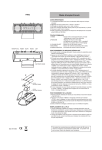
To replace a fan module (Figure 1):
1. Loosen the captive thumbscrew
2. Grasp the handle securely and slowly pull the fan module out of the chassis
3. Slide the replacement module into place
4. Firmly tighten the thumbscrew
Always insure that the thumbscrews are tightened before shipping or moving the chassis.
More...
For more information, see the following:
• The Chassis Service Manual.
• Intelligent Platform Management Interface Specification. © Intel Corporation, HewlettPackard Company, NEC Corporation, Dell Computer Corporation.
Addendum
2