1
F-110
FIELD ENGINEERING MANUAL
U.S. version 1.0
Muratec America
6400 International Parkway #1500
Plano, Tx 75093
972/364-3300 (Voice)
972-/364-3465 (Fax)
www.muratec.com
This page left intentionally blank
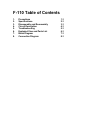
F-110 Table of Contents
1.
2.
3.
4.
5.
6.
7.
8.
Precautions
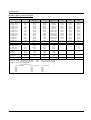
Specifications
Disassembly and Reassembly
Circuit Description
Troubleshooting
Exploded View and Parts List
Block Diagram
Connection Diagram
1-1
2-1
3-1
4-1
5-1
6-1
7-1
8-1
1. Precautions
Please read the following carefully to prevent any accidents and not to damage the unit during service.
1-1 Safety Precautions
1. Safety Precautions
There are some electric or machinery parts with safety
related property. If the parts replaced are different from
the original, the safety may not function. Even if the part
could allow higher voltage than that of the part used, do
not replace it and use a regular product clarified in specifications.
2. Be careful not to leave a switch, a cover or a safety device
out when reinstalling or assembling the product after
repair.
3. Replacing Precautions
Do not change or add parts as you like. You cannot benefit from such a remodeled product at your will during the
term of guarantee.
4. You must replace overheated or damaged parts or cords
with regular products. Please solve the problem causing
any damage or overheating and troubles beforehand.
LASER STATEMENT (LASERTURVALLISUUS)
WARNING : NEVER OPERATE AND SERVICE THE PRINTER
WITH THE PROTECTIVE COVER REMOVED
FROM LASER/SCANNER ASSEMBLY. THE
REFLECTIVE BEAM, ALTHOUGH INVISIBLE, CAN
DAMAGE YOUR EYES.
Class 1 laser product
Luokan 1 laserlaite
Klass 1 laser apparat
Allonpituus 770-795nm
Teho 0.3mW±0.03mW
CAUTION
INVISIBLE LASER RADIATION WHEN
THIS COVER OPEN. DO NOT OPEN
THIS COVER.
VORSICHT
UNSICHTBARE LASERSTRAHLUNG,
WENN ABDECKUNG GEOFFNET.
NIGHT DEM STRAHL AUSSETZEN.
ATTENTION
Especially mind the safety on the part with this
mark.
You must use regular parts described in specifications for the parts inflammable and where the current can be flown. Otherwise any hazard such as
an electric shock or a fire could occur.
REYONNEMENT LASER INVISIBLE EN CAS
D’OUVERTURE. EXPOSITION DANGERUSE AU
FAISCEAU.
ATTENZIONE RADIAZIONE LASER INVISIBLE IN CASO DI
APERTURA. EVITARE L’ESPOSIZONE LA FASCIO.
PRECAUCION REDIACION LASER INVISIBLE CUANDO SE
ABRE. EVITAR EXPONERSE AL RAYO.
CAUTION :
Avoid exposure to invisible laser radiation when the
development unit is not installed.
1-2 Precautions on Disassembly and Reassembly
Very careful precautions should be taken when replacing
parts. Before replacing, please check cables because you
cannot put the cables that you removed for replacing parts
into the proper place if you would not make sure of where
they were connected and in which condition.
7. When disassembling, assembling, also observe small
components are located in place.
8. If you uncover and turn the machine over to replace some
parts, toner or paper particles may contaminate the LSU
window. Protect the LSU window with clean paper.
Please do the following before disassembling
for a repair or replacement of parts.
1. Pull out paper cassette, printer cartridge installed.
Especially careful not to be scratched by the surface of
developer or not to expose them to light.
2. Turn the power switch off.
3. Take out the power plug, printer cable from the printer.
4. Use only the same type of part as original when replacing
parts.
5. Do not force to open or fasten plastic material components.
6. Be careful that small parts such as screws should not get
in the printer.
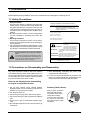
Releasing Plastic Latches
Many of parts are held in
place with plastic latches.
The latches break easily :
release them carefully.
To remove such parts, press
the hook end of the latch
away from the part to which
it is latched.
1-1
Precautions
1-3 ESD Precautions
Certain semiconductor devices can be easily damaged by
static electricity. Such components are commonly called
“Electrostatically Sensitive (ES) Devices”, or ESDs.
Examples of typical ESDs are: integrated circuits, some field
effect transistors, and semiconductor “chip” components.
The techniques outlined below should be followed to help
reduce the incidence of component damage caused by static electricity.
CAUTION:
Be sure no power is applied to the chassis or circuit, and observe all other safety precautions.
1. Immediately before handling a semiconductor component or semiconductor-equipped assembly, drain off any
electrostatic charge on your body by touching a known
earth ground. Alternatively, employ a commercially available wrist strap device, which should be removed for your
personal safety reasons prior to applying power to the unit
under test.
2. After removing an electrical assembly equipped with
ESDs, place the assembly on a conductive surface, such
as aluminum or copper foil, or conductive foam, to prevent electrostatic charge buildup in the vicinity of the
assembly.
3. Use only a grounded tip soldering iron to solder or desolder ESDs.
1-2
4. Use only an “anti-static” solder removal device. Some solder removal devices not classified as “anti-static” can
generate electrical charges sufficient to damage ESDs.
5. Do not use Freon-propelled chemicals. When sprayed,
these can generate electrical charges sufficient to damage ESDs.
6. Do not remove a replacement ESD from its protective
packaging until immediately before installing it. Most
replacement ESDs are packaged with all leads shorted
together by conductive foam, aluminum foil, or a comparable conductive material.
7. Immediately before removing the protective shorting
material from the leads of a replacement ESD, touch the
protective material to the chassis or circuit assembly into
which the device will be installed.
8. Maintain continuous electrical contact between the ESD
and the assembly into which it will be installed, until completely plugged or soldered into the circuit.
9. Minimize bodily motions when handling unpackaged
replacement ESDs. Normal motions, such as the brushing together of clothing fabric and lifting one’s foot from a
carpeted floor, can generate static electricity sufficient to
damage an ESD.
Precautions
1-4 Tools for Troubleshooting
The following tools are recommended for safe and smooth troubleshooting described in this service manual.
1 DVM(Digital Volt Meter)
Standard: Indicates more than 3 digits.
4 Pinset
Standard: For general home use, small type.
5 Cotton Swab
Standard: For general home use, for medical service.
2 Electronic Scale
Standard: Equipment to check the weight of consumables(toner cartridge) . (The gram unit can
be measured.)
3 Driver
Standard: "-" type, "+" type (M3 long, M3 short,
M2 long, M2 short)
Equipments a IPA(Isopropyl
6 Cleaning
Alcohol)dry cloth or a soft stuff neutral
detergent.
7 Software(Driver) installation CD ROM
Note
Mind your hands not to be touched when
you disassemble and reassemble PBA ASS'Y,
such as the main board, SMPS, HVPS.
1-3
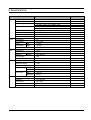
2.Specifications
ITEMS
General
DESCRIPTION
Size(W*D*H)
Weight
Power Rating
LCD
Interface
331 X 355.6 X 194.2 mm
10.2Kg (With accessories)
AC 110V ~ 120V ± 15%, 50/60Hz ± 3Hz
AC 220V ~ 240V ± 15%, 50/60Hz ± 3Hz
Temperature : 10 ~ 32˚C
Humidity : 20 ~ 85% RH
16 X 1 Char
ECP(IEEE1284)
Halftone
64 Level
Maintenance Cycle
60,000 Pages
Power Button
Input Voltage
No
110V~120V
Operating Environment
Power
Print
Power
Idle
10 W/H
Consumption
Max
140 W/H
Power Save Mode
OFF, 5, 10, 15 Min
Print Method
Speed
Laser
8ppm
Resolution
Scan
Copy
Normal
REMARKS
600 x 600 DPI
Print language
Toner Save
GDI
30 ~ 50 %
Scan Method
CIS(Mono)
Quick Scan Speed
3 sec
Resolution
300 x 300 DPI
Scan Width
Max
Effective
216 mm
210 mm
Scan Length
Max
1000 mm
Std Mode
356 mm
Speed
8 ppm
Resolution
600 x 600 DPI
Zoom Range
50 ~ 200%
Collate/Reverse
Yes
Multi Copy
1 ~ 99
2-1
Specifications
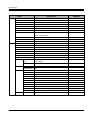
ITEMS
DESCRIPTION
Telephone Handset
No
1-Touch Dial
20EA
Speed Dial
80EA
Group Dial
20EA
Caller ID
Yes
TAD
No
TAD I/F
Yes
Tone/Pulse
Tone (DTMF)
No Power Operation
No
Earth/Recall
No
External Phone Transfer
Yes
Compatibility
ITU-T G3
Communication System
PSTN/PABX
Modem Speed
33.6Kbps Fax Modem
TX Speed
3sec (Using CCITT #1 Chart with Sandard Resolution)
Pulse : Tech Mode only
FAX
Compression
MH/MR/MMR
Rcv. Mode
TEL, FAX, AUTO, ANS/FAX
ECM
Yes
DRPD
Resolution
203 * 98dpi
Fine
203 * 196dpi
S.Fine
203 * 392dpi
Memory
Capacity
2MB(160 pages)
Optional Memory
No
Functions
Voice Request
Yes
TTI
Yes
RTI
Yes
Polling
Yes
Flash
Yes
Auto Reduction
Yes
Broadcasting
119 Locations
Forced Memory
Yes
Delay TX
10 Commands
Memory RX
Yes
RDC
Yes
Battery B/U
2-2
Yes
Std
Yes (Max 30 Min)
REMARKS
Optional
Specifications
ITEMS
Paper
ASF
Handling
DESCRIPTION
Type
Input Capacity
Optional Cassette
Output Capacity
Output Control
Bypass
Media Type
Media Size
ADF
Software Driver
Media
Media Weight
Input Capacity
Media Weight
Printer
TWAIN
PC-FAX
CD-ROM
Diskette
Compatibility
Y2K Compliant
Toner
Life
Initial
Cartridge
Running
Toner Sensor Support
Metthod
Maintena ADF Rubber
-nce Cycle Paper Feeding Rolle
Transfer Roller
Fuser Unit
BIN
150 Sheets / 20Ib
No
100 Sheets / 20Ib
Face up
Yes(single page)
Plain, Coated, Transparency, Envelop,
Card,Post Card, Label
• Paper : A4, Letter, Legal, Folio, Executive, B5, A5
• Envelop : 6 3/4, 7 3/4, #9,#10, DL, C5, B5, Baronial
16~43 Ib(Bypass)
30 Sheets / 20 Ib
12 ~ 69 Ib
GDI
Yes
No
Yes
No
Win 95/98/ME/NT/2000/XP
Yes
1,500 Pages
3,000 Pages
Yes
Software
10K Pages Scan
50K Pages Printr
60K Pages Print
50K Pages Print
REMARKS
Envelop : Manual
feeding only
Using 4% Coverage Pattern
Using 4% Coverage Pattern
Dot Counting
2-3
3. Disassembly and Reassembly
3-1 General Precautions on Disassembly
When you disassemble and reassemble components, you must use extreme caution. The close
proximity of cables to moving parts makes proper
routing a must.
If components are removed, any cables disturbed
by the procedure must be restored as close as
possible to their original positions. Before removing
any component from the machine, note the cable
routing that will be affected.
Releasing Plastic Latches
Many of the parts are held in place with plastic
latches. The latches break easily; release them
carefully.
To remove such parts, press the hook end of the
latch away from the part to which it is latched.
Whenever servicing the machine, you must perform as follows:
1. Check to verify that documents are not stored in
memory.
2. Be sure to remove the toner cartridge before you
disassemble parts.
3. Unplug the power cord.
4. Use a flat and clean surface.
5. Replace only with authorized components.
6. Do not force plastic-material components.
7. Make sure all components are in their proper
position.
3-1
Disassembly and Reassembly
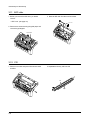
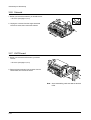
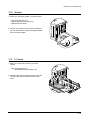
3-2 Cradle
1. Push the lever and remove the cradle as shown
below.
00000
00000
00000000000
0000
00000
000000 0000000000000
00000
000000 0000000000000
1. Open the OPE cover.
A
Note : Check the roller for any dirt. If dirty, wipe it off with
soft cloth dampened with water. If the roller is
heavily worn, replace it with a new one.
Bushing
B
White Roller
Control Panel
3-2
00000000000
00000
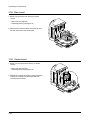
3-3 White Roller
2. Push the bushing on the end of the roller slightly
inward, then rotate it until it reaches the slot.
Then lift, the roller out.
00000
00000
00
1
00000000000
00000
2
00000000000
0000
00
3
Disassembly and Reassembly
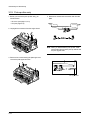
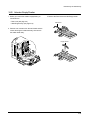
3-4 OPE Cover
1. Pull the cover release button on both sides of the
machine, and open the front cover.
4. Remove two screws securing bracket scan board,
then take out the bracket scan board.
5. Unplug two connectors and one wire from the scan
board.
2. Remove two stoppers holding the front cover unit and
unplug one connector and one wire.
2
1
6. Lift the OPE cover.
2
1
3. Pull the bottom left end of the cover downward to
unlatch the front cover unit and remove the cover
from the main frame.
3-3
Disassembly and Reassembly
7. Remove the stopper holding the OPE cover.
2
1
8. Unlatch the bottom ends, then remove the OPE
cover.
3-4
Disassembly and Reassembly
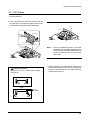
3-5 ADF Rubber
1. Open the OPE unit.
2. Insert a flat blade screw driver and pinset into the slot
as shown below, and release the latches. Take out the
Holder Rubber, Sheet ADF and the Rubber ADF.
Guide Boss
Holder Rubber
Holder Rubber
Rubber ADF
Rubber ADF
Guide Boss
0000000000000
0000000000 00000
000000
000
Notes : • When you reassemble the them, be sure that
the Rubber ADF and Holder Rubber fit into the
guide boss and the Holder Rubber latches fit
into the corresponding hole. Then push firmly
until it clicks.
00000
000000
Holder Rubber
000000
0000000 00000000
Rubber ADF
00000
000000
0000000000000
0000000000 00000
000000
000
000000
0000000 00000000
Safely Precautions :
Do not force to open or fasten plastic material
components.
3. Clean the surface of the rubber pad with IPA (Isopropyl
Alcohol). After wiping it, be sure to dry it. Check the rubber wear. If the wear reaches 1/2 its original thickness,
replace it with a new one.
Pinset or
Screw Driver
3-5
Disassembly and Reassembly
3-6 OPE Board
1. Before you remove the OPE board, you should
remove:
– OPE cover (see page 3-3)
2. Remove four screws securing the OPE board.
3-7 Lever sensor Doc.
1. Unlatch the lever sensor Doc from the scan upper
frame and take it out.
3-8 Lever sensor Scan
1. Push the both sides of Lever sensor Scan inward,
then unlatch and take out the sensor Scan from the
scan upper frame.
3-6
3. Release two latches securing the both side of the
LCD and the two of four latches securing the board.
Then remove the OPE board.
Disassembly and Reassembly
3-9 Scan board
1. Before you remove Scan board, you should remove:
– Bracket scam board (see page 3-3)
2. Unplug all the connectors from the scan board and
remove the board.
3-10 Scan Motor
1. Before you disassemble Scan motor, you should
remove:
– OPE cover (see page 3-3)
– Bracket scan board (see page 3-3)
4. Take out the gear from the motor ass’y.
5. Remove two screws and remove the motor.
2. Unplug one connector from the scan board.
3. Remove three screws, then remove the motor ass’y
from the main frame.
3-7
Disassembly and Reassembly
3-11 ADF roller
1. Before you remove the ADF roller, you should
remove:
3. Remove ADF roller from the scan front frame.
– OPE cover (see page 3-3)
ADF Roller
2. Remove two screws securing the guide paper and
remove the guide paper.
Guide Paper
3-12 CIS
1. Remove one screw and push CIS as shown below
and lift it.
2. Separate the Dummy CIS from CIS.
CIS
tape
3-8
Disassembly and Reassembly
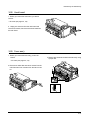
3-13 Rear cover
1. Remove two screws.
2. Push the metal clip on the parallel port down and
remove the rear cover from the main frame.
3-14 Top cover
1. Before you remove the ADF roller, you should
remove:
– OPE cover (see page 3-3)
– Rear cover (see above)
3. Remove two screws and slide the left and right paper
guides fully inward. Then spread the bottom of the top
cover and lift the cover to remove.
Paper guides
2. Remove two screws securing the top cover from the
back side of the machine.
3-9
Disassembly and Reassembly
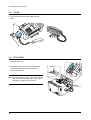
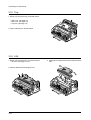
3-15 Tray
1. Before you remove the tray, you should remove:
– OPE cover (see page 3-3)
– Rear cover (see page 3-9)
– Top cover (see page 3-9)
2. Take out the tray from the main frame.
3-16 LSU
1. Before you remove the LSU, you should remove:
– All covers (see page 3-3, 3-9)
2. Remove three screws securing the LSU.
3-10
3. Unplug two connectors from the LSU and remove the
LSU.
Disassembly and Reassembly
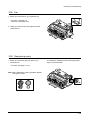
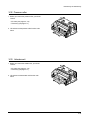
3-17 Transfer roller
1. Pull the cover release button on both sides of the
machine, and open the front cover.
2. Lift the transfer roller using a proper tool (-Driver) and
take out the roller.
3-18 Engine board
1. Before you remove the Engine board, you should
remove:
2. Unplug five connectors and remove one screw from
the engine board, then remove the board.
– All covers (see page 3-3, 3-9)
– LSU (see page 3-10)
3-11
Disassembly and Reassembly
3-19 Pick-up roller ass’y
1. Before you remove the pick-up roller ass’y, you
should remove:
4. Remove two screws and remove the roller from the
plate.
– All covers (see page 3-3, 3-9)
– LSU (see page 3-10)
2. Unplug all the connectors from the engine board.
Note : When you reassemble the pick-up roller, make
sure that the right end of the pick-up roller fits into
the pick-up gear shaft.
3. Remove four screws securing the plate upper and
remove the plate upper as below.
Pick-up gear shaft
3-12
Disassembly and Reassembly
3-20 Knock-up ass’y
1. Before you remove the knock-up ass’y, you should
remove:
3. Remove the knock-up ass’y from the main frame.
– All covers (see page 3-3, 3-9)
– LSU (see page 3-10)
– Plate upper (see page 3-12)
2. Pull the knock-up ass’y fully backward.
3-21 Cap-pad
1. Before you remove the cap-pad, you should remove:
2. Take out the cap-pad from the main frame.
– All covers (see page 3-3, 3-5)
– LSU (see page 3-10)
– Plate upper (see page 3-12)
– Knock-up ass’y (see above)
3-13
Disassembly and Reassembly
3-22 Holder-pad
1. Before you remove the holder-pad, you should
remove:
– All covers (see page 3-3, 3-9)
– LSU (see page 3-10)
– Plate upper (see page 3-12)
– Knock-up ass’y (see 3-13)
– Cap-Pad (see 3-13)
2. Remove the holder-pad from the main frame.
3-23 Motor ass’y
1. Before you remove the motor ass’y, you should
remove:
– All covers (see page 3-3, 3-9)
Note : When you reassemble the motor ass’y, make
sure that the boss shown in the figure below fit
into the corresponding screw holes on the motor
ass’y to allow the screws to be fastened properly.
2. Remove four screws securing the motor ass’y and
unplug one connector from the engine board, then
remove the motor ass’y.
Boss
3-14
Disassembly and Reassembly
3-24 Fan
1. Before you remove the fan, you should remove:
– All covers (see page 3-0)
– Motor ass’y (see page 3-15)
2. Unplug one connector from the engine board and
remove the fan.
3-25 Gear pick-up ass’y
1. Before you remove the gear pick-up ass’y, you
should remove:
2. Release two snap-fits and remove the gear pick-up
ass’y from the main frame.
– All covers (see page 3-3, 3-9)
Note: When reassembling, make sure that the direction
of the gear is correct.
3-15
Disassembly and Reassembly
3-26 Solenoid
1. Before you remove the solenoid, you should remove:
– All covers (see page 3-3, 3-9)
2. Unplug one connector from the engine board and
remove one screw, then remove the solenoid.
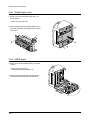
3-27 HVPS board
1. Before you remove the HVPS board, you should
remove:
– All covers (see page 3-3, 3-9)
2. Remove three screws and one connector from the
HVPS board, then remove the board.
Note : when reassembling, make sure that the terminal
is five.
3-16
Disassembly and Reassembly
3-28 Hook board
1. Before you remove the hook board, you should
remove:
– All covers (see page 3-3, 3-9)
2. Unplug one connector from the main board and
remove two screws, then remove the hook board from
the main frame.
3-29 Fuser ass’y
1. Before you remove the fuser ass’y, you should
remove:
3. Remove two screws and unlatch the fuser ass’y using
a proper tool.
– All covers (see page 3-3, 3-9)
2. Remove two wires after remove two screws from the
main frame and one connector from the inter connector.
3-17
Disassembly and Reassembly
3-30 Thermostat
1. Remove one screw and remove the cover thermostat
from the fuser ass’y.
2. Remove two screws and take out thermostat from the
fuser ass’y.
3-31 Halogen Lamp
1. Before you remove the thermostat, you should
remove:
– All covers (see page 3-3, 3-9)
– Fuser ass’y (see page 3-17)
2. On the fuser ass’y, remove the two screws, then
remove the heat roller.
3-18
3. Remove the halogen lamp from the heat roller.
Disassembly and Reassembly
3-32 Pressure roller
1. Before you remove the pressure roller, you should
remove:
– All covers (see page 3-3, 3-9)
– Fuser ass’y (see page 3-17)
2. Lift and remove the pressure roller from the main
frame.
3-33 Actuator-exit
1. Before you remove the actuator-exit, you should
remove:
– All covers (see page 3-3, 3-9)
– Fuser ass’y (see page 3-17)
2. Lift and remove the actuator-exit from the main
frame.
3-19
Disassembly and Reassembly
3-34 Shield Engine ass’y
1. Before you remove the shield engine ass’y, you
should remove:
– Rear cover (see page 3-9)
2. Remove eight screws securing the shield engine
ass’y and remove the shield engine ass’y from the
main frame.
3-34 SMPS board
1. Before you remove the SMPS board, you should
remove:
– Rear cover (see page 3-9)
– Shield Engine ass’y (see page 3-19)
2. Remove four screws and three connectors, then
remove the SMPS board from the main frame.
3-20
Disassembly and Reassembly
3-36 Speaker
1. Before you remove the speaker, you should remove:
– Rear cover (see page 3-9)
– Shield Engine ass’y (see page 3-19)
– SMPS board (see above)
2. Remove one connector that connects the speaker to
the main board and two screws securing the speaker,
then remove the speaker.
3-37 LIU board
1. Before you remove the LIU board, you should
remove:
– Rear cover (see page 3-9)
– Shield Engine ass’y (see page 3-19)
2. Remove three screws and three connectors from the
LIU board, then remove the board from the main
frame.
3-21
Disassembly and Reassembly
3-38 Main board
1. Before you remove the main board, you should
remove:
– Rear cover (see page 3-9)
– Shield Engine ass’y (see page 3-19)
2. Remove four screws and all the connectors (9) from
the main board, then remove the board.
3-39 Sensor board
1. Before you remove the sensor board, you should
remove:
– Rear cover (see page 3-9)
– Shield Engine ass’y (see page 3-19)
2. Release four snap-fits securing the sensor board and
unplug one connector from the main board, then
remove the sensor board.
3-22
Disassembly and Reassembly
3-40 Actuator Empty/Feeder
1. Before you remove the actuator empty/feeder, you
should remove:
– Rear cover (see page 3-9)
– Shield Engine ass’y (see page 3-19)
3. Remove the Feed sensor and the Empty sensor.
Feed Sensor
2. Remove one connector from the main board and two
screws securing the holder feed ass’y, then remove
the holder feeder ass’y.
Empty Sensor
3-23
Disassembly and Reassembly
3-41 Roller Feeder
1. Before you remove the actuator empty/feeder, you
should remove:
3. Rotate the pick-up bushing as shown below and
remove holder feeder ass’y and roller feeder.
– All covers (see page 3-0)
– Motor ass’y (see page 3-15)
2. Release two snap-fits and remove the gear-feed,
clutch-feed, and the spring-clutch.
Spring-clutch
Gear-feed
4. Separate the Roller Feeder from the Holder Feeder
Ass’y.
Clutch-feed
Roller Feed
Holder Feed
3-24
4. Circuit Description
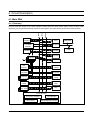
4-1 Main PBA
4-1-1 Summary
The main circuit that consists of CPU, MFP controller including various I/O device drivers, system memory, scanner, printer,
motor driver, PC I/F, and FAX transceiver controls the whole system. The entire structure of the main circuit is as follows:
ADDR
DATA
CNTR
I/O Ports
Controller
PLL & Clock
Save
Scan Image &
Scan Motor
Controller
Bus Router
Ink Head
Controller
Interrupt
Controller
CPU
(ARM7TDMI)
LBUS
I/D Cache
(2-KB)
A/D
Converter
DMA
Controller
Derasterizer
Parallel
Port
Interface
Carrier Motor
Control
Video Data
Controller
Position &
Fire Control
UART/
Serial I/O
Paper Motor
Control
LSU
Control
Real Time
Clock
PWM &
Gen. Timer
Watch Dog
Timer
System Manager
System Bus Controller
Bus Interface
Bus Arbitration
ROM/SRAM/DRAM Controller
4-1
Circuit Description
4-1-2 Circuit Operation
• CLOCK
1) System Clock
Device
Oscillator
Frequency
9.500132 MHz
KS32C65100 RISC PROCESSOR: drives PLL internally and uses 37.17 MHz.
2) Video Clock
Device
Frequency
Oscillator
28.7448 MHz
3) USB Clock
Device
Frequency
Oscillator
48 MHz±%
4-2
Circuit Description
• KS32C65100 MICROPROCESSOR
1) KS32C65100 MICROPROCESSOR PIN & INTERFACE
Signal
Pin No.
I/O Type
Description
OSCI
184
I7
KS32C65100 master clock input.
OSCO
185
O7
KS32C65100 master clock output.
PLL_FILTER
183
I5
PLL filter
nRESET
182
I4
Not reset. nRESET is the global reset input for the
KS32C65100. For a system reset, nRESET must be held to
low level for at least 65 machine cycles.
nSLCTIN/GIP[16]
152
I1
Not select information. This input signal is used by parallel
port interface to request 'on-line' status information.
nSTROBE
151
I1
Not strobe. The nSTROBE input indicates when valid data is
on parallel port data bus, PPD[7:0]
nAUTOFD/GIP[17]
154
I1
Not auto feed. The nAUTOFD input indicates whether data
on the parallel port data bus, PPD[7:0], is an auto feed
command. Otherwise, the bus signals are interpreted as data
only.
nINIT/GIP[15]
153
I1
Not initialization. The nINIT input signal initializes the parallel
port's input control.
nACK
159
I1
Not parallel port acknowledge. The nACK output signal is
issued whenever a transfer on the parallel port data bus is
completed.
BUSY
158
O1
Parallel port busy. The BUSY output signal indicates that the
KS32C65100 parallel port is currently busy.
SELECT
156
O1
Parallel port select. The SELECT output signal indicates
whether the device connected to the KS32C65100 parallel
port is 'on-line' or 'off-line'.
O1
Parallel port paper error. PERROR output indicates that a
problem exists with the paper in the ink-jet printer. It could
indicate that the printer has a paper jam or that the printer
is out of paper.
Not fault. The nFAULT output indicates that an error
condition exists with the printer. This signal can be used to
indicate that the printer is out of ink or to inform the user
that the printer is not turned on.
PERROR
157
nFAULT
155
O1
PPD[7:0]
142~149
I/O2
SAVRT
2
I6
Top reference voltage for IP ADC
SAIN
3
I6
Analog input for IP ADC
SAVRB
4
I6
Bottom reference voltage for IP ADC
arallel port data bus. This 8-bit, tri-state bus is used to
exchange data between the KS32C65100 and an external
host(peripheral).
4-3
Circuit Description
Signal
Pin No.
I/O Type
CIS_CLK
6
O1
CIS shift clock
CIS_SI
7
O1
CIS latch signal
PHA_IA0
164
O1
Line feed motor phase signal A
PHA_IA1
165
O1
Line feed motor phase signal AZ
PHB_IB0
167
O1
Line feed motor phase signal B
PHB_IB1
168
O1
Line feed motor phase signal BZ
LF_PH0/GOPA[21]
163
O1
Line feed motor control signal 0
LF_PH1/GOPA[22]
166
O1
Line feed motor control signal 1
CR_PHA/GOPA[23]
110
O1
Direction control line for phase A
CR_PHB/GOPA[24]
113
O1
Direction control line for phase B
CRIA0/GOPA[25]
109
O1
Current control line 0 for phase A
CRIA1/GOPA[26]
111
O1
Current control line 1 for phase A
CRIB0/GOPA[27]
112
O1
Current control line 0 for phase B
CRIB1/GOPA[28]
114
O1
Current control line 1 for phase B
CHX/GIP[8]
116
I3
Encode sensor
CHY/GIP[9]
117
I3
Encode sensor
ADDR[21:0]
77~80,
82~88,
90~100
O5
Address bus. The 22bit address bus, ADDR[21:0], covers
the full 4M half-words address range of each ROM/SRAM,
DRAM, and external I/O bank
DATA[15:0]
59~66,
68~75
I/O3
nRAS[1:0]
52,53
O1
Not row address strobe for DRAM. The KS32C65100
supports up to two DRAM banks. One nRAS output is
provided for each bank.
nCAS[1:0]
54,55
O1
Not column address strobe for DRAM. The two nCAS
outputs indicate the byte selections whenever a DRAM bank
is accessed.
nOE
56
O1
Not output enable. Whenever a memory access occurs, the
nOE output controls the output enable port of the specific
memory device.
nWE
57
O6
Not write enable. Whenever a memory access occurs, the
nWE output controls the write enable port of the specific
memory device.
16~24,
26~29
O1
Gate control line for print head.
31~38,
40~47
I/O1
Drain control line for print head.
nPHGA[13:1]/
GOPB[12:0]
PHOE[16:1]/
GIOP[26:11]
4-4
Description
External bi-directional 16-bit data bus.
Circuit Description
Signal
Pin No.
I/O Type
RXD0/GIP[0]
194
I1
Receive data input for the UART0. RXD0 is the UART0
channel's input signal for receiving serial data.
RXD1/GIP[1]
192
I1
Receive data input for the UART1. RXD1 is the UART1
channel's input signal for receiving serial data.
RXD2/GIP[2]
190
I1
Receive data input for the UART2. RXD2 is the UART2
channel's input signal for receiving serial data.
nEINT0/GIP[3]
8
I3
External interrupt request input nEINT0.
nEINT1/GIP[4]
9
I3
External interrupt request input nEINT1.
nEINT2/GIP[5]
10
I3
External interrupt request input nEINT2.
nXDREQ/GIP[6]
199
I3
External DMA request.
TXD0/GOPA[0]
193
O1
Transmit data output for the UART0. TXD0 is the UART0
channel's output for transmitting serial data.
TXD1/GOPA[1]
191
O1
Transmit data output for the UART1. TXD1 is the UART1
channel's output for transmitting serial data.
TXD2/GOPA[2]
189
O1
Transmit data output for the UART2. TXD2 is the UART2
channel's output for transmitting serial data.
nXDACK/GOPA[5]
200
O1
External DMA acknowledge. This active low output signal is
generated whenever a DMA transfer is completed.
TONEOUT/GOPA[3]
188
O1
Tone generator output.
nWDTO/GOPA[4]
187
P3
Reset out by watch dog timer.
nIOWR/GOPA[10]
161
O1
External output write strobe
nIORD/GOPA[9]
162
O1
External output read strobe
CLKOUT/GOPA[6]
180
O1
Clock for external chip
14
O1
External memory chip select 2.
TCK
132
I2
JTAG TCK interface in MDS mode.
TMS
135
I2
JTAG TMS interface in MDS mode.
TDI
133
I2
JTAG TDI interface in MDS mode.
nTRST
136
I2
JTAG nTRST interface in MDS mode.
TDO
134
O1
JTAG TDO interface in MDS mode.
137~140,
173~179
I/O4
TEST0
169
I2
Test 0 pin. At normal operation this pin must be connected
to GND.
TEST1
170
I2
Test 1 pin. At normal operation this pin must be connected
to GND.
TEST2
171
I2
Test 2 pin. At normal operation this pin must be connected
to GND.
nECS2/GOPA[8]
GIOP[10:0]
Description
General I/O port.
4-5
Circuit Description
Signal
I/O Type
Description
12,13
O1
Not external chip select. Three I/O banks are provided for
external memory-mapped I/O operations. Each I/O bank
contains up to 4M half-word. The nECS signals indicate that
an external I/O bank is selected.
nRCS[2]
51
O2
nRCS[1]/GOPA[7]
50
O1
nRCS[0]
49
O1
102
O1
Scan motor control/Bi-phase
105
O1
Scan motor control/Bi-phase
103, 104,
106, 107
O1
Scan motor bi-current/uni-phase
118~120
O1
PWM out signal
VDO2/GOPA[29]
121
O4
Video out from PIFC
VDO1/GOPA[14]
LSU_CLK/
122
O5
Video out from LSU control
123
O1
Clock for LSU motor
125
I1
HSYNC1
nLREADY/GIP[11]
126
I1
LSU ready
nHSYNC2/GIP[12]
127
I1
HSYNC2
VDI/GIP[13]
128
I2
Video data input from RET
VCLK/GIP[14]
129
I2
External video clock
nEXTWAIT/GIP[7]
130
I3
External wait
RTCXIN
202
I7
RTC oscillator clock input.
RTCXOUT
203
O7
RTC oscillator clock output.
196~198
O1
CIS LED signals
nECS[1:0]
SC_CONPHA/
GOPA[19]
SC_CONPHB/
GOPA[20]
SC_CUR[3:0]
PWMO[2:0]/
GOPA[13:11]
GOPA[15]
nHSYNC1/GIP[10]
SLED[2:0]/
GOPA[18:16]
GAVRT
Pin No.
Not ROM/SRAM chip select. The KS32C65100 can access
up to three external ROM/SRAM banks. nRCS[0]
corresponds to ROM/SRAM bank 0, nRCS[1] to bank 1, and
nRCS[2] to bank 2. By controlling the nRCS signals, CPU
addresses can be mapped into the physical memory banks.
205
I5
Top reference voltage for general ADC
GAIN[2:0]
206~208
I5
Analog inputs for general ADC
RTC_VDD
201
4-6
RTC VDD.
Circuit Description
Signal
VDD_PLL
Pin No.
186
I/O Type
Description
PLL power (3.3V).
SAVDD
1
Analog power for scan ADC and general ADC (3.3V).
SAVSS
5
Scan ADC ground.
GAVSS
204
15, 30, 81,
115, 131,
160
48, 67, 89,
141, 195
3VDD
5VDD
VSS
11, 25, 39,
58, 76, 101,
108, 124,
150, 172,
181
General ADC ground
3.3V internal power.
Externally connected to the 3.3V regulator.
5V I/O power.
Externally connected to the VCC board plane.
System ground.
Externally connected to the ground board plane.
4-7
Circuit Description
4-1-3 PROGRAM ROM (FLASH MEMORY)
1) DEVICE
TYPE No.
CAPACITY
AM29F800B
2 Mbit (512K * 16bit * 2)
2) PROGRAMMING
BEFORE ASS’Y
AFTER ASS’Y
EPROM PROGRAMMER or PROGRAMMING at the factory
DOWNLOAD from PC
4-1-4 DRAM CONTROL
1) DEVICE
TYPE NO.
CAPACITY
K4E641611D-TC50(EDO Type)
64 Mbit (4M * 16bit)
2) OPERATING PRINCIPLE
DRAM can either read or write. The data can be stored in the DRAM only when the power is on. It stores data white the
CPU processes data. The address to read and write the data is specified by RAS SIGNAL and CAS SIGNAL.
DRAMWE*SIGNAL is activated when writing data and DRAMOE*SIGNAL, when reading.
4-1-5 Modem and TX-and RX Related Circuits
MODEM
The Conexant™ FM336 modem is a V.34 half-duplex modem that supports Group 3 facsimile send and receive speeds up to
33600 bps using the V.34 half-duplex mode. Using a V.34 technique to optimize modem configuration for line conditions, the
modem connects at the optimal selected data rate that the channel can support from 33600 bps to 2400 bps.
The modem can operate over the public switched telephone network (PSTN) through a line terminator provided by a Data
Access rrangement (DAA). The modem satisfies the requirements specified inITU-T recommendations V.34, V.17, V.29, V.27
ter, V.23, V.21, and meets the binary signal ingrequirements of V.8 and T.30. Internal HDLC support eliminates the need for an
external serial input/output (SIO) device in the DTE for products incorporating error detection and T.30 protocol. The modem
can perform HDLC framing per T.30 at all data speeds. CRC generation/checking along with zero insertion/deletion enhances
DLC/HDLC frame operations. An FSK flag pattern detector facilitates FSK detection during high speed reception.The modem
features a programmable DTMF transmitter/receiver and three programmable tone detectors which operate in the tone mode.
The modem offers lower power consumption and small size to allow the design of compact system enclosures for use in industrial, office, and home environments.The modem is available in a 100-pin PQFP package.
4-8
Circuit Description
FM336 FEATURES
• 2-wire half
- duplex fax modem modes with send and receive data rates up to 33600 bps.
- V.34, V.17, V.29, V.27 ter, and V.21 channel 2
- Short train option in V.17 and V.27 ter
• 2-wire full
- duplex data modem modes
- V.21, V.23 (75 bps TX/1200 bps RX or 1200 bps TX/ 75 bps RX)
• PSTN session starting
- V.8 signaling
• HDLC support at all speeds
- Flag generation, 0 bit stuffing, ITU CRC
- 16 or CRC
- 32 calculation and generation
- Flag detection, 0 bit deletion, ITU CRC
- 16 or CRC
- 32 check sum error detection
- FSK flag pattern detection during high speed receiving
• Tone modes and features
- Programmable single or dual tone generation
- DTMF receive
- Tone detection with three programmable tone detectors
• Serial synchronous data
• Parallel synchronous data
• Automatic Rate Adaptation (ARA) in V.34 Half-Duplex
• TTL and CMOS compatible DTE interface
- ITU-T V.24 (EIA/TIA-232-E) (data/control)
- Microprocessor bus (data/configuration/control)
• Receive dynamic range: 0 dBm to –43 dBm for V.17, V.33, V.29, V.27terand V.21, –9 dBm to –43 dBm for V.34 half-duplex
• Programmable RLSD turn-on and turn-off thresholds
• Programmable transmit level: 0 to -15 dBm
• Adjustable speaker output to monitor received signal
• DMA support interrupt lines
• Two 16-byte FIFO data buffers for burst data transfer with extension up to 255 bytes
• NRZI encoding/decoding
• Diagnostic capability
• +3.3V operation with +5V tolerant inputs
• +5V analog signal interface
• Typical power consumption:- Sleep mode: 20 mW
- Normal mode: 250 mWa
• 100-pin PQFP package
4-9
Circuit Description
Signaling Rates, and Data Rates
Configuration
V.34 33600 TCM
V.34 31200 TCM
V.34 28800 TCM
V.34 26400 TCM
V.34 24000 TCM
V.34 21600 TCM
V.34 19200 TCM
V.34 16800 TCM
V.34 14400 TCM
V.34 12000 TCM
V.34 9600 TCM
V.34 7200 TCM
V.34 4800 TCM
V.34 2400 TCM
Modulation1
Carrier Frequency
(Hz) –0.01%
Data Rate (bps)
–0.01%
Symbol Rate
(Symbols/Sec.)
Bits/Symbol Data
Bits/Symbol TCM
Constellation
Points
TCM
TCM
TCM
TCM
TCM
TCM
TCM
TCM
TCM
TCM
TCM
TCM
TCM
TCM
Note 2
Note 2
Note 2
Note 2
Note 2
Note 2
Note 2
Note 2
Note 2
Note 2
Note 2
Note 2
Note 2
Note 2
33600
31200
28800
26400
24000
21600
19200
16800
14400
12000
9600
7200
4800
2400
3429 only
3200 min
3000 min
2800 min
2800 min
2400 min
2400 to 3429
2400 to 3429
2400 to 3429
2400 to 3429
2400 to 3429
2400 to 3429
2400 to 3429
2400 only
Note 2
Note 2
Note 2
Note 2
Note 2
Note 2
Note 2
Note 2
Note 2
Note 2
Note 2
Note 2
Note 2
Note 2
Note 2
Note 2
Note 2
Note 2
Note 2
Note 2
Note 2
Note 2
Note 2
Note 2
Note 2
Note 2
Note 2
Note 2
Note 2
Note 2
Note 2
Note 2
Note 2
Note 2
Note 2
Note 2
Note 2
Note 2
Note 2
Note 2
Note 2
Note 2
V.23 1200/75
FSK
1700/420
1200/75
1200
1
0
—
V.21
FSK
1080/1750
Up to300
300
1
0
—
V.17 14400 TCM
V.17 12000 TCM
V.17 9600 TCM
V.17 7200 TCM
TCM
TCM
TCM
TCM
1800
1800
1800
1800
14400
12000
9600
7200
2400
2400
2400
2400
6
5
4
3
1
1
1
1
128
64
32
16
V.29 9600
V.29 7200
V.29 4800
QAM
QAM
QAM
1700
1700
1700
9600
7200
4800
2400
2400
2400
4
3
2
0
0
0
16
8
4
V.27 ter 4800
V.27 ter 2400
DPSK
DPSK
1800
1800
4800
2400
1600
1200
3
2
0
0
8
4
FSK
1750
300
300
1
0
—
V.21 Channel 2
Notes:
1. Modulation legend: TCM:Trellis-Coded Modulation
QAM:
FSK:Frequency Shift Keying
DPSK:
2. Adaptive; established during handshake:
Carrier Frequency (Hz)
Symbol Rate (Baud)
V.34 Low Carrier
2400
1600
2800
1680
3000
1800
3200
1829
3429
1959
4-10
Quadrature Amplitude Modulation
Differential Phase Shift Keying
V.34 High Carrier
1800
1867
2000
1920
1959
Circuit Description
Modem Functions Interface Signals
/RTS
XTLI
/CTS
XTL0
TXD
OR
TDCLK
CLKIN
Oscillator
XTCLK
V.24
Interface
Crystal
/RLSD
RXD
RIN
/RDCLK
TXA1
/DTR
TXA2
/DSR**
OH
/RI*
telephone
line
TIP
Line
Interface
RING
RINGD
/TALK
/RD
Host
Processor
FM336
Modem
/WR
EYEXY
/CS
EYESYNC
D[7:0]
EYECLK
Optional
Eye Pattern
Generator
RS[4:0]
IRQ
/RESET
TXRQ*
SPKR
RXRQ**
Speaker
Amplifier
+5V
+3.3V
AGND
Power Supply
DGND
* Selectable; TXRQ output replaces /RI output.
** Selectable; RXRQ output replaces /DSR output.
1176DG F2-1
4-11
Circuit Description
FM336 Pin Signals
4-12
Circuit Description
FM336 Signals Definitions
4-13
Circuit Description
FM336 Signals Definitions (Cont’d)
4-14
Circuit Description
FM336 Signals Definitions (Cont’d)
4-15
Circuit Description
FM336 Signals Definitions (Cont’d)
4-16
Circuit Description
4-1-6 Scanner Part
CIS DRIVER, INPUT PROCESSOR
CIS contacl signal is consist of BLED, RLED, GLED, CIS_CLK CIS_SI. CIS driver power supply is +5v, LED driver power supply is +5v also. As CIS input signal, minc-Vref values O, MAXC+Vref Values is about 1.2V.
SPECIFICATION
Readable width
Number of sensor elements
Resolution
Scanning speed
Light source
Data output
Outward dimension(WXHXL)
216mm
2552 dots(21~2572 dots available)
75 ms/line
7.5 ms/line
Color LEDs
Red (640 mm)
Green(525mm)
Blue(470mm)
1 analogue
18.0 X 12.2 X 231.0 mm (attachment)
PIN FUNCTION DESCRIPTION
No.
1
2
3
4
5
6
7
8
9
10
11
12
Signature
SIG
GND
VDD
GND
GND
SI
GND
CLK
LEDB
LEDG
LEDR
VLED
Name
signal output
Ground
Supply voltage
Ground
Ground
Start pulse
Ground
Clock
LED Ground (blue)
LED Ground (green)
LED Ground (red)
Supply voltage
Description
Video output signal
0V DC ; reference point
+5V DC supply (ref. to GND)
0V DC ; reference point
0V DC ; reference point
Start pulse
0V DC ; reference point
CIS main clock
LED POWER SUPPLY BLUE
LED POWER SUPPLY GREEN
LED POWER SUPPLY RED
LED POWER SUPPLY
4-17
Circuit Description
ELECTRICAL CHARACTERISTICS (TA=25˚C)
Item
Power Supply
Input Voltage
Input Current
LED Current
Clock Frequency.
Clock Pulse “L” Duty
Setup Time
Hold Time
SIG Delay Time
Sampling Reriod
SYMBOL
VDD
VLED
VIH
VIL
IIH
IIH
ILEDr
ILEDg
ILEDb
CLK
MIN.
4.75
4.75
3.2
tsu
th
tpd 1
tpd 2
ts
0
TYP.
5.0
5.0
MAX.
5.25
5.25
UNIT
V
V
V
V
µA.
mA.
mA.
mA.
mA.
MHz
%
ns
ns
ns
ns
ns
0.8
20
0.2
30
60
60
2
15
tw/2
tw/2
250
30
90
NOTE
SI & CLK
SI & CLK
REF.
REF.
REF.
tw/to
CIS Driver Clock Timing
to
CLK
tsu
tw
S1
th
tpd2
tpd1
SIG
ts
1st
4-18
2nd
Circuit Description
CIS Block Diagram
VLED
LEDR
LEDG
LEDB
ROD LENS ARRAY
VDD
GND
1
20 21
SENSOR
SHIFT REGISER & ANALOG SWITCH
S1
CLK
OP AMP
SIG
2.5ms
ST
1.2ms
1.2ms
LED_R
OFF
ON
OFF
1.2ms
ON
LED_G
OFF
OFF
1.2ms
LED_B
ON
OFF
OFF
SIG O/P
B O/P
R O/P
G O/P
B O/P
R O/P
G O/P
7.5ms/line
4-19
Circuit Description
4-1-7 HOST INTERFACE:
Parallel Port Interface
PARALLEL PORT INTERFACE PART KS32C61100 has the Parallel Port Interface Part that enables Parallel Interface with PC.
This part is connected to PC through Centronics connector. It generates major control signals that are used to actuate parallel
communication. It is comprised of/ERROR, PE, BUSY, /ACK, SLCT, /INIT, /SLCTIN, /AUTOFD and /STB. This part and the PC
data transmission method support the method specified in IEEE P1283 Parallel Port Standard
(http://www.fapo.com/ieee1284.html).
In other words, it supports both compatibility mode (basic print data transmitting method), the nibble mode (4bit data; supports
data uploading to PC) and ECP (enhanced capabilities port: 8bits data - high speed two-way data transmission with PC).
Compatibility mode is generally referred to as the Centronics mode and this is the protocol used by most PC to transmit data
to the printer. ECP mode is an improved protocol for the communication between PC and peripherals such as printer and scanner, and it provides high speed two-way data communication. ECP mode provides two cycles in the two-way data transmission; data cycle and command cycle. The command cycle has two formats; Run-Length Count and Channel Addressing. RLE
(Run-Length Count) has high compression rate (64x) and it allows real-time data compression that it is useful for the printer
and scanner that need to transmit large raster image that has a series of same data. Channel Addressing was designed to
address multiple devices with single structure. For example, like this system, when the fax/printer/scanner have one structure,
the parallel port can be used for other purposes while the printer image is being processed.This system uses RLE for high
speed data transmission. PC control signals and data send/receive tasks such as PC data printing, high speed uploading of
scanned data to PC, upload/download of the fax data to send or receive and monitoring the system control signal and overall
system from PC are all processed through this part.
4-20
Circuit Description
COMPATIBILITY HARDWARE HANDSHAKING TIMING
PPD( 7: 0)
DATA
BUSY
nSTROBE
nACK
ECP HARDWARE HANDSHAKING TIMING (FORWARD)
1
2
3 4
5
6
nSTROBE
BUSY
PPD( 7: 0)
BYTE0
nAUTOFD
DATA BYTE
BYTE1
COMMAND BYTE
1. The host places data on the data lines and indicates a data cycle by setting nAUTOFD
2. Host asserts nSTROBE low to indicate valid data
3. Peripheral acknowledges host by setting BUSY high
4. Host sets nSTROBE high. This is the edge that should be used to clock the data into the Peripheral
5. Peripheral sets BUSY low to indicate that it is ready for the next byte
6. The cycle repeats, but this time it is a command cycle because nAUTOFD is low
4-21
Circuit Description
ECP HARDWARE HANDSHAKING TIMING (REVERSE)
1 2
3
4
5 6
7
8
nACK
nAUTOFD
PPD( 7: 0)
BUSY
BYTE0
DATA BYTE
BYTE1
COMMAND BYTE
nINI T
PE
1. The host request a reverse channel transfer by setting nINIT low
2. The peripheral signals that it is OK to proceed by setting PE low
3. The peripheral places data on the data lines and indicates a data cycle by setting BUSY high
4. Peripheral asserts nACK low to indicate valid data
5. Host acknowledges by setting nAUTOFD high
6. Peripheral sets nACK high. This is the edge that should be used to clock the data into the host
7. Host sets nAUTOFD low to indicate that it is ready for the next byte
8. The cycle repeats, but this time it is a command cycle because BUSY is low
4-22
Circuit Description
4-2 OPE PBA
4-2-1 SUMMARY
OPE Board is separated functionally from the main board
and operated by the micom(HT48C5A) in the board. OPE
and the main use UART (universal asynchronous receiver/transmitter) channel to exchange information. OPE reset
can be controlled by the main.
OPE micom controls key-scanning and LCD and LED display, detects documents and senses SCAN position. If there
occurs an event in OPE (such as key touch and sensor level
change), it sends specific codes to the main to respond to
the situation and the main analyzes these codes and operates the system.
For example, it the main is to display messages in OPE, the
main transmits data through UART line to OPE according to
the designated format and OPE displays this on LCD, LED.
OPE’s sensing is also transmitted to the main through
UART line and then the main drives necessary operation.
OPE PBA consists of U1(MICOM, HT48C5A),LCD, key
matrix, LED indicators, SCAN position sensor and the document detect sensor. Refer to OPE Schematic Diagram and
Wiring Diagram sections of this manual.
• Display from the controller is received at U2 pin 47
(RX DATA).
• LCD drive signals are sent from P1-x pin group, P1-4~P114 pins.
• Machine status LED drive signals are sent from U2
LED0~LED4.
• Document detect sensor output is received at U2 pin 1.
• Scan position sensor output is received at U2 pin7
Scan
Position
Sensor
RESONATOR
7.37 MHz
11
Document
Detect
Sensor
MICOM
HT48C5A
LCD
16x 1Line
7
X
Y
8
Key Matrix
UART
Connector
Reset
LEDs
<OPE BLOCK DIAGRAM>
4-23
Circuit Description
4-3 LIU PBA
The LIU (Line Interface Unit) using the discrete method is comprised of the following.
(1) Tel_line Interface Circuit that connects the PSTN(exchange) and the system (Facsimile)
(2) Telephone circuit composed of dial/speech circuit.
4-4-1 Tel_Line interface Circuit
Tel_Line Interface is the path that connects the signals between PSTN(exchange) and the system (Facsimile) and it is comprised of Tel-Line Interface Circuit and Impedance Matching Trans Circuit.
(1) TEL_LINE Interface Circuit
(2) TRANS Circuit for IMPEDANCE MATCHING
4-4-2 Telephone Circuit (Ringer/Dial/Speech Circuit, etc)
The telephone circuit is comprised of ring detect circuit, dialer circuit, speech circuit, external hook detect circuit and recall circuit.
(1) Ring Detect Circuit
(2) Dialling Circuit (including MF Dialling Signal Transmitting Circuit)
(3) Speech Circuit
(4) External Hook Detect Circuit
(5) Recall Circuit
4-24
Circuit Description
4-4-3 Detailed Spec.
TEL_LINE INTERFACE CIRCUIT
1) TEL_LINE INTERFACE CIRCUIT
• It is an interface that physically connects facsimile to the PSTN (public switching telephone network) through TIP and
RING as in fig. 1.
• ARS 1-3 protects the system from voltage overload such as the surge coming through PSTN. ARS 2 and ARS 3 are used
as overload protection in common mode (between TIP/RING and FRAME GROUND). ARS 1 is used as overload protection in normal mode (between TIN and RING) and it uses ARRESTOR for 600V. However, arrestor’s rated voltage differs from European and USA(400v).
• CML (CONNECT MODEM to LINE) RELAY K1 is a switch designed to selectively connect the PSTN to system voice communication path and fax communication path. In STAND_BY MODE and voice communication mode, it is connected to
TEL PART and FAX PART while communicating and dialing.
• CML Relay (K1): CML relay interfaces with T2(600:600) TRANS in communication mode.
• DC Impedance: DC impedance is determined in the DC Feeding Unit. It represents DC characteristic of the computer connected through -48V DC power of the switch and lines. The DC characteristic of required by the communication standards
of a number of countries is the DC resistance of 50Ω~300Ω to the current range of 20mA~120mA. (value varies depend
on countries).
• AC Impedance or Return Loss: AC impedance is determined by the peripheral circuits of T2 Transformer. It is the standard required for optimum signal transmission between computer and switch. When the AC impedance of the computer
for AC signal transmission and the AC impedance of the switch matches, the signal can be transmitted without loss.
Therefore, communication standards specifies the AC impedance of the computer and it implies the return loss. The communication standards of each country, considering the characteristic of their lines, requires 600Ω or the return loss of 14dB
and higher against the AC impedance of Complex and the AC signals of 300Hz~400Hz. The AC impedance of transformer
changes depending on the load resistance, the core material, coil inductance and resistance, but generally its characteristic against load resistance is considered.
K1
ARS2
TIP
to FAX
to TEL
ARS1
RING
ARS3
FG
<TEL_LINE INTERFACE CIRCUIT>
4-25
Circuit Description
RINGER DIAL CIRCUIT
1) Ringer Circuit
• The ring detect circuit detects the ring signal by sending the bell signal sent from PSTN to the primary photo coupler
(PC814). At this point, C(1uF/250V) is used to match the ring impedance and R is coupled directly in order to prevent any
damage to the photo coupler due to ring voltage.
2) Dialing Circuit
• Dialing circuit is initiated only when the power is on and it is transmitted to line through the modem of main part (T2 trans)
3) External Hook Detect Circuit
• In the discrete LIU method, the external hook detect circuit is designed to use both the photo coupler and current detector in order to be used in all countries including the countries with low series resistance (Germany, Switzerland, Belgium,
Austria, etc.). To use photo coupler (PC814), you must carefully select the resister connected parallel (75Ω) to the photo
coupler in order to satisfy the voltage drop standards of England and a few other countries. The diode connected to the
current detector pin (5/6) was used to detect the external hook all through when the line parity turns over.
4) Recall Circuit
• In the discrete LIU method, we used the recalling method using low cost photo coupler instead of using photo MOS relay
in order to initiate the recalling for handset hook off dialling after the power is turned on. In this case, the time break recall
was enabled by switching the power transistor of the telephone circuit using the secondary CPU control.
4-26
Circuit Description
4-4 Engine PPA
4-4-1 Engine Configuration
4-4-1-1. Video Controller Board
Video Controller Board receives image data from the host computer and converts it into bitmap (binary) image or receives
bitmap image directly from the host computer and sends it to the engine controller board.
4-4-1-2. SMPS Board
It basically receives AC input and generates ripple-free DC level +5V and -5V +24V. Next, it supplies these voltages to each
unit appropriately.
It also supplies AC power to heat lamp of fixing unit.
4-4-1-3. HVPS Board
HVPS board generates high voltages of THV/MHV/Supply/Dev and supplies them to the developing unit to create images. It
is designed to realize optimum conditions for the images.
This board includes LSU interface unit and cover open sensing unit that it intercepts +24V voltage to the main motor, LSU, fan,
clutch and fixing unit when you open the front cover.
4-4-1-4. Developer
Using the digital picture process, developing unit generates visible images. It is comprised of charge roller, OPC drum, developer roller, supply roller and toner.
4-4-1-5. LSU (Laser Scanning Unit)
This is controlled by engine controller. Using laser beam control, exposure of OPC drum and the rotational principle of polygon
mirror, it forms electro-static latent image in the OPC drum with the video data received from engine. It is the core part of LBP.
OPC drum synchronizes with the feeding speed of the paper and rotates. When the laser beam inside LSU reaches at the end
of polygon mirror, it generates /HSYNC signal and send it to engine. Then the engine detects /HSYNC signal and adjusts the
lengthwise row of the image on the paper. After detecting /HSYNC and after set time period, it sends the video data to LSU to
adjust the left margin on the paper.
The one side of the polygon mirror is the one line scanned.
4-4-1-6. Transfer
Transcribing unit is comprised of PTL(pre-transfer lamp) and transcribing roller. PTL detects the beam of the OPC drum, lowers the electric potential of the developing unit and lower the adhesiveness of toner to enhance transcription coefficient.
And the transcribing roller transfers the toner (constituting element of video image) on OPC drum to the paper.
4-4-1-7. Fixer
It is comprised of heat lamp, heat roller, pressure roller, thermistor and thermostat. It fixes the toner powder transferred to the
paper on the paper using pressure and high heat in order to finish the final printing job.
4-27
Circuit Description
4-4-2. Developing Process
4-4-2-1 Feeder
Engine operates this unit. Solenoid rotates the feed roller and feeds one paper. Then the paper is fed into the set and hits the
actuator of the feed sensor. At this point, the engine detects the signal and prepares to spray according to the image data. If
any problem happens to this feed sensor operation, the system displays “paper jam error” on the OP panel.
Also, feed sensor unit is closely related to the paper margin.
4-4-2-2. Electrifier
This unit electrifies consistent negative voltage to OPC. When the high negative voltage (-1550V) is allowed to charge roller,
the OPC drum surface will be consistently electrified with approximately +1300V. This is the first process in generating the digital picture.
4-4-2-3. Exposer
After receiving bitmap image data from engine board, LSU turns the laser diode either on or off depending on whether the digital data is present or absent in order to expose the OPC drum with the switched laser beam data. The difference between the
voltages generated at this point is presented above. In other words, the part exposed to the laser will have -50V and its relative electric potential will increase and form electrostatic
latent image.
The part unexposed to the laser as it did not have the video data will consistently retain -800V. Eventually, the image will form
in the part electrified and rose to -50V(forms black dot) and the part retaining -800V will be white in order to make the basic
condition to form the video data.
4-28
Circuit Description
DEVELOPER BLOCK DIAGRAM
Engine Operating Descriptions
metering blade
D/R
S/R
OPC
-630V
-430V
GND
OVERALL OPERATING STRUCTURE OF THE SYSTEM
HOST COMPUTER
VIDEO CONTROLLER
ENGINE CONTROLLER
H.V.P.S
/HSYNC
LSU
DEVELOPER
OPC
FUSER
FACE UP
PAPER
PATH
EXIT
SENSOR
FEED
SENSOR
4-29
Circuit Description
LSU
2.Charging
3.Exposure
4.Development
C/R
7.Fixing
8.Exit
EXIT
SENSOR
OPC
D/R
S/R
1.Feeding
H/R
P/R
T/R
6.Transfer
PTL
FEED
SENSOR
5.Pre-Transfer
< Engine Operating Description >
4-4-2-4. Developer Unit
On the surface where OPC drum and developer roller (rotate in opposite direction) meet, the toner that has negative electric
characteristic moves to the exposed part (-50V) due to the electric potential difference, but it will not move to the unexposed
part (-800V).
4-4-2-5. Transfer Unit
OPC
1.3 KV
T/R
GND
Toner on the OPC drum is transferred to paper by transfer unit. In other words, the toner on the OPC drum surface is inducted by the transfer roller electrified to approximately +1.3KV(600~2800V variable) to the paper.
At this point, the voltage (600~2800V variable) is determined by temperature and humidity.
The above process is called “transfer”.
4-30
Circuit Description
Thermistor
Heat Lamp
Heat Roller
Paper
Toner
Pressure
Spring
Roller
4-4-2-6. Anchorage unit
The toner transferred on to the paper is at the electronically low state and it can be easily scattered. Considering this fact, we
used heat (180°C) and pressure (4kg) to fix the toner on the paper permanently. Then the image formed will remain on the
paper permanently. Heat roller transfers the heat from the heat lamp inside to the paper. The surface of the heat roller specially
coated with Teflon repels toner melted by the heat from the surface.
The pressure roller on the bottom of the heat roller is made of silicon resin and its surface is also coated with Teflon. The thermistor of the fixer unit detects the surface temperature of the heat roller and feeds this information back in order to retain 180°C
while printing and 135°C, while on standby. The thermostat is used as the secondary safety device and it prevents overheat
by shutting the main power when the heat lamp
is overheated.
4-4-2-7. Exit
After the digital picture process is finished, the printed paper will come out of the set through the exit sensor. The signal detected will be transferred to the engine and provide the position information. If the actuator and the sensor do not work normally,
the system will display “Paper Jam 2 Error”.
4-31
Circuit Description
BIAS OUTPUT UNIT BLOCK DIAGRAM
SWITCHING
CONTROL UNIT
REGULATION
CIRCUIT
TRANS
OUTPUT
CIRCUIT
MHV-PWM
SWITCHING
CONTROL UNIT
DEV-EA
SWITCHING
CONTROL UNIT
SUPPLY-EA
TRANSFER OUTPUT UNIT BLOCK DIAGRAM
THVPWM
PWM
CONTROL UNIT
SWITCHING
CONTROL UNIT
REGULATION
CIRCUIT
TRANS
FE E DBACK
THVEA
SWITCHING
CONTROL UNIT
TRANS
THVREAD
THV
ENVIRONMENT
RECOGNITION
CIRCUIT
4-32
FEED BACK
REGULATION
CIRCUIT
THV
Circuit Description
4-4-2-8. MHV (Electrification Output Enable)
Electrification Output Enable is the electrification output control signal 'PWM-LOW ACTIVE'.
When MHV-PWM LOW signal is received, Q401 turns on and the steady voltage will be accepted to the non-inverting terminal of OP-AMP 324. As the voltage higher than the inverting reference voltage of OP-AMP, which is set to R405 and R406,
OP-AMP output turns high.
This output sends IB to the TRANS auxiliary wire through current-restricting resistance Q402 via R408 and C403 and Q402
turns on. When the current is accepted to Q402, Ic increases to the current proportional to time through the T401 primary coil,
and when it reaches the Hfe limit of Q402, it will not retain the "on" state, but will turn to "off". As Q402 turns 'off', TRANS N1
will have counter-electromotive force, discharge energy to the secondary unit, sends current to the load and outputs MHV voltage through the high voltage output enable, which is comprised of Regulation– circuit.
T401
24VS
MHV OUTPUT
C404
3K/471
18V
D402
4KV
MHV-PWM
U2 7407
Q402
D526
R405 220K
Q401 A708
24VS
R411 2.2K
R403 130K
R402
82K
R412 2K
R408
47K
+
R404
27K
C408
104
_
R409
390
C406
3K/471
R416
15M
R417
15M
KA324
C403
333
R406
2.2K
4-33
Circuit Description
4-4-2-9. BIAS (supply/dev output unit)
BIAS voltage output is generated only when electrification voltage is set to output. In the circuit presented above, it organizes
enough zener-diodes required to output dev/supply voltage from electrification output.
Supply voltage is output when the supply-ea signal is 'L'. When supply-ea is 'L', Q104 turns off and as Q105 does not turn on,
the electric potential of the output unit retains the electric potential of zener and thus -500V is output as the supply voltage.
In case supply-ea signal is 'H', both Q104 and Q105 will turn on and the electric potential of the output unit will not retain the
electric potential of zener and become GND level and thus the output voltage will become .
The output condition of developer voltage is the same as that of the supply voltage.
T401
24VS
C404
3K/471
MHV
OUTPUT
18V
D402
4KV
MHV-PWM
U2 7407
Q402
D526
R405 220K
Q401 A708
24VS
C406
3K/471
R416
15M
R411 2.2K
R403 130K
R404
27K
R402
82K
C408
104
R412 2K
_
R417
15M
R409
390
KA324
C403
333
R406
2.2K
R113
10K
24VS
Q107 A1413
R114
33K
R117 10K
DEV-EA
R408
47K
+
R118
33K
R116
2.2K
DEV
OUTPUT
C107
1K/101
ZD401 150V
ZD402 150V
R115 3.3K
ZD403 51V
Q106
C3198
R106
10K
24VS
Q105 A1413
R107
33K
R109 10K
SUPPLY-EA
R110
2.2K
SUPPLY
OUTPUT
R111
33K
C106
1K/101
ZD404 150V
ZD405 150V
R108 33K
ZD406 100V
R112
2K
4-34
Q104
C3198
ZD407 100V
Circuit Description
4-4-2-10. THV(THV(+)/THV(-) Output Unit)
Transfer(+) output unit is the transfer output control signal 'PWM-LOW ACTIVE'.
When THV-PWM LOW signal is received, Q203 turns on and the steady voltage will be accepted to the non-inverting terminal
of OP-AMP 324. As the voltage is higher than the inverting reference voltage of OP-AMP, OP-AMP output turns high.
The 24V power adjusts the electric potential to ZD201 and ZD202, sends IB to TRANS auxiliary wire through current-restricting resistance R215 via R212 and C204, and eventually Q204 will turn on. When the current is accepted to Q402, Ic increases to the current proportional to time through the T201 primary coil, and when it reaches the Hfe limit of Q204, it will not retain
the "on" state, but will turn to "off". As Q402 turns 'off', TRANS N1 will have counter-electromotive force, discharge energy to
the secondary coil, sends current to the load and outputs THV voltage through the high voltage output enable, which is comprised of Regulation– circuit. The output voltage is determined by the DUTY width. Q203 switches with PWM DUTY cycle to
fluctuate the output by fluctuating the OP-AMP non-inverting end VREF electric potential, and the maximum is output at 0%
and the minimum, at 100%.Transfer(-) output unit is THV-EA 'L' enable.
When THV-EA is 'L', Q302 turns on and the VCE electric potential of Q302 will be formed and sends IB to TRANS auxiliary
wire through R311, C305 and VR302 via current-restricting resistance R314, and eventually Q303 will turn on. When the current is accepted to Q303, Q303's Ic increases to the current proportional to time through the T301 primary coil, and when it
reaches the Hfe limit of Q303, it will not retain the "on" state, but will turn to "off". As Q303 turns 'off', TRANS N1 will have
counter-electromotive force, discharge energy to the secondary coil, send current to load and output THV(-) voltage through
the high voltage output enable, which is comprised of Regulation– circuit.
5V
18V
24VS
R201
10K
#7
TEV-PWM
1
U2
2
3
T201
KAB-007
U2
1
R206
100
R205
1.8K
D201
1N4148
5 +
VR201
50K
7
U1
R209
100KF
R207
2K
24VS
C205
2KV68pF
R208
30K
Q203
A708Y
6
C201
103
C202
121
R210
845KF
D202
1N4148
R211
1MF
5
R213
2.2K
_
Q204
D526
11 KA324
D205
4KV
C207
3KV470pF
R218
MGR1/2W100KF
R216
SBR306
R212
680K
#19
D204
4KV
6
2
+ C101
35V47UF
#17
C206
3KV470pF
7
C203
472
D203
1N4148
ZD201 ZD202
5.65V 705V
C204
333Z
R214
2.2K
4
R215
390
R217
SBR207
5V
18V
C7
104
ZD1
5.6V
#5
TEV-EA
5
18V
D301
1N4148
R3
1/2W560
R312
1W56
R309
202K
6
7
U2
7407
24VS
KAB-006
T301
Q301
A708Y
R307
33K
1
R313
1W56
C306
2KV68pF
18V
D-GND
5
C4
103
#24
TEV-READ
8
R310
2.2K
R308
33K
+ 10
U1
_
KA324
R301
470K
9
R302
33K
R303
100KF
C302
102
R304
389KF
D302
1N4148
C303
103
R306
26.1KF
C307
3KW470pF
Q303
D526
D304
4KV
6
D303
4KV
C308
3KV470pF
R315
SBR306
7
2
Q302
A708Y
VR302
2K
R311
100KF
C305
333Z
4
R314
1.7K
R305
10KF
VR301
5K
C304
500V103Z
C301
222
4-35
Circuit Description
4-4-2-11. Environment Recognition
THV voltage recognizes changes in transfer roller environment and allows the voltage suitable for the environment in order to
realize optimum image output. The analog input is converted to digital output by the comparator that recognizes the environmental changes of the transfer roller. It is to allow the right transfer voltage to perform appropriate environmental response considering the environment and the type of paper depending on this digital output by the programs that can be input to the engine
controller ROM.
For ML-5000 or ML-5200 series, this environment recognition setting is organized as follows: First, set the THV(+) standard
voltage. Allow 200MΩ load to transfer output, enable output and set the standard voltage 800V using VR201. Then set 78
(CPU's recognition index value) as the standard using VR302. This standard value with CPU makes sure that the current feedback is 4µA when output voltage is 800V and load is
200MΩ.If the load shows different resistance value when 800V is output, the current feedback will also be different and thus
the index value will also be different. according to the index value read by CPU, the transfer voltage output will differ according
to the preset transfer table.
The changes in transfer output required by each load is controlled by PWM-DUTY.
4-36
5. Troubleshooting
5-1 Preventative Maintenance
The cycle period outlined below is a general guideline for maintenance. The example list is for an average usage of 50 transmitted and received documents per day.
Environmental conditions and actual use will vary these factors. The cycle period given below is for reference only.
COMPONENT
SCANNER
CLEANING CYCLE
ADF Rubber
6 Months
10,000 Pages
ADF Roller
1 Year
20,000 Pages
White Roller
As Needed
10,000 Pages
CIS
As Needed
Cartridge
PRINTER
REPLACEMENT CYCLE
SOLUTION
2,500 Pages
Pickup Roller
60,000 Pages
Feed Roller
50,000 Pages
Transfer Roller
60,000 Pages
Fuser
50,000 Pages
5-2 Tech Mode
In Tech mode, the technician can perform various tests to isolate the causes of a malfunction, and set the technical option features to customize the machine depending on the user’s operation environment.
To access TECH mode
: Press SETUP, #, 1, 9, 3, 4 in sequence, and the LCD displays ‘TECH’ in the standby mode screen. While in TECH mode,
the machine still performs all normal operations.
To return to the normal user mode
: Turn the power off, then back on.
The technical options you have set in TECH mode are not changed unless you clear the machine’s memory in TECH mode.
To communicate via direct connection with another fax machine, press OHD/V.REQ followed by Start/Enter.
• Caution :
When you finish operating in Tech Mode, you must turn the power Off/On.
5-1
Troubleshooting
5-2-1 System Data List in TECH MODE
Function
FAX NUMBER/NAME
TIME/DATE SETUP
SYSTEM SETUP
TECH MODE
GROUP DIAL SETUP
VOLUM SETUP
MEMORY CLEAR
MEMORY CLEAR
MAINTENANCE
Item
Content
FAX NUMBER
FAX NAME
DATE FORMAT
EUROPE/USA
TIME/DATE
LANGUAGE
ENG/GER/FRE/ITA/SPA/POR/DUT
SENDING MEMORY
ON/OFF
SEND FROM CONFIRM
ON/OFF/ERROR
FAX PAPER SIZE
LETTER/A4/LEGAL
TONER SAVE MODE
ON/OF
POWER SAVE MODE
OFF/5/10/15
AUTO REDUCTION
ON/OFF
DISCARD SIZE
0~30mm
RINGS TO ANSWER
1~7
STAMP RCV.NAME
ON/OFF
RCV.START CODE
0~9
ECM MODE
ON/OFF
CALLER ID
ON/OFF
JUNK FAX BARRIER
ON/OFF
DRPD MODE
ON/OFF
MODEM SPEED
2.4/4.8/7.2/9.6/12.0/14.4/28.8/33.6
DIALING MODE
TONE/PULSE
SEND FAX LEVEL
0~15
FLASH TIME(RECALL TIME)
80/280/600
PAUSE TIME
1~9
REDIAL INTERVAL
1~15
REDIAL COUNT
0~5
DP MAKE/BREAK
40/60~33/67
SILENCE TIME
UNLIMITED/12SEC
ERROR RATE
5%/10%
IGNORE TONER EMPTY
ON/OFF
GROUP NO[1-20]
ALARM VOLUM
ON/OFF
KEY VOLUM
ON/OFF
FAX NUMBER/NAME
DIAL/SCHEDULE
JOURNAL
DEFAULT SETUP
LCD DISPLAY “ARE YOU SURE?”
CLEANING DRUM
ADJUST SHADING
REMOTE TEST
OFF/ON
NOTIFY TONER LOW
OFF/ON
ROM TEST
ROM OK! (VERSION)
CIS TEST
DRAM TEST
DRAM OK
SWITCH TEST
MODEM TEST
DTMF TEST
TONER COUNT
PRINTING INFO
OFF/ON
PROGRAM DOWNLOAD
SCAN COUNT CLEAR
COUNT CLEARING .
Default
USA
ENGLISH
ON
ERROR
LETTER
OFF
5 MIN
ON
20MM
2
OFF
*9*
ON
OFF
OFF
OFF
33.6 KBPS
TONE
-12 DBM
600 MS
3 SEC
3 MIN
2
40/60
UNLIMITED
10%
OFF
ON
ON
: Only Tech Mode
5-2
Troubleshooting
5-2-2 Tech Mode Options
In TECH mode, press SETUP, then press
or
until
‘TECH MODE’ appears in the display. Press Start/Enter.
The following technical options are available.
Note : If necessary, print System Data List in TECH mode.
The list shows all current system data settings
including the TECH MODE options. To print the system data list, press Report/Help, then press
or
until ‘SYSTEM DATA’ appears in the display, and press Start/Enter.
PAUSE TIME
• Pause time mean delay time (unit: second) inserted
between dial number signal and the next number of signal
in the automatic dial (One touch, Speed dial, Redial) and
the manual dial.
• Caution: The Send Fax Level is set at the best condition
in the shipment from factory. Never change settings arbitrarily.
REDIAL INTERVAL
Modem Speed
• You can set the maximum modem speed.
• Communication is done with modem speed automatically
set at lower speed when communicating with the modem
with lower speed since communication is done on the standard of the side where modem speed is low for transmission/reception. It is better set 33.6 KBPS as default setting.
DIALING MODE
• Select the dialing mode according to the user's line status.
• TONE: Electrical type of dial
• PULSE: Mechanical type of dial
• If the remote machine is busy when the machine sends a
fax using automatic dialing, the machine automatically
redials the number. Select the time interval between automatic redial attempts. Enter the desired redial interval
using the number keypad: 1 - 15 minutes.
REDIAL COUNT
• You can set times that redial automatically attempts when
automatic transmission is done or when the remote
machine is busy or when the machine send a fax. If there
is no response after redialing by the times already set,
redial is no longer attempted. No redial is attempted if the
settings is 0. Enter the desired times from 1 through 5.
DP Make/Break
SEND FAX LEVEL
• Select the dial pulse make and break time: 40-60 or 33-67
• You can set the level of the transmission signal. Typically,
the Tx level should be under -12 dBm. The level within the
range of 1 to -15 dBm is acceptable.
• Caution: Send Fax Level is set at the best condition in the shipment from factory. Never change settings arbitrarily.
• Caution: The Send Fax Level is set at the best condition
in the shipment from factory. Never change settings arbitrarily.
FLASH TIME
• Set the flash time to 80, 280, or 600 milliseconds.
SILENCE TIME
• In ANS/FAX mode, after a call is picked up by the answering machine, the machine monitors the line.
• If a period of silence is detected on the line at any time, the
call will be treated as a fax message and the machine
begins receiving.
• Silence detection time is selectable between limited (about
12 seconds) and unlimited time.
• When '2 sec' is selected, the machine switches to receiving mode as soon as it detects a period of silence. When
'unlimited'is selected, the machine waits until the answering operation is concluded even though a period of silence
is detected. After the answering operation is concluded,
the machine switches to receiving mode.
ERROR RATE
• When the error rate is about to be over the setting value,
the Baud rate automatically lowers up to 2400 bps to make
the error rate remain below the setting value.
• You can select the rate between 5% and 10%.
IGNORE TONER EMP
• You can set this function ON if desiring to drive the engine
continuously even though the life of toner is run out and it
becomes Toner Empty status.
5-3
Troubleshooting
5-2-3 Maintenance Options
In TECH mode, press SETUP, then press
or
until
‘MAINTENANCE’ appears in the display. Press Start/Enter.
The following technical options are available
CLEAN DRUM
• Use this feature to get rid of the toner remained in the
development unit, so you can get a clean printout.Perform
this feature if stains or specks appear on the printing materials and print quality falls.
• Perform this feature several times until a clean printing
material appears.
NOTIFY TONER LOW
• With this feature enabled, when the toner becomes low, the
toner low information will be sent to ta specified contact
point, for example, the service company. After you access
this menu, select ON, and when the LCD prompts, enter
the name and the number of the contact point, the customer's fax number, the model name, and the serial number.
ROM TEST
• Use this feature to test the machine'S ROM. The result and
the software version appear in the LCD display.
ADJUST SHADING
• Use this feature to correct the white reference of the scanner if you experience bad copy images. When using this
feature, a white paper should be used to get clean copy
images.
• Use this adjustment feature to achieve best image (scan)
quality depending on the characteristics of the CIS (Contact
Image Sensor) parts.
1. Select [ADJUST SHADING] from the Service Mode.
2. Insert a clean white original [Letter Size] into the paper
loading part.
3. Original is scanned if pressing the Setting button.
4. If the original scan is completed, message is displayed
on the LCD window and CIS SHADING PROFILE is
output.
• If the output image is different from the normal screen, the
CIS is poor.
Caution:
1. Always perform the CIS TEST after downloading
Firmware. Otherwise, the system may not operate properly.
2. Always perform ADJUST SHADING after replacing the
CIS.
3. Always use a clean white paper in ADJUST SHADING
(Maximum paper width: Letter Size).
4. ADJUST SHADING may be performed even in the User
Mode but ADJUST SHADING profile is output only in the
TECH MODE.
REMOTE TEST
• The Remote Test feature can be enabled in order to allow
a remote location to call up and run a diagnostic test on
your machine. You may be instructed by a service representative to enable this feature.
5-4
CIS TEST
• This test checks the operation of the Contact Image Sensor
(CIS). Each time the number changes by one increment,
the average ADC value of CIS prints out.
DRAM TEST
• Use this feature to test the machine's DRAM. The result
appears in the LCD display.
SWITCH TEST
Use this feature to test all keys on the operation control
panel. The result is displayed on the LCD window each time
you press a key.
MODEM TEST
• Use this feature to hear various transmission signals to the
telephone line from the modem and to check the modem.
• If no transmission signal sound is heard, it means that the
modem part of the main board is poor.
DTMF TEST
• DTMF (Dual Tone Multi Frequency) signal. When you
press any key on the number keypad including • and #, you
will hear the corresponding key tone.
TONER COUNT
•This feature shows the current state of the toner cartridge.
•TONER CNT: The total number of the dots used to print up
to current time.
•CRU STATE: The page number which the toner cartridge
can print.
• Caution : After replacing Main board to new one, you
should update the information to the new board.
Troubleshooting
PRINTING INFO
Adjust Shading Sample Pattern
• This feature allows the machine to automatically print various information, like toner count, transfer voltage, fusing
temperature and so on, at the bottom of each printed page.
• PAGE TONER CNT: prints the number of dots used to print
the page.
• TOTAL TONER CNT: prints the total number of the dots
used to print up to current time.
• THV ON DUTY: prints ADC value of transfer voltage.
• THERMISTER: prints ADC value of fusing temperature.
• P: prints the page number.
PROGRAM DOWNLOAD
• Use this feature to download a new upgraded ROM file
from a PC that is connected to the machine with a parallel
cable (IEEE 1284).
SCAN COUNT CLEAR
• If performing this feature, the value of scanning original until
now is initialized (0). (Total scan count value on the system
data list becomes 0.)
5-5
Troubleshooting
5-2-4 Printout Report
In TECH mode, press Report/Help, then select the desired
list or report by using
or
key, then press Start/Enter.
The following options are available
SCHEDULE INFORM
• This list shows a specific information on the documents
currently stored for delayed transmission. It provides the
operation number, starting time, type of operation, etc.
HELP
• It shows a brief description on the machine's basic functions and commands.Use it as a quick reference guide
SYSTEM DATA
• This list provides a list of the user system data settings and
tech mode settings.
SENT JOURNAL
• This journal shows a specific information concerning transmission activities, the time and dates of up to 40 of the
most recent transmissions.
PROTOCOL LIST
RECEIVED JOURNAL
• This list shows the sequence of the CCITT group 3 T.30
protocol during the most recent sending or receiving operation. Use this list to check for send and receive errors. If
a communication error occurs while the machine is in
TECH mode, the protocol list will print automatically.
• This journal shows a specific information concerning
reception activities, the time and dates of up to 40 of the
most recent receptions.
PATTERN PRINT
• It lists all telephone numbers that have been stored in the
machine.
• Using this pattern printout, you can check if the printer
mechanism is functioning properly. Examine the pattern
and look for a break in the diagonal line. If the diagonal
lines are not broken, the printer mechanism is functioning
properly.
SENDING CONFIRM
SHADING PRIN
• It shows the result of the last send operation.
• With this print, you can check the scanning elements of the
CIS (Contact Image Sensor).
PHONEBOOK
5-2-5 Engine Test Mode
The Engine test mode is used to check the operation of the
components related to the printer engine.
The following test are available.
To access the Engine Test Mode:
1. Press Setup, #, 1, 9, 3, 1 in sequence.
2. When ‘ENGINE TEST?’ appears, press Start/Enter.
3. Scroll the options by pressing
or
repeatedly find
the one you want.
4. Press Start/Enter to start the test.
5. Press Stop to exit the Engine test mode.
• Caution :
When you finish operating in Engine Test Mode, you must turn
the power Off/On.
Engine Test Mode Options :
1.
2
3.
4.
5.
6.
7.
8.
9.
10.
11.
12.
13.
14.
15.
16.
MAIN MOTOR TEST
PTL TEST
FAN TEST
FUSER TEST ( FUSER ON : 145˚C , FUSER OFF : 145˚C )
LSU MOTOR TEST
LD(LASER DIODE) TEST
HSYNC TEST (NG/OK)
LSU OPERATION TEST (NG/OK)
SENSOR TEST ( FEED , EXIT , PAPER EMPTY , COVER OPEN)
SOLENOID TEST
MHV TEST ( -1550 V )
DEV TEST ( - 430 V )
THV(+) TEST ( +1300 V )
THV(-) TEST
THV TRIGGER TEST
ALL FUNCTION TEST :
This function is for a manufacturing press . You can test
all function(1~15)
• When you push the “Start” button, the Main Motor runs.
• If you push the “Start” button again , the current test
stops, and the next test starts.
5-6
Troubleshooting
5-2-6 Maintenance List
A number of reports can be printed from the fax machine
within the test mode. The protocol list all contain detailed
information which may be required when contacting technical support.
To printout the protocol list :
1. Get into the Tech mode by pressing Setup, #, 1, 9, 3, 4.
2. In Tech mode, press Report/Help.
3. Press
or
repeatedly until you find the Protocol
List. When you find ‘PROTOCOL LIST’, press ENTER.
SAMPLE OF A PROTOCOL DUMP LIST
Facsimile Information Field
data described in hexdecmal code
Sending/Receiving
Name of signal
(Facsimile Control Field)
PROTOCOL DUMP LIST
S/R
S
S
S
S
S
S
R
R
S
R
R
S
R
S
S
FCF
FIF data described
in ASCII code
OCT-20-1999 06:35
FIF DATA
ASCII
NSF 61005820003380140200001302090018010000
CSI 2020202020202020202020202O20202020202020
DIS 00000000 01110111 00010111 00100010
NSF 61005020003380140200001302090018010000
CSI 202020202020202020202022O202020220202020
DIS 00000000 01110111 00010111 00100010
TSI 2020202020202020202020202O20202020202020
DCS 00000000 01100001 00010101 00000000
FTT
TSI 2020202020202020202020202O20202020202020
DCS 00000000 01100001 00010101 00000000
CFR
MPS
MCF
DCN
< SAMPLE OF A PROTOCOL DUMP LIST >
5-7
Troubleshooting
5-3 Diagnostics
This section describes methods and procedures to isolate the cause of a malfunction in the machine. This machine displays diagnostic information on the LCD. In addition, it can perform a series of tests that allow the machine to observe individual machine
functions.
5-3-1 Error Messages
Error Message
Description
Solution
DOCUMENT JAM
The loaded document has jammed in the feeder.
Clear the document jam.
DOOR OPEN
The top cover is not securely latched.
Press down on the cover until it clicks in
place.
FUSER ERROR
There occurs a problem in the fuser unit.
Unplug the power code and plug it back
in. If the problem still persists, please call
for service.
JAM/NO CARTRIDGE
Recording paper has jammed inside the unit, or
the toner cartridge is not installed.
Clear the jam, or install the cartridge
LINE ERROR
Your unit cannot connect with the remote
machine, or has lost contact because of a problem on the phone line.
Try again. If failure persists, wait an hour
or so for the line to clear, then try again.
Or, turn the ECM mode on.
LOAD DOCUMENT
You have attempted to set up a sending operation with no document loaded.
Load a document and try again.
LSU ERROR
There occurs a problem in the LSU
(Laser Scanning Unit).
Unplug the power code and plug it back
in. If the problem still persists, please call
for service.
The memory is full.
Either delete unnecessary documents, or
retransmit after more memory becomes
available, or split the transmission into
more than one operation.
NO ANSWER
The remote machine has not answered after all
the redial attempts.
Try again. Make sure the remote machine
is operational.
NO. NOT ASSIGNED
The one-touch or speed dial location you tried
to use has no number assigned to it.
Dial the number manually with the keypad, or assign a number.
MEMORY FULL
5-8
Troubleshooting
Error Message
Description
Solution
NO PAPER
The recording paper has run out.
Load the recording paper.
OVER HEAT
The printer part in your unit has overheated.
Please wait until it cools down.
If you cannot solve the problem, please
call for service.
PAPER JAM 0
Recording paper has jammed in the paper feeding area.
Clear the jam.
PAPER JAM 2
Jammed paper still remains inside the unit.
Clear the jam, or install the cartridge
POLLING ERROR
The remote fax machine you want to poll is not
ready to respond to your poll.
Or When setting up to poll another fax machine,
you have used an incorrect poll code.
The remote operator should know in
advance that you are polling and have
their fax unit loaded with the original document. Enter the correct poll code.
POWER FAILURE
A power failure has occurred.
If documents have been stored in the
memory, a ‘Power Failure Report’ will be
printed automatically when the power is
restored.
RECEIVE ERROR
A fax has not been received successfully.
A problem with the facsmile communications has occurred. Ask the sender to try
again.
RETRY REDIAL ?
The machine is waiting for a specified time interval to redial a previously busy station.
You can press Start to immediately redial, or Stop to cancel the redial operation.
SEND ERROR
Your fax has not gone through successfully.
A problem with the facsmile communications has occurred. Try again.
TONER EMPTY
The toner cartridge has run out. The machine
stops.
Replace with a new toner cartridge.
TONER LOW
The toner is almost empty.
Take out the toner cartridge and gently
shake it. Using this way, you can temporarily re-establish the print quality.
WARMING UP
The printer is warming up and is off-line.
Wait until the printer is on-line.
5-9
Troubleshooting
5-4 Print Quality
No
Roller
Abnormal image period
Kind of abnormal image
1
OPC Drum
75.4mm
•White spot on black image
•Black spot
2
Charge Roller
37.7mm
Black spot
3
Supply Roller
26.8mm
Horizontal density band
4
Develope Roller
31.6mm
Horizontal density band
5
Transfer Roller
47.1mm
Black side contamination/transfer fault
6
Heat Roller
50.1mm
Black spot, White spot
7
Pressure Roller
50.2mm
Black side contamination
5-5 Note for replacing Main board
When you replace the main board to new one, the information on the toner state is cleared. Therefore, you should
update the information to the new board by entering the
exact value of total toner count and specifying the toner cartridge installed currently is shipped with the machine or new.
If not, ‘TONER LOW/EMPTY’ message may not appear
when the toner is run out.
1. In Tech mode, print ‘SYSTEM DATA LIST’. The list
includes the total toner count and CRU state information.
• TOTAL TONER COUNT: The total number of the dots
used to print up to current time.
• CRU STATE: The page number which the toner cartridge can print. (The yield of a new toner cartridge is
approximately 2,500 pages and that of the cartridge
supplied with the machine is approximately 1.000
pages.)
5-10
2. Replace Main board.
3. In Tech mode,
3-1) Press Setup, and find ‘MAINTENANCE’ by pressing
repeatedly
or
, then press Start/Enter.
3-2) When ‘TONER COUNT’ is displayed in LCD, press
Start/Enter, and enter the value of the total toner
count in the system data list.
3-3) When you are prompted to enter CRU STATE, press
Start/Enter.
3-4) When you see ‘[1.1000 2.2300]’ in LCD, select the
value of the CRU state in the system data list.
4. In Tech mode, print ‘SYSTEM DATA LIST’ and make sure
that the toner information is updated.
Troubleshooting
5-6 Troubleshooting Flow Chart
Vertical black line and band
OK after replacing
developer?
YES
Any obstacles on
the developer blocking
the laser beam.
NO
Replace the developer
YES
NO
OK after
removing the
obstacles?
NO
YES
END
OK after
replacing the LSU?
NO
Remove part on the paper
path causing the trouble
YES
Any obstacles ON
mirror lens of LSU and
laser path?
NO
Replace the LSU
YES
Remove the obstacles.
5-11
Troubleshooting
No Image
No image?
A on
next page
NO
YES
Self test
pattern prints?
YES
Check connection to
computer or replace
controller
NO
Self testing
is possible via
Tech Mode?
NO
Re-test after replacing the
conector or Main board
YES
Take out the cartridge
and prepare the tester
for electronic connection
Is the OPC
terminal of machine
is well-connected
to Frame?
NO
Repair or replace the GND
terminal
YES
Does the
video data line to
LSU transit to High/Low
when printing?
YES
The mirror in LSU might be
misplaced so the light path to the
OPC deviates ->Repair or replace
LSU or remove any deffective
matters in the machine
5-12
NO
Check the path between
video controller, engine board
and HVPS. Repair or replace
the defective component
or board
Troubleshooting
A
Is the
connection of
OPC GND and Frame Ground
correct? (less than
10 ‰)
Check the connection of
frame Ground and OPC GND
YES
Trnasfer
voltage OK? (on the
transfer roller
shaft)
NO
YES
Are the
connection terminal
and connection
correct?
NO
Repair or replace terminal
YES
Replace HVPS or repair defective component
Developing
(-350V) and supplying
(-550V) voltage
are OK?
NO
Is the connection
terminal OK?
NO
Repair or replace terminal
YES
YES
Replace HVPS or repair defective component
Does the
counter indicate over
the toner’s guarranty
life
NO
Transfer roller might be out of its location
-> Locate the roller into its place
This could occurrs when he power of LSU is low or
the density is low due to the obstacles on the window
-> Replace LSU or clean the window
YES
Replace the toner cartridge
5-13
Troubleshooting
Light image
Is it not over
the guaranty life of dot
counter?
NO
Replace the developer
YES
Is the toner save
mode or the light mode
is selected?
YES
Ok after setting to the
normal mode?
NO
Is the high voltage
normal? (charging,
developing,
transfer)
YES
NO
NO
Replace the HVPS
YES
YES
NO
Any obstacles on the
gab between high voltage
terminal and
developer?
YES
Remove the obstacles
NO
Transfer roller
works OK?
NO
Clean transfer roller
and gear holder
YES
OK after replacing
LSU?
NO
Replace the developer
5-14
YES
Replace the LSU
YES
HVPS works OK?
END
Troubleshooting
All Black
All black in
printing area?
NO
YES
Does the
video data line to LSU
transit to High/Low when
printing?
NO
Check the path among video
controller, engine board,
HVPS, LSU for the shortage
or open -> Repair or replace
the boards
YES
Replace LSU
Is transfer
voltage supplied
(-1.55 KV)?
NO
Repair or replace HVPS
YES
Is the
Hsync/ signal received
in LSU?
NO
Replace LSU
YES
Transfer part’s contact
is bad -> Repair or
replace toner cartridge
5-15
Troubleshooting
Vertical White Line (Band)
White line
missing definitely?
NO
Check if the
printout is still has the
same problem even right after
passed through the
transfer roller
YES
YES
NO
The ribs in fuser or toner on the roller may invoke
the image problem
-> Replace the fuser cover or the defective part
Dirt of dust stuck onto the window of internal
lens of LSU
-> Clean it or replace LSU
The image is originally black or the black part is
far close to the top
-> Use the pattern which has the image below bigger
than 10mm from the top
Preventive obstacles through the path between
OPC of developer and LSU prevent the path
-> Remove the obstacles
Does the problem
persist?
NO
YES
Toner material might be stuck to blade in the developer
inside and it prevents toner supply
-> Replace the toner cartridge
Check both if the toner cartridge’s counter is over its
guaranty and amount of the toner material
-> Replace the toner cartridge
5-16
END
Troubleshooting
Dark Image
NO
Dark selected
via RCP?
YES
Change to
Normal and test
NO
Same at Normal?
END
YES
Works cor
with -350V of Bias
voltage?
NO
Repair or replace the defective
component
YES
Works
correctly after
replaced LSU?
NO
Toner over supply due to the
adjustment fault of metering
blade in developer
-> Replace developer
YES
The power of LSU is set
high or internal problem
-> Replace LSU or adjust
voluem
5-17
Troubleshooting
Background
Recommended
paper used?
NO
Print 20 to 30 pages using
the recommended paper
YES
Replace transfer
roller’s holder
NO
Is pressure of
transfer roller too high?
Does the operation of
TR work properly?
YES
NO
Same problem
occurs?
END
YES
Transfer,
charge and developing
voltage are OK?
- Adjust voltage or replace HVPS
NO
- Repair or replace after checking the
terminals’ contacts
YES
Operating/
storage atmosphere is
too high temperature
/humidity?
YES
Solve the problem under
the recommended condition
(10-32 degree Centigrade)
NO
Dirt or
dust around the
charge roller?
NO
Replace the
toner cartridge
YES
Clean the charge roller
or replace step-up device
/terminal after check
Check Terminals or contacts and ’Guide-Deve Spring’
are misplaced
-> Repair or replace transfer roller etc.
NO
Work OK?
YES
Internal blade or suppying
part of the developer is
defective
-> Replace the toner cartridge
5-18
Troubleshooting
Ghost
Clean transfer roller’s holder and
TR drive gearor replace TR holder ass’y
NO
Is it regular
interval of 75.4mm?
NO
Is it regular
interval of 31.6mm?
NO
NO
YES
YES
Is it regular
interval of 47mm?
(as transfer roller
interval)
Is it regular interval of
50.4 mm?
NO
Developing
/suppying voltage
normal? (-350V/
-550V)
Transfer
voltage is set to
standard?
Check HVPS
contacts and
HVPS’s self-output
-> If failed, repair/
replace HVPS
Irregularity of NIP
between rollers in
developer
-> Replace developer
Does
the operation
of TR work properly?
YES
Clean TR drive
and OPC gear
NO
YES
YES
YES
YES
Clean heat roller
or replace it
- Repair or replace HVPS
- Check and Repair or
replace the terminal
contacts
Does the same
problem persist?
YES
NO
END
A specific part of the transfer roller has
ruined or its resistance value is changed
-> Replace transfer roller
Bias voltage
is OK? (-350V)
NO
Adjust the Bias
voltage or replace HVPS
Transfer roller cannot force regularly due
to the gears eccentricity of transfer roller
-> Replace the defective component
YES
Operating/storage
temperature is too low or
not recommended
paper used?
NO
There may be a problem in toner
layer control in toner cartridge
-> Replace the developer
YES
Use the machine with
recommended paper and
at condition
5-19
Troubleshooting
Black Spot
Is it regular
interval of 37.7mm?
NO
YES
Is it regular
YES
interval of 75.4 mm?
NO
Perform the OPC
cleaning using
the control panel
buttons.
When taking
out the cartridge,
toner leaks?
YES
Toner leaks and toner
material dropped onto
the paper -> Replace the
developer
Does the same
problesm
persist?
NO
END
5-20
Remove obstacles
stuck on OPC
drum’s surface
YES
NO
Bad image
removes by
scratching?
NO
YES
Check toner is stuck onto
the P/R or H/R in fuser
-> Clean it or replace
The problem occured
since the obstacles
stuck to charge roller
-> Replace toner cartridge
The problem
randomly occured
due to the toner
fallen -> Clean the
machine
Troubleshooting
Horizontal Band
Black band?
NO
Black band
is far about 10mm from
white band?
NO
YES
The OPC is damaged under the
direct sunlight for around 5
minutes -> If the same problem
persists in 10 hours, replace
the developer
Problem of internal
contacts in OPC
-> Replace developer
The black
band has regular
interval?
NO
This occurs when no
Hsync/ at LSU
-> Replace LSU
YES
75.4 mm interval?
NO
YES
The OPC is damaged due to
the irregular transfer voltage
of HVPS
-> Repair/replace HVPS
-> If the same problem persists,
replace the developer
Does it appear
at every 56.1mm at
specific place?
YES
NO
Problems of terminal contact,
transfer voltage supplying,
and transfer roller’s due to the
charge roller is ruined (37.7mm)
-> Repair/replace HVPS,
developer
Heat roller is ruined
-> Replace the roller
5-21
Troubleshooting
Toner Contaminations on Back of Paper
Transfer roller
is clear ?
NO
Clean the transfer roller
YES
Paper path is
clear ?
YES
Clean the pressure roller
5-22
NO
Clean the paper path
Troubleshooting
Partial Blank Image (not Periodic)
Is it not over
the guaranty life of dot
counter?
NO
Replace the toner cartridge
YES
Is toner cartridge
installed correctly?
NO
Install the toner cartridge correctly
YES
Transfer roller
works properly?
NO
Clean the TR holder, the TR gear,
OPC roller gear and the transfer roller
YES
- Clean the contact point of transfer roller
- Check the output of high voltage terminal
and adjust or replace if required
5-23
Troubleshooting
Partial Blank Image (Periodic)
Is it not over
the guaranty life of dot
counter?
NO
Replace the toner cartridge
YES
Is toner
cartridge installed
correctly?
NO
Install the toner cartridge
correctly
YES
Is it regular
interval of 47.1mm?
YES
Transfer roller
works properly?
OK after
replacing the transfer
roller?
NO
- Clean the contact point of
transfer roller.
- Check the output of high
voltage terminal and adjust or
replace if required.
NO
Replace the fuser
(50.2mm, 45.2mm or exit roller
5-24
Clean the TR holder, the TR
gear OPC roller gear and the
transfer roller
YES
END
YES
NO
Is it regular
interval of 75.4mm, 31.6mm
or 37.7mm?
NO
YES
Replace the toner cartidge
Troubleshooting
Irregular Density
OK after
taking out and
rocking the toner
cartridge?
YES
NO
When gray
pattern printing,
irregular density
persists?
NO
YES
transfer/
charge/developing
voltage drops while
printing?
YES
It is over the guaranty
life of toner cartridge
(Check the counter
and replace it)
NO
Defective agitator in
the toner supplying part
of developer
->Replace the developer
Check if the ’guide deve
spring’ works OK and
repair/repalce
Check high voltage
output and repair/
replace terminals, HVPS
Bad images
aroung the no image
area?
NO
Irregualrity of toner
suppy from developer
-> Repalce developer
YES
Light distortion due to
the mirror ruined or
LSU’s diffused reflection
-> Replace LSU
5-25
Troubleshooting
White Spot
Is it regular
interval of 75.4mm?
YES
Obstacles stuck on OPC’s
surface
-> Clean the OPC and
machine or replace
developer
When putting in/out the
developer, scratch is made
-> Replace the developer
5-26
NO
Transfer
voltage is normal?
YES
D/R in developing unit has
the defect
-> Replace the developer
NO
Too high voltage supplied
due to the setting error of
transfer voltage
-> Adjust/replace HVPS
Troubleshooting
Trembling at the End When OHP Printing
Is the OPC
mode selected using
the software
application?
NO
Set to OHP mode
YES
Recommended
OHP film used?
NO
Use the recommended film
YES
Inserted over
than 10 films into
the MPF?
YES
When multi-page OHP printng,
less than 10 films are
guranteed.
NO
When OHP
printing, does the fan
temporarily stops
and revolves?
NO
Use the recommended film
YES
Other parts are touching the
fan and prevents it from
revolution
-> Check and repair
5-27
Troubleshooting
Poor Fusing Grade
After printing
NO
completed, any error
related fuser?
YES
Both ends
of thermostat
open?
The machine
placed under the
severe low tempera
ture for a long
time?
YES
NO
NO
While printing,
the voltage of pin 208
of U5 (CPU) on Main
board is 2.0V
~2.3V?
NO
Thermistor’s
contact is OK?
NO
YES
YES
Re-assemble
thermistor
Place the machine
at normal
temperature and
re-test
YES
Replace thermostat
and re-test
Open the top
cover. When black
printing, is the fuser NIP
width is 1.2~
3.0mm?
YES
Replace the contol
component on engine
board
Check any contact
problem in thermistor
and repair
5-28
The paper used is too
thick or contains too
much cotton in it
-> Re-test with the
recommended paper
NO
Check if the hardness of
P/R, and spring force is OK?
(spring’s force: 2.5 Kg)
Troubleshooting
No Power (LCD NO display LED Off)
Plug in the
power cord?
NO
Check the voltage first and plug
the power cord
YES
The power
NO
voltage supplying is
the same as
rating?
Supply the power as the rating
YES
The fan
revolves when
powered on?
Connections
NO
on board are OK?
NO
YES
YES
LEDs blink
once when
powered on?
NO
Fuse of SMPS
if open?
The On-Line
key is being pressed NO
or shortage on
the panel
board?
Repair/replace the
board
NO
Replace the fuse
YES
YES
YES
Re-connect firmly
and re-test
The connection
error between
controller board
and panel board
or malfunction
of boards.
-> Replace the
boards
Shortage
between 5V and
GND, or between
24V and
GND?
YES
Remove the shortage
or replace the board
NO
Toner cartridge
is in the set?
NO
Put in the
cartridge
YES
Detect failure due to the
board which detects top
cover open or switch error
-> Replace the board or switch
5-29
Troubleshooting
Fuser Error
Measure the resistance
at the both ends of AC
Line with covers open
NO
Less than 10W?
Thermostat is open due to the heat etc.
-> Replace the thermostat
YES
Remove the covers
AC is being supplied?
NO
Re-assemble the top
cover and close it
Check the PCI and fusing
control part and CN502
on the SMPS
-> Replace the component
or replace the SMPS
YES
The voltage
of pin #208 of U5
(CPU) on the Main board
is about 2.3V when
printing?
YES
END
5-30
NO
Thermistor, connecting point or engine
board defect -> Repair/replace the
component/board
Troubleshooting
Paper Jam (Mis-feeding)
Sounds the
solenoid on when starts
print?
NO
The solenoid defected
-> Replace it
YES
Does the
paper move?
The Engine board defected
-> Replace boards
NO
The pick-up unit is
assembled wrong
-> Re-assemble or replace
the unit
YES
Does the
paper move more than NO
100mm?
Too many
papers in the
feeder?
YES
Feeder
sensor and paper
width detect sensor
are assembled
reverse?
YES
NO
The Sensor board
defected
-> Repair/replace
Reduce the amount
and re-test
YES
Switch them
Paper guides
fit the paper width?
NO
Take out the paper
and re-insert
YES
Paper end curled?
YES
Use the recommended
and quality paper
NO
Does the
extender pulled out?
NO
Pull out the
extender
YES
<Recommendation>
Use the MPF for the thick
paper such as envelope
and cardstock
5-31
Troubleshooting
Paper Jam (Jam1)
Paper
NO
stopped before
the OPC?
Paper
NO
stopped before
the fuser?
YES
YES
The
actuator of
NO
paper exit sensor
works OK?
Check the actuator exists and its
operation and around the engine board
-> Replace
YES
Check the LSU and
if it has the defect
replace it
Is the paper
rolled around the
presseure
roller?
Feeds
NO
multiple pages?
NO
YES
YES
Remove the fuser, remove
the paper and replace the
pressure roller, if necessary
Severe skew
when feeding?
NO
YES
Adjust the paper guides to fit the
paper width
The force of springs pressing the
developer is weak
-> Check guide-DEVE
Remove any factors
The paper
came out through
between fuser and
developer?
NO
Check the input path
to the fuser (such as
mis-assembly)
YES
Too thin
or sensitive paper to
static electricity?
YES
Use the recommended
paper
5-32
Check the roller
and ribs of fuser
are in place, and
remove burrs, if
any
-> Remove the
factors of jam
NO
Check guide transfer
is grounded Check
the shutter prevents
feeding
Troubleshooting
LSU Error
Check
CBF Harness28P
(MAIN B’D to ENGINE
B’D)
NO
Try again to connector
or
Replace connector
YES
Check
MAIN B’D CN9-3,
P_MOTOR Signal
(
)
NO
Replace MAIN B’D
YES
Check
MAIN B’D CN9-4,
LREDADY Signal
(
)
NO
Replace LSU
YES
Check
MAIN B’D CN9-9,
LDON Signal
(
)
NO
Replace MAIN B’D
YES
Check
MAIN B’D CN9-6,
HSYNC Signal
(
)
NO
Replace LSU
YES
END
5-33
6. Exploded View and Parts List
6-1
6-2
6-3
6-4
6-5
6-6
6-7
6-8
6-9
6-10
Main Assembly . . . . . . . . . . . . . . . . . . . . . . . . . . . . . . . . . . . . . . . . . . . . . . .
Shield Engine Unit Assembly . . . . . . . . . . . . . . . . . . . . . . . . . . . . . . . . . . . .
Engine Assembly . . . . . . . . . . . . . . . . . . . . . . . . . . . . . . . . . . . . . . . . . . . . . .
Frame Lower Assembly . . . . . . . . . . . . . . . . . . . . . . . . . . . . . . . . . . . . . . . .
Fuser Assembly . . . . . . . . . . . . . . . . . . . . . . . . . . . . . . . . . . . . . . . . . . . . . . .
Plate-Upper Unit Assembly . . . . . . . . . . . . . . . . . . . . . . . . . . . . . . . . . . . . . .
OPE Unit . . . . . . . . . . . . . . . . . . . . . . . . . . . . . . . . . . . . . . . . . . . . . . . . . . . . .
Scan Upper Assembly . . . . . . . . . . . . . . . . . . . . . . . . . . . . . . . . . . . . . . . . . .
Front Assembly . . . . . . . . . . . . . . . . . . . . . . . . . . . . . . . . . . . . . . . . . . . . . . .
RX Drive Unit Assembly . . . . . . . . . . . . . . . . . . . . . . . . . . . . . . . . . . . . . . . .
6-1
Exploded View and Parts List
6-1 Main Assembly
0
18-2
18
16-2
16-1
16
8
15
18-1
6
20
14
5
14-1
14-2
2
19-2
19
3
19-1
4
10 &12
9
13
7
11
17
17-2
1
17-1
6-2
Exploded View and Parts List
Main Assembly Parts List
O : Service available X : Service not available
No.
0
1
2
3
4
5
6
7
8
9
10
11
12
13
14
14-1
14-2
15
16
16-1
16-2
17
17-1
17-2
18
18-1
18-2
19
19-1
19-2
20
Description
Muratec F-110
SMPS-V1
UNIT-LSU
IPR-PLATE_CHANNEL
MEC-PLATE UPPER
MEC-TRAY(P)
MEC-CRADLE
PBA MAIN-LIU PBA
ELA HOU-HANDSET
ELA-UNIT DEV APO6 E
ELA HOU-ENGINE ASS’Y
ELA HOU-SHIELD ENGINE
ELA HOU-FRAME LOWER
ELA HOU-RX DRIVE
AS-OPE FRONT MUR
PBA MAIN-SCAN
PMO-BASHING WHITE
PMO-COVER TOP
MEC-COVER REAR
PMO-COVER_REAR
PMO-TRAY_LARGE
MEC-STACKER
PMO-STACKER_MAIN
PMO-STACKER_SUB
MEA UNIT-CHUTE ASS’Y
PMO-CHUTE
PMO-DUMMY CHUTE
MEC-STACKER
PMO-STACK TX (APOLLO)
PMO-STACKER TX (B)
PMO-CAP CRADLE
SEC.Code
Q’ty
SA
Remark
JC44-00032A
JC59-00006A
JC70-00058A
JC75-00057A
JC75-00075A
JC75-00083A
JC92-01379A
JC96-01629B
JC96-01871A
JC96-02086A
JC96-02087A
JC81-00463A
JC96-01755A
JB81-00777A
JC81-00472A
JC72-41306A
JC72-00128A
JC75-00059A
JC72-00167A
JC72-00180A
JC75-00060A
JC72-00169A
JC72-00170A
JC97-01187E
JC72-00371A
JC72-41334B
JC75-00084A
JC72-00223A
JC72-41331D
JC72-00488A
1
1
1
1
1
1
1
1
1
1
1
1
1
1
1
1
1
1
1
1
1
1
1
1
1
1
1
1
1
1
O
O
X
O
O
O
O
O
X
X
X
O
O
O
O
X
O
O
X
X
O
X
X
O
X
X
O
X
X
O
110V
OPTIONAL
OPTIONAL
110V
6-3
Exploded View and Parts List
6-2 Shield Engine Unit Assembly
0
S-9
3
2
S-9
4
10
S-9
S-9
1
11
LIU B'd
5
S2
6
S8
8
S2
7
9
9
6-4
12
Exploded View and Parts List
Shield Engine Unit Assembly Parts List
O : Service available X : Service not available
No.
0
1
2
3
4
5
6
7
8
9
10
11
12
13
S2
S8
S9
Description
SEC.Code
Q’ty
SA
ELA HOU-SHIELD ENGINE
CABLE-FLAT
CBF HARNESS-LSU
CBF HARNESS-MAIN-HVPS
CBF HARNESS-MAIN/HOOK
CBF HARNESS-MODULA 2
CBF HARNESS
IPR-SHIELD ENGINE
IPR-SHILED SMPS
MEC-GUIDE STAKE ASS’Y
PBA MAIN-MAIN
ELA M/MEDIO AUD-SPEAKER
WASHER-E.T
CBF HARNESS-THERMISTOR
SCREW-MACHINE
SCREW-TAPTITE
SCREW-TAPTITE
JC96-02087D
J3809-001161
JC39-00043A
JC39-00109A
JC39-00174A
JC39-00175A
JC39-40022A
JC70-00200A
JC70-00263A
JC75-00087A
JC92-01308C
JC96-01607A
6031-000120
JC39-00045A
6001-000568
6003-000221
6003-000264
1
1
1
1
1
1
1
1
1
2
1
1
1
1
2
1
11
X
O
X
X
X
X
X
X
X
X
O
O
X
X
X
X
X
Remark
INLET
6-5
Exploded View and Parts List
6-3 Engine Assembly
0
S-1
9
15
14
1
1-2
13-1
1-1
13-2
S-1
21
13
5
S-1
8
21-1
S-1
12
S-10
21-3
20
18
21-2
S-6
19
S-1
17-2
17
17-3
17-4
17-1
7
3
S-1
22-3
22-1
22-2
Frame Lawer Ass'y
16
6
22
Bushing-Shaft
6-6
11
10
Exploded View and Parts List
Engine Assembly Parts List
O : Service available X : Service not available
No.
0
1
1-1
1-2
2
3
4
5
6
7
8
9
10
11
12
13
13-1
13-2
14
15
16
17
17-1
17-2
17-3
17-4
18
19
20
21
21-1
21-2
21-3
22
22-1
22-2
22-3
S7
S10
S11
Description
ELA HOU-ENGINE ASS’Y
MEC-CAM PICK UP
PMO-CAM_PICKUP
PMO-SHAFT_PICKUP
CBF HARNESS-EARTH (TX MOTOR)
SOLENOID-(APOLLO)
CBF HARNESS-MO_SOL
SMPS-HVPS
SPRING-CLUTCH
SPRING-KNOCK UP
PBA MAIN-HOOK 2
PBA MAIN-ENGINE
PMO-GEAR_FEED
PMO-CLUTCH_FEED
PMO-CAP_PAD
MEA RACK-TR ASS’Y
PPR-SPACER DR
MEC-TRANSFER ROLLER
PMO-GEAR_TRANSFER
PCT-INSULATOR ENG BD
PMO-DUMMY SIDE
MEC-HOLDER PAD
SPRING-PAD
PMO-HOLDER PAD
PMO-HOLDER PAD LARGE
RPR-PAD FRICTION
MEC-TERMINAL
MEC-SIDE PAD(L)
MEC-SIDE PAD(R)
MEC-KNOCKUP ASS’Y
IPR-BAR_KNOCKUP
PMO-PLATE-KNOCKUP
PMO-CAM-KNOCKUP
MEC-GEAR PICK UP
SPRING-PICK UP GEAR
PMO-GEAR_PICKUP,1
PMO-GEAR_PICKUP,2
SCREW-TAPTITE
SCREW-TAPTITE
SCREW-TAPTITE
SEC.Code
Q’ty
SA
JC96-02086A
JC75-00072A
JC72-00107A
JC72-00108A
JB39-00017A
JC33-00002A
JC39-40584A
JC44-00017A
JC61-00012A
JC61-00023A
JC92-01378A
JC92-01320A
JC72-00115A
JC72-00116A
JC72-00124A
JC97-01321A
JC72-00288A
JC75-00035A
JC72-00179A
JC72-00400A
JC72-00624A
JC75-00156A
JC61-00054A
JC72-00535A
JC72-00536A
JC73-00062A
JC75-00049A
JC75-00050B
JC75-00051B
JC75-00053A
JC70-00042A
JC72-00121A
JC72-00122A
JC75-00056A
JC61-00020A
JC72-00104A
JC72-00106A
6003-000196
6003-000266
6003-000119
1
1
1
1
1
1
1
1
1
1
1
1
1
1
1
1
1
1
1
1
1
1
2
1
1
1
5
1
1
1
1
1
1
1
1
1
1
7
2
17
X
X
X
X
X
O
X
O
X
X
O
O
X
X
X
X
X
O
X
X
X
O
X
X
X
X
O
O
O
O
X
X
X
O
X
X
X
X
X
X
Remark
6-7
Exploded View and Parts List
6-4 Frame Lower Assembly
29
29-4
29-1
0
Transfer Roller
29-3
29-2
S-1
1
30-3
30-1
12
30
30-2
S-1
7
23
24
21
4
4
35
9
S-1
S-6
34-1
34-2
34
S-1
S-6
S-1
16
14
8
S-1
20
1
31
5
3
18
S-2
19
37
36
S-2
11
5
6
3
15
13
33
18
10
43
41
26
S-1
25
17
2
38
26
39
40
27-1
42
27-2
27
25
28-3
28-4
28-3
28-5
28-1
28
28-2
S-2
S-2
32
6-8
Exploded View and Parts List
Frame Lower Assembly Parts List
O : Service available X : Service not available
No.
0
1
2
3
4
5
6
7
8
9
10
11
12
13
14
15
16
17
18
19
20
21
23
24
25
26
27
27-1
27-2
28
28-1
28-2
28-3
28-4
28-5
29
29-1
29-2
29-3
29-4
30
30-1
30-2
30-3
31
32
33
34
34-1
34-2
35
36
37
38
39
40
41
42
43
S6
S7
S11
Description
ELA HOU-FRAME LOWER
CBF HARNESS-OPE GND
CBF HARNESS-FUSER
SPRING-P/R (APOLLO)
SPRING-GUIDE DEVE
BEARING-PRESSURE R
IPR-SAW_PLATE
IPR-EARTH_TRANS
IPR-GROUND_GUIDE
IPR-GROUND_HVPS
IPR-GROUND_FUSER
IPR-GUIDE-TR
IPR-PLATE-TERMINAL
IPR-GROUND DRIVE
PMO-BUSHING_TERMINAL
PMO-ACTUATOR_EXIT
PMO-GUIDE_INPUT
PCT-FILM SAW
PMO-HOLDER PR
PMO-HOLDER EXIT
PMO-FRAME LOWER
PMO-COVER PTL
PMO-CAP PLTE G/DEV R
PMO-CAP PLTE G/DEV L
PMO-STOPPER EXIT
RMO-RUBBER_FOOT
MEC-ROLLER FEED
RPR-ROLLER FEED
MEC-SHAFT FEED
MEC-HOLDER FEED
SPRING-ACT, FEED
PMO-HOLDER_FEED
PMO-BUSHING_FEED
PMO-ACTUATOR_EMPTY
PMO-ACTUATOR_FEED
MEC-HOLDER TR L
SPRING-TR(300)
IPR-PLATE_TR
PMO-HOLDER TR
PMO-BUSHING_TR(L)
MEC-HOLDER TR R
SPRING-TR(300)
PMO-HOLDER TR
PMO-BUSHING_TR(R)
MEC-ROLLER_PR 1210
PBA MAIN-SENSOR
ELA HOU-MOTOR GND
ELA HOU-OPEN SENSOR
CBF HARNESS-COVER
IPR-BRKT-SENSOR
ELA HOU-PTL ASS’Y
ELA HOU-FUSER 110V
PMO-BUSHING SHAFT
GEAR-FU_IN 47
PMO-HUB GEAR
GEAR-FU_OUT 47
PMO-GEAR_83/35
IPR-BRACKET FUSER DRV
FAN-DC
SCREW-TAPTITE
SCREW-TAPTITE
SCREW-TAPTITE
SEC.Code
Q’ty
SA
Remark
JC81-00463A
JC39-00036A
JC39-00042A
JC61-00014A
JC61-00038A
JC66-10205A
JC70-00030A
JC70-00031A
JC70-00032A
JC70-00034A
JC70-00035A
JC70-00039A
JC70-00040A
JC70-00067A
JC72-00103A
JC72-00130A
JC72-00149A
JC72-00217A
JC72-00531A
JC72-00532A
JC72-00533A
JC72-00534A
JC72-41135A
JC72-41173A
JC72-41396B
JC73-00027A
JC75-00054A
JC73-00038A
JC75-00092A
JC75-00055A
JC61-00019A
JC72-00114A
JC72-00117A
JC72-00118A
JC72-00119A
JC75-00106C
JC61-00024A
JC70-00029A
JC72-00100A
JC72-00102A
JC75-00107C
JC61-00024A
JC72-00100A
JC72-00101A
JC75-00130A
JC92-01197A
JC96-01579A
JC96-01584A
JC39-00041A
JC70-00038A
JC96-02312A
JC81-00439A
JG72-40849A
JC66-00306A
JC72-00676A
JC66-00307A
JC72-00154A
JC70-00108A
J3103-001085
6003-000152
6003-000196
6003-000119
1
1
1
2
2
2
1
1
1
1
1
1
1
1
1
1
1
1
2
2
1
1
1
1
2
2
1
2
1
1
1
1
2
1
1
1
1
1
1
1
1
1
1
1
1
1
1
1
1
1
1
1
1
1
1
1
1
1
1
1
2
17
O
X
X
X
X
X
X
X
X
X
X
X
X
X
X
O
X
X
X
X
X
X
O
O
O
X
O
X
X
X
X
X
X
O
O
O
X
X
X
X
O
X
X
X
O
O
X
O
X
X
O
O
X
X
X
X
X
X
O
X
X
X
110V
110V
6-9
Exploded View and Parts List
6-5 Fuser Assembly
0
S
7
S
13
2
9
12
20
16
11
15
14-2
4
18
17
10
14-1
S
14
5
3
8
S
S
1
21
22
6-10
19
6
Exploded View and Parts List
Fuser Assembly Parts List
O : Service available X : Service not available
No.
0
1
2
3
4
5
6
7
8
9
10
11
12
13
14
14-1
14-2
15
16
17
18
19
20
21
22
S
S
Description
SEC.Code
Q’ty
SA
Remark
ELA HOU-FUSER 110V
THERMISTOR-NTC
THERMOSTAT
LAMP-HALOGEN
PMO-FUSER_UPPER
PMO-BUSHING H/R L
PMO-BUSHING H/R R
PMO-COVER_THERMOSTAT
NPR-ROLLER HEAT
IPR-ELECTRODE_PLATE
IPR-GROUND_FU
IPR-PIN ROLLER EXIT
IPR-ELECTRODE WIRE1
IPR-ELECTRODE WIRE,S
MEA ETC-SHAFT EXIT
PMO-SHAFT_EXIT(Z15)
RMO-RUBBER_EXIT
PMO-ROLLER_IDLE EXIT
SPRING-EXIT
PMO-GEAR_EXIT_DRV16
PMO-GEAR_EXIT_IDLE
GEAR-FUSER 1210
LABEL(R)-CAU_HOT_FU
SPRING-CLAW
PMO-GUIDE CLAW
SCREW-TAPTITE
SCREW-TAPTITE
JC81-00439A
J1404-001188
J4712-000001
J4713-001120
JC72-00129A
JC72-00530A
JC72-00529A
JC72-00133A
JC71-00012B
JC70-00043A
JC70-00044A
JC70-00064A
JC70-00066A
JC70-00065A
JC97-01306A
JC72-00150A
JC73-00017A
JC72-00567A
JC61-00017A
JC72-00143A
JC72-00146A
JC66-00037B
JC68-30928B
JC61-00064A
JC72-41128A
6003-000119
6003-000196
1
1
1
1
1
1
1
1
1
1
1
4
1
1
1
1
4
4
4
1
1
1
1
5
5
5
1
O
O
O
O
X
X
X
X
O
X
X
O
X
X
X
O
O
O
X
X
X
O
X
O
O
X
X
110V
110V
6-11
Exploded View and Parts List
6-6 Plate-Upper Unit Assembly
0
7
S
3
S
S
1
6
6-1
S
6-2
4
6-3
4-2
4-3
4-1
6
4-2
2
6-1
2
S-1
6-2
8
6-12
6-3
Exploded View and Parts List
Plate-Upper Unit Assembly Parts List
O : Service available X : Service not available
No.
0
1
2
3
4
4-1
4-2
4-3
6
6-1
6-2
6-3
7
8
S5
S10
S10
Description
MEC-PLATE UPPER
IPR-UPPER-PLATE
IPR-PLATE SPRING DEV
ELA UNIT-FUSE DEVE
MEA ETC-ROLLER PICK UP
PMO-HOUSING_PICKUP
RMO-ROLLER_PICKUP
PMO-IDLE_PICKUP
MEA ETC-IDLE FEED
PMO-HOLDER_PICKUP
SPRING-FEED
PMO-HOLDER_IDLE,FEED
CABLE CLAMP
ICT-ROLLER IDEL FEED
SCREW-TAPTITE
SCREW-TAPTITE
SCREW-TAPTITE
SEC.Code
Q’ty
SA
JC75-00057A
JC70-00036A
JC70-10223A
JC96-01117A
JC97-01308A
JC72-00109A
JC73-00018A
JC72-00110A
JC97-01309A
JC72-00111A
JC61-00011A
JC72-00112A
6502-000130
JC70-00154A
6003-000113
6003-000266
6003-000266
1
1
2
1
1
1
1
2
2
1
1
1
1
1
2
1
2
O
X
X
X
X
X
X
X
X
X
X
X
X
X
X
X
X
Remark
6-13
Exploded View and Parts List
6-7 OPE Unit
1
3
2
4
5
6
11
11
10
7
9
8
12
14
13
15
OPE Unit Parts List
O : Service available X : Service not available
No.
0
1
2
3
4
5
6
7
8
9
10
11
12
13
14
15
6-14
Description
AS-OPE ASS’Y MUR
MPR-COVER ADDRESS
MPR-PAPER ADDRESS
PCT-LCD WINDOW
PMO-OPE COVER
PMO-KEY OT
PMO-KEY FUNCTION
PMO-KEY COPY
PMO-KEY START
PMO-KEY STOP
PMO-KEY SAVE(T)
PMO-KEY RESOLUTION
PMO-KEY TEL
RMO-TEL
RMO-ONE TOUCH
PBA MAIN-OPE
SEC.Code
Q’ty
SA
JC81-00778A
JC74-00005A
JC74-00004A
JC72-00954A
JC72-00952A
JC72-00188A
JC72-00953A
JC72-00097A
JC72-00098A
JC72-00096A
JC72-00923A
JB72-00112A
JC72-00187A
JC72-00954A
JC73-00121A
JC81-00456B
1
1
1
1
1
1
1
1
1
1
1
2
1
1
1
1
O
X
X
X
X
X
X
X
X
X
X
X
X
X
X
X
Remark
Exploded View and Parts List
6-8 Scan Upper Assembly
0
10
12
8
S
9
4
1
6
5
2
13
7
S
15
S
3
14
11
Scan Upper Assembly Parts List
O : Service available X : Service not available
No.
0
1
2
3
4
5
6
7
8
9
10
11
12
13
14
15
Description
ELA HOU-SCAN UPPER
MEC-PINCH
RPR-SPONGE ADF
MPR-TAPE ADF
CBF HARNESS-SCAN GND
SPRING-SENSOR
SPRING-COIL ADF
PMO-SCAN UPPER
PMO-LEVER SENSOR DOC
PMO-LEVER SENSOR
ICT-SHAFT PINCH
PMO-HOLDER RUBBER
PMO-ROLL PINCH
PMO-SUPPORT ADF
RPR-RUBBER ADF
MEC-BRUSH ANTISTATIC
SEC.Code
Q’ty
SA
JC81-00457A
JG75-10015A
JB73-10913A
JB74-10917A
JC39-00101A
JC61-00018A
JC61-00040A
JC72-00671A
JC72-00823A
JC72-41322A
JF70-40521B
JG72-40044A
JG72-40663A
JG72-41083A
JC73-00032A
JG75-10004A
1
1
1
1
1
1
1
1
1
1
1
1
2
1
1
1
O
X
X
X
X
X
X
X
X
X
X
X
X
X
O
X
Remark
6-15
Exploded View and Parts List
6-9 Front Assembly
S
1-2
1-5
1-1
1-3
1-4
1
S
0
25
24
5
21
4
29
32 30
32 30
2
32
10
28
26
11
28
S3
18
27
31
22
9 15
S
S
23
S
27
28
31
3
19
S3
16
8
17
18
20
Bushing White
6
7
14
6-16
33
Exploded View and Parts List
Front Assembly Parts List
O : Service available X : Service not available
No.
0
1
1-1
1-2
1-3
1-4
1-5
2
3
4
5
6
7
8
9
10
11
13
14
15
16
17
18
19
20
21
22
23
24
25
26
27
28
29
30
31
32
33
S1
S3
S4
S7
S11
S11
Description
SEC.Code
Q’ty
SA
ELA HOU-FRONT ASS’Y
MEA ETC-GUIDE PAPER
PMO-GUIDE PAPER
PMO-GUIDE DOC L
PMO-GUIDE DOC R
GEAR-PINION
IPR-WASHER SPRING CU
CONTACT IMAGE SENSOR
MOTOR STEP-SCAN
MEC-ROLLER WHITE
CBF HARNESS-SCAN/CIS(300)
CBF HARNESS-MAIN/SCAN
CBF HARNESS-SCAN GND
SPRING-LOCKER R
SPRING-LOCKER L
GEAR- 39/20
GEAR- IDLE 30
IPR-BRKT MOTOR
NPR-GROUND CIS
PMO-OPEN LOCKER L
PMO-OPEN LOCKER R
PMO-BRKT SCAN B’D
PMO-OPEN BUTTON
PMO-COVER MOTOR
PMO-COVER FRONT
PMO-DUMMY CIS L
PMO-DUMMY CIS R
PMO-STOPPER EXIT
MEC-ROLLER DRIVE
MEA ETC-ROLLER ADF
SPECIAL SCREW
LOCKER-TX
GEAR-IDLE25
PMO-SHAFT EXIT
PMO-GEAR TRANS(B4)
PMO-BUSHING TX(B4)
RING-C
SPRING CIS
SCREW-MACHINE
SCREW-TAPPING
SCREW-TAPPING
SCREW-TAPTITE
SCREW-TAPTITE
SCREW-TAPTITE
JC81-00458A
JC97-01462A
JC72-00666A
JC72-00136A
JC72-00137A
JG66-40003A
JF70-10616A
J0609-001125
JC31-00011B
JC75-00126A
JC39-00136A
JC39-00086A
JC39-00101A
JC61-00027A
JC61-00028A
JC66-00304A
JC66-00305A
JC70-00199A
JC71-00018A
JC72-00140A
JC72-00141A
JC72-00222A
JC72-00273A
JC72-00670A
JC72-00673A
JC72-00495A
JC72-00496A
JC72-41396B
JC75-00123A
JC97-01452A
JG60-10001A
JG64-30001A
JG66-40036A
JG72-40042A
JG72-40741A
JG72-40744A
6044-000159
JC61-00015A
6001-000131
6002-000175
6002-001078
6003-000196
6003-000119
6003-000119
1
1
1
1
1
1
1
1
1
1
1
1
1
1
1
1
1
1
1
1
1
1
2
1
1
1
1
1
1
1
2
2
3
1
2
9
3
2
2
2
1
2
2
6
O
X
X
X
X
X
X
O
O
O
X
X
X
X
X
X
X
X
X
X
X
X
X
X
X
X
X
X
O
O
X
X
X
X
X
X
X
X
X
X
X
X
X
X
Remark
6-17
Exploded View and Parts List
6-10 RX Drive Unit Assembly
0
7
S7
4
6
1
5
S7
2
S-7
3
S-7
S-7
RX Drive Assembly Parts List
O : Service available X : Service not available
No.
0
1
2
3
4
5
6
7
S-7
6-18
Description
ELA HOU-RX DRIVE
MOTOR-STEP
PMO-GEAR_71/28
PMO-GEAR_73/22
PMO-GEAR_132/19
IPR-BRKT_MOTOR
IPR-BRKT_GEAR
CBF-HARNESS_MOTOR
SCREW-MACHINE
SEC.Code
Q’ty
SA
JC96-01755A
JC31-00005A
JC72-00152A
JC72-00153A
JC72-00158A
JC70-00201A
JC70-00202A
JC39-00144A
6001-000131
1
1
1
1
1
1
1
1
5
O
O
X
X
X
X
X
X
X
Remark
YELLOW
OPE
LC D
TX
MOTOR
CIS
SCAN B oar d
MICOM
- LCD Dr i v e
- Key Scan
DO C
S E N SO R
HOST
( P C)
CENTRONI CS
CIS INTERFACE
PART
TX MOTOR
DRIVER
U A RT
MEMORY I / F
UART* 2
PVC
DMAC
CACHE( 6K)
I/O I/F
I TU
P1284
GEU
ARM7T
KS32C65100
MAI N
33600 bps
MODEM
( 8MB)
DRAM
( 2MB)
F LASH
MEMORY
Audi o Par t
Bac k - up Par t
RT C
Tx : Rx
600/ / 600
TRANSFORMER
Tx : Rx
600/ / 600
TRANSFORMER
H VPS
B 'D
LIU
SM P S
E N G IN E
- 5V
+24V
+5V
PAR T
DETECTI ON
PHONE
EXTER NAL
PA RT
SEPER ATI NG
MODEM &
EXT_PHONE
T HV
D EV
SU PPL Y
O PC G N D
MHV
O P C _F U S E
FA N
S O L E N OI D E
RX
M OT OR
E X IT
SEN SO R
EXTERNAL
PHONE
HANDSET
LI NE
POWER
CORD
7. Block Diagram
7-1
8. Connection Diagram
SCAN
MOTOR
1
2
3
4
5
6
LCD
1 GND5
2 +5 V
3 V0
4 L CD_ RS
5 L CD_ RW
6 L CD_ F
7 L ED_ 0
8 L ED_ 1
9 L ED_ 2
1 0 L ED_3
1 1 L ED_4
1 2 L ED_5
1 3 L ED_6
1 4 L ED_7
CN1
5
4
3
2
1
GND5
+5V
OPE_ TXD
OPE_ RST
OPE RXD
CIS
+24
+24
SCNMOT_A
SCNMOT_*A
SCNMOT_B
SCNMOT_*B
1 CIS_SIG
2 GND
3 +5V
4 GND
5 GND
6 START PULSE
7 GND
8 CIS MAIN CLOCK
9 LED B
10 LED G
11 LED R
12 V LED
CN2
CN4
CN3
SCAN B’ D
CN1
1 2 3 4 5 6 7 8 9 10 11 12 13 14 15 16 1 7 18
18 +24V
16 SCNMOT A
17 +24V
14 SCNMOT * B
15 +5V
12 SCNMOT B
13 SCNMOT * A
11 GND
10 OPE RXD
8 OPE TXD
9 GND5
7 OPE RST
5 +5V
6 GND5
3 CI S LCD
4 CI S SI G
1 CI S CLK
2 CI S SI
OPE
2 1 4 3 6 5 8 7 1 0 9 12 11 14 13 16 15 18 17
CN1 6
HOST
I EEE1284 I / F
( PC)
( 36 PI N)
CN1 2
1
2
3
4
COVER
SWI T CH
THER- MI STOR
CN1
HVPS
+5V
/ PEMPTY
/ FEED
GND5
1 + 2 4V
2 + 2 4VS
CN1 8
1 THERM_A
2 THERM_B
CN7
1
2
3
4
5
6
7
8
9
+ 2 4VS1
GND2 4
THVPWM
/ THV_ EA
THVREAD
MHVPWM
BI ASPWM
+5V
GND5
CN9
CN15- 1
CN8 - 1
CN1 4
CN1 3- 1
+ 24 VS
GND2 4
PMOTOR
/ LREADY
EXTCLK
6
7
8
9
10
11
/ USYNC
+ 5V
CND5
/ LD_ ON
VD0
/ APC_SH
12
13
14
15
16
17
18
19
20
21
22
23
24
25
26
27
28
SLUTCH
FAN
PTL
DEV_ FUSE
/ NEW_DEVE
/ EGMOT_ A0
/ EGMOT_ A1
EGMOT_ PHA
/ EGMOT_ B0
/ EGMOT_ B1
GND5
+ 5V
EGMOT_ PHA
+ 24 VS
+ 24 VS
GND2 4
GND2 4
Heat Lamp
(Fuser)
MODEM TXA1
MODEM TXA2
AGND
NC
MODEM RX
/ EXT PHONE
CML1
REMOTE
CML2
/ DP
/ HOOK1
+5V
GND5
/ RI NG
MI C1
RCV3
MI C2
RCV1
HOOK2
HOOK2 _NC
HOOK2 _NO
1 0 HOOK1
1 1 HOOK1_ NO
1 2 HOOK1_ NC
CN3
CN2
CN1
LIU B’d
POL YGON
MOT OR
LSU
LD DI ODE
CN7
ENGI NE
B’ d
1 + 2 4VS
2 FUSER_ON
3 +5V
4 / EXI T
5 +5V
6 GND5
7 +5V
8 GND5
9 - 5V
1 0 GND5
1 1 2 4V
1 2 GND2 4
1 3 2 4V
1 4 GND2 4
1 5 2 4V
1 6 GND2 4
14
13
12
11
10
9
8
7
6
5
4
3
2
1
HOOK B’d
1
2
3
4
5
6
7
SPK
1
2
3
4
5
CN2
M AIN B’d
SENSOR
B’ D
1 SPKOUT
2 AGND
SMPS
CN5 03
HOT
Neutral
AC LINE
1
2
3
4
5
LI
LI
LI
LI
LI
NE_ 2
NE_ 3
NR_ 4
NR_ 5
NR_ 6
6 EXT_ 3
7 EXT_ 4
8 EXT_ 5
MJ 1
MJ 1
8-1