1
Automatic evaluation of the camera image quality
In the past, it was not possible to assess the quality of a CEREC image until very late in
the process (e.g. on the basis of the 3D model or the milled restoration). The CEREC and
inLab software evaluate the quality of each image immediately after it has been
generated by the 3D intraoral camera. If the image is inadequate, the user receives a
message telling him to repeat the exposure. Poor image quality is attributable to various
factors – for example, an additional light source in the patient’s mouth or camera shake.
Shake can be avoided by deploying the special camera support (REF. 59 45 360).
CEREC MC XL: WLAN
With immediate effect, CEREC MC XL milling units (and inLab MC XL units equipped
with the WLAN option) are supplied together with an access point instead of a built-in
WLAN module. This access point is preconfigured for the WLAN infrastructure mode. It
can be connected directly to the LAN socket of the MC XL milling using the enclosed
cable. A wireless link with the image acquisition unit is established immediately. It is no
longer necessary to configure the WLAN settings manually. Provided that the access
point is favourably positioned (no shadowing caused by metal walls, etc.), very good
WLAN reception can be expected.
inLab MC XL
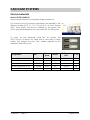
The following components are required in order to operate an inLab MC XL milling unit
via WLAN:
An access point which is attached via a cable to the LAN socket of the MC XL milling
unit:
Designation
REF.
EUR, excl. VAT
Pr. Gr.
WLAN access point, EU/CH/I
61 51 232
165.00
57
WLAN access point, USA
61 51 240
165.00
57
WLAN access point, GB
61 51 257
165.00
57
WLAN access point, AUS/NZ
61 51 281
165.00
57
WLAN access point, Japan
61 51 299
165.00
57
In addition, a WLAN retrofit kit is required for the inLab system PC (hardware versions
AA to GA):
Designation
REF.
WLAN retrofit kit
61 44 104
A 08/2007 − Page 13
EUR, excl. VAT
490.00
Pr. Gr.
57
August 2007