1
Car PC Hacks
By Damien Stolarz
...............................................
Publisher: O'Reilly
Pub Date: July 2005
ISBN: 0-596-00871-6
Pages: 382
Table of Contents | Index
A car PC or carputer is a car tricked-out with electronics for playing radio, music and DVD movies,
connecting to the Internet, navigating and tracking with satellite, taking photos, and any electronic
gadget a person wants in a car. All these devices are managed and controlled through a single
screen or interface. The only place car PC enthusiasts can go for advice, tips and tools is a handful
of hard-to-find Web sites--until now. Car PC Hacks is your guide into the car PC revolution.
Packing MP3 players, handheld devices, computers and video-on-demand systems gives you a pile
too heavy to carry. But add a car and put them together, you've got a powerful and mobile
multimedia center requiring no lifting. The next time you give kids a lift, you won't hear, "Are we
there yet?" Instead, expect "We're there already?" as they won't want to leave the car while playing
video games from multiple consoles.
Car PC Hacks is the first book available to introduce and entrench you into this hot new market. You
can count on the book because it hails from O'Reilly, a trusted resource for technical books. Expect
innovation, useful tools, and fun experiments that you've come to expect from O'Reilly's Hacks
Series.
Maybe you've hacked computers and gadgets, and now you're ready to take it to your car. If
hacking is new and you would like to mix cars and computers, this book gets you started with its
introduction to the basics of car electrical systems. Even when you're unclear on the difference
between amps and watts, expect a clear explanation along with real-life examples to get on track.
Whether you're venturing into car PC for the first time or an experienced hobbyist, hop in the book
for a joy ride.
Car PC Hacks
By Damien Stolarz
...............................................
Publisher: O'Reilly
Pub Date: July 2005
ISBN: 0-596-00871-6
Pages: 382
Table of Contents | Index
Credits
About the Author
Contributors
Acknowledgments
Preface
Why Car PC Hacks?
How to Use This Book
How This Book Is Organized
Conventions Used in This Book
Using Code Examples
Safari Enabled
How to Contact Us
Got a Hack?
Chapter 1. Car Power Basics
Section 1.1. Hacks 1-11: Introduction
Hack 1. Understand Car Electrical Systems
Hack 2. Prevent Electrical Fires
Hack 3. Gauge Your Wires
Hack 4. Connect Your Wires
Hack 5. Calculate Your Car's Battery Life
Hack 6. Upgrade Your Car Battery
Hack 7. Add New Power Connectors Throughout Your Car
Hack 8. Use a Huge Capacitor to Sustain Power
Hack 9. Upgrade Your Car's Alternator
Hack 10. Add a Second Car Battery
Hack 11. Put Home Power Outlets in Your Car
Chapter 2. Automotive Audio Entertainment
Section 2.1. Hacks 1222: Introduction
Hack 12. Get a Headful About Your Car Audio
Hack 13. Install a New Head Unit
Hack 14. Get Computer Audio into Your Head Unit
Hack 15. Amp Up Your Computer Audio
Hack 16. Make a Very Cheap AUX-in
Hack 17. Reduce Your Audio System's Noise
Hack 18. Control Your iPod with Your Car Stereo Knobs
Hack 19. Tune Your PC for Radio Reception
Hack 20. Record Radio Shows
Hack 21. Listen to Email, Weblogs, and RSS Feeds on the Road
Hack 22. Find Out What Was Playing on the Radio
Chapter 3. Automotive Video Entertainment
Section 3.1. Hacks 2340: Introduction
Hack 23. Understand Video Connectors
Hack 24. Choose Your Screens
Hack 25. Install a Headrest Screen
Hack 26. Install a VGA Touchscreen in Your Dashboard
Hack 27. Install a Sun Visor Screen
Hack 28. Install a Motorized Fold-out Screen
Hack 29. Install a Fold-Down Ceiling-Mounted Screen
Hack 30. Supersize Your Fold-Down LCD Screen
Hack 31. Turn Your Laptop into a Fold-Down or Dashboard Screen
Hack 32. Connect a Car PC to Your Factory Screen
Hack 33. Install a Rearview Mirror Screen and Camera
Hack 34. Boost Your Video Signal for Multiple Screens
Hack 35. Customize Each Passenger's Video
Hack 36. Tune in TV in the Car
Hack 37. Receive Satellite TV While Driving
Hack 38. Play DVDs with Your in-Car Computer
Hack 39. Put Multi-Channel DVD Surround Sound in Your Car
Hack 40. Install a Video Game Console Computer in Your Car
Chapter 4. In-Car Computers
Section 4.1. Hacks 4154: Introduction
Hack 41. Choose an in-Car PC Hardware Platform
Hack 42. Power Your Car PC
Hack 43. Start Up and Shut Down Your Car PC
Hack 44. Reduce the Boot Time of Your in-Car Computer
Hack 45. Keep Your Computer on During Engine Cranking
Hack 46. Turn On Your Car Computer Before You Start Your Car
Hack 47. Boot Your Car Computer on a Schedule
Hack 48. Choose an in-Car PC Software Platform
Hack 49. Install Windows on a CompactFlash Card
Hack 50. Power Your Portable Devices in the Car
Hack 51. Install USB Ports in Your Car
Hack 52. Build an in-Car PC
Hack 53. Build an in-Car Macintosh
Hack 54. Install a Mac Mini in Your Car
Chapter 5. Car PC Interface Options
Section 5.1. Hacks 5561: Introduction
Hack 55. Control Your Car PC with a Keyboard and Mouse
Hack 56. Control Your Car PC with a Handheld Remote
Hack 57. Control Your Car PC with a Touchscreen
Hack 58. Car-Enable Clunky Applications
Hack 59. Listen to What Your Car Computer Is Saying
Hack 60. Control Your Car PC with Voice Recognition
Hack 61. Find More Ways to Control Your in-Car Computer
Chapter 6. Wireless Connectivity and in-Car Internet
Section 6.1. Hacks 6268: Introduction
Hack 62. Get Online in Your Car
Hack 63. Make Your Mobile Phone Hands-Free with Your Car PC
Hack 64. Transfer Data to and from Your Car PC
Hack 65. View Real-Time Traffic Data on the Road
Hack 66. Videoconference from Your Car
Hack 67. Use GPS on Your Car PC
Hack 68. Find WiFi Hotspots on the Road
Chapter 7. In-Car Applications
Section 7.1. Hacks 6975: Introduction
Hack 69. Plug into Your Car's Built-in Computer
Hack 70. Put a Video Jukebox in Your Car Theater
Hack 71. Choose Your in-Car Navigation Software
Hack 72. Play Thousands of Games by Emulating Video Game Consoles
Hack 73. Use CENTRAFUSE as Your Car PC Frontend
Hack 74. Use Neocar Media Center as Your Car PC Frontend
Hack 75. Use FrodoPlayer as Your Car PC Frontend
Colophon
Index
Credits
About the Author
Contributors
Acknowledgments
About the Author
Damien Stolarz is an entrepreneur who has spent over half his life making computers talk to each
other. He cofounded Static.com (now http://www.akimbo.com) in 1995, and in his long tenure as
Chief Technology Officer he led the development of numerous technologies, including a direct-dial
online service, networked multiplayer games, and peer-to-peer cost-reduction software for video
streaming. In 2002, he left to start Robotarmy Corp. (http://www.robotarmy.com), a software
consultancy and R&D house that develops large-scale media delivery software, amongst other secret
projects. In 2004, Damien founded CarBot, Inc. (http://www.carbotpc.com), which designs and
manufactures in-car entertainment computers and accompanying software. Damien is the author of
Mastering Internet Video (Addison-Wesley). He holds a B.S. in Computer Science/Engineering from
UCLA.
Damien loves email and is good about responding. You can reach him [email protected],
and you can find a link to his online journal at http://www.damienstolarz.com.
Contributors
The following people contributed to Car PC Hacks:
Terran Brown [Hack #52] is a Project Manager at a leading international outsourcing company
working with large Blue Chip customers. He has worked in the IT industry for eight years in
various technical roles in wide-area networking and server support. His technical background led
to his interest in car PC technology, and he is now one of the more recognized enthusiasts from
the U.K. His web site is http://www.letscommunicate.co.uk.
David Burban [Hack #60] is a high school junior in Los Angeles. He taught himself VB, but
after a brief hiatus from programming, he matured on to Delphi. He now enjoys programming in
Delphi in his spare time. Besides making NaviVoice and GammaControl, David Burban has also
created software for showing car PC information on text LCD displays. His web site can be found
at http://www.whipflash.com/vamr/.
Lionel Felix [Hacks #4, #24, #29, #52, and #53] has worked in IT Systems Strategy for 10
years, designing and building enterprise networks and data centers. He has been tinkering with
cars, car stereos, and computers since before he could drive or get online without adult
supervision. He is currently consulting on various enterprise IT projects and providing IT
executive coaching, and he continues to do terrible things to innocent vehicles and computers.
He can be reached in his garage or at [email protected].
Zoran Horvat (a.k.a. Zorro) [Hack #63] has more than 20 years of experience in the IT
industry. He started developing software applications on the legendary Commodore C64. For 14
years he worked as a Software Engineer, Architect, and Project Manager. Now Zoran works as a
freelancer, developing applications in C#, Visual Basic, C++, and Java, as well as web
applications in DHTML. One of his favorite hobbies is in-car computing, and he developed
PhoneControl.NET (http://www.phonecontrol.net) for linking mobile phones and car PCs. You
can reach him at [email protected].
Jirka Jirout [Hack #53] is an IT Manager at Metro Holland BV. He has been building electronic
circuits and toys since he was 10 years old. He first learned to program on the ZX Spectrum and
some obscure Eastern-bloc computers in the former Czechoslovakia, and eventually moved on
to Windows PCs and then Macintoshes. His other hobbies are antique cars (especially the Tatra),
photography, and building ship models. Jirka lives and works in the Netherlands with his wife
and daughter.
Kevin Lincecum (a.k.a. FrodoBaggins) [Hacks #64 and #75] started working with computers
at age 10. He spent his time ripping apart hardware and software for kicks, and overworking his
parents' phone lines on BBS systems (the precursors to the Internet). Having worked in the IT
industry for nine years now, he has developed a love of programming, especially for car PCs. He
is the developer of the popular frontend with the funny name, FrodoPlayer. All of his programs
can be found online at http://www.frodoplayer.com. Kevin also asks that you visit his blog site
at http://www.teabaggins.com, where you may find a slice of Frodo that many people don't get
to see. And if you need him in a pinch, look no further than the MP3Car.com forums, where he
spends a whole lot of his time keeping the "noobs" and veterans in line as an admin (when his
wonderful wife Joanna will let him, and when his three cats, Marble, Sable, and Amy, give him
any peace).
David McGowan [Hack #73] received a B.B.A. in Management Information Systems and a
minor in Computer Science from the University of Mississippi. When he is not working on
CENTRAFUSE (http://www.fluxmedia.net), David can be found building appraisal-management
systems for large lenders. Some of his other work includes a Java-based document
management system, corporate intranet software, and a web-based appraisal delivery system.
Recently David has spent most of his time writing in C#, but he is no stranger to Java, C++, or
VB. When he's not programming, you can find David snowboarding in the Sierra Mountains or
riding waves on the beach. You can contact him at [email protected].
Paul Peavyhouse [Hack #65] has reluctantly enjoyed working at Microsoft since 1998, in the
Real-Time Collaboration (RTC) and Conferencing fields. His CS experience came from creating
the Night55 Vibe/Sonique MP3 player while failing out of Montana State University. It was here,
while working on the MSU "Double Black Diamond" Solar Vehicle Project, that Paul learned
enough electronics skills to be mistaken as the Unabomber by the authorities. His web site is
http://www.swooby.com/pv/, and his Nissan 350Z car PC project can be seen at
http://www.swooby.com/z/navpc/.
Tor Pinney [Hacks #5 and #68] is a writer, traveler, cruising sailor, and entrepreneur. His
book Ready for Sea! (Sheridan House) is an authoritative manual for outfitting modern sailboats
for long-term voyaging and living aboard. Tor founded the world's first Internet-focused
international yacht brokerage, Anchor Yacht & Ship Sales (http://www.anchoryachts.com),
developing original techniques to list, promote, and sell yachts online around the world. Tor is
presently traveling and writing full time. His web site ishttp://www.tor.cc.
Jacob Riskin [Hacks #64 and #70] is an entrepreneur who cofounded and ran Static.com (now
http://www.akimbo.com) as its CEO from 1995 to 2001. Jacob has over 14 years of experience
in advanced programming design for online systems, and he codesigned Static's core
technologies, including its P2P distributed file network, game synchronization tool-box, and
client/server interface. Prior to founding Static in 1995, Jacob worked in the magazine publishing
industry on a prominent video game magazine, Gamefan.
Silvio Fiorito [Hack #49] spent six years working as a software engineer for various startups
and large corporations in the Northern Virginia area during the height of the dot-com boom.
After getting bored of writing code all day, Silvio decided to change pace and return to his
studies just as the bubble burst. Along with impeccable timing, Silvio also has a love of tinkering
with the latest and greatest in technology, keeping his car PC in a constant state of
development. He is currently majoring in Information Security at George Mason University in
Fairfax, Virginia. You can contact him at [email protected].
Stéphane Monnier [Hack #74] is a thrill-seeking software developer based in Massongex,
Switzerland. After retiring from his early career as a Swiss champion Go-Kart racer, he moved
on to a career in high-voltage-control engineering. He is the author of Neocar Media Center
(http://www.neocarmediacenter.com), one of the most popular car PC applications. He would
like to thank Cyril (Gore), NMC's main debugger, as well as all the users from CarMedia.org and
MP3Car.com who have helped with the application. He is most thankful that his girlfriend Joanna
lets him code as much as he wants to. You can contact him at [email protected].
J.P. Stewart [Hacks #67 and #68] is a Computer Engineer from Washington State with eight
years of experience in writing custom online tools. He is currently working for an industry-
leading software company building and breaking software. When not at work, he is usually busy
either out taking pictures of the northwestern U.S., working on some current multimedia/home
entertainment project, working on some other online tool for his web site
(http://www.jpstewart.org), or working on software for his car PC.
Adam Stolarz [Hack #72] did the photography for Car PC Hacks. A home-schooled high school
student, he's also a skilled writer, a computer technologist, and a budding artist. He spends an
inordinate amount of his own time and others' money on video games. He can be reached at
[email protected].
Jason Tokunaga [Hack #71] has a background in aerospace engineering but has made the
jump to the sexier field of Project Management. He has worked in the software industry for the
past six years, on projects ranging from distributed networking and streaming media delivery to
enterprise-class applications. A die-hard video enthusiast, he's currently managing an
unreasonable number of projects in the Web/IT division of a major studio. He has a degree in
Mechanical Engineering from UC Berkeley.
Acknowledgments
Thanks to David Brickner, the editor of this book, who is even more laidback than I am; Rael
Dornfest, who originally took up my offer for the book and whose efficiency I admire; Jessamyn
Read, who created all the diagrams; and my brother Adam Stolarz, who took the photos for the book
under cruel and unusual deadlines.
Thanks to the production team at O'Reilly: Genevieve d'Entremont, Jessamyn Read, Keith Fahlgren,
and Lydia Onofrei.
Thanks to Nat Wilson, who runs http://www.mp3car.com and knows so much about in-car
computing that I trembled when I read his critiques. (Fortunately, it turns out I was on the right
track most of the time.)
Thanks to Kevin "Frodo" Lincecum for writing great software and thus helping to create the market
for car PCs.
Thanks to George Dean, a brilliant engineer and creator of the CarBot software architecture. I owe
him a great debt of gratitude for making this book and CarBot possible.
Thanks to all the CarBot contributors, old and new: Mark Dixon, Jason Tokunaga, Matthew Wright,
Zack Aaron, Jeremy Stolarz, Zack Gainsforth, Andrew DelGatto, Josh Bandur, Ashley Hoffman, Jim
Baker, Chris Welch, Edwin Khang, Raffi Krikorian, Roger Killer, and Michael O'Reilly.
Thanks to Kalani Patterson and Michael Morena for their brave alpha testing of the prototype CarBot
PCs.
Thanks to Robert Rucker, Aaron Matthews, and Alex Fox from Good Guys in my hometown of Canoga
Park, who endured days and days of questions about car installations, customer preferences, and the
12-volt market in general. Special thanks to Robert, who did all the hard parts of my Mac Mini
installation [Hack #54].
Thanks to the installers at Pacific Stereo in Woodland Hills, Jose Balz, Rene Beltran, and Jesse
Alvarez, who gave my minivan more power, more treble, and better rearview visibility.
Thanks to Clint and Casey from Street Performers in Reseda, who did a fantastic job of modernizing
my 1950 Nash Ambassador.
Thanks to Cliff Leeper and Joe Hegener from SyndicateAuto.com in San Diego for doing such a
gorgeous install of Robert Baizer's CarBot.
Thanks to Lionel Felix for all his feedback as a reviewer and contributor, and for helping me get
Carhacks.org running and keeping me rolling on the floor laughing. And speaking of comedy, I also
have to thank Jeff Munsey, who did a thorough job of reviewing the manuscripts and cracking me up
at the same time.
Thanks to Raffi Krikorian, who fixed so much of the imprecision in my exposition and taught me that
voltage is more like a rock on a cliff than water in a hose.
Warm thanks to Tim O'Reilly, who has created a delightful playground for inventors and technology
writers such as myself.
Thank you Dr. Darius Sankey for many years of kind guidance and support for my professional
ventures.
And finally, thanks to my family, who is happy to have me back after my latest book-writing
adventure.
Preface
The time for in-car computing has arrived. There are strong signs in every direction that personal
computing technology will soon take over the car. It started with satellite radio, bringing streaming
digital audio to the car. Then the iPod captured the digital audio player market and suddenly became
a defacto standard car audio component. MP3 players, in-car navigation systems, and touchscreens
are now standard in many vehiclesand it won't stop there.
So why do people go through all the trouble of installing computers in their cars?
Choice is one reason. Today, you are locked into the navigation system that came with your car, if it
even came with oneand the costs of upgrading to a new one are immense. Why shouldn't you be able
to say, "I like the navigation system in the Infiniti, I think I'll get that for my Civic"? With an in-car
computer, you can choose the implementation that you like the best.
Features are another reason. Once we get used to features (e.g., digital media such as digital video
recorders and iPods) in one part of our lives, we want to be able to use them everywhereincluding in
our cars. Cutting-edge features that would otherwise require expensive hardware upgrades can often
be acquired via a simple software download if you have a car PC.
Integration is vitally important as well. When you've got half a dozen different kinds of digital media
sitting in the passenger seat of your car (mobile phone, camera, PDA, iPod, portable USB memory
stick, CDs), you'd like them to be able to talk to each other. For example, many people stare wistfully
at their digital audio devices, wishing that the MP3 audio would somehow leap out of them and into
their car radios. Putting a computer in your car will allow all your gadgets to work with your vehicle.
Finally, forward compatibility is a huge problem for which a general-purpose computer is the only
solution. A definitive standard for device communication in the car is unlikely to emerge anytime
soon, but a PC can serve as a digital hub for all your devices. Consumer electronics and computing
are inextricably linked; there are few devices a computer can't talk to in one way or another. An incar computer can serve as digital glue for features, peripherals, and networks that haven't even been
invented yet. With an in-car computer, you won't get left behindand you won't have to buy a new car
to get ahead.
Why Car PC Hacks?
The term hacking has a bad reputation in the press. They use it to refer to someone who breaks into
systems or wreaks havoc with computers as their weapon. Among people who write code, though,
the term hack refers to a "quick-and-dirty" solution to a problem, or a clever way to get something
done. And the term hacker is taken very much as a compliment, referring to someone as being
creative, having the technical chops to get things done. The Hacks series is an attempt to reclaim the
word, document the good ways people are hacking, and pass the hacker ethic of creative
participation on to the uninitiated. Seeing how others approach systems and problems is often the
quickest way to learn about a new technology.
Traditionally, car guys don't know computers, and computer guys don't know cars.Car PC Hacks was
written to bridge that gap. For computer hackers skilled in all things software and hardware, this
book will fill you in on the wiring, power, and connector basics you need to get around a car. For
mechanics and auto enthusiasts who can install speakers, amps, and stereos in their sleep but
depend on their friends to fix their ailing computers, this book can show you the essential aspects of
the computer/car interface in a language you understand. Once you've gotten the basics and realize
how simple wiring computers into cars can be, Car PC Hacks shows you how to add sci-fi features to
your car that will blow people away.
How to Use This Book
You can read this book from cover to cover if you like, but each hack stands on its own, so feel free
to browse and jump to the different sections that interest you most. If there's a prerequisite you
need to know about, a cross-reference will guide you to the right hack.
The first few chapters cover the basics of car wiring, showing how easy it is to hack your car and wire
up speakers, radios, screens, and external devices and computers. They also show you how to make
sure you have enough power in your car to power all your new devices.
The middle chapters get to the heart of the matter: wiring up a car PC. They cover the full range of
options for installing, displaying, and controlling your car PC, and they provide several hacks on startto-finish car PC installations.
The final chapters in the book introduce you to the many applications and features that become
possible with a car PC. They provide full coverage of ways to access the Internet in your car, as well
as introducing you to the most popular car PC programs used by thousands of people today.
How This Book Is Organized
Since this book is aimed at both "car guys" and "computer guys," it includes a lot of material for both
audiences. Whether you are an end user just trying to figure out what program to run, or a software
developer trying to figure out how to get your new creation into the dashboard, you'll find the
information you need in these chapters.
Chapter 1, Car Power Basics
This chapter goes over the basics of 12-volt power in the car. Its goal is to help you get rid of
any myths you have about hacking into your car's electrical system and show you what you
should look out for. It also shows you the similarities between computer and car power
systems. When you're done with this chapter, you'll fear no outlet or wire.
Chapter 2, Automotive Audio Entertainment
Your car PC isn't very entertaining if it isn't connected to your car's stereo system. This
chapter's hacks show you how to get any device connected to a car's audio system, be it an
iPod or a car PC. It also covers how to get the best sound over this connection and how to
eliminate buzzes, hisses, and hums. Finally, it covers a few of the audio applications that only a
car PC can deliver.
Chapter 3, Automotive Video Entertainment
This chapter covers almost every option for getting video into your car. From touchscreens to
rearview cameras to HDTV, every popular installation of in-car video is covered in detail. It also
helps you understand the various video formats (car, home, and computer), how they differ,
and how to get them into your car despite these differences. You're sure to come up with new
ideas for your car after reading this chapter.
Chapter 4, In-Car Computers
This chapter gets to the heart of the matter: installing a PC in your car. It covers choosing the
hardware components that work best for car PCs, power supplies, and the other gadgets
necessary to make your car PC work like it came with your car. It also covers operating system
options and the trade-offs between them, including hints on how to speed up boot time. The
chapter ends with three detailed car PC installation case studies.
Chapter 5, Car PC Interface Options
The biggest challenge in car computing is safe operation for the driver. Keyboards and mice are
useless in a vehicle, yet they are the primary forms of communication between humans and
computers. This chapter covers the popular man/machine interfaces that do work in a car,
such as touchscreens, remote controls, and even voice recognition. It also contains some hacks
to force unruly desktop applications to behave in a vehicle.
Chapter 6, Wireless Connectivity and in-Car Internet
Wireless Internet and network connectivity are key ingredients in many of the cleverest hacks
for car PCs. WiFi and 3G mobile phones make absurdly cool features possible. This chapter will
help you figure out how to get your car online and how to transfer all of your audio and video
media to your car seamlessly.
Chapter 7, In-Car Applications
To take advantage of the wide range of entertainment and productivity options available on
your car PC, you need the right applications. This chapter highlights the leading car PC
frontends and navigation programs for driver use. It also covers rear-seat entertainment
options, such as video games and in-car theater. It even shows you how to link your car PC
and the internal computers that make your car run.
Conventions Used in This Book
The following is a list of the typographical conventions used in this book:
Italics
Used for emphasis and new terms where they are defined, and to indicate URLs, filenames,
filename extensions, and directory/folder names. For example, a path in the filesystem will
appear as /Developer/Applications.
Constant width
Used to show code examples, the contents of files, and console output, as well as the names of
variables, commands, and other code excerpts.
Constant width bold
Used for commands to be typed by the user and to highlight portions of code.
Constant width italic
Used in code examples to show sample text to be replaced with your own values.
Color
Used to indicate a cross-reference within the text.
You should pay special attention to notes set apart from the text with the following icons:
This is a tip, suggestion, or general note. It contains useful supplementary
information about the topic at hand.
This is a warning or note of caution, often indicating that things might not work
out.
The thermometer icons, found next to each hack, indicate the relative complexity of the hack:
beginner
moderate
expert
Using Code Examples
This book is here to help you get your job done. In general, you may use the code in this book in
your programs and documentation. You do not need to contact us for permission unless you're
reproducing a significant portion of the code. For example, writing a program that uses several
chunks of code from this book does not require permission. Selling or distributing a CD-ROM of
examples from O'Reilly books does require permission. Answering a question by citing this book and
quoting example code does not require permission. Incorporating a significant amount of example
code from this book into your product's documentation does require permission.
We appreciate, but do not require, attribution. An attribution usually includes the title, author,
publisher, and ISBN. For example: "Car PC Hacks by Damien Stolarz. Copyright 2005 O'Reilly Media,
Inc., 0-596-00871-6."
If you feel your use of code examples falls outside fair use or the permission given above, feel free to
contact us at [email protected].
Safari Enabled
When you see a Safari® Enabled icon on the cover of your favorite technology
book, that means the book is available online through the O'Reilly Network Safari Bookshelf.
Safari offers a solution that's better than e-books. It's a virtual library that lets you easily search
thousands of top tech books, cut and paste code samples, download chapters, and find quick answers
when you need the most accurate, current information. Try it for free at http://safari.oreilly.com.
How to Contact Us
We have tested and verified the information in this book to the best of our ability, but you may find
that features have changed (or even that we have made mistakes!). As a reader of this book, you
can help us to improve future editions by sending us your feedback. Please let us know about any
errors, inaccuracies, bugs, misleading or confusing statements, and typos that you find anywhere in
this book.
Please also let us know what we can do to make this book more useful to you. We take your
comments seriously and will try to incorporate reasonable suggestions into future editions. You can
write to us at:
O'Reilly Media, Inc.
1005 Gravenstein Hwy N.
Sebastopol, CA 95472
(800) 998-9938 (in the U.S. or Canada)
(707) 829-0515 (international/local)
(707) 829-0104 (fax)
To ask technical questions or to comment on the book, send email to:
[email protected]
The web site for Car PC Hacks lists examples, errata, and plans for future editions. You can find this
page at:
http://www.oreilly.com/catalog/carpchks
For more information about this book and others, see the O'Reilly web site:
http://www.oreilly.com
Got a Hack?
To explore Hacks books online or to contribute a hack for future titles, visit:
http://hacks.oreilly.com
Chapter 1. Car Power Basics
Section 1.1. Hacks 1-11: Introduction
Hack 1. Understand Car Electrical Systems
Hack 2. Prevent Electrical Fires
Hack 3. Gauge Your Wires
Hack 4. Connect Your Wires
Hack 5. Calculate Your Car's Battery Life
Hack 6. Upgrade Your Car Battery
Hack 7. Add New Power Connectors Throughout Your Car
Hack 8. Use a Huge Capacitor to Sustain Power
Hack 9. Upgrade Your Car's Alternator
Hack 10. Add a Second Car Battery
Hack 11. Put Home Power Outlets in Your Car
1.1. Hacks 1-11: Introduction
Home electronics and car electronics are quite different. Homes are designed to power dozens of
large appliances; cars are designed to power a handful of small electronic devices. Homes run on high
voltages that could give you a heart attack; most of the electricity in a car won't even give you a
shock.
This chapter is going to give you a rapid-fire, metaphor-rich tutorial on electronics, and automotive
electronics in particular. It will go over key terms, such as voltage, amperage, and wattage, and give
you a basic understanding of how to do arithmetic with these numbers. The goal is to get you up to
speed quickly on car electronics, and show you the essential system upgrades that will help you hook
up and power your in-car computers and accessories.
Hack 1. Understand Car Electrical Systems
Different electronic systems, such as those for houses, cars, and computers, use very
different connectors, voltages, and power levels.
If you are familiar with only home or computer electronics, you will need a little bit of background
before you start playing with the wires in your car. This hack will introduce you to automobile power.
Because you will probably want to "bench test" your in-car computers in the house before installing
them in your car, it will also show you how you can hack a computer power supply to power your incar accessories indoors.
The first term you need to learn about is voltage, which is simply the amount of potential (work,
force, energy, change) in an electrical flow. Different devices are designed around a certain level of
electrical potential, which can be thought of as the amount of pressure propelling the electricity. The
analogy most often used to explain voltage is water flow, where the pressure of the water coming out
of a hose is like the voltage, which can be turned up and down by a valve or spigot. The same hose
can release high-pressure water to clean a driveway, or a low-pressure flow to fill a water balloon.
Electricity, however, doesn't flow readily through the air like water does. Electricity travels well only
through conductors, such as metal wires, and in order to flow it requires a return path (usually called
the ground) going back to the source of the voltage. In our water metaphor, the ground would be
represented by a drainpipe. (Of course, water conveniently doesn't require a returning drainpipe to
flow.)
Another, slightly more accurate analogy for electricity is that of water pouring over a cliff. The cliff
represents the positive (or +) end of a battery, and the electricity flows from the high cliff down to
the ground (negative, or). The higher the cliff, the higher the voltage. However, I'll continue to use
the hose-pressure metaphor because of the corresponding analogy between wires and hoses.
1.2.1. Computer Voltages
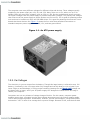
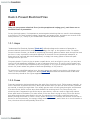
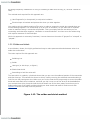
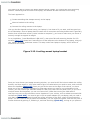
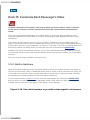
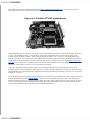
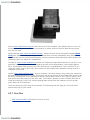
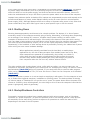
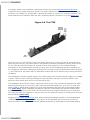
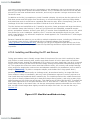
Internally, computers run on several different voltages. The power supply, like the one seen inFigure
1-1, delivers all these voltages through the various colored wires that come out of it and connect to
the motherboard. The black wires generally represent the ground, which allows the electricity to go
back to the source and complete its round trip, or circuit.
The voltage going into the power supply comes from a wall outlet. This provides between 110V and
240V, depending on the country you are in. The computer power supply converts this high-voltage
input into the various output voltages needed by the motherboard and computer peripheral devices.
(To use a standard PC power supply in a car, you need to install an inverter to increase your car's
12V to 120V [Hack #11]).
The computer uses many different voltages for different chips and devices. Three voltages usually
supplied by the power supply are 12V, 5V, and 3.3V. Many chips run on 5V; others run on 3.3V.
Modern CPUs use even lower voltages, such as 2.2V or 1.8V, but the motherboard usually converts
the higher voltages from the power supply to provide these lower voltages. The primary two voltages
that come out of the power supply to power devices are 12V and 5V. 12V is good for powering motors
such as those in hard drives, fans, and CD-ROM drives. 5V is good for powering the electronic circuit
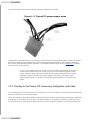
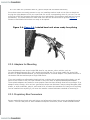
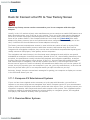
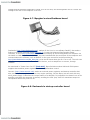
boards that these devices use. Figure 1-2 shows the four wires that peripheral connectors on
standard computer power supplies have: 5V, 12V, and two ground wires.
Figure 1-1. An ATX power supply
1.2.2. Car Voltages
The electricity in your car comes from its battery. Though this large battery is referred to as a 12V
battery, it's actually in the 13V range when fully charged and can dip down to 11V or lower if you
leave a light on and discharge it. During engine cranking (starting the car)[Hack #45] voltage can
dip down to 8V or lower, and if your PC power supply isn't designed to handle this it will hang or
reboot your computer.
Computers are not very tolerant of voltage changes like this. For this reason, computer power
supplies ensure that, no matter how the input voltage bounces around, the output remains stable.
This is called voltage regulation. Automobiles, however, provide much sloppier, unregulated power.
Automotive "12V" is more of an average than a precise voltage. Because of this, most devices built
for cars have their own power supplies that also regulate the voltage.
Figure 1-2. Typical PC power supply wires
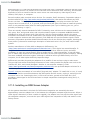
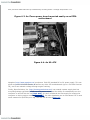
Traditionally, most third-party car electronic devices plug into thecigarette lighter socket (so named
because its original purpose was to provide a method to light cigarettes). Even though most cars
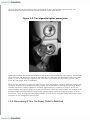
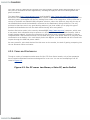
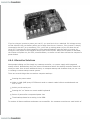
don't come with cigarette lighters anymore, the standard power outlet shown inFigure 1-3 remains
and continues to be utilized.
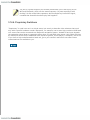
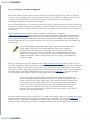
In cars, the entire metal body of the vehicle is usually connected in some way
to the ground. Older cars run a single 12V wire to the cigarette lighter outlet
center, and the outer shell of the outlet is then simply connected to the metal
dashboard. Newer vehicles are made of plastic and vinyl, with some paintcoated metal thrown in, so they run both the ground and the 12V wire to the
outlet.
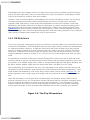
1.2.3. The Key to Car Power: Off, Accessory, On/Ignition, and Crank
You probably don't think about it when you drive a car, but the position of the key switch determines
where the electricity of the vehicle goes.
There are actually two kinds of power outlets in modern vehicles: switched and unswitched. Switched
outlets are on only when your car key is in the accessory or on positions. Naturally, when the car is
on, any devices you have are on. When the key is in the accessory position, all of your accessories
(such as the radio and any devices that are plugged in) are running. When the car is off, any
switched power outlets are turned off, and usually the radio goes off too.
Figure 1-3. Two cigarette lighter power jacks
Unswitched outlets and hardwired accessories are always connected to the car's battery, whether the
car is off or on. Car alarms are all wired this way, which is why they are designed to draw very little
power. If you've ever left your lights on and come back to find that you can't start your car, you
know why low power draw is important.
When you are cranking the engine to start the car, most accessories (including switched outlets) are
turned off temporarily so that all the battery power can be devoted to starting the car. Fans, power
windows and doors, radios, amplifiers, and most lights observe a "moment of silence" as the car
starts. Because the battery must turn a heavy motor that cranks the entire engine, the voltage to all
hardwired and unswitched devices usually sags during engine cranking, dropping from12V to 9V or
even lower. Thus, devices that must always remain on have to use very little power and endure wild
variations in car voltage from time to time.
1.2.4. Discovering if Your Car Power Outlet Is Switched
Learning whether your power outlet (i.e., the cigarette lighter adapter) stays on when the car is off
will help you determine whether you need to run additional power outlets for the devices you intend
to use or install in your car.
To test your outlet, you need a device with a light and no battery, such as a cell phone charger with a
light on it, or a small map light that plugs into a car power outlet. Plug in the device and observe it
when you turn your car on and off. If the light or indicator is on only when the car is on, you have a
switched outlet; if the device stays on no matter what, you have an unswitched outlet. It is generally
a bad idea to leave devices plugged into an unswitched outlet.
1.2.5. The Hack: Making a 12V Power Supply for Indoors
If you're going to start hacking around with cars, you're going to want to bench test your in-car
experiments and devices indoors. You may be working on your installation projects for several days,
and you probably won't want to have your dashboard (or someone else's dashboard) torn open for
that whole time. If you like to spend money, you can go buy a cool 12V power supply (such as Radio
Shack part #22-504) with a nice car outlet on the front so you can do all of your
testing out of the
vehicle.
If you're a computer hacker, you probably have a few computer power supplies hanging around.
Since these output 12V, it's simply a matter of making these power supplies operate with a switch to
power a cigarette lighter jack.
If you have an old AT power supply (usually found in PC computers that run slower than about 200
MHz), you're setjust pull out that old Pentium 90 power supply, front-panel rocker switch and all.
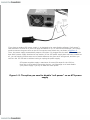
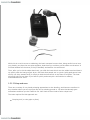
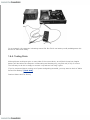
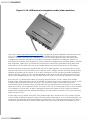
Figure 1-4 shows how you can splice, twist, or cleanly solder the car power socket to the black
(ground) and yellow (12V) wires of the AT power supply that would normally go to a hard drive or
CD-ROM drive. Make sure that the outer shell of the outlet connects to ground and that the bottom
center of the outlet connects to 12V. Ignore the power supply's red (5V) wire; the car power socket
doesn't use it. You can purchase a car power socket for a few bucks at Radio Shack (part #22-540).
Figure 1-4. A PC power supply with an attached cigarette lighter
powerjack
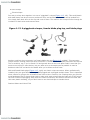
If you have a modern ATX power supply, it is designed to be controlled by software ("soft power")
that switches it off and on or puts it to sleep and wakes it up. To override this behavior, you simply
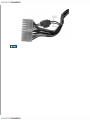
need to connect the green wire on the ATX connector to any black wire, as shown in Figure 1-5.
Then, the power supply automatically outputs 12V when it is plugged into the wall. (This trick works
best with a power supply that has its own switch.) If the ATX power supply does not have a switch at
all, you can simply connect some sort of switch between the green wire and ground, and then you
can turn the 12V off and on without having to unplug the power supply.
ATX power supplies supply a maximum of around 20 amps for the 12V line.
Keep this in mind when connecting devices; you'll damage or at least disable
your power supply if you try to draw too much power.
Figure 1-5. The splice you need to disable "soft power" on an ATX power
supply
Hack 2. Prevent Electrical Fires
Only you can prevent electrical fires (as the paraphrased saying goes), and fuses are an
essential form of prevention.
In any electrical system, it's important to protect against miswiring that can result in devicedamage
or even fires. This hack explains voltage, amperage, and power levels, and points out several of the
safety features (i.e., fuses) of your automobile's electrical distribution system.
1.3.1. Amps
"Understand Car Electrical Systems" [Hack #1] defined voltage as the amount of potential or
pressure behind electrical flow, and gave the analogy of a high- or low-pressure hose. To explain
current in terms of water, we would be considering how many gallons of water went through the hose
per hour. A very unscientific conceptual definition of electrical current (measured inAmperes, or
amps not to be confused with sound amplifiers!) is simply how many gallons of electrons pass
through the wire per hour.
It's pretty simple: if you're trying to power a small device, such as a light in your car, you only have
to give it a few teaspoons (milliamps, or mA) of electrons every hour. If you're trying to power your
car radio, you need a cup of electrons every hour (amps, or A). If you're tooling around town in your
electric car, that's where the gallons of electrons (kiloamps, or KA) come in.
To continue our simplified analogy here, the more amps you need for your device, the bigger your
"hose" or wire should be. "Gauge Your Wires" [Hack #3] discusses the different sizes of wire and
how thick they should be for a given application.
1.3.2. Fuses
Fuses are protective devices placed along the path of an electrical circuit. Tofuse means, basically, to
melt. Fuses melt to protect the circuit, wires, and devices when you put too much current (electrons
per second, or amps) through them. You usually get too much current going through a wire because
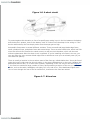
of a short circuit, which is when wires that shouldn't be touching touch. In a short circuit, the
electricity that is supposed to go all the way to some device, such as a radio or light bulb, takes a
direct path back to the battery. In other words, if the wire that is trying to bring 12V to the device
gets loose and touches some metal in the car, the electricity tries to take a shortcut back to the
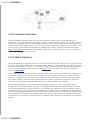
battery through this metal (a "short" circuit, shown in Figure 1-6). Because this shorter circuit has no
device to use the electricity, the energy simply heats up the wires, and if there is no circuit breaker or
fuse, the wires will melt and possibly cause a fire.
Figure 1-6. A short circuit
To protect against this situation, a fuse of a specific amp rating is put in the line between the battery
and the device it powers, close to the battery itself. If a short circuit develops in the wiring or if the
device malfunctions, the fuse simply melts once the amps get too high.
Automobile fuses come in several different varieties. There are small and large blade-edge fuses,
small cylindrical fuses, and plastic fuses with metal strips. There are also fusible links, which look like
wires but will melt like fuses at the rated current, as well as circuit breakers, which can be reset
without replacement after the short circuit is repaired. If you're installing new fuses in the car, you
can use either the very common blade-edge fuses or whichever ones your car already uses (so you
can share the spares).
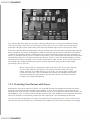
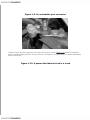
There is usually a location in the car where most of the fuses go, called thefuse box. It may be found
under the hood, inside near the driver's ankles, in the glove compartment, in the trunk, between the
dashboard and the door, or in some other location, depending on the car. As you can see inFigure 17, the fuse box contains a large number of fuses, each protecting a section of the car or a particular
device, such as the radio, headlights, tail-lights, A/C unit, and so on. If the dashboard lights won't
turn on even though the rest of the car seems fine, chances are the fuse has melted.
Figure 1-7. A fuse box
The manual that came with the car when it was purchased new, or a Haynes or Chilton's manual
from any Pep Boys, should tell you the layout of the fuses in your car's fuse box and the proper
amperage ratings of these fuses. Many cars have this diagram right next to the fuse box itself.
Fuses are rated for different amperages, and you should use a fuse just above the amperage that the
device will draw. If a device is designed to draw 5A normally but can spike to 8A when it first starts
(common for situations where a mechanical arm or switch activates at first, such as a CD loader or
motor), it would be safe to use a 10A fuse for the device. If you used a 20A fuse and the device shortcircuited internally, the 20A fuse would be very slow to "blow" or melt and would probably not save
the device from further damage. The 10A fuse would start to melt as soon as the current went over
the normal level, largely protecting the device and the wires that bring it power and possibly
preventing a fire in your car.
When a fuse melts, it's important to figure out why it did. If you were working
on your radio while the car was on, you saw the red wire touch the metal
frame, and now your radio doesn't turn on at all, you can be fairly certain that
it was your fault. But if you've replaced the fuse for your taillights three times
and it keeps blowing, chances are there's a short circuit you need to find and
fix before you keep wasting fuses.
1.3.3. Protecting Your Devices with Fuses
Although the car has its own set of fuses, you may add devices that bypass the normal car power.
Perhaps your power line goes straight to the battery, or your device connects, along with a lot of
other devices, to a 20A fuse. You don't want a short circuit on your device to take out the fuse for all
the gadgets in your trunkyou'd like to be able to tinker with your amplifier or car computer and know
that you'll be able to conveniently replace the fuse right there if you accidentally cross wires.
You can insert a fuse anywhere you want using an in-line fuse connector (the "in-line" refers to the
fact that you put the fuse wire in a line between your battery and the device it protects, as in Figure
1-8). It's generally better to put the fuse closer to the power sourcethat way, the length of the wire
run is protected by the fuse.
If you're connecting wires directly to the battery, your fuse should always be
within a foot of the battery. This is because if there is a collision or the wire
wears out and touches the body of the car, it could cause a fire. The closer the
fuse is to the battery, the less unfused length of wire there is to cause trouble.
In-line fuses are available at hardware shops, car stereo shops, Pep Boys, and similar locations. To
use them, simply choose the lowest fuse rating that will still pass enough powerto your device at its
peak power usage, and then connect the fuse wire between the power source (i.e., the battery or
wherever you are getting your 12V) and the device.
Figure 1-8. An in-line fuse
Here are some important tips for in-car wiring:
Fuse the positive (red) +12V wire.
Never run a wire to your device from the battery without a fuse.
The positive charge uses red wire; the negative charge uses black. Invest in red/black sets of
16-,14-, and 12-gauge braided wire. Avoid solid-core wire (the stuff that's hard to bend and
keeps its shape), because it's not designed for automotive use.
When grounding to the body, use a crimped-on washer post connector (which adds a circle to
the end of the wire) and a metal screw to go into a small hole drilled in the body. If you use a
metal screw with both a hexagonal nut and a Phillips-head top, you'll be able to tighten it with
whatever tool you have handy.
If you need help on wiring, see "Connect Your Wires" [Hack #4].
Hack 3. Gauge Your Wires
The general rule in car wiring is that the thicker the wire is, the better. However, thick
wire is expensive, and financially it's worth learning how thick a wire you really need to
bring power to all the devices you add to your car.
The width of wires is usually given in a unit called gauge. As with shotguns, a smaller number
represents a bigger diameter. Continuing our electricity-as-water analogy, the wider your wire is, the
wider a "pipe" the electricity has to go through. Thus, if you are trying to carry a lot of power to your
trunk to power a small studio of TV screens, computers, and audio amplifiers, you will want to use a
thick wire. But how thick?
Using a wire that is too thin can be a fire hazard: too much amperage will overheat the wire,
potentially melting the insulation and lighting the carpet on fire. However, using a wire that is too
thick can be a financial hazard: you will spend hundreds of dollars on wires alone and have no money
left for gadgets.
1.4.1. Wire Sizes and Amp Ratings
Wire comes in several types, including solid core, which is just thick, bendable copper, and stranded,
which consists of many smaller wires braided together. For automotive applications, stranded wire is
more desirable than solid because it's more flexible, especially at colder temperatures.
The maximum amps a wire can carry safely depends on the gauge and length of the wire. You
probably won't be running wire longer than about 6 meters (20 feet) in a vehicle, but it's good to
know that the longer you run the wire, the thicker it should be, because some of the electricity gets
lost along the way as heat.
Wire gauge differs in the U.S. and Europe. In the U.S. you will see the termAWG, for American Wire
Gauge, which I will be using here. As mentioned before, gauge is a bit odd in that the larger the wire
is, the lower its number is. (Europe uses a more sensible metric-system-based wire gauge scheme. I
won't cover it here, but I will give you the metric equivalents of the AWG numbers so you can
visualize how thick the wires are.)
If you are comfortable inside a computer, you are probably already familiar with several gauges of
wire. The wire used to connect the reset/power buttons and front panel LEDs to the motherboard in
most computers is between 24 and 22 gauge (about 0.5 mm in diameter). The wires that come out of
a power supply to the ATX power connector on a motherboard are 18 gauge (about 1 mm in
diameter), as are the yellow/black/red wires that go to peripherals.
To carry 12V around a vehicle, you will normally use 18-gauge and larger (i.e., smaller number)
wires. The red or yellow 12V power cord in a dashboard going to the back of the radio might be 18 or
14 gauge (11.5 mm in diameter).
Wires get hot, and when you bundle them in groups, they get hotter. Thus, while 18-gauge wires are
rated to carry 16A (according to the AWG Handbook of Electronic Tables and Formulas), this rating
decreases tremendously when the wires are bundled and wrapped and run together in a plastic
sheath under the carpeting.
There are many tables online (Google "wire gauge table"), most with somewhat conflicting data.
Generally, you will use the gauges 12 (20 mm), 10 (25 mm), 8 (33 mm), and 4 (about 50 mm, or 0.5
cm). If you are powering a single device under 5A, 12-or 10-gauge wire can handle it. If you are
going to power a full-sized computer, or several devices, use an 8-or 4-gauge wire. These are thick,
heavy-duty cables that look like they should be powering a big motor. In fact, 4-gauge wires can be
used to bring power to a winch, so they should certainly handle your in-car PC. 2-gauge wires (64
mm in diameter) are overkill, and if you go any thicker than 2 gauge, you're probably using the same
size wire as the battery to the engine. If you need that many amps, you might consider adding
another battery in the trunk [Hack #10].
You should use the same gauge for the ground wire as you use for the 12V wire
you run to your device, as the current path is only as thick as your thinnest
link. Also, run the ground and 12V wires straight to the battery, with a fuse
near the battery between the 12V wire and the positive battery terminal. Try
not to tap off other connections if possible, unless you're powering a low-power
device (not a computer or screen). This includes the chassis (car body)even
though it is connected to the negative battery terminal, this can add noise to
your audio system or device.
1.4.2. The Hack: Powering Everything
A quick way to determine your power needs is to double the amperage you need to power, because
when devices first turn on, they draw a lot more current. This "spike" in current needs to be
accommodated. Thus, if you know your computer will run at 200 watts (200W / 12V = 16A), you
should double that to 32A and add that to the amperage required by any other devices you are
running (amplifiers, subwoofers, etc.) before you decide how thick a power line to run and what fuse
to install.
8-gauge wire (about 33 mm in diameter) can easily carry 50A (600W) to the trunk, and 4-gauge wire
(about 0.5 cm in diameter) can carry over 100A (1200W) to the trunk. A 2-gauge wire (64 mm) can
carry upwards of 150A (1800W).
To tap directly into the battery, you need an additional wire tap for the batteryterminals. Whether
your battery has posts or screw-down connectors, it's as simple as purchasing an inexpensive
extendable connector (Figure 1-9) that enables you to stack on a few connectors. A small power
distribution block mounted next to the battery is even better if you have more than a few additional
power lines to run. A power distribution block is a hub that receives power from the battery and splits
it neatly into several fuse-protected terminals (places to connect a wire). There are many "showquality" devices that are translucent and have big, pretty fuses. Your budget and appearance
concerns will dictate how elaborate a power block you purchase. You can use one large fuse between
the power and this block, and it can be used to turn off all power in an emergency or just act as a
backup fuse for your system. Make sure the distribution block has a protective cover to prevent any
short circuits.
Figure 1-9. An extendable post connector
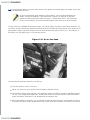
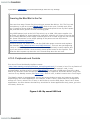
If most of your devices are going to be in the rear of your vehicle,Figure 1-10 shows an excellent
way to provide ample power for all your devices: running one very thick wire to a power distribution
block in the trunk.
Figure 1-10. A power distribution block in a trunk
Hack 4. Connect Your Wires
There are several ways to do in-car wiring: quick-and-dirty, functional, or professional,
depending on who's going to see it and how long you want it to last.
In the process of hacking computers and other devices into your car, you have to connect lots of
wires. Unlike the inside of a computer, where all the wires are keyed and standardized, each car has
its own set of connectors, and most of these are already in use. Except for cigarette lighter power
outlets, which are really more for temporary connections, there is no standard "outlet" in the trunk of
your car where you can seamlessly plug in your gadgets.
What happens instead is that new wires are run to the locations where devices are installed. They are
usually run under the floor carpet, or inside the plastic baseboards or framing at the edges of the
seats and carpets. When the wires poke out, professional audio shops usually surround them with
plastic sheathing and zip-tie them down, as shown in Figure 1-11.
1.5.1. Connecting Wires
There are several ways to connect all your wires. Which method you choose depends on how
permanent a solution you want, your budget and tools, and how important appearances are to you.
Figure 1-11. Tidy professional wiring
1.5.1.1 Twist and tape.
The cheapest way to connect your wires is to twist them together and wrap electrical tape around
them so they don't short out. This is the hallmark of an amateur, but it's my favored method when I
am doing temporary installations or fixing or installing a radio while driving (er, not that I would do
that).
The minimal tools required for this approach are:
Hard fingernails (or sharp teeth) to strip wire insulation
Electrical tape to insulate and protect the wires you twist together
You need to strip the plastic coating off the wire in order to expose the metal wire strands that you
will be twisting together. You should strip up to an inch of insulation, as you want lots of exposed
metal to make as strong a connection as possible. Then you simply take the two wires you are
connecting and twist them together, clockwise or counterclockwise. You then cover the whole thing
with copious amounts of electrical tape.
While this approach is extremely functional, it scores lowest on the scale of "gimped" to "crimped" to
"pimped."
1.5.1.2 Solder and shrink.
A much better, slower, but highly professional way to make permanent bonds between wires is to
solder the connections.
The tools required for this approach are:
Soldering iron
Solder
Heat gun (or hair dryer, or lighter)
Plastic heat shrink
Something to hold the wires still
The heat shrink is a plastic, cylindrical sleeve that you put over the soldered portion of the connection
and then heat up. This causes the sleeve to shrink, cleanly covering the soldered area and making it
look like one tidy contiguous wire. Make sure you cut the heat shrink long enough to cover the solder
bond and reach both wire insulations, and that you slip it over one of the wires to be bondedbefore
you connect them. Also, keep the heat shrink far down one of the wires, away from where you're
solderingthe heat of the solder could preshrink your heat shrink and make it hard to work with.
Figure 1-12 shows one step from this process.
Figure 1-12. The solder-and-shrink method
While this is no mini-course on soldering, the basic concepts here are that, being careful not to burn
your hands, you place the two wires together, heat them up, and then put the solder on the wires. It
will flow between all the wires (if they're braided) and make a nice solid bond.
Then, after you've let the solder bond cool, you slide the heat shrink over the solder bond and heat it
up quickly with the heat gun/hair dryer. One hack that people use in a pinch (with good porous heat
shrink, not shiny smooth stuff) is simply to hold the heat shrink in the flame of a lighter. The heat
shrink will shrivel into place if you heat it quickly and evenlyit's a skill similar to roasting
marshmallows over a fire.
1.5.1.3 Crimp and save.
There are a variety of very handy crimping approaches to wire bonding, and these are excellent in
any situation where you are trying to tap into an existing ground or 12V wire that already goes
somewhere and that you don't want to cut. We'll look at three kinds of wire crimps here.
The tools required for this approach are:
Crimping tool (or vise grips or pliers)
Wire crimps
Electrical tape
One way to crimp wires together is to use a "piggyback" crimper (Figure 1-13, left). This small plastic
and metal clamp can be put on one continuous wire, and another parallel wire can be bonded to it.
You simply place both wires in the clip and crush it down. The metal in the crimp will slice through the
insulation on both wires and connect them.
Figure 1-13. A piggyback crimper, female blade plug tap, and blade plugs
Another excellent crimp connector is a female blade plug tap (Figure 1-13, middle). This connector
crimps onto an existing continuous wire and forms a T outlet that a male blade connector can tap into.
This is excellent, say, if you've found 12V and ground wires in the trunk ofyour Dad's Lexus that you
want to use to plug in some device, but you want to be as inconspicuous as possible in case he
decides to take the car back to the dealer after you've blown several fuses.
Male and female blade plugs (Figure 1-13, right) are classic crimp connectors. When professionally
installed, they are good because they can be plugged and unplugged multiple times. This is important
when a device is going to be uninstalled from time to time. However, the crimping tools you get with
most handyman kits for these plugs tend to make such weak crimps that the ends pull off the wire on
the first or second unplugging. Still, these are useful connectors, and some of them even come with
their own plastic shielding, so you don't have to use electrical tape to insulate them.
Damien Stolarz and Lionel Felix
Hack 5. Calculate Your Car's Battery Life
To make sure you don't kill your car battery, learn how to do quick-and-dirty estimates of
power drain for in-car devices.
There are a number of ways to compare battery characteristics. One of the main measurements of
power storage capacity is amp-hours, which roughly means the number of hours for which your
battery can put out a certain number of amps. However, interpreting exactly what this number
means is tricky.
If you've ever seen the movie Apollo 13, you may remember the scene where the scientists and
astronauts are calculating how much power they have left, and trying to come up with an escape plan
that doesn't use too much of the spacecraft's limited power. Automotive electronics is often like that.
Everything is fine while the engine is on and you're still generating electricity. But once your car is off
and you're running on batteries, you have to count every electron, or you'll find yourself in the
parking lot holding out jumper cables and begging for a jump start.
The reason you want to know how many watts a device is using is so you can determine how long
you can run it in your car, with the engine off, without killing the battery.
Basic Car Hacking Toolkit
You will need several tools and supplies while hackingyour car PC. This is just a quick list
that should cover a wide variety of needs:
Cordless drill, drill bits, and assorted driver heads
A cordless drill is a must-have for a professional installation. Apowerful drill with
strong torque will make quick work of pilot holes, fasteners, screws, and long bolts.
Drill bits are good for pilot holes, which keep plastic from distorting and weakening
and let you fasten large-diameter grounding screws to interior body panels. Most
hardware stores carry assorted driver kits that include Phillips, Torx, flathead, hex,
and a few other types of driver. When one wears out, replace it. Old driver heads
strip fasteners.
Reamer
A little-known gem that's good to have, this makes little holes bigger. It's good for
plastic where you want to sink a switch, run a cable, and so on. It's better than
using a drill bit to make big circles.
Interior panel tool
This looks like a miniature garden tool. It's perfect for getting the majority of your
car's interior panels loose without breaking the fasteners. Although your dealership
will have replacement fasteners, they will charge you a lot for them.
Wire-stripping tool/crimper
When facing a spaghetti bundle of wire to install, a quality Klein Tools or Craftsman
stripper will save you hours. Strip only enough to make it into the end of a crimp,
or around a terminal post. Exposed wire poses a grounding hazard.
Razor knife
Useful for cutting electrical tape, splicing into the middle of a wire, and opening
blister-packed components. Always cut away from your body/fingers.
Side-cutting wire cutter (a.k.a. dikes)
A clean cut makes for an easy strip and quick and neat work.
Work light and mirror
Cars, being small, will tend to have spaces where your head won't quite fit, making
you work blind. Get a small mirror that can be propped in place when a direct view
isn't possible. Things that are hidden and necessitate mirrors tend to also be in
dark places. Have a few different lighting options available, from direct beams to
caged bulbs. Hot bulbs burn carpet/skin and should not be left unattended.
Multimeter
Checking continuity, voltage, and amperage is critical before throwing the big
switch. Multimeters also make it much simpler to find a bad crimp.
Car-specific tools/bits
Your car may contain special fasteners, Torx bits, hex heads, c-clips, and other
various maddening things that come loose only with a special tool. It may be wise
to go to the dealership to find out what tools you need, and then go somewhere
else and buy them cheaper. Better yet, borrow it if you only need it once.
Crimps
Pick up a variety pack for a good starter kit. It should contain blade ends, washer
ends, butt crimps, splicers, and other ways to crimp and connect wires. Add to that
kit as you need.
Big clips
Most hardware stores will have some assortment of clips. These make it very
simple to solder together wires when you happen to not have a third or fourth arm
handy.
Soldering irons and solder
These will make the solder and shrink approach to connecting wires easier.
Odds and sods
Electrical tape, an assortment of sheet metal screws, washers, double-sided foam
tape, zip ties, self-adhesive Velcro strips, a hacksaw, gorilla glue/epoxy, a
ruler/straight edge, a grease pencil/permanent marker, eye protection, and a good
old loud shop radio.
1.6.1. The Difference Between Amps and Watts
In the house, you use watts for your power-consumption math. You know that the 40-watt light bulb
is the dim one you use in the small lamp, and the 100-watt light bulb is the bright one for the porch.
You may also know that you upgraded your computer power supply from the gimpy 250-watt unit it
came with to one that supplies 650 watts, perhaps even with glowing purple lights and an array of
variable-speed fans. These numbers make sense because the power bill comes in kilowatt-hours, and
you know that if you run your 100-watt light bulb for 10 hours, you've used 1 kilowatt-hour.
Watts are used to measure power, and to get wattage, you simply multiply the voltage times the
amperage. So what's our non-scientific definition of a watt? A watt is simply the number of gallons of
electrons that flow at a given pressure. If you have a 12V battery and you flow 1A of current, you're
applying 12 watts of power. If you have a 1.5V battery and you flow 1A of current, you're applying
1.5 watts of power. You've still moved the same number of electrons, but the 12V electrons had a lot
more pressure behind them and thus had a lot more power. This is also why you don't want to plug
12V into your 1.5V device; you don't want to use a fire hose to wash your car, either.
While individual devices such as hard drives and CD-ROM drives list their current draw in amps,
general calculations are done in watts. This is because in a computer, you have 120V coming into the
power supply, and all manner of 5V, 12V, 3.3V, and other voltages flowing within the computer.
Batteries, however, are usually rated in amp-hoursi.e., they tell you how long this battery could put
out that many amps. Thus, you have an incentive to figure out how manyamps, not watts, your
device is drawing.
In general, to calculate watts (power), you multiply the voltage that a device is using by the current
it is drawing. The formula is power (watts) = voltage (volts) x current (amps).
If you have a laptop computer, turn it over and see if it tells you the voltage and amperage draw. My
laptop says on the bottom that it runs at 24.5V and that it uses a maximum of 2.64A. This means that
it runs at 64.68W, or about 70W. This makes sense to me; I know that old desktop computers used
150W and 200W power supplies and that modern units have 350W and higher power supplies.
Fortunately, in a car, everything runs at about 12V. Thus, you can move between amps and watts
easily and think in whichever unit suits you. If you know a device uses 60W, then you know it will
draw 5A at 12V. If you know a device is using about 2A at 12V, you know it's drawing 24W. Divide or
multiply by 12the conversion is simple enough.
Note that these are rough calculations; we'll ignore the fact that the voltage from the battery could be
13.8V instead of 12V, or that you might be using power converters that raise or lower the voltage and
lose power in the process.
1.6.2. Battery Capacity
A typical battery is designed to output some level of current for a certain length of time. This is
measured in amp-hours (Ah). In our ongoing water analogy, this would equate to how many "gallons
per hour" or "gallons per day" of electrons the battery could put out. (There are other measures of
battery capacity as well; see "Upgrade Your Car Battery" [Hack #6]).
An average car battery has an amp-hour rating of about 50 Ah. But does this mean it can put out 50A
for an hour, or that it can put out 1A for 50 hours? The interesting thing about batteries is that the
faster you try to pull out the electrons, the less it can provide. If you had a battery rated at 50 Ah,
you could put out far more than 50 hours if you drew only 1A. For instance, if you ran all your interior
lights (together, they might add up to 1A) on a 50 Ah battery, you could easily go 50 hours (about 2
days) or more. A good battery might last as long as a week.
However, if you hooked up some item that drew 50A, it would be pulling 50A x 12V = 600W. This
would be like powering 10 normal indoor light bulbs, and it would kill your battery in just a few hours
or less.
To be more precise, battery vendors designate the number of hours over which their amp-hour
ratings applyusually 20 hours. By specifying "50 Ah @ 20 hours," they are saying that you get 50 Ah if
you drain the battery over 20 hours. That works out to about 2.5A per hour (50 Ah / 20 hours =
2.5A). In other words, if you draw 2.5A, you should get exactly 20 hours of life out of a fully charged
50-Ah battery. If you draw only 1A, you should getmore than 20 hours, but it's hard to say how
much moreperhaps 40+ hours. If you draw 5A, you will getless than 20 hours, and probably less
than 10 hours because you're draining it above its specification.
So, if you know a battery has a specific Ah rating, just divide it by 20 to get the amperage at which
you could run your devices for 20 hours. By keeping your device amperage under the value you get,
you should be able to get your 20 hours or more of power.
When you get to the end of the 20 hours, the battery is not completely drained. However, it will have
dropped below 11 volts, and it is for all intents and purposes "discharged," in the sense that the
voltage is too low to start your car or power your device. The battery most likely also will be
damaged and will have a shorter life span, as conventional car-starting batteries are not designed for
deep discharge.
1.6.3. The Hack: Calculating Battery Drain
If you know that your in-car computer or device has a 70W power supply, you know that the device
could be using up to 6A (70W / 12V = 6A). But just as you're not using all 350W of your desktop
power supply, you're probably not using the full 70W available to this deviceyour device might
actually be drawing only 2A. How do you figure it out?
1.6.3.1 Method one: Power arithmetic.
You can do some rough back-of-the-envelope calculations to determine how many amps or watts
your devices will draw.
Most devices, such as hard drives, list their amps on the top of the caseboth theirpeak draw (when
you first turn them on) and their normal draw when they are powered. You can do some simple
calculations to find out how many watts they draw. As an example, many hard drives draw around
500 mA (0.5A) of current normally, and run on 12V. If you need to know how many watts, just
multiply these figures: these hard drives draw about 6W normally.
If you can figure out the draw for each device in your system, you can add them up to get the total. A
Pentium 4 might draw 60100W; a mobile Pentium chip might draw 2030W. (I got these results by
Googling "cpu wattage.")
If you knew you had a motherboard, a hard drive, and a mobile Pentium, you could estimate that the
total wattage drawn would be in the 36W range. Divide that by the 12Vpower supply of the car, and
you would expect a current draw of 3A. Based on our earlier calculations, which determined that a
50-Ah car battery can provide 2.5A for 20 hours, you would expect to get less than 20 hours for these
devices on a 50-Ah car battery.
1.6.3.2 Method two: Amp meter.
If you have a multimeter with an amp meter feature (sometimes called ammeter; most have them),
you can figure out your current draw just by hooking up the meter in between your battery and your
devices (as shown in Figure 1-14). You'll be able to see exactly what the draw is, and then figure out
how long you can power that device on your battery.
Figure 1-14. A multimeter connected between a power supply and device
In our example, the computer is drawing around 2A. Our 50-Ah car battery could probablypower this
device for more than a day.
1.6.4. Testing Drain
Although these techniques give us some idea of the current drain, we still don't know how longthe
battery will last when the computer is hibernating and drawing only, say,200 mA (0.2A) of current.
The best way to do this is simply to connect it up and see how long it goes.
If you're concerned about running out of power and getting stranded, you may want to look at "Add a
Second Car Battery" [Hack #10].
Damien Stolarz and Tor Pinney
Hack 6. Upgrade Your Car Battery
If you want to add a lot of electrical devices to your vehicle and still be able to start it up
and drive it, you may need to upgrade your car battery.
There are two primary competing purposes for the battery in a vehicle:
1. To provide a very high-amperage output for several seconds to start the car, then allow the
engine to generate any further needed electricity.
2. To provide a medium- to low-amperage output for many hours when the vehicle is off, to power
devices such as car alarms or the station preset memory in car radios.
To meet these two different needs, two types of batteries are used in automotive applications:
conventional lead-acid and deep-cycle.
If you are familiar with laptop or mobile phone batteries using nickel cadmium, nickel-metal hydride,
or lithium ion, you know that they are designed to be completely discharged and recharged many
times. Conventional automobile batteries use lead-acid and are designed to put out a large current
(to start the car) for a short time, and then be recharged after only a shallow discharge. If you
completely discharge your automobile battery (say, by leaving all the lights on for several weeks) you
are likely to severely limit the life of the battery.
Recreational vehicles (RVs) often have two batteriesone starting battery with its good starting
characteristics, and one deep-cycle battery designed to put out a lower amperage for a long time and
to survive deep discharge.
In addition to the starting and deep-cycle qualifiers, a few other measurements are used to compare
batteries:
Cranking amps (CAs)
This is the maximum output amperage the battery can sustain for 30 seconds (i.e., to start the
car). A good battery can put out 1 kiloamp (1000A) for about 30 seconds before the voltage
starts to sag. Since cold weather makes batteries very tired, another necessary comparison is
cold cranking amps (CCAs), which are how many amps the battery can sustain for 30 seconds
in cold weather. This number will be lower than the CAsfor instance, in the 800A range. Bigger
engines (with more cylinders) and diesel engines require higher CAs orCCAs to start in warm
or cold weather (respectively). In warm climates, CCAs don't matter much; in cold climates,
this becomes an important measurementdon't underrate your battery if you want your car to
start in the winter. The two measurements aren't quite interchangeable, but they're roughly
proportional; a high-CCA battery is generally a high-CA battery, and CCAs are always lower
than CAs.
Reserve capacity (RC) and amp-hours (Ah)
Both of these terms describe how long a battery can put out a lower number of amps.Reserve
capacity describes how many minutes the battery can put out 25A before the voltage goes too
low. Amp-hours are defined for much lower currents, and usually specify how many amps the
battery can put out for 20 hours before the voltage drops.
1.7.1. Convenient Power Connectors
One benefit of a battery upgrade is that you can get one with a dual-post configuration. Some
vehicles have posts on top of the battery, and the battery connectors bolt around these posts. Some
batteries have sockets on the side that you screw battery connectors onto. If you purchase a battery
that has both, like the one in Figure 1-15, you can use the unused set to cleanly run thick wires to
the trunk of your vehicle. For more on how to hook these up, see "Gauge Your Wires"[Hack #3].
1.7.2. The Hack: Installing a Deep-Cycle Battery
If you are installing many gadgets in your vehicle, you will be most impacted by the amp-hours the
battery provides. Most likely, you will be tapping the battery for only 510A, or perhaps more amps if
you run your stereo at full blast for a long time while the car is off.
As mentioned earlier, a deep-cycle battery is designed for applications where there is a long time
between vehicle starts, or where the battery does a lot of work while the vehicle is off (i.e., when it's
not being charged). The latter situation is what we're trying to address.
Figure 1-15. A car battery with both kinds of connectors (posts and
sockets)
Although deep-cycle batteries are not as good at starting, this is where the CCA and CA ratings come
in. If you overcompensate with the cranking amps, you should be able to install a deep-cycle battery
and have it consistently start your car, while still being resilient to the constant device draw of all
your gadgets.
In your search for a suitable deep-cycle battery, you will probably encounterhybrid deep-cycle and
starting batteries, or possibly marine batteries. Marine batteries are designed to deal with months of
not starting and still put out a starting current; they also are designed to deal with the vibration and
rocking that occurs on a boat. These features are unlikely to be of benefit to you if you have decent
suspension on your car, don't go off roading, and drive your car frequently. However, a hybrid might
be a good way to split the difference if you're in a cold climate and are concerned that a normal
deep-cycle battery won't have enough power to start your car in freezing weather.
Optima (http://www.optimabatteries.com) makes a series of battery upgrades that are extremely
popular in competition cars. Their Yellow Top series, in particular, is designed to take heat, vibration,
and deep discharges with minimal capacity loss (seeFigure 1-15).
When you purchase your new battery, get the largest unit that will fit in the space you have and that
has greater CCAs and CAs than your existing battery (assuming your existing battery is the correct
one for the vehicle and successfully starts your car). Any auto shop should be able to look up your
vehicle in its database and tell you what shape and kind of battery you need.
Swapping your starting battery for a deep-cycle battery will give your car a lot more electrical staying
power with the simplest installation. But if you really need to run devices for a while when your car is
off and you don't want to ever risk needing a jump start, you should consider a dual-battery setup
[Hack #10].
Hack 7. Add New Power Connectors Throughout Your Car
Modern devices such as laptops, cell phones, and video cameras often have 12V power
adapters so they can be used, or charged, from a car's cigarette lighter outlet. If you have
more devices than outlets, you can easily add more power connectors.
Some modern vehicles come with switched and unswitched 12V outlets throughout the car. If your
vehicle is not so equipped, you can easily and cleanly install 12V power outlets wherever you have a
plastic panel.
Let's say you're going on a trip. You and your friend/spouse both have cell phones, but they're from
different manufacturers, so you have different car chargers. You've also brought along your laptop,
so the kids/passengers can watch DVDs on the way, and your iPod adapter, so you can recharge it
while you're playing tunes. You have a cold box that stays cool when it's plugged into the cigarette
lighter adapter, and to top it all off, you've got your video camera plugged into a power inverter
[Hack #11] (you were scatter-brained and forgot to charge it, and you're hoping to recharge it on
the way so you can use it tonight).
How can you make it possible to use all of these devices simultaneously? Well, the first approach is to
get one of those triple-decker one-outlet-to-three splitters, which look strange and take up a good
deal of dashboard space. But if your car only has the cigarette lighter power socket that reallyholds a
cigarette lighter, and points awkwardly up from an open ashtray (as in older Mercedes), then what
you really need to do is install more outlets.
Your friends/family surely won't mind while you implement this hack in just a few hours. You'll be on
the road in no time, and all your devices will have the power they need, where they need it.
1.8.1. Planning Your Wiring
The first step is simply to draw a quick sketch of where you want the outlets. The cleanest installation
will be where you can find a nice flat plastic, vinyl, or other panel with a few inches of depth behind it.
Depending on whether you want to separate the wires into different fuses or put them all together,
you may be able to handle all your outlets with one long pairof wires running from front to back. Pick
a continuous path for the wires to flow through the car, hopefully with a minimum of pulling up
carpets or pulling down headliners.
The advice in "Gauge Your Wires" [Hack #3] applies hereyou want to pick a wire thickness that can
handle all your devices. If you figure that each gadget draws perhaps 2A, and you plan to add 5
outlets, then a 15A or 20A fuse should be enough to handle them (and their spiking current demands
when you first plug them in or turn them on), and you should have wire that can handle all this
(perhaps 12 gauge or 10 gauge).
You can purchase car adapter outlets from Radio Shack, Pep Boys, and even Wal-Mart. The auto
stores are likely to be cheaper and have more accessories. You want to find outlets that are designed
for tidy installation in a pre-drilled hole, and if you're lucky you will find something in stock that you
can use.
If not, your best bet is the dealerany dealer. Most new cars have an option for these power outlets,
and a little rubber cap that says "12V." These units are designed to flush mount in a hole in the plastic.
You can just go to a dealer and say "I need a 12V power outlet insert," and mumble when they ask
you what car it's for. The part should probably cost around $1015.
If you're still trying to leave town on schedule, you may want to just grab an external adapter from
Pep Boys and go. Later, when you have time, you can do the clean installation described in the next
section.
1.8.2. Drilling Holes
The satisfying part of this installation is when you drill theholes. Remove each panel where you've
decided you want an outlet, together with all its little screws and clips. Be careful not to lose them, as
there's nothing that screams "lousy install" like a panel that never quite fits again. Once you've taken
off the panel and verified that there's enough room behind the panel for the outlet, you can then
draw a circle the size of your outlet on the panel and start drilling.
Plastic is very forgiving, so if you don't have a lot of drill bitsespecially the large (approximately 1"
diameter) needed for this installyou can use any wide metal blade with the same inner diameter to
bore out your hole. Of course, your best bet is an exactly sized drill bitfor the outlet (or a reamer);
you'll find that the bits used to cut holes for doorknobs work well for this.
1.8.3. Switched or Unswitched Outlets?
Assuming you've remembered to purchase two reels (black and either yellow or red) of 10- or 12gauge wire and an in-line fuse assembly at Pep Boys or the hardware store, you can now tap off the
power. If you want unswitched outlets (which are always on, whether the car is on or not), you can
simply run your two wires to the battery terminals, tapping off the power there. You should put a fuse
right near the battery, at the beginning of the 12V wire.
If you want switched outlets that have power only when the car key is in the on or accessory
positions, you'll need to locate a wire that has 12V only when the car is on. The color of this wire
varies from car to car. Also, in this case, you don't need to use a fuseand you may want to match the
diameter of the wire you find to tap off of. (It's pointless and possibly misleading to use a thicker
gauge of wire to connect to a 10A fused accessory wire.) If, however, you plan to upgrade later,
running thicker wire won't hurtas long as you don't later look at the thick wire and think "Okay, looks
thick enough for my power drill," fire up the drill, and melt theaccessory wires it's attached to.
You'll find switched 12V wires in Figure 1-16, in the dashboard, behind the radio, and behind the
ignition switch itself. Your best bet in this case is to get a Chilton's or other car manual for your vehicle
so you know exactly what you're hooking up to and sharing power with and can choose a red
accessory wire that has a nice big 15A or 20A fuse on it.
You don't want to blow a fuse and suddenly have no driving lights, so make
sure you stick to wires that are for accessories, not for main car functions.
1.8.4. Installing the Power Outlets
Once you have attached your fused wire to the car's battery, or connected to a wisely chosen
accessory wire, you can run your cables under the car's carpet or under and along the floor edge
plastic or metal framing to your first outlet.
Make sure that your battery is disconnected while running the wires, or at least
that the wires are disconnected. If the wire shorts with the body of the car, it
can make a nice, slow, smoldering fire, or at least ruin all the wires in your
dash by melting them together.
Figure 1-16. Switched 12V wires conveniently located in the center console
You should connect the red or yellow wire to the middle post of the power outlet, and the black
ground wire to the frame or sleeve of the outlet. Depending on the back of the outlet, you will need
to either splice a few wires, or use a blade-edge connector to fit into whatever factory power
connector came with your expensive dealership-provided power outlet.
You can now "daisy-chain" your power outlets. To run power to the next outlet, simply run the
red/yellow and black wires from the first outlet to the next, and so on. Make sure that you wire
things well and use copious amounts of electrical tape as needed, to ensure that there are no
exposed wires that could short with the body of the vehicle and create electrical fires.
In the time it took to do this hack, you probably could have recharged your video camera in the
house; but you've now solved your power needs for future trips, and your car now has an outlet for
every passenger. The few hours you delayed in leaving for your trip will be more than made up by
the mobile entertainment you can now enjoy on the way.
Hack 8. Use a Huge Capacitor to Sustain Power
A large capacitor is often used to maintain bass amplifier response, and can address other
problems as wellincluding voltage sags when the car is started.
One of the many goals of aftermarket car audio systems is to create a reverberation that exceeds
the boundary of the car, shaking other nearby cars and buildings. Car audio enthusiasts have been
using 1-farad capacitors for years to make sure their cars go Boom! Boom! without brownouts or
voltage sags.
Bass response is the ability of the subwoofer to reproduce the low-frequency bass sounds in music
with fidelity. One of the problems with subwoofers is that they need a lot of electrical energy to move
the large speaker to reproduce the low-frequency bass sound waves. When the bass beat kicks hard,
the speaker should instantly slam in responsebut often, the car's battery and electrical system can't
put out enough power to ensure an instant response.
I can explain this with another water analogy. Sometimes in houses with old plumbing, you lose
water pressure in the shower whenever someone flushes the toilet or turns on the washing machine.
Plenty of water is coming to the house via the mains; that's not the problem. The problem is that the
plumbing can't maintain the pressure when too many demands are made on it.
1.9.1. Understanding Capacitors
Capacitors are one of the solutions to the problem of sagging voltage (electrical pressure). Capacitors
are devices that store up electricity, like a temporary battery (think "capacity"). One of the uses of a
capacitor is to help keep voltage at a constant level.
Returning to the water pressure problem, imagine you had an extra device hooked to your plumbing,
which I'll totally randomly call a capacitor. This extra device consists of a reservoir that holds perhaps
30 gallons of water. Whenever someone makes too many demands on the water system, the
capacitor steps in and supplies the extra water.
So, if you're taking a shower, and then somebody flushes the toilet and washes their hands, the
capacitor has enough water to keep the pipes full for a little while and keep the pressure up. If,
however, someone turns on the washing machine and someone else starts watering the lawn, the
reservoir will probably run dry after a while, and the capacitor won't be able to maintain a
comfortable shower pressure for the duration.
With apologies to both the plumbing and electrical professions, this is roughly how an electrical
capacitor works. Normally, the car is putting out upwards of 13V (remember, "12V" is just what it's
called; the battery actually runs higher). When the bass amplifier demands massive current, the
voltage of a normal electrical system might "sag" to 12 or 11 volts. If the car was driving at night, you
might actually see the headlights dimming to the beat.
With a large capacitor installed, however, the vehicle maintains the 13V that the battery is putting
out. Since the beats are of short duration, the capacitor keeps the voltage up; the battery or engine
puts out the current, and the audio system effectively delivers a "block-rocking beat."
1.9.2. Car PC Capacitor Use
Sustaining audio output is not the only benefit of using a capacitor. Of interest to in-car computing is
the capacitor's ability to maintain voltage when, for instance, you're starting the car. When a car is
started, for a few seconds the vehicle pulls almost all the battery power for cranking the engine.
During this time, devices that are connected to the car battery have to endure a voltage that drops to
much lower than 12Vpossibly even 7V or lower, depending on the state of the battery. If the car
starts right up the voltage can come back up, but it's often too late for the car computer that began
to boot when you first turned the key and then died when you started cranking.
With a large capacitor and a good battery, it's possible that your computer can survive car-starting
without a reboot. But that isn't the primary purpose of a fat capacitor, and buying an appropriate
power supply that lets your computer survive engine cranking [Hack #45] is cheaper. Probably.
Capacitors come in several shapes and sizes. The most recognizable are the little black cans you see
on a motherboard. Whenever you see a small cluster of capacitors like the one inFigure 1-17 rising
up from a computer motherboard, they are often near a power source, keeping the voltage constant.
You see them a lot in power supplies as well.
Capacitors are rated in farads, and the small capacitors inside electronics are in the microfarad range.
You can think of farads as mega-gallons of electrons.
Audio capacitors like the one in Figure 1-18, in comparison, are huge. They can be a foot long and as
thick around as a small fire extinguisher. They come in 1-farad (1F) or higher capacities. Even though
this sounds like a small number, it's not. Farads are just big units.
The capacitor enhances the battery and is installed in parallel with the battery. Usually, the capacitor
is installed near the audio equipment it is supporting (i.e., in the trunk) and near the power
distribution block or amplifiers.
Figure 1-17. Several microfarad capacitors (courtesy of Chris Gare)
Figure 1-18. A 1-farad capacitor
The 12V line from the battery (red/switched or yellow/unswitched) goes to the + side of the
capacitor, and the ground (usually black) wire from the battery ground goes to theside of the
capacitor.
1F capacitors for audio use come with their own mounting brackets and many of them are designed
to look cool. They're easy to install and are essential for maintaining voltage levels in demanding car
electrical systems.
Hack 9. Upgrade Your Car's Alternator
It's possible to install so many electronic devices in your car that the battery continues to
discharge even when the engine is running. Upgrading to a high-output alternator
ensures that there's enough power to feed all the devices while keeping the battery
charged.
An alternator is a device in modern automobiles that acts as the voltage generator for the engine
(Figure 1-19). While the battery does the job of getting the engine started, once the car is running off
fuel it technically doesn't need a battery anymore. You could even disconnect the battery while a car
was running, and it would probably continue to run (this applies to older cars without a lot of
electronics; newer cars would throw a fit because the battery keeps the voltage levels stable). If
you've ever gotten a jump start and then driven around with a "dead" battery, you understand this
feature.
Figure 1-19. An alternator in a car
Once the engine is started, it's actually the alternator's job to supply the electrical power for the
whole car. As an electrical generator the alternator is very efficient, but its voltage tends to fluctuate.
The car's battery acts to smooth out the voltage and keep it at around 1314V. In the process, the
car's battery gets recharged.
A normal alternator might be designed to put out 100A. This might seem like a lot, but once you start
adding high-power devices with hungry CPUs, you could easily exceed this level. Once that happens,
the car will act as if the alternator has stopped workingthe battery will have to make up the
difference between what the alternator is putting out and what the car's entertainment system is
demanding. The battery can thus become completely discharged, and for conventional batteries, this
essentially makes them "dead." If you don't realize that the real problem is that you've exceeded
your alternator's capacity, you might think that your battery is dead and upgrade it to a new top-ofthe line battery, only to kill that one, too.
The solution to this problem is to upgrade the alternator. You will probably want an auto shop to do
the installation unless you are handy with a wrench and know how to set the right tension on a belt.
Luckily, installing an alternator is almost always a simple (i.e., inexpensive) job. The alternator is
usually right on top of the engine and easily accessible.
If you ever get "dying battery" or "dying alternator" symptoms such as dim headlights or difficulty
starting, even though you know the battery and alternator are good, upgrading the alternator may
be the solution. Also, if you've calculated your power requirements and they clearly exceed the 100A
your alternator probably puts out (perhaps because you've installed your Alienware gaming machine
in the trunk), you should definitely upgrade the alternator.
If you plan to upgrade your alternator, be sure you read "Add a Second Car Battery" [Hack #10]
before you buy, because if you are planning on adding a second battery you may want to get a dualoutput alternator that charges both batteries independently.
Hack 10. Add a Second Car Battery
Adding a second car battery is a great way to get lots of standby power when the vehicle
is off. You can upgrade your car so that it has the same power setup as a recreational
vehicle, with one battery for starting and running the engine and another for powering
devices.
Adding a second battery doesn't really increase the number of devices you can power while the car is
onfor that you need to upgrade your alternator [Hack #9]. What a second battery does do is more
than double your power storage capacity, increasing the time for which your devices can run when
the engine is off and ensuring that your primary battery always has the power to start your car.
To illustrate the information in this hack, I'm going to appeal to your intuitive understanding of
batteries. If you look at the label on AAA, AA, C, and D batteries, you'll discover that they all supply
1.5 volts. But you would expect that a D is better than a AAA somehow, if only because it's bigger.
What you may not know is that the main difference between the two types of batteries is the length of
time each battery can put out 1.5V, and how many amps they can sustain. That's why devices that
need to put out power for a long time, such as flashlights or boomboxes, use D batteries, while
remote controls and pagers only need AA or AAA batteries.
You may or may not also know that you can wire a pair of batteries in parallel. The combination will
output the same voltage, but for longer. For example, if you take 4 AA batteries and wire them in
parallel (tops to tops and bottoms to bottoms, with wires daisy chained between them), they'll
probably be able to put out more sustained power than a single D battery, but only at the same 1.5V
that a single battery delivers.
What you wouldn't want to do is put a D battery in parallel with a AAA battery. After the AAA battery
was discharged, the D battery would still be putting out voltage, and the AAA battery would be
sucking it upnot the desired effect. The general rule is that you put batteries in parallel only when
they are the same kind and age. Even then, if one of the batteries goes bad it can take the other
ones down with it, so don't leave a dead battery mixed in with good ones.
If car batteries are connected in parallel, the more-charged one will always be trying to jump-start
the less-charged one. So, although you could simply wire asecond car battery in parallel with the
first, there are better and safer ways to implement a two-battery system.
1.11.1. Battery Isolators
One excellent way to implement a two-battery system is with abattery isolator. These devices range
from less than $50 to several hundred dollars, depending on the sophistication and features. Ideally,
the job of a battery isolator is to combine the power of the two batteries for everything from
powering devices to starting the car, while making sure that a fault in one battery can't kill the
system. In essence, it becomes a redundant array of batteriesall the benefits of a backup battery,
with none of the drawbacks. And depending on whether starting power or device power is more
important to you, an isolator can make sure that devices deplete only thesecondary battery, always
leaving the primary battery charged to start the car.
In practice, the isolator uses a bit of the power itself (diode isolators will drop alternator output by
about 1 volt, have large heat sinks, and are somewhat inefficient). It's not that easy to keep two
different batteries fully charged, united in power, but divided in risk. Isolators come in several kinds,
from simple switches that flip from one battery to another, to complex microelectronic circuits that
actively monitor the charge levels on both batteries, charge them appropriately using alternator
power, and use both of them to power devices and start the vehicle.
Because of the large currents needed to charge a battery, any second battery setup will need to run
thick (4-gauge or so) wires from the alternator/front battery back to the second battery, unless the
second battery is also being mounted near the engine. Exactly how to do this will be in the
installation instructions that come with the battery isolator.
1.11.2. Dual-Output Alternators
If you want a very simple isolated system, you may be able to achieve it with a dual-output
alternator. These are designed to charge two separate batteries independently. You can install your
second battery to be charged by the secondary output of the alternator, and wire most of your
devices to this second battery. When the engine is running, the vehicle will power the devices. When
the engine is off, the second battery will power the devices, leaving the primarystarting battery
untouched and always charged and ready to start the car.
1.11.3. Conventional Versus Deep-Cycle Batteries
In "Upgrade Your Car Battery" [Hack #6] I discussed the two basic types of car batteries. In RVs,
the usual approach is to have both kinds of batteries, each doing what they do best. A conventional,
high-cranking-amps, lead-acid battery is connected to the ignition, lights, and basic car electronics. A
second, big, deep-cycle battery (or several) is charged by the engine as well, but when the engine is
off these batteries power devices such as refrigerators, TVs, computers, and so on.
There's never any risk of killing the starter battery by powering nonessential accessories, and if the
deep-cycle battery goes dead, no harm is donethe engine can just charge it back up on the next
drive, if it's long enough. However, keep in mind that the stock alternator isn't designed to charge
batteries from a deep discharge on a regular basis, so you may want to upgrade it as well[Hack
#9].
This arrangement depends on a good battery isolation circuit, and the same system can be installed
in any vehicle with room to put an extra battery.
1.11.4. Battery Fumes
An important consideration when installing and using a secondary battery is the potential for battery
fumes (a.k.a. poison gas). These fumes are created when a battery is being recharged. While many
batteries today are "sealed" lead-acid, it's difficult to completely seal a battery. RVs and work trucks
have both their batteries vented to the outside, either in the engine compartment or on the sides of
the vehicle. If you are installing a second battery in a hatchback, or even in a trunk that can allow
gases into the passenger compartment, ensure that the battery you are installing is designed for this,
or provide appropriate ventilation for it by building an enclosed battery box that vents to the outside
of the vehicle.
Battery fumes are explosive and toxic, so a DIYer building a battery box should
make sure that it vents to the outside. These gases are generated only when
the battery is being charged. Consequently, deep-cycle batteries recovering
from a deep discharge will produce more fumes then a starting battery
recovering from an engine start.
Many battery makers recognize this dual-battery application and will tell you whether their batteries
are safe near passenger compartments. As a practical note of experience, I've owned an Audi, a VW
Bug, and a Mercedes, all of which had batteries under the back seat from the factory, so don't be
paranoidjust vent appropriately.
Hack 11. Put Home Power Outlets in Your Car
If you need to power a device that doesn't come with a car adapter, or if you want to run a
top-of-the-line PC that consumes 300 watts, you will need to use a device called an
inverter to convert your vehicle's 12V to the 120V or 220V found indoors
.
"Understand Car Electrical Systems" [Hack #1] showed how you can convert the high-voltage
power from a wall outlet into the 12V and other voltages needed by computers. If you need to power
an in-home device in the car, however, the reverse can be done, using a device called aninverter.
1.12.1. What Inverters Do
American household voltages have been standardized at around 120V, and power in Europe generally
runs at 220V. While vehicles and batteries use something calleddirect current, indoor voltages are
alternating current. Direct current (DC) is simple: 12V on one wire, 0V on the other, and the current
goes around in a loop from the 12V wire through the device andback to the 0V ground wire.
Alternating current (AC) has a wavy pattern: the main two wires in AC trade off being at ±60V (in
North America), back and forth, 60 times per second. (In Europe, the voltage waves ±110V, 50
times per second). The third "ground" wire in AC voltage usually connects to a metal pole sticking
into the ground, and it actually acts as a failsafe return path for current if there should be a power
surge, short circuit, or lightning strike. So, inverters have to do two things: they have to increase the
12V 10 to 20 times, and then they have to convert the simple DC voltage to the more complex backand-forth AC current.
Inverters use a certain amount of the power coming into them just to convert the voltageabout 20%
of the wattage is lost in translation. Thus, if your computer needs 100W to run, the inverter will draw
125W from the battery/alternator in order to supply it. In practice, you should probably have an
inverter rated for twice what your devices demand. In my experience, when you first turn on devices
(such as computers or power supplies for laptops) they create a big power surge, which can flip the
circuit breaker built into your inverter. Then, even though the device settles down to its rated power
draw, well within the inverter's rating, the inverter will have freaked out and shut down everything.
The only caveat is that too powerful an inverter will waste power (on fans and heat) and give you
less running time when the car is offbut you shouldn't be using an inverter if you're trying to
maximize battery time.
1.12.2. Choosing an Inverter
Inverters come in various sizes and generally look like heat sinks, as you can see inFigure 1-20.
They are usually packaged in colored aluminum and have a 12V plug on one side and several outlets
on the other side. They often include an easy-to-replace fuse on the outside.
The key to comparing inverters is their wattage, because each inverter is designed to power devices
only up to a given wattage. (I discussed how to convert amps to watts in "Calculate Your Car's
Battery Life" [Hack #5].)
A small inverter might be able to handle 50W, or just over 4A (50W / 12V). That means it could power
a few cell phone chargers, or perhaps a laptop power converter. Larger inverters might be rated for
200W, 300W, 500W, or even 1200W. The higher the wattage rating is, the more likely it is that the
unit can supply power for hungry devices such as dual-processor computers, 21" flat-screen
monitors, or power tools.
Figure 1-20. An inverter
If you are using a smaller inverter, you are likely to quickly exceed its power, so you have to make
sure you overcompensate. Also bear in mind that almost all devices have a current spike when they
are first turned on or plugged in, so if you are using a small inverter at its wattage limit, you may
need to power on your devices one at a time so as not to trip the circuit breaker or fuse built into the
inverter.
1.12.3. Powering High-Amperage Inverters
Beware of having eyes bigger than your socketswhen you see a power outlet in your car, it's very
tempting to start hooking up power strips and extension cords and treating it just like wall power, but
most wall outlets can easily supply thousands of watts, whereas only the biggest inverters come close
to that.
If your vehicle is off and you don't have a dual-battery system [Hack #10], you're probably not
going to be able to start your car for long if you use a huge inverter. Sustaining 1200W requires
1200W / 12V = 100A. As discussed in the previous hack, conventional batteries might be able to put
out 25A for 2 hours, but a 100A draw is like cranking your car to start itsomething batteries are
designed to do for only about 30 seconds. If you're running a huge inverter without a huge secondary
battery, you're going to need to leave the engine idling while you run your devices.
This car-as-generator approach is the same one taken by bigger work trucks and pickups. When they
need to power high-voltage AC power tools, they have an inverter professionally installed in the truck
and have power outlets right on the back of the vehicle. In RVs there are power outlets as well, and
these run off either the power of the engine, a bank of batteries charged by the engine, or a
separate, more efficient generator that runs off the gas (or even another fuel, such as propane or
diesel).
1.12.4. The Hack: Wall Outlets in Your Car
If you really want to do a high-quality installation of power outlets, make sure that all your power
supply issues are taken care of: that you have a strong enough battery to power these outlets for a
while (or a secondary battery that can be completely discharged), or that you power the outlets only
when the car is on.
If you have a very strong inverter but only a single battery, you probably want to make sure the
inverter only powers on with the engine. First, to make sure that you won't drain your battery while
driving, read "Upgrade Your Car's Alternator" [Hack #9]. Then, because you need to run a thick
cable to supply 100W or more to the inverter, read "Gauge Your Wires"[Hack #3].
If you need a very high-current switched output (so that the inverter is on only when the car is on),
you are going to need to use another device to turn the current on or off. The reason is that the
switched wires that run from the accessory or on positions of the ignition are not going to be thick 4gauge or 2-gauge wires. Thus, you are going to need to use a device called astarter relay (see Figure
1-21) to activate the 100A current on the power wires when the thin accessory wire goes on.
The automotive relay is a simple switch. It has four terminals (wire posts): IN, OUT, 12V, and ground.
You can even see from the size of the terminals which posts activate the switch and which posts
carry the heavy relay current.
You can mount the relay in the trunk or the front of the vehicle; it's probably easier to mount it in the
trunk if that's where you're mounting the inverter. Because other devices (such as amplifiers) will
want access to the unswitched high-amperage 12V, you should supply them first and then route the
power into this relay, and then to your inverter.
At this point, your inverter will turn on when the car key is in the accessory position or when the
vehicle is on. If you want to make sure that it is on only when the engine is actually on, you will need
to consult your vehicle's manual or an installer, who can find a switched 12V connection that's on only
when the car is on.
Figure 1-21. A starter relay
Using a power strip is possible with a high-output inverter, and thickly insulated extension cords are
pretty safe as long as you don't run them underneath the carpets or hide them in such a way that
they might short out on the metal of the vehicle.
If you want the electrical outlets cleanly exposed for easy access or prominent display, your best
solution is to install the inverter right behind the panel where you want the outlets. With this setup,
you aren't snaking these higher-voltage 120V wires dangerously around your vehicle.
1.12.5. Hacking High Voltages Safely
You may not have known this, but 12V of DC power is not likely to shock you. You can test this by
touching the poles of your battery, one with each hand. You most likely won't get a shock; if your
hands are wet you might feel a tingle.
Wall outlet high-voltage AC is another thing altogether. Do the same trick with AC, and your body will
jerk back and you'll hurt for a while. You might get a small heart attack, or you might get "frozen"
onto the wires and not be able to let go.
It's not a good idea to run AC power through the walls of your car. If you short
out the power against the body of the car, you could damage the vehicle, shock
yourself, and possibly create an electrical fire.
The goal of this hack is to install actual power outlets in the walls of your car, just like those in your
house. However, realize that you're now dealing with high AC wall voltage. You do not want to run
high-voltage AC wiring any distance in a car. Besides being very unsafe, it may not be legal unless
installed by a licensed electrician (who may laugh at you when asked to install it). The best solution is
to safely mount the inverter so that its power outlets are flush mounted with the walls of the vehicle.
Running 12V wires around the car is pretty harmless, because if the wires short circuit they will
ultimately just blow a fuse. However, the high-voltage output from the inverter is the same voltage
you have in your house, and just as you wouldn't run extension cords under the carpet in your home,
you shouldn't do this in a vehicle.
If you really want to put a wall outlet inside your vehicle, make sure that the power is run safely,
according to the electrical codes and regulations that RVs must comply to. You can look at a copy of
the National Electrical Code (NFPA 70) at a technical library or buy NFPA 70 at
http://webstore.ansi.org.
AC power should go through insulated wires, inside more insulated metal
conduit, and should run in such a way that there's no chance for the highpower wires to come into contact with anything. In short, make sure anything
you install is both safe and legal before you have to explain to the insurance
adjuster why your 120V wire shorted with your gas tank, detonating your
vehicle like a pipe bomb after only a small fender bender during rush hour.
One additional but less threatening aspect of AC current is that it can create interference with audio
systems. Take care to keep high-voltage AC lines shielded and apart from audio cables to reduce
interference. FM reception can be degraded while using an inverter because of the interference, so if
your radio starts getting bad reception, your recently installed inverter may be the culprit.
Chapter 2. Automotive Audio
Entertainment
2.1. Hacks 1222: Introduction
Audio entertainment has long been the steadfast companion of the driver. Since the first tube radios
were introduced, the latest audio technologies have always found their way into vehiclesand the
recent success of subscription satellite radio and portable music players shows that people will adopt
almost any new technology that satisfies their need for audio choices.
This chapter focuses on ways to get the latest audio-entertainment technologies into your car,
whether it was originally equipped for them or not. While auto manufacturers are slowly seeing the
light on satellite radio and MP3, it may be a while longer before they begin equipping vehicles for
general purpose computers, MP3 players, and portable hard drives. Still, with some basic
understanding of your car's audio system and a few simple tools, you can hack the latest audio
technology into your vehicle's sound system.
Hack 12. Get a Headful About Your Car Audio
The centerpiece of your car's entertainment system is the car radio. You should know how
it interacts with your car's speakers and other electronics before you yank it out.
Almost every car ships with a radio. Most car radios also include a tape deck or aCD player, and
some current vehicles still come equipped with both. Many new car radios are also capable of
controlling a multi-disc CD changer or connecting to a satellite radio. Because the car radio is really a
master control for all sorts of electronic entertainment devices, it is often called ahead unit.
2.2.1. Head Units
General Motors, BMW, Honda, Saab, Ford, and car company you can think of, all manufacture
different head units for their vehicles, and they often use different unitsdepending upon the year and
vehicle model. Each car company has its own proprietary interface for CD changers, and there are no
real standards. Figure 2-1 shows a simple OEM (original equipment manufacturer) head unit.
Figure 2-1. A CD and tape player head unit
There's rarely an opportunity to upgrade the head unit for a better one from the dealer who sold you
the car, but the vast majority of cars can accept aftermarket head units. These range in price from
under $50 for a simple model to upwards of $2000 for a fold-out touchscreen that can interface with
DVD players, CD changers, and satellite radios, and that includes navigation capabilities.
Although many new cars are starting to make aftermarket stereo installation more difficult by
"featuring" swooping dashboards that require nonrectangular head units sold only by the car's
manufacturer, there actually are some size standards for car stereos.
Single-height stereos, which are used by most car manufacturers, correspond to a size calledDIN
(which stands for Deutsches Institut für Nor-mung, a.k.a. the German Institute for Standards, who
established the standard). DIN is about 2" high and 7" wide. Chrysler and a few other manufacturers
produce radios that are twice that height and fit a size called double DIN. You can purchase
inexpensive plastic adapter molds that allow you to install a single-DIN radio (the more common size
for aftermarket radios) in a double-DIN hole. Most double-DIN holes are just large enough to fit a 6"
diagonal screen, which presents interesting hacking possibilities (seeChapter 3).
More and more head units are becoming tangled into functions of the vehicle itself, making their
replacement difficult. For instance, in many cars, the electronics in the head unit integratewith things
such as seatbelts, brake sensors, alarms, navigation systems, or even airbags. Fortunately,
aftermarket adapters exist to replace or substitute the missing functionality when a factory head unit
is removed. Before you pull out your complex modern head unit, Google your make and model of car
and see if there will be any side effects.
2.2.2. Amplifiers
Most OEM and mid-range aftermarket head units have four amplified outputs, which go directly to the
front and rear lefthand and righthand speakers, as well as RCA outputs that can be routed to an
external amplifier to power additional speakers, subwoofers, and so on. One of the main reasons to
upgrade a head unit is to upgrade the audio amplifier. Most factory head units have a small, built-in
amplifier that powers the four to eight speakers in the vehicle. In order to get high volumes without
distortion, or to power larger or better speakers or a subwoofer, the quality of the amplifier needs to
be increased.
One way to increase audio quality is to remove the task of amplification from the head unit altogether
and go to a multi-piece system consisting of a head unit, which produces the sound to be amplified
and runs through RCA connectors, and several amplifiers, which produce the high-powered signals
that go to each of the speakers.
External amplifiers generally power two to four channels each (see Figure 2-2) A channel is sound
that is supposed to come from a particular location, such as front left, front right, or center. If you
are going to power six speakers and a subwoofer, you will need two or three different stereo
amplifiers.
2.2.3. Cabling
The quality of your speaker cabling directly affects the quality of your music. Long unshielded cables
are subject to distortion, picking up hum and noise and adding this to your audio with unpleasant
results. If you are familiar with computers, you understand the importance of decent-quality cabling
and the data loss that can occur when cheap or flaky cables are used. The same principles apply in
car audio, but you may experience tremendous sticker shock when you realize that your installer is
charging you hundreds of dollars just for the cabling.
Figure 2-2. Multi-channel amplifiers
A lot of the cost of cabling comes from the look of it and the brand name. You can certainly get just
as good a result buying a bulk quantity of high-quality cable and running it yourself as you can
paying for a brand name and a professional installation. However, as with making and running your
own network cables, the question is whether you want to risk being a victim of your own quality
control (or lack thereof).
2.2.4. The Hack: Remove Your Head Unit
If you are installing a PC in your car, chances are high that you'll need to pull out the head unit for
one reason or another. Perhaps you're just pulling it out temporarily to run some wires back to your
computer. Perhaps you're going to upgrade it with a better model [Hack #13]. Or perhaps you're
tearing out the whole center dash unit so that you can fabricate a fiberglass enclosure for your new 7"
LCD touchscreen. In any event, there are a couple of things you should know.
Because car stereos are a high-theft item, manufacturers don't make it too easy to pull out a radio;
nonetheless, it is often simply a matter of unscrewing enough Phillips-head screws. To give
dashboards a seamless look, most screws are located either behind panels or toward the bottom,
near the carpet.
Many vendors require you to use a specific tool to remove the radio itself. While these "special tools"
aren't strictly necessary if you pry with enough force, they are necessary if you don't want to bend,
scratch, or break your dashboard. The basic, inexpensive tools you need to disassemble anycar
stereo are, in rough order of importance:
A Chilton's, Haynes, or factory manual for your car
http://www.google.com
An acquaintance at a local car stereo installation shop
The last item will serve you best when you need a specialized $300 tool to pull out your BMW's stereo.
Simply drive it over to the stereo shop and provide proof that you own the car (if necessary)your
installer friend from the shop shouldn't mind popping out the radio for you so you can continue your
hacks.
Once any necessary proprietary tools are applied, the head unit usually disconnects easily. It is only
connected to a few things: a wiring harness, which brings power to the unit and sendsaudio out to
the speakers or external amplifiers; possibly a bus connector (for external devices such as CD
changers); and an antenna connector. Antenna connectors are fairly standard; they come in only a
few different sizes and are all approximately the same shape (Figure 2-3).
Figure 2-3. Connectors on a head unit
Even if you have one of the new super-complicated systems, complete with OnStar, factory
touchscreen navigation, or other goodies, you can open up your dashboard and see what's going on
behind it. The wires are normally keyed so that there's only one way to plug them back in, so you
can almost always safely disassemble the unit and be able to put it back together again without
connecting the wires incorrectly.
Hack 13. Install a New Head Unit
After you've pulled out your head unit, you may want a few tips on putting in a new one.
Most technophiles' needs will exceed the capabilities of their factorycar stereos very quickly. First,
they'll want to play some computer-based audio format, such as MP3, and they'll have to use a tape
adapter to get it into the stereo. Then they'll start wanting to load up MP3s on a CD, and they'll be
frustrated that the built-in stereo won't play them. Even if it does, they'll expect the worksintuitive
navigation, album art display, and track names. They may also want to install satellite radio in
addition to the CD changer. With a three-to-five-year development cycle for new products, auto
manufacturers usually can't keep up. That's where the aftermarket comes in.
If you're looking to hook up an in-car computer to your factory stereo, there are definitely ways to do
it, but it's often easier to just upgrade to an aftermarket stereo with auxiliary inputs, or even a foldout video screen. And as you may want to upgrade your sound in the process, adding an external
amplifier [Hack #15] is a very standard and beneficial upgrade. But if you're just replacing the head
unit, in many cases it is simply a matter of splicing together the correct wires.
2.3.1. Standard Head Unit Wiring
A bundle of wires grouped together in a car is called a harness. All radios with built-in amplifiers have
pretty much the same wires going from their specific harness to the car, with a different plastic end
connector.
Your conventional factory and aftermarket head units usually have the following wires (seeFigure 24):
Front left speaker (two wires, + and)
Front right speaker (two wires, + and)
Rear left speaker (two wires, + and)
Rear right speaker (two wires, + and)
+12V switched power (usually red)
Ground (0V, usually black)
+12V standby power (usually yellow)
+12V cable out (indicates radio on; goes to amps and retractable antennas)
Since these wires are usually present in any car, installing another head unit is often as simple as
buying the right adapter to link your new head unit to the corresponding wires of your car. You can
even just cut off the connector and splice the wires individually (this solution costs less but is more
permanent). The metal chassis on most head units will also be connected to ground.Figure 2-4
shows cut and labeled wires that are ready to be spliced.
Figure 2-4. Figure 2-4. Labeled head unit wires ready for splicing
2.3.2. Adapters for Mounting
Some dashboards have single-height DIN slots for car stereos; other vehicles, such as
Chrysler/Dodge/Plymouth cars, use a double-height DIN slot. For a clean install of a single-DIN
device in a double-DIN dashboard, you should purchase a universal adapter. This plastic mold fits in
the double-DIN slot and accepts a single-DIN device.
If you are installing an aftermarket head unit into a vehicle with a space-age-looking dash, you will
have to look online or ask your local installer if they can order an appropriatefaceplate adapter.
These plastic adapters are made for some popular cars that have strange head unit mountings. If no
adapter exists, though, all is not lost: good stereo shops can fabricate a mount using fiberglass, ABS
plastic, or other materials, paint it, and install it for a custom but seamless fit. Pretty much anything
can be installed into anything if you have the installer custom-fabricate a method of mounting it.
2.3.3. Proprietary Bus Connectors
Recent-model factory head units and higher-end aftermarket head units come equippedwith special
"buses." Just like USB ports or other standard computer connectors, these vendor-standard buses
allow a family of devices to communicate both analog and digital data. CD changers, satellite radios,
and other devices connect to the head unit through this bus. In a factory head unit, there might also
be some other wires that connect to alarm systems or other parts of the vehicle's electronics.
If you have any of these devices installed, such as a factory CD changer, changing your head unit will
most certainly disable it. You generally have to match any add-on equipment to the head unit.
If you are installing a new head unit to make it easier to use external audio sources, take a look at
"Get Computer Audio into Your Head Unit" [Hack #14] to ensure that the head unit you want to
replace it with has an input adapter for your computer or device. Also make sure that you really have
to replace your head unitit's possible that you can get an auxiliary-input adapter to make your
(modern) factory head unit do what you want.
2.3.4. Caveats
Make sure you study up on the car stereo for your car's year, make, and model, either on Google or
by studying the shop manuals or asking the dealer. Specifically, you need to know if there are any
strange interconnections between your head unit and other necessary car functions. If the head unit
goes too far beyond the basic wires listed earlier, stop and get knowledgeable assistance for your
specific vehicle.
Some head units are required to be installed for the car alarm to work. If you replace these, you still
have to keep the head unit stashed somewhere (for example, under a seat). Some head units
integrate closely with features such as OnStar that hook into the car's computer, theairbag system,
and so on. In these cases, it may be difficult to find an adapter that preserves the factory safety
features, and you may be essentially stuck with your factory head unit. So know before you go, lest
you find that the jaws of life never arrive to pry you out of your car because you snipped two wires
you didn't recognize, which disabled your OnStar, which prevented it from reporting that your airbag
had deployed.
Hack 14. Get Computer Audio into Your Head Unit
Aftermarket CD changers and DVD players have become very popular of late, as have
MiniDisk players, MP3 players, and legions of other small audio devices. To use these
devices in a car, however, you'll need to smuggle the audio into your (usually closed)
head unit.
The concept of getting audio into the car stereo is almost completely foreign to automobile
manufacturers, who tend to run years behind state of the art when it comes to audio technology. And
the concept is familiar but threatening to aftermarket manufacturers, who want to lock you into
buying their CD changers and their navigation units, not allow easy use of your own laptop or MP3
player.
Fortunately, there are several ways that you can get audio into your head unit.
2.4.1. Tape Adapters
A tape adapter (Figure 2-5) looks like a cassette tape with a wire coming out of it and a mini
headphone plug (2.5 mm) on the end. The headphone jack plugs into your external audio device.
Tape adapters have a magnetic output device that converts the sound coming in the wire into
magnetic signals like those on a normal cassette tape.
Figure 2-5. A tape deck adapter
Tape adapters are the cheapest solution for audio input; they can be purchased for $1020 and they
plug in and work right away. They are the quickest way to get yourcomputer or MP3 player's audio
into the car's head unit, and they work quite reliably.
However, from an audio perspective, tape adapters are a pretty low-fidelity solution. For one thing,
the audio signal goes through multiple translationsfrom the source, through a wire, through a
magnetic head, read back by a tape head, then amplifiedand it loses a bit of quality in each step.
Additionally, the spindles that move the tape are rotating for no reason, and these scraping rotors
and their motors generate both electrical and audible noise. ("Reduce Your Audio System's Noise"
[Hack #17] has a tip on how to partially solve this problem.) Finally, cassette playback was never
that clean to begin with. Even the highest-end tape deck with Dolby noise reduction never rivaled the
clean sound of CDstape decks always have a bit of noise and hiss.
2.4.2. FM Modulators
If you ever connected a video game system to a television in the mid 1980s, you are familiar with the
concept of FM modulators. An FM modulator takes an input signal (audio or video) and rebroadcasts it
on a particular station frequency. A relatively nonintrusive way to get a head unit to play external
audio is to simply broadcast it on some frequency that isn't used in your area. VCRs do this all the
timeif your TV doesn't have auxiliary input (the yellow, white, and red RCA connectors), your VCR
simply broadcasts its signal on channel 3 or 4. You set your TV to that channel, and voilà, you have
video.
FM modulators of all kinds usually have a range of frequencies, either at the low or high end of the
frequency band, so that you can adjust them to some station that isn't being broadcast in your area.
For instance, your adapter might have a switch to choose between 88.1MHz, 88.3MHz, 88.5MHz, and
88.7MHz. Another adapter might have the choices 106.7MHz, 106.9MHz, and 107.1MHz.
The sound quality of FM modulation can vary a lot, depending on the quality of the FM receiver and
the quality of the FM modulator (and the amount of local interference by other broadcasters). Some
small portable FM modulators, such as the iRoq or other similar units for iPods (seeFigure 2-6), are
battery operated, have a small range, and simply need to be positioned near the FM receiver head
unit.
Other FM modulators, such as those built into aftermarket CD changers, splice directly into the
antenna connector for the car. This allows a stronger FM signal that can override a competing signal
from the airwaves and allow your external audio to work consistently. If you often drive on longdistance trips and don't want to have to keep changing the station every time another competing
station pops into range, a more permanent FM modulator such as this is probably your best bet.
Figure 2-6. The iTrip FM modulator
The sound fidelity range of FM is limited and is only about two-thirds the range that a CD can
faithfully reproduce. As a result, FM modulation is never the best for audio fidelity. (Though MP3s may
add audio glitches, they can produce sounds all the way up to the 22,500-KHz range; FM only goes up
to about 14,000 KHz.)
2.4.3. Auxiliary-in Adapters
Almost all modern head units, factory or aftermarket, can control some sort of CD changer. While
there are hundreds of different CD changer models, each of these boils down to a similar interface:
button presses are sent to a CD changer, and audio comes back from the CD changer.
This same interface can often also be used as a simple auxiliary-in (AUX-in) adapter, as shown in
Figure 2-7. A whole industry exists around building replacement CD changers for factory and
aftermarket head units, and these same vendors provide AUX-in adapters as well.
Some of the AUX-in adapters even have multiple inputs with a switch. If your head unit already has a
factory CD changer attached to it, these switching head units will allow you to toggle between the CD
changer and several other inputs.
Figure 2-7. An AUX-in adapter for a Volkswagon
The sound quality of AUX-in can vary somewhat, because the expected sound input volume level of
the AUX adapter isn't necessarily the same from head unit to head unit. But it is usually far better
than tape adapters or FM modulation.
2.4.4. Aftermarket Head Units
If you can't find the right adapter for your factory head unit, or you want to upgrade your stereo
anyway, the simplest way to get auxiliary input is to buy an aftermarket head unit that includes an
AUX-in plug. Most of the mid- to high-end units have them these days, because they are already
being used to integrate DVD players and video game systems. I've used Pioneer head units, and
while the mid-range units don't come with AUX-in plugs on the back, they are compatible with an
adapter I know I can purchase cheaply. Higherend units usually have a pair of RCA jacks for AUX-in
built in.
2.4.5. Digital Inputs
While not common yet, some high-end stereo systems are designed to provide full six-channel
surround sound for DVD playback in the vehicle. Instead of running six individual wires, you can use
digital optical sound links to move the audio around. If you are considering using one of these
systems in conjunction with an in-car computer, you may be able to use the optical digital output of
the computer (nonintuitively named S/PDIF) to send your audio straight into the head unit.
As home entertainment systems are redesigned to fit the mobile entertainment market, moreand
more "digital" features will show up in vehicles. The gradual convergence of PCs andaudio/video
entertainment makes such high-end systems easy to integrate with an in-car computer.
2.4.6. Adjusting Input Volume
The main problem with any analog audio input solution is one of balancing the volume of the audio
source with the expected input volume of the adapter. A factory CD changer always outputs its audio
to the head unit at a constant volume, and the head unit then amplifies it to the volume selected by
the user.
When a computer or other device is connected to a head unit through any of these analog methods,
audio distortion can result from mismatched volume. If the computer volume is too low, the head
unit volume has to be turned higher. This will add hiss and digital noise. And when you switch back to
normal radio, your speakers are likely to blast your ears off because your head unit's volume is
turned up too high. Conversely, if the computer volume is too high, the head unit volume has to be
turned down. This can result in clipping, where input volume is so high that the higher-frequency
sounds are "cut off" and don't come through, resulting in distorted audio even at low volumes.
One solution to this problem is to balance your computer or other device's volume to the right level
through trial and error, but the ideal solution is to getunamplified output from your computer or
device. The iPod, for instance, actually has two audio outputs: an amplified, volume-adjustable
headphone output on top, and a single-volume output that comes out of the bottom dock connector.
Similarly, some PC sound cards have both a headphone out and an amplified out for connection to
speakers. If you're using a computer, always use the unamplified or lightly amplified output; if you're
using another device, use a fixed-volume output (if one exists).
The term line-level describes a certain voltage between 0.5V and about 4V. Ideally,line-level is the
kind of output you would like. Another term you will encounter ispreamplified, which is the kind of
signal you want for an auxiliary input. A preamplified signal is several volts, but is not designed to
actually power speakers or headphones. It's a strong, clean signal, with no distortion. The best signal
is from a device or sound card that outputs a preamplified line-level signal of around 4 volts.
2.4.7. Choosing Your Adapter
Tape adapters are cheap and easy to install, but they are the least clean installation (an unsightly
wire hangs out of your tape player). They also require you to have a tape player in the first place.
They are all similar in sound quality; the only difference I have seen is in the quality of the cable that
runs to them. You can buy a Sony model in almost any electronics store, and these sound better than
generics.
FM modulators are very consistent in their operation and work in almost in any vehicle. They range
from cheap $30 battery-powered adapters to perhaps $80 for an installed hideaway version. A
reputable installer has told me that there are differences between FM modulators, and that brandname units from Clarion and other manufacturers probably do a better job than cheaper models. I've
personally had poor luck with the iRoq and other portable, battery-powered FM broadcasters. In
some cars, however, the iRoq works well, and I know people who swear by it.
Auxiliary-in adapters, when they work right, are the best-sounding analog connections. When
installed and working correctly, these give you the highest quality sound possible, as good as you
would get from a factory CD changer or other integrated device. They range in price from $25 to over
$100. If you are doing a permanent installation of acomputer in a recent (510 years old) vehicle that
has a CD changer option, chances are one of a variety of vendors makes an AUX-in adapter for your
vehicle.
The biggest names in aftermarket AUX-in adapters are:
http://www.peripheralelectronics.com
http://www.PIE.net
http://www.soundgate.com
http://www.blitzsafe.com
http://www.pac-audio.com
Although this book is about in-car computers, it's hard to ignore the dominating presence of the iPod
as an in-car audio device. iPods sound best with AUX-in adapters, and each of the manufacturers
listed above also makes special iPod adapters that allow control of the iPod via the head unit[Hack
#18].
If you have upgraded or are going to upgrade your car to a high-end head unit with digitalinputs,
you're far ahead of the game. Your computer can integrate with such a unit as easily as with a DVD
player or other high-end entertainment device, with extremely high quality and fidelity.
The digital (optical or coaxial S/PDIF) inputs available on some of the newest car amplifiers will
provide the cleanest audio solution, but you may not be able to control the audio volume easily from
your stereo head unit. These products start at several hundred dollars and go up depending on the
make of the amplifier and whether it comes as part of a multipart stereo system.
Have you considered using a Mac Mini [Hack #54] as your iPod adapter? Then
you can have not just your Mini, but the iTunes Music Store in the car as well!
2.4.8. Multiplexing Your Inputs
As a final note, you may have a whole handful of devices that you need to connect in addition to your
computer. To switch between various input sources, you can use a three-way audio or audio and
video switch [Hack #35]. The switches are just like those you might use on your TV set to switch
between video games, DVDs, and TV. You can choose between, say, your DVD player, your portable
MP3 player, or your in-car computer. If you mount these switches in your center console or glove
compartment, you can easily access them without hanging a bunch of wires across your dashboard.
Hack 15. Amp Up Your Computer Audio
Connect your PC or other audio device directly to an amplifier, bypassing the head unit
altogether.
If you have an external amplifier in your vehicle, you may not have to adapt your head unit to get
audio from external devices to play through your vehicle's speakers. Although the head
unit/auxiliary-in approach in "Get Computer Audio into Your Head Unit" [Hack #14] gives you the
ability to control the volume of all devices from the head unit, you can connect computers and
portable devices with their own volume controls directly to the RCA inputs of your amplifier,
bypassing the head unit altogether.
2.5.1. Amplifier Inputs
Amplifiers come in two-channel (stereo) and four-channel varieties, with a corresponding number of
RCA inputs. You can see an amp and these inputs in Figure 2-8. Some amplifiers also have a set of
"high inputs" that can take the output of a cheap head unit's built-in amplifier, convert it down to a
lower level, and then reamplify it with the strength and audio fidelity of the amplifier. There are also
separate line-level converters that can achieve the same function, for when your head unit doesn't
have RCA outputs.
If you install a separate amplifier for all your speakers, as inFigure 2-9, you can improve the sound
quality and add additional options for inputting audio from sources other than the head unit.
Figure 2-8. An amp and its RCA inputs
Figure 2-9. Adding an amp to the sound path
One of the features of a head unit is a front-to-back audio balancing feature
called fade. If you use the pair of RCA outputs of many lower-end head units,
such as with a twochannel amplifier, you will have to split this stereo signal into
four channels for the front and rear lefthand and righthand speakers, and you
will lose the fade feature.
2.5.2. Bypassing Your Head Unit
The nice thing about a computer is that it has line-level (0.54V) mini-jack outputs, which can be
readily adapted to RCA inputs with a simple cable. This means that the computer can act like a head
unit of sorts. There are several approaches to using this audio signal.
2.5.2.1 RCA switch box.
In an approach similar to the one suggested in the section "Multiplexing Your Inputs" in "Get
Computer Audio into Your Head Unit" [Hack #14], you can use an RCA switch box (audio only or
audio/video) to connect multiple input devices directly into the RCA inputs on your head unit, as
shown in Figure 2-10. The benefit of this approach is that you put the switch box in your center
console, and it allows you to rapidly change between your head unit, your PC, and perhaps a portable
audio device that you plug into the center console compartment.
Figure 2-10. A hooked-up switch box
The drawback of this approach is that you have only fairly clumsy control over the volume of your
devices. Since the amplifier does not have its own volume control, it depends on the volume coming
into it. While the head unit will work fine, PCs and portable devices usually have anamplified, nonline-level output, and if you forget to set the volume very low on the device itself, or accidentally
raise it too high, you could blow out your speakers (or your ears).
Amplified audio devices such as MP3 players and computers, when connected
to a car amplifier, can produce too high a volume for the amp. Either ensure
that your PC's or audio device's volume is set and will stay low, or use a linelevel converter to ensure that the sound is set lower. Painful and potentially
serious damage to hearing and/or equipment could otherwise result.
2.5.2.2 PC pass-through.
Another interesting and potentially very useful approach is to passthe head unit audio through the
PC and connect the PC to the amplifier, as in Figure 2-11. In this way, you're using the computer as
your mixer and head unit. If you can get a sound card that gives you preamplified line-level outputs,
this is the safest approach, as it will not increase the volume to unsafe levels.
Figure 2-11. Passing head unit audio through the PC to the amp
Some PC sound cards even have a pass-through feature, where the input line is connected to the
output line when the computer is offin this case, the head unit (radio, CD player) audio is passed
directly to the amplifier. Other computers require the computer to be on, but allow you to set the
pass-through audio in software.
The interesting aspect of this approach to software developers reading this book is that you can
implement some TiVo-like featuressuch as the ability to pause live radiofrom the head unit. As it
passes through the computer, anything you play on the head unit can be recorded, ripped to MP3,
processed with Winamp audio processor plug-ins, and so on. (In fact, that's one of the things we're
currently working on at my company.)
2.5.2.3 Eliminating the head unit.
Replacing your head unit altogether is the most adventurous approach. As your carcomputer takes
on more responsibility for feeding you audio, you can simply reclaim the space in your dash and
install a screen for your car computer there instead. Figure 2-12 shows how you'd hook it up to the
amp.
Figure 2-12. Using your PC as a head unit connected to the amp
Obviously, this approach requires that you run software that controls all of your audio needs while
you are driving, including selecting devices, adjusting volume, and so on. In essence, you are using a
general-purpose computer to implement a head unit in software. Fortunately, there are a handful of
applications out there (and more appearing every day) that control many aspects of car audio via a
touchscreen. In Chapter 7, you'll find many hacks explaining these frontends in depth.
Hack 16. Make a Very Cheap AUX-in
If your budget is highly constrained or you're out in the wilderness, there's still a way to
install an auxiliary input to your tape deck.
Let's say you're preparing for a long drive home from your grandparents' ranch in the country. Your
car is oldit runs well and has surprisingly good A/C for its age, but the cassette player just started
eating tapes and you don't want to drive a thousand miles without music.
You brought your laptop, and with amazing foresight you also brought your car power adapter for the
laptop. You want to listen to the music stored on your laptop, but road noise makes its tinny speakers
inaudible while you're driving. You'd like to output the audio through your car speakers, but how? The
obvious solution, to use a tape adapter, isn't an option, because your grandparents live in a small
town that stopped growing in the 1970sthere isn't a store where you can buy the tape adapter you
need.
Still, if you're enterprising, and lucky, you may be able to hack your way out of this technological
void. Here's how the hack might go.
First, you have to yank the deck out of your car to take it apart. You improvise some pliers, and pull
the head unit out of your vehicle. Using a steak knife as a makeshift screwdriver, you open the unit,
pulling off the top cover. You notice that there are two spots inside the tape deck where you see
wires that might let in some audio. The actual wires running from the magnetic head that reads the
tapes look like they could be spliced, and you have a pair of cheap headphones at hand, so you
decide to sacrifice your headphones and connect them to the tape deck, using the twist-and-tape
method of connection [Hack #4].
You cut the earpieces off your headphones to expose the wires. You then splice the red (right
channel), white (left channel), and black or copper ground wires from your cheap headphones to the
corresponding colors in the tape deck, as illustrated inFigure 2-13. You can usually identify the
ground wire, even if it's not black, as a braided wire that surrounds the white and red headphone
wires.
Figure 2-13. Audio input wires spliced into the tape deck
That done, you need to shove in one of your pre-eaten tapes so that the tape deck thinks there's a
tape to amplify. Turn the volume on your laptop all the way down to the lowest squeak, plug in the
headphone wires sticking out next to the tape, and voilàthe sound is amazingly passable. You get on
the road and feel MacGyver-ish pride, knowing that you could probably survive on a post-apocalyptic
earth with your techno-improvisational skill.
Hack 17. Reduce Your Audio System's Noise
There are ways to reduce or eliminate the buzzing and high-frequency noise that the
engine adds to your in-car audio.
Despite the fact that we spend so much of our time listening to music in our cars, the automobile is a
fairly hostile environment for someone seeking audio perfection. The alternator of the car and the
electrical pulses from the spark plugs both create oscillating electronic currents in the audio signal.
Really, any moving electrical part can create magnetic waves that show up in electrical wires as
audible noise. This is why cables are shielded.
The power from the 12V car battery that powers your car computer fluctuates from 1214V and
includes many other little electrical oscillations from the car. While the battery can still successfully
power your computer, the little fluctuations pass through the computer and show up in the analog
audio signal that it puts out. At other times, the car's electrical noise is picked up directly by audio
wires that act as a sort of antenna. This line noise can mess up the audio on its way from the
computer to the head unit or the speakers.
Just as there are many potential causes for line noise, there are a number of ways to reduce the
noise in a car computer setup. We'll look at those now.
2.7.1. Install Better Wires
You can spend hundreds of dollars on high-quality speaker wire and RCA cables alone. However, the
importance of using quality wires is not to be underestimated. Cheap, thin, long RCA cables are like
antennas that can pick up noise all along the path they travel through the car. Upgrading to thick,
shielded cabling can reduce unwanted noise in the audio signal.
Monster Cable (http://www.monstercable.com) is one of the leading manufacturers of well-shielded
cable. They're expensive, but if you use cheap cables the labor of re-running wires and diagnosing
hums and buzzes will work out to be more costly in the long run. Just as with computers, using highquality cables will save you a lot of head-scratching time in the end.
Some cable and interconnect manufacturers will brag about how their wire is hand-made by Swiss
engineers and cold-rolled in zero-oxygen chambers, allowing for a superior signal-to-noise ratio.
Although all cable is not created equal, you can get superior interconnects without spending a fortune.
You don't want to use the super-thin 20" RCA cable you bought at the 99-cent store, but the mid-line
Monster Cable Phoenix Gold wires and cables will cover most bases. For places where RF interference
will be an issue, seek more heavily shielded cables, or possibly go with a coaxial RCA cable. These
provide more shielding from interference, but the cables are very stiff, making tight bends difficult or
impossible, and most coax is either black or white, which limits your color-coding options.Canare
(http://www.canare.com) is a leading manufacturer of coaxial cable. They make the cables and
connectors that TV and radio stations use for broadcast, which will probably be sufficient overkill for
your car.
2.7.2. Install Shorter Wires
Long cables waste space and have to be coiled and shoved out of the way in the trunk.Using a 25foot cable when a 15-foot cable will do also adds more length to the cable to pick up more
noise from
electromagnetic fields around the car. Well-shielded or not, too much cable is a bad thing. Use the
correct length of cable, as short as you can get away with. If you invest in a few tools and some raw
materials, you can make your own interconnects. The advantage of this is that they will be the right
length, which makes for clean installs. Also, most raw cable is better quality than you would find in an
off-the-shelf premade cable.
2.7.3. Use a Better Power Supply
The power supply itself, which should be regulating the input voltage, can be a source of noise. Many
small in-car computers use a DC-to-DC power supply, instead of the AC-to-DC power supply used in
desktop PCs (i.e., an ATX power supply). While these DC-to-DC power supplies regulate the 5V
signal, some of them also pass the car 1214V right through on the 12V line. This also passes along the
noise to any device in the computer (e.g., the motherboard) that uses the 12V supply.
A manufacturer called Opus Solutions, Inc. (http://www.opussolutions.com) makes an excellent highwattage power supply for in-car use [Hack #42]. Not only does it have features for turning the
computer on and off with the car, but it regulates the voltage as well and helps eliminate noise from
the whole computer.
2.7.4. Upgrade the Sound Card
While this is more in the realm of computers than automotive audio, it's well known in the computer
world that the sound card alone can add a good deal of noise, due to the electrical and magnetic
fields inside a PC case. If the audio built into the motherboard is cheap or has a built-in amplifier that
adds noise to the signal, you should get a new sound card with an output line that doesn't try to
amplify the signal to improve the sound quality.
Because sound cards that plug into the computer can pick up noise from the case, anexternal USB
sound "card" may be a better bet. Some of these external sound adapters output 5.1 six-channel
DVD sound, or even digital sound over optical cables. The USB sound card runs sound digitally
through a USB cable over the USB protocol, allowing long runs of cable that are immune to analog
interference. The noisy step, which is the digital to analog conversion, is then done as far away from
the computer as possible, and as close as possible to the head unit or amplifier it is connecting to. The
sound card can be linked with short (less than 3 feet), shielded, high-quality RCA cables, virtually
eliminating the chance of interference between the computer and the amplifier.
Some of the newest six-channel amplifiers (designed for 5.1 surround sound) have an optical or
coaxial digital inputall six channels of sound go right from the sound card to the amplifier. Forsound
cards that have 5.1 digital output, this is a surefire way to eliminate interference problems from the
computer to the amplifierbut it won't solve buzzes that are already in the computer due to noisy
input power.
2.7.5. Eliminate Short Circuits
Every speaker has two wires, a send wire and a return wire, that connect to the amplifier. If either of
these wires shorts (touches) the chassis or any metal part of the vehicle, you will still get sound, but
you'll also get any buzzes running through the metal of the vehicle. Remember, in a modern vehicle,
the metal of the car is eventually linked to the negative battery cable as a grounding measure. In this
case, when you accelerate, you will probably be able to hear the revving of the engine as a
"bzzzzzzz!" prominently featured along with your audio entertainment.
If you have this problem, try unplugging all the speakers (either from the amplifier or from the head
unit if the amplifier is built in) and then plug them in one at a time, to see when the buzz appears.
You shouldn't have to drive the car to test the speakersjust idling and revving the engine should
reproduce the problem. If one of them does buzz, it might be that that speaker is shorting with the
metal body of the car.
In fact, any device (not just speakers) that contacts the body of the car or ground wires may pick up
unwanted signals. If metal parts of the computer (such as its case) are touching the body of the car,
this could carry noise as well. Try isolating (through nonconductive insulators such as rubber, plastic,
or vinyl) the computer or other device from the body of the car to see if this improves things. You can
purchase little rubber feet for less than $1 at Home Depot. The more jelly-like the insulation is, the
better, as this also provides vibration damping for the computer.
Another way that ground shorting can occur is if the black ground wire is connected to the body of
the vehicle near the device, instead of running all the way back to the negative battery cable. To
solve this, make sure the ground is truly connected directly to the battery, such as through a power
distribution block, as described in "Gauge Your Wires" [Hack #3].
2.7.6. Use Electronic Noise Filters
Electronic noise filters are small devices that go in-line between the power and the device. They
remove fluctuations from the power signal and transmit a cleaner 1214V. This can help the device
(radio, amplifier, computer, CD changer, etc.) output a cleaner audio signal. SoundGate
(http://www.soundgate.com/products/filters) makes several noise filters.
2.7.7. Eliminate Ground Loops
Ground loops are flows of current caused by different voltage levels in different parts of the car, due
to resistance from long wires or the body of the car. When devices on opposite ends of the vehicle
are both connected to ground (i.e., the negative battery terminal), one of them is actually very close
to the battery, and one is far away. This distance between, say, the head unit and the amplifier can
cause hisses and clicking noises in the system.
One way to solve this problem is to make sure that all the devices are connected to a common
groundthat is, to the same ground wire or to several ground wires that directly connect. Don't just
screw down to the body of the car (a common and easy approach) or whatever black ground wire is
handy in the trunk. Instead, make sure that good, thick wires connect the negative terminal to all the
audio-related devices.
2.7.8. Use an Audio Isolator/Decoupler
Audio decouplers can also be used to solve ground loops. Audio isolators make sure that only the
audio signal gets cleanly through, without the ground loop noise, by completely isolating the voltages
between the two devices. SoundGate makes units for this purpose (see
http://www.soundgate.com/products/isolators-filters/filters.htm).
2.7.9. Use Better Connectors
Computers tend to have mini-jacks (2.5 mm) coming out of their sound cards. Higher-end sound
cards have RCA outputs, which not only stay plugged in better but have more metal contact, and
thus less signal resistance. If there are no other options than to use a mini-jack, purchase one with
the right length, an angled head, and a thick, shielded cable. Smaller wires are more susceptible to
interference, and a straight head makes it easier for the plug to pull out unintentionally.
Gold-plated, professionally mounted plug connectors can do a far better job than poorly soldered,
cheap connectors that lack adequate shielding. Preformed connectors are also more tolerant of
frequent plugging and unplugging without breaking off.
2.7.10. Use Better Power Inverters
Power inverters that convert DC 12V to AC 120/220V do not always do a perfect job of emulating wall
currentthe waveform may not be exactly what the computer's or device's power supply expects. The
power supply output may also have unexpected signals, which could cause the device to perform a
bit out of specification and create hums or additional noises.
A different power inverter, or a different computer power supply that can deal with a "modified sine
wave" power inverter, may solve this problem. Exeltech (http://www.exeltech.com) makes the best
inverters with true sine waves, designed to provide power for more sensitive applications such as
audio.
2.7.11. Segregate Cabling
A simple way to minimize the amount of power signal interference with theaudio lines is to run them
as far apart as possible. You can run the power lines down the passenger side of the car and the
audio cables down the driver's side, for instance, and then run them to your car PC in the trunk
without crossing.
2.7.12. Add Shielding
High-end computer cases actually have two layers of metal surrounding the computer motherboard.
This tight metal cage around the computer components actually helps block stray electrical signals,
both incoming and outgoing. To maintain this protection, it is even important that all expansion card
slots are covered with metal brackets.
Reduce Tape Adapter Noise
If you use a tape adapter, there's another possible source of noise. Turn your car key to
the accessory position, insert a tape adapter tape, and listen. You will hear, either faintly
or loudly, a rotating, scraping noise. This is the sound of the tape rotators uselessly
spinning within your stationary tape adapter, and the corresponding amplification of this
noise through the sound system.
When I used to drive a 1983 Cutlass Sierra, I could hear this noise even when drivingan
annoying cyclical scrape amplified by my nice sound system and laid on top of whatever I
was listening to, in addition to the noise emanating from the tape player itself.
One day, the old tape player was noisier than normal, and it was clear that the rotating
gears were stuck on the tape adapter. I could hear a loud "click click click click" as the
gears kept sticking. Finally, the noise subsidedthe tape player had broken.
When I put in a normal tape, nothing happened. No sound, just the quietest buzz as the
tape player tried to amplify the nonmoving piece of tape that the head happened to be
on. But when I used the tape adapter, the sound was quiet and perfect (well, as much as
a 1983 sound system can be perfect). The unfortunate event of my tape player breaking
ended up showing me that I didn't need the tape rotators to actually spin in order to use
a tape adapter. In fact, the sound quality had never been so good.
If you have pretty much stopped using tapes for audio and are using your MP3 player or
computer exclusively in an older car, you don't really need the noise generated by the
spinning tape player. And if you don't mind a little constructive destruction, you can
purposefully "break" your own tape player in order to reduce noise when using your tape
adapter. (Of course, this means that you won't actually be able to play tapes anymore.)
The real trick to this hack is getting in and either unplugging the motor or disconnecting
the rubber band or gear that goes from the motor to make the tape spin. Some units will
let you unplug the motor; in the unit I used in "Reduce YourAudio System's Noise"
[Hack #17], however, the tape deck "knew" when the motor wasn't connected and
wouldn't play, so I had to disable the spinning mechanically. Experiment and see.
The braided outer wire of well-insulated coaxial cables is another example of a metal "cage" that
protects against electrical interference. In any wire or metal device through which current flows,
magnetic fields are formed. Tight metal cages can absorb and block these stray signals.
This general principle of shielding can be applied to fully debugging a car computer's buzz problem. If
you're certain that you've eliminated all the noise flowing into the computer through the power input,
that you've isolated the computer case from the car chassis, and that you've grounded your
computer directly to the battery, the source of the noise could be a shielding problem. Many cheaper
car PC case manufacturers don't bother to properly insulate their cases from either dust or
electromagnetic interference. If the case has open card slots, shut them with metal shields.
Sometimes case manufacturers use a tinfoil-like metal shielding in order to pass electromagnetic
interference tests. If your case isn't almost airtight, try to get another case that is a fully enclosed
metal shell, properly designed to shield against interference (e.g., a small desktop PC case from a
leading manufacturer).
Hack 18. Control Your iPod with Your Car Stereo Knobs
Apple's iPod can now integrate directly with a number of factory and aftermarket head
units.
Apple's iPod portable audio player is quickly becoming the de facto jukebox standard for cars. Until
just recently, however, the state of the art for iPod/vehicle integration was cigarette lighter power
and a tape adapter. Give some points for style, thoughthe plastic and wires of these adapters were
white.
This situation improved dramatically when Apple released the first interface that allowed iPods to be
controlled by the CD changer controls of several BMW models, as well as the Mini (the car, not the
iPod). With the iPod BMW adapter, the iPod emulates a CD changer when you plug it into a special
adapter stealthily hidden away in the glove compartment. You can create five playlists in iTunes that
can be selected by the CD changer buttons 15; button 6 selects additional playlists in sequence. (Visit
http://www.apple.com/ipod/bmw/ for more information.)
On the heels of Apple's announcement, everybody got into the game. Pacific Accessory Corporation
(http://www.pac-audio.com) released the Swiss Army knife of iPod adapters, the AUX-POD. This
device can interface with the factory head units of dozens of different car makes and models. The
first generation of adapters are relatively simple in operation; they allow you to click "next song" and
possibly to select playlists with the factory controls, and they terminate in a simple wire that you
connect to the bottom of your iPod. PAC's newer adapters are designed to use the full text-display
capabilities of modern satellite-radio-ready head units.
The major aftermarket vendors have responded and added more features to take advantage of their
high-tech head units. Alpine's KCA-420i (http://www.alpine.com) upped the ante by displaying the full
song title and album name and adding search features, and Pioneer has announced a unit with
comparable features. In fact, just about every major stereo manufacturer is adding iPod integration
into some part of their product line.
The beginning of 2005 saw dozens of third-party vendors cashing in on the market dominance of the
iPod and releasing iPod adapters for cars. A number of competitive second-generation models with
search and track-name-display features are in the works, and the iPod adapter arms race is
escalating, with battles underway to make the most sophisticated iPod head unit adapter.
Hack 19. Tune Your PC for Radio Reception
With the right receiver, your PC can take over the radio function of a car's head unit.
Receiving radio broadcasts via home PCs has always been somewhat of a novelty option. Every
generation of PC has had its tuner cards or external USB receivers. But as radios already do a great
job of receiving broadcasts, it's only the added featuressuch as remote control and timed
recordingthat make PC radios valuable. Now you can take advantage of these features with your car
PC, too.
2.9.1. PC Radios
There are two basic kinds of PC radios: external radios connecting to USB or serial ports, and PCI
cards with FM tuners on board. Almost all of these cards output analog audio via a pair of cables and
use the USB or PCI connection only for tuning the station. There's no real point in sending audio over
a digital connection, because the broadcasts are analog to begin with. Instead, the audio goes into
the CD-in, line-in, or microphone input of the computer's sound card.
Every computer radio comes with software that allows you to control the tuner, select different
channels, and display which channel you are on. None of these applications, however, are designed
for in-car use; they are generally quickly-thrown-together Windows programs that do a rudimentary
job of tuning and may or may not offer extra features such as timed recording, pause, and so on.
2.9.2. Problems with PC Radios
Radio is one of the most difficult responsibilities for the PC to take over. For one thing, head unit
radios are very mature and sophisticated, and they are designed to clearly receive broadcasts while
moving at highway speeds. PC radio cards and USB receivers, on the other hand, usually use the
cheapest radio chip available and are designed to sit still on a desk or in a window. This means that
the signal quality of these devices is not as high as it could be.
Another problem with PC radios is that they do not adhere to a standardized programming interface.
Each new unit from a different manufacturer has its own method of changing stations, and these
aren't usually part of a published API. Luckily, the interfaces usually get reverse-engineered by the
Linux community to produce open source drivers and documentation, but this does mean that in-car
GUI software has to be re-coded to control each different FM receiver.
Finally, most of the PC card and external radios do not pick up AM signals. While not that important
for the desk-bound target market of the devices, lack of AM radio is a showstopper for many drivers.
2.9.3. The Hack: Getting Radio to Your Car PC
In 1999 D-Link came out with an excellentFM radio tuner, the DSB-R100, that was easily controlled
by USB. There are now many third-party applications that can control that unit, because it's been
around so long. You can still buy them on eBay and in car computer forums such as
http://www.mp3car.com. A company called Radio Time (http://www.radiotime.com) bundles an
almost identical unit with their subscription service, and Griffin Technology makes the Radio Shark
(http://www.griffintechnology.com/products/radioshark), which works on Macintosh computers but
may have third-party drivers for Linux by now. A number of PCI TV Tuner cards also include FM
tuners. Hauppauge (http://www.hauppauge.com) makes several different inexpensive PCI and USB
TV and FM tuners.
Whatever radio tuner hardware you find, it's probably going to be supported byRadiator
(http://www.flesko.cz), a freeware program for tuning and recording radio from any PC radio device.
In fact, you can find a rather complete list of the radio tuner hardware available for PCs at the
Radiator web site. Radiator is probably the best program for car PC useit's supported by car PC
frontends such as CENTRAFUSE [Hack #73] and FrodoPlayer [Hack #75].
If you must have AM your options are limited, but you will find that there are more expensive
scanner units (costing several hundred dollars) that pick up AM, FM, and a variety of other signals,
such as police and emergency frequencies, and are controllable by USB. You can have it alljust not on
a shoestring budget.
Once you have chosen an FM tuner, you need to route the antenna from your car to the antenna
input of the device, or your reception is going to be pitiful. For this you need an antenna splitter that
allows you to tap into the antenna while still letting it go to your head unit. The most useful of these
splitters are called scanner splitters (Figure 2-14), because they're designed to split the antenna
signal out to a scanner. These usually have a standard BNC connector on the end.
Figure 2-14. A scanner splitter for an antenna and its connector cables
(courtesy of http://www.walcottcb.com)
Once you have this antenna connection, it needs to be adapted to the antenna input of your tuner.
Tuners usually accept either a U.S. television coaxial male connector (Type F) or, less usually, an
RCA-type input. Radio Shack carries a BNC-to-coax adapter, as well as RCA, BNC, and coax adapters.
If you don't want to buy all of these adapters, or you are getting rid of your head unit altogether
[Hack #15], you should be able to just splice and solder the correct connector onto your
radiosimply take a piece of coaxial cable (for television), and solder it to a simpleFM splitter. You
don't want to start cutting up the cable that runs your antenna to your car stereo; it's always cheaper
and easier to destroy a $10 part in the process of hacking than to explain to the dealer why you need
a new antenna wire run through the body of your car.
Once you get this antenna linked into your receiver, you should get better reception than you ever
did with the receiver in the house. Your car PC now has the potential to replace your head unit's
radio, especially if you take advantage of the car PC frontend software that we cover inChapter 7,
such as FrodoPlayer.
2.9.4. PC XM Radio
The success of subscription satellite radio in the U.S. is either strong evidence of consumer interest in
audio entertainment, or strong evidence that traditional radio sucks. In either case,satellite radio
services such as XM and Sirius are getting more popular every day, and most new car head units are
satellite-ready.
For a while, the hardware cost for satellite radio was very high, and you could easily spend almost
$400 to upgrade to satellite radio. In the last year tuner hardware prices have plummeted, and the
basic XM receiver (called XM Direct) now costs less than $50, and can be used with any XM-ready
stereo head unit.
What's more, with a simple cable you can build for about $15, you can turn your own carPC into an
XM-ready head unit! You can find a schematic for the appropriate cable athttp://www.ihacked.com/content/view/56/94/ (or just Google for "XM Direct PC Cable"). Using these inexpensive
cables, most of the car PC frontends (see Chapter 7) include the ability to tune XM radio.
If you don't want to build, you can buy premade homebrew cables for about $25 on the forums at
http://www.mp3car.com, or you can buy hardware and software from TimeTrax
(http://www.timetraxtech.com). Their software not only connects the XM Direct receiver to your
computer, but also allows you to do scheduled recordings [Hack #20].
Hack 20. Record Radio Shows
A variety of software programs enable your computer to make scheduled recordings of
radio programs.
TiVo has grown in popularity over the past few years, and personal video recorders (PVRs) are
proliferating as a must-have feature for set-top boxes. Naturally, consumers of audio content want
the same features, and many PC programs have been developed to meet this demand.
The real key to a functional personal media recorder (PMR) is the database. It's quite easy to plug a
radio into a sound card, tune it to a station, and record, but what makes the process more user
friendly is to have the computer tune the channel automatically and provide the end user with a
menu of choices. Also, as the success of TV Guide tells us, the information on what is playing is as
valuable as the recording itself.
2.10.1. TiVo-Like Functionality for Radio
While there are a bunch of programs that find and record online radio stations, few of them control
the radio to change the station, and almost none of them offer any sort of radio program listing.
However, one subscription service, Radio Time (http://www.radiotime.com), does it all, and will
provide you with an inexpensive radio tuner that looks conspicuously like the D-Link DSB-R100.
As Radio Time has to pay licensing fees for their database of program listings, they pass that cost on
to the consumer in the form of a subscription service. For around $40 a year, you get access to their
database of the programs in your area, and they will sell you the FM receiver hardware as well.
To use their system, you simply enter a Zip Code, and you get a list of radio stations in that area.
The stations are displayed in a web interface and include many of the program search features you'd
expect (by station, category, genre, etc.).
To use this interface on the road you must have mobile Internet access (discussed inChapter 6), but
programs you record, once set, record at their scheduled times regardless of connectivity. The
service recommends broadband Internet access, because it can record a wide variety of Internet
radio stations as well.
The real problem with timed recordings in the vehicle is not the Internet accessthe problem is that
when your car is off, your computer is off, and thus your timed radio recordings will not record.
There are a couple of solutions to this dilemma. One is to simply do your timed recordings on your
desktop PC, which always has power, and then transfer the resulting MP3s to your car PC[Hack
#64].
Another approach is to use a car computer that wakes up on a schedule. Many PCs have a timed
wakeup feature, but even these deep "sleep" modes draw too much current and will kill your car's
battery over time. Some solutions to this problem are discussed in "Boot Your Car Computer on a
Schedule" [Hack #47].
Hack 21. Listen to Email, Weblogs, and RSS Feeds on the
Road
Have your email, blogs, and RSS feeds read to you using computer text-to-speech voice
synthesis. It's safer than reading while driving.
Computers have had primitive speech synthesis capabilities since the early 1980s (you may
remember the awkward computer voice of the Speak & Spell), but only recently have computers
gotten powerful enough to produce speech that sounds, well, natural. While the alt-rock band
Radiohead pioneered the use of speech synthesis in a song on their albumOK Computer, this hack
shows off some products that you can use to have your email read back to you or keep up with blogs
while you're on the road.
2.11.1. Reading Email
To get the email messages into your car PC to begin with, you need to either carry them to your
computer via a portable storage device or follow the hacks in Chapter 6 to enable your computer for
Internet access.
One option for reading your mail is to use a product such as ByteCool's CoolSpeech
(http://www.bytecool.com), which fetches email from a POP3 email account and reads it to you. The
program relies on the built-in voices available on your computer, and you can purchase additional,
higher-quality voices from their web site that work with Microsoft's Speech API (SAPI). You don't
have to worry that the emails will get deleted from the mail server; the email feature in CoolSpeech
is read-only and leaves the messages in place so that you can download them later with your regular
email client.
Another approach is to simply convert the emails or text documents to MP3 on your desktop
computer, and then carry the MP3s to your car computer via a portable drive. You can Google "email
TTS MP3" (or similar keywords) to find a variety of programs to do this, such as Visual Text To
Speech MP3 (http://www.visual-mp3.com/text-to-speech/).
In fact, most text-to-speech programs (http://www.microsoft.com/speech) come with some sort of
helper application you can use to quickly convert text to speech and save it to a WAV file, which can
then be easily ripped to an MP3 by another program. For more on this approach, check outHack
#62 in TiVo Hacks, by Raffi Krikorian (O'Reilly), which you can find online at
http://hacks.oreilly.com/pub/h/549.
When I listen to email, I use a program that was developed by my own
company, the CarBot Player [Hack #59]
(http://www.carbotpc.com/software). It reads emails in sequence and acts just
like a CD player, so you can click the next track and previous track buttons to
cycle through your emails as if they were tracks on a CD.
2.11.2. Reading RSS Feeds and Weblogs
Since I love to keep up with snippets of news but hate the time sink of actually going to Slashdot,
I've rigged up a couple of RSS feeds to email news to me.RSS (Real Simple Syndication) is a
protocol used by thousands of news-oriented web sites to deliver real-time text summaries of news
stories.
Using Aaron Palmquist's rss2email program (http://www.aaronsw.com/2002/rss2email/), I set up
NPR main news feeds and Slashdot headlines to forward to my secret car-only spam-free email
account, which I then retrieve on my way home from work using my in-car WiFi connection[Hack
#62].
The actual scripts run on my home computer (a Mac), so I always have a full set of world news and
geek news headlines, conveniently read to me as new emails. rss2email is designed to run on
Linux/Mac OS X, but since it doesn't have to run on the car computer itself, you just need a Mac or a
Linux box running somewhere. (On Windows, all the blog-aggregator programs I could find only
worked with mail servers based on the IMAP or Exchange server protocols, and thus wouldn't work
with the more prevalent POP3 protocol email readers that support mobile text-to-speech.)
The real challenge of using these programs on the road is that they still require a keyboard to get the
email readback started. Safely controlling all these disparate apps is covered in "Car-Enable Clunky
Applications" [Hack #58].
Hack 22. Find Out What Was Playing on the Radio
If you know what time you were listening to the radio, you can find out what song you were
listening to using a web service .
"Record Radio Shows" [Hack #20] highlighted a subscription-based web application that provides a
program guide for upcoming terrestrial (and Internet) radio. However, with a different web service you
can answer the question "What was that song?" for a day after the program ran.
Yes, Inc. ( http://www.yes.com ) licenses song-by-song playlist information and provides it for the U.S.
radio market. Using the drop-downs on the Yes.com main page, you can select a city, a local station,
and then any airtime in the last 24 hours. The site then displays the five
songs or programs that played
nearest that time, giving you the option to purchase the tracks from either Amazon.com or eBay
(Figure 2-15 ).
To use this service, you simply need to know what station you were listening to, and at what time.
2.12.1. Hacking the Hack
If you have a car PC running, you can use this approach to bookmark songs you hear on your car radio.
Simply add an application to your PC that notes the time, and whenever you hear a song you like, click
that application. In Linux, it is trivial to tie a button to a shell script to do this. For example, the
following command will append the time and date to a text file:
# date >>yestimes.txt
A similar device could be easily whipped up for Windowsfor example, a Visual Basic application with one
button that appends the time and date to a logfile.
Figure 2-15. Yes.com's program listing page
An even better solution is to add such a button to an open source radio controller application. Then you
can note not only the time but also the station that is playing, simplifying the process of identifying that
song in the future.
If you are really adventurous, through creative screen-scraping, you can get the track names of the
songs playing on the radio in real time (assuming you have a mobile Internet connection). Example 2-1
contains a Python script that can access Yes.net information (courtesy of Raffi Krikorian).
Example 2-1. Screen scraping script for Yes.net
#!/usr/bin/env python2.3
## \file YesNet.py
## \brief a simple object to access Yes.net information
import re
import urllib2
optionvaluere = re.compile( 'value=\"(.*?)\".*?\>(.*?)\<\/' )
cityre = re.compile( 'name=city.*?\>\s*(.*?)\s*\<\/select', re.S )
cityurlre = re.compile( '\s' )
radiore = re.compile( 'name=radio.*?\>\s*(.*?)\s*<\/select', re.S )
sidre = re.compile( 'name=sid.*?\>\s*(.*?)\s*<\/select', re.S )
playingre = \
re.compile( '\<td\scolspan=\"2\"\>.*?\n\s*(.*?)' +
'\s*?\n\s*(.*?)\s*?\n', re.S )
class YesNet:
def __init__( self ):
"""setup our data structures"""
self.citymap = self.getcities()
self.radiomap = {}
def getcities( self ):
"""pull the list of cities that we can query for.
this is a helper function used in the initialization. it's
mostly so that we can create a mapping between city names and
the internal name that yes.net uses.
\return a mapping of city names
"""
yesurl = urllib2.urlopen( 'http://www.yes.net/home_bar.jsp' )
cities = \
optionvaluere.\
findall( cityre.search( yesurl.read() ).group( 1 ) )
citymap = {}
for city in cities:
citymap[city[1]] = cityurlre.sub( '%20', city[0] )
return citymap
def listcities( self ):
"""a function that will list the cities that yes.net knows about
this returns the human-readable version of the cities that yes.net knows about
\return a list of city names
"""
return self.citymap.keys()
def getstations( self, city ):
"""given a city name, get the stations that yes.net knows about
this takes a human version of the city name, looks up the
appropriate yes.net internal version, queries for that, then
returns a list of station names. we also have to cache this
so we can do fast lookup on whether a radio station is valid.
\param city the human-readable version of the city name
\return a list of the stations in that city
"""
if city not in self.citymap:
return []
urlcity = self.citymap[ city ]
yesurl = \
urllib2.urlopen( 'http://www.yes.net/home_bar.jsp?city=%s'%
( urlcity ) )
stations = optionvaluere.findall( radiore.\
search( yesurl.read() ).group( 1 ) )
stationlist = []
for station in stations:
stationlist.append( station[0] )
self.radiomap[ city ] = stationlist
return stationlist
def getlastplayed( self, city, station ):
"""given a city name and a station name, get the last played
this takes the human-readable city name and the station name,
and queries yes.net. from yes.net, it attempts to retrieve
the list of the last few songs played and returns them in a
list
\param city the human-readable version of the city name
\param station the station name
\return the list of what was played
"""
if city not in self.citymap:
return []
if city not in self.radiomap:
self.getstations( city )
if station not in self.radiomap[ city ]:
return []
yesurl = \
urllib2. \
urlopen( 'http://www.yes.net/home_bar.jsp?city=%s&radio=%s'% \
( self.citymap[ city ], station ) )
sid = \
optionvaluere. \
search( sidre.search( yesurl.read() ).group( 1 ) ).group( 1 )
yesurl = \
urllib2. \
urlopen( 'http://www.yes.net/playing.jsp?' +
'city=%s&radio=%s&sid=%s'%
( self.citymap[ city ], station, sid ) )
playingmatch = playingre.search( yesurl.read() )
return [ playingmatch.group( 1 ), playingmatch.group( 2 ) ]
Chapter 3. Automotive Video
Entertainment
Section 3.1. Hacks 2340: Introduction
Hack 23. Understand Video Connectors
Hack 24. Choose Your Screens
Hack 25. Install a Headrest Screen
Hack 26. Install a VGA Touchscreen in Your Dashboard
Hack 27. Install a Sun Visor Screen
Hack 28. Install a Motorized Fold-out Screen
Hack 29. Install a Fold-Down Ceiling-Mounted Screen
Hack 30. Supersize Your Fold-Down LCD Screen
Hack 31. Turn Your Laptop into a Fold-Down or Dashboard Screen
Hack 32. Connect a Car PC to Your Factory Screen
Hack 33. Install a Rearview Mirror Screen and Camera
Hack 34. Boost Your Video Signal for Multiple Screens
Hack 35. Customize Each Passenger's Video
Hack 36. Tune in TV in the Car
Hack 37. Receive Satellite TV While Driving
Hack 38. Play DVDs with Your in-Car Computer
Hack 39. Put Multi-Channel DVD Surround Sound in Your Car
Hack 40. Install a Video Game Console Computer in Your Car
3.1. Hacks 2340: Introduction
The miniaturization of LCD-panel technology has made it possible to put avideo screen almost
anywhere. The first-class airline feature of personalized video entertainment has quickly become a
cattle-class requirement. Now all savvy parents install multiple screens in their SUVs to keep the kids
from fighting. It's a video world, and the number of things you can feed to a screen is vast: movies,
TV shows, surveillance feeds, navigation aids, rearview cameras, video games, and video
conferences, to name a few.
Computers have become the "Swiss Army knife" of video manipulation. It makes sense to have a
single machine solve all your video needsstorage, playback, and editingespecially in an environment
where power and space are often limited. And a computer does far more than just imitate the video
appliances it replacesit usually goes beyond their capabilities. Instead of a DVD player, you can have
a video jukebox. Instead of just viewing the images captured by a rear-view camera, you can have
your computer record the license plate of the car tailgating you. Instead of just telling you where to
go, a computer-based navigation system can tell you everywhere your car has ever gone. And
instead of having to choose which video game system to install in your car, you can have your
computer emulate all of them.
In this chapter, we focus on getting video displays into the car by various means, so that you'll be
able to view the output of your in-car PC. I'll briefly introduce the several video-connector
technologies you'll encounter in the process, and then go over a number of conventional and novel
methods for mounting a screen in the car.
Hack 23. Understand Video Connectors
If you can connect a VCR or game console to your television, you can connect a video
screen in your car.
Televisions have been finding their way into cars since the early 1980s, when miniature 12V-powered
TV sets appeared on the market. Picture tubes were long and unwieldy, though, and the small space
available in a car made them impractical for rear-seat entertainment. TinyLCD flat-screen TVs were
initially installed in airplanes for in-flight entertainment, but once they started coming down in price
they began migrating from the airplane to the car.
While larger LCD screens are designed to connect to computers, most small LCD screens are
configured to connect to VCRs and DVD players, and thus have the same kinds of inputs as a
television. The screens used for factory navigation systems use yet another method of connection.
Figure 3-1 shows the four basic connectors you will be dealing with when you connect screens in your
car:
Composite
These are the ubiquitous yellow RCA-type plugs and jacks that you see on VCRs andvideo
game consoles. They are the most widely used video connector and work pretty well at
carrying standard television and video signals. However, they were not originally intended to
carry high-resolution computer signals, and their color is a bit washed-out. You often find
composite cables bundled with two other RCA cables, where yellow is the video and the red and
white cables carry the stereo audio. Most flat monitors for cars have a composite video input.
S-Video
These are your basic upgrade from composite. They look sort of like PC keyboard plugs but
have only four pins. Because they have four wires instead of two, they are able to separate the
brightness and color signals and send them separately. This results in a brighter and sharper
picture. S-Video cables should be used whenever possible. S-Video can be down-graded to
composite with a simple, cheap adapter. Some higher-end in-car screens have S-Video inputs.
RGB
These connectors provide a sharper and higher-quality image than composite and S-Video
television connectors but do not provide the high resolutions that computer connectors provide.
RGB has separate wires for red, green, and blue (hence RGB), as well as one or two
synchronization wires. The factory screens in most vehicles that have built-in navigation
systems use RGB connections, making the text more readable than with composite or S-Video
connectors.
VGA
These are the traditional 15-pin connectors found on the back of any computer. These
connectors separately transmit red, green, and blue signals along with several other signals to
synchronize the monitor to the many resolutions that a computer can produce. Flat-screen
computer monitors and touchscreens for both indoor and automotive use have VGA
connectors.
Figure 3-1. From left to right, composite, S-Video, RGB, and VGA
connectors
3.2.1. Choosing Your Connector
Every modern PC has a VGA output, and any computer designed to connect to a television has a
composite or S-Video output. The choice of how to connect a screen to your in-car computer depends
on how you intend to use the screen (for video or text) and your budget.
The cheapest screens are composite, and you can get headrest screens of this type for less than
$150 at your local Wal-Mart. These screens usually have a much lower resolution than conventional
TVsperhaps only around 400 x 200 pixelsbut they're still perfectly adequate for watching movies.
Most of the screens you see in retail stores have composite video connectors and are designed to
connect to in-car DVD players, not computers. Thus, they have bright screens and are ideal for
viewing films or playing video games. If you want to do actual work on your computer, such as
running an office application, you'll need a VGA connector and a high-resolution display. Otherwise,
the text may be blurry and illegible.
Small flat-screen monitors with VGA connectors can multisync, meaning they can adjust to whatever
resolution you send to them. However, unlike conventional monitors, they have anative resolution, a
precise number of horizontal and vertical dots that they can actually display. These screens look their
sharpest only when the computer's output matches the native resolution.
3.2.2. Powering and Feeding Your Screen
The screens described in this chapter have several things in common. Almost all the screens have
multiple inputsthey can switch between several composite video sources, or even VGA. Many of them
have built-in speakers, and some have headphone jacks or even wireless headphone connections.
And all of them run on 12V. The screens with built-in speakers that face away from the viewer are
essentially useless for most audio applications, but they can be used for the speech on a navigation
system. Built-in headphone jacks are a convenient solution for private listening.
Whatever screen you choose to install, you need to run at least two wires to it: one to feed it power
and another to feed it a video signal. You can snake these wires to the video and the power source,
be it in the trunk, under a seat, or behind the dashboard. Running these connections under the
carpeting is a great way to keep them concealed. Depending on your vehicle, you may have to
unscrew floorboards or other items to loosen and lift up the carpeting. If you have multiple audio and
video sources [Hack #35], you'll need to run wires from each source to the screen, which usually
has two or three inputs.
You'll also need to run a wire to a source of 12V power. Screens usually take less than 1 amp of
power (for instance, the Lilliput 7" touchscreen takes about 550 mA), so they can run off any available
accessory-switched 12V line. It's a good idea to power the screens only when the car key is in the
accessory or on positions [Hack #4], or they could slowly kill the battery when your car is off (the
Lilliput draws 16 mA in standby).
Cables that carry video can be susceptible to RF interference. If you are going to spend a little extra
on something, make it the cables. Shielded video cables will help eliminate cross-talkinterference
(wire-to-wire electrical interference), engine whine, or interference from strong wireless antennas.
It's best to run your audio/video and power cables on opposite sides of the car, if possible. Flexible,
shielded conduit can be used to protect wires against moisture, friction, and interference. Avoid
putting cables in places where they may be pinched by a door, crushed by feet, or submerged. It's
good to do the same for power connections, as 12V car power does not play well with water.
The following hacks describe the unique installation steps and features of particular screens. Once
you get the wire down to the floor, you'll know what to do if you read "Connect Your Wires"[Hack
#4].
Hack 24. Choose Your Screens
Choosing the right screen or screens for your vehicle depends on the available space in
the vehicle and the intended applications.
There are a variety of screens that can be installed in your vehicle. In a large RV or a boat, you can
get away with just installing a cheap, small television set. But in a car, you are usually limited to flat
screens. There are also many places to install screens in a vehicle, and once you start installing them
you may not be able to stop.
In-car flat screens vary widely in quality. Based on LCD (liquid crystal display) and the better TFT
(thin film transistor) technologies, these screens can cost from less than $100 to over $1,000,
depending on size and viewing angle (that is, how good the picture looks when viewed from above or
from the side).
Both wide screens and conventional screens are available for the car. Wide screens usually have an
aspect ratio (i.e., horizontal to vertical ratio) of around 16:9, and just like wide-screenhigh-definition
televisions (HDTVs), they are designed to show movies. As a result, the common 7" touchscreens
have an oddball resolution of 800 x 480 pixels. Conventional screens have a 4:3 aspect ratio, like
traditional televisions, computer monitors, and video game consoles. Most video games will look a bit
stretched on a 16:9 screen. You should choose a screen based on what you will use it for the mostif
it's for DVD or computer use, go ahead and get a wide screen. If it's for older console games and
standard-definition TV shows, you may want to stick to a 4:3 ratio.
Another consideration is how much customization you want to do. A good car installation shop will
have a skilled fabricator who can make any screen you buy look like it was factory installed, as long
as you have room to install it. If you are installing it yourself and do not have the necessary creative
skills or tools available, you should get a screen that installs easily and seamlessly.
Some newer screens developed for mobile audio/video will come with an anti-glare ultraviolet
coating, similar to what is used for instrument clusters and other displays in the car. These coatings
will make it much easier to see the screen during daylight hours (particularly at dawn and dusk).
Make sure you ask about how well the screen works in bright conditions before you make your
purchase.
3.3.1. Off-the-Shelf Screen Options
Portable 12V televisions have been around since the mid 1980s. Originally used for watching TV while
camping, they evolved into larger versions that install in RVs and boats. Nowadays they can come
with VHS tape or DVD players built in.
Portable flat-screen DVD players are widely and cheaply available. They aren't particularly designed
for in-car integrationthey usually flip open like laptops, and most of them don't take externalvideo
inputbut depending on your hacker skills, you may be able to convert many of them into cheap in-car
screens.
Headrest screens were first seen in airplane in-flight entertainment systems, and then they migrated
to cars. Now, you can purchase them for less than $100. If you don't want to cut your headrest, you
can even buy replacement headrests with screens preinstalled. You can purchase these in 4:3 or
16:9 aspect ratios, and in low and high resolutions. Many of them have multiplevideo inputs, so you
can choose between, say, a DVD player and a video game console. The higher-end integrated units
come with wired or even wireless headphones, so that the screens' users can have their own private
audio-visual experiences without bothering other passengers.Headrest screens are great if there are
multiple video entertainment options to choose from. They are always visible, however, and may
attract thieves (window tinting can help).
Fold-down screens range in size from 5" diagonal to the size of in-home screens. Cheap PC screens
can even be adapted to fold down in a vehicle [Hack #30]. They are usually installed just behind the
driver and passenger on the ceiling, so that the one or more rows of backseat passengers can all see
the screen. Most factory-installed DVD playback systems involve a single ceiling-mounted fold-down
flat screen. Because they hide away into the overhead console, they are less obvious and potentially
less prone to theft.
Sun visor screens can be as large as headrest screens and usually come preinstalled in a replacement
sun visor with a mirror and light. The video cable to these screens can be cleanly routed down the
front pillars of the vehicle for a seamless look. These hide away well and are good for providing
customized video entertainment for the front passenger; however, the viewing angle is a bit high.
Rearview mirror screens are designed to assist you in backing up, which is why they are usually sold
along with a camera designed to be mounted on the rear of your vehicle. These are typically small
4:3 screens installed to the left of the rearview mirror. While they are a bit small for actually watching
movies, they can quickly show the driver what his passengers are watching. They are also excellent
for showing the currently playing song and track info, album art, or similar information to the driver.
Motorized fold-out screens are the most stealthy and slickest installation, but they have their
problems. All high-end head units now have an option for a fold-out 7" screen, usually withnavigation
and DVD options as well as touchscreen menu controls. These are some of the most expensive
screens, because they are integrated into a head unit that also receives radio stations, controls other
devices such as satellite radio, and plays CDs and DVDs. They usually also come with an auxiliary
input option allowing you to connect external video (i.e., a computer), but not at high VGA resolution.
Also, the touchscreen interfaces of these screens do not send the keypresses to the computer, so
they are ineffective for in-car computer control. "Install a VGA Touchscreen in Your Dashboard"
[Hack #26] has more information on this subject.
There are actually two types of foldout screens: motorized screens and their cheaper sibling, the
spring-assist monitor. As is the case in most things, the more moving parts there are, the more
potential there is for breakdowns. A motorized screen not under a warranty will require expensive
repair if and when the mechanism fails. A nonmotorized, spring-assisted unit will save you money
both in the purchase price and down the road. The trade-off is the lack of automation and having to
push/pull things to turn them on and off.
3.3.2. Factory Screens
Built-in center console screens with factory navigation features come in many mid- to high-end
vehicles. The benefit of these screens is that they are seamlessly integrated with the interior of the
vehicle. The drawback is that they are often slaves to their factory-designated functions, and in the
U.S., because of various laws against in-car movie viewing, none of them display DVDs without
assistance. A number of aftermarket companies have designed adapters for certain models of car
that allow external devices to be attached to factory screens [Hack #32], and a Google search on
your particular car can also help you find the company or individual out there who has figured out
which wires to tap into. (Some good keywords to search for are RGB, NAV, screen, and rearview
camera, as well as the make of your car.)
Needless to say, this may be a good way to void a factory warranty. When
hacking something as tightly integrated as a factory screen, use the same
quick-release connectors that the screen harness uses and avoid cutting wires.
You want to be able to restore the wiring to stock (original)condition for
troubleshooting, or if you're taking it to the dealer for warranty work. This
method is also effective for leased vehicles, depending on how strict the lease
agreement is.
While you will probably be able to find an adapter to getvideo on your NAV screen, the ability to send
the touchscreen or button presses to your in-car computer is highly unlikely unless you tap into and
reprogram the factory navigation system itself. At this level of difficulty, you're better off replacing
the screen.
3.3.3. Custom Screens
Many of the commercially available screens use the same electronics and simply change the
enclosure. They may also add some buttons or video source switching capabilities. In fact, you can
purchase the screens from electronics catalogs without enclosures in a very plain-vanilla
configuration.
Sub-$100 video screens are easy to find in large retail chains, though, and they can be disassembled
and custom-installed wherever you need them. For instance, some people have installed screens in
the center of their side-view mirrors, so they can see both behind and another view, by way of
minicameras located at the rear of the vehicle. Others have installed whole banks of screens in the
rear seat, making a video wall of inexpensive screens, just like you see in stores and clubs.
3.3.4. Mounting Your Screen on the Dashboard
If you are going to be setting up a temporary in-car screen installation, you can use the mounting
equipment that comes with most small screens.
There are several standards relating to mounting screens. Almost all screens come with an integrated
nut (Figure 3-2) that is the same as the one you find on cameras. This allows the screen to be
mounted from below on a tripod or other bracket. Another standard mounting system is a slot in the
back of the screen, also shown in Figure 3-2. A slotted nut can be slid into this bracket and tightened.
Many pivoting arm supports for screens use this mounting system.
When you purchase a screen, you should check what mounting hardware it comes with to ensure
that you get what you need for your configuration.
If your vehicle doesn't have room in the console or radio area to install the screen, you can use the
mounting hardware that comes with the screen, shown in Figure 3-3, to mount it on top of the
dashboard. The VGA touchscreens from Xenarc, Lilliput, and Pixellon all come with mounting posts.
These posts have flexible metal bases with double-stick tape. Although not the prettiest installation,
this tape will stick firmly to most dashboards and will hold the screen in place. While some of these
mounting posts have screw holes as well, if you ever decide to remove the monitor you'll find it a lot
easier to remove some sticky tape from the dashboard than to fill in and patch any holes you've
drilled.
Figure 3-2. A standard mounting nut and mounting slot
Figure 3-3. A touchscreen mounting bracket
If the screen you've set your heart on doesn't come with the mount you need, that doesn't mean you
shouldn't buy it. When deciding to tear into your vehicle, it's a good idea to find out how good you
are at fabricating brackets and the like. It's not nearly as difficult as you think. Most brackets are
simply bent sheet metal with holes. With a vise, a few different hammers, a drill or drill press, a
hacksaw, and a grinding wheel, you'll be all set to make the majority of brackets and fittings you'll
need. A good way to see what kind of bracket you need is to make a mock-up using malleable
materials. Strapping tape, which is not actually tape but comes in a similar rolled-up narrow strip, is
a good way to make a test fitment. It can be found at any hardware store and is simply a thin-gauge
metal strip with holes every half-inch. Use it to make the basic shape of the needed bracket, fit it up
with the screen to be mounted, and once it fits right, use it as a modelfor a sturdier version. If you
know of any metal fabricators in your area, make friends with them. Little brackets can mean the
difference between your screen fitting or falling out.
Damien Stolarz and Lionel Felix
Hack 25. Install a Headrest Screen
Headrest screens are safe, inexpensive, and very easy to install without ripping your car
apart.
Headrest screens are probably the most popular aftermarket installation. Giving your vehicle an "inflight entertainment" look, they can be cleanly installed into a vehicle without expensive or difficult
modifications.
There are several ways to get screens installed or attached to headrests so that passengers in the
rear seats can enjoy video.
3.4.1. Replacing Your Headrests
Figure 3-4 shows one way, which is simply to buy a headrest with a screen preinstalled. Companies
such as Visualogic and Audiovox make these units for a range of vehicles, including many popular
SUVs with gray or beige leather headrests. These headrests are slightly wider than OEM headrests,
so that they can accommodate 7" wide-screen monitors. They also have the benefit of being tested to
comply with Department of Motor Vehicles standards for head protection in a crash (the primary
purpose of a headrest). Another company, Starvision, makes a model that can adapt to any size of
headrest. And as always, you can just Google "headrest screen kit" and see what you find.
3.4.2. Clamping onto Your Headrests
Another option for installing screens is to use a bracket that connects to the headrest posts. These
brackets come in various shapes and provide a standard mounting screw that can support a headrest
monitor.
Although these screens are easy to mount, the cables will be somewhat visible even in the neatest of
routings. A good way to hide the cable harness is to use mesh sheathing and shrink tube on the
ends. You can pick the color, and the mesh looks better than three wires running down the headrest.
Figure 3-4. Headrest with preinstalled screen
3.4.3. Digging into Your Headrests
If there are no pre-manufactured headrest solutions for your vehicle, or you don't mind modifying
your headrests, you can install screens yourself (or have them professionally installed). If you're
going to do it yourself, you can often get inexpensive used headrests for your car from a local
dismantler or junkyardyou can then keep a set of unmodified headrests in reserve, so you can
restore the car to its original state if you decide to sell it or move the screens to another car.
Most LCD screens for cars come with a plastic frame that encloses the screen,
and some even have an up/down swivel to adjust the screen angle. Make sure
you check your screen to see how good it looks at different viewing anglesyou
don't want to mount the screen in such a way that it looks dim, or that the
backseat passenger can't see it if the driver tilts her seat back.
To install a headrest screen, the first step is to remove the headrest from the car. Many cars have a
button you can press at the bottom of one of the metal posts that frees the headrest and lets the
posts slide all the way out. Other cars require you to insert a paper clip in a small hole to release the
lock.
Once you have the headrest out, center the screen's frame in the headrest and verify that the
headrest is deep enough to embed the frame and screen. If it is, draw an outline of the frame on the
headrest in the exact location where you plan to install the screen. Make sure that the rectangle is
the inside dimension of the frame, so that the frame lip of the installed screen will cover your ink
mark (Figure 3-5).
Figure 3-5. Installing a headrest screen (courtesy of
http://www.xenarc.com)
You won't be cutting a rectangle to install the frame. Instead, draw an X from corner to corner in the
square you've drawn. Once you're sure the square is in the right place, take a razor blade or knife
and cut along this X, so that you have four triangular flaps to fold out.
To make room for the screen, you will need to remove some of the guts of the headrest (such as
foam or stuffing). You can use whatever cutting tools you have on hand; razor blades or scissors will
work, but an adjustable-length utility blade is best. Dig out the stuffing until you have enough depth
(usually about an inch) to push in the screen frame. If you run into harder stuff than foam, you may
have to cut it away with another tool, such as a rotary cutting drill (i.e., a Dremel). You should not
cut to the very edge of the lines, but rather cut inward so that there is enough material to tightly hold
the frame once it is inserted.
After you have removed an inch or so of material and made a nice indentation for your frame, you
need to secure it. Most likely, your headrest has hard material in the middle, such as plastic, that you
can screw the frame into. (Use short screws, because you don't want these screws impaling your
head should you subsequently whiplash into your headrest while driving.)
3.4.4. Velcroing onto Your Headrests
I wanted to simply purchase new headrests with screens installed for my vehicle, but none of the
models I could find matched the gray fabric interior of my 2005 Dodge Grand Caravan. So I went to
get a pair of screens that I could install in the headrestsagain, no luck. My headrests are unusually
thin, only a couple of inches deep. I was frustrated, because I wanted a clean look. I initially zip-tied
the metal stand that came with the screen to the metal posts of the driver's-side headrest, but that
didn't look very good, and I kept having to tighten the nut on the stand or the screen would sag and
point at the floor.
Finally, I got a bright idea. I have a reel of strong industrial Velcro that I bought at Fry's Electronics. I
had been using it for a temporary installation of a touchscreen on my front console, and it was
holding well. I decided to sew two strips onto the back of the headrest. You can see the result in
Figure 3-6.
Figure 3-6. Mounting a headrest screen with Velcro
Voilà!I'm not much of a tailor and this Velcro does not match my fabric color, but one day I may try
to dye a patch of gray Velcro. The handy thing is, I can now quickly take off the screens and stash
them if I need to, and if I ever decide to upgrade the screens (e.g., to wide VGA touchscreens for
head-to-head computer gaming), I can replace them easily.
If you use sufficient Velcro (I use a 2" by 5" strip) the screen should be quite securely fastened;
however, a permanent installation is safer in an accident because there is no chance of it flying off
the headrest. Sun visor screens [Hack #27] are only half as deep as screens designed for headrests
(less than 1"), and could be adapted to fit in a particularly shallow headrest or behind a racing-style
seat.
3.4.5. Installing the Wiring
Once you have a screen mounted, you need to get the video to the screen somehow. Most good
screens have a single wire (or two, in the case of USB touchscreens) that carries thevideo and the
12V power to the screen. The screen comes with only a couple of inches of wire, which mates with a
longer cord that breaks out into the video and power inputs.
Facing the screen, you can see whether the thick wire (or bundle of wires) comes out of the right or
left side. You will need to pull the longer wire up to that side through the seat itself, in the space
between the seat covering (fabric or leather) and the padding of the seat. Starting on the appropriate
side, insert the wire into the side or back of the seat and start fishing it upward. If you pull the end of
the video cable with your fingers through the fabric while pushing on the wire from below, you can
inch the wire up a bit at a time. Eventually you'll get to the top of the seat. Another approach is to
straighten a coat hanger, create a hook on the end, lower it down between the seat fabric and foam,
hook the wire, and pull it up. If you wrap the hook end in tape it won't tear the fabric as you pull it
back up.
If you look at the plastic receptacles that the headrest poles insert into, you should find that the
fabric or leather underneath them has a little bit of play. If not, you will need to carefully choose
where you want to cut a hole, or extend the hole under one of those receptacles. You will need to
feed the wire that goes to the screen through this hole.
Once you connect the short pigtail wire that comes from your screen to the long wire you've fed
through the seat, you should have a working screen. Most screens are designed so that they're
powered off when you start the car, and the passenger can turn them on by pressing the power
button. If you've supplied multiple video sources to the screen, your passenger will be able to select
them with the screen's input button.
Some higher-end screens come with their own audio jacks or even infrared audio receivers, allowing
each passenger to have wired or wireless headphones connected to their audio/video sources. To get
the most out of this setup, you'll want to get a multiple-in, multiple-outvideo switcher so that each
passenger can fully customize his or her video [Hack #35].
Hack 26. Install a VGA Touchscreen in Your Dashboard
Although it's a more challenging project, a cleanly integrated center console screen can
provide you with a high-resolution touchscreen that's ideal for controlling your in-car PC.
Many of the newest cars come with a factory-installed navigation option. However, you are invariably
stuck with the software that came with the car, and these navigation units usually can't play DVDs
and certainly can't play video games. Also, after 5 years you'll find yourself with an old, clunky
navigation unit, even though computers will have increased in speed by 10 times.
If you instead had a simple touchscreen that controlled whatever state-of-the-art computer you felt
like installing in the trunk, you'd be ahead of the game. You'd be able to read sharper text and view
clearer maps, because VGA screens run at higher resolutions than the RGB screens that come in
cars. And you'd be able to continually add new programs and new features, while maintaining the
clean look of a factory install.
There are several early manufacturers in this market, all of whom use similar screens with different
enclosures and features. Xenarc (http://www.xenarc.com) and Lilliput (http://www.newision.com)
are two such vendors, and Figure 3-7 shows some of their screens.
Whether you are replacing your existing screen or installing a new one, there are a number of
planning steps to take before you make a purchase.
3.5.1. Maximizing the Screen Size
VGA touchscreens come in sizes ranging from 7" wide-screen monitors to 10" traditional 4:3
monitors, and all the way up to full-size LCDs. If you're replacing a factory screen, you want to get a
screen as close to the original size and shape as possible, in order to both minimize the amount of
customization you need to do and leave open the option of installing the original screen if you ever
need to (e.g., when selling the car, returning it after the lease is up, or returning it to the friend you
borrowed it from).
If you are doing a new installation in a vehicle that did not come with a touchscreen, you have a
couple of options. First, if your vehicle was not originally designed to have a screen at all, you may
have to fabricate a completely new dashboard panel. A good custom audio shop can create any
shape you need, using fiberglass.
Figure 3-7. Two Newision Lilliput touchscreens
If you are going to have to build the screen-mounting frame from scratch, you do have the option to
"go big" or "supersize" your screen. You may be able to squeeze a 10" or even 12" screen into your
center dash paneljust be sure the laws in your state won't keep you off the road with your oversized
video unit.
If your car has a factory navigation option but you didn't choose it, you have more options. You may
be able to buy the navigation-ready dashboard framing from the dealer or, even better, from a car
parts distributor (not a chainlook in the phone book for replacement parts for your particular car) or
a salvage yard. If you can find a totaled version of your car with the navigation option installed, you
may be able to get all the dashboard pieces you need, and if you say you don't want the screen the
price may not be that bad.
3.5.2. Determining the Placement
Installing the screen involves more than simply finding an empty space in your dash and sticking the
screen in it. Before you even purchase a screen, you should make a cardboard mock-up and place it
where you anticipate installing it. Make sure that the driver and the passenger can reach it (if it is a
touchscreen) and that any other controls it may be displacing can be reached in their new homes as
well.
Many of the controls in a car are oversized by design, to take up more space on the dashboard. For
instance, the temperature controls on many cars are simply three dials and two sliders, which could
fit in a 1" by 4" panel if the knobs were smaller. Instead, they are put in a modular 2-DIN panel that
dominates the dashboard and takes up more room than the radio. Often these can be moved to
another part of the dashboard, or even into the glove compartment if there is not enough room on
the dash.
The more planning and purchasing you do yourself before you go to the fiberglass masters, the
cheaper your project will be and the faster it will be completed.
3.5.3. Adjusting the Angle
Most in-dash screens are not adjustable. Thus, it is imperative that you get the viewing angle right.
While preinstalled screens in modern dashboards are presented at a nice viewing angle, older
dashboards are straight up and down, and a naÏve flush installation will result in a screen that you
have to slouch down to look at.
Even if you get the angle perfect for yourself, you should try to ensure that taller and shorter people,
both passengers and drivers, can also see the screen. You may have to evaluate several screens,
because different screens have different viewing angles, and thetouchscreen layer on the screen
decreases the brightness and affects this angle.
Some screens do have a few degrees of pivot in their mounting, so they can point more toward either
the left or the right. However, some cars with center consoles that point toward the driver may make
a center-mounted monitor useless for anyone but the driver. In short, "screen test" your setup (pun
intended) before you commit to its final position.
3.5.4. Ensuring Brightness
If the screen is going to be used in an SUV with tinted windows all around, the amount of ambient
light competing with the touchscreen should be minimal. If you are installing the screen in a
convertible car, however, it's important to make sure that the display on the screen isn't completely
washed out by sunlight.
Before installing any screen into the dash, you should verify its brightness qualities and behavior
under different lighting conditions. Many of the screens preinstalled in cars, while low resolution, have
been designed to deal with diverse lighting conditions, or use buttons on the side for user input and
thus do not have the brightness reductions caused by touchscreen capabilities.
Fortunately, there is a high-bright option available for VGA touchscreens. Some vendors (such as
http://www.karpc.com) will sell you a Xenarc touchscreen that they have modified with a reflective
back panel. While this washes out the colors a bit, it reflects incoming light and makes the screen
usable even in bright sunlight.
Unfortunately, no current LCD screen is readable in direct sunlight. The most practical solution today
is to shield the LCD from sun with good (deep) placement within the dashboard. If you look at many
factory NAV units, you will see that they have a large frame around the screen and that the screen is
inset several inches. This helps to keep the screen "in the shade" and viewable.
Gamma Control is a program that adjusts your gamma, brightness, and
contrast levels based on the time of day and sunrise/sunset times in your
geographic location. This makes it unnecessary for you to adjust your screen's
brightness as the day changes into night. This program is also fully integrated
into the voice-recognition program NaviVoice [Hack #60] by the same author.
You can find both of these programs at http://www.whipflash.com/vamr/.
3.5.5. Exposing Infrared Controls
Because these screens are VGA, they can autosync to standard PC resolutions, and even switch
between VGA and several composite video inputs. They also have built-in brightness, contrast, and
other settings. However, if the screens are cleanly installed, the buttons to adjust these settings may
be hidden away in the dashboard.
Luckily, many of the in-car computer screens (such as the Xenarc and Lilliput models) come with an
external remote control that has brightness and source controls on it. If you expose the infrared
receiver during your installation (just leave a small hole over the IR receiver eye on the screen), you
can keep a remote in the center console and use it when you need to adjust these settings.
3.5.6. Integrating Existing Navigation and Video Features
One difficulty in replacing the factory screen is that the factory features, such as navigation, are
designed to work only with that screen. Furthermore, factory systems never give you something nice
like a standard VGA or composite port to plug into. Most of them use a multi-wirevideo connection
called RGB (red-green-blue), which sits between composite video (low quality) and VGA (high
quality). This allows their navigation screens to be fairly crisp, but it will make it difficult to connect
your navigation system to your new screen.
One option you have is to convert the NAV unit's RGB output down to composite and connect that to
your replacement screen. This is a straightforward solution, but it gives you an unacceptably lowerquality image than the factory RGB. The other option is to convert the RGBup to VGA, but this
requires relatively expensive hardware and the addition of yet another item: a VGA switcher to switch
between the PC and the factory navigation. So, if you replace your factory screen, you pretty much
have to give up the factory navigation systemwhich you may or may not want to do, depending on
how much of an improvement the computer-based navigation system you're installing is. (An
alternative to replacing the screen is to make your computer talk to the built-in factory RGB screen
[Hack #32].)
If you have a DVD player in your car, factory or aftermarket, you probably want to be able to display
its output on your front screen as well. Most VGA touchscreens for cars have two additional video
inputs for items such as rearview cameras [Hack #33] and DVD players. Optionally, you can play
DVDs on your car PC, which gives a higher resolution on the VGA screen.
3.5.7. Finishing the Installation
While the passengers can manually turn on their headrest screens, you expect a dashboard screen to
automatically power on when the car is started. Some of the models automatically turn on whenever
there is power, but others need to be turned on by pressing the power switch. If your screen doesn't
turn on with the car, read "Power Your Car PC" [Hack #42] to learn how to fix it.
Once you have your screen installed, if your PC is in the trunk, you may need to get 3-meterVGA and
USB extension cables for the touchscreen interface. You should also configure your car PC to match
the native resolution (e.g., 800 x 480 or 800 x 600) of yourVGA touchscreen. Although it will display
other resolutions, such as 1024 x 768, the native resolution of an LCD display is usually the sharpest
and clearest image. If your car computer cannot output the right resolution, there is aftermarket
software for Windows that may help. Linux users running X11 can simply set the right resolution and
refresh numbers in their X configuration filesif their video cards support it, it will work.
As always, check the functioning of the system at various points during the install to make sure that
you're on the right track. Having to take everything apart at the end to fix one forgotten connector is
a waste of your precious car PC hacking time.
Hack 27. Install a Sun Visor Screen
With headrest and fold-down screens, the front-seat passenger often gets left out of the
picture.
Sun visor screens are a stealthy way to give a customized video experience to the front-seat
passenger. The back seats of many compact and sports cars are used only for pet and grocery
transport or general storage, and people only sit in the front seats. If the laws in your state do not
allow screens visible to the driver, a sun visor tilted away from the driver may be the perfect solution
for your front-seat passenger.
As with headrests, there are two basic models available: replacement visors, and screens that you
dig into the visor to install. Replacement visors have the screens built right in and come in a few
styles that hopefully match your interior. They also come with vanity mirrors and lights, just like
normal visors.
Figure 3-8 shows one of the many kits that install into your existing visor. These come in sizes
ranging from just a few inches to 7" wide-screens. They have especially shallow (about 0.5") frames
that can be mounted in today's puffier SUV visors.
Figure 3-8. A visor screen kit
To install one of these visor screens, you need to dig into your visor. Naturally, the first thing to do is
to remove the visor from the car. There are usually several screws that hold the adjustable pole of
the visor to the ceiling near the front pillars of the windshield. Also, visors with lighted screens or
other electronics are connected by a wire, which can hopefully be unpluggedthere should be a mating
connector somewhere that can be un-mated to release the visor. If you need to remove the pillar
cover to get to the wiring, go ahead, because you will need to take it off later anyway.
Once you have taken out the visor, the installation is similar toinstalling a screen in a headrest
[Hack #25], but with a smaller hole. Position the frame of the visor monitor on the correct side of
the visor, and trace it lightly. Then draw an X connecting the corners of the rectangle, and cut along
the lines of the X.
Once the hole is cut, you must remove the fluff or other padding from the center outward, to make a
firm-holding fit around the frame when it is installed. Because you don't have the clearance for
screws, the frame must be affixed with different materials, such as strong double-stick tape or
adhesive glue.
With the screen mounted, you now need to run the video and power cables through the corner of the
visor and down through the pillar of the vehicle.
If your pillar has side-impact airbags, do not dismantle it. Instead, find another
route from the ceiling to the floor, or at least go to a professional install shop
and ask what they would do first.
If the screen's wires are black and the original wires were beige, gray, or another color, you may
want to spray paint the short bit of wire that will be exposed to better match the car's interior. Also,
the thicker wire for the screen may not fit in the existing visor, roof, or pillar holes, especially if the
existing power wire travels through the metal visor pole itself. If this is the case, you need to make a
small hole in the corner of the visor, and then put the wire down the top of the pillar. Don't cut into
the headliner.
If you haven't yet removed the pillar cover, do so now. Find the screws and clamps and carefully
loosen it. You may not need to completely remove it in order to thread the visorvideo cables down
into the dashboard area.
Once you have the cables in place and have taken out most of the slack in the wiring, temporarily
mount the visor without closing up the pillar. Check the full range of motion of the visorsome visors
extend on their mounting rails and thus require some slack in the wire.
Before you fasten everything back into place, do a final screen functionality check by giving it 12V and
a video signal. If it works correctly, you can close up the pillar, finish fastening the visor, and run the
power and video cables to their final destinations.
Hack 28. Install a Motorized Fold-out Screen
Motorized fold-out screens are relatively easy and noninvasive to install.
If you don't have room in your dashboard to mount a screen, already have a factory screen that only
does navigation, or don't want your screen visible when you're not using it, ahead unit with a
motorized video screen (as shown in Figure 3-9) may be your solution. Due to the continual
miniaturization of electronics, it's possible to fit a 7" touchscreen, a DVD player, and a standard radio
receiver head unit into a single-DIN(the size of a normal car radio) enclosure.
Figure 3-9. A compact fold-out screen
Installing a head unit with a motorized video screen is as straightforward as installing a new head
unit. The only difference is that there are a couple of extra wires you need to connect.
Some of these screens have a built-in DVD player; others are "DVD-ready" and connect to an
external DVD component. In the U.S., however, none of these players are supposed to play DVDs
when the car is in motion. In order to prevent this playback, all of the units have a wire that tells the
DVD player when the car is in motion.
Professional installers are supposed to connect this wire to something that supplies 12V only when the
car is safely stoppedi.e., when the transmission is in park or the emergency brake is on. The
emergency brake is commonly used for this purpose, because it is easy to find and connect to.
If you are going to use your in-car computer to display track and title
information, just like your existing head unit does, then you may not need to
disable the video input when the car is moving to remain in compliance with
traffic laws. However, even if I were a lawyer, I wouldn't give legal advice in a
book on hacking your carit's up to you to stay legal and, more importantly,
safe to yourself and others.
Other wires that need to be routed correctly are the audio and video inputs. Since you are probably
installing the head unit as a display for an in-car computer, you need to run shielded video and stereo
audio cables from the computer to the head unit.
Depending on the features of your fancy new head unit, it may have four audio outputs, or even sixchannel surround sound with an optical digital audio output. When you upgrade to a DVD player head
unit (or any higher-end head unit, for that matter), you often need to add an amplifier. This is
because while most factory and less-expensive ($250300) aftermarket head units usually have an
integrated amplifier that can connect directly to your car speakers, higher-end units expect to
connect to an external two-, four-, or six-channel amplifier. For more on surround sound and
upgrading your amplifier, read "Put Multi-Channel DVD Surround Sound in Your Car"[Hack #39].
While some of the high-end head units with fold-out screens have touchscreen features, don't expect
to be able to use these to control your computer. The touchscreens in the head units from
manufacturers such as Pioneer, Kenwood, and others work only with their own built-in user interface
and other components by the same manufacturer.
Several manufacturers have been working on PC-compatible, VGA-resolution motorized fold-out
touchscreen head units. However, these have been plagued by quality issuespressing against a
screen gradually weakens the motorized parts and hingeand thus have not yet made it to market.
Even the name-brand touchscreens are prone to weakening.
Make sure that your head unit screen has audio and video auxiliary inputs before you buy it. Some of
the units "have" AUX-in but require another external component to bring it to the head unit, which
costs extra. Look at your equipment, and make sure it isn't "AUX-ready" but actually has RCA or SVideo inputs for audio and video. If it doesn't, either choose a different screen or buy the correct
adapters.
Hack 29. Install a Fold-Down Ceiling-Mounted Screen
While individual headrest screens give each passenger the potential for individual
entertainment, to entertain everyone at once go with a big fold-down screen.
If you buy a new vehicle with a factory DVD player, it comes with a fold-down screen for the rear
passengers, and often wired or wireless headphones as well. However, these screens are usually a bit
undersized and are not the highest resolution available.
Aftermarket fold-down screens are often bigger, have higher resolution, and even have touchscreen
featuresbut installing things on the roof of your car can be difficult. While factory installation is
usually a safer option, it's not crazy to try to install your own ceiling-mounted screen, as long as you
do it in a sensible way.
3.8.1. Selecting Your Screen
The first thing to do when considering installing a ceiling-mounted screen is to make sure that you
have enough room, that there's enough ceiling clearance, and that the screen won't hit someone in
the head when it folds down. Before you buy a huge screen, make sure that it will be comfortably
visible for all the passengers. If you have multiple rows of rear passengers, such as in larger SUVs or
vans, you should take a piece of cardboard the size of the screen, pin it up to the ceiling, and sit in
the rearmost row of seats, with two people in the middle seats. Make sure you can see. Also sit in the
middle seats, and make sure the screen isn't six inches from your face, making you feel like you're in
the front row of a movie theater.
If any screen you're mounting is going to block your rear-view mirror, make
sure that you install a rearview camera [Hack #33] to restore rearview
mirror functionality. Seeing traffic behind you may not be just a convenience
issue, but a legal one. Some states will fine you if you obstruct your rear-view
mirror. Check the local laws, and ask around at custom shops if people in the
area are getting hassled for having 17" ceiling flippers. You don't want to be
driving blind.
Once you have established that a screen will work in your car, you want to make sure the screen has
the features you're looking for, such as the right aspect ratio. If you plan to watch primarily DVD
movies, you can get a wide screen, but if you plan to use the screen mainly for satellite or TV
reception, you might not want the stretched look for everything and should instead get a traditional
4:3 (TV-shaped) monitor, or something a bit in the middle. You also should consider getting a VGA
fold-down screen if you can. Since you are powering this screen with a computer, you might as well
make use of all your available resolution. Your DVD movies can then be shown in their native
resolutions or higher HDTV resolutions, depending on how good afold-down VGA screen you buy.
Another consideration is whether you want to get a brand-name stereo manufacturer's DVD system.
These systems often have higher-resolution connections between the DVD player and the screen,
providing a more satisfying DVD experience. They also usually provide an auxiliary A/V input for
other devices, such as video game consoles or in-car computers. The main drawback is that Alpine,
Pioneer, and other vendors create complete solutions with proprietary interconnects, so buying one
item locks you into buying other accessories from that manufacturer. This makes it harder to, say,
play the DVD on multiple screens with an A/V switcher [Hack #35].
If you can't find the screen you're looking for in a fold-down format, or you already have a nice
monitor or old laptop you want to use, then check out "Install a VGA Touchscreen in Your Dashboard"
[Hack #26] and "Turn Your Laptop into a Fold-Down or Dashboard Screen" [Hack #31].
3.8.2. Scouting for Locations
The main challenge of installing a fold-down screen is to not screw up your headliner. To mount your
screen, you are going to need to screw it stably into the ceiling of your vehicle. Since you don't want
screws sticking out through the roof, you will need to mount the screen to the roof'scrossmembers,
which are the metal beams or ribs that travel across the roof at regular intervals from front to back,
giving the roof support.
To find these crossmembers, you need to peek under your headliner. The headliner is usually just a
thin layer of fabric with spongy backing glued to a firm cardboard frame. Depending on your vehicle,
getting underneath this headliner is usually a fairly involved process, requiring a couple hours spent
unscrewing plastic panels. It's not that hard to do; it's just a bit boring. Before you start, it's a good
idea to read up on either the factory manuals (which are available on CD or at the dealer) or the
Chilton's manual for your carthese are available at any auto parts chain or online
(http://www.chiltondiy.com), and they usually give you full instructions on how to replace the
headliner for your car. Make sure you keep track of all the screws you remove in the process and of
where each plastic brace, frame, or panel goes.
Taking digital pictures of something before you remove it is a quick and easy
way to record how it was assembled, so you can put it back correctly later.
You do not have to completely remove the headliner to install a screen. You should be able to loosen
the mounting for the front half or front quarter (passenger's side or driver's side) of the headliner
and drop it down, looking under it to find the crossmembers and noting their locations. You'll have to
remove all the plastic hardwareceiling lights, top pillar panels, plastic and rubber door frames,
clothing hooks, passenger handholds, and any other hardware that helps to hold up the ceiling. You'll
also have to remove the pillar seatbelt holders, and possibly the seatbelt itself, in order to create a
clear path for the wiring that needs to go from the ceiling to the floor.
The main risks in removing a headliner are denting or folding the flimsy
cardboard that makes it up, or breaking the tabs off the plastic panels that
mount to the body and hold up the headliner. Don't let a corner of the
headliner hang down unsupported, and be careful to remove the interior plastic
panels without breaking their clips (although you can get new ones from the
dealer if you need to).
If you have to mark any positions on the headliner itself, since you don't want to mark it
permanently, you can use painter's masking tape. You can find this non-tacky tape at a hardware
storelike a Post-it note, it should pull right off when you're done. Once you have dropped enough of
the headliner (see Figure 3-10), you can use a flashlight to scout around and see where any wires
should be run along the ceiling.
Figure 3-10. A dropped headliner
3.8.3. Building the Set
Most ceiling-mounted screens come with a special mounting frame. This metal bracket mounts to the
crossmembers (metal ribs) on the ceiling, and the flip-down monitor screws into the frame.
Sometimes, if the crossmembers aren't in the right place, an installer will create a custom mounting
bracket out of plywood (or metal). In this approach, a piece of plywood is cut to fit into the space
between crossmembers and glued to the roof of the car using metal-to-wood construction adhesive.
Pictures of this type of bracket can be found at http://www.audioinmotion.com/generic48.html.
If you have a welder, or know someone who does, it may make sense to tack
weld a small bit of angle iron to fit up to the rest of the mounting holes. Weld
only to the crossmember, and make small tack welds using the coolest setting.
A hot weld may damage paint on the other side of the roof, so never weld
directly to the roof skin. If done right, it will be a very solid mount. Don't forget
the welder for trunk and floor work as well. Those places are less sensitive to
paint issues.
Once you have established a surface for accepting screw holes (either plywood or existing metal
crossmembers), you need to drill mounting holes. This is the penetrating moment; you are impaling
your headliner, so be conservative and be accurate where you drill. The fortunate thing is that these
are small holes, and if you favor the center of where your screen will be installed, you can cover any
mistakes with the screen. You need to support the headliner during this drilling, but don't put
everything together yet, because you still need to run all the wires from the screen.
3.8.4. Costumes
If you're a stickler for matching (or if you aren't but your spouse, with whom you must share the
vehicle, is), then you want to make sure that your screen matches your interior. Many of the screens
you can purchase come in black plastic, but the interiors of many cars are a standard beige, gray, or
other color. Luckily, it's all pretty much the same plastic, and even more fortunately, you can paint
the plastic of your screen to match your interior. Painting techniques for plastic or other items are
beyond the scope of this book, but here is a useful tip: go to any used car lot and ask them who does
their interior vinyl and leather dyes. They will refer you to a vendor who can mix a paint to match
your interior.
While this is particularly applicable to the highly visiblefold-down screens, any of the plastic frames
and screen enclosures can be painted to match your interior.
3.8.5. Action!
Once you have your screen dressed up how you want it, the same rules apply toinstalling any
screen. Your goal is to find a way to get the video and power wires from your screen, across the roof,
down one of the pillars between the front and rear seats (the B pillars), and to the floor, where they
can be stealthily routed to their destination.
All this pillar-talk can get a little confusing. Fortunately, there is a way to
indicate what pillar you're talking about. The forward-most pillar that holds the
windshield is called the "A" pillar. The pillar where the front door strikes the
body is the "B" pillar. In a two-or four-door coupe or sedan, the pillar that
holds the sides of the rear window isyou guessed itthe "C" pillar. For wagons
and SUVs, we continue on down the alphabet.
To route these pillar wires, you must carefully remove most of the plastic or other covering on the B
pillars, being careful not to break any clips (once again, the take-apart manual for your car is a
cheap, essential tool for this stage).
Most of the wiring will be going down the pillar, but if you'reinstalling the screen where there was
once a dome light, you should be able to tap into that light's 12V and ground wires to power your
screen. Once you have the wires routed, you can reattach the headliner and start putting a few
framing pieces back in place. Then you can position the monitor frame and insert the screws.
It's good to have a body panel tool for this type of work, but don't fret if you
break clipsmost of them are not intended to be pulled out and put back in over
and over. Know what clips to ask for when going to the dealership and ask for
new ones.
Make sure that the screen is fully working by connecting it to your DVD player or computer before
you replace all the interior pieces. Make sure it turns on appropriately, by temporarily wiring it to
something that supplies 12V. You don't want to be driving around in a semi-disassembled car for the
next week, and if you start this project on a Sunday and then find that you didn't connect the wires
to the screen correctly…well, you get the picture.
Damien Stolarz and Lionel Felix
Hack 30. Supersize Your Fold-Down LCD Screen
A lower-cost, higher-quality fold-down screen awaits you with standard ceiling- and wallmounting approaches.
If you want a big screen in your car, you can go to your local car stereo shop and spend $1,000 on a
14" fold-down monitor. While flashy and large, the quality of this monitor will leave much to be desired
because of its composite-only video inputs and its low TV resolution.
Alternatively, you can go to your local computer shop and spend $199 on a 15" LCD flat-screen
monitor. The lowest-end flat-screen computer monitor, with a VGA input and at least 1024 x 768
resolution, has far better quality than a high-end car screen.
The difference, of course, is that the car screen has a custom molded fold-down enclosure, whereas
the desktop LCD has a stand. But fortunately the Video Electronics Standards Organization (VESA)
has standardized a mounting system for flat-screen monitors. As a result, most LCD monitors use
either a 100-mm or 75-mm square bolt pattern on the back, and companies such as OmniMount
(http://www.omnimount.com) and AVF Vector (http://usen.avfgroup.com) offer a large array of
inexpensive mounting solutions that can be adapted for in-car use.
If your seats are big enough, you could mount a 15" flat screen for each
passenger! Instead of headrest screens, you can use OmniMount's QM-100F (a
$50 flat-screen wall mount) to give each passenger an in-car theatre
experiencefor under $250 per seat!
In my own installation, I tried using the OmniMount first. It installed fairly easily and looked great, but
each time I folded down the screen it torqued the wood block I had glued to my ceiling, which
eventually broke loose. I kept shopping, and finally at Home Depot I found the AVF Vector LCD005
(Figure 3-11). This unit, also designed for mounting an LCD screen under a cabinet, worked great,
because it folds down with no tension and stays up by sliding and locking into placea lower-tech
solution than the OmniMount, but better suited for the vehicle. In my 2005 Dodge Caravan, the
crossmember over the front seats had a fortuitously located metal bracket with a small hole in it. I
simply widened the hole with a drill bit, put a nut above it, and bolted the unitinto the ceiling. (You
can see other pictures from this installation in "Install a Mac Mini in Your Car"[Hack #54]).
Figure 3-11. A 15" fold-down LCD screen
These VESA screen mounts are generally attractive, but they won't be mistaken for a factory install.
Still, mounting a high-resolution 15" LCD screen in your vehicle for the street price of an 8" car screen
is a much better upgrade, in my opinion.
Hack 31. Turn Your Laptop into a Fold-Down or
Dashboard Screen
You may already have a nice LCD screen for your car, in the form of an old laptop.
We haven't yet exhausted all the ways to get a flat screen into your car. A laptop, old or new, can be
an excellent solution for an in-car installation.
Laptops have beautiful, large LCD screens, but they do have a few drawbacks. For one thing, they
almost always have thin, fragile, proprietary connectors for which you can't easily make extension
wires. Second, except for a few specialized models, laptop screens usually have a big keyboard and
computer sticking out of them. Finally, if a laptop screen is mounted on a ceiling, it will be upsidedown. But don't worry, there are solutions to all of these problems.
3.10.1. In-Dash or In-Seat Monitor
In the late 1990s, when computers weren't even powerful enough to play DVDs, Sony made a thin
laptop called the Clié that had a strange screen resolution: 1024 x 480. It was about the size of a VHS
cassette tape. My friend used one as a portable MP3 player in his Mazda RX7 years before there were
any MP3 players on the market. At the time, I was upgrading the stereo system for my 1950 Nash
Ambassador, which has a radio that hides behind a roll-down cover. The size of the radio slot is
hugeas you'd guess, about the size of a Sony Clié screen.
The big problem was that the Sony Clié would not bend 270 degrees backwards, as I wanted it to,
without threatening to break. So I did what any hacker would doI took it apart to see if I could
encourage it to rotate. And indeed I could (see Figure 3-12).
In practice, while you will find that it's difficult to extend the length of the cord between a laptop and
its monitor, reversing the position of the monitor 180 degrees will work. To do this, you have to do a
lot of disassembly. (Although manufacturers usually don't publish the take-apart manuals for their
laptops except for authorized service, you may be able to find this information by searching the Web
for your make of laptop, or by contacting the manufacturer.)
First, take off the outer plastic of the LCD bezel (the thin plastic frame that surrounds the screen).
Then, remove the casing from the top of the laptop around the LCD hinges. Depending on your
model, you may have to remove the entire laptop case. You will now have several ribbon cables and
the power cord exposed. There should be two to four screws mounting the hinges to the body of the
laptop, and once you remove these the LCD screen should be free from the body of the laptop. You
can turn the LCD screen 180 degrees at this point, and in many cases, you will see how you can
screw the hinges on in this reversed orientation.
You can usually carefully flip over the thin plastic ribbon cable that goes to the LCD so that it still fits
neatly into the thin path through the plastic or metal hinge covers. You may find that there is some
asymmetry in the design, and while the hinges will fit, the cover will remain about 15 degrees open
instead of closing completely. This may affect your ability to mount it flat (for instance, in a
dashboard or flush in a seat back). However, if you don't reattach the hinges, but simply securely
Velcro your screen to the bottom of the laptop, it will pack flat, providing you with a compact screen
and computer combination, ready for flush mounting in your dashboard or the back of the front
driver's or passenger's seat.
Figure 3-12. A reversed laptop screen
3.10.2. Fold-Down Laptop
Perhaps you have a working laptop that you want to suspend from your car's ceiling, rather than
embedding it in the dash or a seat back. A laptop already has a tidy closed position, and if it's a
newer laptop it will have an optical drive for you to play DVDs.
The first step is to make sure that your laptop screen can be inverted. Portrait Displays, Inc.
(http://www.portrait.com) makes software called Pivot Pro that can invert your screen. The software
is inexpensive, and you can download a free trial to make sure it works before embarking on a large
upside-down laptop installation.
If you can invert the screen, the next step is to figure out where to mount thelaptop on your ceiling.
To mount a laptop, you want to create a very secure mounting bracket. Since you probably want the
lid to close flush, you can't have anything too thick going around thelaptop to hold it up. Also, since
you want to be able to remove the laptop without taking it apart, you need a two-piece mounting
solution: something that connects to the laptop, and another bit that connects to the ceiling.
The basic approach is:
Create something that clamps securely to the laptop.
Mount a bracket to the ceiling.
Connect the ceiling mounts to the laptop.
How you do this depends on how heavy your laptop is, how clean a fit you want, and how good you
are at fabrication. Since a laptop does not come with a convenient mounting bracket and is generally
heavier than a fold-down screen (it also includes a computer!), you have to make sure you mount it
securely enough to support its weight.
In my installation, I used OmniMount's QM-100F, a two-piece flat wall-mounting bracket for LCD
screens. Figure 3-13 shows how I mounted one of the brackets to the bottom of my laptop, using zip
ties, metal L-brackets, and some screws. This step varies from laptop to laptop, and is left as an
exercise for the reader.
Figure 3-13. A ceiling-mount laptop bracket
Once you have chosen your laptop mounting solution, you need to drill the holes to attach the ceiling
bracket, and then mount it. You'll also need to figure out what wires you need to route, and run them
above the headliner [Hack #29]. Once you get all the wires to the edge of the vehicle, run them
down one of the door pillars. Depending on how many wires you want to run to elsewhere in the
vehicle, you may need to get extender cables for USB, VGA, and even the power cord. (If you use a
wireless mouse and keyboard, you can run fewer wires.) Note that running the VGA cable is
usefulyou can use it to drive another screen elsewhere in your vehicle, such as a dash-mounted VGA
touchscreen [Hack #26]. You need to get a 12V car power adapter for your laptop, and you need a
wire that runs from your laptop through the ceiling and down to the floor, where it then meets the
power. You don't have to buy a power cord extender; you can extend the power cord with any wire of
similar thickness by splicing it, soldering it, and heat shrinking it[Hack #4], as long as you preserve
the polarity by making sure the center wire and outer wire stay connected correctly.
For a clean look, you may want to cover the exposed portions of the laptop frame with plastic, vinyl,
leather, or a similar covering that matches your interior. You should be able to get plastic covers for
the screws you use as well. For a completely clean installation, you can have a fabricator make a
fiberglass shell that covers the front and back of the laptop, and even paint your laptop case cover to
match your car's interior. But most laptops close up pretty flat and tidy, and you only need to cover
the bundle of wires that comes out of the back of the laptop.
Hack 32. Connect a Car PC to Your Factory Screen
Almost any factory screen can be connected to your in-car computer with the right
adapter.
Usually, in the U.S. market at least, auto manufacturers are too cautious to enable DVD features on a
dash-mounted monitor, even if the car is not in motion. Thus, one of the most popular aftermarket
hacks is to connect DVD players and video games to these screens with a video AUX-input adapter.
Some of the vendors listed in "Get Computer Audio into Your Head Unit" [Hack #14] also make
adapters for factory screens, but as new vehicles and screen configurations are coming out all the
time, it's difficult for the manufacturers of these adapters to keep up.
The factory rear-seat entertainment screens in most vehicles are easier to hook up to play DVDs.
There are fewer product-liability concerns with these screens, and because they don't have to
integrate with a navigation computer, they use the more conventional compositevideo signaling and
readily connect to DVD players, video games, and car computers.
The navigation and control screen in the front-seat area is designed to work with its own special
embedded car computer via an RGB connection. Outside of the U.S., where liability lawsuits are less
prevalent, the manufacturer usually includes DVD playback and navigation capabilities, as well as
auxiliary input for video game or other devices. In the U.S., there are laws that prohibit most frontseat video except for navigation, and the NAV systems even have a "click-through license" that
drivers have to agree to in order to indemnify the manufacturer before they can use the system. Of
course, since you're putting your own computer in your car, you're the manufacturer, so be nice and
don't sue yourself when your in-car computer makes you spill hot coffee on your lap.
Seriously, though, there are several main strategies for getting your computer to display on a screen
in the front-seat area of your car.
3.11.1. European A/V Entertainment Systems
If your car has a less-crippled version overseas, as is the case with Mercedes, you can find an
importer or car stereo shop that can transplant that "adult" European version of your entertainment
system, which has a DVD player and auxiliary audio and video inputs. Then, you simply connect your
computer's composite video output and stereo audio outputs to this system. Your upgraded system
will have a method of switching between the primary display or navigation system, the integrated
DVD player, and whatever auxiliary video you connect.
3.11.2. Rearview Mirror Systems
Although many U.S. laws exist prohibiting front-seat DVD video, a legitimate reason to get AUX input
for your factory screen is to connect it to a rearview mirror camera for safer reversing. The fortunate
byproduct of such an install is that the center screen can now accept any video signal, from a
camera, DVD player, or computer.
Several vendors make rearview mirror devices. For example, Pacific Accessory Corporation makes a
product called VCI-X (http://pac-audio.com/products/video.htm) that works with almost any RGB
screen out there. The only problem is that they don't provide plug-and-play connectors for most
carsyou have to locate the R, G, B, ground, and sync wires and splice into them to install the product,
which is not permitted under most car leasing agreements (but if you're hacking your car, you're
probably not leasing it…right?).
There are actually several standards for RGB. Fortunately, most vehicles use the same standard, with
red, green, blue, and ground wires, and a synchronization signal on a separate wireRGBS. Another
standard is to have only three wires (plus ground), with the synchronization signal in the green
wireRGSB. And outside of the car realm there's yet another wiring standard (more commonly found
in older computer monitors and video systems), with RGB and two synchronization signals. Pacific
Accessory Corporation provides detailed documentation for all the vehicles they support, showing the
exact pinout (a document containing a description of what each wire is for) for each vehicle's NAV
system.
Another manufacturer of video AUX-in adapters is AVElectronic, Inc.
(http://www.avelectronic.com/NavigationVid-Switcher.htm). Their device has several benefits. It
integrates both a video switcher, allowing selection between three different inputs, and anFM
modulator (in case your stereo doesn't have an audio AUX-in). Most interestingly, it has anS-Video
port. S-Video really improves the sharpness and clarity of the input signal from the computer, making
text more readable and colors brighter. Although it would be best to get RGB directly out of the
computer, the S-Video option definitely improves things.
AVElectronic provides plug-and-play adapters for a handful of cars and are trying to make more.
They provide instructions minimizing the amount of wire cutting needed for popular cars such as the
Hummer H2, Mini, and Lincoln Navigator. Another in-car computer company, G-Net
(http://www.gnetcanada.com/factoryintegration-products.htm) also provides adapter solutions for a
wide variety of cars.
Figure 3-14 shows an example of a so-called "plug-and-play" adapter. To install this in a car, it is only
necessary to find the connection between the NAV system and the screen, unplug it, and plug in the
converter box in line. Powering the box (+12V to the red wire, ground to the black wire) and
providing a video signal to the RCA connector is simple compared to locating and cutting the R, G,
and B wires.
3.11.3. Installing an RGB Screen Adapter
All the systems described in this hack for RGB screen integration use essentially the same
approachthey insert an adapter box in line between the navigation computer and the screen. When a
video signal is detected (or when a switch is toggled), the adapter box turns off the video signal from
the navigation computer, converts the input video signal from composite to RGB, and sends it to the
factory screen.
Figure 3-14. AVElectronic navigation audio/video switcher
If you go to http://pac-audio.com/vcix/vcix.asp, you will find general installation instructions for the
VCI-X, as well as specific instructions for locating theRGBS and ground wires for many popular
vehicles. The basic procedure for installation is to use the vehicle guide to locate the wires, then
courageously snip them and splice in the Molex connectors indicated in the diagram. (Molex is a
manufacturer of plastic plug interfaces for various electronics applications, including those in vehicles
and computers.) Make sure you follow the instructions to connect the male Molex plug (with solidcolored wires) to the NAV unit and run the female Molex plug (with striped wires) to the display.
Because the Molex connectors provided with the VCI-X mate together, you should be able to verify
that the NAV screen still works before you install the VCI-X. Simply connect the Molex plugs directly
together and power up the vehicle. If all is well, inserting the VCI-X and giving it power and avideo
signal is all that is left to do. The common problem at this point is that the colors will look wrong if
they've been swappedthe green, red, and blue wires will need to be correctly matched in this case.
Since the VCI-X is designed to enable a reversing camera function, it has a switch that enables
display of the video input when the car is backing up. Whenever the car is shifted into reverse, a pair
of white lights activate on the rear of the car. The VCI-X has a pair of wires that need to be
connected (through a switch) when the AUX video input is supposed to be connected. The reversing
lights go on when 12V is applied to them. To use the 12V "on" reversing light power to close a switch,
it is necessary to use a relay. A relay is designed to allow one system to turn a switch on another
system while isolating the two systems electrically (you don't want to send the 12V of the reversing
lights into the VCI-X).
A little relay trivia is helpful here. SPDT relay means single pole, double throw. The number of poles
is the number of different things for which the relay can act as a switch. If you had double poles, you
could have two separate devices switched at the same time. The single pole means that the relay is
intended to switch one device. Double throw means the switch has two outputs. Instead of just on
and off, there are three posts to connect wires to. When the switch is off, posts 1 and 2 are
connected; when the switch is on, posts 2 and 3 are connected. The manufacturers could just as
easily have used an SPST (single pole, single throwi.e., only one connection) switch, because the goal
is simply to close (connect) the two wires on the VCI-X.
Your application may not need a relay, though. If the VCI-X is being used for an in-car computer
rather than a reversing camera, the two wires can simply be run to a front panel switch. You can
purchase a single pole, single throw switch that you can install in your dashboard at any Radio Shack
(go to http://www.radioshack.com and search for "SPST").
3.11.4. Finding Your RGB, Sync, and Ground Wires
If you have a vehicle that has a built-in RGB screen but is not listed in the help sections of any of the
vendors' web sites mentioned previously, you should still be able to find the RGB wires and use one
of these adapters. What you need to do is find and isolate the wires carrying red, green, and blue to
the screen.
The best sources of information about hacking video into the NAV screens of U.S. automobiles are
vendors such as those described earlier in this hack. Each of these companies will likely continue to
get phone calls for decades to come, with questions such as "Do you work with my 2015 Hummer
H3?" Since they can sell more units if they adapt their products for the hottest new cars, they
compete to be the first to market with an adapter for the new Cadillac, the new Lexus, or the new
Mercedes. In fact, as soon as their friends at the dealerships loan them cars, they reverse-engineer
them and make new adapters.
But what if you have a brand new car that no one has yet made the hardware for? Or what if you
have a vehicle that the vendors won't make an adapter for, because they're worried they'll disable
the OnStar, or because it would take too much modification and they can't make a plug-and-play kit?
And what if you want to move your adapter from your other car into your new car? Well, you can do
the same thing the adapter makers do: open up the dash and take a look.
The best starting source of information on your car is the manufacturer's manual, which is an
invaluable reference if you are taking apart your navigation system. Also, if your car is popular, you
can find a lot of additional information with Google. If you can find someone who has done a takeapart of your car, analyzed the pieces, and made a web page describing the process, you're golden.
But even without a manual, you can do the investigation yourselfand if you don't totally understand
what you see, you'll at least have gathered more clues for further searching online. In fact, even if all
you find out is that you'd rather just throw in the towel and install a replacement screen, you'll still
have moved the project along. So get your screwdriver and start carefully taking apart that dash.
If you can get into your car and identify the manufacturer part numbers of the screen and navigation
unit, you may find that the same model is also used in a different car. Try Googling for that NAV unit
(instead of your make/model of vehicle), and if it's used in any other vehicle, you can see if there's
an adapter for that vehicle that will work for you. Even if it's a one-of-a-kind NAV unit not used in any
other cars, once you've identified the actual manufacturer of your screen and accessories, you can
contact them and ask for the wiring and video format information. It may be publicly available, or
just an email away.
Alternatively, if you truly crave adventure, you can get a pair of wire snips, some electrical tape, and
a multimeter and just jump in. Like disabling a bomb in a spy movie, you want to find good
candidates for the R, G, B, and sync wires, and then carefully turn off the vehicle, snip one of them,
turn on the vehicle, and see if you've disabled one of the colors. If you snip the sync wire, you should
have a wavy picture. The ground wire is usually black. If you snip a wire that doesn't seem to be one
of the ones you're after, you'll need to connect the wires back together [Hack #4] and verify that
things still work.
This procedure of snipping wires is for the courageousas with any device, if you
power it up with some of the wrong wires disconnected, you could damage
something. Unless you possess the right skills and equipment (i.e., an
oscilloscope), or the same reckless overconfidence that I possess, you should
stick to what others can discover for you.
3.11.5. VGA to RGB Conversion
The adapters listed earlier work for most applications, such as DVDs andvideo games, and if you're
using your computer to play MP3s or movies they should work acceptably. However, you will notice
that with any of these adapters, your image is not as sharp and clean as the factoryvideo. The
reason is that converting from composite or S-Video up to RGB is much cheaper (for the
manufacturer) than converting from VGA down to RGB.
If you need the same sharp, readable text that your NAV system produces from your computer, and
the S-Video input is still too fuzzy, you're going to have to get your computer to output the right RGB
signal. Although a full explanation is outside the scope of this hack, there are two paths you can
pursue: find a video card that outputs RGB (like the video output of the NAV unit itself), or find a
scan converter, a small device that can translate the VGA signals down to the RGB the screen
expects.
3.11.6. Composite Video Screens
Now, if your screen does have a factory DVD option that connects to a rear-seat entertainment folddown screen, or even the front screen in European setups, you should be able to connect your
computer to it as well.
DVD players almost always use composite video outputs, so finding where to plug in your computer is
as easy as removing the DVD player itself and finding where the wires lead. If you're very fortunate it
will even use conventional RCA cables, but in any event you should be able to figure out which cables
are power, which are audio, and which are video.
The basic approach is the same with all this investigative worktrace the source of your video, follow it
to the screen or to the video source, and find out where you can splice into it. Then, insert a switcher
so that you can pipe multiple sources into it, including the original.
As a parting reminder, use high-quality (thick, well-shielded) video cables for this workwhen video is
run long distances through a car in unshielded cables, its signal weakens and the quality suffers.
Hack 33. Install a Rearview Mirror Screen and Camera
Rearview monitor and camera combinations can double as a convenient display for your
car PC.
With the progressive miniaturization of LCD display technology comes the option of putting screens
everywhere. Rearview mirrors can now be purchased with embedded 35" screens, and coupled with
tiny video surveillance cameras, they've become a great option for improving rear visibility in large
vehicles.
Trucks and buses without rearview mirrors were the first to really benefit from rearview monitors and
cameras. But now, tall SUVs with tinted windows are just as likely to crush small obstacles when
backing up, unless they are enhanced with video surveillance technology.
However, hindsight is not the only use for these rearview mirror screens. For in-car computer
applications, the rearview mirror is ideally located to provide information to the driver while
minimizing eye movement away from the road. Rearview screens are necessarily small, perhaps only
45" diagonally, but that's enough space to show a few lines of large-point text, such as the title of the
currently playing MP3 or album, just as you would get on a modern digital radio receiver (seeFigure
3-15).
Figure 3-15. A rearview mirror screen in action
One of the nice things about the way screens are integrated into rearview mirrors is that the screens
are reflective, so the entire length of the mirror still serves as a rear view, and by simply changing
the focus of your eyes you can read the text on the screen.
3.12.1. Installing the Screen
Rearview screens install in a similar way to sun visor screens [Hack #27], except that the video
cables need to travel under the headliner [Hack #29] before they make their trip down a pillar.
Another difference is that rearview screens have another wire that detects when the car is in reverse
and automatically switches the video to the rear camera. The installation of this backing-up activation
feature is discussed in the section "Installing an RGB Screen Adapter" in "Connect a Car PC to Your
Factory Screen" [Hack #32].
3.12.2. Installing the Camera
There are several options for installing a rearview camera.
The easiest to install are the units that are integrated into the license plate holder. Since there are
usually already wires running power to a rear plate light, you can pass the camera wires through the
hole that they use. Another popular unit is a cylindrical camera that replaces the trunk or rear door
lock fixture. Since most cars can unlock the trunk using a keyless entry remote, and lifting the trunk
gate or back hatch does not require the key, this is a good place to install a camera. These units have
a longer lens and thus a better picture, and they install very seamlessly.
The more conventional rear cameras require a hole to be drilled, either on the back hatch or in the
roof of the vehicle. These come in a variety of configurations, and it is probably best to have them
professionally installed unless you feel comfortable drilling a hole in the exterior of your vehicle.
Figure 3-16 shows a rearview camera.
All of these cameras terminate with a video cable somewhere in the back of the car, in either the
trunk or the back hatch area. In the case of a trunk install, the wire can be snaked around the edge
of the trunk and clips can be used to mount the wire until it enters the body of the car, where it can
be fed under the carpet to the rearview screen. Find a place to pass through the wire that won't
encourage water to come in and spoil the party. Any gap in the door or hatch seals will leak to some
degree. Finding a spot between the seal and the outer skin and drilling a small hold to gain access to
the interior is one way to keep the seals sealed. If possible, remove the connector head, or the hole
will have to be bigger than the wire diameter to let it pass through. Then, once it's all in place, use
silicone sealant (available in any hardware store) to plug up the hole.
In a back-hatch install (i.e., in SUVs or vans) you have to remove the paneling on the hatch, and in
the process figure out how to get the wire up around the hatch window and through the watertight
wire pipe that connects the hatch and the body of the vehicle (as inFigure 3-17). Depending on how
close this wiring is to the inside framing, you should be able to run the video cable either above the
rear headliner, or to one of the rear pillars and down to the floor of the vehicle.
Figure 3-16. A rearview camera
Figure 3-17. The watertight wire pipe, an important part of the wiring of
your camera
3.12.3. Hacking the Hack
There are some interesting hacking possibilities with the rearview screen and camera combination.
In terms of the user interface, some of the very popular in-car computer motherboards have dualvideo-output capabilities. You can connect one screen to your PC as your primary, and connect the
rearview mirror screen as a second monitor. You can then display a skinned media player such as
Winamp on the small screen (in a big font) to get track and album information while you're playing
tunes. Better yet, you can run any application that gives you useful informationthe time, compass
directions, a GPS map, WiFi signal strength while wardrivingand have that information available at a
glance.
Another interesting hack is to record the rearview video. Since you have a full-fledged PC in the car,
you can use a capture card, or a USB 2.0 video-capture device, to pipe the rearview video into your
car PC. If you install a program that automatically starts recording the video to disk when the
computer is turned on (webcam software with an archiving feature is good for this), you will have a
built-in surveillance camera for behind your vehicle. Then if you need the license plate of that hitand-run or the guy who was tailgating you, you're in luck, because your vehicle is recording it all.
Hack 34. Boost Your Video Signal for Multiple Screens
You don't have to put up with poor-quality video when displaying your car computer's
output on multiple screens.
If passenger video entertainment in your vehicle is handled by one large fold-down screen, you don't
need this hack. If you have multiple screens, though, this hack can help you improve the quality of
the picture they display.
If you're simply driving a pair of rear-headrest screens, using a simple RCA splitter is one approach.
This will work, but because the voltage coming out of the video card has to supply two screens, each
screen will get a correspondingly washed out and weaker signal. Start splitting the voltage to three or
four screens, and you will get an unacceptable picture on all the screens. Retail stores, which have
dozens of TV sets all showing the same signal, solve this problem by using avideo booster to amplify
the signal.
Video boosters are inexpensivea 1 x 4 (1 input, 4 outputs) booster can be purchased for around
$2530. Figure 3-18 shows a unit by Fahrenheit Technologies (http://www.farenheitusa.com), a
popular manufacturer of in-car boosters.
Figure 3-18. Fahrenheit's video booster
To install it, simply connect the composite output (or S-Video output with an S-Video-to-composite
adapter) of your computer to the amplifier input, and then run the wires from each video screen to
one of the outputs. Many units have adjustable gain (amplification)for each output, so you can tune
it for each monitor until the picture looks rightthe color should not be either washed out or bleeding
and oversaturated, and the picture should be crisp and solid.
Video boosters are designed to send the same video to all your monitors. If you would like to have
different video at each screen according to the preference of that passenger, "Customize Each
Passenger's Video" [Hack #35] is a must-read.
Hack 35. Customize Each Passenger's Video
Imagine a peaceful cross-country road trip in which you never need to endure someone
else's choice of music or movies, because everyone has a personalized entertainment
center.
If you carry around many passengers on a regular basis, or if you just want to make sure that
everyone is amused on a long road trip, provide your passengers with adequate facilities to enjoy
themselves.
The number of video devices you can have in a vehicle is limited only by your budget and cargo
space. I personally would not find it unreasonable to have one of each current video gaming console,
a DVD player, and one or two computers in a vehicle. I even have a 12V VCR for showing old movies,
and the very bored can always check out the action from the rearview camera [Hack #33].
Enabling all of these devices doesn't require you to have a switchboard operator climbing around in
the trunk and trying to route video hookups between devices and screens. Instead, you need avideo
switcher.
There are several kinds of switchers to choose from.
3.14.1. Built-in Switchers
Many of the better headrest screens can switch between two or three video sources via a button on
the front of the monitor, and/or a handheld remote control. These units do not switch the audio, but
if your goal is to tune into a head-to-head video game or a DVD movie, where the audio is already
being piped into wireless headphones, then this solution does work.
For the scenario shown in Figure 3-19, you need one video booster per video source [Hack #34],
and you must run those outputs to each switchable screen. Each screen can then choose between
multiple sources, such as a video game, a DVD player, or the computer.
Figure 3-19. Use video boosters to provide a clean signal to all screens
3.14.2. Automatic Switchers
Simple automatic switchers allow a screen to auto-select between two sources depending on a
voltage line. This is good for situations where you don't want to have to select, but you simply want
one device to override another. An example would be to have the overhead screen usually show the
output from the DVD player, but for the 12V output of the computer to trigger the auto-selector when
it gets turned on and make the computer the image that is shown. Precision Interface Electronics
(http://www.pie.net) makes this sort of adapter, and when you don't want to have to hit switches to
get the right video, it's a good solution.
3.14.3. Matrix Switchers
The third approach to switching video is to connect all the screens and video sources to a single video
switcher, which incorporates routing and amplification features. These switchers can switch a number
of inputs to a number of outputs (3 x 3 and 4 x 4 being common numbers), allowing each viewer to
select any of the available video sources. (See Figure 3-14 in "Connect a Car PC to Your Factory
Screen" [Hack #32].)
Some of these units come with a wired remote for each screen, which is intended to be installed near
the screen. Viewers then use the remote to select the input signal for that screen. These units are
relatively inexpensive, but you have to run additional wires and install unsightly switch boxes near
each screen. Other units come with multiple wireless remotes, so that each viewer can wirelessly
select his or her desired programmingbut be sure you don't misplace the remotes!
Many video switching units incorporate audio switching as well, so you can use a single set of
headphones for all audio sources. The best units broadcast the audio wirelessly and come bundled
with wireless headphones. This provides for a customized A/V experience for any passenger, with a
minimum of wiring. The audio lines of each video source need to be connected through the switcher,
so that the passengers can select from the DVD player, game console, or computer, for instance, and
their headphones will switch to the appropriate sound. One of these outputs should be routed to the
car's head unit or amplifier, so that the DVD or computer sound can be put through the car speakers
as well.
2.4 GHz is a great frequency for wireless audiounless you're also trying to use
WiFi and Bluetooth, which use the same frequency. My own experience with
dueling 2.4 GHz audio/video repeaters, which mangled my home WiFi signal,
revealed that these devices don't play well together.
3.14.4. Proprietary Switchers
"Proprietary" is used here not in a critical sense, but merely to describe video selectors that work
only with a specific hardware vendor. Blaupunkt, for example, has its own high-resolution RGB head
unit screen that can be connected to a Blaupunkt navigation system. Instead of having to degrade
the navigation signal down to composite video when you add AUX video inputs, their switch box has
an RGB input as well as four additional video inputs for games, a DVD player, a computer, and so on.
If you have a high-end aftermarket head unit, go to your vendor's web site to see what viewer
customizations are available to you.
Hack 36. Tune in TV in the Car
With the right antenna, the TV tuner card in your PC can expand your viewing choices and
entertain your passengers.
While many in-car TV systems are available, in-car computers expand the options even further. A
computer-based TV system can combine the functions of playing, recording, and archiving TV
programs. With digital video recorder (DVR) software, passengers can have all the latest TV features
that they've come to expect, such as being able to pause and rewind live TV.
There are many systems for tuning TV broadcasts in a computer, ranging from external USB 2.0TV
capture systems to built-in TV/FM tuner PCI cards. The USB units are sometimes better, because
they don't have to deal with signal interference inside the PC case. However, the features andvideo
speeds are better on the PCI cards. PCI cards (such as those from http://www.hauppauge.com) are
also good because they integrate FM and TV tuning and have built-in MPEG encoding
capabilitiesessential for soft personal video recorder (PVR) programs, so that you can have TiVo-like
features on the road. The Hauppauge units also have some of the best Linux driver support of any
card on the market for their PVR series.
The trick to picking up good TV signals in the car is a good car antenna. If you have ever seen the
small wings on the trunk of a limousine, you've seen one type of TV antenna for vehicles. However,
you don't have to install an external antenna to pick up TVthere are many antennas that can be
mounted on the inside of your car.
You can pay from around $10 to $100 for an in-car TV antenna, depending on the quality of the
model. The easiest to install are like in-home rabbit earsthey have two antennas that stretch out to
the left and right, and these can be mounted high in the rear window.
During your antenna search, you will see the term diversity . With a diversity antenna, you mount
two antennas in different places in your car. Receivers can then choose which antenna has a better
signal at any given time, providing better reception than with just one antenna.
There are two main connectors for antennas. Conventional antennas for homes use what is called an
F connector. In the U.S., this connector is commonly referred to as a coaxial connector. This is the
same connector type that screws onto the back of TVs, cable boxes, and VCRs. However, many car
TV systems use a 3.5-mm connector (like a headphone jack) instead. Your car TV tuner most likely
uses an F connector, so make sure that your car antenna has an F jack. If it doesn't, you can buy a
3.5-to-F connector, or build one with parts available at Radio Shack.
If you can, get an antenna that comes with an amplifier, either integrated within the antenna housing
or as a separate 12V device. It's an inexpensive addition, and given that the TV tuner on a car or in a
computer is probably less sophisticated than a TV set, you need all the signal strength you can get.
With a starting cost of less than $10 for some antennas, it's cheap and easy to test out the reception
of your in-car computer television. If you find you need a better signal, you can go to a more
expensive internal or even external-mount solution.
Now that you have TV in the car, you need a PVR so that your shows are waiting for you when you
get in the car. For more information on setting up these PVR features on your PC, see "Put aVideo
Jukebox in Your Car Theater" [Hack #70].
Hack 37. Receive Satellite TV While Driving
While RVs have been tuning in satellite TV while parked for years, recent technologies
allow you to tune in while your vehicle is in motion.
Years ago, millions of rural dwellers envied their urban cable-ready friends who were able to get
dozens of cable TV channels at a low cost. However, with the advent of digital satellite television,
people who lived in remote places were able to get comparable service to cableprovided they could
see the southern sky. It didn't take long for RV owners to jump on this opportunity and equip their
vehicles with satellite dishes.
At first, these dishes needed to be manually aimed whenever the RV parked up for a while. Then,
signal-finding kits were developed that provided audio feedback to speed up the process of aiming
the antenna. Finally, motorized automatic signal finders hit the market.
However, each of these solutions still required a large, 18" dish to be pointed at the sky, which had to
be folded down when the vehicle was in motion. Fast forward to now to see a new solution that works
not only for RVs, but for everyday vehicles with big, flat roofs, such as Hummers and SUVs. A roofmounted digital satellite receiver integrates a spinning array of tiny, half-dollar-sized antennas into a
package that is only 5" inches tall.
Made by KVH Industries (http://www.kvh.com), this device is expensive at a little over $2,000but not
overpriced considering what it does. Combine the ability to receive digital satellite at any time, while
driving or not, with the PVR software available to modern computers, and you can have the novelty
of watching your favorite shows in your car whenever you want to view themand the real hack here
is that KVH has built an antenna to pick up signals that were never designed for mobile reception.
(For more information on setting up PVR features on your PC, see "Put a Video Jukebox in Your Car
Theater" [Hack #70].)
DirecTV has dozens of audio-only channels similar in format to XM and Sirius, so in addition to rearseat entertainment, you can use this as another option for satellite radio. Furthermore, if you already
have DirecTV, adding the mobile package is very cheapessentially just the $10 cost of adding another
receiver.
It's worth noting that the DirecTV channel package for in-car use is a bit restrictedyou can't watch
HBO, for instance. However, if you get the RV or trucker package, the full coast-to-coast mobile
package with all the channels is available. You have to designate what type of vehicle you're installing
the system in when you subscribe, but with the size of SUVs these days, I think you could make a
case for getting the RV or trucker package if you really feel you need all the channels.
Hack 38. Play DVDs with Your in-Car Computer
The most obvious reason to install video in the car is so your passengers can watch
movies, and with a computer, the in-car DVD experience can be even better.
DVD entertainment is the major driver of in-car screen sales. In-car video entertainment was once
rare, but now you can purchase a DVD player and two headrest screens for the rear passengers for
under $300.
But this cheap solution doesn't give you the best DVD experience possible. In-car portable DVD
players are limited. Most of them include only stereo sound, not surround sound (Pyle, at
http://www.pyleaudio.com, and Phoenix Gold, at http://www.phoenixgold.com, are notable
exceptions), and most of them are limited to composite video output, which is the lowest acceptable
video quality.
A modern personal computer is a much more powerful DVD player. For about $50 you can get a fullfeatured software DVD player that does progressive scan conversion (a method of enhancing the
visual quality of DVD video for flat screens and computer monitors), offers surround sound, and can
be set to play DVDs from any region (U.S., Europe, etc.). Computer-based DVD players can drive
high-resolution screens at the full DVD resolution of 720 x 480, and even higher on larger flat screens.
3.17.1. Locating Your DVD Drive
There are several approaches to getting DVD drives into a car. Many in-car computer enclosures
have an integrated CD/DVD drive, either tray-or slot-loading. However, most computers are too large
to fit in the dashboard, or even under the seat.
If you have a large vehicle with a center console between the driver and passenger seats, you may
be able to hide your computer in that unit, mounting the DVD drive so that it can be accessed by the
front or rear passengers.
However, the standard location for an optical drive in cars is in the middle of the dashboard. Thus, for
the driver's convenience, you want a small drive that you can install seamlessly in the dashboard
alongside any existing CD drive. Figure 3-20 shows one of the many slim-line CD/DVD enclosures that
are excellent for this purpose. Several models exist that provide both USB and FireWire connectors,
are less than 1" tall, and can accommodate any laptop-sized DVD drive. Although a conventional
5.25" CD drive enclosure (also pictured inFigure 3-20) could fit in a single-DINslot, your dashboard
would look like the front of a PC casenot a very attractive install. Instead, you should mount a slotloading, laptop-sized optical drive (or a Mac Mini [Hack #54]) using an existing or fabricated
horizontal slot in the dashboard for a very stealth install.
Figure 3-20. An internal DVD drive, a laptop DVD drive, and a Mac Mini
3.17.2. Connecting Your DVD Drive
The easiest approach is to mount your DVD drive externally from the computer, so that your
computer can be located wherever you want. If you have a full-sized computer installed in the trunk,
you can use three-meter cables to connect it to your DVD drive in the front area. But what interface
should you use?
Since it's likely you'll want USB connectors near the dashboard [Hack #51] anyway, you may simply
want to connect a USB hub for your in-dash DVD player. This install looks best if you cleanly flushmount the USB adapter, but it looks bad to have the USB cable from the DVD drive looping out of the
dash to plug into the front of the hub. So, for a clean install, you need to either usetwo USB hubs,
with one facing inwards for a connection to the DVD drive, or run a pair of USBcables from the
computer up to the front of the car.
Another consideration with USB is power. Optical drives take around 600 800 mA of power at 5V. This
is above the 500-mA limit provided by USB 2.0 hubs. I've personally tried half a dozen USB hubs to no
availthey purposely limit the power. Thus, the DVD drive has to be separately powered, requiring
another 12V-to-5V adapter. These are cheap and easy to findat Radio Shack and any auto shop, you
can find cigarette lighter adapters that adapt 12V down to 9V, 6V, 3V, or 1.5V with a switch. And a
company called ZIP-LINQ (http://www.ziplinq.com) even makes a unit that is basically a 12V-to-USB
adapter.
It's important to note that these units may not provide the clean, regulated 5V power your DVD drive
needs and may be designed for more robust equipment. If you want a safer power environment for
your DVD drive, use a regulated adapter (Google "12V to 5V DC-to-DC power supply").
With smaller motherboards, such as the popular VIA EPIA models, the USB power output isn't enough
to power an external DVD drive by the wire itself. However, if you have a larger computer and a
hearty power supply, you may be able to get away with a single USB cable that can power the
device.
The motivation for having only a single wire is more than just to reduce clutter. Abus-powered
device (which gets its power from the cable, not a separate power supply) ensures that the DVD
drive is on only when the computer is on, and avoids synchronization problems when the DVD drive is
suddenly powered off (e.g., when you pull the key out of the ignition) when the computer is still on
or, even worse, reading from the disk (which won't hurt the player but will probably crash your
operating system). Another benefit of bus power is that you don't have to install yet another power
adapter in your dash.
The most successful bus power approach is to use FireWire cables (the larger, 6-pin version).
FireWire has very solid power characteristics and was designed to drive fairly thirsty external
devices. The maximum rated length of a FireWire cable is about three meters, and in practice they
work at longer distances than that. FireWire cables are nicely shielded, and I've purchased a 15-foot
cable at Fry's Electronics for around $12.
FireWire is also nicely compatible with the 12V in cars. Similar to the 12V-to-5V cigarette lighter
adapter mentioned earlier, the older FireWire iPod rechargers can be used to power FireWire devices.
FireWire devices have additional circuitry to deal with a range of input voltages, and they aren't likely
to suddenly give up on life if the voltage fluctuates.
There's one more reason to use bus power. Many of the power adapters for external devices are
barrel plugs . These cylindrical plugs can pull or fall out easily, requiring you to take your dashboard
apart to get the DVD player working again. USB and FireWire connectors plug in more firmly and are
less likely to pop out after installation.
3.17.3. Running the Right Software
It wasn't until computer processors reached 400 MHz that PCs had enough power to decode DVD
MPEG-2 video using software. Modern processors with speeds greater than 1 GHz have no problems
decoding DVD video, but the multitasking features of computers can still cause jitters and quality
problems when the PC has other work to do, such as driving multiple monitors or accessing networks.
There are a number of DVD programs and hardware solutions available for PCs. WinDVD
(http://www.windvd.com) and PowerDVD (http://www.gocyberlink.com) are two mainstream
Windows applications, both of which play DVDs with high quality on any GHz-class machine. They
each come as $15 add-ins to Windows Media Player, or you can buy the full-fledged versions of the
programs for $5070, depending on which additional features you choose (such as 5.1 surround
sound).
The very popular, compact VIA EPIA motherboards are used extensively for in-car computing. They
are low power, low heat, and run an Intel-compatible processor at speeds around 1 GHz. However,
these CPUs have lower floating-point performance than real Pentiums, and thus DVD playback taxes
their processors. While they advertise built-in MPEG-2 decoding hardware assistance, the only DVD
player that implements this is a closed-source version of Linux DVD software (a bad mix, if you ask
me). PowerDVD and WinDVD seem to run fine on these machines (not the 600-MHz versions, but the
1GHz and above models), but it's a shame that they don't use the built-in hardware support.
I'd have to say my favorite DVD player is MPlayer (http://www.mplayerhq.hu), which runs on Linux,
Windows, and Mac OS X. One of the features I like most about it is that it runs from a command line
from which you can configure all sorts of features, such as which screen to start playback on and
which track or scene in the movie to start with. This allows you to startplaying the movie on a DVD
instantly, without going through all the trailers and the menu system. This also makes it safer for the
driverif you can hit one button on your touchscreen and play the movie, that's better than having to
hit Play, wait for a menu, and then hit Play again.
3.17.4. Putting It Together
My own car-computer setup is designed so that I can put in a DVD and start itplaying in the front
seat without having to watch the video. I remain in control of the media, but those in the back seat
get to watch. I can also choose whether to pump the DVD sound through the car's speakers or let the
back-seat passengers listen on their own headphones.
To accomplish this, I use the dual monitor setup available on the VIA EPIA boards. They have a VGA
output (which I've connected to my dash-mounted VGA touchscreen) and both a composite and an
S-Video output.
I run one of these outputs to the rear monitor (I only have one headrest monitor, but the output
could be split and amplified to any number of other screens) and the other to the composite input of
my VGA touchscreen.
While I'm driving, I leave my software running on the primary (VGA touchscreen) monitor. If I insert
a DVD, I have my software configured to play the DVD on the second monitor (the composite
output).
If I want to watch too (i.e., while stopped or to quickly check what'splaying), I press the SOURCE
button on the VGA touchscreen and switch from VGA to the first AUX video input. Then I switch back
to my VGA signal when I want to run the primary desktop on my PC.
Once you get DVD working well in the car, you may realize that you have four or more speakers, yet
you're only playing back a stereo soundtrack. "Put Multi-Channel DVD Surround Sound in Your Car"
[Hack #39] tells you how to correct this shortcoming.
Hack 39. Put Multi-Channel DVD Surround Sound in Your
Car
If you already have four or more speakers in your car, it's a straightforward upgrade to go
from stereo to multi-channel sound.
Surround sound is a term used to describe a number of different approaches to "surrounding" the
listener with sound in a movie theater, home theater, or, in our case, automotive theater.
The basic concept of surround sound is to place multiple speakers strategically around the audience,
giving them sound from all directions. By sending different types of sounds to each speaker, a 3D
effect is created, where things can be heard coming from behind, passing by, and going off into the
distance. Even dialog can be positioned in space around the listener.
The unique sound sent to each individual speaker is called achannel, and the number of channels in
the sound determines how many speakers you need to reproduce it. Each channel of sound in these
systems has a specific function and helps to produce the overall 3D sound experience.
Surround sound systems usually have an array of speakers in front of and behind the listener, as well
as a low-frequency channel for special effects such as explosions and rumbling. The designation5.1
describes a system with five normal audio channels and one low-frequency effects channel. If you
add a rear center speaker, you get six audio channels plus a bass track, and this is called6.1. If you
go to four rear speakersleft surround, right surround, left rear, and right rearyou have 7.1 sound.
Figure 3-21 shows the normal elements of a surround sound system.
Figure 3-21. Different types of surround sound
Although your car might have eight speakers, it really has only two basic channels (stereo). The bass
amplifier usually uses a crossover to extract the low frequency from these two channels and sends
that to the bass speaker. In cheaper subwoofers, the crossover, amplifier, and bass speaker are in a
single self-contained unit. The other four to eight speakers (front and rear, midrange and tweeter)
play back either the left or the right stereo signal. Your car probably has balance and fade controls,
but these simply adjust the relative volume between left and right or between front and back. You're
still listening to the same two channels of sound; they're just being sent to you from all directions.
In the specification for surround sound systems, each speaker is supposed to work at a certain
frequency range (like the tweeters, midrange, and bass speakers in a car) and be positioned at a
precise distance from the listener. In the car, though, you generally won't want to move the speakers
you already have. Instead, you simply want to change their purpose, and add a couple of additional
speakers to fill out the missing roles.
Figure 3-22 demonstrates that for each distinct channel in a car, you may actually have two
speakersa midrange and a tweeter. The different channels in surround sound really describewhere
the sound is supposed to come from (rear right, behind, center front, etc.). Most cars have stereos
that output four signals, which are then split into eight speakers. To install truesurround sound,
you'll use these eight speakers (four pairs) as the front channel and rear surround speakers, and
then add a center channel and a subwoofer.
Figure 3-22. Surround sound in a car
3.18.1. DTS Versus Dolby 5.1
There are several competing surround sound systems. DVDs usually come with tracks in both the
DTS and Dolby 5.1 formats, as well as in stereo. Surround sound processors are designed to take the
sound from a DVD player and split it into the six or more surround sound channels.
In a home theater setup, you usually have a separate amplifier unit that performs this function,
connected to the DVD player via a single digital link. For an in-car computer, you can use DVD player
software such as Power-DVD (http://www.gocyberlink.com) or WinDVD (http://www.windvd.com)to
decode all the surround sound formats without requiring any additional hardware.
3.18.2. Audio Connectors
Naturally, if you're decoding six channels of sound, you need six physicalaudio outputs, and thus you
need a sound card that supports this. There are two basic approaches to implementing six-channel
sound.
3.18.2.1 Analog approach.
The analog approach is to get a sound card with six outputs (three stereo pairs). Then, you can use
two or three car audio amplifiers [Hack #15] (depending on whether they are two-or four-channel)
to amplify these six audio signals.
The VIA EPIA boards, for instance, have a mode where the three audio connectorsnormally line-in,
line-out, and microphonebecome six-channel sound. By connecting a 3.5 mm to RCA out pair to each
of these, you get the six audio outputs you need for the surround sound.
You can also get USB 5.1 sound output devices that have the necessary six outputs.
3.18.2.2 Digital approach.
The digital approach to surround sound decoding allows the signal to travel digitally from the
computer to the amplifier or sound decoder. In this arrangement, the digital to analog conversion
occurs nearer to the amplifier, reducing analog losses.
S/PDIF (which stands for Sony/Phillips digital interface) is a protocol and physical standard for
sending multiple channels of sound digitally over a wire. Actual implementations of S/PDIF can travel
over coaxial wires or optical cables.
Many sound cards have both S/PDIF inputs and outputs for compatibility with any audio equipment
you might have. The coaxial S/PDIF interface uses the common RCA connector. Optical S/PDIF
comes in two physical connector formats.
Toslink (Toshiba link) is an optical connector format (shown in Figure 3-23) that can carry S/PDIF
and other optical audio transmission protocols. A Toslink cable consists of a single, flexible, insulated
optical cable, with squarish connectors on both ends that click into the female receptacles of Toslink
devices. There is also a smaller version of this connector format, called mini-Toslink (found on
devices such as MiniDisks), that can be converted to Toslink with a simple adapter.
Figure 3-23. Toslink connectors
By using digital cabling as much as possible, you increaseaudio quality and reduce the number of
wires, because one digital cable can carry all of theaudio channels.
Surround sound is becoming popular in cars, and the aftermarket has started to realize this. You can
already get an all-in-one 5.1 sound card and amplifier combo for your computer from Creative Labs,
and companies are starting to manufacture the same type of product for the car. For instance, the
company Phoenix Gold (http://www.phoenixgold.com) makes a six-channel (5.1 sound) amplifier,
called the OCTANE-R 5.1MT, that has optical Toslink inputs and coaxial inputs, and powers five car
speakers at 100W and a subwoofer at 200W. It even has onscreen computer controls, which are a
really nice feature. If space is at a premium, or if you don't want to fill your trunk with amplifiers
because you want to leave room for computers, this is a great solution.
3.18.3. Auto Upgrades
Part of the beauty of using a computer in your car is that you get to upgrade to the latest
technologies without getting a new car, and sometimes without even getting new hardware. IfDVD
software evolves to support an enhanced DVD feature, you can simply install the new program in
your car, and you're up to date.
If you want to upgrade to some new audio or video technology in your car, even HD DVD, you can
bet that your computer will allow you to shortcut the delays of consumer electronics and get the
feature before most people know that it even exists.
Hack 40. Install a Video Game Console Computer in Your
Car
Video games are an extremely effective way of burning time on the road, and they're an
essential tool for enduring long-distance drives.
Unsurprisingly, many of the people who like to enhance their cars also enjoy playing video games.
And even "soccer moms" and other unexpected car hobbyists enjoy the ability to placate their
children with the backseat entertainment provided by a game console.
3.19.1. Installing a Game Console
PlayStation 2 units, Xboxes, and Nintendo GameCubes are all candidates for in-car installation. There
are several considerations when installing these in the car:
Power
The car voltage needs to be converted and regulated to safely power these devices, and you
need to make sure that they won't stay on when the car is off and kill the battery, so they
should be connected to auxiliary switched outlets. A simple way to power one of these devices
is to use an inverter [Hack #11] and plug in the wall adapter that came with the unit. A better
way is to find a 12V adapter designed for your specificvideo game unit, which should be
available at any store that sells video game console accessories.
Integration
The easiest units to install in a car dashboard are ones where the optical drive tray slides out.
You want the units to be installed in a stable way, so that the optical drives don't get shaken
around. GameCubes, original PlayStations, and new PlayStation 2s have top-load drives and
are more difficult to mount.
Video delivery
If you are going to have head-to-head gaming, you need multiple passengers to be able to tap
into the video signal. Thus, it's probably best to either run the game to all screens or, even
better, install a video switcher [Hack #35] so that each passenger can select their screen's
video source.
If you would like to install two game consoles for head-to-head gaming (for instance, so that
four rear passengers can play head-to-head, each with their own screens) you can use a 4 x 4
video splitter [Hack #35]. Put the two game consoles as two of the inputs, and each of the
passengers can select the appropriate game console as their screen's video source.
Control
The best solution for game control is to get wireless (preferably radio frequency, not infrared,
which require line of sight to work) controllers so that they can be passed to whoever needs
them without creating a tangled mess of wires. If you have infrared receivers, mount them
high and central on the ceiling so anyone in the car can use the controllers. You can also run
controller extensions to each seat and plug in a controller only when neededthis involves more
labor but uses fewer expensive parts, and you won't run into any interference problems (as
you may with the IR and RF solutions).
3.19.2. Hacking the Hack
One of the benefits of Xbox and PlayStation 2 installation, and one of the reasons why they are so
popular, is that they double as DVD players. When cleanly integrated in the dashboard, you get DVD,
CD, and gaming capabilities all in one unit.
But you needn't stop there. Most of the consoles on the market are powerful enough to run Linux.
Some of the consoles require a mod chip, a chip with a hacked version of their internal software, in
order to run Linux or other software, but once you get the modification your console becomes a
powerful, versatile computing platform. Sony actually supplies a Linux distribution for their console
(http://playstation2-linux.com). You can find Xbox Linux at http://www.xbox-linux.org and
GameCube Linux at http://www.gc-linux.org. A full-featured car PC frontend package for Linux can
be found at http://www.dashwerks.com.
Chapter 4. In-Car Computers
4.1. Hacks 4154: Introduction
In the first three chapters, I covered the basics of automotive computer integration: car power, car
audio, and car video. Now you finally get to hook up your computer. There are many considerations
that go into what kind of computer to put in a car. A large, modern, multi-gigahertz computer
provides the smoothest in-car gaming experience, but it takes a lot of power and space. A laptop
seems an obvious choice for in-car use, but laptops are awkward to mount and difficult to smoothly
integrate in a vehicle's interior. Industry standards exist for rugged, low-power-consumption
computers, but these are usually too expensive for consumer use. Fortunately, there has been a lot
of recent investment and development in the area of set-top boxes and home theater PCs (HTPCs),
which has resulted in the creation of small, quiet, low-power, gigahertz-class Intel-compatible
motherboards and processors with excellent multimedia capabilitiesperfect for in-car computing.
When you go to install a PC in your car, one way to approach it is from an engineering perspective.
Draw up a detailed list of requirements, along with notes on the physical and power constraints of
your car. Search for industry-standard solutions for rugged, shock-mounted hardware. Locate
memory, motherboards, and hard drives that deal well with the temperature extremes of an
uninsulated vehicle trunk. Create a budget for your expenditures, and while you're at it, solicit quotes
from at least three vendors for each component.
Well, that's one way to do it. The more conventional way to hack a computer into a car is to say, "I'm
going to build a computer for my car this weekendI think I have enough spare parts." This is the
approach addressed in this chapter. Each of the following hacks covers one important aspect of
getting a computer to work in a car. Once you've worked through the hacks in this chapter, you
should have a car PC well integrated into your car and ready to use.
Hack 41. Choose an in-Car PC Hardware Platform
Speed, size, noise, power efficiency, and price are some of the trade-offs to consider when
building a car PC.
There are many ways to build an in-car PC. The "right" way depends on what you want to use the PC
for, and whether you are building from scratch or using parts you have on hand.
If you are an IT guy with too many spare computers to count, you probably want to see if you can
put your existing parts together to make a PC for your car. Or perhaps you just upgraded your laptop
and you figure that the older one, which can play DVDs and still has 10 minutes of battery life, could
be adapted to power your in-car entertainment system. Maybe you're a gamer with a top-of-the-line
Alienware (http://www.alienware.com) machine, and you expect to get in some extra time on your
massive multiplayer online role-playing game over your new broadband wireless cell phone
connection while someone else drives. Or maybe you're a hacker who wants the computer to run all
the time, so you can remotely control your car windows and an in-car camera through your
computer's wireless Internet connection.
Let's look over the major considerations that go into selecting a car PC hardware platform.
4.2.1. Fast Computers
If you have a top-of-the-line PC on your desk, your first impulse may be to build the same sort of
system for your car. Certainly, if you are doing seriously demanding work, such as playing 3D, 2D, or
online games, or running platform game emulation (i.e., emulating a PlayStation, Xbox, Nintendo 64,
or older console), you need the fastest computer money can buy.
If you plan to run your high-end PC only when the car is on, you should have enough power if you
use a high-wattage inverter [Hack #42] and upgrade your car's alternator [Hack #9].
Extremely fast computers have the drawbacks of being expensive, noisy, power-hungry, and bulky. If
you mount the computer in your trunk and don't mind the space it takes up, that solves the size and
noise issues. But if you have an SUV, you may not have a sonic barrier between your rear area and
the cabin of the car. In this case, you will want to reduce the noise your PC makes.
Another consideration is temperature. Keeping your PC cool enough requires there to be adequate
airflow, and the trunk of a vehicle tends to be fairly leaky, allowing some of this hot air to get out. For
in-trunk high-end PCs, though, you'd do well to make sure you have fansthat are heat-controlled, so
that their speed increases (and the computer is possibly even shut down) in response to hightemperature conditions.
If you have an SUV, minivan, or luxury car that has air-conditioning vents in the rear of the vehicle,
you can run a ventilating pipe from an A/C vent to the intake fan of your PC. With SUVs, using the
A/C can help reduce the effort required by PC fans to keep the computer cool, and tinting the rear
windows keeps the sun off the PC and helps it to stay cool.
4.2.2. Cheap Computers
If your main consideration is cost, you can build a car PC out of whatever you have lying around.
Depending on what you want to use it for, you can get away with an old or low-powered computer.
Older computers tend to run cooler and make less noise than anything you purchase today.
If you only want to play MP3s and run Winamp visualizations on a screen, anything over a 90-MHz
Pentium is sufficient. Computers below 200 MHz might even have an old AT power supply (with an
on/off toggle switch on the front of the case), which are much easier to get working in a car. (For
more on startup and shutdown, see "Start Up and Shut Down Your Car PC" [Hack #43].)
If you need to play DVDs, you can supplement a slow processor with a circa-1999 DVD decoder
board from your junk pile. Software DVD decoding requires a 450-MHz Pentium III at a minimum, but
with a DVD decoder board or a video card with onboard DVD decoding capabilities (such as some ATI
Rage 128s), any PC can do it.
Even if you can't play current PC video games on a low-end system, many older video games from
the 1980s and 1990s can be run with emulation software. And because these types of games have
simple keypad controls (most don't require a full PC keyboard), they are well suited for in-car
passenger entertainment.
If you plan to use the PC just for web surfing, you have even more options any computer with a
processor speed of over 200 MHz should be able to run a web browser without too much trouble.
4.2.3. Small, Power-Efficient Computers
If you want to operate the computer when the car is off, its power usage is a primary consideration.
You might only want to use the PC for brief moments while the car is stopped, or you might try to
design a system where the computer is always powered so that it can "phone home" fortelemetry
functionality (remote measurement and control, such as downloading music, video, and emails;
tracking your car's location; or even viewing a live security webcam installed in your car).
When both space and power are considerations, the best solution is to use small motherboards that
are designed for compact, low-power environments. Over the last few years,computers have been
shrinkingand not in the traditional sense. Instead of packing more functionality into the same ATX
form factor, there has been a trend to make smaller, cube-or pizza-box-shaped PCs that can fit in the
space of a VCR or a DVD player.
One manufacturer of cube-sized PCs is Shuttle (http://www.shuttle.com). While quiet and highperformance, Shuttle PCs are almost as power-hungry as traditional desktop computers.
VIA Technologies (http://www.via.com.tw), a major motherboard manufacturer, has developed and
standardized entirely new PC form factors that they have dubbed Mini-ITX (pictured in Figure 4-1)
and Nano-ITX. On their embedded web site (http://www.viaembedded.com), you can find links to
their wide selection of feature-packed EPIA series motherboards.
Figure 4-1. The Mini-ITX M2 motherboard
VIA's EPIA boards use their own low-power, Intel-compatible processor, running at speeds of around
1 GHz. The boards are only 17 cm square, have every connector and port you could want, and
consume only 2030W of power. Their newest board, the Nano-ITX, is only 12 cm squareabout the
size of a CD case. The community surrounding these boards is quite extensive, as people have begun
using them to hack computers into any conceivable device or object. Mini-ITX.com (http://www.miniitx.com) has a long list of creative projects for which these boards have been used, as well as links to
the many small cases in which you can install these boards.
If you are building a car PC from scratch, your best starting point is an EPIA board such as the
EPIAM2, which has a PCMCIAslot (essential for the many wireless Internet connectivity options) and a
CompactFlash slot (great for shock-resistant nonmechanical flash file storage), and can run at speeds
as fast as 1.3 GHz.
If you're looking for a computer that's already all put together, you should also take a look at the Mac
Mini as a hardware solution [Hack #54]. Capable of running both OS X and Linux, the Mac Mini is
almost exactly the size of a single-DIN car radio and has a slot-loading CD drive. Buying one of these
can be even cheaper than building an EPIA-based PC (Mac Minis start at about $500); what's more,
they're more powerful, more compact, and already assembled.
The Mac Mini
The best reason to switch to Mac for your in-car computer is the new Mac Mini. At 6.5"
square and 2" tall (see Figure 4-35 in "Install a Mac Mini in Your Car" [Hack #54]), it
seems like it was designed for a single-DIN automotive slot (7" x 2"). Though the Mac
Mini had only just been released when this book was being written, there are already
vendors specializing in Mac Mini-to-car installations, such as Classic Restorations in New
York (http://www.classicresto.com/macmini.html).
The Mac Mini costs only a little more than the iPod, yet it can turn your car intothe
"digital hub," instead of just an accessory to it. It is a powerful multimedia machine with a
cool-running 1.42-GHz PowerPC processor; it comes with VGA and DVI video interfaces,
USB and FireWire peripheral interfaces, and also has options for integrated WiFi,
Bluetooth, and even a DVD burner in the same tiny packagejust about every conceivable
technology and interface necessary for in-car computing.
4.2.4. Laptop Computers
Using a laptop with an automobile power adapter is a quick, easy way to get a computer into your
car. You can even leave the laptop plugged into the cigarette lighter adapter when the car is off for
several hours without any harm, but if you leave your laptop charging overnight itcould discharge
your car battery. If you want to permanently install a laptop in your car, you still need touse a
startup/shutdown controller [Hack #43], as you would with a regular PC.
Laptops are great if you simply want to play MP3s and surf the Web in the car on an occasional basis,
but it's difficult for the driver to safely operate a laptop that's just sitting on the passenger seat, and it
can go flying in an accident. The excellent thing about laptops is that they are compact and power
efficient; also, many used laptops available on eBay include DVD players, making any laptop over
around 600 MHz suitable for in-car audio/video entertainment.
The drawback of laptops is that you can't disconnect the screen on them and put the laptop in the
trunk and the screen in the ceiling, so the screen becomes a wasted resource. Out-of-warranty
laptops with cracked screens or many dead pixels are great candidates for in-carcomputers ("Hey
boss, can I take your broken Dell off your hands?"). But if your laptop is slim and stylish enough, you
may find you can get the screen and the computer in your car if you mount it on the ceiling [Hack
#31].
4.2.5. Non-Obvious in-Car Computers
Your in-car computer does not have to be a "computer" at all. All the most recentgame consoles,
such as the Xbox, PlayStation 2, and GameCube, have interfaces for hard drives, networking, and
keyboards. Each of these platforms can even run Linux, with easily available modification chips.
The benefits of using a game console as an in-car computer are obvious. For one, consoles are far
cheaper than PCs, as well as smaller and quieter. You can install one console for each passenger if
you really need to. Although the consoles can't play ordinary console games when booted to Linux,
they can run thousands of other applications, including MP3 players and Linux-based games and
game emulators.
The latest Palm (http://www.palmone.com) and PocketPC (http://www.microsoft.com/pocketpc/)
devices are multimedia-capable, with processor speeds exceeding 600 MHz. Their portability ensures
that their power consumption will be low, making them viable in-car computers. In fact, there are a
variety of PocketPC and PalmOS GPS/navigation solutions, where the GPS unit plugs into the top of
the handheld device and the handheld is mounted on the dashboard, facing the driver. The only
problem is that there aren't any good docking stations (yet) that enable you to plug this type of
portable multimedia device into the dash without having wires everywhere.
Another diminutive option is the recently released OQO (http://www.oqo.com) computer, which uses
a low-power Intel-compatible chip to squeeze a 1-GHz processor into a handheld computer. With a
simple docking adapter, this device connects to a VGA monitor and a standard keyboard. It has an
integrated 800 x 480 touchscreen and a 20-GB hard drive, and it can power itself for a long time when
connected to a car battery. You could simply Velcro the OQO to your dashboard and drill a small hole
to pass through the USB and power cables.
As more powerful, pint-sized devices like this come on the market, the task of getting computing into
the car becomes easier and easier.
4.2.6. Cases and Enclosures
Though a variety of companies make cases for Mini-ITX form factor boards, only a few companies
have created motherboard enclosures designed for in-car use. You can see a sampling of car PC
cases in Figure 4-2.
Figure 4-2. Car PC cases: two Morex, a Solar PC, and a CarBot
Morex (http://www.morex.com.tw) cases are some of the cheapest. They adapt easily to in-car use
but don't have any car-specific power connectors, so power wires will have to pass through some
hole into the case.
Opus Solutions (http://www.opussolutions.com), makers of some of the best power supplies [Hack
#42], also make several in-car computer enclosures that are solid, expandable (they add an
additional PCI slot for the VIA motherboards), and have optional shock-absorbing rubber spacers for
industrial vehicle (or sports car) installations.
In-Dash PC (http://www.indashpc.org) makes an inexpensive single-DIN enclosure for car PCs. Their
approach is unique in that they've managed to squeeze a VIA motherboard, a slot-loading optical
drive, and bootable flash memory into a box that can fit in yourdashboard. This is excellent if you
really don't have room in the trunk, and it saves you the trouble and expenseof running wires to a
computer in the trunk.
CarBot (http://www.carbotpc.com), my own company, has been selling a very pretty (but expensive)
brushed aluminum enclosure for Mini-ITX boards. One of the features of the CarBot case is that it has
all the PC-related ports on one side and all the car-related ports (such as 12V, ground, ignition, and
RCA audio input and output) on the other side. This makes it possible to take a CarBot case into an
install shop and say "hook it up" without getting blank stares from the installers, as you do with
many other car PC enclosures.
There are dozens of other cases on the market. The following links will help you find some other
options that may fit your needs.
4.2.7. See Also
http://www.mp3car.comPremier forum on car PCs
http://www.karpc.comCar PC reseller
http://www.logicsupply.comCar PC parts distributor/reseller
http://www.carhacks.orgCar PC blog site
Hack 42. Power Your Car PC
While you could just use an inverter to power a normal PC AT or ATX power supply, there
are several power supplies on the market designed specifically for in-car computer use.
An in-car computer must be able to run on 12V, instead of the 120240V found in a house. More
accurately, an in-car computer has to put up with a voltage that fluctuates around 1214V when the
engine is on, and that can drop well below 12V when the engine is off or while it is starting.
Computers
are fairly sensitive to voltage fluctuations and can easily get "fried" by voltage spikes.
A regulated power supply is a power supply that ensures that its output voltages do not fluctuate
significantly. All internal computer power supplies and many external AC adapters areregulated,
meaning that minor fluctuations of input voltage do not show up on the output to the motherboard.
All laptop computers have batteries, and their battery-charging circuits are usually voltage-regulation
circuits as well. Most laptops can run quite easily on 12V; even if they usually expect 18V or some
other voltage, you can find power adapters that allow them to run on the 12V available in a car by
converting the voltage. iGo (http://www.igo.com) is a good manufacturer of such adapters.
Conventional desktop computers, however, are not designed to run on 12V. To provide the indoor AC
power they expect, you need to either use an inverter or replace the computer's conventional AC-toDC power supply with a DC-to-DC power supply.
4.3.1. Inverters
Traditional desktop PCs present more of a problem than laptops, because their power supplies expect
the 120240V of AC power. You can use an inverter to convert the car's 12V into 120V of AC power
suitable for a conventional power supply, but voltage isn't the only issue. You also need to make sure
that the inverter can put out enough power. Basic inverters are only rated to 120W, but a top-of-theline computer with a power-hungry 3D video card can take upwards of 350W. At this wattage, you'll
exceed the power available in your cigarette lighter outlet (you might even melt the wire, if the fuse
doesn't blow first), so you should wire a high-wattage inverter directly to the car battery. "Put Home
Power Outlets in Your Car" [Hack #11] gives the full lowdown on power inverter use.
Inverters are in fact DC-to-AC power supplies, which convert a steady 12 14V of DC current into a
sine-wave-shaped flow of 120V or 220V AC current (depending on whether you are based in the U.S.
or Europe). The drawback of power inverters is that about 20% of the power is lost in this
translationthey also have to be switched off when the car is turned off, or they will eventually run
down the battery. But if your car PC demands more than about 200W of power, you'll need to use an
inverter to power it.
4.3.2. DC-to-DC Power Supplies
Most of the power supplies you are used to are AC-to-DC power supplies. Thus, when you use an
inverter, you are converting the 12V DC from the battery up to 120220V AC with the inverter; the
computer power supply then converts it back down to 12V and 5V DC, as needed by the
motherboard, hard drive, and other components.
A more efficient approach is to use a DC-to-DC power supply, which converts the 1214V from the car
into the DC voltages needed by the computer. While all computer power supplies are regulated, most
of the DC-to-DC power supplies made for smaller PCs can accept only a very narrow input voltage of
around 12V.
Several companies make DC-to-DC power supplies for automotive use. Morex
(http://www.morex.com.tw) makes several units ranging from 60W to 80W, ideal forpowering the
VIA EPIA series of motherboards. While all of their power supplies are regulated, only one of their
power supplies is designed to take fluctuations of automobile input voltage, and that model can't
keep the computer on during engine cranking. You have to go beyond Morex to get a suitablein-car
power supply.
I've used VIA EPIA motherboards many times without an automotive-rated
power supply (and with all the voltage dips and spikes), but I wouldn't
recommend it. Eventually some component will fry, and 3.5" hard drives
definitely don't like their 12V lines fluctuating. Car voltages are almost always
above 12V, as high as the 1315V range. So, while the EPIA boards can endure
voltage fluctuations, make sure they don't have to by using a regulatedDC-toDC power supply.
Mini-box, (also known as iTuner Networks Corp.; http://www.mini-box.com) sells a range of DC-toDC power supplies for Mini-ITX form factor motherboards. These power supplies are not enclosed like
ATX power supplies; they look like circuit boards, but they have the conventional ATX power supply
connectors on them. These devices provide up to 200W and some of them have the unique feature of
mounting tidily on the EPIA motherboard itself (as you can see inFigure 4-3), without requiring a
long ATX power supply cable or taking up more space than the motherboard itself.
Some of the Morex and Mini-box power supplies are designed specifically for
Mini-ITX-compatible motherboards (made by VIA and others) and supply only a
subset of the full ATX power supply wires. That means that while the connector
is the same as an ATX power connector, some of the pins aren't supplied with
power, so you can't just snap these on to any ATX motherboard and expect it
to work. Mini-ITX boards can work with a conventional ATX power supply,
however. The moral of the story is, make sure the power supply you're buying
will work with your motherboard.
Mini-box recently came out with the M1-ATX. This 90W power supply comes in a compact form factor
that is a drop-in replacement for the Morex supply found in many Mini-ITX cases (seeFigure 4-4). It
regulates the full range of car voltages (even during engine cranking), and it goes beyond their
already excellent ITPS startup controller, providing several jumper-configurable startup settings. It
also prevents dead batteries by automatically shutting down if voltage drops below 11V.
Figure 4-3. An iTuner power board mounted neatly on an EPIA
motherboard
Figure 4-4. An M1-ATX
Mpegbox (http://www.mpegbox.net) produces a 70W ATX standard DC-to-DC power supply. This can
power any of the VIA EPIA boards, as well as any older ATX motherboards (up to a 700-MHz Pentium
III), and it can maintain voltage through engine cranking.
Finally, Opus Solutions, Inc. (http://www.opussolutions.com) has created a power supply that has
everythingvoltage regulation, 150W true ATX power output, and the ability to automatically turn the
computer on and off with the car [Hack #43]. It is also considered the best supply for keeping the
computer on during engine cranking [Hack #45]. Its main drawbacks are its sizeit doesn't fit in most
small casesand its $150200 price tag. This unit can be seen inFigure 4-5.
Figure 4-5. The Opus power supply
Mini-box's M1-ATX is my current favorite, because it seems to do everything the Opus does (and
more) for less than $80.
Hack 43. Start Up and Shut Down Your Car PC
Desktop and laptop computers both require some encouragement to power up and down
smoothly in a vehicle.
While it's fairly easy to convert in-car power to run a computer, getting the computer to start up and
shut down in the expected manner can be much more challenging.
The basic operation you are probably used to in a vehicle is that of the car radio: accessories such as
the radio start up when the key is inserted and turned to the accessory or on positions and power
down when the key is removed from the ignition. More recent cars have a lingering accessory
feature, where the radio continues to play after the car has been turned off, until the car doors are
opened.
It would have been easy to achieve this functionality with the computers of the early 1990s. The old
AT power supplies (predating the modern ATX power supply specification) had a very intuitive switch
on the front of the computer. If the switch was on, the computer was on. If the switch was off, the
computer was off.
New motherboards make use of soft power switches that are controlled by software in order to
implement power management. The front-panel switches on most computers don't actually cut power
to the power supply; instead, they politely ask the motherboard to shut down or do whatever else the
operating system wants. The new energy-saving features of ATX PCs enable them tosleep (go into a
low-power mode) and hibernate (save the contents of memory to disk and completely shut down).
What they often don't allow a computer to do is simply turn on when power is applied, and then turn
off when it goes away.
4.4.1. Starting Up
Many computers have a "wake on power loss" feature in their BIOS settings. With this feature
activated, they start back up automatically if they lose power while they were running. This feature is
primarily designed for servers, where any power loss is usually accidental (due to blackouts, for
instance). If, however, the computer is properly shut down through software (i.e., by choosing "shut
down" in the operating system) and then power is lost and then reactivated, the computer rarely
decides to power back up. This feature prevents most computers from predictably and consistently
starting up when installed in a car without additional hardware to monitor the power states of the car
and the computer.
A few motherboards actually do behave how we would like them to. The VIA EPIA-M motherboard
[Hack #48] has the excellent feature that it will start up whenever power appears, whatever its
prior state. Sadly, this board is several years old; its successors have the conventional behavior of
powering up only if power was lost while the computer was on.
If you recall the first hack in this book ("Understand Car Electrical Systems"[Hack #1]), we made a
PC power supply automatically turn on by shorting the green ATX wire to ground. Unfortunately,
while this does turn on the power supply, and thus the hard drives and other devices, it does not
make the motherboard turn onyou still have to press the power switch on the front of the computer.
Laptops have problems similar to desktop PCs. Laptops are programmed to notice and respond to the
presence and absence of power, and a laptop's battery serves as a sort of built-in uninterruptible
power supply (UPS). Although laptops can be set to sleep or hibernate after power is lost, when that
power comes back, they don't wake upyou have to press specific keys or click the mouse.
4.4.2. Shutting Down
Shutting down appropriately would seem to be a simple problem. For laptops, it is: loss of power
eventually results in the computer smoothly going to sleep, hibernating, or shutting down, depending
on its settings. For a desktop PC, however, a sudden loss of power results in a rather violent
cessation of whatever the PC was working on. PCs usually have dozens of files open while running,
and if any data is being written to the hard disk or other devices when the computer loses power, this
can screw up those files and may require you to run disk-repair programs to recover lost data.
Occasionally, if the hard disk or other storage device is particularly unlucky, the sudden loss of power
while writing can even cause hardware damage.
When applications primarily read data from the hard disk, as media player
applications do, the risk of data corruption from sudden power loss is low. Also,
when computers are powered off unexpectedly, they usually run a disk-fix
utility when they boot up again, slowing down the boot process by several
minutes. Many hackers simply disable this utility and abruptly cut power to
their computers when the car turns off, without adverse effects.
The other problem with shutting down is that, unlike with car radios, you may not want your car
computer to shut down just because you're leaving the car. Perhaps you're using it to send or receive
data wirelessly [Hack #64] while you're parked, or you want to be able to record a radio program
while you're not in the car, à la TiVo. (I'll cover this more in "Boot Your Car Computer on a Schedule"
[Hack #47].)
Getting a computer to power on is not as simple as supplying it with power. For the computer to boot
up, it needs to be triggered somehow, in addition to receiving power. The basic problem of starting
up either a laptop or a desktop PC is to get the car to "press" the power button when the power first
comes on. Similarly, when shutting down, the nice thing to do is to have the computer know that the
power is going away, before it goes away.
4.4.3. Startup/Shutdown Controllers
Fortunately, commercial vendors have created products (with various names, such as "shutdown
controller" or "power sequencer") to solve the problem of the in-car booting process. These devices
all essentially do the same thing: perform a sequence of operations to control the state of a PC
depending on the state of the car's power.
A company called iTuner Networks (also known as Mini-box, found athttp://www.mini-box.com)
created the iTuner power sequencer (ITPS). This device takes three lines in (switched 12V from car
accessory, 12V always on, and ground), regulates the power to a clean 12V, and then "presses" the
power switch on the computer when the car's accessory switch is turned on or off (seeFigure 4-6).
Figure 4-6. The ITPS
If the car turns on, the ITPS will "press" the power switch to turn on the PC and let it start booting.
When the car turns off, the power switch is hit againbut instead of immediately cutting power to the
PC, the ITPS gives the PC another 45 seconds to shut down smoothly. If the computer hangs
somewhere in the shutting-down process (as many user-oriented operating systems commonly do,
for example by leaving up a dialog box that says "Do you want to save this document before quitting?
"), the ITPS will cut the power after 45 seconds to ensure that the PC doesn't keep running and kill the
car battery.
The ITPS doesn't include a power supply, but it does supply 12V to another power supply or a voltage
inverter. ITPS units are relatively inexpensive (less than $40) and work extremely reliably. They
draw very little power when the PC is off (around 10 mA).
The drawbacks of the ITPS are that it requires an input of over 13V (not always available with weak
batteries when the car is turned off), and it can only pass about 60W (5A), so it can't be used with
larger 120W or 200W power supplies. To solve these problems, Mini-box also just released theirM1ATX [Hack #42], which integrates ITPS startup controller functionality with a solid, compact 90W
power supply. Improving on the ITPS, the M1-ATX has several jumpers that allow you to configure
how long you want the computer to stay on after you shut down the carkey for sending and receiving
data wirelessly [Hack #64].
Mpegbox (http://www.mpegbox.net) also makes a startup/shutdown controller: the microShutdown
(uSDC20D), pictured in Figure 4-7. Not only does it do the standard job of turning on the car PC
when the power is activated, but it has the additional benefits of measuring the automobile battery
voltage and the ambient temperature inside your car PC case, and shutting down the PC if either the
voltage is too low or the computer is too hot.
Figure 4-7. Mpegbox's microShutdown board
Dashwerks (http://www.dashwerks.com), makers of the Linux in-car software DashPC, also make a
feature-rich startup controller board (Figure 4-8). It uses the Advanced Configuration Power
Interface, or ACPI (http://www.acpi.info), to control starting up and shutting down the computer via
the Wake-on-LAN connection. In addition, the unit interfaces with the serial port of the computer and
communicates with software (such as DashPC or the open source Perl scripts provided at
http://www.dashwerks.com/dw_dssc.php) to let the OS know when the car is on or off. The unit even
allows the computer to control five other 12V devices, such as amplifiers or screens, through
software.
As mentioned in "Power Your Car PC" [Hack #42], Opus Solutions makes 90W and 150W power
supplies that combine power regulation and startup/shutdown control.
Carnetix (http://www.carnetix.com) makes an external power regulator and startup controller that
also provides power regulation and survives engine cranking, like the Opus, but can work with any
other power supply. It also has the unique feature of a delayed 12V outputthis line doesn't turn on the
amplifier until after the computer is started, avoiding the loud "pop" that PCs sometimes output to
the speakers when they first turn on.
Figure 4-8. Dashwerks's startup controller board
If you're using an inverter to power your car PC, you need to tie it to a switched 12V voltage source,
so that it doesn't kill your battery when you're away from the car. However, if the inverter is simply
connected to the ACC (on or accessory) 12V, you'll end up cutting power to your PC when the car
turns off. To prevent this from happening, use a startup/shutdown controller with an inverter by
wiring the 12V output of the controller to the input of the inverter. When the car power is activated,
the inverter will power on; the ITPS, microShutdown, or similar unit will then activate the computer's
power button.
4.4.4. Alternative Solutions
Most people building car PCs simply buy a startup controller, or a power supply with integrated
startup control. Nonetheless, there are some circumstances where the startup controller doesn't do
what you want. Here is some additional theory on computer startup and shutdown that you can use
in creating a custom startup control system.
There are several things that can make a computer wake up:
Pressing the power switch
Wake-on-LAN (WOL)many PCI Ethernet cards or network cards built into motherboards can
turn on a PC
Activity on the serial port
Pressing the "on" button on recent-model keyboards
Return of power after unexpected power loss
Timed wakeup based on a setting in the BIOS
To monitor all these conditions and power up successfully, the computer must have a small trickle of
current, called standby power. All modern ATX power supplies provide this small 5V signal even when
the computer is "off." (For more on standby power, see "Boot Your Car Computer on a Schedule"
[Hack #47].)
4.4.4.1 Switches and long wires.
The simplest way to rig up your car computer is to run a switch to the dashboard and manually hit
this power switch to power up the PC. You could even run the power switch, the reset switch, and the
power LED and hard disk LED wires to the dashboard, drill small holes for them, and mount them in
the dash. This technique requires long wires but the least amount of inventiveness, and it's a
straightforward way to get things going.
If you are running wires to a laptop located under the seat or in the trunk, you need to find a way to
remotely power the laptop. If you don't mind voiding your laptop's warranty (since you're reading
this book, you probably don't), you can solder a pair of wires to its power button.
Take-apart instructions vary for any laptop, but once you have exposed the power switch, you can
solder a pair of wires to the existing switch. You can then either run the wires through an existing hole
or slot in your laptop, or poke a new small hole in the plastic casing. Since this is a small switch with
probably only 1V going through it, you can use fairly thin wires (such as phone cord), run them to the
dash, and hook them up with another switch installed in your dash, as shown inFigure 4-9.
4.4.4.2 Relay circuits.
Ideally, a car computer should act just like a car radioit should automatically turn on and off with the
car, and be ready to use shortly after you start the vehicle without you having to press a power
switch.
The first hack I ever came up with for automatic startup and shutdown was a relay circuit. Relays are
simple voltage-activated switches used to isolate one power system from another. They don't take
much circuit-building skill to use. If you look up the specifications of a Wake-on-LAN (WOL) header
(the pins sticking up from the motherboard) in your motherboard manual, you will see that it is made
up of pins for 5V, ground,and WOL. To get your computer to wake up, you simply have to connect
the 5V and WOL pins for a moment (for this to work, WOL must also be enabled in the computer
BIOS).
Figure 4-9. A small dashboard switch
For my hack, I used two relays. One relay was connected to the accessory 12V of the vehicle; it
closed one switch and opened another whenever the car was on. The other relay was connected to
the 12V of the computer power supply; it closed one switch and opened another whenever the
computer was on.
I rigged up the two relays in sequence, so that the 5V pin connected to the WOL pin only when the
car's accessory 12V was on and the computer was off. In other words, WOL is off when the car's 12V
is off and when the computer is already on, but if the computer is off and the car is on, WOL will be
triggered until the computer switches on (which activates the second relay, turning WOL off again).
One of the attributes of this solution is that it always keeps the computer on when the car is on. If
you manually shut down the computer (i.e., choose "shut down" from an OS menu), it will dutifully
shut down, and then the relay circuit will dutifully turn it back on.
This relay circuit is crude, but it works, and it only costs around $10to build with Radio Shack parts.
After I discovered the next solution, however, I stopped using this reliable but complex relay circuit.
4.4.4.3 Capacitors.
After six months of using the above relay solution, my friend pointed out an elegant solution that
made me smack my forehead.
Capacitors are small, cylinder-shaped electronic devices that hold a voltage for a short time. Large
capacitors can be used to keep your voltage levels stable [Hack #8], but this hack uses a tiny
capacitor to create the effect of a momentary button press.
Capacitors work by filling up with electricity (up to their capacity, measured in farads) until they
match the voltage that's being fed to them. They don't let any voltage pass through; they only fill up.
Normally, when you press the power switch that connects to a motherboard, you are shorting
(connecting) the power switch pins on the motherboard, which causes a voltage on one pin to travel
to the other pin.
If you put a capacitor across these pins, as in Figure 4-10, when the motherboard first gets standby
power (the trickle of 5V power from the power supply when the computer is off but plugged into a wall
socket), the power switch will also have power. The capacitor will start to fill up, and during this filling
period the other power pin will feel a surge in voltage, turning on the computer. Once the capacitor is
filled (within a second or less) it doesn't change the voltage, so the computer will remain on until it is
manually shut down or the power to the unit is cut.
In my experience, a 10uF capacitor works well with the EPIA M2 motherboards. Increasing that
number increases the length of time for which the button is "pushed"; you may need to experiment
with a couple of different capacitors for your particular motherboard. The capacitor has a little + and
- diagram on its label, and these should correspond to the + and - pins on the power header on the
motherboard.
This capacitor trick can be used for other soft power devices, too. For instance, some video displays
have power switches and don't automatically turn on when power is supplied. To solve this problem,
you simply solder a capacitor across the power switch. Now, instead of having to hit the switch, the
unit will always turn on when it receives power.
4.4.4.4 Shutting down.
Although both the relay and capacitor solutions get the computer turned on, you also need some way
to turn it off.
Manually powering down in software is one approach. If you choose "shut down" in your OS, the
computer will turn off. If you used a capacitor to power up, it won't power on again until you turn the
car off and on again. If you used a relay circuit and the car is still running, the computer will shut
down and the WOL relays will cause it to power right back up, as mentioned earlier.
Figure 4-10. A 10uF capacitor acting as a power switch
However, depending on the driver to manually shut down the computer every time is a recipe for a
dead battery. A more automatic solution is to use your OS's energy-saving features. Most OSs have
a control panel where you can tell the computer to shut down after a set period of inactivity. If you set
it for 30 minutes, the computer should usually shut down (or hibernate) about 30 minutes after you
leave the car.
Yet another option is the simple hack I did for some versions of my company's
(http://www.carbotpc.com) in-car computers. I wanted the ability to let our software determine when
to shut down the computer, based on whether it was done downloading email or software from the
house when the driver parked at the house at the end of the day.
I used a "car is on" relaysimply the ACC 12V and ground across a relay to tell the computer whether
or not the car was on. Many small motherboards have one serial port on the back and another as a
header on the board itself. In my hack, I ran pin 1 (the carrier detect, or CD, pin, usually used to
notify the computer if a modem is online) through the relay switch to pin 4 (the data terminal ready,
or DTR, pin, usually used to tell the modem the computer is ready). Since my motherboard has COM2
(the second serial port) on the inside, my software can simply open COM2and monitor the CD line. If
it's up, then the car's ACC 12V must be on, and our software doesn't shut down. If it goes down, our
software knows the car is off; if it's off for long enough, and if all software updates and email
downloads are finished, the software shuts down the computer.
Hack 44. Reduce the Boot Time of Your in-Car Computer
There are dozens of tricks you can use to reduce the boot time of your in-car PC.
In 1980, if you turned on a car stereo, it turned on. Instantly. If you left the volume up from the last
time you'd used it, the sound would come blaring out as quickly as the tape could start spinning and
the analog amplifier circuits could charge their capacitors.
Nowadays, when you turn on your car radio, it boots up just like a computer. Since it only loads a
tiny bit of microcode out of nonvolatile memory, though, it boots too quickly for most people to really
notice. And by saving a bit of state information, it usually returns to the last radio station or CD track
you were listening to.
NAV systems also have to boot up. When you turn on your modern navigation screen in a luxury car,
you may have to wait a few seconds for everything to settle down, but the splash screen comes up
almost instantly, and it feels more like starting an appliance than like booting a computer.
User-interface designers have often been critical of the modern PC boot process. Every modern
operating system usually takes several minutes to boot up and load its graphical user interface. But
why? You'd think that an operating system would be able to figure out what hardware is in the
machine and, barring any changes, simply snap right back to where it was the last time the machine
was shut down.
The general solution to the lengthy boot process has been to createenergy-saving modes. Instead of
shutting the machines off when not in use and then making them boot faster, the simpler approach is
to allow the computers to sleep, by turning off some of the most power-hungry devices during down
time (i.e., the monitor and the CPU) and supplying power only to keep the OS and programs paused
in memory.
Another energy-saving mode is hibernation, where the contents of memory are quickly saved to the
hard disk, and the computer is shut down completely. Then, when it boots up again, itrestores the
memory from the hard disk and picks up where it left off.
Hibernation is one of the most common tricks used for getting a car PC to boot a bit quicker. Most
PCs can be configured to hibernate when the power button is pressed, instead of shutting down. This
can cut boot times down to 30 seconds or so, but awakening from hibernation still takes a long time
because hundreds of megabytes of memory have to be refilledand the more memory you have, the
more Windows will fill, and thus the longer it will take to restore. A trick for quicker hibernation wakeups is to reduce the amount of RAM to the minimum you really need.
4.5.1. Breaking It Down
It isn't just the operating system that contributes to boot time. The BIOS power-on self-test (POST)
and device detection, the hard drive spin up, and the boot loader delays are all factors, not to
mention the multi-second delays added by startup/shutdown controllers[Hack #43] in an attempt
to stabilize the car power.
Figure 4-11 breaks down the boot process into all the steps, from turning the key to hearing the
audio resume where it left off when the computer last shut down.
Figure 4-11. The steps of an in-car computer boot process
4.5.1.1 Stabilizing power.
The power stabilization step is just how long it takes for the voltage to level out in the car. When you
start to crank the engine, the 1214V suddenly drops to 8V or lower. Your computer's startup process
will be reset unless its power supply can deal with this much of a voltage drop. "Keep Your Computer
on During Engine Cranking" [Hack #45] discusses how to alleviate this problem. You're pretty much
stuck with the delays built into your chosen hardware and power supplies, but having a good
alternator and a good strong battery can save a little time.
Once the power has stabilized in both the car and the power supply, whatever on/off circuit you are
using will "press" the power switch to turn on the computer. The computer's POST takes a few
seconds at a minimum, just to test the memory. If you're adventurous you can actually replace the
computer's BIOS (http://sourceforge.net/projects/freebios) to reduce the boot time, but normally
you'll only be able to optimize the BIOS by changing settings, as outlined next.
4.5.1.2 Optimizing the BIOS settings.
There are several simple setting changes that can greatly reduce boot time. For one, setting the
desired boot device as the only boot option simplifies the process of looking for CD-ROMs andfloppy
disks to boot from. Eliminate legacy devices and settings such as floppy disks, floppy seek at boot,
the floppy controller, and any other setting having to do with floppy disks to preventhardware
detection delays. Definitely disable any LAN boot, as this is useful only when booting from a server
(i.e., quite useless for a car PC). Set the BIOS error setting on the main page to not stop on any
errorsyou want the car PC to boot even if no keyboard is attached.
Whether you are using Linux or Windows, you can gain time by disablingonboard devices. If you
aren't using the onboard Ethernet for anything, disable it. If you aren't using serial ports or parallel
ports, disable those as well. Every device that must be auto-detected and configured takes a few
milliseconds to a few seconds. If you aren't using the second IDE channel for hard disks, disable
thatand definitely disable any unused onboard SCSI cards, as this setting consumes a lot of time
during boot.
You can sometimes also disable the summary screens and graphical splash screens of the
BIOSalthough these don't add much time (if any), they add visuals you probably don't need to see in
a car PC.
4.5.1.3 Optimizing boot loading.
Once you have trimmed down the BIOS, you should have a computer that hits the boot loader screen
within a few seconds. Many boot loaders for either Linux or Windows sit there for several seconds to
give you the option of pressing keys to change the booting process. Since your car computer system
is supposed to boot the same way each time, you can disable these optionsyou want the OS to start
booting immediately. Depending on the boot loader, this change can save another two or more
seconds in the boot process.
4.5.1.4 Trimming the operating system.
If you are going to rely on hibernation to decrease your boot times, you need to actually reduce your
total system memory. Counterintuitive as it is, less memory makes for faster resumption from
hibernation. The more memory there is, the more the operating system uses, and thus the more
"stuff" there is in memory that must be saved to disk and later restored. Since the multitasking
demands of a car PC can be less than those of a desktop, you should be able to get by with less
memory than you might thinkeven 128 MB might be sufficient.
If you are going to do a full OS boot instead of restoring from hibernation, however, you should trim
down services and disable anything not needed that tries to find and dynamically configure devices.
While this is fairly easy to do on Linux, Windows has less granular control over the boot process.
An excellent reference for optimizing boot times on Windows XP, titled "Beginners Guides: 99
Performance Tips for Windows XP," is located at http://www.pcstats.com/articleview.cfm?
articleid=1590.
Optimizing Linux can vary by distribution, but the complete configurability of the sequence of boot
processes offers many more options than Windows for tuning the system. An article I wrote,
"Reducing Boot Times in Linux" (available at http://www.linuxjournal.com/article.php?sid=7594),
summarizes several of these options.
4.5.1.5 Giving the user something to see and hear.
One of the ways to make a user interface appear to be "working" is to make sure that video is on the
screen and sound is coming out of the speakers. The Windows boot loader normally briefly shows the
Windows 98 or Windows XP screen. If you're working with Linux, with either theGRUB or LILO boot
loaders, you can get a splash screen up almost instantly, and it can show animation throughout the
boot process. You can find GRUB and LILO boot resources at
http://ruslug.rutgers.edu/~mcgrof/grub-images/ and http://www.gamers.org/~quinet/lilo/help.html,
respectively.
In Linux, if you load the sound drivers early on in the boot process, you can activate a "splash sound"
to let the user know that the car PC is booting. You can even put your MP3 player as an extremely
early-running service, so that MP3 playback from the last-known position in the playlist resumes
before the rest of the software (for instance, an X Windows environment) boots. (However, if you run
a new GUI MP3 player, once the GUI boots it will interrupt that command-line MP3 player.)
4.5.2. More Hardware Approaches
After doing everything possible to the software, you'll still be stuck at 2030 seconds for booting up.
How do you get it down from there? If you are willing to try a brute-force solution, there's some
more hardware you can throw at the problem.
4.5.2.1 Using faster hard drives.
The 2.5" IDE drives that come in many in-carcomputers and laptops are usually 4,200-or 5,400-RPM
drives. You can upgrade to a 7,200-RPM drive in the laptop form factor, such as the Hitachi Travelstar 7K60. You can also use 3.5" drives, and get a 10,000-RPM drive such as a Western Digital Raptor
WD740GD. But these faster hard drives are power hungry, so why not go for a solid-state solution?
You can get a multigigabyte drive such as M-Systems's (http://www.m-systems.com) Fast Flash Disk
(FFD) 2.5" Ultra ATA or BitMicro's (http://www.bitmicro.com) E-Disk. Designed for use in fighter
planes, these drives essentially eliminate seek times, reducing them to microseconds. Of course, be
prepared for sticker shocksolid-state hard drives can be hundreds of times costlier per megabyte
than mechanical hard drives.
4.5.2.2 Starting the computer earlier.
Another way to "reduce" the boot time is to have the computer already on when you get to your car.
Why should the computer start booting only when you turn the key? One user read an article I wrote
and suggested that the car PC should start booting as soon as you open the car door. Another
approach is to start the computer with your remote keyless entry system [Hack #46].
But why wait until you're near your car? If you drive on a schedule, there's no reason not to boot
your car PC minutes before you get to your car, with your email and traffic information already
downloaded and your music queued up. You can set up this solution using "Boot Your Car Computer
on a Schedule" [Hack #47].
Note that these "early-bird" booting approaches only work if your computer can stay on during
engine cranking [Hack #45].
Hack 45. Keep Your Computer on During Engine Cranking
An already booted car PC will reboot whenever you start the car, unless you install the
right hardware.
The primary reason cars have large batteries is to turn the starter engine and start the car. When
you crank the engine to start the car, the voltage dropsfrom the normal 1214V, it can drop all the
way to 7V or lower. As soon as the car is started, the voltage goes back up, but in the meantime,
your unprotected car PC will hang or reboot.
In many cars, the turning of the ignition switch temporarily cuts power to the radio, the headlights,
and the A/Cturn your car on to see if it does this. If so, the other problem that occurs is that the 12V
line going to your computer is completely cut off during engine cranking, and your computer shuts
down immediately.
After you've made sure that the 12V line to your car PC[Hack #11] doesn't get switched off when
cranking the engine, you then have to figure out how to stabilize it.
4.6.1. Stabilizing the Voltage
There are a couple of ways to solve this problem, but they all boil down tokeeping the voltage to the
computer level while the car's voltage fluctuates. Normal voltage regulators are designed to level out
small fluctuations in the input voltage, not massive brownouts like those caused by engine cranking.
To survive it, you need devices that can maintain 12V for as long as it takes to start the engine.
4.6.1.1 Adding a second battery.
"Add a Second Car Battery" [Hack #10] provides the technical instructions you need on how to set
up a car with two different batteries. Figure 4-12 shows how you can run your car PC off the second
battery, turning it on either with its own power switch or with a power sequencer connected to the
car's ignition. Doing this ensures that your car PC is unmolested by the power fluctuations in the
primary battery.
Figure 4-12. Wiring of a second battery
4.6.1.2 Adding a small 12V battery.
Another, less drastic approach is to get a small 12V battery, rated at around 12 Ah, and use it as a
voltage stabilizer, as shown in Figure 4-13. You can find these batteries at an electronic surplus store
or any larger electronic hobbyist store. Make sure the battery you purchase isdeep cycle, so that you
can completely discharge it without killing it. You need to put adiode (a device that only lets current
go one way) in between the car's 12V line and the 12V line of the battery, so that if your car is off, the
little battery doesn't try to power your accessories. The trickle current passing through iton the way
to the device will charge the battery, and this may slowly drain the main battery over time. So, if
you're not driving the car frequently (which recharges the main battery), you'll want to make sure
the 12V line to this battery and to your computer is switched off when the car is off.
Figure 4-13. Using a smaller 12V battery
4.6.1.3 Using a crank-proof power supply.
Opus Solutions, Mpegbox, and Mini-box all make power supplies that can survive engine cranking.
Each of these power supplies has its own power range, and they are getting better all the time.
Opus Solutions's (http://www.opussolutions.com) 150W power supply, which leads the bunch, can
deal with input voltages ranging from 7.5V to 18V. Mpegbox http://www.mpegbox.net)
(
makes a
70W power supply that can regulate to 12V voltages from 8V to 15V. Mini-box http://www.mini(
box.com) has recently released the M1-ATX, a 90W ATX power supply that is the smallest and, at
$80, the cheapest fully crank-proof power supply.
Carnetix (http://www.carnetix.com) don't make a power supply, but they make an external power
regulator and startup controller [Hack #43] to supply crank-proof 12V to any non-crank-proof
power supply. It takes a battery input of +7.5VDC to +18VDC and provides a regulated +12VDC
output at up to 5A. It's designed to be used with the common ITX cases (such as the Casetronic C134 case) with their own internal power supplies (which require regulated 12V input) and to replace
the external conventional AC/DC power brick with one that's DC/DC.
Although Morex (http://www.morexintl.com) manufactures 60W and 80W power supplies rated to
survive voltages from 916V, they are not crank-proof. Their "Car Power Kit" power supplies are
intended for automotive applications, but they have not worked in my extensive testing, and I do not
recommend them.
For a full rundown on the power supplies, check out "Power Your Car PC" [Hack #42].
4.6.1.4 Using a big capacitor.
"Use a Huge Capacitor to Sustain Power" [Hack #8] describes how a large capacitor can help deliver
consistent high-amperage output to bass speakers. Capacitors are designed to keep the car lights
from dimming when your amplifiers are pumping out sound. If you're already installing a large farad
capacitor for your audio system, check if it lets your computer stay on when you start the car. You
have to ensure, however, that the input to the capacitor doesn't turn off when the car is cranking
(i.e., that the car's battery connects directly to the capacitor).
Hack 46. Turn On Your Car Computer Before You Start
Your Car
Most cars today come with keyless entry systems that can be used to turn on your car PC
remotely.
"Reduce the Boot Time of Your in-Car Computer" [Hack #44] suggested that one way to reduce the
perceived boot time of your car PC is to have it boot when you open thecar door. This way, by the
time you get the engine started, the computer is fully booted and waiting for your commands.
When you open your car door, the dome light usually comes on. This behavior is controlled by a small
plunger between the car door hinges in the frame of the car itself. It turns off when the car door is
closed and on when it is open.
Opening the door causes 12V to activate somewhere in the system. This 12V may not be directly
connected to the dome lightfor instance, it may trigger some computer that turns on the dome light
for a while. Regardless, you can simply use the door opening or dome light 12V signal as a "start"
command for the startup controller you selected in "Start Up and Shut Down Your Car PC"[Hack
#43], by running a wire from the door button or dome light to the ACC/KEY input on your startup
controller. Figure 4-14 shows how this works.
The door opening or dome light turning on will cause the computer to start booting. Depending on
your startup controller, you will then have a short while (from 45seconds to a couple of minutes) to
bring the ACC/KEY line high (up to 12V) again after the door is closed or the dome light goes back off.
As long as you start your car, or at least turn the key to the accessory position, in this time window,
the startup controller will remain on and the computer will continue to receive power, and thus the
computer will finish booting without interruption.
Figure 4-14. Booting up your computer using the dome light switch
If you start blending different 12V trigger inputs to the car PC, such as dome light and ACC, you
must
use a diode between each input and the startup controller to ensure the voltages don't "backwash."
Otherwise, the dome light may come on whenever the car is on, or the car radio may try to power up
whenever the door opens. Figure 4-15 shows how you can do this.
Once you've completed these steps, your car PC will start to boot the instant a door is opened,
because the dome light will go on, which will also make the startup controller think that the car has
turned on.
For many cars, using a remote keyless entry device ("key fob") to unlock the doors also activates the
dome light, so using such a device may have the side effect of giving you remote activation. As long
as you get to the car before your dome light goes out again, you won't lose power to your computer.
(The light is usually on a timer, and it will go out a little while after you activate the lock or press the
remote's unlock switch.)
You might want your car computer to go on only if you unlock your car. This is almost as
straightforward; you need to find a wire that goes to 12V when the car is unlocked. A Chilton's or
other shop manual for your car will provide you with wiring diagrams. Although cars vary, the
harness of wires going to the driver's door will contain the wire you need. The wire that actually
triggers the unlock will most likely be 12V, and you will find it running to a small unlocking motor if you
pull the panel off your door.
Figure 4-15. Use diodes to ensure that voltages don't mix
But, if you are using a momentary 12V pulse such as the unlock signal to activate your PC, you need
to ensure that the pulse is long enough to turn on the power supply, and that your startup controller
doesn't immediately shut the computer back down when the pulse is over. The Opus power supply
(described in both "Power Your Car PC" [Hack #42] and "Start Up and Shut Down Your Car PC"
[Hack #43]) has the ability to wait up to one hour after the ACC/KEY line goes down before it tries
to shut down the PC, so it is good for this application. Even better, the P1260 and P1280 startup
regulators from Carnetix (http://www.carnetix.com), also described in "Start Up and Shut Down Your
Car PC" [Hack #43], have this "Pulse Start" feature built in, and they are designed to allow you to
power up your car PC with momentary door lock, car alarm, or wireless device triggers.
Another option for remote booting is to purchase a remote car starter that has buttons to turn on the
car, roll down the windows, open the trunk, and so on. (For more information, Google "remote
start.") If you want a dedicated "turn on my computer" button, you can use one of the remote car
starter's unused switches for this task. If you configure your startup/shutdown controller to boot up
the computer and leave it on for a while after it is triggered, you can tie it to any one of the 12V pulses
from a remote starter.
Some aftermarket remotes have extended ranges, allowing you to turn on the car PC from very far
away (e.g., 1,000 feet).
4.7.1. See Also
"Transfer Data to and from Your Car PC" [Hack #64]
Hack 47. Boot Your Car Computer on a Schedule
To get your in-car computer to do work when the car isn't on, you'll need to get it booting
on a schedule.
OnStar, a service that comes preinstalled with certain U.S. vehicles, allows you to call a live person
over a hands-free cellular connection to obtain a variety of concierge services, such as reservations,
directions, and roadside assistance. One of the features of the OnStar computer is that, if you get
locked out of your car, you can call them, and within 10 minutes they can unlock your car by sending
a code to your OnStar system. You have to wait 10 minutes because this is how often the OnStar
computer turns on to "phone home," making itself available to the OnStar mother ship through a
cellular network.
"Phone home" is only one of the important features that can be enabled by periodicwakeups. You
could configure your in-car computer to take time-lapse photographs of the parking lot with an
attached camera, or to pull down traffic information from an online traffic web site (using your web
browser's timed web site retrieval) so that it's there when you get in the car before and after work.
Or you might want it to sync up every night with a directory on your home computer (using file
synchronization software) over a wireless connection, in order to download music, videos, or other
data.
4.8.1. Computer BIOS Wakeup
Most computer BIOS settings include the ability to wake up on a schedule. The feature is designed for
client/server machines that must perform periodic tasks but may not be powered on when the tasks
are due. This is great if you want a computer to turn on at 2 A.M., dial your other office, and perform
one or more tasks, or if you want to push software updates to hundreds of machines in the middle of
the night.
There are even utilities to set the wakeup time. On Linux, using tools such as NVRAM wakeup
(http://sourceforge.net/projects/nvram-wakeup) or Wakeup Clock
(http://www.malloc.de/tools/wakeup_clock.html), you can program your computer to wake up every
hour (or whenever you need) by using a cron job or scheduled task that shuts down the PC but sets
the wakeup time before it goes down.
On Windows, utilities such as PowrClik (http://genntt.webs.com.ua) allow you to set scheduled
wakeups and run Visual Basic scripts and command-line programs.
4.8.1.1 Problems with timed wakeup.
The problems with using timed wakeups in a car are twofold. First, each of these wakeups uses a lot
of power, even if the computer only wakes up and shuts down within a span of two minutes. While
not as taxing as starting your car, these startup/shutdown sequences take their toll on the battery,
especially if the vehicle is only driven every few days or on weekends. Second, the car computer
requires something called "standby power"that is, the computer must still be plugged into a live
source of power for periodic wakeups to function, and this means it is constantly drawing small
amounts of power.
The OnStar computer is a small, low-power, embedded computer that takes only as much power as
a car alarm. A desktop computer, even when powered off, can draw 10 times that power. In a wallpower setting, this tiny trickle of current is no problem. In a car, however, supplying this 300 mA of
current is the equivalent of leaving your dome light onafter a couple of days or a week it can kill the
car battery.
4.8.1.2 Using a second battery.
The simplest approach to letting your computer wake up on a schedule is to allocate the power for it.
If you install a second deep-cycle battery [Hack #10], there is no risk of killing your main battery.
Since a deep-cycle battery doesn't mind being completely discharged, there's no problem if you don't
drive for a week and your computer drains it. And because the standby power for a PC (around 300
mA) is much, much lower than the rated output of the battery, you should be able to get weeks of
standby power without discharging the battery too muchperfect for scheduling your car PC to record
a radio program for you while you're on vacation.
4.8.1.3 Using a startup controller.
Most of the startup/shutdown controllers described in "Start Up and Shut Down Your Car PC"[Hack
#43] cut power completely from the car computer when the car is turned off. While this is good for
the battery, it essentially precludes the PC from waking up on its own because it has no standby
power.
However, the startup controller I like the best, the ITPS (http://www.mini-box.com/itps.htm), can be
reprogrammed. Why would you want to do this? Well, when you turn off your car and go into your
house or office, you may want your computer to stay on for another 30 minutes so you can copy files
to its WiFi connection [Hack #64], for instance. iTuner Networks even provides the source code to
the microcontroller they use, a 12-series PIC chip. You can download the source code at
http://www.mini-box.com/ITPS/itps3.zip and reprogram it to suit your needs. You'll need a PIC chip
writer, but these can be purchased for under $50 (Google "PIC programmer").
Using the ITPS, my own company, CarBot (http://www.carbotpc.com), has tried to solve the problem
of starting car computers on a schedule. At CarBot, we wanted a way to have a car computer start
up every couple of hours so we could periodically check email and download of new versions of the
software.
We also wanted the computer, not the ITPS, to be in charge of when to shut down. Ordinarily, the
ITPS has two wires, both of which connect to the power switch on the computer. Since we use a 10uF
capacitor across the power switch to automatically start up the computer when power is applied.
[Hack #43], we decided to repurpose the two pins on the ITPS (both of which go directly to pins on
the 12-series PIC chip). You can get the source code for our PIC modification at
http://www.oreilly.com/catalog/carpchks.
We use one of the pins for output, and one for input. The output pin is wired directly to the carrier
detect pin (pin 1) of the onboard COM2, and the status of the ACC line (whether the car's ignition is
on) is sent to the computer. That way, when the car is turned off, the computer knows about itbut
then it's up to the computer to determine how long to stay on. The input pin is wired to a 5V line on
the motherboard audio header. This allows the ITPS to monitor when the computer is on. When the
computer finally turns off, the ITPS then cuts the power to the motherboard. This drops the power
consumption from the 1.52A that a normal EPIA-M board takes when running with a laptop hard
drive, or 300 mA when turned off, down to the 1030 mA trickle of current that the ITPS consumes.
The ITPS then continues to wait until the car turns on again, and when the power comes back, the
motherboard starts up again.
Hack 48. Choose an in-Car PC Software Platform
You can use any major operating system for your in-car PC. Here are a few pointers to
help you decide.
The major choices for an in-car operating system are the same as for a desktop: Windows, Linux,
and, if you "think different," Mac OS X. The primary deciding factors are what software you want to
run, what hardware you want to run it on, and of course what system is easiest foryou to work with.
4.9.1. Windows
Windows XP is your most flexible choice in terms of hardware and software support. Though you can
run older versions of Windows, such as Windows 2000 or Windows 98, most of the car computer
application development occurs on XP.
Windows tends to have support for the latest multimedia features. I know that sounds very
buzzwordy, but it isn't intended to be; it merely means that you get the best driver support, both
hardware and software, when using the latest version of the Windows OS. If you're trying to run the
latest DVD software with surround sound, a handful of video game emulators, and some 3D games,
as well as supporting a number of USB networking, storage, and input devices, you'll have the
smoothest experience if you run XP.
One of the drawbacks of Windows XP is the way it handles new hardware. If you so much as change
the USB port of a network device, GPS unit, or other similar device, Windows acts as if it has never
seen that hardware before. It pops up dialogs asking you to find the driver (even though it knows full
well where the driver is), and then it creates a completely unconfigured "new" entry for the device in
its hardware list. This has the frustrating result of changing the COM port of your GPS unit, or
resetting the "connect to non-preferred networks" setting of a USB network card, making your GPS
and networking stop working until you reconfigure them in the Windows control panel.
Another Windows choice is Microsoft's embedded operating system, Windows CE. Embedded
operating systems are designed to run on appliances and other special-purposecomputers. The BMW
7 Series uses this OS in its navigation computer, and the Windows automotive group
(http://www.microsoft.com/automotive/windowsautomotive) is trying to get this OS into new
vehicles from other manufacturers. Windows CE also powers the Pocket PC computing platform,
which has gained market share over the Palm Pilot after half a decade of fierce fighting. But while you
can install applications on a Pocket PC, Windows CE alone isn't sold directly to end consumers.
Embedded operating systems expect to be configured with only the necessary drivers and software,
burned onto a flash disk, and run for years without any changes. While this ultra-reliability is
important for an OS that might be communicating with the engine computer, it's very uninteresting
for those of us who want to hack new functionality into our cars on a regular basis.
Windows runs only on x86 instruction set processors, which include Intel, AMD, and VIA Eden
processors. Intel's own market-leading Pentium 4 processors get notoriously hotnot an ideal
condition for an in-car computer.
But recently, VIA and Intel itself (with the Pentium M) have begun to make hardware that consumes
tens of watts, not hundreds. While the "real" in-car computers that auto manufacturers preinstall in
their cars are unlikely to ever be x86 processors (or to run Windows XP or its successors), Windows is
still one of the strongest options for in-car entertainment computing.
There are actually several different editions of Windows XP suitable for in-car computing: Home,
Professional, Media Center Edition 2005, and Embedded. Windows XP Home edition is the cheapest,
at less than $100 for the OEM (Original Equipment Manufacturer) version. You can buy an OEM
version of Windows when you purchase computer hardware such as a motherboard or processor, as
opposed to the retail version, which upgrades your existing operating system. Windows XP Home has
almost everything you need for car PC computing (despite the irony of its name), but it lacks one
must-have feature found in Windows XP Pro: Remote Desktop. When that feature is enabled, you can
log into your computer remotely (say, when you go into the house after parking your car) and see
the full screen, enabling you to control and configure things, run programs remotely, and so on.
While there are many other remote desktop services that you can install (including VNC, at
http://www.realvnc.com), the one built into XP Pro is probably the most bandwidth-efficient version
you can get.
Windows XP Media Center Edition 2005 is essentially Windows XP Pro with a special media player
application, and for an additional $30 you can get an infrared remote control designed for it. Like the
OEM version of XP Home, you can purchase this in conjunction with just a minimum amount of
computer hardware from a licensed vendor. Media Center can play MP3/WMA (Windows Media Audio)
collections and WMV (Windows Media Video), but not DVDsfor that, you need a separate DVD player
plug-in or application. It also can control a radio or TV tuner if you have the correct hardware (check
out http://www.microsoft.com/windowsxp/mediacenter for more info). Since it is designed to be used
with a remote and not a keyboard, it is a decent option for rear-seat entertainment, although you will
find that most dedicated in-car computer frontend software has far more features.
The final version of Windows XP that I recommend for in-car computing isXP Embedded. This version
of the OS is designed to work on embedded (dedicated-purpose) computers, not as a generalpurpose computing OS. It is purchasable only from Microsoft's embedded licensing companies, such
as Bsquare (http://www.bsquare.com), and you have to sign several license agreements to get hold
of it. The license takes great pains to make sure that you don't ship XP Embedded with general
office-productivity applications as a desktop OS replacement, and it has a lot of other language
intended to ensure that you use it only for appliance-type computers.
Once you get through these rings of fire, in small volumes XP Embeddedcosts about the same as XP
Home, and you get a lot of features you'll wish XP Home had. For instance, XP Embedded has a readonly filesystem driver that allows you to use a hard drive so that unexpected shutdowns won't
corrupt the drive [Hack #49]. Another cool feature of XP Embedded is that you can throw away all
the features you don't wantreally. It's as if you were given a bag of all the thousands of drivers in XP
Home/Pro and told, "Have it your way." The learning curve on XP Embedded is high; it's designed for
system integrators, not car PC nuts. But the results of customization can be vastly reduced boot
times; exact control over startup activities and their sequence; and the ability to make bootable, very
small footprint XP drives. A reasonably capable XP Embedded image (all the files that boot XP) can be
squeezed onto a small flash drive. "Install Windows on a CompactFlash Card"[Hack #49] goes into
more detail on using XP Embedded.
Information on a nice selection of in-car frontend software for Windows can be found in the
MP3Car.com forums under Mp3Car Technical, Software & Software Development, as well as in
Chapter 7 of this book.
4.9.2. Linux
Linux runs a strong second to Windows in terms of versatile in-car multimedia support. Linux has
strong hardware support for all the popular hardware peripherals useful in a car, such as wireless
remotes, video capture cards, and networking peripherals. Plus, Linux is much more easily
customizable than Windows XP. Taking out unneeded drivers and resources is as simple as editing a
few text files, and advice abounds on the Net on how to make a good Linux box do all sorts of things.
The drawback with Linux is that it requires familiarity. If you aren't a command-line edit-config-files
type of person, and aren't willing to learn, Linux can be a rough road for you. However, Linux will
ultimately get you the most bang for your buckyour computer will boot faster, react more
responsively, and act more predictably between boots than it will with Windows XP. Linux's graphical
user interfaces, to date, lack most of the "helpful" wizards that pop up demanding explanation of new
networks, devices, updates, and how much disk space you have left. Although these bells and
whistles are arguably useful for a desktop user, they are a hassle to deal with when you don't have a
keyboard or mouse, and they disturb the experience of an in-car computer user.
The major strength of Linux is its command-line and scripting capabilities. Just about every scripting
language runs on Linux, and almost everything you would want to do can be done from a command
line. This comes in quite handy when you don't want to write a full-blown program, but you want to,
for example, quickly make a nice button on the screen that the driver can press to instantly play a
DVD on the car's second screen (for instance, with MPlayer, available athttp://www.mplayerhq.hu).
It's perhaps somewhat unfair to describe Linux only in terms of how it differs from or is better than
Windows, but the common wisdom of the desktop world applies here as well: Linux is more open,
more configurable, and arguably better for programmers, but it has fewer available applications.
While there are dozens of navigation and car PC frontends for Windows, only a small selection is
available for Linux. SourceForge is a good place to look for projects.
An excellent, full-featured, open source in-car PC project for Linux can be found atDashwerks
(http://www.dashwerks.com); the SourceForge project for Dashwerks can be found at
http://sourceforge.net/project/showfiles.php?group_ id=43989.
Another Linux-based car PC frontend project is Headunit, found at
http://sourceforge.net/projects/headunit. You can find more information about it at the MP3Car web
site (http://www.mp3car.com).
4.9.3. Mac OS X
Mac OS X is a strong solution for in-car applications. It's no secret that the iPod pretty much owns the
portable MP3 market, and one obvious (if overkill) way to get your iPod integrated into your car is to
use a Macintosh computer running iTunes as the go-between.
OS X has fantastic multimedia support with its QuickTime architecture, and iTunes alone can be used
as a dashboard jukebox with a remote control. OS X also has an integrated DVD player application
that will play DVD video right off the hard drive or DVD drive, without you having to buy additional
software. Almost every application on the system is accessible by the native scripting language
AppleScript, and the OS has built-in speech recognition for launching commands. Thus, with a few
lines of relatively painless programming, everything in the OS can be made "speakable" (i.e., respond
to voice commands).
Besides the built-in apps, there are some really promising individual projects out there[Hack #53],
such as Dash Mac (http://sourceforge.net/projects/dash-mac) and iDash
(http://sourceforge.net/projects/idash).
A good resource for Mac car PC software is http://carmac.acmelab.org. Along with iTunes frontends,
they have a number of more advanced projects and general discussions. But the biggest reason to
switch to a Mac for in-car computing is the new Mac Mini, which is described in "Choose an in-Car PC
Hardware Platform" [Hack #41] and installed in "Install a Mac Mini in Your Car" [Hack #54].
4.9.4. DOS and Other Operating Systems
Depending on the hardware you're using, DOS may be a viable OS choice for you. DOS, including the
simple DOS that comes with Windows 95, 98, or ME, is by far the fastest-booting OS on Intel
hardware. Using an MP3 player such as DAMP (http://www.damp-mp3.co.uk), you can get your
music playing mere seconds after you start your computer, instead of a minute later, as with modern
bloated GUI OSs.
DOS also runs on very old hardware. If you have an old Pentium or AMD processor, for instance, you
can underclock it (say, run a 500-MHz chip at 300 MHz or a 200-MHz chip at 133 MHz).Underclocking
will reduce the processing power and thus the amount of heat generated. Since you only really need a
90-MHz (or faster) Pentium to play back MP3s, underclocking can let you build a simple media
computer that draws small amounts of power and generates little heat.
Any other orphaned OS that still has an online community can be adapted for in-car use, as long as
you can get it to talk to whatever touchscreen, remote control, or other user-interface device you
want to use. If you just want to have a fixed menu of options (say, music, videos, and some games)
and you can develop a simple menu for your computer, there's no good reason not to, and you may
get some brief Internet notoriety when you post screenshots of the only BeOS or OS2/Warp in-car
computer system out there.
Hack 49. Install Windows on a CompactFlash Card
Microsoft's XP Embedded OS can help you do what XP normally can'tboot off a CompactFlash
card .
The car PC community is constantly searching for hardware and software solutions to improve the
system's boot speed and reliability and reduce the physical size of the computer. One of these solutions
is to build a system that boots off a CompactFlash (CF) drive. Flash storage is used in many commercial
devices because it's small, has no moving parts, uses less power than a hard drive, and holds up much
better than a hard drive when exposed to vibration and extreme temperatures.
Using only a CF-to-IDE adapter (Google "CF to IDE") and any off-the-shelf CF card (Figure 4-16), flashbased systems can be built relatively easily and affordably. One of the disadvantages of using flash,
however, is that due to its construction it can withstand only a limited number of writes. This is fine for
digital cameras, but since operating systems like to constantly thrash around on the hard drive with
temporary files and virtual memory, flash requires special support by the operating system to filter out
or completely disable these writes. Many users have turned to custom versions of Linux, whileWindows
users have had no viable option other than Windows CE or XP Embedded.
Figure 4-16. A CompactFlash-to-IDE adapter
For those willing to try, Microsoft provides a free trial of XP Embedded (XPe) from its web site that allows
developers to build a fully functional boot image that will work for 90120 days. It takes a few tries to get
it working right, but it's a very powerful tool. After spending a good amount of time playing with it and
reading as much as I could about it on Microsoft's MSDN site, I decided to investigate how XPe was able
to work on flash disks. Since XPe is just a componentized version of XP, I figured there was no reason
why a regular XP install couldn't be made to use some of the XPe components in order to boot from a CF
disk.
Microsoft provides a component called the Enhanced Write Filter ( EWF) for developers planning to
deploy their systems to a CF disk. EWF is simply a storage filter driver that can be configured to protect
one or more volumes from any unwanted writes. All changes to a protected volume are filtered by EWF,
which then stores them in RAM rather than writing them to the disk. Upon system shutdown or reboot,
changes can be either committed to the volume or discarded. Since the volume is not written to during
normal operation, the system is also more resistant to data corruption in case of a sudden power loss.
MinLogon is a component Microsoft added to XPe for devices that need quick boot times and as little
overhead as possible. Normally, when an XP system is booted, an executable called WinLogon is started
that performs the user login, sets the security policy settings, and runs the logon scripts. This can be a
lengthy process and seriously hurt boot times. Car PC developers don't typically need this level of
functionality in our systemswe just want the system to boot up as quickly as possible and start playing
music like a normal radio would. MinLogon was created for just these types of devices, and coupled with
EWF, you can use it to turn a regular XP install into an OS capable of quickly booting off a CF disk.
The first step in preparing a CF install is downloading the XPe trial from
http://msdn.microsoft.com/embedded/windowsxpembedded/default.aspx . The install will create a
network share on your system called Repositories . This is where all the XPe components are stored, and
all the files I use in this hack come from this directory. The best way to experiment with this hack
without corrupting your desktop system is to use machine virtualization software, such as VirtualPC
(http://www.microsoft.com/windows/virtualpc/default.mspx ) or VM-Ware (http://www.vmware.com ).
Set up your XP install and make sure you've got a way to transfer files between the virtual machine
(VM) and the desktop. After I set up my system in VirtualPC, I created a second VM using a differencing
drive of the first VM. This was so that if I screwed up I wouldn't have to go through the lengthy reinstall
process all over again. (See the VirtualPC documentation for directions on how to set up a differencing
drive.)
If you have any disk-cloning software, such as Symantec's Ghost
(http://www.symantec.com/sabu/ghost/ ), you can use that too. Clone the drive you want to
experiment with onto some old 1-GB drive you have lying around, and try changing that version so that
you can re-clone it if you mess it up.
4.10.1. Setting Up MinLogon
First we'll set up MinLogon. This is an optional componentit is not necessary for running XP from a CF
card, but it does improve boot time. Search the Repositories directory on your main hard disk for the
latest version of minlogon.exe and transfer it to the test virtual machine or hard drive:
1. First go to the Windows\System32 directory of your virtual machine and rename the file
winlogon.exe to winlogon.exe.bak .
2. Copy the minlogon.exe file to the Windows\System32 directory and rename it winlogon.exe .
3. If a Windows File Protection warning comes up warning you about changing the filename, just
cancel the dialog to ensure that the new MinLogon file isn't replaced by Windows File Protection.
4. Next, create a text file called minlogon.reg . Edit the file and enter the following text:
Windows Registry Editor Version 5.00
[HKEY_LOCAL_MACHINE\SOFTWARE\Microsoft\Windows NT\CurrentVersion\Winlogon]
"Config"=dword:00000017
5. Save the file and then merge it into the Registry by double-clicking on it. Double-check the Registry
to make sure the entries were entered properly.
6. Reboot the system.
As long as you entered everything properly, the VM will boot into XP using the System account. The first
time you boot up it will prepare the user settings for the System account, so it'll take a bit longer than
usual. Once that is done, go ahead and reboot again to make sure everything is working properly.
MinLogon may cause problems for some applications, so if you find that it doesn't fit your needs, just
restore the original winlogon.exe .
4.10.2. Setting Up Enhanced Write Filter (EWF)
Now that MinLogon is working properly, you can go ahead and set upEWF. Before you do so, make sure
you disable the paging file by right-clicking on My Computer, clicking the Advanced tab, clicking the
Performance button, clicking the Change button in the Virtual Memory section, and selecting "No paging
file." You'll also want to disable system restores, by right-clicking on My Computer, selecting the System
Restore tab, and checking "Turn off System Restore." (These features interfere with EWF.) One bug I've
found is that when booting with EWF, XP always brings up the recovery options at bootup. You can
disable this by deleting the file named bootstat.dat in the Windows directory. You'll need to search the
Repositories directory again for three files: ewf.sys, ewfntldr , and ewfmgr.exe . Since the directories
may change with each release, make sure you search for the latest versions and place them on the VM
system.
1. Rename the ntldr file on your root drive to ntldr.bak .
2. Move the ewfntldr file to your root drive, and rename it ntldr .
3. Move ewfmgr.exe to your Windows\System32 folder.
4. Move ewf.sys to your Windows\System32\drivers folder.
5. Create a text file called ewf.reg and enter the text from Example 4-1. (You can download these files
at http://www.oreilly.com/catalog/carpchks .)
Example 4-1. Registry entries to set up Enhanced Write Filter
Windows Registry Editor Version 5.00
[HKEY_LOCAL_MACHINE\SOFTWARE\Microsoft\Dfrg\BootOptimizeFunction]
"Enable"="N"
[HKEY_LOCAL_MACHINE\SOFTWARE\Microsoft\Windows\CurrentVersion\OptimalLayout]
"EnableAutoLayout"=dword:00000000
[HKEY_LOCAL_MACHINE\SYSTEM\CurrentControlSet\Control\FileSystem]
"NtfsDisableLastAccessUpdate"=dword:00000001
[HKEY_LOCAL_MACHINE\SYSTEM\CurrentControlSet\Control\Session Manager\Memory
Management\PrefetchParameters]
"EnablePrefetcher"=dword:00000000
[HKEY_LOCAL_MACHINE\SYSTEM\CurrentControlSet\Control\Session Manager]
BootExecute=""
[HKEY_LOCAL_MACHINE\SYSTEM\CurrentControlSet\Enum\Root\LEGACY_EWF]
"NextInstance"=dword:00000001
[HKEY_LOCAL_MACHINE\SYSTEM\CurrentControlSet\Enum\Root\LEGACY_EWF\0000]
"Service"="EWF"
"Legacy"=dword:00000001
"ConfigFlags"=dword:00000020
"Class"="LegacyDriver"
"ClassGUID"="{8ECC055D-047F-11D1-A537-0000F8753ED1}"
"DeviceDesc"="EWF"
"Capabilities"=dword:00000000
[HKEY_LOCAL_MACHINE\SYSTEM\CurrentControlSet\Enum\Root\LEGACY_EWF\0000\Control]
"ActiveService"="EWF"
[HKEY_LOCAL_MACHINE\SYSTEM\CurrentControlSet\Services\ewf]
"ErrorControl"=dword:00000001
"Group"="System Bus Extender"
"Start"=dword:00000000
"Type"=dword:00000001
[HKEY_LOCAL_MACHINE\SYSTEM\CurrentControlSet\Control\Class\{71A27CDD-812A-11D0BEC7-08002BE2092F}]
"UpperFilters"="Ewf"
[HKEY_LOCAL_MACHINE\SYSTEM\CurrentControlSet\Services\ewf\Parameters\Protected\
Volume0]
"Type"=dword:00000001
"ArcName"="multi(0)disk(0)rdisk(0)partition(1)"
6. Save the file. Before you merge it, you need to alter the permissions on one Registry key. In
regedit , navigate to HKEY_LOCAL_MACHINE\SYSTEM\CurrentControlSet\Enum\Root . Right-click on
Root and click Permissions. Set "Everyone" to have Full Control, and then merge the file by doubleclicking on it. As you did for MinLogon, ensure that all the values were entered properly, and then
reset the Root key permissions to the way they were before.
7. Reboot the system.
Pay special attention to the last entry, ArcName . That points to the volume you want protected. This
script will default to the first partition of the master drive on the primary IDE controller, so as long as
you have your CF card set as the master drive on the primary IDE controller you'll be fine.
The first few entries are optimizations for EWF-enabled systems. To minimize disk writes, we've disabled
automatic defragmentation and prefetch. I also included a tweak to disable the NTFS last-access file
timestamp. If you use NTFS on your system, you don't want the OS constantly updating timestamps for
files you access and creating unnecessary disk writes.
Once the system boots, pull up a command line and run ewfmgr n: , where n: is the letter of the
protected drive (typically "c"). The output should be similar to this:
Protected Volume Configuration
Type
RAM (REG)
State
ENABLED
Boot Command
NO_CMD
Param1
0
Param2
0
Volume ID
87 0B 88 0B 00 7E 00 00 00 00 00 00 00 00 00 00
Device Name
"\Device\HarddiskVolume1" [C:]
Max Levels
1
Clump Size
512
Current Level
1
Memory used for data 1294336 bytes
Memory used for mapping 4096 bytes
If instead you get an error stating that no EWF volume could be found, pull up the Registry Editor and
recheck your settings, make sure that ewf.sys is in the System32\drivers directory, unplug any other
hard drives, and restart.
ewfmgr gives you some important information about your protected volume and tells you how much
RAM your overlay is taking up. That's an important factor to keep in mind: the more changes you make
to your protected volume, the more RAM it'll take up, until you finally run out of memory. So be careful
what you do to your system with EWF running.
Here are two important commands to remember:
C:\ ewfmgr c: -commitanddisable live
This will immediately disable EWF and commit all changes to the volume.And this command will enable
EWF on the next bootup:
C:\ ewfmgr c: -enable
The typical process for making persistent changes to your volume is to run thecommitanddisable
command, make your changes, run the enable command, and restart.
Another useful feature for car PC systems is what Microsoft calls "Hibernate Once, Resume Many"
(HORM). If you have hibernation support enabled in your system, this basically allows you to hibernate
your system once, and then always resume from that same hibernation state every time you boot up.
This minimizes writes to the CF card and improves boot and shutdown times. All it takes is a simple file
called resmany.dat on the root of your drive. Just create an empty text file and name it resmany.dat .
When this file is present on the root drive, the EWF NTLDR knows not to reset the hibernation file as it
normally would; thus, you never have to re-hibernate, unless you specifically request it. If you decide
you don't want to resume from hibernation, just hit F8 while the system is booting to delete the
restoration data and boot up normally.
The hibernation process bypasses EWF, so there's no need to disable EWF before you hibernate.
However, make sure to disable EWF when you create the resmany.dat file, or it won't be written to the
flash drive. (You'll then need to re-enable EWF and reboot before hibernating.) Most likely, you'll have an
external drive containing your MP3s. Microsoft recommends setting the hibernation point without any
other hard drives plugged into the system, because if the write cache still has data in it when you
hibernate, every time you resume that data will be in the write cache and could potentially corrupt the
partition. XP will automatically detect any new drives that are attached to the system, so once you set
the hibernation point you can leave your drives plugged in.
4.10.3. Setting Up Your XP Installation
Now that you have successfully created an EWF system in a VM, you can start planning your final
system. My recommendation is to first make a customized XP install, using a program such as nLite
(http://nuhi.msfn.org/nlite.html ) to remove any excess features you don't need. You want to get your
XP installation as small as possible so that it can fit onto a CF card. You'll probably have to choose
between a 512-MB or 1-GB card. Do some research, and try to find the fastest CF card you can afford.
Keep in mind that if you plan on using hibernation, your space requirements will increase by the amount
of RAM you install in the system. In other words, if your XP installation takes up 320 MB and you have a
256-MB stick of RAM, you'll use up about 576 MB of space and will need to get a 1-GB card. However, if
you don't need hibernation, you can make do with a 512-MB card and save yourself some money. You'll
also need to buy a CF-to-IDE adapter. Do a search on Google, and you'll find quite a few different
adapters out there. Some can even plug directly into the IDE port rather than using cables, which saves
space.
The best way to go about putting your XP installation on a CF card is to first set up your system on a
regular hard drive. Load up all your drivers and third-party tools, make the necessary configuration
changes, and of course install EWF and MinLogon. Once you're happy with the system, you need to
initialize your CF card. Microsoft recommends using a FAT filesystem to improve the performance of EWF
and minimize writes to the drive. Also, many retail CF cards come configured as removable drives, and
as Windows XP will not allow you to partition and format a removable drive with NTFS, you must use
FAT for these cards (although you can sometimes get a utility from the manufacturer to configure the CF
card to appear as a fixed , or non-removable, drive).
XPe includes a special tool called Bootprep.exe that is used to enable FAT-formatted disks to boot into
Windows XP. To configure a FAT-formatted CF disk to boot XP, you'll need a DOS boot disk with
fdisk.exe, format.com , and bootprep.exe . Here's what to do:
1. Start by installing your CF card as the master drive on the primary controller and your hard drive
on the secondary controller.
2. Boot into DOS and partition your disk, and then run the command format c: /s . This command
formats the disk, and the /s switch copies over the DOS system files to make the CF disk bootable.
Reboot, and if all goes well the system will boot into DOS from the CF disk. If not, you need to
check your BIOS settings.
3. Once you've confirmed that your CF card boots successfully, boot with your DOS boot disk (not the
CF card) and reformat the card by using the command format c: (without the /s switch). Then
use the bootprep /dc command (the /d switch specifies which drive to use) to run Bootprep.
If you are using NTFS, simply use Windows Disk Management to partition the drive and format it.
Now you are ready to copy over your XP install. Since Windows won't allow copying of files from the
currently running OS instance, you need to boot into another OS, or attach both the hard drive and the
CF card to another machine. Use whatever method you prefer, whether it's booting into Knoppix, DOS,
or another XP installation. Just make sure that whichever method you use, it copies all hidden and
system files and keeps the file attributes (hidden, read-only, archived, and so on) intact.
Once the transfer is done, connect your CF card to your system, remove all other hard drives, and boot
up. As long as all the files were copied over properly, the system will start booting into your XP install,
just as it did from the hard drive. Once the system boots up, take a look around and make sure
everything is working right. Bring up a console by running cmd from the Start menu, and check that EWF
is running.
With your system now running on a CF card, you have a small, fast, and reliable installation of XP to use
for your car PC or any other small, embedded device you plan to use. I suggest you experiment a little
by using the standby power function, as well as taking a look through Microsoft's MSDN site for
embedded technologies (http://msdn.microsoft.com/embedded/ ) to see what tips they may have.
If you're going to be making significant changes to the system, you may want to consider doing it on the
hard drive first and then redeploying to the CF disk. That way, you can clean out log files, temp
directories, and any other leftover junk that'll take up precious space on your CF disk.
Silvio Fiorito
Hack 50. Power Your Portable Devices in the Car
Almost any small consumer device can be run on car power, and if you can't find the right
adapter you can usually make one.
There are many portable devices that can bring music to your car, but unless your device is very
popular there may not be a specific car adapter for it. Nonetheless, by figuring out a few vital
statistics about your device, you can adapt it to work in the car.
The main data you need to get a device working is:
Voltage
You need to know the voltage of the device, and whether it runs on AC or DC. The ideal
candidates for running on car voltage are DC and between 1.5V and 12V.
Amperage
You need to know how much current your device wants. More amps, in general, require thicker
wires and a bigger adapter. The easiest devices to power are under 1 or 2 amps.
Plug size
The common barrel plug is a cylindrical plug with an inner and an outer metal contact
separated by insulating plastic. There are many sizes of these, and you need your power
adapter to fit correctly in this plug.
Polarity
Polarity is simply which of the contacts in your barrel plug is positive (+) and which is negative
(-). These are usually indicated by a small diagram.
Most consumer electronics devices, especially those that run on batteries, are designed to run on DC
voltage in the 1.5V to 9V range. This is fortunate, because it is very easy to "step down" a car's 12V
to one of these voltages. Figure 4-17 shows one such adapter from Radio Shack with a switch to
select 9V, 6V, 4.5V, or 3V, depending on your device.
Figure 4-17. A 12V car multi-adapter
The second thing to determine is whether your device wants too much current. Any power adapter
you purchase should specify a maximum amperage at which it will run, such as 1000 mA (1A). Any
device you wish to power should have a corresponding amperage on its label, such as 800 mA. As
long as the device's amperage is less than the maximum for the adapter, you can safely power the
device.
Getting plug sizes right is straightforward enough. The 12V, 1A cigarette lighter adapter shown in
Figure 4-17 comes with four common plugs on the end. If none of these is the one you need,
however, all is not lost. You may need to buy a different plug end, or snip the plug end off the wall
adapter that came with the unit and splice it onto the 12V adapter to make it work in your car (you
can always splice the original wall adapter back together [Hack #4] if you keep it). If you don't want
to cut your wall adapter, you should be able to find the right adapter; Radio Shack has a full
collection of common adapters and wires to hook them up.
As long as you have a proper barrel plug that fits your device, the only thing you have left to worry
about is respecting the polarity of the wires (positive to positive and negative to negative).
You don't want to reverse the polarity (+ and - connection) of wires to your
devices, even for a moment, as it can damage the devices.
There are a few rules of thumb that can help you figure out the polarity of your power supply wires,
to make sure that plus goes to plus and minus goes to minus. On AC-to-DC wall adapters, the
negative wire is usually black, and the positive wire is often black with a white stripe. Sometimes
there is a little diagram on the device and/or the power supply, with a letter C around a dot. The
outer C circle indicates the polarity (+ or -) of the outside of the barrel plug, and the inside dot
signifies the polarity of the inside of the plug. The key is to make sure that the + and going into the
device are what the device expects.
The most effective way to make sure that you get the polarity right is to purchase and use a
multimeter. Set the multimeter to the 20V range, and put one lead on the middle plug and one on the
outside of the plug to the wall adapter that came with your device. It should indicate the voltage
coming out of the adapter, with a plus or minus sign. Then, when you get your new power adapter
wired up, do the exact same test on your new in-car power adapter. The voltage should be around
the same (e.g., 5V), and the + or - polarity should be the same as it was for the wall adapter. If you
do this, you'll know you've wired it up right.
4.11.1. Powering Hard Drives and Optical Drives
USB is notoriously bad for powering devices such as portable hard drives and DVD drives. The 500-m
A limit on many USB ports and hubs is less than the 6001000 m A needed to power a device with a
spinning disk. FireWire is much more reliable with regard to bus power, and since most of the car PC
motherboards of choice come with FireWire ports built in, it is a good choice forpowering both CD
drives [Hack #38] and portable hard drives, assuming you can use a short enough cable (less than
15'). FireWire may fail to power your devices if you use a longer (1525') cable.
If you have a dual FireWire/USB device and you don't want to rewire a power supply for it, there is a
simpler approach: connect the device to the computer via USB, then power it with 12V on the
FireWire port. You can use a device such as the Griffin Powerpod
(http://www.griffintechnology.com/products/powerpod) to supply the 12V the FireWire drive needs,
even if it isn't an iPod, and then hook the drive up to the USB port connected to the computer F
( igure
4-18). Only the two power pins of the six-pin FireWire cable will be used; the data will go over the
USB. Note that you should not connect the device to the computer through both the FireWire and
USB ports, as the computer will be confused about which method it should use to connect to the
drive.
Figure 4-18. A dual FireWire/USB optical drive
4.11.2. See Also
"Power Your Car PC" [Hack #42]
"Install USB Ports in Your Car" [Hack #51]
"Transfer Data to and from Your Car PC" [Hack #64]
Hack 51. Install USB Ports in Your Car
Installing USB ports in the front-seat area will give you the ability to easily add
peripherals to your in-car PC.
Have you ever thought it would be nice if your car came with USB ports right on the dashboard? If this
sort of geek chic is important to you, there are a variety of USB hubs that can fit the bill. The trick is
to find a hub with a 2 x 2 stack of ports that is rectangular and has a narrow edge. (Your local
computer store probably has dozens of USB hubs to choose from.) This will give a fabricator/installer
a good unit to work with when they try to cleanly integrate it with your factory dash.
But there's no reason you must have the USB ports visible. Many vehicles have a center armrest
designed to hide away CDs or other media, and this is a great place to put your USB hub. The glove
compartment is another candidate, although it's a little harder for the driver to reach.
There are a couple of considerations when installing a USB hub. The primary one is power. Even with
the upgraded USB 2.0 specification, every USB 2.0 self-powered hub has a 500-m A limit for each
port. When the hub is bus-powered (i.e., only gets its power from the computer) that limit is lower,
around 100 mA.
So, if you are going to connect a bunch of bus-powered devices, such as USB flash drives, Bluetooth
adapters, flash drive readers, keyboards, and mice, you probably want to make sure that the USB
hub you're installing is self-powered. Also, be sure to get a hub without an integrated USB cable. You
may need to run the cable a fair distance from your computer, and integrated cables seldom have
the length necessary for this.
Since USB hubs almost uniformly expect a 5V input, you're going to have to get a 12V-to-5V adapter
in order to power it. At Radio Shack and elsewhere you should be able to find a cigarette lighter
adapter with a variable output, like the one shown earlier in Figure 4-17. You need to run or tap into
existing 12V switched or unswitched wires in the glove compartment or center armrest area, and
connect these to the 12V-to-5V adapter [Hack #50]. Your best bet is to run what you need from the
battery area [Hack #3].
You should probably use a switched 12V wire when powering a USB hub to
make sure attached USB devices are off when your car is off. You should use
unswitched wires only if you have devices that recharge off the USB port, or if
for some reason you do not want the devices to lose power.
You're also going to need to run the USB cable from wherever your car computer is to wherever
you're putting the hub. You'll want to lift the carpet and run the USB cable underneath so it's out of
sight. You can get a 1525' USB 2.0 cable almost anywhere computer cables are sold. I've noticed no
difference in quality between the $40 gold-plated super USB 2.0 cables and the $8 store special
versions.
If you're running the USB cable to the console between the front seats, your car's service manual
should give you hints as to how to remove and get under the console. Depending on the vehicle, you
may be able to just run the cable under the carpet and beneath the passenger seat, and then snake
it into the center console from below. (Chapter 1 has more information about running wires in your
car.) If you're installing the hub in the glove compartment, you can run the wires all the way to the
front passenger foot area and then run it to the glove compartment through the dashboard (Figure 419).
Figure 4-19. A USB hub in the glove compartment
If you know ahead of time that you are going to be using a particular higher-power device, such as an
iPod or portable hard drive, it would be best to run a wire for that device now. If your hard drive
takes both FireWire and USB, you're in luckwith the right wire, the FireWire portion can usually be
powered straight off of the 12V.
If your drive doesn't take FireWire, that's fine tooyou'll just need a second 12V-to-5V adapter to
connect the drive to. However, if your USB hub's 5V barrel connector is the same as your hard
drive's barrel connector, you may have a simpler optionjust unplug the USB extension cable from the
hub and plug it into your drive. If your USB 2.0 hard drive is designed to work on bus power (some
can and some can't), there may be enough power on the bus if you disconnect the hub. If this works,
you can just leave the hub there until it is needed for other devices.
Having a hub in the front is valuable in many ways. You can use it to connect keyboards and mice
[Hack #55], GPS receivers, wireless remote controls [Hack #56], or Bluetooth adapters [Hack
#63], just to name a few.
4.12.1. See Also
"Power Your Portable Devices in the Car" [Hack #50]
Hack 52. Build an in-Car PC
Having covered all the basics, let's look at how a U.K.-based IT manager put together his
car PC.
My job involves a good deal of travel, so naturally I looked into buying a satellite navigation system
when I was buying a new car. But the high cost and minimal features of the factory navigation
system compelled me to look at computer-based alternatives.
At first I considered using a laptop with a GPS and PC-based navigation system, but laptops are
clunky copilots at best. After a lot of online research, especially onhttp://www.mp3car.com, I found
that I could actually build a small PC for the car that would not only give me a navigation system, but
also MP3 and DVD playback, all usable though a nice touchscreen interface. Armed with this
knowledge and the cash I had saved by not opting for the factory navigation system, I began piecing
together my car PC.
4.13.1. Choosing a Computer and Screen
To get started, I looked for a computer. Cost was a big factor here for me, and after some searching
I purchased a used, preassembled 800-MHz VIA Mini-ITX system (Figure 4-20) from an online
auction. The low-cost, power-efficient VIA boards [Hack #41] are by far the most popular
motherboards for in-car computer use.
The first version of my car PC project used an LCD composite monitor attached to the TV-out port of
my video card. I thus learned that using a standard LCD TV screen (with a composite connector) will
result in an unacceptably low-resolution picture for anything but watching movies. If you think using
a TV for a monitor on your home PC is bad, it's even worse in the car because the screen is so small.
As far as I am concerned, the screen is the most important part of the whole system. It needs to
have high enough resolution that it is readable, looks good, and is able to cope with the resolutions
needed to run computer graphical user interfaces. Lilliput's (http://www.newision.com) 7"
touchscreen monitors [Hack #26] are by far the cheapest (less than $300) and most popular
screens for in-car PC installation, so that's what I went with.
Figure 4-20. A Mini-ITX based computer
I had to do some adjustment to get the sharpest picture on my Lilliput monitor. I invested in a PCI
video card with 3D capabilities and TV out, and fortunately the card I bought was compatible with a
utility called TVTool (http://tvtool.info/index_e.htm). The Lilliput has a native resolution of 800 x 480
pixels, and TVTool was able to set the resolution to 800 x 484 or 800 x 480, both using the 75-Hz
refresh rate. This put Windows in a true 16:9 (wide-screen) resolution and eliminated flickering on the
screen. The onboard video of most VI A boards can't display 800 x 480, but the Lilliput can display an
800 x 600 imageit will just look compressed vertically, which you may be able to compensate for in
your application software.
4.13.2. Installing and Mounting the PC and Screen
While a custom-fabricated dash installation of the screen is a very popular option, one of my goals
was to have a PC that I could move from car to car. On the Lilliput units, the USB wires for the
touchscreen and the VGA input are all contained in a single cable, which means that if need to I can
simply unscrew the screen from the dash, unplug the cable, and quickly place the screen out of view
from prying eyes.
To mount it on the dashboard I used a special mounting bracket from Dash-mount
(http://www.dashmount.co.uk) in the U.K.the bracket needs no screws, so when I sell the car there
will be no holes left in the dash. To attach the screen to the bracket itself I simply used the
thumbscrew that came with the monitor, slightly drilled out the center hole of the bracket, and added
some sticky rubber pads to hold the screen in position (Figure 4-21).
Figure 4-21. My touchscreen mounted to the dash
I decided to install the computer itself in the boot (that's the trunk, for all you Yanks), still keeping to
the goal of minimizing the amount of modifications I made to the car (i.e., drilling holes). To wire up
the computer, I needed power [Hack #42], ignition (ACC/KEY 12V), a very good ground, sound to
the head unit [Hack #14], and VGA and USB extension cords. For the power I used a three-pin
"Euro" mains socket and plug and a 13A main cable. I ran the power down one side of the car and the
sound and video down the other, to prevent interference [Hack #17]. For the VGA, I bought a 10foot extension cable from a computer store. Finding audio cables was easy, but I had to fabricate the
USB extension cables by soldering a USB socket and plug to CAT4 networking cable.
The benefit of a trunk install is that would-be thieves are unaware of the computer's existence.
However, I needed a method to stop the computer from sliding around the trunk while I was driving
that didn't involve modifying the vehicle. The answer came when I was looking at my brother's new
car. He was in a rush to get his stereo and amps into the car, so he had used Velcro to put them in
place. This held the amp to the carpet in the back and also let him quickly remove it at night. I
decided to try this myself, so I went down to the local market and bought some Velcro. Once I got it
home, I laid it out on the floor in a cross and placed the CPU on top of it. Then, making sure that the
plastic hooks were facing down, I measured and cut them as needed. When finished, I simply took
the whole unit, with the Velcro wrapped around it, and stuck it to the carpet in the boot F
( igure 422). Success! And although I planned to replace it with a custom-built metal case drilled into the side
of the car, I have never yet had cause to change the design.
Figure 4-22. The power of Velcro
One of the questions you may be asking yourself is, "Won't the hard drive get damaged when I drive
over a bump?" It's possible, but I think in the several years I have been following carcomputers I
have only heard about this happening once or twice. Still, there are ways to minimize the possibility,
two of which I have tried myself. The first is to soften the impact by placing rubber in between the
hard drive and the mounts where the screw attaches to it. (I got this idea from Hewlett-Packard, who
used it in some of their desktop machines that I worked on a lot a few years ago.) The second option
is to use a laptop (2.5") hard drive. Although they tend to be smaller and slower, the advantage you
get is that they are built to take more shock and vibration than conventional 3.5" desktop drivesand
the speed of laptop hard drives today is quite sufficient to play back audio and video.
Mounting Your Car PC
Each car will pose its own challenges with regard to mounting a CPU. You have to
consider ventilation, heat dissipation, access, security, removal, and what happens when
you sell the car.
Facing the trunk, sedans have a nice flat seatback to which you can securely mount a
0.25" or thicker board. Any car audio shop can install the board for you if finding anchor
points in the seatback proves too challenging. Measure the board to be a little bigger than
your car PC, flush with all the sides except the cable side of the box. On that side, let the
board extend 6". The extra space lets you secure the cables nicely for better
presentation. Extend the board further if you need to mount other devices, such as
power blocks or fuses. With the cover removed from the case, you can use four wood
screws to penetrate the case floor (watch out for things like computer parts and wires)
and mount it to the board. Using rubber feet between the case and the board can add a
little vibration dampening, which will make your hard drive happier and extend its life.
Another good place for car PC installation is under the rear window, in the trunk. That
deck is often made of metal, and with a few short screws a board can easily be fit to it.
Long screws might penetrate all the way into the cabin space, and that's not a good look.
Hatchbacks are trickier, as they have fewer suitable surfaces. Depending on the size of
your car PC, you may be able to wedge it behind the rear-side panels (which often house
a tire jack or CD changer). You can also look in the front passenger footwell, under the
dash. If the space is not overwhelmed with heating/air conditioning hardware, a small PC
may fit there.
Installing your devices under a seat is a good way for them to get kicked, wet, and
dusty, but this is an extremely popular option for both amplifiers and carcomputers.
Under rear seats, heat and ventilation can be issues; however, the most popularcar PCs
deal with this environment just fine.
A lot of people with very customized cars use that big, inviting circle in the bottom of the
trunk where a spare tire used to live. Pickup trucks often have a nice space behind the
driver's seat or in an extended or crew cab, behind the back seats. That flat, tall space
makes a perfect perch.
But what about the ever-present SUV or the humble minivan, with all their cubic feet of
space? Unfortunately, all of that great cargo space is exposed. Finding places for a small
computer in these vehicles will prove to be a little challenging. Check the usual
spacesunder the passenger seats, in the rear quarters, and in the front passenger
footwellbut also check right in the middle of the car. Larger SUVs often have a large
center console that sits up high. There may be space under it, or in it. Alternatively, you
can always create a custom box and mount it on the wall, behind the wheel wells and
toward the back.
As there will be a different solution for every car, truck, or SUV, think creatively, and
consider the materials you have and can acquire as well as the level of difficulty for each
mounting place. The space you have to work with in your particular vehicle should help
you decide what size and shape of computer case you purchase.
Lionel Felix
4.13.3. Powering the PC
After looking at the various power supply options [Hack #42], I decided to go for a highly
recommended off-the-self option: the 90W supply from Opus Solutions
(http://www.opussolutions.com). I knew that if I skimped on the power supply I could come back to
my car to find it with a dead battery, or possibly even fry the machine.
Although it was slightly bigger than I expected, it was still smaller than its 150W bigger brother, and it
fit very nicely in the unused hard drive bay in my Casetronic case. The Opus cost a fair bit more than
many of the other options, but I felt that the extra expense was worth it because it gave me
configurable shutdown options and low-battery protection for the car, as well as a clean ATX power
output.
4.13.4. Peripherals and Controls
The primary interface for controlling the operation of my car PC is through the touchscreen and the
custom skin I've made for the FrodoPlayer software [Hack #75] (Figure 4-23). I have also
configured a wireless remote [Hack #56], so that my passengers can control the music playing from
anywhere in the car.
4.13.5. Audio Connection
Once I had installed my car PC, I had to decide how I was going to connect it to my existing caraudio
system [Hack #14]. I tried using an FM modulator, but the sound just wasn't clear enough for me,
so I purchased a Kenwood head unit (KDC-W6527) that had auxiliary audio inputs and even worked
with my existing steering-wheel volume controls.
In addition to connecting my car PC to the radio, I connected a USB radio to my car PC[Hack #19].
I used the D-Link DRU100, and I installed the drivers from a program calledRadiator (http://radiatorfm.com.ru/indexuk.htm), as they are more stable and work better with Windows XP than the ones
that came with the DRU100. With the USB radio, I can tune radio stations and set presets via the
same touchscreen interface that controls all my audio.
Figure 4-23. My touchscreen interface
4.13.6. Networking
One of the popular solutions for getting content from your home PC into your car isWiFi [Hack
#64], but this approach is much slower than good old network cable. Also, because carcomputers
are designed to shut off soon after the car turns off (to save the car battery), if you download
content via WiFi you actually have to leave your car on while your music downloads. I tried using WiFi
anyway, but my house tended to absorb the WiFi signals too much. Although I could get a connection
outside, when I tried to copy large amounts of data the wireless connection dropped a lot of it. To
solve this problem, I installed the remote desktop program VNC (http://www.realvnc.com) on both
the car PC and my laptop. When I need to copy content to the car PC, I simply use a crossover
network cablethis solution cost me far less than buying wireless cards and a WiFi point, and it
transfers the data quicker.
If you do want to connect to the Internet while you're out and about [Hack #62], you'll more than
likely need a Bluetooth adapter, a Bluetooth phone, and a contract that allows you access to a GPRS
data system. You may find this useful for accessing certain web-based travel data sites (such as the
U.K. Traffic Master system), so you can plan your route before you leave your departure point[Hack
#65].
4.13.7. Frontend Software
While Linux options exist, I found that most of the free frontend applications developed by and for
the in-car PC community are Windows XPbased. The various car PC frontends tend to carry out the
same functions, but in different ways. Most of these applications are alsoskinnablethat is, you can
customize the visual look of the user interface to suit your taste. As many of them are under
continuous development, I think it's a good idea to test several options before you make your choice.
The main players in the freeware world that I looked at were FrodoPlayer [Hack #75]
(http://www.frodoplayer.com) and Neocar Media Center [Hack #74]
(http://www.neocarmediacenter.com/?language=EN). I found FrodoPlayer to offer the best options
for visual customization.
After I installed all the supporting utilities, I installed FrodoPlayer and set up my preferences (such as
my music and movie directories). I also placed a FrodoPlayer icon in my startup folder, so that when
my PC started it would be the first application that was shown (hiding the Windows XP interface).
When choosing a skin, bear in mind that a touchscreen can be very hard to read in sunlight, so a
darker skin can help the characters stand out better. I adapted one of the more well-known
FrodoPlayer skins from Febsperanza (http://febsperanza.3plast.com), and once I'd changed the text
and the "glow" of the buttons to match my dashboard color, I had an interface that looked like it
came straight from the manufacturer (Figure 4-24).
4.13.8. GPS/Navigation
The first GPS software I used was Microsoft's AutoRoute, a quick application that supported my GPS
system. Later, I switched to Destinator [Hack #71]. Destinator is one of the few PC-based systems
that looks as good as factory navigation. It gives you touchscreen menus for planning your journey
and excellent 3D views, just like a factory-installed system (Figure 4-25). More and more car PC
applications are now supporting it.
I'm on my second GPS receiver nowmy first one worked well, but it was purple and round and just
didn't look good on my dash. I originally ran a single USB connection to the front of my car, with all
the devices going into a nonpowered USB hub [Hack #51]. My new GPS unit is a power hog and
demands more power than that USB hub could provide, though, so I ended up running a separate
USB cable just for the new GPS device.
4.13.9. Movies and Music
Beyond navigation, the main benefit of my car PC is that I can play all of my music and digital videos
in the car. I have been slowly converting all of my LPs and CDs to MP3 using CDex
(http://cdexos.sourceforge.net), and I have a collection of music videos as well. When I finally got
my PC fully installed, with my entire music collection available at my fingertips, I knew it was worth
all the effort.
Figure 4-24. Designing my FrodoPlayer skin
Figure 4-25. Destinator's 3D navigation interface
Encoding Your Music Collection
Encoding your music collection from CD is a lengthy process that may take you months.
Once you have all of the MP3/OGG/WMA files in the same place, take some time to
spruce them up a little. Tag & Rename, an application from Softpointer
(http://www.softpointer.com/tr.htm), can handle your ID3 tags one at a time or in bulk.
With good ID3 tags, finding songs is much simpler and more straightforward. This app
won't just help you normalize and standardize the naming conventions in your collectionit
will also identify mystery albums where no names were given to tracks, and it will
download and add album art to your tracks and albums.
Lionel Felix
4.13.10. Conclusion
A car PC is a great thing to have, and it gives you features available nowhere else. If you put in the
effort, you can create a unique, customized system that does exactly what you want and offers far
better value than any off-the-shelf solution.
When you're planning and building your car PC, be sure to take advantage of the many online
forums. These forums are extremely useful to the car PC community, as they enable people from all
over the world to share ideas and hints, and even arrange local meetings to show off their work. I
have attended a number of U.K. meets, and I've found them to be excellent opportunities for
enthusiasts to meet up, see what others have done, and make new friends.
4.13.11. See Also
http://www.letscommunicate.co.ukTerran Brown's web site
http://www.pricepc.com/html/carpc.phpA sampling of car PC installations and pictures
http://www.via.com.tw/en/initiatives/spearhead/Mini-ITX/car-pc.jspSeveral more car PC
installations, using VIA motherboards
http://www.mp3car.comA U.S. car PC forum
http://www.digital-car.co.ukA U.K. car PC forum
http://www.cpcd.de and http://www.car-pc.infoGerman car PC forums
http://www.carmedia.orgA French car PC forum
Terran Brown
Hack 53. Build an in-Car Macintosh
Check out how one programmer used OS X and a PowerMac G4 to meet his in-car
computing needs.
Several years ago I got a job in Holland, and I needed a comfortable car for almost-monthly trips to
the Czech Republic. I purchased a 1993 Tatra T6134Mi sedan with a rear-mounted 200-HP V8 engine.
Ironically, although the car I purchased had been made for the Frankfurt auto show and was
originally equipped with fully digital controls, a handful ofcomputers, and features such as voice
synthesis, the factory had replaced all this equipment and rewired it with more traditional controls
after the show. The moment I bought it, I decided that a computerhad to be put back in. I started to
design my Tatra computer in the summer, and by Christmas I had a working installation.
The main features that I wanted my in-car computer to provide were a navigation system and the
ability to play my MP3 collectionanyone who needs to make 1,000-km trips every month or has ever
been lost in Copenhagen can understand the need for a lot of music and a good map.
Of course, I could simply have purchased dedicated navigation hardware (and a head unit that plays
MP3s), but I was not very excited about the prospect of spending several thousand euros on a
dedicated hardware solution and then having to wait for the manufacturer to release the maps that I
needed of the Czech Republic. The use of a standard computer gave me much more freedom in
terms of the configuration of the system and of potential software and hardware upgrades.
During the design and construction of my mobile Mac, I also decided to add some functionality that I
hadn't anticipated, including communication with the engine controller and an on-board
microcontroller for basic telemetric data.
4.14.1. Choosing a Computer and Screen
My first idea was to use an LCD iMac, and build it into the original dashboard of my Tatra. The base
unit was supposed to be placed within the dashboard, and the display with its holder outside. This idea
had two basic flaws: the iMac's 15" screen is really too big for most dashboards, and its LCD screen is
not designed for use in full daylight (not to mention direct sunlight).
OK, so no iMac. The second alternative was to install a separate LCD display, built into the original
dashboard and connected to a computer (either a PowerMac or a PowerBook) that could be placed
under the front seat or behind the dashboard. I also wanted to drive another screen that would allow
rear-seat passengers to watch movies or play games. Since a Power-Book cannot easily handle two
external screens, I purchased an old 450MHz PowerMac G4 and an industrial 6.5" LCD screen F
( igure
4-26) that has contrast and temperature range controls, both of which are necessary forin-car use.
The native resolution of this LCD screen is 640 x 480 pixels, but its controller can interpolate various
other resolutions. I chose 800 x 600 pixels, the minimal resolution required by the navigation
software intended to use (Route 66).
With the release of the Mac Mini in January 2005, Apple has created a very
attractive in-car computing platform. See "Choose an in-Car PC Hardware
Platform" [Hack #41] and "Install a Mac Mini in Your Car" [Hack #54] for
more information.
Figure 4-26. The LCD screen in my dashboard
4.14.2. Installing and Mounting the PC and Screen
I soon realized that the original dashboard of my Tatra didn't have an ideal place for a fixed mount of
the 6.5" LCD screen, and that a retractable screen would also cause quite a few problems. I therefore
decided to rebuild the whole dashboard from scratch. This also allowed me to replace the original
gauges, which were not really high-tech (almost unreadable at night, for example).Figure 4-27 is a
behind-the-dash look at the rear of the LCD.
Figure 4-27. The back of the LCD screen
The placement of the computer also had to be reconsidered. There was not enough space below the
front seats for a PowerMac, so I had to abandon this idea and start thinking about how to install the
computer in the trunk (which, in a Tatra, is located in the front of the car). I wanted to use the least
possible trunk space for the computer, so in the end I decided to install it in a rectangular case
attached to the rear wall of the trunk (see Figure 4-28).
Two important engineering issues to be dealt with were heat and water condensation. The main heat
source in older PowerMacs is certainly the hard disk, and the parts that are most vulnerable to
condensing humidity are the motherboard and the PCI cards. Based on this knowledge, I decided to
separate these two parts of the system.
Figure 4-28. My PowerMac, on a plexiglass plate
I installed the motherboard in a fiberglass case and the hard disks on a console next to this case. At
first I wanted to completely seal the motherboard case, but later I found that this was not really a
good idea, particularly due to temperature changes affecting the air volume inside the case. To fix
this problem, I installed two Gore-Tex valves on the case (Figure 4-29). These valves are used in the
automotive industry to allow air circulation in the headlight units while keeping any water on the
outside.
I did not take any special measures for CPU cooling, although the CPU is mounted in a closed space
with minimal air circulationthe 450-MHz G4 processor is known for its low cooling requirements, so I
decided to wait and see how it went before over-engineering a solution to a problem that might not
exist. This hunch proved to be correct, as even in 35° C days last summer with the computer running
for 15 hours, I never had problems with CPU temperature, and the hard disks did not suffer any
damage (even on the roads in the Czech Republic and Slovakia, which are not always up to civilized
standards!).
Figure 4-29. A complete PowerMac G4 in the Tatra
4.14.3. Powering the PC
Although my final solution turned out to be simple and reliable, the power supply was probably the
biggest problem I encountered during the whole installation. My very first idea was touse an
uninterruptible power supply (UPS) without an internal battery, connected to the car's battery. This
idea cost me two UPS units, both of whose transistors burned out. Even a 300W UPS was not able to
handle the current surge that occurred when the computer started up.
My second idea was to use an inverter [Hack #11] and the original 220V power supply. This almost
workedI say "almost" because, while it did power the computer, there was a 50-Hz noise on the
audio output of the computer that I could not eliminate.
Fortunately, my third idea, a 12V ATX power supply, did work perfectly. I used a commercial TurboCool power supply (see Figure 4-30) that works with input voltages of between 9V and 16V[Hack
#42]. The maximum rated power is only 100W, which is much less than the 250W of the original
220V power supply. However, the original power supply was designed for a workstation full of disks
and PCI cards, which is certainly not my case. The only problem I have experienced so far is that the
5V output of the power supply is not capable of providing enough current for all of my USB devices,
and this problem was very easy to address by using a USB hub powered by a special 5V power
source [Hack #51]. The very wide range of the input voltages ensures that the power source is able
to power the computer even when I'm cranking the engine [Hack #45].
Figure 4-30. The original 220V and new 12V ATX power supplies
The power supply is controlled by the power-on signal from the motherboard, which has an idle
current of about 100 mA. Accidental draining of the battery is not much of an issue, since this current
is comparable to the idle current of other devices in the car (such as the alarm and the engine
controller).
Motherboards usually draw more standby powerfor instance, the VIA
motherboards draw 300 mA without any devices attached. The drain of the
PowerMac in this installation is quite low, but you might still want to invest in a
startup controller [Hack #43], which will draw less than 10 mA. This is the
best way to prevent battery drain, especially if the car is not driven (and
recharged) daily.
4.14.4. Peripherals and Controls
There are several basic ways to control the computer, and most of them can be implemented using
standard USB peripherals. Many people use touchscreens in similar installations. Although I also
considered this option at the beginning, I rejected it pretty quickly. In my opinion, having to look at
the screen while driving results in a loss of concentration that can be dangerous. Instead, I decided
to use controls with fixed positions that can be used without looking at the screen.
The key control element in my installation is Griffin Technology's PowerMate rotating controller
(http://www.griffintechnology.com/products/powermate), which is used not only for controlling the
software [Hack #61], but also for starting up the computer. I also installed a row of buttons
beneath the screen in the dashboard, for auxiliary functions. This is all shown inFigure 4-31.
When I'm not driving, I can control all the functions of the computer using an infrared keyboard with
a built in trackpoint that emulates a mouse. Rear-seat passengers can control the movie player and
some other functions with another infrared deviceKeyspan's Digital Media Remote
(http://www.keyspan.com/products/usb/remote).
For convenience, I installed two USB connectors in the center console to allow ad-hoc connection of
other USB devices when required (typically, a keyboard and a mouse).
4.14.5. Audio Connection
The sound output of the PowerMac is connected to a Sony head unit [Hack #14] that is in turn
connected to two amplifiers and a total of eight speakers and a subwoofer. There is also another
sound output, via a USB adapter, that provides rear-seat passengers with headphone jacks so that
they can choose to listen to a different audio source than what's being played through the main
speakers.
Figure 4-31. The PowerMate and the buttons below the LCD screen
4.14.6. Networking
My Tatra has its own Ethernet network, with a small eight-port switch under the rear seats and a
total of four outlets in the armrest and the center console (Figure 4-32). Passengers with laptop
computers can connect to the network to access data on the car's hard disk or share the PowerMac's
Internet connection. The PowerMac is also equipped with an AirPort card that can be used to connect
to WiFi networks wherever they are available. This feature is used for smaller updates, software and
data downloads from my home network, and Internet connection at places with public WiFi hotspots
(such as certain fuel stations).
In places without WiFi coverage, the computer uses a mobile phone GPRS-over-Bluetooth interface
for its Internet connection [Hack #62]. Of course, the speed is significantly lower, but it's sufficient
for finding out about traffic situations, getting weather data updates, or checking email. This feature
once saved me and my company quite a lot of trouble (and money), when I was able to solve a
potentially very serious problem from a parking place on a highway in the middle of Germany.
Figure 4-32. A software upload via the Ethernet plug in the rear armrest
4.14.7. Frontend Software
My Tatra PowerMac uses both standard and custom applications. I tried to use standard applications
whenever possible; the custom applications mostly only provide a simplified user interface to some of
the standard applications and some car-specific functions, such as the display of speed and fuel
consumption.
The main application, called Tatra.app (http://sourceforge.net/projects/dash-mac), was written by
Ondra ada. It runs in full-screen mode and hides the standard OS X menu bar, as well as the Dock.
Its screen is divided into several parts. At the top of the screen, there is a space for what we call a
"compass module." The middle and biggest part contains eight slots, each of which can be used by
different plug-in modules to display information and user interface elements.
The user can select which modules are installed in the eight slots of the main window, but even a
module that is not currently displayed or has no user interface in any slot can display urgent
messages or status information, using either icons or pop-up windows. The main application also
provides the modules with the ability to speak messages, through Apple's text-to-speech technology.
Spoken feedback allows the user to work with the computer without even looking at the screen.
A module can optionally have a special "setup" part, which is available through the main application
in its setup mode. Unlike the main window and activated modules, the user can control it only by
standard keyboard and mouse input, not via the PowerMate. (Obviously, this mode is not supposed
to be used while driving.)
Here's a list of the modules I currently use:
Current speed
Current fuel consumption
Fuel status (consumed from last fill-up, remaining, range)
Fuel counter (resettable, multi-instance)
Distance counter (total)
Distance counter (resettable, multi-instance)
Stopwatch (resettable, multi-instance)
Countdown (multi-instance)
Vehicle data input (GUI-less, reads data from onboard systems)
Temperature module (internal CPU temperature and sensors in car)
MP3 player (controls iTunes using AppleScript)
System (switching between apps, turning off power, night display mode)
To support all these vehicle measurement modules, I connected a separate circuit board with its own
microcontroller to the car's engine and installed five digital thermometers and a distance counter on
the transmission. (For the interested, the microcontroller was designed and built by Tomá Struziak,
and the schematics can be found at http://aek4470.finalnet.cz/html/palpoc.htm.)
4.14.8. GPS/Navigation
Navigation in my Tatra is handled by Route 66 (currently Route 66 Europe 2004 Professional, to be
exact). Although this application was certainly written as route planning rather than navigation
software, it does the job well. It has a good database of Europe, offers support for NMEA GPS devices
(I use Garmin's GPS II+ receiver), and, last but not least, can receive real-time traffic information
using Internet Traffic Message Channel (TMC) servers for the U.K., Belgium, Luxemburg, the
Netherlands, Germany, and Italy.
On the other hand, Route 66 is not easy to control with simplified controllers. It does not use hotkeys
that are easy to emulate through simple programming, and the displayed maps are not as good as
those in factory navigation systems. The worst problem is that Route 66 only displays the maps
"north up," while most navigation systems work with "track up" display, which is more logical and
gives the driver a much better overview of the current situation ahead. With a "north up" map
display, the driver must constantly pay attention to the direction, indicated by a little arrow, and
make the necessary mental calculations (i.e., when driving south, right turns are left on the screen,
and vice versa).
4.14.9. Movies and Music
In Tatra.app, modules can be "activated," or made responsive to the user's commands. Figure 4-30
shows an MP3 player module. In the normal state, the module displays information about the track
currently being played. In the "active" state, the module displays a dialog box that allows the user to
pause the playback and select the track and playlist to be played. All these functions are controllable
using the PowerMate rotating controller, so the driver can cycle through the playlists without having
to look away from the road.
Figure 4-33. An MP3 player Tatra.app module
I had originally planned to install a DVD drive in the center console, but after seeing the high quality
of DivX/MPEG movies I decided to implement a video jukebox application[Hack #70] instead of
having DVDs strewn all around the car.
I wanted my computer to deliver multi-zone content (i.e., different audio and video in the front and
back seats), so I developed another application that could play back a different movie on the second
video card and reroute the corresponding audio to separate speakers or headphones. Like the main
application, my movie player also runs in full-screen mode and uses a simple user interface,
controllable by either the PowerMate controller or the Key-span infrared remote control. It can
display the main window on any connected screen, so it can be used on the primary screen in the
dashboard as well as on the secondary rear screen (Figure 4-34). It provides only basic playback
functions (choose a movie, play it, and pause it), but it gets the job done.
Figure 4-34. My movie-player program
4.14.10. Conclusion
Since the original installation, I have continued to add features to myin-car Macintosh. One change I
made was to install a GPS/GSM module, primarily to replace the standard alarm. The one-wire bus is
used for user "authentication" with a chip card (to disarm the alarm) and communication with several
temperature sensors. The car heater can indeed be controlled by SMS texting, and using SMS I can
also get information about the car's position, lock and unlock it, or stop the engine.
4.14.11. See Also
http://carmac.acmelab.orgThe Macintosh car integration forum
http://sourceforge.net/projects/dash-mac/Location of the open source Tatra.app
http://sourceforge.net/projects/idashiDash, a graphical frontend for using OS X in a car
environment
http://www.popsci.com/popsci/how2/article/0,20967,695577,00.htmlA Popular Science article
on the Tatra Mac
http://aek4470.finalnet.cz/html/palpoc.htmSchematics for the custom power board (in Czech)
"Install a VGA Touchscreen in Your Dashboard" [Hack #26]
Jirka Jirout
Hack 54. Install a Mac Mini in Your Car
Apple's new Mac Mini has the perfect price, performance, size, and shape for in-car
computer installations.
In January 2005, Apple surprised a lot of people by entering the sub-$500 PC market. Their new
product, the Mac Mini, was greeted with enthusiastic press and fanfare. The Mac Mini is equipped
similarly to Apple's laptop line, with a 1.25-GHz or 1.42-GHz PowerPC G4 processor, a 2.5" laptop
hard drive, and a slot-loading optical drive. It's small enough to be mistaken for an external CD/DVD
drive.
For car PC enthusiasts, the most interesting thing about the Mini is itsform factor (i.e., standard size
and shape). The Mac Mini is 2" tall and 6.5" wide. For those not keeping track, the standard size of a
car radio slot [Hack #12] is an almost identical 2" by 7"consequently, the Mac Mini can be installed
almost seamlessly in a dashboard slot. You can see a picture of a Mac Mini and a single-DIN head unit
in Figure 4-35.
On a personal note, I've been an Apple user since the early 1980s and a "Mac
guy" since I bought my first used Mac 512 in 1989. I was hooked on a
WYSIWYG GUI when Windows 3.0 was just a twinkle in Microsoft's eye. I'm
very cross-platform, though, and although most of the software I develop
targets the Windows and Linux platforms, I've written this book on a 1.5-GHz
G4 PowerBook.
Figure 4-35. A single-DIN head unit and a Mac Mini
As soon as the Mac Mini came out, I knew I had to put one in my car. I have a young daughter who
likes to watch shows on the go in her car seat. I had already set her up with a DVD player, a
headrest monitor [Hack #25], and a stereo surround sound car seat (i.e., speakers built into her
car seat)she seemed satisfied, but I knew that in her heart she really wanted to see Dora the
Explorer in high-definition on a VGA screen, so I installed a Mac Mini for her in our 2005 Dodge
Caravan (a "MacMiniVan," if you will).
4.15.1. Choosing a Computer and Screen
One of the coolest things about the Mac Mini is that you don't have to assemble itit's all there, nice
and compact and already put together. Furthermore, the processor is powerful enough to do
everything I want to do with my car computer. While the VIA EPIA boards do a fair job of DVD
playback, the Macintosh is well known for its superior multimedia performance. Plus, DivX and other
video codecs have been heavily optimized for the PowerPC G4 chips and OS X. So, although I am the
only person I know of who does DivX rips of Nickelodeon shows for his toddler's in-car video jukebox
[Hack #70], the Mini was a much more turnkey experience for me than any of the cheap compact
car PCs I've built, hands down.
As you can see in Figure 4-36, the Mini has the standard array of ports you'd expect: two USB ports,
a FireWire port, an Ethernet port, and stereo sound in and out. You can also get it preconfigured with
optional WiFi and/or Bluetooth.
The Mini has a DVI port, so you can either connect directly to a digital LCD screen or use an adapter
to connect to a VGA, S-Video, or composite screen. This versatility makes it easy to connect any
screen you want to your Mini. Its screen capabilities are great, although its lack of dual-output video
was a bit of a challenge as I usually depend on my car PC to have multi-zone (front and back) video.
Figure 4-36. The Mac Mini's back panel
Though I had a touchscreen and a CarBot in my minivan for a while, I wanted to go back to a
configuration that was a bit more "stealth." Additionally, in my pursuit of safer in-car experiences,
I've been trying to get away from the "screensaver on the dashboard" look of a touchscreen and go
back to just using button presses and audio feedback. Thus, I decided that I would use the Mac Mini
primarily for rear-seat entertainment and music, and not try to operate it using a touchscreen from
the driver's seat.
In addition to the Mini, to complete my install I needed a display. My minivan has the option for a 6"
fold-down screen and DVD player from the factory, so a few months ago I called my Dodge dealer
and asked how much it would cost to upgrade$1,800 was the reply. Ouch! Consequently, part of the
challenge of this Mini install was to see what I could do for a bit less than that.
The Mini had set me back $599 so far (I opted for the pricier, faster processor and larger hard drive),
so I needed a cheap video solution. I went to Fry's Electronics and CompUSA, compared monitor
prices, and made a selection. At first I got a $250 17" monitor from CompUSA that ran on 12V, which
was perfect for in-car installation. However, the 17" monitor was actuallytoo big for the car; even
when it was folded up, my wife and I bumped our heads against it. So I returned the 17" and bought a
15" for $199 at Fry's.
Because I wanted the option to run my Mini to multiple composite screens, including my VGA screen,
I purchased a pass-through, USB-powered VGA-to-composite adapter from Grandtec
(http://grandtec.com/ultimateEZ.htm). Although you can get a composite signal directly out of the
Mac DVI port using a $20 adapter, you'll lose the crisp VGA high-definition output that the Mini is able
to produce.
4.15.2. Installing and Mounting the PC and Screen
Taking apart modern cars is literally a snap. Most of the pieces of the car click in and hold in place
with friction or small mounting tabs, and the main dash console is held in place with half a dozen
Phillips-head screws. Getting the dashboard off (I've done it so many times that I can do it in seconds
now) involves removing a few screws and then simply seizing the main dash faceplate and pulling it
off. This exposes the cavernous center area that holds the radio, A/C controls, and multiple storage
slots, perfect for stowing the various wires and adapters needed for this installation (such as AUX-in
adapters [Hack #14], my VGA-to-composite adapter, and the Mac Mini's huge power block).
Mounting the Mac Mini was actually no challenge at all. As mentioned earlier, its single-DIN form
factor makes it a drop-in installation, with only a bit of fabrication required. I took my minivan to a
local install shop and explained what I wanted to do. The installer pulled out the rubber-floored coin
tray (which is usually replaced with the in-dash DVD player factory option), and using a rotary highspeed cutting tool, he cut the top off the tray. This made a sort of clip to hold the Mini. To protect the
Mini case's edges and to fill the space between the 6.5" Mini and the 7"-wide slot, he stuck a bit of
black foamy carpet on the case's sides. He also put some plastic spacers underneath the rear of the
Mini, so that it would angle down slightly to match the slope of the slot. You can see the tray in
Figure 4-37.
Figure 4-37. Mac Mini modified coin tray
The huge challenge of this project was not the installation of the Mac Mini, but of the screen. I tested
two screens and three mounting approaches before I settled on the final install. As described in
"Install a Fold-Down Ceiling-Mounted Screen" [Hack #29], a heavy screen needs to be connected to
the crossbeams of the ceiling; otherwise, it will simply make the headliner sag or even rip it out. I
settled on a fold-down undermounting screen support [Hack #30] (the AVF Vector LCD005) that I
bought at Home Depot for $80.
Wiring everything was time-consuming but not challenging. I ran a long VGA cable from the center
dashboard, along the front passenger pillar, up the column, across the ceiling under the headliner,
and out near where the VGA screen was mounted. I also ran an audio cable, a three-prong computer
power cord, and a 12V power cord, just to be ready for any screen I might decide to swap in later
(Figure 4-38).
Figure 4-38. View of the headliner where the power and video cables have
been run
Powering the Mac Mini was not as simple as it should have been. Unfortunately, the Mac Mini runs on
an 85W, 18V DC power supply brick. Thus, you can't connect it directly to the 12V of the car. I
wanted to get my Mac Mini installed quickly and easily, and I didn't feel like cutting the power cord
(yet), so I took the easy route and installed an inverter [Hack #11] in the center storage bin
between the front seats of the van.
I was going to have to install an inverter anyway, because my 15" screen ran on 120V AC (unlike the
17" screen I tried first, which ran on 12V). So, I ran two power cords from the center bin under the
carpet and through the dashboard: a long AC power cord to the screen, and the white AC cord that
plugs into the Mini's power adapter.
The only part of powering my Mac that did require some invasive surgery was adding an external
power switch. The Mac does have a "boot on power loss" feature, so for a while I was restarting it by
just rudely cutting power to it (by hitting the off switch on my power inverter in the center storage
bin). However, I found that after a few rude reboots, the Mini gets apathetic and won't boot up. I
think this has to do with powering it up and down and then up again too quickly.
So, when the Mini is off, the only way to reliably get it to turn on is to press a power button on the
back of the unit, which is hidden behind and deep inside the dashboard of the car. I needed a way
around this problem but didn't want to mess up the motherboard in any way, so I opened up the Mac
Mini and soldered a pair of wires to the power button on the back (Figure 4-39). I then ran the wires
out of one of the ventilation slots in the bottom of the Mini case, and connected them to a
momentary switch (just a standard PC case switch). Once you have run these wires out of the Mac
Mini, you can use any of the standard power sequencing startup controllers
Figure 4-39. Extending the Mac Mini's power switch
As soon as the Carnetix Mac Mini power adapter becomes available (see the sidebar "Powering the
Mac Mini in the Car"), I'll replace my inverter. The inverter is so well wired to the car battery (with 8gauge cable) that my Mac survives engine cranking [Hack #45] with no problems right now, but the
inverter consumes way too much power, and after about five hours of marathon DVD playback with
the car off I found that I couldn't start the car again. Fortunately, I had already upgraded to a deep-
cycle battery [Hack #6], so the deep discharge didn't do any damage.
Powering the Mac Mini in the Car
There are three ways I know of at this writing to power a Mac Mini on 12V. The first, and
most obvious, is with an inverter [Hack #11], which is the route I initially took. Since
then, I bought a Targus 90W car laptop power supply and spliced it into my Mini's power
cord, and this cooler, quieter solution is working great.
Sony VAIO laptops (such as the PCG-700 series) run on 90W, 18V power supplies. You
can find a car adapter for these laptops for under $50, although you'll have to cut the plug
off an existing Mac Mini power supply cord and splice it on in order to get the 18V into the
Mini. Some instructions on the proper splicing of the power cord can be found at
http://www.carhacks.org/macmini.
The other solution I'm aware of is to use the CNXP1900 power converter and regulator
from Carnetix (http://www.carnetix.com/CNXP1900.htm). This unit was just beginning
to ship as I was writing this. Carnetix even offers a tidy, minimally invasive splitter wire
so you can connect the Mini's inconveniently placed power button to the Carnetix. This
allows the Mini to power up when the car is on and sleep when the car is off.
4.15.3. Peripherals and Controls
Ever since I found the Macally KeyPoint remote
(http://www.macally.com/spec/usb/input_device/keypads.html), I've been in love. It's my favorite of
the many wireless RF remotes I've triedit's small, has just the few buttons I need, is very
programmable, and has a built-in mouse [Hack #56]. I ran a pair of USB wires from the in-dash
Mini to my minivan's center storage bin so I could plug in a USB hub, and that's where I plug in the
receiver for my Macally remote (see Figure 4-40). Since it is RF, it doesn't need to be in line of sight.
The Macally remote is programmable, so you can set any button to enter any keypress you want,
depending on the current application. For example, it has a "menu" button that I've configured to
always run iTunes, unless I'm in iTunes, in which case it runs the DVD player. Once I am in those
applications, the other buttons do what they should do for those applications seek, pause, go to the
next track, and so on.
Figure 4-40. My secret USB hub
This arrangement allows me to use iTunes while I'm on the road, without any visual interface. I just
put it in shuffle mode before I start driving and then hit the next track button when I want to skip
songs. That accomplishes about 90% of what I want to do with audio when I'm on the road.
Although there are many ways to achieve iPod/car integration [Hack #18],
with a Mac Mini you get all the advantages of an iPod, plus CD ripping
capabilities and access to the iTunes music store. If you hear a new song that
you've just got to have while traveling cross-country, you can purchase it from
the ITMS in just a few seconds.
The USB hub in my center console also has a Bluetooth receiver plugged into it. Although the Mac
Mini had a factory Bluetooth option, I considered that having the Bluetooth receiver more centered in
the car (and not stuffed into the dashboard) would give it better range for rear-seat passengers, the
ones most likely to be using Bluetooth input devices.
I keep an Apple Bluetooth keyboard and mouse stashed in the Millenium-Falconesque
subcompartments in my minivan, so I can whip them out when people need to use the computer for
productivity.
4.15.4. Audio Connection
My minivan has eight speakers installed and has fantastic, enveloping sound, especially in the rear
seats. To get the Mac Mini sound into my factory head unit, I needed the appropriate AUX-in audio
adapter [Hack #14].
I wanted to have both XM radio and the Mac Mini as audio options when I drive, and I wanted to
keep the factory head unit. To accomplish this, I actually used three different devices: an XM Direct
radio receiver, an XM-to-Pioneer adapter, and a Pioneer-to-Dodge adapter. Because the XM adapters
use RCA stereo jacks to connect the audio to the adapter, I was able to piggyback the Mac Mini's
mini-jack (too many minis!) onto the XM AUX-in (see Figure 4-41).
Figure 4-41. A symphony of AUX-in adapters
When I want to listen to XM radio, I just leave the Mac Mini off or mute it. When I want to listen to
the Mac Mini, I turn my XM radio down to station zero (station ID), and it outputs no sound and lets
the Mini's sound come out.
There's an interesting side effect to all these adapters: my car radio starts up and says Sirius,
displays XM radio once the XM adapter initializes, and then starts playing music from iTunes.
4.15.5. Networking
Although I bought a USB WiFi adapter for my Mac Mini, I haven't even hooked it up yet. I use a
Bluetooth connection to my cell phone to do most of my web surfingluckily, my EDGE-over-Bluetooth
connection runs at 6080 kbps [Hack #62]. My minivan has a nice little mobile-phone holder on the
center bin, and this is very close to the Bluetooth adapter (Figure 4-42). Since I've paired the Mini
and the phone, I set up the Mini so that any time it needs to access the Internet, it just silently dials
up through the phone. It can even share this connection with other WiFi laptops in the car, through
Sharing
Internet in the System Preferences. This system works so smoothly that once, when
iTunes needed to authenticate with the music store to play a song I had bought and copied onto the
Mini, I didn't even realize it had connected until it was asking me for my password and showing me
album art for the song in question. I can even stream (low-bitrate) MP3 radio stations in iTunes over
the modem. Hmm…maybe soon I won't need my satellite radio anymore!
Figure 4-42. My Mac Mini Internet access point
4.15.6. Frontend Software
The thing about a rear-seat entertainment computer is that you don't need frontend softwarefor the
most part, OS X works fine. That said, after having my Mini in the car for a while, I'm looking forward
to having more driver-side usability. For instance, it's very difficult to switch between different
functions of iTunes, and when the computer goes silent and unresponsive to my keypresses, I usually
find that some dialog box has appeared on the screen and demanded interactive attention. Although
such modal dialogs used to be frowned upon in the Mac OS, both the DVD player and iTunes are full
of them.
At this writing the Mac Mini has only been out for a few months. There aren't any really solid
completed frontends available, but that's probably going to change soon. You can find a list of a few
of the current options at the end of "Build an in-Car Macintosh" [Hack #53]. I should also mention
that my own company, CarBot (http://www.carbotpc.com), is currently porting its CarBot Player
software to the Mac.
4.15.7. GPS/Navigation
I don't have a GPS receiver hooked up to my Mac Mini, since there aren't that many navigation
options for Mac OS X. That said, I do use the Mini for navigation, and I even have features that PC
navigation software [Hack #71] doesn't yet have.
For years I've wished I could access MapQuest (http://www.mapquest.com) or something similar
while on the road, and with this Mac Mini, I finally can. In fact, Google Maps
(http://maps.google.com) has quickly become my favorite mapping service. Google's maps are very
detailed, and once you have them up in a browser window, you can disconnect from the Internet and
still scroll around in them. Using Google Maps on my Mac has already saved me more than once. And
if it's real-time traffic information you need, Yahoo! Maps (http://maps.yahoo.com/traffic) is even
better than Google.
4.15.8. Movies and Music
I'm absolutely spoiled by the entertainment options that my Mac Mini provides. I recently downloaded
the Star Wars Episode III trailer, and I've been showing that off to people who get in my van. The
stereo sound is breathtaking and sounds as good as my home theater. Because I have a 2005 Dodge
Caravan with collapsing seats, I can fold down the middle seats and create a capacious, three-seat
in-car theater [Hack #70]. And, of course, it isn't just DVDs I can play back; I can also copy movies
from a hacked TiVo (see Raffi Krikorian's TiVo Hacks, also published by O'Reilly, for instructions on
how to do this) or download them from my computer PVR.
The Mac Mini comes with QuickTime and iTunes preinstalled, but just to make sure you can play
everything I recommend that you also install all of these applications and codecs:
RealPlayer (http://www.real.com)
RealPlayer was the first and best audio streaming technology, and many radio stations around
the world simulcast their content in Real format. For in-car radio streaming, RealPlayer is a
must.
Windows Media Player (http://www.microsoft.com/mac)
A large portion of the video content you're going to find online is encoded in this format, and
several of the home PVRs encode in Windows Media, so it's always good to have this on your
Mac.
DivX (http://www.divx.com)
The vast majority of applications for encoding video save it in this version of MPEG-4, so it's
important for any video aficionado.
3ivx (http://www.3ivx.com)
In the Macintosh world, the 3ivx codecs are optimized for the Mac and play MPEG-4 content.
It's best to have them in addition to DivX.
MPlayerOSX (http://mplayerosx.sourceforge.net)
This OS X port of the popular Linux player has good de-blocking (i.e., it can make DivX and
MPEG-4 movies look even smoother). It's also a great app to have, just to make sure that you
can play anything anyone hands you.
4.15.9. Future Plans
I'm planning on making a few additions to this install. So that I can still see behind the vehicle while
I'm driving with the fold-down screen in use, I've just installed a rearview camera[Hack #33]. Once
I get the rearview screen working, I'm going to connect the Mac Mini to it so that I can see a tiny (5")
view of what's on the Mini screen.
I plan to get the WiFi working soon, and I'm coming up with clever ideas on how to get EVDO[Hack
#62] working for the Mac Mini. Although the Mini doesn't have a PCMCIA slot, I'm going to use a PC
laptop with a damaged screen, plug in EVDO and WiFi, run Knoppix on it to make it a wireless router
(see Kyle Rankin's Knoppix Hacks, also published by O'Reilly), and then connect it to the Mac via
Ethernet.
Heh heh heh.
4.15.10. See Also
http://www.carbotpc.comPorting our software to the Mac Mini
http://www.carhacks.org/macminiMac Mini hacking resources
Chapter 5. Car PC Interface Options
5.1. Hacks 5561: Introduction
Human/computer interface design is especially important in an automotive environment. Traditional
control systems such as computer mice and keyboards tend to be awkward for passengers and too
dangerous for the driver to use. To make the use of an in-car computer safe and convenient for
everyone, it is necessary to rethink not only the input hardware but also the computer's GUI itself.
Menu-based graphical user interfaces are difficult for passengers to use and almost impossible for a
driver to safely navigate, so alternatives must be found.
The car radio is a good example of an established and relatively safe to use in-car user interface.
Users can select the next or prior station by turning a dial left and right or pressing a button up and
down. A number of preset stations can be assigned to half a dozen buttons. The media-du-jour, be it
eight-track, cassette, MiniDisk, CD, or DVD, can be shoved into a slot and will start playing
automatically. Volume is usually controlled via a big, obvious dial or pair of buttons. This basic
method of selecting and controlling audio entertainment has remained the same for many years.
The strength of the radio interface lies with its predictability: each button generally has an
unchanging function and definitely has an unchanging position. A driver who becomes familiar with
his radio can operate it without looking, and a driver who gets in an unfamiliar vehicle can usually
figure out how to use that radio without a tremendous learning curve.
The onslaught of new gadgets for the car has presented a strong challenge for user-interface
designers. Safely and aesthetically integrating all the new applications and functions into the car is a
work in progress. But while the industry works on that, car PC hackers have worked out a few control
options of their own. This chapter covers various methods and software programs car PC enthusiasts
are using to control their creations.
Hack 55. Control Your Car PC with a Keyboard and Mouse
If you're a passenger, a compact mouse and keyboard are the most familiar way to
control the in-car computer.
Before we get into the various ways a driver can safely control an in-car computer, let's look at how
to get the passengers going. Many in-car PCs are designed for rear-seat or passenger entertainment.
In this case, there's no particular reason a keyboard can't be used to control the PC.
5.2.1. Wired Keyboards
In a moving vehicle, the use of any conventional mouse is difficult, due to vibration and lack of flat
surfaces. Thus, a keyboard with an integrated mouse is probably best. Integrated mice on wireless
keyboards usually come in the form of a small trackball or joystick. Theirwired counterparts are
usually bigger and come with an integrated trackpad.
If smallness is what you are after, so you can fit the keyboard in a glove compartment, the center
console, or under a seat, a wired keyboard is your best bet because the keyboard manufacturer
doesn't have to include room for batteries or a wireless transmitter. If you know the keyboard is
going to be used, for example, in only the front passenger seat, you can run PS2 keyboard and
mouse cables under the carpet from the computer to inside the dash and hide the keyboard in the
glove compartment.
If the keyboard needs to be usable by passengers in the front or back seats, another good solution is
to run a USB hub to the center console between the front bucket seats [Hack #51]. Then, you can
store your USB keyboard (or other controllers) wherever it's convenient, and plug it in when you
need to. Again, this solution keeps the wires hidden so your car doesn't look cluttered when
everything is stowed away.
5.2.2. Wireless Keyboards
A wireless keyboard with an integrated mouse is the least tangled way to control the PC from any
seat in the car. Fortunately, the home theater PC market has generated a variety of keyboards that
fit these parameters.
A basic keyboard with a built-in mouse is shown in Figure 5-1. This unit uses an infrared receiver that
plugs into the PS2 keyboard and COM ports on the back of the computer. The keyboard itself can last
for months (with light use) on four AA batteries.
Figure 5-1. An infrared keyboard with a built-in mouse
One of the most popular keyboards for in-car use is the Gyro keyboard (http://www.gyration.com).
These units are great because they use radio frequencies (RF) instead of infrared, so they don't
require a direct line of sight to a receiver to work. You can get just the mouse, just the keyboard, or
both together, but they're a bit expensiveover $100 for the pair. When the mouse is sitting on a flat
surface, it acts like a conventional optical mouse. But when you pick it up, agyroscope inside the
mouse (hence the name) detects movement, and you can move the cursor just by moving the mouse
in the air.
There are two drawbacks to using the Gyro mouse in the car: when you inevitably set the mouse
down, it turns back into an optical mouse and the cursor moves unexpectedly, and to keep the
mouse charged you have to mount the mouse recharging dock somewhere convenient. However, the
convenience of being able to mouse in the air rather than having to find a suitable surface in a
moving vehicle is a strong plus.
A good site for finding keyboards of all kinds, one of which may work for you, ishttp://www.fentekind.com.
Hack 56. Control Your Car PC with a Handheld Remote
Handheld remote controls are a familiar and easy way to control media playback and
other applications in the car.
Before the recent emergence of home theater PCs (HTPCs), there were not many hardware options
for PC remote control. Now, with dozens of personal video recorder (PVR) or, if you prefer, digital
video recorder (DVR) applications available, consumer demand for computer remote controls is at an
all-time high.
It used to be that all the remote controls cost over $100 and were primarily sold to business users for
controlling PowerPoint presentations. Now, the average remote with an integrated mouse costs
around $50.
Now, I bet you're asking yourself, "Is there one standard for PC remote controls, just like keyboards,
so that any remote-controllable program can be controlled by any remote control?" Well, if you have
ever seen a coffee table with 12 TV clickers on it, you'll realize that even universal remote controls
haven't solved that problem. But fortunately computers, in their infinite programmability, can be
taught to listen to any remote you want and, with the right software, control most of the programs
you want.
5.3.1. Understanding Infrared
The relationship between infrared and computers is actually a bit confusing, because there are
several incompatible types of infrared. Your computer, laptop, or PDA probably has an infrared port.
The infrared port on a Palm handheld can act as a universal remote control, using the slow, simple
language spoken by remotes, television sets, VCRs, and DVD players.
The high-speed infrared data-communication technique used by your PC, however, is designed for
data transfer, not just control. Infrared data association (IrDA) is a networking technique that runs
networking protocols such as TCP/IP over infrared signals. The infrared sender/receiver in your
computer may only speak IrDA, and it probably can't listen to or speak the frequencies of many TV
remotes.
Remote controls don't speak anything as complicated as TCP/IPthey have a much simpler ones-andzeros network protocol called ASK. Of course, ASK is just the alphabet, if you willeach remote speaks
its own manufacturer-specific dialect on top of ASK. Also, there are actually two different infrared
light ranges, which is why if you look at the front of a universal remote, you'll see that it actually has
two small infrared LEDs in the front (one for each "color" of infrared light used).
That's the long story. The short story is, don't get excited because your motherboard has "built-in
infrared" and think that you can just connect any old IR receiver and start working. Your computer
probably has an IrDA port, and you're going to have to buy and connect a separateIR receiver.
5.3.2. PC Infrared (IR) Receivers
IR receivers (Figure 5-2) provide your computer with the same "eye" you find on the front of a TV,
VCR, or other controllable device, allowing you to use aremote to control the programs on your
computer instead of a keyboard. Whereas a TV is hard-wired to respond to CHANNEL UP by
increasing the channel, the software that comes with a PC IR receiver can usually translate the
CHANNEL UP key to any button or keypress you want.
Figure 5-2. Irman's IR receiver box
IR receivers for PCs usually come bundled with their own remotes, but many can accept the infrared
signals from the remotes you have around your house. Because they expect your computer to be on
the floor or generally not in view, receivers usually come with a remote "eye" at one end of a cable.
You plug one end of the cable into the computer, then place the eye wherever it needs to be to
receive signals. If your IR receiver is on a PCI card, the plug is usually a mini-jack connector.
Otherwise, the connector usually fits to a USB or serial port.
Irman (http://www.evation.com/irman/index.html) makes a great receiver box that accepts signals
from almost any remote control, and a number of companies (such as Streamzap, at
http://www.streamzap.com) sell remotes bundled with serial or USB receivers for the PC. Microsoft
also offers a $30 remote bundle that has a USB IR receiver along with its new Windows XP Media
Center software. While cheap, it is designed primarily to work with their own software, and because
the buttons map to an unusual combination of keyboard presses, you'll need to write special software
to adapt it to control other programs.
The problem with the Media Center remote and other PC remotes is the same as with TV/VCR/DVD
player remotesyou wind up having several of them, each controlling a different application.
5.3.3. PC Radio Frequency (RF) Remotes
While IR works great in a wide-open entertainment room where line-of-sight is not a problem, it has
its problems in a car. IR is not interfered with by metal or other wireless signals; however, because it
requires a direct line of sight between the remote and the receiver, you have to put the receiver
somewhere in the open where the user can easily point the remote at it. And unfortunately, a
location that is good for one user, such as the front passenger, may not be good for all the
passengers in the back seats.
Another major problem with IR in the car is that any time the sun hits the receiver, it becomes
unusablethe sunlight simply drowns out the tiny infrared beam. Thus, it's important to mount the IR
receiver where it won't be exposed to direct sunlight.
In contrast, RF remotes are directionless and unaffected by direct sunlightbecause they use radio
frequencies instead of infrared light, they work no matter where you point them. This makes them
great for letting anyone control the music of the PC, regardless of where they are sitting in the car.
Figure 5-3 shows some of the remotes listed below and their receivers, along with the Microsoft
Media Center remote mentioned earlier.
ATI and X10 produce excellent RF remotes. The recently released ATI Remote Wonder II
(http://www.ati.com/products/remotewonder2) has an 80-foot range, which means your signal is
strong enough to control the car PC two lanes over. I have used the original ATI Remote Wonder for
both PC and home entertainment control (on my Macintosh Cubeit's cross-platform), and it has
worked well in both environments. My company (http://www.carbotpc.com) shipped each of our firstgeneration car PCs with the X10 Lola media remote
(http://www.x10.com/entertainment/remote_controls.html), as it has tons of programmable keys
and is relatively inexpensive (less than $50).
SnapStream's Firefly PC Remote (http://www.snapstream.com/products/firefly/) is a new RF remote
that has excellent support for dozens of applications in each category, from DVD players to media
players to karaoke software. It also has good support for a Windows automation and scripting tool
called Girder (more on this later).
Macally's compact remote control (http://www.macally.com/spec/usb/input_device/keypads.html),
the KeyPoint, looks more like something you should have in a car, and it can be Velcroed to the dash
or stashed in the center console. The KeyPoint is bundled with simple keypress-sending software that
can be configured to press different keys depending on the program that is in the front.
Figure 5-3. From left to right: the Macally KeyPoint, Microsoft Media
Center, ATI Remote Wonder, and X10 Lola
The one drawback of the KeyPoint is its relatively short wireless range. Unlike the Firefly or recent
X10 units, its signals may not penetrate the back seats if you have the receiver in the trunk. The
solution is to run a USB cable to the front area [Hack #51] of the vehicle and place the receiver up
there. You'll want to install the receiver around the middle of the car, so it's close to everyone who
might use the remote.
5.3.4. Integration and Compatibility
With all these different remotes, what are the chances that they will work with your car PC or media
player application out of the box? Not good. But there are several programs that help to bridge the
gap and bring understanding between remotes and the programs you want to control.
Girder (http://www.promixis.com) is an incredibly versatile Windows scripting and automation
program that supports all the major IR and RF remotes out there and comes bundled with the Firefly.
Through a plug-in architecture, it can work with any remote, including the X10 Lola, the ATIRemote
Wonder, and most of the commercially available IR remote receivers, including the receivers built into
video capture cards such as those from Hauppauge (http://www.hauppauge.com). Through various
techniques such as simulated keypresses, menu selections, software messaging, and other scripting
mechanisms, Girder can map remote button presses to the appropriate keys or sequences of keys or
clicks that a particular program needs. Girder changes context whenever a different application
comes into focus, so the control can be customized for all your applications. At $20, it is a must-have
if you are doing any in-car software integration with a wireless remoteit just makes life easier.
On the Linux front, the Linux Infrared Remote Control (LIRC; see http://www.lirc.org) has
comprehensive support for a wide range of IR and RF remotes, and even Bluetooth phones acting as
remotes. There has been some cross-pollination between Girder and LIRC (as they address the same
problems on different platforms), and many hobbyists developing homebrew IR receivers and
transmitters have written support plug-ins for both programs.
If you're going to control your apps in a car with a remote control, I recommend the Macally KeyPoint
for driver use, and any of the larger, many-button IR remotes (such as the Firefly, the ATI, or the
X10) for passenger use. I strongly recommend that the Girder software be combined with any
remote.
Hack 57. Control Your Car PC with a Touchscreen
Touchscreens are the primary way to control most of the in-car applications being
developed today.
In Chapter 3, I showed you how to install a VGA touchscreen in the dashboard[Hack #26]. And for
good reasonnot only are VGA screens sharper and far more readable than most other screens
because of their higher resolution, but with a touchscreen interface you can eliminate the need for a
mouse, a remote, and even a keyboard.
As an in-car user interface, touchscreens are one of the most attractive approaches out there. They
are easy to use, with the big, ATM-style menus (Figure 5-4) that characterize the state of the in-car
PC software art.
A touchscreen basically emulates a mouse. The major vendors of touchscreens for in-car use are
Xenarc and Lilliput. These manufacturers include software to drive their screens that can run on most
versions of Windows, Mac OS, and Linux (see http://www.xenarc.com/download.html and
http://www.newision.com/download.htm).
Figure 5-4. A touchscreen with an easy-to-touch interface
When emulating a mouse, touchscreens work quite well. When you touch any point on the screen,
the application responds just as if the mouse pointer had been moved to that spot and the button
pressed. Holding your finger down (with most of the drivers) simulates a right-click, and a contextual
menu will pop up as expected. The influences of the last decade of PDA touchscreen innovation show,
as even these relatively large screens can have fine, pixel-level "mouse" movement if you use a
stylus or a fingernail. Touchscreens I used in the mid 1990s had calibration problems (as did my Palm
Pilot) where if you touched one part of the screen your cursor was annoyingly offset, but my
experience with Xenarc, Lilliput, and Pixellon monitors has been very consistent. I have never needed
to calibrate any of my monitors using the software utility, even when I was using different resolutions
and squishing them from a 4:3 to a 16:9 aspect ratio. Also, the different touchscreen overlays use the
same technology and generally the same software drivers.
The other great feature of touchscreens is that they can act as keyboards, too. They do this by
drawing the image of a keyboard on the screen, and you "type" on these virtual keys. If you've used
a touchscreen navigation system or searched a wedding registry at a big department store chain, you
know that you can slowly but accurately enter text on the screen via this method.
Windows actually comes with an onscreen keyboard (OSK) built in, but the buttons are designed to
be clicked with a mouse pointer and are too small for general touchscreen use. You're better off using
a navigation app that comes with an onscreen keyboard, such as Destinator (found at
http://www.mp3car.com)or CoPilot [Hack #71], which has an excellent onscreen keyboard for
entering addresses. Alternatively, you can Google for "virtual keyboard," "touchscreen keyboard," or
"onscreen keyboard" to find a variety of configurable, large-key onscreen keyboard applications
suitable for touchscreen use.
There are several drawbacks to touchscreens, and safety is potentially the biggest one. Touchscreens
lack the tactile feedback that other input methods offer. Because the buttons have no recognizable
feel to them (unlike radio buttons and controls), and because touchscreen menus can change
position, the driver has to take her eyes off the road to use the screen.
Brightness is a problem too. The thin, plastic, touch-sensitive film used by touchscreens has a side
effect of reducing LCD brightness by about 20%. Since most in-car LCD screens are already battling
daylight sun, the added dimming caused by touchscreen film may be a factor in screen usability.
Another drawback is, of course, integration. The touchscreen that currently comes preinstalled with
factory NAV systems is completely incompatible with car PCs. And if your car didn't come with a
factory option for a screen, your dashboard will need significant (professional) rearranging to
integrate one seamlessly. The other option is to make your car look like a cop car or a taxi, with a
screen and a bundle of wires mounted on a functional but unaesthetic metal bracket attached to your
dashboard. (Of course, you don't actually have to delve into bracketrywith liberal use of Velcro, I've
had good success integrating a 7" Xenarc screen into my minivan's dashboard.)
5.4.1. Solutions
If you intend to use a touchscreen in your vehicle to control your car PC, there are several things you
can do to make it safer and more usable. If the car PC app you are using allows you to redesign the
skin, you can use a high-contrast color scheme that can deal with lots of ambient light. ("Install a
VGA Touchscreen in Your Dashboard" [Hack #26] gives some additional solutions to the brightness
problem.)
Another useful change to make when you're editing the skin for your UI is to put the four most often
used buttons in the four corners of the touchscreen. As the late Jef Raskin (one of the original
Macintosh designers) pointed out to me, you can find the corners of a touchscreen with your finger,
without having to look at the screen. In some of the skins we've designed at CarBot, for example, we
put the next track/last track buttons on the bottom left and right corners, so that the driver can seek
and move through playlists by touch alone, just like with a normal stereo.
The fact remains that while aftermarket computer touchscreens are still a bit of a bleeding-edge
gadget and are difficult to cleanly install, they are the most configurable and cool-looking additions to
your car PC setup. As of this writing, both Xenarc (http://www.xenarc.com) and Lilliput
(http://www.newision.com) have announced their single-DIN (standard radio size) fold-out motorized
touchscreens, which will (finally!) permit easy aftermarket do-it-yourself installation.
Hack 58. Car-Enable Clunky Applications
You can use a scripting program to provide single-press access to application features
that normally require complex menu navigation.
Many programs are difficult to use without a mouse and keyboard. For instance, most of the
navigation packages for Windows are almost impossible to control without stopping the car and
clicking on tiny buttons for a while. These applications are actually designed for use by a passenger
with a laptop, not the driver.
A few summers ago I went on a month-long, cross-country trip with my wife and daughter ("to find
America," as my friend put it). During the trip, we stopped from time to time and uploaded maps of
our route so our relatives could keep track of us. We also took pictures of our daughter in front of all
the "Welcome to [state]" signs we passed along the way.
Our "itinerary" was no more specific than dots on a poster-sized map of the U.S., and a printout of
the addresses of our friends and family. As we had no portable Internet solution worked out for that
trip except for any WiFi connection we might stumble upon, we relied on our GPS unit, our prototype
CarBot, and the DeLorme Street Atlas USA program.
The DeLorme program has a sort of clunky, Visual-Basic-buttony feel, but it was pretty fast on my
600-MHz fanless VIA EPIA motherboard. I was fortunate to have a copilot who could work the clunky
NAV application on that trip, though, as we quickly learned that the program is essentially unusable
by the driver. Few programs are written to be used exclusively with a mouse; fewer still are designed
to be used by someone with only one free hand who can't look at the screen except for fractions of a
second.
Being used to MapQuest, we liked the DeLorme feature of being able to put in any two addresses and
calculate the route between them, and the fact that we could switch between having the map track
with the GPS unit (i.e., where we actually were) and then doing some MapQuest-like
"reconnaissance" to find out where we were going.
I liked the DeLorme program, and it had all the maps and features I needed. Thus, when I later went
to find the ideal NAV application for my in-car computer, I was frustrated that I couldn't just use the
cheap (less than $100) app that I had already bought.
5.5.1. Scripting a Solution
On the MP3Car.com forums (http://www.mp3car.com), there is constant talk about controlling,
launching, and grabbing the Windows handles of other non-car applications to make them work with
car PC software. While this is a great solution for a coder (which I am, but that's not the point), I
wanted to see what I could do with application scripting alone.
After a few searches, I found a freeware Windows scripting solution that, after a steep two-hour
learning curve, solved my problem within a few minutes. CalledPowerPro
(http://powerpro.webeddie.com), it is a strange, non-intuitive, yet solid and versatile application. The
program can do everything under the sun, including macros (sequences of keystrokes and
commands), timed scripts, application launching, and pop-up and skinned menus. It seems designed
to minimize the number of clicks and keystrokes you need to do any task, which is exactly what I
wanted to do for my NAV program.
As mentioned in "Control Your Car PC with a Touchscreen" [Hack #57], big, easy-to-see, fixedposition buttons are far safer for a driver to use than pop-down menus. In PowerPro, you can create
a menu full of clickable command buttons, known as a bar. You can specify the color, text size, and a
background for these buttons. You can also tell the bar to be always on top and to position itself in all
sorts of fixed and variable locations, related either to the main window or to the frontmost screen.
Navigation software tends to have two basic modes: route planning, and simply showing a map of
where you are. In the case of my road trip, all of the basic routes were planned in advance (i.e.,
"Drive from Tacoma to Boise on this freeway"), so I didn't need the route-planning functionality in my
application. What I did want to be able to do while I was driving was:
Zoom in and out on the map, so I could see the forest or the trees
Toggle pan-to-GPS-location, so I could glance ahead on the map and then snap back to showing
where I was
Showing you how to set up these two functions should give you a feel for how PowerPro works and
enable you to create your own custom uses. Setting up zooming was simple, because zoom in and
zoom out functions were already enabled in the DeLorme application, using the keyboard shortcuts of
Page Up and Page Down. Toggling pan-to-GPS-location was more difficult.
To get PowerPro to control Street Atlas, I had to learn its simple scripting language. After a while, I
figured out that the syntax for sending Page Up and Page Down keystrokes to the window of a
running program were the following (for up and down, respectively):
*Keys {to *USA*} {pgup}
*Keys {to *USA*} {pgdn}
The *Keys command tells the button to send keypresses; the {to *USA *} sends them to a particular
window of a running program, identified by the text in its titlebar (in this case, "USA"). The titlebar of
the running Street Atlas program contained the text "startup.sa9DeLorme Street Atlas USA." In my
matching string, the * wildcards before and after USA basically say, "Find a window with 'USA'
somewhere in the title." I first tried the string DeLorme, but I ran into problems I couldn't debug; once
I changed it to *USA *, it worked fine. If I were going to run another program that had "USA" in the
window title, though, I would need to change my search string to something more specific.
PowerPro allows you to set a few button preferences, including the button transparency, the button
size (I made it 80 x 80 pixels), and the font and position of the button text. The results were plain, but
functional. I created two large, easily visible buttons on the righthand side of the screen that held
their positions no matter what I did and allowed me to rapidly zoom in and out.
Toggling pan-to-GPS-location off and on was slightly trickier, as the check-box option in the menu
can't be run with a single keypress. As you probably know, Windows menus usually have accelerator
keys assigned to them. When you press and hold the Alt key, various letters on the menu become
underlined. When you press those letters in combination with the Alt key, the corresponding menu
item is selected. The PowerPro code for the Alt key is a %. Using that piece of information, I was able
to use the following command to launch the menu item that was accessible with the Alt-A-G key
combination:
*Keys {to *USA*} %ag
I experimented with putting a one-second delay between the two letters, but I found it wasn't
necessary, and the option toggled without even showing me a pop-up menu. I wasn't finished yet,
though. I had corny-looking buttonsfunctional but way uncooland I wanted to improve them a bit
before I called the project done. So, I did a screen grab of Street Atlas, selected the tiny zoom
buttons and a GPS button off the top of the screen, resized them, and pasted them into a
rudimentary stack of three buttons.
Then, I simply configured a background for my button bar in PowerPro, and voilàmy big, iconic,
touchscreen-friendly buttons were in place (see Figure 5-5)
Figure 5-5. Stylish PowerPro DeLorme buttons
In addition to everything else, PowerPro gives you 12 virtual desktops that you can instantly switch
between with a button press. Using this feature, you can create a fixed-position button bar along the
bottom of the screen, containing nothing but one-sentence "scripts" (which are just keypresses) that
switch between your various virtual desktops. On each virtual desktop, you can run one in-car PC
application, such as your navigation software, iTunes, a movie player, a video game emulator, and so
on. Not only that, but using the facilities available with the {toNameOfWindow} command, you can
configure buttons to operate on apps that are on different screens, so that, for example, your music
controls (play, pause, rewind, fast forward, next track, shuffle, etc.) all appear on whatever screen
you're looking at. You can then use whatever media player you'd like, whether it's "driverfriendly" or
not.
With an image-editing program, a few solid hours spent learning the PowerPro program, and a couple
of days to play, you can put together your own custom in-car PC application to automate your
favorite programs, without having to "program" at all.
5.5.2. See Also
"Control Your Car PC with a Handheld Remote" [Hack #56]
Hack 59. Listen to What Your Car Computer Is Saying
Your computer may be talking, but is it really saying anything? With the right application,
it could be.
When I first started researching in-car computing trends, I tried to determine what the biggest
obstacles were to launching a successful product that large numbers of people would buy. What I
learned from reading a lot of market research, analysis papers, and expert opinions was thatsafety
was the number one concern of millions of potential consumers.
To be fair, price, standards, ease of installation, ease of use, cost of operation, form factor,
performance, and supported applications all impact a product's sales potential as well. But if car
computing products aren't made safe enough to begin with, anti-car-computer legislation could stop
the whole market, at least in the very litigious United States.
I thought the problem through and decided that one of my design goals was to be able to operate
every function of our CarBot software using only button presses and computer voice responses,
without requiring a screenand thus the CarBot Player software was born.
Text-to-Speech
TTS is the acronym often used to describe any system where a computer attempts to
read text or speak command results to the user. There is a control panel called "Speech"
in Windows that allows you to configure which voice you want the system and programs
to use by default, and to test that TTS is working on your system. The Windows Speech
Application Programming Interface (SAPI) comes with a few built-in Microsoft voices and
allows thirdparty developers to add additional higher-quality voices to a system. Any
program that uses TTS can use the high-quality speech from these additional voices.
TTS has many useful applications in in-car computing. For example, many of the laptop
navigation programs have a mode where they can read turn-by-turn directions to you
[Hack #71].
5.6.1. The CarBot Player Software
The CarBot Player software was designed to allow the driver to easily and safely control any function
that an in-car computer could possibly do, including controlling video for rear-seat entertainment,
activating games, sending and receiving email, receiving instant messages, activating an in-car
webcam…you name it. Yet I still had the goal of preserving the lowest common denominator of
buttons available on remotes and stereo head units: fast forward, rewind, last track, next track, and
perhaps five or six numbered preset buttons.
To accomplish all this, I tried to map everything to a CD player control methodology. For instance,
while a DVD has a complex menu system, I wanted to make it as easy as possible to just start
playing the actual movie. As a recent dad, I have a simple need: I want to be able to put in a Dora
the Explorer DVD, press next next next, and have my daughter contentedly eating goldfish crackers
while watching the show from inside her surround-sound car seat within moments.
Another application I really wanted was email. I used to have the privilege (thankfully, I love driving!)
of driving 35 miles from a suburb to my office in downtown Los Angeles each daya commute that
averaged 1 hour and 15 minutes. Though I could have listened to music or books on tape/CD, what I
really wanted to listen to were the hundreds of emails I got every day that didn't actually require
responses, and the Slashdot headlines and blurbs from that morning.
So, using the same interface my company was already using to control DVDs, we implemented an
interface for navigating through email messages just like tracks on a CDthe next, back, pause, fast
forward, and rewind buttons moved me through the messages in my Inbox, and the CarBot software
read each message to me. One of our staff figured out that he could email himself chunks of text, or
even long articles, and have them read to him during his commute.
5.6.2. Can I Have a Screen with That?
While the market research we did while preparing for this project may have been valid for millions of
potential future consumers, I soon learned that it wouldn't necessarily help us sell in-carcomputers
today. As I mentioned earlier, our market research said safety was the most important issue. But in
fact, safety was actually what was on the minds of all the peoplenot buying in-car computers. To sell
our computers, we had to "give the market what it wants." And what was that?
Almost every one of our conversations with the customers that called for information about the first
version of the CarBot (which was screenless) went something like this:
Customer:
Me: No, it
Customer:
Me: No, it
Customer:
Hello, I'm interested in your CarBot. Does it come with a screen?
speaks to you, and you control it with a wireless remote control unit.
Oh you mean it has speech recognition?
speaks to you; you control it with a wireless remote control unit.
But can it work with a screen?
Needless to say, you can imagine what my response became:
Me: Absolutely! CarBot can work with or without a screen. You can run any Windows
application, because it's a full-fledged PC…
Dance, sales guy, dance.
Questions such as "Can I check Outlook when I'm on the road?" and "Can I connect to my VPN?"
indicated the real needs of the actual marketi.e., the people ready to actually pay money and buy the
product. They weren't interested in safety (how could a populace addicted to driving while using
mobile phones be worried about safety?); they were interested in applications. I don't even know if
most of our buyers were worried about price or even standards, except for the standard "Does it
work with my car?"
Voice/Button Interface
The well-established human interface for audio in the car is the car radio, which has
remained essentially the same for many decades. One of the benefits of radio buttons is
that they stay put and always have generally the same function, or at least the same
function depending on what mode you're in (FM1, FM2, AM, CD changer, etc.).
One successful manufacturer of a Linux-based (but closed source) in-car computing
platform is PhatNoise (http://www.phatnoise.com). Their digital media player started out
with one main function: playing large MP3 libraries. To solve the problem of navigating
through these libraries, they actually designed and even filed a patent on a method of
using the CD changer buttons on factory stereos to reshuffle MP3s based on artist,
album, title, genre, and so on. Early in the design process, I knew that we wanted to
have excellent TTS software. Not being limited by the small CPU power of a handheld, we
looked for a system that took advantage of the ample hard disk space and computational
power of our in-car computers. We tried out the ViaVoice voices from IBM
(http://www.wizzardsoftware.com/products/IBMttssdk.php) as well as some other Anglocentric companies, but we finally decided to use the voices from a French company, Elan
Sayso, now part of the largest European TTS company, Acapela Group
(http://www.acapela-group.com).
My goal was to feel like Tomb Raider's Lara Croft (picture Angelina Jolie or the
anatomically implausible video game character of your choice) was reading my email to
me. And it worked! The Lara voice we chose, with her Frenchtinged British accent,
actually made listening to some of my spam enjoyable.
5.6.3. Listening to Your Apps
The original CarBot Player had several user interface methods, all completely usable without a
screen. Our design started with voice feedback and basic buttons that did not require the user to look
at a screen. Then we built the visual interface, which is just a Flash movie. The user or installer can
customize it to taste, making it as simple or complex as desired (or as permitted by the laws in their
region).
When using the music playback features, the titles of the songs, artists, and folders being navigated
are read to the user, who can navigate through them quickly without looking at the screen. Since the
user can memorize the locations of the relevant buttons on the controller, navigating can become an
automatic actionthere's no need to hunt around on the screen for the right button, song, or folder
name.
Figure 5-6 shows a screen capture of one simple skin for our email application, which displays just
the sender and title. Simple, huh? Listen, the last thing I want is people reading emails on a monitor
while they're driving; I do have to share the road with these people!
Figure 5-6. Screen capture of the CarBot Player software
Hack 60. Control Your Car PC with Voice Recognition
You can use software to make your car PC's navigation system and other functions voiceoperated, just like the cool cars in the commercials.
My initial inspiration for implementing voice recognition in my car PC came because I kept seeing
commercials for voice-activated navigation systems, like those in Hondas and Acuras.
Speech recognition requires the computer to accept spoken words as input and interpret what has
been spoken. To make the job of understanding speech easier for the computer, a method of speech
input called command and control is used. With command and control, a limited number of voice
commands are specified and listened for by the computer, which greatly decreases the chances of
errors in interpretation.
If you install Microsoft's Speech API (SAPI) and my NaviVoice
(http://www.whipflash.com/vamr/routisvoice.htm) program on your Windows computer, you can
configure it to respond to voice commands. The text commands that you can use are stored in an
XML (eXtensible Markup Language) file. In the XML file that comes with NaviVoice, each command is
next to a number; when a command is uttered, the corresponding number is sent to NaviVoice,
which then executes the command that is associated with that number. NaviVoice itself responds to
the number that it receives from SAPI by executing commands stored in INI files. These INI files
specify what should be done to respond to the recognized voice command (e.g., launching a file or
executing a macro).
NaviVoice implements a macro system so that it can control closed source applications for which no
documentation or programming API exists. Basically, the macros are series of emulated user
commands (such as menu selections) that are executed very quickly and automatically.
5.7.1. Controlling Routis and iGuidance
Routis and iGuidance are popular in-car computer navigation programs [Hack #71], but neither of
these programs provides a way to access their commands from software, so I had to develop a
workaround. NaviVoice emulates the keyboard and mouse inputs a user would normally give to the
program. When you want to enter a destination, you speak a voice command and NaviVoice
"presses" Alt-F, Enter, Enter, Enter in the NAV application on your behalf. When you then spell out an
address and say "Enter" twice, NaviVoice enters the information in the host NAV application for you
and has it perform a search for directions.
The process of accessing favorite locations is even easier. Enter your desired favorite into the
configuration program, and add the desired voice command and its corresponding number into the
XML file. When you want to go to that favorite, speak the voice command you associated with it, and
NaviVoice will do all the typing for you. Then you can just follow the directions to your destination.
Currently, NaviVoice voice-enables almost every function that either Routis or iGuidance can perform,
including access to some nested commands, such as automatic speed warnings, map orientation,
map size, 3D map view, point of interest icons on/off, map or guidance view, route mode, and so on.
Ninja Monkey (from the http://www.mp3car.com forums) has developed
another popular navigation program based on the Destinator engine, called
Map Monkey. NaviVoice controls this version of Destinator just as well.
In earlier versions of NaviVoice, the application was always listening, leading to erroneous command
recognition when the driver spoke to passengers or talked on a mobile phone. The solution I
implemented was to give NaviVoice a trigger word that, when spoken by the user, opens up a userconfigurable "window" (in time) in which the user may speak all of his commands. Each successful
command recognition resets the window, so you won't have to say the trigger command constantly.
This way, NaviVoice listens constantly just for the trigger word, and only when it hears it will it then
listen for other navigation-specific commands. If the user needs to close the window early, there is a
"done" command; there is also an infinite time window command to eliminate the need for a trigger
word. When NaviVoice is listening for commands, the system tray icon will indicate this by changing
from a globe with headphones to a microphone.
Problems Caused by Standby or Hibernation
SAPI has an unfortunate tendency not to resume after Windows comes out of either
standby or hibernation, both of which are often used with in-car computers. However,
I've noticed that if I pause the recognition before the system goes into either standby or
hibernation, SAPI will work when I resume after I click on resume recognition. So now,
NaviVoice monitors system power events and pauses recognition before going into
standby or hibernation and resumes recognition after resumption.
Another problem that was fixed by monitoring the system power events was a bug in
which Routis/iGuidance did not recognize USB GPS receivers when the computer
resumed from standby or hibernation. In NaviVoice.ini, you can configure NaviVoice so
that when resumption is detected, NaviVoice will dismiss the GPS error dialog and
command either Routis or iGuidance to recognize the GPS receiver.
5.7.2. Text-to-Speech Output
Text-to-speech (TTS) is another technology offered by SAPI. The speech is totally synthesized in
software, and additional voices are available in your favorite dialects and languages[Hack #59].
Routis, iGuidance, and many other navigation applications use prerecorded voice prompts instead of
generic voice synthesis. This is because they have a standard set of 50 or so phrases that they say a
lot (e.g., "turn left"), which are recorded by a voice actor instead of being synthesized. However, it
can be unsettling to have multiple voices in the car (one for general TTS and one for prerecorded
navigation prompts). With help from Frodo (the author of FrodoPlayer [Hack #75]), I added a
feature to the NaviVoice configuration application that uses the SAPI 5 engine to output the navigation
text prompts into WAV format, suitable for replacing the prerecorded prompts in Routis/iGuidance
and providing a more consistent listening experience.
5.7.3. SAPI Hints
Here are some useful hints for using the Microsoft Speech API:
Update to the latest version of SAPI (6) included with Microsoft Office 2003.
Increase the "Pronunciation Sensitivity" and "Accuracy vs. Recognition Time" settings (Start
Control Panel
Speech
Settings).
Disable the "Background Adaptation" setting (Start
Control Panel
Speech
Settings). Do you really want SAPI learning from what it hears? Probably not.
Use a noise-canceling microphone.
Training seems like an obvious requirement, but most people seem to skip this. The original
SAPI training session is not the means by which a properly configured SAPI learns to
understand you. The more you train, the more accurate SAPI will be.
5.7.4. Further Development
For future versions, I would love to enable album and artist selection of MP3s usingvoice recognition.
I know that this is possible; it's just a matter of figuring out how to add voice commands after SAPI
has initialized. Also, I would love to add support for PhoneControl.NET[Hack #63], with the goal of
being able to say things like "call home" and have your home number automatically dialed.
5.7.5. See Also
"Car-Enable Clunky Applications" [Hack #58]
"Choose Your in-Car Navigation Software" [Hack #71]
David Burban
Hack 61. Find More Ways to Control Your in-Car
Computer
On the horizon are several new integrated control methods that will make in-car PC
control even easier.
Some people in the car PC world like to claim that auto manufacturers are a decade behind the
technology curve. True, it took years before a single car had MP3 support, and even today almost no
new cars support it.
The automotive industry has two strong drivers for its technology: the need for minimal price per unit
and the need for maximum safety. Thus, expensive computer gadgets that add to driver distraction
are the first to get cut in any design effort, and those features that do make it through this powerful
filter of cost and litigation-consciousness have to be designed to be cheap and as safe as practical.
To a user-interface designer, arguably, no user interface is inherently intuitive. Even the mouse is not
intuitive; rather, every desktop computer uses it, and it's a good control method, so people can adapt
to new programs easily because they know how to use a mouse.
If you have new functionality to add to a car, you have a few choices: use a familiar interface (be it
good or bad), or start from scratch and design a new one that, once learned, will be safer and easier
to use.
5.8.1. Rotating Knobs
At a recent automotive trade show I visited the booth of a very, very cool company, Immersion
Technologies (http://www.immersion.com/automotive), which designs and builds haptic (touch)
interfaces for a variety of technology fields, including automotive. In fact, they partnered with BMW
to design the iDrive interface. With iDrive, you have a single haptic rotating knob in the center
console. The cool thing about it is that it can take on different qualities to allow you to control various
applications: it can act like a click knob with hundreds of small angular increments, or with just five
positions; it can be an infinitely rotating knob, or rotate around four times and then stop, or it can be
configured through the car's embedded software to feel like it only turns 180 degrees and stops hard
at 3 and 9 o'clock.
As a result, the user can look at the road while operating a complex set of menus, each of which has
its own unique feel. You can control all the deep, layered functions of the car, such as climate
controls, the radio, and the navigation system, by pressing and rotating just this one knob.
Now, there is definitely a learning curve to using the knob. While it is somewhat intuitive, in the
sense that people are familiar with using knobs (e.g., to control the volume, tuning, and fade and
balance settings on a car radio), we haven't really experienced morphing knobs before.
After getting you all excited about Immersion's knob, I have to say that in single-unit quantities
these units are prohibitively expensive. I tried to buy one at a trade show, and for the price they
quoted me I could buy a Segway. Nonetheless, you can control your media with a much simpler dial
at a much lower cost. Contour Design's ShuttleXpress
(http://www.contourdesign.com/shuttlepro/shuttlexpress.htm), pictured in Figure 5-7, is a sub-$100
device designed for film editing but applicable to any rapid-scrolling application. It has five
configurable buttons (ideal for mapping to CD controls) and two scrolling wheels. The outer, ridged
wheel is a shuttle-wheelit can rotate to the right or left, but not all the way around, with the degree
of twist indicating how fast it seeks through selections. The top jog-wheel with a recessed finger hole
can rotate around and around indefinitelyexcellent for spinning rapidly through thousands of songs.
Like handheld remote control programs [Hack #56], the software that accompanies the
ShuttleXpress changes the key mappings when you switch applications, so you can customize how
different applications react to the shuttle input.
Another even smaller, cooler looking device is the Griffin TechnologyPowerMate
(http://www.griffintechnology.com/products/powermate/features.php). The PowerMate is a brushed
aluminum or black metal jog/shuttle-wheel with a glowing blue programmable light. Although the
pretty lights are less useful for in-car applications, the wheel has five "buttons": twist left, twist right,
press, press and twist left, or press and twist right. Originally conceived as a huge volume and mute
knob, it can be configured to scroll through large media collections, like the ShuttleXpress.
Both of these devices, which connect via USB, are small enough to mount between the driver and
passenger seats, giving a nice clean look compared to a clunky remote control and requiring less
button pressing.
5.8.2. Car PC/Head Unit Integration
One of the most obvious but difficult control options for car PCs is head unit integration. Almost every
stereo head unit manufactured today has at least an eight-character display and an array of buttons
including up, down, left, right, and preset buttons 1 through 6. The display is used for showing CD
text, station identifications, and song names sent by terrestrial and satellite radio stations.
Figure 5-7. The ShuttleXpress
XM has released a new model of their XM receiver, called XM Direct
(http://www.xmradio.com/xm_direct/). This unit is universal, costs only $50, and connects to another
device, a "digital adapter," that converts it to the proprietary OEM or aftermarket protocol for a
variety of head units. Depending on the satellite-ready capabilities of the head unit, the XM Direct
unit either displays a simple channel number, like a CD changer, or displays the full text of the
channel when possible.
Many hackers have figured out the XM Direct protocol, allowing computers to talk to the XM receiver,
making the car PC the head unit and allowing it to change stations on the XM radio through the car
PC software. This connection can also be reversed, with the car PC connecting to the satellite-ready
head unit through the digital adapter. In this configuration, car PC software developers can receive
the button presses from the head unit, and send text to be displayed on the head unit, for any
application they want! My company (http://www.carbotpc.com) has developed the hardware and
software implementing this feature for inclusion in our next car PC, but we are by no means the first
or only one. I know of a number of adapter manufacturers (such as In-Dash PC, at
http://www.indashpc.org) and individual hackers and car PC frontend developers (such as Frodo,
author of FrodoPlayer [Hack #75]) that are working on the same sort of things, and I'm confident
that several of them will be available before this book hits the shelves.
5.8.3. Future Controls
Members of the car PC community are working on several control methods to improve your
interaction with your in-car computer. Even though these hacks aren't done yet, they are natural
extensions of other hacks in this book and are left as an exercise for the reader. Here are a few of
the options that are being developed:
Steering wheel controls
The Pacific Accessory Corporation, mentioned in "Get Computer Audio into Your Head Unit"
[Hack #14], makes a unit called the SWI-X (http://www.pac-audio.com/products/swi.htm),
which is a sort of universal learning infrared remote control for your steering wheel. It connects
to the wires connecting the steering wheel controls to the factory head unit (it supports almost
every model built after 1986) and can learn and imitate codes from another remote control.
The use here is obvioussince you can teach it your own codes, the natural thing is to teach it to
send IR codes to a receiver such as the one made by Irman [Hack #56].
Shift knob controls
Pacific Accessory Corporation also makes a line of performance shifters with four
programmable buttons on top that extend through wires to an infrared transmitter. If you
aren't already in love with your existing shift knob, you can program this learning IR
transmitter to control your in-car computer so that you can switch tracks between shifts.
Bluetooth mobile phones
A lesser-known feature of Bluetooth mobile phones is that they can serve as wireless
controllers for your computer. For PCs, Zoran Horvat's PhoneControl (http://zoranhorvat.de/private/CarPC/) enables the use of certain Sony Ericsson, Siemens, or Motorola
mobile phones to generate keypresses or mouse movements. Likewise, Jonas Salling's Salling
Clicker (http://homepage.mac.com/jonassalling/Shareware/Clicker/) allows a wide variety of
Bluetooth mobile phones to control applications on a Macintosh. The Salling Clicker has won
numerous awards, and its iTunes integration is fantastic.
Chapter 6. Wireless Connectivity and inCar Internet
6.1. Hacks 6268: Introduction
It's a fun and promising time for wireless Internet access. 802.11 Wireless Networking, orWiFi, is
growing at an explosive rate, and metropolitan-area networks are being deployed with new
technologies such as WiMax, a proposed wide-range evolution of WiFi technology. Mobile phone
providers are also beginning to deploy their own broadband wireless networks, using solutions under
the banner of 3G (third-generation wireless).
Wireless technology allows data to flow freely between the car PC and its surroundings. Wireless
technology already lets cars pass through tollbooths without stopping, and future trials have been
announced to download movies directly to the car as it pulls up to a gas station. But while it may be
years before we can purchase an audio book, movie, or song at the pump, the technology to get the
information we need into our cars today is already at our fingertips.
From real-time traffic updates to videoconferencing to auto-downloading MP3s to the car, this chapter
will cover some of the fantastic features that are available when you bring wireless networking and
the Internet to your car.
Hack 62. Get Online in Your Car
You have several options for how to rig your car PC for wireless Internet connectivity so
you can surf the Web, download email, or transfer files while on the go.
In the old days, there were only a few ways to get online wirelessly, each of them slow and
expensive. Recently, that has all changed. This hack will help you understand your options and
choose your wireless connectivity solution.
In the era of analog cell phones, you could pay upwards of a dollar per minute for a modem
connection of between 2,400 and 9,600 bits per second (i.e., up to 9.6 kbps). Not only was the
connection slow, but it usually took a minute or so to connect as well, making even a failed attempt
at getting online a costly affair. The conversion to digital cell phonestandards opened the door to
faster connect times, but for a long time it did nothing to increase connection speeds, which were still
pegged at 9600 bits per second.
For many years the U.S. market had its own handful of cell phone standards, including analog and
early transitional digital standards, while Europe had standardized onGSM (Global System for
Mobiles). In the last five years GSM has gained popularity in the U.S. market (through T-Mobile,
AT&T, and Cingular), and now the two major standards in the United States are GSM andCDMA
(Code Division Multiple Access, describing how the signals travel).
Both GSM and CDMA have basic digital transfer and fax capabilities, being digital protocols. But these
so-called 2G (second-generation) cellular standards maxout at modem speeds (i.e., up to around 50
kbps). Higher-speed data protocols build upon these standards.
6.2.1. Wireless Internet Options
The broad set of aims for wireless evolution with all the features anyone could want falls in the scope
of 3G (the third-generation wireless protocol; see http://www.3gpp.org for GSM and
http://www.3gpp2.org for CDMA). What has been deployed so far is only part of this grand vision,
and these transitional standards have been dubbed 2.5G.
In addition to the GSM and CDMA standards, there are a number of technologies that seek to push
data-transfer speeds into the broadband range. These include GPRS, EDGE, 1xRTT, and EVDO.
6.2.1.1 GPRS (2040 kbps).
At the bottom of the speed barrel is GPRS (General Packet Radio Service). While the top speed of
GPRS is theoretically over 150 kbps, in practice it consistently offers only the speed of a 28.8-kbps
modem. However, unlike with traditional dial-up-over-cellular solutions, the connection times with
GPRS are so short as to seem instant, and the connections are very durable, handling the transition
between cell towers well so that your connection is not dropped.
GPRS service is relatively cheapT-Mobile provides it for an additional $20 per month on your existing
Bluetooth phone or for $30 per month on a PC card for unlimited data transfer. It has a very wide
coverage range (pretty much anywhere you get GSM cellular reception, GPRS will work), and you can
use it to surf the Web (slowly) on your car PC. For general telemetry applications, it is a cheap, solid
solution.
T-Mobile and Cingular (which has absorbed AT&T) provide GPRS service in the U.S. market. There
are two major ways to use it. One way is to get a dedicated GPRS PC card. T-Mobile provides a Sony
Ericsson combination WiFi and GPRS card, so that you can transition between a T-Mobile WiFi hotspot
and their GPRS service. The other way is over a Bluetooth connection to your mobile phone.
6.2.1.2 EDGE (6080 kbps).
EDGE (Enhanced Data Rates for GSM Evolution) is an upgrade path for GPRS speeds. It has a
theoretical maximum connection speed of 128 kbps or 384 kbps, depending on the configuration. In
the U.S. it actually provides about 6080 kbps. Since Cingular recently absorbed AT&T, Cingular and TMobile are now the two leading GSM phone service providers in the U.S. Right now, Cingular/AT&T
has EDGE, and T-Mobile is about to deploy it.
EDGE networking works in the same way as GPRS. You can use either Bluetooth or a PC card to get it
in your machine, and EDGE access cards are backward-compatible with GPRS networks, so you get
wide coverage. In my experience, it delivers a sort of choppy enhancement to normal GPRS. When
fetching large emails or downloading files, the raw throughput is fantastic. However, the latency of
the connection is high, and while you're surfing the Web this can mean lots of failed connections or 20second waits while switching towers. Once established, though, EDGE connections, like GPRS, are
very solid.
6.2.1.3 CDMA2000/CDMA 1xRTT/W-CDMA/EVDO (4060 kbps/80144 kbps/300500 kbps).
As this list of confusing acronyms shows, the marketing hasn't really caught up with the technology.
Within the CDMA standards used by Verizon and Sprint, the terms 1xRTT (1 pair of channels, Radio
Transmission Technology), W-CDMA (Wideband-CDMA), and 1xEVDO or just EVDO (1 pair of
channels, Evolution, Data Only) describe the new higher-bandwidth data protocols that are available.
While 1xRTT only goes up to 144 kbps, EVDO operates at up to 25 times the bandwidth of traditional
CDMA, with a theoretical maximum connection speed of 2 Mbps and an average of between 300 kbps
and 500 kbps. The upload speeds are considerably slower, at 6080 kbps.
Sprint provides the bandwidth for the very popular Treo (Palm OS) hand-helds, but their network, as
of this writing, only offers speeds of up to 144 kbps, and their pricing is not that competitive. Verizon,
on the other hand, offers the fastest flat-fee bandwidth available. Their NationalAccess plan offers
only modest speeds of 4060 kbps, but it lives up to its name with coast-to-coast availability in the U.S.
Verizon's BroadbandAccess, however, provides what you an truly call broadband speed at 300500
kbps, and it is available in a dozen major city markets. Reviews I have read report sustained speeds
as high as 800 kbps, with spikes of up to 2 Mbps. At this speed, live audio streaming (e.g., via
http://www.live365.com) and even video streaming are possible.
6.2.1.4 WiFi (802.11) (150050,000 kbps).
WiFi is the consumer marketing term for a group of wireless networking technologies that you must
have heard of by now. Most WiFi signals run at the frequency of 2.4 GHz. WiFi speeds range from 11
Mbps (802.11b) to 54 Mbps (802.11g), and newer standards run into the 100-Mbps range. However,
because of protocol overhead, interference, and bandwidth sharing, you are guaranteed to get less
than half of the theoretical throughput in the best case.
WiFi was not originally designed as a wide area networking protocol, but the emergence of open
wireless hotspots and the workability of WiFi at driving speeds have made it a viable option for mobile
Internet access. Mind you, this does not mean that you can drive down any highway and have
guaranteed high-speed WiFi accessWiFi will not let your passengers surf the Web unless you are near
a hotspot, or driving slowly in rush hour through a WiFi-saturated neighborhood.
What it does mean is that a number of vendors, such as T-Mobile (http://www.tmobile.com), have
installed WiFi access points at many popular retail locations (such as Starbucks), and that the same
WiFi adapter you use to access the Internet at home and work can seamlessly "roam" onto these
networks. For uses that can be batched, such as downloading email and news feeds[Hack #21],
synchronizing MP3 collections [Hack #64], or uploading GPS logs to a web site [Hack #67], this
high-bandwidth but intermittent connectivity works perfectly.
6.2.2. Getting Online with 3G
To connect to one of these mobile phone wireless networks, you'll need a new network card. Your
existing WiFi cards won't work on the 3G networks (although your Bluetooth-equipped laptop can
communicate with these networks through a Bluetooth-equipped mobile phone).
Normally, wireless PCMCIA cards are sold as part of a service contract (like mobile phones) by the
wireless provider. To get a better picture of all the available wireless options, try looking up the
hardware first, rather than going directly to the service providers.
Sierra Wireless (http://www.sierrawireless.com) is one of the best starting points, because they
make wireless PCMCIA cards (their AirCard series) for almost all of the majorwireless networks.
Another good hardware provider is Novatel Wireless (http://www.novatelwireless.com), with their
Merlin series of wireless cards.
You can improve the reception of these cards by using an external antenna. The best vendor I've
found for a wide array of antenna products is HyperLink Technologies
(http://www.hyperlinktech.com). My own company, CarBot, buys all its car-mount WiFi antennas
from HyperLink, and we've been very happy with the reception using their 5dB antennas. (Decibels,
or dB, are a measure of signal strength; more is better.)
Because of a lack of early standards, there are literally dozens of possible connectors for WiFi
antennas. HyperLink takes care of that, because they provide pigtails (short wire adapters) that
convert any WiFi card or access point you have into an N-female ending, which can then be
connected to any of their antennas.
HyperLink's 19" pigtails also provide stress relief for the tiny connector needed for the most popular
PCMCIA WiFi cards (see Figure 6-1). Wavelan, which became Orinoco, which became Proxim
(http://www.proxim.com), makes the most popular and best-supported WiFi cards. Most of their 802.
11b and 802.11g cards come with an antenna port, which is a rare thing for PCMCIA cards.
Although you can get online with a PCMCIA card, another way to do it is by connecting through a
Bluetooth-capable phone [Hack #63], which you may already own. The cool thing about the
Bluetooth modem feature is that it works just as fast as a PCMCIA card and connects very rapidly. It
only takes a few seconds to get connected, and your phone can be sitting anywhereyou don't have to
point it at the computer or even take it out of your pocketalthough I usually put it on the dashboard
or clip it to the ceiling so I ensure that it has a good signal.
6.2.3. On-Road Experience
I've traveled from Los Angeles to San Jose, California via Interstate 5 and maintained a GPRS
(modem speed, about 20 kbps) connection most of the way, with some interruptions in the Grapevine
(naturally). While going through a canyon on the 152 (which takes you inland from Interstate 5 to the
101 Freeway near San Jose), I lost my connection completely for an hour; however, my mobile
phone didn't work in that canyon either.
Once I upgraded to my Nokia 6620 with EDGE (6080 kbps), I continued testing. When I repeated my
LA-to-San Jose mobile connectivity test, the EDGE connection lasted just as durably, with the same
Grapevine and Route 152 interruptions. One of my passengers was downloading programs and doing
extensive Google searching while we went at freeway speeds up the Interstate 5. Another friend of
mine was even programming in the car, using a remote desktop connection to his home PC.
Figure 6-1. Connecting a car-mount antenna to your WiFi card
6.2.4. Making Your Car a Mobile WiFi Hotspot
If your car PC is configured to connect via WiFi, and your laptop has a 3G card, you can get your car
PC online using your laptop. Conversely, if you have passengers who need to get their laptops online
while they ride in your car, and your car PC has a 3G card, why not make your whole car a WiFi
hotspot?
Since I got my new PowerBook with built-in Bluetooth, I've used it frequently to give my WiFiequipped CarBot an Internet connection. Since my PowerBook is already paired with my Nokia 6620,
I just click "Connect" in Internet Connect on my PowerBook, which rapidly brings up a Net connection
via AT&T/Cingular's EDGE network and then, using Connection Sharing (System Preferences
Sharing
Internet), shares it as a WiFi hotspot. My CarBot and any passengers with laptops
(including passengers in other cars in the same vicinity!) then get the benefit of my WiFi connection.
I mention my Macintosh because that's what I use, and I find it very simple. However, there is similar
software available for PCs that turns them into real WiFi access points. PCTEL
(http://pctel.com/softap.php) makes a software access point product for around $20 that can be
installed on a car PC with a PCI WiFi card (their site lists supported cards).
If you have a permanent 3G wireless connection set to auto-dial on your car PC, you can use the
PCTEL SoftAP to make your car PC into an access point. If you happen to be in, say, a restaurant
near your car and you need to get online, you can just turn on your car PC remotely [Hack #46]
and then connect to the Internet through your car PC access point.
Hack 63. Make Your Mobile Phone Hands-Free with Your
Car PC
Your car PC and car speakers can act as a hands-free unit for your mobile phone, using
Bluetooth wireless networking.
Bluetooth is a low-range, low-speed, and low-power radio frequency transmission protocol designed
for attaching peripherals to computers. You can think of it as a sort of wireless alternative to USB,
just like WiFi is a wireless alternative to Ethernet.
One of the "killer applications" of Bluetooth technology ismaking mobile phones hands-free, either
through a wireless headset or by direct integration with your vehicle. And while only a few of the
newest cars come with Bluetooth hands-free capabilities built in, your car PC can speak Bluetooth and
integrate with your mobile phone, no matter what kind of car you drive.
In order for your car PC to act as a Bluetooth hands-free speaker, it needs to make a wireless
connection to your mobile phone. To enable this, you need a Bluetooth interface (a.k.a. adongle; see
Figure 6-2). The most common interface used for Bluetooth dongles is USB. Some manufacturers
have a serial (RS232) interface, but this is unusual. For a car PC, the tiny USB form factor is excellent.
Figure 6-2. A Bluetooth dongle
Bluetooth is fairly standard. Most of the dongles are based on a Cambridge Silicon Radio
(http://www.csr.com) Bluetooth microchip. Pretty much any standalone dongle you purchase should
work with your phone (the adapter that comes with the Microsoft Bluetooth wireless mouse and
keyboard is a notable exception).
Each Bluetooth dongle is equipped with driver software for your operating system, which contains the
so-called "protocol stack." This stack implements the Bluetooth profiles, which are the services you
can use with your Bluetooth dongle (such as Dial-up Networking, Serial Port, or Headset/HandsFree). When ordering a Bluetooth device, be sure it comes with the latest version of the protocol
stack (post-1.1). Early versions don't include the Headset Profile and thus don't support hands-free
use.
Most of the Bluetooth driver software comes from a company called Widcomm
(http://www.widcomm.com), which was recently acquired by Broadcom
(http://www.broadcom.com).
6.3.1. Installing Bluetooth on Windows
Installing Bluetooth hardware consists of sticking the Bluetooth dongle into a free USB port, either in
your car PC or in a USB hub connected to the PC, and then inserting the CD that came with the
dongle and running the setup program. Follow the steps shown on the screen and reboot your
computer if you're asked to.
If you're using the Microsoft Windows XP operating system with Service Pack 2 (SP2) installed on
your PC, however, start the setup on the CD first, and don't plug in the Bluetooth dongle until the
setup program instructs you to do so. This is important because SP2 has its own Bluetooth protocol
stack, which is not compatible with the Widcomm stack and will inhibit accessing the dongle with the
Widcomm stack. The Microsoft protocol stack doesn't implement the Headset/Hands-Free Profile as of
this writing, so you shouldn't use it.
After the setup is complete, you'll have a new icon on your desktop called "My Bluetooth Places" and
a new applet in your System Tray. This applet should show a white B, signalling that your Bluetooth
dongle is initialized and ready to use. A red B signals that the device hasn't been started yet (check
whether your dongle is plugged in correctly). As soon as you've established a connection to any
Bluetooth device, the B turns green.
Right-click on the applet and choose Open Bluetooth Settings from the pop-up menu to display the
Bluetooth configuration dialog (Figure 6-3).
Figure 6-3. Bluetooth advanced configuration
In this dialog, you have all the configuration settings categorized and grouped by tabs. The first tab
(General) is important because it shows the currently installed version of your software. Below the
version, you can give a name to be used by your car PC when it establishes a Bluetooth connection to
other devices.
The Local Services tab contains a list of services this computer provides that can be used with other
Bluetooth devices. Double-click the Headset Profile in this list to see its properties. Make sure that
both checkboxes ("Startup Automatically" and "Secure Connection") are ticked.
On the last tab (Hardware), you can check the hardware you're using. You'll see some internal
information, such as the device address and the Host Controller Interface (HCI) version. If the HCI
version is less than 1.1, you might have problems when using this device.
6.3.2. Searching for Your Mobile Phone
After you've checked your installation, you have to let your car PC search the Bluetooth
Neighborhood for all devices in range. Before you start this search, make sure that your mobile
phone is in range and has Bluetooth switched on.
Double-click the Bluetooth icon on your desktop to open a new window displaying the Bluetooth
Neighborhood. The menu on the left displays several Bluetooth tasks. Click "Search for devices in
range," and after a while, your phone should appear in the area on the right. Don't be surprised if
you find more devices than just your mobile phone, though. Each device will be listed with its
individual name and its device class (e.g., Laptop Computer, PDA, Cellular Phone).
6.3.3. Pairing with Your Mobile Phone
Before you can use any Bluetooth services on your cell phone, you have topair your computer and
your phone. This is like introducing your devices to each other. To pair the devices, right-click the
mobile phone icon in Windows and select Pair Device. This opens a dialog where you'll be asked to
enter a new four-digit PIN number.
When you click OK, your phone will come up with a dialog stating that some device is about to
connect over Bluetooth and asking whether or not you want to allow the connection. If you confirm
this request, you'll be asked to enter the PIN code you just created on your car PC.
Once you've entered the code, your phone will acknowledge this action, and the icon in your
Bluetooth Neighborhood will show the state of the paired device by displaying a check mark.
If you accidentally enter the wrong code on your mobile phone or you wait too long before confirming
this action, the Bluetooth Neighborhood will raise an error message and you will have to start the
process over.
6.3.4. Setting Up Your Phone
Even after you've paired your mobile phone with your car PC, some mobile phones will require you to
tell your phone that there is a new headset/hands-free device available that you'd like to use. This is
especially true for Sony Ericcson phones. For instance, on the Sony Ericsson T610, you'll need to
select the car PC Bluetooth connection in your phone, and then select "Service list." A window will
appear listing all the services provided by the car PC that the mobile phone itself can handle, which
hopefully includes your headset.
If your headset is not on this list, click the Refresh button. After a while, you'll see an updated list. If
the headset still doesn't appear, turn your phone off and then back on and repeat the procedure.
If you can see your headset in the list, go back to the Bluetooth menu and select Handsfree
My
Handsfree
New Handsfree. Click Add, and your phone will display the name of your car PC.
If your phone starts searching for new headset devices, this is a signal that something has gone
wrongfor example, your car PC may already be in your list.
6.3.5. Initiating a Call
Now it's time to test the work you've done so far. Dial a number on your phone. As soon as the call is
established (i.e., the phone is ringing on the other end), a bubble will appear over the Bluetooth
applet in the System Tray of your car PC.
This tooltip is labelled "Bluetooth Authorization Request," and it appears because you set the "Secure
Connection" option for the Headset Profile (see "Installing Bluetooth on Windows," earlier in this
hack). As long as this option is set, you'll always have to click on the tooltip and then click OK in the
resulting dialog to establish the connection. (If you want the connection to be made automatically in
the future, open up the Headset Profile and check the "Always allow this device to access this service"
box.) Once you press OK, you should be able to hear your phone call through your car's audio
system.
PhoneControl.NET
PhoneControl.NET is a software application that helps you to control your mobile phone
from your car PC. If you've been envying the address book/mobile phone integration
offered by some of the newest cars, you should definitely check it out.
PhoneControl.NET lets you control your mobile phone and place calls through your
touchscreen monitor, but it also reads the address book out of your mobile phone and
displays your contacts and their phone numbers in a large, readable font on your screen.
It will automatically mute your car PC's music when a call comes in, identify the caller for
you, and even display a picture of the caller if one is available. You can also import
vCards and Outlook contact databases into PhoneControl.NET, so that you can access all
your contacts on the road.
PhoneControl.NET works with several of the popular car PC frontends, such as
FrodoPlayer [Hack #75] and CENTRAFUSE [Hack #73], and even some home theater
PC apps, such as Meedio [Hack #70].
If you have an active (phone) connection and you open the Bluetooth Neighborhood to view your
"Local Services," you'll see that the My Headset icon has changed to green to signal ongoing traffic.
The Widcomm drivers use your car PC's sound settings for voice input and output. If you can't hear
the caller on your speakers or the caller can't hear you talking, you'll need to take a look at your
system configuration settings. Go to Start
Control Panel
Sounds and Audio Devices
Properties, and check whether your settings in the Voice tab are set to your phone. Then use the Test
Hardware button to confirm that the configured devices are up and running.
6.3.6. Choosing the Right Phone
Not all cell phones support the Headset Profile, which means they are not all suitable for use with this
hack. Some phones, notably those made by Nokia and Symbian OS, have a Hands-Free profile, but
unfortunately this is not compatible with the Widcomm drivers' Headset Profile. If you're interested in
this hack and you're planning on buying a new phone, you should check which of the profiles it
supports for wireless audio (Headset/Hands-Free) before making your selection. A great resource for
these types of questions is the Bluetooth forum at http://www.jonsguides.com/bluetooth.
Zoran Horvat
Hack 64. Transfer Data to and from Your Car PC
USB flash drives, portable USB/FireWire hard drives, and WiFi are a few of the ways to
get data onto and off of your car PC.
One of the things you should know before you get an in-car computer is that you are going to have
to feed it. Car computers are multimediaivorous, subsisting primarily on digital audio, video, and GPS
coordinates for roughage.
Seriously, though, you are going to want to get your media into the car, and probably update it from
time to time. Some people prefer to perform a onetime dump of their entire MP3 collections into their
cars and leave it at that. Others want to be able to listen to daily music feeds fromPodcasts
(http://en.wikipedia.org/wiki/Podcasting), books on tape (http://www.audible.com), or their own
email and documents converted to MP3 using computer text-to-speech synthesis
(http://www.nextup.com).
Although wireless is sometimes touted as the holy grail of car-computer synchronization, 802.11a/b/g
may be too slow for routine large media transfers. Also, any WiFi solution depends on your car being
parked close enough to your home network to get a decent signal and requires your car PC to run
when you aren't in the car, which can potentially drain your car battery.
Table 6-1 compares various ways to transfer data to your computer. Which method you choose
comes down to how much data you have to transfer.
Table 6-1. Network transfer speeds
Technology
Theoretical
speed (in
Mbps)
Maximum
(in Mbps)
Minimum
(in Mbps)
Expected time
to transfer a
700-MB CD (in
minutes)
Expected time
to transfer a
4.3-GB DVD (in
minutes)
802.11b
11
5
<1
19
117
10-MB
Ethernet
10
9
3
11
63
USB 1.1[1]
12
9
4
11
63
802.11g
54
20
12
8
49
USB 2.0 flash
drive[2]
480
80 [3]
24 [4]
4
N/A
Technology
Theoretical
speed (in
Mbps)
Maximum
(in Mbps)
Minimum
(in Mbps)
Expected time
to transfer a
700-MB CD (in
minutes)
Expected time
to transfer a
4.3-GB DVD (in
minutes)
100-MB
Ethernet
100
90
70
<2
6
FireWire[5]
400
400[6]
80 [7]
<1
4
USB 2.0[8]
480
350[9]
80 [10]
<1
4
500
160[11]
<1
4
1-GB Ethernet 1000
[1]
Technically, you should double the time, as you need to copy the data twice (once from your desktop to the portable device,
and then again to the car PC). However, portable hard drives and flash drives don't require you to move the content onto your car
PC's hard drive.
[2]
Technically, you should double the time, as you need to copy the data twice (once from your desktop to the portable device,
and then again to the car PC). However, portable hard drives and flash drives don't require you to move the content onto your car
PC's hard drive.
[3]
Typical hard drive data rates will vary a lot and will be the limiting factor on these speeds.
[4]
Typical hard drive data rates will vary a lot and will be the limiting factor on these speeds.
[5]
Technically, you should double the time, as you need to copy the data twice (once from your desktop to the portable device,
and then again to the car PC). However, portable hard drives and flash drives don't require you to move the content onto your car
PC's hard drive.
[6]
Typical hard drive data rates will vary a lot and will be the limiting factor on these speeds.
[7]
Typical hard drive data rates will vary a lot and will be the limiting factor on these speeds.
[8]
Technically, you should double the time, as you need to copy the data twice (once from your desktop to the portable device,
and then again to the car PC). However, portable hard drives and flash drives don't require you to move the content onto your car
PC's hard drive.
[9]
Typical hard drive data rates will vary a lot and will be the limiting factor on these speeds.
[10]
Typical hard drive data rates will vary a lot and will be the limiting factor on these speeds.
[11]
Typical hard drive data rates will vary a lot and will be the limiting factor on these speeds.
6.4.1. Flash Drives
Flash drives (Figure 6-4) are small, cheap, and possibly the easiest way to get your media into the
car. Priced at around $100 for a 1-GB drive, and less than $20 for a 128-MB drive, these USB devices
are smaller than a cigarette lighter yet can store up to several gigabytes of data.
Figure 6-4. A USB flash drive
Flash drives have several car-related benefits. As they have no moving parts, they are essentially
shockproof, and their low power consumption makes them ideal for in-car use. Most USB ports
[Hack #51] are limited to less than 500 mA of power. Though many portable USB hard drives
require more power than this, USB flash drives usually don't. This means you can plug a USB flash
drive into a bus-powered USB hub (i.e., a hub that gets its power from its USB connection to the
computer), and you shouldn't have any problems powering the drive.
The important things to check for when purchasing a USB flash drive are that it can run on a buspowered hub and that it supports high-speed USB 2.0 (480 Mbps, not 12 Mbps, which is known as "full
speed"), so that your media will copy and play quickly.
If you've been looking for an excuse to get an iPod, the new iPod Shuffle
makes a great USB flash drive.
A review of USB flash drives can be found at
http://www.arstechnica.com/reviews/hardware/flash.ars.
6.4.2. Portable Hard Drives
Laptop hard drives are only 2.5" wide and are designed to withstand more vibration than 3.5"
desktop hard drives. Over the last few years, compact USB 2.0 enclosures for these hard drives have
made it very easy to port hundreds of gigabytes of data in your pocket. You can purchase a hard
drive/enclosure combo or, if you have an old laptop drive sitting around, you can find the enclosures
themselves for less than $20 at places likehttp://www.compgeeks.com.
The best hard drives and optical drives are bus-powered and can run right off the computer's USB or
FireWire connection. However, if you are using a long (more than 15-foot) USB or FireWire cable to
connect a PC in the trunk to the dashboard, chances are that your hard drives, optical drives, and
other mechanical devices will not have enough power to run, especially if they go through a hub. In
this case, the solution is to provide them with power directly[Hack #50].
If you don't want to copy your media onto your car PC but just want to play it,
that's easy to accomplish. Most of the car PC frontends (discussed inChapter
7) can easily, if not automatically, switch to the media on an inserted
removable drive.
6.4.3. iPods and Other Portable Media Players
Apple's immensely popular iPods are also high-capacity,portable, self-powered USB 2.0 and FireWire
hard drives, so they can be used to transfer anything you wantvideo includedto your car PC.
The nice thing about iPods is that iTunes automatically synchronizes the MP3 collection you have in
iTunes and the collection on your iPod. Thus, it's simply a matter of plugging your iPod into your
home PC for long enough, and you'll always have all of your music with you.
If you install iTunes on your car PC and plug your iPod into it, you'll be able to see your iPod in iTunes
and play any non-copy-protected songs. To play songs purchased from the iTunes Music Store, your
in-car copy of iTunes will need to be authorized, which requires you to have an Internet connection,
at least temporarily. Click Advanced
Check for Purchased Music, and type in your iTunes Music
Store name (Apple ID) and password. The copy of iTunes on your car PC will connect to the store,
authenticate itself, and permit you to play your purchased music on that machine as well.
If you have other media besides music, you're in luck, because the iPod also doubles as a large
portable hard drive. With a 20-GB iPod, you can carry five full DVDs' worth of video, or 4080 hours of
video if it's been compressed with a video compression format such as MPEG-2 or MPEG-4.
With its compact design and high storage capacity (and the fact that you may already own one), the
iPod is a great tool for getting music and video from your desktop computer out to the car.
As fantastic as the iPod is, though, most of the third-party portable media players out there are just
as good, if not better, at moving audio and video to your in-car PC. You can load most of them with
music by just copying a directory full of music, without having to use some other music-management
program.
The best portable media players for in-car use are self- or bus-powered, meaning they are powered
or recharged by the USB or FireWire connection on your computer. Most flash solutions and small
hard drive solutions meet this requirement. As long as they use the newer USB 2.0 standard, you
should be able to play audio and video right off the device without having to copy it to your in-car
computer's hard drive.
6.4.4. Portable Media Synchronization
If you're the type of user who transfers your entire media library onto your car PC once and then
rarely needs to update it, auto-synchronization probably isn't that essential to you. However, if you're
an avid fan of Podcasts or are constantly adding music, TV shows from your PVR, or movies to your
in-car jukebox [Hack #70], you'd probably like your car PC to pull these files from your portable
hard drive or desktop PC automatically.
Some brands of USB flash drives come with synchronization software. Flash drives from Iomega
(http://www.iomega.com) come with Iomega Sync, which is designed to automatically keep files and
folders synchronized between the desktop and the drive. It can even be configured to keep two
computers in sync, using a single drive moved back and forth between them. Naturally, this software
only works for Iomega drives.
Most of the synchronization apps I have found are pretty useless for the kind of automated
synchronization you'd need for a car (i.e., no dialog boxes popping up). The best I've found so far is
ZincSync (http://www.zincsync.com). It has a nice feature for automatically "backing up" an inserted
flash drive or other removable hard drive to a specified directory (without overwriting what is already
there). I made my "backup" directory the "My Music" folder in My Documents, inserted my flash
drive, and voilà. It immediately began syncing just like I want it to when I plug it into my car
PCwithout asking. A very nice utility.
6.4.5. WiFi/Lan Synchronization
Using a program by Karen Kenworthy called Karen's Replicator, you can automatically sync your car
PC with your home media library over WiFi. This program (including Visual Basic source code!) can be
found at http://www.karenware.com.
To make synchronization automatic and seamless, you need connectivity between the two
computers, which means you need a wireless network set up in your house that you can access from
your car when it's parked in the driveway or garage. The faster the network the better, because
media files (especially video files) are big[Hack #70]. If the distances involved are great enough,
you may need to get a wireless network extender or put a wireless base station as close to the
driveway as possible (maybe even in your garage).
If you really need fast transfer, you can park in your garage and plug an
Ethernet cable into your car PCkind of like filling it up with gas, but filling it up
with digital media instead.
Once you have your network extending to where your car is parked, you need to configure
networking so that your car PC can see your home file server, where your media files are stored. On
the car PC, you should map persistent network drives to the server directories you want to sync with
(check the "Reconnect on login" box when creating the share in Windows), so that they will
automatically reconnect when the computer is rebooted. (This is a feature of Windows, not of Karen's
Replicator.)
Once you can access the file shares, it's time to set up Karen's Replicator. Run the program, and go
to Edit Settings
New Job. Browse for the file folders you want to sync, and create any filters or
extra rules you want to apply (for example, exclude *.asf, but sync *.mp3).
Click Schedule, and set all the timer options except minutes to 0 (I recommend setting minutes to 2).
Make sure you set the beginning time to something soon, so you won't have to wait long for it to go
into effect. Click Save, then Save Job, name the job, and click Close and Save.
Here is the cool part: with these settings, your car PC will attempt to sync every two minutes; if it
doesn't find the network, it will fail silently. This means that when you pull up to your house, within
two minutes it will find your network and automatically synchronize the folders you've selected!
If you set up your computer to stay on for a while when you go in the house[Hack #43] or boot up
on a schedule [Hack #47], you can simply park, go into your house, and trust your computer to
sync unattended and shut off shortly afterwards.
If you prefer to do the synchronization manually, don't schedule automatic syncs in your jobs.
Instead, choose a job and click "Run Highlighted Job Now" when you want to sync.
FrodoPlayer [Hack #75] comes with a special version of Karen's Replicator with large, touchscreencompatible buttons (see Figure 6-5). If you are running FrodoPlayer, you can simply click on the main
menu and choose "SYNC".
Figure 6-5. KarenWare synchronization software with Frodo-sized buttons
You can set up additional jobs to synchronize multiple folders, if you like. I think it's a really cool way
to keep a car PC up to date, and it certainly beats burning CDs full of media that must be manually
uploaded to the car computer. One thing to remember, though, is that wireless networks aren't very
fast, so you may want to transfer the bulk of your media to your car PC by directly connecting the
drive to your server or using higher-speed Ethernet or FireWire networking.
6.4.6. See Also
"Get Online in Your Car" [Hack #62]
Kevin "Frodo" Lincecum, Jacob Riskin, and Damien Stolarz
Hack 65. View Real-Time Traffic Data on the Road
If you have a wireless Internet connection for your car PC, even a slow one, you can get
real-time traffic information for any major U.S. city.
Even with all the nifty PC enhancements that you can put in your car, you probably still don't want to
sit in traffic on a hot summer day sweating and wasting your time, gas, and money. There are
several ways to interface with traffic data so that you can avoid bad traffic and get where you need
to go before you or your car overheats.
The easiest way to access traffic data is not via a navigation program, but simply via a web browser.
One of the best sites is http://www.traffic.com (see Figure 6-6). This service has sensor networks
measuring traffic speeds for most major U.S. cities, and their web site provides an interactive,
colorcoded map showing the state of congestion of all the major thoroughfares in a particular city. If
you register for their free membership (i.e., trade your email address), you can get even more
information, such as the current traffic speed on each freeway segment.
Information on how Traffic.com works can be found at http://www.traffic.com/Mobility/faq.html and
http://www.traffic.com/Mobility/data.html.
Traffic.com even provides an RSS feed, updated with close-to-real-time traffic incidents. (If you use
this service with the CarBot Player software [Hacks #21 and #59], you can even have the feeds
read to you while you drive.)
Traffic.com is not the only good provider of traffic-related information. Not only are there other traffic
sites, but the same or similar traffic information is actually available from the national, state, and city
Departments of Transportation (DOTs) on their respective web sites. However, the problem with
these sites is that there is no standard for how that information is provided or accessed.
Figure 6-6. The Traffic.com web site
Almost all of the traffic sites render traffic conditions as static GIF/JPG images. Some cities report
only traffic incident information, while others provide complete real-time traffic flow information.
Incidents are useful to know about, but their reports are delayed by the time it takes for the DOT to
acknowledge them. Real-time reporting of traffic flow requires special hardware on the streets, and
not all cities currently have this equipment. Real-time conditions almost always include incident
reports, too. This inconsistency in freely available information has created a market for Traffic.com
and other real-time traffic condition data aggregators.
I live near Seattle, and free public access to the city's traffic data is provided through the Washington
State Department of Transportation (WSDOT) system. Their web page
(http://www.wsdot.wa.gov/traffic/seattle) renders their traffic data and includes a lot of other useful
information (Figure 6-7).
Figure 6-7. The WSDOT's Seattle Traffic web page
On this web page, you can:
Click on any traffic still/video camera at any major intersection and see a live image of the
actual traffic conditions. Some cameras even provide a five-second AVI video of the traffic flow.
Click on some suburbs of Seattle and view details of city street traffic conditions.
It is all very well organized and accessible to the average user, and I have not found another homegrown metro traffic site that provides this much detail. Information on how the Seattle system works
can be found at http://www.wsdot.wa.gov/traffic/seattle/questions/.
While you can access web-based traffic information directly from your web browser without having to
develop any code, you will be limited to the web site's interface and access to information.
Furthermore, many of these user-interface factors are not conducive to a car PC environment,
especially when you're the driver.
6.5.1. My Traffic Viewer Application
The relatively low resolution of in-car PC screens makes accessing a web-based map (with its large
borders and banner advertisements) while on the go inconvenient and distracting. I decided that a
better way to view traffic data would be to embed a browser into a custom application that gave me
more control over the user interface.
To demonstrate my idea, I wrote Traffic.exe, a C# application that polls Seattle's traffic data via FTP
or HTTP and renders that data. You can download the application and its source code at
http://www.oreilly.com/catalog/carpchks. As with any C# application, you'll need to have the .NET
runtime installed to use it.
Unfortunately, this application (as well as my demo code) is only directly
applicable to hacking Seattle's traffic data. However, it should provide valuable
insight when it comes time to hack your own city's traffic web site.
Traffic.exe first pulls down an uncolored freeway map that is not populated with any congestion data
(Figure 6-8, left). When you click the Process Data button, Traffic.exe retrieves the up-to-the-minute
traffic information, decodes it, and appropriately color-codes the map (Figure 6-8, right).
6.5.2. Using Seattle's Raw Data
Custom traffic-monitoring applications would flourish if the information they provided was more
standardized. Alas, there's little indication that a nationwide open traffic standard for all cities will be
developed anytime soon, so the next best thing may be to directly use the web pages from the
existing traffic web sites. Fortunately, a lot of traffic information is freely available on the Web, and
with a bit of work it can be formatted for your car PC any way you wantthat's what I did with my
Traffic.exe application and the raw data I was able to pull down from the WSDOT web site. This
section tells you a little about this data, to help you understand how my program operates, and to
help you write your own traffic program.
Figure 6-8. Traffic.exe in action
Seattle's raw traffic data is presented in a proprietary, albeit simple, format. The files can be
accessed via either http://images.wsdot.wa.gov/nwflow/wireless/ or ftp://webflow.wsdot.wa.gov.
Both of these URLs contain the following identical data files:
webflow.dat
Contains the "occupancy" information for a certain set of loop detector stations. Loop detectors
are wire loops, about a meter square, embedded in the road. They are used to detect whether
a vehicle is present over that patch of road. This file is an older data file that is about 6 KB in
size.
wirelessxxx.dat
Contains the "occupancy" information for a slightly different set of loop detector stations.xxx is
a version number that the WSDOT increments from time to time. This file is a newer
compressed data file that is about 0.2 KB in size. The basic source code to decompress this file
can be found at http://www.wsdot.wa.gov/PugetSoundTraffic/palmflow/huffman.c. (This code
will need to be modified a bit before it can be used.)
webflow.sta
Describes each loop detector in webflow.dat.
wirelessxxx.sta
Describes each loop detector in wirelessxxx.dat.
/WebFlowUpdates/SysVert.bmp
A bitmap of the loop stations in webflow.dat.
/WebFlowUpdates/SysVert.XY
(X, Y) polygon coordinates of the loop stations in SysVert.bmp.
webflow.msg
A text file that describes relevant current information (incidents, construction, etc.).
As you can see, wireslessxxx.dat is much smaller than webflow.dat; however, Seattle does not
provide .bmp or .XY files for wireslessxxx.dat, so if you want to use wirelessxxx.dat you will have to
create your own .bmp and .XY files. For simplicity's sake, the example Traffic.exe application uses the
larger webflow.dat file and the relevant .sta, .bmp, and .XY files.
You can use these data files to create your own traffic application. To get the raw data, all you have
to do is open an anonymous FTP or HTTP connection to one of the data URLs and download the latest
data file(s).
Paul Peavyhouse
Hack 66. Videoconference from Your Car
With mobile broadband Internet connections, car PCs will soon achieve James Bondstyle
videoconferencing.
I think it was 1998 when I first started trying to set up a webcam in my car. I have a Nash
Ambassador, and in addition to putting a screen in the center console, I hooked up an X10 camera
facing the driver, with the eventual goal of letting people keep tabs on me. For several years I
tinkered with a number of low-speed, expensive Internet solutions, such as analog cell phones
connected to 14.4 modems, while searching in vain for an affordable flat-fee service.
Fast forward several years, and wireless connectivity has matured a lot. GPRS (and more specifically,
EDGE) networking has brought the bitrates into ISDN range (64128 kbps), and pitiful but recognizable
streaming video has become a viable option for in-car use.
Since two of my cars (my 1950 Nash and my 1998 Malibu) already had X10 cameras in them, I
wanted to find out if I could finally realize my dream of a James Bond (or Austin Powers, depending
on your pop-culture exposure) in-car videoconferencing experience. This hack will take you through
my attempts to get videoconferencing working between my home PC and my car.
6.6.1. Choosing Your Conference Software
The best conference program I've used is the Mac-only iChat. It has a very good codec and smooth
full-screen display, and with my Apple iSight FireWire camera, the picture is very clean. AOL recently
made their Instant Messenger product (AIM) compatible with iChat, so my first thought was that I
could use AIM on my CarBot (which runs Windows XP) and iChat on my Mac in the house.
Unfortunately, as I soon found out, iChat had set my expectations too high.
To get video into my CarBot car PC, I decided to use a USB 2.0 video capture device. Since I was
using an X10 video camera, which outputs composite video like a TV (instead of an integrated USB
webcam), I needed a composite video capture device. I went for the cheapest thing I could find at
Fry's Electronics, a $59 USB video capture dongle. For my initial tests I used WiFi networking, which
depends on the car being parked near an access point.
Figure 6-9 shows a diagram of a vehicle and the various parts of the videoconferencing setup.
Figure 6-9. Videoconferencing car PC setup
The good news is that my setup worked cleanly and perfectly. The bad news is that AIM's chat
program has no full-screen mode. Thus, although my conferencing buddy on the Macintosh in my
house was able to see a full-screen image of my face, the AOL chat program only showed me a smallscreen image of my partner. This, on an already small 7" touchscreen in the car, was not what I was
afterI wanted to be able to have a full-screen video chat with the other party.
Today's instant messaging programs quite reasonably make the assumption
that you are going to type a lot and read a lot, both things you should not be
doing while driving.
My next step was to check out several other chat programs to see which would give me the video
experience I was looking for. I looked at Yahoo! Chat, but their model is more suited to a webcam
than a two-way conference. I then tried MSN, but it has the same drawback as AIMyou can't do fullscreen chats.
I finally tried out Trillian (http://www.trillian.cc). With perfect timing, they had just come out with
Version 3, which supports the videoconferencing protocols of all the major IM apps (AIM, MSN,
Yahoo!) and offers full-screen video.
For my testing, my CarBot was using an Orinoco PCMCIA WiFi 802.11b card, installed in a 1-GHz VIA
EPIA M2 motherboard, with 256 MB of RAM. One of the things I quickly learned about
Trillian is that it
takes a lot of CPU power. I'm guessing that's because they've just implemented the codecs for each
of the major IM apps, and they're pretty unoptimized at this point. On my desktop 1.6-GHz Athlon it
only took 15 seconds or so to start a chat with my 1.5-GHz Apple PowerBook, but it took more than
twice as long to negotiate a chat with the CarBot.
6.6.2. Going Wireless
Although the new Verizon EVDO network offers broadband speeds [Hack #62], I had already signed
up for an AT&T Wireless EDGE networking phone. I wanted to see how well I could conference with
just the 6080 kbps EDGE provides. People video-chat and webcam on modems all the time and get a
few frames per second, which I would have been happy with.
I plugged a Bluetooth adapter into my CarBot so that it could get online through my phone, and then
I paired the phone and the computer [Hack #63] and set up dial-up networking so that the CarBot
would dial up through the phone. I tried repeatedly to get the conferencing going over this
connection, but the combination of high latency, low bandwidth, and an underpowered car PC
brought Trillian to its kneesI could never establish a connection, and it simply timed out repeatedly.
However, when I used the same Bluetooth-to-EDGE connection on my faster desktop PC, I was able
to get connected, so the speed of the machine clearly has a lot to do with it. Later, I triedEVDO from
Verizon, with similar results.
6.6.3. Not Quite There Yet
My endeavor showed me that while we're right on the cusp of in-car videoconferencing capabilities,
it's going to take a little more software and hardware development to pull it off.
One frustration I had with all the IM apps, Trillian included, was that I could not get them to autoaccept chat requests. The Accept button is just big enough for me to hit it on a touchscreen, but I
can't really do it when I'm using my non-touchscreen setup. However, I know I can solve that
problem with a scripting program [Hack #58], so I'm not overly worried about it.
After playing with various apps, I think Yahoo! Messenger would be a decent way to set up a one-way
webcam, where your car uploads a shot of you once a second so that people can see you when you
drivethis would work well on even the slower modem-speed connections available with base-level
GPRS.
In conclusion, while my PC teleconferencing setup has enough speed to do voice chat and basic
webcam delivery, my dreams of full-screen, one- or two-way videoconferencing in the vehicle will
have to wait until faster broadband wireless comes about 20 miles north in Los Angeles county to
meet me, or until someone writes conferencing software specifically for the car that's optimized for
wireless 2.5G (4080 kbps) connections.
One lesson I learned from this attempt is that the current low-power VIA processors popular for incar computers are just too underpowered for videoconferencing. I've also learned that without
custom software development, nothing less than wireless broadband (or WiFi while the car is
stationary) is sufficient for conferencing.
Hack 67. Use GPS on Your Car PC
With GPS, your car PC can always know where on Earth it is, and with wireless Internet, it
can also tell the world.
The Global Positioning System (GPS) provides fairly accurate (to within a few meters) location
coordinates for anyone who has a GPS receiver. GPS receivers come in a variety of shapes and sizes,
from standalone units with LCD screens showing your location in latitude and longitude, to units with
a little map and an "X" marking where you are. The GPS hardware and antenna can be made smaller
than a matchbox, and you can purchase tiny CompactFlash-sized GPS receivers for PDAs, or small
USB dongle receivers for PCs (see Figure 6-10).
Figure 6-10. A USB GPS receiver
Knowing exactly where you are can be useful for many different applications, and recording
everywhere you've been can be even more useful. Maybe you run a business with a fleet of
automobiles, and you want to be able to store your routes on a daily basis and improve efficiency by
examining exactly where you went. Or maybe you're going on a cross-country trip and you want to
keep a journal of your travels. Why not include the coordinates of the path you take?
Even better, you can upload your coordinates to a web page as you travel, so others can keep track
of your vehicle in real time. This feature can be used for people to monitor your progress while you're
making a trip, so you can keep track of someone who borrows your car, to monitor the positions of
company vehicles in real time, or even for stolen vehicle recovery (assuming your car PC always runs
when the car is driven).
GPS is standard, well documented, and easy to program for, and while you can simply purchase
navigation software [Hack #71], none of the navigation programs on the market are designed with
all the features I've mentioned. In this hack, I'll briefly explain how to understand the language GPS
units speak and then provide several example programs (available for download at
http://www.oreilly.com/catalog/carpchks) that illustrate the features I've mentioned.
The term telemetry describes the action of remotely communicating with a
device for measurement, be it a Mars rover or a gas meter. Telematics,
however, is a term that has recently come into use to describe all the
technologies (and businesses) involving GPS, wireless data, and vehicles.
6.7.1. How GPS Works
The basic way that GPS works is that satellites in known locations in space transmit radio signals with
embedded timestamps to Earth. Your GPS receiver measures the time that it takes for four or more
of these different satellite signals to reach your location, and compares that information to the
current time. If you've ever heard of "triangulating your position," it's like that, but with GPS you're
"quadrangling" or "sextangling" your positionthe more GPS satellites your receiver can get a signal
from, the more points of reference it has to calculate a more accurate position.
When you first power up a GPS receiver, it has to spend a while getting a "lock" on the satellites, and
it has to find at least four signals that it can use to calculate a position. If your GPS receiver has been
powered on recently (a "warm start"), it will remember at least which hemisphere it is in, and
perhaps the general latitude and longitude, and so will be able to get its bearings in a matter of
seconds. However, when you turn on a GPS receiver for the first time (or when you turn it on after its
batteries have been removed and it has "forgotten" everything), it has to literally figure out where on
Earth it is, which can take a few minutes.
The GPS represents coordinates in the same way that the Greeks originally used coordinates. The
sky is divided into 12 regions, which are further split into 30 one-degree segments (12 * 30 = 360).
Locations in GPS are represented using the standard trigonometric system of Degrees, Minutes, and
Seconds, such as:
47 Degrees 38 Minutes 12.372 Seconds North Latitude
122 Degrees 7 Minutes 58.8 Seconds West Longitude
On a computer, Minutes and Seconds are often mathematically combined to one decimal fraction. For
example:
47.63677 Latitude
-122.13300 Longitude
North is positive latitude, and east is positive longitude; south is negative
latitude, and west is negative longitude.
Most GPS receivers communicate their current location coordinates to the computer using the NMEA
0183 protocol. (Make sure the GPS receiver you purchase conforms to this format.)You can find out
more information about this standard from the National Marine Electronics Association (NMEA) web
site, at http://www.nmea.org/pub/0183.
Most GPS devices for the computer run at a nice, mellow speed of 4,800 baud (for comparison,
modems run at 56,000 baud) and speak in ASCII characters over a serial port or USB port. If you
plug a GPS unit into your serial port, run a terminal program (e.g., Hyperterminal on Windows), and
set the baud rate correctly, you'll see what the GPS device is saying.
The NMEA protocol is fairly simple. Once connected, the GPS device will output a string every second
or so containing its latitudinal and longitudinal data. While the GPS unit is still figuring out where it is,
it will not output location coordinates, but it may report which satellites it sees and what it is
currently doing.
Writing a program to process GPS information is as straightforward as reading data sent to the serial
port and processing some text. This is easily done in any programming or scripting language.
6.7.2. Reading and Understanding GPS Sentences
Assuming that you have your GPS device attached and configured (though usually not much
configuration is necessary, other than making sure that the port and speed settings are correct),
reading information from it is very easy, since it talks in ASCII and provides data that is close to what
is necessary for this hack. The device outputs comma-delimitedsentences. The beginning of each
sentence is a code that explains what is in the rest of the sentence. The sentences that tell you your
current coordinates start with $GPGGA. These will probably be the only sentences that you are
interested in, but you can check the NMEA 0183 standard if you want to know more. The most
interesting parts of the sentence are listed in Table 6-2.
Table 6-2. Some useful NMEA codes
Field number
Description
Example
1
Time that the position was calculated. (hhmmss.ss)
180432.00
2
Latitude (ddmm.mmmmmm)
4738.2062
3
Direction of latitude (N=north, S=south)
N
4
Longitude (dddmm.mmmmmm)
12207.98
5
Direction of longitude (W=west, E=east)
W
Field number
Description
Example
6
GPS quality (0=invalid, 1=GPS fix, 2=DGPS fix)
1
7
Number of satellites used for calculation
07
9
Altitude above mean sea level
212.15
10
Units for altitude (M=meters)
M
For information on the other fields, check the NMEA 0183 reference.
6.7.3. Creating a Record of Your Travels
I've written a handful of Perl scripts to illustrate how easy it is to work withGPS information. You can
download the source code for each of these examples at http://www.carpchacks.com/gps/. The
programs were developed on a Windows XP machine running Perl. You can get Perl for Windows from
ActiveState (http://activestate.com/Products/ActivePerl/). The second two code examples require an
additional script to be running on an Internet-based web server running Perl. These scripts require
IIS or Apache, Perl, and write access to a file so they can store GPS locations.
Each of the Perl scripts running on the car PC will be storing locations to a file. Like any log file, this
can get very large over time. Whatever method you use to get the data off your car PC, you should
have some mechanism for moving and storing it all.
These scripts are examples, so if you want a more secure solution that isn't viewable by the whole
world, you may want to password-protect the script on your web server. Making a robust, secure
version of a GPS tracking web service is left as an exercise to the reader.
Example #1: Record Your Travels to a File
My first code example runs on the car PC. It reads the GPS sentences from the GPS receiver,
decodes them, and writes a simple travel log of latitude, longitude, and timestamp to disk. The
text file generated by this script can be manually parsed later on your desktop PC and
displayed on a map (see the next section in this hack, "Displaying GPS Data on a Map").
When you get home and your car PC can connect to your home network [Hack #64], you can
transfer this file off of the car PC and start over again with a fresh file.
Example #2: Upload Your Current Position to a Web Page in Real Time
My second code example is a pair of client/server Perl scripts. The client script is almost the
same as the first code example, except I've added a few lines that post theGPS data to the
web server script at an interval (I have mine set to every four minutes). It depends on you
having always-on Internet access in your car, but the bandwidth requirements are so low that
any persistent wireless connection will do. (T-Mobile offers a $20/month GPRS plan, as of this
writingsee "Get Online in Your Car" [Hack #62].)
The server-side script collects the location data (latitude, longitude, and timestamp) from the
car PC and stores it to a file. The same script that receives data from the car PC also returns an
HTML page linking to a map of the current location (see Figure 6-11). There are two versions
of the server-side script. One of them only keeps track of the current location, so viewing it
from a web page will simply show the last uploaded location of the vehicle. The other version of
the script keeps a path for the last 24 hours (this is user-configurable, depending on how much
history you want to keep). This allows viewers to observe the migratory patterns of your car PC
for as far back as you'd care to store it.
Example #3: Use MapPoint to Generate Maps on the Car PC
This third code example can deal with intermittent Internet connectivity (for instance, relying
on WiFi hotspots [Hack #68]). It also adds code to produce a map that's visible in the car, if
MapPoint 2004 is installed on the car PC. The site I used to learn how to control MapPoint with
my Perl scripts is http://www.mp2kmag.com/a100--perl.automate.Win32-OLE.mappoint.html.
This code uses MapPoint's ability to generate a graphic file with the GPS map coordinates
drawn on it. It then uploads that image and the HTML code displaying that image to the web
server (see Figure 6-12). Using MapPoint on the client machine simply moves the mapgeneration code from a web service to the client and allows for local viewing of the generated
map file.
6.7.4. Displaying GPS Data on a Map
All of this tracking information is great, but without pretty graphical maps at the end, there's little
payoff for all the hard work. Unfortunately, high-quality, high-resolution mapping software costs
money, and the terms of service of most online mapping sites do not necessarily permit you to
generate free, real-time illustrations of your car PC's travels (i.e., they'll want you to pay for that
functionality). A great site that does allow this (and which I've included in my sample code) is Acme
Labs (http://mapper.acme.com). Another useful site with few restrictions on its use is
http://terraserver.microsoft.com.
Figure 6-11. A real-time position map usinghttp://mapper.acme.com
MSN Maps, Yahoo! Maps, MapQuest, and Google Maps can all display graphicalmaps of your location
information if you learn how to generate the right URLs, and depending on the license agreements of
these sites, you may be able to link to them with your location (but always check the site's
acceptable use policy before doing so).
Google Maps (http://maps.google.com; see Figure 6-13) is growing in
popularity for projects like this, and they tend to be more flexible than their
competitors when it comes to terms of service.
Figure 6-12. A map generated with MapPoint 2004
As mentioned in the description of Example #3, you can also run MapPoint (or a similar mapping
product with an API) to generate the maps on your car PC and then simply upload them. This uses
more bandwidth, but yields potentially better-looking results than a free online mapping service can
provide.
Each of the major search engines is in the process of adding a local search capability, and this is
causing them to revamp, enhance, and solidify their online mapping technologies. At the same time,
improved mobile Internet connectivity is becoming available. It's a great time to be tinkering in this
area, as the raw materials for some really innovative telematics hacks are now readily available.
Collecting GPS Location Data
The script that runs on your car PC to collect GPS coordinates can fill an entire hard drive in time
if the information is not managed intelligently. The script will generate data once a second, as
long as the GPS device has a fix on your location. If you are just blindly storing data to the disk
and you wind up sitting at a red light or stuck in traffic for a few minutes, that can add up to a lot
of unnecessarily recorded data points. By keeping track of the distance traveled between data
points, you can determine whether a new data point is different enough (i.e., whether the car has
moved) and thus whether it should be saved to disk.
To determine the distance between two GPS points in decimal form, you can use the Great Circle
Distance Formula:
r * arccos[sin(lat1) * sin(lat2) + cos(lat1) * cos(lat2) * cos(lon2 - lon1)]
However, that's rather complex and really only pertains to measuring long distances on the
curved surface of the Earth. For my own approximations (since in each case the distances
traveled will probably be only a few meters), I have used the following equation:
Sqrt([4774.81 * (lat2 - lat1)2] + [2809 * (lon2 - lon1)2]) = distance in miles
In my program, I use this equation to determine how far I have moved from the last recorded
data point.
Another thing that I have found about GPS is that while it'sfairly accurate, it does have a
tendency to jitterthat is, if I'm sitting still, it will show me moving around slightly. Since I don't
want all those random changes to be saved in my log files, I decided to specify a certain minimum
distance that must be traveled before a new point is recorded. I chose 45 feet, or about
0.00852272727 miles, as my minimum distance to travel. I can now calculate the minimum
required difference in GPS coordinates:
Difference in GPS = Sqrt((0.00852272727)2 / 7583.81)
The result of this calculation is around .0000978, which I then further rounded to 0.0001. (See
why 45 feet is not so random?) You can use these calculations to easily come up with your own
threshold, in the manner that I just described.
Just to make my data even tidier, whenever I read a data point that is within the threshold that I
defined, instead of throwing it away, I simply average it with the previous value that I was
comparing to. This helps focus in on my location when my car is sitting still for a while in traffic.
Figure 6-13. A car PC location using Google Maps
6.7.5. See Also
"Choose Your in-Car Navigation Software" [Hack #71]
J.P. Stewart
Hack 68. Find WiFi Hotspots on the Road
WiFi is the best friend of the well-connected commuter and traveler.
Early last spring I sold my business, moved into an RV, and took off traveling. I have been on the
road for six months now, cruising from the east coast of the U.S. to Alaska. During this time I've
managed to access the Internet nearly as often as I like, staying in touch with friends and family via
email and maintaining an active web site. I also use an Internet telephone account to make and
receive phone calls through my laptop whenever I'm online. For anyone contemplating long-term
travel and wanting to stay "connected," perhaps some of my own experiences and discoveries of late
may prove useful.
6.8.1. Staying Free and Connected on the Road
Once I hit the road, I discovered a variety of ways and means for getting online. I should mention
here that although more and more commercial RV parks are offering Internet connections to their
overnight guests these days, I have never once stayed in such a place. I prefer the roads less
traveled and the places less visited: free, secluded campsites along National Forest back roads and
streams, in the countryside, and on empty beaches.
Still, I manage to get online quite often. For example, whenever I visit a friend with broadband
access, I just bring my laptop in and connect it.
With a compact WiFi access point such as Apple's AirPort Express
(http://www.apple.com/airportexpress/), you can also use that network
connection to quickly create a WiFi network accessible by your car PC. Simply
plug your WiFi router into an open Ethernet jack on your friend's Internet
router and plug in power, and in most cases you'll be able to connect.
It's also possible to connect through a cell phone [Hack #62], and this may be the best solution for
many travelers. Unfortunately, a cell phone connection was not an option for me. I was planning to
hang out in the northwestern U.S. National Forests, where cell phones generally don't work; in
western Canada, where there is no cell phone service at all outside of a few big towns; and in the
wilder parts of road-accessible Alaska, where coverage is sparse to nonexistent.
Public libraries are a good place to look for an emergency Internet connection, although it is rarely
wireless. A few I've come across are set up to allow visitors to plug in their own PCs, and one on
Orcas Island off the northwest coast of Washington actually provided WiFi in addition to cable
connections. That was the exception, however.
Many coffee houses today also offer Internet connections (cable, wireless, or both). Some of them
charge; some don't as long as you buy something while you're there. These cozy Internet cafés are a
pleasant alternative to sitting alone in my RV, and I use them from time to time.
However, I much prefer to download incoming email onto my own laptop to read and file at my
leisure, and I usually compose and answer emails when I'm camped out in the woods, to be sent the
next time I log on. In addition, I often want to upload files from my laptop's hard drive to my web
site, which I can't easily do using someone else's computer.
6.8.2. Finding WiFi
Of course, the RV PC holy grail is a free WiFi hotspot, and finding these on the road can become an
art and an obsession. A WiFi hotspot is an area where an Internet connection is available through
localized radio waves rather than through a hard-wired cable hookup. As long as your computer is set
up to receive these signals and you're within their (typically limited) broadcast range, you can get
online without plugging in.
My laptop came ready-made with a built-in WiFi card and antenna to access wireless signals.
Computers without this feature can usually be upgraded with a plug-in wireless PC card and a small
external antenna. For the RV vagabond, the appearance of the screen message "One or more
wireless networks are available" is always welcomedit's kind of like finding money on the street.
If you're already online, you can often locate some local hotspots simply by doing a search at web
sites that list them, such as http://www.jiwire.com. However, these sites often don't list all of the
hotspots in a given town, and sometimes they don't list any at all where they actually do exist. New
WiFi hotspots spring up all the time, as anyone with a broadband Internet connection and a hundreddollar Linksys access point can create one.
One tactic I use to find hotspots is to set up my laptop on the passenger seat of my RV and slowly
cruise through a town or city, watching for that heartwarming "One or more wireless networks are
available" message. Not all of the signals are useful, however. The provider of a WiFi signal can, if he
chooses, block access to it so that only those who know the password can log on. These protected
signals are obviously intended for the benefit of members or paying customers only and are therefore
of no use to me. It's the free, unblocked WiFi signals I'm looking for.
When I come across an accessible hotspot, I pull over and see if I can spot the source. Whoever is
transmitting a wireless signal gets to name it, and the receiving computer displays that name.
Sometimes the network name will indicate plainly that it's coming from this office or that café. Others
bear cryptic names that have no obvious meaning to anyone besides the owner. If I can't guess the
signal's source, I might move around a bit in an effort to home in on it, but regardless of whether or
not I ever actually locate the signal source, once I've got a strong connection I'm in hacker's heaven.
I can then sit in the comfort of my motor home with a hot mug of tea on the table and Mozart on the
stereo, sending and receiving emails and surfing the Web to my heart's contentfor free! I also make
all my phone calls then, which I'll tell you more about later in this hack.
During these months traveling in my RV, I have found WiFi signals in some interesting and unlikely
places. Once I pulled off Interstate 40 at one of those exits where a bunch of motels, gas stations, and
chain restaurants are clustered togethera commercial oasis in the middle of nowhere. On a lark, I
booted up the laptop, and bingo! There was a good signal coming from a Best Western motel. So I
parked discretely in a corner of their parking lot and spent a happy hour sending email from the
Texas prairie while tumbleweed rolled across the road two blocks away.
On another occasion, I had parked way out on a beach point near a town on Vancouver Island. I had
already searched the small community for a WiFi hotspot without success, yet when I fired up my
laptop to do some writing a strong WiFi signal magically appeared. I was surrounded by ocean, sand,
and city parkland, yet I sat chatting with friends back east through my laptop as though I was next
door. My best guess was that the signal emanated from the high school's administration offices on a
hill nearly a mile away, but I never really knew (and it never really mattered).
Most recently, I've been using a WiFi signal I found on the town docks in beautiful Seward, Alaska,
broadcast by one of the tour boat operators there. I park my RV a stone's throw from their cabin-like
ticket office and surf and email and make phone calls while gazing at glacier-clad mountains across
the bay, where bald eagles fly and bears fish for salmon in the streams.
6.8.3. Improving Reception
Capturing strong WiFi signals is the key to happy RV PC hacking. I bought a 4' long, fiberglassencased antenna to increase my signal quality, but erecting it outside the RV each time I wanted to
use it was usually more hassle than the slight improvement in reception was worth. In the end, I
tended to leave the antenna up more often than I should have, projecting several feet above the roof
of my RV (which already stands 10' above the road). One day, while I was hunting for WiFi signals in
downtown Kamloops, British Columbia, I pulled up to a curb to park, failed to notice an overhanging
tree branch, and snap! There went my expensive external antenna. I'd like to try out a directional
antenna, but I haven't gotten around to it yet. For the time being, I manage to find enough WiFi
signals to carry on just using my laptop's built-in antenna. (For more on WiFi reception, see "Get
Online in Your Car" [Hack #62]).
6.8.4. Internet Telephone over WiFi
In addition to staying connected via email with my RV PC, I also have an Internet telephone account
with Vonage (http://www.vonage.com). This is one of the relatively new, groundbreaking Internet
telephone companies that are, I believe, heralding the end of home and office telephone service as
we know it. Rather than using traditional telephone systems for phone calls, these companies use the
Internet to carry voice communications. This technology, called Voice over IP (VoIP), enables the
calls to avoid expensive switching fees and a host of petty taxes that drive up "normal" phone bills
every month.
Wardriving
Wardriving is the act of driving around and seeking out and recording the locations of
wireless networks. It is derived from war dialing, the act of randomly dialing phone
numbers in the hopes of finding a computer modem to connect to (an act made popular
by the movie War Games). Wardriving is possible because the transmissions of wireless
networks seldom stop at the boundaries of house or yard. By intercepting these
transmissions as you drive by a wireless network, you can often learn the name of the
network, the IP address of the wireless access point, and a little bit about the makeup of
the network (e.g., whether it requires encryption to access and what channel it is
broadcasting on).
The most popular program for finding WiFi networks is NetStumbler
(http://www.netstumbler.com). Not only does it monitor names of networks and their
signal strengths, but it works with your GPS receiver [Hack #67] and records the
geographic locations of the WiFi hotspots.
NetStumbler uses the combination of location information (from the GPS receiver) and
signal strength (from the WiFi receiver) for each access point it finds to pinpoint where
the hotspot is. This allows you to quickly zero in on open hotspots (the ones you want).
There are also several web sites where you can upload the data that you have captured
for the benefit of others. Some of these sites will draw a map of your discovered access
points, and many will let you view the discoveries of other people. Here are just a few of
these sites:
http://www.gpsvisualizer.com/map?form=wifi
http://www.wifimaps.com
http://www.wigle.net
If you'd like to learn more about NetStumbler and finding WiFi networks, Rob Flickenger's
Wireless Hacks (O'Reilly) is your best resource. Have fun wardriving!
You can even cut the last cord tethering you to your permanent residence: your home phone
number. If you haven't already ditched it for a mobile phone, you can transfer your traditional
landline number over to Vonage, and keep the phone number you've had at your home for so many
years.
Unfortunately, Vonage's standard package and service do require a bit of hardware (which they give
you) and a hard-wired (Ethernet) connection to the Internet. They also offer a "SoftPhone" package,
which works directly through a laptop computer and a wireless connection, without the extraneous
hardware; however, they would not sell me the SoftPhone package alone. I had to first sign up for the
Residential Basic 500 plan, which I cannot use, and then add on the SoftPhone package for an
additional $10 (plus tax) per month. Also, the SoftPhone package doesn't offer "all you can eat" flatfee calling, like their equipment-based plans do.
Still, I am paying less than $30 (including tax) a month to have wireless Internet telephone capability,
including voicemail that is accessible both by telephone and online. I can park my RV (or just myself
with my laptop) in any hotspot, plug my operator-style headset and microphone into the computer,
and chat with friends and family as if I were calling from a landline.
Note that with the Vonage system you cannot make or receive phone calls
except when your computer is actually online. The voicemail service, however,
works all the time. People can leave messages whether you're online or not,
and you can retrieve them anytime via Internet or telephone.
While it wasn't ideal for my purposes, as it happens, the Vonage hardware limitation can also work to
your benefit. While "Get Online in Your Car" [Hack #62] showed you how to use your dial-up
connection to make your own WiFi hotspot, with Vonage you can do the oppositeuse your laptop or
car PC to turn a WiFi connection into a hardwire connection for your phone.
On Windows XP, there is a feature called "Internet Connection Sharing." Once your laptop or car PC is
connected to the WiFi connection you want to use, you can share this connection through your
Ethernet port. Go to Control Panels
Networks
Wireless Connection (whatever it is named on
your PC), click Properties
Advanced, and check the "Share this Internet Connection" box. Once
you've done this, you can connect the WAN port of your Vonage equipment to the Ethernet port of
your PC. After a few moments, the LINE 1 light on your Vonage adapter or hub should glow, letting
you know that an Internet connection has been found and you can make a call.
To accomplish the same thing on a Macintosh, just go to System Preferences
Internet and share your AirPort (WiFi) connection over Ethernet.
Sharing
It gets better. I plan to be on the road in New Zealand soon, but Vonage treats all my phone calls as
originating in the United States, no matter where in the world I happen to be when I log onto the
Internet. Thus, when I log on over there, I'll still be able to use my Internet telephone system to call
anywhere in the U.S. and Canada, and I won't have to pay any overseas charges!
6.8.5. Conclusion
As computers and the Internet continue to evolve, people are finding new ways of applying these
tools to suit the way they live and work. Footloose travelers like me can now stay as connected as
they want to bewell, almost. I foresee a day of omnipresent, broadband WiFi signals worldwide, so
that we'll be able to log onto the Internet while parked in an RV in the deepest forest or sailing a boat
in the middle of the ocean. In fact, the beginnings of that technology are already available, but that's
another story altogether.
Tor Pinney, J.P. Stewart, and Damien Stolarz
Chapter 7. In-Car Applications
7.1. Hacks 6975: Introduction
The majority of this book has focused on the hardware side of car PCs, with very little discussion of
the software you will actually run on your computer. At first blush you might think that you can run
any software you want on your car PC. And though this is technically true, asChapter 5 points out,
most software is designed to be used with a mouse and keyboard and is not easy or safe to use while
driving.
For this reason, several clever hackers have designed special software to run on your car PC. This
software acts as a frontend to your operating system and applications, and provides a simplified
interface with large "touchable" buttons so you can launch an application with a brush of your finger.
This chapter covers three of the most popular frontend programs: CENTRAFUSE, Neocar, and
FrodoPlayer.
However, your car PC is not limited to the features provided by these frontends. There is plenty of
software that is suitable for use in an automobile, especially by passengers. These range from
navigation systems, to game emulation software, to video jukeboxes. This chapter has several hacks
that cover these possiblities.
Hack 69. Plug into Your Car's Built-in Computer
If your car is less than a decade old, you can hook into a wealth of real-time information
through its on-board diagnostic port.
If you say "car computer," most auto repair shops will assume you mean one of the various
electronic control units, or ECUs, built into your car. Almost all modern vehicles are computerized in
the sense that they have computers that read inputs from various sensors and use that information
to control the engine, transmission, and other electronic systems. Most car users are not even aware
of the existence of these computers (until they break, at which point they become very aware of the
expense of replacing them). However, people who modify their cars with aftermarketperformance
parts sometimes need to provide new software to the computers in order to take maximum
advantage of the new hardware they've installed. This process, known aschipping, is often as simple
as replacing a single EEPROM (Electrically Erasable and Programmable Read-Only Memory) chip.
ECUs are not monolithic computers that control everything in your car. In fact,
cars have many different ECUs, such as the Electronic Control Module (ECM),
which controls smog emissions through engine tuning; the Powertrain Control
Module (PCM), which controls the transmission and engine; and the Vehicle
Control Module (VCM), which oversees a number of non-smog-related
functions, including antilock braking systems.
Almost all new consumer vehicles conform to a standard calledOBD-II (On-Board Diagnostic System
II). A vehicle that supports OBD-II will provide real-time readings for dozens of engine parameters,
such as fuel temperature, oxygen temperature, coolant temperature, fuel pressure, RPMs, speed, and
throttle position, in addition to decoding all the fault codes that cause a "check engine" light to go on
or stay on.
OBD-II describes both a physical plug in your car's computer and the network protocol youcan use to
communicate with the car. Using the information in this hack, you will be able to connect to your
car's built-in computer and have it tell you everything it is seeing and doing.
While OBD-II defines a standard set of data that has to be made available by all cars, each car
manufacturer also uses the OBD-II port to access additional codes. Sometimes they also use higherspeed protocols to speak directly to (and even reprogram) the various ECUs in that car.
Entire in-car networks and related hardware standards and protocols have been developed so that
the various ECUs can talk to each other. The Controller Area Network (CAN) bus is a standard used
throughout Europe and in some U.S. cars to connect everything from brake systems to engine
management systems to seatbelts, windows, and door locks. However, there are several standards
for in-car interdevice communication, and more than one network system may be used in a particular
car designone for essential real-time engine control and another for audio and lighting, for instance. A
great summary of various automotive networking protocol standards can be found at
http://www.interfacebus.com/Design_Connector_Automotive.html.
If you're just trying to get the standard set of OBD-II readouts, which are quite numerous, you can
get a simple, inexpensive generic adapter that works with your general make of vehicle. If, however,
you'd like to do exotic things such as engine tuning, you'll want to get an adapter and software
designed specifically for your make and model of vehiclethese are most likely to be found on the fan
sites relating to your specific car model. Before you can buy an adapter to talk to your vehicle's OBDII port, though, you have to figure out which of the versions of OBD-II your car speaks.
On-Board Diagnostics Version II
In the 1980s and 1990s, automobile service centers started needing to employ
"computer guys" to deal with the ECUs and fuel computers of modern cars. However,
most shop technicians, with a little training, could still do smog inspections. All they
needed was a DOS program running on a greasy Intel 286 computer wired into a long
sensor stuck in the car's tailpipe and a tachometer sensor clipped to a spark plug wire.
Decades later, these systems have been replaced with much more sophisticated test
computers that connect directly to the car's ECU, assess its smoggyness, and then
immediately phone home to the DMV mother ship. This provides more accurate and
honest smog-test information to the DMV. Notably, it will also give vehicles a means of
receiving orders when, in the not-too-distant future, they become self-aware and rise up
against us.
As U.S. state governments worked to increase the sophistication of their tests and cut
down on fraud, they pushed for a standardized interface for accessing the ECU diagnostic
and engine information needed for smog-testing cars. The early version of this on-board
diagnostic standard ( OBD) was not universally installed, but the second version ( OBDII) became a requirement on all U.S. passenger cars from 1996 onward, and on most
European cars from around 2000 onward.
7.2.1. The Four Flavors of OBD-II
The OBD-II port (Figure 7-1) is a 16-pin, trapezoidal-shaped connector found somewhere in the
driver's-side dashboard area of modern vehicles.
If you're familiar with computers, you know that just because the plug fits, that doesn't mean it will
work. The same applies to the OBD-II interface. This hardware plug is actually an interface to four
different possible connection protocolsit's sort of like if you had a serial port, a USB port, and a PS2
keyboard port merged together into a single connection socket.
Figure 7-1. An OBD-II connector
The functions of the different pins in the OBD-II connector are shown inTable 7-1.
Table 7-1. The OBD-II port pinout
Pin
Purpose
2
SAE-J1850 (VPW/PWM) bus positive line
4
Chassis ground
5
Signal ground
6
CAN high (J-2284)
7
ISO 9141-2 K (data) line
10
J1850 bus negative line
14
CAN low (J-2284)
15
ISO 9141-2 L (initialization) line
16
Battery power
See http://www.obdii.com/connector.html and http://www.
auterraweb.com/obdiipinout.html for more information about the pinouts.
The unassigned pins (1, 3, 8, 9, 11, 12, and 13) are all availablefor use by the manufacturer for
things such as airbags, alarms, remotes, and so on.
OBD-II is actually a software layer on top of multiple hardware interfaces. Society of Automotive
Engineers (SAE) standard J197 defines the communication protocol that runs on this hardware (sort
of like how TCP/IP runs on top of Ethernet).
You practically need an R2D2 unit to speak all the different languages, protocols, and electrical
standards that this innocent-looking port can speak. The following list describes the four different
wire protocols crammed into the OBD-II port (and thus the four types of adapters you might have to
purchase):
ISO (International Organization for Standardization) 9141-2 and ISO 1430
ISO 9141-2 is the electrical connection method used by European, Asian, and Chrysler vehicles
and is electrically similar to a serial port. ISO 1430, orKWP2000 (Key Word Protocol 2000),
uses the same physical interface but speaks a different language. The ISO protocols use pins 5,
7, 16, and sometimes 15.
VPW (SAE J1850)
Variable Pulse Width (describing the electrical communication method) is used by most General
Motors vehicles. This uses pins 2, 5, and 16.
PWM (SAE J1850)
Pulse Width Modulation (describing the electrical communication method) is used by most Ford
vehicles. This uses pins 2, 5, 10, and 16.
CAN (SAE J2284)
Controller Area Network (described in ISO documents 11898/11519/ 15765) is slowly replacing
the three buses above, and it should be the one standard OBD-II interface method by 2008.
This uses pins 4, 6, 14, and 16.
There are dozens more acronyms where those came from, but this list should allow you to wade
through some of the morass and figure out what kind of adapter you'll need to connect your PC to
the OBD-II port in your car. A good list of car makes and the protocols they support for each year of
manufacture can be found at http://www.etools.org/files/public/generic-protocols-02-17-03.htm.
7.2.2. Access Your Car's OBD-II Data
Some vendors make standalone devices that plug into the OBD-II port and are primarily designed to
read vehicle fault codes. To use your computer to take readings, you will need an OBD-to-serial or
OBD-to-USB adapter.
There are too many OBD-II adapters out there to mention them all, but a couple of popular adapters
used by car PC hackers are the BR-3 from http://www.obddiagnostics.com and the Elmscan from
http://www.scantool.net. While both have free software available for Windows and Linux, the
Elmscan has more third-party application support (http://www.scantool.net/ software/scantool.net/).
You can download the software for both of these units and check them out before you buy.
Once you get one of these adapters, you're going to need to figure out where to plug it into your car.
Depending on your vehicle, the physical interface may be with the fuses, under the steering wheel to
the left or right, or in some other inconspicuous and car-specific location. A great resource for finding
this location is at http://www.autocenter.weber.edu/OBD-CH/vehicleoems.asp. If your port is right
under the steering wheel, you may want an adapter that folds over nicely. Since you're probably
going to be leaving your OBD-II interface plugged in all the time, you don't want to have a big plug
hitting your knees as you try to drive.
Once you have plugged the unit into your OBD port, you'll simply need to plug the serial connector
into your car PC or laptop, and inform the OBD-II software which COM port you've connected it to.
One of the most popular uses of live OBD-II data is for a computerized dashboard display. The
software that comes with the BR-3 has a built-in gauge function, which you can see in Figure 7-2.
Although the Elmscan software does not come with a gauge display, I went onto the OBD-II forums
at http://www.mp3car.com and found a skinnable real-time gauge designed to use the Elmscan
hardware (Figure 7-3).
As I write this, both FrodoPlayer [Hack #75] and CENTRAFUSE [Hack #73] are adding support for
OBD-II data streams directly into their applications.
7.2.3. Going Beyond OBD-II
OBD-II will give you an interesting set of data and may even help you diagnose engine troubles, but
it's only the beginning of in-car interfacing. Beyond the sub-$100 hobby interfaces (which are
perfectly adequate for most users), there are professional scan tools that understand the unique
dialect of your make of vehicle and can interface more intimately with your car than ordinary OBD-II
can.
There are aftermarket products dedicated to the specific make (or even model) of most popular
vehicles. Some of these products are designed for tuning the vehicle and improving its racing
performance, and to facilitate this they can tap into the car's real-time sensor networks (as opposed
to the slower, once-a-second readouts of OBD-II). Examples include http://www.tweecer.com (for
Mustangs), http://www.ecutek.com (for Subarus), and so on for every other make of car you can
think of. Combining the OBD-II data with other sensors can allow for some very accurate
measurements of engine performance. For example, for $239 Auttera (http://www.auterraweb.com)
offers a unit that combines all four OBD protocol standards, and also includes an accelerometer.
Combining the speed and RPM measurements from the OBD-II with the accelerometer readout, the
device can accurately estimate horsepower and torque, acceleration times (060, quarter-mile, and
so on), and fuel mileage.
Figure 7-2. BR-3 gauges
Figure 7-3. OBD-II gauge from MP3Car.com forums
You have to spend a bit more for the ultimate in ECU measurement and interfacing. Vehicle Spy
(http://www.intrepidcs.com/vspy/), which uses a highly sophisticated (and very expensive) hardware
interface, can simultaneously record information from a number of your car's ECUs in real time and
correlate them to location data from a GPS unit. Designed primarily for engineers at auto
manufacturers, it has APIs and programming interfaces so you can get at the data any way you
want. Although this tool is total overkill for most car PC hacking, I've listed it here because there's
little it can't do.
7.2.4. See Also
http://www.obdii.comThis site provides a great introduction to OBD-II and is sponsored by
AutoTap (http://www.autotap.com).
http://www.andywhittaker.com/ecu/obdii_software.htmThis site provides a good tutorial, sells
OBD interface hardware, and links to other useful OBD programs.
http://www.mp3car.comThe MP3Car.com forums are the best place to see what cheap, open,
functional adapters are most popular amongst car PC hackers.
Hack 70. Put a Video Jukebox in Your Car Theater
Use home theater software to provide a great multimedia experience in your car.
Home theater personal computers (HTPCs) are pretty leading-edge stuff, but if you want to go to the
real bleeding edge, you'll need a car theater PC (CTPC). Imagine all the rear-seat entertainment you
could provide with a few hundred gigabytes of movies, music, photos, and games[Hack #72], all of
which you can take with you anywhere you drive!
The good news is that there is a lot of choice in HTPC software; the bad news is that it varies from
very beta to fairly mature, and most of it was not designed for in-car use. I've isolated a handful of
good candidates, though, and to help you narrow down the choices I'll go over the caveats of using
these programs on a car PC.
Table 7-2 shows a sampling of the HTPC software available today.
Table 7-2. HTPC software snapshot
Availability
Program name
Free
MythTV, Mini MythTV, WinMyth, myHTPC, OpenHTPC, Freevo, GAM, GB-PVR, Media
Portal, VDR
Commercial
SageTV 2.1, SnapStream Beyond TV 3, ShowShifter, Windows XP Media Center
Edition, Meedio, DirectTivo
Xbox
XboxMediaCenter
Mac
EyeTV, MythTV (viewer onlyrequires a Linux machine as well)
For the purposes of this hack, I'll assume you have video in digital form (on a PC or on CD/DVD) that
you want to get into your in-car PC. I'll avoid most of the PVRapplicationssuch as Frey Technologies'
SageTV (which I think is one of the best in-home PVRs), SnapStream's Beyond TV, and Home Media
Networks' ShowShifterbecause the main focus of these PVR programs is on scheduling, recording,
pausing, and playing back live TV. Importing content, which is needed for a car theater, tends to be
an afterthought.
Most HTPC applications are written with a remote control in mind, and they assume you don't have
access to a keyboard or a mouse. ("Control Your Car PC with a Handheld Remote" [Hack #56]
covers the use of remote controls for in-car computing in detail.) However, I find that having some
sort of mouse (such as a touchscreen [Hack #26]) is still essential. If you are using Windows, there
is nothing more annoying than a pop-up that you can't get rid of with the remote control or having no
way to recover from an application crash.
As you can see from Table 7-2, other operating systems (such as Linux or Mac OS X) can also be
used for this project, as can alternative hardware (such as an Xbox). However, setting up Linux can
be a real chore, Macs tend to be a bit pricier for the hardware you get (though the Mac Mini[Hack
#54] is changing this), and the Xbox requires a bit of hacking to get it to work well in the car and
make it home-theater-ready. For most uses, the easiest, cheapest solution with the best third-party
support is Windows (XP or later).
7.3.1. Hardware Requirements
While VIA's EPIA motherboards are the most popular in-car computing platform[Hack #41] today,
even their fastest processors are a bit anemic for all the different video compression standards used
currently. A true Pentium or Athlon processor of at least 1 GHz is a requirement for smooth video
playback with all the video codecs you're going to run into.
I recommend the following system specs:
A 1-GHz or faster processor to handle all forms of video playback
A DVD optical drive to play DVDs
A large hard drive (60 GB or above) to store media files
A DirectX 9compatible graphics card to play the latest video games
A two-hour movie compressed to MPEG-4 typically takes up either 700 MB or 1400 MB (i.e., one or
two CDs, depending on the compression). With that kind of compression, you can fit 4080 movies on
an empty 60-GB drive. If MP3 music files average 5 MB per song, just 20 GB of your space will hold
over 4,000 songs (that's 11 days of no-repeat music!). Live TV content recorded with a hardware
MPEG-2 encoder such as the Hauppauge line of PVRs (150/250/350) is typically recorded at much
higher data rates. A typical 60-minute program in MPEG-2 may be 24 GB or more, which means you
can store less than 50 hours of television on a 60-GB disk.
Some people like to keep their DVDs uncompressed on their hard drives (better quality, and no timeconsuming compression to do). These files will be 49 GB per movie, so plan on getting a monster 400GB drive if you want to do this!
7.3.2. Software Requirements
Since you will probably be transferring media files[Hack #64] from your hacked TiVo (Raffi
Krikorian's Tivo Hacks tells you how to do this) or other in-home HTPC, your CTPC needs the correct
codecs to play back the various video formats.
While Windows XP comes with the Windows Media codecs, to play DVDs you need a software decoder
such as InterVideo PowerDVD, CyberLink PowerDVD, or the drivers that came with your DVD player.
Once you've installed any of these programs, you'll be able to play DVDs in any of the HTPC
applications I mention here. Note, though, that there may be some MPEG-2 or MPEG-4 encoded
formats that you'll need additional codecs to play back. DivX (http://www.divx.com) is the most
essential codec to install; after that, http://www.free-codecs.com should help you get any others you
need.
When you install codecs in Windows, they become available to every
application on the system. Thus, once you have the right codec installed, you
should be able to play back your media in any HTPC application. A quick test to
make sure everything is working is to try playing back the media in Windows
Media Player first. If you can play back your DivX movies, your MPEG-2
movies, your MPEG-4 movies, and your DVDs in Windows Media Player,
chances are all the HTPCs listed later in this hack will play back your content,
too.
Just about every piece of software I tested requires the latest versions of both DirectX 9 and .NET
1.1, both of which are available from the Microsoft web site.
If you want to transfer media to your CTPC, one option is to directly rip content off your own CDs and
DVDs. The main advantages of this approach are that it is legal (depending on who you talk to) and
that many of the ripping tools download metadata (such as cover art, artists' names, release dates,
and so on) automatically. This metadata can be imported into and used by manyHTPC applications.
A presence or absence of accurate metadata really shows up when you're using theseapplicationsif
you have a large collection of audio and video that you've imported from many different sources,
you'll want a way to have the content show up with album art, movie posters, and all the other eyecandy that these HTPC applications can provide. Though downloading media from the Internet will
save you the time of compressing and ripping it yourself, you'll likely need to add metadata
information manually to make these files truly useful.
7.3.3. HTPC Comparisons
I tested half a dozen of the HTPC applications that I thought might be appropriate for in-car use. For
the reasons stated earlier, I did not test all of the PVR-centric applications. In the end, the programs
covered in this section were the strongest candidates for in-car use.
7.3.3.1 Windows Media Center Edition ($150 OEM).
Windows Media Center Edition (MCE), shown in Figure 7-4, is by far the most well-polished of the
HTPC applications, with stunning 3D visuals (and hardware requirements to match). Almost Mac-like
in its ease of use, it was unfortunately not Mac-like in its importing ability and compatibility with my
media library.
I found that the application did a good job of collecting metadata (such as artwork and DVD
information) from ripped content, but didn't do so well with media downloaded from the Internet. I
don't know how it manages to guess which CD is which, but with downloaded content it was more
miss than hit. When displaying metadata, I liked how as a fallback it will generate preview icons for
videos by displaying an actual video frame (although with CDs you just get a generic icon).
7.3.3.2 Meedio ($59.99).
Meedio (Figure 7-5) has an interface remarkably similar to Media Portal's MCE skin and, obviously,
similar to MCE itself. At first, it seemed like an ideal solution (if at a cost). The interface is as clean as
Windows MCE's, the menu sound effects are easily the best of the bunch(very TiVo-like), and the
onscreen menus for playing back media are all top-notch. It does a fine jobof playing back DVDs,
videos, and music, and of displaying photos. Meedio also has more plug-ins than any of the other
applications I tested, giving it compatibility with a wide range of remote controls and allowing it to
download tons of information, ranging from movie listings to weather forecasts to top-10 music lists
(just to name a few).
Figure 7-4. Windows MCE
Since I'm big on metadata support, I was eager to test out how well Meedio handled gathering
information from both ripped content and stuff I downloaded from the Internet. Though Meedio did
find some of the cover art for my music, it couldn't make use of any of the textual metadata. It
performed similarly poorly with videosin fact, a little worse than MCE, since it didn't create preview
icons for them.
7.3.3.3 Media Engine (free).
Media Engine (Figure 7-6) is the only software I looked at that was actually designed as a car PC
application. The bad news is that it's the most difficult to set up and has the worst user interface of
all the applications I tried. The setup dialogs are daunting, the menu options are usually not clear,
and the buttons take time to learn and aren't always obvious.
Figure 7-5. Meedio
Figure 7-6. Media Engine
On the positive side, it has a few features that may make it a must-have for some users:
Synchronization
You can point it at a directory to automatically sync up with your media directory[Hack #64].
Dim at night
You can set a time of day for the display to automatically dim the look of the interface.
XM and radio tuner support
Media Engine supports USB-connected XM and FM radio receivers.
External application launcher
It comes with buttons to help control external applications.
Windows GUI replacement
It can completely replace the regular Windows interface, to save memory and prevent its use
while driving.
Media Engine is also the most tenacious of the applications about keeping itself on top, and it doesn't
use pop-up windows. This is great, because with some of the other apps I had to reboot just to get
back to a menu that had been obscured by some dialog box that I couldn't get rid of without a
keyboard. A major downside, however, is that the limitation of a single media folder prevented me
from managing my media the way I prefer, with separate volumes and folders for my music and
videos.
7.3.3.4 Media Portal (free).
I really was impressed when I ran Media Portal (Figure 7-7) for the first time. The setup is almost as
easy as that for Windows MCE, and the menus are almost as polished. The only bad news is that it is
brand new and was a little unstable. However, development is proceeding at a rapid pace, and as the
program is open source, if any of the programmers drift away there should be others to pick up the
slack. There also seem to be quite a few plug-ins in development, and the message boards are very
active.
The setup for Media Portal runs you through several wizards for music, pictures, DVDs, videos, and
TV. These wizards allow you to specify as many music, picture, and video folders as you want, as well
as which external players and MPEG-2 codecs to use, and all the typical options expected of a media
player. Once inside Media Portal, you can get back to the setup panel or the wizards from the main
menu (which isn't visible in full-screen mode), or you can hit F2 to open the setup menu (whether it's
in full-screen mode or not). The video playback function could use a bit of polish, but it was very solid
and got the job done. My only complaint is that the onscreen menus were a bit sloppy and
occasionally flickered.
Figure 7-7. MediaPortal
I also love the media information setup. While MCE is good about metadata when working with ripped
media, it falls flat on its face with downloaded content. Media Portal can use the same metadata that
Windows creates, but it also builds on it by using the Internet Movie Database
(http://www.imdb.com) for video metadata and another online database for music metadata. In my
experience, the music section was good, but the video section was amazing. With movies, you can hit
the Info button on your remote (or select Scan from the main menu), and Media Portal will attempt
to search the IMBD based on the filename. It then presents you with a listof results you can choose
from. If it gets it wrong, there is a manual setting where you can put in your own search terms. Once
you've made a match, it downloads the complete cast information, artwork, and a synopsis of the
film. I love it!
Another very nice feature is that when you turn off your car PC, Media Portal remembers the position
you were at in any video files that were playing. This means your kids can pick up watchingFinding
Nemo at the same spot they were at when you turned off the car to fill up the gas tank!
Unfortunately, this doesn't currently work for remembering DVD positioning, but I have a feeling that
this is on the to-do list.
Overall, Media Portal gets my vote for the in-car HTPC application of choice. It's free, it has good
support, the interface is excellent, the setup was easy, and the player is solid.
Jacob Riskin
Hack 71. Choose Your in-Car Navigation Software
With a car PC you have access to cutting-edge navigation features, and you aren't locked
into using the expensive and limited system that came with your car.
In-car navigation used to be a status symbol of the elite, reserved only for those who could afford a
Lexus or an Infiniti. Now, however, anyone with an in-car computer (or handy laptop) and a GPS unit
can have a navigation system. This hack will describe some of the PCnavigation software that can
give you a near-MapQuest-like experience with your car PC.
Before we start, let's make one thing entirely clear: you will never get aftermarket integration as
tight as you would with a factory-installed navigation unit (at least, not without spending a lot of
money). Factory-installed units offer such niceties as spoken directions and automatic lowering of the
radio volume so you can hear those directions. They also generally present a cleaner interface
(steering-wheel controls rock) and better integration with your dash (have you ever tried to
shoehorn a 7" screen into a Honda Civic?). But navigation still isn't a common factory option on
vehicles below $20,000, so if your budget doesn't stretch to a more expensive car, chances are you'll
have to either go aftermarket or roll your own with a car PC.
Once you've decided to add in-car navigation, there are several routes you can take (no pun
intended). You can combine a Palm or PocketPC with a CompactFlash-based GPS unit and some
software for a quick and highly portable solution. You can also get a dedicated navigation unit, such
as a TomTom GO (http://www.tomtom.com), for around $900. If, like me, however, you happen to
have an old laptop (or two or three) lying around the house, why not put it to use? More adventurous
souls will install specialized PCs in their vehicles[Hack #52], complete with dash-mounted
touchscreens [Hack #26]. The software described in this hack will work with both.
Regardless of the computer you use, you will need a device that can capture GPS information and
send it to the computer. Many external GPS units are available for PCs. Garmin
(http://www.garmin.com/mobile/) and DeLorme (http://www.delorme.com) are two of the big
names out there. You can spend anywhere from $70 to $400 on your GPS hardware. The most
expensive options come with Bluetooth or external antenna jacks. Just make sure that whatever unit
you purchase, there's enough cable to run it to the windshield or the rear window, because GPS units
don't work very well if they can't see the sky. (This is where the newest Bluetooth units come in
handy, as there are no cables to run.) Nicer units have magnetic backings so you can attach them
externally (e.g., to your roof or the top of your trunk). Fortunately, most GPS units adhere to the
NMEA standard, which means that you should be able to buy a GPS unit from one vendor and use it
with any other piece of software.
So, you have a computer, and you have a GPS unit (serial, USB, or Bluetooth). Now the only thing
you have to decide on is software. More than likely, your GPS unit came with some form ofnavigation
software, such as Garmin's nRoute, DeLorme's Street Atlas, Microsoft's Streets and Trips
(http://www.microsoft.com/streets), ALK's CoPilot Live (http://www.alk.com), or one of a dozen
lesser-known navigation packages. All of these programs have their strengths and weaknesses, and
most are intended for passenger use, as the buttons and interface are usually too small to be used on
a 7" touchscreen (for a way around this, check out "Car-Enable ClunkyApplications" [Hack #58]). If
you usually drive solo, you need to use a software package that can be used safely and won't distract
you.
One such navigation program is CoPilot Live (Figure 7-8), which offers a stripped-down Driver mode.
At about $199299, depending on the maps you get with it, it is a bit expensive, but it's very polished.
Many car PC resellers consider it the best navigation software out there for in-car computer use. It
borrows several of its features from a sophisticated truck fleet management package from the same
company. It offers a powerful navigation feature set, and if you have a wireless Internet connection
in your vehicle [Hack #62], it even has various telematics features, such as the ability to receive
text messages and real-time updating of your location over the Internet[Hack #67].
The interface is clean and well designed, and it even has a text-to-speech (TTS) engine to read back
directions to you. Be forewarned, though: trying to edit your route while driving is a sure way to get
yourself into an accident. Let your passenger do the work, or at least pull off to the side of the road
to do it.
Having used CoPilot Live extensively on a road trip through Napa, San Francisco, Monterey, and
Santa Barbara, I can testify that the software works pretty well (better, at times, than my weary
traveling companions!). Here are some items of note:
Just like with MapQuest or any other computer-based routing system, you will occasionally get
bum informationfor example, sometimes CoPilot will tell you to turn left off a street that has "No
Left Turn" signs liberally applied at every intersection.
Figure 7-8. CoPilot Live (3D view)
CoPilot's Planning mode will give you a MapQuest-like interface to build your trip. It's much
easier to deal with this interface than it is to add waypoints (places to go) on the fly in Guidance
mode, which is intended for use once you start moving.
If you don't get all the way to a waypoint on your planned route (perhaps because the parking
structure is a couple of blocks away), you'll have to delete that waypoint in order to move on to
your next destination. Failure to do so will keep you running around in circles until you realize
what the software's trying to do.
The Driver mode gives you the simplest display possible, showing only your next
turn/instruction and basic information such as your speed and ETA. Switch to Passenger mode
to see more of your mapped surroundings.
The software automatically changes views when you're stopped. Get up to 10 mph, and it
switches back to Driver mode. This is to keep you from looking away from the road and
tinkering with settings at high speed.
Not getting a GPS fix? You might be in an area where high terrain features (hills, tall buildings,
etc.) are blocking your view of the sky. Also, the software generally will not give you a good fix
until you start moving.
Feel like giving back to the company? You can send back your GPS tracks to help ALK refine its
mapping data.
Another very popular package is Destinator (http://www.destinator1.com). Although current
versions of Destinator only run on PocketPC, the company that makes Destinator
(http://www.hstcglobal.com) offers a software development kit (SDK) that others can use to produce
PC-based applications.
Using the Destinator 3 SDK, the user Ninja Monkey on the popular MP3Car.com site has developed a
completely touchscreen-compatible navigation app. Ninja Monkey's frontend, called MapMonkey
(http://www.mapmonkey.net), is designed to work with a VGA touchscreen and let the driver control
everything (see Figure 7-9). As far as I know, it is the only aftermarket navigation app designed
specifically for car PC use.
Figure 7-9. Ninja Monkey's MapMonkey navigation software
MapMonkey is a popular add-in to various car PC applications, such as FrodoPlayer [Hack #75],
Neocar Media Center [Hack #74], and CENTRAFUSE [Hack #73]. Because it's under development,
you can get a beta version of the software for free right now, but you'll need to purchase the maps
and SDK for your country and city from Destinator. Although most of the NAV apps use maps from
the same vendors, Destinator maps use a special compression format that takes up a lot less hard
drive spaceuseful for handhelds, but not as essential when you have a large car PC hard drive.
You can use CoPilot or Destinator with a laptop, but if you're going to use them with a car PC you'll
want a VGA touchscreen [Hack #26]a low-res composite LCD TV screen isn't going to work well.
Since Destinator 3 (MapMonkey, specifically) is under continuous development, it's probably the car
PC product most likely to add the features you want. Just hop on the message boards at
http://www.mp3car.com and discuss your needs. Maybe Ninja Monkey will like your idea and add it
to the program.
Having in-car navigation is like having high-speed Internet access: once you've got it, you'll never
want to go back. It beats carrying around a bunch of paper maps that may or may not give you the
level of detail you need to get to your destinationand you'll never again have to worry about refolding
them.
Jason Tokunaga and Damien Stolarz
Hack 72. Play Thousands of Games by Emulating Video
Game Consoles
Here's a creative way you can get inexpensive, interactive in-car entertainment.
Perhaps the most common in-car entertainment device after the radio and a DVD player is a game
console, such as an Xbox or PlayStation 2. Though you can easily install a game console in your car,
many car computer enthusiasts get shivers up their spines (and down their checkbooks) at the
thought of having yet another ominously power-hungry box hidden under a seat. Thankfully, a
solution exists that is far less costly (free, even!) and requires no additional power, video, and audio
cables to be run. This hack will show you how to emulate popular game consoles on your car PC,
which means you can provide a wide variety of games to all of your passengers from a single
machine.
Emulation is quite simply the act of getting one piece of software to imitate another piece of software
or hardware. In the case of video game emulation, a program is making your PC imitate the
hardware of your favorite console. To make this work, the game information is sucked off the original
game pack or CD, using special hardware and/or software. The game images are then stored in
either ROM format (for game packs) or ISO format (for CDs). (Note that the use of a ROM or ISO file
for a game you do not actually own could be illegal.)
7.5.1. Emulators
There are many emulators for practically every game system, and I've picked out the ones that I
think have the best features for in-car application. I should note, however, that I've only covered
emulators that run on Windows machines. If you have Linux or some other OS, or want to emulate a
system I haven't covered here, check out Zophar's Domain, at http://www.zophar.net this site
discusses pretty much any emulator for any system you could desire.
7.5.1.1 Nintendo emulation.
The Nintendo Entertainment System (NES) is an old-school machine from the mid-1980s with some
real classic games. While they don't provide snazzy 3D action, NES emulators will run easily on car
PCs with processors as slow as those found in the Mini-ITX systems, and they can do so without
interfering with your MP3 listening. Out of all the available NES emulators, I would recommend
NNNesterJ (http://www.emulation9.com/nnnesterj/) as your mobile NES choice, due to the easy
setup, wide range of controller emulation (including the ZapperDuck Hunt, anyone?), and IP-based
net-play (in case you have multiple computers in one car). However, you should probably get it from
http://www.zophar.net/nes.html instead of its own web site, due to the fact that the Emulation9.com
site is mostly in Japanese. NNNesterJ is showcased running Super Mario Brothers inFigure 7-10.
Figure 7-10. NNNesterJ running Super Mario Brothers
The Super Nintendo Entertainment System (SNES) is, somewhat obviously, the successor to NES.
The graphics are far superior to NES but will still run smoothly on somewhat low-end systems. The
best SNES emulator, hands down, is ZSNES (http://www.zsnes.com). This emulator is incredibly fullfeatured, with countless customization options, and it runs fast. Also, you can emulate the SNES
mouse and Super Scope (the SNES light gun, or rather, light-zooka). If you pair those features with a
touchscreen and a Super Scope game such as Battle Clash or Metal Combat, you'll have super robotpoking fun for your passengers. You can see ZSNES in action in Figure 7-11.
Figure 7-11. ZSNES in action, with Gradius III
Nintendo's next big thing was the Nintendo 64 (so named because it was a 64-bit system). However,
with this and more recent systems, you're probably going to need at least a 1.5-GHz Pentium 4 or
comparable machine and a decent gaming 3D video card. For N64 emulation, NEmu
(http://www.nemu.com) is the most compatible emulator available. I won't sugarcoat it, though; it's
a pain in various places to get running, and the ROMs are typically hidden somewhere in a web page
labyrinth of endless "VOTE FOR ME AT TOP 5000 ROM PAGES" loops and cartoon breasts. I wish you
luck if you do set out on this endeavor.
7.5.1.2 Sega emulation.
The SNES's main competition was Sega's Genesis; however, a few lesser-known Sega systems were
released before and after the Genesis, including the Sega CD and the 32X. Those didn't do too well,
but there are still some good games for them, and running an emulator won't take much processing
power.
Kega (http://www.eidolons-inn.de), shown in Figure 7-12, is what you want for Sega Genesis/CD/32X
emulation. It's great, aside from the fact that you have to have your colors set to 16-bit for it to run.
Figure 7-12. Kega playing Zoop
The Dreamcast was Sega's final system, and it had some excellent four-player games (which could be
just the right thing for a road trip with a full minivan, provided that the emulator runs smoothly and
supports four players, and you have enough input devices). There's only one Dreamcast emulator
that's currently capable of playing commercial games at a decent speed, and that isChankast
(http://www.chanka.org). The recommended processor speed is along the lines of 2 GHz, though, so
make sure your in-car computer has decent specs.
7.5.1.3 PlayStation emulators.
Sony originally just made TVs and other home electronics, but when they released their own game
system, the PlayStation, it was massively successful. If it's a PlayStation you want to emulate, then
ePSXe (http://www.epsxe.com) is the program of choiceit does everything you could want and runs
fast on any gigahertz-class computer. However, you need to separately download the plug-ins for
things like graphics, sound, CD reading, controller support, and netplay. You can find all the needed
plug-ins and instructions on how to use them at http://www.ngemu.com/psx/index.php.
7.5.1.4 Other game emulators.
If you want to emulate any arcade game, MAME32 (http://www.classicgaming.com/mame32qa/) will
be your best friend. There are about a zillion unofficial versions of MAME with all sorts of little tweaks,
but I recommend MAME32.
If you're looking to find a way to play all the latest console games without actually buying aPS2, an
Xbox, or a GameCube, chances are you're not going to find all of what you're lookingfor in an
emulator just yet. There's one Xbox emulator (Xeon, no web site) that is running Halo, and a PS2 one
named neutrinoSX2 (http://nsx2.emulation64.com) that can run Blade 2 and Mortal Kombat 5. The
most developed GameCube emulator is Dolphin (http://www.dolphin-emu.com), which is running
Zelda: The Wind Waker. Check back in a couple of years, and you should be able to play a lot more
games on these brand-newish emulators.
7.5.2. Game Controllers
Of course, all of these games require some type of controller in order to play. It can detract from the
head-to-head gaming experience if everyone has to share one keyboard for game input, and even for
single-player use you may want a more intuitive or convenient input method than a keyboard. Here
are a few creative control solutions for your gaming pleasure, so you don't have to run all your
game-craving passengers through the tutorial of "Okay, here's the keyboard, now W is up, Enter is
start," and so on.
Probably the simplest approach is to use a standard USB controller/joystick for your computer, and
simply map the buttons on it to the controls on the emulator.
If you've already made a large investment in console controllers, you may be able to use one of
those with your PC by using an adapter. Figure 7-13 shows one of the many adapters you can buy
that will allow you to plug original SNES, NES, and other controllers into USB ports. To find a wide
selection of these adapters for any system imaginable, go to http://www.lik-sang.com and head over
to the SmartJoy page.
Figure 7-13. A SmartJoy SNES controller-to-USB adapter
You can also use a touchscreen for some gamesplaying light-gun-based games with a touchscreen is
pretty darn close to cheating, but it's still amusing to kill time on the road by tapping ducks, robots,
zombies, or what have you.
I tried to find some way for a standard X10 Lola RF remote (which integrates with car PC frontends)
to control ZSNES so that you could use the same remote you use for your music programs on your
emulators, but my efforts proved fruitless. First I tried usingGirder (http://www.proximis.com) to
turn the button presses on the remote into keystrokes [Hack #56], but it turns out emulators are
very stubborn about only taking commands from a real keyboard. Then I tried pairing Girder with
PPJoy (http://www.geocities.com/deonvdw/Docs/PPJoyMain.htm) to turn the faked keypresses into
faked joystick button presses, but it turns out that either PPJoy would only talk to real keyboards too,
or ZSNES would only talk to real joysticks.
Although I couldn't make the X10 work for me, there's an indication on the Firefly PC Remote web
page (http://www.snapstream.com/products/firefly/) that their remote can control ZSNES. I'm not
sure to what extent they meani.e., whether you can actually configure the keys for the remote in the
menubut you might want to look into that option if you want to successfully control everything on
your PC with one device.
Adam Stolarz
Hack 73. Use CENTRAFUSE as Your Car PC Frontend
CENTRAFUSE integrates media playback, navigation, and hands-free mobile phone control
in a clean, sharp-looking interface.
When I first installed a computer in my car, there wasn't any software available that did exactly what
I needed it to do. That's when I decided to write CENTRAFUSE. What originally started out as a small
project quickly grew into a large one. My main focus was to build a touchscreen-friendly music
player, but it became much more than that. Just like any other car PC owner, I soon wanted
navigation, video playback, and radio control capabilities, and I wanted it all integrated into one
applicationand hence, CENTRAFUSE expanded into what it is today (seeFigure 7-14). This hack will
tell you a bit about how CETRAFUSE works and the features it offers.
7.6.1. Installing CENTRAFUSE
To get started, visit http://www.fluxmedia.net and download the latest version of CENTRAFUSE.
While visiting the site, it is also a good idea to download the latest user manual. If you plan on using
any third-party applications (such as PhoneControl.NET [Hack #63] for phone integration or
Radiator [Hack #19] for hardware radio control), I recommend that you install and set up these
applications before running CENTRAFUSE. This will simplify the configuration process, because you
will already know the locations of your external applications. If you plan on using GPS, you should
install your GPS software and verify that it is functional before attempting to embed it within
CENTRAFUSE.
Figure 7-14. The CENTRAFUSE music manager
Once you've downloaded CENTRAFUSE and installed any helper applications you intend to use, simply
run the setup and follow the onscreen instructions. When the installation is complete, click the
CENTRAFUSE icon to launch the program, and the configuration will start automatically.
7.6.2. Integrating External Programs
You can integrate external programs into CENTRAFUSE by embedding them. One of the problems
with Windows for car PC use is that you don't want or need Windows Explorer (the Windows GUI, not
the web browser). And when you run other applications, you don't want to have to switch to them
using the Alt-Tab or a mouseyou want them all to look and function like one integrated application.
To embed any external application into CENTRAFUSE, you'll need two important pieces of
information:
The name or "title" of the external application, as listed within the application's title bar
The location of the executable file you wish to embed
Using GPS as an example, here is how you can embed a program in CENTRAFUSE. First, visit the
CENTRAFUSE support forums at http://forums.fluxmedia.net, and navigate to the Installation
subforum to view a list of commonly used GPS window titles. This list includes only verified and
tested applications and is updated as new information and software become available. If your GPS
program is not listed, don't worry; you can determine this information on your own. To do so, run
your application and write down the exact title listed within the main title bar across the top of the
program window. Once you have this information, open the CENTRAFUSE configuration utility and
enable GPS support. Next, key in the correct location of the executable file for your GPS program,
and enter its window title in the "GPS window name" field.
When you click the GPS button in CENTRAFUSE, it will now launch your selected GPS program and
embed it within the main window (see Figure 7-15). Once the GPS window is loaded, you can toggle
to a full-screen mode by clicking the song title display across the top of the window (which happens
to be one of my favorite featuresbeing able to use your GPS software and still have easy access to
your music controls is awesome!).
Figure 7-15. An embedded GPS application
For the curious programmers amongst you, I first get the GPS application's
window handle by using FindWindow ( user32.dll), and then I used
SetWindowLong ( user32.dll) to attach it to a .NET panel. I designed it this way
so a user can plug in any GPS application. Also, through the use of SetWindowLong, I am able to remove the border and client edge. When I first saw
how good it looked, I couldn't believe it.
7.6.3. Changing CENTRAFUSE's Appearance
CENTRAFUSE is completely customizable and skinnable, which means anyone can customize its
appearance. I added skin support because I love being able to easily change the look and feel of the
application. Creating custom skins is not difficult. Open the installation folder where you installed
CENTRAFUSE, and locate the skins folder. Here you will find a folderfor each skin included with
CENTRAFUSE. Each skin folder consists of many images that represent different states of the skin. All
the buttons and icons are stored in JPEG files, and the action for each button is defined by ahot spot,
a user-defined zone that is specified in the skin.xml file. Hot spots are rectangular areas defined by
specifying the location of the top-left corner and then providing a width and a height. The ability to
edit the skin files gives you control over almost all aspects of the application's look and feel, including
text, fonts, and sizes. So if you decide you want to change a font size or don't like the way a font
looks, don't worryyou can customize this in the skin file.
7.6.4. Setting Up the Radio
To use the radio mode within CENTRAFUSE, you need to install an application called Radiator
(http://www.flesko.cz). (I also have links to the latest version of Radiator on the CENTRAFUSE
support forums.) After installing Radiator, you should verify that it works with your current hardware
setup. Then you need to enter the CENTRAFUSE setup utility, enable radio support, and provide the
location to the Radiator executable file ( rc.exe). Now, through the use of the Radiator external
application, CENTRAUFSE will have full control over your radio hardware.
7.6.5. Adding Support for New Audio and Video Formats
CENTRAFUSE supports any audio or video format your system supports. The audio and video file
formats are determined by a list of file extensions within the config.xml file, which is located in your
CENTRAFUSE system directory. By default, CENTRAFUSE supports all the most common audio and
video extensions. However, if you install any extra codecs, you will need to edit theconfig.xml file to
instruct CENTRAFUSE to support these new file types. The following code is a segment from the
config.xml file, which shows the default list of supported audio and video file types:
<APPCONFIG>
<MUSICEXT>wav|mpa|mp2|mp3|au|aif|aiff|snd|wma</MUSICEXT>
<VIDEOEXT>avi|qt|mov|mpg|mpeg|m1v|wmv|bin</VIDEOEXT>
If your system supports any other audio or video extensions, you can add support for these file types
by adding the new extensions to the end of the MUSICEXT or VIDEOEXT nodes. Just be sure to use the
same format shown in this configuration segment.
7.6.6. Adding Phone Support
Phone support is enabled through PhoneControl.NET (http://www.phonecontrol.net). CENTRAFUSE is
designed to communicate directly with the PhoneControl.NET application, but before starting down
this path, I recommend that you first visit http://www.phoco.net and see if your phone is supported.
If it is (or after you've purchased a supported phone), download and install PhoneControl.NET. Once
PhoneControl.NET is up and running [Hack #63], start CENTRAFUSE, enter the setup, enable
support for the application, and specify the correct location to its executable file. The next time you
start CENTRAFUSE, if your phone support is working properly, you will see a battery and signal meter
in the top-right corner (visible in Figure 7-15). This icon indicates that CENTRAFUSE recognizes your
phone, and you can now use the phone modes and screens to make calls and send SMS messages. If
you place or receive a call while music is playing, CENTRAFUSE will automatically pause the music
until your call is finished.
7.6.7. Getting Online in Your Car
CENTRAFUSE can be configured to access the Internet via your mobile phone[Hack #62], so you
can surf the Web, look up weather data, and check traffic updates from your car PC. Once you are
able to establish an Internet connection with your phone, you can configure your computer to use
this connection as the default Internet connection under Tools
Internet Options
Connections.
Enabling this feature gives CENTRAFUSE control over your Internet connectivity. Touching the
Internet status bar in the top-right corner of the CENTRAFUSE display will cause it to dial and connect
via the default Windows Internet connection; touch it again to disconnect.
I implemented these features using wininet.dll and its methods. Your Internet
connectivity status can be accessed using InternetGetconnectedState.
InternetAutodial and InternetAutodialHangup provide easy methods for
connecting and disconnecting via the default Internet connection. If the
Internet status bar is clicked while disconnected, CENTRAFUSE will use
InternetAutodial to dial the default Internet connection. If clicked while
connected, it will use InternetAutodialHangup to disconnect.
Once an Internet connection is established, you can use the embedded web browser to access
weather and traffic reports and surf the Web (seeFigure 7-16). However, before you begin surfing via
your cell phone, make sure you contact your wireless phone provider about a data (i.e., flat-fee) plan
so that you can avoid costly chargesby default, most providers charge for data by the byte.
Figure 7-16. The embedded CENTRAFUSE web browser
7.6.8. Changing the Voice Commands
CENTRAFUSE comes with voice-activated control. To enable this feature you must install Microsoft's
SAPI SDK [Hack #60], which can be found under "Downloads" at http://www.fluxmedia.net. Once
you've downloaded and installed SAPI, you will need to enter the CENTRAFUSE setup utility and
enable the voice control option. The voice commands used for CENTRAFUSE are fully customizable
via the grammar.xml file located in the CENTRAFUSE system folder. The voice keyword used to tell
CENTRAFUSE you are going to give it a voice command is located under theCID_Navigation nodethe
default value is computer. All voice commands are located under the CID_MAIN node. When
performing edits to the grammar.xml file, do not make any changes to the XML tags, other than
altering the voice commands. Editing any values other than the actual voice commands might disable
voice support. Here's a sample grammar.xml file:
<GRAMMAR LANGID="409">
<DEFINE>
<ID NAME="CID_MAIN" VAL="1" />
<ID NAME="CID_MUSIC" VAL="2" />
<ID NAME="CID_RADIO" VAL="3" />
<ID NAME="CID_GPS" VAL="4" />
<ID NAME="CID_VIDEO" VAL="5" />
<ID NAME="CID_DVD" VAL="6" />
<ID NAME="CID_TOOLS" VAL="7" />
<ID NAME="CID_PHONE" VAL="8" />
<ID NAME="CID_TRAFFIC" VAL="9" />
<ID NAME="CID_Navigation" VAL="254" />
</DEFINE>
<RULE ID="CID_Navigation" TOPLEVEL="ACTIVE">
<P>
<L>
<P>computer</P>
</L>
</P>
<RULEREF REFID="CID_MAIN" />
</RULE>
<RULE ID="CID_MAIN">
<L PROPID="CID_MAIN">
<P VAL="CID_MUSIC">music</P>
<P VAL="CID_RADIO">radio</P>
<P VAL="CID_GPS">gps</P>
<P VAL="CID_VIDEO">video</P>
<P VAL="CID_DVD">dvd</P>
<P VAL="CID_TOOLS">tools</P>
<P VAL="CID_PHONE">phone</P>
<P VAL="CID_TRAFFIC">traffic</P>
</L>
</RULE>
</GRAMMAR>
7.6.9. Video Poster Images
Video poster images, which allow you to associate images with your video files, are supported in the
Video Manager. This seems like a small thing, but it really improves the appearance of the video
selection screen. CENTRAFUSE will read poster images for individual video files and for entire folders.
For video files, you simply make a .jpg with the same name as the video file, and place it in the same
directory as the video file. For example, if your movie is calledIncredibles2.avi, your poster should
be called Incredibles2.jpg. To make a generic graphic for everything in a folder, just create an image
called folder.jpg inside that folder. These poster images are shown as you browse through your
videos in the Video Manager.
7.6.10. Future Improvements
There are still a lot of things left for me to finish. Currently, I am working with some OBD-II readers
[Hack #69] trying to implement cool analog gauges and sensors for the speedometer, tachometer,
and so on. I also plan on diving into some XM and Sirius integration, which I have really been looking
forward to. The plug-in system I am working on will allow other programmers to use my
CENTRAFUSE SDK to easily integrate their own applications with mine, which will hopefully help add
lots of support. I have had a great time writing this program, and I hope you enjoy using it.
David McGowan
Hack 74. Use Neocar Media Center as Your Car PC
Frontend
Neocar Media Center is a very popular, highly customizable car PC frontend with a large
European following.
A couple of years ago, I started planning my own car PC installation. I was very excited, and I
thought, "In a few days I'll be playing any multimedia files I want in my car!" Assembling the
hardware was easy, as there were already plenty of choices for a good car multimedia installation
[Hack #52]. I just needed to find good, powerful software to manage all the new functions.
And that was the problemnothing I found worked how I wanted it to. Some goodapplications were
available, but none of them had all the functions I needed. So, I decided to make my own software.
This hack is about the Neocar Media Center application that I wrote
(http://www.neocarmediacenter.com/?language=EN). After reading it, you should have a pretty good
idea of whether you want to use my software as the frontend to your car PC.
7.7.1. Neocar Media Center
When I started working on NMC, I had a big problem: I had only rudimentary Visual Basic skills, and
I wasn't an experienced programmer. Perhaps this is what led me to really think about the design of
my software before I wrote any code. Besides making a frontend application, I wanted a program
that was user-configurable, because I wanted users to be able to run it they waythey wanted. I also
wanted a program that was skinnable, so that I (and other users) could change its appearance with
ease. Finally, I wanted to include all the functions I wanted in one program, because I hate having to
install multiple pieces of software when one could do the job.
NMC is coded to enable you to sort of build your own car PC software. That is, NMC has a lot of
functions that the user can choose to use in his particular skin, or not. It's all based on different NMC
modules that accomplish the main functions, such as music playing, movie playback, and image
display (see Figure 7-17).
Figure 7-17. Neocar Media Center main module
Installing NMC is simplejust download the latest development version from
http://www.neocarmediacenter.com and install it with a double-click. After installing, NMC will
automatically load Neocar Manager so that you can enter the only required options: the location of
your media folders for music, movies, and images. Once you've saved the configuration, all the other
options will be available so that you can set up NMC howyou want.
Neocar is comprised of three components:
Neocar Media Center (NMC)
The frontend program itself. This is what you will interact with on a daily basis.
Neocar Skin Workshop (NSW)
Using this, you can make a custom NMC skin design from scratch, or simply open an existing
skin and modify it. You can change the fonts (color, name, size, format), button positions and
sizes, text sizes, and more, all without having to redesign any image files!
Neocar Manager (NM)
With NM, you can set all the available options, even if your skin doesn't support them. Options
are ordered in categories for better readability.
7.7.2. NMC Features
NMC derives its functionality from several different modules. It is up to the user to select which
modules to display on the main NMC window. Each module can have up to three view modes, which
are fully customizable by the user. Using the view modes, you can show all the available options or
just a subset, or display the module in full-screen mode. Here are brief descriptions of the currently
available modules:
Main module
When you launch NMC, by default the Main module will load (seeFigure 7-18). This menu
displays buttons for all of the functions enabled by the skin. If you return to the main menu
while audio files are playing, not only does the music continue, but NMC will also show audio
controls to let you play, stop, or change the music.
Figure 7-18. The NMC Main module (with audio controls)
Music module
This is probably the most-used part of NMC (see Figure 7-19). The Music module allows you to
play audio files (naturally), but it also lets you open Winamp playlists and playlists in NMC's
custom format, which allows you to include virtual folders. Once you've starting playing music,
it will continue to play when you switch to other modules.
Figure 7-19. The NMC Music module
The Music module can play MP3, WAV, WMA, and OGG files. It also supports reading ofcue
sheet files, which are text files that prepare audio files to be burned to CD (like a summary of
the included tracks, with start and end times). This feature is for those who don't want to rip
individual tracks for each audio CD. It allows the whole CD to exist as a single file on the hard
disk, while preserving an index of the subdivided tracks that NMC will read and display for you.
Movie module
The Movie module supports every function supported by the Music module. You can use cue
sheets, use playlists to manage your playing order, go to full-screen video with an auto-hiding
control bar, and so on. The Movie module can play AVI, MPEG, ASF, WMV, and MPV files.
Images module
With the Images module (Figure 7-20), you can open your image files, make automatic
slideshows, and adjust the slideshow speed. The auto-hiding control bar is present, as in other
modules. The Image module can display JPG, GIF, BMP, and PNG images.
External Applications module
A major feature of NMC is the External Applications module, which allows you to embed any
external application as if it were part of NMC.
Figure 7-20. The NMC Images module
To use this feature, you define a list of software in the Neocar Manager that NMC will show in
the External Applications module (Figure 7-21). If you click on an application in that list, you
will see a brief description, and clicking another time will run it. NMC then switches to fullscreen
mode, showing the launched application embedded inside the NMC skin (Figure 7-22). As in the
other modules, the control bar automatically hides after a configurable delay.
Keyboard module
The Keyboard module is a fully working onscreen keyboard (Figure 7-23), allowing you to enter
information in NMC or in any launched external application. Like the other modules, you can
design the keyboard exactly how you want it; you aren't constrained by a normal keyboard
layout. NMC includes a function to let you choose the keyboard scheme to fit your language
requirements.
File List module
This module (see Figure 7-24) lets you navigate through your filesystem and search for
multimedia files. It can show you information about each file that can be played in NMC and will
open the appropriate module for any selected file. You can also use the file list to manage audio
or video playlists, by simply adding or removing tracks using dedicated buttons.
Figure 7-21. The NMC External Applications module
Figure 7-22. Full-screen navigation with control bar
Figure 7-23. The NMC Keyboard module
Figure 7-24. The NMC File List module
Equalizer module
You can use this module to adjust sound EQ settings to your liking. You can also use it to set
common levels, such as the volumes for main, WAV, line-in, audio CD, or microphone, just like
the Volume Control panel in Windows.
7.7.3. Configuring NMC
Using skins, you can quickly customize the entire look of the application. Since skinning is an
important feature to me, I wanted to make it easy to do, and I wanted to include the ability to edit
the available skins and create new skins, not just apply existing ones. You can do all of this using the
Neocar Skin Workshop (NSW).
The interface is similar to other image-editing software (see Figure 7-25). Using the mouse, you
select a button to add to the interface, then click on the skin where you want that button to appear.
NSW will then display a list of available module controls to assign to that button.
Figure 7-25. Neocar Skin Workshop
After you've created or modified a skin, NSW lets you validate it for errors. Once you've validated
your creation, NSW can make an installer for your skin (using Nullsoft's NSIS installer) and upload
the skin directly to http://www.neocarmediacenter.com, where it will be made available for others to
use.
Each skin is made from just four images:
Background image
This is the image on which you place all other images, such as your interface buttons.
Normal buttons image
This image combines the background image and the interface buttons in their "released" or up
positions.
Pressed buttons image
This shows the interface with the buttons in the "pressed" or down position.
Hover buttons image
This is what the interface looks like when the mouse is hovering over each of the buttons.
The skin.xml file (present in the folder for each individual skin) is a file containing information about
the position and size of each used control. It also contains text display properties and some skinrelated options.
While loading, NMC will list the positions and sizes of each of the skin's controls and draw the buttons
where you placed them. The image will then be copied from the "normal buttons" skin image, and the
background will be painted on the module.
With this system, it's easy to remove a button from the skin and just let NMC use the background
image to paint the module without that button. So, if NMC doesn't find a control's information, it will
simply not paint or load it, so that button's commands will be unavailable.
7.7.4. Neocar Manager
The Neocar Manager is where you can configure all NMC-related options. You can associate files with
NMC, manage your albums, manage your movies, add or remove external apps, and more. There are
too many features and configuration options to describe here; the best way to get to know it is to
experiment.
7.7.5. Future Plans
Neocar is far from finished. I'm working on several stunning new functions, includingfull GPS
embedding, keyboard support, DVD support, audio CD support, character LCD support, and
database-driven filesystem support, as well as lots of function improvements and general
performance tuning.
The best source of feature and support information about NMC is the main web site,
http://www.neocarmediacenter.com/?language=EN. There you can find updates on the progress of
development, the to-do list, requests, bugs, and more.
Stéphane Monnier
Hack 75. Use FrodoPlayer as Your Car PC Frontend
FrodoPlayer is one of the most popular car PC applications, because it integrates almost
every conceivable feature (and has a cool name).
FrodoPlayer started out as a way for me to tie together the many functions I wanted in a car PC.
When I began my car PC project, there weren't as many programs for use with car computers and
VGA touchscreens as there are now. A lot of the functions I needed just weren't easy or safe to use in
a car environment, especially for drivers. I started out with a very basic media player that played
only MP3s. Compare that to what FrodoPlayer is today: a system that supports music, video, DVD,
CD audio, "smart" and regular playlists, XM radio, FM radio, GPS, reversing cameras, file syncing,
picture slideshows, remote control, web-based control, skinning and customization, external
applications, video lockout for safety and legal reasons, and ties in with external applications written
specifically for the car PC market. Believe it or not, even more features are in the works, and all the
existing features are constantly being improved.
As you can see, I'm quite proud of it, and I like to brag…a little.
After reading this hack, you should have a pretty good idea of whether you want to useFrodoPlayer
as the frontend to your car PC.
7.8.1. Installing FrodoPlayer
First up, let's get the setup of FrodoPlayer out of the way. I'm going to go through some basic and
intermediate aspects of setting up FrodoPlayer for the first time.
The latest version of FrodoPlayer can always be found at http://www.frodoplayer.com. There is also a
support forum there, but more people use the forum at http://www.mp3car.com. This MP3Car.com
web site is by far the best car PC resource in existence.
After you have downloaded FrodoPlayer and verified that you have all the prerequisites, you can
install FrodoPlayer. This is straightforward and has a guided setup, so you shouldn't have any
problems.
After installation, FrodoPlayer needs to scan your media collection in order to add all your music to its
database. To do this, go to Settings
Database and browse to a media folder located on your nonremovable hard drive. Sit back and wait a bit while the player builds your database. If you would like,
you can peruse the other settings in this menu while you wait. You will only have to rebuild your
database when you add media to your car PC. (A syncing function is in the works that will shorten
this process considerably, but unfortunately it is not yet available.)
Okay, you have it set up now, but it might not look like you want it to. Fortunately, FrodoPlayer is
completely skinnable, which means you can easily change the appearance of the entire application.
Take some time to choose a skin you like from the FrodoPlayer web site.
The main interface (Figure 7-26) has Forward and Back buttons, which allow you to choose the
browse modes (i.e., different ways to access your media). You can find the media you want to play
by artist, genre, title, folder hierarchy, or album art, to name a few of the options. There's even a
search facility that will bring up an onscreen keyboard. Before you move on, check out the full-screen
mode.
Figure 7-26. FrodoPlayer's main interface
Everything on the main screen should be pretty self-explanatory; if it isn't, it
won't take you long to figure it all out, but you should do sobefore you start
driving. When you drive, you need to keep your eyes on the road, not on a new
user interface.
7.8.2. FrodoPlayer Features
FrodoPlayer is packed with features. When it first launches, you are presented with the media player
screen and your music collection. If you press the Menu button you'll see the screen shown inFigure
7-27, which displays all the other functions available to you. Read the feature descriptions below,
then play around in the interface to see how the features actually work. Experimenting like this is
probably the easiest way to learn the program.
Figure 7-27. The main FrodoPlayer menu
The features available in FrodoPlayer are:
Smart playlists
Smart playlists are just database queries. These can currently be made in the settings menus.
An example smart playlist would be one that consists of only Rolling Stones songs from the
'80s. Note that it is possible to create such a playlist only if your file tags include the necessary
information. To accomplish this, open the Settings menu, click on Smart Playlists, enter in the
query values, and save. It's that simple.
Import Winamp playlists
If you've spent hundreds of hours making Winamp playlists over the years, all thateffort
wasn't wasted. If you have Winamp playlists in . m3u or .pls format, just drop them in the
playlists folder and FrodoPlayer will make use of them.
Regular playlists
Of course, FrodoPlayer supports regular playlists as well. Figure 7-28 shows the regular playlist
selector.
Figure 7-28. The playlist selector
Use FFDShow to post-process videos
Post-processing enhances the resolution, sharpness, and detail of digital video after it has been
decompressed, compensating for some of the jagged artifacts added in the compression
process. If you have a powerful enough system, you can install FFDShow (Google to find it)
and use it to post-process your videos.
Add videos to the database
FrodoPlayer normally doesn't store videos in the database, but that doesn't mean you can't.
Open the Settings menu, and click the File-types option. Add the video file types to your
database, and then rebuild or sync. Just make sure your video files are located under the same
main folder as your music. Now you can use the browse modes to browse your video collection.
If you want to categorize your videos, just set them up in folders and use one of the directory
or album art modes.
Install DVD codecs
FrodoPlayer won't play DVDs without the appropriate decoder (codec). When you install a
player application such as PowerDVD or WinDVD, the appropriate codecs are installed with it
[Hack #70], You don't actually have to use these programs; you just need them for their
included codecs.
Install a video lockout device, or a remote camera trigger
You can buy small serial relay devices from my web site, or build your own. These devices
allow FrodoPlayer to respond to input signals telling it when the car is in motion or backing up.
(For wiring considerations, look at "Turn On Your Car Computer Before You Start Your Car"
[Hack #46].) Installing these will allow you to disable video playback inFrodoPlayer while the
car is moving, or have FrodoPlayer switch to your rearview camera when the vehicle shifts into
reverse [Hack #33].
FM radio
The FM radio player (see Figure 7-29) piggybacks off a wonderful program called Radiator,
which is available at http://www.flesko.cz. Find a supported card somewhere on the Net [Hack
#19], and get it all set up and running with Radiator. Then just go to the settings page and tell
FrodoPlayer where you installed Radiator.
Figure 7-29. FM radio player (picture courtesy of Konrad)
XM Radio
FrodoPlayer is XM satellite ready! To use an XM Direct receiver[Hack #19], you need a
simple, cheap cable that connects the receiver to your car PC's serial port. The instructions to
make this cable can be found on my site (http://www.frodoplayer.com)or at
http://www.mp3car.com. You may also find vendors who provide the cables pre-madejust ask
on the forums at one of the above sites.
After you have fabricated or purchased your cable, hook up your XM Direct receiver to an
available serial port, or to an available USB port if you would like to use a USB-to-serial
adapter. Note the port you used, and define the port in the settings. You'll now be able to tune
your XM radio directly from FrodoPlayer (see Figure 7-30).
Figure 7-30. XM radio player (picture courtesy of djScript)
Automatic file syncing
File syncing can be accomplished by using an integrated third-party application called Karen's
Replicator [Hack #64]. Karen's Replicator has been modified for touchscreen use and is
available from FrodoPlayer's main menu. It supports scheduled and manual syncing. Additional
information can be found at http://www.karenware.com. This is really useful for wireless
connections between your home and car. Once your network is set up, a touch of the sync
button is all that is needed to transfer your files. Optionally, you can use the Replicator's
scheduling functions.
Serve up HTML or scripts to other applications
FrodoPlayer includes a small web server internally. This allows third-party tools to query and
control FrodoPlayer, as well as allowing the user to write web plug-ins (FPWebins)for simple
automation and control of just about anything. The web server also supports most CGI scripts,
including PHP, so practically unlimited control is possible. Full programming specifications and
usage instructions can be found at http://www.frodoplayer.com.
Remote control
FrodoPlayer can be controlled with Windows messages, which allows third-party developers to
automate FrodoPlayer. This also enables users to automate FrodoPlayer by using a third-party
tool such as Girder [Hack #56] that will allow remote controls and other hardware to control
it. Complete specifications for the commands and some tutorials are available on the
FrodoPlayer web site. Here is an example of how this works (you'll need a remote control, of
course):
1. Download Girder from http://www.girder.nl.
2. Go to the FrodoPlayer web site, and download the sample Girder configuration file.
3.
1.
2.
3. Load the file into Girder and follow Girder's instructions for your IR receiver to get it all
set up. Then click on the command in the list that you want, choose Learn, and press the
desired key on your remote.
4. After that, if Girder is running and FrodoPlayer is running, pressing the key on the remote
will initiate that action. Yes, it is that simple!
7.8.3. Third-Party Tools
An increasing number of third-party tools can be used with FrodoPlayer. These tools are able to
interoperate with FrodoPlayer as one cohesive unit.
One example is my friend Zoran Horvat's PhoneControl.NET [Hack #63], which can pause and
resume FrodoPlayer when you receive and terminate incoming calls. To try out PhoneControl.NET, go
to http://zoran-horvat.de/private/CarPC/default.htm.
Another useful third-party tool, written by another friend of mine, is Navi-Voice[Hack #60].
NaviVoice is a nice voice-activated program that will allow you to control all kinds of computer-related
things. You can download the program from http://www.whipflash.com/vamr/routisvoice.htm. To find
out more about it, go to http://www.mp3car.com/vbulletin/forumdisplay.php?f=52 (or just search
the MP3Car.com forums for NaviVoice).
7.8.4. Replace the Windows GUI with Frodo
You can replace the Windows XP Explorer shell (i.e., the whole Windows GUI) with FrodoPlayer. It is
relatively simple to do, but it may cause instability in your OS. This will only work with a Windows XP
system. Here are the steps:
1. Open the Windows Registry Editor ( regedit).
2. Navigate to this subkey: HKEY_LOCAL_MACHINE\SOFTWARE\Microsoft\Windows
NT\CurrentVersion\Winlogon.
3. Go to the Shell setting.
4. Replace explorer.exe with the full path to FrodoPlayer.exe.
5. Reboot.
7.8.5. Future Improvements
By the time you are reading this, the player will probably have changed a lot, with more features
added and ease of use improved. Here's just a sampling of the features I'm working on at this
writing:
Dual screen support
Integrated web browser, email reader, weather reporting, TV control, and radio control
Gamma (brightness) control and relay controller support with plug-ins
Memo recording, contact list
File manager
Control of FrodoPlayer from any "XM-ready" head unit
Full Unicode support and international customization support, languages, etc.
Safety enhancements
Expanded GPS support
All of the things you have read about here can be found as tutorials or FAQs at
http://www.frodoplayer.com or http://www.mp3car.com.
Support forums are available as well. Please check in to see what has changed and try out some of
the things you find there.
Kevin Lincecum
Colophon
Our look is the result of reader comments, our own experimentation, and feedback from distribution
channels. Distinctive covers complement our distinctive approach to technical topics, breathing
personality and life into potentially dry subjects.
The tool on the cover of Car PC Hacks is a wire cutter. Following the invention of wire came that of
the wire cutter, a tool similar to pliers, with sharpedged cutting jaws like scissors. Pliers were
invented in Europe around 2000 BC to grip hot objects, principally iron. Over the centuries, many
different kinds of pliers have been developed specifically for new inventions, including horseshoes,
fasteners, pipes, and electrical and electronic components. Wire cutters, like other kinds of pliers, are
comprised of two handles, a pivot, and a head section with gripping jaws or cutting edges.
Conventional wire cutters utilize a compression-type cut in which the blade edges collide, pushing the
wire out of the way. The long handles relative to the short nose of the cutters amplify the force in the
hand's grip on the wire. The tool on the cover also has stripping abilities and may alternately be
referred to as a wire stripper. It has an additional center notch that makes it easier to cut insulation
from a wire without cutting the wire itself.
Genevieve d'Entremont was the production editor and proofreader for Car PC Hacks. Rachel Wheeler
was the copyeditor. Mary Brady and Claire Cloutier provided quality control. Lydia Onofrei provided
production assistance. Ellen Troutman-Zaig wrote the index.
Hanna Dyer designed the cover of this book, based on a series design by Edie Freedman. The cover
image is a photograph from the Stockbyte Work Tools CD. Karen Montgomery produced the cover
layout with Adobe InDesign CS using Adobe's Helvetica Neue and ITC Garamond fonts.
David Futato designed the interior layout. This book was converted by Keith Fahlgren to FrameMaker
5.5.6 with a format conversion tool created by Erik Ray, Jason McIntosh, Neil Walls, and Mike Sierra
that uses Perl and XML technologies. The text font is Linotype Birka; the heading font is Adobe
Helvetica Neue Condensed; and the code font is LucasFont's TheSans Mono Condensed. The
illustrations that appear in the book were produced by Robert Romano, Jessamyn Read, and Lesley
Borash using Macromedia FreeHand MX and Adobe Photoshop CS. This colophon was written by Lydia
Onofrei.
Index
[A] [B] [C] [D] [E] [F] [G] [H] [I] [K] [L] [M] [N] [O] [P] [R] [S] [T] [U] [V] [W] [X] [Y] [Z]
Index
[A] [B] [C] [D] [E] [F] [G] [H] [I] [K] [L] [M] [N] [O] [P] [R] [S] [T] [U] [V] [W] [X] [Y] [Z]
AC (alternating current)
AC-to-DC power supply
accessory wires
adapter outlets for cars
adapters
12V-to-5V
choosing among
factory screens
FM radio tuner
for mounting head unit
iPod
OBD-II
RGB (video) screen 2nd 3rd
tape adapter
Advanced Configuration Power Interface (ACPI)
Ah (amp-hours)
air-conditioning
airbag system
alternators
dual-output
upgrading 2nd
amp meter
amp-hours (Ah) 2nd
amplifiers
getting computer audio into 2nd 3rd 4th
bypassing the head unit
inputs
passing head unit through PC connected to
amps
calculating draw of your device
determining your power needs
required by portable devices
watts vs.
analog audio input
antenna connectors
antennas
car radio
in-car TV antennas
WiFi 2nd
AOL Instant Messenger product (AIM)
applications for car PCs 2nd 3rd 4th 5th 6th 7th 8th 9th 10th 11th 12th 13th 14th 15th 16th 17th 18th 19th 20th 21st 22nd 23rd 24th 25th
26th 27th 28th 29th 30th 31st 32nd 33rd 34th 35th 36th 37th 38th 39th 40th 41st 42nd 43rd 44th
built-in car computer 2nd 3rd 4th 5th 6th 7th
CENTRAFUSE as frontend 2nd 3rd 4th 5th
Dashwerks
emulating video game consoles 2nd 3rd
FrodoPlayer as frontend 2nd 3rd 4th 5th 6th 7th
Headunit
HTPC (home theater personal computer) 2nd
iDash
Media Engine
navigation software 2nd 3rd 4th
Neocar Media Center as frontend 2nd
arcade games
ASK protocol
aspect ratio (screens)
headrest screens
AT power supplies
ease of startup in a car
ATX power supplies 2nd
standby power
use for in-car Mac
audio connectors 2nd 3rd
audio entertainment technologies 2nd 3rd 4th 5th 6th 7th 8th 9th 10th 11th 12th 13th 14th 15th 16th 17th 18th 19th 20th 21st 22nd 23rd
24th
car audio systems 2nd 3rd 4th 5th 6th
cheap auxiliary input (AUX-in)
computer audio 2nd 3rd 4th 5th 6th 7th
controlling iPod with car stereo knobs
installing a new head unit 2nd 3rd
listening to email 2nd 3rd
radio program content 2nd 3rd
radio reception on PCs 2nd 3rd 4th
recording radio on PCs
reducing audio system noise 2nd 3rd 4th 5th
removing your head unit
audio isolator/decoupler
audio system (car)
Mac Mini in-car computer
automatic video switchers
auxiliary-in (see AUX-in adapters)
AUX-in adapters 2nd
Mac Mini audio connection
very cheap
video
Index
[A] [B] [C] [D] [E] [F] [G] [H] [I] [K] [L] [M] [N] [O] [P] [R] [S] [T] [U] [V] [W] [X] [Y] [Z]
barrel plugs
batteries
adding second car battery 2nd 3rd
adding small 12V battery as voltage stabilizer
capacity of
connectors
power drain from timed computer wakeups
sustaining power with large capacitor 2nd 3rd
tapping directly
battery isolators
BIOS
optimizing settings
replacing to speed boot process
wakeup settings
blade plugs
Bluetooth 2nd
communication with 3G networks
driver software
EDGE connection
installing on Windows
making your mobile phone hands-free 2nd 3rd 4th 5th 6th 7th
mobile phone
searching for your mobile phone
use with Mac Mini
bookmarking songs heard on your car radio
boot loaders
delays at startup
GRUB and LILO
optimizing
boot process
steps in
boot time 2nd 3rd 4th 5th
energy-saving modes
hardware approaches
splash screens and sounds during boot
trimming the operating system
booting car computers on a schedule 2nd 3rd
brightness
touchscreens
VGA touchscreen installed in dashboard
building
computers
audio connection
movies and music
peripherals and controls
powering the PC
built-in video switchers
bus connectors
bus-powered devices 2nd
Index
[A] [B] [C] [D] [E] [F] [G] [H] [I] [K] [L] [M] [N] [O] [P] [R] [S] [T] [U] [V] [W] [X] [Y] [Z]
cables
better
FireWire
speaker
VGA and USB extension cables
video
XM Direct PC cable
cameras
rearview
installing
CAN (Controller Area Network) bus
Canare (coaxial cable)
capacitors 2nd 3rd 4th
acting as power switch
installation in parallel with battery
keeping car PC on during engine cranking
use by car PC
car
batteries
wiring high-wattage inverter directly to
car electrical systems
adding new power connectors 2nd
connecting your wires 2nd 3rd 4th 5th 6th
key to
preventing fires 2nd
upgrading the battery
wiring
car stereos
size standards
car theater PC (CTPC)
CarBot Player software
CAs (cranking amps)
cases and enclosures for car PCs
sources of
CCAs (cold cranking amps)
CD changers
controls
using as auxiliary-in adapter
CD players
CDMA (Code Division Multiple Access) 2nd
ceiling-mounted fold-down screen 2nd 3rd 4th
CENTRAFUSE 2nd 3rd 4th 5th 6th 7th
customizing appearance
getting online in your car
installing
integrating external programs
phone support
setting up the radio
support for new audio and video formats
video poster images
CF (CompactFlash)
CF-to-IDE adapter
installing Windows on CF card 2nd 3rd 4th 5th 6th
slot on EPIA boards
Chankast emulator
channels
multi-channel DVD surround sound 2nd 3rd
Chilton's manual 2nd
chipping
choosing for car video
screens
custom screens
factory screens
off-the-shelf options
choosing hardware platform
computers
cheap computers
fast computers
game console computers
handheld computers
laptop computers
small
cigarette lighter sockets 2nd
clipping
coaxial cable
adapters for FM radio tuners
shielding
coaxial connectors
Code Division Multiple Access (CDMA)
cold cranking amps (CCAs)
command and control (speech input)
composite video connectors 2nd
composite video screens
computer audio
getting into your head unit 2nd 3rd
reducing noise
computer audio in
head units
FM modulators
input volume
computers 2nd 3rd 4th 5th 6th 7th 8th 9th 10th 11th 12th 13th 14th 15th 16th 17th 18th 19th 20th
applications 2nd 3rd 4th 5th 6th 7th 8th 9th 10th 11th
building
building in-car Macintosh 2nd 3rd 4th
choosing hardware platform 2nd
choosing operating system 2nd 3rd 4th
connecting to factory screen 2nd 3rd 4th 5th 6th 7th
installing a Mac Mini 2nd 3rd 4th 5th 6th 7th 8th 9th 10th 11th
powering the PC 2nd 3rd 4th 5th
reducing boot time 2nd 3rd 4th 5th
startup and shutdown 2nd 3rd 4th 5th 6th 7th 8th 9th
staying on during engine cranking 2nd 3rd
turning on before starting the car 2nd 3rd 4th
USB ports 2nd 3rd
computers, in-car
installing a Mac Mini
installing and mounting PC and screen 2nd
powering the PC
DC-to-DC power supplies
startup and shutdown
startup control systems
conductors
connectors
antennas
audio 2nd 3rd
battery
bus
OBD-II
on a head unit
video 2nd 3rd
Controller Area Network (CAN) bus
controllers 2nd
alternatives to 2nd 3rd 4th
car door opening/dome light on as start command
using for timed computer wakeups
controlling with handheld remote
interface options
infrared
controlling your car PC
touchscreens
acting as keyboards
disadvantages of
emulating a mouse
safety and usability solutions
CoPilot Live (navigation software) 2nd
crank-proof power supplies
crimping approaches to wire bonding
crossmembers
crossover
Index
[A] [B] [C] [D] [E] [F] [G] [H] [I] [K] [L] [M] [N] [O] [P] [R] [S] [T] [U] [V] [W] [X] [Y] [Z]
daisy-chain of power outlets
Dash Mac project
dashboard PCs
dashboard screens
turning laptop into
VGA touchscreen 2nd 3rd 4th
Dashwerks
data transfer to/from
computers
flash drives
data transfer to/from car PCs 2nd 3rd 4th 5th 6th
flash drives
iPods and other portable media playes
portable hard drives
portable media synchronization
WiFi/Lan synchronization
DC (direct current)
DC-to-AC power supplies
DC-to-DC power supplies 2nd 3rd 4th 5th
decouplers
deep-cycle batteries 2nd 3rd
installing
desktop computers
Destinator (GPS software) 2nd
device detection
digital (optical or coaxial S/PDIF) inputs
digital approach to surround sound decoding
DIN size standard for car stereos
DIN slots for car stereos
diode isolators
diversity antennas
DivX/MPEG movies
Dolby 5.1 surround sound
dongles
DOS as in-car PC OS
double throw relay
double-DIN car radios
Dreamcast (Sega)
drilling holes for power outlets
DTS surround sound
DVDs
playing in HTPC applications
playing with in-car computers 2nd 3rd 4th 5th
surround sound 2nd 3rd 4th 5th 6th
supplementing slow processor with DVD decoding
Index
[A] [B] [C] [D] [E] [F] [G] [H] [I] [K] [L] [M] [N] [O] [P] [R] [S] [T] [U] [V] [W] [X] [Y] [Z]
ECUs (electronic control units)
EDGE (Enhanced Data Rates for GSM Evolution)
AT&T wireless EDGE networking phone
EEPROM (Electrically Erasable and Programmable Read-Only Memory)
electronic control units (ECUs)
electronic noise filters
email (read by your car PC)
embedded operating systems
emulation
energy-saving features
Windows CE
XP Embedded
Enhanced Write Filter (EWF) 2nd 3rd 4th 5th
ePSXe emulator
EVDO 2nd 3rd
EWF (Enhanced Write Filter) 2nd 3rd 4th 5th
extendable post connector
external USB sound cards
Index
[A] [B] [C] [D] [E] [F] [G] [H] [I] [K] [L] [M] [N] [O] [P] [R] [S] [T] [U] [V] [W] [X] [Y] [Z]
F connectors
faceplate adapters
farads 2nd
FAT filesystem
fires
protecting devices with fuses
FireWire
cables
powering portable devices
FireWire/USB device
flash drives
synchronization software
USB
review of
flash file storage
floppy disk settings (BIOS)
FM modulators 2nd 3rd
FM radio tuners controlled by USB
fold-down screens
ceiling-mounted
converting laptop to 2nd 3rd
making with VGA LCD monitor
fold-out screens
motorized
spring-assist (nonmotorized)
form factor (Mac Mini)
formula for calculating watts
forums (online)
FrodoPlayer 2nd 3rd 4th 5th 6th 7th 8th
features
installing
third-party tools
frontend applications for in-car PCs
fuse box
fuses
amperage ratings
switched outlets and
Index
[A] [B] [C] [D] [E] [F] [G] [H] [I] [K] [L] [M] [N] [O] [P] [R] [S] [T] [U] [V] [W] [X] [Y] [Z]
game consoles
installing in your car 2nd
use as in-car computer
GameCube
emulator
suitability for in-car PC
gauge (wires)
General Packet Radio Service (GPRS)
getting computer audio into
amplifiers
PC pass-through
getting into your head unit
computer audio
aftermarket head units
auxiliary-in adapters
digital inputs
FM modulators
input volume
tape adapters
Girder (software for remotes) 2nd
GPRS (General Packet Radio Service)
GPS (Global Positioning System)
CoPilot Live
Destinator 2nd
external units for PCs
location data
using on your car PC 2nd 3rd 4th 5th 6th 7th 8th 9th 10th
ground
ground loops
GRUB or LILO boot loaders
GSM (Global System for Mobiles)
Gyro keyboard
Index
[A] [B] [C] [D] [E] [F] [G] [H] [I] [K] [L] [M] [N] [O] [P] [R] [S] [T] [U] [V] [W] [X] [Y] [Z]
handheld remote 2nd 3rd 4th 5th
infrared
infrared (IR) receivers
integration and compatibility
RF (radio frequency)
haptic (touch) interfaces
hard drive spin up
hard drives
faster
minimizing shock to
portable
hardware detection delays at boot time
harness
Haynes manual
head units
aftermarket
amplifiers
bypassing by using amplifier
entanglement with vehicle functions
installing new
integration with car PC
iPod integration
motorized video screen 2nd
option for fold-out screen
replacing with car computer
header (WOL)
headliner
headrest screens
installing 2nd 3rd 4th
Headunit (Linux software)
heat shrink
Hibernate Once
hibernation
high-definition televisions (HDTVs)
holes
hotspots
finding on the road 2nd 3rd 4th 5th 6th
making your car a mobile hotspot
hours over which amp-hour ratings apply
HTPC (home theater personal computer)
comparisons of applications 2nd 3rd 4th 5th
hardware requirements
software available today
software requirements
hybrid deep-cycle and starting batteries
Index
[A] [B] [C] [D] [E] [F] [G] [H] [I] [K] [L] [M] [N] [O] [P] [R] [S] [T] [U] [V] [W] [X] [Y] [Z]
iChat
iDash project
iDrive
iGuidance
IM (instant messenger) applications
AIM
limitations of
Trillian
In-Dash PC
in-line fuse connector
in-seat screens
infrared
controls for VGA touchscreen
IR receivers for PCs
keyboards
infrared data association (IrDA)
inputs
amplifier
installing
headrest screens
velcroing onto headrests
wiring
hibernation
problems with SAPI
installing a Mac Mini
computers
frontend software
GPS/navigation
movies and music
networking
peripherals and controls
powering the PC 2nd
installing a second in your car
batteries
keeping computer on during engine cranking
installing in your car
Mac Mini
frontend software
installing new
head units
adapters for mounting
caveats
proprietary bus connectors
standard wiring
insulators
interface options 2nd 3rd 4th 5th 6th 7th 8th 9th 10th
car-enabling clunky applications
computer voice responses 2nd 3rd 4th
controlling car PC with keyboard and mouse 2nd
controlling with a touchscreen 2nd 3rd 4th
controlling with handheld remote 2nd 3rd 4th
controlling with voice recognition 2nd 3rd 4th
new integrated control methods 2nd
interference
Internet connections
CENTRAFUSE
in-car PC
staying free and connected on the road
viewing traffic data on the road 2nd 3rd 4th 5th 6th
wireless 2nd 3rd 4th 5th 6th 7th 8th 9th 10th 11th 12th 13th 14th 15th 16th 17th 18th 19th 20th
getting online in your car 2nd 3rd 4th 5th 6th
Internet telephone over WiFi
inverters 2nd 3rd
better
choosing
high-amperage
high-wattage
starting only when the engine is running
using startup/shutdown controller with
iPod
adapters for
IR (infrared) receivers for PCs
problems with
iSight FireWire camera
isolators
audio
battery
iTuner power sequencer (ITPS) 2nd
iTunes
Index
[A] [B] [C] [D] [E] [F] [G] [H] [I] [K] [L] [M] [N] [O] [P] [R] [S] [T] [U] [V] [W] [X] [Y] [Z]
Kega emulator
keyboards
finding
Gyro
touchscreens as
wired
wireless
kiloamps (KA)
Index
[A] [B] [C] [D] [E] [F] [G] [H] [I] [K] [L] [M] [N] [O] [P] [R] [S] [T] [U] [V] [W] [X] [Y] [Z]
LAN boot setting (BIOS)
laptops
suitability for car PC
turning into fold-down or dashboard screen 2nd
voltage requirements and regulation
LCD screens
bezel
choosing for in-car setup
VGA monitor
line noise
line-level
line-level converters
Linux
booting process
Dashwerks
optimizing boot time
OS for in-car PCs
PhatNoise in-car computing platform
utilities to set wakeup time
Linux Infrared Remote Control (LIRC)
liquid crystal display (LCD)
low-frequency channel
Index
[A] [B] [C] [D] [E] [F] [G] [H] [I] [K] [L] [M] [N] [O] [P] [R] [S] [T] [U] [V] [W] [X] [Y] [Z]
M1-ATX controller
mA (milliamps)
Mac Mini
advantages for in-car computer
installing in your car
choosing a computer and screen 2nd
installing and mounting PC and screen 2nd 3rd
Macally KeyPoint remote
Macintosh 2nd 3rd
audio connection
choosing computer and screen
frontend software
GPS/navigation
installing and mounting PC and screen 2nd
Mac OS X as in-car computer OS
movies and music
networking
peripherals and controls
powering the PC
making hands-free with your car PC
mobile phones
Bluetooth installation on Windows
choosing the right phone
initiating a call
setting up your phone
male and female blade plugs
MAME32 emulator
manuals for car stereos
maps of GPS data 2nd 3rd 4th 5th
marine batteries
matrix switchers
MCE (Media Center Edition)
Media Engine
Media Portal
media recorder
Meedio
memory
microShutdown (uSDC20D)
milliamps (mA)
Mini-ITX motherboards
DC-to-DC power supplies for
enclosure for
mini-jacks on computer sound cards
MinLogon
mobile phone GPRS-over-Bluetooth interface
mobile phones
CENTRAFUSE Internet connection via
standards
modified sine wave power inverter
Monster Cable
motorized fold-out screens
mounting
car PCs
Mac Mini in-car PC
mounting brackets for ceiling fold-down screen
mouse
integrated into keyboard
MP3
converting emails or text documents to
MP3Car.com web site
information on Linux Headunit project
information on Windows in-car software
multimeter
multiplexing inputs
multisync
music
Index
[A] [B] [C] [D] [E] [F] [G] [H] [I] [K] [L] [M] [N] [O] [P] [R] [S] [T] [U] [V] [W] [X] [Y] [Z]
Nano-ITX motherboard
native resolution
VGA touchscreen
navigation screens
integrating VGA touchscreen with
navigation systems 2nd 3rd 4th
Mac Mini in-car computer
voice-activated
NaviVoice
NEmu emulator
Neocar Manager (NM)
Neocar Media Center (NMC) 2nd 3rd 4th 5th 6th
components
configuring
features
installing
Neocar Manager (NM)
Neocar Skin Workshop (NSW) 2nd 3rd
networking
networking protocols
new integrated control methods
interface options
car PC/head unit integration
rotating knobs
news
Nintendo 64
Nintendo Entertainment System (NES)
Nintendo GameCubes
NNNesterJ emulator
noise 2nd 3rd 4th 5th 6th
adding shielding to computer
electronic noise filters
eliminating ground loops
eliminating short circuits
installing shorter wires
segregating cabling
tape adapter noise
upgrading the sound card
using better connectors
using better power supply
nonconductive insulators
normal draw
Index
[A] [B] [C] [D] [E] [F] [G] [H] [I] [K] [L] [M] [N] [O] [P] [R] [S] [T] [U] [V] [W] [X] [Y] [Z]
OBD-II (On-Board Diagnostic System II)
accessing your car's data
four flavors
going beyond
onboard devices
online forums
onscreen keyboard (OSK)
OnStar
integration with head unit
power requirements
operating systems
choosing for in-car PC
optical drives
optical S/PDIF 2nd
Optima batteries
Opus Solutions (power supply)
OQO computer
OS for in-car PCs
Windows XP
Media Center Edition 2005
Pro edition
outlets
12V
switched or unswitched
Index
[A] [B] [C] [D] [E] [F] [G] [H] [I] [K] [L] [M] [N] [O] [P] [R] [S] [T] [U] [V] [W] [X] [Y] [Z]
pairing your computer with your mobile phone
Palm devices
PC
PC radios 2nd 3rd 4th
PC XM radio
problems with
PCI cards
FM tuners
IR receiver on
TV/FM tuners 2nd
PCMCIA cards (wireless)
PCMCIA slot
peak draw
Perl scripts
personal media recorder (PMR)
PhoneControl.NET 2nd
PIC chip writer
piggyback crimper
pillars
pinout
playing with in-car computers
DVDs
connecting DVD drive
locating DVD drive
putting it all together
software
PlayStation 2
PlayStation eumlators
plug size 2nd
PMR (personal media recorder)
PocketPC devices
Podcasts 2nd
polarity 2nd
poles
portable
hard drives
powering in your car
portable devices 2nd 3rd 4th
portable media players
post connectors (battery)
power
usage by in-car PCs
power distribution block
power drain 2nd 3rd 4th 5th 6th 7th
testing
power outlet inserts
power sequencer
power stabilization step (boot process)
power supplies
12V
AT
choosing for in-car PC
crank-proof
DC-to-DC 2nd
regulated
with integrated startup controller
power-on self-test (POST)
powering the PC
computers
inverters
PowerMate
PowerPro 2nd 3rd
preamplified (audio input)
progressive scan conversion
PS2 emulator
PVRs (personal video recorders)
Python script accessing Yes.com information
Index
[A] [B] [C] [D] [E] [F] [G] [H] [I] [K] [L] [M] [N] [O] [P] [R] [S] [T] [U] [V] [W] [X] [Y] [Z]
Radiator program (for PC radio devices) 2nd
radio
finding out what was playing 2nd
recording shows on PCs
user interface
Radio Time
RCA switch box connecting multiple input devices
RealPlayer
rearview mirror screens
rearview mirror systems
hacking possibilities
installing screen and camera 2nd 3rd
installing the camera
reception on PCs
radio
satellite radio
regulated power supply
relays
car is on
starter
using to start in-car computers
remote car starters
remote controls for PCs 2nd 3rd 4th 5th
infrared
Remote Desktop (Windows XP Pro)
remote desktop program (VNC)
remote keyless entry
reserve capacity (RC)
resolution
video screens
RF (radio frequencies)
interference in cables carrying video
keyboard for in-car use
remotes
RGB connectors
RGB screens
converting VGA to
finding RGB
installing adapter 2nd
Routis
RSS feeds read by car computers
Index
[A] [B] [C] [D] [E] [F] [G] [H] [I] [K] [L] [M] [N] [O] [P] [R] [S] [T] [U] [V] [W] [X] [Y] [Z]
S-Video connectors 2nd
S/PDIF (Sony/Phillips digital interface) 2nd
inputs on car amplifiers
satellite radio 2nd
satellite TV
scan converters
scanner splitters
scanner units
scheduled booting of in-car computer
screens
choosing for car video 2nd 3rd 4th
choosing for in-car Mac Mini
choosing for in-car Macintosh
choosing for in-car PC
composite
connectors 2nd
fold-down
headrest 2nd 3rd 4th 5th
installing 2nd 3rd
LCD
motorized fold-out 2nd
mounting
ceiling-mounted laptop
system for flat-screen monitors
touchscreen on the dashboard
mounting for Mac Mini in-car PC
mounting on the dashboard
multiple
powering and feeding
rearview mirror 2nd 3rd
sun visor 2nd
turning laptop into fold-down or dashboard screen 2nd
VGA touchscreen
Sega game console emulation
shielded cabling 2nd
shielding cables and computer components
short circuits
shutting down in-car computers
ShuttleXpress
sine waves
single pole
single-DIN enclosure for car PCs
skinnable applications
sleep
socket connectors (battery)
soft power switches
soldering wire connections
solid-core wires
reasons to avoid
sound cards
connectors
preamplified line-level outputs
unamplified output
SoundGate
audio isolators
noise filters
SourceForge
space and power considerations
SPDT (single pole
speaker cabling
Speech API (SAPI) 2nd
hints for using
text-to-speech output
speech recognition
speech synthesis
spike in current when devices turn on
spring-assist monitors
stabilizing power in boot process
standby power
for periodic wakeups
starter relay
starting battery 2nd
swapping for deep-cycle
starting up in-car computers 2nd 3rd 4th
before you get to your car
capacitors
relay circuits
switches and long wires
startup/shutdown controllers 2nd 3rd
subwoofers
sun visor screens 2nd
installing
Super Nintendo Entertainment System (SNES)
surround sound 2nd 3rd 4th 5th
DTS vs. Dolby 5.1
switched power outlets 2nd
Index
[A] [B] [C] [D] [E] [F] [G] [H] [I] [K] [L] [M] [N] [O] [P] [R] [S] [T] [U] [V] [W] [X] [Y] [Z]
tape adapters 2nd
advantages and disadvantages of
telemetry 2nd
television
in cars
satellite TV
tuning TV broadcasts in a computer
TV and FM tuners
temperature
terminals 2nd
automotive relay
testing for
text-to-speech (TTS) 2nd 3rd
TFT (thin film transistor)
timed computer wakeups 2nd 3rd
problems with 2nd
timed recordings (car PC radio)
TiVo 2nd
tools
basic car hacking toolkit
car stereo disassembly
crimping wires
Toslink optical connector format
touch interfaces
touchscreens
VGA 2nd 3rd
VGA, dashboard
installation 2nd 3rd 4th
traffic information 2nd 3rd 4th 5th 6th 7th 8th
Trillian 2nd
TTS (text-to-speech) 2nd
twisting and taping wires
Index
[A] [B] [C] [D] [E] [F] [G] [H] [I] [K] [L] [M] [N] [O] [P] [R] [S] [T] [U] [V] [W] [X] [Y] [Z]
underclocking 2nd
uninterruptible power supply (UPS)
unswitched power outlets 2nd
upgrading
batteries
installing deep-cycle battery
USB
flash drives 2nd
hub for in-dash DVD player
installing ports in your car 2nd 3rd
PC radios 2nd
powering hard drives and optical drives
sound cards 2nd
TV capture systems
using on your car PC
GPS (Global Positioning System)
how GPS works
reading and understanding GPS sentences
recording your travels
Index
[A] [B] [C] [D] [E] [F] [G] [H] [I] [K] [L] [M] [N] [O] [P] [R] [S] [T] [U] [V] [W] [X] [Y] [Z]
VCI-X
VESA screen mounts
VGA connectors 2nd
VGA screens
converting to RGB
fold-down 2nd
touchscreen 2nd 3rd 4th 5th 6th 7th
VGA touchscreen
screens
adjusting the angle
brightness
determining placement
exposing infrared controls
maximizing screen size
VIA EPIA motherboards 2nd
in-car power supplies
video 2nd 3rd 4th 5th 6th 7th 8th 9th 10th 11th 12th 13th 14th 15th 16th 17th 18th 19th 20th 21st 22nd 23rd 24th 25th 26th 27th 28th 29th
30th 31st 32nd 33rd 34th 35th 36th 37th 38th 39th 40th 41st 42nd 43rd 44th 45th 46th 47th 48th 49th 50th 51st 52nd 53rd 54th 55th 56th
57th 58th 59th 60th 61st 62nd 63rd 64th 65th 66th 67th 68th 69th 70th 71st 72nd 73rd 74th 75th
boosting video signal for multiple screens
connectors
choosing your connector
customizing for each passenger 2nd 3rd 4th
installing fold-down ceiling-mounted screen 2nd
installing headrest screens 2nd 3rd
installing motorized fold-out screen 2nd
installing rearview mirror screen and camera
installing sun visor screen
installing VGA touchscreen in dashboard 2nd 3rd
installing video game console computer
playing DVDs with in-car computers
reinstalling VGA touchscreen in dashboard
video connectors
video boosters 2nd
video games
console computer
older
playing by emulating game consoles 2nd 3rd 4th
video jukebox in your car theater 2nd 3rd 4th 5th 6th 7th
video switchers 2nd 3rd
automatic
proprietary
videoconferencing from your car 2nd 3rd 4th
choosing conference software 2nd
VNC
voice recognition 2nd 3rd 4th
voltage regulation
voltage regulators
voltages
car
computer
fluctuations for in-car PCs
keeping at constant level with capacitors
line-level
stabilizing by adding 12V battery to your car
volume
adjusting for analog audio input
amplified audio devices connected to car amplifier
Vonage 2nd
Index
[A] [B] [C] [D] [E] [F] [G] [H] [I] [K] [L] [M] [N] [O] [P] [R] [S] [T] [U] [V] [W] [X] [Y] [Z]
Wake-on-LAN (WOL)
wakeups
timed
wall outlets in your car
wardriving
watts
amps vs.
inverter wattage
web surfing on lower-end PCs
weblogs
wide screens
width of wires (gauge) 2nd
WiFi 2nd 3rd
antennas
connection for in-car Macintosh
finding hotspots on the road 2nd
home media library
improving reception
Orinoco PCMCIA 802.11b card
Windows
boot loader
DOS
embedded operating system (Windows CE)
installing Bluetooth
scripting solution to car-enable applications 2nd
utilities for sheduled wakeups
Windows Media Center Edition (MCE)
Windows XP
frontend software for in-car PCs
OS for in-car PCs 2nd
wired keyboards
wireless game control
wireless keyboards
wireless RF remotes
wireless technologies
in-car Internet connections
displaying GPS data on a map
GPS on your car PC 2nd 3rd 4th 5th 6th 7th
wires
colors for switched or unswitched outlets
size of
wiring
car video screens
connecting wires
gauge of wires
ground loops
head unit
head unit with motorized video screen
in-car
planning for adding outlets
rearview screens
RGB devices 2nd
shielded coaxial cables
WOL (Wake-on-Lan)
Index
[A] [B] [C] [D] [E] [F] [G] [H] [I] [K] [L] [M] [N] [O] [P] [R] [S] [T] [U] [V] [W] [X] [Y] [Z]
X10 video camera
Xboxes
emulator
XM satellite radio 2nd
XM Direct
XP Embedded
installing on CompactFlash card 2nd 3rd
Index
[A] [B] [C] [D] [E] [F] [G] [H] [I] [K] [L] [M] [N] [O] [P] [R] [S] [T] [U] [V] [W] [X] [Y] [Z]
Yes.com
Index
[A] [B] [C] [D] [E] [F] [G] [H] [I] [K] [L] [M] [N] [O] [P] [R] [S] [T] [U] [V] [W] [X] [Y] [Z]
ZSNES emulator