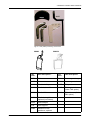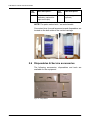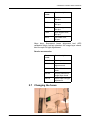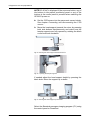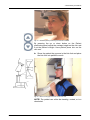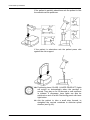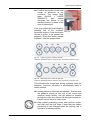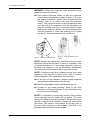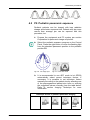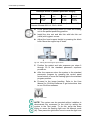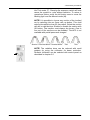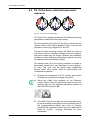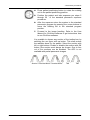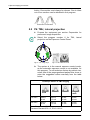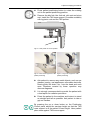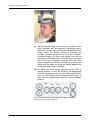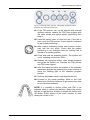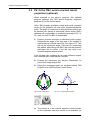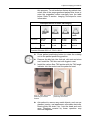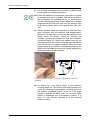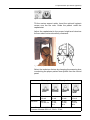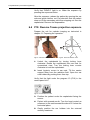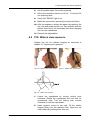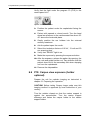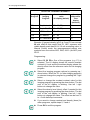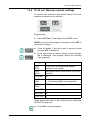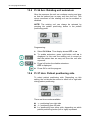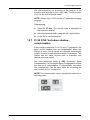
1
ENGLISH Orthopantomograph® OP200 D Orthoceph® OC200 D User Manual 5139796-100 rev. 5 Copyright Code: 5139796-100 rev 5 Date: 6 November 2009 Document code: D500319 rev 5 Copyright © 11/2009 by PaloDEx Group Oy. All rights reserved. Orthopantomograph® and Orthoceph® are registered trademarks of Instrumentarium Dental. U.S. patents 4,641,336; 5,016,264; 5,425,065, 5,444,754, 6,731,717 and 6,829,326. German patent 4,344,745. Finnish patents 112594 and 114383. Windows® is trademark of Microsoft Corporation in the United States of America and other countries. Pentium® is a registered trademark of Intel Corporation. Iomega® Jaz® is a registered trademark of Iomega Corp. Documentation, trademark and the software are copyrighted with all rights reserved. Under the copyright laws the documentation may not be copied, photocopied, reproduced, translated, or reduced to any electronic medium or machine readable form in whole or part, without the prior written permission of Instrumentarium Dental. The original language of this manual is English. Instrumentarium Dental reserves the right to make changes in specification and features shown herein, or discontinue the product described at any time without notice or obligation. Contact your Instrumentarium Dental representative for the most current information. Manufactured by Instrumentarium Dental Nahkelantie 160 (P.O. Box 20) FI-04300 Tuusula FINLAND Tel. +358 10 270 2000 Fax. +358 9 851 4048 For service, contact your local distributor. Table of Contents 1 Introduction.................................................................................................................. 1 1.1 General ................................................................................................................. 1 1.2 Markings and graphics symbols............................................................................ 2 1.3 Type and version................................................................................................... 3 1.4 Options, accessories and manuals ....................................................................... 4 1.5 Radiation protection guidelines ............................................................................. 5 1.5.1 Protection by distance................................................................................ 6 1.5.2 Laser lights................................................................................................. 7 1.5.3 Control from a protected environment........................................................ 7 1.5.4 Emergency Stop Switch ............................................................................. 8 1.6 Manufacturer’s liability........................................................................................... 8 1.7 Disposal ................................................................................................................ 9 2 OP200 D controls and accessories.......................................................................... 11 2.1 OP200 D main parts............................................................................................ 11 2.2 OC200 D Main parts ........................................................................................... 15 2.3 Control panel....................................................................................................... 16 2.4 Positioning panels ............................................................................................... 19 2.5 Patient positioning accessories........................................................................... 20 2.6 Disposables & Service accessories .................................................................... 22 2.7 Changing the fuses ............................................................................................. 23 3 Equipment care and preparations............................................................................ 25 3.1 Care Instructions ................................................................................................. 25 3.2 Cleaning recommendations ................................................................................ 25 3.2.1 Cleaning ................................................................................................... 25 3.2.2 Disinfection and sterilization..................................................................... 26 3.2.2.1 Autoclave ................................................................................... 26 3.2.2.2 Steam sterilization ..................................................................... 26 3.2.2.3 Ethylene oxide sterilization ........................................................ 27 3.2.3 Other sterilization processes.................................................................... 27 3.2.3.1 Dry heat sterilization .................................................................. 27 3.2.3.2 Liquid chemical sterilant gases.................................................. 27 3.2.3.3 Chemical sterilant gases............................................................ 27 3.3 Connecting and disconnecting the CCD sensor ................................................. 28 3.4 Preparation for panoramic image acquisition...................................................... 29 3.5 Selecting collimator height with automatic collimator.......................................... 33 4 Panoramic procedures.............................................................................................. 35 4.1 P1: Standard panoramic exposure...................................................................... 35 4.2 P2: Pediatric panoramic exposure ...................................................................... 43 4.3 P3: Ortho Zone enhanced panoramic exposure ................................................. 46 4.4 P4: Orthogonal exposure .................................................................................... 48 4.5 P5: Wide arch panoramic exposure .................................................................... 50 5 Special imaging procedures..................................................................................... 53 5.1 BW: Bitewing exposure ....................................................................................... 53 5.2 P6: TMJ, Lateral projection ................................................................................. 54 5139796-100 rev 4 Instrumentarium Dental i 5.3 P6: Ortho TMJ, axial corrected lateral projection (optional) ................................ 58 5.4 P7: TMJ, posterioranterior projection .................................................................. 62 5.5 P8: Maxillary Sinus view ..................................................................................... 63 6 Cephalometric procedures (optional)...................................................................... 67 6.1 Preparing the operation....................................................................................... 67 6.2 P9a: Cephalo Core Lateral projection P9b: Lateral projection ........................................................................................ 67 6.3 P10: Cephalo postero-anterior (PA) projection ................................................... 70 6.4 P10: Reverse Towne projection exposure .......................................................... 72 6.5 P10: Waters view exposure ................................................................................ 73 6.6 P10: Carpus view exposure (holder optional) ..................................................... 74 7 Imaging technique ..................................................................................................... 77 7.1 Automatic exposure control (AEC)...................................................................... 77 7.2 AEC test .............................................................................................................. 78 7.3 Exposure technique factors................................................................................. 78 7.4 Manual mode ...................................................................................................... 80 7.5 Free selection of kV and mA ............................................................................... 81 7.6 Test mode ........................................................................................................... 82 7.7 Measurements from the image ........................................................................... 83 8 Special features ......................................................................................................... 85 8.1 Basic quality assurance ...................................................................................... 85 8.2 Advanced QA (optional) ...................................................................................... 86 8.3 Exposure counter ................................................................................................ 87 8.4 Preventive maintenance reminder ...................................................................... 87 9 Understanding the OP200 D image.......................................................................... 89 10 Failure diagnostics ................................................................................................... 91 10.1 Failure messages................................................................................................ 91 10.2 kV display............................................................................................................ 91 10.3 mA display........................................................................................................... 92 10.4 Time display ........................................................................................................ 92 10.5 Resetting a failure ............................................................................................... 92 10.6 Failure codes....................................................................................................... 94 11 Diagnosing image quality problems ....................................................................... 95 11.1 Patient positioning problems ............................................................................... 95 11.2 Image appearance problems .............................................................................. 98 11.3 Artefacts .............................................................................................................. 99 11.4 Unit operation.................................................................................................... 100 12 How to use the user programming mode............................................................. 103 12.1 General ............................................................................................................. 103 12.2 Installation and unit configuration programs ..................................................... 103 12.3 Programs affecting image quality...................................................................... 104 12.4 Other Pr programs ............................................................................................ 105 12.5 How to use the user programming mode .......................................................... 105 ii Instrumentarium Dental 5139796-100 rev 4 13 User program features ........................................................................................... 107 13.1 Pr 50 S3d: Volumetric Tomography settings..................................................... 107 13.2 Pr 51 PUS: Power up settings........................................................................... 108 13.3 Pr 52 PCo and Pr 52 gCo: Constant contrast & density settings................................................................. 108 13.4 Pr 53 nor: Resume normal settings................................................................... 111 13.5 Pr 54 Arn: Rotating unit autoreturn ................................................................... 112 13.6 Pr 57 Hon: Patient positioning side ................................................................... 112 13.7 Pr 58 CON: Vertebrae shadow compensation .................................................. 113 13.8 Pr 59 PSE: Preventative maintenance reminder............................................... 115 13.9 Pr 60 bEP: Panel beep...................................................................................... 116 13.10 Pr 61 CLC: Clear exposure counter................................................................. 117 13.11 Pr 62 ERR: Last failure code ........................................................................... 117 13.12 Pr 63 CEL: Cephalostat exposure limit............................................................ 118 13.13 Pr 64 FSt: Fast scanning selection .................................................................. 118 13.14 Pr 65 doS: Dose / time display selection ......................................................... 119 13.15 Pr 66 COU: Exposure counters ....................................................................... 121 13.16Pr 67 qUA: Quality assurance .......................................................................... 122 14 User statement........................................................................................................ 123 14.1 Dose area product (DAP).................................................................................. 128 15 Technical specifications ........................................................................................ 131 15.1 Electromagnetic Compatibility (EMC) tables..................................................... 140 16 Maintenance ............................................................................................................ 145 16.1 Maintenance Schedule...................................................................................... 145 16.2 Monthly Inspection by User............................................................................... 145 16.3 Preventive maintenance Reminder ................................................................... 146 5139796-100 rev 4 Instrumentarium Dental iii iv Instrumentarium Dental 5139796-100 rev 4 1 Introduction 1.1 General Instrumentarium Dental Orthopantomograph® OP200 D panoramic unit (hereafter called “OP200 D”) is a software controlled diagnostic panoramic dental X-ray equipment for producing high quality digital images of dentition, TM-joints and skull. In order to take images with OP200 D you need a suitable PC hardware connected to the OP200 D unit and CliniView software to handle images. OP200 D performs the following procedures: Standard panoramic exposure Pediatric panoramic exposure Ortho Zone enhanced panoramic exposure Wide arch panoramic exposure Orthogonal panoramic exposure Maxillary sinus TMJ, lateral projection or Ortho TMJ axial corrected lateral projection (optional) TMJ, PA projection Bitewing exposure Orthoceph® OC200 D is a more equipped x-ray panoramic unit with cephalometric exposure option (hereafter called “OC200 D”) . In addition to the OP200 D functions OC200 D performs the following cephalometric procedures: lateral view posterior-anterior (PA) and anterior-posterior (AP) views The basic OP200 D can be upgraded later to the Orthoceph® OC200 D. A minimum complete system contains the X-ray unit itself (with all of its accessories) and the modality workstation (PC) that is connected to the unit. However note that where as the rest of the system is installed to the patient environment, the modality workstation or any other PC may have restrictions to the place of installation referenced to that environment. As the manufacturer we strongly recommend that you read this manual before taking the unit into use. 5139796-100 rev 4 Instrumentarium Dental 1 1 Introduction NOTE! OP200 D Must be installed according to the OP200 D installation & Adjustments manual by a qualified technician. Only trained personnel should be allowed to operate OP200 D. 1.2 Markings and graphics symbols The following symbols are used in OP200 D: Radiographic control Protective earth (ground) Type B equipment GOST-R A certification that the products qualifies for safety requirements in Russia Dangerous voltage On (Power) Off (Power) Attention, consult accompanying documents If the unit has CE-marking it is CE-marked according to the Medical Device Directive 93/ 42/EEC. If the unit has UL-marking, it is UL-marked according to UL60601-1 and CAN/CSA C22.2 No.601.1 This symbol indicates that the waste of electrical and electronic equipment must not be disposed as unsorted municipal waste and must be collected separately. Please contact an authorized representative of the manufacturer for information concerning the decommissioning of your equipment. 2 Instrumentarium Dental 5139796-100 rev 4 1 Introduction 1.3 Type and version The type and version of OP200 D is defined in the main label of the unit located on the vertical carriage bottom plate next to the power on/off switch or in the column label of the unit located on the column. The unit is class I, type B and with IP-20 protection. Fig 1.1. Location of main label and CE mark Fig 1.2. Main label and CE mark (230 V) 5139796-100 rev 4 Instrumentarium Dental Fig 1.2. Main label and CE mark (110 V) 3 1 Introduction The type and version of the unit can be read from the main label or column label codes. The type numbers appear in the following form: OP200 D-a-bc-d-S. TYPE AND VERSION OP200 D short form for ORTHOPANTOMOGRAPH® OP200 D OC200 D short form for ORTHOCEPH® OC200 D a bc type of the x-ray tube insert which is originally utilized: 1 = Toshiba D-051S the type of Panoramic sensor (b) and Cephalostat sensor (c): 0 = No sensor = No type number 1 = PAN sensor, fixed 2 = PAN sensor, removable 3 = CEPH sensor, fixed 4 = PAN / CEPH sensor, removable NOTE: Number can be for example “24” meaning both PAN sensor and PAN/CEPH sensor. d version number: 1 = OP200 models starting from s/n 100 000 S indication of a "Special" version, marked only in products which have a non-standard modification For example, OP200 D-1-4-1 is: (OP200 D) Orthopantomograph® OP200 D (-1) with Toshiba D-051S tube (-4) Removable combined panoramic and cephalostat sensor (-1) first version of OP200. 1.4 Options, accessories and manuals The options are listed in the appendices. The accessories are listed in sections 2.5 and 2.6. All standard items and approved accessories are suitable for use within the patient environment. WARNING! This product itself complies IEC601-1-1 medical safety standard but in order to the system incorporating also a PC to comply the standard, EITHER the PC has to be a medical PC OR the PC has to be located over 1,5 meters apart from the OP/OC200 D unit. The installer and the user of the system shall confirm that 4 Instrumentarium Dental 5139796-100 rev 4 1 Introduction at least one of the above requirements is fulfilled. A PC is a medical one if it complies IEC 601-1standard and that is indicated in the accompanying documents of the PC. NOTE! In order to maintain safe and correct functioning of OP200 D, only the approved accessories may be used. CAUTION! Use of controls or adjustments or performance of procedures other than those specified herein may result in hazardous radiation exposure. Following manuals and documents are shipped with the OP200 D: OP200 D / OC200 D Installation & Adjustments Manual OP200 D / OC200 D User Manual Installation & User Manual for CliniView software These manuals and future updates are available on request from the manufacturer. 1.5 Radiation protection guidelines X-ray equipment may cause injury if used improperly. The instructions contained in this manual must be read and followed when operating the Orthopantomograph® OP200 D. All government and local regulations pertaining to radiation safety must be observed. NOTE! For USA: Many provisions of these regulations are based on recommendations of the National Council on Radiation Protection and Measurements. Recommendations for dental x-ray protection are published in NCRP Report #35 available from NCRP Publications, 7910 Woodmont Avenue, Suite 1016, Bethesda, MD 20814. Personal radiation monitoring and protective devices are available and recommended for staff members. It is also recommended to provide the patient with a protective apron. Consult the physician before taking images of pregnant patients. WARNING! OP200 D must not be used in rooms where an explosion hazard exists. Equipment not suitable for use in the presence of flammable mixtures. OP200 D with radiation protection in accordance with IEC601-1-3:1994. 5139796-100 rev 4 Instrumentarium Dental 5 1 Introduction 1.5.1 Protection by distance In all examinations the user of the x-ray equipment should wear protective clothing. The operator does not need to be close to the patient during normal use. The protection against stray radiation can be achieved by using the hand switch not less than 2 m (7 ft) from the focal spot and the xray beam. Operator should maintain visible contact with the patient and technique factors. This allows immediate termination of radiation by the release of the exposure button in the event of a malfunction or disturbance. Caution information on control panel: CAUTION X-RAYS ATTENTION RAYONS X WARNING: This x-ray unit may be dangerous to patient and operator unless safe exposure factors, operating instructions and maintenance schedules are observed. 6 Instrumentarium Dental 5139796-100 rev 4 1 Introduction 1.5.2 Laser lights Fig 1.3. Laser light (CLASS 1 LASER PRODUCT). Max output 100µW. 1.5.3 Control from a protected environment The control panel hand switch or optional remote hand switch can be used from an environment protected from the x-ray radiation. The fully extended spiral cable length of the control panel hand switch is approx. 4 m (13 ft). The cable length of the remote hand switch (part no. 69961) is approx. 10 m (32 ft). 5139796-100 rev 4 Instrumentarium Dental 7 1 Introduction 1.5.4 Emergency Stop Switch In case of malfunction of the exposure button release or other protective devices of the unit, an emergency stop switch is provided on the right side of the unit so that the patient can reach it. If the emergency stop switch is pressed during an exposure, the exposure is terminated immediately and the x-ray unit is completely stopped. An interrupted exposure cannot be continued later, but has to be retaken from the beginning. 1.6 Manufacturer’s liability As a manufacturer we can only assume liability of safe and reliable operation of this unit when OP200 D unit installation was performed according to the OP200 D Installation & Adjustments Manual and OP200 D Unit is used according to the OP200 D User Manual CliniView PC software was installed according to the Installation Manual for CliniView software. CliniView software is used according to User Manual for CliniView software. Maintenance and repairs are performed by a qualified Orthopantomograph® Dealer and Original or authorized spare parts are used In order to guarantee maximal image quality for the entire life time of this high performance imaging system, we suggest that a special image quality assurance procedure (* and test object designed for image quality assurance 8 Instrumentarium Dental 5139796-100 rev 4 1 Introduction purposes is used (code 68795). Also we recommend that a qualified serviceman to check the unit to be in its original condition regarding electrical, radiation and mechanical safety according to our maintenance program described in more details in maintenance manual (code 61049) every year or after 2000 images. For more information please contact your local dealer. *) According to EN61223-3-4 and DIN 6868-151 If service on the unit is performed, a work order describing the type and extent of repair must be provided by the service technician. This must contain information of changes of nominal data or work range performed. The work order must furthermore indicate the date of repair, the name of the company concerned and a valid signature. User should keep this work order for future references. NOTE! Only use PC hardware that has been tested to be compatible with the OP 200 D PCI board and CliniView software. NOTE! Certain changes to the hardware may void the compatibility. Contact your local dealer for up-to-date information on this matter. 1.7 Disposal At the end of useful service life of the device, its spare parts, its replacement parts and its accessories make sure that you follow all local, national and international regulations regarding the correct and safe disposal and/or recycling of the device, its spare parts, its replacement parts and its accessories. The device, its spare parts, its replacement parts and its accessories may include parts that are made of or include materials that are non-environmentally friendly or hazardous. These parts must be disposed of in accordance with all local, national and international regulations regarding the disposal of non-environmentally friendly or hazardous materials. The locations of all parts that are made of or include materials that are non-environmentally friendly or hazardous can be found in the device service manual. 5139796-100 rev 4 Instrumentarium Dental 9 1 Introduction 10 Instrumentarium Dental 5139796-100 rev 4 2 OP200 D controls and accessories 2 OP200 D controls and accessories WARNING! Do not stack or locate the unit close to other equipment. 2.1 OP200 D main parts 3 4 13 Optional cephalostat 2 1 12 11 5 10 8 9 6 5139796-100 rev 4 7 1. CCD sensor 2. CCD sensor holder 3. Main support 4. Rotating unit 5. Head and Temple support 6. Bite fork with rod 7. Chin rest 8. Handles 9. Positioning panel Instrumentarium Dental 11 2 OP200 D controls and accessories 10. Control panel 11. Exposure indicator lights 12. FH laser (CLASS 1 LASER PRODUCT) light height adjustment 13. Mirror 14. PC equipment Fig 2.1. PC equipment 15. Remote exposure button and holder (optional in some markets) 15 Fig 2.2. Remote exposure button 12 Instrumentarium Dental 5139796-100 rev 4 2 OP200 D controls and accessories 16 19 17 18 Fig 2.3. Carriage bottom plate and unit main label 20 21 Fig 2.4. Optical fibre connectors in OP200 D 5139796-100 rev 4 Instrumentarium Dental 13 2 OP200 D controls and accessories 22 25 23 Fig 2.5. Optical fibre connectors in PC 16. Main label 17. Power ON / OFF switch with an indicator NOTE! When unit has been switched ON, wait about one minute until the unit is ready to exposure. 18. Main fuses with label 19. Connector for Control panel 20. Optical fiber link connectors at OP200 D (transmitter and receiver) 21. Cephalostat main cable (only in OC200 D units) 22. Optical fiber link connectors at PCI card (transmitter and receiver) 23. PCI board status leds 14 Instrumentarium Dental 5139796-100 rev 4 2 OP200 D controls and accessories 2.2 OC200 D Main parts 1 2 8 7 9 4 6 2 5139796-100 rev 4 5 1. Cephalostat head 2. Control buttons 3. CCD sensor 4. Secondary collimator 5. Ear rod with pin 6. Nasion support with scale 7. Locking knob for ear rod rotation 8. Ear rod brake release button 9. Knob for raising and lowering the CCD sensor Instrumentarium Dental 3 15 2 OP200 D controls and accessories 2.3 Control panel Exposure Control Exposure Button Exposure Indicator light “Ready” Indicator light Pediatric Collimator light Sections 1. Anterior 2. Premolar 3. Molar 4. Jaw joint NOTE! Sections 2 and 3 are combined as one section in panoramic programs. Imaging Procedures P1-P12 with Indicator lights Standard Panoramic (P1) Pediatric Panoramic (P2) Ortho Zone enhanced Panoramic (P3) Orthogonal Panoramic (P4) Bitewing (BW) 16 Instrumentarium Dental 5139796-100 rev 4 2 OP200 D controls and accessories Wide arch Panoramic (P5) TMJ lateral projection (P6) or Ortho TMJ, axial corrected lateral projection (optional) (P6) TMJ, posterior-anterior projection (P7) Maxillary Sinus View (P8) Cephalo Core Lateral Projection (P9a) Cephalo Lateral Projection (P9b) Cephalo Postero-Anterior (PA) projection (P10) Volumetric Tomography mandible (optional) (P11) Volumetric Tomography maxilla (optional) (P12) Exposure Modes with Indicator lights Automatic Exposure Control Test Mode Manual Exposure Control 5139796-100 rev 4 Instrumentarium Dental 17 2 OP200 D controls and accessories Automatic exposure signal to noise ratio (9 dose control steps) Default Signal to Noise ratio Decrease dose by one and half step Half step higher dose Two steps higher dose Displays showing exposure values kV display mA display Exposure time display / Radiation dose display Icons for Pre-programmed Technique Factors with Indicator lights Child - Juvenile - Adult - Large adult Function Selection buttons: Move the flashing indicator to left or right / decrease or increase the value on display Move the flashing indicator up or down to the next selection row P1-P10: Show exposure counter value P11-P12: Show projection angle and number of images All programs: Clear errors NOTE! The OK button is also used for entering and exiting programming mode. See chapter User program features for details. 18 Instrumentarium Dental 5139796-100 rev 4 2 OP200 D controls and accessories Radiation warning 2.4 Positioning panels 24 23 22 21 25 20 26 20 Fig 2.6. Positioning panel, right side (on left side just the buttons 25 and 26 are flipped) Positioning Panel button meaning in each mode Key 20 Panoramic(P1-P5) Maxillary Sinus (P8) Carriage movement up and down 21 moves the image layer 3 mm anterior during exposure (retrusion) moves the image layer 10 mm anterior from nominal position during exposure 22 normal occlusion/reset position nominal position 23 moves the image layer 3 mm posterior during exposure (protrusion) moves the image layer 10 mm posterior from nominal position during exposure 24 Positioning lasers (CLASS 1 LASER PRODUCT) on/off 25 Rotating unit movement: Start positioning 26 Rotating unit movement: Patient positioning Positioning Panel button meaning in each mode Key 20 5139796-100 rev 4 Cephalometric (P9-P10) TMJ (P6-P7) Carriage movement up and down 21 No functioning moves image layer anterior 22 No functioning reset to middle Instrumentarium Dental 19 2 OP200 D controls and accessories Positioning Panel button meaning in each mode 23 No functioning moves image layer posterior 24 Postioning lasers (CLASS 1 LASER PRODUCT) on / off 25 Rotating unit movement: Start positioning 26 Rotating unit movement: Patient positioning Up movement Down movement Positioning light button Fig 2.7. Positioning panel, cephalostat head 2.5 Patient positioning accessories 64197 68758 Fig 2.8. Panoramic patient positioning accessories 20 Instrumentarium Dental 5139796-100 rev 4 2 OP200 D controls and accessories 60477 Fig 2.9. TMJ patient positioning accessories 68696 5139796-100 rev 4 200634 Part code: Part description: Part code: Part description: 68758 Chin rest 62904* Nose support, long 64197 Sinus rest 62906* Nose support, short 62942* Bite block 10 pcs 60477 TMJ pointer 62985* Bite fork, short 56 mm 64665 TMJ angle indicator (Ortho TMJ option) 62988* Bite fork 71 mm 62943 TMJ chin rest (Ortho TMJ option) 62958* Bite fork, long 80 mm, optional (not shown) 50076 Child adaptor 6722 Chin support 62965 Edentulous bite positioner, optional Instrumentarium Dental 21 2 OP200 D controls and accessories Part code: Part description: Part code: Part description: 68696 Cephalostat mirror assembly (optional for right hand ceph) 200634 Carpus support (optional) NOTE! The parts marked with * are autoclavable. Convenient bins for small accessories and disposables are located on the both sides of the vertical carriage. Fig 2.10. Left and right accessory cabins 2.6 Disposables & Service accessories The following accessories, disposables and tools are available for the equipment: 7451 7452 8915 7453 6644 Fig 2.11. Disposables 22 Instrumentarium Dental 5139796-100 rev 4 2 OP200 D controls and accessories Part code: Part description: 6644 Bite fork coat, 200 pcs 7451 Chin rest coat, 200 pcs 7452 Temple support coat, 200 pcs 7453 Nose support coat, 200 pcs 8915 Ear holder coat, 20 pcs Allen keys, fluorescent beam alignment tool, AEC calibration block, ball-pin phantom for image layer check, bird for ceph FH-light adjustment. Service accessories: Part code: Part description: 61215 Allen keys 68662 fluorescent beam alignment tool 60441 AEC calibration block 68799 ball-pin phantom for image layer check 68719 bird for ceph FH-light adjustment 2.7 Changing the fuses 5139796-100 rev 4 Instrumentarium Dental 23 2 OP200 D controls and accessories Push inward on the fuse base and twist it counterclockwise with a screwdriwer. The fuse with the base will come out. Remove the fuse from the base and replace it with the new one. Repeat this with each blown fuse. Fasten both fuses by pushing the base in and twisting it clockwise with a screwdriver. Use only appropriate fuses: 326 Littelfuse 10A (slow blow) 230 Vac line voltage MDA-15 Cooper Bussman 15A (time delay) 115 Vac line voltage 24 Instrumentarium Dental 5139796-100 rev 4 3 Equipment care and preparations 3.1 Care Instructions X-ray devices are sophisticated electronic products including advanced technologies. As such, they have to be handled with a high degree of care. This document gives the care instructions applicable to the Orthopantomograph® panoramic and cephalostat units. NOTE! It is strictly mandatory to follow these Care Instructions in order to not void the warranty of the product. CAUTION! As a standard recommendation, clean the unit regularly using non-agressive, mild, commercially available cleaning agents. 3.2 Cleaning recommendations The unit should be cleaned after every usage between the patients. Items and surfaces that are not given special instructions for cleaning, disinfecting and sterilizing, can be cleaned with soft cloth moistured with disinfective after every usage. WARNING! Always disconnect OP200 D from mains or switch off the power prior to cleaning or disinfecting the unit. CAUTION! Do not allow water or other cleaning liquids to enter the unit interior since these may cause short-circuits or corrosion. 3.2.1 Cleaning The purpose of cleaning and rinsing is to remove all adherent visible soil (eg. blood, protein substances and other debris), to reduce the number of particulate and micro-organisms, and to reduce the amount of pyrogenic and antigenic material. Use a cloth moistened in cool-to-lukewarm, soapy water to clean the unit, and prevent coagulation and thus faciliate the removal of protein substances. Then wipe with a cloth moistened in clear water. Mild detergent solution can be used. Use cleaners or solvents, which are listed as allowed cleaning agents below. If you are uncertain of the nature of cleaning agent, do not use it. 5139796-100 rev 4 Instrumentarium Dental 25 3 Equipment care and preparations Examples of cleaning agents that are allowed or prohibited when cleaning the unit panels: Allowed: Methanol (metyl alcohol), Soap, Isopropyl alcohol, distilled water. Not allowed: Bentzene, Chlorine bentzene, Acetone, Acetic ether, agents containing phenol, paracetic acid, peroxide and other oxygen-cleaving agents, sodium hypochlorite and iodine-cleaving agents. 3.2.2 Disinfection and sterilization The disinfection and sterilization concerns the parts of the equipment like bite block, chin support and accessories. Wipe manually with clean cloth moistured in disinfectant solution. Never use corrosive or solvent disinfectants. All items and surfaces should be dried before next usage. NOTE! Wear gloves and other protective equipment during decontamination process. WARNING! Do not use any disinfecting sprays since the vapor could ignite causing injury. Disinfecting techniques for both the unit and the room must comply with all laws and regulations that have jurisdiction of law within the jurisdiction on which the unit is. 3.2.2.1 Autoclave Some removable parts in touch with the patient are sterilizable in autoclave. Such parts are: Bite forks (62985, 62988, 62958), Bite block (62942) and Nose supports (62906, 62904). If autoclaving is performed for these items, disinfection by immersing in disinfectant solution for 10 minutes is not needed. 3.2.2.2 Steam sterilization Recommended parameters for sterilizable parts are: 26 Gravity-displacement steam sterilization "Flash" sterilization: Temperature: 270 F (132°C) Exposure time: 3 minutes Prevacuum steam sterilization "Flash" sterilization: Instrumentarium Dental 5139796-100 rev 4 3 Equipment care and preparations Temperature: 270 F (132°C) Exposure time: 3 minutes Steam-flush pressure-pulse steam sterilization Temperature: 270 F to 275 F (132°C to 135°C) Exposure time: 3 to 4 minutes 3.2.2.3 Ethylene oxide sterilization Not recommended as sterilization process for OP200 D parts. 3.2.3 Other sterilization processes 3.2.3.1 Dry heat sterilization Dry heat sterilization can only be used with the bite forks. Typical cycle parameters are: Temperature: 338 F (170°C) Exposure time: 60 minutes Temperature: 375 F (190°C) Exposure time: 6 minutes (unwrapped items) or 12 minutes (wrapped items) 3 3.2.3.2 Liquid chemical sterilant gases Not recommended as sterilization process for OP200 D parts. 3.2.3.3 Chemical sterilant gases Not recommended as sterilization process for OP200 D parts. Testing For example, a 2% hydrogen peroxide solution can be used to verify removal of protein from the unit. Soluton bubbles if it comes in contact with blood or protein substances. If any bubbling is observed, the decontamination process must be performed again. 5139796-100 rev 4 Instrumentarium Dental 27 3 Equipment care and preparations 3.3 Connecting and disconnecting the CCD sensor OC200 D unit can be equipped with one or two sensors. If the unit is equipped with one cephalostat sensor the same sensor can be used for pan and ceph imaging. Another possibility is to use two sensors at the place all the time. In this case the unit is equipped with one pan and one ceph sensor. Panoramic sensor To remove the CCD sensor from rotating unit pull the handgrip downwards (Figure 1). Push the sensor slightly from below (Figure 2) so that it comes off from the top. Lift the sensor a little and pull it away (Figure 3). Fig 3.1. Removal of the panoramic CCD sensor To install the sensor back to the rotating unit proceed as stated above in reverse order. However instead of pulling the ring, push the top of the sensor towards the rotating unit. Fig 3.2. Placement of the panoramic CCD sensor NOTE! When installing the sensor, make sure that the sensor is properly connected by pushing with one hand from the top towards the holder and simultaneously pull toward yourself from the bottom. 28 Instrumentarium Dental 5139796-100 rev 4 3 Equipment care and preparations Cephalostat sensor To remove the CCD sensor from the cephalostat head press the button on the knob and turn it 360° counterclockwise to lower the sensor down to rest on the safety clips. Then press the clips on both sides of the sensor while having a good grip on the sensor to release it completely from the holder. CAUTION! Hold the sensor while pressing the clips in order to prevent the sensor from falling. Fig 3.3. Removal of the Ceph CCD sensor To install the sensor back to the cephalostat head lift the sensor to holder until a click is heard. Then press the button on the knob and turn 360° to raise the sensor to it's locked position. Fig 3.4. Placement of the Ceph CCD sensor CAUTION! Handle the sensor with care as instructed in this manual. The sensor must not be dropped or exposed to impacts. A shock indicator inside the sensor will show if the sensor has been exposed to excess impact. 3.4 Preparation for panoramic image acquisition 1. 5139796-100 rev 4 Locate the power switch behind the carriage at the bottom left side. Turn the power switch to the "I" position. Turning on takes a few seconds. Instrumentarium Dental 29 3 Equipment care and preparations NOTE! Er 45 InP is displayed if the exposure button, any of the buttons in the patient positioning panel or any of the buttons in the control panel is pressed when switching the OP200 D power on. 2. Set the CCD sensor into the panoramic sensor holder. See chapter Connecting and disconnecting the CCD sensor. 3. Move the head support towards the mirror by pressing both side buttons simultaneously and make sure the temple supports are fully opened by rotating the black round knob anti-clockwise. Fig 3.5. Moving the head support towards the mirror Fig 3.6. Opening the temple supports If needed adjust the head support height by pressing the black knob. Move the support up or down. Fig 3.7. Moving the head support up and down. Select the Standard panorama imaging program (P1) using the control panel or SmartPad. 30 Instrumentarium Dental 5139796-100 rev 4 3 Equipment care and preparations 5139796-100 rev 4 Instrumentarium Dental 31 3 Equipment care and preparations 4. Computer preparation: – Switch on PC – Start Windows software – Start CliniView software Refer to the User manual for CliniView software to get instructions how to use the CliniView software – Open the patient database and select patient or type all the required patient details in order to take an image – Press "Take PanImage" button to get ready for an exposure NOTE! Always maintain visible contact with the patient and technique factors during the exposure and stay within earshot to be able to hear the warning tone. This allows immediate termination of radiation by the release of the exposure button in the event of a malfunction or disturbance. 5. Proceed to the section Panoramic procedures for Panoramic imaging and to the section Special imaging procedures for Sinus and TMJ imaging. WARNING! Handle the sensor with care as instructed in this manual. The sensor must not be dropped or exposed to impacts. A shock indicator inside the sensor will show if the sensor has been exposed to excess impact. NOTE! When using the system in an extremely high electromagnetic environment interferences may change image quality. If interference appears, contact your local dealer. 32 Instrumentarium Dental 5139796-100 rev 4 3 Equipment care and preparations 3.5 Selecting collimator height with automatic collimator OP200 lets you to reduce the dose by using low field collimation when diagnostically feasible. Low field collimation is possible in panoramic imaging programs P1P5. It is also possible to take lateral cephalometric images with reduced height using a dedicated imaging program (9a). NOTE! Changing collimation in panoramic imaging programs requires that the unit is configured to allow it. This configuration can be done by your local dealer. Full height collimation is used by default in all imaging programs except P2 (pediatric panoramic) and P9a (cephalo Core lateral projection). To change collimation, proceed as follows: Select the desired imaging program (P1-P5). Press key up on the control panel until the pediatric collimator light is blinking. Activate pediatric collimation by pressing key right, or deactivate it by pressing key left. To select low field collimation for lateral cephalometric imaging, simply select imaging program 9a. 5139796-100 rev 4 Instrumentarium Dental 33 3 Equipment care and preparations 34 Instrumentarium Dental 5139796-100 rev 4 4 Panoramic procedures 4.1 P1: Standard panoramic exposure 1. Prepare the equipment per section 3.3. and 3.4. 2. Verify that the light under "1" (P1) in the control panel is lit. 3. Press patient positioning button to rotate the rotating unit to the patient positioning position. When the system is turned on it will automatically set itself to standard panoramic with AEC (Automatic exposure control) mode settings. You can also program different power up settings if you want. No other Control Panel settings are necessary. NOTE! If you wish to set the AEC dose factors higher or lower or wish to set the technique factors by patient size or manually, refer to section Imaging technique. Fig 4.1. P1: Image Layer Fig 4.2. P1 & AEC mode 4. 5139796-100 rev 4 It is recommended to use AEC mode to let OP200 D automatically select correct technique factors. If necessary, it is possible to set technique factors manually according to the patient size by selecting one of the preprogrammed patient size icons or entering the suggested values manually from the table below. Refer to section Imaging technique for more information. Instrumentarium Dental 35 4 Panoramic procedures Technique factors in standard panoramic imaging Child Juvenile Adult Large adult 110 VAC 66 kV/ 5 mA 66 kV/ 8 mA 66 kV/ 10 mA 66 kV/ 13 mA 230 VAC 66 kV/ 5 mA 66 kV/ 8 mA 66 kV/ 10 mA 66 kV/ 13 mA Note: Example with PR 52. Fast Scan disabled (Pr 64 FSt = OFF). Constant Contrast GCO = 5, PCO = 66/0.0 5. Install the chin rest and bite fork with bite fork rod (adult or child) with hygienic covers. Open temple supports by turning the black knob counterclockwise. Fig 4.3. Chin rest 36 Fig 4.3. Open template supports 6. Ask patient to remove any metal objects, such as eye glasses, jewelry, oral appliances, removable dentures, hearing aids, bib chain, etc., from the head and neck area. Shadows caused by these opacities may obscure diagnosis. 7. It is strongly recommended to provide the patient with a lead apron for radiation protection. 8. Direct the patient to the unit and instruct to stand as straight and tall as possible. Ask patient to take a grip on handles. Instrumentarium Dental 5139796-100 rev 4 4 Panoramic procedures Fig 4.4. Standard patient positioning accessories installed By pressing the up or down button on the Patient positioning panel adjust the carriage height so the chin rest is at the patient's height. Have patient place chin on the chin rest. 9. Show the patient the grooves in the bite fork and place the bite fork into patient's mouth. Fig 4.5. Hands on the grips and chin on the chin rest. NOTE! The patient can either be standing, seated, or in a wheelchair. 5139796-100 rev 4 Instrumentarium Dental 37 4 Panoramic procedures If the patient is partially edentulous ask the patient to bite the edentulous bite positioner. If the patient is edentulous ask the patient press chin against the chin support. 10. Positioning laser (CLASS 1 LASER PRODUCT) lights will switch on automatically when the carriage is moved. They stay on for 35 seconds or until exposure is initiated. If necessary, laser lights can also be switched on and off at the Positioning panel with laser light button. 11. Ask the patient to take a small step forward, to straighten the cervical vertebrae to minimize spinal shadow (see fig 4.8). 38 Instrumentarium Dental 5139796-100 rev 4 4 Panoramic procedures 12. Patient's face and laser (CLASS 1 LASER PRODUCT) light lines can be seen in the curved mirror. Move the FH laser light to illuminate the patients' infra-orbital notch. By slightly raising or lowering the carriage, position the patient so that the Frankfort-Horizontal plane (FH) laser light passes over the ear opening and the infra-orbital notch. Be sure the patient does not slump if carriage is lowered. Fig 4.6. FH-laser light Fig 4.7. Straighten the cervical vertabrae 13. Adjust patient´s head as necessary so that the front laser (CLASS 1 LASER PRODUCT) light coincides with the patient´s mid sagittal plane. 14. Move the head support against the patient's forehead by pressing the buttons on the sides. Fig 4.8. Moving the head support forward and backward 5139796-100 rev 4 Instrumentarium Dental 39 4 Panoramic procedures Adjust the head support height by pressing the black knob. Move the support up or down. Fig 4.9. Fig 4.10. Moving the head support up and down. NOTE! The lowest positions of the head support are used only with low field collimation. Close the temple supports by rotating the black knob clockwise. Fig 4.11. Closing the temple supports Fig 4.12. Front laser light 40 Instrumentarium Dental 5139796-100 rev 4 4 Panoramic procedures 15. Confirm the position of the focal trough in reference to the occlusion. The image layer laser (CLASS 1 LASER PRODUCT) light should illuminate the buccal of the maxillary canine (or base of the nose if edentulous). If not, then adjust the focal trough by pressing one of the occlusion correction buttons. Press the button closest to mirror, if the patient has progenia. Press the button closest to patient, if he has prognathism. 22 23 Fig 4.13. The image layer laser light 24 Fig 4.14. Positioning panel, located at left side. Occlusion adjustment buttons: retrusion (22), normal (23), protrusion (24). 24 23 22 Fig 4.15. Positioning panel, located at right side. Occlusion adjustment buttons: retrusion (22), normal (23), protrusion (24) This will adjust the image layer during exposure. After the exposure, occlusion correction is automatically reset to center position. 16. Advise patient to close lips and swallow. This will raise the patient's tongue to the roof of the mouth and enhance image quality. Ask the patient to breathe through the nose and remain still during the exposure. Patient can be asked to close eyes. 17. After patient positioning press start position button, and wait until the unit stops. Check that the patient positioning is not changed when the rotating unit is moved to its starting position. 5139796-100 rev 4 Instrumentarium Dental 41 4 Panoramic procedures WARNING! During the exposure cycle radiation control guidelines must be observed. 18. Use remote exposure button or take the exposure control panel to a position at least 2 meters (7 ft.) from the patient or behind a shield. After verifying that the "Ready" light is on, press and hold the exposure button. The exposure button must be pressed at least until the end of the exposure cycle as indicated by a light and audible tone, but it is recommended to keep pressing the exposure button until all movements stop. This will continue to move the rotating unit to better position for letting the patient out from the unit. Fig 4.16. Remote exposure button Fig 4.17. Control panel exposure button NOTE! Observe the patient and CliniView real time image acquisition during the exposure. In case of a problem, such as patient movement or if the image acquisition does not succeed, the exposure can be terminated immediately upon release of the exposure switch under the thumb. NOTE! If exposure cannot be initiated and an error code appears on the exposure control panel, refer to section Failure Diagnostics for explanation and correction. 19. At the end of the exposure, release temple supports and guide the patient away from the unit. 20. Remove disposable covers and disinfect the unit. 21. Proceed to the image handling. Refer to the User Manual for CliniView software to get instructions how to use CliniView software. NOTE! It is possible to choose any section of the toothed arc by selecting the arc figure with up button. This shall reduce the radiation dose for the patient. Select the section with left or right buttons. Enable or disable the section with OK button. One section must always be chosen. One to four out of five sections can be disabled. The AEC is not available with partial panoramic images! 42 Instrumentarium Dental 5139796-100 rev 4 4 Panoramic procedures Anterior Premolar-Molar Premolar-Molar TMJ TMJ 4.2 P2: Pediatric panoramic exposure Pediatric patients can be imaged with less radiation dosage and shorter exposure time. Patients with jaw more narrow than average jaw can be exposed with this procedure, too. 1. Prepare the equipment and PC system per section Preparation for panoramic image acquisition. 2. Select the pediatric exposure program on the Control Panel. Press the right button to move the flashing light from the standard panoramic position to the pediatric position P2. Fig 4.18. P2: Image layer 3. Fig 4.19. P2 & AEC mode It is recommended to use AEC mode to let OP200 automatically select correct technique factors. If necessary, it is possible to set technique factors manually according to the patient size by selecting one of the preprogrammed patient size icons or entering the suggested values manually from the table below. Refer to section Imaging Technique for more information. Technique factors in pediatric panoramic imaging Child 5139796-100 rev 4 Instrumentarium Dental Juvenile Adult Large adult 43 4 Panoramic procedures Technique factors in pediatric panoramic imaging 110 VAC 66 kV/ 5 mA 66 kV/ 8 mA 66 kV/ 10 mA 66 kV/ 13 mA 230 VAC 66 kV/ 5 mA 66 kV/ 8 mA 66 kV/ 10 mA 66 kV/ 13 mA Note: Example with PR 52. Fast Scan disabled (Pr 64 FSt = OFF). Constant Contrast GCO = 5, PCO = 66/0.0 4. Press patient positioning button to rotate the rotating unit to the patient positioning position. 5. Install the chin rest and bite fork with bite fork rod (child) with hygienic covers. 6. Adjust the head support height by pressing the black knob. Move the support up or down. Fig 4.20. Moving the head support up and down. 7. Position the patient and take exposure per steps 6 through 20 of the standard panoramic exposure procedure. 8. After the exposure return the system to the standard panoramic program by pressing the control panel arrow buttons to move the flashing light to the standard program position. 9. Proceed to the image handling. Refer to the User Manual for CliniView software to get instructions how to use CliniView software. Fig 4.21. Test mode NOTE! The system can be operated without radiation to demonstrate the movement to the child by setting the system to the Test mode. To do this, press the down button to move the flashing light over the Manual mode (M). Then press the right button once to move the light over 44 Instrumentarium Dental 5139796-100 rev 4 4 Panoramic procedures the Test mode (T). Pressing the exposure switch will now cause the system to cycle without radiation. To return to operational status, press the left button once to move the flashing light over the Manual mode (M). NOTE! It is possible to choose any section of the toothed arc by selecting the arc figure with up button. This shall reduce the radiation dose for the patient. Select the section with left or right buttons. Enable or disable the section with OK button. One section must always be chosen. One to four out of five sections can be disabled. The AEC is not available with partial panoramic images! Anterior Premolar-Molar Premolar-Molar TMJ TMJ NOTE! The radiation dose can be reduced with small patients by using the collimator for beam restriction. Pediatric collimator can be selected with control panel as described in chapter 3.5. 5139796-100 rev 4 Instrumentarium Dental 45 4 Panoramic procedures 4.3 P3: Ortho Zone enhanced panoramic exposure #1 #2 #3 Fig 4.22. P3: Ortho Zone image layers The Ortho Zone program produces two different scanning geometries combined on the same image. The first geometry (#1 and #3 in the figure) starts with the rotation center much further posterior than in the normal panoramic views (eg. Programs P1 and P2). The result of this scanning location will allow for views of the TM joint without redundant shadows from the opposite side ramus obscuring the image. Patients with prosthetic condyles or other posterior radioopaque objects can have the opposite side successfully imaged. The second view (#2 in the figure) produces an image of the anterior region with a very wide layer of focus (approx. 35 mm). This view may be helpful when diagnosing trauma, wired shut, severe class III malocclusion and uncooperative patients. 1. Prepare the equipment and PC system per section Preparation for panoramic image acquisition. 2. Select the Ortho Zone program on the Exposure Control Panel. Press the right button twice to move the flashing light from the standard panoramic position to the Ortho Zone position P3. Fig 4.23. P3 & AEC Mode 3. 46 If the AEC mode is not used, the technique factors can be set according to the patient size by selecting one of the preprogrammed patient size icons or entering manually the suggested values from the table below. Refer to section Imaging Technique for more information. Instrumentarium Dental 5139796-100 rev 4 4 Panoramic procedures Technique factors in ortho zone imaging Child Juvenile Adult Large adult 110 VAC 66 kV/ 5 mA 66 kV/ 8 mA 66 kV/ 10 mA 66 kV/ 13 mA 230 VAC 66 kV/ 5 mA 66 kV/ 8 mA 66 kV/ 10 mA 66 kV/ 13 mA Note: Example with PR 52, Constant Contrast GCO = 5, PCO = 66/0.0 4. Press patient positioning button to rotate the rotating unit to the patient positioning position. 5. Position the patient per steps 5 through 16 of the standard panoramic exposure procedure. Skip step 15. 6. Take the exposure per steps 17 through 20 of the standard panoramic exposure procedure. 7. After the exposure return the system to the standard panoramic program by pressing the control panel arrow buttons to move the flashing light to the standard program position. 8. Proceed to the image handling. Refer to the User Manual for CliniView software to get instructions how to use CliniView software. NOTE! It is possible to choose any section of the toothed arc by selecting the arc figure with up button. This shall reduce the radiation dose for the patient. Select the section with left or right buttons. Enable or disable the section with OK button. One section must always be chosen. One to four out of five sections can be disabled. The AEC is not available with partial panoramic images! Anterior Premolar-Molar Premolar-Molar 5139796-100 rev 4 Instrumentarium Dental TMJ TMJ 47 4 Panoramic procedures 4.4 P4: Orthogonal exposure An optimized view of the dentition only with optimized anqulation and reduced radiation can be achieved by selecting the orthogonal exposure program. 1. Prepare the equipment and PC system per section Preparation for panoramic image acquisition. 2. Select the orthogonal exposure program on the Exposure Control Panel. Press the right button three times to move the flashing light from the standard panoramic position P1 to the orthogonal position P4. Fig 4.24. P4: Orthogonal image layer 3. Fig 4.25. P4 & AEC Mode It is recommended to use AEC mode to let OP200 automatically select correct technique factors. If necessary, it is possible to set technique factors manually according to the patient size by selecting one of the preprogrammed patient size icons or entering the suggested values manually from the table below. See Imaging Technique for more information. Technique factors in ortho zone imaging Child Juvenile Adult Large adult 110 VAC 66 kV/ 5 mA 66 kV/ 8 mA 66 kV/ 10 mA 66 kV/ 13 mA 230 VAC 66 kV/ 5 mA 66 kV/ 8 mA 66 kV/ 10 mA 66 kV/ 13 mA Note: Example with PR 52, Constant Contrast GCO = 5, PCO = 66/0.0 48 Instrumentarium Dental 5139796-100 rev 4 4 Panoramic procedures 4. Press patient positioning button to rotate the rotating unit to the patient positioning position. 5. Position the patient and take exposure per steps 5 through 20 of the standard panoramic exposure procedure. 6. After the exposure return the system to the standard panoramic program by pressing the cursor buttons to move the flashing led to the standard program position. 7. Proceed to the image handling. Refer to the User Manual for CliniView software to get instructions how to use CliniView software. NOTE! It is possible to choose any section of the toothed arc by selecting the arc figure with up button. This shall reduce the radiation dose for the patient. Select the section with left or right buttons. Enable or disable the section with OK button. One section must always be chosen. The AEC is not available with partial panoramic images! Anterior Premolar-Molar Premolar-Mola 5139796-100 rev 4 Instrumentarium Dental 49 4 Panoramic procedures 4.5 P5: Wide arch panoramic exposure When the patient has a wider than normal dental arch, an improved image can be achieved by selecting the wide layer exposure program. 1. Prepare the equipment and PC system per section Preparation for panoramic image acquisition. 2. Select the wide layer panoramic program on the Exposure Control Panel. Press the right button four times to move the flashing led from the standard panoramic position P1 to the wide layer position P5. Fig 4.26. P5: Image layer 3. Fig 4.27. P5 & AEC Mode It is recommended to use AEC mode to let the unit automatically select correct technique factors. If necessary, it is possible to set technique factors manually according to the patient size by selecting one of the preprogrammed patient size icons or entering the suggested values manually from the table below. Refer to section Imaging Technique for more information. Technique factors in wide arch imaging Child Juvenile Adult Large adult 110 VAC 66 kV/ 5 mA 66 kV/ 8 mA 66 kV/ 10 mA 66 kV/ 13 mA 230 VAC 66 kV/ 5 mA 66 kV/ 8 mA 66 kV/ 10 mA 66 kV/ 13 mA Note: Example with PR 52, Constant Contrast GCO = 5, PCO = 66/0.0 50 Instrumentarium Dental 5139796-100 rev 4 4 Panoramic procedures 4. Press patient positioning button to rotate the rotating unit to the patient positioning position. 5. Position the patient and take exposure per steps 5 through 20 of the standard panoramic exposure procedure. 6. After the exposure return the system to the standard panoramic program by pressing the cursor buttons to move the flashing led to the standard program position. 7. Proceed to the image handling. Refer to the User Manual for CliniView software to get instructions how to use CliniView software. It is possible to choose any section of the toothed arc by selecting the arc figure with up button. This shall reduce the radiation dose for the patient. Select the section with left or right buttons. Enable or disable the section with OK button. One section must always be chosen. One to four out of five sections can be disabled. The AEC is not available with partial panoramic images. Anterior Premolar-Molar Premolar-Molar 5139796-100 rev 4 Instrumentarium Dental TMJ TMJ 51 4 Panoramic procedures 52 Instrumentarium Dental 5139796-100 rev 4 5 Special imaging procedures 5.1 BW: Bitewing exposure An orthogonal view of the dentition from the canine and posterior. 1. Prepare the equipment and PC system per section. Preparation for panoramic image acquisition. 2. Select the bitewing exposure program by repeatedly pressing the right button on the control panel until the BW indicator light is flashing. 3. Select exposure values either by entering them manually or by selecting a preset patient size. Example exposure values are found presented in the table below. Technique factors in bitewing imaging Child Juvenile Adult Large adult 110 VAC 66 kV/ 4 mA 66 kV/ 6.3 mA 66 kV/ 8 mA 66 kV/ 10 mA 230 VAC 66 kV/ 4 mA 66 kV/ 6.3 mA 66 kV/ 8 mA 66 kV/ 10 mA Note: Example with PR 52, Constant Contrast GCO = 5, PCO = 66/0.0 4. Press patient positioning button to rotate the rotating unit to the patient positioning position. 5. Position the patient and take exposure per steps 5 through 20 of the standard panoramic exposure procedure. 6. After the exposure return the system to the standard panoramic program. 7. Proceed to the image handling. Refer to the User Manual for CliniView software to get instructions how to use CliniView software. NOTE! It is possible to choose any section of the toothed arc by selecting the arc figure with up button. This reduces the radiation dose for the patient. Select the section with left or right buttons. Enable or disable the section with OK 5139796-100 rev 4 Instrumentarium Dental 53 5 Special imaging procedures button. One section must always be chosen. One to three out of four sections can be disabled in this program. Premolar-Molar Premolar-Molar T 5.2 P6: TMJ, Lateral projection 1. Prepare the equipment per section Preparation for panoramic image acquisition. 2. Select the program number 6 for TMJ, lateral projection on the Exposure Control Panel. Fig 5.1. P6: Image layer 3. Fig 5.2. P6 & Manual mode The system is in the manual exposure control mode, as the automatic exposure control is not available for this program. To set technique factors by patient size, select one of the preprogrammed patient size icons or enter the suggested values manually from the table below. Technique factors in TMJ imaging Child Juvenile Adult Large adult 110 VAC 66 kV/ 8 mA 66 kV/ 13 mA 66 kV/ 16 mA 70 kV/ 16 mA 230 VAC 66 kV/ 8 mA 66 kV/ 13 mA 66 kV/ 16 mA 70 kV/ 16 mA Note: Example with PR 52, Constant Contrast GCO = 5, PCO = 66/1.0 54 Instrumentarium Dental 5139796-100 rev 4 5 Special imaging procedures 4. Press patient positioning button to rotate the rotating unit to the patient positioning position. 5. Remove the bite fork, bite fork rod, chin rest and sinus rest. Install the TMJ nose support (2 models available) with hygienic coat and the TMJ pointer. Fig 5.3. TMJ pointer in correct position Fig 5.4. Short nose support for TMJ Fig 5.5. Long nose support for TMJ patient positioning patient positioning 6. Ask patient to remove any metal objects, such as eye glasses, jewelry, oral appliances, removable dentures, hearing aids, bib chain, etc., from the head and neck area. Shadows caused by these opacities may obscure diagnosis. 7. It is strongly recommended to provide the patient with a lead apron for radiation protection. 8. Direct the patient to the machine and instruct to stand as straight and tall as possible. Ask patient to take a grip on handles. By pressing the up or down button on the Positioning Control panel adjust the carriage height so that the TMJ nose support is at the patient's nose height. Have patient place nose against TMJ nose support. 5139796-100 rev 4 Instrumentarium Dental 55 5 Special imaging procedures Fig 5.6. TMJ Lateral projection 9. Adjust patient's head as necessary so that the front laser coincides with the patient's mid-sagittal plane. Move the FH laser light to illuminate the patients' infraorbital notch. By slightly raising or lowering the carriage, position the patient so that the FrankfortHorizontal plane (FH) laser light passes over the ear opening and the infra-orbital notch. Be sure the patient does not slump if carriage is lowered. Move the head support against the patient's forehead by pressing the buttons on the sides and close the temple supports by rotating the black knob clockwise. 10. To adjust the focal trough reference to the TMJ, a special pointer is used. By pressing the appropriate occlusal adjustment button on the Positioning Control, move the TMJ pointer forward (towards the mirror) or back until the pointer aligns with the external auditory meatus. 24 23 22 Fig 5.7. Positioning panel, left side. TMJ pointer adjustment buttons: backward (22), reset (23), forward (24) 56 Instrumentarium Dental 5139796-100 rev 4 5 Special imaging procedures 22 23 24 Fig 5.8. Positioning panel, right side. TMJ pointer adjustment buttons: backward (22), reset (23), forward (24) 11. If the TMJ pointer can not be aligned with external auditory meatus, replace the TMJ nose support with the other model and repeat patient positioning from step 9. 12. Have the patient close or open the jaw. If the jaw is open move the TMJ pointer 10 mm anterior compared to jaw closed positioning. 13. After patient positioning press start position button, wait until the unit stops. Check that the patient positioning is not changed when the rotating unit is moved to its starting position. 14. Press and hold the exposure button. The system will cycle, exposing only the two TMJ's. 15. Release the exposure button, open temple supports and guide the patient out. Remove the TMJ pointer and TMJ nose support. 16. After the exposure return the system to the standard panoramic program by pressing the cursor buttons to move the flashing light to the standard program position. 17. Remove disposable covers and disinfect the unit. 18. Proceed to the image handling. Refer to the User Manual for CliniView software to get instructions how to use CliniView software. NOTE! It is possible to choose either side TMJ to be exposed alone to reduce the radiation. Select the section with left or right buttons. Enable or disable the section with OK button. Either section of jaw joints (number 4) must always be chosen in P6. 5139796-100 rev 4 Instrumentarium Dental 57 5 Special imaging procedures 5.3 P6: Ortho TMJ, axial corrected lateral projection (optional) When selected in the service program, this optional program replaces the TMJ lateral projection exposure program P6 on the Control panel. Ortho TMJ program provides a wide layer axial corrected views for the patient's left and right temporomandibular joints. The angle of correction for any particular patient can be derived from tracing a submental vertex image (SMV) obtained with cephalostat, or a statistical average of 18 º to 20 º may be used if a SMV is unavailable. 1. Expose, process and trace a submental vertex image. Determine the angle of the long axis of the condyle in relationship to a lateral base line. See figure 5.9. This will be the correction angle. Take care in positioning the patient while taking the SMV. Be sure the patient's ala-tragus line is vertical, if not this can result in an incorrect angular measurement. If the left and right condyles are at vaste different angles, two corrected joint views may be required. 2. Prepare the equipment per section Preparation for panoramic image acquisition. 3. Select the imaging program for corrected lateral TMJ projections on the Exposure Control Panel. a b P6TM Fig 5.9. P6: Image layer Fig 5.10. Condylar lateral angles Fig 5.11. P6 & Manual mode 4. 58 The system is in the manual exposure control mode, as the automatic exposure control is not available for Instrumentarium Dental 5139796-100 rev 4 5 Special imaging procedures this program. To set technique factors by patient size, select one of the preprogrammed patient size icons or enter the suggested values manually from the table below. Refer to section Imaging Technique for more information. Technique factors in Ortho TMJ imaging Child Juvenile Adult Large adult 110 VAC 66 kV/ 8 mA 66 kV/ 13 mA 66 kV/ 13 mA 70 kV/ 16 mA 230 VAC 66 kV/ 8 mA 66 kV/ 13 mA 66 kV/ 16 mA 70 kV/ 16 mA Note: Example with PR 52, Constant Contrast GCO = 5, PCO = 66/1.0 5. Press patient positioning button to rotate the rotating unit to the patient positioning position. 6. Remove the bite fork, bite fork rod, chin rest and sinus rest. Install the TMJ chin rest with hygienic coat. 7. Install the carbon fiber TMJ pointer with the TMJ angle indicator into the socket over the patient's head. Fig 5.12. Ortho TMJ patient positioning accessories installed 8. 5139796-100 rev 4 Fig 5.13. Ortho TMJ patient positioning accessories Ask patient to remove any metal objects, such as eye glasses, jewelry, oral appliances, removable dentures, hearing aids, bib chain, etc,. from the head and neck area. Shadows caused by these opacities may obscure diagnosis. Instrumentarium Dental 59 5 Special imaging procedures 9. It is strongly recommended to provide the patient with a lead apron for radiation protection. 10. Direct the patient to the machine and instruct to stand as straight and tall as possible. Ask patient to take a grip on handles. By pressing the up or down button on the Positioning Control panel adjust the carriage height so that the TMJ chin rest is at the patient's chin level. Have patient place chin against the TMJ chin rest. 11. Adjust patient's head as necessary so that the front laser coincides with the patient's mid-sagittal plane. Move the FH laser light to illuminate the patients' infraorbital notch. By slightly raising or lowering the carriage, position the patient so that the FrankfortHorizontal plane (FH) laser light passes over the ear opening and the infra-orbital notch. Be sure the patient does not slump if carriage is lowered. Move the head support against the patient's forehead by pressing the buttons on the sides and close the temple supports by rotating the black knob clockwise. Fig 5.14. Ortho TMJ, patient positioning Fig 5.15. Angle indicator adjustment 12. To adjust the x-ray beam angle to the patient's condyler angle the TMJ pointer and angle indicator are used. By pressing the appropriate occlusal button on the Patient positioning panel, move the TMJ angle indicator forward or back until the desired angle marker is displayed over the patient's condyle. It is about 10 mm anterior direction from the external auditory meatus. 60 Instrumentarium Dental 5139796-100 rev 4 5 Special imaging procedures 24 23 22 Fig 5.16. Positioning panel, left side. TMJ pointer adjustment buttons: backward (22), reset (23), forward (24) 22 23 24 Fig 5.17. Positioning panel, right side. TMJ pointer adjustment buttons: backward (22), reset (23), forward (24) 13. Have the patient gently close the jaws together. 14. After patient positioning press start position button, wait until the unit stops. Check that the patient positioning has not changed when the rotating unit has moved to its starting position. 15. Press and hold the exposure button. The system will cycle exposing only the two TMJ's. 16. Release the exposure button, open temple supports and guide the patient out. Remove the TMJ pointer, TMJ chin rest and TMJ angle indicator. 17. After the exposure return the system to the standard panoramic program by pressing the cursor buttons to move the flashing light to the standard program position. Remove Ortho TMJ accessories. 18. Remove disposable covers and disinfect the unit. 19. Proceed to the image handling. Refer to the User Manual for CliniView software to get instructions how to use CliniView software. NOTE! It is possible to choose either side TMJ to be exposed alone to reduce the radiation. Select the section with left or right buttons. Enable or disable the section with OK button. Either section of jaw joints (number 4) must always be chosen in P6. 5139796-100 rev 4 Instrumentarium Dental 61 5 Special imaging procedures 5.4 P7: TMJ, posterioranterior projection 1. Prepare the equipment per section Preparation for panoramic image acquisition. 2. Select the imaging program P7 for TMJ, PA projection on the Exposure Control Panel. Fig 5.18. P7: Image layer Fig 5.19. P7 & Manual mode 3. The system is in the Manual Exposure Control mode. Use technique factors per section TMJ, Lateral projection. 4. Press patient positioning button to rotate the rotating unit to the patient positioning position. 5. Position the patient as in TMJ, Lateral view and procedure steps through. Move the TMJ pointer 10 mm anterior compared to jaw closed positioning. Fig 5.20. TMJ PA Projection 62 6. Have the patient open the jaw. 7. After patient positioning press start position button, wait until the unit stops. Check that the patient positioning has not changed when the rotating unit has moved to its starting position. 8. Press and hold the exposure button. The system will cycle and expose only as necessary to display the TMJ's in PA projection. Instrumentarium Dental 5139796-100 rev 4 5 Special imaging procedures 9. Release the exposure button, open temple supports and guide the patient out. Remove the TMJ pointer and TMJ support. 10. Return the system to the standard panoramic program. 11. Remove disposable covers and disinfect the unit. 12. Proceed to the image handling. Refer to the User Manual for CliniView software to get instructions how to use CliniView software. NOTE! It is possible to choose either side TMJ to be exposed alone to reduce the radiation. Select the section with left or right buttons. Enable or disable the section with OK button. Either section of jaw joints (number 4) must always be chosen in P7. 5.5 P8: Maxillary Sinus view 1. Prepare the equipment per section Preparation for panoramic image acquisition. 2. Select the imaging program P8 for a maxillary sinus view on the Exposure Control Panel. Fig 5.21. P8 & Manual mode 3. The system is in the Manual Exposure Control mode. To set technique factors according to the patient size select one of the preprogrammed patient size icons or enter the suggested values manually from the table below. Refer to section Imaging technique for more information. Technique factors in Maxillary Sinus imaging Child Juvenile Adult Large adult 110 VAC 66 kV/ 8 mA 66 kV/ 13 mA 66 kV/ 13 mA 70 kV/ 16 mA 230 VAC 66 kV/ 8 mA 66 kV/ 13 mA 66 kV/ 16 mA 70 kV/ 16 mA Note: Example with PR 52, Constant Contrast GCO = 5, PCO = 66/1.0 5139796-100 rev 4 Instrumentarium Dental 63 5 Special imaging procedures 4. Press patient positioning button to rotate the rotating unit to the patient positioning position. 5. Remove the bite fork, bite fork rod and chin rest. Install the bite fork with bite fork rod over the sinus rest. Install hygienic covers. Fig 5.22. Maxillary Sinus patient positioning accessories installed 6. Direct the patient to the machine and instruct to stand as straight and tall as possible. Ask patient to take a grip on handles. By pressing the up or down button on the Positioning Control panel adjust the carriage height so the sinus rest is at the patient's height. Have patient place chin on sinus rest. 64 7. Show the patient the grooves in the bite fork and place the bite fork into patient's mouth. 8. Adjust patient's head as necessary so that the front laser coincides with the patient's mid-sagittal plane. Move the FH laser light to illuminate the patients' infraorbital notch. By slightly raising or lowering the carriage, position the patient so that the FrankfortHorizontal plane (FH) laser light passes over the ear opening and the infra-orbital notch. Be sure the patient does not slump if carriage is lowered. Move the head support against the patient's forehead by pressing the buttons on the sides and close the temple supports by rotating the black knob clockwise. Instrumentarium Dental 5139796-100 rev 4 5 Special imaging procedures Fig 5.23. Maxillary Sinus view positioning 9. Adjust the focal trough as necessary. Image layer is 18 mm posterior compared to Standard panoramic procedure. To set this layer 10 mm anterior or 10 mm posterior, press occlusal correction buttons. Center layer position is selected by pressing normal occlusion button. This will adjust the unit during the exposure. 24 23 22 Fig 5.24. Positioning panel located at left side. Sinus layer adjustment buttons: 10 mm posterior (22), center (23), 10 mm anterior (24). 22 23 24 Fig 5.25. Positioning panel, localted at right side. Sinus layer adjustment buttons: 10 mm posterior (22), center (23), 10 mm anterior (24). P10LAYER Fig 5.26. P5: Sinus view layers: anterior, premolar, molar. 10. Instruct the patient to close lips, swallow and raise the tongue to the roof of the mouth. Ask the patient to breathe through the nose and remain still during the exposure. 11. After patient positioning press start position button, wait until the unit stops. Check that the patient 5139796-100 rev 4 Instrumentarium Dental 65 5 Special imaging procedures positioning is not changed when the rotating unit is moved to its starting position. 12. Press and hold the exposure button. The system will cycle and expose the maxillary sinus region. 13. Release the exposure button, open temple supports and guide the patient out. Remove the bite fork and rod, reset chin rest and bite fork. 14. Return the system to the standard panoramic program. 15. Remove disposable covers and disinfect the unit. 16. Proceed to the image handling. Refer to the User Manual for CliniView software to get instructions how to use CliniView software. NOTE! It is not possible to choose any section of the toothed arc of the arc figure for the control panel in P8. 66 Instrumentarium Dental 5139796-100 rev 4 6 Cephalometric procedures (optional) Programs P9a, P9b and P10 are cephalometric imaging programs. For cephalometric programs pre-programmed patient symbols or manual exposure values can be used to control the dose. Image magnification is fixed at 14%. CliniView software compensates this magnification when measurements are made with CliniView. Positioning steps demonstrated in this manual are for rightmounted cephalostat. Steps for the left-handed cephalostat are similar otherwise the exception mentioned. 6.1 Preparing the operation 1. Set the CCD sensor into the cephalo head´s sensor holder if it isn´t already in place. WARNING! The sensor must not be dropped or exposed to impacts. 2. Turn the power switch to the "I" position. 3. Select imaging program. 4. Ask patient to remove any metal objects, such as eye glasses, jewelry, oral appliances, removable dentures, hearing aids, bib chain, etc., from the head and neck area. Shadows caused by these opacities may obscure diagnosis. 5. Make the computer preparations CliniView User Manual. according to 6.2 P9a: Cephalo Core Lateral projection P9b: Lateral projection P9b Lateral Cephalostat uses a full height image field (221 mm) and P9a Core Lateral Cephalostat has an optimized image height (184 mm) that is used e.g. for pediatric patients but also adult patients to reduce the radiation dose. The Core Lateral projection covers all the typical cephalostat landmarks from Nasion down to the spine and the starting point of the lateral scan is adjustable with both Standard and Core lateral cephalostat programs. Drive the unit to the patient positioning position by pressing the patient positioning button. 5139796-100 rev 4 Instrumentarium Dental 67 6 Cephalometric procedures (optional) CAUTION! Make sure that the nasion support does not hit the secondary collimator while rotating the ear rods. Turn the ear rods to the lateral projection position and lock by turning the lever on the cephalostat head. Fig 6.1. Unlock first the lever, turn the ear rods and lock the lever again. NOTE! Turning the lever 180° alters the state of the ear rods (locked- unlocked) regardless of the turning direction. Verify that the light under the program 9a or 9b in the control panel is lit. Fig 6.2. P9a or P9b & Manual mode. Tilt the nasion support aside. Insert the optional hygienic covers over the ear rods and the nasion support. Guide the patient under the cephalostat. Adjust the cephalostat to the proper height and introduce the ear rods to external auditory meatuses. 68 Instrumentarium Dental 5139796-100 rev 4 6 Cephalometric procedures (optional) Switch the laser light on. Position the patient so that the patient's Frankfurt Horizontal plane (FH) is parallel with the horizontal reference light of the unit. WARNING! It is safe to look at the laser (CLASS 1 LASER PRODUCT) beam, but not recommended. Tilt the nasion support down and set it to nasion. OC200 D uses the position information from Nasion support to perform Automatic facial contour by reducing kV value during the scanning at appropriate point. Fig 6.3. Cephalo Lateral Projection Select the technique factors manually by altering the scanning time. In normal cases do not change the kV 85 or mA 13 values. The patient size symbols can also be used to control dose. Technique factors for Lateral Projection Child Juvenile Adult Large adult 110 VAC 85 kV/ 13 mA 85 kV/ 13 mA 85 kV/ 13 mA 85 kV/ 16 mA 230 VAC 85 kV/ 13 mA, 8 s 85 kV/ 13 mA, 10 s 85 kV/ 13 mA, 16 s 85 kV/ 13 mA, 20 s Note: Example with PR 52, Constant Contrast GCO = 5, PCO = 77/0.0 5139796-100 rev 4 Instrumentarium Dental 69 6 Cephalometric procedures (optional) Verify that "READY" light is on. Press the exposure button to make the exposure. After the exposure, release the patient by opening the ear rods and guide him/her out. Pay attention that the patient does not hit the secondary collimator when stepping out from the cephalostat. Remove the disposables. 6.3 P10: Cephalo postero-anterior (PA) projection Prepare the unit for cephalo imaging as instructed in chapter 6.1 Preparing the operation. Drive the unit to the patient positioning position by pressing the patient positioning button. NOTE! Make sure that the nasion support does not hit the secondary collimator while rotating the ear rods. Turn the ear rods to the PA projection position and lock by turning the handle on the cephalostat head. Fig 6.4. Unlock first the lever, turn the ear rods and lock the lever again. Verify that the light under the program 10 (P10) in the control panel is lit. 70 Instrumentarium Dental 5139796-100 rev 4 6 Cephalometric procedures (optional) Fig 6.5. P10 & Manual mode. Tilt the nasion support aside. Insert the optional hygienic covers over the ear rods. Guide the patient under the cephalostat. Adjust the cephalostat to the proper height and introduce the ear rods to external auditory meatuses. Fig 6.6. PA projection Select the technique factors by changing the scanning time or selecting the proper patient size symbol form the control panel. Technique factors for PA projection Child Juvenile Adult Large adult 110 VAC 85 kV/ 13 mA 85 kV/ 13 mA 85 kV/ 13 mA 85 kV/ 13 mA 230 VAC 85 kV/ 13 mA, 8 s 85 kV/ 13 mA, 10 s 85 kV/ 13 mA, 16 s 85 kV/ 13 mA, 20 s Note: Example with PR 52, Constant Contrast GCO = 5, PCO = 77/0.0 5139796-100 rev 4 Instrumentarium Dental 71 6 Cephalometric procedures (optional) Verify that "READY" light is on. Make the exposure by pressing the exposure button. After the exposure, release the patient by opening the ear rods and guide him/her out. Pay attention that the patient does not hit the secondary slot when stepping out from the cephalostat. Remove the disposables. 6.4 P10: Reverse Towne projection exposure Prepare the unit for cephalo imaging as instructed in chapter 6.1 Preparing the operation. Fig 6.7. Reverse Townes view Fig 6.8. Reverse Townes view 1. Unlock the cephalostat by turning locking lever clockwise. Rotate the cephalostat from ear rods for symmetrical view. Turn the locking lever counter clockwise to lock the cephalostat. 2. Insert hygienic covers to ear rods. Tilt the nasion support away from the radiation field. Open the ear rods holders by pushing them from top. Verify that the light under the program 10 (P10) in the control panel is lit. Fig 6.9. P10 & Manual mode. 72 3. Position the patient under the cephalostat facing the sensor. 4. Patient with opened mouth. Turn the head ventral as reference to the canthomeatal line about 30° below the horizontal plane. 5. Gently position the ear holders into the external auditory meatuses. Instrumentarium Dental 5139796-100 rev 4 6 Cephalometric procedures (optional) 6. Ask the patient open the mouth maximally. 7. Select the technique factors of 85 kV, 13 mA and 20 sec scanning time.. 8. Verify that "READY" light is on. 9. Make the exposure by pressing the exposure button. 10. After the exposure, release the patient by opening. the ear rods and guide him/her out. Pay attention that the patient does not hit the secondary slot when stepping out from the cephalostat. 11. Remove the disposables. 6.5 P10: Waters view exposure Prepare the unit for cephalo imaging as instructed in chapter 6.1 Preparing the operation. Fig 6.10. Waters view, mouth closed Fig 6.11. Waters view, mouth open Fig 6.12. Waters view, degrees 5139796-100 rev 4 1. Unlock the cephalostat by turning locking lever clockwise. Rotate the cephalostat from ear rods for symmetrical view. Turn the locking lever counter clockwise to lock the cephalostat. 2. Insert hygienic covers to ear rods. Tilt the nasion support away from the radiation field. Open the ear rods holders by pushing them from top. Instrumentarium Dental 73 6 Cephalometric procedures (optional) Verify that the light under the program 10 (P10) in the control panel is lit. Fig 6.13. P10 & Manual mode. 3. Position the patient under the cephalostat facing the sensor. 4. Patient with opened or closed mouth. Turn the head dorsal as reference to the canthomeatal line about 3540° above the horizontal plane. 5. Gently position the ear holders into the external auditory meatuses. 6. Ask the patient open the mouth. 7. Select the technique factors of 85 kV, 13 mA and 20 sec scanning time. 8. Verify that "READY" light is on. 9. Make the exposure by pressing the exposure button. 10. After the exposure, release the patient by opening. the ear rods and guide him/her out. Pay attention that the patient does not hit the secondary slot when stepping out from the cephalostat. 11. Remove the disposables. 6.6 P10: Carpus view exposure (holder optional) Prepare the unit for cephalo imaging as instructed in chapter 6.1 Preparing the operation. CAUTION! Before taking Carpus image make sure this imaging method is approved by local authorities of your country. Turn the rotation chassis so that the nasion support is against the sensorholder. Turn the nasion support sideways and fasten the carpus holder to the nasion support holder. 74 Instrumentarium Dental 5139796-100 rev 4 6 Cephalometric procedures (optional) Verify that the light under the program P10 in the control panel is lit. Fig 6.14. P10 & Manual mode. Ask patient to remove any metal objects and place hand against the carpus holder. Select the following technique factors manually. Directive technique factors for carpus imaging 70 kV 3,2 mA 8s 12. Verify that “READY” light is on. Press the exposure button to make an exposure. 5139796-100 rev 4 Instrumentarium Dental 75 6 Cephalometric procedures (optional) 76 Instrumentarium Dental 5139796-100 rev 4 7 Imaging technique 7.1 Automatic exposure control (AEC) When the OP200 D is turned on, it is set as a default to Standard Panoramic with Automatic Exposure Control. The software will monitor the amount of radiation the CCD sensor is receiving and automatically set the exposure factors for proper dose. After the exposure the adjusted values are shown on the display. The AEC will stay engaged with all the panoramic procedures unless set to manual mode (P1 through P5). The signal to noise ratio can be changed while keeping AEC engaged: 1. The signal to noise ratio can be adjusted by resetting the automatic exposure density scale on the Control Panel. Fig 7.1. AEC density scale 2. Press the down button twice to move the flashing light from the standard panoramic position to the central light on the automatic exposure density scale. 3. To increase the signal to noise ratio, press the right button to move the flashing light to the right. 4. To decrease the radiation output, press the cursor button to move the flashing light to the left. NOTE! AEC density is controlled in half steps. A half step between two indicators is shown with both indicators lit. 5139796-100 rev 4 Instrumentarium Dental 77 7 Imaging technique 7.2 AEC test To make sure the Automatic Exposure Control (AEC) works properly the following test can be performed. Cover the x-ray source with lead. Set the unit to Automatic mode and choose the standard panoramic program. Make an exposure and observe the technique factors. The technique factors should increase to the highest values (85 kV, 13 mA). Remove the lead from the x-ray source and make the exposure once again. Now the technique factors should decrease to the lowest value (57 kV, 2 mA). 7.3 Exposure technique factors OP200 D has a flexibility to use a variety of exposure technique factors, ranging from 57 kV to 85 kV and from 2 mA to 16 mA. The kV/mA values used depend on OP200 D software settings, ie. constant contrast kV setting defined in PR 52 and also on line voltage. In the following charts each "ball" represent a kV/mA pair that can be used with the selected line voltage, with imaging programs P1 to P8. Exposure time is fixed with programs P1 to P8. Fig 7.2. Exposure factors with 230 VAC 78 Instrumentarium Dental Fig 7.3. Exposure factors with 110 VAC 5139796-100 rev 4 7 Imaging technique Fig 7.4. Example: When kV is lowered and mA increased, the same radiation output level results Exposure factors shown on the control panel are automatically selected by the OP200 D software based on settings done during the installation. These settings can be changed. See User Program Chapter in OP200 D User Manual, PR 52 for details. The following charts show examples of exposure values with different software settings. A "ball" represents a kV/ mA value used in Manual mode and a "line" represents kV/ mA values which can be selected by the Automatic Exposure Control (AEC). Fig 7.5. Possible exposure values Fig 7.6. Possible exposure values when constant contrast has value of when constant contrast has value of 70kV and supply voltage is 230 VAC. 63kV and supply voltage is 230 VAC. 5139796-100 rev 4 Instrumentarium Dental 79 7 Imaging technique Fig 7.7. Possible exposure values Fig 7.8. Possible exposure values when constant contrast has value of when constant contrast has value of 70kV and supply voltage is 110 VAC. 70kV and supply voltage is 110 VAC. 7.4 Manual mode If desired, the exposure technique factors can be set manually with the AEC disengaged. The technique factors can be set either by patient size or by specific kV and mA factors. 1. To set the unit to manual mode first press the down button once to move the flashing light from the standard panoramic position to the AEC (A) position. Then press the right button once to move the flashing light to manual (M) position. Fig 7.9. Manual mode 80 2. At this time the light over the juvenile of the programmed exposure factor should be lit. To change the programmed exposure, first press the down button 2 times until the flashing light is over the patient size symbol. To raise or lower the setting, press the right or left button. 3. To set specific technique factors set the unit to manual mode first, then press the down button once until the flashing light is at the kV and mA section. By pressing the right or left button the displayed value can be increased or decreased. Instrumentarium Dental 5139796-100 rev 4 7 Imaging technique 4. Panoramic and Special procedures can use the following technique settings: Panoramic, TMJ and Maxillary Sinus Imaging Procedures Technique Factors kV 57 - 60 - 63 - 66 - 70 - 73 - 77 - 81 - 85 mA 2 - 2.5 - 3.2 - 4 - 5 - 6.3 - 8 - 10 - 13 - 16 kV/mA pairs 57/2 - 85/13 Combined values depend on PR 52 settings. Exposure time 8.0 - 17.6 s. Fixed for each imaging procedure. NOTE! If kV and mA must be selected independently, see next chapter 7.5 Free selection of kV and mA. See also Service Program Manual, section Sr 89 COP, option 4 FE for details. 5. Technique factors for patient size symbols can be programmed for Panoramic and Special procedures. See User Program Chapter in User Manual, section PR 52 for details. 6. These programmed values are for guidance only. Adjust contrast and brightness with CliniView software when necessary. 7. To adjust for optimum image quality select one density setting lower or higher in Automatic Exposure Control and one point higher or lower technique factors in Manual Exposure Control and expose again. Consult your dealer for detailed information. 7.5 Free selection of kV and mA OP200 D technique factors are normally selected based on kV target level set with the constant contrast program (PR 52), where kV and mA values are tied to each other. It is possible to configure OP200 D so that kV and mA are selected independently in Manual mode. Please consult your dealer to activate this software option. When activated, this feature has no effect on the AEC mode and on preprogrammed technique factors. In Manual mode the tube voltage can be selected in steps of 1 kV. When the light indicator for kV/mA values is lit, first kV display is blinking. Select kV value by pressing the right or left button. NOTE! Pressing the button longer causes kV to change in larger steps. 5139796-100 rev 4 Instrumentarium Dental 81 7 Imaging technique Then press the down button; mA display is blinking. Select the mA value. mA can be selected from the fixed table: 2.0, 2.5, 3.2, 4.0, 5.0, 6.3, 8.0, 10, 13 and 16. NOTE! If the kV is increased with maximum mA selection, the mA value is automatically decreased when the product of kV * mA exceeds the allowed X-ray tube rating. 7.6 Test mode The movements of the unit can be performed without radiation. This may be useful for children or uncooperative patients to demonstrate the operation prior to taking the exposure. 1. Select the imaging program (P1-P10), which you want to demonstrate. 2. To set the unit to test mode first press the down button to move the flashing light from the imaging program position to the AEC (A) position. Then press the right button to move the flashing light to the test mode (T) position. Fig 7.10. Test mode 82 3. Press the exposure button to demonstrate the movements. The unit will now operate without X-ray emission. 4. To return to the AEC (A) mode press the left button twice. Instrumentarium Dental 5139796-100 rev 4 7 Imaging technique 7.7 Measurements from the image In normal panoramic mode images the vertical dimension must be devided by a factor of 1.3. Horizontal dimensions should not be measured because the horizontal magnification is accurate only in the center of focal trough (1.3 in standard panoramic and 1.23 in TMJ lateral, 1.8 in TMJ PA) and changes rapidly when moving away from focal trough. NOTE! CliniView software corrects automatically the enlargement proportion. Refer to User Manual for CliniView software. WARNING! In panoramic images the horizontal and vertical magnifications are the same only in the focal trough. Manufacturer assumes no liability on the accuracy of the measurements from the X-ray image. Angulation of the object being imaged affects on the dimensional accuracy on the image. 5139796-100 rev 4 Instrumentarium Dental 83 7 Imaging technique 84 Instrumentarium Dental 5139796-100 rev 4 8 Special features 8.1 Basic quality assurance The Orthopantomograph® OP200 D can produce a self diagnosing image for checking that the OP200 D digital system, (OP200 D unit, PC hardware with connections and CliniView software), works properly. 1. Remove the bite fork with bite fork rod. 2. Enter user program Pr 67 qUA. Quality assurance mode is indicated by the AEC density indicators running from side to side. 3. Press the start position button in the patient positioning panel. The rotating unit turns towards the column. 4. Computer preparation: Switch on PC. Start Windows software. Start the CliniView software. Refer to the User manual for CliniView software to get instructions how to use CliniView software. Select test image patient from the patient database. Press "Take PanImage" button to get ready for an exposure. 5139796-100 rev 4 5. Press and hold the exposure button. The rotating unit will remain stationary while exposure with increasing kV/ mA values. 6. QA image appears on the PC display. 7. Check that you have 15 blocks in the image and their density is increasing smoothly from light to dark. If you do not have these blocks or the image does not appear on the display change CliniView contrast settings. If this doesn´t work contact your local dealer. Instrumentarium Dental 85 8 Special features Fig 8.1. QA image 8. If everything is as described then the system is working properly. 9. Perform the test anytime you suspect there is something wrong with your images. 8.2 Advanced QA (optional) See more detailed information in OP200 D installation manual, chapter 5.3.3. IEC Quality Assurance. 86 Instrumentarium Dental 5139796-100 rev 4 8 Special features 8.3 Exposure counter The total number of exposures is counted automatically by the system and can be read any time from the control power. Turn the OP200 D power on, and wait until the normal display appears. Make sure that one of the programs P1 to P10 is selected. Press OK. Several numbers will be displayed on the Control panel for a few seconds while other indicators will be turned off. The total number of exposures is read from top to bottom. The maximum value is 99 999 exposures. Nothing needs to be done to resume normal operation. 8.4 Preventive maintenance reminder The exposure counter also provides means of reminding when maintenance is due. After every 2000 exposures a special reminder message, "Ch 8 PSE", is displayed when the power is switched on. This message indicates that the user should contact the dealer for the scheduled maintenance. We recommend that this unit will be provided regular service for best performance and reliable operation. Refer to chapter Maintenance of this manual for details. The message display does not affect the equipment operation. It will be reset during the maintenance service procedure, or it can be reset by the user. 5139796-100 rev 4 Instrumentarium Dental 87 8 Special features 88 Instrumentarium Dental 5139796-100 rev 4 9 Understanding the OP200 D image 21 6 15 14 12 9 10 4 5 11 7 13 8 18 3 2 16 17 19 20 1 Fig 9.1. Drawing of OP200 D radiograph with anatomical landmarks and structures Typical OP200 D radiograph with anatomical landmarks and structures. 1 hyoid bone 2 angle of mandible 3 external oblique line 4 maxillary tuberosity 5 styloid process 6 middle cranial fossa 7 zygomatic arch 8 palate 9 orbit 10 septa in maxillary sinus 11 maxillary sinus 12 pterygoid plates 13 coronoid process 14 articular eminence 15 mandibular condyle 16 glenoid fossa 17 vertebra 18 ear lobe 19 mandibular canal 20 mental foramen 21 Sella Turcica 5139796-100 rev 4 Instrumentarium Dental 89 9 Understanding the OP200 D image 90 Instrumentarium Dental 5139796-100 rev 4 10 Failure diagnostics The OP200 D has many safety functions and features assuring the operation of the equipment. In the event of certain user failures or system malfunction the unit will not produce x-rays and a failure code will be displayed on the Control Panel. 10.1 Failure messages In case of malfunction, the unit displays a failure message. A classification, number and explanation of the error will be displayed in the kV, mA and time displays. 10.2 kV display The kV-display indicates the nature of the failure, whether it is caused by user (eg. exposure button prematurely released by operator), environment (eg. low line voltage) or protection in the unit (eg. tubehead too hot), or whether there is a serious defect in the unit, which disables the complete operation (eg. program memory error): Ch Check. A failure caused by the user (eg. exposure button prematurely released by operator). Sy Safety. Temporary malfunction or protection of the unit, caused by the unit or environment. Operation is prohibited or terminated to protect the operator, patient and the unit itself. (Eg. the temperature in the tube head assembly is too high due to intensive use). After the corrective action and/or waiting period, the unit can be used again. Er Error. There is a serious defect in the unit, and the operation is therefore prohibited to protect the operator, patient and the unit itself. (Eg. failure in the CPU Board). WARNING! If the unit is continued to be used after "Er" error, further damage may be caused to the unit. Please call service instead. 5139796-100 rev 4 Instrumentarium Dental 91 10 Failure diagnostics 10.3 mA display The mA-display indicates the actual numeric failure code. Each failure code has a unique number, to differ one malfunction from another: kV Ch Sy Er mA 1 to 19 20 to 39 40 to 50 10.4 Time display The exposure time display indicates the alphanumeric short form explanation of the incident. This reminds the user or the serviceman of what the actual numeric failure code means, or sometimes numeric information of the malfunction. The display may also blink telling more information about the fault, for example in Sy 20 where blinking display tells the waiting time, after which next exposure can be started. kV Time display Ch-failure PC, PAC, CEC, COL, POS, rEL, PSE, rEo, EAr, PAR, LbL, bPL, StP, HSP or numbers Sy-failure HHo, ArC, Inu, FIL, AEC, EEP, Por, CCD, PoL, PoH, PoU, nSY, COL or numbers Er-failure CPU, FIL, InP 10.5 Resetting a failure Ch and Sy failures can be reset by pressing the OK button. Some of them will be reset as soon as the miscondition they represent is corrected. If a Sy failure appears repeatedly call your local dealer. The Sy 20 failure is an exception as it appears when a new exposure has been initiated too soon after the previous one. This is neccesary to protect the unit from overheating. The length of the waiting time depends on the number of exposures and exposure values used recently. This is normal operation. Er failures can not be reset. Switch the unit off and on, to test whether the failure was only temporary. 92 Instrumentarium Dental 5139796-100 rev 4 10 Failure diagnostics Fig 10.1. Patient positioning panel Only one error code is shown at a time. In case of multiple error codes, press OK to display the following error code: 5139796-100 rev 4 Check Interpretation Ch 1 PC PC SYSTEM: System not ready for an exposure. The PC and CliniView software is not ready for capture or there is no connection to the OP200. Ch 2 PAC, Ch 2 CAC PC SYSTEM: System not ready for an exposure. The PC and CliniView software is not ready for capture or there is no connection to CEPH/PAN CCD sensor. Ch 5 *** LINE VOLTAGE: Line voltage out of limits - Approximate line voltage (***) displayed in s-display Ch POS 6 POSITION: The patient positioning button was not pressed before starting an imaging procedure demanding positioning (P6-P7). Ch rEL 7 EXPOSURE SWITCH: Exposure button prematurely released by operator - Blinking display tells also the achieved exposure time (***) in s-display Ch PSE 8 PREVENTATIVE SERVICE: Preventative service reminder (appears after 2000 exposures since last service counter reset). Ch rEo 9 REMOTE EXPOSURE: Exposure was initiated from control panel, while only remote exposure has been selected. Ch 10 EAr EAR PIN POSITION: Ceph exposure was initiated while ear pin position did not match the imaging program selected by control panel. (Ceph lateral / Ceph PA) Ch 11 PAr EXPOSURE VALUES: (parameters) out of range. Ch 12 dCC DOSE CALIBRATION: constant missing or out of limits. Ch 13 LbL PC SYSTEM: Incorrect image label acknowledgement received from workstation Ch 15 bPL VT BITEPLATE: The biteplate attached to the unit does not match the selected imaging program. Instrumentarium Dental 93 10 Failure diagnostics Check Interpretation Ch 16 StP EMERGENCY STOP: The emergency stop button is depressed. Ch 17 HSP HEAD SUPPORT: The head support is in invalid (too low) position for selected imaging program. 10.6 Failure codes PCI board LED:s (H1 is uppermost H5 is lowermost) H1: LINK_OK light is lit when link is OK. H2: EPROM FAILURE (red) light is lit when there is an EPROM failure H3: +3.3V light is lit when +3.3V is present. H4: +5V light is lit when +5V is present. H5: LOCAL RESET (red) light is lit while RESET. Fig 10.2. PCI board LED:s 94 Instrumentarium Dental 5139796-100 rev 4 11 Diagnosing image quality problems High quality images with sharp contrast and good detail present optimum diagnostic information. Images with less quality are usually the result of one or more common problems, which are discussed here. 11.1 Patient positioning problems Problem Incisors and canines narrow and unsharp. Overshadow in molar and premolar areas. Rows of teeth are compressed. Possible Cause Remedy 1. Occlusal correction of focal trough set too far posterior 1. Check patient positioning with laser light lines and occlusion correction buttons 2. Image layer laser light not obeyed 3. Bite block was not used AUP 2. Check patient positioning with laser light lines and occlusion correction buttons 3. Insert bite block Incisors and canines wide and unsharp. Rows of teeth widened. 1. Occlusal correction of focal trough set too far anterior 2. Image layer laser light not obeyed ABACK 3. Bite block was not used 1. Check patient positioning with laser light lines and occlusion correction buttons 2. Check patient positioning with laser light lines and occlusion correction buttons 3. Insert bite block 5139796-100 rev 4 Instrumentarium Dental 95 11 Diagnosing image quality problems Problem Possible Cause Teeth appear wider on one side and narrower on the opposite. Ramus widths are different on opposite sides. 1. Midsagittal line not obeyed 2. Patient's head not in center position Remedy 1. Check patient's mid sagittal plane with laser light line 2. Check that patient's head is centered, and that the head support side clamps where closed to keep the head straight. The shadow of hard palate is exposed over maxillary molars. Row of teeth has a wavy appearance. TM joints are exposed outward. Image is not "smiling". Mandible is imaged sharper than maxilla. Patient head tilted back Check FH plane Patient head tilted forward Check FH plane AUP Rows of teeth curved upwards. Mandibular incisors are unsharp. TMJ joints exposed high and are often cut off from the image. Image is "smiling" too much. 96 Instrumentarium Dental 5139796-100 rev 4 11 Diagnosing image quality problems Problem Possible Cause Middle area of the image too bright and unsharp. Spine shadow. ANECK 1. Patient's neck was not stretched 2. Spine compensation not used or LOW compensation was used with large adult patient Remedy 1) Stretch patient's neck 2) Enable or increase spine compensation Black shadow over maxillary teeth apex area. Tongue was not against the roof of palate. Ask patient to swallow and place tongue against the roof of palate during the exposure. TMJ's exposed on different heights on image. Bilateral distortion in molar and premolar regions. 1. Patient tilted to one side 1. Check midsagittal plane and center patient's head. 2. Midsagittal laser light line not obeyed. 2. Check midsagittal plane and center patient's head. Rows of teeth exposed too high. TMJ's cut off. 1. Chin was not resting on chin support 2. Patient positioned too high Rows of teeth exposed too low. Mandible not exposed completely to the image. 5139796-100 rev 4 Chin rest was not used with bite fork. Instrumentarium Dental 1. Check patient positioning and type of bite fork rod. 2. Check patient positioning and type of bite fork rod. Install chin rest. 97 11 Diagnosing image quality problems 11.2 Image appearance problems Problem Images are too light Possible cause 1. CliniView: Contrast and brightness not optimum 2. CliniView: Gamma not set correctly Images are too dark 1. CliniView: Contrast and brightness not optimum. 2. Density setting is too high in PR 52 when patient symbols are used. 3. Manual technique factors used too high. Remedy 1. Adjust contrast and brightness. 2. Select a more fitting histogram type and check gamma setting. 1. Adjust contrast and density. 2. Adjust density setting to a lower value. 3. Decrease technique factors. 4. Call service. 4. AEC control misadjusted. Lack of image contrast 1. CliniView: Contrast and brightness not optimum. 2. kV used is too high. 3. Gamma value is not correct for the monitor being used. 98 Instrumentarium Dental 1. Adjust contrast and brightness. 2. Lower the kV setting. See PR 52 (User program manual) for details. 3. Adjust Gamma value 5139796-100 rev 4 11 Diagnosing image quality problems 11.3 Artefacts Problem Possible cause Irregular, bright shadows or artefacts Remedy Patient is wearing metal objects, such as earrings, necklace etc. Ask patient to remove objects. Lead apron misplaced. Check the lead apron positioning. Partial lack of detail and motion artefacts. Irregular vertical bright lines on image. Patient has moved during the exposure. Retake the image. Vertical dark lines on image. Patient's shoulder in touch with machine parts. Check patient positioning. Patient's right side tooth are not exposured. Exposure button released prematurely. Retake the image. Right and left image sides are uncomplete. TMJ's are not shown. Orthogonal procedure was mistakenly used. Select correct panoramic procedure. A light horizontal line on QA image. Bite block was left on place. Remove the bite block and retake QA image. Horizontal lines on image. CCD sensor problem. Consult the dealer. CEPH: Unexposed rectangular on the image. Ceph collimator not correctly selected. Select correct collimation. CEPH: Vertical lines on the image. Secondary collimator out of adjustments. Contact service. AJEWEL An unexposed area is shown down in the lower middle section of the image. AAP 5139796-100 rev 4 Instrumentarium Dental 99 11 Diagnosing image quality problems Problem Possible cause CEPH: Lateral view has 2 ear holder pins. 1. Cephalostat lock not locked Remedy 1. Lock it 2. Call service 2. Ear holders misaligned 11.4 Unit operation Problem Possible cause Remedy READY light not lit at the control panel. 1. Unit is not ready for exposure 1. Check the program selection and CCD sensor. If the unit still not ready, momentarily press exposure button: Failure message will be displayed. Make the corrective measures 2. PC is not ready for exposure 3. System is not ready for exposure 2. Start PC and CliniView software. Press take Pan Image button. 3. Check that the fibre optic cables are connected. Back of the patient's head is touching the xray tube during the exposure. 1. Patient's head inclination not correct 2. Patient is too big for the unit. 3. Patient has slumped. If the image is not acceptable then 1. Check the head position and retake the image. 2. Check the patient positioning. Make the exposure even though the head may touch the tube head. 3. Check the patient positioning. Make the exposure even though the head may touch the tube head. 100 Instrumentarium Dental 5139796-100 rev 4 11 Diagnosing image quality problems 5139796-100 rev 4 Problem Possible cause Remedy Patient's shoulders are touching the xray tube or CCD sensor. Patient is too big for the unit. Wide and high shoulders. Reverse patient's hands on handles: left to right side handle and vice versa. Instrumentarium Dental 101 11 Diagnosing image quality problems 102 Instrumentarium Dental 5139796-100 rev 4 12 How to use the user programming mode 12 How to use the user programming mode 12.1 General OP200 D software is divided into two parts. User programs (Pr) are accessible by the user and they have features for configuring the unit for daily use and for changing technique factors to optimize image quality. Maintenance and Service programs (Sr) are for technical people for installation and service. This manual covers the features of the Pr programs. See OP200 D Service Program Manual for Sr program features. 12.2 Installation and unit configuration programs “PR” USER PROGRAMS 5139796-100 rev 4 Pr 50 S3d VOLUMETRIC TOMOGRAPHY SETTINGS: Editing the number of exposures and total angle for each procedure. Pr 51 PUS POWER UP SETTINGS: Select default imaging program and default exposure control mode OP200 D will start up with. Pr 54 Arn ROTATING UNIT AUTORETURN: Easy patient exit after the exposure by returning the rotating unit to the nearest patient exit position. Pr 57 Hon HOMESIDE SELECTION: Select from which side of the unit patient positioning is done. Pr 59 PSE PREVENTATIVE SERVICE MESSAGE: Clear, disable or enable the Preventative Service Request message after installation, maintenance or service. Instrumentarium Dental 103 12 How to use the user programming mode “PR” USER PROGRAMS Pr 60 bEP PANEL BEEP: Enable or disable the response “beep” when pushing any button in the unit’s panels. Pr 62 CLC CLEAR USER COUNTER: Clear the user exposure counter. Pr 63 CEL CEPHALOSTAT EXPOSURE LIMIT: Starting position of the lateral ceph image. Pr 64 FSt FAST SCANNING SELECTION: Enable or disable fast scanning in P1 and P2 Pr 65 doS DOSE/TIME DISPLAY SELECTION: Display of the display selection. Pr 67 qUA QUALITY ASSURANCE: Take quality assurance images 12.3 Programs affecting image quality “PR” USER PROGRAMS Pr 50 S3d VOLUMETRIC TOMOGRAPHY SETTINGS: Editing the number of exposures and total angle for each procedure. Pr 52 gCo GENERAL DOSE/DENSITY: Set general technique factors for all imaging programs. Pr 52 PCo PROGRAM SPECIFIC CONTRAST AND DOSE OFFSET: Set contrast (kV) and increase or decrease from general dose for each program. Pr 58 Con CERVICAL VERTEBRA SHADOW COMPENSATION: mA-compensation at spinal column for imaging programs 1 trough 5. – – – – 104 OFF = no compensation. LO = compensation by one mA step HI = compensation by two mA steps ASC = Automatic Spine Compensation Instrumentarium Dental 5139796-100 rev 4 12 How to use the user programming mode 12.4 Other Pr programs “PR” USER PROGRAMS Pr 53 nor RESUME NORMAL SETTINGS: Reset user program memory parameters for selected “Pr” programs. Pr 61 CLC CLEAR EXPOSURE COUNTER: Clear the resettable exposure counter. Pr 62 Err LAST FAILURE CODE: Display of the last storable failure code for this unit. Pr 66 COU COUNTERS: Reset and view various exposure counters. 12.5 How to use the user programming mode 1. Switch the OP200 power on. 2. Wait until the unit has started up and is in normal operating mode. 3. Press and hold OK until user programming mode is entered. The current program, e.g. Pr 51 PUS is displayed on the control panel. NOTE! If OK is released too early, normal operating mode is resumed. In that case repeat step 3. 4. Use the up/down buttons to select one of the Pr programs. Press OK. 5. Use the up/down buttons to select different options. 6. Use the left/right buttons to change the settings. Follow the guidelines for each Pr program as described in the next chapter. 7. Press OK to exit the program. NOTE! If power is switched off before the program is exited, the program does not store any changes. 8. 5139796-100 rev 4 Press OK for a while to exit from the user programming mode. A tone is heard as the normal operating mode is resumed. Another way to exit the user programming mode is to switch OP200 power off, wait for 15 s, and switch the power on again. Instrumentarium Dental 105 12 How to use the user programming mode EXAMPLE 1: To change the constant dose settings of the unit. Press and hold OK to enter the user programming mode. The tone is heard while pressing. Use the up/down buttons to select PR 52 gCO and press OK. Use the up/down buttons to select the dose value the light next to the time when time display starts blinking. Set the desired density value with right/left buttons. Use OK to store the changes. Press and hold OK to return to the normal operating mode. 106 Instrumentarium Dental 5139796-100 rev 4 13 User program features 13 User program features 13.1 Pr 50 S3d: Volumetric Tomography settings For setting the number of images and total angle for VT projection images. The values are settable on a per-region basis, separately for Maxilla and Mandible. The currently selected jaw and region of interest are indicated as during normal operating mode. The number of images is shown in the kV display, and the total angle in the time display. Incisor Canine Canine Molar + premolar Molar + premolar Programming: 5139796-100 rev 4 1. Select Pr 50 S3d. The control panel shows current VT for the selected region. – In the kV display the amount of the projection images (5-11 images) – In the mGycm2 (Time/Dose) display the total opening angle 2. Press OK to exit the program. Instrumentarium Dental 107 13 User program features 13.2 Pr 51 PUS: Power up settings To set the exposure mode and imaging procedure to be selected when the unit is powered on. This makes the use of OP200 D even easier and reduce the total imaging time, as the most frequently used imaging program and AEC or Manual mode are automatically selected and the operator can proceed directly to the patient positioning. Programming: 1. Select Pr 51 PUS. The control panel shows current power-up display, eg. – Standard panoramic procedure (Program 1) is chosen – Automatic Exposure Control “ A “ is chosen 2. Change the power up settings. 3. Use the up and down buttons to select exposure control mode: AEC, Manual or Test. 4. In AEC mode, the density setting is by default in the middle of the scale. This may be changed using the left / right buttons. 5. Note that AEC can be selected for the panoramic programs (P1 - P5) only. 6. Press OK to exit the program. 13.3 Pr 52 PCo and Pr 52 gCo: Constant contrast & density settings OP200 D image quality can be controlled by setting the technique factors for CCD sensor and per user preferences. Give general contrast and dose parameters for all imaging programs with Pr 52 gCo and adding an offset value for individual imaging program by Pr 52 PCo if necessary. AEC and Manual mode technique factors are related to each other: the selection of contrast (kV level) and density (dose level) will fix the AEC and Manual mode technique factors. Preprogrammed patient size symbols have only one reference, and this reference is tied to AEC settings. 108 Instrumentarium Dental 5139796-100 rev 4 13 User program features The technique factors relation between patient size symbols is fixed. PR 52 GCO: GENERAL DENSITY All imaging programs Density value (default) 1-15 (2,5) adjustable by 0,5 steps NOTE! These technique settings are for guidance. If the patient images have less resolution than desired or the image is too noisy, you may change the values according to your preferences. . PR 52 PCO: CONTRAST & DENSITY 5139796-100 rev 4 Imaging Program Description of Imaging Program Constant Contrast value kV display (default) Density offset value Time display (default 0) P1 Panoramic 57 - 85 (66) 0 P2 Panoramic 57 - 85 (66) 0 P3 Panoramic 57 - 85 (66) 0 P4 Panoramic 57 - 85 (66) 0 P5 Panoramic 57 - 85 (66) 0 P6 Lateral TMJ 57 - 85 (66) 0 P7 TMJ PA 57 - 85 (66) 0 P8 Maxillary Sinus 57 - 85 (66) 0 P9a Ceph Core lateral 57 - 85 (77) 0 Instrumentarium Dental 109 13 User program features PR 52 PCO: CONTRAST & DENSITY Imaging Program Description of Imaging Program Constant Contrast value kV display (default) Density offset value Time display (default 0) P9b Ceph lateral 57 - 85 (77) 0 P10 Ceph PA/AP 60 - 85 (77) 0 P11 VT Mandible 57 - 85 0 P12 VT Maxilla 57 - 85 0 P13 VT Panoramic 57 - 85 0 Example: If general density (gCO) is 5 and P1 has contrast 66 and offset 0 this means that P1 AEC exposure with middle density scale has 66 kV /10 mA as starting value. In Manual Control mode, the preprogrammed patient size symbols have the values 66/5, 66/8, 66/10 (as AEC) and 66/13. Programming: 110 1. Select Pr 52 PCo. One of the programs (e.g. P1) is selected. The kV display shows the current constant contrast kV level and the time/dose-display shows the density offset from the reference value for this imaging program. 2. Select the imaging program options by pressing up / down button. When the P1 (or other imaging program) is selected change the program by pressing left / right button. 3. Select or change the constant contrast value for this imaging program by pressing the down button. The led next to the kV display is blinking. Use left / right buttons to change the value. 4. Select the density level (dose) offset if needed for this imaging program by pressing the down button. The led next to the mA display is blinking. Use left / right buttons to change this value. The offset can be from -3 to +3 with half step increments. 5. If you want to change contrast and density (dose) for other programs, repeat steps 2, 3 and 4. 6. Press OK to exit the program. Instrumentarium Dental 5139796-100 rev 4 13 User program features 13.4 Pr 53 nor: Resume normal settings To resume user settings to their default values. Error and exposure counters are not affected. Programming: 1. Select Pr 53 nor. Time display shows OFF or on. NOTE! If you enter this program by mistake, select OFF to exit without changes. 2. Press left button, if you don’t want to resume normal settings. OFF is displayed. 3. Press right button to resume factory normal settings. On is displayed. This program affects the following User programs: Program Default value Pr 51 PUS: P1 and AEC mode selected, density selection in the middle Pr 52 gCO: See default values in the section Pr 52 gCo and PCo Pr 54 Arn: on Pr 57 HON: L -, if positioning lights on the left side r -, if positioning lights on the right side Pr 58 CON: ASC set for all imaging procedures Pr 59 PSE: on Pr 60 bEP: on Pr 61 CLC: 0 These parameters have to be checked when configuring OP200 D for daily use. 4. 5139796-100 rev 4 Press OK to exit the program. Instrumentarium Dental 111 13 User program features 13.5 Pr 54 Arn: Rotating unit autoreturn After the exposure the unit can continue moving and stop so that the patient has an easy exit from the unit. This return movement of the rotating unit can be enabled or disabled. NOTE! The rotating unit can always be returned by pressing the patient positioning button in the patient positioning panel. Programming: 1. Select Pr 54 Arn. Time display shows OFF or on. 2. To enable autoreturn, press right button until on is displayed. In this case the rotating unit is moved so that the patient has an easy exit from the unit after exposure. 3. Press left button the disable autoreturn. OFF is displayed. 4. Press OK to exit the program. 13.6 Pr 57 Hon: Patient positioning side To select patient positioning side. Depending on this setting, the unit drives the sensor to either left or right side during patient positioning. There are three modes available: 112 -r-: positioning from right side -L-: positioning from left side L=r positioning from either side, depending on which patient positioning button (left or right) is pressed Instrumentarium Dental 5139796-100 rev 4 13 User program features The side should be set according to the location of the Frankfort and layer lights (left / right side). The third option (L=r) can be used in special cases. NOTE! Affects only P1-P8 and the VT panoramic imaging program. Programming: 1. Select Pr 57 Hon. The current mode is displayed on the time/dose display. 2. Select the desired mode using the left / right buttons. 3. Press OK to exit the program. 13.7 Pr 58 CON: Vertebrae shadow compensation In the imaging programs P1 to P5 and VT panoramic, the spine column shadow may be compensated. When this feature is used, kV/mA values are adjusted automatically at spine column to eliminate the shadow of vertebrae. This feature has the same function both in Automatic and Manual exposure control. The most advanced mode is ASC (Automatic Spine Compensation), for Automatic Spine Compensation where the amount of compensation is automatically controlled. The compensation can be done either by increasing the tube current (mA) or voltage (kV). NOTE! The compensation cannot exceed the maximum xray tube power. 5139796-100 rev 4 Instrumentarium Dental 113 13 User program features PR 58 CON: VERTEBRAE SHADOW COMPENSATION Panorami c Program Mode P1 OFF LO HI ASC P2 OFF LO HI ASC P3 OFF LO HI ASC P4 OFF LO HI ASC P5 OFF LO HI ASC VT PAN OFF LO HI ASC Programming: 1. Select Pr 58 Con. One of the panoramic imaging programs is indicated by the imaging program indicators. The time display shows the current compensation mode for this program: ASC, HI, LO or OFF. 2. Press the up / down button until one of the mA / kV indicators is blinking and the other lit. Use the left / right buttons to select compensation by kV or mA. 3. Press right / left button to change the compensation mode for the selected imaging program: OFF disables this feature. It can be selected with pediatric patients. When disabled, the same exposure values are used during the whole exposure cycle. LO compensates the spine shadow by one step. This setting is fine for most patients. 114 Instrumentarium Dental 5139796-100 rev 4 13 User program features HI compensates the spine shadow by two steps. This setting can be used with large patients. Select ASC for Automatic Spine Compensation. The compensation is determined automatically. The steps correspond to moving one step to the right in the following series: kV 57 - 60 - 63 - 66 - 70 - 73 - 77 - 81 - 85 mA 2 - 2.5 - 3.2 - 4 - 5 - 6.3 - 8 - 10 - 13 - 16 Example of use 1: The selected exposure values are 66 kV / 8 mA a) With Lo (one step) selection the values during spine compensation are 66 kV / 10 mA. b) With Hi (two steps) selection the values during spine compensation are 66 kV / 13 mA. Example of use 2: The selected exposure values are 66 kV / 8 mA a) With Lo (one step) selection the values during spine compensation are 60 kV / 16.0 mA. b) With Hi (two steps) selection the values during spine compensation are 63 kV / 16.0 mA, as the sequence of the mA values doesn’t get any further than 16.0 mA. 4. To change the compensation for other imaging programs, select the desired program and repeat steps 2 and 3. 5. Press OK to exit the program. 13.8 Pr 59 PSE: Preventative maintenance reminder To remind the user after every 2000 exposures about preventative service. When activated, a Preventative Maintenance Request message Ch 8 PSE is displayed automatically after power up -sequence, when cumulative 2000 exposures have been taken. The reminder comes again after every power-up until the counter has been reset with this program. This message has no effect on the unit’s operation. 5139796-100 rev 4 Instrumentarium Dental 115 13 User program features Programming: Select Pr 59 PSE. Time display shows OFF, on or rES. If OFF was displayed this feature is not used. Press the right button to enable this feature. ON is displayed. If on was displayed, you can press the left button not to use this feature. OFF is displayed. Press the right button to reset this counter and to clear the Ch 8 PSE service message. rES is displayed. Next Ch 8 PSE service message comes after 2000 exposures. Press OK to exit the program. 13.9 Pr 60 bEP: Panel beep Enables the response “beep” when pushing any button in the OP200 panels. This feature can be disabled, if needed for maintenance and testing. Programming: 116 1. Select Pr 60 bEP. Time display shows OFF or on. 2. Press the left button not to hear the beep-signal after pushing the panel buttons. OFF is displayed. 3. Press the right button to enable the beep-signal after pushing the panel buttons. On is displayed. 4. Press OK to exit the program. Instrumentarium Dental 5139796-100 rev 4 13 User program features 13.10 Pr 61 CLC: Clear exposure counter The left / right buttons toggle between zero and the current clearable exposure count (user counter, “trip meter”). The exposure count is the same as displayed when entering the user programming mode. Toggling to 0 and pressing OK clear the exposure count. Programming: 13.11 1. Select Pr 61 CLC. The mA and time displays show the total number of exposures since last reset of this counter. 2. Press the left button to clear the counter value to zero after Installation or Maintenance. 0 is displayed. 3. Press the right button not to clear the exposure counter value to zero. Number of exposures taken is displayed in the time/dose display. 4. Press OK to exit the program. Pr 62 ERR: Last failure code OP200 D stores the last storable failure code information. A new OP200 D may have a failure code already in this memory and this is considered normal. Programming: 5139796-100 rev 4 1. Select Pr 62 Err. OP200 D displays the last failure code. If there are no failure codes stored in the memory, displays show Ch 00 - - -. 2. Press OK to exit the program. Instrumentarium Dental 117 13 User program features 3. If needed, the last failure code can be cleared (clr) from the memory. To clear the value press the left button to display clr and press OK. NOTE! Ch failure codes are not stored, except Ch 5 ooo. Sy failure codes are stored, except Sy 20 ooo and Sy 26 EEP. 13.12 Pr 63 CEL: Cephalostat exposure limit Starting position of the lateral ceph image can be adjusted with digital units only. Full lateral scan starts 10 cm behind (before) the ear pins. This scanning can be shortened by 1 cm steps all the way down to 1 cm behind the ear pins. With this minimized exposure area, the minimum scanning time selection is 5 sec. Setting OFF means the full lateral scan is performed. Programming: 13.13 1. Select Pr 63 CEL. OP200 shows the current starting point value. 2. Use arrow buttons to go down to time field. Change the value with right / left buttons. A quick way to toggle between minimum and maximum lateral image size is to change between OFF and 1 (cm). 3. Press OK to exit the program. Pr 64 FSt: Fast scanning selection This disables or enables fast scanning in imaging programs P1 and P2. When enabled, the duration of the imaging procedure is shortened by 20 %. Usage: 1. Select Pr 64 FSt. 2. To enable fast scanning, select value on by pressing the right button. To disable fast scanning, select value OFF by pressing the left button. 118 Instrumentarium Dental 5139796-100 rev 4 13 User program features 3. 13.14 Press OK to exit the program. Pr 65 doS: Dose / time display selection OP200 D can be configured to show either time or dose in the time/dose display during exposure. Additionally, the unit can show a summary screen containing exposure time and dose value for the last exposure when the exposure is ended. The summary screen is shown until OK is pressed. Choose one of the modes ending with con (from “confirmation”) to enable this feature. Programming: 5139796-100 rev 4 1. Select Pr 65 doS. OP200 D displays SE cS con, dA P con, SE cS or dA P. 2. Use right / left buttons to select SE cS con. Exposure time is shown in the time/dose display during exposure. After exposure, the up / down buttons can be used to toggle between time and dose display. 3. Use right / left buttons to select dA P con. Current dose value is shown in the time/dose display during exposure. After exposure, the up / down buttons can be used to toggle between dose and time display. 4. Use right / left buttons to select SE cS. Exposure time is shown in the time/dose display during exposure. No dose is shown. Instrumentarium Dental 119 13 User program features 5. Use right / left buttons to select dA P. The current dose value is shown in the time/dose display during exposure. The dose display is dismissed as soon as the exposure button is released. NOTE! SEcS/dAP Con: The time and dose are shown on the control panel only until OK is pressed. After this, the values can be viewed in the image info dialog in CliniView or other compatible image capturing application. NOTE! SEcS/dAP: The time/dose value is shown only during exposure or as long as the exposure button is pressed. NOTE! SEcS/dAP and failure during exposure: If the exposure is stopped by some error or as a result of the exposure button being released, the current time (SEcS) or dose value (dAP) is shown blinking along with the error code. NOTE! If OP200 D is controlled using SmartNav, SEcs/ dAP Con behaves equally to SEcs/dAP. No confirmation is required before dismissing the time/dose value since the values are continually shown by SmartNav both during and after the exposure. 120 Instrumentarium Dental 5139796-100 rev 4 13 User program features 13.15 Pr 66 COU: Exposure counters For viewing counter values. OP200 D has various exposure counters. Programming: 1. Select Pr 66 COU. OP200 D displays a user counter. 2. Press down button to see the next counter. 3. Press OK to exit the program. Counter 5139796-100 rev 4 Description uSEr Resettable "trip counter" for exposures. totAL Total exposure counter. Not resettable. tubE Tube exposure counter. Not resettable. SErvicE Exposure count since last preventative maintenance reminder was resetted by Pr 59 PSE. LEASE This counter is used only if the Sr 71 PAY lease period has been activated. InStALL This counter shows the number of exposures taken in service mode. When exposures are made in service mode, the user, service and lease counters are not affected. Instrumentarium Dental 121 13 User program features 13.16 Pr 67 qUA: Quality assurance For taking quality assurance images. The behavior is different depending on whether the unit is configured for normal or advanced QA (Prüfkörper). Usage in case normal quality assurance is used: 1. Select Pr 67 qUA. 2. Prepare the PC for imaging. 3. Take a quality assurance image by pressing the exposure button. 4. Press OK to exit the program. Usage in case advanced quality assurance is used: 122 1. Select Pr 67 qUA. 2. Select either panoramic or cephalostatic imaging by using the left / right buttons to select P1, P9a or P9b respectively. 3. Prepare the PC for imaging. 4. Take a quality assurance image by pressing the exposure button. 5. Press OK to exit the program. Instrumentarium Dental 5139796-100 rev 4 14 User statement Instructions for the use of the Orthopantomograph® OP200 D and precautionary statements are part of the OP200 D User Manual. Radiation leakage technique factors The maximum-rated peak tube potential is 85 kV with the maximum rated continuous tube current of 1.5 mA. 1.5 mA is the equivalent maximum rated continuous tube current for 13 mA with a duty cycle of 1:7. Duty cycle is automatically calculated by the software so that the next exposure does not exceed the anode thermal capacity. The equation used by the software is mA*s*kV = Initial heat capacity [J] + Anode cooling rate [J/ s] * 3600 [s] where: mA*s*kV = Maximum energy input during one hour Initial heat capacity = 28000 Joules [J] for tube type D051S Anode cooling rate = 120 Joules/s [J/s] for tube type D051S 3600 = 1 hour observation time [s] Beam limiting device / tube housing assembly compability The tube housing assembly THA 100 is compatible with the beam limiting device BDV95, BDP147 or BDC221. Equipment statement for tube housing assembly Maximum operating voltage is 85 kV. Effective focal spot 0.5 mm (IEC 336/1982). X-ray tube: Toshiba D-051S. For additional information please refer to the tube specification sheets. 5139796-100 rev 4 Instrumentarium Dental 123 14 User statement Maximum deviation from indicated values Parameter Indicated value Deviation Tube voltage 57 - 85 kV ± 5 kV Tube current 2 - 16 mA ± 1mA or 10%, whichever is larger Exposure time (pan) 16.8 - 17.6 s ± 0.1 s or 10%, whichever is larger Exposure time (TMJ, Sinus) 8 - 15.6 s ± 0.1 s or 10%, whichever is larger Exposure time (cephalometric) 8 - 20 s ± 0.1 s or 10%, whichever is larger Power supply requirements Rated nominal voltage 110/230 VAC, 50/60 Hz single phase. Maximum line current With 110 VAC power supply systems maximum line current during the exposure is 15 A, at stand-by maximum 1A. The system line fuses are 15 A time delay type (Cooper Bussman MDA-15). With 230 VAC power supply systems the maximum line current during the exposure is 10 A, at stand by maximum 1 A. The system line fuses are 10 A slow blow type (Littelfuse 326 series). General output rating and duty cycle The following charts represent technique factors that can be used with the selected line voltage. One of the three technique factors is always fixed. Panoramic and Special procedures use fixed exposure time. 124 Instrumentarium Dental 5139796-100 rev 4 14 User statement Fig 14.1. Possible technique factors with 230 VAC Fig 14.2. Possible technique factors with 110 VAC Exposures are automatically limited during duty cycle cooling times, minimum of 15 s. Maintenance To keep the equipment in compliance with the DHHS Performance Standard the following maintenance schedule shall be observed: Up to 40 exposures per week, perform maintenance every 12 months. At 40 - 100 exposures per week, perform maintenance every 6 months. Refer to the chapter Maintenance of this manual for details. Tube ratings Maximum rating chart Multi-Peak Full Wave rectified (HF Inverter System) Focal spot: 0.5 mm (IEC 336/1982) Fig 14.3. Tube ratings 5139796-100 rev 4 Instrumentarium Dental 125 14 User statement Tube anode thermal characteristics (D-051s) Fig 14.4. Tube anode thermal characteristics (D-051S) Tube head assembly cooling curve Fig 14.5. Tube head assembly cooling curve Location of a focal spot is marked on the tube head´s cover. Focal spot Fig 14.6. Focal spot 126 Instrumentarium Dental 5139796-100 rev 4 14 User statement Measurement criteria for exposure time Exposure time Consists of beginning and ending points as measured by a calibrated x-ray monitor at 70% of the peak radiation waveform kV The high voltage mean value received after measurement with a calibrated x-ray monitor mAs The resistance value divided by voltage. A calibrated x-ray monitor measures the voltage over feedback resistor and provides a mAs value. The nominal x-ray voltage 85 kV is obtained at highest tube current 13 mA. NOTE! Exact value is 12,6 mA. This value has been rounded upwards to 13 mA. The nominal tube current 16 mA is obtained at the highest tube voltage 77 kV. The highest electric power is obtained at 77 kV tube voltage and 16 mA tube current. The nominal electric power of 1232 W is obtained when loading time is 0.1 s and nominal x-ray tube voltage 77 kV is used. We reserve the rights for technical changes at any time. 5139796-100 rev 4 Instrumentarium Dental 127 14 User statement 14.1 Dose area product (DAP) Values for some common imaging procedures. NOTE! The values listed below are rounded and based on the following assumptions: 1. The dose rate of the tubehead is 13,4 R/min @ 85 kV / 10 mA / 0.42 m 2. Automatic spine compensation is used in P1 and P2 3. The image is taken using full width in P9a or P9b (Pr 63 CEL = OFF) 4. The unit is correctly aligned and adjusted 5. The nasion support is in the middle position in P9a or P9b (Nasio = 30) Deviations from the assumptions affect the DAP value. Therefore, the values should only be seen as reference values. The OP200 takes assumptions 1-3 into account when calculating the DAP, and thus give a more accurate number than the values presented here. P1, Standard panoramic Voltage [kV] 66 66 66 66 66 66 66 66 66 66 128 Current [mA] 2 2,5 3,2 4 5 6,3 8 10 13 16 Instrumentarium Dental Time [s] 14,1 14,1 14,1 14,1 14,1 14,1 14,1 14,1 14,1 14,1 DAP [mGycm2] 12 15 19 23 29 37 46 58 75 93 5139796-100 rev 4 14 User statement P2, Pediatric panoramic Voltage [kV] 66 66 66 66 66 66 66 66 66 66 Current [mA] 2 2,5 3,2 4 5 6,3 8 10 13 16 Time [s] 13,4 13,4 13,4 13,4 13,4 13,4 13,4 13,4 13,4 13,4 DAP [mGycm2] 12 15 19 23 29 37 46 58 75 93 P9a, Core lateral cephalometric Voltage [kV] 77 85 85 85 85 85 Current [mA] 16 13 13 13 13 13 Time [s] 8 8 10 12,5 16 20 DAP [mGycm2] 6 6 7 9 11 14 Time [s] 8 8 10 12,5 16 20 DAP [mGycm2] 6 7 8 10 13 16 Time [s] 8 8 10 12,5 16 20 DAP [mGycm2] 8 8 10 13 16 20 P9b, Lateral cephalometric Voltage [kV] 77 85 85 85 85 85 Current [mA] 16 13 13 13 13 13 P10, P/A Cephalometric Voltage [kV] 77 85 85 85 85 85 5139796-100 rev 4 Current [mA] 16 13 13 13 13 13 Instrumentarium Dental 129 14 User statement VT Mandibular / Maxillary, Incisor area Radiation amount per one projection image Voltage [kV] 66 66 66 66 Current [mA] 2,5 4 5 6,2 Time [s] 4,0 4,0 4,0 4,0 DAP [mGycm2] 4,9 7,8 9,9 12,4 VT Mandibular / Maxillary, Canine area Radiation amount per one projection image Voltage [kV] 77 77 77 77 Current [mA] 2 3,2 4 5 Time [s] 4,0 4,0 4,0 4,0 DAP [mGycm2] 5,3 8,2 10,3 13,1 VT Mandibular / Maxillary, Molar area Radiation amount per one projection image Voltage [kV] 77 77 77 77 130 Current [mA] 3,2 5 6,3 8 Instrumentarium Dental Time [s] 4,0 4,0 4,0 4,0 DAP [mGycm2] 8,2 13,1 16,5 20,9 5139796-100 rev 4 15 Technical specifications Manufacturer: Instrumentarium Dental P.O. Box 20, FIN-04301 Tuusula, FINLAND Quality system: In accordance with ISO13485 and ISO9001 standard Environmental management system: In accordance with ISO14001 standard Electrical & mechanical safety: According to IEC60601-1, UL and C-UL (File E301913). CE models marked according to the Medical Device Directive 93/42/EEC. Product name: ORTHOPANTOMOGRAPH® ORTHOCEPH® Model: OP200 D OC200 D Product type: Digital Panoramic X-ray Unit Digital Panoramic X-ray Unit with Cephalostat Unit data Class I Type B Protection IP-20 Operation Continuous operation with intermittent loading Power supply Mains plug connection High voltage DC First software version Release 1.2 dated 17.3.2005 by Instrumentarium Dental Standards this complies with 5139796-100 rev 4 unit Instrumentarium Dental IEC 60601-1 UL 60601-1 MDD (93/42/EEC) (if the unit contains CE mark) UL/CSA (file E301913, if the unit contains UL/CSA mark) 131 15 Technical specifications Tube head assembly Tube head assembly type THA 100 Tube type Toshiba D-051S, Stationary anode Tube voltage 57 - 85 kV Max. tube current 2 - 16 mA Max. electric output 1,36 kW Target angle 5 degrees Focal spot 0,5 mm (IEC 336/1982) Nominal anode input power 1750 W Reference axis In the middle of the panoramic sensor´s active area Max. anode heat content 28 kJ Max. X-ray tube assembly heat content 385 kJ Max. continuous heat dissipation of the X-ray tube assembly 38 W Total filtration 2,5 mm Al Leakage Technique Factors 85 kV /1.5 mA Electrical connections 132 Nominal mains voltage 110 / 230 VAC Automatic mains voltage compensation Input power frequency 50 / 60 Hz Nominal current 10A @ 230 VAC, 15A @ 110 VAC Fuses 326 Littelfuse (slow blow) 10A @ 230 VAC,MDA-15 COOPER BUSSMAN (Time delay) 15A @ 110 VAC Power consumption 2.3 kVA @ 230 VAC, 1.65 kVA @ 110 VAC Maximum impedance of main 1,0 Ω Instrumentarium Dental 5139796-100 rev 4 15 Technical specifications Positioning laser lights Panoramic, TMJ & Maxillary Sinus Programs laser light (CLASS 1 LASER PRODUCT) max output 100µW Cephalostat FH laser light Warning symbols are placed next to the laser lights and the label describing the laser light classification is placed inside the carriage side cabinet. USA / Canada models have different types of laser light stickers according to local requirements. Caution - use of controls or adjustments or performance of procedures other than those specified herein may result in hazardous radiation exposure. IEC 60825-1:1993+A1:1997+A2:2001 X-ray generator Nominal power 1,2 kW Tube voltage 57 - 85 kV Tube current 2 - 16 mA Supply frequency 75 - 150 kHz Spine compensation 0 to 2 mA steps increase max. 16 mA Spine compensation mode Automatic (ASC), Pre-programmed User interface 5139796-100 rev 4 Program and technique factors selection, exposure control Control panel, removable Auxiliary exposure button with 10m cable* Note: * optional in USA/Canada Patient positioning Positioning panel, integrated Connection to PC Optical link Connection cable (OP200 D - PC) Optical fibre 10m or 20m Instrumentarium Dental 133 15 Technical specifications Panoramic programs & technique factors & magnification: Standard Adult Panoramic (Program 1) 57-85 kV/2-16 mA/ 14.1-17.6 s 30% Pediatric Panoramic (P2) 57-85 kV/2-16 mA/ 13.4-16.8 s 30% Ortho Zone (P3) 57-85 kV/2-16 mA/16.8 s 25% Orthogonal Panoramic (P4) 57-85 kV/2-16 mA/16.8 s 30% Wide Arch Panoramic (P5) 57-85 kV/2-16 mA/17.4 s 30% Lateral TMJ View (P6) 57-85 kV/2-16 mA/10.8 s 23% Ortho TMJ (P6 optional) 57-85 kV/2-16 mA/10.8 s 23% PA TMJ View (P7) 57-85 kV/2-16 mA/8.0 s 80% Maxillary Sinus (P8) 57-85 kV/2-16 mA/15.6 s 30% Bitewing (BW) 57-85 kV/2-16 mA/11.2 s 30% Quality Assurance QA (P0) 57 kV/2 mA-85 kV/8 mA, 12.7 s, 15 values Exposure Control Automatic Exposure Control (AEC) (P1-P5) Pre-programmed icons for all programs Automatic Spine Compensation Cephalometric programs & technique factors: Core Lateral view (P9a) 60-85 kV / 3.2-16 mA / 8-20 s Lateral view (P9b) 60-85 kV / 3.2-16 mA / 8-20 s PA/AP, facial and oblique views (P10) 60-85 kV / 3.2-16 mA / 8-20 s Carpus View (P10) 60-85 kV / 3.2-16 mA / 8-20 s Exposure Control Automatic Facial Contour (AFC), Pre-programmed icons for all programs. Magnification factor 1.14 (14%) Image storing and retrieving: File formats 134 Instrumentarium Dental PNG (16-bit), JPG (12-bit) 5139796-100 rev 4 15 Technical specifications Image storing and retrieving: File compression PNG (lossless), JPG (100%-60% quality) Typical panoramic file size About 2-4 MB (PNG 16 bits) Typical cephalometric file size 3-5 MB (PNG 16 bits) Patient database Standalone workstation Server on local area network (LAN) Panoramic patient positioning Operation Left or right side of unit Motorised carriage movement Positioning aids Chin rest, bite block, 3-point headrest Curved mirror, 3 positioning laser lights, Occlusion correction buttons Cephalostat patient positioning Operation Arm mounts on left or right side of the unit Interlocked pan/ceph CCD sensor Motorised carriage buttons at cephalostat head assembly. Lock for ear positioner rotation movement. Positioning aids Ear holders, Nasion support with vertical mm scale, Frankfurt horizontal plane laser light, Contact plate (Carpus view) and Patient positioning mirror in left handed cephalostat Cephalostat scanning Scanning method Horizontal scan, synchronized CCD sensor and secondary slot motion Scanning time 8 - 20 s. Panoramic image receptor sensor unit 5139796-100 rev 4 Instrumentarium Dental Pan sensor or interchangeable pan/ ceph sensor 135 15 Technical specifications Panoramic image receptor Technology Charged Couple Device (CCD) Image pixel size 96 x 96 μm Image field height 5.8 inches / 147 mm / 1440 pixels Resolution Pan: 5.5 LP/mm Data transmission Fibreoptic cable Transmission speed 160 Mbps Cephalometric image receptor sensor unit Separate ceph sensor or interchangeable pan/ceph sensor Technology Charged Couple Device (CCD) Image pixel size 96 x 96 μm Image field height 8.7 inches / 221 mm / 1980 pixels Image field width in lateral view 10.2 inches / 260 mm, maximum 6.7 inches / 170 mm, minimum Image field width in PA view 7.9 inches / 200 mm Resolution 5 LP/mm (cephalometric) Data transmission Fibreoptic cable Transmission speed 160 Mbps OP200 D physical measures: 136 source-image distance (SID) 19.2 inches / 487 mm (Panoramic) Installation Standard wall mount with ±45° angled joint. Optional base for free standing unit (unit height is increased 25 mm). Height x Width x Depth (inches/mm) 2247 x 830 x 1000 (standard column) 88.5 x 32.7 x 39.4 inches -Max. 2157 x 830 x 1000 (short column option) 84.9 x 32.7 x 39.4 inches -Max. 2447 x 830 x 1000 (long column option) 96.3 x 32.7 x 39.4 inches -Max. Weight 175 kg / 385 lbs. (Panoramic) Instrumentarium Dental 5139796-100 rev 4 15 Technical specifications OC200 D physical measures: source-image distance ( SID) 68.7 inches / 1745 mm source-object distance ( SOD) 60 inches / 1524 mm Installation Standard wall mount with 45° angled joint. Optional base for free standing unit (unit height is increased 25 mm) Height x Width x Depth (inches/mm) 2247 x 1900 x 1000 (standard column) 88.5 x 74.8 x 39.4 inches-Max. 2157 x 1900 x 1000 (short column option) 84.9 x 32.7 x 39.4 inches -Max. 2447 x 1900 x 1000 (long column option) 96.3 x 32.7 x 39.4 inches -Max. Weight 210 kg / 465 lbs. (Cephalometric) Ambient temperatures: Transportation and Storage -10°…+50°C Operation Temperature +10°...+40°C, RH max. 95% Recommended computer system: 5139796-100 rev 4 Platform Pentium III ® PC or equivalent Processor 800MHz or higher Hard disk 20GB HDD minimum CD-ROM 32X CD-ROM minimum Operating system Windows® 2000, Windows ® XP (32bit), Windows Vista (32-bit) Business, Ultimate or Enterprise Main memory (RAM) 512 MB, or 1GB in Windows Vista Display graphics SVGA, 1024x768, 16.7M colors (24bit), graphics card 4 MB minimum Color monitor size 17" or larger (15" minimum) PCI board connection PCI slot Back-up A method is needed to archive the captured x-ray images Instrumentarium Dental 137 15 Technical specifications Customized model OP200D Patient positioning (Please specify) Options Description LL Controls on the left side of the unit. Left side operator's view for panoramic patient positioning. Cephalostat arm on the left. Controls and ceph arm can be reversed any later date. RR Controls on the right side of the unit. Right side operator's view for panoramic patient positioning. Cephalostat arm on the right. Controls and ceph arm can be reversed any later date. LR Controls on the left side of unit. Left side operator's view for panoramic patient positioning. Cephalostat arm on the right. Controls and ceph arm can be reversed any later date. RL Controls on the right side of unit. Right side operator's view for panoramic patient positioning. Cephalostat arm on the left. Controls and ceph arm can be reversed any later date. Ceph ready option (Ordered separately) Options Description Ceph CCD sensor with OP200 D Unit has the same CCD sensor as ceph unit. Cost saving with future digital ceph upgrade. Installation options for OP200 D (Ordered separately) 138 Options Description Short column 9 cm shorter column. Allows low ceiling siting. Long column 20 cm longer column. Allows high ceiling siting. OP200 D Base plate Base for OP200 D. Free standing installation for pan Instrumentarium Dental 5139796-100 rev 4 15 Technical specifications Installation options for OP200 D (Ordered separately) Universal base plate Flat steel plate base. Free standing installation. OP200 D and OC200 D. Field upgrades for model OP200 D 5139796-100 rev 4 Upgrade Description Digital Cephalostat Kit Add digital ceph imaging to OP200 D digital pan Ortho TMJ software Kit Axial corrected TMJ software replaces lateral TMJ program P8 Volumetric Tomography option kit Add Volumetric Tomography option to OP200 D Instrumentarium Dental 139 15 Technical specifications 15.1 Electromagnetic Compatibility (EMC) tables NOTE! It is hereby verified that medical electrical equipment needs special precautions regarding EMC and needs to be installed according to EMC information. Orthopantomograph® OP200 D is suitable for use in the specified electromagnetic environment. The purchaser or user of Orthopantomograph® OP200 D should assure that it is used in an electromagnetic environment as described below: Emissions Test Compliance Radio-Frequency Emissions CISPR11 Group 1 Orthopantomograph® OP200 D uses RF energy only for its internal function. Therefore, the RF emission is very low and not likely to cause any interference in nearby electronic equipment. Radio-Frequency Emissions CISPR11 Class B Orthopantomograph® OP200 D is suitable for use in all establishments, including domestic establishments and those directly connected to the public low-voltage power supply network that supplies buildings used for domestic purposes. Harmonic emissions IEC 61000-3-2 Class A Orthopantomograph® OP200 D is suitable for use in all establishments, including domestic establishments and those directly connected to the public low-voltage power supply network that supplies buildings used for domestic purposes. Complies Orthopantomograph® OP200 D is suitable for use in all establishments, including domestic establishments and those directly connected to the public low-voltage power supply network that supplies buildings used for domestic purposes. IEC 61000-3-2 Voltage fluctuations/ flicker emissions IEC 61000-3-3 Electromagnetic Environment Table 15.1 Electromagnetic emissions IEC 60601-1-2 Ed2 140 Instrumentarium Dental 5139796-100 rev 4 15 Technical specifications Orthopantomograph® OP200 D is suitable for use in the specified electromagnetic environment. The purchaser or user of Orthopantomograph® OP200 D should assure that it is used in an electromagnetic environment as described below: Immunity Test IEC 60601-1-2 Test Level Compliance Level Electromagnetic Environment Electrostatic discharge (ESD) IEC 61000-4-2 ± 2, 4, 6 kV for contact discharge ± 2, 4, 8 kV for air discharge ± 2, 4, 6 kV for contact discharge ± 2, 4, 8 kV for air discharge Floors are wood, concrete, or ceramic tile, or floors are covered with synthetic material and the relative humidity is at least 30 percent. Electrical fast transient/burst IEC 61000-4-4 ± 2 kV for power supply lines ± 2 kV for power supply lines ± 1 kV for input/output lines ± 1 kV for input/output lines Mains power quality is that of a typical commercial and/or hospital environment Surge IEC 61000-4-5 ± 1 kV differential mode ± 2 kV common mode ± 1 kV differential mode ± 2 kV common mode Mains power quality is that of a typical commercial and/or hospital environment. Voltage dips, short interruptions and voltage variations on power supply input lines IEC 61000-4-11 < 5 % UT (> 95 % dip in UT) for 0,5 cycle 40 % UT (60 % dip in UT) for 5 cycles 70 % UT (30 % dip in UT) for 25 cycles < 5 % UT (> 95 % dip in UT) < 5 % UT (> 95 % dip in UT) for 0,5 cycle 40 % UT (60 % dip in UT) for 5 cycles 70 % UT (30 % dip in UT) for 25 cycles < 5 % UT (> 95 % dip in UT) Mains power quality is that of a typical commercial and/or hospital environment. If the user of Orthopantomograph® OP200 D requires continued operation during power mains interruptions, it is recommended that Orthopantomograph® OP200 D be powered from an uninterruptible power supply or a battery. Power frequency (50/60 Hz) magnetic field IEC 61000-4-8 3 A/m 3 A/m Power frequency magnetic fields are at levels characteristic of a typical location in a typical commercial and/or hospital environment. NOTE: UT is the a.c. mains voltage prior to application of the test level. Table 15.2 Electromagnetic immunity IEC 60601-1-2 Ed2 5139796-100 rev 4 Instrumentarium Dental 141 15 Technical specifications Orthopantomograph® OP200 D is suitable for use in the specified electromagnetic environment. The purchaser or user of Orthopantomograph® OP200 D should assure that it is used in an electromagnetic environment as described below: Immunity Test IEC 60601-1-2 Test Level Compliance Level Electromagnetic Environment Portable and mobile RF communications equipment are used no closer to any part of Orthopantomograph® OP200 D, including cables, than the recommended separation distance calculated from the equation appropriate for the frequency of the transmitter. Conducted RF IEC 61000-4-6 3 V150 kHz to80 MHz Radiated RFIEC 61000-4-3 3 V/m80 MHz to2,5 GHz [ V1 ] 3 V Recommended Separation Distance: d =[ [ E1 ] 3 V/m d =[ d =[ 3,5 E1 7 E1 3,5 V1 ] P ] P 80 MHz to 800 MHz ] P 800 MHz to 2,5 GHz Where P is the maximum output power rating of the transmitter in watts (W) according to the transmitter manufacturer and d is the recommended separation distance in meters (m).Field strengths from fixed RF transmitters, as determined by an electromagnetic site survey,* are less than the compliance level in each frequency range.** Interference may occur in the vicinity of equipment marked with the following symbol: *Field strengths from fixed transmitters, such as base stations for cellular telephones and land mobile radios, amateur radio, AM and FM radio broadcast, and TV broadcast cannot be estimated accurately. To assess the electromagnetic environment due to fixed RF transmitters, an electromagnetic site survey should be performed. If the measured field strength exceeds the RF compliance level above, observe Orthopantomograph® OP200 D to verify normal operation in each use location. If abnormal performance is observed, additional measures may be necessary, such as re-orienting or relocating Orthopantomograph® OP200 D. **Over the frequency range 150 kHz to 80 MHz, field strengths are less than [V1] V/m. The Recommended Separation Distances are listed in the next table. Note: These guidelines may not apply in all situations. Electromagnetic propagation is affected by absorption and reflection from structures, objects, and people. Table 15.3 RF immunity of non-life-support equipment or system IEC 60601-1-2 142 Instrumentarium Dental 5139796-100 rev 4 15 Technical specifications NOTE! It is hereby verified that RF communications equipment can effect medical electrical equipment. NOTE! This equipment generates, uses and can radiate radio frequency energy. If not installed and used in accordance with this manual, it may cause harmful interference to radio communications. Portable and mobile RF communications equipment can also affect the performance of OP200 D. Recommended Separation Distances for Portable and Mobile RF Communications Equipment IEC 60601-1-2 Frequency of Transmitter Equation 150KHz to 80 MHz d =[ 3,5 V1 ] P 80 MHz to 800 MHz d =[ 3,5 E1 ] P 800 MHz to 2,5 GHz d =[ 7 E1 ] P Rated Maximum Output Power of Transmitter (watts) Separation Distance (meters) Separation Distance (meters) Separation Distance (meters) 0,01 0,12 0,12 0,23 0,1 0,37 0,37 0,74 1 1,17 1,17 2,34 10 3,69 3,69 7,38 100 11,67 11,67 23,34 Fig 15.1. Table 4 5139796-100 rev 4 Instrumentarium Dental 143 15 Technical specifications USE LIMITATION: External components The use of accessories, transducers, and cables other than those specified may result in degraded ELECTROMAGNETIC COMPATIBILITY of the EQUIPMENT and/or SYSTEM INSTALLATIONS REQUIREMENTS & ENVIRONMENT CONTROL : In order to minimize interference risks, the following requirements shall apply. Cables shielding & grounding All interconnect cables to peripheral devices must be shielded and properly grounded. Use of cables not properly shielded and grounded may result in the equipment causing radio frequency interference. Electrostatic discharges environment & recommendations In order to reduce electrostatic discharge interference, a charge dissipative floor should be installed to prevent charge accumulation. The dissipative floor material must be connected to the system reference ground, if applicable. Relative humidity must be maintained above 30 percent. Stacked components & equipment The Orthopantomograph® OP200 D should not be used adjacent to or stacked with other equipment; if adjacent or stacked use is necessary, the Orthopantomograph® OP200 D should be observed to verify normal operation in the configuration in which it will be used. Interference may occur in the vicinity of equipment marked with the following symbol: NOTE! No portable or mobile RF communications equipment may be used closer to any part of the Orthopantomograph® OP200 D, including cables, than the recommended separation distance calculated from the equation appropriate to the frequency of the transmitter. See Table 4. 144 Instrumentarium Dental 5139796-100 rev 4 16 Maintenance This unit is designed to provide reliable performance and many years of customer satisfaction. In order to assure safe performance of this X-ray equipment, a preventative maintenance program must be established. It is the owner's responsibility to supply or arrange for this service. Consult your Orthopantomograph® dealer to arrange for this service. 16.1 Maintenance Schedule Maintenance service for Orthopantomograph® OP200 D is suggested at installation and after each 2000 exposures. This periodic maintenance is outlined in OP200 D Service Manual Maintenance. These maintenance procedures require the services of a qualified technician. In addition to periodic maintenance any deviation from normal performance should be immediately reported to your dealer. WARNING! SERVICING THIS UNIT WITHOUT ADEQUATE EXPERTISE IS EXTREMELY DANGEROUS. Instrumentarium Dental recommends that all service operations are performed by Instrumentarium Dental authorized service personnel! 16.2 Monthly Inspection by User The user must perform monthly the following inspections: – Visually check that all visible labels are intact and legible – Visually check that the exposure indicator led is lit for the duration of exposure – Confirm that the audible indicator sounds for the duration of the exposure – Check that exposure button must be kept pressed continuously during the exposure cycle – Check that exposure terminates and an error code is displayed when prematurely releasing the exposure button – Check all the functions of the control panel and the positioning panel – Test the image quality with the Test Tool Digital Kit for panoramic imaging 5139796-100 rev 4 Instrumentarium Dental 145 16 Maintenance Fig 16.1. Test Tool Digital Kit – Test the image quality for Cephalostat imaging Fig 16.2. Image quality test for cephalostat imaging 16.3 Preventive maintenance Reminder The equipment has a special feature that displays a message "Ch 8 PSE" on time display after every 2000 exposures. See User Program Features chapter in this manual for details. NOTE! Wiring diagrams, schematics and other documents, which are needed. when the unit is repaired, will be supplied by request to authorized service personnel. 146 Instrumentarium Dental 5139796-100 rev 4 Instrumentarium Dental reserves the right to make changes in specification and features shown herein, or discontinue the product described at any time without notice or obligation. Contact your Instrumentarium Dental representative for the most current information. Copyright © 11/2009 by PaloDEx Group Oy. All rights reserved. Instrumentarium Dental Nahkelantie 160, P.O.Box 20, FI-04301 Tuusula, Finland Tel. +358 10 270 2000 Fax +358 9 851 4048 Americas: Instrumentarium Dental Inc. Milwaukee, Wisconsin, U.S.A. Tel. 800 558 6120 Fax 414 481 8665 Orthopantomograph® OP200 D Orthoceph® OC200 D User Manual, English 5139796-100 rev 5 Printed in Finland 11/2009