1
Second Edition · Eighth Printing
Operator's Manual
FUNCTION TESTS
Test the Tilt Sensor
At the Platform Controls
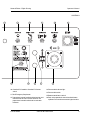
9 Pull out the platform red Emergency Stop button
to the on position. Turn the key switch to
platform control.
Test Emergency Stop
10 Open the tank side turntable cover and locate
the tilt sensor next to the control
box.
11 Press down one side of the tilt
sensor.
15 Turn the key switch to platform control and
restart the engine.
16 Push in the platform red Emergency Stop button
to the off position.
Result: The engine should turn off and all
functions should not operate.
Result: The alarm, located in the
platform, should sound.
17 Pull out the red Emergency Stop button and
restart the engine.
Test Auxiliary Controls
Test the Hydraulic Oil Return Filter
12 Turn the key switch to ground control and shut
the engine off.
18 Move the engine idle select switch to high idle
(rabbit symbol).
13 Pull out the red Emergency Stop button to the
on position.
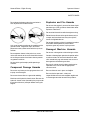
19 Locate and check the hydraulic filter condition
indicator.
14 Simultaneously hold the auxiliary power switch
on and activate each boom function toggle
switch.
Result: The filter should be operating with the
plunger or the needle in the green area.
Note: To conserve battery power, test each
function through a partial cycle.
20 Move the engine idle select switch to foot switch
activated high idle (rabbit and foot switch
symbol).
Result: All boom functions should operate.
Test the Horn
21 Push the horn button.
Result: The horn should sound.
Part No. 43645
Genie S-40 & Genie S-45
17