1
MerCruiser
SCAN TOOL
The fastest and easiest way to troubleshoot
Marine Electronic Fuel Injection Systems
USER’S GUIDE
Version 5
Rinda Technologies, Inc.
MerCruiser
SCAN TOOL
USER’S GUIDE
Rinda Technologies Inc.
4563 N. Elston Ave.
Chicago, IL 60630 USA
Tel: (773) 736-6633
Fax: (773) 736-2950
Web: www.rinda.com
Serial Number: ________________________________
Limited Warranty
To the original purchaser only, Rinda Technologies, Inc. warrants the supplied scan tool hardware to be
free from defects in materials and workmanship under normal use for a period of 1 year from date of
purchase as evidenced by a copy of the sales receipt. Rinda Technologies, Inc. makes no other express
warranties on the hardware products. The purchaser’s sole remedy in the event of a breach of warranty is
expressly limited to repair of the defective scan tool hardware. Repair parts and replacement hardware
products will be provided on an exchange basis and will be either reconditioned or new. All replaced parts
become property of Rinda Technologies, Inc. This limited warranty does not cover damage to the products
resulting from misuse, accident, disaster, abuse, negligence, improper maintenance, or modification and/or
repair of the hardware product other than by Rinda Technologies, Inc.
The software components in the scan tool are believed to be accurate. Rinda Technologies, Inc. does not
warrant that the operation of the software will be uninterrupted or error free. Further, Rinda Technologies,
Inc. does not warrant or guarantee the use of, or the results of the use of, the software in terms of correctness,
accuracy, reliability, currentness, or otherwise.
Limitation of Liability
Neither Rinda Technologies, Inc. nor its authorized dealer shall be liable for any defect, indirect, incidental,
special, or consequential damages, whether in an action in contract or tort (including negligence and strict
liability), such as, but not limited to, loss of anticipated profits or benefits resulting from the use of this scan
tool and its software or any breach of any warranty, even if Rinda Technologies or its authorized dealer has
been advised of the possibility of such damages. In no event will Rinda Technologies, Inc. or its authorized
dealer’s liability exceed the price paid for the product.
The information presented in this manual is believed to be accurate. Responsibility for errors, omission of
information, or consequences resulting from the use of this information cannot be assumed by Rinda
Technologies, Inc. Rinda Technologies, Inc. retains all rights to make changes to specifications at any time
without notice.
Reproduction of this manual, in whole or in part, is forbidden
without the express written permission of Rinda Technologies Inc.
Manual contents including photographs Copyright ©) 1997-2008 Rinda Technologies Inc.
All rights reserved worldwide.
Volvo Penta is a registered trademark of Volvo Penta Corp. MerCruiser, Thunderbolt V, D-Tronic and
Mercury are registered trademarks of Brunswick Corp. GM is a registered trademark of General Motors
Corp. Indmar is a registered trademark of Indmar Engine Co. Pleasurecraft and Crusader are registered
trademarks of Pleasurecraft Engine Group. All other trademarks are properties of their respective holders.
Table of Contents
Safety Precautions . . . . . . . . . . . . . . . . . . . . . 2
Overview . . . . . . . . . . . . . . . . . . . . . . . . . . . 3
Scan Tool Key Functions . . . . . . . . . . . . . . . . . . 4
Setup & Operation. . . . . . . . . . . . . . . . . . . . . . 5
Function Flowchart . . . . . . . . . . . . . . . . . . . . . 6
Marine Engines Supported by the Scan Tool . . . . . . . 9
Engines with GM MEFI. . . . . . . . . . . . . . . . . 12
Volvo Penta EGC EFI . . . . . . . . . . . . . . . . . 25
Pleasurecraft / Crusader ECM-07 & ECM-08 . . . . . 32
Indmar GCP EFI . . . . . . . . . . . . . . . . . . . . 33
OBD-M compliant EFI . . . . . . . . . . . . . . . . . 34
MerCruiser PCM-555 / ECM-555 EFI . . . . . . . . . 35
MerCruiser PCM-09 (Visteon) EFI . . . . . . . . . . . 49
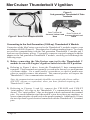
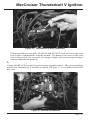
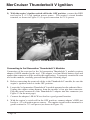
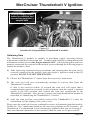
MerCruiser Thunderbolt V Ignition . . . . . . . . . . 50
MerCruiser 2.8L / 4.2L D-Tronic Diesel . . . . . . . 58
MerCruiser 7.3L D-Tronic Diesel . . . . . . . . . . . 59
Mercury 3.0L Carbureted Outboard. . . . . . . . . . 60
Mercury 3.0L EFI Outboard . . . . . . . . . . . . . . 62
Mercury Hi Perf 2.0 / 2.5 L EFI Outboard . . . . . . . 63
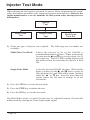
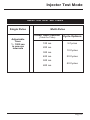
Injector Test Mode . . . . . . . . . . . . . . . . . . . . . 64
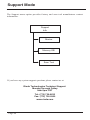
Support Information. . . . . . . . . . . . . . . . . . . . . 66
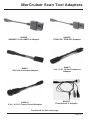
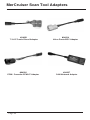
Scan Tool Adapters . . . . . . . . . . . . . . . . . . . . . 67
Page 1
Safety Precautions
Before attempting to use the MerCruiser Scan Tool please
read and observe the following safety precautions:
·
Always refer to and follow the engine and boat manufacturer’s safety
and service procedures to prevent personal injury and equipment
damage.
·
Never connect or disconnect the scan tool with the vehicle’s ignition
turned ON or while the engine is running.
·
Always stay clear of any moving or movable engine components
when connecting and using the scan tool.
·
When working near marine batteries never use any device that is
capable of producing a spark, high temperature or open flame.
Marine batteries contain sulfuric acid and produce highly explosive
gasses that may ignite. To prevent serious injury always observe this
precaution along with the safety precautions provided by the engine,
boat and battery manufacturers.
·
Always test and service a running engine in a well ventilated area.
·
Always wear approved eye protection.
IMPORTANT
·
This scan tool is a sensitive electronic instrument. Handle the tool
with extreme care.
·
DO NOT subject the scan tool to excessive water spray or expose it
to rain. The scan tool is water resistant but not water proof.
·
DO NOT leave the scan tool in direct sunlight for extended periods of
time or subject it to extreme temperatures (hot or cold).
·
ALWAYS store the scan tool in its protective carrying case (# 94015)
when not in use. If you do not have a carrying case, store the scanner
in its original packaging.
Page 2
Overview
What is the MerCruiser Scan Tool?
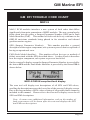
The MerCruiser Scan Tool is a multi-purpose diagnostic device that functions
as a scanner and a fuel injector t ester. The scanner supports current
MerCruiser electronic engine control systems and is software ungradable for
future applications.
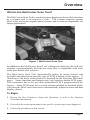
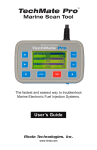
Figure 1 MerCruiser Scan Tool
In addition to the MerCruiser Scan Tool’s diagnostic functions, the tool also
contains a programmable fuel injector tester that is compatible with most
multi-port marine fuel injectors.
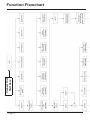
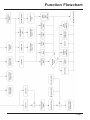
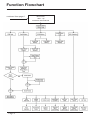
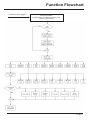
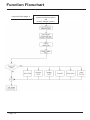
The MerCruiser Scan Tool automatically tailors its menu choices and
available functions based upon the type of ECM it detects on the engine. A
flowchart of the basic menu choices is detailed on the Function Flowchart
pages. Some functions and features may vary between similar ECM types.
This variation is due to the way that a particular ECM is programmed at the
factory. Some ECMs may have certain features enabled or disabled which
will cause the MerCruiser scan tool to automatically adjust its menu and data
display choices.
To Begin:
1. Review the Key Functions, Setup and Operation, as well as the Function
Flowchart information.
2. Proceed to the section pertaining to the specific system type being diagnosed.
3. Follow the procedures in that section.
Page 3
Scan Tool Key Functions
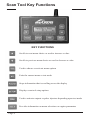
KEY FUNCTIONS
Scrolls to next menu choice or used to increase a value
Scrolls to previous menu choice or used to decrease a value
Used to choose or activate menu options
Exits the current menu or test mode
Stops information that is scrolling across the display
Displays scan tool setup options
Used to activate outputs or pulse injectors depending upon test mode
Provides information on menu selections or engine parameters
Page 4
Setup and Operation
Setup
The setup function is accessible while in any of the scan tool’s menus or while in the
data scanning mode. Pressing the SETUP key causes the scanner to suspend its
current mode of operation and enter a special setup menu. The setup menu contains
items that allow you to tailor various functions of the scan tool.
These functions are as follows:
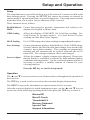
English/Metric Causes data related to pressure, temperature and velocity to be
displayed in English or Metric units.
Mode
GPH Scaling
Affects the display of GM MEFI 1 & 2 fuel flow readings. Use
Scale Factory #1 for most engine’s. Use Scale Factor #2 when
working on older MerCruiser engines.
MAP Scaling
Use 2 ATM setting only when working on supercharged engines.
Save Settings
Causes adjustments made to English/Metric Units, GPH Scaling,
Screen Contrast, and Fuel Injector time settings to be stored in the
scanner’s non-volatile memory. These settings are permanently
retained and will automatically be recalled each time the tool is
turned ON. The settings remain in effect until changed.
Screen Adjust
Allows the scanner’s display contrast to be adjusted. Please note
that the display’s readability is affected by both ambient lighting
conditions and temperature. Use the screen adjustment feature as
necessary to produce a suitable amount of contrast for your
viewing purposes.
Press the NO key to exit the Setup mode.
Operation
The s and t keys are used to access all menu choices throughout the operation of
the scan tool.
The YES key is used to select or activate the currently displayed menu item.
The HELP key provides information on current menu choices or items.
After the scan tool displays its initial opening messages, use the s and t keys to
access one of the following operating modes, then press the YES key to select it.
Marine EFI
Merc D-Tronic
Thunderbolt V
Mercury Outboard
Injector Test
Support Information
Page 5
Connect Tool
Start Here
Function Flowchart
Page 6
Function Flowchart
Page 7
Function Flowchart
continued from page 6
Page 8
MerCruiser
2001 - Up
PCM-555 and ECM-555
Function Flowchart
continued from page 6
Volvo Penta EGC
Pleasurecraft / Crusader ECM-07 & Up
Indmar (GCP ECM)
Page 9
Function Flowchart
continued from page 6
Page 10
MerCruiser Visteon ECM
(catalyst equipped engines)
and
Generic OBD-M systems
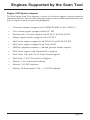
Engines Supported by the Scan Tool
Engine / EFI System Support
The MerCruiser Scan Tool supports a variety of electronic engine control systems as
summarized below. Please refer to the appropriate section of this manual based on the
type of engine control system being diagnosed.
·
All marine engines equipped with GM MEFI (MEFI 1 thru MEFI 5)
·
Volvo Penta engines equipped with EGC EFI
·
Pleasurecraft / Crusader engines with ECM-07 & ECM-08 EFI
·
Indmar engine models equipped with GCP EFI
·
MerCruiser engines equipped with PCM-555 and ECM-555 EFI
·
MerCruiser engines equipped with Visteon EFI
·
OBD-M compliant sterndrive / inboard gasoline marine engines.
·
MerCruiser engines with Thunderbolt V Ignition
·
MerCruiser 2.8L and 4.2L D-Tronic Diesel Engines
·
MerCruiser 7.3L D-Tronic Diesel Engines
·
Mercury 3.0L Carbureted Outboard
·
Mercury 3.0L EFI Outboard
·
Mercury Hi-Performance 2.0L / 2.5L EFI Outboard
Page 11
GM Marine EFI
Scan Tool GM EFI Compatibility
At the date of publication of this manual, the MerCruiser Scan Tool is
compatible with 1993 and newer GM Marine EFI systems being used by a
variety of marine engine manufacturers. These manufacturers include Volvo
Penta, MerCruiser, Indmar, Crusader, Flagship, Marine Power, Pleasurecraft,
and KEM. Please note that other manufacturers may also apply based upon
new product releases and MerCruiser Scan Tool software updates.
Gasoline ECMs Supported
The Marine EFI menu choice should be selected in order to service all 1993 and newer
gasoline engines produced by Volvo Penta that are equipped with Electronic Fuel
Injection. This is the menu choice you will use most often.
Upon selecting the Marine EFI menu choice, the scan tool will establish
communication with the engine’s Electronic Control Module (ECM) and
automatically determine the type of module that is present.
There are, at the time of this writing, five base GM marine system types that are
supported by the MerCruiser scan tool. Some of the system types shown below also
have revisions that were released after their initial introductions which incorporated
refinements. For example, MEFI-4 also had two follow-up revisions called MEFI-4a
and MEFI-4b. The scan tool currently supports all known GM MEFI revisions from
MEFI-1 through MEFI-5c.
Supported GM EFI system types:
Page 12
·
MEFI 1 (introduced in 1993)
·
MEFI 2 (introduced in 1996)
·
MEFI 3 (introduced in 1998)
·
MEFI 4 (introduced in 2001)
·
MEFI 5 (introduced in 2005)
GM Marine EFI
Connecting to GM MEFI-1 thru MEFI-4 systems
(For connecting to GM MEFI-5 CAN based systems see page 15)
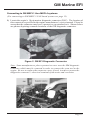
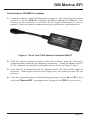
1) Locate the engine’s 10 pin marine diagnostic connector (DLC). The location of
this connector is specified in the engine manufacturer’s service manual. Please be
aware that the connector may have a protective cap attached to it. Shown below
are photos depicting common locations of the GM diagnostic connector.
Figure 2 GM EFI Diagnostic Connector
Note: Some manufacturers place a protective cover over the GM diagnostic
connector which must be removed in order to connect the scan tool to the
engine. Be sure to replace the connector cover, if used, in order to protect the
diagnostic connector’s electrical terminals from water and corrosion.
Page 13
GM Marine EFI
2) With the engine’s ignition switch in the OFF position, plug the scan tool’s
communication cable into the diagnostic connector. Scan tool adapter #94005 is
required for this application.
3) Once the tool is connected, turn the ignition switch ON and start the engine if
necessary. If the engine will not start, simply leave the ignition switch ON and
proceed.
4) After the scan tool displays its initial opening messages, use the s and t keys to
select the “Marine EFI” operating mode, then press the YES key to select it.
Connecting Twin Engine Systems
In a twin engine configuration, the ECM modules (one on each engine) may be
electronically linked together. This link is usually installed by the boat manufacturer
and provides the ability to diagnose both engines from a single diagnostic connector.
With the exception of setting the engine’s base timing, all scanner functions are
available for accessing both engines from one diagnostic plug. In order for the
scanner to function properly in this mode, the ignition keys should be ON for BOTH
engines. It is not necessary to have the engines running, but both ignition systems
should be turned on (Key On/Engine OFF).
For twin installations that are NOT electronically linked together, you must connect
to and service each engine individually. In this situation, each engine in the twin
installation will respond as Engine #1.
Engine #1 / Engine #2 Selection (MEFI ECMs Only)
This menu allows you to select which engine you would like to service. For a single
engine system, choose Engine #1.
For a twin engine system where the engines are electronically linked together, choose
Engine #1 or Engine #2.
If you are diagnosing a twin engine system that is NOT electronically linked
together, you must have the scanner attached to the diagnostic connector on
the engine you wish to service and choose Engine #1.
Remember, both ignition systems should be ON when troubleshooting an
electronically linked twin engine installation.
Page 14
GM Marine EFI
Connecting to GM MEFI-5 systems
1) Locate the engine’s 6 pin CAN diagnostic connector. This connector may also be
referred to as the OBD-M connector (On-Board Diagnostics-Marine). The
location of this connector is specified in the engine manufacturer’s service
manual. Please note that the connector may have a protective cap attached to it.
Figure 3 Scan Tool CAN Network Adapter #94027
2) With the engine’s ignition switch in the OFF position, plug the scan tool’s
communication cable into the diagnostic connector. Scan tool adapter #94027
(CAN Adapter) is required for this application as shown in Figure 3 above.
3) Once the tool is connected, turn the ignition switch ON and start the engine if
necessary. If the engine will not start, simply leave the ignition switch ON and
proceed.
4) After the scan tool displays its initial opening messages, use the s and t keys to
select the “Marine EFI” operating mode, then press the YES key to select it.
Page 15
GM Marine EFI
Obtaining Data
After selecting the “Marine EFI” function the scan tool will attempt to communicate
with the engine’s fuel injection computer and automatically identify it. After an
identification is made, you will be presented with several menu choices. To obtain
diagnostic data and system trouble codes, select the “ECM Data” function. This
menu choice causes the scanner to begin reading information from the ECM module.
The scanner will prompt for your input as follows:
1) After choosing the ECM data function, the scanner may prompt you to choose a
data list(MEFI-1 thru MEFI-4 systems only). Select Data List #1 or Data List #0.
Data List #1 contains diagnostic service information and will usually be of
primary interest to you.
Data List #0 contains a smaller number of information items and is intended for
electronic instrumentation purposes.
2) The scanner will now attempt to communicate with the engine’s computer and
automatically determine what version of ECM is installed on the engine.
3) Next, the scanner will provide you with the number of Operating Hours the
engine has logged. Once displayed, the scanner will interrogate the ECM and
obtain any stored Fault Codes. If any codes are detected, they will be displayed
along with their descriptions. Options will be displayed allowing you to Review
as well as Erase the stored codes.
4) The tool will now enter its “Scanner” mode and allow you to select and display a
wide variety of engine sensor and operating information. The displayed data is
updated several times per second. Use the s and t keys to scroll through the
available information. Use the HELP key to access information on the currently
displayed engine parameter. Use the NO key to exit the “Scanner” mode and
return to the main menu.
Page 16
GM Marine EFI
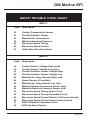
GM EFI TROUBLE CODE CHART
MEFI-1
Code
Description
14
21
23
33
42
43
51
Coolant Temperature Sensor
Throttle Position Sensor
Manifold Air Temperature
Manifold Absolute Pressure
Electronic Spark Timing
Electronic Spark Control
Calibration Checksum Error
MEFI-2
Code
Description
14
15
21
22
23
24
25
33
34
41
42
43
44
51
52
Coolant Sensor Voltage High (cold)
Coolant Sensor Voltage Low (hot)
Throttle Position Sensor Voltage High
Throttle Position Sensor Voltage Low
Manifold Air Temp Sensor High (cold)
Speed Sensor (if installed)
Manifold Air Temp Sensor Low (hot)
Manifold Absolute Pressure Sensor High
Manifold Absolute Pressure Sensor Low
Electronic Spark Timing Open Circuit
Electronic Spark Timing Grounded Circuit
Electronic Spark Control Detects Continuous Knock
Electronic Spark Control Cannot Detect Knock
ECM Calibration Checksum Error
ECM Hardware Failure
Page 17
GM Marine EFI
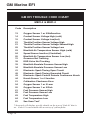
GM EFI TROUBLE CODE CHART
MEFI-3 & MEFI-4
Code
Description
13
14
15
21
21
22
23
24
25
31
32
33
34
41
42
43
44
51
54
55
61
62
63
64
81
Oxygen Sensor 1 or 2 Malfunction
Coolant Sensor Voltage High (cold)
Coolant Sensor Voltage Low(hot)
Throttle Position Sensor Voltage High
Throttle Position Sensor Voltage Skewed High
Throttle Position Sensor Voltage Low
Manifold Air Temperature Sensor High (cold)
Speed Sensor Inactive (if installed)
Manifold Air Temperature Sensor Low (hot)
Governor Not Tracking
EGR Valve Not Tracking
Manifold Absolute Pressure Sensor High
Manifold Absolute Pressure Sensor Low
Electronic Spark Timing Open Circuit
Electronic Spark Timing Grounded Circuit
Electronic Spark Control Detects Continuous Knock
Knock Sensor 1 or 2 Inactive
Calibration Checksum Error
Oxygen Sensor 1 or 2 Lean
Oxygen Sensor 1 or 2 Rich
Fuel Pressure Sensor High
Fuel Pressure Sensor Low
Fuel Temperature High
Fuel Temperature Low
See Scan Tool*
* Scan tool will display specific details on the type of Code 81 that is
set. Code 81 is associated with a variety of system faults.
Page 18
GM Marine EFI
GM EFI TROUBLE CODE CHART
MEFI-5
Mefi-5 ECM modules introduce a new system of fault codes that differs
significantly from prior generations of MEFI modules. The new system breaks
faults down into two parts, a Suspect Parameter Number (SPN) and a Fault
Mode Identifier (FMI). This method of fault code delivery conforms to the
OBD-M emissions standards being phased in for sterndrive and inboard
gasoline marine engines.
SPN (Suspect Parameter Number):
This number provides a general
description of the engine component, sub-system or process that is suspected of
having an operational error.
FMI (Fault Mode Identifier): This number reflects the type or method of
failure associated with the SPN described above. In other words it describes
how the engine component, sub-system or process has failed.
On the scan tool's display screen the Suspect Parameter Number is preceded by
the letters SPN and the Fault Mode Identifier is preceded by the letters FM as
shown below:
MEFI-5 OBD-M compliant fault display
The scan tool will display text descriptions of all SPN and FMI values,
scrolling the descriptions across the lower line of the scan tool's display screen.
Due to the large number of SPN values a listing of all possible faults cannot be
included in this manual. Please refer to the scan tool's display screen for all
SPN and FMI descriptions.
Note: In some cases additional information, such as the number of
fault occurrences will be shown after the scan tool displays the SPN
and FMI text descriptions.
Page 19
GM Marine EFI
Service Mode Function (MEFI-1 thru MEFI-4 ECMs Only)
The Service Mode function is primarily used to set an engine’s base spark timing.
This function normally applies to engines equipped with a mechanical distributor and
is typically not used on engines with Distributorless Ignition Systems (DIS) unless
otherwise specified. Upon selecting the Service Mode menu option, the currently
active mode will be displayed and you will have the choice of selecting either the
Normal or Service Modes. Simply select the desired mode then continue on to
perform other scanner functions if necessary. The “Service” mode will stay activated
until changed by entering the Service Mode function again and selecting a different
mode or by disconnecting the scan tool.
Special note for twin engine systems:
In order for the service Mode to function properly on twin engine systems, you
must have the scan tool attached to the Diagnostic Connector on the engine
being serviced.
Power Balance Test (MEFI-4 & MEFI-5 ECMs Only)
The Power Balance Test is designed to assist a technician in finding a problematic
cylinder. This test commands the ECM to disable the spark output, or on some
systems both spark and fuel, to a selected cylinder thereby causing that cylinder to
misfire (not produce power). This test must be enabled by the engine manufacturer.
Upon selecting the Power Balance Test the scan tool will query the ECM to see if the
test is available.
The objective of this test is to determine whether or not disabling a particular cylinder
will cause a drop in engine RPM. If a cylinder is disabled and the RPM remains the
same it is likely that the disabled cylinder is problematic and not producing power
under normal operating conditions. Please refer to the engine manufacturer's service
literature for more information on this test.
·
IMPORTANT: This test should be performed with the engine
running at approximately 1500 rpm, at normal operating
temperature and under moderate load.
·
Do not attempt to drive the boat while performing this test.
·
Follow all engine and boat manufacturer’s safety precautions
and stay clear of all moving engine components.
·
Refer to the engine manufacturer’s service manual for special
notes on performing this test.
.
Page 20
GM Marine EFI
Reset BLM Values (MEFI-5 only)
This function applies to MEFI-5 based engine that are equipped with oxygen sensors.
During engine operation the ECM learns and stores modifications to it's factory preset
fuel delivery values. This allows the ECM to adapt itself to the unique operating
conditions it is subjected to in a particular engine application. The Reset BLM
function allows a service technician to clear the ECM's learned values and reset the
system back to factory default conditions.
Note: Always consult the engine manufacturer's service literature prior to
performing this function. Under normal circumstances resetting the BLM
values should not need to be performed unless specified by the engine
manufacturer.
ECM Output Tests Function
The MerCruiser scan tool has the ability to activate a number of ECM outputs for
diagnostic purposes. Upon selecting the ECM Output Tests menu choice the scanner
will interrogate the ECM in order to determine its version type. You will then be
presented with a menu listing all ECM outputs the scanner is capable of triggering.
Outputs are normally activated for one-second intervals. You may continue to cycle a
particular output numerous times by pressing the scanner’s FIRE key.
WARNING! Please note that each engine manufacturer may use
individual ECM outputs for functions other than those listed on the
following pages. In order to avoid personal injury and unexpected
device activation, always refer to the engine manufacturer’s service
manual before performing any output test
Page 21
GM Marine EFI
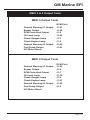
MEFI-1 & 2 Output Tests
MEFI-1 EFI Output Tests (MerCruiser only)
Buzzer Circuit Output 1
Buzzer Circuit Output 2
Fuel Pump Output
IAC Motor Reset
ECM Pin #
J2-11
J2-27
J2-9
MEFI-1 EFI Output Tests (Volvo & Other Makes)
Over Temp Lamp
Buzzer Output
I/O Fluid Level Lamp
Oil Pressure Lamp
Oil Level Lamp
Check Engine Lamp
Fuel Pump Output
IAC Motor Reset
J2-11
J2-12
J2-26
J2-27
J2-30
J2-31
J2-9
MEFI-2 EFI Output Tests (MerCruiser only)
(MerCruiser models using 1996 GM MEFI II ECM only)
Buzzer Circuit Output 1
Buzzer Circuit Output 2
Fuel Pump Output
IAC Motor Reset
J2-11 *
J2-26
J2-9
* Physically connected to J2-11, may electronically respond as J2-12
due to ECM’s factory programmed calibration.
MEFI-2 EFI Output Tests (Volvo and Other Makes)
Check Gauges Lamp
Buzzer Output
General Warning #1 Output
RPM Controlled Output
Oil Level Lamp
Check Engine Lamp
Fuel Pump Output
IAC Motor Reset
Page 22
J2-11
J2-12
J2-26
J2-27
J2-30
J2-31
J2-9
GM Marine EFI
MEFI 3 & 4 Output Tests
MEFI 3 Output Tests
General Warning #1 Output
Buzzer Output
RPM Controlled Output
Oil Level Lamp
Check Gauges Lamp
Check Engine Lamp
General Warning #2 Output
Fuel Pump Output
IAC Motor Reset
ECM Pin #
J1-21
J1-26
J1-8
J1-25
J1-7
J1-9
J1-22
J1-23
MEFI 4 Output Tests
General Warning #1 Output
Buzzer Output
RPM Controlled Output
Oil Level Lamp
Check Gauges Lamp
Check Engine Lamp
General Warning #2 Output
Fuel Pump Output
IAC Motor Reset
ECM Pin #
J1-22
J1-8
J1-7
J1-18
J1-9
J1-27
J1-23
J1-6
Page 23
GM Marine EFI
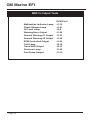
MEFI 5 Output Tests
Malfunction Indicator Lamp
Check Gauges Lamp
Oil Level Lamp
Warning Horn Output
General Warning #1 Output
General Warning #2 Output
RPM Controlled Output
Troll Lamp
Trans Shift Output
Governor Lamp
Fuel Pump Output
Page 24
ECM Pin #
J1-12
J1-41
J3-8
J1-54
J1-51
J1-52
J1-53
J3-16
J3-13
J1-55
J1-13
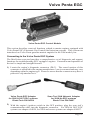
Volvo Penta EGC
Volvo Penta EGC Control Module
This section describes scan tool functions related to marine engines equipped with
Volvo Penta EGC (Electronic Gas Control) fuel injection systems. This system was
introduced on Volvo Penta gasoline marine engines for the 2006 model year.
Connecting to the Volvo Penta EGC System
The MerCruiser scan tool provides a comprehensive set of diagnostic and support
functions for troubleshooting EGC equipped engines. Connection and operation of
the tool is simple and straight forward.
1) Locate the engine’s diagnostic connector (DLC). The exact location of this
connector is specified in the engine manufacturer’s service manual and may vary
depending upon the engine type. Please be aware that the connector may have a
protective cap attached to it.
Volvo Penta EGC Adapter
for 2006 & 2007 EGC systems
Rinda Tech P/N 94024
Scan Tool CAN Network Adapter
for 2008-Up EGC systems
Rinda Tech P/N 94027
2) With the engine’s ignition switch in the OFF position, plug the scan tool’s
communication cable into the diagnostic connector. For 2006 & 2007 EGC
systems use adapter #94024, for 2008 and newer systems use adapter #94027.
Page 25
Volvo Penta EGC
3) Once the tool is connected, turn the ignition switch ON and start the engine if
necessary. If the engine will not start, leave the ignition switch ON and proceed.
4) After the scan tool displays its initial opening messages, use the s and t keys to
display the “MARINE EFI” operating mode from the main menu, then press the
YES key to select it.
Obtaining General Diagnostic Data
After selecting the “MARINE EFI” function the scan tool will attempt to
communicate with the engine’s fuel injection computer and automatically identify it.
After an identification is made you will be presented with several menu choices. To
obtain general diagnostic data and system trouble codes, select the “ECM Data”
function. This menu choice causes the scanner to begin reading information from the
Volvo EGC module. The scanner will prompt for your input as follows:
1) After selecting the “ECM Data“ function the scanner will communicate with the
engine’s EGC control module and automatically provide you with the number of
Operating Hours the engine has logged.
2) Once the engine operating hours have been displayed the scanner will prompt you
to scan for trouble codes. Selecting YES will cause the scanner to interrogate the
EGC’s trouble code memory. If any codes are present, their descriptions will be
displayed. After the trouble code description is displayed you will be prompted to
view optional information associated with each code. This information includes
whether the code was set during the current ignition cycle and the number of
engine restarts since the code was set.
3) After trouble codes are displayed the scan tool will provide an option to Erase the
stored codes.
Viewing Specialized Diagnostic Data
In addition to providing general diagnostic data as described above, the scan tool
provides several other data lists that are each tailored for a specific purpose. These
lists vary based upon EGC system type and are accessible from the main Volvo Penta
EGC system menu. All lists may not be available on a particular EGC system type.
Warning Monitor data list:
This data list provides quick access to a subset of EGC parameters and status
indicators that are considered system critical.
Parameters displayed in this list
provide a technician with a summary of important operating data such as oil pressure,
engine temperature, MIL status as well as other critical engine indicators.
Page 26
Volvo Penta EGC
ECM Information data list:
Selecting this data list allows a technician to view version, serial number and
calibration information related to the engine and EGC module. This information
includes a variety of non-diagnostic data including hardware and software version
numbers, calibration checksums, serial numbers and engine firing order data.
Sea Trial Monitor data list:
The sea trial monitor data list includes a short set of engine parameters that are useful
when performing boat tests. Information available in this data list includes engine
speed, fuel flow rate, engine load and throttle position data.
Injector Monitor data list:
This data list provides a set of ON and OFF voltages for each fuel injector driver. By
viewing the EGC module’s injector output voltage levels a technician can quickly
isolate fuel injector electrical failures.
Throttle Monitor data list:
This list is available only when connected to an engine that is equipped with
Electronic Throttle Control (ETC). The throttle monitor data list provides quick
access to EGC system parameters that are critical to electronic throttle operation. A
complete set of items related to throttle lever position and throttle blade angle are
provided to assist in diagnosing ETC related problems.
O2 / Misfire Monitor data list:
This list is available only when oxygen sensors and catalytic converters are present on
an EGC equipped engine. This data list provides access to O2 sensor, catalyst and
engine misfire information.
Special Reset Functions for O2 / Catalyst equipped engines.
Reset Fuel Adapt
Allows a service technician to clear the ECM's learned fuel delivery values and reset
the system back to factory default conditions. Consult the engine manufacturer's
service literature prior to using this function.
Reset Misfire Data
Clears the ECM's stored cylinder misfire data. Consult the engine manufacturer's
service literature prior to using this function.
Page 27
Volvo Penta EGC
ECM Tests
The ECM TESTS option provides access to a variety of EGC functional tests.
·
IMPORTANT: Before performing any ECM or engine test refer to
the engine manufacturer's service literature for safety precautions and proper engine test procedures.
To access the ECM TESTS menu perform the following steps:
1) After selecting the “ECM TESTS“ option from the scanner’s main EGC system
menu you will be presented with a sub-menu containing the following choices:
Spark Kill
Injector Kill Test
Spark Fire Test
Injector Fire Test
Relay Test
Compression Test
Idle Speed Test
Drive by Wire Test
O2 Sensor Test
2) Use the s and t keys to select the desired menu item then press YES.
Spark Kill Test (not available on catalyst equipped engines)
This test allows individual spark outputs to be disabled. This test should be performed
with the engine under a moderate load within an RPM range of 1000 and 2000 rpm.
Running the engine under a moderate load will allow you to audibly hear a drop in
engine speed when the spark output is disabled. Upon selecting this test you will be
prompted to select the spark output, 1 thru 8, to disable. Spark outputs follow cylinder
number order. Use the s and t keys to select the desired spark output and then
press the FIRE key to start the test. The test will run for approximately 10 seconds.
·
To abort the Spark Kill test at any time, press and hold the
scanner’s NO key.
Injector Kill Test
This test allows individual fuel injectors to be disabled. This test should be performed
with the engine under a moderate load within an RPM range of 1000 and 2000 rpm.
Running the engine under a moderate load will allow you to audibly hear a drop in
engine speed when the injector is disabled. Upon selecting this test you will be
prompted to select the fuel injector, 1 thru 8, to disable. Injector numbers follow
cylinder number order. Use the s and t keys to select the desired fuel injector and
then press the FIRE key to start the test. The test runs for approximately 10 seconds.
·
To abort the Injector Kill test at any time, press and hold the
scanner’s NO key.
Page 28
Volvo Penta EGC
Spark Fire Test
This test allows individual spark outputs to be fired.
·
WARNING: Engine backfire and external flame can occur during
this test. As a safety precaution, purge fuel vapors from the
engine before proceeding. Do not remove the flame arrestor if
the engine is equipped with one.
·
IMPORTANT: Before performing this test disconnect the
engine’s Crank Position Sensor.
·
This test must be performed with Key-On and Engine Off.
Upon selecting this test you will be prompted to select the spark output to fire. Spark
outputs follow cylinder number order. Use the s and t keys to select the desired
spark output and then press the FIRE key to start the test. The test will run for
approximately 10 seconds. Use an inductive pickup KV tester to verify the spark
output’s operation.
·
To abort the Spark Fire test at any time, press and hold the
scanner’s NO key.
Injector Fire Test
This test allows individual fuel injectors to be pulsed. The test must be performed
with Key ON / Engine OFF. This test is intended to be used for injector leak-down
testing and it can assist a technician in identifying clogged injectors. A fuel pressure
gauge is normally used in conjunction with this test.
Refer to the engine
manufacturer's service literature for specific details and procedures on injector
testing.
Upon selecting this test you will first be prompted to select a fuel injector ON time.
The ON time can be adjusted from 1 to 200 milliseconds. Use the s and t keys to
set the injector ON time and then press the YES key to proceed to the test. Holding
either the s or t key continuously for more than two seconds accelerates the
injector ON time adjustment.
After setting the time and pressing YES you will be prompted to select the fuel
injector to pulse. Use the s and t keys to select the desired fuel injector and then
press the FIRE key to activate the injector.
After the injector is pulsed you will be prompted to run the engine for a short period of
time to clear out the unburned fuel from the cylinder. The test cannot be re-run
unless this procedure is performed.
Page 29
Volvo Penta EGC
Relay Test
This test allows the EGC module’s relay outputs to be activated. The test must be
performed with Key ON / Engine OFF.
Upon selecting this test you will be
prompted to select either the Ignition Relay output or All Relays (including the Fuel
Pump relay).
Pressing the FIRE key will activate the selected relay(s) for
approximately two seconds.
·
Refer to the engine manufacturer's service literature for specific
details and safety precautions associated with EGC system relay
testing.
Compression Test
The Compression Test is a special test mode that the EGC system provides to allow a
technician to safely perform a cylinder compression check.
·
WARNING: This test commands the EGC module to disable all
spark and fuel injector outputs. The test must be properly exited
from the scan tool in order to re-enable normal spark and fuel
operation. Do not perform this test at sea.
The Compression Test should only be performed dockside or at a service facility since
the engine will be disabled until the test is properly exited.
·
If the scan tool is disconnected from the engine during the
Compression Test the engine will remain in a disabled state.
You must reconnect the scan tool, re-enter the Compression
Test mode and then properly exit the test.
Idle Speed Test
This test allows a technician to verify the operation of the engine's idle speed control
system. This test must be performed with the engine idling, in neutral and at normal
operating temperature.
The test overrides the factory set engine idle speed and allows a technician to adjust
the idle speed between 600 to 2000 RPM. Upon selecting the Idle Speed Test the
scan tool will initially command the engine to idle at 700 RPM. Use the s and t
keys to vary the commanded speed in 100 RPM increments.
·
To stop the Idle Speed test at any time, press and hold the
scanner’s NO key.
.
Page 30
Volvo Penta EGC
Drive by Wire Test
This test is available only when connected to engines equipped with Electronic
Throttle Control (ETC). The test allows a technician to check the functionality of the
ETC system by commanding the engine throttle blade to track helm throttle control
lever movements.
This test must be performed with Key ON / Engine OFF. Upon selecting this test
you will be prompted to move the helm throttle lever and observe movements of the
engine throttle blade. The scan tool will also display the commanded Throttle
Control Position percentage as well as the commanded Throttle Position
percentage (percentage of throttle blade movement).
·
To stop the Drive by Wire test at any time, press and hold the
scanner’s NO key.
O2 Sensor Test (O2 / catalyst equipped engines only)
This test is available only when connected to an engine equipped with oxygen sensors
and one or more catalytic converters. The test allows a technician to check the
functionality of the O2 sensor feedback system by automatically cycling the engine
through rich and lean phases of operation. This test must be performed with the
engine idling and gear selector in the Neutral position.
·
The engine's speed will be increased to approximately 1200 rpm
during the test.
·
To abort the O2 Sensor test at any time, press and hold the
scanner’s NO key.
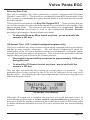
This test runs automatically and consists of several phases of operation.
The
particular phase being executed by the ECM will be indicated on the scan tool's
display screen. Also displayed is the elapsed time that the test has been in progress as
shown in the photo below.
O2 Sensor Test display
When the O2 sensor test is complete the scan tool will scroll messages across its
screen displaying the results of the pre-catalyst and post-catalyst oxygen sensors. A
message will also be displayed instructing the technician to scan for ECM fault codes
to obtain additional information on any O2 sensor problem that was detected during
the test.
Page 31
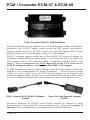
PCM / Crusader ECM-07 & ECM-08
PCM / Crusader ECM-07 / ECM-08 Module
Pleasurecraft Engine Group, manufacturer of both PCM and Crusader brand engines
introduced their ECM-07 engine control system on 2007 model year engines.
Engines produced prior to the 2007 model year used GM-Delphi MEFI control
modules which are described starting on page 12 of this manual.
ECM-07 equipped engines require use of the #94026 GCP scan tool adapter for
diagnostic communication (see photo below). Please note that 2007 year engines are
also equipped with a CAN connector which is compatible with the #94027 CAN
adapter, however diagnostics are NOT supported via the CAN connector on
ECM-07 equipped engines. You must use the #94026 GCP adapter.
In 2008 Pleasurecraft Engine Group introduced the ECM-08 module which fully
supports CAN communication for engine diagnostics. ECM-08 based systems
require use of the #94027 scan tool CAN network adapter for all diagnosis and
troubleshooting functions. Be sure to correctly identify the model year of the engine
you are working on and select the correct adapter as shown in the photos below.
PCM / Crusader GCP (ECM-07) Adapter
# 94026
Scan Tool CAN Network Adapter
# 94027
Diagnostic functions for ECM-07 and ECM-08 modules are identical to those
described in the Volvo Penta EGC section of this manual. Please refer to pages 25
through 31 for a comprehensive description of the available functions.
Page 32
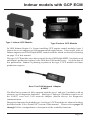
Indmar models with GCP ECM
Type 1 Indmar GCP Module
Type 2 Indmar GCP Module
In 2008 Indmar Engine Co. began installing GCP engine control modules (type 1
shown above) on engines used in tournament ski applications. Prior model years of
Indmar engines used GM-Delphi MEFI control modules which are described starting
on page 12 of this manual.
The type 1 GCP module was a direct retrofit for the GM-Delphi MEFI-5 modules used
on Indmar's production engines in the 2006 thru 2009 model years.. As of the date of
this publication, Indmar is planning to phase in the type 2 GCP module on future
production engines.
Scan Tool CAN Network Adapter
# 94027
The MerCruiser scan tool fully supports both the type 1 and type 2 modules with an
extensive set of diagnostic functions. Both type 1 and type 2 modules require use of
the #94027 scan tool CAN network adapter (shown above) for diagnostic
communication.
Diagnostic functions for both the type 1 and type 2 GCP modules are identical to those
described in the Volvo Penta EGC section of this manual. Please refer to pages 25
through 31 for a comprehensive description of the available functions.
Page 33
OBD-M compliant ECMs
The MerCruiser scan tool supports marine sterndrive and inboard engines that comply
with the 2008 California mandated OBD-M diagnostic specification. The scan tool
displays both live data and fault codes when connected to OBD-M compliant systems.
OBD-M live data
The live data displayed by the scan tool is dependent upon the engine manufacturer's
engine control system configuration. The OBD-M specification defines a set of
common engine parameters that must be made available to service technicians using a
scan tool if the those parameters apply to the engine being diagnosed.
Connecting to an OBD-M system
1) Locate the engine’s 6 pin OBD-M diagnostic connector. The location of this
connector is specified in the engine manufacturer’s service manual. Please note
that the connector may have a protective cap attached to it.
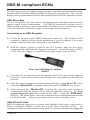
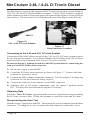
2) With the engine’s ignition switch in the OFF position, plug the scan tool’s
communication cable into the diagnostic connector. Scan tool adapter #94027
(CAN Network Adapter) is required for this application as shown below.
Scan Tool CAN Network Adapter
# 94027
3) Once the tool is connected, turn the ignition switch ON and start the engine if
necessary. If the engine will not start, simply leave the ignition switch ON and
proceed.
4) After the scan tool displays its initial opening messages, use the s and t keys to
select the “Marine EFI” operating mode, then press the YES key to select it.
5) After selecting the “Marine EFI” function the scan tool will attempt to
communicate with the engine’s ECM and automatically identify it. To obtain
general diagnostic data and system trouble codes, select the “ECM Data”
function. This menu choice causes the scanner to begin reading information from
the ECM module. Follow the prompts on the scan tool display screen.
OBD-M Fault Codes
OBD-M compliant engines use a system which displays fault codes in two parts, a
Suspect Parameter Number (SPN) and a Fault Mode Identifier (FMI).
An
explanation of this system is detailed in the MEFI-5 section of this manual on page 19.
Page 34
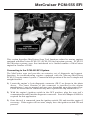
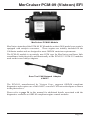
MerCruiser PCM-555 EFI
This section describes MerCruiser Scan Tool functions related to marine engines
equipped with MerCruiser PCM-555 / (ECM-555) fuel injection systems. PCM-555
fuel injection systems were first introduced on a limited number of MerCruiser
engines in October of 2000.
Connecting to the PCM-555 EFI System
The MerCruiser scan tool provides an extensive set of diagnostic and support
functions for troubleshooting engines equipped with the Mercury/MerCruiser
PCM-555 engine control system. Connection and operation of the tool is simple and
straight forward.
1) Locate the engine’s 4 pin diagnostic connector (DLC) as shown in the photo
above. The exact location of this connector is specified in the engine
manufacturer’s service manual and may vary depending upon the engine type.
Please be aware that the connector may have a protective cap attached to it.
2) With the engine’s ignition switch in the OFF position, plug the scan tool’s
communication cable into the diagnostic connector. Scan tool adapter #94006 is
required for this application.
3) Once the tool is connected, turn the ignition switch ON and start the engine if
necessary. If the engine will not start, simply leave the ignition switch ON and
proceed.
Page 35
MerCruiser PCM-555 EFI
4) After the scan tool displays its initial opening messages, use the s and t keys to
display the “MARINE EFI” operating mode from the main menu, then press the
YES key to select it.
Obtaining Data
After selecting the “MARINE EFI” function the scan tool will attempt to
communicate with the engine’s fuel injection computer and automatically identify it.
After an identification is made you will be presented with several menu choices. To
obtain diagnostic data and system trouble codes, select the “PCM Data” function.
This menu choice causes the scanner to begin reading information from the PCM
module. The scanner will prompt for your input as follows:
1) After selecting the “PCM Data“ function the scanner will communicate with the
engine’s PCM-555 control module and automatically provide you with the
number of Operating Hours the engine has logged.
2) Once the engine operating hours have been displayed the scanner will prompt you
to display any currently stored system faults.
Selecting YES will cause the
scanner to interrogate the PCM’s “Fault Memory”. If any faults are present,
their descriptions will be displayed.
Important Note on PCM-555 / (ECM-555) Faults:
The PCM-555 engine control module stores faults concurrently in two different
areas of it’s internal memory. One area, called the “Fault Memory”, only stores
faults that have been detected during the engine’s current Ignition-On cycle.
These faults will not be retained after the ignition switch is turned OFF.
The second fault storage area is referred to as the “Freeze Frame Memory”. The
Freeze Frame Memory retains the last 10 faults that the PCM has detected
regardless of when they occurred and even if ignition power has been turned
OFF. The Freeze Frame Memory also contains a snapshot of several critical
engine parameters, such as the engine’s speed and temperature, for each fault that
is stored. This information is helpful in making an accurate diagnosis and also
useful for understanding why the fault occurred. See “Fault History” for
additional details.
3) After the scanner displays a fault description it will give you the option to access
the fault’s associated “Freeze Frame” engine data. This data represents a
snapshot of various engine parameters at the time the fault was detected. Use the
s and t keys to recall and scroll through the fault’s Freeze Frame data. After
viewing the Freeze Frame data, press the NO key to return to the Fault Memory
access mode.
Note: While displaying Freeze Frame data a “ff:” will appear on the left side
of the second line of the scanner’s display.
Page 36
MerCruiser PCM-555 EFI
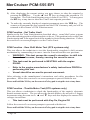
4) When all faults from the PCM’s Fault Memory have been displayed, the scanner
will provide you with the option of reviewing the faults or erasing them. The
erase function will clear the PCM’s “Fault Memory” to eradicate the faults that
were stored during the present Ignition ON cycle. The faults and associated
snapshot engine data stored in the PCM’s “Freeze Frame Memory” will not be
erased.
5) After the scanner has exited it’s fault access mode the tool will enter its “Scanner”
mode. This mode allows you to select and display a wide variety of engine sensor
and operating information. The displayed data is updated several times per
second. Use the s and t keys to scroll through the available data. Use the
HELP key to access information on the currently displayed engine parameter.
Use the NO key to exit the “Scanner” mode and return to the main menu.
Fault History
The PCM-555 control module contains a non-volatile memory that is used to retain
fault and operating history information. This information is retained in the PCM even
if power is removed from the system and allows historical operating information to be
recalled. This information is designed to aid a technician in diagnosing intermittent
and past events. To view “Fault History” information, perform the following steps:
1) After selecting the “Fault History“ function from the scanner’s PCM-555 menu
you will be presented with a sub-menu containing the following choices:
Read Fault Hist
Read Fault Sec
2) Select the “Read Fault Hist” menu item then press YES. The scanner will now
interrogate the PCM’s “Freeze Frame Memory” to determine if any faults have
occurred in the past. If any faults are found, their descriptions will be displayed.
3) After the scanner displays a fault description it will give you the option to access
the fault’s associated Freeze Frame engine data. This data represents a snapshot
of various engine parameters at the time the fault was detected. Use the s and
t keys to recall and scroll through the fault’s Freeze Frame data. After viewing
the Freeze Frame data press NO to return to the Fault History access mode.
Note: While displaying Freeze Frame data a “ff:” will appear on the left side
of the second line of the scanner’s display.
4) When all faults from the PCM’s Freeze Frame Memory have been displayed the
scanner will provide you with the option of reviewing the faults or erasing them.
The erase function will clear the PCM’s “Freeze Frame Memory” to eradicate
the PCM’s fault history data . The faults and associated snapshot engine data
stored in the PCM’s “Freeze Frame Memory” (including Fault Seconds,
described in the next paragraph) will be completely erased.
Page 37
MerCruiser PCM-555 EFI
Fault Seconds
When critical faults occur and remain active the PCM-555 keeps track of how many
seconds the fault has persisted during engine operation. The type and number of
critical faults this function keeps track of is pre-selected by the engine manufacturer.
All PCM-555 faults do not have an associated “Fault Second” counter assigned to
them, only a select number of fault types are kept track of. To view “Fault Seconds”
information perform the following steps:
1) After selecting the “Fault History“ function from the scanner’s PCM-555 menu
you will be presented with a sub-menu containing the following choices:
Read Fault Hist
Read Fault Sec
2) Select the Read Fault Sec menu item then press YES. The scanner will now
read the PCM’s “Fault Second Memory” and display the number of seconds
each critical fault has persisted. Use the s and t keys to recall and scroll
through the Fault Second data. After viewing the Fault Second data, press the
NO key to return to the Fault History access mode.
Note: The Fault Second information is erased when the Fault History’s
“Freeze Frame Memory” is cleared. See the prior section describing Fault
History for details.
RPM History
PCM-555 control modules have the ability to record the number of hours an engine
has been operated within a predetermined set of RPM ranges. These ranges are set at
the factory and allow a service technician to view a profile of how a particular engine
has been operated. To view “RPM History” information perform the following
steps:
1) After selecting the “RPM History“ function from the scanner’s PCM-555 menu
you will be presented with a sub-menu containing the following choices:
Read RPM History
Erase RPM Hist
2) Select the Read RPM History menu item then press YES. The scanner will
now read the PCM’s “RPM History Memory” and display the number of hours
the engine has operated in 9 sets of RPM ranges. Use the s and t keys to scroll
through the RPM History data. After viewing the RPM History data press the NO
key to return to the RPM History menu.
Page 38
MerCruiser PCM-555 EFI
Erase RPM History
This function clears the RPM History memory. The accumulated hours recorded for
each of the nine RPM ranges will be reset to zero after this function is executed.
Please note that the Total Operating Hours will not be cleared. This value is not
erasable.
PCM System Info
The PCM-555 control module contains an area of memory that is used to store helpful
text information for the service technician. This information consists of many lines of
text which describe basic engine settings, capacities, etc, as well as PCM software
revision information. The System Info data is entered into the PCM’s memory at the
factory and may be read by performing the following steps :
1) After selecting the “PCM System Info“ function from the main PCM-555 menu
the scanner will begin to display the first line of System Info text from the PCM’s
memory. Use the following keys to navigate through the multiple lines of System
Info text information:
Keys to control System Info display:
Use the s key to repeat the line of information currently scrolling across the
scanner’s display screen.
Use the t key to skip to the next available line of system information.
Use the PAUSE key to momentarily pause the scrolling display.
Use the NO key to abort the System Info function and return to the main PCM-555
scanner menu.
2) After the scanner displays the last line of system information it will automatically
return to the main PCM-555 menu.
Page 39
MerCruiser PCM-555 EFI
PCM Functions
The PCM Functions menu option allows a technician to access a variety of PCM
functional tests and settings. To access the PCM Functions menu perform the
following steps:
1) After selecting the “PCM Functions“ option from the scanner’s PCM-555
menu you will be presented with a sub-menu containing the following choices:
Auto Self Test
Output Tests
Induced Misfire
IAC Test
Set Engine Loc
Set Trim Limit
2) Use the s and t keys to select the desired menu item then press YES.
PCM Function - Auto Self Test
The Auto Self Test function is actually a series of individual PCM tests that are
executed in sequence. These tests are designed to provide a service technician with a
quick method of testing engine actuators, ignition coils, fuel injectors and sensors to
determine if they are operating within an acceptable range.
·
WARNING: During this test, backfire and external flame can
occur if fuel vapors have not been purged from the engine.
Purge fuel vapors prior to performing this test so they are not
ignited when the spark plugs are fired. Do not remove the flame
arrestor if the engine is equipped with one.
·
IMPORTANT: Before performing this test the engine’s electric
fuel pump should be disabled. Disabling of the fuel pump may
be accomplished by removing the fuel pump fuse or disconnecting the pump’s electrical connector.
·
The Auto Self Test should be performed with Key-On and Engine
Off.
1) Review the warnings stated above and be sure the engine is not running when
attempting to conduct this test. The Auto Self Test should be run with Key-On
and Engine Off.
Page 40
MerCruiser PCM-555 EFI
2) After selecting the “Auto Self Test“ function from the PCM Functions menu the
scanner will begin to display several warning messages. Review these messages
and be certain their instructions are followed.
3) When the warning messages have been displayed, you may begin the Auto Self
Test by pressing the YES key. This action will initiate a series of engine actuator
and sensor tests. The entire testing process may take several minutes to complete.
While the Auto Self Test is in progress the scanner’s display will indicate the type
of test being performed.
·
To Abort the Auto Self Test at any time, press and hold the
scanner’s NO key.
4) When the Auto Self Test has completed, the scanner will automatically
interrogate the PCM’s fault code memory and report any errors that have
occurred. A successful self test will report no errors.
PCM Function - Output Tests
The Output Test menu provides a technician with the ability to exercise various PCM
actuators and controls in order to verify correct operation.
Available output tests are:
Fuel Injectors
Fuel Pump Relay
Ignition Coils
Warning Horn
Tach Output
The sections presented on the following pages will provide specific details on each
output test.
Page 41
MerCruiser PCM-555 EFI
Fuel Injector Output Test
The Fuel Injector output test allows individual fuel injectors to be actuated to verify
their operation. The fuel injector under test will be fired at a rate equivalent to 1600
rpm. This test helps a technician verify that a particular fuel injector is receiving a
command signal from the PCM. This test will not reveal if an injector is clogged,
internally leaking or mechanically worn.
·
IMPORTANT: Before performing this test the engine’s electric
fuel pump should be disabled. Disabling of the fuel pump may
be accomplished by removing the fuel pump fuse or
disconnecting the pump’s electrical connector.
·
This test should be performed with Key-On and Engine Off.
1) Review the warnings stated above and be sure the engine is not running when
attempting to perform this test.
2) After selecting the “Fuel Injector“ function from the PCM Output Test menu the
scanner will begin to display several warning messages. Review these messages
and be certain their instructions are followed.
3) When the warning messages have been displayed, you may select the fuel
injector you wish to test by using the s and t keys. To begin firing the
selected injector press the FIRE key. This action will being actuating the fuel
injector at a speed equivalent to 1600 rpm for a period of approximately 10
seconds.
·
To abort the Fuel Injector test at any time, press and hold the
scanner’s NO key.
4) After the test is complete you may return to step #3 to test another injector or press
the NO key to return to the scanner’s Output Test menu.
Fuel Pump Relay Output Test
This test will cause the PCM to energize the fuel pump relay thereby activating the
engine’s electric fuel pump. Upon executing this test the technician should listen for
fuel pump and relay mechanical activity. The relay will be activated for a period of
one second.
·
This test should be performed with Key-On and Engine Off.
1) Review the advisory message stated above and be sure the engine is not running
when attempting to perform this test.
Page 42
MerCruiser PCM-555 EFI
2) After selecting the “Fuel Pump Relay“ test from the PCM Output Test menu
the scanner will prompt you to begin the test. To initiate the test press the FIRE
key. The fuel pump relay will be activated for approximately one second.
3) You may press the FIRE key again to repeat the test or press the NO key to return
to the Output Test menu.
Ignition Coil Output Test
The Ignition Coil output test allows individual coils and their associated spark outputs
to be fired to verify their operation. This test requires that a spark gap tester be used
to verify proper ignition coil operation. The ignition coil under test will be fired at a
rate equivalent to 1600 rpm. This test helps a technician verify that a particular
ignition coil is receiving a command signal from the PCM and that the coil’s high
voltage output is sufficient to generate a spark discharge.
·
WARNING: Use of spark gap tester is required for this test. Do
not perform this test with the ignition wires attached to the
engine’s spark plugs while they are installed in the cylinders.
Engine backfire and external flame can occur. As a safety
precaution, purge fuel vapors from the engine before
proceeding.
·
An approved spark gap tester must be attached to the spark
output under test. See the spark gap tester’s instructions for
proper installation, adjustment and use.
·
IMPORTANT: Before performing this test the engine’s electric
fuel pump should be disabled. Disabling of the fuel pump may
be accomplished by removing the fuel pump fuse or
disconnecting the pump’s electrical connector.
·
This test should be performed with Key-On and Engine Off.
1) Review the warnings stated above and be sure the engine is not running when
attempting to perform this test.
2) After selecting the “Ignition Coil“ function from the PCM Output Test menu the
scanner will begin to display several warning messages. Review these messages
and be certain their instructions are followed.
Page 43
MerCruiser PCM-555 EFI
3) When the warning messages have been displayed, you may select the ignition coil
you wish to test by using the s and t keys. To begin firing the selected coil
press the FIRE key. This action will begin firing the ignition coil at a speed
equivalent to 1600 rpm for a period of approximately 10 seconds.
·
To abort the Ignition Coil test at any time, press and hold the
scanner’s NO key.
4) After the test is complete you may return to step #3 to test another ignition coil or
press the NO key to return to the scanner’s Output Test menu.
Warning Horn Output Test
This test will cause the PCM to energize the engine warning horn. Upon executing
this test the technician should listen for warning horn activity. The warning horn will
be activated for a period of one second.
·
This test should be performed with Key-On and Engine Off.
1) Review the advisory message stated above and be sure the engine is not running
when attempting to perform this test.
2) After selecting the “Warning Horn“ test from the PCM Output Test menu the
scanner will prompt you to begin the test To initiate the test press the FIRE key.
The warning horn will be activated for approximately one second.
3) You may press the FIRE key again to repeat the test or press the NO key to return
to the Output Test menu.
Tachometer Output Test
The Tachometer Output test is primarily used to verify the operation of an external,
dash mounted, engine tachometer. The PCM is capable of supplying an internally
generated RPM signal to a tachometer gauge during engine operation. This test will
command the PCM to output a tach signal that is equivalent to 3000 rpm.
·
This test should be performed with Key-On and Engine Off.
1) Review the advisory message stated above and be sure the engine is not running
when attempting to perform this test.
Page 44
MerCruiser PCM-555 EFI
2) After selecting the “Tach Output“ test from the PCM Output Test menu the
scanner will prompt you to begin the test. To initiate the test press the FIRE key.
The tachometer output will begin sending a signal equivalent to 3000 rpm to an
externally attached (usually dashboard mounted) tachometer gauge. The tach
signal will be active for approximately 10 seconds.
3) You may press the FIRE key again to repeat the test or press the NO key to return
to the Output Test menu.
PCM Function - IAC Test
The IAC Test allows the functionality of the engine’s Idle Air Control system to be
tested. This test commands the PCM module to change the IAC valve’s position
thereby changing the engine’s idle speed. Perform the following steps to conduct the
IAC test.
·
IMPORTANT: This test should be performed in Neutral with the
engine idling and at normal operating temperature.
·
Do not attempt to drive the boat while performing this test.
·
Follow all engine and boat manufacturer’s safety precautions
and stay clear of all moving engine components.
1) Review the warnings stated above prior to conducting this test. For best results
the engine should be idling at normal operating temperature.
2) After selecting the “IAC Test“ function from the PCM Functions menu the
scanner will begin to display one or more advisory messages. Review these
messages and be certain their instructions are followed.
3) When the advisory messages have been displayed, you may begin the test by
pressing the YES key. While the test is in progress the scanner will display the
current engine RPM as well as the IAC valve’s position. Use the s and t keys
to change the IAC’s position in 10% increments. The IAC position range is from
-100% to +100%. While changing the IAC position you should hear a noticeable
change in engine speed.
4) To exit the IAC test, press the NO key. You will be returned to the scanner’s PCM
Function menu.
Page 45
MerCruiser PCM-555 EFI
PCM Function - Set Engine Location
This function allows the technician to read and modify the PCM’s engine location
setting. All engines shipped from the factory are configured as STARBOARD.
Multi-engine installations may require an alternate setting when used within a
Mercury/MerCruiser SmartCraft system. Refer to the engine and boat manufacturer’s
installation procedures for the correct setting.
Available PCM engine location settings are as follows:
STARBOARD
PORT
STARBRD 2 INSIDE
PORT 2 INSIDE
Perform the following steps to read and change the Engine Location.
·
This test should be performed with Key-On and Engine Off.
1) Review the advisory message stated above prior to performing this function.
2) After selecting the “Set Engine Loc“ function from the PCM Functions menu
the scanner will automatically read and display the current Engine Location
setting. After displaying the setting you may choose to proceed to alter the
location setting by pressing the YES key. Use the s and t keys to scroll
through the available location settings.
3) When you have selected the correct Engine Location Setting, press the YES key
to make the new setting permanent. The scanner will program the new location
setting into the PCM’s memory and you will be returned to the scanner’s PCM
Function menu.
Note: The new Engine Location setting will not become active until the
ignition has been cycled OFF and then back ON.
PCM Function - Induced Misfire Test
The Induced Misfire Test is designed to assist a technician in finding a problematic
cylinder. This test commands the PCM module to disable the fuel injector on a
selected cylinder thereby causing that cylinder to misfire (not produce power).
Perform the following steps to conduct the induced misfire test.
·
IMPORTANT: This test should be performed with the engine
running at approximately 1500 rpm, at normal operating
temperature and under moderate load.
Page 46
MerCruiser PCM-555 EFI
·
Do not attempt to drive the boat while performing this test.
·
Follow all engine and boat manufacturer’s safety precautions
and stay clear of all moving engine components.
1) Review the warnings stated above prior to conducting this test. For best results
the engine should be running at approx. 1500 rpm and under a moderate load.
2) After selecting the “Induced Misfire” function from the PCM Functions menu
the scanner will begin to display one or more advisory messages. Review these
messages and be certain their instructions are followed.
3) When the advisory messages have been displayed, you may select the cylinder
you wish to disable by using the s and t keys. To begin the test press the
FIRE key. This action will command the PCM to disable the fuel injector on the
selected cylinder for approximately 10 seconds. During this time you should hear
a noticeable decrease in engine speed. This decrease indicates that the selected
cylinder was contributing power to the system.
If a decrease in engine speed is not heard during the course of this test it may
indicate a problem with one or more cylinder components including the fuel
injector, ignition coil, spark plug, or other component. Refer to the engine
manufacturer’s troubleshooting procedures to isolate the problem component.
·
To Abort the Induced Misfire Test at any time, press and hold
the scanner’s NO key.
4) After the test is complete you may return to step #3 to test another cylinder or press
the NO key to return to the scanner’s PCM Function menu.
PCM Function - Set Trim Limit
The Trim Limit Setpoint function allows the technician to limit the range of the stern
drive’s trim movement. This setting has a range of 0% to 100%. When the trim
position reaches the Trim Limit Setpoint the PCM will disable the trim limit relay in
order to restrain the stern drive mechanism from further advancement. Perform the
following steps to read and change the Trim Limit Setpoint.
·
This test should be performed with Key-On and Engine Off.
1) Review the advisory message stated above prior to performing this function.
2) After selecting the “Set Trim Limit“ function from the PCM Functions menu the
scanner will display the current Trim Limit setting.
Page 47
MerCruiser PCM-555 EFI
3) After displaying the current setting you may choose to alter the setpoint by
pressing the YES key. Use the s and t keys to change the setpoint in 1%
increments. The Trim Limit Setpoint range is from 0% to 100%. You may press
the NO key at any time to abort the Trim Limit setpoint procedure.
4) To make the currently displayed setpoint permanent press the YES key. The
scanner will program the new setpoint into the PCM’s memory and you will be
returned to the scanner’s PCM Function menu.
PCM Function - Set Trailer Limit
Similar to the Set Trim Limit function described above, some MerCruiser systems
allow the trailering position of the sterndrive to be set. This position is above the Trim
Limit setpoint and is the upper limit of the sterndrive for trailering situations. Follow
the scan tool's on screen prompts to set the Trailer Limit.
PCM Function - Gear Shift Motor Test (DTS systems only)
This test allows the technician to test the functionality sterndrive's shift actuator
mechanism by commanding it to move into the Forward and Reverse positions.
·
WARNING: This test causes the vessel's sterndrive to shift into
forward and reverse, thereby causing the vessel to move.
·
This test must be performed in NEUTRAL with the engine
IDLING.
·
Refer to the engine manufacturer's safety instructions PRIOR to
performing this test.
·
Vessel should be secured to prevent movement.
After referring to the manufacturer's instructions and safety procedures for this
procedure, follow the scan tool's on screen prompts to proceed with the test.
Press and hold the NO key on the scan tool's keypad to stop the test at any time.
PCM Function - Throttle Motor Test (DTS systems only)
This test allows a technician to check the functionality of the engine's electronic
throttle actuator motor. The test allows the throttle blade to be moved in 5 degree
increments using the scan tool's s and t keys and also displays the current TPS
voltages in real-time.
·
This test must be performed with Key-On, Engine Off
Follow the scan tool's on screen prompts to proceed with the test.
Press and hold the NO key on the scan tool's keypad to stop the test at any time.
Page 48
MerCruiser PCM-09 (Visteon) EFI
MerCruiser PCM-09 Module
MerCruiser introduced the PCM-09 ECM module on their 2009 model year engine's
equipped with catalytic converters. These engines are initially intended for the
California market and are designed to meet OBD-M emission requirements.
The PCM-09 module is an entirely new ECM type for MerCruiser and bears little
resemblance both physically and functionally to the PCM-555 / ECM-555 modules
used on their non-catalyst engines.
Scan Tool CAN Network Adapter
# 94027
The PCM-09, manufactured by Visteon Corp., supports OBD-M compliant
diagnostics and requires use of the #94027 scan tool CAN network adapter as shown
in the photo above.
Please refer to page 34 in this manual for additional details associated with the
diagnostics available on OBD-M compliant engine control modules.
Page 49
MerCruiser Thunderbolt V Ignition
Thunderbolt V
Figure 3
1st and 2nd Generation
Thunderbolt V Module
Figure 4
3rd Generation
Thunderbolt V Module
This section describes a procedure which allows marine service technicians to obtain
engine operating hour information. This information is not useful for diagnosing
ignition performance related problems. If you are trying to diagnose ignition system
problems, please refer to an appropriate MerCruiser factory service manual for
ignition system diagnostic procedures.
The MerCruiser Thunderbolt V ignition module is a microprocessor based electronic
ignition controller. The module incorporates a variety of performance related
features and is designed to provide optimum spark advance throughout the engine’s
operating range. Three versions of the Thunderbolt V module are currently in
existence. Two of the three versions are capable of providing historical engine
operating information to the MerCruiser scan tool.
The 1st generation Thunderbolt V module was originally introduced during the 1994
model year. Although this generation module provided precise spark control for the
engine, it was superseded in 1996 and again in 1998 by second and third generation
models which contained data logging capabilities. These newer Thunderbolt V
modules are equipped with the ability to record engine operating hour information
throughout the life of the engine. The 3rd generation Thunderbolt V module,
introduced in 1998, has a redesigned outer case and improved diagnostic terminal
connections. MerCruiser has eliminated the module’s recessed diagnostic terminal
connections.
All connections to the module are now integrated into two
weather-proof electrical connectors at the module’s base.
Page 50
MerCruiser Thunderbolt V Ignition
Identifying the Thunderbolt V Version
Before using your MerCruiser scan tool to extract information from the Thunderbolt
V module you will first need to determine which version of the Thunderbolt V is
installed on the engine you are servicing.
The 1st and 2nd generation Thunderbolt V modules are mounted on a bracket that is
attached to the engine’s distributor as shown in figure 3. On some MerCruiser
engines a Knock Sensor (KS) module is also mounted on the same bracket. The 3rd
generation Thunderbolt V modules are mounted on the engine’s exhaust elbow and
may also have a Knock Sensor module mounted above it (see Fig. 4).
Be careful not to confuse the Thunderbolt V module with the Knock
Sensor module that may be mounted adjacent to it.
White outline
around text
Figure 5
1st Generation
Thunderbolt V Module
New Data
Connector
Figure 6
2nd Generation
Thunderbolt V Module
Figure 7
3rd Generation
Thunderbolt V Module
Referring to Figures 5 and 6, you will notice that both the 1st and 2nd generation
Thunderbolt V modules are physically identical. The telltale indicator that identifies
the 2nd generation module is the white box that surrounds the printed information
on the module’s cover. Thunderbolt V modules displaying this white outline around
their printed text are the 2nd generation modules which are capable of providing
engine operating data to the MerCruiser scan tool. Modules that do not display this
white outline will NOT communicate with the scan tool.
The 3rd generation Thunderbolt V module exhibiting a redesigned outer case is
shown in Fig. 7. All 3rd generation Thunderbolt V modules are capable of providing
data to the MerCruiser scan tool.
Page 51
MerCruiser Thunderbolt V Ignition
Figure 9
2nd generation Thunderbolt V Data
Terminals
Data Terminal #1
Data Terminal #2
Connect Yellow Lead Connect Violet Lead
Figure 8 Scan Tool Adapter #94020
Here
Here
Connecting to the 2nd Generation (1996-up) Thunderbolt V Module
Connection of the MerCruiser scan tool to the Thunderbolt V modules requires scan
tool adapter #94020 (Figure 8). The adapter has 4 leads protruding from it. Two leads
are used for communicating with the 2nd generation Thunderbolt V module and 2
leads are used for battery power. To properly connect a scan tool equipped with this
adapter to the 2nd generation Thunderbolt V module, carefully proceed through the
following steps:
1) Before connecting the MerCruiser scan tool to the Thunderbolt V
module be sure the Engine’s Ignition Switch is in the OFF position.
2) Referring to Figure 9 above, locate the Thunderbolt V data communication
terminals. These terminals are normally covered at the factory by a small amount
of silicone rubber. Use a small jeweler’s screwdriver or a pair of needle-nose
pliers to carefully remove this material. This removal process will expose the
Thunderbolt V’s two communication terminals.
Note, the communication terminals should be recovered with silicone rubber
(GE RTV silicone or equivalent) when you have finished acquiring the
Thunderbolt V’s data.
3) Referring to Figures 9 and 10, connect the YELLOW and VIOLET
“mini-grabber” test clips to the Thunderbolt V’s communication terminals as
shown. The “mini-grabber” clips are designed to hook underneath the terminal
pins. Pay careful attention since the module’s pins do not have any markings, to
ensure connecting the colored leads to the proper terminals. Additionally, be sure
the test clips form a good electrical connection with the Thunderbolt V’s terminal
pins.
Page 52
MerCruiser Thunderbolt V Ignition
Figure 10 Thunderbolt V Data Terminals
Please note that reversing the YELLOW and VIOLET leads will cause the scan
tool to fail to communicate with the module. No damage will occur to the scan
tool or the module, the scan tool will simply display an error message stating it
cannot communicate properly.
4)
Connect the BLACK test lead to a good engine ground location. The lower mounting
stud for the Thunderbolt V module, as shown in Figure 11, is a suitable location for
this lead.
Figure 11 Ground Connection
Page 53
MerCruiser Thunderbolt V Ignition
5) With the engine’s ignition switch still in the OFF position, connect the RED
test lead to a +12 volt ignition power source. The engine’s circuit breaker
terminal, as shown in Figure 12, is a good connection for +12v power.
Figure 12 Circuit Breaker Terminal
Connecting to 3rd Generation Thunderbolt V Modules
Connection of the scan tool to the 3rd generation Thunderbolt V module requires
adapter #94020 attached to the tool. The adapter’s red and black battery clips and
square data connector will be used for this application. To properly connect the scan
tool to this module, carefully proceed through the following steps:
1. Before connecting the scan tool cables to the Thunderbolt V module, be sure the
engine’s ignition switch is in the OFF position.
2. Locate the 3rd generation Thunderbolt V module mounted on the exhaust elbow .
Unplug the engine wiring harness from the module’s four pin data connector.
Plug the square connector of the Thunderbolt V adapter into this connector (see
Figure 13 on the next page).
3. Connect the adapter’s BLACK test lead to a good ground location.
4. With the engine’s switch still in the OFF position, connect adapter’s RED test
lead to a +12 volt ignition power source. The engine circuit breaker terminal is a
good location for +12 volt power (as shown in Figure 12).
Page 54
MerCruiser Thunderbolt V Ignition
Unplug four pin engine
harness connector and
connect the scan tool’s
adapter here
Figure 13
Location of 3rd generation Thunderbolt V module
Obtaining Data
The Thunderbolt V module is capable of providing engine operating history
information to the MerCruiser scan tool. In order for the module to communicate this
information to the scan tool, the Engine must be OFF. After checking that you have
properly connected the scan tool to the module, proceed though the following steps to
extract the module’s data.
1) After observing standard safety precautions and ensuring that the scan tool is
correctly connected to the module, place the engine’s ignition switch in the ON
position. DO NOT START THE ENGINE.
2) Choose the"Thunderbolt V" option from the scan tool’s main menu.
3) The scan tool will now automatically attempt to retrieve data from the
Thunderbolt V module.
If data is not received within 10 seconds the scan tool will report that a
communication error has occurred. In this situation, turn the engine’s ignition
switch to the OFF position and recheck the scan tool connections to the
Thunderbolt V module. Also, be sure you have correctly identified the module as
described in “Identifying the Thunderbolt V Version”.
4) After the scan tool has successfully retrieved the Thunderbolt V’s data, the
information will be displayed for your review.
Please note the scan tool does not continually retrieve information from the module.
Unlike the “live” monitoring functions the scan tool performs on EFI systems, the
Thunderbolt V’s information is not continuously updated while you are viewing it.
Also note that the information is not retained when the scan tool is powered off.
Page 55
MerCruiser Thunderbolt V Ignition
Thunderbolt V Data
Scan Tool Display
Description
KEY-ON / ENG OFF
Number of hours ignition has been
ON with engine OFF
UNDER 1000 RPM
Number of hours engine has operated
under 1000 RPM
1000-1999 RPM
Number of hours engine has operated
between 1000 and 1999 RPM
2000-2999 RPM
Number of hours engine has operated
between 2000 RPM and 2999 RPM
3000-3999 RPM
Number of hours engine has operated
between 3000 and 3999 RPM
4000-4999 RPM
Number of hours engine has operated
between 4000 and 4999 RPM
TIME AT REV LIMIT
Number of hours engine has operated
at its Rev (rpm) limiter
TOTAL RUN TIME
Total number of hours engine has run
Figure 11 Thunderbolt V Data
Page 56
MerCruiser Thunderbolt V Ignition
Disconnecting from the Thunderbolt V Modules
Use the following procedure to disconnect the scan tool from all Thunderbolt V
modules.
1) Turn the engine’s ignition switch to the OFF position.
2) Remove the RED power lead from the +12v power connection.
3) Remove the BLACK ground lead from the engine’s ground connection.
4) For 2nd Generation modules, remove the YELLOW and VIOLET
“mini-grabber” test clips from the Thunderbolt V’s communication terminals.
For 3rd generation modules unplug the 4 pin scan tool adapter from the module’s
data connector.
5) Replace the removed silicone rubber waterproofing on the 2nd generation
module’s communication terminals. Use General Electric RTV silicone rubber or
equivalent.
6) On 3rd generation modules, replace the four pin engine harness connector.
Page 57
MerCruiser 2.8L / 4.2L D-Tronic Diesel
The MerCruiser scan tool fully supports the D-Tronic fuel injection system found on
1997-Up 2.8L and 4.2L MerCruiser diesel engines. The D-Tronic system is equipped
with a connector which is located on upper rear corner of the engine’s electrical box as
shown below. The electrical box is located near the rear of the engine on the left side.
#94014
Figure 16
2.8L / 4.2L D-Tronic Adapter
Figure 17
Data Connector Location
Connecting to the 2.8L and 4.2L D-Tronic System
Connection of the MerCruiser scan tool to the 2.8L or 4.2L D-Tronic system requires
the use of a special adapter. You will need adapter #94014 along with a MerCruiser
scan tool that has been updated with Version 3 or newer software.
Be sure the Engine’s Ignition Switch is in the OFF position before connecting the
scan tool to the D-Tronic data connector.
1) Be sure the engine is turned OFF.
2) Locate the D-Tronic data connector as shown in Figure 17. Remove the data
connector’s protective cover.
3) Connect the 94014 adapter to the data connector. Turn the adapter’s locking ring
clockwise to lock the connector firmly in place.
4) Connect the scan tool to the adapter’s round DIN connector.
5) Standing clear of all engine components, turn the engine’s ignition switch
ON. You may also start and run the engine if necessary.
Obtaining Data
Select the “Merc D-Tronic” option from the scan tool’s main menu to begin reading
the D-Tronic system’s data. Follow the prompts to read fault codes and live data.
Disconnecting the Scan Tool
Shut the engine’s ignition switch OFF. Disconnect the scan tool adapter from the data
connector. If equipped, be sure to replace the data connector’s protective cover.
Page 58
MerCruiser 7.3L D-Tronic Diesel
The MerCruiser scan tool fully supports the D-Tronic fuel injection system found on
1997-Up 7.3L MerCruiser diesel engines. The 7.3L D-Tronic system is equipped
with a diagnostic data connector which is located on upper rear corner of the engine’s
electrical box as shown below. The electrical box is located near the rear of the engine
on the left side.
Figure 18
7.3L D-Tronic Adapter
Figure 19
7.3L D-Tronic Engine
#94021
Data Connector
Connection of the MerCruiser scan tool to the 7.3L D-Tronic system requires the use
of adapter #94021 (see Figure 18 above) along with a MerCruiser scan tool that has
been updated with Version 3 or newer software
Be sure the Engine’s Ignition Switch is in the OFF position before connecting the
scan tool to the D-Tronic data connector.
1) Locate the D-Tronic data connector as shown in Figure 19. Remove the data
connector’s protective cover.
2) Connect the 94021 adapter to the data connector.
3) Connect the scan tool to the adapter’s round DIN connector.
4) Standing clear of all engine components, turn the engine’s ignition switch ON.
You may also start and run the engine if necessary.
Obtaining Data
Select the “Merc Diesel EDI” option from the scan tool’s main menu to begin reading
the D-Tronic system’s data. Follow the scan tool’s prompts to read fault codes and
live data.
Disconnecting the Scan Tool
Shut the engine’s ignition switch OFF. Disconnect the scan tool adapter from the data
connector. If equipped, be sure to replace the data connector’s protective cover.
Page 59
Mercury 3.0L Carbureted Outboard
The MerCruiser scan tool is equipped with the ability to diagnose Mercury’s 3.0L
outboard ignition system. This system incorporates an electronic control module and
was used on 1994 and newer 3.0L (185c.i. / 225 HP) carbureted outboard motors.
#94012
#94011
Figure 20
1994 3.0L Adapter
Figure 21
1995-Up 3.0L Adapter
Connecting to the 3.0L Carbureted Outboard
Connection of the MerCruiser scan tool to the Mercury outboard ignition system
requires the use of a special adapter. Presently there are two adapters available for
this system as shown in Figures 20 and 21.
The 1994 model year 3.0L ignition modules were not equipped with a diagnostic
connector and require the use of a T-Adapter harness #94012. The 1995 and newer
3.0L ignition modules were equipped with a 4 pin diagnostic connector and require
scan tool adapter # 94011.
Be sure the Engine’s Ignition Switch is in the OFF position before connecting the
scan tool to the ignition system.
If you are using the #94012 T-Adapter Harness
1) Be sure the engine is turned OFF.
2) Remove the 3.0L engine cover per Mercury’s recommended procedure.
3) Locate the ECU module as shown in Figure 22 on the next page.
4) Disconnect the ECU’s starboard engine harness connector.
5) Connect the T-Adapter into the ECU’s starboard wiring harness as shown in
Figure 22.
6) Connect the scan tool to the T-Adapter’s round DIN connector.
7) Standing clear of all engine components, you may now turn the engine’s ignition
switch ON.
Page 60
Mercury 3.0L Carbureted Outboard
ECU Module
T-Adapter
Harness
Connect Scan
Tool
Figure 22 T-Adapter Harness Installation
If you are using the 94011 adapter
1) Be sure the engine is turned OFF.
2) Remove the 3.0L engine cover per Mercury’s recommended procedure.
3) Locate the ECU’s 4 pin diagnostic connector.
4) Connect the 94011 adapter to the engine’s diagnostic connector.
5) Connect the scan tool to the adapter’s round DIN connector.
6) Standing clear of all engine components, you may now turn the engine’s ignition
switch ON.
Obtaining Data
Select the Mercury Outboard selection from the scan tool’s main menu to begin
reading the ECU’s data. The scan tool will automatically provide the ECU’s software
revision number, search for stored fault codes and then proceed to the live data
scanning mode.
Disconnecting the Scan Tool
Be sure the engine’s ignition switch is in the OFF position before disconnecting
the scan tool or T-harness adapter. Disconnect the scan tool and adapter from the
engine. Reconnect the ECU’s starboard harness if the #94012 T-adapter was used.
Replace engine cover per Mercury’s recommended procedures.
Page 61
Mercury Outboard 3.0 Fuel ECM
The MerCruiser scan tool is equipped with the ability to diagnose Mercury’s 3.0L
outboard EFI system. This system incorporates a Fuel ECM which is capable of
providing a variety of diagnostic information to the MerCruiser scan tool.
#94011
Figure 23
3.0L EFI Adapter
Figure 24
Data Connector Location
Connecting to the 3.0L Fuel ECM
Connection of the MerCruiser scan tool to the 3.0L Fuel ECM requires the use of a
special adapter. You will need adapter #94011 along with a MerCruiser scan tool that
has been updated with Version 3 or newer software.
Be sure the Engine’s Ignition Switch is in the OFF position before proceeding
with the following steps.
1) Be sure the engine is turned OFF.
2) Locate the data connector as shown in Figure 24.
3) Connect the 94011 adapter to the data connector.
4) Connect the scan tool to the adapter’s round DIN connector.
5) Standing clear of all engine components, turn the engine’s ignition switch ON.
Obtaining Data
Select the “3.0L Fuel ECM” option from the scan tool’s “Mercury Outboard” menu to
begin reading the ECM’s data. Follow the prompts to read live data, status switches
and sensor history data. Sensor history data is not retained by the Fuel ECM after it
has been powered OFF. The history data pertains to the engine’s current operating
period since it has been powered ON. Turning the ignition switch OFF then ON will
clear the Pass / Fail sensor history data.
Disconnecting the Scan Tool
Shut the engine’s ignition switch OFF. Disconnect the scan tool adapter from the data
connector.
Page 62
Mercury Hi Performance 2.0L / 2.5L ECM
The MerCruiser scan tool is equipped with the ability to diagnose Mercury High
Performance’s 2.0L / 2.5L ECM system. This system incorporates an ECM which is
capable of providing a variety of diagnostic information to the MerCruiser scan tool.
#94013
Figure 25
2.0L / 2.5L Hi Perf
Figure 26
Data Connector Location
Connecting to the 2.0L / 2.5L Hi Performance ECM
Connection of the MerCruiser scan tool to the Hi Performance ECM requires the use
of a special adapter. You will need adapter #94013 along with a MerCruiser scan tool
that has been updated with Version 3 or newer software.
Be sure the Engine’s Ignition Switch is in the OFF position before proceeding
with the following steps.
1) Be sure the engine is turned OFF.
2) Locate the data connector as shown in Figure 20. (ECM is shown with cover
removed, data connector is accessible without removing cover.)
3) Connect the 94013 adapter to the data connector.
4) Connect the scan tool to the adapter’s round DIN connector.
5) Standing clear of all engine components, turn the engine’s ignition switch ON.
Obtaining Data
Select the “Hi-Perf 2.0 2.5” option from the scan tool’s “Mercury Outboard” menu to
begin reading the ECM’s data. Follow the scan tool’s prompts to read ECM data and
status information.
Disconnecting the Scan Tool
Shut the engine’s ignition switch OFF. Disconnect the scan tool adapter from the data
connector.
Page 63
Injector Test Mode
When entering the fuel injector test mode, be sure to follow all pertinent fuel system
safety precautions provided by the engine and injector manufacturers. Refer to the
engine manufacturer’s service manuals for fuel system safety and injector test
information.
Injector
Test
Multi-Pulse
Test
Single-Pulse
Test
Multi-Pulse
Time Set
1) Select the type of injector test required. The following two test modes are
available:
Multi Pulse Test Mode
Allows the injector to be cycled ON/OFF a
predetermined number of times. When in this mode
you may use the s and t keys to select from 5 to 50
cycles per test. The ON TIME reading displayed in
this mode reflects the total time the injector is held
ON.
Single Pulse Mode
Cycles the injector ON/OFF one time. When in this
mode, you may use the s and t keys to select an
ON time between 1 and 1000 milliseconds. Holding
either the s or t key down for more than ten
counts causes the ON time to change in 10 ms
increments.
2) Press the YES key to enter the test mode.
3) Press the FIRE key to initiate the test.
4) Press the NO key to exit the test mode.
The Multi-Pulse mode’s overall ON time may be adjusted between 100 and 600
milliseconds by entering the Time Adjust menu option.
Page 64
Injector Test Mode
INJECTOR TEST SETTINGS
Single Pulse
Multi-Pulse
Pulse Time Options
Adjustable
from
1 - 1000 ms
in one-ms
intervals
(Total On-Time)
100 ms
Cycle Options
5 Cycles
200 ms
10 Cycles
300 ms
400 ms
20 Cycles
500 ms
50 Cycles
600 ms
Page 65
Support Mode
The Support menu option provides factory and scan tool manufacturer contact
information.
Support
Info
Marine
Mercury OB
Scan Tool
If you have any system support questions please contact us at:
Rinda Technologies Technical Support
Monday through Friday
9am-5pm CST
Tel: (773) 736-6633
Fax: (773) 736-2950
www.rinda.com
Page 66
MerCruiser Scan Tool Adapters
#94005
GM MEFI-1 thru MEFI-4 Adapter
#94006
PCM-555 / ECM-555 Adapter
#94011
1995-Up Outboard Adapter
#94013
2.0L / 2.5L Hi-Perf Outboard
Adapter
#94014
2.8L / 4.2L D-Tronic Diesel Adapter
#94020
Thunderbolt V Adapter
Continued on the next page.
Page 67
MerCruiser Scan Tool Adapters
#94021
7.3L D-Tronic Diesel Adapter
#94026
PCM / Crusader ECM-07 Adapter
Page 68
#94024
Volvo Penta EGC Adapter
#94027
CAN Network Adapter
Notes:
Page 69
Notes:
Page 70
Notes:
Page 71
Rinda Technologies Inc.
4563 N. Elston Ave.
Chicago, IL 60630 USA
Tel: (773) 736-6633 Fax: (773) 736-2950
www.rinda.com