1
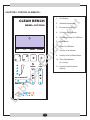
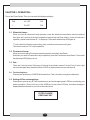
CHAPTER 3. OPERATION:Turn on the Power Switch. Then you can see the followings on display:
FAN
UV : OFF
T: 00
1
FL: OFF
T: 00
3.1 Ultraviolet Lamp:When you need an Ultraviolet Lamp Operation, press the Ultraviolet Lamp Button and set a desired
time (time unit is minute) of the lamp's operation using the Up and Down button. In case of continuous
operation, please lower the time till *:* is displayed. Then check that the lamp LED lights up.
“T” on the first line of display means setting value, and other one means running time.
Time button is only for U.V. Lamp's operation.
3.2 Fluorescent Lamp:When you want to stop a Fluorescent Lamp's operation, press the Lamp Button.
And when you need a Fluorescent Lamp's operation, press the Fluorescent Lamp Button. Then check
that the lamp's LED lights up or not.
3.3 Fan:There are 9 velocity levels. Each lamp of Velocity level indicator means 3 levels. Every 3 levels, light
moves to the upper lamp. Number below the "FAN" on display means current velocity level.
3.4 Total running time:Please press up/down key of SPEED at the same time. Then, the total running time is displayed.
3.5 Setting of Filter exchange time:Please press up/down key of TIME simultaneously and set the appropriate LIFE time considering your
working condition. (Time unit is hour) If the USED time is more than LIFE time, the below message is
displayed with an alarm when you turn on the clean bench.
FILTER CHANGE
PRESS ANY KEY
-3-