1
FILE NO. SVM-08028
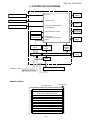
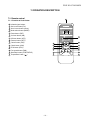
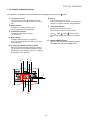
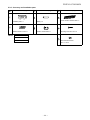
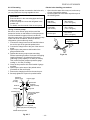
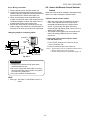
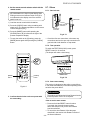
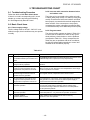
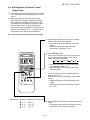
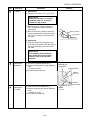
7-1-2. Display of Remote Control
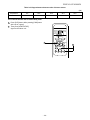
All indications, except for the clock time indicator, are displayed by pressing the
button.
1.
Transmission mark
This transmission mark indicates when the
remote controller transmits signals to the indoor
unit.
6.
Swing
Indicate when louver is swing.
Press swing button to start the swing operation
and press it again to stop the swing operation.
2.
Mode indicator
Indicates the current operation mode.
(AUTO, COOL, DRY and AUTO FAN)
7.
FAN speed indicator
Indicates the selected fan speed.
AUTO, QUIET or three fan speed levels
3.
Temperature indicator
Indicates the temperature setting.
(17°C to 30°C)
4.
5.
( LOW , MED
, HIGH
can be shown.
Indicate Auto will be appear with Dry operation
only.
ECO indicator
Indicates when the ECO is in activated.
Press the ECO button to start and press it again
to stop operate.
8.
A, B change indicator remote controller
When the remote controller switching function is
set, "B" appears in the remote controller display
(When the remote controller seting is "A", there is
no indication at this position.)
2
1
3
7
6
• ••
B•
•
Hr.ON OFF •
• • •
••
7
7
8
4
5
8
− 14 −
ON/OFF TIMER indicator
Indicates when the ON/OFF TIMER operation.
(ON TIMER [Hr. ON], OFF TIMER [OFF]).