1
VIO 300 D
User Manual
06.09
V 1.7.x
ERBE
VIO 300 D
User Manual
Peter Mock
Technical Editor
Tel. (+ 49) 70 71 75 52 37
E-mail [email protected].
I shall be very pleased if this User Manual can make your work easier and help you to use all the functions of your unit safely.
It has been produced with great care by me in collaboration with development engineers and quality personnel. The use of
publishing software and digital photography provided the documentation team with layout flexibility. Our object was to
achieve a clear combination of text and photographs. The translation of the text into your language is subjected to a strict
quality control. The User Manual is digitally printed only on delivery of your machine. All information is up to date. The
ERBE documentation team would like to improve its products for your benefit, and I would therefore be very pleased to receive suggestions, criticism and questions as well as positive comments.
EN ISO 9001 EN ISO 13485
User Manual Art. No. 80104-521
All rights to this User Manual, in particular rights of duplication, dissemination and translation, are reserved. No part of this
User Manual may be reproduced in any form (by photocopying, microfilming or other methods) or processed, duplicated or
disseminated by the use of electronic systems without the written consent of ERBE Elektromedizin GmbH.
The information contained in this User Manual can be changed or expanded without prior notice and without obligation on
the part of ERBE Elektromedizin GmbH.
Printed by ERBE Elektromedizin
Printed in Germany
Copyright © ERBE Elektromedizin GmbH, Tübingen 2009
Table of Contents
Table of Contents
Chapter
80104-521
06/ 2009
1
Title
Page
Safety Instructions ......................................................................... 9
Intended use ............................................................................................................. 9
Combination with other equipment ......................................................................... 9
Safety notations........................................................................................................ 9
Meaning of the note ................................................................................................. 9
Who must read this User Manual?......................................................................... 10
Compliance with safety information...................................................................... 10
Structure of safety instructions .............................................................................. 10
Operating errors by persons without training ........................................................ 10
Risks due to the environment................................................................................. 11
Electric shock......................................................................................................... 12
Fire / explosion ...................................................................................................... 13
Burns ...................................................................................................................... 15
Risks due to incorrect use of the return electrode.................................................. 19
Defective unit......................................................................................................... 20
Interference caused by the unit .............................................................................. 21
Damage to the unit and accessories ....................................................................... 22
Notes ...................................................................................................................... 23
2
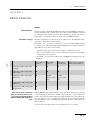
Safety Features............................................................................. 25
NESSY ................................................................................................................... 25
How do I receive information about the safety status of the return electrode? ..... 26
Automatic monitoring of equipment output error.................................................. 29
Automatic monitoring of the ON time................................................................... 29
Protection from operating errors ............................................................................ 30
3
Accessories .................................................................................. 31
Check compatibility of instrument and CUT / COAG mode with the help of
the Upmax display ................................................................................................. 31
Check compatibility of the return electrode........................................................... 33
4
Description of the Controls ......................................................... 35
Controls on the front panel .................................................................................... 35
Controls on the back .............................................................................................. 37
5
Working with the Electrosurgical Unit: a Tutorial .................... 39
The tutorial and your electrosurgical system ......................................................... 39
Make power connection, switch on unit, self-test, assignment of active
program .................................................................................................................. 39
Adopt Program....................................................................................................... 42
Select Program ....................................................................................................... 42
5 / 166
Table of Contents
The basic concept of the electrosurgical unit: focusing attention on the
functions of a receptacle (Focus View) ..................................................................44
Changing settings of the Basic Program ................................................................44
Setting Cut mode ....................................................................................................45
Setting CUT effect..................................................................................................46
Selecting CUT Max. Wattage.................................................................................47
Select COAG mode, COAG effect and COAG power limitation ..........................48
Activation of CUT and COAG modes with footswitch .........................................48
Activation of CUT and COAG modes with fingerswitch, Auto Start...................50
The Focus View and activation concept of the electrosurgical unit. What
points must I observe? ............................................................................................51
NESSY ...................................................................................................................51
How do I receive information about the safety status of the return electrode?......52
Saving the amended Basic program under a new name .........................................56
Overwriting a program ...........................................................................................57
Creating all settings for a program from scratch ....................................................58
Deleting a program .................................................................................................58
Creating programs for ReMode function ..............................................................58
Calling up Setup .....................................................................................................62
Description of receptacle hardware............................................ 65
Purchasing further receptacles................................................................................65
Receptacles for different modes and instrument connectors ..................................65
Monopolar receptacle .............................................................................................65
Bipolar receptacle...................................................................................................67
Multifunctional receptacle......................................................................................68
Receptacle for return electrode...............................................................................69
7
Monopolar Standard Modes ........................................................ 71
AUTO CUT ............................................................................................................71
HIGH CUT .............................................................................................................73
DRY CUT...............................................................................................................75
DRY CUT ° ............................................................................................................77
SOFT COAG ..........................................................................................................79
SWIFT COAG ° .....................................................................................................81
SWIFT COAG........................................................................................................83
FORCED COAG ....................................................................................................85
SPRAY COAG.......................................................................................................87
8
Bipolar Standard Modes .............................................................. 91
BIPOLAR CUT ......................................................................................................91
BIPOLAR CUT +...................................................................................................93
BIPOLAR SOFT COAG........................................................................................94
BIPOLAR SOFT COAG +.....................................................................................96
BIPOLAR FORCED COAG..................................................................................97
9
Monopolar Optional Modes ....................................................... 101
PRECISE CUT .....................................................................................................101
ENDO CUT Q ......................................................................................................103
ENDO CUT I........................................................................................................104
6 / 166
80104-521
06/ 2009
6
Table of Contents
PRECISE COAG ................................................................................................ 106
TWIN COAG....................................................................................................... 107
10
Bipolar Optional Modes ............................................................. 111
BiClamp ............................................................................................................... 111
BIPOLAR PRECISE CUT .................................................................................. 112
BIPOLAR PRECISE COAG ............................................................................... 114
11
APC receptacle (only available with the APC module) ........... 117
APC receptacle..................................................................................................... 117
12
APC Standard Modes (Only Available with an APC
Module)........................................................................................ 119
FORCED APC ..................................................................................................... 119
PRECISE APC .................................................................................................... 121
PULSED APC...................................................................................................... 122
Argon-assisted AUTO CUT Mode ..................................................................... 124
Argon-assisted HIGH CUT Mode ....................................................................... 126
Argon-assisted DRY CUT Mode......................................................................... 128
Argon-assisted DRY CUT ° Mode ...................................................................... 130
Argon-assisted SWIFT COAG Mode ................................................................. 132
Argon-assisted SWIFT COAG ° Mode ............................................................... 134
Argon-assisted FORCED COAG Mode ............................................................. 136
Argon-assisted SOFT COAG Mode ................................................................... 138
80104-521
06/ 2009
13
APC Optional Modes (Only Available with an APC Module) .. 141
Argon-assisted TWIN COAG Mode.................................................................... 141
14
Installation .................................................................................. 145
Ambient conditions .............................................................................................. 145
Electrical installation ........................................................................................... 146
Install electrosurgical unit on overhead support .................................................. 148
Installing the unit on an ERBE equipment cart ................................................... 149
15
Cleaning and Disinfection ......................................................... 151
Wipe disinfection ................................................................................................. 151
Instructions for cleaning and disinfection............................................................ 151
Safety Instructions ............................................................................................... 151
16
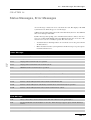
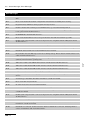
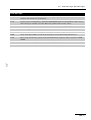
Status Messages, Error Messages ........................................... 153
17
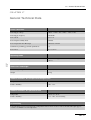
General Technical Data.............................................................. 157
18
Information on electromagnetic compatibility (EMC) ............. 159
Guidelines for avoiding, recognizing and rectifying unwanted
electromagnetic effects on other equipment or systems, which are the
result of operating the VIO system. ..................................................................... 159
19
Maintenance, Customer Service, Warranty, Disposal ............ 165
Maintenance ......................................................................................................... 165
Customer service.................................................................................................. 165
7 / 166
Table of Contents
80104-521
06/ 2009
Warranty ...............................................................................................................165
Disposal ................................................................................................................166
8 / 166
1 • Safety Instructions
CHAPTER 1
Safety Instructions
Intended use
The VIO 300 D is an electrosurgical unit for cutting and coagulation. Thanks to its
performance features it offers universal applications.
Combination with other equipment
You can combine this unit with matching ERBE equipment: e.g. APC 2, EIP 2. You
will then have a well-conceived, coordinated system.
Safety notations
DANGER
indicates an imminently hazardous situation which, if not avoided,
will result in death or serious injury.
80104-521
06/ 2009
WARNING
indicates a potentially hazardous situation which, if not avoided,
could result in death or serious injury.
CAUTION
indicates a potentially hazardous situation which, if not avoided,
may result in minor or moderate injury.
CAUTION
used without the safety alert symbol indicates a potentially hazardous situation which, if not avoided, may result in property damage.
Meaning of the note
"Note:"
Refers a) to manufacturer's information that relates directly or indirectly to the safety of people or protection of property. The information does not relate directly to a
risk or dangerous situation.
Refers b) to manufacturer's information that is important or useful for operating or
servicing the unit.
9 / 166
1 • Safety Instructions
Who must read this User Manual?
Knowledge of the User Manual is absolutely essential for correct operation of the
unit.
Therefore, everyone who is concerned with
•
preparing,
•
adjusting,
•
operating,
•
disassembling, as well as
•
cleaning and disinfecting
the unit must read the User Manual.
Please pay particular attention to the safety instructions in each chapter.
Compliance with safety information
Working with medical equipment is associated with certain risks to patients, medical personnel and the environment. Risks cannot be entirely eliminated by design
measures alone.
Safety does not depend solely on the equipment. Safety depends to a large extent on
the training of medical personnel and correct operation of the equipment.
The safety instructions in this chapter must be read, understood and applied by everyone who is working with the equipment.
The safety instructions are structured according to the following risks:
•
Operating errors by persons without training
•
Risks due to the environment
•
Electric shock
•
Fire / explosion
•
Burns
•
Risks due to incorrect use of the return electrode
•
Defective unit
•
Interference caused by the unit
•
Damage to the unit and accessories
•
Notes
Operating errors by persons without training
WARNING
Operating errors by persons without training
Persons without training can operate the unit incorrectly.
Risk of injury or death for patients and medical staff! Risk of damage to property.
The equipment may only be used by persons who have been
trained on how to use it properly according to this User Manual.
10 / 166
80104-521
06/ 2009
Structure of safety instructions
1 • Safety Instructions
Training may only be carried out by persons who are suitable on
the basis of their knowledge and practical experience.
In the event of uncertainties or if you have any questions, please
contact ERBE Elektromedizin. You will find the addresses in
the address list at the end of this User Manual.
Risks due to the environment
CAUTION
Interference with the unit by portable and mobile HF communication devices (e.g. mobile phones, WLAN equipment)
Electromagnetic waves emitted by portable and mobile HF communication devices can effect the unit.
The unit may fail or not perform properly.
Please see the table "Recommended separation distances between portable and mobile HF communications equipment and
the equipment" at the end of this User Manual.
CAUTION
Unsuitable temperature or level of humidity during operation
If you operate the equipment at an unsuitable temperature or level
of humidity, it may sustain damage, fail, or not perform properly.
80104-521
06/ 2009
Operate the equipment at a suitable temperature and level of humidity. You will find the tolerances for temperature and humidity in the Technical Data.
If other ambient conditions must be observed for operation of
the equipment, you will also find them in the Technical Data.
CAUTION
Unsuitable temperature or humidity in transit or storage
If you transport or store the equipment at an unsuitable temperature
or level of humidity, it may sustain damage and fail.
Transport and store the equipment at a suitable temperature and
level of humidity. You will find the tolerances for temperature
and humidity in the Technical Data.
If other ambient conditions must be observed for transport and
storage of the equipment, you will also find them in the Technical Data.
CAUTION
Insufficient acclimatization time, unsuitable temperature during acclimatization
If the device was stored or transported below or above a certain
temperature, it will take a certain time and temperature to acclimatize.
If you do not observe the rules, the device can sustain damage and
fail.
Acclimatize the device according to the rules in the Technical
Data.
11 / 166
1 • Safety Instructions
CAUTION
Overheating of the device due to poor ventilation
If ventilation is poor, the device can overheat, sustain damage, and
fail.
Install the device in such a way that there is an unobstructed circulation of air around the housing. Installation in confined wall
recesses is prohibited.
CAUTION
Penetration of liquid into the device
The housing is not absolutely watertight. If liquid penetrates, the
device can sustain damage and fail.
Make sure no liquid can penetrate the device.
Do not place vessels containing liquids on top of the device.
Electric shock
WARNING
Defective grounded power outlet, inferior-quality power cord,
incorrect line voltage, multiple power outlets, extension cords
Risk of electric shock and other injuries to the patient and medical
personnel! Risk of damage to property.
Only use the ERBE power cord or an equivalent power cord for
this purpose. The power cord must bear the applicable national
test symbol.
Check the power cord for damage. You must not use a damaged
power cord.
The supply voltage must match the voltage specified on the
unit's rating plate.
Do not use multiple power outlets.
Do not use extension cords.
WARNING
Incorrect line fuse, defective device
Risk of electric shock to the patient and medical personnel! Risk of
damage to property.
Blown line fuses may only be replaced by a competent technician. Only replacement fuses that have the same rating as the
one specified on the unit’s rating plate may be used.
When a fuse has been changed, the function of the unit must be
verified. If the unit does not function properly or if there are any
concerns, please contact ERBE.
12 / 166
80104-521
06/ 2009
Connect the unit / the equipment cart to a properly installed
grounded power outlet.
1 • Safety Instructions
WARNING
Connection of unit / equipment cart and power supply during
cleaning and disinfection
Risk of electric shock to the medical personnel!
Switch off the device. Unplug the power cord of the device/
equipment cart.
Fire / explosion
In electrosurgery electric sparks and arcs occur at the instrument. Flammable gases,
vapors, and liquids can be set alight or caused to explode.
DANGER
Flammable anesthetics
Risk of explosion to the patient and medical personnel! Risk of
damage to property.
Do not use flammable anesthetics when an operation is being
performed on the head or thorax.
If use is unavoidable, you must extract the anesthetics before
performing electrosurgery.
WARNING
80104-521
06/ 2009
Flammable gas mixture in TUR (Transurethral Resection) and
TCR (Transcervical Endometrial Resection)
Hydrogen and oxygen can ascend into the roof of the bladder, the
upper part of the prostate, and the upper part of the uterus. If you
resect into this gas mixture, it could combust.
Risk of combustion to the patient!
Allow the gas mixture to escape through the resectoscope
sheath.
Do not resect into the gas mixture.
DANGER
Flammable endogenous gases in the gastrointestinal tract
Risk of explosion to the patient!
Extract the gases before performing electrosurgery or irrigate
with CO2.
DANGER
Combustion-supporting gases, e.g. oxygen, nitrous oxide
The gases can accumulate in materials like cotton wool or gauze.
The materials become highly flammable.
Risk of fire to the patient and medical personnel! Risk of damage to
property.
Do not use combustion-supporting gases when an operation is
being performed on the head or thorax.
If use is unavoidable, you must extract the combustion-supporting gases before performing electrosurgery.
13 / 166
1 • Safety Instructions
Remove any jeopardized (e.g. cotton wool or gauze) materials
before performing electrosurgery.
Check the oxygen-carrying tubes and connections for leaks.
Check the endotracheal tubes and their cuffs for leaks.
Before using argon plasma coagulation (APC) in the tracheobronchial system it is absolutely essential that you observe the
specific safety information and instructions in the User Manual
for the argon plasma unit!
WARNING
Active or hot instruments in contact with combustible materials
Materials like gauze, swabs, and cloths can catch fire.
Risk of fire to the patient and medical personnel! Risk of damage to
property.
Do not bring active or hot instruments into contact with combustible materials.
Put instruments down in a safe place: sterile, dry, non-conductive, and easy to see. Instruments that have been put down must
not come into contact with the patient, medical personnel, or
combustible materials.
WARNING
Risk of fire and explosion to the patient and medical personnel!
Risk of damage to property.
Use products that are not flammable.
If the use of flammable products is unavoidable, proceed as follows:
Allow the products to evaporate completely before switching on
the device.
Check whether flammable liquids have accumulated under the
patient, in body recesses such as the navel, or in body cavities
such as the vagina. Remove any liquids before performing electrosurgery.
WARNING
Ignition of anesthetics, skin cleansers, and disinfectants in
potentially explosive atmospheres
If you place the device in a potentially explosive atmosphere, anesthetics, skin cleansers, and disinfectants can ignite.
Risk of fire and explosion to the patient and medical personnel!
Risk of damage to property.
Do not place the device in potentially explosive atmospheres.
14 / 166
80104-521
06/ 2009
Flammable detergents and disinfectants, flammable solvents
in adhesives used on the patient and on the device / equipment cart
1 • Safety Instructions
Burns
WARNING
Damaged device, damaged accessories, modified device, and
modified accessories
Risk of burns and injury to the patient and medical personnel! Risk
of damage to property.
Check the device and accessories for damage every time before
using them (e.g. footswitch, cords of instruments and the return
electrode, equipment cart).
You must not use damaged equipment or damaged accessories.
Replace defective accessories.
If the equipment or equipment cart is damaged, please contact
our customer service.
For your safety and that of the patient: Never attempt to perform
repairs or make modifications yourself. Any modification will
invalidate liability on the part of ERBE Elektromedizin GmbH.
WARNING
HF leakage current flows through metal parts
The patient must not have contact with electrically conductive objects. That includes metal parts of the operating table, for example.
HF current can be discharged through points of contact accidentally (HF leakage current).
80104-521
06/ 2009
Risk of burns to the patient!
Position the patient on dry, antistatic drapes.
If the drapes can become wet during the operation due to sweat,
blood, irrigation liquid, urine, etc., lay a waterproof sheet over
the drapes.
WARNING
HF leakage current flows through monitoring electrodes
HF current can be discharged through points of contact between the
skin and monitoring electrodes accidentally (HF leakage current).
Risk of burns to the patient!
Position monitoring electrodes as far away as possible from the
surgical field (area where electrosurgical instruments are used).
Do not use needle electrodes for monitoring during electrosurgery.
Where possible, use monitoring electrodes that contain devices
to limit high-frequency current.
15 / 166
1 • Safety Instructions
WARNING
HF leakage current flows through skin-to-skin points of contact
HF current can be discharged through skin-to-skin points of contact
accidentally (HF leakage current).
Risk of burns to the patient!
Prevent skin-to-skin points of contact. For example, lay dry
gauze between the patient's arms and body.
WARNING
Unintentional activation of the instrument
Risk of burns to the patient and medical personnel!
Put instruments down in a safe place: sterile, dry, non-conductive, and easy to see. Instruments that have been put down must
not come into contact with the patient, medical personnel, or
combustible materials.
Instruments that have been put down must not come into contact
with the patient, not even indirectly. An instrument can come
into contact with the patient indirectly through electrically conductive objects or wet drapes, for example.
CAUTION
Hot instruments
Put instruments down in a safe place: sterile, dry, non-conductive, and easy to see. Instruments that have been put down must
not come into contact with the patient, medical personnel, or
combustible materials.
Instruments that have been put down must not come into contact
with the patient, not even indirectly. An instrument can come
into contact with the patient indirectly through electrically conductive objects or wet drapes, for example.
WARNING
Unintentional activation of the instrument during an endoscopic application
If the instrument is activated and remains activated during an endoscopic application, the patient can suffer burns when the instrument
is removed.
All points that come into contact with the active part of the instrument are at risk. The cause of unintentional activation can be a fault
in the footswitch or device or operator error, for example.
You will recognize unintentional activation from the continuous activation signal.
Risk of burns to the patient!
Turn off the power switch on the electrosurgical unit immediately. Only then should the instrument be removed from the patient’s body.
16 / 166
80104-521
06/ 2009
Even non-active instruments that are still hot can burn the patient or
medical personnel.
1 • Safety Instructions
WARNING
Capacitive coupling between the cords of two instruments
When one instrument is activated, current can be transferred to the
cord of another instrument (capacitive coupling).
The patient can suffer burns if the non-active but still live instrument has direct or indirect contact with the patient.
Risk of burns to the patient!
Lay the cords of instruments in such a way that they are as far
apart as possible.
Put instruments down in a safe place: sterile, dry, non-conductive, and easy to see.
Instruments that have been put down must not come into contact
with the patient, medical personnel, or combustible materials.
Instruments that have been put down must not come into contact
with the patient, not even indirectly. An instrument can come
into contact with the patient indirectly through electrically conductive objects or wet drapes, for example.
WARNING
Power setting too high, ON time too long, effects too high
The higher the power setting the longer the ON time of the unit and
the higher the effect the higher the risk of accidental tissue damage.
80104-521
06/ 2009
Risk of accidental tissue damage to the patient!
Set power as low as possible relative to the required surgical effect. However, power settings that are too low can be dangerous,
e.g. gas embolisms with the APC (Argon Plasma Coagulation).
Activate the unit for as short a time as possible relative to the required surgical effect.
The temperature at the return electrode site increases during
long and continuous activations; therefore, ensure that the cooling phases between activations are sufficient.
Set effect as low as possible relative to the required surgical effect.
If you are unable to achieve a surgical effect with a power setting / ON time / effect level that is sufficient judging from experience, this can be due to a problem with the electrosurgical unit
or accessories:
Check the instrument for soiling with insulating tissue remnants.
Check the return electrode to make sure it is secure.
Check the connectors on all cords to make sure they are secure.
WARNING
Activation of the unit with no knowledge of active settings
If the user does not understand the active settings of the unit, he can
cause the patient accidental tissue damage.
Check the active settings on the display of the unit, after:
switching on the unit, connecting up an instrument, and changing the program.
17 / 166
1 • Safety Instructions
WARNING
The user was not informed of a change in maximum ON time
Risk of accidental tissue damage to the patient!
All users must be informed of any change in maximum ON time
at an early stage. That is, before the user works with the modified maximum ON time for the first time.
The temperature at the return electrode site increases during
long and continuous activations; therefore, ensure that the cooling phases between activations are sufficient.
WARNING
Tissue structures / vessels with a cross-section that is small
or becoming smaller
If monopolar HF current flows through parts of the body with a relatively small cross-section, there is a risk of unintentional coagulation for the patient!
If possible, use the bipolar coagulation technique.
WARNING
Activation signal not audible
You do not hear the signal when the electrosurgical unit is activated.
Risk of burns to the patient and medical personnel!
WARNING
Undesirable contact between the active instrument and metal
objects in the patient's body
Contact with metal hemostats, etc.
Risk of burns to the patient!
Do not touch metal objects (e.g. implants) in the patient's body
with the active instrument.
CAUTION
A hand-held metal instrument is touched with the active
instrument (electrode)
Risk of hand burns!
Such practice is not recommended. The risk of burns cannot be
ruled out.
18 / 166
80104-521
06/ 2009
Adjust the activation signal so that it is clearly audible.
1 • Safety Instructions
Risks due to incorrect use of the return electrode
CAUTION
Non-compatible or single surface return electrode
When applying a non-compatible return electrode, it should be expected that monitoring the contact between return electrode and
skin is faulty.
When applying a single surface return electrode, the contact between return electrode and skin is not monitored. If contact between
return electrode and skin is inadequate, the unit does not emit any
visual and acoustic signal.
Risk of burns for the patient under the return electrode!
Check in the accompanying papers of the manufacturer whether
the return electrode is suitable for the VIO device used.
Use only suitable return electrodes.
When applying a single surface return electrode: Regularly
check the return electrode for good skin contact.
Check in the accompanying papers of the manufacturer whether
the return electrode cable is suitable for the return electrode
used.
Use only suitable return electrode cables.
WARNING
Positioning the return electrode above the heart
80104-521
06/ 2009
Risk of ventricular fibrillation and cardiac arrest for the patient!
Do not position the return electrode over the heart or in the region of the heart.
CAUTION
Incorrect application of the return electrode
Risk of burns to the patient!
Apply the entire contact surface of the return electrode to a muscular part of the body with good blood circulation.
Apply the return electrode as close as possible to the surgical
site.
Insert the contact tab of the return electrode completely into the
connecting clamp. The contact tab must not touch the patient's
skin. (For reusable cord with disposable pads only.)
Align the symmetry line of the return electrode towards the operating field. The current should flow from the active electrode
(instrument) to the symmetry line of the return electrode.
Check the return electrode regularly for good contact with the
patient's skin.
Check the return electrode especially when the patient has been
repositioned and after surgical steps where the device was activated frequently and for a long time.
19 / 166
1 • Safety Instructions
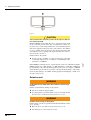
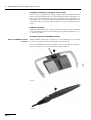
Fig. 1-1
CAUTION
Short circuit in the connecting cord or in the clip of a dual surface return electrode
With the NESSY setting "NE: either way" setup and a short circuit
in the connecting cord or in the clip of a dual surface return electrode the device can no longer monitor the contact with the patient's
skin or the application direction of the contact surface. You will not
receive a warning if the electrode becomes detached from the skin.
You will not receive a warning if the application direction of the return electrode is incorrect.
Risk of burns to the patient!
Note: ERBE recommends the use of split return electrodes in combination with the
NESSY setting set to “NE: dynamic” or “NE: dual surface”. With this combination
the optimal use of the safety monitoring functions are given (see chapter 2 “NESSY
Safety Features). If the unit is activated in a monopolar mode using a cable with a
short, the unit will give an audible warning signal and will display a "B-B" error
message on the screen.
Defective unit
WARNING
Undesirable rise in output level due to failure of electrosurgical unit
Risk of accidental tissue damage to the patient!
The device shuts off independently.
To guard against a possible failure of the electrosurgical unit,
have the device checked for safety at least once a year.
WARNING
Routine safety testing not being done
Risk of injury or death for patients and medical staff! Risk of damage to property.
Have the device checked for safety at least once a year.
You must not use a device that is not safe.
20 / 166
80104-521
06/ 2009
To rule out the possibility of a short circuit in the connecting
cord and the clip before use, see Chapter 2 of this Manual "Safety Features" for NESSY.
1 • Safety Instructions
WARNING
Failure of display elements
If display elements fail, you can no longer operate the device safely.
Risk of injury or death for patients and medical staff!
You must not use the unit.
Interference caused by the unit
WARNING
Interference with cardiac pacemakers, internal defibrillators,
or other active implants
Activation of the electrosurgical unit may affect the performance of
active implants or damage them.
Risk of injury or death for patients!
In the case of patients having active implants, consult the manufacturer of the implant or the competent department of your
hospital prior to performing surgery.
Do not position the return electrode near cardiac pacemakers,
internal defibrillators, or other active implants.
CAUTION
80104-521
06/ 2009
Interference with electronic equipment due to the electrosurgical unit
The activated electrosurgical unit can affect the performance of
electronic equipment by causing interference.
The equipment may fail or not perform properly.
Position the electrosurgical unit, the cords of the instruments,
and the cord of the return electrode as far away as possible from
electronic equipment.
Position the cords as far away as possible from the cords of electronic equipment.
WARNING
Low-frequency currents stimulate nerves and muscles (Neuromuscular Stimulation)
Low-frequency currents arise either due to low-frequency power
sources or partial rectification of the HF current. During cutting
procedures, forced coagulation and spray coagulation, the unavoidable electric arcs between an active electrode and the tissue have the
effect that a portion of the high-frequency alternating current is rectified. Spasms or muscle contractions can occur.
Risk of injury to the patient.
Set effect as low as possible relative to the required surgical effect.
21 / 166
1 • Safety Instructions
CAUTION
Use of non-approved internal cables by Technical Service
This can result in the increased emission of electromagnetic waves
or reduce the immunity of the device.
The unit may fail or not perform properly.
Technical Service may only use the internal cables that are listed in the service manual for the device.
CAUTION
Stacked devices
If you stack the device next to other equipment or with other equipment, the devices can affect each other.
The unit may fail or not perform properly.
The device may only be stacked next to or with VIO series units.
If it is necessary to operate the device near other equipment or
stacked together with other equipment, check whether the devices are affecting each other: Are the devices behaving unusually? Do errors occur?
Damage to the unit and accessories
CAUTION
With membrane keyboards and paint surfaces there is the risk of
cracks. Propanol and ethanol will erode surfaces.
Do not use these substances.
CAUTION
Alternate use of disinfectant solutions based on different
active ingredients
A color reaction may occur with plastics.
Do not use these substances alternately.
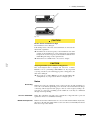
CAUTION
Mix-up of receptacles on monopolar receptacle modules
20140-622, 20140-623
If the receptacles are mixed up, the unit will be damaged.
If you use a connecting cord with a monopolar 4 mm dia. connector, you may only plug the connector into the receptacle with
the blue ring. The correct receptacle is marked with an arrow on
the illustration.
22 / 166
80104-521
06/ 2009
Alcohol-based spray disinfectant for fast disinfection
1 • Safety Instructions
Fig. 1-2
CAUTION
Electric load on instrument too high
The instrument can be damaged.
If the damaged area comes into contact with tissue, it can lead to unintentional coagulation.
Determine the electrical capacity of the instrument. It is either
printed on the instrument or can be found in the user manual.
Compare the electrical capacity of the instrument with the maximum HF peak voltage of the required mode.
Instructions are available in the "Accessories" chapter.
80104-521
06/ 2009
CAUTION
Very long activation cycles without cooling phases
The electrosurgical unit is designed and tested for a relative
ON time of 25 % (conforming to IEC 60601-2-2). If you perform
very long activation cycles without appropriate cooling phases, the
unit can be damaged.
Keep to the 25 % relative ON time (see also Technical Data, Operating Mode), if you operate the unit for a lengthy period.
Notes
Grounding
Note: If necessary, the equipment can be connected to the external grounding system of the room with the grounding pin on the back of the unit and/or Cart using a
connecting cable designed for this purpose. Affects of low frequency leakage currents due to a defective grounding system within the room may be eliminated
through external grounding.
Use of a defibrillator
Note: The equipment conforms to the requirements of Type CF and is protected
against the effects of a defibrillator discharge.
Membrane keyboards
Note: If alcohol-based disinfectants are used on units with membrane keyboards,
this remove the anti-glare finish. However, the user surfaces remain fully functional.
This does not present a hazard.
23 / 166
80104-521
06/ 2009
1 • Safety Instructions
24 / 166
2 • Safety Features
CHAPTER 2
Safety Features
NESSY
What is NESSY?
The unit is equipped with a Neutral Electrode Safety System (NESSY), which monitors the return electrode (neutral electrode), warns of critical situations, and thus
prevents burns. How effective the monitoring is depends on whether you choose a
single surface or dual surface return electrode and on the NESSY setting.
The NESSY settings
On delivery the unit is set to Neutral electrode: Dual surface. To utilize this setting,
you require a dual surface neutral electrode.
80104-521
06/ 2009
In the unit's service programs, a technician can carry out various NESSY settings
according to your requirements. The following table shows you what effects the settings will have on the safety of monitoring.
•
You will see the safety level in the first column. 1 = highest safety level.
•
In the second column you can see the combination of neutral electrode (NE) /
setting in the service programs.
•
In columns 3 - 6 you can see what safety level NESSY offers with various combinations.
Unit - NE connection
1
Dual surface NE / setting "NE:
Dynamic“
2
Dual surface NE / setting "NE:
Dual surface“
3
Dual surface NE / setting "NE:
Either way“
4
Single surface NE / setting "NE:
Either way“
4
Single surface NE / setting "NE:
Single surface“
Short circuit in the connecting
cord or in the clip of a dual surface neutral electrode with the
NESSY setting "NE: either way"
setup
Skin - NE
contact
NE application direction
Partial,
observe warning
Partial,
observe warning
Higher safety for patients
with low skin resistance
With the NESSY setting "NE: either way" setup and a short circuit in the connecting
cord or in the clip of a dual surface neutral electrode the device can no longer monitor the contact with the patient's skin or the application direction of the contact surface. You will not receive a warning if the electrodes becomes detached from the
skin. You will not receive a warning if the application direction of the neutral electrode is incorrect.
A check of the connecting cable can be performed before use as follows:
25 / 166
2 • Safety Features
•
Switch on the Unit. Set the NESSY setting to "NE: either way". Connect the
cable to the return electrode receptacle.
•
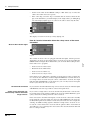
If the connecting cord or the clip of a reusable cable do not have shorts the display of the dual surface (1) and the display of the single surface (2) will light up
red. If the displays lights up green, a short of the cable is detected by the unit.
Fig. 2-1
The displays of return electrodes (1) and (2) light up red.
How do I receive information about the safety status of the return
electrode?
Observe the indicator lights
The neutral electrode socket is equipped with indicator lights, which represent a
dual surface electrode (1) and a single surface electrode (2) respectively. Call up the
NESSY window using the Focus button. Here you can check which setting is active
in the unit's service programs.
•
Neutral electrode: Dual surface
•
Neutral electrode: Dual surface
•
Neutral electrode: Either way
•
Neutral electrode: Single surface
If the unit is set for a dual surface / dynamic electrode and you connect a single surface electrode, the dual surface indicator light will illuminate red. If the unit is set
for a single surface electrode and you connect a dual surface electrode, the single
indicator light will illuminate red. In both cases you can only activate monopolar
mode if you connect the correct electrode.
No electrode connected
If you switch on the unit without having connected an electrode, the indicator lights
will illuminate red. It is not possible to activate monopolar mode.
Single surface electrode connected. Setup "Neutral electrode:
Single surface“
If you connect a single surface electrode, the unit only monitors the connection between unit and electrode. If this is faultless, the electrode symbol illuminates green
(safety status Green). Monopolar mode can be activated.
If the connection to the unit is interrupted, or if the electrode contact tab is not fully
inserted into the connection clamp, the electrode symbol illuminates red (safety status Red). Monopolar mode cannot be activated. If you activate the device despite the
warning, an audible warning signal is emitted. If a single surface electrode is connected, the contact between the electrode and the patient's skin is not monitored!
You will not receive a warning if the electrode becomes detached from the skin and
there is a danger of burns.
26 / 166
80104-521
06/ 2009
Fig. 2-2
2 • Safety Features
Dual-surface neutral electrode
connected. "Neutral electrode:
Dual surface" or "Neutral electrode: Either way" setup
To optimally utilize the unit's monitoring functions, ERBE recommends connecting
a dual-surface electrode, and in particular the ERBE NESSY Omega electrode.
Apart from many other advantages, this electrode virtually eliminates any possibility of excessive heating of the tissue and skin at the edges of the electrode.
Contact between skin and electrode
If you connect a dual-surface electrode, the unit not only monitors the connection
between unit and electrode, but also the contact between skin and electrode. If everything is OK, the electrode symbol illuminates green (safety status Green). Monopolar mode can be activated.
If the connection with the unit is interrupted, or if the contact tab is not fully inserted
into the connection clamp, or if the contact with the skin is so bad that there is a danger of burns, the electrode symbol illuminates red (safety status Red). Monopolar
mode cannot be activated. If you attempt activation, an audible warning signal is
emitted..
Application direction of the contact surface relative to the conduction direction
80104-521
06/ 2009
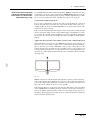
When dual-surface electrodes are used, NESSY also monitors the direction of application of the contact surface relative to the conduction direction. The high-frequency current is not, as a rule, distributed evenly over the contact surface of the
neutral electrode. The current flows to the proximal corners or edges. There it can
be larger than at the distal corners or edges. For this reason, when applying the neutral electrode, ensure that the neutral electrode's line of symmetry points toward the
operating field.
Fig. 2-3
NESSY compares the currents that flow through the two surfaces of the neutral electrode. If the currents differ slightly from each other, a green indicator window appears on the display. Monopolar mode can still be activated, but you should correct
the position of the neutral electrode as soon as possible.
If the currents differ too greatly from each other, the dual-surface electrode symbol
on the VIO illuminates red. Monopolar mode cannot be activated. If you attempt activation, an audible warning signal is emitted. A red warning message appears on
the display: When applying the neutral electrode, ensure that the line of symmetry
points toward the operating field.
27 / 166
2 • Safety Features
Checking function of the NESSY
window when a dual-surface
electrode is connected with
"Neutral electrode: Dual surface" or "Neutral electrode:
Either way" setup
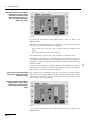
Fig. 2-4
If you press the Focus button on the neutral electrode socket, you change to the
NESSY window.
You will see a traffic-light symbol (1). According to the contact resistance between
skin and electrode, this symbol shows the following:
•
Safety status Green. The unit can be activated without any danger for the
patient.
•
Safety status Red. You cannot activate the unit.
"Neutral electrode: Dual surface" setup. The diagram on the right (3) shows the contact resistance as a bar. The upper and lower limits of the Green safety status are indicated by a red line at the top and bottom. The lower limit is 20 ohms. The upper
limit is 120 ohms.
"Neutral electrode: Either way" setup (not illustrated). The diagram on the right (3)
shows the contact resistance as a bar. The upper limit of the Green safety status is
indicated by a red line. The upper limit is 120 ohms.
Dual surface neutral electrode
connected. "Neutral electrode:
Dynamic" setup
The "Neutral electrode: Dynamic" setup offers extra safety for patients with low
skin resistance, for example, patients with little subcutaneous fatty tissue, children
and infants. Even with these patients, critical detachment of the neutral electrode
from the skin is detected in good time.
Checking function of the NESSY
window when a dual-surface
electrode is connected with
"Neutral electrode: Dynamic"
setup
Fig. 2-5
If you press the Focus button on the neutral electrode socket, you change to the
NESSY window.
28 / 166
80104-521
06/ 2009
The middle indicator (2) shows the contact resistance as a numerical value.
2 • Safety Features
You will see a traffic-light symbol (1). According to the contact resistance between
skin and electrode, this symbol shows the following:
•
Safety status Green. The unit can be activated without any danger for the
patient.
•
Safety status Red. You cannot activate the unit.
The middle indicator (2) shows the contact resistance as a numerical value.
The diagram on the right (3) shows the contact resistance as a bar. The upper and
lower limits of the Green safety status are indicated by a red line at the top and bottom. The lower limit is 20 ohms. The upper limit is not fixed at 120 ohms, but depends on the lowest contact resistance measured between skin and neutral electrode
(measured value). The upper limit is reduced relative to the measured value to ensure that a critical detachment of the neutral electrode from the skin is detected in
good time.
The NESSY window as a visual
aid to applying a dual surface
electrode
When you apply a dual surface electrode to the patient's skin, first change to the
NESSY window. With the aid of its displays, you can recognize how good the skin
contact is. Ideally the contact resistance should be between 20 and 120 ohms.
The NESSY window when connecting a single-surface
electrode
To check a single-surface electrode it is sufficient to observe the indicator lights.
Similarly, in the NESSY window you will only receive the information: Safety status Green or Red.
When a single-surface electrode is connected, the NESSY window does not give
any visual assistance. The contact between electrode and skin cannot be measured
when a single-surface electrode is used.
80104-521
06/ 2009
Automatic monitoring of equipment output error
The unit is equipped with an automatic monitoring system for the HF output parameters. This system monitors any divergence between the actual value and the setpoint of the HF output parameters selected and emits warning signals or switches
off the HF generator if the divergence is so great that the required quality of the respective effect (CUT or COAG) is no longer guaranteed.
For the operating surgeon the display of any equipment output error allows him to
immediately see, in the event of divergence or absence of the required effect, whether this defect has been caused by the unit. With the unit, any divergence of the HF
output parameters from the HF output parameters actually selected can only be
caused by loads with an excessively low resistance, e.g. too large coagulation electrodes, short circuit between active electrode and return electrode or by a defect in
the unit.
Automatic monitoring of the ON time
With proper use, a high-frequency generator is only briefly activated to carry out a
cut or coagulation using a fingerswitch, pedal or AUTO START. This generally
only takes a few seconds. A defect in the unit, in the accessories or in usage may
cause the high-frequency generator to be switched on unintentionally. To prevent
major damage being caused by accidental activation of a high-frequency generator
the unit is equipped with a monitor which automatically monitors the ON time of
the high-frequency generator.
When a predetermined maximum ON time is exceeded, the monitor emits a visual
and acoustic signal and automatically switches off the HF generator. However, the
HF generator can be switched back on at any time, resulting in renewed monitoring
of the ON time. This prevents major damage being caused by the accidental activation of an HF generator for indefinitely long periods.
29 / 166
2 • Safety Features
Custom adaptation of maximum
ON time
In view of the risk of thermal tissue damage due to the accidental switch-on, a HF
generator which has been switched on accidentally should be switched off again automatically, as far as possible immediately. As the unit cannot automatically distinguish between the intentional and accidental switch-on of a HF generator, the automatic switch-off of a HF generator should not take place too quickly as this would
hinder the operating surgeon with cutting or coagulation. Setting of the ON time can
only be carried out by a technician in the service programs.
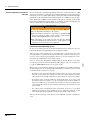
WARNING
The user was not informed of a change in maximum ON time
Risk of accidental tissue damage to the patient!
All users must be informed of any change in maximum ON
time at an early stage. That is, before the user works with the
modified maximum ON time for the first time.
The temperature at the return electrode site increases during
long and continuous activations; therefore, ensure that the cooling phases between activations are sufficient.
Protection from operating errors
To prevent operating errors the front panel and the menus are designed so as to automatically monitor and signal illogical or incomplete settings.
You can connect three instruments simultaneously to the unit. However, for safety
reasons they can only be activated alternately. HF voltage is only ever carried by one
receptacle. TWIN COAG mode is an exception to this.
Whenever the power switch is switched on, an automatic test program is run inside
the unit, designed to detect and signal the following defects in the operator controls
of the unit and the connected accessories:
•
If a button on the front panel has short-circuited due to an error or was pressed
when the power switch was switched on, this error will be indicated acoustically and by an error number and message after switch-on of the power switch.
•
If a button on the electrode handle has short-circuited due to an error or has
been bypassed at low resistance (e.g. due to moisture in the electrode handle) or
was pressed while the power switch was switched on, this error will be indicated acoustically and by an error number and message after switch-on of the
power switch.
•
If a contact of the footswitch has short-circuited due to an error, or a pedal is
jammed or a pedal was pressed while the power switch was switched on, this
error will be indicated acoustically and by an error number and message.
The relevant error message on the display of the VIO tells you how to remedy the
error.
30 / 166
80104-521
06/ 2009
All receptacles of the applied part are arranged in the receptacle strip next to the
front panel. These receptacles are designed so that only connectors of the proper accessories can be inserted (provided that only the accessories supplied or recommended by the manufacturer of the unit are used).
3 • Accessories
CHAPTER 3
Accessories
You can connect a number of instruments and return electrodes from different manufactures to the VIO.
Check ERBE instruments and instruments from other manufacturers for compatibility with the required CUT / COAG mode of the VIO before use (see below).
Check the return electrodes from other manufacturers for compatibility with the
VIO before use (see below).
You can connect only ERBE footswitches to the VIO. There are special footswitches for the VIO D / VIO S series and special footswitches for the VIO C series.
Please note the accessories catalog for ERBE accessories. We recommend the use
of ERBE accessories.
Check compatibility of instrument and CUT / COAG mode with the
help of the Upmax display
CAUTION
Electric load on instrument too high
The instrument can be damaged.
80104-521
06/ 2009
If the damaged area comes into contact with tissue, it can lead to
unintentional coagulation.
Determine the electrical capacity of the instrument. It is either
printed on the instrument or can be found in the user manual.
Compare the electrical capacity of the instrument with the maximum HF peak voltage of the required mode.
Observe the following instructions.
1. Switch on the Upmax display
If the Upmax display is not visible in the Cut / Coag Settings window, you must
switch on the Upmax display.
Call up the Guide window. Select the Other functions menu item. Select the Setup
menu item. Press the selection button next to the More menu item.
Use a selection button to select Upmax. Change the setting to ON using the Up /
Down buttons. Press the Enter button to confirm the changed setting.
2. Determine the electrical
capacity of the instrument
The maximum electrical capacity of the instrument is indicated on the instrument or
in the users manuals of the instruments. The unit of measurement for electrical capacity is Vp. For example, an instrument can have a maximum electrical capacity of
5 kVp (5000 Vp). Another instrument can have a maximum electrical capacity of
500 Vp. You are not permitted to load the instrument beyond these values.
Example
You want to operate an instrument with a maximum electrical capacity of 500 Vp.
You want to operate the instrument in AUTO CUT mode and with Effect 8. Look at
the Upmax display in the Select Cut Effect window.
31 / 166
3 • Accessories
3. Call up the "Select Cut Effect"
window
Fig. 3-1
Fig. 3-2
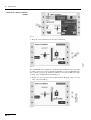
The AUTO CUT mode with Effect 8 would load the instrument with peak voltage
of 740 Vp (1). Do not operate the instrument with Effect 8 of the AUTO CUT mode.
The electrical capacity of the instrument (500 Vp) is less than the HF peak voltage
(740 Vp) of the AUTO CUT mode with Effect 8.
Reduce the effect. Press the down button until the HF peak voltage (1) is the
same or less than 500 Vp.
Fig. 3-3
32 / 166
80104-521
06/ 2009
Press the selection button next to the Effect menu item.
3 • Accessories
The HF peak voltage (490 Vp) of the AUTO CUT mode with Effect 5 is less than
the electrical capacity of the instrument (500 Vp). You may operate the instrument with these settings. Confirm the settings. Press Enter.
You can also check the compatibility of instruments and COAG mode in the same
way. Call up the Select Coag Effect window.
Check compatibility of the return electrode
CAUTION
Non-compatible or single surface return electrode
When applying a non-compatible return electrode, it should be expected that monitoring the contact between return electrode and
skin is faulty.
When applying a single surface return electrode, the contact between return electrode and skin is not monitored. If contact between return electrode and skin is inadequate, the unit does not
emit any visual and acoustic signal.
Risk of burns for the patient under the return electrode!
Check in the accompanying papers of the manufacturer whether the return electrode is suitable for the VIO device used.
Use only suitable return electrodes.
When applying a single surface return electrode: Regularly
check the return electrode for good skin contact.
80104-521
06/ 2009
Check in the accompanying papers of the manufacturer whether the return electrode cable is suitable for the return electrode
used.
Use only suitable return electrode cables.
Depending on the return electrode (single surface or dual surface) and the settings
in the service programs, the return electrode safety system (NESSY) of the VIO
monitors various parameters for ERBE and compatible return electrodes:
•
The unit / return electrode connection
•
The skin / return electrode contact
•
The application direction of the return electrode
Get to know what specific parameters are monitored in the "Safety Features" chapter. When using single surface return electrodes, the skin / return electrode contact
is not monitored.
When using third-party return electrodes, you must check in the accompanying papers of the manufacturer whether the return electrode is suitable for the VIO used.
33 / 166
80104-521
06/ 2009
3 • Accessories
34 / 166
4 • Description of the Controls
CHAPTER 4
Description of the Controls
Controls on the front panel
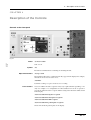
Fig. 4-1
80104-521
06/ 2009
Power
(1) Power switch
Unit on / off
Symbol
(1a)
Read the user manual before switching on and using the unit.
Adjustment buttons
(10) Up / down
These buttons always have a function when they appear in the display. For example,
the buttons are used to select the effect.
(11) Enter
Confirms a setting, accepts a selection, saves a setting.
Focus buttons
You can combine the unit receptacles in any way required. In this regard Fig. 4-1 is
only one example of a configuration. If a Focus button next to the receptacle is
pressed, the functions of the receptacle and the setting of the functions will be shown
in the display.
(12) Focus button for bipolar receptacle
(13) Focus button for monopolar receptacle
(14) Focus button for MF receptacle
(15) Focus button for patient plate receptacle
Shows info about the patient plate on the display.
35 / 166
4 • Description of the Controls
Pilot lamps
(16) Footswitch
The footswitch symbol lights up when the respective footswitch is assigned to the
scoket.
(17) Auto Start
When this lamp is lit up, Auto Start is active.
(18) Patient plates
Single-surface or dual-surface patient plate connected. Green: all OK. Red: Hazard,
call up Focus button, check patient plate.
Symbol
(20)
The symbol designates a constructional safety measure. The patient circuit is insulated from ground. The danger of leakage currents and therefore the danger of burns
is substantially reduced for the patient.
Symbol
(21)
80104-521
06/ 2009
The equipment conforms to the requirements of Type CF (Cardiac Float) and is protected against the effects of a defibrillator discharge.
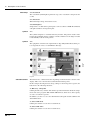
Fig. 4-2
Selection buttons
The buttons have a different function depending on which window is shown on the
display. Take note of the function toward which the button points.
In this example showing the Cut / Coag settings for the monopolar receptacle, the
buttons have the following functions:
(2) Directory / Programs
Calls up the Directory window. The window provides information about the assignment of the active program: Which CUT / COAG mode, which effect, what capacity
are active for which receptacle?
In addition, you have access to the submenu Select Program and the submenu Additional Functions.
(3) Select CUT mode
Calls up the window for selection of a CUT mode.
(4) Select CUT effect
Calls up the window for selection of a CUT effect.
36 / 166
4 • Description of the Controls
(5) Select CUT power limitation
Calls up the window for selection of a CUT power limitation level.
(6) Socket Selected
Calls up the window for selection of the footswitches and Auto Start modes.
(7) Select COAG mode
Calls up the window for selection of a COAG mode.
(8) Select COAG effect
Calls up the window for selection of a COAG effect.
(9) Select COAG power limitation
Calls up the window for selection of a COAG power limitation level.
(19) Signal for smoke evacuator
If this signal is green in the control field Cutting or Coagulate, the smoke evacuator
will automatically start on activation of the respective mode.
80104-521
06/ 2009
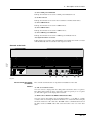
Controls on the back
ECB
1
2
3
4
5
6
Fig. 4-3
Please consult the chapter
Installation
Sockets
The controls described below are important for installation of the unit.
(1) and (2) footswitch sockets
You can connect a single-pedal and a dual-pedal footswitch to these receptacles.
The dual-pedal footswitch can be connected to either receptacle (1) or receptacle
(2). The same applies to the single-pedal footswitch.
(3) ECB sockets (ECB means ERBE Communication Bus)
You can connect other units to the electrosurgical unit, e. g. an APC or a smoke
evacuator. The electrosurgical unit then functions as a control unit whose display
shows the functions of the other units. The ECB ensures communication between
the units. Connect an ECB cable to this socket and connect it to one of the other
units.
37 / 166
4 • Description of the Controls
Potential equalization
(4) Potential equalization terminal
Connect a potential equalization line and connect this to the potential equalization
system of the operating room. If you are using the ERBE VIO-CART, connect the
potential equalization line to the potential equalization pin of the VIO-CART.
Power fuses
(5) Power fuses
The unit is protected with power fuses. If one of these power fuses has blown, the
unit may not be used on the patient again until it has been checked by a competent
technician. The values of the power fuses are specified on the unit's rating plate.
Only spare fuses with these values may be used.
Power connection
(6) Power connection
80104-521
06/ 2009
Connect the unit to a properly installed grounded outlet. Only use the ERBE power
cord or an equivalent power cord for this purpose. The power cord must bear the national test symbol. If the unit is installed on the ERBE VIO-CART, make the power
connection with the power cord of the VIO-CART.
38 / 166
5 • Working with the Electrosurgical Unit: a Tutorial
CHAPTER 5
Working with the Electrosurgical Unit: a Tutorial
The tutorial and your electrosurgical system
You have an individually configured system
The electrosurgical unit is part of a system. Every electrosurgical system is put together individually for you. This variability involves the receptacles, the software
and also the combination with other units which can be connected to the electrosurgical unit. There are separate user manuals for the units which are available for the
combinable units and for the VIO-CART.
The tutorial is based on a sample
configuration
In this tutorial you will learn how to operate the VIO 300 D electrosurgical unit using a sample configuration. Although the unit you have before you may be configured differently, the structure of the user environment and operation of the functions
is nevertheless identical.
As with a computer program you can call up a series of windows in the user environment of the unit. In a window you can carry out a series of actions. You do not
have to call up the windows and carry out the actions in a specific sequence. This
depends on what you wish to achieve. A tutorial normally specifies a procedure; for
this reason it can only act as an example.
80104-521
06/ 2009
Operation is intuitive and simple
to learn
The tutorial puts forward a task and describes the solution. ERBE recommends
learning the different steps on the unit. Then think of a typical work situation: organize the receptacles according to your requirements, for example, and save a program. If you get stuck with the settings in a window, consult the tutorial. "Learning
by doing" is the fastest way to learn. Operation of the unit has been designed to be
intuitive and enjoyable. The time required to work through the tutorial and several
separate exercises is between 30 and 45 minutes. You should then have a grasp of
all major functions.
Make power connection, switch on unit, self-test, assignment of
active program
1. Make power connection
The supply voltage must match the voltage specified on the unit's rating plate.
Connect the unit to a properly installed grounded outlet. Only use the ERBE power
cord or an equivalent power cord for this purpose. The power cord must bear the national test symbol. If the unit is installed on the VIO-CART, make the power connection with the power cord of the VIO-CART.
2. Switch on unit, performance
test
Use the power switch to switch the unit on. The unit then carries out a performance
test and checks all receptacles. Connected units and footswitches are detected. All
pilot lamps and Focus buttons light up. The version number of the software appears
on the display.
39 / 166
5 • Working with the Electrosurgical Unit: a Tutorial
3. Getting an overview: assignment of the active program for
the electrosurgical unit
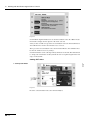
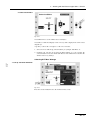
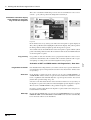
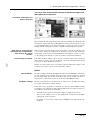
Fig. 5-1
Once the performance test has been completed, you will see the window Guide.
Here you can see the number (1) and the name (2) of the active program. In this example it is the program 1 program xy.
On the right side of the window you can see the assignment (3) of the active program. The receptacles of your individual unit are displayed schematically. This provides you with answers to the questions: Which CUT / COAG mode, which effect,
what capacity are active for which receptacle?
Option 1: Direct activation from the window Guide. It is not possible to assign a
footswitch to a receptacle here. You can activate all receptacles with a fingerswitch.
With a footswitch you can only activate the CUT or COAG mode for a receptacle
which was allocated a footswitch in the program. The allocation of the footswitches
in this view can be seen from the illuminated footswitch symbols of the receptacles.
Option 2: You press the selection button next to the menu item Adopt Program,
switch to the window Cut / Coag Settings and effect activation from this window.
The window Cut / Coag Settings focuses attention on the functions of a receptacle.
In the window Cut / Coag Settings any allocation of the footswitches is possible. Activation using a fingerswitch is possible. The use of the window Cut / Coag settings
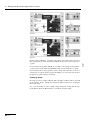
is described in detail from p. 44.
In both cases you first have to confirm by pressing any button that you have checked
the settings of the active program. Superimposed on the window Guide you will see
a small window with the message:
Check settings before activating. Please confirm by pressing key
Only when you have complied with this prompt will you have access to the active
program and the functions of the window Guide.
After switch-on, the unit always calls up the program you last used. This does not
apply to ReMode programs. See here p. 58. In the sample program the bipolar receptacle is assigned with the following settings:
40 / 166
80104-521
06/ 2009
You now have two options for activating CUT or COAG for a receptacle of the program.
5 • Working with the Electrosurgical Unit: a Tutorial
•
Cut mode: BIP CUT
•
Cut effect: 4
•
Cut power limitation: 60 W
•
Coag mode: BISOFT
•
Coag effect: 4
•
Coag power limitation: 60 W
If your unit is equipped with a patient plate receptacle , the display of the receptacle
will show a patient plate (4).
If you have connected an APC 2, an IES 2 or another unit to the electrosurgical unit,
you can also find out about the assignment of the other unit receptacles in the program.
The sample display shows the symbol of the Down button (5). Underneath you can
see APC. An APC 2 is connected to the electrosurgical unit. If you press the Down
button on the front panel of the electrosurgical unit, the window scrolls down to the
APC receptacles:
80104-521
06/ 2009
4. Getting an overview: assignment of the active program for
the APC 2
Fig. 5-2
In the sample display the APC 2 has one receptacle (1). The box showing the second
receptacle (2) is empty.
Although the functions of the APC 2 are set on the electrosurgical unit, operation of
the APC 2 is described in a separate user manual. Please consult the chapter Working with the APC 2 in the user manual for the APC 2.
5. Getting an overview: assignment of the active program for
the IES 2
The sample display shows the symbol of the Down button (3). Underneath you can
see IES. An IES 2 is connected to the electrosurgical unit. Press the Down button
on the front panel of the electrosurgical unit and keep it pressed until you see the IES
2 settings for VIO 300 D window. You can also scroll to the IES 2 settings for APC
window.
Although the functions of the IES 2 are set on the electrosurgical unit, operation of
the IES 2 is described in a separate user manual. Please consult the chapter Working
with the IES 2 in the user manual for the IES 2.
Press the Up button several times. You will move to the first view of the window
Guide.
41 / 166
5 • Working with the Electrosurgical Unit: a Tutorial
Adopt Program
Adopt Program
Fig. 5-3
If you want to accept the active Existing Program, press the selection button next to
the menu item Adopt program. You will then move to the window Cut / Coag Settings. You will then see the settings of the receptacle last activated. The Focus button next to this receptacle is lit up.
Alternatively, you can press the selection button next to a receptacle display, e. g.
the selection button next to the monopolar receptacle. With this action you will likewise accept the program. You will then move to the window Cut / Coag Settings.
You will then see the settings for the receptacle selected. The Focus button next to
this receptacle is lit up.
Select Program
1. Call up window Select
Program
Fig. 5-4
If you want to use another program, press the selection button next to the menu item
Select program.
42 / 166
80104-521
06/ 2009
Press the selection button next to the menu item Guide / progs.You will then move
to the window Guide.
5 • Working with the Electrosurgical Unit: a Tutorial
2. Select Program
Fig. 5-5
You will then move to the window Select Program. You will then see a selection
list of programs (1).
1. If you press the Up/Down buttons (2), and more than 4 programs are stored, the
window scrolls in the program selection list. The active program is marked in
green.
2. Press the selection button next to the required program. For the purpose of this
exercise please select the Basic Program.
80104-521
06/ 2009
3. Accept selected program
Fig. 5-6
You have now returned to the window Guide and can find out about assignment of
the active program (see Assignment of the active program 40).
If you want to accept the selected program, press the selection button next to the
menu item Adopt Program. You will then move to the window Cut / Coag Settings.
You will then see the settings of the receptacle last activated. The Focus button next
to this receptacle is lit up.
Alternatively, you can press the selection button next to a receptacle display, e. g.
the selection button next to the monopolar receptacle. With this action you will likewise accept the program.
43 / 166
5 • Working with the Electrosurgical Unit: a Tutorial
The basic concept of the electrosurgical unit: focusing attention
on the functions of a receptacle (Focus View)
Fig. 5-7
The window Cut / Coag Settings
The window Cut / Coag Settings focuses attention on the functions of a receptacle
as you only ever see the CUT settings (1) and COAG settings (2) of one receptacle.
If you want to check or change the settings of a receptacle, call up the receptacle
with the appropriate Focus button (3). This also applies to the receptacles of the connected units. For example, the CUT / COAG settings of the APC 2 are also displayed in this window of the electrosurgical unit.
Alternatively, you can briefly activate the instrument which is connected to the required receptacle. The display automatically switches to the activated receptacle.
The window Cut / Coag Settings always appears in combination with the footswitch
and Auto Start pilot lamps for the receptacles! Further details can be found under
the heading: Receptacle Selected.
What can I do in the window Cut /
Coag Settings?
You can:
•
Select CUT (1) and COAG (2).
•
Change to the window Guide (4).
•
Select a footswitch or Auto Start function (5) for the receptacle. Auto-Start is,
however, only possible in the bipolar modes. In the display cutout (5), all the
possible types of activation for the socket depicted are shown. The assigned
activation type is highlighted in color.
•
Determine whether the smoke evacuator is automatically activated (6) with
CUT or COAG.
Changing settings of the Basic Program
Here you will change
44 / 166
•
the mode,
•
the effect,
•
the power limitation,
•
and the activation type.
80104-521
06/ 2009
Pressing the Focus button of the patient plate receptacle will show information
about the patient plate on the display.
5 • Working with the Electrosurgical Unit: a Tutorial
Setting Cut mode
1. Call up CUT mode
Fig. 5-8
Press the selection button next to the menu item Mode.
80104-521
06/ 2009
2. Select CUT mode
Fig. 5-9
You will then move to the window Select cut mode. On the right you will see a selection list of modes (1).
1. If you press the Up/Down button (2), the window scrolls in the selection list.
The active mode is marked in green. To change to other modes (if available),
you can also press the Select button next to the "Other modes" menu item (3).
You will then change to the next window in which the selection list is continued. When you have reached the end of the selection list by pressing the Select
button, the next time you press the Select button, you will return to the start of
the selection list.
2. Press the selection button next to the required CUT mode (example: HIGH
CUT). You will then move back to the window Cut / Coag Settings.
If you want to deactivate the CUT mode for the receptacle, select CUT off in the selection list.
Call up information on CUT mode
If you wish, you can display information about the active CUT mode after selection
of the CUT mode. Press the selection button next to the menu item Mode again.
Press the selection button next to the menu item Info.
45 / 166
5 • Working with the Electrosurgical Unit: a Tutorial
Fig. 5-10
Scroll with the Up/Down buttons or use the Select button next to the "Other modes"
menu item to display the description of the mode selected.
After you have read the text, press the selection button next to the menu item Return.
You will then move back to the window Select cut mode.
There press the selection button next to the menu item Return. You will then move
back to the window Cut / Coag Settings.
Useful information can be called up in many windows for the unit. The method used
to call up such information is always identical. It is not explained again in the next
stages of the tutorial.
Setting CUT effect
80104-521
06/ 2009
1. Call up CUT Effect
Fig. 5-11
Press the selection button next to the menu item Effect.
46 / 166
5 • Working with the Electrosurgical Unit: a Tutorial
2. Choose CUT Effect
Fig. 5-12
You will then move to the window Select Cut Effect.
You will see a numerical display for the effect (1) and a display in the form of a bar
diagram (2).
A picture (3) shows the consequence of the effect on tissue.
1. Select an effect with the Up / Down buttons (4) (example: Cut Effect 4):
2. Confirm your selection by pressing the Enter button (5) or by pressing the
selection button next to the menu item Return. You will then move back to the
window Cut / Coag Settings.
80104-521
06/ 2009
Selecting CUT Max. Wattage
1. Call up Cut Power limitation
Fig. 5-13
Press the selection button next to the menu item max. watts.
47 / 166
5 • Working with the Electrosurgical Unit: a Tutorial
2. Select Cut power limitation
Fig. 5-14
You will then move to the window Cut power limitation. Selection of a power limitation level is for the safety of the patient and protects the instrument from damage.
You will see a numerical display for the power limitation (1) and a display in the
form of a bar diagram (2).
1. Select a power limitation level with the Up / Down buttons (3) (example: 140
watts).
2. Confirm your selection by pressing the Enter button (4) or by pressing the
selection button next to the menu item Return. You will then move back to the
window Cut / Coag Settings.
Selection of the COAG window is made in the same way as for selection of the CUT
window. Please try it out.
Activation of CUT and COAG modes with footswitch
Footswitch concept
At the back of the electrosurgical unit you can connect a dual-pedal footswitch and
a single-pedal footswitch. See the chapter Installation.
The dual-pedal footswitch has a yellow pedal for the activation of CUT and a blue
pedal for the activation of COAG.
The pedal of the single-pedal footswitch is blue. It is also used to activate COAG.
The pedals of the dual-pedal footswitch CUT (yellow), COAG (blue) and the pedal
of the single-pedal footswitch COAG (blue) can be freely allocated to the receptacles of the electrosurgical unit. If you have connected an APC 2 to the electrosurgical unit, you can also allocate the pedals to the receptacles of the APC 2.
48 / 166
80104-521
06/ 2009
Select COAG mode, COAG effect and COAG power limitation
5 • Working with the Electrosurgical Unit: a Tutorial
1. Call up window Select activation type
Fig. 5-15
1. First use a Focus button (1) to select a receptacle to which you want to allocate
a footswitch. You will see the functions of the receptacle in the window Cut /
Coag Settings. In our example it is the monopolar receptacle.
2. Press the selection button next to the menu item Footswitch.
80104-521
06/ 2009
2. Select footswitch
Fig. 5-16
Fig. 5-17
In the window Fig. 5-17 you will see a list of the possible footswitch allocations.
Scroll with the Down button (1) to the next window Fig. 5-16. You can also use the
Select button next to the "Other modes" menu item.
•
Dual-pedal footswitch yellow and blue pedal
•
Dual-pedal footswitch blue pedal
•
Dual-pedal footswitch yellow pedal
•
Blue single-pedal footswitch
49 / 166
5 • Working with the Electrosurgical Unit: a Tutorial
The active footswitch is marked in green. Use the selection button to select a footswitch, e. g. the yellow pedal of the dual-pedal footswitch (2).
Orientation: Footswitch display
in the window Cut / Coag Settings and on the receptacle
Fig. 5-18
In the window Cut / Coag Settings you will see the monopolar receptacle displayed.
The yellow pedal allocated is highlighted yellow in the display. The yellow pedal of
the dual-pedal footswitch (1) lights up at the monopolar receptacle.
You can thus activate the CUT function of the monopolar receptacle with the yellow
pedal of the dual-pedal footswitch. No footswitch is allocated to the COAG function
of the monopolar receptacle.
It is possible to switch on the unit, select a program and only then connect a footswitch. The unit will detect the footswitch. The footswitch symbols at the receptacles light up according to the footswitch assignment of the program.
Activation of CUT and COAG modes with fingerswitch, Auto Start
Fingerswitch activation
If an instrument has a fingerswitch, you can also activate any receptacle with the fingerswitch. The option of fingerswitch activation is not shown in the window Cut /
Coag Settings.
Auto Start
If the bipolar receptacle has been selected, you can select AUTO START 1 or
AUTO START 2 in the window receptacle Selected. When the instrument touches
tissue, coagulation starts automatically after a specified period of time. You can adjust this time period in Setup. See p. 64.
Selection of the Auto-Start function is shown in the window Cut / Coag Settings of
the bipolar receptacle. The symbol for Auto Start lights up at the bipolar receptacle.
The selection of AUTO START is only possible for bipolar coagulation.
If you have assigned Auto Start to the bipolar receptacle, CUT can no longer be activated with the footswitch.
Auto Stop
50 / 166
By selecting the COAG mode you can select an AUTO STOP function, for example
BIPOLAR SOFT with AUTO STOP. AUTO STOP ends activation automatically
before the tissue adheres to the instrument.
80104-521
06/ 2009
Plug and Play
5 • Working with the Electrosurgical Unit: a Tutorial
The Focus View and activation concept of the electrosurgical unit.
What points must I observe?
Instrument at monopolar and
bipolar receptacle
Fig. 5-19
Please imagine the following situation: The yellow pedal CUT (1) is allocated to the
monopolar receptacle. The blue pedal COAG (2) is allocated to the bipolar receptacle. An instrument that you are using alternately is connected to both receptacles.
Cutting with the monopolar receptacle, coagulation with the bipolar receptacle.
After you have activated cutting for the monopolar receptacle, the window Cut /
Coag Settings displays the settings for the monopolar receptacle. This situation is
shown in Fig. 5-19. If you activate the instrument on the bipolar receptacle, you only
see the settings of the bipolar receptacle if you have activated the instrument.
Check settings if in doubt.
If in doubt check the settings of the receptacle you want to activate: Press the Focus
button at the receptacle. You can also briefly activate the instrument. When doing
so, persons or objects must not be touched.
80104-521
06/ 2009
What settings are displayed in
the window Cut / Coag Settings,
what settings do I want to
activate?
In both cases the window Cut / Coag Settings will now display the settings of the
receptacle you want to activate. You can check the settings.
NESSY
What is NESSY?
The unit is equipped with a Neutral Electrode Safety System (NESSY), which monitors the return electrode (neutral electrode), warns of critical situations, and thus
prevents burns. How effective the monitoring is depends on whether you choose a
single surface or dual surface return electrode and on the NESSY setting.
The NESSY settings
On delivery the unit is set to Neutral electrode: Dual surface. To utilize this setting,
you require a dual surface neutral electrode.
In the unit's service programs, a technician can carry out various NESSY settings
according to your requirements. The following table shows you what effects the settings will have on the safety of monitoring.
•
You will see the safety level in the first column. 1 = highest safety level.
•
In the second column you can see the combination of neutral electrode (NE) /
setting in the service programs.
•
In columns 3 - 6 you can see what safety level NESSY offers with various combinations.
51 / 166
5 • Working with the Electrosurgical Unit: a Tutorial
Unit - NE connection
1
Dual surface NE / setting "NE:
Dynamic“
2
Dual surface NE / setting "NE:
Dual surface“
3
Dual surface NE / setting "NE:
Either way“
4
Single surface NE / setting "NE:
Either way“
4
Single surface NE / setting "NE:
Single surface“
Skin - NE
contact
NE application direction
Partial,
observe warning
Partial,
observe warning
Higher safety for patients
with low skin resistance
CAUTION
Short circuit in the connecting cord or in the clip of a dual surface return electrode
Risk of burns to the patient!
To rule out the possibility of a short circuit in the connecting
cord and the clip before use, see Chapter 2 of this Manual
"Safety Features" for NESSY.
Note: ERBE recommends the use of split return electrodes in combination with the
NESSY setting set to “NE: dynamic” or “NE: dual surface”. With this combination
the optimal use of the safety monitoring functions are given (see chapter 2 “NESSY
Safety Features). If the unit is activated in a monopolar mode using a cable with a
short, the unit will give an audible warning signal and will display a "B-B" error
message on the screen.
How do I receive information about the safety status of the return
electrode?
Observe the indicator lights
Fig. 5-20
The neutral electrode socket is equipped with indicator lights, which represent a
dual surface electrode (1) and a single surface electrode (2) respectively. Call up the
NESSY window using the Focus button. Here you can check which setting is active
in the unit's service programs.
52 / 166
80104-521
06/ 2009
With the NESSY setting "NE: either way" setup and a short circuit
in the connecting cord or in the clip of a dual surface return electrode the device can no longer monitor the contact with the patient's skin or the application direction of the contact surface. You
will not receive a warning if the electrode becomes detached from
the skin. You will not receive a warning if the application direction
of the return electrode is incorrect.
5 • Working with the Electrosurgical Unit: a Tutorial
•
Neutral electrode: Dual surface
•
Neutral electrode: Dual surface
•
Neutral electrode: Either way
•
Neutral electrode: Single surface
If the unit is set for a dual surface / dynamic electrode and you connect a single surface electrode, the dual surface indicator light will illuminate red. If the unit is set
for a single surface electrode and you connect a dual surface electrode, the single
indicator light will illuminate red. In both cases you can only activate monopolar
mode if you connect the correct electrode.
No electrode connected
If you switch on the unit without having connected an electrode, the indicator lights
will illuminate red. It is not possible to activate monopolar mode.
Single surface electrode connected. Setup "Neutral electrode:
Single surface“
If you connect a single surface electrode, the unit only monitors the connection between unit and electrode. If this is faultless, the electrode symbol illuminates green
(safety status Green). Monopolar mode can be activated.
If the connection to the unit is interrupted, or if the electrode contact tab is not fully
inserted into the connection clamp, the electrode symbol illuminates red (safety status Red). Monopolar mode cannot be activated. If you activate the device despite the
warning, an audible warning signal is emitted. If a single surface electrode is connected, the contact between the electrode and the patient's skin is not monitored!
You will not receive a warning if the electrode becomes detached from the skin and
there is a danger of burns.
80104-521
06/ 2009
Dual-surface neutral electrode
connected. "Neutral electrode:
Dual surface" or "Neutral electrode: Either way" setup
To optimally utilize the unit's monitoring functions, ERBE recommends connecting
a dual-surface electrode, and in particular the ERBE NESSY Omega electrode.
Apart from many other advantages, this electrode virtually eliminates any possibility of excessive heating of the tissue and skin at the edges of the electrode.
Contact between skin and electrode
If you connect a dual-surface electrode, the unit not only monitors the connection
between unit and electrode, but also the contact between skin and electrode. If everything is OK, the electrode symbol illuminates green (safety status Green). Monopolar mode can be activated.
If the connection with the unit is interrupted, or if the contact tab is not fully inserted
into the connection clamp, or if the contact with the skin is so bad that there is a danger of burns, the electrode symbol illuminates red (safety status Red). Monopolar
mode cannot be activated. If you attempt activation, an audible warning signal is
emitted..
Application direction of the contact surface relative to the conduction direction
When dual-surface electrodes are used, NESSY also monitors the direction of application of the contact surface relative to the conduction direction. The high-frequency current is not, as a rule, distributed evenly over the contact surface of the
neutral electrode. The current flows to the proximal corners or edges. There it can
be larger than at the distal corners or edges. For this reason, when applying the neutral electrode, ensure that the neutral electrode's line of symmetry points toward the
operating field.
53 / 166
5 • Working with the Electrosurgical Unit: a Tutorial
Fig. 5-21
NESSY compares the currents that flow through the two surfaces of the neutral electrode. If the currents differ slightly from each other, a green indicator window appears on the display. Monopolar mode can still be activated, but you should correct
the position of the neutral electrode as soon as possible.
If the currents differ too greatly from each other, the dual-surface electrode symbol
on the VIO illuminates red. Monopolar mode cannot be activated. If you attempt activation, an audible warning signal is emitted. A red warning message appears on
the display: When applying the neutral electrode, ensure that the line of symmetry
points toward the operating field.
80104-521
06/ 2009
Checking function of the NESSY
window when a dual-surface
electrode is connected with
"Neutral electrode: Dual surface" or "Neutral electrode:
Either way" setup
Fig. 5-22
If you press the Focus button on the neutral electrode socket, you change to the
NESSY window.
You will see a traffic-light symbol (1). According to the contact resistance between
skin and electrode, this symbol shows the following:
•
Safety status Green. The unit can be activated without any danger for the
patient.
•
Safety status Red. You cannot activate the unit.
The middle indicator (2) shows the contact resistance as a numerical value.
"Neutral electrode: Dual surface" setup. The diagram on the right (3) shows the contact resistance as a bar. The upper and lower limits of the Green safety status are indicated by a red line at the top and bottom. The lower limit is 20 ohms. The upper
limit is 120 ohms.
"Neutral electrode: Either way" setup (not illustrated). The diagram on the right (3)
shows the contact resistance as a bar. The upper limit of the Green safety status is
indicated by a red line. The upper limit is 120 ohms.
54 / 166
5 • Working with the Electrosurgical Unit: a Tutorial
Dual surface neutral electrode
connected. "Neutral electrode:
Dynamic" setup
The "Neutral electrode: Dynamic" setup offers extra safety for patients with low
skin resistance, for example, patients with little subcutaneous fatty tissue, children
and infants. Even with these patients, critical detachment of the neutral electrode
from the skin is detected in good time.
Checking function of the NESSY
window when a dual-surface
electrode is connected with
"Neutral electrode: Dynamic"
setup
Fig. 5-23
If you press the Focus button on the neutral electrode socket, you change to the
NESSY window.
80104-521
06/ 2009
You will see a traffic-light symbol (1). According to the contact resistance between
skin and electrode, this symbol shows the following:
•
Safety status Green. The unit can be activated without any danger for the
patient.
•
Safety status Red. You cannot activate the unit.
The middle indicator (2) shows the contact resistance as a numerical value.
The diagram on the right (3) shows the contact resistance as a bar. The upper and
lower limits of the Green safety status are indicated by a red line at the top and bottom. The lower limit is 20 ohms. The upper limit is not fixed at 120 ohms, but depends on the lowest contact resistance measured between skin and neutral electrode
(measured value). The upper limit is reduced relative to the measured value to ensure that a critical detachment of the neutral electrode from the skin is detected in
good time.
The NESSY window as a visual
aid to applying a dual surface
electrode
When you apply a dual surface electrode to the patient's skin, first change to the
NESSY window. With the aid of its displays, you can recognize how good the skin
contact is. Ideally the contact resistance should be between 20 and 120 ohms.
The NESSY window when connecting a single-surface
electrode
To check a single-surface electrode it is sufficient to observe the indicator lights.
Similarly, in the NESSY window you will only receive the information: Safety status Green or Red.
When a single-surface electrode is connected, the NESSY window does not give
any visual assistance. The contact between electrode and skin cannot be measured
when a single-surface electrode is used.
Neonatal NE Monitoring System
When using Neonatal neutral electrodes, you can activate the Neonatal NE Monitoring System. You can then turn the Neonatal NE Monitoring System on or off in
the NESSY window. If an electric current limit of 300 mA is exceeded, an advisory
message is shown on the VIO display:
"Neonatal NE Monitoring System. Reduce the effect or power setting."
55 / 166
5 • Working with the Electrosurgical Unit: a Tutorial
Exceeding the electric current limit can indicate intense heating of the neutral electrodes. Check the neutral electrodes for heating, and reduce the effect and or power
setting if necessary.
Saving the amended Basic program under a new name
Changes to the Basic program
which have not been saved will
be lost
In the preceding stages of the tutorial you made changes to the settings of the Basic
program. The settings will be lost if they are not saved. You cannot overwrite the
Basic program with your settings. The Basic program cannot be changed, but you
can store the changed settings of the Basic program as a new program. The settings
for all receptacles will then be stored as a complete setting in the memory. Adaptation of the Basic program and its storage under a new name is a simple and fast
method for creating a program.
Save changed Basic program as
a new program
Press the Enter button. You will then move to the window Save as.
Optionally you can enter a password for the new program. The program can then
only be overwritten or deleted after entering the password. Please do not forget your
password, because without it you cannot access the program either.
1. Press the Selection button next to the menu item Password. This takes you to
the window Password.
2. The password is up to four characters long. As an example, we shall call the
password "Test". Select the letter T using the Up/Down buttons. Press the
Selection button arrow to move the cursor on to the next character. By pressing
the selection button next to the menu item Char set, you can choose between
upper case, lower case and numbers.
3. Press the Enter button to confirm the password. This takes you to the window
Save as.
56 / 166
80104-521
06/ 2009
Fig. 5-24
5 • Working with the Electrosurgical Unit: a Tutorial
4. Press the Selection button next to the menu item Number. The field Number is
marked gray with a cursor. Select a number with the Up/Down buttons (1). The
number refers to the free memory cells of the unit.
5. Press the Selection button next to the menu item Name. The field Name is
marked gray with a cursor. We want to call the program Test. Select the letter T
with the Up/Down buttons. Press the selection button next to the menu item
Name again to move the cursor forward one letter. By pressing the selection
button next to the menu item Char. set you can choose between upper-case or
lower-case letters and numbers.
6. Depress the Enter button for 3 sec. to save the program.
Note: You can change the settings of any program and then save it under a new
name.
Overwriting a program
You can change the settings of a program and overwrite it with the new settings.
80104-521
06/ 2009
Overwrite changed program Test
Fig. 5-25
1. Call up the program Test. Change any setting.
2. Press the Enter button. You will then move to the window Save.
3. Press the selection button next to the menu item Prog. no. 2 "Test" overwrite.
Fig. 5-26
4. You will then move to the window Save as. Depress the Enter button for 3 sec.
to overwrite the program.
57 / 166
5 • Working with the Electrosurgical Unit: a Tutorial
Creating all settings for a program from scratch
You can create a program from an empty program template. Call up the menu item
Guide. Select the menu item Select Program. From the program selection list select
New program. You will then move back to the window Guide. Look at the schematic display of the receptacles. In the new program all CUT and COAG Modes are
switched off. Select a receptacle. Select the mode, effect, power limitation and activation.
Deleting a program
Call up the menu item Guide. Select the program you want to delete. Call up the
menu item Additional Functions. Select Delete. Depress the Enter button for 3 sec.
to delete the program.
Creating programs for ReMode function
What is the ReMode function
used for?
With the ReMode switch of the footswitch (1) or certain handles (2) you can switch
between two programs a and b without having to operate the unit.
80104-521
06/ 2009
If you are alternating between two programs a and b, the unit always calls up program a after switch-on, even if you switched off with program b.
Fig. 5-27
Fig. 5-28
58 / 166
5 • Working with the Electrosurgical Unit: a Tutorial
Examples of options for ReMode
function
1st option: You can switch between any two settings of a receptacle as required.
2nd option: You can switch between the settings of two receptacles, for example, if
you assign the footswitch in program a to a monopolar receptacle and in program b
to a bipolar receptacle. If you start with program a and the monopolar receptacle and
then switch to program b, the settings for the monopolar receptacle will now still be
displayed for program b, but the footswitch is on the bipolar receptacle. This receptacle is configured with the settings you made for program b. If you press the footswitch, the display switches to the settings of the bipolar receptacle and BIPOLAR
CUT or BIPOLAR COAG is activated.
This sounds rather complicated but just try out the two options according to the following instructions. If you try out the ReMode function on the unit itself, it will become clearer.
Create programs 3a ReMode and
3b ReMode to familarize yourself
with the first ReMode option
80104-521
06/ 2009
Fig. 5-29
1. Call up the Basic Program. Call up the monopolar receptacle.
2. Change the setting according to the following specifications: AUTO CUT,
Effect 5, 100 W. SPRAY COAG, Effect 2, 110 W. Allocate the footswitch (CUT
and COAG) to the monopolar receptacle.
3. Press the Enter button.
Fig. 5-30
4. You will then move to the window Save as. Press the selection button next to
the menu item Number. The field Number is marked gray with a cursor. Select a
Number with the Up / Down buttons. The tutorial uses number 3. The number
refers to the free memory locations of the unit.
59 / 166
5 • Working with the Electrosurgical Unit: a Tutorial
5. Press the selection button next to the menu item Name. Enter ReMode. Depress
the Enter button for 3 sec. to save the program.
80104-521
06/ 2009
Fig. 5-31
Fig. 5-32
6. You will then move to the window Cut / Coag Settings. There you will see the
name of the program 3 ReMode at the top of the window . Change the settings
of the program 3 ReMode according to the following specifications: DRY CUT,
Effect 3, 80 W. FORCED COAG, 1, 90 W.
7. Press the Enter button.
Fig. 5-33
8. You will then move to the window Save. Press the selection button next to the
menu item Level two of prog. no. 3 "ReMode" create.
60 / 166
5 • Working with the Electrosurgical Unit: a Tutorial
Fig. 5-34
9. You will then move to the window Save as. Press the Enter button. The program
will be saved.
Switch between program 3a
ReMode and 3b ReMode
80104-521
06/ 2009
Fig. 5-35
The system has renamed program 3 ReMode as 3a ReMode and saved a program 3b
ReMode.
With the ReMode switch you can now switch between programs 3a ReMode and 3b
ReMode. The settings of the monopolar receptacle are always displayed. With the
footswitch only these settings can be activated as in both 3a ReMode and 3b ReMode
the footswitch is allocated to the monopolar receptacle.
Amend program 3b ReMode to
familarize yourself with the second ReMode option
1. In the program 3b ReMode call up the bipolar receptacle.
2. Assign the footswitch (CUT and COAG) to the bipolar receptacle. Any value
can be set for the bipolar receptacle.
3. Overwrite the program 3b ReMode with the new footswitch allocation.
4. witch to program 3a ReMode. Call up the monopolar receptacle with the Focus
button. If you now switch between the program 3a ReMode and 3b ReMode,
the display and the receptacle strip look as follows:
61 / 166
5 • Working with the Electrosurgical Unit: a Tutorial
Fig. 5-36
In the program 3a ReMode you will see the settings of the monopolar receptacle of
this program. The footswitch (CUT and COAG) is allocated to the monopolar receptacle.
If you switch to the program 3b ReMode, you will see the settings of the bipolar receptacle. The footswitch (CUT and COAG) is allocated to the bipolar receptacle.
By switching between the programs you have changed the allocation of the footswitch to the receptacles! In the program 3b ReMode you can activate the modes of
the bipolar receptacle with the footswitch.
Calling up Setup
In Setup you can for example adjust the unit to the light conditions in the room. Call
up the window Guide. Call up the menu item Additional Functions. Call up the
menu item Setup.
Use a selection button to select a Setup setting. Change the setting with the Up /
Down buttons. Press the Enter button to confirm the changed setting.
62 / 166
80104-521
06/ 2009
Fig. 5-37
5 • Working with the Electrosurgical Unit: a Tutorial
80104-521
06/ 2009
Fig. 5-38
Fig. 5-39
Fig. 5-40
Brightness
Volume
Display of screen brightness in 16 levels.
Selection of the volume level of the warning signals in 16 levels. The warning signals must be clearly audible!
Volume button
Selection of the button volume in 16 levels.
Viewing angle
Setting of the viewing angle on the display: from top, from bottom, from front.
Power display
If you switch on the output display, you will see a bar diagram on activation of the
unit.
63 / 166
5 • Working with the Electrosurgical Unit: a Tutorial
The diagram shows the maximum possible output in the respective mode. The green
line represents the power limitation. If you change the power limitation level, the
line will move within the bar.
On activation, the bar diagram shows the output level currently called up by the unit
under power limitation. If it is making full use of the power limitation, and you are
not satisfied with the cut or coagulation, we recommend setting the power limitation
to a higher level.
The numerical values displayed are measurement values.
Pmax refers to: the maximum output of the last activation. This may lie above the
power limitation level selected if PPS (Power Peak System) is permitted.
Pavg refers to: the average power consumed over a unit of time to be specified.
Upmax display
Maximum HF voltage [Vp] display when activating the unit. This maximum electrical capacity is given in [Vp] in the user manual of the instrument or on the instrument itself. If the voltage is greater than the capacity of the instrument, the instrument can be damaged. In such cases select a smaller effect.
AUTO START 1
Input of start delay for the AUTO START function. 0.0 to 9.5 sec. in 0.1 sec. steps.
AUTO START 2
Input of start delay for the AUTO START function. 0.1 to 10 sec. in 0.1 sec. steps.
This menu item is provided for Service.
80104-521
06/ 2009
Service programs
64 / 166
6 • Description of receptacle hardware
CHAPTER 6
Description of receptacle hardware
Purchasing further receptacles
You can individually select the receptacles of your electrosurgical unit when placing
your order. After purchase it is possible to add further receptacles or to replace existing receptacles with others.
A receptacle module consists of a front plate, receptacle insert and two holding
clips. Installation in the electrosurgical unit is simple and can be carried out quickly
by any technician authorized by ERBE.
Receptacles for different modes and instrument connectors
In this chapter the receptacles are described from the aspect of their usage and compatibility with various instrument connectors.
Specific cutting and coagulation modes are allocated to the receptacles. Via the monopolar receptacle you can thus activate AUTO CUT and SOFT COAG for example. If you require SOFT COAG for one of your applications, the monopolar receptacle is used.
Instrument compatibility
The VIO electrosurgical unit is sold all over the world. The standard instrument connectors vary from country to country. To ensure your instruments can be connected
to the electrosurgical unit, the receptacles are available in various designs.
80104-521
06/ 2009
Cutting and coagulation modes
Monopolar receptacle
Cutting and coagulation modes
Standard
•
AUTO CUT
•
HIGH CUT
•
DRY CUT
•
DRY CUT °
•
SOFT COAG
•
SWIFT COAG
•
SWIFT COAG °
•
FORCED COAG
•
SPRAY COAG
Optional
•
PRECISE CUT
•
ENDO CUT Q
•
ENDO CUT I
•
TWIN COAG
•
PRECISE COAG
65 / 166
6 • Description of receptacle hardware
Instrument compatibility
Receptacle module MO 9 / 5
Fig. 6-1
ERBE No. 20140-620
The receptacle module is suitable for the following connectors: monopolar receptacle based on ERBE standard. Contact ring which transmits activation signal dia. 9
mm. HF contact ring dia. 5 mm.
Receptacle module MO 4
Fig. 6-2
ERBE No. 20140-621
The receptacle module is suitable for the following connectors: monopolar connector dia. 4 mm. (mainly used in endoscopy for polypectomy loops etc.)
80104-521
06/ 2009
Receptacle module MO 3-pin Bovie
Fig. 6-3
ERBE No. 20140-622
You can connect ONE of the following connectors as required: a monopolar 3-pin
connector; a Bovie connector; a monopolar connector dia. 4 mm to the input marked
blue.
Receptacle module MO 3-pin 9 / 5
Fig. 6-4
ERBE No. 20140-623
You can connect ONE of the following connectors as required: a monopolar 3-pin
connector; a monopolar receptacle based on ERBE standard; a monopolar connector
dia. 4 mm to the input marked blue.
66 / 166
6 • Description of receptacle hardware
Bipolar receptacle
Cutting and coagulation modes
Standard
•
BIPOLAR CUT
•
BIPOLAR SOFT COAG
•
BIPOLAR FORCED COAG
Optional
Instrument compatibility
•
BIPOLAR PRECISE CUT
•
BIPOLAR PRECISE COAG
Receptacle module BI 8/4
Fig. 6-5
ERBE No. 20140-610
The receptacle module is suitable for the following connectors: Bipolar connector
based on ERBE standard. Rear contact ring dia. 8 mm, front contact ring dia. 4 mm.
80104-521
06/ 2009
Receptacle module BI 2-pin 22
Fig. 6-6
ERBE No. 20140-612
The receptacle module is suitable for the following connectors: international bipolar
connector with 2 pins, pin spacing 22 mm.
Receptacle module BI 2-pin 28
Fig. 6-7
ERBE No. 20140-611
The receptacle module is suitable for the following connectors: international bipolar
connector with 2 pins, pin spacing 28.5 mm.
67 / 166
6 • Description of receptacle hardware
Receptacle module BI 2 pin 22 – 28 – 8 / 4
Fig. 6-8
ERBE No. 20140-613
You can connect ONE of the following connectors, as required: international bipolar connector with 2 pins (pin spacing 22 mm); international bipolar connector with
2 pins (pin spacing 28.5 mm); ERBE standard bipolar connector.
Instrument detection with multifunctional receptacle
Instruments with instrument detection are identified only at multifunctional receptacles.
Cutting and coagulation modes
Standard Monopolar
•
AUTO CUT
•
HIGH CUT
•
DRY CUT
•
DRY CUT °
•
SOFT COAG
•
SWIFT COAG
•
SWIFT COAG °
•
FORCED COAG
•
SPRAY COAG
Optional Monopolar
•
PRECISE CUT
•
ENDO CUT Q
•
ENDO CUT I
•
PRECISE COAG
•
TWIN COAG
Standard Bipolar
•
BIPOLAR CUT
•
BIPOLAR CUT +
•
BIPOLAR SOFT COAG
•
BIPOLAR SOFT COAG +
•
BIPOLAR FORCED COAG
Optional Bipolar
68 / 166
•
BiClamp
•
BIPOLAR PRECISE CUT
•
BIPOLAR PRECISE COAG
80104-521
06/ 2009
Multifunctional receptacle
6 • Description of receptacle hardware
Instrument compatibility
Socket module MF-0
Fig. 6-9
ERBE No. 20140-630
The receptacle module is suitable for the following connectors: 5-pole ERBE multifunctional connector.
Receptacle for return electrode
Function
Connector compatibility
The receptacle is used to connect a return electrode with monopolar modes.
Receptacle module NE 6
Fig. 6-10
ERBE No. 20140-640
80104-521
06/ 2009
The receptacle module is suitable for the following connectors: ERBE return electrode connector Ø 6.35 mm.
Receptacle module NE 2-pin
Fig. 6-11
ERBE No. 20140-641
The receptacle module is suitable for the following connectors: Return electrode
connector with 2 pins.
Receptacle module NE 6 – NE 2-pin
Fig. 6-12
ERBE No. 20140-642
You may connect ONE of the following plugs: ERBE return electrode plug with
Ø 6.35 mm; return electrode plug with 2 pins. The receptacle is equipped with a
slide switch that allows you to connect the plug with Ø 6.35 mm or the plug with 2
pins based on the position of the receptacle (see illustration above).
69 / 166
80104-521
06/ 2009
6 • Description of receptacle hardware
70 / 166
7 • Monopolar Standard Modes
CHAPTER 7
Monopolar Standard Modes
AUTO CUT
Properties
Reproducible, gentle cuts, extra kind to tissue, minimal to medium hemostasis.
The AUTO CUT mode is equipped with PPS. A special problem during incision
may be posed by the initial incision phase, in particular when the cutting electrode
is pressed firmly against the tissue to be cut before activation of the HF generator so
that the cutting electrode has a relatively extensive and thus low-resistance contact
with the tissue. This is generally the case for example with TUR and endoscopic
polypectomy. In such cases the HF generator must offer an above-average output so
that the initial incision is not delayed, as otherwise an excessive coagulation necrosis may be produced at the point of initial incision. The VIO is equipped with automatic power control which detects low-resistance loads and controls the HF generator so that it briefly provides sufficient output to ensure the HF voltage necessary
for the cutting quality selected or the intensity of the electric arcs even with low-resistance loads. Thanks to this feature the average output can be limited to relatively
low levels, something which represents improved protection from unintentional
thermal tissue damage.
Areas of use
All cutting procedures in electrically conductive tissue: e.g. muscle tissue and vascular tissue. Dissections and cutting of fine structures.
80104-521
06/ 2009
PPS (Power Peak System)
Suitable electrodes
Technical data
Needle electrodes, knife electrodes, spatula electrodes, loop electrodes.
HF voltage waveform
unmodulated sinusoidal alternating
voltage
Rated frequency
350 kHz (at RL = 500 ohms) ± 10%
Crest factor
1.4 (at RL = 500 ohms)
Rated load resistor
500 ohms
Max. HF peak voltage
740 Vp
Number of effects
8
Constancy of effects
automatic control of HF peak voltage
HF power limitation
10 watts to 300 watts in 1 watt steps
Max. power output at rated load resistor
300 watts ± 20%
71 / 166
7 • Monopolar Standard Modes
Diagrams
AUTO CUT
RL = 500 Ohm
350
Power HF output (W)
300
Effect 6-8
250
Effect5
200
Effect4
Effect3
150
Effect2
Effect1
100
50
0
0
100
200
300
400
Power HF max. (W)
Fig. 7-1
AUTO CUT
350
Effect8
300
Effect7
Effect6
Effect5
200
Effect4
150
Effect3
Effect2
100
Effect1
Pmax = 150W
50
0
100
1000
Resistance (Ohm)
Fig. 7-2
72 / 166
10000
80104-521
06/ 2009
Power (W)
250
7 • Monopolar Standard Modes
AUTO CUT
800
700
Effect8
U HF (Vp)
600
Effect7
Effect6
500
Effect5
400
Effect4
Effect3
300
Effect2
200
Effect1
100
0
0
50
100
150
200
250
300
350
Power HF max. (W)
Fig. 7-3
80104-521
06/ 2009
HIGH CUT
Properties
Reproducible tissue-sparing cuts, in particular in poorly conductive and varying tissue.
PPS (Power Peak System)
The HIGH CUT mode is equipped with PPS. A special problem during incision may
be posed by the initial incision phase, in particular when the cutting electrode is
pressed firmly against the tissue to be cut before activation of the HF generator so
that the cutting electrode has a relatively extensive and thus low-resistance contact
with the tissue. This is generally the case for example with TUR and endoscopic
polypectomy. In such cases the HF generator must offer an above-average output so
that the initial incision is not delayed, as otherwise an excessive coagulation necrosis may be produced at the point of initial incision. The VIO is equipped with automatic power control which detects low-resistance loads and controls the HF generator so that it briefly provides sufficient output to ensure the HF voltage necessary
for the cutting quality selected or the intensity of the electric arcs even with low-resistance loads. Thanks to this feature the average output can be limited to relatively
low levels, something which represents improved protection from unintentional
thermal tissue damage.
Areas of use
Several, including cutting fat-containing structures, cutting under water, e.g. with
TUR-P.
Suitable electrodes
Technical data
Knife, spatula and loop electrodes.
HF voltage waveform
unmodulated sinusoidal alternating
voltage
Rated frequency
350 kHz (at RL = 500 ohms) ± 10%
Crest factor
1.4 (at RL = 500 ohms)
73 / 166
7 • Monopolar Standard Modes
Rated load resistor
500 ohms
Max. HF peak voltage
950 Vp (with an arc)
Number of effects
8
Constancy of effects
automatic control of arc intensity
HF power limitation
10 watts to 300 watts in 1 watt steps
Max. power output at rated load resistor
300 watts ± 20%
Diagrams
HIGH CUT
RL = 500 Ohm
350
Power HF output (W)
300
Effect 1-8
250
200
150
100
50
0
0
100
200
300
400
80104-521
06/ 2009
Power HF max. (W)
Fig. 7-4
HIGH CUT
Power (W)
350
300
Effect8
250
Effect6
Effect7
Effect5
200
Effect4
150
Effect3
Effect2
100
Effect1
Pmax = 150W
50
0
100
1000
Resistance (Ohm)
Fig. 7-5
74 / 166
10000
7 • Monopolar Standard Modes
HIGH CUT
800
700
Effect8
U HF (Vp)
600
Effect7
Effect6
500
Effect5
400
Effect4
Effect3
300
Effect2
200
Effect1
100
0
0
50
100
150
200
250
300
350
Power (W)
Fig. 7-6
DRY CUT
80104-521
06/ 2009
Properties
Areas of use
Difference from AUTO CUT and
HIGH CUT
Suitable electrodes
Technical data
Intense haemostasis with somewhat slower cutting speed.
E.g. cuts in "open surgery" and cuts in endoscopic operations that require very good
primary hemostasis during the cut and tolerate a somewhat slower cutting speed.
Medium to intense hemostasis.
Electrodes with a large application area: knife and spatula electrodes and strap loop
electrodes.
HF voltage waveform
pulse-modulated sinusoidal alternating voltage
Rated frequency
350 kHz (at RL = 500 ohms) ± 10%
Crest factor
effect 1-4: 3.0 effect 5+6: 3.2 effect
7+8: 3.8 (at RL = 500 ohms)
Rated load resistor
500 ohms
Max. HF peak voltage
1450 Vp
Number of effects
8
Constancy of effects
automatic control of HF peak voltage
HF power limitation
10 watts to 200 watts in 1 watt steps
Max. power output at rated load resistor
200 watts ± 20%
75 / 166
7 • Monopolar Standard Modes
Diagrams
DRY CUT
RL = 500 Ohm
Power HF output (W)
250
Effect8
200
Effect7
Effect6
150
Effect5
Effect4
100
Effect3
Effect2
Effect1
50
0
0
100
200
Power HF max. (W)
Fig. 7-7
DRY CUT
250
Effect8
200
Effect7
150
Effect5
100
Effect3
Effect4
Effect2
Effect1
50
0
100
Pmax = 100W
1000
Resistance (Ohm)
Fig. 7-8
76 / 166
10000
80104-521
06/ 2009
Power (W)
Effect6
7 • Monopolar Standard Modes
DRY CUT
1600
1400
Effect8
U HF (Vp)
1200
Effect7
Effect6
1000
Effect5
800
Effect4
Effect3
600
Effect2
400
Effect1
200
0
0
50
100
150
200
250
Power (W)
Fig. 7-9
DRY CUT °
80104-521
06/ 2009
Properties
Difference compared with Dry
Cut
Intense haemostasis with somewhat slower cutting speed.
Changed ratio of crest factor to RF peak voltage.
Areas of use
E.g. cuts in "open surgery" and cuts in endoscopic operations that require very good
primary hemostasis during the cut and tolerate a somewhat slower cutting speed.
Suitable electrodes
Electrodes with a large application area: knife and spatula electrodes and strap loop
electrodes.
Technical data
HF voltage waveform
pulse-modulated sinusoidal alternating voltage
Rated frequency
350 kHz (at RL = 500 ohms) ± 10%
Crest factor
3.5 (at RL = 500 ohms)
Rated load resistor
500 ohms
Max. HF peak voltage
1,550 Vp
Number of effects
8
Constancy of effects
automatic control of HF peak voltage
HF power limitation
10 watts to 200 watts in 1 watt steps
Max. power output at rated load resistor
200 watts ± 20%
77 / 166
7 • Monopolar Standard Modes
Diagrams
DRY CUT °
RL = 500 Ohm
Power HF output (W)
250
Effect8
200
Effect7
Effect6
150
Effect5
Effect4
100
Effect3
Effect2
Effect1
50
0
0
100
200
Power HF max. (W)
Fig. 7-10
DRY CUT °
250
Effect8
200
Effect7
Effect5
150
Effect4
Effect3
100
Effect2
Effect1
50
Pmax = 100W
0
10
100
1000
Resistance (Ohm)
Fig. 7-11
78 / 166
10000
80104-521
06/ 2009
Power (W)
Effect6
7 • Monopolar Standard Modes
DRY CUT °
1800
1600
Effect8
1400
Effect7
U HF (Vp)
1200
Effect6
1000
Effect5
800
Effect4
Effect3
600
Effect2
400
Effect1
200
0
0
50
100
150
200
250
Power (W)
Fig. 7-12
SOFT COAG
Carbonization of the tissue is prevented, adhesion of the electrode to the tissue is
greatly reduced. Greater coagulation intensities than in other COAG modes. If you
want to use the potentially high coagulation intensities of SOFT COAG to the full,
select a low effect level and carry out coagulation for a longer period. If you are only
able to carry out coagulation for a short time, select a high effect level. You will then
still achieve a high coagulation intensity in comparison with other COAG modes,
but do not use the potential coagulation intensity of SOFT COAG to the full.
Areas of use
In almost all operations that call for safe, "intense" coagulation, or in which adhesion of the electrode would have a negative effect on the coagulation process.
Suitable electrodes
Electrodes with a large contact surface, e.g. ball electrodes for intense coagulation.
80104-521
06/ 2009
Properties
Technical data
HF voltage waveform
unmodulated sinusoidal alternating
voltage
Rated frequency
350 kHz (at RL = 500 ohms) ± 10%
Crest factor
1.4 (at RL = 500 ohms)
Rated load resistor
50 ohms
Max. HF peak voltage
190 Vp
Number of effects
8
Constancy of effects
automatic control of HF peak voltage
79 / 166
7 • Monopolar Standard Modes
HF power limitation
5 watts to 200 watts in 1 watt steps
Max. power output at rated load resistor
200 watts ± 20%
Diagrams
SOFT COAG
RL = 50 Ohm
Power HF output (W)
250
Effect8
200
Effect7
Effect6
150
Effect5
Effect4
Effect3
100
Effect2
Effect1
50
0
0
100
200
Power HF max. (W)
Fig. 7-13
80104-521
06/ 2009
SOFT COAG
250
Effect8
200
Effect7
Power (W)
Effect6
150
Effect5
Effect4
Effect3
100
Effect2
Effect1
50
Pmax = 100W
0
10
100
1000
Resistance (Ohm)
Fig. 7-14
80 / 166
10000
7 • Monopolar Standard Modes
SOFT COAG
250
Effect8
U HF (Vp)
200
Effect7
Effect6
150
Effect5
Effect4
100
Effect3
Effect2
50
Effect1
0
0
50
100
150
200
250
Power (W)
Fig. 7-15
80104-521
06/ 2009
SWIFT COAG °
Properties
Fast effective coagulation which is very suitable for dissection with high hemostasis
due to its limited tissue-cutting property.
Difference compared with SWIFT
COAG
Optimised preparation characteristics due to changed ratio of crest factor to RF peak
voltage.
Applications
Suitable electrodes
Technical data
Coagulation and dissection.
Ball electrodes for coagulation only, knife or spatula electrodes for dissection and
coagulation.
HF voltage waveform
pulse-modulated sinusoidal alternating voltage
Rated frequency
350 kHz (at RL = 500 ohms) ± 10%
Crest factor
3.5 (at RL = 500 ohms)
Rated load resistor
500 ohms
Max. HF peak voltage
1550 Vp
Number of effects
8
Constancy of effects
automatic control of HF peak voltage
HF power limitation
5 watts to 200 watts in 1 watt steps
Max. power output at rated load resistor
200 watts ± 20%
81 / 166
7 • Monopolar Standard Modes
Diagrams
SWIFT COAG °
RL = 500 Ohm
Power HF output (W)
250
Effect8
Effect7
200
Effect6
Effect5
150
Effect4
Effect3
Effect2
100
Effect1
50
0
0
100
200
Power HF max. (W)
Fig. 7-16
SWIFT COAG °
250
Effect8
200
Effect7
Effect5
150
Effect4
Effect3
100
Effect2
Effect1
50
Pmax = 100W
0
10
100
1000
Resistance (Ohm)
Fig. 7-17
82 / 166
10000
80104-521
06/ 2009
Power (W)
Effect6
7 • Monopolar Standard Modes
SWIFT COAG °
1800
1600
Effect8
U HF (Vp)
1400
Effect7
1200
Effect6
1000
Effect5
800
Effect4
Effect3
600
Effect2
400
Effect1
200
0
0
50
100
150
200
250
Power (W)
Fig. 7-18
SWIFT COAG
80104-521
06/ 2009
Properties
Applications
Suitable electrodes
Technical data
Fast effective coagulation which is very suitable for dissection with high hemostasis
due to its limited tissue-cutting property.
Coagulation and dissection.
Ball electrodes for coagulation only, knife or spatula electrodes for dissection and
coagulation.
HF voltage waveform
pulse-modulated sinusoidal alternating voltage
Rated frequency
350 kHz (at RL = 500 ohms) ± 10%
Crest factor
5.4 (at RL = 500 ohms)
Rated load resistor
500 ohms
Max. HF peak voltage
2500 Vp
Number of effects
8
Constancy of effects
automatic control of HF peak voltage
HF power limitation
5 watts to 200 watts in 1 watt steps
Max. power output at rated load resistor
200 watts ± 20%
83 / 166
7 • Monopolar Standard Modes
Diagrams
SWIFT COAG
RL = 500 Ohm
Power HF output (W)
250
Effect 7-8
200
Effect6
Effect5
150
Effect4
Effect3
100
Effect2
Effect1
50
0
0
100
200
Power HF max. (W)
Fig. 7-19
SWIFT COAG
250
Effect8
200
Effect7
150
Effect5
100
Effect3
Effect4
Effect2
Effect1
50
Pmax = 100W
0
10
100
1000
Resistance (Ohm)
Fig. 7-20
84 / 166
10000
80104-521
06/ 2009
Power (W)
Effect6
7 • Monopolar Standard Modes
SWIFT COAG
3000
2500
Effect8
Effect7
U HF (Vp)
2000
Effect6
Effect5
1500
Effect4
Effect3
1000
Effect2
Effect1
500
0
0
50
100
150
200
250
Power (W)
Fig. 7-21
FORCED COAG
80104-521
06/ 2009
Properties
Areas of use
Difference from SWIFT COAG
Suitable electrodes
Technical data
Effective, fast "standard" coagulation.
Contact coagulation, clamp coagulation, e.g. with insulated monopolar forceps.
The tissue cutting property is suppressed.
Ball electrodes for coagulation. Insulated monopolar forceps for clamp coagulation.
HF voltage waveform
pulse-modulated sinusoidal alternating voltage
Rated frequency
350 kHz (at RL = 500 ohms) ± 10%
Crest factor
6.0 (at RL = 500 ohms)
Rated load resistor
500 ohms
Max. HF peak voltage
1800 Vp
Number of effects
4
Constancy of effects
automatic control of HF peak voltage
HF power limitation
5 watts to 120 watts in 1 watt steps
Max. power output at rated load resistor
120 watts ± 20%
85 / 166
7 • Monopolar Standard Modes
Diagrams
FORCED COAG
RL = 500 Ohm
140
Power HF output (W)
120
Effect 3-4
100
Effect2
Effect1
80
60
40
20
0
0
50
100
150
Power HF max. (W)
Fig. 7-22
FORCED COAG
140
120
Effect4
Effect3
80
Effect2
60
Effect1
Pmax = 60W
40
20
0
10
100
1000
Resistance (Ohm)
Fig. 7-23
86 / 166
10000
80104-521
06/ 2009
Power (W)
100
7 • Monopolar Standard Modes
FORCED COAG
2000
1800
1600
U HF (Vp)
1400
Effect4
1200
Effect3
1000
Effect2
800
Effect1
600
400
200
0
0
20
40
60
80
100
120
140
Power (W)
Fig. 7-24
80104-521
06/ 2009
SPRAY COAG
Properties
Areas of use
Contact-free, efficient surface coagulation, low penetration depths. Automatic dosing of power within the pre-selected limits.
Coagulation of diffuse hemorrhage.
WARNING! Only use insulated monopolar metal forceps for clamp coagulation.
Suitable electrodes
Technical data
Knife and lancet-shaped electrodes.
HF voltage waveform
pulse-modulated sinusoidal alternating voltage
Rated frequency
350 kHz (at RL = 500 ohms) ± 10%
Crest factor
7.4 (at RL = 500 ohms)
Rated load resistor
500 ohms
Max. HF peak voltage
4300 Vp
Number of effects
2
Constancy of effects
Restriction of HF peak voltage
HF power limitation
5 watts to 120 watts in 1 watt steps
Max. power output at rated load resistor
120 watts ± 20%
87 / 166
7 • Monopolar Standard Modes
Diagrams
SPRAY COAG
RL = 500 Ohm
140
Power HF output (W)
120
100
Effect 1-2
80
60
40
20
0
0
50
100
150
Power HF max. (W)
Fig. 7-25
SPRAY COAG
140
120
Effect2
80
Effect1
Eff2_Pmax = 60W
60
Eff1_Pmax = 60W
40
20
0
10
100
1000
Resistance (Ohm)
Fig. 7-26
88 / 166
10000
80104-521
06/ 2009
Power (W)
100
7 • Monopolar Standard Modes
SPRAY COAG
5000
4500
4000
U HF (Vp)
3500
3000
Effect2
2500
Effect1
2000
1500
1000
500
0
0
20
40
60
80
100
120
140
Power (W)
80104-521
06/ 2009
Fig. 7-27
89 / 166
80104-521
06/ 2009
7 • Monopolar Standard Modes
90 / 166
8 • Bipolar Standard Modes
CHAPTER 8
Bipolar Standard Modes
BIPOLAR CUT
Cutting current that only flows directly around the distal end of the applicator. You
can use the effect levels to set the degree of haemostasis at the cut edge.
PPS (Power Peak System)
The BIPOLAR CUT mode is equipped with PPS. A special problem during incision
may be posed by the initial incision phase, in particular when the cutting electrode
is pressed firmly against the tissue to be cut before activation of the HF generator so
that the cutting electrode has a relatively extensive and thus low-resistance contact
with the tissue. This is generally the case for example with TUR and endoscopic
polypectomy. In such cases the HF generator must offer an above-average output so
that the initial incision is not delayed, as otherwise an excessive coagulation necrosis may be produced at the point of initial incision. The VIO is equipped with automatic power control which detects low-resistance loads and controls the HF generator so that it briefly provides sufficient output to ensure the HF voltage necessary
for the cutting quality selected or the intensity of the electric arcs even with low-resistance loads. Thanks to this feature the average output can be limited to relatively
low levels, something which represents improved protection from unintentional
thermal tissue damage.
Suitable electrodes
Special applicators (bipolar electrodes with a rigid or retractable cutting needle) in
laparoscopy, neurosurgery and ENT.
80104-521
06/ 2009
Properties
Technical data
HF voltage waveform
unmodulated sinusoidal alternating
voltage
Rated frequency
350 kHz (at RL = 500 ohms) ± 10%
Crest factor
1.4 (at RL = 500 ohms)
Rated load resistor
500 ohms
Max. HF peak voltage
740 Vp
Number of effects
8
Constancy of effects
automatic control of HF peak voltage
HF power limitation
1 watts to 100 watts in 1 watt steps
Max. power output at rated load resistor
100 watts ± 20%
91 / 166
8 • Bipolar Standard Modes
Diagrams
BIPOLAR CUT
RL = 500 Ohm
120
Power HF output (W)
100
Effect 1-8
80
60
40
20
0
0
20
40
60
80
100
120
Power HF max. (W)
Fig. 8-1
BIPOLAR CUT
120
Effect 7-8
Effect6
80
Effect5
Effect4
60
Effect3
Effect2
40
Effect1
Pmax = 50W
20
0
100
1000
Resistance (Ohm)
Fig. 8-2
92 / 166
10000
80104-521
06/ 2009
Power (W)
100
8 • Bipolar Standard Modes
BIPOLAR CUT
800
700
Effect 8
U HF (Vp)
600
Effect 7
Effect6
500
Effect5
400
Effect4
Effect3
300
Effect2
200
Effect1
100
0
0
20
40
60
80
100
120
Power (W)
Fig. 8-3
80104-521
06/ 2009
BIPOLAR CUT +
Properties
Areas of use
Reproducible, tissue-sparing cuts. You can use the effect levels to set the degree of
hemostasis at the cut edge.
Cutting procedures in Bipolar Resection.
PPS (Power Peak System)
The BIPOLAR CUT mode is equipped with PPS. A special problem during incision
may be posed by the initial incision phase, in particular when the cutting electrode
is pressed firmly against the tissue to be cut before activation of the HF generator so
that the cutting electrode has a relatively extensive and thus low-resistance contact
with the tissue. This is generally the case for example with TUR and endoscopic
polypectomy. In such cases the HF generator must offer an above-average output so
that the initial incision is not delayed, as otherwise an excessive coagulation necrosis may be produced at the point of initial incision. The VIO is equipped with automatic power control which detects low-resistance loads and controls the HF generator so that it briefly provides sufficient output to ensure the HF voltage necessary
for the cutting quality selected or the intensity of the electric arcs even with low-resistance loads. Thanks to this feature the average output can be limited to relatively
low levels, something which represents improved protection from unintentional
thermal tissue damage.
Suitable electrodes
On the MF receptacle the mode is restricted by the connecting cords for use with
bipolar resectoscopes.
Technical data
Type of HF voltage
Unmodulated sinusoidal AC voltage
Nominal frequency
350 kHz (across RL = 500 ohms) ±
10%
Crest factor
1.4 (across RL = 500 ohms)
93 / 166
8 • Bipolar Standard Modes
Design load resistance
500 ohms
Max. HF peak voltage
770 Vp
Number of effects
8
Consistency of effects
Automatic control of HF peak voltage
Max. output across the design load
resistor
370 W ±20 %
Diagrams
BIPOLAR CUT +
400
Effect8
Power (W)
350
Effect7
300
Effect6
250
Effect5
Effect4
200
Effect3
150
Effect2
100
Effect1
50
0
100
1000
10000
Fig. 8-4
BIPOLAR SOFT COAG
Properties
Lower voltages, carbonization of the tissue is prevented, adhesion of the electrode
to the tissue is very much reduced.
If you want to use the potentially high coagulation intensities of BIPOLAR SOFT
COAG to the full, select a low effect level and carry out coagulation for a longer
period. If you are only able to carry out coagulation for a short time, select a high
effect level. You will then still achieve a high coagulation intensity in comparison
with other COAG modes, but do not use the potential coagulation intensity of BIPOLAR SOFT COAG to the full.
94 / 166
AUTO STOP
The BIPOLAR SOFT COAG mode is also available as BIPOLAR SOFT COAG
with AUTO STOP. AUTO STOP ends activation automatically before the tissue adheres to the instrument.
AUTO START
In the window Select activation type you can select an AUTO START function for
BIPOLAR SOFT COAG . When the instrument touches tissue, coagulation starts
automatically after a specified period of time.
80104-521
06/ 2009
Resistance (Ohm)
8 • Bipolar Standard Modes
Suitable electrodes
Technical data
Bipolar instruments, e.g. bipolar forceps, bipolar hook electrodes.
HF voltage waveform
unmodulated sinusoidal alternating
voltage
Rated frequency
350 kHz (at RL = 500 ohms) ± 10%
Crest factor
1.4 (at RL = 500 ohms)
Rated load resistor
75 ohms
Max. HF peak voltage
190 Vp
Number of effects
8
Constancy of effects
automatic control of HF peak voltage
HF power limitation
1 watt to 120 watts in 1 watt steps
Max. power output at rated load resistor
120 watts ± 20%
Diagrams
BIPOLAR SOFT COAG
RL = 75 Ohm
140
Effect 6-8
Power HF output (W)
80104-521
06/ 2009
120
Effect5
100
Effect4
Effect3
80
Effect2
60
Effect1
40
20
0
0
20
40
60
80
100
120
140
Power HF max. (W)
Fig. 8-5
95 / 166
8 • Bipolar Standard Modes
BIPOLAR SOFT COAG
140
Effect8
120
Effect7
Power (W)
100
Effect6
Effect5
80
Effect4
60
Effect3
Effect2
40
Effect1
Pmax = 60W
20
0
10
100
1000
10000
Resistance (Ohm)
Fig. 8-6
BIPOLAR SOFT COAG
250
Effect8
Effect7
Effect6
150
Effect5
Effect4
100
Effect3
Effect2
Effect1
50
0
0
20
40
60
80
100
120
140
Power (W)
Fig. 8-7
BIPOLAR SOFT COAG +
Properties
Areas of use
Suitable electrodes
96 / 166
Lower voltages, carbonization of the tissue is prevented, adhesion of the electrode
to the tissue is reduced considerably.
Coagulation in Bipolar Resection.
On the MF receptacle the mode is restricted by the connecting cords for use with
bipolar resectoscopes.
80104-521
06/ 2009
U HF (Vp)
200
8 • Bipolar Standard Modes
Technical data
Type of HF voltage
Unmodulated sinusoidal AC voltage
Nominal frequency
350 kHz (across RL = 500 ohms) ±
10%
Crest factor
1.4 (across RL = 500 ohms)
Design load resistance
75 ohms
Max. HF peak voltage
190 Vp
Number of effects
8
Consistency of effects
Automatic control of HF peak voltage
Max. output across the design load
resistor
200 W ± 20%
Diagrams
BIPOLAR SOFT COAG +
250
Effect8
Power (W)
200
Effect7
Effect6
150
Effect5
Effect4
100
Effect3
50
Effect1
80104-521
06/ 2009
Effect2
0
10
100
1000
10000
Resistance (Ohm)
Fig. 8-8
BIPOLAR FORCED COAG
Properties
Areas of use
Difference from BIPOLAR SOFT
COAG
Suitable electrodes
Fast bipolar coagulation.
All bipolar coagulation procedures in which you want to coagulate vessels fast and
effectively or want to replace monopolar forceps coagulation.
Faster bipolar coagulation. Carbonization of the tissue cannot be precluded.
Bipolar instruments, e.g. bipolar forceps, bipolar hook electrodes.
97 / 166
8 • Bipolar Standard Modes
Technical data
HF voltage waveform
pulse-modulated sinusoidal alternating voltage
Rated frequency
350 kHz (at RL= 500 ohms) ± 10%
Crest factor
4.4 (at RL = 500 ohms)
Rated load resistor
200 ohms
Max. HF peak voltage
560 Vp
Number of effects
2
Constancy of effects
automatic control of HF peak voltage
HF power limitation
5 watts to 90 watts in 1 watt steps
Max. power output at rated load resistor
90 watts ± 20%
Diagrams
BIPOLAR FORCED COAG
RL = 200 Ohm
100
80
Effect 1-2
70
60
50
40
80104-521
06/ 2009
Power HF output (W)
90
30
20
10
0
0
20
40
60
Power HF max. (W)
Fig. 8-9
98 / 166
80
100
8 • Bipolar Standard Modes
BIPOLAR FORCED COAG
100
90
80
70
Power (W)
60
Effect 1-2
50
Pmax = 50W
40
30
20
10
0
10
100
1000
10000
Resistance (Ohm)
Fig. 8-10
BIPOLAR FORCED COAG
600
400
U HF (Vp)
80104-521
06/ 2009
500
Effect 2
Effect 1
300
200
100
0
0
20
40
60
80
100
Power (W)
Fig. 8-11
99 / 166
80104-521
06/ 2009
8 • Bipolar Standard Modes
100 / 166
9 • Monopolar Optional Modes
CHAPTER 9
Monopolar Optional Modes
PRECISE CUT
Properties
Very fine adjustment, minimum necroses at the cut edge, very fine power output in
a range of 1 to 50 watts.
Areas of use
E.g. cuts in operations where strain on the tissue or patient must be kept to a minimum, e.g. neurosurgery, ENT, dermatology.
Difference from AUTO CUT
In the lower power range, you can set the degree of hemostasis lower and more accurately.
Suitable electrodes
80104-521
06/ 2009
Technical data
Microsurgical instruments, needle electrodes for microsurgery.
HF voltage waveform
unmodulated sinusoidal alternating
voltage
Rated frequency
350 kHz (at RL = 500 ohms) ± 10%
Crest factor
1.4 (at RL = 500 ohms)
Rated load resistor
500 ohms
Max. HF peak voltage
390 Vp
Number of effects
8
Constancy of effects
automatic control of HF peak voltage
HF power limitation
1 watt to 50 watts in 1 watt steps
Max. power output at rated load resistor
50 watts ± 20%
101 / 166
9 • Monopolar Optional Modes
Diagrams
PRECISE CUT
RL = 500 Ohm
60
Power HF output (W)
50
Effect 2-8
Effect1
40
30
20
10
0
0
10
20
30
40
50
60
Power HF max. (W)
Fig. 9-1
PRECISE CUT
60
Effect8
Effect7
Effect6
40
Effect5
Effect4
30
Effect3
Effect2
20
Effect1
10
0
100
Pmax = 25W
1000
Resistance (Ohm)
Fig. 9-2
102 / 166
10000
80104-521
06/ 2009
Power (W)
50
9 • Monopolar Optional Modes
PRECISE CUT
450
400
Effect8
U HF (Vp)
350
Effect7
300
Effect6
250
Effect5
200
Effect4
Effect3
150
Effect2
100
Effect1
50
0
0
10
20
30
40
50
60
Power (W)
Fig. 9-3
80104-521
06/ 2009
ENDO CUT Q
Properties
The cut consists of alternating cutting and coagulating phases. The cut is easy to
control and is characterized by a reproducible, preselectable coagulation property
while cutting.
Areas of use
Endoscopic interventions in which alternating cutting and coagulation with activation is called for.
Suitable electrodes
Expert mode
Monofilament and polyfilament snare electrodes.
For a customized setting you can have Expert mode activated by a service technician. The Cut / Coag Settings window will then also show the parameters Cutting
duration and Cutting interval .
Cutting duration
Depending on the size, type and location of lesions it may be advantageous to vary
cutting duration.
You can set cutting duration to one of 4 levels. Cutting duration has a major influence on cutting width.
Cutting interval
The cutting interval is the amount of time between the start of a cutting cycle and
the start of the next cutting cycle. The cutting interval is thus comprised of one cutting cycle and one coagulation cycle.
You can set the cutting interval to one of 10 levels. The higher the level, the longer
the cutting interval and coagulation cycle. A short cutting interval makes it easier to
103 / 166
9 • Monopolar Optional Modes
remove the lesion quickly. A long cutting interval makes it easier to remove the lesion slowly under control.
Technical data
HF voltage waveform
unmodulated sinusoidal alternating
voltage
Rated frequency
350 kHz (at RL= 500 ohms) ± 10%
Crest factor
1.4 (at RL = 500 ohms)
Max. HF peak voltage
770 Vp
Number of effects
4
Constancy of effects
automatic control of HF peak voltage
Max. power output
400 watts + 0% / -20%
Diagrams
Power (W)
ENDO CUT Q
Cutting_stage max.
Power
450
Cutting_stage min.
Power
400
350
300
250
200
80104-521
06/ 2009
150
100
50
0
10
100
1000
10000
Resistance (Ohm)
Fig. 9-4
ENDO CUT I
Properties
The cut consists of alternating cutting and coagulating phases. The cut is easy to
control and is characterized by a reproducible, preselectable coagulation property
while cutting.
Areas of use
Endoscopic interventions in which alternating cutting and coagulation with activation is called for.
Suitable electrodes
104 / 166
Papillotomy, needle electrodes
9 • Monopolar Optional Modes
Expert mode
For a customized setting you can have Expert mode activated by a service technician. The Cut / Coag Settings window will then also show the parameters Cutting
duration and Cutting interval .
Cutting duration
Depending on the size, type and location of lesions it may be advantageous to vary
cutting duration.
You can set cutting duration to one of 4 levels. Cutting duration has a major influence on cutting width.
Cutting interval
The cutting interval is the amount of time between the start of a cutting cycle and
the start of the next cutting cycle. The cutting interval is thus comprised of one cutting cycle and one coagulation cycle.
You can set the cutting interval to one of 10 levels. The higher the level, the longer
the cutting interval and coagulation cycle. A short cutting interval makes it easier to
remove the lesion quickly. A long cutting interval makes it easier to remove the lesion slowly under control.
80104-521
06/ 2009
Technical data
HF voltage waveform
unmodulated sinusoidal alternating
voltage
Rated frequency
350 kHz (at RL = 500 ohms) ± 10%
Crest factor
1.4 (at RL = 500 ohms)
Max. HF peak voltage
550 Vp
Number of effects
4
Constancy of effects
automatic control of HF peak voltage
Max. power output at rated load resistor
155 watts ± 20%
Diagrams
Fig. 9-5
105 / 166
9 • Monopolar Optional Modes
PRECISE COAG
Properties
Extremely fine adjustment, extremely fine precision power output in range from 1
to 50 watts.
Applications
Coagulation processes where stress for tissue or patient must be minimized, e.g.
neurosurgery, ENT, dermatology.
Difference from SOFT COAG
In the lower output range the degree of coagulation can be set lower and more accurately.
Technical data
Microsurgical instruments, electrodes for microsurgery.
HF voltage waveform
unmodulated sinusoidal alternating
voltage
Rated frequency
350 kHz (at RL = 500 ohms) ± 10%
Crest factor
1.4 (at RL = 500 ohms)
Rated load resistor
50 ohms
Max. HF peak voltage
110 Vp
Number of effects
8
Constancy of effects
automatic control of HF peak voltage
HF power limitation
1 watt to 50 watts in 1 watt steps
Max. power output at rated load resistor
50 watts ± 20%
Diagrams
PRECISE COAG
RL = 50 Ohm
60
Power HF output (W)
50
Effect 7-8
Effect6
40
Effect5
Effect4
30
Effect3
20
Effect2
Effect1
10
0
0
10
20
30
40
Power HF max. (W)
Fig. 9-6
106 / 166
50
60
80104-521
06/ 2009
Suitable electrodes
9 • Monopolar Optional Modes
PRECISE COAG
60
Effect8
Power (W)
50
Effect7
Effect6
40
Effect5
Effect4
30
Effect3
Effect2
20
Effect1
10
Pmax = 25W
0
10
100
1000
10000
Resistance (Ohm)
Fig. 9-7
PRECISE COAG
120
100
Effect8
Effect7
U HF (Vp)
80104-521
06/ 2009
80
Effect6
Effect5
60
Effect4
Effect3
40
Effect2
Effect1
20
0
0
10
20
30
40
50
60
Power (W)
Fig. 9-8
TWIN COAG
Properties
Fast, effective coagulation, which is highly suitable for preparation with high hemostasis owing to its limited tissue-cutting property. Two monopolar instruments can
be activated at the same time.
WARNING! In the TWIN COAG mode the output power of any of the active electrodes can change.
107 / 166
9 • Monopolar Optional Modes
Setting
When carrying out the first selection of TWIN COAG, you are requested to select a
second additional monopolar receptacle (on the VIO or APC 2) by pressing the required Focus button.
Activation
The TWIN COAG function can be called up on the two selected receptacles simultaneously. If one of the two receptacles requires a CUT function, they must be activated alternately.
Areas of use
Especially in disciplines where simultaneous coagulation and preparation is required, e.g. in heart and breast surgery.
Suitable electrodes
Ball electrodes for coagulation. Knife or blade electrodes for preparation and coagulation.
HF voltage waveform
pulse-modulated sinusoidal alternating voltage
Rated frequency
350 kHz (at RL = 500 ohms) ± 10%
Crest factor
5.0 (at RL = 500 ohms)
Rated load resistor
500 ohms
Max. HF peak voltage
2000 Vp
Number of effects
8
Constancy of effects
automatic control of HF peak voltage
HF power limitation
5 watts to 200 watts in 1 watt steps
Max. power output at rated load resistor
200 watts ± 20%
80104-521
06/ 2009
Technical data
Diagrams
TWIN COAG
RL = 500 Ohm
250
Power HF max. (W)
Effect8
200
Effect7
150
Effect5
Effect6
Effect4
Effect3
100
Effect2
Effect1
50
0
0
100
Power HF max. (W)
Fig. 9-9
108 / 166
200
9 • Monopolar Optional Modes
TWIN COAG
250
Effect8
200
Effect7
150
Effect5
100
Effect3
Power (W)
Effect6
Effect4
Effect2
Effect1
50
Pmax = 100W
0
10
100
1000
10000
Resistance (Ohm)
Fig. 9-10
TWIN COAG
2500
Effect8
U HF (VP)
80104-521
06/ 2009
2000
Effect7
Effect6
1500
Effect5
Effect4
1000
Effect3
Effect2
Effect1
500
0
0
50
100
150
200
250
Power (W)
Fig. 9-11
109 / 166
80104-521
06/ 2009
9 • Monopolar Optional Modes
110 / 166
10 • Bipolar Optional Modes
CHAPTER 10
Bipolar Optional Modes
BiClamp
Properties
Special COAG mode for ERBE BiClamp (bipolar clamp). With four effect graduations you can adjust the coagulation performance exactly to the type of tissue involved. The AUTO STOP function is adjusted to BiClamp and ends activation automatically when the best coagulation effect is achieved.
Modulation
BiClamp is a modulated current waveform with alternating pulse and rest periods.
This ratio is set using "Modulation". This means the larger the "Modulation" value,
the longer the rest period is compared to the subsequent active current flow period.
80104-521
06/ 2009
Technical data
HF voltage waveform
modulated sinusoidal alternating voltage
Rated frequency
350 kHz (at RL = 500 ohms) ± 10%
Crest factor
1.4 (at RL = 500 ohms)
Rated load resistor
25 ohms
Max. HF peak voltage
220 Vp
Number of effects
4
Constancy of effects
automatic control of HF peak voltage
max. HF output
225 watts
111 / 166
10 • Bipolar Optional Modes
Diagrams
BiClamp
250
Power (W)
200
Effect 4
150
Effect 3
Effect 2
100
Effect 1
50
0
10
100
1000
Resistance (Ohm)
Fig. 10-1
Properties
Very fine adjustment, minimal necrosis at the cut edge, extremely precise power
output in the 1 to 50 W range.
Applications
For example, incisions during procedures where stress for the tissue or patient must
be minimised, e.g. neurosurgery, ENT, dermatology
Difference from BIPOLAR CUT
In the lower output range, you can set the degree of haemostasis to a lower and more
precise value.
Suitable electrodes
Technical data
112 / 166
Bipolar microsurgical instruments.
HF voltage waveform
unmodulated sinusoidal alternating
voltage
Rated frequency
350 kHz (at RL = 500 ohms) ± 10%
Crest factor
1.4 (at RL = 500 ohms)
Rated load resistor
500 ohms
Max. HF peak voltage
390 Vp
Number of effects
8
Constancy of effects
automatic control of HF peak voltage
HF power limitation
1 watt to 50 watts in 1 watt steps
Max. power output at rated load resistor
50 watts ± 20%
80104-521
06/ 2009
BIPOLAR PRECISE CUT
10 • Bipolar Optional Modes
Diagrams
BIPOLAR PRECISE CUT
RL = 500 Ohm
60
Power HF output (W)
50
Effect 1-8
40
30
20
10
0
0
20
40
60
Power HF max. (W)
Fig. 10-2
BIPOLAR PRECISE CUT
60
Effect8
Power (W)
80104-521
06/ 2009
50
Effect7
Effect6
40
Effect5
Effect4
30
Effect3
Effect2
20
Effect1
Pmax = 25W
10
0
100
1000
10000
Resistance (Ohm)
Fig. 10-3
113 / 166
10 • Bipolar Optional Modes
BIPOLAR PRECISE CUT
450
400
Effect8
U HF (Vp)
350
Effect7
300
Effect6
250
Effect5
Effect4
200
Effect3
150
Effect2
100
Effect1
50
0
0
10
20
30
40
50
60
Power (W)
Fig. 10-4
Properties
Very fine adjustment, extremely precise power output in the 1 to 50 W range.
Applications
Coagulation processes where stress for tissue or patient must be minimised, e.g.
neurosurgery, ENT, dermatology.
Difference from BIPOLAR SOFT
In the lower output range, you can set the coagulation degree to a lower and more
precise value.
Suitable electrodes
Technical data
114 / 166
Bipolar microsurgical instruments.
HF voltage waveform
unmodulated sinusoidal alternating
voltage
Rated frequency
350 kHz (at RL = 500 ohms) ± 10%
Crest factor
1.4 (at RL = 500 ohms)
Rated load resistor
75 ohms
Max. HF peak voltage
110 Vp
Number of effects
8
Constancy of effects
automatic control of HF peak voltage
HF power limitation
1 watt to 50 watts in 1 watt steps
Max. power output at rated load resistor
50 watts ± 20%
80104-521
06/ 2009
BIPOLAR PRECISE COAG
10 • Bipolar Optional Modes
Diagrams
BIPOLAR PRECISE COAG
RL = 75 Ohm
60
Effect8
Power HF output (W)
50
Effect7
Effect6
40
Effect5
Effect4
30
Effect3
Effect2
20
Effect1
10
0
0
20
40
60
Power HF max. (W)
Fig. 10-5
BIPOLAR PRECISE COAG
60
Effect8
Power (W)
80104-521
06/ 2009
50
Effect7
Effect6
40
Effect5
Effect4
30
Effect3
Effect2
20
Effect1
10
Pmax = 25W
0
10
100
1000
10000
Resistance (Ohm)
Fig. 10-6
115 / 166
10 • Bipolar Optional Modes
BIPOLAR PRECISE COAG
120
100
Effect8
Effect7
U HF (Vp)
80
Effect6
Effect5
60
Effect4
Effect3
40
Effect2
Effect1
20
0
0
20
40
60
Power (W)
80104-521
06/ 2009
Fig. 10-7
116 / 166
11 • APC receptacle (only available with the APC module)
CHAPTER 11
APC receptacle (only available with the APC module)
APC receptacle
Cutting and coagulation modes
Standard
•
Forced APC
•
Precise APC
•
Pulsed APC
•
Argon-assisted AUTO CUT Mode
•
Argon-assisted HIGH CUT Mode
•
Argon-assisted DRY CUT Mode
•
Argon-assisted DRY CUT ° Mode
•
Argon-assisted SWIFT COAG Mode
•
Argon-assisted SWIFT COAG ° Mode
•
Argon-assisted FORCED COAG Mode
•
Argon-assisted SOFT COAG Mode
80104-521
06/ 2009
Optional
•
Argon-assisted TWIN COAG Mode
117 / 166
80104-521
06/ 2009
11 • APC receptacle (only available with the APC module)
118 / 166
12 • APC Standard Modes (Only Available with an APC Module)
CHAPTER 12
APC Standard Modes (Only Available with an APC
Module)
FORCED APC
Properties
Standard setting for the APC with ignition assistance for safe ignition of the plasma.
Areas of use
Hemostasis of small, diffuse areas of bleeding. Devitalization and reduction of tissue.
Setting
The intensity of the thermal effect can be set with the power. The higher the power,
the higher the intensity of the thermal effect.
Suitable instruments
80104-521
06/ 2009
Technical data
Rigid APC applicators, flexible APC probes.
HF voltage waveform
pulse-modulated sinusoidal alternating voltage
Rated frequency
350 kHz (at RL = 500 ohms)
Crest factor
7.0 (at RL = 500 ohms)
Rated load resistor
500 ohms
Max. HF peak voltage
4300 Vp
Constancy of effects
Restriction of HF peak voltage
HF power limitation
5 W to 120 W in 1 W steps
Max. power output at rated load resistor
120 watts ± 20%
119 / 166
12 • APC Standard Modes (Only Available with an APC Module)
Diagrams
FORCED APC
RL = 500 Ohm
140
Power HF output (W)
120
100
80
60
40
20
0
0
20
40
60
80
100
120
140
Power HF max. (W)
Fig. 12-1
FORCED APC
140
120
Pmax = 120W
80
Pmax = 60W
60
120W
40
20
0
10
100
1000
Resistance (Ohm)
Fig. 12-2
120 / 166
10000
80104-521
06/ 2009
Power (W)
100
12 • APC Standard Modes (Only Available with an APC Module)
FORCED APC
5000
4500
4000
U HF (Vp)
3500
3000
2500
2000
1500
1000
500
0
0
20
40
60
80
100
120
140
Power (W)
Fig. 12-3
80104-521
06/ 2009
PRECISE APC
Properties
APC with well controllable change of effect at the tissue surface, largely independent of the distance between applicator and tissue.
Areas of use
Hemostasis of diffuse areas of bleeding. Devitalization and reduction of tissue with
emphasis on reproducibly low coagulation depth.
Setting
The coagulation depth is set with effect levels. A low effect level means "very superficial" and a high effect level means "greatest possible penetration depth".
Modulation
PRECISE APC is a current waveform which is modulated by the spark signal. Finer
graduation of the effect levels is achieved using the "Modulation" value. This means
the larger the "Modulation" value, the closer the thermal effect is to the next highest
effect level.
Suitable instruments
Technical data
Rigid APC applicators, flexible APC probes.
HF voltage waveform
pulse-modulated sinusoidal alternating voltage
Rated frequency
350 kHz (at RL = 500 ohms)
Crest factor
7.4 (at RL = 500 ohms)
Rated load resistor
1,000 ohms
Max. HF peak voltage
4,300 Vp
Number of effects
8
121 / 166
12 • APC Standard Modes (Only Available with an APC Module)
Constancy of effects
automatic control of arc intensity
Max. power output at rated load resistor
160 watts ± 20%
Diagrams
PRECISE APC
180
160
Power (W)
140
120
100
Effect 1-8
80
60
40
20
0
100
1000
10000
Resistance (Ohm)
Fig. 12-4
80104-521
06/ 2009
PULSED APC
Properties
Defined output of individual APC impulses with well controllable change of effect
at the tissue surface.
Area of use
Hemostasis of diffuse areas of bleeding. Devitalization and reduction of tissue with
emphasis on controlled power output.
Setting
Adjustment of the intensity of the thermal effect with the power. When the effect
level is changed, the pulse frequency also changes.
Suitable instruments
Technical data
122 / 166
Rigid APC applicators, flexible APC probes.
HF voltage waveform
pulse-modulated sinusoidal alternating voltage
Rated frequency
350 kHz (at RL = 500 ohms)
Crest factor
7.4 (at RL = 500 ohms)
Rated load resistor
500 ohms
Max. HF peak voltage
4,300 Vp
Number of effects
2
12 • APC Standard Modes (Only Available with an APC Module)
Constancy of effects
Restriction of HF peak voltage
HF power limitation
1 W to 120 W in 1 W steps
Max. power output at rated load resistor
120 watts ± 20%
Diagrams
PULSED APC
RL = 500 Ohm
140
Power HF output (W)
120
Effect 1-2
100
80
60
40
20
0
0
20
40
60
80
100
120
140
Power HF max. (W)
80104-521
06/ 2009
Fig. 12-5
PULSED APC
140
120
Power (W)
100
Effect 1-2
80
Eff. 1-2 Pmax =60W
60
120W
40
20
0
100
1000
10000
Resistance (Ohm)
Fig. 12-6
123 / 166
12 • APC Standard Modes (Only Available with an APC Module)
PULSED APC
5000
4500
4000
U HF (Vp)
3500
3000
2500
Effect 1-2
2000
1500
1000
500
0
0
20
40
60
80
100
120
140
Power (W)
Fig. 12-7
Properties
Reproducible, extremely tissue-sparing cuts, minimal to medium hemostasis. The
argon gas reduces the formation of smoke and the carbonization.
Areas of use
All cutting procedures in electrically conductive tissue: e.g. muscle tissue and vascular tissue. Dissections and cutting of fine structures.
Suitable electrodes
APC applicators with adjustable electrodes, as well as the laparoscopic hook electrode.
Technical data
124 / 166
HF voltage waveform
unmodulated sinusoidal alternating
voltage
Rated frequency
350 kHz (at RL = 500 ohms) ± 10%
Crest factor
1.4 (at RL = 500 ohms)
Rated load resistor
500 ohms
Max. HF peak voltage
740 Vp
Number of effects
8
Constancy of effects
automatic control of HF peak voltage
HF power limitation
10 watts to 300 watts in 1 watt steps
Max. power output at rated load resistor
300 watts ± 20%
80104-521
06/ 2009
Argon-assisted AUTO CUT Mode
12 • APC Standard Modes (Only Available with an APC Module)
Diagrams
AUTO CUT
RL = 500 Ohm
350
Power HF output (W)
300
Effect 6-8
250
Effect5
200
Effect4
Effect3
150
Effect2
Effect1
100
50
0
0
100
200
300
400
Power HF max. (W)
Fig. 12-8
AUTO CUT
350
Effect8
300
Effect7
Power (W)
80104-521
06/ 2009
250
Effect6
Effect5
200
Effect4
150
Effect3
Effect2
100
Effect1
Pmax = 150W
50
0
100
1000
10000
Resistance (Ohm)
Fig. 12-9
125 / 166
12 • APC Standard Modes (Only Available with an APC Module)
AUTO CUT
800
700
Effect8
U HF (Vp)
600
Effect7
Effect6
500
Effect5
400
Effect4
Effect3
300
Effect2
200
Effect1
100
0
0
50
100
150
200
250
300
350
Power HF max. (W)
Fig. 12-10
Properties
Areas of use
Suitable electrodes
Technical data
126 / 166
Reproducible, tissue-sparing cuts, in particular in poorly conductive and varying tissue. The argon gas reduces the formation of gas and carbonization.
Several, including cutting fat-containing structures.
APC applicators with adjustable electrodes, as well as the laparoscopic hook electrode.
HF voltage waveform
unmodulated sinusoidal alternating
voltage
Rated frequency
350 kHz (at RL = 500 ohms) ± 10%
Crest factor
1.4 (at RL = 500 ohms)
Rated load resistor
500 ohms
Max. HF peak voltage
950 Vp (with an arc)
Number of effects
8
Constancy of effects
automatic control of arc intensity
HF power limitation
10 watts to 300 watts in 1 watt steps
Max. power output at rated load resistor
300 watts ± 20%
80104-521
06/ 2009
Argon-assisted HIGH CUT Mode
12 • APC Standard Modes (Only Available with an APC Module)
Diagrams
HIGH CUT
RL = 500 Ohm
350
Power HF output (W)
300
Effect 1-8
250
200
150
100
50
0
0
100
200
300
400
Power HF max. (W)
Fig. 12-11
HIGH CUT
350
Effect8
300
Effect7
Power (W)
80104-521
06/ 2009
250
Effect6
Effect5
200
Effect4
150
Effect3
Effect2
100
Effect1
Pmax = 150W
50
0
100
1000
10000
Resistance (Ohm)
Fig. 12-12
127 / 166
12 • APC Standard Modes (Only Available with an APC Module)
HIGH CUT
800
700
Effect8
U HF (Vp)
600
Effect7
Effect6
500
Effect5
400
Effect4
Effect3
300
Effect2
200
Effect1
100
0
0
50
100
150
200
250
300
350
Power (W)
Fig. 12-13
Properties
Intense hemostasis with somewhat slower cutting speed. The argon gas reduces the
formation of smoke and the carbonization.
Areas of use
E.g. cuts in "open surgery" and cuts in endoscopic operations that require very good
primary hemostasis during the cut and tolerate a somewhat slower cutting speed.
Differences from AUTO CUT and
HIGH CUT
Suitable electrodes
Technical data
128 / 166
Medium to intense hemostasis.
APC applicators with adjustable electrodes, as well as the laparoscopic hook electrode.
HF voltage waveform
pulse-modulated sinusoidal alternating voltage
Rated frequency
350 kHz (at RL = 500 ohms) ± 10%
Crest factor
effect 1-4: 3.0 effect 5+6: 3.2 effect
7+8: 3.8 (at RL = 500 ohms)
Rated load resistor
500 ohms
Max. HF peak voltage
1450 Vp
Number of effects
8
Constancy of effects
automatic control of HF peak voltage
80104-521
06/ 2009
Argon-assisted DRY CUT Mode
12 • APC Standard Modes (Only Available with an APC Module)
HF power limitation
10 watts to 200 watts in 1 watt steps
Max. power output at rated load resistor
200 watts ± 20%
Diagrams
DRY CUT
RL = 500 Ohm
Power HF output (W)
250
Effect8
200
Effect7
Effect6
150
Effect5
Effect4
100
Effect3
50
Effect1
Effect2
0
0
100
200
Power HF max. (W)
Fig. 12-14
80104-521
06/ 2009
DRY CUT
250
Effect8
200
Effect7
Power (W)
Effect6
Effect5
150
Effect4
Effect3
100
Effect2
Effect1
50
0
100
Pmax = 100W
1000
10000
Resistance (Ohm)
Fig. 12-15
129 / 166
12 • APC Standard Modes (Only Available with an APC Module)
DRY CUT
1600
1400
Effect8
U HF (Vp)
1200
Effect7
Effect6
1000
Effect5
800
Effect4
Effect3
600
Effect2
400
Effect1
200
0
0
50
100
150
200
250
Power (W)
Fig. 12-16
Argon-assisted DRY CUT ° Mode
Difference compared with Dry
Cut
Changed ratio of crest factor to RF peak voltage.
Areas of use
E.g. cuts in "open surgery" and cuts in endoscopic operations that require very good
primary hemostasis during the cut and tolerate a somewhat slower cutting speed.
Suitable electrodes
APC applicators with adjustable electrodes, as well as the laparoscopic hook electrode.
Technical data
130 / 166
Intense haemostasis with somewhat slower cutting speed.
HF voltage waveform
pulse-modulated sinusoidal alternating voltage
Rated frequency
350 kHz (at RL = 500 ohms) ± 10%
Crest factor
3.5 (at RL = 500 ohms)
Rated load resistor
500 ohms
Max. HF peak voltage
1,550 Vp
Number of effects
8
Constancy of effects
automatic control of HF peak voltage
HF power limitation
10 watts to 200 watts in 1 watt steps
Max. power output at rated load resistor
200 watts ± 20%
80104-521
06/ 2009
Properties
12 • APC Standard Modes (Only Available with an APC Module)
Diagrams
DRY CUT °
RL = 500 Ohm
Power HF output (W)
250
Effect8
200
Effect7
Effect6
150
Effect5
Effect4
100
Effect3
Effect2
Effect1
50
0
0
100
200
Power HF max. (W)
Fig. 12-17
DRY CUT °
250
Effect8
200
Effect7
Power (W)
80104-521
06/ 2009
Effect6
Effect5
150
Effect4
Effect3
100
Effect2
Effect1
50
Pmax = 100W
0
10
100
1000
10000
Resistance (Ohm)
Fig. 12-18
131 / 166
12 • APC Standard Modes (Only Available with an APC Module)
DRY CUT °
1800
1600
Effect8
1400
Effect7
U HF (Vp)
1200
Effect6
1000
Effect5
800
Effect4
Effect3
600
Effect2
400
Effect1
200
0
0
50
100
150
200
250
Power (W)
Fig. 12-19
Properties
Areas of use
Suitable electrodes
Technical data
132 / 166
Fast, effective coagulation, which is highly suitable for preparation with high hemostasis owing to its limited tissue-cutting property.
Coagulation and preparation.
Ball electrodes only for coagulation. Knife or blade electrodes for preparation and
coagulation. (Note: When using the ERBE VIO APC handpiece, a conventional 4
mm electrode can be used instead of the argon applicator. For this, the flow setting
must be set to 0)
HF voltage waveform
pulse-modulated sinusoidal alternating voltage
Rated frequency
350 kHz (at RL = 500 ohms) ± 10%
Crest factor
5.4 (at RL = 500 ohms)
Rated load resistor
500 ohms
Max. HF peak voltage
2500 Vp
Number of effects
8
Constancy of effects
automatic control of HF peak voltage
HF power limitation
5 watts to 200 watts in 1 watt steps
Max. power output at rated load resistor
200 watts ± 20%
80104-521
06/ 2009
Argon-assisted SWIFT COAG Mode
12 • APC Standard Modes (Only Available with an APC Module)
Diagrams
SWIFT COAG
RL = 500 Ohm
Power HF output (W)
250
Effect 7-8
200
Effect6
Effect5
150
Effect4
Effect3
100
Effect2
Effect1
50
0
0
100
200
Power HF max. (W)
Fig. 12-20
SWIFT COAG
250
Effect8
200
Effect7
150
Effect5
100
Effect3
Power (W)
80104-521
06/ 2009
Effect6
Effect4
Effect2
Effect1
50
Pmax = 100W
0
10
100
1000
10000
Resistance (Ohm)
Fig. 12-21
133 / 166
12 • APC Standard Modes (Only Available with an APC Module)
SWIFT COAG
3000
2500
Effect8
Effect7
U HF (Vp)
2000
Effect6
Effect5
1500
Effect4
Effect3
1000
Effect2
Effect1
500
0
0
50
100
150
200
250
Power (W)
Fig. 12-22
Properties
Fast effective coagulation which is very suitable for dissection with high hemostasis
due to its limited tissue-cutting property.
Difference compared with SWIFT
COAG
Optimised preparation characteristics due to changed ratio of crest factor to RF peak
voltage.
Applications
Suitable electrodes
Technical data
134 / 166
Coagulation and dissection.
Ball electrodes only for coagulation. Knife or blade electrodes for preparation and
coagulation. (Note: When using the ERBE VIO APC handpiece, a conventional 4
mm electrode can be used instead of the argon applicator. For this, the flow setting
must be set to 0)
HF voltage waveform
pulse-modulated sinusoidal alternating voltage
Rated frequency
350 kHz (at RL = 500 ohms) ± 10%
Crest factor
3.5 (at RL = 500 ohms)
Rated load resistor
500 ohms
Max. HF peak voltage
1550 Vp
Number of effects
8
Constancy of effects
automatic control of HF peak voltage
80104-521
06/ 2009
Argon-assisted SWIFT COAG ° Mode
12 • APC Standard Modes (Only Available with an APC Module)
HF power limitation
5 watts to 200 watts in 1 watt steps
Max. power output at rated load resistor
200 watts ± 20%
Diagrams
SWIFT COAG °
RL = 500 Ohm
Power HF output (W)
250
Effect8
Effect7
200
Effect6
Effect5
150
Effect4
100
Effect2
Effect3
Effect1
50
0
0
100
200
Power HF max. (W)
Fig. 12-23
80104-521
06/ 2009
SWIFT COAG °
250
Effect8
200
Effect7
150
Effect5
100
Effect3
Power (W)
Effect6
Effect4
Effect2
Effect1
50
Pmax = 100W
0
10
100
1000
10000
Resistance (Ohm)
Fig. 12-24
135 / 166
12 • APC Standard Modes (Only Available with an APC Module)
SWIFT COAG °
1800
1600
Effect8
U HF (Vp)
1400
Effect7
1200
Effect6
1000
Effect5
800
Effect4
Effect3
600
Effect2
400
Effect1
200
0
0
50
100
150
200
250
Power (W)
Fig. 12-25
Properties
Areas of use
Difference from SWIFT COAG
Suitable electrodes
Technical data
136 / 166
Effective, fast "standard" coagulation.
Contact coagulation, clamp coagulation, e.g. via insulated monopolar forceps.
Tissue-cutting property is suppressed.
Ball electrodes for contact coagulation. Insulated monopolar forceps for clamp coagulation. (Note: When using the ERBE VIO APC handpiece, a conventional 4 mm
electrode can be used instead of the argon applicator. For this, the flow setting must
be set to 0)
HF voltage waveform
pulse-modulated sinusoidal alternating voltage
Rated frequency
350 kHz (at RL = 500 ohms) ± 10%
Crest factor
6.0 (at RL = 500 ohms)
Rated load resistor
500 ohms
Max. HF peak voltage
1800 Vp
Number of effects
4
Constancy of effects
automatic control of HF peak voltage
HF power limitation
5 watts to 120 watts in 1 watt steps
Max. power output at rated load resistor
120 watts ± 20%
80104-521
06/ 2009
Argon-assisted FORCED COAG Mode
12 • APC Standard Modes (Only Available with an APC Module)
Diagrams
FORCED COAG
RL = 500 Ohm
140
Power HF output (W)
120
Effect 3-4
100
Effect2
Effect1
80
60
40
20
0
0
50
100
150
Power HF max. (W)
Fig. 12-26
FORCED COAG
140
120
Power (W)
80104-521
06/ 2009
100
Effect4
Effect3
80
Effect2
60
Effect1
Pmax = 60W
40
20
0
10
100
1000
10000
Resistance (Ohm)
Fig. 12-27
137 / 166
12 • APC Standard Modes (Only Available with an APC Module)
FORCED COAG
2000
1800
1600
U HF (Vp)
1400
Effect4
1200
Effect3
1000
Effect2
800
Effect1
600
400
200
0
0
20
40
60
80
100
120
140
Power (W)
Fig. 12-28
Properties
Carbonization of the tissue is prevented, adhesion of the electrode to the tissue is
greatly reduced. Great coagulation depth in comparison to other COAG modes.
If you wish to fully utilize the potentially great coagulation depth of SOFT COAG,
select a low effect level and coagulate over a long period.
If you can only coagulate for a short time, select a high effect level. In comparison
to other COAG modes you will attain an even greater coagulation depth, but do not
fully utilize the potential coagulation depth of SOFT COAG.
Areas of Use
In almost all operations which require safe, "deep" contact coagulation or in which
an adhesion of the electrode would have a negative effect on the coagulation process.
Clamp coagulation, e.g. via insulated monopolar forceps.
Suitable electrodes
Technical data
138 / 166
Contact electrodes, for this in particular electrodes with large contact surface, e.g.
ball electrodes for deep coagulation. (Note: When using the ERBE VIO APC handpiece, a conventional 4 mm electrode can be used instead of the argon applicator.
For this, the flow setting must be set to 0)
HF voltage waveform
unmodulated sinusoidal alternating
voltage
Rated frequency
350 kHz (at RL = 500 ohms) ± 10%
Crest factor
1.4 (at RL = 500 ohms)
Rated load resistor
50 ohms
80104-521
06/ 2009
Argon-assisted SOFT COAG Mode
12 • APC Standard Modes (Only Available with an APC Module)
Max. HF peak voltage
190 Vp
Number of effects
8
Constancy of effects
automatic control of HF peak voltage
HF power limitation
5 watts to 200 watts in 1 watt steps
Max. power output at rated load resistor
200 watts ± 20%
Diagrams
SOFT COAG
RL = 50 Ohm
Power HF output (W)
250
Effect8
200
Effect7
Effect6
150
Effect5
Effect4
Effect3
100
Effect2
Effect1
50
0
0
100
200
Fig. 12-29
SOFT COAG
250
Effect8
200
Effect7
Effect6
Power (W)
80104-521
06/ 2009
Power HF max. (W)
150
Effect5
Effect4
Effect3
100
Effect2
Effect1
50
Pmax = 100W
0
10
100
1000
10000
Resistance (Ohm)
Fig. 12-30
139 / 166
12 • APC Standard Modes (Only Available with an APC Module)
SOFT COAG
250
Effect8
U HF (Vp)
200
Effect7
Effect6
150
Effect5
Effect4
100
Effect3
Effect2
50
Effect1
0
0
50
100
150
200
250
Power (W)
80104-521
06/ 2009
Fig. 12-31
140 / 166
13 • APC Optional Modes (Only Available with an APC Module)
CHAPTER 13
APC Optional Modes (Only Available with an APC
Module)
Argon-assisted TWIN COAG Mode
Properties
Fast, effective coagulation, which is highly suitable for preparation with high hemostasis owing to its limited tissue-cutting property. Two monopolar instruments can
be activated at the same time.
80104-521
06/ 2009
WARNING! In the TWIN COAG mode the output power of any of the active electrodes can change.
Setting
When carrying out the first selection of TWIN COAG, you are requested to select a
second additional monopolar socket (on the VIO or APC 2) by pressing the required
Focus button.
Activation
The TWIN COAG function can be called up on the two selected sockets simultaneously. If one of the two sockets requires a CUT function, they must be activated
alternately.
Areas of use
Especially in disciplines where simultaneous coagulation and preparation is required, e.g. in heart and breast surgery.
Suitable electrodes
APC applicators (with adjustable electrode). Monopolar electrodes for inserting on
the APC handpiece.
Technical data
HF voltage waveform
pulse-modulated sinusoidal alternating voltage
Rated frequency
350 kHz (at RL = 500 ohms) ± 10%
Crest factor
5.0 (at RL = 500 ohms)
Rated load resistor
500 ohms
Max. HF peak voltage
2000 Vp
Number of effects
8
Constancy of effects
automatic control of HF peak voltage
HF power limitation
5 watts to 200 watts in 1 watt steps
Max. power output at rated load resistor
200 watts ± 20%
141 / 166
13 • APC Optional Modes (Only Available with an APC Module)
Diagrams
TWIN COAG
RL = 500 Ohm
250
Power HF max. (W)
Effect8
200
Effect7
150
Effect5
Effect6
Effect4
Effect3
100
Effect2
Effect1
50
0
0
100
200
Power HF max. (W)
Fig. 13-1
TWIN COAG
250
Effect8
200
Effect7
150
Effect5
100
Effect3
Effect4
Effect2
Effect1
50
Pmax = 100W
0
10
100
1000
Resistance (Ohm)
Fig. 13-2
142 / 166
10000
80104-521
06/ 2009
Power (W)
Effect6
13 • APC Optional Modes (Only Available with an APC Module)
TWIN COAG
2500
Effect8
U HF (VP)
2000
Effect7
Effect6
1500
Effect5
Effect4
1000
Effect3
Effect2
Effect1
500
0
0
50
100
150
200
250
Power (W)
80104-521
06/ 2009
Fig. 13-3
143 / 166
80104-521
06/ 2009
13 • APC Optional Modes (Only Available with an APC Module)
144 / 166
14 • Installation
CHAPTER 14
Installation
Ambient conditions
WARNING
Ignition of anesthetics, skin cleansers, and disinfectants in
potentially explosive atmospheres
If you place the device in a potentially explosive atmosphere, anesthetics, skin cleansers, and disinfectants can ignite.
Risk of fire and explosion to the patient and medical personnel!
Risk of damage to property.
Do not place the device in potentially explosive atmospheres.
CAUTION
Interference with the unit by portable and mobile HF communication devices (e.g. mobile phones, WLAN equipment)
Electromagnetic waves emitted by portable and mobile HF communication devices can effect the unit.
80104-521
06/ 2009
The unit may fail or not perform properly.
Please see the table "Recommended separation distances between portable and mobile HF communications equipment and
the equipment" at the end of this User Manual.
CAUTION
Unsuitable temperature or level of humidity during operation
If you operate the equipment at an unsuitable temperature or level
of humidity, it may sustain damage, fail, or not perform properly.
Operate the equipment at a suitable temperature and level of humidity. You will find the tolerances for temperature and humidity in the Technical Data.
If other ambient conditions must be observed for operation of
the equipment, you will also find them in the Technical Data.
CAUTION
Unsuitable temperature or humidity in transit or storage
If you transport or store the equipment at an unsuitable temperature
or level of humidity, it may sustain damage and fail.
Transport and store the equipment at a suitable temperature and
level of humidity. You will find the tolerances for temperature
and humidity in the Technical Data.
If other ambient conditions must be observed for transport and
storage of the equipment, you will also find them in the Technical Data.
145 / 166
14 • Installation
CAUTION
Insufficient acclimatization time, unsuitable temperature during acclimatization
If the device was stored or transported below or above a certain
temperature, it will take a certain time and temperature to acclimatize.
If you do not observe the rules, the device can sustain damage and
fail.
Acclimatize the device according to the rules in the Technical
Data.
CAUTION
Overheating of the device due to poor ventilation
If ventilation is poor, the device can overheat, sustain damage, and
fail.
Install the device in such a way that there is an unobstructed circulation of air around the housing. Installation in confined wall
recesses is prohibited.
CAUTION
Penetration of liquid into the device
The housing is not absolutely watertight. If liquid penetrates, the
device can sustain damage and fail.
Do not place vessels containing liquids on top of the device.
Electrical installation
WARNING
Defective grounded power outlet, inferior-quality power cord,
incorrect line voltage, multiple power outlets, extension cords
Risk of electric shock and other injuries to the patient and medical
personnel! Risk of damage to property.
Connect the unit / the equipment cart to a properly installed
grounded power outlet.
Only use the ERBE power cord or an equivalent power cord for
this purpose. The power cord must bear the applicable national
test symbol.
Check the power cord for damage. You must not use a damaged
power cord.
The supply voltage must match the voltage specified on the
unit's rating plate.
Do not use multiple power outlets.
Do not use extension cords.
146 / 166
80104-521
06/ 2009
Make sure no liquid can penetrate the device.
14 • Installation
WARNING
Incorrect line fuse, defective device
Risk of electric shock to the patient and medical personnel! Risk of
damage to property.
Blown line fuses may only be replaced by a competent technician. Only replacement fuses that have the same rating as the
one specified on the unit’s rating plate may be used.
When a fuse has been changed, the function of the unit must be
verified. If the unit does not function properly or if there are any
concerns, please contact ERBE.
WARNING
Damaged device, damaged accessories, modified device, and
modified accessories
Risk of burns and injury to the patient and medical personnel! Risk
of damage to property.
Check the device and accessories for damage every time before
using them (e.g. footswitch, cords of instruments and the return
electrode, equipment cart).
You must not use damaged equipment or damaged accessories.
Replace defective accessories.
80104-521
06/ 2009
If the equipment or equipment cart is damaged, please contact
our customer service.
For your safety and that of the patient: Never attempt to perform
repairs or make modifications yourself. Any modification will
invalidate liability on the part of ERBE Elektromedizin GmbH.
Grounding
If necessary, connect the grounding pin of the unit or of the equipment cart to the
grounding system of the operating room using a grounding conductor.
147 / 166
14 • Installation
Install electrosurgical unit on overhead support
Fig. 14-1
1. Screw the bottom plate to the electrosurgical unit.
2. If the electrosurgical unit is installed on an overhead support, the caps* (1) must
be fitted to the interconnections. When the unit is activated, the interconnections carry HF voltage. Place the electrosurgical unit on the overhead support.
In the bottom plate you will see two holes which are provided for the insertion
of screws. These must match up with the respective holes in the overhead support (arrows).
3. Firmly screw the electrosurgical unit with the bottom plate to the overhead support.
*Meaning of the symbols on the caps:
WARNING! Read the User Manual before removing the caps.
WARNING! HF voltage when the unit is activated.
148 / 166
80104-521
06/ 2009
For installation you require the VIO fastening set on console No. 20180-133.
14 • Installation
ECB
1
2
3
4
5
Fig. 14-2
Sockets
(1) and (2) footswitch sockets
You can connect a one pedal and a two pedal footswitch to these receptacles. The
two pedal footswitch can be connected to either receptacle (1) or receptacle (2). The
same applies to the one pedal footswitch.
80104-521
06/ 2009
(3) ECB sockets (ECB means ERBE Communication Bus)
You can connect other units to the electrosurgical unit, e. g. an APC or a smoke
evacuator. The electrosurgical unit then functions as a control unit whose display
shows the functions of the other units. The ECB ensures communication between
the units. Connect an ECB cable to this socket and connect it to one of the other
units.
Grounding
(4) Grounding terminal
Connect a grounding cable and connect this to the grounding system of the operating
room.
Power connection
(5) Power connection
Connect the unit to a properly installed grounded outlet. Only use the ERBE power
cord or an equivalent power cord for this purpose. The power cord must bear the national test symbol.
Installing the unit on an ERBE equipment cart
Please read the User Manual for the equipment cart concerned. There you will find
instructions on how to secure the unit to the equipment cart.
149 / 166
80104-521
06/ 2009
14 • Installation
150 / 166
15 • Cleaning and Disinfection
CHAPTER 15
Cleaning and Disinfection
Wipe disinfection
For cleaning and disinfecting the surfaces of the unit or of the equipment cart, ERBE
recommends a wipe disinfection. Use only disinfectant which complies with the relevant national standards.
Instructions for cleaning and disinfection
Mix the disinfectant in the concentration specified by the manufacturer.
Clean surfaces contaminated with blood before using the disinfectant; otherwise it
may be less effective.
Wipe the surfaces. Make sure the surfaces are treated uniformly. Comply with the
action time of the disinfectant specified by the manufacturer.
Safety Instructions
WARNING
Connection of unit / equipment cart and power supply during
cleaning and disinfection
80104-521
06/ 2009
Risk of electric shock to the medical personnel!
Switch off the device. Unplug the power cord of the device/
equipment cart.
WARNING
Flammable detergents and disinfectants, flammable solvents
in adhesives used on the patient and on the device / equipment cart
Risk of fire and explosion to the patient and medical personnel!
Risk of damage to property.
Use products that are not flammable.
If the use of flammable products is unavoidable, proceed as follows:
Allow the products to evaporate completely before switching on
the device.
Check whether flammable liquids have accumulated under the
patient, in body recesses such as the navel, or in body cavities
such as the vagina. Remove any liquids before performing electrosurgery.
151 / 166
15 • Cleaning and Disinfection
CAUTION
Penetration of liquid into the device
The housing is not absolutely watertight. If liquid penetrates, the
device can sustain damage and fail.
Make sure no liquid can penetrate the device.
Do not place vessels containing liquids on top of the device.
CAUTION
Alcohol-based spray disinfectant for fast disinfection
With membrane keyboards and paint surfaces there is the risk of
cracks. Propanol and ethanol will erode surfaces.
Do not use these substances.
CAUTION
Alternate use of disinfectant solutions based on different
active ingredients
A color reaction may occur with plastics.
Do not use these substances alternately.
Note: If alcohol-based disinfectants are used on units with membrane keyboards,
this remove the anti-glare finish. However, the user surfaces remain fully functional.
This does not present a hazard.
80104-521
06/ 2009
Membrane keyboards
152 / 166
16 • Status Messages, Error Messages
CHAPTER 16
Status Messages, Error Messages
An error message consists of an error code and an error text. The display of the VIO
system shows two different types of error messages.
a) Error messages that prompt you to take action and remedy the error. You will find
these error messages in the table.
b) Error messages that prompt you to inform Technical Service. These error messages are not listed individually in the User Manual because the error texts of the
relevant error codes are constantly repeated. The error texts are:
•
Activation has been interrupted due to an error. If the error recurs, please inform
Technical Service.
•
Minor deviation from the system parameters. If this message is repeated, please
inform Technical Service.
80104-521
06/ 2009
Status Messages
B-84
Connected two-pedal footswitch ready for operation.
B-85
Two-pedal footswitch disconnected from system.
B-88
Single-pedal footswitch ready for operation.
B-89
Single-pedal footswitch disconnected from system.
B-93
Multifunctional footswitch ready for operation..
B-94
Multifunctional footswitch disconnected from system.
B-95
Connected instrument ready for operation. It has already been used approx. xxx times.
B-A6
Data transmission. Transferring data to program memory. Please wait until system has been restarted.
B-9B
Remote control. VIO system disconnected from an external master unit and ready for operation.
B-9C
Remote control. VIO system disconnected from external master unit.
B-9D
Remote control. VIO system controlled by external remote control and ready for operation.
B-9E
Remote control. VIO system disconnected from external remote control.
B-9F
Instrument disconnected from VIO system.
Error Messages
B-B
Nessy contact. Please check contact between skin and neutral electrode (patient plate).
B-F
Keyboard fault. The selection buttons are defective. If this message reappears, please inform Technical
Service.
B-01
Fault. Restarting device due to fault.
B-09
Fault. Restarting device due to fault.
153 / 166
16 • Status Messages, Error Messages
B-10
Please end activation! Activation via finger or footswitch must be ended. After which reactivation is possible.
B-12
Please end activation! Footswitch or fingerswitch activation detected during device start-up.
B-16
Program memory full. Please delete programs no longer needed.
B-17
Double activation. Two switches pressed simultaneously e.g. footswitch and fingerswitch.
B-19
Line voltage fault. The unit has discontinued activation due to an insufficient supply voltage. If this
recurs, please inform Technical Service.
B-21
Invalid BMP file. Inform Technical Service.
B-22
Please end activation! Please remove forceps from tissue After which reactivation is possible.
B-81
Invalid system component. The connected component is not compatible with the VIO system. Inform
Technical Service.
B-1B
Self-check active. Please wait until self-check is complete. The unit is then ready for use.
B-1C
ON time limitation. Maximum ON time exceeded. Maximum ON time can be adjusted in setup.
B-1D
Instrument detection fault Do not use instrument; have it checked.
B-1E
Pressed button detected. Button pressed on device during start-up. Release button. If fault cannot be remedied, inform Technical Service.
B-1F
NESSY symmetry. When applying neutral electrode (patient plate), ensure that neutral electrode line of
symmetry runs towards the operating field.
B-8E
VIO socket 1 fault; restart VIO. If fault cannot be remedied, inform Technical Service.
B-8F
VIO socket 2 fault. Restart VIO. If fault cannot be remedied, inform Technical Service.
B-90
VIO socket 3 fault. Restart VIO. If fault cannot be remedied, inform Technical Service.
B-97
Program memory fault. Restoring basic program setting. If this recurs, please inform Technical Service.
B-98
Program memory fault. The stored program could not be called up. If this recurs, please inform Technical
Service.
B-99
Activation type unavailable. For further information, consult user manual.
B-9A
Please check time in system menu.
B-A0
No other mode can be selected for this instrument.
B-A3
Footswitch not assigned. Footswitch activated but not assigned to a socket.
B-A4
Two footswitches connected. Two footswitches of the same type connected. For further information,
consult user manual.
B-A8
Invalid system component. The connected component is not compatible with the VIO system. Inform
Technical Service.
B-A9
Please confirm settings. Cannot activate device until current settings have been confirmed.
B-AA
Cannot activate mode. Attempt made to activate a mode that is switched off or unavailable. For further
information, consult user manual.
B-AB
Instrument not connected. Socket activated to which no instrument is connected. Or attempt made to
activate an instrument with old, invalid software.
154 / 166
80104-521
06/ 2009
Error Messages
16 • Status Messages, Error Messages
Error Messages
NESSY symmetry. When applying neutral electrode (patient plate), ensure that neutral electrode line of
symmetry runs towards the operating field.
B-AC
Contact detected. Attempt made to assign the AUTO START function to the instrument. This is not possible if the tips are touching each other. This is not possible if there is tissue contact.
B-B1
NESSY contact. Please check contact between skin and neutral electrode (patient plate).
B-B3
Recalibrating glass keyboard. Do not touch!
B-B7
The AUTO START function is only permissible up to a max. power output of 50 W.
B-BB
Safety check due. Deadline for next safety check has been reached. Inform Technical Service.
B-C0
Please assign activation type. Newly connected instrument not assigned to either footswitch or AUTO
START.
B-C6
Neonatal NE Monitoring System. Reduce the effect or power setting.
X 81 - 86
Fault with instrument detection. Do not use instrument; have it checked.
80104-521
06/ 2009
B-B0
155 / 166
80104-521
06/ 2009
16 • Status Messages, Error Messages
156 / 166
17 • General Technical Data
CHAPTER 17
General Technical Data
Power connection
Rated supply voltage
100 V – 120 V ± 10% / 220 V – 240 V ± 10%
Rated supply frequency
50 / 60 Hz
Line current
8A/4A
Power input in standby mode
40 watts
Power input with max. HF output
500 watts / 920 VA
Terminal for grounding (potential equalization)
yes
Power fuses
T8A/T4A
Operating mode
80104-521
06/ 2009
Intermittent operation
ON time 25% (e.g. activated for 10 sec. / deactivated for
30 sec.)
Dimensions and weight
Width x height x depth
410 x 165 x 380 mm
Weight
9.5 kg
Ambient conditions for transport and storage of unit
Temperature
-40 °C to + 70 °C
Relative humidity
10% – 95%
Ambient conditions for operation of unit
Temperature
+10 °C to + 40 °C
Relative humidity
15% – 80%, noncondensing
Acclimatizing
If the unit has been stored or transported at temperatures below +10 °C or above +40 °C, the unit will require approx.
3 hours to acclimatize at room temperature.
157 / 166
17 • General Technical Data
Standards
II b
Protection class as per EN 60 601-1
I
Type as per EN 60 601-1
CF
80104-521
06/ 2009
Classification according to EC Directive 93/42/EEC
158 / 166
18 • Information on electromagnetic compatibility (EMC)
CHAPTER 18
Information on electromagnetic compatibility (EMC)
Where EMC is concerned, medical electrical equipment is subject to special safety
measures and must be installed and commissioned according to the EMC instructions stated herein.
Guidelines for avoiding, recognizing and rectifying unwanted electromagnetic effects on other equipment or systems, which are the
result of operating the VIO system.
When VIO electrosurgical units are activated, disturbance of other equipment or
systems in the immediate vicinity can occur. This can be recognized as, for example,
image artifacts in imaging devices or unusual fluctuations in measured value displays.
Such disturbances from an activated electrosurgical unit can be reduced by placing
it further away and/or carrying out suitable shielding measures on the equipment or
system experiencing disturbance.
When the VIO electrosurgical unit is in the non-activated state, interference with
other equipment in the immediate vicinity does not occur.
80104-521
06/ 2009
CAUTION
Use of non-approved internal cables by Technical Service
This can result in the increased emission of electromagnetic waves
or reduce the immunity of the device.
The unit may fail or not perform properly.
Technical Service may only use the internal cables that are listed in the service manual for the device.
CAUTION
Stacked devices
If you stack the device next to other equipment or with other equipment, the devices can affect each other.
The unit may fail or not perform properly.
The device may only be stacked next to or with VIO series units.
If it is necessary to operate the device near other equipment or
stacked together with other equipment, check whether the devices are affecting each other: Are the devices behaving unusually? Do errors occur?
159 / 166
18 • Information on electromagnetic compatibility (EMC)
Guidance and manufacturer's declaration - electromagnetic emissions
The equipment is intended for use in the electromagnetic environment specified below. The customer or the user of the
equipment should ensure that it is used in such an environment.
Emissions test
Compliance
Electromagnetic environment - guidance
HF emissions CISPR 11
Group 1
In the stand-by state the equipment uses HF energy
only for its internal function. Therefore its HF emissions are very low in the stand-by state and are not
likely to cause any interference in nearby electronic
equipment.
HF emissions CISPR 11
Class B
Harmonic emissions IEC 61000-3-2
Class A
Voltage fluctuations/flicker emissions
IEC 61000-3-3
Complies
The equipment is suitable for use in all establishments, including domestic establishments and those
directly connected to the public low-voltage power
supply network that supplies buildings used for
domestic purposes.
Guidance and manufacturer's declaration - electromagnetic immunity
Immunity test
IEC 60601 test level
Compliance level
Electromagnetic environment - guidance
Electrostatic discharge
(ESD) IEC 61000-4-2
±6 kV contact
±8 kV air
±6 kV contact
±8 kV air
Floors should be wood, concrete or ceramic tile. If floors
are covered with non-conductive synthetic material, the relative humidity should be at
least 30%.
Electrical fast transient/burst IEC 610004-4
±2 kV for power supply lines
±2 kV for power supply
lines
Mains power quality should be
that of a typical commercial or
hospital environment.
±1 kV for input/output lines
±1 kV for input/output lines
Surge IEC 61000-4-5
Voltage dips, short
interruptions and voltage variations on
power supply input
lines IEC 61000-4-11
160 / 166
±1 kV differential mode
±1 kV differential mode
±2 kV common mode
±2 kV common mode
<5% U T (>95% dip in U T )
for 0.5 cycle
<5% U T (>95% dip in U T )
for 0.5 cycle
40% U T (60% dip in U T )
for 5 cycles
40% U T (60% dip in U T )
for 5 cycles
70% U T (30% dip in U T )
for 25 cycles
70% U T (30% dip in U T )
for 25 cycles
<5% U T (>95% dip in U T )
for 5 s
<5% U T (>95% dip in U T )
for 5 s
Mains power quality should be
that of a typical commercial or
hospital environment.
Mains power quality should be
that of a typical commercial or
hospital environment.
If the user of the equipment
requires continued operation
during power mains interruptions, it is recommended that
the equipment be powered
from an uninterruptible power
supply or a battery.
80104-521
06/ 2009
The equipment is intended for use in the electromagnetic environment specified below. The customer or the user of the
equipment should ensure that it is used in such an environment.
18 • Information on electromagnetic compatibility (EMC)
Guidance and manufacturer's declaration - electromagnetic immunity
Power frequency (50/
60 Hz) magnetic field
IEC 61000-4-8
3 A/m
3 A/m
Power frequency magnetic
fields should be at levels characteristic of a typical location
in a typical commercial or hospital environment.
Note: UT is the a.c. mains voltage prior to application of the test level.
Guidance and manufacturer's declaration - electromagnetic immunity
The equipment is intended for use in the electromagnetic environment specified below. The customer or the user of the
equipment should ensure that it is used in such an environment.
Immunity test
IEC 60601 test level
Compliance level
Electromagnetic environment
- guidance
80104-521
06/ 2009
Portable and mobile HF communications equipment should be
used no closer to any part of the
equipment, including cables,
than the recommended separation distance. The separation
distance is calculated from various equations depending on the
frequency of the portable and
mobile HF communications
equipment:
Recommended separation distance
Conducted HF IEC
61000-4-6
3 Vrms
150 kHz to 80 MHz
3 Vrms
Equation 1) d=1.2 P1/2
Radiated HF IEC 610004-3
3 V/m
80 MHz to 800 MHz
3 V/m
Equation 2) d=1.2 P1/2
3 V/m
800 MHz to 2.5 GHz
3 V/m
Equation 3) d=2.3 P1/2
161 / 166
18 • Information on electromagnetic compatibility (EMC)
Guidance and manufacturer's declaration - electromagnetic immunity
P is the maximum output power
rating of the transmitter in watts
(W) according to the transmitter
manufacturer. d is the recommended separation distance in
meters (m).
Field strengths from fixed transmitters, as determined by an
electromagnetic site surveya)
should be less than the compliance level in each frequency
rangeb).
Interference may occur in the
vicinity of equipment marked
with the following symbol:
Note 1: At 80 MHz equation 2) applies. At 800 MHz equation 3) applies.
a) Field strengths from fixed transmitters, such as base stations for radio (cellular/cordless) telephones and land mobile
radios, amateur radio, AM and FM radio broadcast and TV broadcast cannot be predicted theoretically with accuracy. To
assess the electromagnetic environment due to fixed HF transmitters, an electromagnetic site survey should be considered. If the measured field strength in the location in which the equipment is used exceeds the applicable compliance level
above, the equipment should be observed to verify normal operation. If abnormal performance is observed, additional
measures may be necessary, such as reorienting or relocating the equipment.
b) Over the frequency range 150 kHz to 80 MHz, field strengths should be less than 3 V/m.
Recommended separation distances between portable and mobile HF communications
equipment and the equipment
The equipment is intended for use in an electromagnetic environment in which radiated HF disturbances are controlled.
The customer or the user of the equipment can help prevent electromagnetic interference. This can be achieved by maintaining the minimum distance recommended below between the communications equipment (transmitters) and the equipment. The minimum distance depends on the maximum output power and the frequency of the communications
equipment.
Rated maximum output power
of transmitter (W)
Separation distance according to frequency of transmitter (m)
150 kHz to 80 MHz
d=1.2 P1/2
80 kHz to 800 MHz
d=1.2 P1/2
800 MHz to 2.5 GHz
d=2.3 P1/2
0.01
0.12
0.12
0.23
0.1
0.38
0.38
0.73
1
1.2
1.2
2.3
10
3.8
3.8
7.3
162 / 166
80104-521
06/ 2009
Note 2: These guidelines may not apply in all situations. Electromagnetic propagation is affected by absorption and
reflection from structures, objects and people.
18 • Information on electromagnetic compatibility (EMC)
Recommended separation distances between portable and mobile HF communications
equipment and the equipment
100
12
12
23
For transmitters rated at a maximum output power not listed above, the recommended separation distance can be determined using the equation applicable to the frequency of the transmitter. P is the maximum output power rating of the
transmitter in watts (W) according to the transmitter manufacturer.
Note 1: An additional factor of 10/3 is used in calculating the recommended separation distance for transmitters in the
frequency bands between 80 MHz and 2.5 GHz to decrease the likelihood that mobile/portable communications equipment could cause interference if it is inadvertently brought into patient areas.
80104-521
06/ 2009
Note 2: These guidelines may not apply in all situations. Electromagnetic propagation is affected by absorption and
reflection from structures, objects and people.
163 / 166
80104-521
06/ 2009
18 • Information on electromagnetic compatibility (EMC)
164 / 166
19 • Maintenance, Customer Service, Warranty, Disposal
CHAPTER 19
Maintenance, Customer Service, Warranty, Disposal
Maintenance
Modifications and repairs
Modifications and repairs must not impair the safety of the equipment or equipment
cart and accessories for the patient, user and the environment. This condition is met
when changes to the structural and functional characteristics are not detrimental to
safety.
Authorized persons
Modifications and repairs may only be undertaken by ERBE or by persons expressly
authorized by ERBE. ERBE accepts no liability if modifications and repairs to the
unit or accessories are made by unauthorized persons. This will also invalidate the
warranty.
Safety checks
The safety checks determine whether the safety and operational readiness of the unit
or the equipment cart and accessories conform to a defined technical required status.
Safety checks must be performed at least once a year.
80104-521
06/ 2009
What safety checks must be
performed?
For this device the following safety checks have been stipulated:
•
Checking of labels and User Manual
•
Visual inspection of unit and accessories for damage
•
Testing the grounded conductor in accordance with IEC 60601-1 Section 18
•
Testing the leakage current in accordance with IEC 60601-1 Section 19
•
Functional testing of all the unit's operating and control elements
•
Testing the monitoring equipment
•
Measurement of DC resistance
•
Testing footswitch and fingerswitch activation
•
Testing the automatic start/stop mode
•
Testing the spark monitor
•
Measurement of the output power in the CUT and COAG operating modes
•
Functional testing of the upgrades
The results of the safety checks must be documented.
If during the safety checks any defects are found which might endanger patients,
staff or third parties, the device may not be operated until the defects have been remedied by competent service technicians.
Customer service
If you are interested in a maintenance contract, please contact ERBE Elektromedizin in Germany, or your local contact in other countries. This may be an ERBE subsidiary, an ERBE representative or a distributor.
Warranty
The General Terms and Conditions or the conditions of the purchase contract apply.
165 / 166
19 • Maintenance, Customer Service, Warranty, Disposal
Disposal
Your product bears a crossed-out garbage can icon (see image). Meaning: In all EU
countries this product must be disposed of separately in accordance with the national laws implementing EU Directive 2002/96/EC of January 27, 2003, WEEE.
In non-EU countries the local regulations must be observed.
80104-521
06/ 2009
If you have any questions about disposal of the product, please contact ERBE Elektromedizin or your local distributor.
166 / 166