1
Service Technician:
87-029 1986 Integra; Damaged DIN Connector
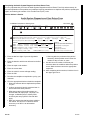
2. Complete your diagnosis, and fill out your part of
the Audio System Diagnosis and Core Retrun
Form. Refer to page 9. If you find that the radio,
tape player, or CD player is OK, check the rest of
the system (speakers, wiring, antenna, and cable).
• Review PROformance videotape E3103, Tuning
in on Audio Diagnosis.
• Refer to these service bulletins as appropriate:
87-024 1986–88 Legend; Replacement Radio Repair
Harness
03-016 2001–03 MDX; Remote Audio Controls
Do Not Work
01-034 2001 MDX; Rattle or Buzz From the
Speakers
01-018 2001 MDX; MDX Audio Unit Buttons Stop
Working
01-015 1991–92 Legend; Safety Recall: Bose
Audio Amplifiers
00-006 1996–99 SLX; Static From the Speakers
While Adjusting the Power Mirrors
99-011 1998–99 CL; Remote Audio Switches Do
Not Work Properly
98-006 1998 SLX; Service Manual Update:
CD Player Removal/Installation
97-033 1997 3.5RL (with Bose audio system);
No Sound From Rear Speakers
97-032 1997 CL, 1997 Integra; Distortion From
the Front Speakers
97-005 1996–97 3.2TL, 1996–97 3.5RL,
1995–96 NSX; Radio Interference From
the Ignition Coil(s)
96-035 1995–96 2.5TL, 1996 3.2TL; Static When
Adjusting the Radio Volume
95-025 1995–96 2.5TL, 1995–96 3.2TL; CD
Player Error Codes
95-019 1995–96 2.5TL, 1995–96 3.2TL; Rear
Speaker Static
94-015 1991–95 Legend; Acura/Bose
Remanufacturing Program
94-011 1991–94 Legend, 1991–94 NSX; Poor
Reception or Interference on the Radio
92-018 Trunk Unit CD Changer Magazine Won’t Eject
92-013 1991–92 Legend; Remote Audio Volume
Controls Inoperative or Cause Static
92-001 1991–92 Legend; Static on AM Band
91-053 1990–95 Integra, 1992–94 Vigor; Poor
Reception or Interference on the Radio
91-045 1991–95 Legend; Erratic Remote Audio
Control Operation
91-027 1992 Vigor; High Frequency Hum or
Silence in DSP Mode
90-010 Audio Unit Error Codes
90-001 1986–90 Legend; Legend AM Static
88-013 1986–88 Legend; Legend Poor FM
Reception
2 of 10
87-016 1987 Legend; AM Band Distortion
Service Advisor and Service Technician:
3. If the unit is faulty, check if it is covered by
warranty.
• If the unit is covered by warranty, go to
IN-WARRANTY EXCHANGE.
• If the unit is not covered by warranty, go to
OUT-OF-WARRANTY REPAIR.
IN-WARRANTY EXCHANGE
Service Technician:
1. Ask the parts manager for the appropriate
remanufactured unit.
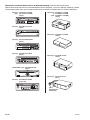
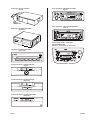
NOTE: If the faulty unit is a CD player or cassette
tape player with no model identification on its
faceplate, refer to Identification of Optional
Audio Units for In-Warranty Exchange.
• If your parts department does not have the
remanufactured unit in stock, return the vehicle
to the service advisor (step 2).
• If your parts department has the remanufactured
unit in stock, go to step 5.
Service Advisor:
2. Return the vehicle to your customer, and schedule
a date for replacing the faulty unit based on the
remanufactured unit’s estimated time of arrival.
Parts Manager:
3. If the appropriate remanufactured unit is not in
stock, order it through normal parts ordering
channels. For part number information, refer to
Parts Information Bulletin (PIB) B02-0009, Audio
Unit Warranty Exchange Program in the Interactive
Network (iN). Click on Parts, Info Library, and
Parts Bulletins. In the Pub ID dialogue box, enter
B02-0009, and click on Search.
• Refer to Identification of Optional Audio Units
for In-Warranty Exchange to help identify an
optional audio unit such as a CD player.
• For a CD changer controller, order a new unit.
NOTE: If the remanufactured unit does not have
the same part number as the faulty unit, the
warranty claim will be debited, and you will not get
credit for the value of the core.
4. Fill out your part of the Audio System Diagnosis
and Core Return Form. Make two copies of the
form. Check the Dealer Copy box on the original,
and staple it to the repair order. Check the
Manufacturer Copy box on the two copies.
87-015