1
11
3.2 Diagnostics Mode
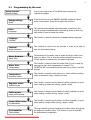
SELECT FUNCTION
MACHINE READY
Auto-diagnostic
To go to “diagnostics mode” turn on the machine
is displayed.
Within the first 5 seconds, press the 8-9-8-2 keys in order to display
Programming
energy saving
and then press OK to display
Software
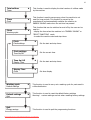
The programming menu is displayed.
Keys “2” and “3” are used to scroll through the settings.
Key “4” is used to change the settings and confirm.
Key “1” is used to quit diagnostics mode.
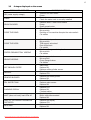
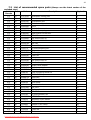
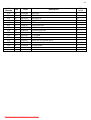
MACHINE SETTINGS
SETTING RANGE
1
1 Large coffee – 520 impulses
50 – 800
Number of pump impulses to make a large coffee
2
1 Expresso – 170 impulses
50 – 800
Number of pump impulses to make an expresso coffee
3
1 Coffee – 290 impulses
50 – 800
Number of pump impulses to make a coffee
4
Hot Water – 260 impulses
50 - 800
Number of pump impulses to distribute hot water
5
Steam timer 20 seconds
5 - 120
6
K1 Setting K1 Value 8
1 – 50
7
K2 Setting K2 Value 30
1 – 50
8
Normal temperature 90 °C
70 – 130 °C
Normal temperature
9
High temperature 110 °C
70 – 130 °C
High temperature
10
Temperature of the 1st coffee
117 °C
70 – 130 °C
Temperature of the first coffee
11
Total grounds 0
0 – 50
Coffee grounds counter
12
Stop grounds 12
0 - 50
Limit beyond which the coffee grounds tray should be emptied
13
Total water
0
14
De-scaling water ml --
0
15
Water filter ml --
16
H2O after de-scaling message
ml --
0
17
Hot water flow l/h 20
06 - 26
Flow in l/h during hot water distribution
18
Hot water pump settings
62430
Pump settings for water distribution (do not modify the selected
value)
19
Water tank – number of
impulses 0
0
20
Water tank stop – n° of impulses
750
Downloaded from CoffeeMachineManual.com Manuals
FUNCTION
K1 is the temperature rise factor. High value = high factor (do
not modify the selected value)
K2 is the influence of frequency of use on the temperature
setting. High value = low influence (do not modify the selected
value)
Boiler 1 total distributed water (not modifiable)
When the set value is reached the “de-scale” message is
displayed (not modifiable)
Quantity of water filtered since the Aqua Prima filter was
activated
Quantity of water used since the “de-scale” message was
displayed
Water tank counter
Water tank stop