1
<If A4
or Letter
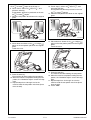
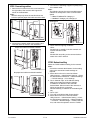
12. Touch “Copy”, select “A4 /8½×11 ”, and
press the start key.
A test pattern will then be produced on the two
paper is set in step 1>
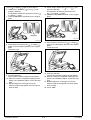
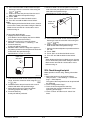
6. Touch “Print”, select “A4 /8½×11 ”, and
press the start key.
A test pattern will then be produced on the two
A4
or Letter
papers.
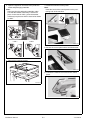
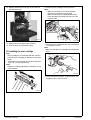
7. Place the test pattern face down on the original
glass.
A4
or Letter
papers.
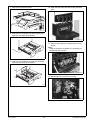
13. Place the test pattern face down on the original
glass.
Cyan
Magenta
A0P0IXC062DB
A0P0IXC060DB
8. Place about ten sheets of A3
or Ledger
paper on the test pattern placed on the original
glass.
Lower the cover.
14. Place about ten sheets of A3
or Ledger
paper on the test pattern placed on the original
glass.
Lower the cover.
A0P0IXC059DA
A0P0IXC059DA
9. Press the start key.
The machine will start reading the test pattern.
10. When the machine completes reading the test
pattern, the “Gradation Adjust” screen will reappear.
11. Repeat steps from 6 through 9 to let the
machine read the test pattern two times (three
times in total).
Y111050-6
E-11
15. Press the start key.
The machine will start reading the test pattern.
16. When the machine completes reading the test
pattern, the “Gradation Adjust” screen will reappear.
17. Repeat steps from 12 through 15 to let the
machine read the test pattern two times (three
times in total).
18. Touch “END.”
Installation Manual