1
ACCEPTANCE TESTING
(8)
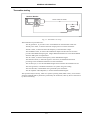
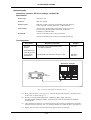
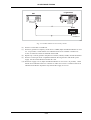
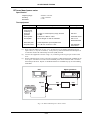
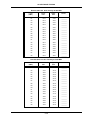
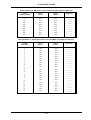
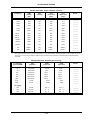
Check that the Modulation meter reads within ±7% of setting ± 1 digit. Repeat for UUT AM
depths of 10, 20, 30, 40, 50, 60, 70, and 85%.
(9)
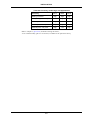
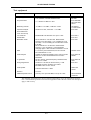
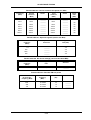
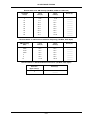
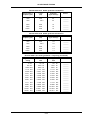
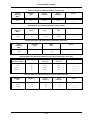
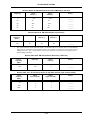
Refer to Results table 5-13 on page 5-41. On the UUT, press [FREQ] 65 Hz to set Mod Gen
2 to 65 Hz.
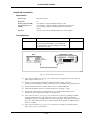
(10) Set the Modulation meter to monitor AM in a 30 Hz to 50 kHz flat bandwidth.
(11) Check the Modulation meter for a reading within ±10% of setting ± 1 digit.
(12) Repeat step 11 with the UUT set to each of the following mod rates:- 140 Hz, 500 Hz,
2 kHz, and 5 kHz.
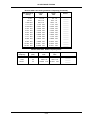
(13) Set the UUT mod rate to 15 kHz and check the Modulation meter for a reading within ±15%
of setting ± 1 digit.
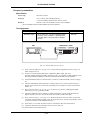
(14) Refer to Results table 5-14 on page 5-41. Reset Mod Gen 2 frequency to 1 kHz and level to
30%.
(15) Set the Modulation meter to monitor AM in a 0.3 to 3.4 kHz bandwidth.
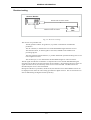
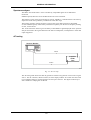
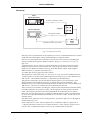
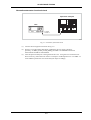
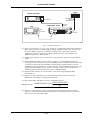
(16) Connect the LF output from the Modulation meter to the AF input on the UUT. Select the
0.3 to 3.4 kHz AF Filter on the UUT and select distortion measurement.
(17) Check that the distortion indicated on the UUT display is less than 2 %.
5-14