1
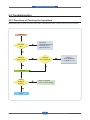
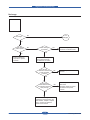
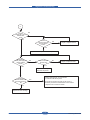
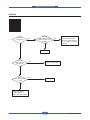
Alignment & Troubleshooting
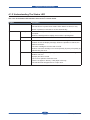
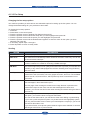
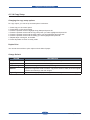
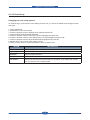
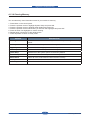
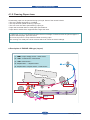
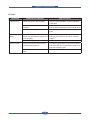
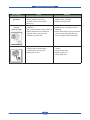
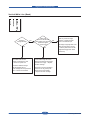
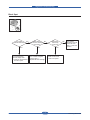
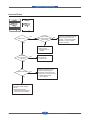
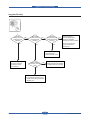
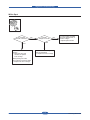
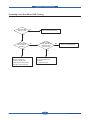
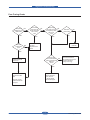
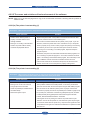
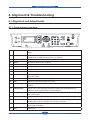
4.1.2 Understanding The Status LED
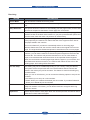
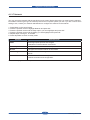
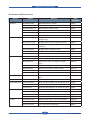
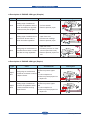
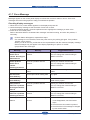
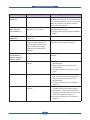
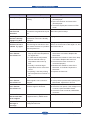
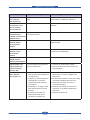
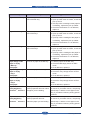
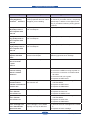
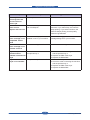
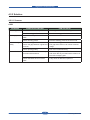
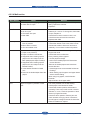
The color of the Status LED indicates the machine’s current status.
Status
Description
Off
• The machine is off-line.
• The machine is in power saver mode. When data is received, or any
button is pressed, it switches to on-line automatically.
Green
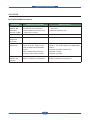
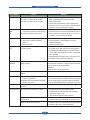
Red
Service Manual
Blinking
• When the backlight slowly blinks, the machine is receiving data from the
computer.
• When the backlight blinks rapidly, the machine is printing data.
On
The machine is on-line and can be used.
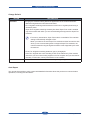
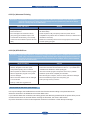
Blinking
• A minor error has occurred and the machine is waiting for the error to be
cleared. Check the display message. When the problem is cleared, the
machine resumes.
• The toner cartridge is near the end of its life.
Order a new toner cartridge. You can temporarily improve print quality by
redistributing the toner.
On
• The toner cartridge is totally empty. Remove the old toner cartridge and
install a new one.
• A paper jam has occurred.
• The cover is opened. Close the cover.
• There is no paper in the tray. Load paper in the tray.
• The machine has stopped due to a major error.
4-2
Samsung Electronics