1
SmarTemp Control fx
Installation – Operation Instructions
Timer
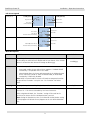
There are 4 heater start-up cycles possible 7 days per week. Select the day or
the specific timer (T1 – T4) using the rotary knob and the selection button.
Once the day, time, and duration have been entered, press the selection
button to set. A checkmark will confirm the timer has been saved. To turn
the timer OFF, select the timer checkmark and dial the duration down to the
OFF position and click the selection button.
Calendar
Fields Empty
Skip
The Skip feature looks similar to timer programming; however when a
specific timer program is selected, it will update the checkmark to an “s” for
skipped. When a program has been skipped, it will disable that specific timer
program for one cycle (7 day period). Preset timer programming will
reactivate after this one-time skip cycle.
Calendar
Fields Empty
Note: To permanently turn a timer OFF, refer to the “Timer” section.
LVD
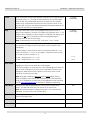
LVD “Low Voltage Disconnect” allows the user to adjust the battery voltage
level at which the Webasto SmarTemp Control fx will shut down heater
functionality.
If battery voltage is equal to or less than the threshold selected +0.1v, the
heater will not start. i.e. if an 11.5v threshold is selected the heater cannot
be started until B+ has reached 11.7v.
Error Codes
12 volt - Range between 11v – 12.5v
11.4v
24 volt - Range between 21v – 25.5v
24.2v
This section will log the last 5 error codes and the date that it was set.
Highlight and select an error code for a full description.
No Errors
If the heater produces an error code, the status indicator lights will flash red
and the error will display on the main screen. Error codes cannot be reset
through the Webasto SmarTemp Control fx. Refer to the heater service
manual for resetting an error code.
Note: Error code functionality does not apply to most coolant heaters.
Codes on products with no blink code functionality can still be obtained
using the PC Diagnostics test tool. Refer to the applicable service manual by
visiting www.techwebasto.com for detailed PC diagnostics information.
Hour Meter
The hour meter logs the operating hours of an active ON signal to the
heater. This does not reflect the true runtime of the heater itself.
N/A
Note: For warranty purposes a diagnostic printout is still required where
applicable. This hour meter is for reference only!
Default
Default allows the user to perform a factory reset of the control settings and
saved timer program data.
SW Version
This displays the firmware version of the Webasto SmarTemp Control fx.
Back
Select this to return to the previous screen.
N/A
Installed Version
N/A
4