1
Technical Information Bulletin
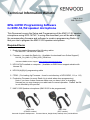
Instructions: Firmware programming
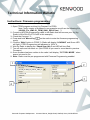
1. Open FPRO program and load Jig Firmware to FPRO
Note: Verify version of firmware for our example we will use the following file.
(NX-200_For_KMC-51_FIRM_SH01_REL00.hex) *1
2. Connect a KPG-36 programming cable to the Radio that will become your Jig (Jig
Radio is NX-x00/x10 or TK-5x20 in this example)
3. Check the Comport *2
on the radio to enter the firmware programming
4. Press and hold “Menu Key”
mode.
5. Click the “Write” button in FPRO *3 (Radio will display “LOADING” and Green LED
will light.) FPRO Progress bar will advance to 100% *4
6. Wait for Radio to display the “Check Sum 1A14” and LED will turn Red.
7. Turn off radio and turn back on. (Quit FPRO till you need to revert back to previous
Firmware.)
8. Once firmware has been written to the radio it will display “ PC TOOL MODE “ when
power is turned to On
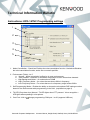
9. Note: Radio must be pre-programmed with Firmware Programming enabled.
1
2
3
4
Kenwood European Headquarters
Kenwood House, Dwight Road, Watford, Herts, WD18 9EB UK