1
Technical Information Bulletin
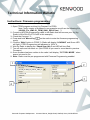
Instructions: Writing Microphone
1. Connect the KPG-36 programming cable to the Jig Radio
2. Click on “Write” button in KPG-147NC you will get a Confirmation pop up window “Is it
OK to write data?” Click on “OK”
3. A Progress Bar will pop up and the radio will display “PROGRAM” once writing is
completed a pop up box will appear, Click “OK”
4. Turn off Jig Radio and disconnect KPG-36 cable and connect KMC-51/52 mic.Power
on while holding Right Arrow Key
5. Power on Jig Radio while holding Right Arrow Key
Jig Radio will Display “ MIC
DATA WRITE” press the mic PF1 Key (Orange Key). Radios display will change to
“WRITING” when the Jig Radio has completed writing the display will indicate “MIC
DATA WRITE” with the Jig Radios Red TX LED lit.
6. Disconnect KMC-51/52
Note: Jig Radio can write multiple times by changing microphone and pressing PF1 key twice
while in “MIC DATA WRITE” mode.
Instructions: Configuration self programming
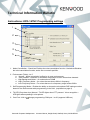
Environment settings position 1 to 5 can be selected from the pull down list once the
microphone has been enabled for self programming mode. You can select the DSP
mode environment by holding the Mic PF1 key and powering on the radio. 1. Press the Mic PF1 Key and the TX LED will blink the number of times the position the
Mic is set for based on the environment table above.
2. Once you have selected the corresponding Environment setting press the PTT to
confirm the selection.
3. Note: The different Environment selections are backed up in memory even when the
radio is turned off. Kenwood European Headquarters
Kenwood House, Dwight Road, Watford, Herts, WD18 9EB UK