1
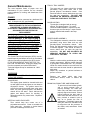
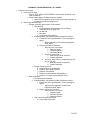
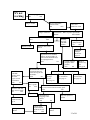
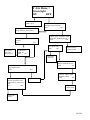
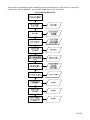
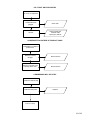
“Control System” - Control System
Summary Error Codes
Press key number 4 and the display will show one of
the following:
- “Door Switch”, indicating a door switch in the open
position for more than 1 hour.
- “RAM Checksum”, indicating the check sum
for service mode settings memory has been
corrupted.
- “AC Supply Low”, indicating AC supply to
the machine has fallen more than 15%
below normal line voltage for more than 30
seconds.
- “Scale Factor”, indicating a peripheral has
introduced a scaling factor that is incompatible with
current setting.
Press key number 1 will return to “Control System” if
all control system Error Codes have not been cleared. If all
control system Error Codes have been cleared the
next error code will be displayed, or “No Error Codes”
if there are no Error Codes. Press key number 1 will
return to “Error Codes”.
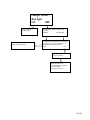
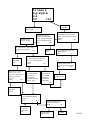
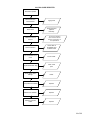
“Selection Switch” - Select Switch Summary Error
Codes
Press key number 4 and the display will show
“Selection SW #”, indicating a key on the keypad has
been active for more than 15 seconds while in normal
(sales) mode.
Press key number 1 will return to “Selection Switch” if
all selection Error Codes have not been cleared.
If all selection Error Codes have been cleared the
next error code will be displayed or “No Error Codes”
if there are no Error Codes.
Press key number 1 will return to “Error Codes”.
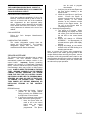
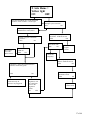
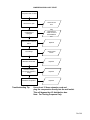
“CHANGER” - Changer Summary Error Codes
Press key number 4 and the display will show one of
the following:
- “Changer Comm”, indicating a changer
communication error (No communication for
more than 2 seconds).
- “Tube Sense”, indicating a tube sensor error.
- “Changer Inlet”, indicating an inlet chute blocked
error (no coins sensed in acceptor for 96 hours). “Tube Jam #”, indicating a tube jam error.
- “Changer ROM”, indicating a changer ROM
check sum error (failed changer).
- “Excessive Escrow”, indicating excessive escrow
attempts (more than 255 since last coin sensed). “Coin Jam”, indicating a coin jam reported by coin
mech.
- “Low Acceptance”, indicating a low coin
acceptance rate (less than 80%). - “Acceptor
Disconnected”, indicating an acceptor is unplugged.
- “Coin Routing Err”, indicating a coin was mis-
routed.
Press key number 1 will return to “CHANGER” if all
changer Error Codes have not been cleared.
If all changer Error Codes have been cleared the
next error code will be displayed or “No Error
Codes” if there are no Error Codes.
Press key number 1 will return to “Error Codes”.
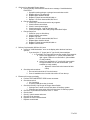
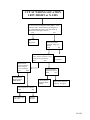
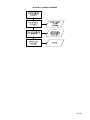
“Bill Validator” - Bill Validator Summary Error
Codes
Press key number 4 and the display will show one of
the following:
- “Bill Val Comm” indicating a bill validator
communication error (No communication for more
than 5 seconds).
- “Bill Stack Full” indicating the bill stacker is full.
- “Bill Motor Error” indicating a defective motor in
the validator.
- “Bill Jam ” indicating a bill jam in the validator.
- “Bill Val ROM” indicating a check sum error.
- “Bill Stack Open” indicating an open stacker.
- “Bill Sense Err” indicating a bill validator sensor
error.
Press key number 1 will return to “Bill Validator” if all
changer Error Codes have not been cleared.
If all validator Error Codes have been cleared the
next error code will be displayed or “No Error
Codes” if there are no Error Codes.
Press key number 1 will return to “Error Codes”.
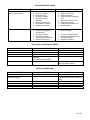
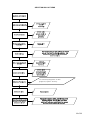
“Card Reader” - Card Reader Summary Error
Codes
Press key number 4 and the display will show one of
the following:
- “Card Reader Comm”, indicating no card reader
communication for 5 seconds.
- “Card Reader #”, indicating the most recent “nontransient error” from the card reader (failed card
reader).
Press key number 1 will return to “Card Reader” if all
changer Error have not been cleared. If all card
reader Error Codes have been cleared the next error
code will be displayed or “No Error Codes” if there
are no Error Codes. Press key number 1 will return to
“Error Codes”. Press key number 2 will scroll to the next
routine.
“Remote Vend Mech” - Remote Vend Mechanism
(USD) Error.
Press key number 4 and the display shows one of the
following.
- “Remote Vend Comm #”, indicates no
communication for 5 seconds with remote vend
mech at address “#”.
11 of 88