Download Operation Manual
Transcript
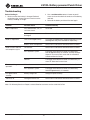
LS100L Battery-powered Punch Driver Troubleshooting Before You Begin 1. Make sure that the battery is charged. Recheck the battery after several minutes to make sure the battery is holding its charge. 2. Use a nonflammable contact cleaner or pencil eraser to clean the electrical contacts on the battery and tool. 3. Reinstall the battery and check the tool again. Problem Possible Cause Probable Remedy Tool is inoperative. Dirt, contaminants, etc., in ram area of tool. Clean tool. Tool components worn or damaged. Return tool to a Greenlee Authorized Service Center. Low or uncharged battery. Try known charged battery. Inoperative battery may be discharged or may have reached life expectancy. Broken switch components. Return tool to a Greenlee Authorized Service Center. Oil level low. Return tool to a Greenlee Authorized Service Center. Air in hydraulic system. Pull trigger and hold return button simultaneously. Run for approximately 10 seconds, and then attempt to punch. If unsuccessful, return tool to a Greenlee Authorized Service Center. Cold oil. Pull trigger and hold return button simultaneously to warm oil. Store tool in warm area. Oil level low. Return tool to a Greenlee Authorized Service Center. Air in hydraulic system. Pull trigger and hold return button simultaneously. Hold for approximately 10 seconds. LED glows for 20 seconds. Battery charge low. Charge or replace battery. Tool loses oil. Damaged internal seal. Return tool to a Greenlee Authorized Service Center. Motor is inoperative. Motor runs but tool will not complete a cycle. Dies stop during operation. Note: For Warranty Service or Repair, contact Greenlee customer service at 800-435-0786. Greenlee / A Textron Company 14 4455 Boeing Dr. • Rockford, IL 61109-2988 USA • 815-397-7070