1
6
PROGRAMMING
Programming is carried out on two levels, namely:
“Bartender” programming
“Technician” programming
6.1. The “Bartender” Menu
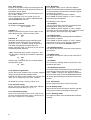
When the “+” and “ – “buttons are pressed for
approximately 2 seconds, the “bartender”
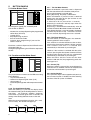
programming menu is activated. The menu contains
the submenus shown in the column to the right:
To move from one submenu to another, press “+” or
“-”. To enter a submenu, press “enter”.
To quit, press “esc”.
When you enter a submenu, the display flashes the
editable value. To make changes, use the “+” or “-”
buttons.
LANGUAGE
SELECTION
SOFTENER
REGENERATION
-
-
Language selection
Softener regeneration
Beep
Clock
- Set clock
- Date-time format
Set timer
Selection counts
- Coffee group 1
- Coffee group 2
- Coffee group 3
- Coffee group 4
- Water group
- TS group
- Counter total
- Reset counters
If you make changes, these must be confirmed by
pressing “enter” until you quit the submenu. If you
do not wish to save your changes, press “esc”.
CLOCK
BEEP
SET TIMER
SELECTION
COUNTER
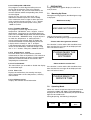
6.1.1 Selecting the Display Language
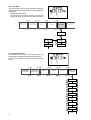
This menu allows you to select the language to be
used to show and messages on the display. You can
select among the following languages: Italian, French,
English, German, Spanish and Portuguese.
LANGUAGE
SELECTION
ITALIANO
FRANCAIS
ENGLISH
DEUTSCH
ESPANOL
5
SOFTENER
REGENERATION
BEEP
CLOCK
SET TIMER
SELECTION
COUNTER