1
SPARCcluster Service Manual
Sun Microsystems Computer Company
A Sun Microsystems, Inc. Business
2550 Garcia Avenue
Mountain View, CA 94043 USA
415 960-1300
fax 415 969-9131
Part No.: 802-6789-11
Revision A, April 1997
Copyright 1995, 1996, 1997 Sun Microsystems, Inc. 2550 Garcia Avenue, Mountain View, California 94043-1100 U.S.A.
All rights reserved. This product or document is protected by copyright and distributed under licenses restricting its use, copying, distribution, and decompilation.
No part of this product or document may be reproduced in any form by any means without prior written authorization of Sun and its licensors, if any.
Portions of this product may be derived from the UNIX® system and from the Berkeley 4.3 BSD system, licensed from the University of California. UNIX is a
registered trademark in the United States and in other countries and is exclusively licensed by X/Open Company Ltd. Third-party software, including font
technology in this product, is protected by copyright and licensed from Sun’s suppliers.
RESTRICTED RIGHTS LEGEND: Use, duplication, or disclosure by the government is subject to restrictions as set forth in subparagraph (c)(1)(ii) of the Rights in
Technical Data and Computer Software clause at DFARS 252.227-7013 and FAR 52.227-19.
Sun, Sun Microsystems, the Sun logo, and Solaris are trademarks or registered trademarks of Sun Microsystems, Inc. in the United States and in other countries. All
SPARC trademarks are used under license and are trademarks or registered trademarks of SPARC International, Inc. in the United States and in other countries.
Products bearing SPARC trademarks are based upon an architecture developed by Sun Microsystems, Inc.
The OPEN LOOK® and Sun™ Graphical User Interfaces were developed by Sun Microsystems, Inc. for its users and licensees. Sun acknowledges the pioneering
efforts of Xerox Corporation in researching and developing the concept of visual or graphical user interfaces for the computer industry. Sun holds a nonexclusive
license from Xerox to the Xerox Graphical User Interface, which license also covers Sun’s licensees who implement OPEN LOOK GUIs and otherwise comply with
Sun’s written license agreements.
X Window System is a trademark of X Consortium, Inc.
XPM library, Copyright 1990-93 GROUPE BULL
Permission to use, copy, modify, and distribute this software and its documentation for any purpose and without fee is hereby granted, provided that the above
copyright notice appear in all copies and that both that copyright notice and this permission notice appear in supporting documentation, and that the name of
GROUPE BULL not be used in advertising or publicity pertaining to distribution of the software without specific, written prior permission. GROUPE BULL makes no
representations about the suitability of this software for any purpose. It is provided "as is" without express or implied warranty.
THIS PUBLICATION IS PROVIDED “AS IS” WITHOUT WARRANTY OF ANY KIND, EITHER EXPRESS OR IMPLIED, INCLUDING,
BUT NOT LIMITED TO, THE IMPLIED WARRANTIES OF MERCHANTABILITY, FITNESS FOR A PARTICULAR PURPOSE, OR
NON-INFRINGEMENT.
Copyright 1995 , 1996, 1997 Sun Microsystems, Inc., 2550 Garcia Avenue, Mountain View, Californie 94043-1100 U.S.A.
Tous droits réservés. Ce produit ou document est protégé par un copyright et distribué avec des licences qui en restreignent l’utilisation, la copie et la décompilation.
Aucune partie de ce produit ou de sa documentation associée ne peut être reproduite sous aucune forme, par quelque moyen que ce soit, sans l’autorisation préalable
et écrite de Sun et de ses bailleurs de licence, s’il y en a.
Des parties de ce produit pourront être derivées du système UNIX® et du système Berkeley 4.3 BSD licencié par l’Université de Californie. UNIX est une marque
enregistrée aux Etats-Unis et dans d’autres pays, et licenciée exclusivement par X/Open Company Ltd. Le logiciel détenu par des tiers, et qui comprend la technologie
relative aux polices de caractères, est protégé par un copyright et licencié par des fournisseurs de Sun.
Sun, Sun Microsystems, le logo Sun, et Solaris sont des marques déposées ou enregistrées de Sun Microsystems, Inc. aux Etats-Unis et dans d’autres pays. Toutes les
marques SPARC, utilisées sous licence, sont des marques déposées ou enregistrées de SPARC International, Inc. aux Etats-Unis et dans d’autres pays. Les produits
portant les marques SPARC sont basés sur une architecture développée par Sun Microsystems, Inc.
Les utilisateurs d’interfaces graphiques OPEN LOOK® et Sun™ ont été développés de Sun Microsystems, Inc. pour ses utilisateurs et licenciés. Sun reconnaît les
efforts de pionniers de Xerox Corporation pour la recherche et le développement du concept des interfaces d’utilisation visuelle ou graphique pour l’industrie de
l’informatique. Sun détient une licence non exclusive de Xerox sur l’interface d’utilisation graphique, cette licence couvrant aussi les licenciés de Sun qui mettent en
place les utilisateurs d’interfaces graphiques OPEN LOOK et qui en outre se conforment aux licences écrites de Sun.
Le système X Window est un produit du X Consortium, Inc.
Bibliothèque XPM, Copyright 1990-93 GROUPE BULL. L'utilisation, la copie, la modification et la distribution de ce logiciel et de sa documentation à quelque fin que
ce soit sont autorisées à titre gracieux, à condition que la mention du copyright ci-dessus apparaisse dans tous les exemplaires, que cette mention et cette autorisation
apparaissent sur la documentation associée et que l'utilisation du nom du GROUPE BULL à des fins publicitaires ou de distribution soit soumise dans tous les cas à
une autorisation préalable et écrite. Le GROUPE BULL ne donne aucune garantie relative à l’aptitude du logiciel à répondre à une utilisation particulière. Le logiciel
est fourni en l'état, sans garantie explicite ou implicite.
CETTE PUBLICATION EST FOURNIE "EN L’ETAT" SANS GARANTIE D’AUCUNE SORTE, NI EXPRESSE NI IMPLICITE, Y COMPRIS, ET SANS QUE CETTE
LISTE NE SOIT LIMITATIVE, DES GARANTIES CONCERNANT LA VALEUR MARCHANDE, L’APTITUDE DES PRODUITS A REPONDRE A UNE
UTILISATION PARTICULIERE OU LE FAIT QU’ILS NE SOIENT PAS CONTREFAISANTS DE PRODUITS DE TIERS.
Please
Recycle
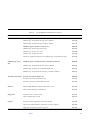
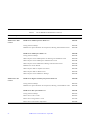
Contents
Part 1 —System Information
1. Product Description . . . . . . . . . . . . . . . . . . . . . . . . . . . . . . . . . . .
1-1
1.1 Standard Features . . . . . . . . . . . . . . . . . . . . . . . . . . . . . . . . .
1-1
1.2 SPARCcluster 1000PDB Configurations. . . . . . . . . . . . . . .
1-3
1.3 SPARCcluster 2000PDB Configurations. . . . . . . . . . . . . . .
1-5
1.4 SPARCcluster 1000HA Server Configuration . . . . . . . . . .
1-7
1.5 SPARCcluster 2000HA Server Configuration . . . . . . . . . .
1-9
1.6 Expansion Cabinet with RSM Units and Differential SCSI
Trays . . . . . . . . . . . . . . . . . . . . . . . . . . . . . . . . . . . . . . . . . . . . 1-11
1.7 Internal and External Options. . . . . . . . . . . . . . . . . . . . . . . 1-14
Part 2 —Troubleshooting
2. Troubleshooting Overview . . . . . . . . . . . . . . . . . . . . . . . . . . . . .
2-1
2.1 Troubleshooting Philosophy . . . . . . . . . . . . . . . . . . . . . . . .
2-1
2.2 Maintenance Authorization . . . . . . . . . . . . . . . . . . . . . . . .
2-2
2.3 Troubleshooting a Remote Site . . . . . . . . . . . . . . . . . . . . . .
2-2
2.4 PDB Cluster Troubleshooting . . . . . . . . . . . . . . . . . . . . . . .
2-5
iii
2.4.1 Cluster GUIs . . . . . . . . . . . . . . . . . . . . . . . . . . . . . . . .
2-5
2.4.2 Troubleshooting Flow . . . . . . . . . . . . . . . . . . . . . . . . .
2-5
2.4.3 Fault Classes and Principal Assemblies . . . . . . . . . . 2-10
2.4.4 Error Messages or Symptoms . . . . . . . . . . . . . . . . . . 2-11
2.4.5 Device Troubleshooting Cross-Reference. . . . . . . . . 2-13
2.4.6 Device Replacement Cross-Reference. . . . . . . . . . . . 2-15
2.5 HA Cluster Troubleshooting . . . . . . . . . . . . . . . . . . . . . . . 2-16
2.5.1 Takeover . . . . . . . . . . . . . . . . . . . . . . . . . . . . . . . . . . . . 2-16
2.5.2 Switchover . . . . . . . . . . . . . . . . . . . . . . . . . . . . . . . . . . 2-16
2.5.3 Failures Where There is No Takeover. . . . . . . . . . . . 2-16
2.5.4 Fault Classes and Principal Assemblies . . . . . . . . . . 2-19
2.5.5 Error Messages or Symptoms . . . . . . . . . . . . . . . . . . 2-19
2.5.6 Device to Troubleshooting Cross-Reference . . . . . . 2-19
2.5.7 Device Replacement Cross-Reference. . . . . . . . . . . . 2-19
3. Hardware Troubleshooting . . . . . . . . . . . . . . . . . . . . . . . . . . . . .
3-1
3.1 SPARCstorage Array and Optical Connections Faults . .
3-2
3.1.1 Both Nodes Indicate Errors From Same
Physical Disk . . . . . . . . . . . . . . . . . . . . . . . . . . . . . . . .
3-4
3.1.2 Errors From Both Nodes on the Same SPARCstorage
Array. . . . . . . . . . . . . . . . . . . . . . . . . . . . . . . . . . . . . . . 3-5
3.1.3 Multiple Disk Errors or Disk Communication Error
For One Node Only. . . . . . . . . . . . . . . . . . . . . . . . . . . 3-5
3.1.4 SPARCstorage Array Communication Fault . . . . . .
3-6
3.1.5 Node Faults . . . . . . . . . . . . . . . . . . . . . . . . . . . . . . . . . 3-12
3.2 Network Faults . . . . . . . . . . . . . . . . . . . . . . . . . . . . . . . . . . . 3-17
iv
SPARCcluster Service Manual—April 1997
3.2.1 Private Network Fault . . . . . . . . . . . . . . . . . . . . . . . . 3-17
3.2.2 Client Net Fault . . . . . . . . . . . . . . . . . . . . . . . . . . . . . . 3-25
3.3 Terminal Concentrator and Serial Connection Faults . . . 3-25
3.3.1 Terminal Concentrator . . . . . . . . . . . . . . . . . . . . . . . . 3-25
3.3.2 Serial Connections. . . . . . . . . . . . . . . . . . . . . . . . . . . . 3-35
4. Software Troubleshooting . . . . . . . . . . . . . . . . . . . . . . . . . . . . . .
4-1
5. Diagnostics. . . . . . . . . . . . . . . . . . . . . . . . . . . . . . . . . . . . . . . . . . .
5-1
5.1 On-Line . . . . . . . . . . . . . . . . . . . . . . . . . . . . . . . . . . . . . . . . .
5-1
5.2 Determining Cluster Status . . . . . . . . . . . . . . . . . . . . . . . . .
5-2
5.3 Verifying Hardware Installation . . . . . . . . . . . . . . . . . . . . .
5-2
5.4 Running SunVTS . . . . . . . . . . . . . . . . . . . . . . . . . . . . . . . . .
5-6
Part 3 —Preparing for Service
6. Safety and Tools Requirements . . . . . . . . . . . . . . . . . . . . . . . . .
6-1
6.1 Safety Precautions . . . . . . . . . . . . . . . . . . . . . . . . . . . . . . . .
6-1
6.2 Symbols . . . . . . . . . . . . . . . . . . . . . . . . . . . . . . . . . . . . . . . . .
6-2
6.3 System Precautions. . . . . . . . . . . . . . . . . . . . . . . . . . . . . . . .
6-3
6.4 Tools Required . . . . . . . . . . . . . . . . . . . . . . . . . . . . . . . . . . .
6-5
7. Shutdown and Restart Procedures . . . . . . . . . . . . . . . . . . . . . . .
7-1
7.1 SPARCcluster 1000PDB . . . . . . . . . . . . . . . . . . . . . . . . . . . .
7-2
7.1.1 System Cabinet . . . . . . . . . . . . . . . . . . . . . . . . . . . . . .
7-2
7.1.2 Processor . . . . . . . . . . . . . . . . . . . . . . . . . . . . . . . . . . .
7-4
7.1.3 SPARCstorage Disk Arrays . . . . . . . . . . . . . . . . . . . . 7-10
7.1.4 Terminal Concentrator . . . . . . . . . . . . . . . . . . . . . . . . 7-21
7.2 SPARCcluster 2000PDB . . . . . . . . . . . . . . . . . . . . . . . . . . . . 7-22
Contents
v
7.2.1 System Cabinet . . . . . . . . . . . . . . . . . . . . . . . . . . . . . . 7-22
7.2.2 Processor Shutdown and Startup . . . . . . . . . . . . . . . 7-27
7.2.3 SPARCstorage Disk Arrays . . . . . . . . . . . . . . . . . . . . 7-29
7.2.4 Terminal Concentrator . . . . . . . . . . . . . . . . . . . . . . . . 7-29
Part 4 —Subassembly Removal and Replacement
8. Internal Access . . . . . . . . . . . . . . . . . . . . . . . . . . . . . . . . . . . . . . .
8-1
8.1 Removing System and Expansion Cabinet Panels . . . . . .
8-1
8.1.1 Opening the Hinged Door (SPARCcluster 2000PDB) 8-2
9.
8.1.2 Vented Front Panels (SPARCcluster 2000PDB or
SPARCcluster 1000PDB) . . . . . . . . . . . . . . . . . . . . . . .
8-2
8.1.3 Rear Screen Panel . . . . . . . . . . . . . . . . . . . . . . . . . . . .
8-4
8.1.4 Kick Panel . . . . . . . . . . . . . . . . . . . . . . . . . . . . . . . . . .
8-5
8.1.5 Stabilizer Bar . . . . . . . . . . . . . . . . . . . . . . . . . . . . . . . .
8-5
8.2 Leveling the Cabinets. . . . . . . . . . . . . . . . . . . . . . . . . . . . . .
8-6
8.3 Optional Panel Removal . . . . . . . . . . . . . . . . . . . . . . . . . . .
8-8
Major Subassembly Replacement. . . . . . . . . . . . . . . . . . . . . . .
9-1
9.1 SPARCcluster 1000 . . . . . . . . . . . . . . . . . . . . . . . . . . . . . . . .
9-2
9.1.1 System Board and Components . . . . . . . . . . . . . . . .
9-2
9.1.2 SPARCstorage Arrays . . . . . . . . . . . . . . . . . . . . . . . . .
9-2
9.1.3 SSA Model 100 Series . . . . . . . . . . . . . . . . . . . . . . . . .
9-3
9.1.4 SSA Model 200 Series . . . . . . . . . . . . . . . . . . . . . . . . .
9-3
9.1.5 Blower Assemblies . . . . . . . . . . . . . . . . . . . . . . . . . . .
9-5
9.1.6 Terminal Concentrator . . . . . . . . . . . . . . . . . . . . . . . .
9-7
9.1.7 Cabling . . . . . . . . . . . . . . . . . . . . . . . . . . . . . . . . . . . . . 9-10
vi
SPARCcluster Service Manual—April 1997
9.2 SPARCcluster 2000 . . . . . . . . . . . . . . . . . . . . . . . . . . . . . . . . 9-10
9.2.1 System Board and Components . . . . . . . . . . . . . . . . 9-10
9.2.2 SPARCstorage Arrays . . . . . . . . . . . . . . . . . . . . . . . . . 9-11
9.2.3 Terminal Concentrator . . . . . . . . . . . . . . . . . . . . . . . . 9-11
9.2.4 Cabling . . . . . . . . . . . . . . . . . . . . . . . . . . . . . . . . . . . . . 9-13
Part 5 —Illustrated Parts Breakdown
10. Illustrated Parts Breakdown . . . . . . . . . . . . . . . . . . . . . . . . . . . . 10-1
10.1 SPARCcluster 1000 . . . . . . . . . . . . . . . . . . . . . . . . . . . . . . . . 10-3
10.2 SPARCcluster 2000 . . . . . . . . . . . . . . . . . . . . . . . . . . . . . . . 10-5
10.3 SPARCcluster Expansion Cabinets . . . . . . . . . . . . . . . . . . . 10-7
Part 6 —Appendixes and Index
A. Product Specifications . . . . . . . . . . . . . . . . . . . . . . . . . . . . . . . . . A-1
B. Connector Pinouts and Cabling . . . . . . . . . . . . . . . . . . . . . . . . .
B-1
B.1 SPARCstorage Array Fiber-Optic Cables. . . . . . . . . . . . . .
B-1
B.2 Terminal Concentrator Ports . . . . . . . . . . . . . . . . . . . . . . . .
B-1
B.2.1 RJ-45 Serial Port Connectors . . . . . . . . . . . . . . . . . . .
B-1
B.2.2 Public Ethernet Connector . . . . . . . . . . . . . . . . . . . . .
B-3
B.3 Private Interconnect Cable (Short and Long) . . . . . . . . . .
B-4
C. SCSI Targeting. . . . . . . . . . . . . . . . . . . . . . . . . . . . . . . . . . . . . . . .
C-1
C.1 SPARCstorage Array Model 100 Series . . . . . . . . . . . . . . .
C-1
C.2 SPARCstorage Array Model 200 Series . . . . . . . . . . . . . . .
C-2
C.2.1 RSM SCSI Target IDs. . . . . . . . . . . . . . . . . . . . . . . . . .
C-2
C.2.2 Differential SCSI Disk Tray Target IDs . . . . . . . . . . .
C-3
C.3 SCSI Cable Length . . . . . . . . . . . . . . . . . . . . . . . . . . . . . . . .
C-5
Contents
vii
D.
SPARCstorage Array Firmware and Device Driver Error
Messages . . . . . . . . . . . . . . . . . . . . . . . . . . . . . . . . . . . . . . . . D-1
D.1 Message Formats . . . . . . . . . . . . . . . . . . . . . . . . . . . . . . . . .
D-1
D.2 System Configuration Errors. . . . . . . . . . . . . . . . . . . . . . . .
D-2
D.2.1 soc Driver . . . . . . . . . . . . . . . . . . . . . . . . . . . . . . . . . . .
D-3
D.3 Hardware Errors . . . . . . . . . . . . . . . . . . . . . . . . . . . . . . . . . .
D-4
D.4 Informational Messages. . . . . . . . . . . . . . . . . . . . . . . . . . . . D-10
D.5 Internal Software Errors . . . . . . . . . . . . . . . . . . . . . . . . . . . D-11
viii
SPARCcluster Service Manual—April 1997
Figures
Figure 1-1
SPARCcluster 1000PDB Cabinet . . . . . . . . . . . . . . . . . . . . . . . . .
1-3
Figure 1-2
SPARCcluster PDB Block Diagram Based on SPARCserver
1000 . . . . . . . . . . . . . . . . . . . . . . . . . . . . . . . . . . . . . . . . . . . . . . . . .
1-4
Figure 1-3
SPARCcluster 2000PDB Cabinet . . . . . . . . . . . . . . . . . . . . . . . .
1-5
Figure 1-4
SPARCcluster PDB System Based on SPARCcenter 2000 . . . .
1-6
Figure 1-5
SPARCcluster 1000HA Server Cabinet. . . . . . . . . . . . . . . . . . . .
1-7
Figure 1-6
SPARCcluster HA Cluster Based on SPARCserver 1000. . . . .
1-8
Figure 1-7
SPARCcluster 2000HA Server Cabinets . . . . . . . . . . . . . . . . . .
1-9
Figure 1-8
SPARCcluster HA Cluster based on SPARCcenter 2000 . . . . .
1-10
Figure 1-9
SPARCcluster System Expansion Cabinet with SSA Model 200
Series and SPARCstorage RSM Units. . . . . . . . . . . . . . . . . . . . . 1-12
Figure 1-10
SPARCcluster System Expansion Cabinet with SSA Model 200
Series and Differential SCSI Trays . . . . . . . . . . . . . . . . . . . . . . . 1-13
Figure 2-1
Troubleshooting Flow Diagram . . . . . . . . . . . . . . . . . . . . . . . . .
2-7
Figure 2-2
Message Viewer Window. . . . . . . . . . . . . . . . . . . . . . . . . . . . . . .
2-8
Figure 2-3
Cluster Monitor-Front Panel Window . . . . . . . . . . . . . . . . . . . .
2-9
Figure 2-4
Item Properties Window . . . . . . . . . . . . . . . . . . . . . . . . . . . . . . .
2-10
ix
x
Figure 2-5
Takeover Troubleshooting Flow Diagram. . . . . . . . . . . . . . . . .
2-18
Figure 3-1
I/O Component Path for Typical SSA . . . . . . . . . . . . . . . . . . . .
3-3
Figure 3-2
LCD Display . . . . . . . . . . . . . . . . . . . . . . . . . . . . . . . . . . . . . . . . . .
3-7
Figure 3-3
Link 0 Failed, Recovered on Link 1. . . . . . . . . . . . . . . . . . . . . . .
3-18
Figure 3-4
Private Network Link 0 Troubleshooting . . . . . . . . . . . . . . . . .
3-19
Figure 3-5
Private Network Link 0 Troubleshooting . . . . . . . . . . . . . . . . .
3-22
Figure 3-6
Private Network Link 1 Troubleshooting . . . . . . . . . . . . . . . . .
3-24
Figure 3-7
Indicator Locations . . . . . . . . . . . . . . . . . . . . . . . . . . . . . . . . . . . .
3-26
Figure 3-8
Troubleshooting Flow Diagram Overview . . . . . . . . . . . . . . . .
3-35
Figure 3-9
Branch A: cconsole Does Not Succeed . . . . . . . . . . . . . . . . . . . .
3-36
Figure 3-10
Branch A1: Terminal Concentrator Does Not Respond to Ping
Command . . . . . . . . . . . . . . . . . . . . . . . . . . . . . . . . . . . . . . . . . . . . 3-37
Figure 3-11
Branch B: Terminal Concentrator Cannot Connect to a Host .
3-38
Figure 3-12
Branch B.1: Cconsole Window is Blank orNot Responding . .
3-39
Figure 7-1
Key Switch Positions . . . . . . . . . . . . . . . . . . . . . . . . . . . . . . . . . . .
7-2
Figure 7-2
AC Distribution Unit Power Switch . . . . . . . . . . . . . . . . . . . . . .
7-3
Figure 7-3
Key Switch in the Standby Position . . . . . . . . . . . . . . . . . . . . . .
7-5
Figure 7-4
Processor AC Power Switch and Plug . . . . . . . . . . . . . . . . . . . .
7-6
Figure 7-5
Key Switch in On Position . . . . . . . . . . . . . . . . . . . . . . . . . . . . . .
7-7
Figure 7-6
Removing the Front Panel . . . . . . . . . . . . . . . . . . . . . . . . . . . . . .
7-8
Figure 7-7
Reset Switch (Behind the Front Panel) and Front Panel Status
LEDs . . . . . . . . . . . . . . . . . . . . . . . . . . . . . . . . . . . . . . . . . . . . . . . .
7-9
Figure 7-8
SPARCstorage Array Model 100 Series . . . . . . . . . . . . . . . . . . .
7-10
Figure 7-9
SPARCstorage AC Power Switch and AC Plug . . . . . . . . . . . .
7-11
Figure 7-10
LCD Display While Powering On the System . . . . . . . . . . . . .
7-13
SPARCcluster Service Manual—April 1997
Figure 7-11
SPARCstorage Array Model 2000 Series (Controller and Disk
Trays). . . . . . . . . . . . . . . . . . . . . . . . . . . . . . . . . . . . . . . . . . . . . . . . 7-15
Figure 7-12
SPARCstorage RSM Operator Panel. . . . . . . . . . . . . . . . . . . . . .
Figure 7-13
SPARCstorage Array Model 200 Series Power Supply Switch 7-18
Figure 7-14
LEDs for Differential SCSI Tray . . . . . . . . . . . . . . . . . . . . . . . . .
7-21
Figure 7-15
Terminal Concentrator (Rear View) . . . . . . . . . . . . . . . . . . . . . .
7-21
Figure 7-16
Key Switch Positions . . . . . . . . . . . . . . . . . . . . . . . . . . . . . . . . . . .
7-22
Figure 7-17
AC Distribution Unit Power Switch . . . . . . . . . . . . . . . . . . . . . .
7-23
Figure 7-18
Local/Remote Switch Location . . . . . . . . . . . . . . . . . . . . . . . . . .
7-24
Figure 7-19
System Reset Switch . . . . . . . . . . . . . . . . . . . . . . . . . . . . . . . . . . .
7-26
Figure 7-20
Power Supply Cable Location . . . . . . . . . . . . . . . . . . . . . . . . . . .
7-28
Figure 8-1
Opening the Hinged Door — System Cabinet . . . . . . . . . . . . .
8-2
Figure 8-2
Removing the Vented Panels . . . . . . . . . . . . . . . . . . . . . . . . . . . .
8-3
Figure 8-3
Rear Screen Panel Removal . . . . . . . . . . . . . . . . . . . . . . . . . . . . .
8-4
Figure 8-4
Removing the Kick Panel . . . . . . . . . . . . . . . . . . . . . . . . . . . . . . .
8-5
Figure 8-5
Stabilizer Bar . . . . . . . . . . . . . . . . . . . . . . . . . . . . . . . . . . . . . . . . .
8-6
Figure 8-6
Main Leveling Pads. . . . . . . . . . . . . . . . . . . . . . . . . . . . . . . . . . . .
8-7
Figure 8-7
Stabilizer Bar Leveling Pads. . . . . . . . . . . . . . . . . . . . . . . . . . . . .
8-8
Figure 8-8
Removing the Side Panels . . . . . . . . . . . . . . . . . . . . . . . . . . . . . .
8-9
Figure 9-1
Blower Assemblies Removal/Replacement . . . . . . . . . . . . . . .
9-6
Figure 9-2
Removing Terminal Concentrator Screws . . . . . . . . . . . . . . . . .
9-7
Figure 9-3
Swinging Terminal Concentrator Out of Cabinet. . . . . . . . . . .
9-8
Figure 9-4
Removing/Replacing Terminal Concentrator Cabling . . . . . .
9-9
Figure 9-5
Terminal Concentrator Mounting Detail . . . . . . . . . . . . . . . . . .
9-10
Figure 9-6
Terminal Concentrator Removal/Replacement . . . . . . . . . . . .
9-12
Figure 10-1
SPARCcluster 1000 System . . . . . . . . . . . . . . . . . . . . . . . . . . . . .
10-3
Figures
7-17
xi
Figure 10-2
SPARCcluster 2000 System . . . . . . . . . . . . . . . . . . . . . . . . . . . . .
10-5
Figure 10-3
System Expansion Cabinet with SSA Model 200 Series and
SPARCstorage RSM Units . . . . . . . . . . . . . . . . . . . . . . . . . . . . . .
10-8
System Expansion Cabinet with SSA Model 200 Series and
Differential SCSI Trays . . . . . . . . . . . . . . . . . . . . . . . . . . . . . . . . .
10-9
Figure B-1
Serial Port RJ-45 Receptacle . . . . . . . . . . . . . . . . . . . . . . . . . . . . .
B-2
Figure B-2
15-pin 10BASE5 Ethernet Receptacle . . . . . . . . . . . . . . . . . . . . .
B-3
Figure C-1
Model 100 Series SCSI Addresses . . . . . . . . . . . . . . . . . . . . . . . .
C-2
Figure C-2
SPARCstorage RSM Front View with Target Address IDs . . .
C-3
Figure C-3
Differential SCSI Tray Drive Locations . . . . . . . . . . . . . . . . . . .
C-4
Figure 10-4
xii
SPARCcluster Service Manual—April 1997
Tables
Table 2-1
Graphical User Interfaces . . . . . . . . . . . . . . . . . . . . . . . . . . . . . . .
2-5
Table 2-2
Error Message or Symptom . . . . . . . . . . . . . . . . . . . . . . . . . . . . .
2-11
Table 2-3
Device Troubleshooting Cross-Reference . . . . . . . . . . . . . . . . .
2-13
Table 2-4
Device Replacement Cross-Reference . . . . . . . . . . . . . . . . . . . .
2-15
Table 3-1
POST Codes . . . . . . . . . . . . . . . . . . . . . . . . . . . . . . . . . . . . . . . . . .
3-7
Table 6-1
Safety Precautions . . . . . . . . . . . . . . . . . . . . . . . . . . . . . . . . . . . . .
6-2
Table 10-1
SPARCcluster List of Unique Replacement Parts. . . . . . . . . . .
10-1
Table 10-2
Principal Assembly Part Replacement Reference . . . . . . . . . . .
10-2
Table 10-3
SPARCcluster 1000 Replaceable Parts List . . . . . . . . . . . . . . . .
10-4
Table 10-4
SPARCcluster 2000 Replaceable Parts List . . . . . . . . . . . . . . . .
10-6
Table 10-5
System Expansion Cabinet Replaceable Parts List . . . . . . . . . .
10-7
Table B-1
Serial Port Pin/Signal Allocations . . . . . . . . . . . . . . . . . . . . . . .
B-2
Table B-2
10BASE5 Ethernet Transceiver Port Pin/Signal Allocations .
B-3
Table B-3
Private Ethernet Pinout/Signals . . . . . . . . . . . . . . . . . . . . . . . . .
B-4
Table C-1
SCSI Addresses for the Differential SCSI Disk Tray . . . . . . . .
C-4
xiii
xiv
SPARCcluster Service Manual—April 1997
Preface
How This Book Is Organized
This manual provides service instructions for Ultra™ Enterprise™ Cluster
systems, including factory-assembled and customer-assembled systems. These
instructions are designed for experienced and qualified maintenance
personnel.
Part 1—System Information
Chapter 1, “Product Description,” describes Enterprise Cluster PDB standard
features, internal options, and external options for each system configuration.
Part 2—Troubleshooting
Chapter 2, “Troubleshooting Overview,“describes the overall architecture for
troubleshooting the system.
Chapter 3, “PDB Cluster Hardware Troubleshooting,” provides procedures
for the isolation of various faults relative to major system components.
Chapter 4, “HA Cluster Hardwareware Troubleshooting,“ provides references
to lists of error messages generated by the various software types.
Chapter 5, “Software Troubleshooting,“ provides software troubleshooting
references.
xv
Chapter 6, “Diagnostics,” describes online diagnostics and scripts for
verifying hardware installation.
Part 3—Preparing for Service
Chapter 7, “Safety and Tools Requirements,“ provides safety precautions and
a list of required tools.
Chapter 8, “Shutdown and Restart Procedures,“ provides system and
individual subsystem shutdown and restart procedures.
Part 4—Subassembly Removal and Replacement
Chapter 9, “Internal Access,“ provides panel removal procedures necessary to
access system components during removal and replacement.
Chapter 10, “Major Subassemblies,“ contains procedures for the removal and
replacement of system subassemblies and parts.
Part 5—Illustrated Parts Breakdown
Chapter 11, “Illustrated Parts Breakdown,“ provides illustrations of the major
replacement parts in a system and lists part numbers.
Part 6—Appendixes and Index
Appendix A, “Product Specification,” provides system product specifications
for each Ultra Enterprise system configuration.
Appendix B, “Connector Pinouts and Cabling,” provides a list of pinouts and
cabling for items specific to an Ultra Enterprise clustered system.
Appendix C, “SCSI Targeting,” provides SCSI targeting information for SCSI
devices specific to an Ultra Enterprise Clustered system.
Appendix D, “SPARCstorage Array Firmware and Device Driver Error
Messages,” provides a list of SPARCstorage Array error messages specific to
the firmware and device driver.
xvi
SPARCcluster Service Manual—April 1997
UNIX Commands
This document may not include specific software commands or procedures.
Instead, it may name software tasks and refer you to operating system
documentation or the handbook that was shipped with your new hardware.
The type of information that you might need to use references for includes:
•
•
•
•
Shutting down the system
Booting the system
Configuring devices
Other basic software procedures
See one or more of the following:
•
Solaris 2.x Handbook for SMCC Peripherals contains Solaris™ 2.x software
commands.
•
On-line AnswerBook™ for the complete set of documentation supporting
the Solaris 2.x software environment.
•
Other software documentation that you received with your system.
Typographic Conventions
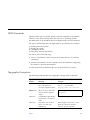
The following table describes the typographic changes used in this book.
Typeface or
Symbol
Meaning
Example
AaBbCc123
The names of commands,
files, and directories;
on-screen computer output
Edit your .login file.
Use ls -a to list all files.
machine_name% You have mail.
AaBbCc123
What you type, contrasted
with on-screen computer
output
AaBbCc123
Command-line placeholder:
replace with a real name or
value
To delete a file, type rm filename.
AaBbCc123
Book titles, new words or
terms, or words to be
emphasized
Read Chapter 6 in the User’s Guide.
These are called class options.
You must be root to do this.
Preface
machine_name% su
Password:
xvii
Shell Prompts
The following table shows the default system prompt and superuser prompt
for the C shell, Bourne shell, and Korn shell.
Shell
Prompt
C shell
machine_name%
C shell superuser
machine_name#
Bourne shell and Korn shell
$
Bourne shell and Korn shell
superuser
#
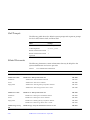
Related Documents
The following documents contain information that may be helpful to the
system administrator and service provider.
Table P-1
Product Family
List of Related Documentation
Title
Part Number
SPARCcenter 2000 System Binder Set
825-1509
SPARCcluster Servers
SPARCcenter 2000
Installation
SPARCcenter 2000 Installation Manual
801-6975
Service
SPARCcenter 2000 Service Manual
801-2007
Safety/EMI
SPARCcenter 2000 Regulatory Compliance Manual
801-3051
SPARCcenter 2000 Storage Device User’s Guide
801-7009
SPARCserver 1000
SPARCserver 1000 System Binder Set
825-1725
Installation
SPARCserver 1000 System Installation Manual
801-2893
Service
SPARCserver 1000 System Service Manual
801-2895
Safety/EMI
SPARCserver 1000 Regulatory Compliance Manual
801-2892
SPARCserver 1000 Storage Device User’s Guide
801-2198
SPARCstorage Array
100
xviii
SPARCstorage Array 100 Installation and Service Set
SPARCcluster Service Manual—April 1997
825-2513
Table P-1
Product Family
SPARCstorage Array
200
Terminal Concentrator
Software
Diagnostics
Options
List of Related Documentation (Continued)
Title
Part Number
SPARCstorage Array Model 100 Series Installation Manual
801-2205
SPARCstorage Array Model 100 Serie Service Manual
801-2206
SPARCstorage Array Regulatory Compliance Manual
801-7103
SPARCstorage Array User’s Guide Doc Set
825-2514
SPARCstorage Array Configuration Guide
802-2041
SPARCstorage Array User’s Guide
802-2042
SPARCstorage Array Product Note
802-2043
Disk Drive Installation Manual for the SPARCstorage Array Model 100 Series
801-2207
SPARCstorage Array Model 200 Series Installation Manual
802-2027
SPARCstorage Array Model 200 Series Service Manual
802-2028
SPARCstorage Array Battery and PROM Install Note
802-2029
SPARCstorage Array Model 200 Series Reg. Compliance Manual
802-2031
Terminal Concentrator Binder Set
825-2227
Terminal Concentrator Installation Notes
801-6127
Terminal Concentrator General Reference Guide
801-5972
SMCC SPARC Hardware Platform Guide Solaris 2.5.1
802-6530
Solstice System Manager Install Manual
802-6135
SunVTS Version 2.0 Users Guide
802-5331
Solstice SyMON User’s Guide
802-5355
Expansion Cabinet Installation and Service Manual
802-6084
Sparcstorage RSM Installation, Operations and Service Manual
802-5062
Differential SCSI Disk Tray Service Manual
802-7341
Preface
xix
Table P-1
List of Related Documentation (Continued)
Product Family
Title
Part Number
SPARCcluster PDB
Clusters
SPARCcluster PDB Preparation Binder Set
825-3527
Getting Started (roadmap)
802-6787
SPARCcluster System Hardware Site Preparation, Planning and Installation Guide
802-6788
SPARCcluster PDB System Binder Set
825-3528
Getting Started (roadmap)
802-6787
Ultra Enterprise Cluster PDB Software Site Planning and Installation Guide
802-6790
Ultra Enterprise Cluster PDB System Administration Guide
802-6784
Ultra Enterprise Cluster PDB Volume Manager Administration Guide
802-6785
SPARCcluster Service Manual
802-6789
Ultra Enterprise PDB 1.2 Software (CD insert)
804-5449
Ultra Enterprise PDB 1.2 Release Notes
802-6793
Ultra Enterprise Cluster PDB Error Messages
802-6792
SPARCcluster High Availability Preparation Binder Set
825-3590
Getting Started (roadmap)
802-7619
SPARCcluster System Hardware Site Preparation, Planning, and Installation Guide
802-6788
SPARCcluster HA System Binder Set
825-3591
Getting Started (roadmap)
802-7619
Solstice HA 1.3 User’s Guide
805-0317
Solstice HA 1.3 Programmer's Guide
802-0318
Solstice HA 1.3 New Product Information
802-0629
SPARCcluster HA
Clusters
xx
SPARCcluster Service Manual—April 1997
Notes, Cautions, and Warnings
Warning – This equipment contains lethal voltage. Accidental contact can
result in serious injury or death.
!
Caution – Improper handling by unqualified personnel can cause serious
damage to this equipment. Unqualified personnel who tamper with this
equipment may be held liable for any resultant damage to the equipment.
Individuals who remove any outer panels or open covers to access this
equipment must observe all safety precautions and ensure compliance with
skill level requirements, certification, and all applicable local and national
laws.
Procedures contained in this document must be performed by qualified
service-trained maintenance providers.
Note – Before you begin, carefully read each of the procedures in this manual.
If you have not performed similar operations on comparable equipment, do
not attempt to perform these procedures.
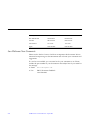
Ordering Sun Documents
SunDocsSM is a distribution program for Sun Microsystems technical
documentation. Easy, convenient ordering and quick delivery is available from
SunExpress™. You can find a full listing of available documentation on the
World Wide Web: http://www.sun.com/sunexpress/
Country
Telephone
Fax
United States
1-800-873-7869
1-800-944-0661
United Kingdom
0-800-89-88-88
0-800-89-88-87
France
05-90-61-57
05-90-61-58
Belgium
02-720-09-09
02-725-88-50
Luxembourg
32-2-720-09-09
32-2-725-88-50
Preface
xxi
Germany
01-30-81-61-91
01-30-81-61-92
The Netherlands
06-022-34-45
06-022-34-46
Sweden
020-79-57-26
020-79-57-27
Switzerland
155-19-26
155-19-27
Japan
0120-33-9096
0120-33-9097
Sun Welcomes Your Comments
Please use the Reader Comment Card that accompanies this document. We are
interested in improving our documentation and welcome your comments and
suggestions.
If a card is not available, you can email or fax your comments to us. Please
include the part number of your document in the subject line of your email or
fax message.
•
•
xxii
Email:
[email protected]
Fax:
SMCC Document Feedback
1-415-786-6443
SPARCcluster Service Manual—April 1997
Product Description
1
1.1 Standard Features
Clustered systems based on SPARCcluster Sun4D hardware platforms provide
a highly scalable, highly available clustered computing platform for the
support of PDB™ (parallel database) and HA (High Availability) architectures.
Note – A cluster is comprised of two compute server nodes.
Hardware platforms for the SPARCcluster server family consist of two
products, the SPARCcluster 1000 and SPARCcluster 2000 systems. These
systems are targeted at enterprise-wide, mission-critical database applications.
SPARCcluster clustered systems support several database products. For
information on database products supported, refer to the applicable (HA or
PDB) Software Administration Guide.
Clustered systems improve the availability characteristics of databases. The
two nodes communicate with each other using two private network links. The
benefits of coupling database servers are increased performance and higher
level of database availability.
The system database is implemented on SPARCstorage™ Array Model 100
series disk arrays. For expanded systems, the controllers can be either
SPARCstorage Array Model 200s or 210s which are used with SPARCstorage
RSM™ (Removable Storage Media) units or 9-Gbyte disk trays. Clustered
software mirrorsthe database on the disk arrays.
1-1
1
The system is designed for reliability and serviceability. A cluster consists of
two nodes (servers) with no single point of failure, and can be repaired and
maintained on line.
Each server has a local disk to store its operating system (that is, the /, /usr,
/ops and var . file systems). Local disk partitions can be mirrored to
improve system availability (although they are not viewed as a shared
resource). Each server boots from its local disk.
Each disk array is cross-connected to both servers via a 25-Mbyte/second full
duplex Fibre Channel optical link. Data is mirrored across multiple disk arrays
for high availability. The maximum number of storage arrays that can be
installed is determined by the number of available Sbus slots available on the
servers.
The servers and disk arrays can be
•
•
•
Mounted in a single rack
Physically located in the same server room
Physically separated
The maximum distance between a server and disk array is limited to
two kilometers by the fiber channel. The maximum distance between the
servers is 100 meters. Geographical distribution improves protection of data
against catastrophical failure, such as fire, therefore improving overall database
availability.
SPARCcluster hardware should be installed in a manner to satisfy data
availability requirements. When planning the optimal hardware installation,
consider factors such as:
•
•
•
•
•
Immunity from power interruption
Network infrastructure
Physical security
Use of a transaction monitor
Backup/restore procedure
SPARCcluster hardware configurations can be tailored to meet unique
requirements for most users.
1-2
SPARCcluster Service Manual—April 1997
1
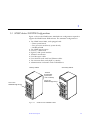
1.2 SPARCcluster 1000PDB Configurations
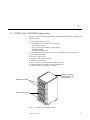
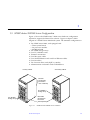
Figure 1-1 shows the minimum SPARCcluster 1000PDB hardware configuration
which contains:
•
•
•
•
•
•
•
•
•
•
One 56-inch expansion rack
Two SPARCserver™ 1000s each containing:
• Two system boards
• Four processor modules (2/system board)
• 256-Mbyte RAM
• Two internal disk drives
Two SPARCstorage Arrays with extra FC/OM SBus card-one per array
Four fiber-optic cables
Four FC/S SBus cards
Eight FC/OM optical modules
Terminal concentrator
Four SunSwift™ cards with local Ethernet cables
Administration workstation with CD-ROM drive
Client net SBus card (SQEC or similar)
Terminal concentrator
(Inside top and to the
rear of cabinet)
SPARCserver 1000s
SPARCstorage arrays
Figure 1-1
SPARCcluster 1000PDB Cabinet
Product Description
1-3
1
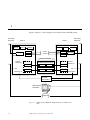
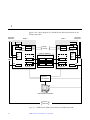
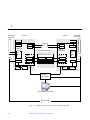
Figure 1-2 depicts a block diagram of the SPARCcluster 1000PDB system.
Secondary
Ethernets
Boot 0
Boot 1
SBus card
be,
hme, le,or qe
Secondary
Ethernets
Node 1
Node 0
CD/tape
Boot 0
SunSwift hme0
hme1
SunSwift
Private
network
Boot 1
CD/tape
hme0 SunSwift
SBus card
hme1
be,
SunSwift
hme, le,or qe
(Shared database)
System
boards (2)
FC/S (2)
SPARCstorage arrays (2)
FC/S (2)
FC/OM
FC/OM
FC/OM
FC/OM
FC/OM
FC/OM
FC/OM
FC/OM
le0
System
boards (2)
le0
Serial port A
Serial port A
Terminal
concentrator
Administration
workstation
Primary
Ethernet
Figure 1-2
1-4
SPARCcluster PDB Block Diagram Based on SPARCserver
1000
SPARCcluster Service Manual—April 1997
1
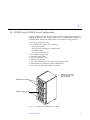
1.3 SPARCcluster 2000PDB Configurations
Figure 1-3 shows the SPARCcenter 2000 hardware configuration required to
support the SPARCcluster PDB software. The minimum configuration is:
•
•
•
•
•
•
•
•
•
Two SPARCcenter 2000s, each equipped with:
• Three system boards
• Four processor modules (2/system board)
• 512-Mbyte RAM
Two SPARCstorage arrays
Four FC/ S SBus cards
Eight FC/OM optical modules
Terminal concentrator
Four fiber-optic cables
Four SunSwift cards with local Ethernet cables
Two client net SBus cards (SQEC or similar)
Administration workstation with CD-ROM drive
Secondary cabinet
Primary cabinet
Terminal
concentrator
(mounted in
rear of cabinet)
One or two
SPARCstorage arrays
One or two
SPARCstorage arrays
Figure 1-3
SPARCcluster 2000PDB Cabinet
Product Description
1-5
1
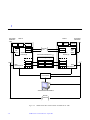
Figure 1-4 is a block diagram of a SPARCcluster PDB system based on the
SPARCcenter 2000.
Secondary
Ethernets
Node 0
CD/tape
CD/tape
le1
SunSwift hmeo
FSBE/S
System SunSwift hme1
boards (3)
Client
net
SBus
(2)
le0
Secondary
Ethernets
Node 1
Private
network
hme0 SunSwift
hme1 SunSwift
(Shared database)
FC/S (2)
SPARCstorage arrays (2)
FC/S (2)
FC/OM
FC/OM
FC/OM
FC/OM
FC/OM
FC/OM
FC/OM
FC/OM
FSBE/S
le1
FSBE/S
System
boards (3)
Client
net
SBus
(2)
FSBE/S
Serial port A
Serial port A
Terminal
concentrator
Administration workstation
Primary
Ethernet
Figure 1-4
1-6
SPARCcluster PDB System Based on SPARCcenter 2000
SPARCcluster Service Manual—April 1997
le0
1
1.4 SPARCcluster 1000HA Server Configuration
Figure 1-5 depicts the SPARCserver 1000 hardware configuration required to
support the Solstice™ HA software. Figure 1-6 is a simplified block diagram of
a SPARCcluster 1000 based configuration. The minimum configuration is:
•
•
•
•
•
•
•
•
•
One 56-inch expansion rack
Two SPARCserver 1000s each containing:
• Two system boards
• Four processor modules (2/system board)
• 128-Mbyte RAM
• Two internal disk drives
Two SPARCstorage arrays
Four fiber optic cables
Four FC/OM SBus cards
Terminal concentrator
Four SunFastEthernet™ cards with local Ethernet cables
Administration workstation with CD-ROM drive
Two client net SBus cards (SQEC or similar)
Terminal concentrator
(Inside top and to the
rear of cabinet)
SPARCserver 1000s
SPARCstorage arrays
Figure 1-5
SPARCcluster 1000HA Server Cabinet
Product Description
1-7
1
Secondary
Ethernets
Boot 0
Client
net
SBus
Node 0
Boot 1
Boot 0
CD/tape
SFE
SFE
System
boards (2)
Private
net
Boot 1
SFE
SFE
System
boards (2)
(Non-shared database)
Client
net
SBus
FC/S
FC/OM
FC/OM
FC/OM
FC/OM
FC/OM s
FC/OM
FC/OM
FC/OM
(le0)
Serial port A
Terminal
concentrator
Administration workstation
Primary
Ethernet
Figure 1-6
1-8
CD/tape
SPARCstorage arrays
FC/S
(le0)
Serial port A
Secondary
Ethernets
Node 1
SPARCcluster HA Cluster Based on SPARCserver 1000
SPARCcluster Service Manual—April 1997
1
1.5 SPARCcluster 2000HA Server Configuration
Figure 1-7 shows the SPARCcenter™ 2000 server hardware configuration
required to support the Solstice HA software. Figure 1-8 depicts a block
diagram of a SPARCcluster 2000 based system. The minimum configuration is:
•
•
•
•
•
•
•
•
•
Two SPARCcenter 2000s, each equipped with:
• Three system boards
• Six processor modules
• 256-Mbyte RAM
Two SPARCstorage arrays
Four FC/OM SBus cards
Terminal concentrator
Four fiber optic cables
Four SunFastEthernet cards with local Ethernet cables
Four boot disks
Two client net SBus cards (SQEC or similar)
Administration workstation with CD-ROM drive
Primary cabinet
Secondary cabinet
Terminal
concentrator
(mounted in
rear of cabinet)
One SPARCstorage array
Boot disks
(mounted behind lower
vented panels)
Two SPARCstorage arrays
Figure 1-7
SPARCcluster 2000HA Server Cabinets
Product Description
1-9
1
Secondary
Ethernets
Node 0
CD/tape
CD/tape
FSBE/S
SFE
System
boards (3)
SFE
Private
net
(Non-shared database)
Client
net
SBus
(2)
le0
FC/S
FSBE/S
SPARCstorage arrays
SFE
FSBE/S
SFE
System
boards (3)
FC/S
FC/OM
FC/OM
FC/OM
FC/OM
FC/OM
FC/OM
FC/OM
FC/OM
Serial port A
Serial port A
Boot 0
Boot 1
Boot 1
Administration workstation
Ethernet
Figure 1-8
SPARCcluster HA Cluster based on SPARCcenter 2000
SPARCcluster Service Manual—April 1997
Client
net
SBus
(2)
FSBE/S
Serial port A
Terminal
concentrator
1-10
Secondary
Ethernets
Node 1
Boot 0
le0
1
1.6 Expansion Cabinet with RSM Units and Differential SCSI Trays
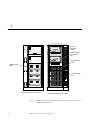
For expanded systems, the controllers can be either SPARCstorage Array
Model 200s or 210s. The Model 200 Series controllers are used with
SPARCstorage RSM (Removable Storage Media) units or 9-Gbyte disk trays.
See Figure 1-9 and Figure 1-10.
Product Description
1-11
1
Fan tray
assembly,
cabinet
SPARCstorage Array
SPARCstorage
Array Model
200
SPARCstorage
RSM
SPARCstorage Array
SPARCstorage
RSM
AC Distribution
Unit
Expansion Cabinet (front view)
Figure 1-9
1-12
Expansion Cabinet 2 (rear view)
SPARCcluster System Expansion Cabinet with SSA Model 200 Series and
SPARCstorage RSM Units
SPARCcluster Service Manual—April 1997
1
Fan tray
assembly,
cabinet
SPARCstorage Array
SSA Model
200
SPARCstorage Array
Differential
SCSI tray
Differential SCSI
tray
AC Distribution
unit
Expansion Cabinet (front view)
Expansion Cabinet 2 (rear view)
Figure 1-10 SPARCcluster System Expansion Cabinet with SSA Model 200 Series and
Differential SCSI Trays
Product Description
1-13
1
1.7 Internal and External Options
Refer to Chapter 2 of the SPARCcluster Hardware Site Preparation, Planning, and
Installation Guide.
1-14
SPARCcluster Service Manual—April 1997
2
Troubleshooting Overview
Troubleshooting Philosophy
page 1
Maintenance Authorization
page 2
Troubleshooting a Remote Site
page 2
PDB Cluster Troubleshooting
page 5
HA Cluster Troubleshooting
page 16
2.1 Troubleshooting Philosophy
Note – A SPARCcluster clustered system is comprised of redundant, on-line
components, which can continue system operation even through failure, repair,
and relocation of one assembly or device. However, to maintain a high level of
availability, failed components should be replaced as soon as possible.
A SPARCcluster system is two identical system nodes joined into a cluster.
Typically, prior to performing hardware repair, a node will be removed from
the cluster. The surviving node in the cluster will then continue to support the
client database for both nodes until the faulty node can be repaired and
rejoined to the cluster.
2-1
2
You must take several service precautions to maintain cluster operation while
maintenance is being accomplished. For most hardware repair operations, the
node with the faulty part must be removed from the cluster as indicated in the
following Section 2.2, “Maintenance Authorization.” Additionally, the system
administrator may have to perform related software tasks both before and
following removal of a node from the cluster.
For example, instances of the database application on a node may have to be
halted prior to removing a node from the cluster in order to prevent panicking
cluster operation. Or, pertinent software tasks may have to be performed after
replacing a disk drive or a controller and prior to or after rejoining a node to
the cluster. For these and other software specific tasks, refer to the applicable
(HA or PDB) system administration guide.
2.2 Maintenance Authorization
The site system administrator must be contacted to remove a node from the
cluster and, after maintenance, to return the node to cluster membership. The
procedures in this manual note points where the system administrator must be
contacted. However, the equipment owner’s administrative requirements
supercede the procedures contained herein.
The following troubleshooting procedures are based on console access for both
nodes. Refer to the applicable (HA or PDB) system administration guide for
console access.
2.3 Troubleshooting a Remote Site
Use telnet to communicate with either node in the cluster via the terminal
concentrator. For example:
% telnet terminal concentrator name
The normal response is:
Trying ip_address ...
Connected to tc_lm.
Escape character is ’^]’.
2-2
SPARCcluster Service Manual—April 1997
2
If you get the following message:
telnet: connect: Connection refused
two possibilities exist:
• The port is busy (being used by someone else).
• The port is not accepting network connections because the terminal
concentrator settings are incorrect. Refer to Section 3.3.1.4, “Resetting the
Terminal Concentrator Configuration Parameters.”
To isolate and correct the problem, telnet to the terminal concentrator and
specify the port interactively:
% telnet tc_lm 5002
Trying ip_address ...
Connected to tc_lm.
Escape character is ’^]’.
You may have to press Return to display the following prompts:
% Rotaries Defined:
cli
Enter Annex port name or number:2
Port (s) busy, do you wish to wait ? (y/n) [y]:
If you see the preceding message, the port is in use. If you see the following
message, the port is misconfigured:
Port 2
Error: Permission denied
Rotaries Defined:
cli
Enter Annex port name or number:
To correct the problem:
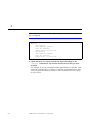
1. Select the command line interpreter and log on as superuser.
Troubleshooting Overview
2-3
2
2. In terminal concentrator administrative mode, set the port to slave mode
as follows:
Enter Annex port name or number: cli
Annex command line Interpreter *
Copyright 1991 Xylogics, Inc.
annex: su
password:
annex# admin
Annex administration MICRO-XL-UX R&.0.1, 8 ports
admin: port 2
admin: set port mode slave
You may need to reset the appropriate port, Annex subsystem, or
reboot the Annex for the changes to take affect.
admin: reset 2
admin:
After you reset the port, it will be configured correctly. For additional details
on terminal concentrator commands, refer to the Terminal Concentrator General
Reference Guide, part number 801-5972.
2-4
SPARCcluster Service Manual—April 1997
2
2.4 PDB Cluster Troubleshooting
2.4.1 Cluster GUIs
Three graphical user interfaces (GUIs) allow the system administrator to
facilitate troubleshooting: the Cluster Control Panel (ccp), the Cluster Console
(cconsole), and the Cluster Monitor (clustmon). See the following table for
a brief description of each GUI; refer to the SPARCcluster PDB System
Administration Guide for more detailed information.
Table 2-1
Graphical User Interfaces
GUI
Description
Cluster Control
Panel
Enables launching of the Cluster Console (cconsole,
telnet, or crlogin), the Cluster Monitor (clustmon) and
other administrative tools.
Cluster Console
Enables execution of commands on multiple nodes
simultaneously.
Cluster Monitor
Enables monitoring the current status of all nodes in the
cluster.
2.4.2 Troubleshooting Flow
The troubleshooting presented herein is based on error messages displayed on
the system administrator console, Cluster Monitor, or other sources. In
addition, the Cluster Monitor GUI displays information and graphics that you
can use to isolate faults. To maintain the system in high-availability mode,
troubleshooting should be accomplished in the following order:
!
Caution – DO NOT connect a keyboard directly to a host processor board. This
keyboard would become the default for console input, thus preventing input
from the system administration workstation, terminal concentrator or serial
port. In addition, connecting a keyboard directly into a hot host processor
board (that is, while power is applied to the host) panics the Solaris™
operating environment by sending a break signal.
1. Check the system Console or Cluster Monitor (PDB clusters only) messages
and troubleshooting instructions to determine principle assembly at fault.
Troubleshooting Overview
2-5
2
2. Contacting system administrator to remove principal assemblies node from
cluster.
3. Isolate the fault to the smallest replaceable component.
4. Shut down the specific disk tray, system node, or terminal concentrator.
5. Replace the defective component.
6. Contact the system administrator to return the node to the cluster.
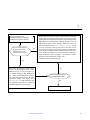
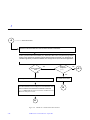
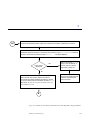
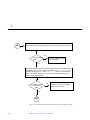
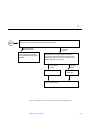
This troubleshooting flow is further depicted in Figure 2-1.
2-6
SPARCcluster Service Manual—April 1997
2
If a system appears to be
malfunctioning, but the problem
is unknown, proceed as follows:
Are error messages displayed on the system
administrator’s workstation or other source?
No
Refer to the PDB Cluster System Administration Guide and
bring up the Cluster Monitor-Front Panel (see Figure 2-3). The
Cluster Monitor-Front Panel displays the cluster configuration,
highlighting in red, components requiring attention, as well as
indicating the status of the database, PDB and CVM software.You can then use the Follow Mouse Pointer facility
to select components of the system (refer to the PDB Cluster
System Administration Guide for this procedure) which results
in the display of additional status information in the Item Properties window (see Figure 2-4). If the GUI display indicates a
faulty component, then see Chapter 3 for hardware troubleshooting of the component or Chapter 4 for
additional software troubleshooting.
Yes
Refer to the PDB Cluster System Administration Guide and bring up the Cluster
Monitor Message Viewer (see Figure 2-2).
If a similar message to that displayed on
the console for the failed node is present,
select that message and observe the More
Information display. This display has a
Suggested Fix: field, which may indicate applicable procedures to correct the
condition indicated by the message.
No
Is a procedure indicated
in Suggested Fix: field?
Yes
Perform indicated procedure.
Figure 2-1
Troubleshooting Flow Diagram
Troubleshooting Overview
2-7
2
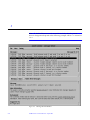
Note – If SunFastEthernet is used instead of SunSwift, then the private
network designation depicted in the following example will be be1 instead of
hme1.
Figure 2-2
2-8
Message Viewer Window
SPARCcluster Service Manual—April 1997
2
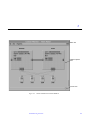
Menu bar
Graphical picture
area
Footer area
Figure 2-3
Cluster Monitor-Front Panel Window
Troubleshooting Overview
2-9
2
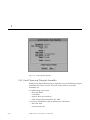
Figure 2-4
Item Properties Window
2.4.3 Fault Classes and Principal Assemblies
SPARCcluster PDB troubleshooting is dependent on several different principal
assemblies and classes of faults. The fault classes and their associated
assemblies are:
2-10
•
SPARCstorage Array faults
• Data disk drives
• Controllers
• Optical cables and interfaces
• Fibre Channel Optical Modules (FC/OM)
•
Processor (SPARCcenter 2000 or SPARCserver 1000) faults
• Boot disk fault
• System board fault
SPARCcluster Service Manual—April 1997
2
• Control board fault
• NVSIMM fault
• Private network fault
•
•
•
Terminal concentrator/serial connections faults
Client net/connections
Software faults
• Application program failed
• System crash (panic)
• Hung system (lockup)
• Cluster wide failures
All troubleshooting begins at the system console, Cluster Monitor, or other
operator information. The system console or Cluster Monitor must be checked
regularly by the system administrator.
2.4.4 Error Messages or Symptoms
Table 2-2 lists error messages or symptoms together with the probable cause
and troubleshooting reference.
Table 2-2
Error Message/Symptom
Error Message or Symptom
Probable Cause
Cluster Service
Reference
Troubleshooting Reference
Processor/Node
Either node reboots;
boot disk failure;
dlm reconfiguration
<ioctl nn>
(loss of cluster membership);
loss of performance meter
response from one node
SPARCcenter
2000/
SPARCserver
1000
Section 3.1.5, “Node
Faults”
Troubleshooting Overview
SPARCcenter 2000/SPARCserver 1000
System Service Manual
2-11
2
Table 2-2
Error Message/Symptom
Error Message or Symptom (Continued)
Cluster Service
Reference
Probable Cause
Troubleshooting Reference
Private Network
hme0 no carriertransceiver cable
problem? ;
hme0 no response
SunSwift
Section 3.2.1, “Private
Network Fault”
SunSwift SBus Adapter User’s Guide
be0 no carriertransceiver cable
problem? ;
be0 no response
SunFastEthernet
Section 3.2.1, “Private
Network Fault”
SunFastEthernet Adapter User‘s Guide
Client Network
qe0 no carrier transceiver cable
problem?;
qe0 no response
client net
Refer to your client
network
documentation
As applicable
Public Network
le0 no carriertransceiver cable
problem?;
le0 no response
Cable
Chapters 9
(SPARCcluster 1000)
and Chapter 10
(SPARCcluster 2000) of
the SPARCcluster
System Hardware Site
Preparation, Planning
and Installation Guide
for cable detail.
2-12
SPARCcluster Service Manual—April 1997
Not applicable
2
Table 2-2
Error Message/Symptom
Error Message or Symptom (Continued)
Probable Cause
Cluster Service
Reference
Troubleshooting Reference
SPARCstorage Array
c2t4d8s2 failed;
see Appendix A for additional
messages
Disk
Section 3.1,
“SPARCstorage Array
and Optical
Connections Faults”
SSA Model 100 Series: SPARCstorage
Array Model 100 Series Service Manual
SSA Model 200 Series: SPARCstorage
Array Model 200 Series Service Manual
SPARCstorage RSM: SPARCstorage RSM
Installation, Operations, and Service
Manual
Terminal Concentrator
No cconsole messages for one
of the nodes;
no cconsole messages from
either node
Terminal
concentrator
Section 3.3, “Terminal
Concentrator and Serial
Connection Faults”
Not applicable
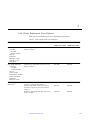
2.4.5 Device Troubleshooting Cross-Reference
Table 2-3 cross-references devices to the appropriate troubleshooting manual.
Table 2-3
Device Troubleshooting Cross-Reference
Device/Trouble Area
Cross Reference
Part Number
Array Controller/Fibre Optic Connector/
Fibre Channel Optical Module
SPARCstorage Array Model 1000 Series Service Manual,
Chapter 2 “Troubleshooting”.
801-2206
Model 100 Series disk drives
SPARCstorage Array Model 100 Series Service Manual
801-2206
Model 200 Series disk drives
SPARCstorage RSM: SPARCstorage RSM Installation, Operations
and Service Manual
Differential SCSI tray: Diferential SCSI Disk Tray Service Manual
802-5062
Section 3.3, “Terminal Concentrator and Serial Connection
Faults”
N/A
Terminal concentrator
Troubleshooting Overview
800-7341
2-13
2
Table 2-3
Device Troubleshooting Cross-Reference (Continued)
Device/Trouble Area
Cross Reference
Part Number
SPARCcenter 2000
SPARCcenter 2000 Service Manual, Chapter 2,
“TroubleshootingOverview”.
801-2007
SPARCserver 1000
SPARCserver 1000 System Service Manual, Chapter 2,
“Troubleshooting Overview”.
801-2895
SunSwift adapter
SunSwift SBus Adapter User’s Guide
802-6021
SunFastEthernet Adapter
SunFastEthernet SBus Adapter Use’s Guide
802-6022
2-14
SPARCcluster Service Manual—April 1997
2
2.4.6 Device Replacement Cross-Reference
Table 2-4 cross-references devices to replacement procedures.
Table 2-4
Device
Device Replacement Cross-Reference
Cross Reference
Part Number
SPARCserver 1000
SPARCcenter 2000
SSA Model 100 Series
controller
FC/OM
battery module
fan tray
backplane
fibre optic cables
disk drive trays
disk drives
SPARCstorage Array Model 100 Series Service
Manual, Chapter 5
801-2206
801-2206
SSA Model 200 Series
controllers
FC/OM
battery module
fan tray
power supply
LCD-display module
interface modules
backplane
fibre optic cables
SPARCstorage Array Model 200 Series Service
Manual, Chapter 5
801-2007
801-2007
SPARCstorage Array
disk drives
Model 100 Series: SPARCstorage Array Model
100 Series Service Manual, Chapter 5
SPARCstorage RSM: SPARCstorzge RSM
Installation, Operations and Service Manual,
Chapter 3
SCSI tray: Differential SCSI Disk Tray Service
Manual, Chapter 2
801-2206
801-2206
802-506
802-5062
800-7341
800-7341
Troubleshooting Overview
2-15
2
Table 2-4
Device
Device Replacement Cross-Reference (Continued)
Cross Reference
Part Number
SPARCserver 1000
SPARCcenter 2000
Optical Module
Fibre Channel Optical Module Installation
Manual
801-6326
801-6326
SunSwift
SunSwift SBus Adapter User’s Guide
801-6021
801-6021
System board, control
board, power supply,
SPARC module, boot
disk
SPARCcenter 2000 or SPARCserver 1000
System Service Manual
801-2007
801-2895
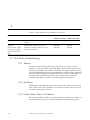
2.5 HA Cluster Troubleshooting
2.5.1 Takeover
The Solstice HA software enables one node to take over when a critical
hardware or software failure is detected. When a failure is detected, an error
message is generated to the system console and, if required, notify the service
provider (depending upon the system maintenance contract). When a takeover
occurs, the node assuming control becomes the I/O master for the disksets on
the failed node and redirects the clients of the failed node to itself. The
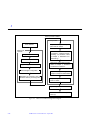
troubleshooting flow for a takeover is further depicted in Figure 2-5.
2.5.2 Switchover
Administrators can manually direct one system to take over the data services
for the other node. This is referred to as a switchover (refer to the Solstice HA
1.2 Software Administration Guide).
2.5.3 Failures Where There is No Takeover
For noncritical failures, there is no software takeover. However to continue to
provide HA data services, you should troubleshoot in the following order:
2-16
SPARCcluster Service Manual—April 1997
2
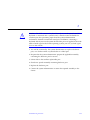
!
Caution – DO NOT connect a keyboard directly to a node system board. If a
keyboard is connected into a system board, it then becomes the default for
console input, thus preventing input from the system administration
workstation/terminal concentrator serial port. In addition, connecting a
keyboard directly into a node system board while power is applied to the node
sends a break signal to the Solaris operating system, just as if you had typed
L1-A on the console.
1. You will be contacted by the system administrator to replace a defective
part, or to further isolate a system defect to a failed part.
2. Request that the system administrator prepare the applicable assembly
containing the defective part for service.
3. Isolate fault to the smallest replaceable part.
4. Shut down specific assembly containing defective part.
5. Replace the defective part.
6. Contact the system administrator to return the repaired assembly to the
cluster.
Troubleshooting Overview
2-17
2
Service provider notified
Service provider:
Fault detected
Requests that sys admin prepare node for service
Solstice HA
software:
Isolates fault, for software refers
to Chapter 4, “Software troubleshooting”, for hardware, refers
to Chapter 4, “Hardware Troubleshooting”.”
Migrates deskset
Restores data service
Migrates logical node name
Acknowledges configuration
Requests are serviced and returned to client by surviving node
Shuts down applicable assembly,
refers to Chapter 7, “Shutdown
and Restart Procedures”
Replaces faulty part using
Chapter 9, “Major Subassemblies”
Requests sys admin to return
node to cluster
Sys admin performs switchover
Cluster returned to full HA (both
nodes up)
Figure 2-5
2-18
Takeover Troubleshooting Flow Diagram
SPARCcluster Service Manual—April 1997
2
2.5.4 Fault Classes and Principal Assemblies
With the exceptions that HA clusters have no SCI links and no Clustor
Monitor, same as that described in Section 2.4.3, “Fault Classes and Principal
Assemblies,” for a PDB cluster.
All troubleshooting begins at the system console. You should check the console
regularly, and any other source of operator information. For example, regularly
check the output of the hastat command. For more information on the
hastat command, refer to the Solstice HA 1.2 Software Administration Guide.
2.5.5 Error Messages or Symptoms
Same as that described in Section 2.4.4, “Error Messages or Symptoms,”for a
PDB cluster with the exception that HA clusters do not have a cconsole.
2.5.6 Device to Troubleshooting Cross-Reference
Same as that described in Section 2.4.5, “Device Troubleshooting CrossReference,” for a PDB cluster.
2.5.7 Device Replacement Cross-Reference
Same as that described in Section 2.4.6, “Device Replacement Cross-Reference,”
for a PDB cluster.
Troubleshooting Overview
2-19
2
2-20
SPARCcluster Service Manual—April 1997
Hardware Troubleshooting
3
Prior to performing service on components within a node that is joined in a
cluster, the system administrator must perform certain tasks that are necessary
in a high-availability system, refer to the applicable (PDB or HA) cluster
administration guide. The procedures within this chapter, with the exception of
the terminal concentrator procedures, are structured to be used with the
system administrator’s assistance.
SPARCstorage Array and Optical Connections Faults
page 3-2
Both Nodes Indicate Errors From Same Physical Disk
page 3-4
Errors From Both Nodes on the Same SPARCstorage Array
page 3-5
Multiple Disk Errors or Disk Communication Error For One Node Only
page 3-5
SPARCstorage Array Communication Fault
page 3-6
Node Faults
page 3-12
System Board, Control Board, and Boot Disk Faults
page 3-12
Loss of Cluster Membership
page 3-13
Network Faults
Private Network Fault
Client Net Fault
Terminal Concentrator and Serial Connection Faults
page 3-17
page 3-17
page 3-25
page 3-25
Terminal Concentrator
page 3-25
System Indicators
page 3-26
Using the ROM Monitor config Command
page 3-27
3-1
3
Resetting the Terminal Concentrator Configuration Parameters
Serial Connections
Terminal Concentrator Flow Diagrams
page 3-29
page 3-35
page 3-35
3.1 SPARCstorage Array and Optical Connections Faults
Note – This section is applicable to either Model 100 or Model 200 series
SPARCstorage Arrays, regardless of the type of drive trays used.
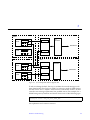
System console messages indicate a SPARCstorage Array is not communicating
with one or both nodes. If the fault is hardware related, the problem could be
any of the components in the I/O path, as depicted in Figure 3-1. For example,
the defective component could be an FC/S card, FC/OM, or cable on the hosts
for either node; or an FC/OM, the controller, or I/O interface on the applicable
SPARCstorage Array.
3-2
SPARCcluster Service Manual—April 1997
3
SSA
Node0
Controller
FC/S
FC/OM
FC/OM
FC/S
FC/OM
FC/OM
FC/OM
A
B
Disk drives
FC/OM
A
B
Node1
SSA
Controller
FC/S
I/O
interface
FC/OM
FC/OM
A
I/O
interface
FC/OM
B
Disk drives
FC/S
FC/OM
FC/OM
FC/OM
A
B
Figure 3-1
I/O Component Path for Typical SSA
To aid in isolating the fault, first try to correlate the console messages with
those listed in the Ultra Enterprise PDB Error Messages guide for PDB clusters
and the Solstice HA 1.2 Software Administration Guide for HA clusters. In most
cases the error message explanation lists probable causes. For example, for a
SPARCstorage Array firmware and device driver error of the following type:
Transport error: FCP_RSP_SCSI_PORT_ERR
the explanation and corrective action is:
Hardware Troubleshooting
3-3
3
The firmware on the SPARCstorage Array controller has detected the failure of
the associated SCSI interface chip. Any I/O operations to drives connected to
this particular SCSI bus will fail. If you see this message, you may have to
replace the array controller.
If no related message is found in the above referenced guides, perform the
procedures in the following two sections, if the fault matches the section
heading. Otherwise proceed to Section 3.1.4, “SPARCstorage Array
Communication Fault” and proceed as directed.
3.1.1 Both Nodes Indicate Errors From Same
Physical Disk
Note – The following procedure isolates a probable failure of a single disk.
3. Contact the system administrator and request that the node be prepared
for replacement of a disk.
Note – Drives should not be pulled out randomly. If there is activity on a drive,
request that the system administrator perform the necessary software tasks to
stop that activity prior to removing the drive. This can be done without
bringing down the operating system or the tray that the drive is in.
4. Replace the defective disk drive using the following references as
applicable:
•
SSA Model 100 Series; Chapter 5 of the SPARCstorage Array Model 100 Series
Service Manual
•
SSA Model 200 Series:
• For RSM disk drives, use the SPARCstorage RSM Installation, Operations,
and Service Manual
• For 9-Gbyte tray disk drives, use the 5.25 Fast/Wide Differential SCSI Disk
Drive Installation Manual.
5. Contact the system administrator and indicate that the node is ready to be
returned to the cluster following disk replacement.
3-4
SPARCcluster Service Manual—April 1997
3
3.1.2 Errors From Both Nodes on the Same SPARCstorage Array
If errors from the same SSA occur for both nodes it is likely that the fault is a
common point in the SSA I/O path. Using Figure 3-1 as a reference, a probable
point of failure would be the SSA controller. Use the following procedure to
replace an SSA controller.
1. Contact the system administrator and request that the node be prepared
for replacement of a controller in a SPARCstorage Array.
2. Bring the SPARCstorage Array down as described in Chapter 7,
“Shutdown and Restart Procedures.”
3. Replace the controller board as described in Chapter 5 of the applicable
(100 or 200 series) SPARCstorage Array Service Manual.
4. Bring the SPARCstorage Array tray up as described in Chapter 7,
“Shutdown and Restart Procedures.”
5. Contact the system administrator and indicate that the node is ready to be
returned to the cluster following replacement of a controller in a
SPARCstorage Array.
3.1.3 Multiple Disk Errors or Disk Communication Error
For One Node Only
If disk errors occur for one node only it is likely that the faulty component is
the disk itself or in the disk I/O path for the node receiving the errors, see
Figure 3-1. Use the following procedure to replace a disk.
1. Contact the system administrator and request that the node be prepared
for replacement of a disk.
2. Replace the defective disk using the following references as applicable:
•
SPARCStorage Array Model 100 series controllers; Chapter 5 of the
SPARCstorage Array Model 100 Series Service Manual
•
SPARCstorage Array Model 200 series controllers:
• For RSM disk drives, use the SPARCstorage RSM Installation, Operations and
Service Manual.
• For 9-GByte tray drives, use the 5.25 Fast/Wide Differential SCSI Disk Drive
Installation Manual
Hardware Troubleshooting
3-5
3
3. Contact the system administrator and request that the node be returned to
the cluster.
4. If the disk drive errors still exist after replacing the drive, refer to the next
section to isolate the fault to a component in the I/O path for the disk.
3.1.4 SPARCstorage Array Communication Fault
If a SPARCstorage Array is not communicating with a host system, begin
troubleshooting by making a physical inspection as described in the
appropriate series service manual for your SSA (Model 100 or 200).
If the node and the SPARCstorage Array subsystem are still not
communicating, then one of the components depicted in Figure 3-1 is probably
faulty:
Use the following procedure to find the faulty component:
1. Contact the system administrator and request that the node be prepared
for troubleshooting, which will require the shutdown of a SPARCstorage
Array.
2. Shut down the SPARCstorage Array as described in Chapter 7,
“Shutdown and Restart Procedures.”
3. On the controller board at the rear of the SPARCstorage Array, set the
DIAG switch to DIAG EXT.
Setting the DIAG switch to DIAG EXT provides more thorough testing, but
it also causes the array to take longer to boot up.
4. Press the Reset switch to reset the SPARCstorage Array.
5. Check the front panel LCD display and see if a POST code specific to the
SPARCstorage Array is displayed in the alphanumerics portion of the
LCD display.
Figure 3-2 shows the location of the alphanumerics portion of the LCD and
Table 3-1 lists the POST codes specific to the SPARCstorage Array.
3-6
SPARCcluster Service Manual—April 1997
3
+
Alphanumerics
A
B
Figure 3-2
Table 3-1
LCD Display
POST Codes
POST Code
Meaning
Action
01
LCD failure
Replace fan tray
08
Fan failure
Replace fan tray
09
Power supply failure
Replace power supply
30
Battery failure
Replace battery module
Any other number
Controller failure
Replace controller
• If you do not see a POST code specific to the SPARCstorage array, set the
DIAG switch back to DIAG, then go to step 6.
• If you see a POST code specific to the SPARCstorage array, set the DIAG
switch back to DIAG, then replace the indicated component as described
in Chapter 5 of the applicable 100 or 200 series SPARCstorage Array
service manual. Contact the system administrator and indicate that the
node is ready to be returned to the cluster following component
replacement.
6. Become superuser and shut down the processor for the node.
a. Verify that the system returns to the ok prompt after the shutdown is
complete.
b. If the system goes to the > prompt after the shutdown, enter n to
display the ok prompt.
Hardware Troubleshooting
3-7
3
7. At the ok prompt, enter:
ok true diag-switch?
ok true to fcode-dbug?
ok reset
8. The system will immediately boot unless you enter a control ] to get
the telnet prompt and then enter the following:
telnet> send break
After the ok prompt is displayed, enter:
ok show-devs
You should see output similar to the following.
9. Locate the lines in the output that give information on the FC/S cards
installed in the host system.
You can find those lines by looking for soc@x,x in the output. The first x in
soc@x,x tells you which SBus slot the FC/S card is installed in. For
example, looking at the output given above, the first line of the output:
ok /io-unit@f,e0200000/sbi@0,0/SUNW,soc@2,0
tells you that an FC/S card is installed in SBus slot 2 in the host system.
10. Locate the FC/S card that is connected to the SPARCstorage Array that is
not communicating with the host system.
11. Determine what the SBus slot number is for that FC/S card.
Refer to the service manual that came with your host system for more
information on SBus slot numbers for your system.
• If you can find an entry in the output for the FC/S card installed in that
SBus slot, go to Step 12.
3-8
SPARCcluster Service Manual—April 1997
3
• If you cannot find an entry in the output for the FC/S card installed in that
SBus slot, replace the FC/S card in that SBus slot according to the
instructions given in the service manual that came with your host system.
Following replacement of the FC/S card, contact the system administrator
and indicate that the node is ready to be returned to the cluster following
component replacement.
12. At the ok prompt, enter:
ok path select-dev
where path is the entire path given in the line containing the soc@x,x
output. Using the previous output as an example, you would enter:
ok “ /io-unit@f,e0200000/sbi@0,0/SUNW,soc@3,0” select-dev
Note – From this point on, if you enter a command incorrectly, and you get the
error message “Level 15 Interrupt” or “Data Access Exception,” then you must
enter the command given in step 12 again to select the FC/S card again.
13. At the ok prompt, enter:
ok soc-post
• If you see a message saying that the test passed, go to step 14.
• If you see a message saying that the test failed, replace the FC/S card in
that SBus slot according to the instructions given in the service manual
that came with your host system. Following replacement of the FC/S card,
contact the system administrator and indicate that the node is ready to be
returned to the cluster following component replacement.
14. Disconnect the fibre optic cable from FC/OM on the host system.
15. Get the loopback connector, Part Number 130-2837-01, from the ship kit
and install it in the FC/OM on the host system.
Hardware Troubleshooting
3-9
3
16. Enter the following at the ok prompt:
ok 40 is frame-dsize
ok 1 is frame-num
ok 1 is sb-burst-size
17. Locate the FC/OM(s) in the FC/S card and determine whether the
FC/OM(s) are in slot A or B in the FC/S card.
You should be able to see the letters “A” and “B” silkscreened on the
outside of the FC/S card.
18. Probe only off the slots that contain an FC/OM.
Note – Due to a silkscreening error, the “A” and “B” on the outside of the
FC/S card are reversed, so the command to probe off slot A will actually probe
off slot B and vice versa.
a. If you have an FC/OM in slot A, enter the following at the ok prompt:
ok soc-txrx-extb
b. If you have an FC/OM in slot B, enter the following at the ok prompt:
ok soc-txrx-exta
• If you see a message saying that the test passed, go to step 19.
• If you see a message saying that the test failed, then replace the FC/OM
from the appropriate slot on the FC/S card according to the instructions
given in the service manual that came with your host system.
c. Following replacement of the FC/S card, contact the system
administrator and indicate that the node is ready to be returned to the
cluster following component replacement.
3-10
SPARCcluster Service Manual—April 1997
3
Note – Because the SPARCstorage Array diagnostics can check only the
FC/OMs on the host system, the next steps in this procedure will call for you
to switch the FC/OMs from the SPARCstorage Array with the FC/OMs from
the FC/S card on the host system.
19. Remove the loopback connector from the FC/OM on the host system.
20. Remove the FC/OM(s) from the FC/S card in the host system.
Refer to the service manual that came with your host system for those
instructions.
21. Remove the FC/OM(s) from the SPARCstorage Array, taking care to keep
them separate from the FC/OM(s) that you just removed from the host
system.
Refer to Chapter 5 of the applicable Model 100 or 200 series SPARCstorage
Array service manual, for those instructions.
22. Install the FC/OM(s) from the SPARCstorage Array onto the FC/S card in
the host system.
23. Install the FC/OM(s) from the FC/S card on the host system into the
SPARCstorage Array.
24. Install the loopback connector on the FC/OM on the host system.
25. Probe only off the slots that contain an FC/OM.
a. If you have an FC/OM in the A slot, enter the following at the ok
prompt:
ok soc-txrx-extb
b. If you have an FC/OM installed in the B slot in the FC/S card, enter the
following at the ok prompt:
ok soc-txrx-exta
• If you see a message saying that the test passed, go to step 26.
Hardware Troubleshooting
3-11
3
• If you see a message saying that the test failed, then replace the FC/OM
from the appropriate slot on the FC/S card according to the instructions
given in the service manual that came with your host system.
c. Following replacement of the FC/OM, contact the system administrator
and indicate that the node is ready to be returned to the cluster
following component replacement.
26. Replace the fiber-optic cable.
Refer to Chapter 5 of the applicable (100 or 200 series) SPARCstorage Array
Service Manual, for those instructions.
27. Replace the cable and then bring up the applicable SPARCstorage Array,
see Chapter 7, “Shutdown and Restart Procedures.”
28. Contact the system administrator and indicate that the node is ready to be
returned to the cluster following component replacement.
29. If the host system still cannot communicate with the SPARCstorage Array,
contact the system administrator and request that the node be prepared
for replacement of a controller in a SPARCstorage Array.
30. Bring down the SPARCstorage Array, as described in Chapter 7,
“Shutdown and Restart Procedures.”
31. Replace the array controller.
32. Bring up the applicable SPARCstorage Array, as described in Chapter 7,
“Shutdown and Restart Procedures.”
33. Contact the system administrator and indicate that the node is ready to be
returned to the cluster following replacement of a controller in a
SPARCstorage Array.
3.1.5 Node Faults
3.1.5.1 System Board, Control Board, and Boot Disk Faults
Messages on the system administrator’s console or the Cluster Console (PDB
clusters only) for the node will identify the defective node and system board
slot. You can further isolate a system board fault using the prtdiag command
as described in Section 3.1.5.3, “Using the prtdiag Command”.
3-12
SPARCcluster Service Manual—April 1997
3
This class of faults can also be isolated by referring directly to the
troubleshooting procedures in the respective service manual for the system
board. Refer to the SPARCserver 1000 System Service Manual for a SPARCcluster
1000 based system and the SPARCcenter 2000 System Service Manual for a
SPARCcluster 2000 based system.
After determining which part is defective, perform the following procedure to
replace the part.
1. Contact the system administrator and request that the node be prepared
for replacement of a processor part.
2. Once the node has been removed from the cluster, part of the system
cabinet may be shut down to replace a defective boot disk, system board,
processor module, SBus board, SIMM, and so forth.
Use the respective system processor shutdown procedures to prevent
interrupting other cluster components.
•
•
SPARCcluster 1000: reference Section 7.1.2, “Processor.”
SPARCcluster 2000: reference Section 7.2.2, “Processor Shutdown and
Startup.”
3. Replace the defective device as indicated in the applicable service
manual.
Refer to the SPARCserver 1000 System Service Manual for a SPARCcluster
1000 based system and the SPARCcenter 2000 Service Manual, for a
SPARCcluster 2000 based system.
4. Bring up the applicable processor, as described in Chapter 7, “Shutdown
and Restart Procedures.”
5. Contact the system administrator and indicate that the node is ready to be
returned to the cluster following replacement of a processor part.
3.1.5.2 Loss of Cluster Membership
If the following error message occurs (denoting loss of cluster membership for
a node):
node 0# dlm reconfiguration < ioctyl nn>
Hardware Troubleshooting
3-13
3
♦ Type the following confirming command query as root on either
cconsole:
node 0# clustm dumpstate <clustername>
The surviving node will respond with the total cluster membership as
follows:
current cluster membership
<0,1,or both>
local node ID: <0 or1>
A failed node that is not a cluster member will simply time out with no
response to the query.
Local node ID corresponds to the cconsole for the node on which the
command was executed. Nodes in the cluster will give the data response as
detailed above; nodes out of the cluster will only give an error response.
3.1.5.3 Using the prtdiag Command
Use the prtdiag command to locate replaceable board components.
Note – prtdiag is a UNIX command. It can be accessed only if the OS is
booted and running on the machine in question. prtdiag resides in
/usr/platform/sun4d/sbin/prtdiag.
The following example shows the command and its output; actual output will
differ
# /usr/platform/sun4d/sbin/prtdiag
System Configuration: Sun Microsystems sun4d SPARCcenter 2000
System clock frequency: 40 MHz
Memory size: 384Mb
Number of XDBuses: 2
CPU Units: Frequency Cache-Size
Memory Units: Group Size
A: MHz MB
B: MHz MB
0: MB
1: MB
2: MB
3: MB
--------- ------------- ----- ----- ---# /usr/platform/sun4d/sbin/prtdiag
3-14
SPARCcluster Service Manual—April 1997
3
# /usr/platform/sun4d/sbin/prtdiag
Board0:
40 1.0
40 1.0
128
0
128
Board1:
40 1.0
40 1.0
32
0
32
Board2:
40 1.0
40 1.0
0
0
0
Board3:
40 1.0
40 1.0
32
0
32
0
======================SBus Cards==========================
Board0:
SBus clock frequency: 20 MHz
0: dma/esp(scsi)
'SUNW,500-2015'
lebuffer/le(network)'SUNW,500-2015'
1: qec/be(network)
'SUNW,270-2450'
2: SUNW,soc
'501-2069'
3: dma/esp(scsi)
'SUNW,500-2015'
lebuffer/le(network)'SUNW,500-2015'
Board1:
SBus clock frequency: 20 MHz
0: qec/be(network)
'SUNW,270-2450'
1: SUNW,soc/SUNW,pln
'501-2069'
2: dma/esp(scsi)
'SUNW,500-1902'
lebuffer/le(network)'SUNW,500-1902'
Board2:
SBus clock frequency: 20 MHz
0: SUNW,soc/SUNW,pln
'501-2069'
2: dma/esp(scsi)
'SUNW,500-1902'
lebuffer/le(network)'SUNW,500-1902'
Board3:
SBus clock frequency: 20 MHz
1: dma/esp(scsi)
'SUNW,500-1902'
3: dma/esp(scsi)
'SUNW,500-1902'
lebuffer/le(network)'SUNW,500-19902'
No failures found in System
===========================
#
# /usr/platform/sun4d/sbin/prtdiag
As shown above, prtdiag displays the status of the following system boards
and replaceable system board components:
•
•
•
•
System boards, by location
SuperSPARC™ modules, by number, location, and type (identified as
operating speed)
SIMMs, by quantity and locations (identified by group)
SBus cards, by location and type
3.1.5.4 Using the probe scsi Command
Use this command to verify operation for a new or replacement SCSI-2 device
installed in the system.
Hardware Troubleshooting
3-15
3
1. Become superuser.
2. After obtaining authorization to remove system from cluster, use the
appropriate command to halt the system.
Once the system is halted, several system messages are displayed. When the
messages finish the ok prompt is displayed.
3. Enter the appropriate command to probe the system for SCSI-2 devices.
a. To probe all SCSI-2 devices installed in the system:
ok probe-scsi-all
b. To confine the probe to SCSI-2 devices hosted by a specific on-board or
SBus SCSI-2 host, substitute for variables A and B in the command
below, where A is the board number (0-3) and B is the SCSI-2 host
(0 for on-board SCSI-2,or 1, 2 or 3 for the corresponding SBus slot):
ok probe-scsi-all /io-unit@f,eA200000/sbi@0,0/dma@B,81000
4. Verify the drive in question is listed.
After entering the above command, a list of drives like the one below is
displayed:
Target 0
Unit
Target 3
Unit
Target 5
Unit
Target 6
Unit
3-16
0 Disk < drive brand name>
0 Disk < drive brand name>
0 Tape < drive brand name>
0 Removable Read Only Device
SPARCcluster Service Manual—April 1997
3
Target 0
Unit
Target 3
Unit
Target 5
Unit
Target 6
Unit
0 Disk < drive brand name>
0 Disk < drive brand name>
0 Tape < drive brand name>
0 Removable Read Only Device
The “Target #” lines identify the SCSI-2 addresses of installed devices. If the
address is listed for the device in question, installation was successful. If the
address is absent, verify that the cables are installed correctly.
5. Reboot the system:
ok reset
The screen goes blank for several seconds as the system reboots.
3.2 Network Faults
3.2.1 Private Network Fault
Caution – Problems on the private network may be due to temporary
communication conditions. A fix on the private network must be verified, with
before and after traffic condition measurements, to verify that comparable
traffic has been supported. Do not close a problem by a cable replacement
without running % netstat before and after the fix, saving the output to a
mail message to the support organization for record. Compare the traffic
conditions in the two netstat outputs for similar levels.
The private network can be either SunFastEthernet (be) or SunSwift (hme).
Supplemental troubleshooting for private network faults can be found in the
applicable (SunSwift™ or SunFastEthernet™) SBus Adapter User’s Guide. Also,
one of the following procedures can be utilized, depending upon whether or
not both nodes are up and running in the cluster (see Section 3.2.1.1, “One or
Both Nodes Up and Running in a Cluster”), or whether neither node is
running in a cluster (see Section 3.2.1.2, “Both Nodes Not Running In A
Cluster”).
Hardware Troubleshooting
3-17
3
3.2.1.1 One or Both Nodes Up and Running in a Cluster
Note – As root, use the pdbfindifs command to find all network interfaces,
be designates SunFastEhernet, hme designates SunSwift. If the private network
is configured with SunFastEthernet instead of SunSwift, then the interface
designations given in the following example would be be0 and be1 instead of
hme0 and hme1.
# pdbfindifs -b
hme0 = board# 0 slot# 2
hme1 = board# 1 slot# 2
In the following example procedure (see Figure 3-3) both nodes are up and
running in a cluster, Link 0 has failed and the software has recovered on
Link 1.
Node 0
hme0
hme1
Figure 3-3
Link 0
(Failed)
Link 1
(Recovered)
Node 1
hme0
hme1
Link 0 Failed, Recovered on Link 1
To troubleshoot Link 0 to a defective card or cable, use the following
procedure.
3-18
SPARCcluster Service Manual—April 1997
3
Note – In the following procedure, node 1 is removed from the cluster. When
there is one node remaining in a cluster, software will continue sending
messages across the private links. The following procedure uses these message
packets to confirm communication between nodes.
1. Contact the system administrator and request that a node be prepared for
removal from the cluster.
Note – For this example, assume that the software recovers on node 1.
2. See Figure 3-4 and remove the Link 1 cable (cable between the hme1 ports
of both nodes).
3. Connect the Link 0 cable (cable for failed link) between the hme0 port of
node 0 and the hme1 port of node 1.
Node 1
Node 0
Figure 3-4
hme0
Link 0
hme0
hme1
Link 1
hme1(snoop)
Private Network Link 0 Troubleshooting
4. Use the snoop command on node 1 as follows:
# snoop -d hme1
Hardware Troubleshooting
3-19
3
5. If the following string is returned as a result of the snoop command, then
the SBus card for the hme0 port on node 1 is most likely defective. This
message string indicates that the hme0 port of node 0 as well as the Link
0 cable are functional.
In this instance, request that the system administrator rejoin node 0 to the
cluster and then remove node 1 prior to replacing the related SBus card.
Once the card is replaced, indicate to the system administrator that node 1 is
ready to be returned to the cluster.
192.100.100.17-> 192.100.100.18 UDP D=5556 S=5556 LEN=120
6. If the preceding string is not returned by the snoop command, then
connect the Link 0 cable between the hme1 ports of both nodes. Following
this, use the snoop command on node 1:
# snoop -d hme1
7. If the message string indicated in step 5 is returned, then the hme0 port
on node 0 is most likely defective as this message indicates that the Link
0 cable is functional.
a. In this instance, replace the related SBus card in node 0.
b. Notify the system administrator that node 0 is ready to be returned to
the cluster.
8. If the message string indicated in step 5 is not returned, then the Link 0
cable is most likely defective.
3-20
SPARCcluster Service Manual—April 1997
3
3.2.1.2 Both Nodes Not Running In A Cluster
1. Use the netstat -i command on the cconsole for each node to
determine which private links hme0 and/or hme1 are available.
In the following examples, both hme0 and hme1 are available on node 0 and
node 1.
node 0 # netstat -i
Name Mtu
Net/Dest
hme0 1500 mpk14-092-n
hme1 1500 mpk14-092-n
Address
pnode-0-0
pnode-0-1
Ipkts
node 1 # netstat -i
Name Mtu
Net/Dest
hme0 1500 mpk14-092-n
hme1 1500 mpk14-092-n
Address
node-1-0
pnode-1-1
Ipkts
Ierrs
642650
642650
0pkts
0
0
0errs Collis Queue
266563 1
25477
0
266563 1
25477
0
Ierrs 0pkts
0errs Collis Queue
642650 0
266563 1
25477
0
642650 0
266563 1
25477
0
2. If you reboot your system, manually designate and set the interfaces as
follows:
a. Assuming you have the same configuration as shown in Figure 3-6,
then for node 0 enter the following:
node
node
node
up
node
up
0 # ifconfig hme0 plumb
0 # ifconfig hme1 plumb
0 # ifconfig hme0 192.100.100.1 netmask 255.255.255.240 broadcast + - trailers private
0 # ifconfig hme1 192.100.100.17 netmask 255.255.255.240 broadcast + - trailers private
Hardware Troubleshooting
3-21
3
b. And, for node 1, enter:
node
node
node
up
node
up
1 # ifconfig hme0 plumb
1 # ifconfig hme1 plumb
1 # ifconfig hme0 192.100.100.2 netmask 255.255.255.240 broadcast + - trailers private
1 # ifconfig hme1 192.100.100.18 netmask 255.255.255.240 broadcast + - trailers private
Note – The following troubleshooting procedure is based on the failure of one
link only (one link must be operative).
3. If the netstat -i command output indicates that Link 0 (node 0 hme0 to
node 1 hme0) is failing (no entries for hme0 and/or hme1), replace the
cable. If the problem still exists then proceed to step 4.
If the netstat -i command output indicates that Link 1 (node 0 hme1
port to node 1 hme1 port) is failing, replace the cable. If the problem still
exists, proceed to step 8.
4. Connect the hme1 port of node 0 to the hme0 port of node 1 as shown in
Figure 3-6.
Node 1
Node 0
hme0
(ping) hme1
Figure 3-5
Link 0
Link 1
hme0(snoop)
hme1
Private Network Link 0 Troubleshooting
5. Use the ping and snoop commands to check the condition of the interface
between the hme1 port of node 0 and the hme0 port of node 1 as shown in
the following examples.
3-22
SPARCcluster Service Manual—April 1997
3
a. For node 0, use the ping command:
node 0 # ping -i 192.100.100.17 -s 192.100.100.18
For node 1, use the snoop command:
node 1 # snoop -d hme0
6. If the hme0 port on node 1 is operative, then:
• For node 0, the result of the ping command will result in no output
summary, however, a control-c break should result in the message string:
node 0 # 100% packet loss
• For node, the use of the snoop command should result in the following
message string:
node 1 # 192.100.100.17 -> 192.100.100.18 ICMP Echo request
7. If the snoop command succeeds as described previously, then replace the
related SBus card for the hme0 port on node 0. If the snoop command
does not succeed, replace the related SBus card for the hme0 port of
node 1.
Hardware Troubleshooting
3-23
3
8. Connect the hme0 port of node 0 to the hme1 port of node 1 as shown in
Figure 3-6.
Node 1
Node 0
(ping) hme0
hme1
Figure 3-6
Link 0
Link 1
hme0
hme1 (snoop)
Private Network Link 1 Troubleshooting
9. Use the ping and snoop commands to check the condition of the interface
between the hme0 port of node 0 and the hme1 port of node 1 as shown in
the following examples.
a. For node 0, use the ping command:
node 0 # ping -i 192.100.100.1 -s 192.100.100.2
b. For node 1, use the snoop command:
node 1 # snoop -d hme1
10. If the hme1 port on node 1 is operative, then:
For node 0, the result of the ping command will result in no output
summary. However, a control C break should result in the message
string:
node 0 # 100% packet loss
3-24
SPARCcluster Service Manual—April 1997
3
For node 1, the use of the snoop command should result in the following
message string:
node 1 # 192.100.100.1 -> 192.100.100.2 ICMP Echo request
11. If the snoop command succeeds as described previously, then replace the
related SBus card for the hme1 port on node 0. If the snoop command
does not succeed, replace the related SBus card for the hme1 port of
node 1.
3.2.2 Client Net Fault
System console messages will identify the specific port that has failed.
Otherwise, for information on test commands as well as additional
troubleshooting, refer to the documentation that came with your client
network interface card.
3.3 Terminal Concentrator and Serial Connection Faults
3.3.1 Terminal Concentrator
Note – It is not necessary for either node to be stopped or removed from a
cluster when replacing the terminal concentrator.
Isolate terminal concentrator faults using the diagrams depicted in
Section 3.3.2.1, “Terminal Concentrator Flow Diagrams” as well as the
information contained in the following sections.
Hardware Troubleshooting
3-25
3
STATUS
POWER
UNIT
NET
ATTN
LOAD
System indicators Test indicator
Figure 3-7
1
ACTIVE
2
3
4
5
6
7
8
Test switch Status indicators
Indicator Locations
3.3.1.1 System Indicators
Figure 3-7 depicts the location of terminal concentrator system, test, and status
indicators. The system indicators are:
•
Power – ON if unit is receiving AC power and the internal DC power
supply is working.
•
•
Unit – ON if unit successfully passes its self-test.
•
Attn – ON when unit requires operator attention. Flashing when unit
encounters a problem.
•
Load – ON when the unit is loading or dumping. Flashing when unit is
trying to initiate a load.
•
Active – FLASHING when unit successfully transmits data to and receives
data from the network; flashing during diagnostics.
Net – ON when unit successfully transmits test data to and receives test
data from the network.
The test indicator is located next to the test switch. The indicator lights when
the terminal concentrator enters test mode.
The status indicators, numbered 1 to 8, display serial port activity during
normal operations. When the terminal concentrator is first configured during
the SPARCcluster installation, the indicators should all be OFF. If any status
indicator lights, there may be a hardware failure.
After POST has passed, tThe eight status indicators on the terminal
concentrator indicate activity on the serial ports. Messages from the host
should cause the appropriate port LED (2 through 5) to blink. Text entered into
3-26
SPARCcluster Service Manual—April 1997
3
the cconsole host window should also cause the LED to blink. This can be
useful when trying to determine whether the terminal concentrator, host, or
cable is bad.
3.3.1.2 Using the ROM Monitor config Command
You can use the ROM monitor command, config, to verify the hardware and
software revisions of the terminal concentrator.
1. Press the reset button, and after 5 seconds, press the test button.
2. When the monitor:: prompt appears, enter:
monitor: : config <return>
REVISION/CONFIGURATION INFORMATION
Amount of memory 2 Meg
Board ID 52 - Serial Number 172743
REV ROM: Maj Rev 40 Min Rev 0
ROM Software Rev # 0601
MLB Type: 8s,V24,FMC,(1)
EXPANSION Type: None,(15)
EEPROM size: 32768 bytes
FLASH PROM (1048576 bytes) is installed
PARITY option is not installed
Twisted Pair alternate interface installed
Number of ports 8
3.3.1.3 Intermittent Router Problems
There is a procedure you can follow if the following cnditions exsist:
•
•
Terminal concentrator connections made via routers exhibit intermittent
problems, while connections from hosts on the same network as the
terminal concentrator continue to work normally.
The terminal concentrator shows no signs of rebooting.
To solve this problem, establish a default route within the terminal
concentrator and disable the routed feature.You must disable the routed
feature to prevent the default route from being lost. The procedure is as
follows:
Hardware Troubleshooting
3-27
3
1. Telnet to the terminal concentrator and become superuser:
$ telnet ss-tc
Trying terminal concentrator..
Connected to ss-tc.
Escape character is '^]'.
Rotaries Defined:
cli
Enter Annex port name or number: cli
Annex Command Line Interpreter * Copyright 1991 Xylogics, Inc.
annex: su
Password:
annex#
2. At the terminal concentrator promp, enter:
annex# edit config.annex
You should see the following as the first line of help text on a screen editor.
Ctrl-W: save and exit Ctrl-X: exit Ctrl-F: page down Ctrl-B: page up
a. To establish a default route within the terminal concentrator enter the
following, where default_router is the IP address for your router:
%gateway
net default gateway default_router metric 1 hardwire
b. Follow this with a carriage return and then Ctrl-W to save and exit.
3. Disable the router feature using the set command:
annex# admin set annex routed n
3-28
SPARCcluster Service Manual—April 1997
3
4. Boot the terminal concentrator:
annex# boot
3.3.1.4 Resetting the Terminal Concentrator Configuration Parameters
You may need to reset the terminal concentrator configuration information to a
known state. One specific case is if you need to recover from an unknown
terminal concentrator administrative password.
You can reset the configuration information using the erase terminal
concentrator ROM monitor command. The erase command resets all
configuration information to default values; however these defaults are not
what were programmed when you initially received your terminal
concentrator.
The following procedure shows how to reset all parameters to their defaults
and then set the few parameters necessary for use in the Ultra Enterprise
cluster environment. For more information, see the Terminal Concentrator
General Reference Guide.
Before starting, you will need the following:
•
•
•
•
A terminal; for example, a Sun Workstation running tip(1), located near the
terminal concentrator
The RJ-45 to DB-25 serial cable for connecting the terminal concentrator to
your terminal
An Ethernet connection to the terminal concentrator
A system from which you can telnet(1) to the terminal concentrator
1. Connect the terminal concentrator console port to a suitable terminal
connection in order to perform the following steps.
If your terminal connection is a Sun workstation, use the Sun cable and
connect the RJ-45 connector to the terminal concentrator console port (port
1) and the DB-25 connector to serial port A on the workstation.
Hardware Troubleshooting
3-29
3
2. If you are using a workstation and this step was not previously done, edit
the /etc/remote file to add the following line.
a:dv=/dev/term/a:br#9600:
This allows tip(1) to connect to serial port A at 9600 baud.
3. From the workstation, type the following command to connect the
workstations serial port A to terminal concentrator port 1.
# tip a
connected
Note – Your administration workstation may have a combined serial port
labeled SERIAL A/B. In this case, you cannot use the TTY B port without the
appropriate splitter cable. See the documentation supplied with your
workstation for more information.
4. Verify that the terminal concentrator power is on.
5. Reset the terminal concentrator.
Depress the Test button (Figure 6-1) for three or more seconds until the
Power LED blinks rapidly. Release the button.
6. Wait for the Test LED to turn off and, within 30 seconds, press the Test
button again. Verify that the orange Test LED lights, indicating the unit is
in test mode.
The terminal concentrator performs a self-test that lasts about 30 seconds.
Wait for the monitor:: prompt to appear.
System Reset - Entering Monitor Mode
monitor::
3-30
SPARCcluster Service Manual—April 1997
3
7. Use the erase command to reset the EEPROM memory (configuration
information).
!
Caution – Do not erase the FLASH memory (self-boot image). Doing so will
require reloading of the self-boot image from the Sun network terminal server
CD-ROM or from another terminal concentrator, which is beyond the scope of
this manual. Alternatively, the entire terminal concentrator can be replaced.
monitor:: erase
Erase
1) EEPROM (i.e. Configuration information)
2) FLASH
(i.e. Self boot image)
Enter 1 or 2 :: 1
Erase all non-volatile EEPROM memory? (y/n) [n]:: y
Erasing 32736 bytes of non-volatile memory. Please wait...
16K->| Data 0xff
...............................................................
...............................................................
16K->| Data 0x0
...............................................................
...............................................................
Initialized checksum record installed
Erasing 32736 bytes of non-volatile memory complete.
monitor::
Hardware Troubleshooting
3-31
3
8. Use the addr command to assign the IP address, subnet mask, and other
network parameters to the terminal concentrator.
Some parameters are not critical to the SPARCcluster environment; just
accept the defaults, and enter the subnet mask appropriate for your network.
The broadcast address is the IP address of the terminal concentrator with the
host portion set to all ones. For example, for a standard class C IP address of
192.9.200.5, the broadcast address would be 192.9.200.255.
monitor:: addr
Enter Internet address [<uninitialized>]:: terminal concentrator IP
address
Internet address: terminal concentrator IP address
Enter Subnet mask [255.255.255.0]:: subnet mask
Enter Preferred load host Internet address [<any host>]::
<return>
Enter Broadcast address [0.0.0.0]:: broadcast address
Broadcast address: broadcast address
Enter Preferred dump address [0.0.0.0]:: <return>
Select type of IP packet encapsulation (ieee802/ethernet)
[<ethernet>]:: <return>
Type of IP packet encapsulation: ethernet
Load Broadcast Y/N [Y]:: n
Load Broadcast: N
monitor::
3-32
SPARCcluster Service Manual—April 1997
3
9. Set the terminal concentrator to boot from itself instead of the network.
To do this, use the sequence command at the monitor:: prompt and
press Return after verifying the correct settings as follows.
monitor:: seq
Enter a list of 1 to 4 interfaces to attempt to use for
downloading code or upline dumping. Enter them in the order they
should be tried, separated by commas or spaces. Possible
interfaces are:
Ethernet: net
SELF:
self
Enter interface sequence [net]:: self
Interface sequence: self
monitor::
10. Power cycle the terminal concentrator to reboot it.
It takes a minute or two to boot and display the annex: prompt.
Annex Command Line Interpreter
annex:
*
Copyright 1991 Xylogics, Inc.
11. Become the terminal concentrator superuser and use the admin command
to enter the administrative mode, indicated by the admin: prompt.
The superuser password at this step is the IP address set using the addr
command above, for example, 192.9.200.5.
annex: su
Password:
[the password does not display]
annex# admin
Annex administration MICRO-XL-UX R7.0.1, 8 ports
admin :
Hardware Troubleshooting
3-33
3
12. Set the following port parameters.
Note – This command line is case sensitive. Be sure to enter this line exactly as
shown.
admin : set port=1-8 mode slave type dial_in imask_7bits Y
You may need to reset the appropriate port, Annex subsystem
or reboot the Annex for changes to take effect.
admin :
13. Quit the administrative mode and then reboot the terminal concentrator.
admin : quit
annex# boot
bootfile: <return>
warning: <return>
*** Annex (terminal concentrator IP address) shutdown message from port
1 ***
Annex (terminal concentrator IP address) going down IMMEDIATELY
Note – The terminal concentrator will not be available for a minute or two
until it completes booting.
14. Quit the tip program by pressing Return followed by a tilde (~) and a
period (.).
<return> ~.
[EOT]
#
The return-tilde-period key sequence does not echo as entered, however you
will see the tilde (~) after you enter the period.
3-34
SPARCcluster Service Manual—April 1997
3
This terminal concentrator is now ready for telnet(1M) use. Confirm that you
are able to establish a connection to this terminal concentrator. You may also
want to set the superuser password and other site-specific configuration
settings. If desired, you may disconnect the serial cable and store it for future
use.
3.3.2 Serial Connections
Isolate serial connections between the terminal concentrator and each node
using the troubleshooting flow diagrams in the following Section, “Terminal
Concentrator Flow Diagrams.”
3.3.2.1 Terminal Concentrator Flow Diagrams
cconsole does not succeed.
This branch focuses on the ability of the terminal concentrator to
bring up the cconsole windows successfully.
One cconsole window does not open or does not respond.
This branch focuses on the failure of a terminal concentrator serial port.
Figure 3-8
A
B
B
Troubleshooting Flow Diagram Overview
Hardware Troubleshooting
3-35
3
A
cconsole does not succeed
Disconnect all serial cables from the rear of the terminal concentrator.
Power cycle the terminal concentrator (TC). Watch the LEDs on the front panel during normal
bootup to see whether the operating system software loads successfully. You should see all
indicators light briefly. If software is loaded, the Load light turns off, and the Active light blinks.
Does TC
respond to
ping.
Yes
Does software
load?
No
Yes
Check power connection to terminal concentrator.
Re-install serial cables
If software still can’t load, replace the terminal concentrator.
Re-install software and reconfigure the net addresses. Use
the CLI-version of the terminal concentrator command,
stats. Refer to the Terminal Concentrator Installation Notes
and General Reference Guide.
A
Figure 3-9
3-36
Branch A: cconsole Does Not Succeed
SPARCcluster Service Manual—April 1997
B
No
A.1
3
A.1
The terminal concentrator loads software but does not respond to the ping command.
Verify that the Ethernet interface cable on the terminal concentrator is seated in its connector.
If it is seated, verify that the software is loaded. Connect a serial cable between the administrator’s
workstation serial port B and port 1 of the terminal concentrator. Type tip hardwire in a shell tool
window. The terminal concentrator prompt monitor : : should be displayed.
Is the prompt
displayed?
Yes
Use CLI-command, stats, to
verify correct IP address. If
correct, and TC is still not
responding, replace TC.
No
If address is correct, but the terminal concentrator still
doesn’t answer when pinged, replace the terminal
concentrator and follow installation procedures. Use the
CLI-version of the terminal concentrator command, stats.
Refer to the Terminal Concentrator Installation Notes and
General Reference Guide.
If ping doesn’t work after
terminal concentrator has been
replaced, troubleshoot the
external network.
A
Figure 3-10 Branch A1: Terminal Concentrator Does Not Respond to Ping Command
Hardware Troubleshooting
3-37
3
B
The terminal concentrator does not connect to a cluster host. First, check the
serial cable connection between the cluster host and the terminal concentrator.
No
Is the connection
good?
Correct problem and verify
proper operation.
Yes
Check if the port is being used. Connect a serial cable from the administration
workstation to port 1 of the terminal concentrator. Type tip hardwire in a
shell tool window. Type who at the monitor : : prompt. You should see a
list of current users on each port. Check to see whether another process is
running on the port in question.
Is another process
running on the
port?
Yes
Some other workstation is connected
to the port. Contact the workstation
owner to free up the port.
No
B.1
Figure 3-11 Branch B: Terminal Concentrator Cannot Connect to a Host
3-38
SPARCcluster Service Manual—April 1997
3
B.1
Switch the serial cable at the cluster host end with the serial cable from the cluster host that is alive.
Put the cursor in the master window and press the Return key.
No response
from same
window
No response from
different windows
The problem is in the cluster
host. Repair the host. Return
the serial cables to their original
positions.
The problem is the serial cable or the terminal
concentrator. Switch the same serial cables at the
terminal concentrator end. Put the cursor in the host
window and press the return key.
No response
from different
window
Replace the serial cable.
No response
from same
window
Replace the terminal
concentrator.
Verify normal operation.
Figure 3-12 Branch B.1: Cconsole Window is Blank orNot Responding
Hardware Troubleshooting
3-39
3
3-40
SPARCcluster Service Manual—April 1997
Software Troubleshooting
4
For HA clusters refer to the Solstice HA 1.2 Software Administration Guide for
information on system software errors as well as system software
troubleshooting. Refer to Appendix D for error messages specific to a
SPARCstorage Array.
For PDB clusters refer to the Ultra Enterprise Cluster PDB Error Messages guide
and the PDB Cluster Software Administration Guide for information on PDB
system software errors as well as system software troubleshooting.
4-1
4
4-2
SPARCcluster PDB System Service Manual— April 1997
5
Diagnostics
5.1 On-Line
SunVT™S is one of the online diagnostics tool for a SPARCcluster based
system. See Section 5.4, “Running SunVTS.”
A utility within SunVTS, vtsprobe, enables you to verify installation of
system hardware, SPARCstorage Arrays, private net devices, network
interfaces and so forth. See Section 5.3, “Verifying Hardware Installation.”
In addition, for PDB clusters, you can isolate faults with the Cluster Monitor
GUI displays of information and graphics, see Chapter 2, for the applicable
(HA or PDB) troubleshooting flow. The following table lists the procedures in
this chapter:
Determining Cluster Status
page 5-2
Verifying Hardware Installation
page 5-2
Running SunVTS
page 5-6
5-1
5
5.2 Determining Cluster Status
You can use the Cluster Monitor GUI information displays to determine the
state of the cluster, hardware as well as software. See Chapter 2,
“Troubleshooting Overview", and the Figure 2-1 “Troubleshooting Flow
Diagram,” which contains the procedure.
5.3 Verifying Hardware Installation
There are four prerequisites:
1. Both nodes have Solaris 2.5.1 installed.
2. Both nodes have SPARCstorage Array package installed.
3. Both nodes have routing table established for the private interconnect.
4. Both nodes have SUNWvts package installed.
The following steps must be performed on each node:
1. Become superuser and then change directories:
# cd /opt/SUNWvts/bin
2. Set the following environment variables:
For a Bourne shell:
# BYPASS_FS_PROBE=1;export BYPASS_FS_PROBE
For a C shell:
% setenv BYPASS_FS_PROBE=1
3. Enter the following command:
# ./vtsk
5-2
SPARCcluster Service Manual—April 1997
5
Executing the ./vtsk command starts the SunVTS kernel. The SunVTS
kernel will then probe the system devices and await commands from an
interface.
The following error message may be displayed if you are executing the
./vtsk command for the second time, such as when directed to in the final
step of this procedure.
# “vtsk: SunVTS kernel is already running”
If this error message occurs, enter:
# ./vts_cmd probe
4. Wait a few minutes to allow vtsk to finish system probing and then
initiate the probe_map by entering the vtsprobe command.
As shown in the following example, the output, which can be lengthy, is
redirected to the file /tmp/probe_map for later viewing. The vtsprobe
command without modifiers will produce a console screen output.
# ./vtsprobe > /tmp/probe_map
5. Check that the response to the vtsprobe command is similar to the
following for the private net devices:
Diagnostics
5-3
5
Note – The data listed in the following example is obtained before the private
net is configured.
Network
beo(nettest)
Port Address: Unknown
Host ID: 80500419
Domain Name : nn.nn.nn.com
be1(nettest)
Port Address: Unknown
Host ID: 80500419
Domain Name : nn.nn.nn.com
6. Check that there is a response (under the Network heading) to the
vtsprobe command for any network interface devices that you have
installed.
For example, if you have installed an SBus Quad Ethernet Controller, there
should be corresponding qe entries. Consult the documentation that came
with your particular network interface card to determine the correct entry
for your device.
5-4
SPARCcluster Service Manual—April 1997
5
7. Check that the response to the vtsprobe command is similar to the
following for the SPARCstorage Arrays:
pln0(plntest)
Worldwide Name: 08002018375f
Disks Attached: c1t0d0 c1t0d1 c1t1d0 c1t1d1 c1t2d0
: c1t2d1 c1t3d0 c1t3d1 c1t4d0 c1t4d1
: c1t5d0 c1t5d1
pln1(plntest)
Worldwide Name: 0800201cad8e
Disks Attached: c2t0d0 c2t0d1 c2t1d0 c2t1d1 c2t2d0
: c2t2d1 c2t3d0 c2t3d1 c2t4d0 c2t4d1
: c2t5d0 c2t5d1
If the data listed for the SPACstorage Arrays does not match the build
configuration, check and correct any cabling errors and then repeat steps
1 through 4.
Diagnostics
5-5
5
8. Check that the response to the vtsprobe command is similar to the
following for each disk listed under a SPARCstorage array:
SparcStorageArray(pln0)
c1t0d0(rawtest)<--- logical name(test name)
Logical Name: c1t0d0
Capacity: 1002.09MB
Controller: pln0
c1t0d1(rawtest)<--- logical name(test name)
Logical Name: c1t0d1
Capacity: 1002.09MB
Controller: pln0
c1t1d0(rawtest)<--- logical name(test name)
Logical Name: c1t1d0
Capacity: 1002.09MB
Controller: pln0
If the data listed for the disks does not match that shown under the
corresponding SPARCstorage Array entry, check and correct the cabling and
then repeat steps 1 through 5.
9. Compare the probe_maps genArray. Check and compare disk logical
name and capacity for all disks under corresponding SPARCstorage Array.
If there is not an identical match, replace disks if necessary.
10. To run a final system functional check, run SunVTS as indicated in the
following section.
5.4 Running SunVTS
Caution – Do not run SunVTS in conjunction with any system that is also
running a database application or PDB.
To run a final functional test of the system using SunVTS:
5-6
SPARCcluster Service Manual—April 1997
5
1. Become superuser and then change directories:
# cd /opt/SUNWvts/bin
2. Enter:
# ./sunvts -display<admin ws>:0.0
The SunVTS GUI is displayed. After the GUI comes up, click the “start” button
and allow for one system pass of the SunVTS run. For details of how to run
SunVTS, refer to SunVTS User’s Guide, Part Number 802-5331.
Diagnostics
5-7
5
5-8
SPARCcluster Service Manual—April 1997
Safety and Tools Requirements
6
6.1 Safety Precautions
For your protection, observe the following safety precautions when setting up
your equipment:
•
•
Follow all cautions, warnings, and instructions marked on the equipment.
•
•
Only use properly grounded power outlets.
•
Refer servicing of equipment to qualified personnel.
Ensure that the voltage and frequency rating of the power outlet you use
matches the electrical rating label on the equipment and video monitor.
Never push objects of any kind through openings in the equipment as they
may touch dangerous voltage points or short out components that could
result in fire or electric shock.
6-1
6
To protect both yourself and the equipment, observe the following precautions:
Table 6-1
Safety Precautions
Item
Problem
Precaution
AC power cord
Electric shock
Unplug the AC cord from the AC wall socket before working inside the
system chassis.
Wrist or
foot strap
ESD
Wear a conductive wrist strap or foot strap when handling printed circuit
boards.
ESD mat
ESD
An approved ESD mat provides protection from static damage when used
with a wrist strap or foot strap. The mat also cushions and protects small
parts that are attached to printed circuit boards.
Cover panels
System damage
and overheating
Re-install all cabinet cover panels after performing any service work on the
system.
SBus slot covers
System damage
and overheating
Install SBus slot covers in all unused SBus slots.
6.2 Symbols
!
!
6-2
WARNING
Hazardous voltages are present. To
reduce the risk of electrical shock and
danger to personal health, follow the
instructions.
CAUTION
There is a risk of personal injury and
equipment damage. Follow the
instructions.
HOT SURFACE
CAUTION: Hot surfaces. Avoid
contact. Surfaces are hot and may
cause personal injury if touched.
SPARCcluster Service Manual—April 1997
6
AC
A terminal to which alternating
current or voltage may be applied.
STANDBY
The key lock switch is in the
STANDBY position.
ON
The key lock switch is in the ON
position.
PROTECTIVE EARTH
Protective earth conductor.
CHASSIS
Frame or chassis terminal.
FUSE REPLACEMENT
MARKING
For continued protection against risk
of fire and electric shock, replace
ONLY with same type and rating of
fuse.
6.3 System Precautions
Prior to servicing this equipment, ensure that you are familiar with the
following precautions:
•
•
•
•
•
Ensure that the voltage and frequency of the power outlet to be used
matches the electrical rating labels on the cabinet.
Wear antistatic wrist straps when handling any magnetic storage devices or
system boards.
Only use properly grounded power outlets as described in the Site
Preparation Guide.
Persons who remove any of the outer panels to access this equipment must
observe all safety precautions and ensure compliance with skill level
requirements, certification, and all applicable local and national laws.
All procedures contained in this document must be performed by qualified
service-trained maintenance providers.
Safety and Tools Requirements
6-3
6
!
Caution – DO NOT make mechanical or electrical modifications to the cabinet.
Sun Microsystems™ is not responsible for regulatory compliance of modified
cabinets.
!
Caution – Power off the equipment as directed in Chapter 7, “Shutdown and
Restart Procedures” before performing any of the procedures described in this
book.
!
Caution – Before servicing a power supply or power sequencer, ensure that the
chassis AC power cord is removed from the AC wall socket. However, when
servicing low voltage circuitry such as a system board, the AC power cord
should remain plugged in to ensure proper grounding.
Warning – This equipment contains lethal voltages. Accidental contact can
result in serious injury or death.
6-4
!
Caution – Improper handling by unqualified personnel can cause serious
damage to this equipment. Unqualified personnel who tamper with this
equipment may be held liable for any resulting damage to the equipment.
!
Caution – Before you begin, carefully read each of the procedures in this
manual. If you have not performed similar operations on comparable
equipment, do not attempt to perform these procedures.
SPARCcluster Service Manual—April 1997
6
6.4 Tools Required
The following list represents the minimum of tools and test equipment to
service the system cabinet:
•
•
•
•
•
•
•
•
•
Screwdrivers, Phillips #2 and flat blade
Screwdriver, slotted, 3/16 inch
Hex drivers, M-4 and 3/16 inch
Wrench, 13 mm
Sun ESD mat
Grounding wrist strap
Needlenose pliers
Removal tool, pin/socket
Digital multimeter (DMM)
Safety and Tools Requirements
6-5
6
6-6
SPARCcluster Service Manual—April 1997
7
Shutdown and Restart Procedures
This chapter gives instructions on performing shutdown and startup tasks for
subassembly removal and replacement procedures. These procedures are
specifically structured for a high availability system. At appropriate points,
references will indicate that the system administrator be contacted, to remove a
node in preparation for service or to rejoin a node after servicing. Thus, a node
remains in the cluster and the integrity of a high availability system is
maintained.
Procedure
SPARCcluster 1000
SPARCcluster 2000
System Cabinet
page 7-2
page 7-22
Shutdown
page 7-2
page 7-22
Startup
page 7-4
page 7-23
Processor
page 7-4
page 7-27
Shutdown
page 7-4
page 7-27
Startup
page 7-6
page 7-27
page 7-10
page 7-29
SPARCstorage Disk Arrays
SPARCstorage Array Model 100 Series
page 7-10
page 7-10
Complete Array Shutdown
page 7-11
page 7-11
Complete Array Startup
page 7-12
page 7-12
Single Drive and Tray Shutdown
page 7-14
page 7-14
Single Drive and Tray Startup
page 7-14
page 7-14
page 7-15
page 7-15
page 7-15
page 7-15
SPARCstorage Array Model 200 Series
Complete Array Shutdown
7-1
7
Complete Array Startup
page 7-17
page 7-17
Single Disk and Tray Shutdown
page 7-19
page 7-19
Single Disk and Tray Startup
page 7-19
page 7-19
page 7-21
page 7-29
Terminal Concentrator
7.1 SPARCcluster 1000PDB
7.1.1 System Cabinet
!
Caution – The system cabinet shutdown procedure should be used only in case
of a catastrophic failure or to facilitate some types of service; for example, as in
the case of a failed power sequencer. Unless absolutely necessary, do not power
off the system using this procedure. Instead proceed to the jump table at the
beginning of this chapter and perform the indicated procedure for the system
component you want to shut down or start up.
Before you shut down the system cabinet, request that the system
administrator back up the complete system and then bring both nodes down.
Once both nodes are down, the system cabinet can be powered off and on as
indicated in the following sections:
7.1.1.1 Shutdown
1. Turn front panel key switch (Figure 7-1) to the Standby position.
STANDBY
Position
OFF Position
Figure 7-1
ON Position
Key Switch Positions
2. Turn AC power off:
Turn the AC distribution unit power switch to Off. The switch is at the rear
of the cabinet. See Figure 7-2.
7-2
SPARCcluster Service Manual—April 1997
7
Warning – The power must be turned off at the AC distribution unit or there is
risk of electrical shock to personnel.
J9
REMOTE POWER CONTROL BUS
J8
L
O
C
A
L
II 0 I
2
OFF
1
Main power circuit breaker
Figure 7-2
OFF
OFF
I
OFF
R
E
M
O
T
E
SWITCHED
20 Second Delay
Local/Remote switch
ON
!
Caution – Do not disconnect the power cord from the facilities outlet when
working on the system. This connection provides a ground path that prevents
damage from electrostatic discharge.
AC Distribution Unit Power Switch
Shutdown and Restart Procedures
7-3
7
7.1.1.2 Startup
1. Begin with a safety inspection.
a. Ensure the AC power switch on the expansion cabinet rear is off.
b. Verify the power cord is plugged into the correct facilities power
outlet.
2. Turn the Local/Remote switch to Local.
See Figure 7-2.
3. Turn the AC power switch on the expansion cabinet rear to ON.
See Figure 7-2.
!
Caution – Never move the system when the power is on. Failure to heed this
warning may result in catastrophic disk drive failure. Always power the
system off before moving it.
4. Turn the key switch to (the power-on position).
See Figure 7-1. You will hear the fans begin turning.
5. After the cabinet has been powered on, request that the system
administrator return the system to high availability.
7.1.2 Processor
Before turning off the processor power, request that the system administrator
remove the processor for the node from the cluster. Once the node has been
removed from the cluster, then the processor can be shut down or started as
indicated in the following procedures.
!
7-4
Caution – To avoid damaging internal circuits, do not disconnect or connect
any cable while power is applied to the system.
SPARCcluster Service Manual—April 1997
7
7.1.2.1 Shutdown
To shut down the system and give users a shutdown warning:
1. Back up the system files and data to tape, if necessary.
2. Notify users that the system is going down.
3. Halt the system using the appropriate commands.
4. Wait for the system-halted message and the boot monitor prompt.
5. Turn the key switch on the front panel of the server to the Standby
position (fully counterclockwise).
See Figure 7-3.
On
Standby
Diagnostics
Locked
Figure 7-3
Key Switch in the Standby Position
6. Turn the AC power switch on the system back panel to off.
See Figure 7-4.
Shutdown and Restart Procedures
7-5
7
AC power switch
AC plug
Figure 7-4
Processor AC Power Switch and Plug
7.1.2.2 Startup
1. Begin with a safety inspection of the system.
a. Ensure the key switch on the front panel is in the Standby position.
See Figure 7-3.
b. Ensure the AC power switch on the system rear is off.
c. Verify the power cord is plugged into the server and a wall socket.
2. Turn on the TTY terminal.
3. Turn on the AC power switch on the rear panel.
4. Turn the key switch to the On position.
See Figure 7-5. You should see and hear several things happen:
• Fans begin turning.
• The left front panel LED (green) turns on immediately to indicate the DC
power supply is receiving current.
7-6
SPARCcluster Service Manual—April 1997
7
• The middle front panel LED (yellow) lights while POST runs for
approximately 60 seconds. After 60 seconds, this LED turns off if the tests
do not fail. If the LED remains lighted after 60 seconds, a test has failed.
• The right front panel LED (green) lights to show that booting is successful
and the operating system is running. If this LED does not turn on and the
middle LED is on, a severe hardware fault exists.
On
Standby
Diagnostics
Locked
Figure 7-5
!
Key Switch in On Position
Warning – Never move the system when the power is on. Failure to heed this
warning may result in catastrophic disk drive failure. Always power the
system off before moving it.
5. Watch the terminal screen for possible error messages from the POST
diagnostic program.
POST tests subassemblies in the server and some interface paths between
subassemblies.
At the conclusion of testing, POST automatically attempts to reconfigure the
system, omitting any parts of the system that have failed diagnostics.
If there are no faults, or if POST completes a successful reconfiguration of
the detected faults, the system boots.
Shutdown and Restart Procedures
7-7
7
If you wish to run diagnostics again, or if the system hangs, you need to press
the reset switch behind the front panel.
1. To reach and activate the reset switch:
a. Remove the key from the key switch.
b. Remove the front panel. Lift up on the latch at the bottom of the panel.
The top of the front panel rests in a grooved channel on the system top
front edge. Once the bottom latch is opened, the front panel lifts off. See
Figure 7-6.
A
B
Figure 7-6
+
Removing the Front Panel
2. Insert the back of a pencil or other narrow object into the small opening
in the center of the metal face plate and press the reset button.
See Figure 7-7.
7-8
SPARCcluster Service Manual—April 1997
7
Reset switch
Status LEDs
Figure 7-7
Reset Switch (Behind the Front Panel) and Front Panel Status LEDs
3. After the system is reset, replace the front plastic panel.
Rest the top of the front panel in the grooved channel on the top panel. Push
in on the lower portion of the front panel until it snaps back into place.
4. Return the key to the key switch.
!
Warning – Once the system is started, do not move or attempt to move the
chassis with system power on. Failure to heed this caution may result in
catastrophic disk drive failure. Always power the system off completely before
attempting a move.
5. Once the previous steps have been accomplished, request that the system
administrator rejoin the node to the cluster.
Shutdown and Restart Procedures
7-9
7
7.1.3 SPARCstorage Disk Arrays
The disk arrays for the database in SPARCcluster PDB systems are comprised
of SPARCstorage Array Model 100 series disks (used in main system cabinets)
and SPARCstorage Array Model 200 Series with SPARCstorage RSM units
(used in expansion cabinets).
The SPARCstorage Array Model 100 series has controllers and disk drives
mounted within a single chassis. The SPARCstorage Array Model 200 Series,
either the Model 200s or 210s, has the controllers and interface boards mounted
in a chassis while the disk drives are mounted separately within SPARCstorage
RSM units or 9-Gbyte Fast/Wide Differential SCSI trays.
7.1.3.1 SPARCstorage Array Model 100 Series
A Model 100 Series SPARCstorage Array contains three drive trays, each tray
contains ten drives, see Figure 7-8. To replace a single drive or a single drive
tray within a SPARCstorage Array, it is not necessary to power down the
SPARCstorage Array, together with all drives. Instead, shut down only the
drive tray or the tray containing the drive to be replaced as described in
Section , “Single Drive and Tray Shutdown”.
Drive tray (3)
SP
AR
Cs
tora
ge
Arr
ay
Figure 7-8
7-10
SPARCstorage Array Model 100 Series
SPARCcluster Service Manual—April 1997
7
Complete Array Shutdown
!
Caution – Do not disconnect the power cord from the wall socket when you
work on the SPARCstorage Array. This connection provides a ground path that
prevents damage from uncontrolled electrostatic discharge.
1. Prior to powering down a complete SPARCstorage Array, you must
request that the system administrator:
a. Remove the node for the SSA from the cluster.
b. Halt all I/O processes to the SSA.
c. Power off the three drive trays.
2. Once the system administrator has powered off all drive trays in the
array, turn off the AC power switch on the rear of the SPARCstorage
Array 100 Series chassis.
See Figure 7-9.
~ IN
OFF
O
O
ON
I
I
~
AC plug
AC power switch
Figure 7-9
SPARCstorage AC Power Switch and AC Plug
Shutdown and Restart Procedures
7-11
7
Complete Array Startup
!
Warning – Never move the SPARCstorage Array when the power is on. Failure
to heed this warning can result in catastrophic disk drive failure. Always
power the system off before moving it.
1. Begin with a safety inspection.
Ensure that the SPARCstorage Array AC power switch is off and that the
power cord is plugged into the chassis and a wall socket. See Figure 7-9.
2. Turn on the AC power switch on the chassis rear.
You should hear the fans begin turning.
3. Watch the front panel LCD display.
When powering on, the LCD displays the icons shown in Figure 7-10.
7-12
SPARCcluster Service Manual—April 1997
7
•
During the power-on self-test (POST), the
POST and service icons are displayed in the
upper left corner of the LCD display. The four
alphanumeric LCDs display the code for the
currently running POST test.
If problems are detected during POST, an
error code is flashed continuously on the
alphanumeric LCDs. See Section 3.1.4,
“SPARCstorage Array Communication Fault”
for a listing and explanation of POST errors.
A
•
After POST is completed, the following will
be displayed in this order:
• The last four digits of the World Wide
Name for the particular SPARCstorage
Array.
• One or two fibre icons, which indicate the
status of the fibre links.
• A drive icon (solid bar) for each installed
drive in the drive trays.
•
During normal operation, you should see the
same icons solidly displayed on the front
panel display.
B
Figure 7-10 LCD Display While Powering On the System
Shutdown and Restart Procedures
7-13
7
It may take some time for a SPARCstorage Array to boot, depending on the
following factors:
• Total number of disk drives in the SPARCstorage Array
• Total number of disks drives under CVM control
• Total number of volumes created for the disk drives
• Complexity of the CVM configuration
For example, a SPARCstorage Array with eighteen disk drives and only simple
volumes may take 15–30 seconds to boot, while a SPARCstorage Array with
thirty disks drives and striped and mirrored volumes may take up to two
minutes to boot.
4. Once POST has completed, request that the system administrator restart
all drive trays within the array and then rejoin the node to the cluster.
Single Drive and Tray Shutdown
Note – The procedure for a single disk is the same as that for a tray. To replace
a disk within a tray, the disk tray must be shut down.
1. Request that the system administrator:
a. Remove the node for the SPARCstorage Array from the cluster.
b. Halt all I/O processes to the applicable drive tray.
c. Power off the applicable drive tray.
2. Once all drives in the tray are stopped, remove the tray to access
individual drives for service.
Single Drive and Tray Startup
1. Request that the system administrator:
a. Restart drive tray within the array
b. Rejoin the drive tray to the Volume Manager
c. Rejoin the node to the cluster.
7-14
SPARCcluster Service Manual—April 1997
7
7.1.3.2 SPARCstorage Array Model 200 Series
There are two types of disk trays used with Model 200 Series SSAs, see
Figure 7-11. SSA Model 200s with RSM units as the disk trays or SPARCstorage
Array Model 210s used in conjunction with 9-Gbyte differential disk trays. A
Model 200 Series chassis contains the disk array controller and interface
boards; each RSM unit contains up to seven disk drives, each 9-Gbyte drive
tray contains up six drives.
RSM
SSA Model 200
Differential SCSI Disk Tray
Figure 7-11 SPARCstorage Array Model 2000 Series (Controller and Disk Trays)
Complete Array Shutdown
This procedure details the shutdown of a complete disk array; that is, the SSA
Model 200 (controller) as well as the RSM units or 9-Gbyte trays connected to
the controller. To shutdown and remove a single drive from an RSM unit or
9-Gbyte tray, without shutting down the complete array, proceed to the
Section , “Single Drive and Tray Shutdown.”
!
Caution – Do not disconnect the power cord from the wall socket or expansion
cabinet power distribution outlet if you are planning on working on the
SPARCstorage Array. This connection provides a ground path that prevents
damage from uncontrolled electrostatic discharge.
Shutdown and Restart Procedures
7-15
7
1. Prior to powering off a SPARCstorage Array Model 200, you must request
that the system administrator remove the node from the cluster and then
prepare the node for service.
The administrator will then perform the necessary software tasks required
by the Volume Manager to halt all I/O processes on the RSM units
controlled by the Model 200.
!
Caution – Do not disconnect the power cord from the facilities outlet when
working on the system. This connection provides a ground path that prevents
damage from electrostatic discharge.
2. Once the system administrator has performed all required software tasks,
power off each disk tray connected to the SSA Model 200 Series
controller:
a. For an RSM; position the Power-on/off switch on the SPARCstorage
RSM operator panel to Off.
See Figure 7-12.
b. For a 9-Gbyte disk tray: power off the cabinet PDU providing power to
the trays.
7-16
SPARCcluster Service Manual—April 1997
7
I
On/Off Switch
Power indicator (green LED)
Power module A fault (red LED)
A
B
Power module B fault (red LED)
Fan module warning (amber LED)
Fan module failure (red LED)
Over temperature (red LED)
Audible alarm reset switch
Figure 7-12 SPARCstorage RSM Operator Panel
Complete Array Startup
1. Verify that the power cord from the expansion cabinet socket is connected
into the SPARCstorage Array power supply.
See Figure 7-13.
2. Verify that data connections are correct:
a. Complete the fiber-optic cable connections between the SSA Model 200
Series and the host server.
b. Complete the differential SCSI connections between the SSA Model
200 Series controller and the disk trays.
3. Press the SPARCstorage Array Model 200 Series power supply switch to
On.
See Figure 7-13.
Shutdown and Restart Procedures
7-17
7
AC plug
O
I
AC power switch
Figure 7-13 SPARCstorage Array Model 200 Series Power Supply Switch
!
Caution – Never move the system when the power is on. Failure to heed this
warning may result in catastrophic disk drive failure. Always power the
system off before moving it.
•
During the power on selftest (POST), the POST and service icons are
displayed on the diagnostic module LCD display. The four alphanumeric
LCD characters display the code of the currently running POST test.
If problems are detected during POST, an error code flashes continuously on
the alphanumeric LCDs. For POST error code meanings, see Table 3-1 in
Chapter 3.
7-18
•
After POST is finished, the following will be displayed in this order:
• The last four digits of the World Wide Name for the particular
SPARCstorage Array.
• One or two fiber icons, which indicate the status of the fiber links.
•
During normal operation, you should see the same icons solidly displayed
on the front panel display.
SPARCcluster Service Manual—April 1997
7
4. Once POST has successfully completed, power on each RSM or 9-Gbyte
tray connected to the SSA as applicable:
a. RSM: position the RSM Power on/off switch located on the operator
panel to On. See Figure 7-13 on page 7-18.
b. 9-Gbyte disk trays: power on the cabinet PDU providing power to the
disk trays.
5. Request that the system administrator perform the necessary software
tasks required to rejoin the disk drives within the array to the Volume
Manager and then rejoin the node to the cluster.
Single Disk and Tray Shutdown
In some cases it is not necessary to shutdown a complete disk array, that is, the
SSA Model 200 controller and any connected disk trays. Instead, a single RSM
or 9-Gbyte tray attached to an SSA may be shutdown.
1. Prior to powering down an RSM or 9-Gbyte tray, you must first request
that the system administrator remove the node from the cluster and then
prepare the node for service.
The administrator will then perform the necessary software tasks required
by the Volume Manager to halt all I/O processes to the RSM or 9-Gbyte tray
that is to be shutdown.
2. Once the system administrator has performed all necessary software
tasks, shut down the RSM or 9-Gbyte tray as applicable:
a. RSM: position the Power On/Off with on the RSM operator panel to
Off.
b. 9-Gbyte tray: remove the power cord from the rear of the chassis.
Single Disk and Tray Startup
RSM
1. Position the Power On/Off switch on the RSM operator panel to On and
verify the following:
See Figure 7-12 on page 7-17.
•
The green power indicator LED on the operator panel lights.
Shutdown and Restart Procedures
7-19
7
•
•
The green LED directly above each open storage device lights while the
drive spins up.
When a drive has spun up, the LED extinguishes.
2. Request that the system administrator perform the required software
tasks necessary to rejoin the RSM to the Volume Manager and then rejoin
the node to the cluster.
9-Gbyte Tray
1. Connect the power cord into the receptacle at the rear of the chassis.
2. Once you have powered on the system, the green Ready LEDs on the front
of the disk tray will first flash on and off, then stay off for 0 seconds to
approximately 2 minutes (depending on the drive ID), then blink while
the drive is spinning up, and finally light up for each installed drive.
See Figure 7-14.
3. Request that the system administrator perform the required software
tasks necessary to rejoin the disk tray to the Volume Manager and then
rejoin the node to the cluster.
7-20
SPARCcluster Service Manual—April 1997
7
READY
+
FAULT
ACTIVE
0 I
–
+
1 II
–
+
2 III
–
+
3 IV
–
+
4 V
–
+
5 VI
–
Figure 7-14 LEDs for Differential SCSI Tray
7.1.4 Terminal Concentrator
To power the terminal concentrator on or of, use the power switch on the back
panel as depicted in Figure 7-15.
Power
switch
1
2
3
4
5
6
7
8
Figure 7-15 Terminal Concentrator (Rear View)
Shutdown and Restart Procedures
7-21
7
7.2 SPARCcluster 2000PDB
7.2.1 System Cabinet
!
Caution – The system cabinet shutdown procedure should be used only in case
of a catastrophic failure or to facilitate repair; for example, as in the case of a
failed power sequencer. Unless absolutely necessary, do not power off the
system using this procedure. Instead proceed to the jump table at the
beginning of this chapter an down or start up.
Before you shut down the system cabinet, request that the system
administrator back up the complete system and then bring both nodes down.
Once both nodes are down, the system cabinet can be powered off and on as
indicated in the following sections:
7.2.1.1 Shutdown
1. Turn the front panel key switch to
See Figure 7-16.
(the Standby position).
2. Turn the AC distribution unit power switch to Off.
The unit is at the rear of the cabinet. See Figure 7-17.
On
Standby
Figure 7-16 Key Switch Positions
7-22
SPARCcluster Service Manual—April 1997
7
Off
Main Power
Figure 7-17 AC Distribution Unit Power Switch
7.2.1.2 Startup
Note – As the system starts up, watch for error messages from the POST
diagnostic program. If a terminal is not already part of the system, install a
TTY terminal before continuing the startup. Refer to the SPARCcenter 2000
Installation manual for terminal settings.
1. The system key switch must be turned to
See Figure 7-16 on page 7-22.
(the Standby position).
2. Turn the Local/Remote switch down, to Local. See Figure 7-18.
3. Turn on the power switch on the AC distribution unit.
See Figure 7-17 on page 7-23.
Shutdown and Restart Procedures
7-23
7
4. Turn on power to the terminal.
5. Turn the key switch to (the power-on position). See Figure 7-16.
Several things will happen:
• The DC-powered blower fan in the top of the cabinet begins turning.
• The left front panel LED (green) turns on immediately to indicate the DC
power supply is functioning.
• The middle front panel LED (yellow) lights immediately and should turn
off after approximately 60 seconds.
• The right front panel LED (green) lights after POST has ended to show
that booting is successful.
• The terminal beep indicates that the system is ready.
• The terminal screen lights up upon completion of the internal self test.
Remote
Local
Figure 7-18 Local/Remote Switch Location
7-24
SPARCcluster Service Manual—April 1997
7
!
Caution – Never move the system cabinet or the expansion cabinets when
system power is on. Excessive movement can cause catastrophic disk drive
failure. Always power the system off before moving cabinets.
6. Watch the terminal screen for any POST error messages.
At the conclusion of testing, POST automatically configures the system,
omitting any devices that have failed diagnostics. After POST ends, the
system will boot using the new configuration.
If the middle front panel LED remains lit after the system has booted, the
system has failed POST.
Note – POST does not test drives or internal parts of SBus cards. To test these
devices, run OpenBoot™ PROM (OBP) diagnostics manually after the system
has booted. Refer to the OpenBoot Command Reference manual for instructions.
7. To start POST again, or if the system hangs, press the reset switch on the
back of the front panel.
See Figure 7-19.
Shutdown and Restart Procedures
7-25
7
Reset switch
Figure 7-19 System Reset Switch
8. After the cabinet has been powered on as described in previous steps,
power on individual components as directed in the jump table at the
beginning of this chapter.
9. Once the system cabinet and individual components have been powered
on, request that the system administrator return the system to high
availability.
7-26
SPARCcluster Service Manual—April 1997
7
7.2.2 Processor Shutdown and Startup
You can power off a SPARCcluster 2000PDB processor without powering off
the associated SPARCstorage Arrays.
1. Request that the system administrator remove the node for the processor
from the cluster and then halt the operating system.
!
Caution – To avoid damaging internal circuits, do not disconnect or connect
any cable while power is applied to the system.
2. Notify users that the system is going down.
3. Halt the system using the appropriate commands.
4. Wait for the system-halted message and the boot monitor prompt.
!
Caution – Do not use the key switch to power off the system for service.
5. See Figure 7-20 and remove the Power Supply cover by loosening six
screws (it is not necessary to remove the screws).
Lift the panel and pull it to the rear.
6. See Figure 7-20 and position the Local/Remote switch on the AC
distribution unit to the LOCAL position.
If it is in the remote position, the AC distribution unit and the
SPARCstorage Arrays will power off, due to a sensing circuit, when the
Power Supply is disconnected.
7. Disconnect the power cord from the rear of the Power Supply. The logic
bay and main blower will power off.
You may now service the logic bay as described in the SPARCcenter 2000
Service Manual.
Shutdown and Restart Procedures
7-27
7
Power supply
Local/Remote
switch
Power supply panel
Figure 7-20 Power Supply Cable Location
8. To restore power, connect the power cord into the Power Supply and then
replace the Power Supply cover.
Several things will happen:
• The DC-powered blower fan in the top of the cabinet begins turning.
• The left front panel LED (green) turns on immediately to indicate the DC
power supply is functioning.
• The middle front panel LED (yellow) lights immediately and should turn
off after approximately 60 seconds.
7-28
SPARCcluster Service Manual—April 1997
7
• The right front panel LED (green) lights after POST has ended to show
that booting is successful.
• The terminal beep indicates that the system is ready.
• The terminal screen lights up upon completion of the internal self test.
9. Watch the terminal screen for any POST error messages.
At the conclusion of testing, POST automatically configures the system,
omitting any devices that have failed diagnostics. After POST ends, the
system boots using the new configuration.
If the middle front panel LED remains lit after the system has booted, the
system has failed POST.
Note – POST does not test drives or internal parts of SBus cards. To test these
devices, run OpenBoot PROM (OBP) diagnostics manually after the system has
booted. Refer to the OpenBoot Command Reference manual for instructions.
10. To start POST again, or if the system hangs, press the reset switch on the
back of the front panel.
See Figure 7-7.
11. Once the previous steps have been accomplished, request that the system
administrator rejoin the node to the cluster.
7.2.3 SPARCstorage Disk Arrays
Same as that described for the SPARCserver 1000PDB system, see Section 7.1.3,
“SPARCstorage Disk Arrays.”
7.2.4 Terminal Concentrator
To power the terminal concentrator on or off use the power switch on the back
panel as depicted in Figure 7-15.
Shutdown and Restart Procedures
7-29
7
7-30
SPARCcluster Service Manual—April 1997
Internal Access
8
This chapter provides procedures for
•
•
Removing panels from the two cabinet types
Leveling the cabinets
8.1 Removing System and Expansion Cabinet Panels
Note – Power must be turned off before removing panels. For powering off
and on procedures, see Chapter 7 “Shutdown and Restart Procedures.”
Cabinet outer panels are shown in Figure 8-1 through Figure 8-4.
Note – The front panels on all cabinets remove in the same way with the
following exception: the hinged front panel is absent on the expansion cabinet
and SPARCcluster 1000PDB cabinet. Instead, there is a vented front panel.
8-1
8
8.1.1 Opening the Hinged Door (SPARCcluster 2000PDB)
1. Grasp the door at the upper-right corner and pull towards you firmly.
See Figure 8-1. The door is secured by clips and ballstuds at the side
opposite of the hinge. The door is released and swings open if pulled firmly.
Figure 8-1
Opening the Hinged Door — System Cabinet
8.1.2 Vented Front Panels (SPARCcluster 2000PDB or SPARCcluster
1000PDB)
The three vented front panels remove in the same manner. They are retained
by chassis-mounted ball studs that mate with catches on the rearside of the
panel.
!
Caution – Do not remove the vented front panels by twisting off. Such action
may break the panel or fasteners. Always support the panels during removal
and replacement.
To remove the panels:
1. Grasp the panel under the vent on one side and pull out far enough to
just disengage the ball studs.
See Figure 8-2.
8-2
SPARCcluster Service Manual—April 1997
8
2. Repeat this procedure on the other side of the vent to disengage and
remove the panel. Set the panel aside.
Figure 8-2
Removing the Vented Panels
Internal Access
8-3
8
To replace a panel:
1. Place the panel against the chassis with ball studs aligned with the
catches on the panel.
2. Tap or press both sides of the panel into place.
8.1.3 Rear Screen Panel
To remove the rear screen panel:
1. Remove the two #10 Phillips screws securing the panel to the frame.
See Figure 8-3.
2. Tilt the panel top out and lift it free of the chassis. Set the panel aside.
There is a flange on the bottom of the rear screen.
Rear screen panel
Screws (2)
Kick panel
Figure 8-3
Rear Screen Panel Removal
To replace the rear screen panel:
8-4
SPARCcluster Service Manual—April 1997
8
1. Insert the panel so the bottom flange engages behind the top of the kick
panel.
2. Tilt the panel flush against the frame and secure using Phillips screws.
8.1.4 Kick Panel
To remove the kick panel:
1. Loosen the two captive screws. See Figure 8-4.
To replace the kick panel:
♦ Arrange cables (if applicable) neatly behind the kick panel, then fasten
the two captive screws to secure the panel in place.
Kick panel
Captive screws
Figure 8-4
Removing the Kick Panel
8.1.5 Stabilizer Bar
!
Warning – Always extend the stabilizer bar before pulling the disk drive trays
out for servicing.
The cabinet has six leveling pads. Four pads on the cabinet frame are lowered
to touch the floor and prevent the cabinet from rocking. Two leveling pads are
part of the stabilizer bar and should not touch the floor.
Internal Access
8-5
8
1. Grasp the stabilizer bar under the front edge and pull it out to its fully
extended position. See Figure 8-5.
2. Screw the two stabilizer bar leveling pads down until they are 3 to 6 mm
(1/8 to 1/4 inch) above the floor.
Ensure both pads are at equal heights. This clearance allows the stabilizer
bar to slide in and out easily, yet catch the cabinet if it should begin to tilt.
Stabilizer bar
Leveler feet
Figure 8-5
Stabilizer Bar
8.2 Leveling the Cabinets
This procedure requires that the screen panel and kick panel be removed. See
Section 8.1.3, “Rear Screen Panel,” and Section 8.1.4, “Kick Panel.”
1. Remove the leveling wrench, located inside the cabinet:
Locate the leveling wrench in the upper part of the rack. Unlock the tie
wrap and remove the wrench. Press the tie wrap tabs together to loosen the
strap.
8-6
SPARCcluster Service Manual—April 1997
8
2. Remove the kick panel.
The kick panel is held by two captive screws.
3. Use the wrench to lower the four main leveling pads (not the pads on the
stabilizer bar).
See Figure 8-6. The four main leveling pads are located near the corners of
the cabinet. Lower the pads until all four wheels are off the floor.
Leveling pads
Figure 8-6
Main Leveling Pads
4. Adjust the two leveling pads on the stabilizer bar:
a. Fully extend the stabilizer bar.
See Figure 8-7.
b. Screw the pads down until they almost touch the floor.
Leave approximately 6 mm (1/4-inch) clearance between the pads and
floor. This clearance will prevent tilting of the cabinet, and yet allow you
to easily extend or retract the stabilizer bar.
c. Slide the stabilizer bar back into the cabinet.
5. Restore the wrench to its storage place in the rack.
Internal Access
8-7
8
Pad
Stabilizer bar
Figure 8-7
Stabilizer Bar Leveling Pads
8.3 Optional Panel Removal
Note – Removing the side panels is not normally required for installation.
To remove the side panel:
1. Loosen two slot-head captive screws near the panel base.
See Figure 8-8.
2. Tilt the panel bottom out.
3. Lift the panel up until free of the tabs at the top of the chassis.
Set the panel aside.
8-8
SPARCcluster Service Manual—April 1997
8
Panel notches
Chassis tabs
Side panel
B
B
Captive screws
Figure 8-8
Removing the Side Panels
To replace a side panel:
1. Place the panel against the cabinet so the notches on the panel inside
align with tabs at the chassis top.
2. Lower the panel into place and allow it to hang flush against the chassis.
3. Tighten the two captive screws at the panel base.
Internal Access
8-9
8
8-10
SPARCcluster Service Manual—April 1997
9
Major Subassembly Replacement
This chapter supplies the information necessary to remove and reinstall the
replaceable parts for SPARCcluster systems. There are several different system
configurations depending upon the processor type and the manner in which
the system components are mounted. A SPARCcluster 1000 system can be
customer-assembled or rack-mounted. A SPARCcluster 2000 system is rackmounted only. The contents of this chapter are as follows:
Procedure
SPARCcluster 1000
SPARCcluster 2000
System Board and Components
page 9-2
page 9-10
SPARCstorage Arrays
page 9-2
page 9-11
page 9-3
page 9-3
page 9-3
page 9-3
SSA Model 100 Series
SSA Model 200 Series
Blower Assemblies
page 9-5
Terminal Concentrator
page 9-7
page 9-11
page 9-10
page 9-13
Cabling
9-1
9
9.1 SPARCcluster 1000
9.1.1 System Board and Components
1. Shut the processor down as described in Chapter 7, “Shutdown and
Restart Procedures.”
Once the processor has been shut down, remove and replace a system board
or any replaceable part on the system board by following the procedures
described in Chapter 11 of the SPARCserver 1000 System Service Manual.
Note – The skins of the SPARCcluster 1000 processors will not be on in rackmounted, factor-assembled systems.
2. After a part or system board has been replaced, power on the processor as
indicated in Chapter 7, “Shutdown and Restart Procedures.”
9.1.2 SPARCstorage Arrays
Two series of disk arrays are used in SPARCcluster systems, SPARCstorage
Array Model 100 and Model 200 Series. The SSA Model 100 Series arrays are
mounted in the system cabinets while the SSA Model 200 Series are used in the
expansion cabinets. The SPARCstorage Array Model 100 series has the
controller and disk drives mounted within a single chassis. The SPARCstorage
Array Model 200 Series has the controller and interface boards mounted in a
chassis while the disk drives are mounted separately within fast/wide
differential SCSI trays, either SPARCstorage RSM units or 9-Gbyte disk trays.
Note – When replacing parts in a SPARCcluster system you will be directed to
minimize powering off system components. Do not use the shutdown
procedures in the documentation referenced in the following procedures, instead
use the power procedures described in Chapter 7 as directed in the following
sections.
9-2
SPARCcluster Service Manual—April 1997
9
9.1.3 SSA Model 100 Series
9.1.3.1 Trays, Disk Drives, and Major Subassemblies
1. Shut the disk tray down as described in Chapter 7, “Shutdown and
Restart Procedures.”
2. Replace defective component as described in Chapter 5 of the
SPARCstorage Array Model 100 Series Service Manual.
This document provides procedures for the removal and replacement of the
following:
•
•
•
•
•
•
•
Fan tray
Power supply
Array controller
• Fibre Channel Optical Module (FC/OM)
• Battery module
Backplane
Fiber-optic cables
Disk drive trays (3)
Disk drives in the drive trays
3. Restart the disk tray as described in Chapter 7, “Shutdown and Restart
Procedures.”
9.1.4 SSA Model 200 Series
9.1.4.1 SSA Controller Chassis
1. Shut down the SSA as described in Chapter 7, “Shutdown and Restart
Procedures.”
2. Replace the defective component as described in Chapter 5 of the
SPARCstorage Array Model 200 Series Service Manual.
This manual provides procedures for the removal and replacement of the
following:
•
•
•
Fan tray
Power supply
LCD-display diagnostic module
Major Subassembly Replacement
9-3
9
•
•
•
•
Differential SCSI interface modules (2)
Array controller
• Fibre Channel Optical Module (FC/OM)
• Battery module
Backplane
Fiber-roptic cables
3. Following replacement of a defective component, restart the SSA as
described in Chapter 7, “Shutdown and Restart Procedures.”
9.1.4.2 SPARCstorage RSM Units
1. Shut down the RSM as described in Chapter 7, “Shutdown and Restart
Procedures.”
2. Replace defective component as described in Chapter 3 of the
SPARCstorage RSM Installation, Operations and Service Manual.
This manual provides procedures for the removal and replacement of the
following:
•
•
•
•
Disk Drives
Redundant cooling module
Power supply
I/O board
3. If the component replaced was a disk verify the SCSI target address as
described in Appendix C.
4. Following replacement of a defective component, restart the RSM as
described in Chapter 7, “Shutdown and Restart Procedures.”
9.1.4.3 Differential SCSI Trays
1. Shut down the tray as described in Chapter 7, “Shutdown and Restart
Procedures.”
9-4
SPARCcluster Service Manual—April 1997
9
2. Refer to the Chapter 2 of the Differential SCSI Disk Drive Service Manual
and perform as directed to replace a defective component.
The above manual provides for the following:
Chapter 1:
•
•
Removal of any required cabinet panels
Preparing the tray for servicing
Chapter 2, replacement of:
• Power supply
• DC harness cable
• Fan tray
• LED/address board
• LED/address cable
• Device select switch
• SCSI data cable
• Disk drives
3. If the component replaced was a disk ,verify the SCSI target address as
described in Appendix C.
4. Following replacement of a defective component, restart the disk tray as
described in Chapter 7, “Shutdown and Restart Procedures.”
9.1.5 Blower Assemblies
Two blower assemblies are located in the front lower right side of all
SPARCcluster 1000 cabinets. To remove and replace these units:
1. Remove the two upper vented panels from the front of the cabinet.
Grasp each panel under the vent on one side and pull out far enough to just
disengage the ball studs. Repeat this procedure on the other side of the
vents to disengage and remove the panels. Set the panels aside.
2. Locate the blower assembly you want to remove, upper or lower.
Remove four screws (see Figure 9-1) securing the top and the bottom of the
assembly to the cabinet and then remove and tilt the assembly so that you
can remove the power cord. Drape the removed power cord on the chassis
so it will not be displaced.
Major Subassembly Replacement
9-5
9
Upper blower
Retainer feature
Screws, 4
per blower
Lower blower
Figure 9-1
9-6
Blower Assemblies Removal/Replacement
SPARCcluster Service Manual—April 1997
9
3. Connect the power cord (female end) into the rear of the replacement
assembly.
Tilt the unit and insert the bottom of the blower through the opening so that
retainer features at the bottom of the blower assembly engage the sheet
metal at the bottom of the opening.
4. Place the blower flush to the cabinet while replacing the four screws
removed in step 2.
9.1.6 Terminal Concentrator
1. The terminal concentrator is located on a hinged bracket that is secured to
the rear of the cabinet chassis by two screws on the right side.
To gain access, remove the two securing screws and then swing the bracket
out and to the left as shown in Figure 9-2 and Figure 9-3.
Figure 9-2
Removing Terminal Concentrator Screws
Major Subassembly Replacement
9-7
9
Figure 9-3
Swinging Terminal Concentrator Out of Cabinet
2. Power the terminal concentrator off by using the power switch located on
the back panel, see Figure 9-4.
3. Remove power and serial cables from the terminal concentrator as shown
in Figure 9-4.
9-8
SPARCcluster Service Manual—April 1997
9
Power switch
1
Figure 9-4
2
3
4
5
6
7
8
Removing/Replacing Terminal Concentrator Cabling
4. Remove the Phillips screw that secures the terminal concentrator plenum
assembly to the bayonet hinge.
Refer to detail in Figure 9-5.
5. Lift the plenum assembly up until it clears the bayonet hinge and is free
of the system chassis.
Put the plenum assembly on a firm surface.
6. Remove the three M4 hex-head screws that secure one of the terminal
concentrator mounting brackets to the plenum as shown in Figure 9-5.
Repeat this operation for the other bracket.
7. Remove the terminal concentrator, and put it to one side.
To replace the terminal concentrator, reverse the preceding instructions.
Major Subassembly Replacement
9-9
9
Phillips screw
M4 Hex-head
screws
Mounting
bracket
Plenum assembly
Bayonet hinge
Figure 9-5
Terminal Concentrator Mounting Detail
9.1.7 Cabling
Refer to the SPARCcluster System Hardware Site Preparation, Planning, and
Installation Guide for details on cabling the terminal concentrator, the private
net, and the SPARCstorage Array optical connections.
9.2 SPARCcluster 2000
9.2.1 System Board and Components
1. Shut the processor down as described in Chapter 7, “Shutdown and
Restart Procedures.”
The procedure in Chapter 7 details the shut down of the processor without
shutting down associated SPARCstorage Arrays.
2. Once the processor has been shutdown, remove and replace a system
board or any replaceable part on the system board by following the
procedures described in Chapter 11 of the SPARCcenter 2000 System
Service Manual.
9-10
SPARCcluster Service Manual—April 1997
9
3. After a part or system board has been replaced, power on the processor as
indicated in Chapter 7, “Shutdown and Restart Procedures.”
9.2.2 SPARCstorage Arrays
Same as for a SPARCcluster 1000 system, as described in Section 9.1.2,
“SPARCstorage Arrays,” on page 9-2.
9.2.3 Terminal Concentrator
1. The terminal concentrator is located at the rear of the cabinet on a hinged
bracket that is secured to the chassis by two screws on the left side.
To gain access, remove the two securing screws and then swing the bracket
out and to the right as shown in Figure 9-6.
2. Power the terminal concentrator off by using the power switch located on
the back panel of the unit.
3. Remove power and serial cables from unit.
4. Remove three nuts from each of the terminal concentrator side brackets,
and then remove the terminal concentrator from the cabinet mounting
bracket as shown in Figure 9-6,
Major Subassembly Replacement
9-11
9
Detail
Figure 9-6
Terminal Concentrator Removal/Replacement
5. To replace the terminal concentrator, reverse the preceding steps.
9-12
SPARCcluster Service Manual—April 1997
9
9.2.4 Cabling
Note – To access SPARCstorage Array cabling, first open and swing the
terminal concentrator out of the way as described in step 1 of Section 9.2.3,
“Terminal Concentrator.”
Refer to Chapter 10 of the SPARCcluster System Hardware Site Preparation,
Planning, and Installation Guide for details on cabling the terminal concentrator,
the private net, and the SPARCstorage Array optical connections.
Major Subassembly Replacement
9-13
9
9-14
SPARCcluster Service Manual—April 1997
10
Illustrated Parts Breakdown
The tables and illustrations on the following pages augment the removal and
replacement procedures. Table 10-1 provides a list of replaceable parts that are
unique to a SPARCcluster system. For information on replaceable parts within a
principal assembly, see Table 10-2.
Table 10-1 SPARCcluster List of Unique Replacement Parts
Replacement part
Part Number
SPARCcluster 1000
SunSwift SBus Adapter
SPARCcluster 2000
501-2739
501-2739
Short cable
530-2149
530-2149
Long cable
530-2150
530-2150
370-1434
370-1434
(to workstation)
530-2151
530-2151
(to node 0 or 1)
530-2152
530-2152
15m fiber-optic cable
537-1006
537-1006
2m fiber-optic cable
537-1004
537-1004
Fan tray
370-1983
SunSwift cable:
Terminal concentrator
Terminal concentrator
cabling:
10-1
10
Table 10-2 Principal Assembly Part Replacement Reference
Assembly
Reference
SPARCcluster 1000
SPARCcluster 2000
Processor
SPARCserver 1000 System Service Manual
SPARCcenter 2000 System Service Manual
SPARCstorage Array
SPARCstorage Array Service Manual
SPARCstorage Array Service Manual
AC Distribution Unit
SPARCserver 1000 System Service Manual
SPARCcenter 2000 Service Manual
DC power supply
SPARCserver 1000 System Service Manual
SPARCcenter 2000 Service Manual
SPARCstation 4 Service Manual
SPARCstation 4 Service Manual
Cabinet
Workstation (SPARCstation 4)
10-2
SPARCcluster Service Manual—April 1997
10
10.1 SPARCcluster 1000
Figure 10-1 depicts the hardware components for a SPARCcluster 1000 system.
Table 10-3 lists replaceable parts.
1
2
3
4
Figure 10-1 SPARCcluster 1000 System
Illustrated Parts Breakdown
10-3
10
Table 10-3 SPARCcluster 1000 Replaceable Parts List
Ke
y
Description
Part Number or Exploded View Reference
1
SPARCserver 1000
SPARCserver 1000 System Service Manual
2
SPARCstorage Array
SPARCstorage Array Model 100 or 200 Series Service
Manual
Workstation (SPARCstation 4)
SPARCstation 4 Service Manual
Terminal concentrator
370-1434
Terminal concentrator
cabling
Refer to the SPARCcluster Hardware Site Preparation,
Planning and Installation Guide for cable detail
3
4
(to workstation)
530-2151
(to node 0 or 1)
530-2152
Fan tray
370-1983
Cabinet
AC distribution unit
SunSwift SBus Adapter
501-2739
SunSwift private
interconnect cables:
Refer tothe SPARCcluster Hardware Site Preparation,
Planning and Installation Guide for cable detail.
Short cable
530-2149
Long cable
530-2150
Fiber-optic cables:
10-4
SPARCserver 1000 System Service Manual
Refer to the SPARCcluster Hardware Site Preparation,
Planning and Installation Guide for cable detail.
15m
537-1006
2m
537-1004
SPARCcluster Service Manual—April 1997
10
10.2 SPARCcluster 2000
Figure 10-2 depicts the hardware components of a SPARCcluster 2000 system.
Table 10-4 lists replaceable parts.
1
2
3
Figure 10-2 SPARCcluster 2000 System
Illustrated Parts Breakdown
10-5
10
Table 10-4 SPARCcluster 2000 Replaceable Parts List
Ke
y
Description
Part Number or Exploded View Reference
1
System board (4)
SPARCcenter 2000 System Service Manual
Workstation (SPARCstation 4)
SPARCstation 4 Service Manual
Terminal concentrator
370-1434
Terminal concentrator
cabling:
Refer to the SPARCcluster Hardware Site Preparation,
Planning and Installation Guide for cable detail.
2
3
(to workstation)
530-2151
(to node 0 or 1)
530-2152
SPARCstorage Array
SPARCstorage Array Model 100 or 200 Series Service
Manual
Cabinet
AC distribution unit
SPARCcenter 2000 System Service Manual
DC power supply
SPARCcenter 2000 System Service Manual
SunSwift SBus Adapter
501-2739
SunSwift private interconnect
cables:
Refer to the SPARCcluster Hardware Site Preparation,
Planning and Installation Guide for cable detail.
Short cable
530-2149
Long cable
530-2150
Fiber-optic cables:
10-6
Refer to the SPARCcluster Hardware Site Preparation,
Planning and Installation Guide for cable detail.
15m
537-1006
2m
537-1004
SPARCcluster Service Manual—April 1997
10
10.3 SPARCcluster Expansion Cabinets
Table 10-5 lists replaceable parts for expansion cabinets containing either RSM
units or differential SCSI trays. Figure 10-3 and Figure 10-4 depict system
expansion cabinets with RSM units and differential SCSI trays, respectively.
Table 10-5 System Expansion Cabinet Replaceable Parts List
Key
Description
1
Disk drive
Part Number or Exploded View Reference
Figure 10-3
RSM:
SPARCstorage RSM Installation, Operations, and Service
Manual
Figure 10-4
SCSI Tray:
540-2646 (9-Gbyte differential wide)
2
Fan tray assy,
cabinet
3
SSA Model 200
4
Drive trays:
Figure 10-3
SPARCstorage
RSM
SPARCstorage RSM Installation, Operations and Service
Manual
Figure 10-4
Differential SCSI
tray
Differential SCSI Tray Service Manual
5
AC distribution
unit
Illustrated Parts Breakdown
SPARCstorage Array Model 200 Series Service Manual
10-7
10
2
SPARCstorage Array
3
SPARCstorage Array
1
4
5
Expansion Cabinet (front view)
Expansion Cabinet 2 (rear view)
Figure 10-3 System Expansion Cabinet with SSA Model 200 Series and SPARCstorage
RSM Units
10-8
SPARCcluster Service Manual—April 1997
10
2
3
SPARCstorage Array
4
SPARCstorage Array
1
5
Expansion Cabinet (front view)
Expansion Cabinet (rear view)
Figure 10-4 System Expansion Cabinet with SSA Model 200 Series and Differential SCSI
Trays
Illustrated Parts Breakdown
10-9
10
10-10
SPARCcluster Service Manual—April 1997
Product Specifications
A
Refer to the SPARCcluster System Hardware Site Preparation, Planning, and
Installation Guide.
A-1
A
A-2
SPARCcluster Service Manual—April 1997
Connector Pinouts and Cabling
B
B.1 SPARCstorage Array Fiber-Optic Cables
Refer to the SPARCcluster Hardware Site Preparation, Planning and Installation
Guide for information on connecting SPARCstorage Arrays to a node using the
fiber-optic cables. See Chapter 9 for a SPARCcluster 1000 PDB system and
Chapter 10 for a SPARCcluster 2000PDB system.
B.2 Terminal Concentrator Ports
Refer to the SPARCcluster Hardware Site Preparation, Planning and Installation
Guide to connect serial port 1 on the terminal concentrator to the system
console and the serial ports on your system nodes. See Chapter 9 for a
SPARCcluster 1000PDB system and Chapter 10 for a 2000PDB system.
B.2.1 RJ-45 Serial Port Connectors
Port 1 of the terminal concentrator is designated as the console port. Ports 2
and 3 are designated for nodes 0 and 1, respectively. The connector
configuration is shown in Figure B-1 and the pin allocations are given in
Table B-1.
B-1
B
1
Figure B-1
8
Serial Port RJ-45 Receptacle
Table B-1 Serial Port Pin/Signal Allocations
B-2
Pin Number
Signals ports 1-6
(partial modem)
Signals ports 7, 8
(full modem)
1
No connection
RTS
2
DTR
DTR
3
TXD
TXD
4
No connection
CD
5
RXD
RXD
6
GND
GND
7
No connection
DSR
8
CTS
CTS
SPARCcluster Service Manual—April 1997
B
B.2.2 Public Ethernet Connector
The primary public Ethernet network connects to the 10BASE5 Ethernet
transceiver port on the terminal concentrator. The 10BASE5 port is shown in
Figure B-2 and the pin allocations are given in Table B-2.
Figure B-2
15-pin 10BASE5 Ethernet Receptacle
Table B-2 10BASE5 Ethernet Transceiver Port Pin/Signal Allocations
Pin Number
Signal
1
Chassis ground
2
Collision +
3
Transmit +
4
No connection
5
Receive +
6
Ground (for transceiver power)
7-8
No connection
9
Collision -
10
Transmit -
11
No connection
12
Receive -
13
+ 12 volts (for transceiver power)
14-15
No connection
Connector Pinouts and Cabling
B-3
B
B.3 Private Interconnect Cable (Short and Long)
Both nodes in a PDB system are connected in a private interconnect using two
special (either short or long) Ethernet cables. Refer to the SPARCcluster
Hardware Site Preparation, Planning and Installation Guide to cable the Private
Ethernet on your system. See Chapter 9 for a SPARCcluster 1000PDB system
and Chapter 10 for a 2000PDB system. The pinout for these cables is as listed in
Table B-3.
Table B-3 Private Ethernet Pinout/Signals
B-4
Pin number
Signal
Connects to pin
number
Signal
1
Tx+
3
Rx+
2
Tx-
6
Rx+
3
Rx+
1
Tx+
4
No connection
5
No connection
6
Rx-
2
Tx-
7
No connection
8
No connection
SPARCcluster Service Manual—April 1997
SCSI Targeting
C
C.1 SPARCstorage Array Model 100 Series
The SPARCstorage Array Model 100 Series has three disk drive trays. Each tray
has two SCSI ports. In general, disk drives should be distributed evenly across
the three trays and six SCSI ports for cooling and SCSI addressing
considerations.
All disk drive addresses are hardwired in the SPARCstorage Array Model 100
Series. The position of the disk drive in the drive tray automatically sets the
SCSI address. See Figure C-1, and substitute the values shown for the address
string ctds where: c = scsi channel; t = tray; d = disk; s =slice.
C-1
C
SCSI channel
2
0
t=0
d=0
t=2
d=0
t=4
d=0
t=0
d=1
t=2
d=1
t=4
d=1
t=0
d=2
t=2
d=2
t=4
d=2
t=0
d=3
t=2
d=3
t=4
d=3
t=0
d=4
t=2
d=4
t=4
d=4
t=1
d=0
t=3
d=0
t=5
d=0
t=1
d=1
t=3
d=1
t=5
d=1
t=1
d=2
t=3
d=2
t=5
d=2
t=1
d=3
t=3
d=3
t=5
d=3
t=1
d=4
t=3
d=4
t=5
d=4
Tray 2
Tray 3
3
front (handle side)
5
Tray 1
SCSI channel
4
1
Figure C-1
Model 100 Series SCSI Addresses
C.2 SPARCstorage Array Model 200 Series
C.2.1 RSM SCSI Target IDs
The SCSI target address IDs for an RSM unit are fixed and sequential. See
Figure C-2.
C-2
SPARCcluster Service Manual—April 1997
C
SCSI ID
0
1
Figure C-2
2
3
4
5
6
SPARCstorage RSM Front View with Target Address IDs
C.2.2 Differential SCSI Disk Tray Target IDs
The target IDs for a differential SCSI tray are designated as follows:
SCSI Targeting
C-3
C
AC input
Power supply
P1
P11
LE
D
P1
0
P4
P3
P2
P9
P5
P7
Drive
IV
P8
Drive
VI
P6
Drive
II
Drive
P12 I
Drive
III
Drive
V
Fan tray
Figure C-3
Differential SCSI Tray Drive Locations
Table C-1 SCSI Addresses for the Differential SCSI Disk Tray
Tray 2 (for 5.25" fast/wide differential
SCSI Drives with DWIS/S Card Only)
Tray 1
C-4
Drive Location
SCSI Address
Drive Location
SCSI Address
I
0
I
8
II
1
II
9
III
2
III
10
IV
3
IV
11
V
4
V
12
VI
5
VI
13
SPARCcluster Service Manual—April 1997
C
C.3 SCSI Cable Length
The maximum combined length for a string of SCSI cables is six meters for
non-differential cables. For differential SCSI cables, the maximum is 25 meters.
When calculating the total length of a string, remember to include any cable
that is internal to a device housing.
SCSI Targeting
C-5
C
C-6
SPARCcluster Service Manual—April 1997
SPARCstorage Array Firmware and
Device Driver Error Messages
D
D.1 Message Formats
Error indications from the SPARCstorage Array drivers (pln and soc) are always sent
to syslog (/var/adm/messages). Additionally, depending on the type of event that
generated the message, it may be sent to the console. These messages are limited to
significant events like cable disconnections. Messages sent to the console are in the
form:
[WARNING:]
instance:
<message>
The syslog messages may contain additional text. This message ID identifies the
message, its producer, and its severity:
ID[SUNWssa.soc.messageid.####] instance: <message>
Some examples:
soc3: Transport error: Fibre Channel Online Timeout
ID[SUNWssa.soc.link.6010] soc1: port: 0 Fibre Channel is ONLINE
D-1
D
In the PDB Cluster Error Messages Manual messages are presented with the message
ID and the message text, even though the message ID is not displayed on the console.
The character # implies a numeric quantity and ... implies a string of characters or
numbers. The prefix ID[SUNWssa] is implied and is not shown.
soc.link.6010
soc#: port: # Fibre Channel is ONLINE
Note that most disk drive and media-related errors will result in messages from the ssd
drivers. See the manual pages for sd(7), pln (7), and soc(7) for information
on these messages.
?? Error indications from the SPARCstorage Multipack drivers (pln and soc) are
always sent to syslog (/var/adm/messages). ???
D.2 System Configuration Errors
This class of errors may occur because of insufficient system resources (for example,
not enough memory to complete installation of the driver), or because of hardware
restrictions of the machine into which the SPARCstorage Array host adapter is
installed.
This class of errors may also occur when your host system encounters a hardware error
on the host system board, such as a failed SIMM.
D-2
SPARCcluster Service Manual—April 1997
D
D.2.1 soc Driver
soc.attach.4004
soc.attach.4010
soc.attach.4020
soc.attach.4030
soc.attach.4040
soc.attach.4050
soc.attach.4060
soc.attach.4003
soc.attach.4070
soc#:
soc#:
soc#:
soc#:
soc#:
soc#:
soc#:
soc#:
soc#:
attach
attach
attach
attach
attach
attach
attach
attach
attach
failed:
failed:
failed:
failed:
failed:
failed:
failed:
failed:
failed:
bad soft state
unable to map eeprom
unable to map XRAM
unable to map registers
unable to access status register
unable to access hostadapter XRAM
unable to install interrupt handl
alloc soft state
offline packet structure allocat
These messages indicate that the initialization of the soc driver was unable to complete
due to insufficient system virtual address mapping resources or kernel memory space
for some of its internal structures. The host adapter(s) associated with these messages
will not be functional.
soc.driver.4020
soc.driver.4040
soc.driver.4050
soc.driver.4060
soc.driver.4070
soc.driver.4090
soc.driver.4100
soc.driver.4110
soc#:
soc#:
soc#:
soc#:
soc#:
soc#:
soc#:
soc#:
alloc of request queue failed
DVMA request queue alloc failed
alloc of response queue failed
DVMA response queue alloc failed
alloc failed
alloc failed
DMA address setup failed
DVMA alloc failed
These messages indicate there are not enough system DVMA or kernel heap resources
available to complete driver initialization. The associated host adapter(s) will be
inoperable if any of these conditions occurs.
SPARCstorage Array Firmware and Device Driver Error Messages
D-3
D
soc.attach.4001 soc#: attach failed: device in slave-only slot
soc.attach.4002 soc#: attach failed: hilevel interrupt unsupported
soc.driver.4001 soc#: Not self-identifying
The SBus slot into which the host adapter is installed cannot support the features
required to operate the SPARCstorage Array. The host adapter should be relocated to a
different SBus slot. If you see this error message, it’s possible that you are running an
unsupported configuration (for example, you may have the SPARCstorage Array
connected to a server that is not supported).
D.2.1.1 pln Driver
pln_ctlr_attach:
pln_ctlr_attach:
pln_ctlr_attach:
pln_ctlr_attach:
pln_ctlr_attach:
pln_ctlr_attach:
controller struct
scsi_device alloc
pln_address alloc
controller struct
scsi_device alloc
pln_address alloc
alloc failed
failed
failed
alloc failed
failed
failed
The pln driver was unable to obtain enough kernel memory space for some of its
internal structures if one of these messages is displayed. The SPARCstorage Array (s)
associated with these messages will not be functional.
pln_init: mod_install failed error=%d
Module installation of the pln driver failed. None of the SPARCstorage Arrays
connected to the machine will be operable.
D.3 Hardware Errors
Errors under this classification are generally due to hardware failures (transient or
permanent), or improper configuration of some subsystem components.
D-4
SPARCcluster Service Manual—April 1997
D
D.3.0.1 soc driver
soc.wwn.3010
soc#: No SSA World Wide Name, using defaults
The associated SPARCstorage Array has an invalid World Wide Name (WWN). A
default World Wide Name is being assumed by the software. The system will still
function with a default World Wide Name if only one SSA gives this message (they all
would be using the same default WWN). A valid World Wide Name should be
programmed into the SPARCstorage Array (refer to the ssaadm (1m) man pages and
the Solstice HA 1.2 Administration Guide or the PDB 1.2 System Administration
Guide for more information).
soc.wwn.3020
soc#: Could not get port world wide name
If there is a failure on the SPARCstorage Array and the driver software is unable to
obtain the devices WWN, this message is displayed.
soc.wwn.5020
soc#: INCORRECT WWN: Found: ... Expected: ...
This message is usually the result of plugging the wrong fibre channel cable into a host
adapter. It indicates that the World Wide Name of the device connected to the host
adapter does not match the World Wide Name of the device connected when the
system was booted.
soc.driver.3010
soc#: host adapter fw date code: <not available>
This may appear if no date code is present in the host adapter microcode. This
situation should not occur under normal circumstances and possibly indicates the use
of invalid SPARCstorage Array drivers or a failed host adapter.
For reference, the expected message is:
soc.driver.1010
soc#: host adapter fw date code: ...
This is printed at boot time to indicate the revision of the microcode loaded into the
host adapter.
SPARCstorage Array Firmware and Device Driver Error Messages
D-5
D
soc.link.4060
soc#: invalid FC packet; ...
The soc driver has detected some invalid fields in a packet received from the host
adapter. The cause of this is most likely incorrectly functioning hardware (either the
host adapter itself or some other SBus hardware).
soc.link.4020
soc.link.4030
soc.link.4040
soc.link.4010
soc.link.3010
soc#:
soc#:
soc#:
soc#:
soc#:
Unsupported Link Service command: ...
Unknown FC-4 command: ...
unsupported FC frame R_CTL: ...
incomplete continuation entry
unknown LS_Command
D.3.0.2 pln Driver
Transport error:
Transport error:
Transport error:
Received P_RJT status, but no header
Fibre Channel P_RJT
Fibre Channel P_BSY
These messages indicate the presence of invalid fields in the fibre channel frames
received by the host adapter. This may indicate a fibre channel device other than Sun’s
fibre channel device for the SPARCstorage Array. The messages may also be caused
by a failed host adapter, Fibre Channel Optical Module, fiber-optic cable, or array
controller.
soc.link.4080 soc#: Connections via Fibre Channel Fabric are unsupported
The current SPARCstorage Array software does not support fibre channel fabric
(switch) operation. This message indicates that the software has detected the presence
of a fabric.
soc.login.5010
soc.login.5020
soc.login.5030
soc.login.5040
D-6
soc#:
soc#:
soc#:
soc#:
Fibre Channel login failed
fabric login failed
N-PORT login not successful
N-PORT login failure
SPARCcluster Service Manual—April 1997
D
These messages may occur if part of the fibre channel link initialization or login
procedures fail. Retries of the login procedure will be performed.
soc.login.6010
soc#: Fibre Channel login succeeded
The soc driver will display this message following a successful fibre channel login
procedure (part of link initialization) if the link had previously gone from an operable
to an inoperable state. The “login succeeded” message indicates the link has again
become fully functional.
soc.login.4020
soc.login.4040
soc#: login retry count exceeded for port: #
soc#: login retry count exceeded
These errors indicate that the login retry procedure is not working and the port/card
associated with the message is terminating the login attempt. The associated
SPARCstorage Array will be inaccessible by the system.
Note that the fibre channel specification requires each device to attempt a login to a
fibre channel fabric, even though one may not be present. A failure of the fabric login
procedure due to link errors (even in a point-to-point topology) may result in the
printing of fabric login failure messages even with no fabric present.
Link errors detected
A number of retryable errors may have occurred on the fibre channel link. This
message may be displayed if the number of link errors exceeds the allowable link bit
error rate (1 bit/1012 bits). If you see this message, clean the fiber-optic cable according
to the instructions given in the SPARCstorage Array 100 Service Manual. If the
problem still exists, replace either the fiber-optic cable or the Fibre Channel Optical
Module.
SPARCstorage Array Firmware and Device Driver Error Messages
D-7
D
D.3.0.3 pln Driver
Transport
Transport
Transport
Transport
Transport
error:
error:
error:
error:
error:
FCP_RSP_CMD_INCOMPLETE
FCP_RSP_CMD_DMA_ERR
FCP_RSP_CMD_TRAN_ERR
FCP_RSP_CMD_RESET
FCP_RSP_CMD_ABORTED
An error internal to the SPARCstorage Array controller has occurred during an I/O
operation. This may be due to a hardware failure in a SCSI interface of the
SPARCstorage Array controller, a failure of the associated SCSI bus (drive tray) in the
SPARCstorage Array package, or a faulty disk drive.
Transport error:
FCP_RSP_CMD_TIMEOUT
The SCSI interface logic on the SPARCstorage Array controller board has timed out on
a command issued to a disk drive. This may be caused by a faulty drive, drive tray, or
array controller.
Transport error:
FCP_RSP_CMD_OVERRUN
This error (on an individual I/O operation) may indicate either a hardware failure of a
disk drive in the SPARCstorage Array, a failure of the associated drive tray, or a fault
in the SCSI interface on the SPARCstorage Array controller. The system will try to
access the failed hardware again after you see this message.
Transport error:
FCP_RSP_SCSI_PORT_ERR
The firmware on the SPARCstorage Array controller has detected the failure of the
associated SCSI interface chip. Any I/O operations to drives connected to this
particular SCSI bus will fail. If you see this message, you may have to replace the
array controller.
Transport error:
soc.link.6010
D-8
Fibre Channel Offline
soc#: port: # Fibre Channel is ONLINE
SPARCcluster Service Manual—April 1997
D
If you see these messages together, the system was able to recover from the error, so
no action is necessary.
Transport error:
Transport error:
Fibre Channel Offline
Fibre Channel Online Timeout
If you see these messages together, an I/O operation to a SPARCstorage Array drive
has failed because the fibre channel link has become inoperable. The driver will detect
the transition of the link to an inoperable state and will then initiate a time-out period.
Within the time-out period, if the link should become usable again, any waiting I/O
operations will be resumed. However, if the time-out should expire before the link
becomes operational, any I/O operations will fail.
The time-out message means that the host adapter microcode has detected a time-out
on a particular I/O operation. This message will be printed (and the associated I/O
operation will fail) only if the retry count of the driver for this class of link errors has
been exhausted.
Transport
Transport
Transport
Transport
Transport
Transport
Transport
Transport
Transport
Transport
error:
error:
error:
error:
error:
error:
error:
error:
error:
error:
CMD_DATA_OVR
Unknown CQ type
Bad SEG CNT
Fibre Channel Invalid X_ID
Fibre Channel Exchange Busy
Insufficient CQEs
ALLOC FAIL
Fibre Channel Invalid S_ID
Fibre Channel Seq Init Error
Unknown FC Status
These errors indicate the driver or host adapter microcode has detected a condition
from which it cannot recover. The associated I/O operation will fail. This message
should be followed or preceded by other error messages; refer to these other error
messages to determine what action you should take to fix the problem.
Timeout recovery failed, resetting
SPARCstorage Array Firmware and Device Driver Error Messages
D-9
D
This message may be displayed by the pln driver if the normal I/O timeout error
recovery procedures were unsuccessful. In this case, the software will perform a
hardware reset of the host adapter and attempt to continue system operation.
reset recovery failed
This message will be printed only if the hardware reset error recovery has failed,
following the failure of normal fibre channel link error recovery. The associated
SPARCstorage Array (s) will be inaccessible by the system. This situation should only
occur due to failed host adapter hardware.
D.4 Informational Messages
Messages in this category will be used to convey some information about the
configuration or state of various SPARCstorage Array subsystem components.
D.4.0.1 soc Driver
soc.driver.1010
soc#: host adapter fw date code: ...
This string will be printed at boot time to indicate the revision of the microcode loaded
into the host adapter.
soc.link.6010
soc.link.5010
soc#: port: # Fibre Channel is ONLINE
soc#: port: # Fibre Channel is OFFLINE
Under a variety of circumstances, the fibre channel link may appear to the host adapter
to have entered an inoperable state. Frequently, such a condition is temporary.
The following are possible causes for the fibre channel link to appear to go “offline”:
D-10
•
A temporary burst of errors on the fibre cable. In this case, the “OFFLINE”
message should be followed by an “ONLINE” message shortly afterwards.
•
Unplugging of the fibre channel cable from either the host adapter or the
SPARCstorage Array
•
Powering off a connected SPARCstorage Array
SPARCcluster Service Manual—April 1997
D
•
Failure of a Fibre Channel Optical Module in either the host adapter or the
SPARCstorage Array
•
•
•
Failure of an optical cable
Failure of a SPARCstorage Array controller
Failure of a host adapter card
Note that any pending I/O operations to the SPARCstorage Array will be held by the
driver for a period of time (one to two minutes) following a link “off-line” in case the
link should return to an operable state, so that pending operations can be completed.
However, if sufficient time elapses following the transition of the link to “off-line”
without a corresponding “on-line” transition, the driver will fail the I/O operations
associated with the formerly connected SPARCstorage Array.
It is normal to see the ONLINE message for each connected SPARCstorage Array
when the system is booting.
soc.link.1010
soc#: message: ...
Peripheral devices on the Fibre Channel (like the SPARCstorage Array) can cause
messages to be printed on the system console/syslog under certain circumstances.
Under normal operation at boot time, the SPARCstorage Array will display the
revision date of its firmware following a fibre channel login. This message will be of
the form:
soc.link.1010 soc#: message:SSA EEprom date: Fri May 27 12:35:46 1996
Other messages from the controller may indicate the presence of warning or failure
conditions detected by the controller firmware.
D.5 Internal Software Errors
These messages may be printed by the driver in a situation where it has detected some
inconsistency in the state of the machine. These may sometimes be the result of failed
hardware, usually either the SPARCstorage Array host adapter or SBus hardware.
These are not expected to occur under normal operation.
SPARCstorage Array Firmware and Device Driver Error Messages
D-11
D
D.5.0.1 soc Driver
soc.driver.4010
soc.driver.4030
soc.driver.4080
soc.link.3020
soc.link.4050
soc.link.4070
soc.login.1010
soc#:
soc#:
soc#:
soc#:
soc#:
soc#:
soc#:
Illegal state: SOC_COMPLETE == 0
too many continuation entries
no unsolicited commands to get
unknown status: ...
unsolicited: Illegal state: flags: ...
invalid fc_ioclass
reset with resets disabled
D.5.0.2 pln Driver
ddi_dma_sync failed (rsp)
Invalid transport status
Unknown state change
Grouped disks not supported
pln_scsi_pktfree: freeing free packet
D-12
SPARCcluster Service Manual—April 1997
Index
Numerics
10BAS5 connector, B-3
A
AC power switch
cabinet, 7-2
adjust, levelling pads, 8-5
C
cabinet
AC power switch, 7-3
key switch, 7-2
connection refused, 2-3
correcting misconfigured port, 2-3
terminal concentrator, B-3
H
height adjust, levelling pads, 8-5
hinged door, 8-2
K
key switch
cabinet, 7-2
location, 7-6
kick panel See panel, remove, kick
L
leveling pads, adjust, 8-5
local/remote switch, 7-23
D
disk drive
caution, 7-25
drive
test manually, 7-25, 7-29
E
N
network
primary, B-3
O
outer covers See panel, remove
Ethernet
connector
10BASE5, B-3
Index-1
P
panel
remove
hinged front, open, 8-2
rear screen, 8-4
side, 8-8
replace
kick, 8-5
rear screen, 8-4
side, 8-9
ping command, 3-37
pinout
10BASE5, B-3
RJ-45 serial, B-2
terminal concentrator, B-1
port, terminal concentrator, 2-3
misconfigured, 2-3
POST
LEDs
front panel, 7-25, 7-29
reconfiguration of system, 7-7
restart, 7-25, 7-29
power
cabinet AC switch, 7-3
primary network
connection, B-3
R
rear screen panel See panel, remove
remove
panel
hinged front, open, 8-2
rear screen, 8-4
side, 8-8
vented front, 8-2
replace
panel
kick, 8-5
rear screen, 8-4
side, 8-9
vented front, 8-4
reset
switch, initiate POST, 7-25, 7-29
Index-2
SPARCcluster Service Manual—April 1997
resetting terminal concentrator port, 2-3
restart
POST, 7-25, 7-29
RJ45 connector pinout, B-2
S
safety, 6-1 to 6-3
SBus
card
test manually, 7-25, 7-29
serial port connector
pinout, B-2
side panels See panel, remove
slave mode, setting terminal concentrator
port to, 2-3
SPARCcluster 1000HA
configurations, 1-7
SPARCcluster 1000PDB
cabling,replacing, 9-10
configurations, 1-3
fan assembly, replacing, 9-5
processor
replacing system board and
components, 9-2
startup, 7-6
SPARCstorage array, 7-10
complete array shutdown, 7-11
complete tray startup, 7-12
replacing trays and drives, 9-3
single drive/ tray startup, 7-14
single drive/tray shutdown, 714
system cabinet, 7-2
shutdown, 7-2
startup, 7-4
terminal concentrator, 7-21
replacement of, 9-7
SPARCcluster 2000HA
configurations, 1-9
SPARCcluster 2000PDB, 7-22
cabling
replacing, 9-13
configurations, 1-5
network failures, 3-17
node failures
boot disks, 3-12
processor
replacing system board and
components, 9-10
processor shutdown/startup, 7-27
system cabinet, 7-22
shutdown, 7-22
startup, 7-23
terminal concentrator, 7-29
replacement of, 9-11
stabilizer bar, adjust, 8-5
stats command, 3-37
swapping cables, algorithm, 3-39
switch
key
cabinet, 7-4
local/remote, 7-23
reset, initiate POST, 7-25, 7-29
control board, 3-12
system board, 3-12
serial connections, 3-25
SPARCstorage Array, 3-6
controller board, 3-5
disk errors, 3-4
SPARCstorage Array/Optical
connections, 3-2
terminal concentrator, 3-25
flow diagrams, 3-35
maintenance authorization, 2-2
overview, 2-1
principal assemblies, 2-10, 2-19
remote site, 2-2
software, 4-1
symptons, list of, 2-11, 2-19
terminal concentrator, 2-3
T
terminal concentrator
Ethernet, pinout, B-3
indicator LEDs, 3-26
port, resetting, 2-3
serial pinout, B-1
setting port mode to slave, 2-3
testing
drive
SBus card, 7-25, 7-29
tip hardwire command, 3-37, 3-38
tools required, 6-5
troubleshoolting
hardware
SPARCstorage Array
disk data path, 3-5
troubleshooting
error messages
SPARCstorage Array, D-1
device driver, D-1
V
vented front panel, 8-2
firmware, D-1
error messages, list of, 2-11, 2-19
fault classes, 2-10, 2-19
flow, 2-5, 2-16
hardware, 3-1
Index-3
Index-4
SPARCcluster Service Manual—April 1997