1
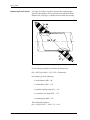
GE
Sensing & Inspection Technologies
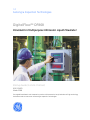
DigitalFlow™ DF868
Panametrics Multipurpose Ultrasonic Liquid Flowmeter
Startup Guide (1 and 2-Channel)
GE
Sensing & Inspection Technologies
DigitalFlow™ DF868
Panametrics Multipurpose Ultrasonic Liquid Flowmeter
Startup Guide (1 and 2-Channel)
910-176UD1
March 2008
The DigitalFlow DF868 is a GE Panametrics product. GE Panametrics has joined other GE high-technology
businesses under a new name—GE Sensing & Inspection Technologies.
March 2008
Warranty
Each instrument manufactured by GE Sensing, Inc. is warranted to be
free from defects in material and workmanship. Liability under this
warranty is limited to restoring the instrument to normal operation or
replacing the instrument, at the sole discretion of GE. Fuses and
batteries are specifically excluded from any liability. This warranty is
effective from the date of delivery to the original purchaser. If GE
determines that the equipment was defective, the warranty period is:
•
one year for general electronic failures of the instrument
•
one year for mechanical failures of the sensor
If GE determines that the equipment was damaged by misuse,
improper installation, the use of unauthorized replacement parts, or
operating conditions outside the guidelines specified by GE, the
repairs are not covered under this warranty.
The warranties set forth herein are exclusive and are in lieu of
all other warranties whether statutory, express or implied
(including warranties of merchantability and fitness for a
particular purpose, and warranties arising from course of
dealing or usage or trade).
Return Policy
If a GE Sensing, Inc. instrument malfunctions within the warranty
period, the following procedure must be completed:
1. Notify GE, giving full details of the problem, and provide the model
number and serial number of the instrument. If the nature of the
problem indicates the need for factory service, GE will issue a
RETURN AUTHORIZATION number (RA), and shipping instructions
for the return of the instrument to a service center will be
provided.
2. If GE instructs you to send your instrument to a service center, it
must be shipped prepaid to the authorized repair station indicated
in the shipping instructions.
3. Upon receipt, GE will evaluate the instrument to determine the
cause of the malfunction.
Then, one of the following courses of action will then be taken:
•
If the damage is covered under the terms of the warranty, the
instrument will be repaired at no cost to the owner and returned.
•
If GE determines that the damage is not covered under the terms
of the warranty, or if the warranty has expired, an estimate for the
cost of the repairs at standard rates will be provided. Upon receipt
of the owner’s approval to proceed, the instrument will be repaired
and returned.
iii
March 2008
Table of Contents
Chapter 1: Installation
Introduction . . . . . . . . . . . . . . . . . . . . . . . . . . . . . . . . . . . . . . . . . . . . . . . . . . . . . . . . . . . . . . . . . . . . . . . . . . . . . . . 1-1
Unpacking . . . . . . . . . . . . . . . . . . . . . . . . . . . . . . . . . . . . . . . . . . . . . . . . . . . . . . . . . . . . . . . . . . . . . . . . . . . . . . . . . 1-1
Site Considerations. . . . . . . . . . . . . . . . . . . . . . . . . . . . . . . . . . . . . . . . . . . . . . . . . . . . . . . . . . . . . . . . . . . . . . . . . 1-2
Electronics Console Location. . . . . . . . . . . . . . . . . . . . . . . . . . . . . . . . . . . . . . . . . . . . . . . . . . . . . . . . . . . . 1-2
Flowcell Location . . . . . . . . . . . . . . . . . . . . . . . . . . . . . . . . . . . . . . . . . . . . . . . . . . . . . . . . . . . . . . . . . . . . . . . 1-2
Transducer Location. . . . . . . . . . . . . . . . . . . . . . . . . . . . . . . . . . . . . . . . . . . . . . . . . . . . . . . . . . . . . . . . . . . . 1-2
Cable Lengths. . . . . . . . . . . . . . . . . . . . . . . . . . . . . . . . . . . . . . . . . . . . . . . . . . . . . . . . . . . . . . . . . . . . . . . . . . 1-3
Temperature Transmitters . . . . . . . . . . . . . . . . . . . . . . . . . . . . . . . . . . . . . . . . . . . . . . . . . . . . . . . . . . . . . . 1-3
Transducer Cables . . . . . . . . . . . . . . . . . . . . . . . . . . . . . . . . . . . . . . . . . . . . . . . . . . . . . . . . . . . . . . . . . . . . . 1-3
Installing a Flowcell . . . . . . . . . . . . . . . . . . . . . . . . . . . . . . . . . . . . . . . . . . . . . . . . . . . . . . . . . . . . . . . . . . . . . . . . 1-3
Installing Temperature Transmitters . . . . . . . . . . . . . . . . . . . . . . . . . . . . . . . . . . . . . . . . . . . . . . . . . . . . . . . . 1-4
Mounting the DF868 Electronic Console . . . . . . . . . . . . . . . . . . . . . . . . . . . . . . . . . . . . . . . . . . . . . . . . . . . . . 1-5
Making Electrical Connections . . . . . . . . . . . . . . . . . . . . . . . . . . . . . . . . . . . . . . . . . . . . . . . . . . . . . . . . . . . . . . 1-5
Wiring the Line Power . . . . . . . . . . . . . . . . . . . . . . . . . . . . . . . . . . . . . . . . . . . . . . . . . . . . . . . . . . . . . . . . . . 1-6
Wiring the Transducers . . . . . . . . . . . . . . . . . . . . . . . . . . . . . . . . . . . . . . . . . . . . . . . . . . . . . . . . . . . . . . . . . 1-8
Wiring the 0/4-20 mA Analog Outputs . . . . . . . . . . . . . . . . . . . . . . . . . . . . . . . . . . . . . . . . . . . . . . . . . . . 1-9
Wiring the Serial Port . . . . . . . . . . . . . . . . . . . . . . . . . . . . . . . . . . . . . . . . . . . . . . . . . . . . . . . . . . . . . . . . . . . 1-9
Wiring an Alarms Option Card. . . . . . . . . . . . . . . . . . . . . . . . . . . . . . . . . . . . . . . . . . . . . . . . . . . . . . . . . . 1-13
Wiring a 0/4-20 mA Analog Inputs Option Card . . . . . . . . . . . . . . . . . . . . . . . . . . . . . . . . . . . . . . . . . 1-14
Wiring a Totalizer/Frequency Outputs Option Card . . . . . . . . . . . . . . . . . . . . . . . . . . . . . . . . . . . . . . 1-15
Wiring an RTD Inputs Option Card . . . . . . . . . . . . . . . . . . . . . . . . . . . . . . . . . . . . . . . . . . . . . . . . . . . . . . 1-16
Wiring a 0/4-20 mA Analog Outputs Option Card . . . . . . . . . . . . . . . . . . . . . . . . . . . . . . . . . . . . . . . 1-16
Wiring a MODBUS Option Card . . . . . . . . . . . . . . . . . . . . . . . . . . . . . . . . . . . . . . . . . . . . . . . . . . . . . . . . . 1-16
v
March 2008
Table of Contents (cont.)
Chapter 2: Initial Setup
Introduction . . . . . . . . . . . . . . . . . . . . . . . . . . . . . . . . . . . . . . . . . . . . . . . . . . . . . . . . . . . . . . . . . . . . . . . . . . . . . . . 2-1
Navigating Through the User Program . . . . . . . . . . . . . . . . . . . . . . . . . . . . . . . . . . . . . . . . . . . . . . . . . . . . . . 2-1
Accessing the User Program. . . . . . . . . . . . . . . . . . . . . . . . . . . . . . . . . . . . . . . . . . . . . . . . . . . . . . . . . . . . . . . . 2-2
1-Channel Meter . . . . . . . . . . . . . . . . . . . . . . . . . . . . . . . . . . . . . . . . . . . . . . . . . . . . . . . . . . . . . . . . . . . . . . . 2-2
2-Channel Meter . . . . . . . . . . . . . . . . . . . . . . . . . . . . . . . . . . . . . . . . . . . . . . . . . . . . . . . . . . . . . . . . . . . . . . . 2-2
Activating a Channel . . . . . . . . . . . . . . . . . . . . . . . . . . . . . . . . . . . . . . . . . . . . . . . . . . . . . . . . . . . . . . . . . . . . . . . 2-3
1-Channel Meter . . . . . . . . . . . . . . . . . . . . . . . . . . . . . . . . . . . . . . . . . . . . . . . . . . . . . . . . . . . . . . . . . . . . . . . 2-3
2-Channel Meter . . . . . . . . . . . . . . . . . . . . . . . . . . . . . . . . . . . . . . . . . . . . . . . . . . . . . . . . . . . . . . . . . . . . . . . 2-3
Entering System Data for a Channel . . . . . . . . . . . . . . . . . . . . . . . . . . . . . . . . . . . . . . . . . . . . . . . . . . . . . . . . 2-4
1-Channel Meter . . . . . . . . . . . . . . . . . . . . . . . . . . . . . . . . . . . . . . . . . . . . . . . . . . . . . . . . . . . . . . . . . . . . . . . 2-4
2-Channel Meter . . . . . . . . . . . . . . . . . . . . . . . . . . . . . . . . . . . . . . . . . . . . . . . . . . . . . . . . . . . . . . . . . . . . . . . 2-5
1- and 2-Channel Meters . . . . . . . . . . . . . . . . . . . . . . . . . . . . . . . . . . . . . . . . . . . . . . . . . . . . . . . . . . . . . . . 2-6
Entering Pipe Data . . . . . . . . . . . . . . . . . . . . . . . . . . . . . . . . . . . . . . . . . . . . . . . . . . . . . . . . . . . . . . . . . . . . . . . . . 2-9
Transducer Number . . . . . . . . . . . . . . . . . . . . . . . . . . . . . . . . . . . . . . . . . . . . . . . . . . . . . . . . . . . . . . . . . . . . 2-9
Pipe Material . . . . . . . . . . . . . . . . . . . . . . . . . . . . . . . . . . . . . . . . . . . . . . . . . . . . . . . . . . . . . . . . . . . . . . . . . . 2-10
Pipe OD. . . . . . . . . . . . . . . . . . . . . . . . . . . . . . . . . . . . . . . . . . . . . . . . . . . . . . . . . . . . . . . . . . . . . . . . . . . . . . . 2-10
Pipe Wall . . . . . . . . . . . . . . . . . . . . . . . . . . . . . . . . . . . . . . . . . . . . . . . . . . . . . . . . . . . . . . . . . . . . . . . . . . . . . 2-11
Lining. . . . . . . . . . . . . . . . . . . . . . . . . . . . . . . . . . . . . . . . . . . . . . . . . . . . . . . . . . . . . . . . . . . . . . . . . . . . . . . . . 2-11
Path and Axial Length . . . . . . . . . . . . . . . . . . . . . . . . . . . . . . . . . . . . . . . . . . . . . . . . . . . . . . . . . . . . . . . . . 2-11
Tracking Windows . . . . . . . . . . . . . . . . . . . . . . . . . . . . . . . . . . . . . . . . . . . . . . . . . . . . . . . . . . . . . . . . . . . . 2-12
Fluid Type. . . . . . . . . . . . . . . . . . . . . . . . . . . . . . . . . . . . . . . . . . . . . . . . . . . . . . . . . . . . . . . . . . . . . . . . . . . . . 2-12
Reynolds Correction . . . . . . . . . . . . . . . . . . . . . . . . . . . . . . . . . . . . . . . . . . . . . . . . . . . . . . . . . . . . . . . . . . . 2-14
Calibration Factor . . . . . . . . . . . . . . . . . . . . . . . . . . . . . . . . . . . . . . . . . . . . . . . . . . . . . . . . . . . . . . . . . . . . . 2-14
Exiting the User Program . . . . . . . . . . . . . . . . . . . . . . . . . . . . . . . . . . . . . . . . . . . . . . . . . . . . . . . . . . . . . . . . . . 2-15
Chapter 3: Operation
Introduction . . . . . . . . . . . . . . . . . . . . . . . . . . . . . . . . . . . . . . . . . . . . . . . . . . . . . . . . . . . . . . . . . . . . . . . . . . . . . . .
Powering Up . . . . . . . . . . . . . . . . . . . . . . . . . . . . . . . . . . . . . . . . . . . . . . . . . . . . . . . . . . . . . . . . . . . . . . . . . . . . . . .
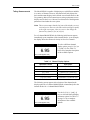
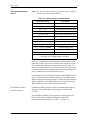
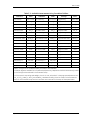
Using the Display . . . . . . . . . . . . . . . . . . . . . . . . . . . . . . . . . . . . . . . . . . . . . . . . . . . . . . . . . . . . . . . . . . . . . . . . . .
Taking Measurements. . . . . . . . . . . . . . . . . . . . . . . . . . . . . . . . . . . . . . . . . . . . . . . . . . . . . . . . . . . . . . . . . . . . . .
Foundation Fieldbus Communications . . . . . . . . . . . . . . . . . . . . . . . . . . . . . . . . . . . . . . . . . . . . . . . . . .
3-1
3-2
3-3
3-5
3-6
Chapter 4: Specifications
General Specifications . . . . . . . . . . . . . . . . . . . . . . . . . . . . . . . . . . . . . . . . . . . . . . . . . . . . . . . . . . . . . . . . . . . . .
Energy Accuracy . . . . . . . . . . . . . . . . . . . . . . . . . . . . . . . . . . . . . . . . . . . . . . . . . . . . . . . . . . . . . . . . . . . . . . .
Fluid Types. . . . . . . . . . . . . . . . . . . . . . . . . . . . . . . . . . . . . . . . . . . . . . . . . . . . . . . . . . . . . . . . . . . . . . . . . . . . .
Electrical Specifications . . . . . . . . . . . . . . . . . . . . . . . . . . . . . . . . . . . . . . . . . . . . . . . . . . . . . . . . . . . . . . . . . . . .
Operational Specifications . . . . . . . . . . . . . . . . . . . . . . . . . . . . . . . . . . . . . . . . . . . . . . . . . . . . . . . . . . . . . . . . .
Transducer Specifications . . . . . . . . . . . . . . . . . . . . . . . . . . . . . . . . . . . . . . . . . . . . . . . . . . . . . . . . . . . . . . . . . .
Wetted Ultrasonic Flow Transducers . . . . . . . . . . . . . . . . . . . . . . . . . . . . . . . . . . . . . . . . . . . . . . . . . . . .
Clamp-On Ultrasonic Flow Transducers . . . . . . . . . . . . . . . . . . . . . . . . . . . . . . . . . . . . . . . . . . . . . . . . .
Temperature Transducers . . . . . . . . . . . . . . . . . . . . . . . . . . . . . . . . . . . . . . . . . . . . . . . . . . . . . . . . . . . . . .
Pipe Size & Materials . . . . . . . . . . . . . . . . . . . . . . . . . . . . . . . . . . . . . . . . . . . . . . . . . . . . . . . . . . . . . . . . . . . . . . .
Wetted Transducers. . . . . . . . . . . . . . . . . . . . . . . . . . . . . . . . . . . . . . . . . . . . . . . . . . . . . . . . . . . . . . . . . . . .
Clamp-On Transducers . . . . . . . . . . . . . . . . . . . . . . . . . . . . . . . . . . . . . . . . . . . . . . . . . . . . . . . . . . . . . . . . .
PC Interface Software . . . . . . . . . . . . . . . . . . . . . . . . . . . . . . . . . . . . . . . . . . . . . . . . . . . . . . . . . . . . . . . . . . . . . .
4-1
4-2
4-2
4-3
4-5
4-6
4-6
4-6
4-7
4-7
4-7
4-7
4-7
vi
March 2008
Table of Contents (cont.)
Appendix A: CE Mark Compliance
Introduction . . . . . . . . . . . . . . . . . . . . . . . . . . . . . . . . . . . . . . . . . . . . . . . . . . . . . . . . . . . . . . . . . . . . . . . . . . . . . . . A-1
Wiring . . . . . . . . . . . . . . . . . . . . . . . . . . . . . . . . . . . . . . . . . . . . . . . . . . . . . . . . . . . . . . . . . . . . . . . . . . . . . . . . . . . . . A-1
External Grounding. . . . . . . . . . . . . . . . . . . . . . . . . . . . . . . . . . . . . . . . . . . . . . . . . . . . . . . . . . . . . . . . . . . . . . . . . A-1
Appendix B: Data Records
Option Cards Installed . . . . . . . . . . . . . . . . . . . . . . . . . . . . . . . . . . . . . . . . . . . . . . . . . . . . . . . . . . . . . . . . . . . . . . B-1
Initial Setup Data. . . . . . . . . . . . . . . . . . . . . . . . . . . . . . . . . . . . . . . . . . . . . . . . . . . . . . . . . . . . . . . . . . . . . . . . . . . B-2
Appendix C: Optional Enclosures
Introduction . . . . . . . . . . . . . . . . . . . . . . . . . . . . . . . . . . . . . . . . . . . . . . . . . . . . . . . . . . . . . . . . . . . . . . . . . . . . . . . C-1
Rack Mount Enclosure . . . . . . . . . . . . . . . . . . . . . . . . . . . . . . . . . . . . . . . . . . . . . . . . . . . . . . . . . . . . . . . . . . . . . . C-1
Rack Mount Wiring . . . . . . . . . . . . . . . . . . . . . . . . . . . . . . . . . . . . . . . . . . . . . . . . . . . . . . . . . . . . . . . . . . . . . . . . . C-1
Rack Mount Front Panel . . . . . . . . . . . . . . . . . . . . . . . . . . . . . . . . . . . . . . . . . . . . . . . . . . . . . . . . . . . . . . . . . . . . C-2
Appendix D: Measuring P and L Dimensions
Measuring P and L . . . . . . . . . . . . . . . . . . . . . . . . . . . . . . . . . . . . . . . . . . . . . . . . . . . . . . . . . . . . . . . . . . . . . . . . . D-1
vii
Chapter 1
Installation
Introduction. . . . . . . . . . . . . . . . . . . . . . . . . . . . . . . . . . . . . . . . . . . . . . . . . . . . 1-1
Unpacking . . . . . . . . . . . . . . . . . . . . . . . . . . . . . . . . . . . . . . . . . . . . . . . . . . . . . 1-1
Site Considerations . . . . . . . . . . . . . . . . . . . . . . . . . . . . . . . . . . . . . . . . . . . . . 1-2
Installing a Flowcell . . . . . . . . . . . . . . . . . . . . . . . . . . . . . . . . . . . . . . . . . . . . . 1-3
Installing Temperature Transmitters . . . . . . . . . . . . . . . . . . . . . . . . . . . . . 1-4
Mounting the DF868 Electronic Console . . . . . . . . . . . . . . . . . . . . . . . . . . . 1-5
Making Electrical Connections . . . . . . . . . . . . . . . . . . . . . . . . . . . . . . . . . . . 1-5
March 2008
Introduction
To ensure safe and reliable operation of the Model DF868 Ultrasonic
Liquid Flowmeter, the system must be installed in accordance with
the guidelines established by GE engineers. Those guidelines, which
are explained in detail in this chapter, include the following specific
topics:
•
Unpacking the Model DF868 system
•
Selecting a suitable site for the electronics console and the
flowcell/transducers
•
Installing a flowcell
•
Installing temperature transmitters
•
Installing the Electronics Console
•
Wiring the Electronics Console.
!WARNING!
The Model DF868 flowmeter can measure the flow rate
of many liquids, some of which are potentially
hazardous. In such cases, proper safety practices must
be observed.
Be sure to follow all applicable local safety codes and
regulations for installing electrical equipment and
working with hazardous liquids or flow conditions.
Consult company safety personnel or local safety
authorities to verify the safety of any procedure or
practice.
ATTENTION EUROPEAN CUSTOMERS!
In order to meet CE Mark requirements, all wiring
connections must be made in accordance with the
instructions in Appendix A, CE Mark Compliance.
Unpacking
Installation
Carefully remove the electronics console, the transducers, and the
cables from the shipping containers. Before discarding any of the
packing materials, account for all components and documentation
listed on the packing slip. The discarding of an important item along
with the packing materials is all too common. If anything is missing
or damaged, contact the factory immediately for assistance.
1-1
March 2008
Site Considerations
Because the relative physical locations of the flowcell and the Model
DF868 electronics console are important, use the guidelines given in
this section to plan the Model DF868 system installation.
Electronics Console
Location
The standard Model DF868 electronics enclosure is a Type-4X
weather-resistant, dust-tight, indoor/outdoor type. Typically, the
electronics console is mounted in a meter shed. When choosing a
mounting site, make sure that the location permits easy access to the
console for programming, testing, and servicing.
Note: For compliance with the European Union’s Low Voltage
Directive (73/23/EEC), this unit requires an external power
disconnect device such as a switch or circuit breaker. The
disconnect device must be marked as such, clearly visible,
directly accessible, and located within 1.8 m (6 ft) of the
Model DF868.
Flowcell Location
The pipeline flowcell consists of the flow transducers and any
temperature transducers employed as part of the flowmeter system.
Ideally, choose a section of pipe with unlimited access as the flowcell,
such as a long stretch of pipe that is above ground. However, if the
flowcell is mounted on an underground pipe, dig a pit around the pipe
to facilitate installation of the transducers.
Transducer Location
For a given fluid and pipe, the Model DF868’s accuracy depends
primarily on the location and alignment of the transducers. In addition
to accessibility, when planning for transducer location, adhere to the
following guidelines:
1. Locate the transducers so that there are at least 10 pipe diameters
of straight, undisturbed flow upstream and 5 pipe diameters of
straight, undisturbed flow downstream from the measurement
point. To ensure undisturbed flow, avoid sources of turbulence in
the fluid such as valves, flanges, expansions and elbows.
2. Because sediment at the bottom of the pipe and gas at the top of
the pipe may cause attenuation of the ultrasonic signal, locate the
transducers on the side of a horizontal pipe, when possible. If
limited pipe access necessitates top-mounted transducers and the
sound beam path includes a reflection, shift the transducers to at
least 10° off top center. This will minimize the influence of any
sediment or gas on the reflected ultrasonic signals.
1-2
Installation
March 2008
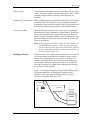
Cable Lengths
Locate the flowcell/transducers as close as possible to the electronics
console. The factory supplies transducer cables up to 1,000 ft (306 m)
in length. If longer cables are required, consult the factory for
assistance.
Temperature Transmitters
When installing temperature transmitters in the flowcell, locate them
downstream of the flow transducers. These transmitters should be
positioned no closer to the flow transducers than 2 pipe diameters and
no further away from the flow transducers than 20 pipe diameters.
Transducer Cables
When installing the transducer cables, always observe established
standard practices for the installation of electrical cables. Specifically,
do not route transducer cables alongside high amperage AC power
lines or any other cables that could cause electrical interference. Also,
protect the transducer cables and connections from the weather and
corrosive atmospheres.
Note: When using non-GE cables to connect the flow transducers to
the Model DF868 electronics console, the cables must have
electrical characteristics identical to the GE cables. Type RG
62 a/u coaxial cable should be used, and each cable must be
the same length (within ±4 in.).
Installing a Flowcell
A flowcell is the section of pipe where the transducers are mounted. It
can be created either by mounting the transducers on the existing
pipeline or by mounting them on a spoolpiece. A spoolpiece is a
separately manufactured pipe section, matched to the existing pipe,
which contains ports for mounting the transducers. This approach
allows the transducers to be aligned and calibrated before inserting
the spoolpiece into the pipeline.
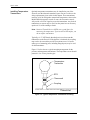
Figure 1-1 below shows a diagram of a typical Model DF868 system.
For detailed instructions on installing the transducers and/or
spoolpiece, refer to the supplied drawings and the GE Liquid
Transducer Installation Guide (916-055).
Transducer
Liquid
Flowcell
Flow
Transducer
Electronics
Console
Figure 1-1: A Typical Model DF868 System
Installation
1-3
March 2008
Installing Temperature
Transmitters
Optional temperature transmitters may be installed as part of the
flowcell, near the ultrasonic transducer ports. Be sure to observe the
siting requirements given earlier in this chapter. These transmitters
must use a 0/4-20 mA signal to transmit the temperature values to the
Model DF868 electronics console. In turn, the electronics console
will provide a 24 VDC signal to power the transmitters. Any desired
transmitters or sensors may be used, but they must have an accuracy
equal to 0.5% of the reading or better.
Note: Resistive Thermal Devices (RTDs) are a good choice for
measuring the temperature. If you use direct RTD inputs, you
do not require transmitters.
Typically, a 1/2” NPT female threaded port is used to mount the
transmitters on the flowcell. If the pipeline is insulated, the coupling
may need to be extended to provide convenient access. Of course,
other types of mounting ports, including flanged ports, may be used
for the transmitters.
Figure 1-2 below shows a typical mounting arrangement for the
pressure and temperature transmitters. The temperature sensor should
protrude 1/4 to 1/2 way into the pipe.
Temperature
Transmitter
RTD
Thermowell
Coupling
Flowcell Wall
Figure 1-2: Typical Temperature Transmitter Mounting
1-4
Installation
March 2008
Mounting the DF868
Electronic Console
The standard Model DF868 electronics package is housed in a
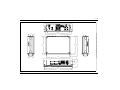
NEMA-4X weather-resistant enclosure. Refer to Figure 1-9 on
page 1-17 for the mounting dimensions of this enclosure. For meters
housed in one of the optional enclosures, a dimensional drawing will
be shipped with the unit.
IMPORTANT:
For meters supplied in one of the optional enclosure
styles, refer to Appendix C, Optional Enclosures, for
specific mounting dimensions and instructions.
!WARNING!
Proper grounding of the DF868 chassis is required to
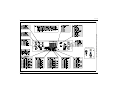
prevent the possibility of electric shock. See Figure 1-10
on page 1-18 to locate the internal ground connection.
Making Electrical
Connections
!ATTENTION EUROPEAN CUSTOMERS!
To meet CE Mark requirements, all cables must be
installed as described in Appendix A,
CE Mark Compliance.
This section contains instructions for making all the necessary
electrical connections to the Model DF868 flowmeter. Refer to
Figure 1-10 on page 1-18 for a complete wiring diagram of the unit.
IMPORTANT:
For meters supplied in one of the optional enclosure
styles, refer to Appendix C, Optional Enclosures, for
the appropriate wiring diagram and specific wiring
instructions.
Except for the power connector, all electrical connectors are stored in
their terminal blocks during shipment and may be removed from the
enclosure for more convenient wiring. Feed the cables through the
conduit holes on the bottom of the enclosure, attach the wires to the
appropriate connectors and plug the connectors back into their
terminal blocks.
Note: For compliance with the European Union’s Low Voltage
Directive (73/23/EEC), a transparent plastic shroud protects
the electrical connections. The shroud must remain in place,
except while wiring the unit. Reinstall the shroud after the
wiring has been completed.
Once the Model DF868 is completely wired, proceed to Chapter 2,
Initial Setup, to configure the unit for operation.
Installation
1-5
March 2008
Wiring the Line Power
!ATTENTION EUROPEAN CUSTOMERS!
To meet CE Mark requirements, all cables must be
installed as described in Appendix A,
CE Mark Compliance.
The Model DF868 may be ordered for operation with power inputs of
100-120 VAC, 220-240 VAC, or 12-28 VDC. The label on the shroud
inside the electronics enclosure, just above the TB1 line power
terminal block, lists the required line voltage and the fuse rating for
the unit (the fuse rating is also listed in Chapter 4, Specifications). Be
sure to connect the meter only to the specified line voltage.
Note: For compliance with the European Union’s Low Voltage
Directive (73/23/EEC), this unit requires an external power
disconnect device such as a switch or circuit breaker. The
disconnect device must be marked as such, clearly visible,
directly accessible, and located within 1.8 m (6 ft) of the
Model DF868.
Refer to Figure 1-3 on page 1-7 or Figure 1-10 on page 1-18 to locate
terminal block TB1 and connect the line power as follows:
!WARNING!
Improper connection of the line power leads or
connecting the meter to the incorrect line voltage will
damage the unit. It will also result in hazardous
voltages at the flowcell and associated piping and
within the electronics console.
1-6
Installation
March 2008
Wiring the Line Power
(cont.)
1. Remove the plastic shroud that covers the terminal blocks. Be sure
to reinstall the shroud after all of the wiring has been completed.
2. Strip ¼” of insulation from the end of the power and neutral or line
leads (or the positive and negative DC power leads), and ½” from
the end of the ground lead.
3. Connect the ground lead to the internal ground connection located
on the side panel of the enclosure (see Figure 1-3 below).
IMPORTANT:
The incoming ground lead must be connected to the
internal ground connection.
4. Connect the neutral or line lead (or the negative – DC power lead)
to TB1-2 and the line power lead (or the positive + DC power lead)
to TB1-3 as shown in Figure 1-3 below.
IMPORTANT:
Do not remove the existing PC board ground wire or
the cover ground wire.
G – + DC
G N/L2 L1 AC
PC Board
Ground Wire
TB1
Cover
Ground Wire
1
2
3
AC Line Power
or DC +
Gro
Internal
Ground
Connection
AC Neutral/Line
or DC –
u nd
Figure 1-3: Wiring the Line Power
Installation
1-7
March 2008
Wiring the Transducers
!ATTENTION EUROPEAN CUSTOMERS!
To meet CE Mark requirements, all cables must be
installed as described in Appendix A,
CE Mark Compliance.
Wiring a typical Model DF868 ultrasonic liquid flowmeter system
requires interconnection of the following components:
•
a pair of transducers (per channel) mounted in the flowcell
•
a lightning protector (optional)
•
the electronics console
To wire the transducers, complete the following steps:
!WARNING!
Before connecting the transducers, take them to a safe
area and discharge any static buildup by shorting the
center conductor of the transducer cables to the metal
shield on the cable connector.
1. If an optional lightning protector is being installed, connect it to
the electronics end of the cables according to the instructions
provided.
2. Locate the CH1 transducer cables and connect them to the two
CH1 transducers.
3. Refer to the wiring diagram in Figure 1-10 on page 1-18 and
connect the transducer cables to the CH1 terminal block. Then,
secure the cable clamp.
4. For a 2-channel Model DF868 flowmeter, repeat steps 2-3 to wire
the Channel 2 transducer system to terminal block CH2.
Note: It is not required that Channel 2 of a 2-channel Model DF868
be used. This channel may be left inactive for future use.
After the wiring has been completed, the transducer channel(s) must
be activated before measurements can begin. See Chapter 2, Initial
Setup, for instructions.
1-8
Installation
March 2008
Wiring the 0/4-20 mA
Analog Outputs
The standard configuration of the Model DF868 flowmeter includes
two isolated 0/4-20 mA analog outputs (designated as A and B).
Connections to these outputs may be made with standard twisted-pair
wiring. The current loop impedance for these circuits must not exceed
550 ohms.
Refer to Figure 1-10 on page 1-18 for the location of terminal block
I/O and wire the terminal block as shown.
Wiring the Serial Port
The Model DF868 is equipped with a built-in serial communications
port. The standard port is an RS232 interface, but an optional RS485
interface is available upon request. Proceed to the appropriate subsection for wiring instructions. For more information on serial
communications, refer to the EIA-RS Serial Communications Manual
(916-054).
Wiring the RS232 Interface Use the serial port to connect the Model DF868 flowmeter to a
printer, an ANSI terminal or a personal computer. The RS232
interface is wired as Data Terminal Equipment (DTE), and the signals
available at terminal block J1 are shown in Table 1-1 below. Refer to
Figure 1-10 on page 1-18 and complete the following steps:
1. Disconnect the main power to the unit.
2. Install the required cable clamp in the chosen conduit hole on the
side of the electronics enclosure.
3. Use the information in Table 1-1 below to construct a suitable
cable for connecting the Model DF868 to the external device. If
desired, an appropriate cable may be purchased from the factory.
Table 1-1: RS232 Connection to DCE or DTE Device
J1 Pin
Installation
Signal
Description
DCE
DB25
Pin #
DCE DB9
Pin #
DTE
DB25
Pin #
DTE
DB9
Pin #
5
DTR (Data
Terminal Ready)
20
4
20
4
6
CTS
(Clear to Send)
4
7
5
8
7
COM (Ground)
7
5
7
5
8
RX (Receive)
2
3
3
2
9
TX (Transmit)
3
2
2
3
1-9
March 2008
Wiring the RS232 Interface
(cont.)
Note: Signal names that imply direction (e.g., transmit and receive)
are named from the point of view of the DTE device (the GE
meter is usually considered the DTE device). When the RS232
standard is strictly followed, these signals are labeled with the
same name and pin # on the DCE device side as well.
Unfortunately, the convention is not followed because the
DTE and DCE side get confused. Therefore, connections that
imply direction are changed to reflect their direction on the
DCE side.
4. Feed the flying leads end of the cable through the conduit hole and
wire it to terminal block J1. Connect the other end of the cable to
the printer, ANSI terminal or personal computer, and secure the
cable clamp.
After the wiring has been completed, consult the User’s Manual for
the external device to configure it for use with the Model DF868.
Wiring the RS485 Interface Use the optional RS485 serial port to network multiple DF868
flowmeters to a single computer terminal. Upon request, the standard
RS232 port on the DF868 may be configured as a two-wire, halfduplex RS485 interface, through a device such as the INMAC Model
800052 RS232-RS422/RS485 converter.
IMPORTANT:
The DF868 must be configured at the factory for
RS485 operation.
To wire the RS485 serial port, refer to Figure 1-10 on page 1-18 and
complete the following steps:
1. Disconnect the main power to the unit.
2. Install the required cable clamp in the chosen conduit hole on the
side of the electronics enclosure.
3. Feed one end of the cable through the conduit hole, wire it to
terminal block J1 and secure the cable clamp. Connect the other
end of the cable to the converter, as shown in Figure 1-4 below.
DF868
NC 6
NC 7
RX 8
TX 9
Converter
1 TD OUT
2
3
4 RD IN
Figure 1-4: Typical RS485 Connections
1-10
Installation
March 2008
Wiring the Ethernet
Interface
A modified DF868 can use the Ethernet interface to communicate to
an internal network. An optional Ethernet card with a unique MAC
(IP) address (installed only in slots 5 or 6) includes an RJ45
connector. To connect the Ethernet-enabled DF868 to the network,
insert the jack of an RJ45 cable into the RJ45 connector, route the
cable through the bottom of the DF868, and wire the other end of the
cable to the Ethernet network according to the manufacturer’s
instructions. An external connection is required between the Ethernet
option card and the DF868’s RS232 connector, as shown in Table 1-2
below.
Note: The MAC address for a specific DF868 is included with
customer documentation. For more information on setting up
the MAC address, refer to Chapter 6 of the Programming
Manual.
Table 1-2: RS232 to Ethernet Interconnections
DF868 Type
Wall Mount
Rack Mount
Wiring the MODBUS/TCP
Interface
Terminal Block
Terminal Block
RS232 on
Main Board
TB1 on
Ethernet Card
TX
Pin 1
RX
Pin 2
RTN
Pin 3
RS232 on
Main Board
TB2 on
Ethernet Card
TX
Pin 1
RX
Pin 2
RTN
Pin 3
Customers can also use a modified DF868 that provides a MODBUS/
TCP interface to communicate to an internal network. An optional
MODBUS/TCP card with a unique MAC (IP) address (installed only
in slots 5 or 6) includes an RJ45 connector. To connect the
MODBUS/TCP-enabled DF868 to the network, insert the jack of an
RJ45 cable into the RJ45 connector, route the cable through the
bottom of the DF868, and wire the other end of the cable to the
Ethernet network according to the manufacturer’s instructions.
Note: The MAC address for a specific DF868 is included with
customer documentation. For more information on setting up
the MAC address, refer to Chapter 6 of the Programming
Manual.
Installation
1-11
March 2008
Wiring the Foundation
Fieldbus Network
Fieldbus network connections are made at J8/J9, pins 1 and 2 (see
Figure 1-5 below). Optionally, a shield can be connected to J8/J9
pin 3, depending on the network wiring. Connector J8 or J9 will be
installed depending on the option ordered by the customer.
No connections are made to J8/J9, pins 7 and 9, under normal
operation. If it is desired to reset the network board to factory
defaults:
1. Connect a jumper between J8/J9 pin 7 and pin 9.
2. Power cycle the instrument.
3. Ten seconds after the power has been restored to the unit, remove
the jumper to return the network board to normal operation.
9
J9
1
9
J8
1
Figure 1-5: Network Connections - Standard Option Interior
1-12
Installation
March 2008
Wiring an Alarms Option
Card
The Model DF868 flowmeter can accommodate up to 4 alarm option
cards. Each alarms option card includes three Form C relays
(designated as A, B and C).
The alarm relays on the option card are available in two types:
•
general purpose
•
hermetically sealed for Class I, Division 2 hazardous areas.
The maximum electrical ratings for the relays are listed in Chapter 4,
Specifications. Each of the three alarm relays can be wired either as
Normally Open (NO) or Normally Closed (NC).
In setting up an alarm relay, it may be wired for either conventional or
fail-safe operation. In fail-safe mode, the alarm relay is constantly
energized, except when it is triggered or a power failure or other
interruption occurs. See Figure 1-6 below for the operation of a NO
alarm relay in both conventional and fail-safe mode.
Connect the two wires required for each alarm relay in accordance
with the pin number assignments shown in Figure 1-10 on page 1-18.
Conventional,
not triggered
Fail-Safe,
not triggered
NO
NO
C
C
NC
NC
Alarm
Monitoring
Device
Alarm
Monitoring
Device
Conventional,
triggered
Fail-Safe,
triggered or power failure
NO
C
NO
C
NC
NC
Alarm
Monitoring
Device
Alarm
Monitoring
Device
Figure 1-6: Conventional and Fail-Safe Operation
Installation
1-13
March 2008
Wiring a 0/4-20 mA
To calculate energy measurement, the Model DF868 requires accurate
Analog Inputs Option Card temperature data from the measurement site. Transmitters installed in
the flowcell can provide this information via an optional 0/4-20 mA
analog inputs card. This option card includes two isolated 0/4-20 mA
analog inputs (designated as A and B), each of which includes a 24
VDC power supply for loop-powered transmitters. Either input may
be used to process the temperature signal.
Note: To enter programming data during operation of the meter, it
will be necessary to know which input is assigned to which
process parameter. This information should have been entered
in Appendix B, Data Records.
The analog inputs, which have an impedance of 118 ohms, should be
connected with standard twisted-pair wiring. Power to the
transmitters may be supplied either by the integral 24 VDC power
supply on the analog input card or by an external power supply.
Figure 1-7 below shows typical wiring diagrams, with and without an
external power supply, for one of the analog inputs.
With External Power Supply
24 VDC
POWER SUPPLY
+
Analog Input
Transmitter
+ IN
+
RTN
Sensor
- OUT
+24V
Analog Input
Transmitter
+
- OUT
RTN
+24V
Sensor
+ IN
With Internal Power Supply
Figure 1-7: Analog Input Wiring Diagram
1-14
Installation
March 2008
Wiring a 0/4-20 mA
Analog Inputs Option Card
(cont.)
Wire the analog input terminal block in accordance with the pin
number assignments shown in Figure 1-10 on page 1-18.
If the flowmeter system includes additional transmitters, the Model
DF868 can accommodate up to three more analog inputs option cards.
These option cards are identical to the temperature card described on
page 1-14 and they should be wired in the same manner (see
Figure 1-10 on page 1-18).
The analog inputs on the option card(s) can be calibrated with the
Model DF868’s built-in analog outputs. However, be certain that the
analog outputs have been calibrated first. See Chapter 1, Calibration,
in the Service Manual for the appropriate procedures.
Wiring a Totalizer/
Frequency Outputs Option
Card
The Model DF868 can accommodate up to four totalizer/frequency
outputs option cards. Each totalizer/frequency outputs option card
provides four outputs (designated as A, B, C, and D) that can be used
as either totalizer or frequency outputs.
Each totalizer/frequency output requires two wires. Wire this terminal
block in accordance with the pin number assignments shown in
Figure 1-10 on page 1-18. Figure 1-8 below shows sample wiring
diagrams of a totalizer output circuit and a frequency output circuit.
Totalizer Output
Model DF868
Pulse Counter
Max. Current:
Max. Voltage:
Isolation Voltage:
Max. Load Power:
4A
150V
500V
10W In
Volts +
(Int. Pwr. Sup.)
Load
(minimum
10 kW)
NO
C
C = Isolated Return
Volts (Common)
Frequency Output
Model DF868
Frequency Counter
+5V
200 Ω
IN
NO
Common
C
C = Isolated Return
Figure 1-8: Totalizer/Frequency Outputs Wiring
Installation
1-15
March 2008
Wiring an RTD Inputs
Option Card
The Model DF868 can accommodate up to four RTD (Resistance
Temperature Device) inputs option cards. Each RTD inputs option
card provides two direct RTD inputs (designated as A and B).
Each RTD input requires three wires, which should be fed through
one of the conduit holes on the bottom of the electronic console. (For
maximum accuracy, the three wires must be of equal length.) Wire
this terminal block in accordance with the pin number assignments
shown in Figure 1-10 on page 1-18.
Wiring a 0/4-20 mA
Analog Outputs Option
Card
The Model DF868 flowmeter can accommodate up to 4 analog
outputs option cards. Each analog outputs option card includes four
isolated 0/4-20 mA outputs (designated as A, B, C and D).
Connections to these outputs may be made with standard twisted-pair
wiring. The total current loop impedance for these circuits must not
exceed 1000 ohms. Wire this terminal block in accordance with the
pin number assignments shown in Figure 1-10 on page 1-18.
Wiring a MODBUS Option
Card
A modified DF868 can use the RS485 standard for MODBUS
communications. This standard allows up to 32 nodes (drivers and
receivers) on one multidrop network, at distances up to 4,000 ft
(1,200 m). To connect the instrument(s) to the host system, the
factory recommends using a 24-gauge (24 AWG) twisted-pair cable
with a characteristic impedance of 120 ohms and a 120-ohm
termination at each end of the communications line.
The MODBUS option card must be plugged into either slot 5 or slot 6
of the DF868. On the option card, pin 1 is the [TMT-] inverting or
negative connection and pin 2 is the [TMT+] non-inverting or positive
connection. To link the DF868 to the control system, connect the two
wires of the twisted-pair cable from these terminals to the
corresponding terminals at the control system, in accordance with the
pin number assignments shown in Figure 1-10 on page 1-18.
Note: If two MODBUS option cards are installed in the DF868, only
the card in slot 5 is activated.
1-16
Installation
Figure 1-9: Model DF868 Type 4X Enclosure (ref. dwg #425-208)
March 2008
Installation
1-17
G N/L2 L1
G
Installation
–
+
Figure 1-10: Model DF868 Electronics Console Wiring (ref. dwg #702-213, sht 1 of 2)
March 2008
1-18
Chapter 2
Initial Setup
Introduction. . . . . . . . . . . . . . . . . . . . . . . . . . . . . . . . . . . . . . . . . . . . . . . . . . . . 2-1
Navigating Through the User Program . . . . . . . . . . . . . . . . . . . . . . . . . . . . 2-1
Accessing the User Program . . . . . . . . . . . . . . . . . . . . . . . . . . . . . . . . . . . . . 2-2
Activating a Channel . . . . . . . . . . . . . . . . . . . . . . . . . . . . . . . . . . . . . . . . . . . . 2-3
Entering System Data for a Channel . . . . . . . . . . . . . . . . . . . . . . . . . . . . . . 2-4
Entering Pipe Data . . . . . . . . . . . . . . . . . . . . . . . . . . . . . . . . . . . . . . . . . . . . . . 2-9
Exiting the User Program . . . . . . . . . . . . . . . . . . . . . . . . . . . . . . . . . . . . . . . 2-15
March 2008
Introduction
This chapter provides instructions for entering the minimum amount
of programming data required to place the Model DF868 flowmeter
into operation. Before the Model DF868 can begin taking
measurements and displaying valid data, the system and pipe
parameters must be entered. In addition, if you plan to use both
channels of a 2-channel meter, each channel must be activated prior to
use. Additional programming options provide access to the more
advanced features of the Model DF868, but this information is not
required to begin taking measurements.
Note: See the Programming Manual for information on those User
Program options not covered in this chapter.
Navigating Through the
User Program
In order to begin using the Model DF868, the following submenus
within the User Program will be accessed:
•
ACTIV - enables selection of the desired measurement method (for a
2-Channel meter, it is also used to activate a channel)
•
SYSTM - prompts the user to enter the required system data
•
PIPE - prompts the user to enter the required pipe parameters
As a guide in following the programming instructions in this chapter,
the relevant portions of the Model DF868 menu map have been
reproduced in Figure 2-1 on page 2-17 and Figure 2-2 on page 2-18.
Note: There are minor differences at the start of the ACTIV and SYSTM
submenus for the 1-Channel and 2-Channel models, but the
PIPE submenus are identical.
The following discussion assumes that the left screen pane is active.
If the right screen pane is active, only the function key designations
change. That is, replace [F1]-[F4] with [F5]-[F8]. Be sure to record all
programming data in Appendix B, Data Records.
Use the keypad, as described in the Programming Manual, to
navigate through the User Program. The menu map may be followed
in sequence, or the [↑] and [↓] keys may be used to scroll through the
prompt screens. The [←] key may be used to delete the last
alphanumeric character that was entered from the keypad.
Initial Setup
2-1
March 2008
Accessing the User
Program
To access the User Program, press the [PROG] key on the keypad.
1-Channel Meter
For a 1-Channel Model DF868, the measurement mode screen is
replaced by the following initial programming mode screen:
Note: If the security feature is active, enter the password and press
[ENT] to enter the User Program. See the SECUR submenu
section in Chapter 1 of the Programming Manual for more
information on the security feature.
PROGRAM
PROGRAM
status
ACTIV SYSTM
2-Channel Meter
Start ‰
PIPE
At the User Program screen
shown, press [F1] and proceed to
the next page for instructions.
I/O
For a 2-Channel Model DF868, the following two-step sequence is
required to reach the initial programming screen:
PROGRAM
PROGRAM
Channel 1
CH1
CH2
Chan 1
Start ‰
GLOBL
PROGR
Channel PROGRAM
status
ACTIV SYSTM PIPE
Press [F1] or [F2] to select the
submenu for Channel 1 or
Channel 2, respectively, from the
option bar.
SAVE
Start ‰
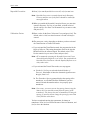
At the User Program screen
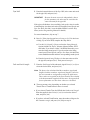
shown, press [F1] and proceed to
the next page for instructions.
I/O
Only the submenus ACTIV, SYSTM and PIPE are discussed in this
manual. Refer to the Programming Manual for information on the
other submenus.
Note: In this manual, only the programming of Channel 1 will be
described. To program Channel 2, simply repeat the same
procedures presented for Channel 1.
2-2
Initial Setup
March 2008
Activating a Channel
The ACTIV submenu permits selection of the desired measurement
method. In addition, it is used to activate/deactivate one or both of the
channels in a 2-Channel Model DF868.
1-Channel Meter
1. Enter the ACTIV submenu by pressing [F1] at the User PROGRAM
prompt.
2. Press [F1] to activate the channel in Transit-Time mode, or [F2] to
activate the channel in TransFlection mode.
2-Channel Meter
1. Enter the ACTIV submenu by pressing [F1] at the Channel PROGRAM
prompt.
2. Press [F1] (Off) to deactivate the channel and return to the Channel
PROGRAM prompt, or press [F2] to activate the channel in TransitTime mode, or [F3] to activate TransFlection mode.
Note: If a customer has not ordered the DF868 with TransFlection
mode, the TRNFL option does not appear.
Proceed directly to the next section to program the SYSTM submenu.
Initial Setup
2-3
March 2008
Entering System Data for
a Channel
Begin the programming of the SYSTM submenu in either the
1-Channel or 2-Channel section below.
1-Channel Meter
For the 1-Channel Model DF868, the information entered in the
SYSTM submenu pertains to the global operation of the flowmeter.
1. At the User Program screen, press the [F2] function key to
program the SYSTM submenu.
2. Enter a Site Label of up to 9 characters and press the [ENT] key.
(While taking measurements, the site label appears on the locator
bar.)
3. Enter a Site Message of up to 21 characters. Use this screen to
enter a brief description of the site. When the message has been
entered, press the [ENT] key.
4. Press [F1] to turn the Energy Option OFF or press [F2] to turn it
ON. (The Energy Option calculates the energy of a system based
on temperatures at the supply and return points, and the flow of
fluid.)
5. To select the System Units, press [F1] to display parameters and
measurements in English units or press [F2] to display parameters
and measurements in Metric units.
6. To program the Totalizer Option, press [F1] to measure totals
automatically, or press [F2] to measure totals manually.
The remainder of the SYSTM submenu is identical for the 1-Channel
and 2-Channel versions of the Model DF868. Proceed to the 1- and 2Channel Meters section to complete the programming of this
submenu.
2-4
Initial Setup
March 2008
2-Channel Meter
For the 2-Channel Model DF868, the information entered in the
SYSTM submenu pertains only to the currently selected channel.
1. At the User Program screen shown, press [F2] to program the
SYSTM submenu.
2. Enter a Channel Label of up to 9 characters. While taking
measurements, the channel label will appear on the locator bar.
Press [ENT].
3. Enter a Channel Message of up to 21 characters. Press [ENT].
4. Press [F1] to turn the Energy Option OFF or press [F2] to turn it
ON. (The Energy Option calculates the energy of a system based
on temperatures at the supply and return points, and the flow of
fluid.)
Note: For the 2-Channel Model DF868, the System Units and
Totalizer prompts, which are not required to make the unit
operational, are located in the GLOBL submenu. See the
Programming Manual for details.
The remainder of the SYSTM submenu is identical for the 1-Channel
and 2-Channel versions of the Model DF868. Proceed to the 1- and 2Channel Meters section below to complete programming.
Initial Setup
2-5
March 2008
1- and 2-Channel Meters
1. Use the [F1]-[F4] and [→] keys to select the desired Volumetric
Units for the flow rate display.
The abbreviations and definitions of all the available volumetric units
are shown in Table 2-1 below. The choices shown on the option bar
are determined by the selections made at the previous SYSTEM UNITS
prompt screen..
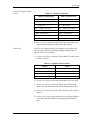
Table 2-1: Volumetric Unit Options
English Volumetric Units
Metric Volumetric Units
GAL/S - U.S. Gallons per Second
L/S - Liter per Second
GAL/M - U.S. Gallons per Minute
L/M - Liters per Minute
GAL/H - U.S. Gallons per Hour
L/H - Liters per Hour
MGD - Millions of U.S. Gallons per Day
ML/D - Millions of Liters per Day
ft3/s - Cubic Feet per Second
m3/s - Cubic Meters per Second
ft3/m - Cubic Feet per Minute
m3/m - Cubic Meters per Minute
ft3/h - Cubic Feet per Hour
Mm3/h - Millions of Cubic Meters per Hour
Mft3/d - Millions of Cubic Feet per Day
Mm3/d - Millions of Cubic Meters per Day
BBL/S - Barrels per Second
BBL/S - Barrels per Second
BBL/M - Barrels per Minute
BBL/M - Barrels per Minute
BBL/H - Barrels per Hour
BBL/H - Barrels per Hour
BBL/D - Barrels per Day
BBL/D - Barrels per Day
MBBL/D - Millions of Barrels per Day
MBBL/D - Millions of Barrels per Day
Acre-inch/sec - Acre-inches per second
N/A
Acre-inch/min - Acre-inches per minute
N/A
Acre-inch/hr - Acre-inches per hour
N/A
Acre-inch/day - Acre-inches per day
N/A
Acre-foot/sec - Acre-feet per second
N/A
Acre-foot/min - Acre-feet per minute
N/A
Acre-foot/hr - Acre-feet per hour
N/A
Acre-foot/day - Acre-feet per day
N/A
2. Press [F1]-[F4] to select the Vol Decimal Digits (the desired number
of digits to the right of the decimal point) in the volumetric flow
rate display.
3. Use the [F1]-[F4] and [→] keys to select the Totalizer Units.
The abbreviations and definitions of all the available totalizer units
are shown in Table 2-2 on page 2-7. The choices shown on the option
bar in the prompt screen above are determined by the selections made
at the previous SYSTEM UNITS prompt screen.
2-6
Initial Setup
March 2008
1- and 2-Channel Meters
(cont.)
Table 2-2: Totalizer Unit Options
English Totalizer Units
Metric Totalizer Units
Gal - U.S. Gallons
L - Liters
MGAL - Mega U.S. gallons
ML - Megaliters
ft3 - Cubic Feet
m3- Cubic Meters
Mft3 - Mega Cubic Feet
Mm3- Mega Cubic Meters
BBL - Barrels
BBL - Barrels
MBBL - Megabarrels
MBBL - Megabarrels
Acre-inches
Acre-feet
4. Press [F1]-[F4] to select the Total Decimal Digits (the digits to the
right of the decimal point) in the totalized flow display.
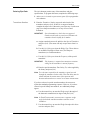
Mass Flow
If the Mass Flow prompt in the SETUP submenu is not enabled, skip
this sub-section. However, the following programming sequence
appears if Mass Flow is enabled.
1. Use the [F1]-[F4] keys to select the desired Mass Flow units, listed
in Table 2-3 below.
Table 2-3: Available Mass Flow Units
English
LB = Pounds
KLB = Thousands of LB
MMLB = Millions of LB
TONS = Tons (2000 LB)
Metric
KG = Kilograms
TONNE = Metric Tons (1000 KG)
2. Use the [F1]-[F4] keys to select the desired Mass Flow Time units.
3. Use the [F1]-[F4] keys to select the MDOT Decimal Digits (the
digits to the right of the decimal point) for displaying mass flow.
4. Use the [F1]-[F4] keys to select the Mass (Totalizer) units, listed in
Table 2-3.
5. Use the [F1]-[F4] keys to select the Mass Decimal Digits (the digits
to the right of the decimal point) for displaying totalized mass
flow.
Initial Setup
2-7
March 2008
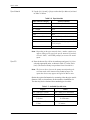
Energy Option
If you did not select the Energy Option earlier, the meter now returns
to the initial User (or Channel) Program screen. But if you selected
the Energy Option, several more prompts appear.
1. Use the [F1]-[F4] keys to select the desired Power units, listed in
Table 2-4 below.
Table 2-4: Power Unit Options
English Power Units
Metric Power Units
kBTU—Thousands of British
Thermal Units per Hour
kCAL/sec—Kilocalories/second
MMBTU—Millions of British
Thermal Units per Hour
MCAL/sec—MegaCalories/
second
kW—kilowatts
kW—kilowatts
Tons
MW—Megawatts
2. Use the [F1]-[F4] keys to select the Power Decimal Digits (the
digits to the right of the decimal point) for displaying power.
3. Use the [F1]-[F4] keys to select the Total Energy units, shown in
Table 2-5 below.
Table 2-5: Energy Unit Options
English Energy Units
Metric Energy Units
kBTU—Thousands of British
Thermal Units
kCAL—Kilocalories
MMBTU—Millions of British
Thermal Units
MCAL—MegaCalories
kWHr—Kilowatt-Hours
kW—Kilowatt-Hour
Tons
MW—Megawatt-Hour
4. Use the [F1]-[F4] keys to select the Energy Decimal Digits (the
digits to the right of the decimal point) for displaying total energy.
5. Press [F1] to make measurements in a Cooling system, or [F2] to
make measurements in a Heating system.
6. Press [F1] to conduct Flow Measurement at the point of return
(where the liquid exits), or [F2] to measure flow at the point of
supply (where the liquid enters).
When the above selection has been made, the meter exits the SYSTM
submenu and returns to the initial User Program screen. Proceed
directly to the next section to program the PIPE submenu.
2-8
Initial Setup
March 2008
Entering Pipe Data
The PIPE submenu permits entry of the transducer and pipe
specifications. To program this menu, complete the following steps:
1. At the User (or Channel) Program screen, press [F3] to program the
PIPE submenu.
Transducer Number
2. Enter the Transducer Number engraved on the head of the
transducer and press [ENT]. If there is no engraved number,
complete the steps below. Otherwise, proceed to step 3 on the next
page for a clamp-on transducer, or to step 4 for a wetted
transducer.
IMPORTANT:
Special transducers, which have no engraved
number on the head, are rarely used. Examine the
transducer head carefully for a number.
a. Assign a number between 91 and 99 to the Special Transducer
and press [ENT]. (The meter will only accept values from 1 to
199.)
b. Use the [F1]-[F3] keys to select the Wedge Type. Three choices
are available: Rayleigh or Shear wave (for clamp-on
transducers) or wetted transducers.
c. Use the [F1]-[F3] keys to select the Frequency of the special
transducer.
IMPORTANT:
The frequency is required to transmit an excitation
voltage at the transducer’s natural frequency.
d. Enter the special transducer Time Delay (Tw) value supplied by
the factory and press [ENT].
Note: Tw is the time required for the transducer signal to travel
through the transducer and its cable. This time delay must be
subtracted from the transit times of the upstream and
downstream transducers to ensure an accurate measurement.
If you have selected a special wetted transducer, the meter now
rejoins the standard programming sequence. However, if you have
selected a special clamp-on transducer, two additional prompts
appear.
e. Use the numeric keys to enter the Wedge Angle (the angle of
the ultrasonic transmission) in degrees and press [ENT].
Note: In TransFlection mode, you must enter a separate wedge
angle for both the transmit transducer and the receive
transducer.
f. Use the numeric keys to enter the Wedge Soundspeed in ft/sec
or m/sec and press [ENT].
Initial Setup
2-9
March 2008
Pipe Material
3. Use the [F1]-[F4] and [→] keys to select the Pipe Material, as listed
in Table 2-6 below.
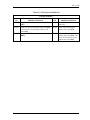
Table 2-6: Pipe Materials
Pipe Material Category
Specific Material
Steel
Carbon Steel or Stainless Steel
Iron
Ductile Iron or Cast Iron
Cu - Copper
None
Al - Aluminum
None
Brass
None
CuNi - Copper/Nickel
70% Cu 30% Ni or 90% Cu 10% Ni
Glass
Pyrex, Flint, or Crown
Plastic
Nylon, Polyester, Polypropylene, PVC
(CPVC), Acrylic
Other*
Any material
Note: Depending on the pipe material choice, another window may
appear, asking you to specify the specific material. If you have
selected “Other,” the DF868 prompts you to enter the sound
speed.
Pipe OD
4. Enter the known Pipe OD or circumference and press [F1]-[F4] to
select the appropriate units, as shown in Table 2-7 below. Press
[ENT]. (The meter will only accept values from 1/8 to 648 in.)
Note: The first two lines of text in the prompt area depend on the
selection made at the TRANSDUCER NUMBER prompt. The
option bar choices may appear in English or Metric units.
Obtain the required information by measuring either the pipe outside
diameter (OD) or circumference at the transducer installation site.
The data may also be obtained from standard pipe size tables.
Table 2-7: Available Pipe OD Units
English
inch = pipe OD in inches
feet = pipe OD in feet
in/PI = pipe circumference
in inches
ft/PI = pipe circumference
in feet
2-10
Metric
mm = pipe OD in millimeters
m = pipe OD in meters
mm/PI = pipe circumference
in millimeters
m/PI = pipe circumference
in meters
Initial Setup
March 2008
Pipe Wall
5. Enter the known thickness of the Pipe Wall, in the same units used
for the pipe OD, and press [ENT].
IMPORTANT:
Because the units can not be independently chosen
for this parameter, the value must be entered in the
same units used for the pipe OD.
If the pipe wall thickness is not available, look up the value in a table
of standard pipe size data (such as the GE brochure Sound Speeds and
Pipe Size Data, 914-004), or use the Model DF868’s on-line Help
Menu (see the Programming Manual for details).
For wetted transducers, skip to step 7.
Lining
6. Press [F1] if the pipe does not have a Lining, or [F2] if it does have
a lining. If you select YES, complete the steps below.
a. Use the [F1]-[F4] and [→] keys to select the Lining Material.
Options include Tar, Pyrex, Asbestos, Mortar, Rubber, PTFE
and Other. If you choose “Other,” the DF868 then asks you to
enter the lining sound speed. If you do not know the lining
sound speed, Sound Speeds and Pipe Size Data (914-004) lists
some standard materials and their corresponding sound speeds.
b. Enter the known Lining Thickness, in the same units used for
the pipe OD, and press [ENT]. Then proceed to step 9.
Path and Axial Length
7. Enter the Path Length of the ultrasonic signal. Press [F1] or [F2] to
select the desired units, and press [ENT].
Note: The factory has calculated both the transducer signal path
length (P) and the transducer signal axial length (L), based on
the exact transducer configuration used for the application.
These values are engraved on the flowcell and/or are included
in the documentation supplied with the meter. See Appendix D
for an explanation as to how these values are calculated.
8. The next prompt varies, depending on whether you selected
Transit-Time or TransFlection in the ACTIV menu.
Initial Setup
•
If you selected Transit-Time, the DF868 asks for the Axial Length.
Enter the supplied value. Press [F1] or [F2] to select the desired
units, and press [ENT].
•
If you have selected TransFlection, enter the number of degrees for
the Transducer Angle, and press [ENT]. Skip to step 10.
2-11
March 2008
Tracking Windows
Note: This step only appears if you have selected Transit-Time.
9. Press [F1] if you do not want Tracking Windows, or [F2] if you want
to enable the windows. (Tracking windows are used to detect the
receive signal when you are unsure of the fluid soundspeed.)
Fluid Type
10.Use the [F1]-[F4] and [→] keys to select the Fluid Type. The
selections for the fluid type vary, depending on whether:
•
the ENERGY OPTION is ON or OFF; and
•
the TRACKING WINDOW is enabled or disabled.
Refer to Table 2-8 below if ENERGY OPTION is OFF, or to Table 2-9 on
page 2-13 if ENERGY OPTION is ON.
Note: Some of the fluid types may require additional selections as
shown in the following tables.
Table 2-8: Fluid Types for ENERGY OFF
Tracking Windows =
NO
Additional Selections
YES
Additional Selections
WATER
Select NORML or SEA and press [ENT].
If NORML is selected, enter the Water
Temperature and press [ENT].
W100
No additional selections
required.
OIL
Select LUBE or CRUDE and press [ENT].
W260
No additional selections
required.
OIL
No additional selections
required.
METH
No additional selections required.
ETH
Enter the Fluid Soundspeed and press [ENT].
LN2
No additional selections required.
FREON
No additional selections required.
OTHER
Enter the Fluid Soundspeed and press [ENT].
2-12
OTHER
Enter the Minimum Soundspeed and press [ENT]. Then
enter the Maximum Soundspeed and press [ENT].
Initial Setup
March 2008
Table 2-9: Fluid Types for ENERGY ON
Tracking Windows =
NO
Additional Selections
YES
Additional Selections
WATER
Enter the Water Temperature and press
[ENT].
W260
No additional selections
required.
MIXED
Enter the Fluid Soundspeed and press [ENT].
Then enter the Percentage of Water and
press [ENT].
MIXED
Enter the Percentage of
Water and press [ENT].
OTHER
Enter the Fluid Soundspeed and press
[ENT].
OTHER
Enter the Minimum Soundspeed and press [ENT]. Then
enter the Maximum Soundspeed and press [ENT].
Initial Setup
2-13
March 2008
Reynolds Correction
11.Press [F1] to turn Reynolds Correction off, or [F2] to turn it on.
Note: Reynolds Correction is a number based on the Kinematic
Viscosity and flow rate of the fluid. It should be enabled for
most applications.
12.When you enable the Reynolds Correction Factor, you must also
enter the Kinematic Viscosity of your fluid, as listed in Sound
Speeds and Pipe Size Data. Use the numeric keys to enter a value,
and press [ENT].
Calibration Factor
13.Enter a value for the flow Calibration Factor and press [ENT]. The
default value is 1.00, but values between 0.50 and 2.00 may be
entered.
14.The menu now varies, depending on whether you have activated
the TransFlection or Transit-Time mode.
•
If you activated the TransFlection mode, the program asks for the
Depth of Reflector. This setting determines where in the pipe the
DF868 looks for the reflected signal. The default value is 50%.
Use the numeric keys to enter a value, and press [ENT].
Note: GE recommends activating the Reynolds Correction Factor
when the Depth of Reflector is set at 50%. You can disable the
Reynolds Correction Factor when the Depth of Reflector is set
at any other value.
•
If you activated the Transit-Time mode, two steps appear.
a. Use the [F1]-[F4] keys to select the desired Number of
Traverses, the number of times the ultrasonic signal traverses
the pipe, from 1 to 5.
b. The Transducer Spacing prompt displays the spacing of the
transducers, as calculated from the information you have
entered. Record this number and use it to properly space
transducers.
Note: If necessary, you can overwrite the spacing shown (using the
numeric keys) to match the actual physical spacing of the
transducers. The factory does not recommend overwriting the
spacing. If you must, do not change the spacing by more than
±10% from the value shown.
You have completed entering pipe parameters for clamp-on
transducers. Press [ENT] to return to the start of the PIPE submenu, and
[EXIT] to leave the submenu.
2-14
Initial Setup
March 2008
Entering Pipe Data
(cont.)
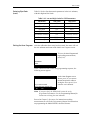
Table 2-10 below lists the numeric parameters in the PIPE submenu,
with their high and low limits.
Table 2-10: Low and High Limits for PIPE Parameters
Exiting the User Program
Parameter
Low Limit
High Limit
Wedge Angle
25°
90°
Pipe OD
0.12 in.
300 in.
Pipe Wall
0 in.
4.0 in.
Lining Thickness
0 in.
4.0 in.
Kinematic Viscosity
0.1
10,000 (E-6 ft2/s)
Path Length
0.12 in.
480 in.
Axial Length
0.12 in.
480 in.
After the calibration factor entry has been made, the meter will exit
the PIPE submenu and return to the initial User Program screen.
PROGRAM
PROGRAM
status
ACTIV SYSTM
Start ‰
PIPE
To leave the User Program and
begin taking measurements,
press [EXIT].
I/O
At the conclusion of the initial setup programming sequence, the
following screen appears:
PROGRAM
Start
Do you want to SAVE
current selection appears here
No
Yes
At the User Program screen
shown, press [F1] to return to
measurement mode without
saving the file or press [F2] to
enter the SAVE submenu.
Note: If you press [NO], the DF868 still retains the newly
programmed information. See the Programming Manual for
instructions on using the SAVE submenu.
Proceed to Chapter 3, Operation, for instructions on taking
measurements or refer to the Programming Manual for instructions
on programming the Model DF868’s advanced features.
Initial Setup
2-15
March 2008
PROG
F1
F2
CH1
CH2
F3
F4
GLOBL
SAVE
(1-Channel)
PROGRAM status
Channel PROGRAM status
Channel PROGRAM
F1
F2
ACTIV
F1**
OFF
F2*
TRANS
F3
SYSTM
CHANNEL LABEL
ENERGY OPTION SITE/CHANNEL MESSAGE
Channel/Site status
F3*
F1
TRNFL
F1
METRC
F1
F2
F3
RAYL
SHEAR
WETTD
F1
F2
AUTO
MNUAL
F4
F3
GAL/H
F4
F1
F2
F3
F4
F1
Mft3/d
BBL/S
BBL/M
BBL/H
BBL/D
MBL/D
F3
A-I/M
F4
A-I/H
MGD
500k
F3
F4
1MHz
2MHz
4MHz
Tw
F2
F4
F1
A-F/H
A-F/D
F2
OIL
F2
SEA
F4
F3
METH
F1
ETH
LN2
F3
F4
LUBE
CRUDE
F1
F2
STEEL
IRON
F3
F4
Cu
Al
F2
F3
F4
F1
CuNi
GLASS
PLSTC
OTHER
F1
F2
F3
PYREX
FLINT
F1
F1
0
MASS FLOW
F2
1
F4
F3
2
3
LB
TOTALIZER UNITS
F1
GAL
BBL
KLB
F3
ft^3
F1
F4
Mft^3
F2
F3
F4
MBBL
AC-IN
AC-FT
/SEC
FLUID SOUNDSPEED
BRASS
F1
F2
W100
W260
F3
OIL
F4
OTHER
F2
1
MMLB
TONS
F1
F1
F2
DUCT
CAST
F2
CARBN
SS
3
F1
F2
F3
NYLON
POLYE
POLYP
F2
F1
OFF
ON
KINEMATIC VISCOSITY
or TEMP/KV table active
F1
F4
F4
F2
PVC
ACRYL
CALIBRATION FACTOR
1
2
PIPE OD
F4
F3
3
PIPE OD
F1
inch
F2
feet
F1
F4
F3
in/PI
inch
F1
F3
F4
MMLB
TONS
F2
KLB
inch
F1
F2
1
F4
F3
in/PI
DEPTH OF REFLECTOR
ft/PI
ft/PI
NUMBER OF TRAVERSES
PIPE WALL
PATH LENGTH P
F1
0
F2
feet
(TRANS) (TRNFL)
PIPE WALL
MASS FLOW ON
1(Z)
feet
F2
2(V)
F3
3
F4
4
F1
5
F2
F1
NO
YES
TRANSDUCER SPACING
F4
F3
2
F1
LINING
F2
3
LINING MATERIAL
(TRNFL) (TRANS)
AXIAL LENGTH L
F1
inch
TRANSDUCER ANGLE
Initial Setup
F2
10%Ni
MASS TOTALS
LB
MASS FLOW OFF
REYNOLDS CORRECTION
F1
30%Ni
/DAY
F4
F3
2
F3
/HR
MINIMUM SOUNDSPEED
MAXIMUM SOUNDSPEED
(Clamp-on Transducers) (Wetted Transducers)
0
TOT DECIMAL DIGITS
F1
F4
F2
/MIN
F1
0
F3
F2
MASS FLOW TIME
F2
MGAL
F1
F1
F3
OTHER
FLUID TYPE
PIPE SOUNDSPEED
VOL DECIMAL DIGITS
F2
FREON
PIPE MATERIAL
A-I/S
F3
WATER NORML
TEMPERATURE
WEDGE SOUNDSPEED
(Wetted Type) (Clamp-On Type)
A-F/M
F1
WEDGE ANGLE
ft3/h
F2
WATER
(RAYL/SHEAR)
F3
ft3/m
A-F/S
F1
A-I/D
F2
ft3/s
F1
F2
(WETTD)
F1
F2
GAL/M
YES
FLUID TYPE
F1
VOLUMETRIC UNITS
F1
F2
F1
NO
FREQUENCY
TOTALIZER OPTION
GAL/S
TRACKING WINDOWS?
SPECIAL TRANSDUCER
WEDGE TYPE
F2
ENG
(TRNFL) (TRANS)
SPEC
SYSTEM UNITS
**Appears only on
2-Channel DF868.
SETUP
TRANSDUCER NUMBER
ON
F1
NOTE: Plain text represents prompt area messages and
boxed text represents option bar choices.
Fx represent function keys to select option bar choices.
F1
I/O
F2
OFF
*Selections are
different depending
on installed options.
F4
PIPE
Figure 2-1: Model DF868 Initial Setup Menu Map with Energy Option Turned OFF
(2-Channel))
F1
F2
TAR
F2
F3
F4
F1
F2
F3
PYREX
ASBES
MORTR
RUBBR
TEFLN
OTHER
feet
LINING SOUNDSPEED
LINING THICKNESS
2-17
March 2008
PROG
(2-Channel) (1-Channel)
F2
CH2
F3
F4
GLOBL
SAVE
PROGRAM status
Channel PROGRAM status
F1
F2
ACTIV
Channel/Site status
F1**
OFF
F3
SYSTM
CHANNEL LABEL
F1*
TRANS
OFF
F3
GAL/S
GAL/M
GAL/H
F4
F1
BBL/D
MBL/D
F4
MGD
F2
ON
WEDGE TYPE
VOLUMETRIC UNITS
F1
F2
ft3/s
F3
A-I/S
A-I/M
ft3/m
F4
A-I/H
F1
GAL
1
MGAL
ft^3
Mft^3
0
1
MASS FLOW
F1
F2
LB
KLB
/SEC
/MIN
F2
F3
Mft3/d
BBL/S
BBL/M
BBL/H
F2
F3
F4
F1
A-F/S
A-F/M
A-F/H
A-F/D
0
3
2
500k
1MHz
Tw
BBL
F4
F1
F2
MBBL
AC-IN
AC-FT
STEEL
IRON
F4
F3
Cu
Al
F3
4MHz
FLUID TYPE
F2
CuNi
F3
F4
F1
GLASS
PLSTC
OTHER
F1
F2
PYREX
FLINT
F4
3
2
F2
F1
CARBN
MASS FLOW OFF
POWER
F2
F1
MMBTU
F3
F4
F1
F2
F1
F2
F3
WATER
MIXED
OTHER
FLUID TYPE
F1
F2
F3
W260
MIXED
OTHER
REYNOLDS CORRECTION
F1
F4
F1
F2
TONS
DUCT
CAST
F3
KW
F3
SS
F1
F2
F1
F2
F3
30%Ni
10%Ni
NYLON
POLYE
POLYP
F2
OFF
ON
KINEMATIC VISCOSITY
F1
F4
PVC
ACRYL
CALIBRATION FACTOR
(Clamp-on Transducers) (Wetted Transducers)
/HR
/DAY
F3
F4
0
1
F3
F4
3
PIPE OD
PIPE OD
3
2
inch
ENERGY (TOTAL)
F1
F2
F3
F4
KBTU
MMBTU
KWHr
TONS
F1
F2
F3
F4
F2
feet
F1
F4
F3
in/PI
inch
ft/PI
PIPE WALL
F1
F3
F4
MMLB
TONS
0
1
2
F3
2
F4
3
inch
F1
F2
HEAT
F1
(TRANS) (TRNFL)
F2
feet
F4
F3
in/PI
DEPTH OF REFLECTOR
ft/PI
NUMBER OF TRAVERSES
PIPE WALL
F1
LINING
1(Z)
F1
F2
feet
NO
F2
YES
F2
2(V)
F4
F3
3
4
F1
5
LINING MATERIAL
AXIAL LENGTH L
F1
inch
TRANSDUCER ANGLE
F2
TRANSDUCER SPACING
3
COOL
RTN
Initial Setup
2MHz
YES
PIPE SOUNDSPEED
KBTU
F2
1
F2
NO
(RAYL/SHEAR)
F1
(TRNFL) (TRANS)
F1
F4
BRASS
PATH LENGTH P
0
F3
WEDGE SOUNDSPEED
(Wetted Type) (Clamp-On Type)
F3
F4
2
KLB
TRACKING WINDOWS?
F1
FREQUENCY
F2
F1
F2
TONS
MASS TOTALS
F1
F2
LB
(TRNFL) (TRANS)
PIPE MATERIAL
F1
F3
F2
1
F3
WETTD
(WETTD)
F1
F1
F2
SHEAR
F4
MMLB
MASS FLOW TIME
F1
F2
F1
F1
RAYL
WEDGE ANGLE
TOT DECIMAL DIGITS
F1
F2
MASS FLOW ON
ft3/h
F3
TOTALIZER UNITS
F3
F4
F2
F4
F3
F1
A-I/D
VOL DECIMAL DIGITS
F1
F2
0
NOTE: Plain text represents prompt area messages and
boxed text represents option bar choices.
Fx represent function keys to select option bar choices.
F1
**Appears only on
2-Channel DF868.
F2
SETUP
SPEC
SPECIAL TRANSDUCER
*Selections are
different depending
on installed options.
F1
F1
I/O
TRANSDUCER NUMBER
ENERGY OPTION SITE/CHANNEL MESSAGE
F1
F2
F2*
TRNFL
F4
PIPE
Figure 2-2: Model DF868 Initial Setup Menu Map with Energy Option Turned ON
F1
CH1
F1
F2
TAR
F2
F3
F4
F1
F2
F3
PYREX
ASBES
MORTR
RUBBR
TEFLN
OTHER
feet
LINING SOUNDSPEED
LINING THICKNESS
SPPLY
2-18
Chapter 3
Operation
Introduction. . . . . . . . . . . . . . . . . . . . . . . . . . . . . . . . . . . . . . . . . . . . . . . . . . . . 3-1
Powering Up . . . . . . . . . . . . . . . . . . . . . . . . . . . . . . . . . . . . . . . . . . . . . . . . . . . 3-2
Using the Display . . . . . . . . . . . . . . . . . . . . . . . . . . . . . . . . . . . . . . . . . . . . . . . 3-3
Taking Measurements. . . . . . . . . . . . . . . . . . . . . . . . . . . . . . . . . . . . . . . . . . . 3-5
March 2008
Introduction
See Chapter 1, Installation, and Chapter 2, Initial Setup, to prepare
the system for operation. When the meter is ready to take
measurements, proceed with this chapter. The following specific
topics are discussed:
•
Powering Up
•
Using the Display
•
Taking Measurements
Note: All inputs and outputs of the Model DF868 are calibrated at
the factory, prior to shipment. If it becomes necessary to
recalibrate any of the inputs and/or outputs, see Chapter 1,
Calibration, of the Service Manual.
!WARNING!
To ensure the safe operation of the Model DF868, it must
be installed and operated as described in this manual. In
addition, be sure to follow all applicable local safety
codes and regulations for the installation of electrical
equipment.
Operation
3-1
March 2008
Powering Up
Because the Model DF868 does not have an ON/OFF switch, it will
power up as soon as the connected power source is energized.
Note: For compliance with the European Union’s Low Voltage
Directive (73/23/EEC), this unit requires an external power
disconnect device such as a switch or circuit breaker. The
disconnect device must be marked as such, clearly visible,
directly accessible, and located within 1.8 m (6 ft) of the
Model DF868.
Immediately upon power up, the Model DF868 displays the GE logo
and the software version (2AA) in the left pane of the display
window. The Model DF868 performs a series of internal checks and
display the results in the right pane of the display window.
Note: If the Model DF868 fails any of the internal checks, try
disconnecting the power and then re-powering the unit. If the
Model DF868 continues to fail any of the internal checks,
contact the factory for assistance.
After successfully performing the internal checks, the Model DF868
begins taking measurements. The power up display is replaced by a
measurement mode display similar to that shown in Figure 3-1 below.
Note: As a minimum, the system and pipe parameters (for each
installed channel of a 2-channel meter) must be entered before
the Model DF868 can display valid data. Refer to Chapter 2,
Initial Setup, for specific instructions.
SITE1 PIPE1
SITE1 PIPE1
Velocity
m/s Volumetric
1038.7
6.95
VEL
VOLUM
+TOTL
SCM/M
-TOTL
Figure 3-1: A Typical Measurement Display
Proceed to the next section for a description of the components of the
Model DF868 display screen.
3-2
Operation
March 2008
Using the Display
The Model DF868 display is divided into a left pane and a right pane.
The two screen panes can be set independently to display any of the
available measurement or diagnostic parameters. The components of
a typical measurement mode screen are shown in Figure 3-2 below.
Pointer
Locator Bar
gSITE
Ch1 no label
Prompt Area
Error Code
CH1
CH2
SUM
DIF
Option Bar
Figure 3-2: Display Screen Components
Both panes of the display screen are continuously updated, but only
one pane at a time may be programmed or changed. To select a pane,
press the corresponding side of the [SCREEN] key on the keypad. The
currently selected screen pane will have function names in the option
bar, while the other screen pane will have a blank option bar. See the
Programming Manual for detailed instructions on using the keypad.
As shown in Figure 3-2 above, each pane of the display screen is
divided into the following three general areas:
•
the locator bar
•
the prompt area
•
the option bar.
The upper portion of the screen pane is called the locator bar. While
the meter is taking measurements, the locator bar displays the name
of the currently selected site file. In addition, the locator bar identifies
the task that is currently being performed and the status of that task.
For example, pressing the [PROG] key on the keypad will cause the
locator bar to display “PROGRAM” and “Start” to indicate that the meter
is ready to be programmed from the start of the User Program.
Operation
3-3
March 2008
Using the Display (cont.)
At various times, one or more of the following four symbols may be
displayed on the far right of the locator bar:
•
‰: This symbol, which is called the pointer, indicates that
additional option bar entries are available. These options can be
accessed by using the [←] and [→] keys.
•
*: A flashing asterisk indicates that the Model DF868 is currently
logging information. See the Programming Manual for
instructions on creating a log file.
•
S or SL: This symbol indicates the status of the red [SHIFT] key. “S”
indicates that the [SHIFT] key is activated for the next keystroke
only, while “SL” indicates that the [SHIFT] key is locked. See the
next section for instructions on using the keypad.
•
T: This symbol indicates that the Model DF868 is currently
totalizing data.
The middle portion of the screen pane is the prompt area. This area
displays data, graphs, and logs in measurement mode and menu
prompts in programming mode. In addition, error code messages,
which are described in the Service Manual, are displayed in the
prompt area.
The lower portion of the screen pane is called the option bar. The
option bar displays the functions assigned to the four keys
immediately below the display screen ([F1]-[F4] for the left pane and
[F5]-[F8] for the right pane). Press a function key to select the function
listed in the option bar immediately above it. If more than four
functions are available, a pointer (
) appears on the far right of the
locator bar. Press the [←] or [→] keys to display the additional
functions on the option bar.
For information about other symbols and text that may appear on the
display screen, refer to the Service Manual.
3-4
Operation
March 2008
Taking Measurements
The Model DF868 is capable of displaying several different variables
in a variety of formats. However, this manual will only discuss the
basic measurement displays in the default screen format. Refer to the
Programming Manual for instructions on setting up alternate screen
displays and see the Service Manual for a discussion of the diagnostic
parameters listed under the DIAG option.
Note: This section assumes that the left pane of the display screen is
currently active. However, the same instructions apply equally
to the right screen pane, when it is active. Just change the
function keys from [F1]-[F4] to [F5]-[F8].
For a 2-channel Model DF868, the following initial screen appears
immediately upon completion of the internal checks. As an example,
the display shows the measured velocity in ft/sec for Channel 1.
Ch1 Channel Label
Ch1 Velocity Ft/s
gSITE ‰
6.95
(error codes appear here)
CH1
CH2
SUM
To select a different channel
display option, press [F1]-[F4] (or
[→] and [F1]). See Table 3-1
below for a complete description
of the available options.
DIF
Table 3-1: Channel Display Options
Option Bar Choice
Description
[F1] = CH1
Channel 1
[F2] = CH2
Channel 2
[F3] = SUM
(Channel 1) + (Channel 2)
[F4] = DIF
(Channel 1) - (Channel 2)
[→] + [F1] = AVE
[(Channel 1) + (Channel 2)]/2
The following screen appears after selection of the channel mode
display option for a 2-channel Model DF868 or immediately after the
internal checks for a 1-channel Model DF868.
(Ch1) label
(Ch1) Velocity Ft/s
gSITE ‰
6.95
(error codes appear here)
VEL VOLUM +TOTL
Operation
Use the [F1]-[F4], [←] and [→]
keys to select the desired display
parameter option. See Table 3-2
on page 3-6 for a complete
description of the available
options.
-TOTL
3-5
March 2008
Taking Measurements
(cont.)
Note: Ch1 (or Ch2), which is shown in parentheses above, appears
only with a 2-Channel Model DF868.
Table 3-2: Measurement Parameter Options
Option Bar Choice
Description
[F1] = VEL
Flow Velocity
[F2] = VOLUM
Volumetric Flow
[F3] = +TOTL
Forward Totalized Volume Flow
[F4] = -TOTL
Reverse Totalized Volume Flow
[→] + [F1] = TIME
Total Flow Measurement Time
[→] + [F2] = MDOT*
Mass Flow
[→] + [F3] = +MASS*
Forward Totalized Mass Flow
[→] + [F4] = -MASS*
Reverse Totalized Mass Flow
[→] + [→] + [F1] = POWER**
Energy Flow Power
[→] + [→] + [F2] = +ENRG**
Forward Energy Flow
[→] + [→] + [F3] = -ENRG**
Reverse Energy Flow
[→] + [→] + [F4] = DIAG
Diagnostic
* Available only if Mass Flow is enabled
** Available only if Energy Option is enabled
In the SETUP submenu, the Advanced Features option offers a MASS
(Mass Flow) option. The SYSTEM submenu offers an ENERGY OPTION.
If you enable these options, the related options listed in Table 3-2
above are available. However, if you do not enable these options, the
six options indicated do not appear and the DIAG option will appear in
the [F2] position on the second option bar screen.
By following the instructions in this section, the Model DF868 can be
set up to display the desired channel option (for a 2-Channel meter)
and the desired measurement parameter. To utilize the more advanced
display capabilities of the Model DF868, refer to the Programming
Manual and/or the Service Manual for the instrument.
Foundation Fieldbus
Communications
Foundation Fieldbus provides a means of communicating with the
flowmeter. The patent numbers which apply are 5,909,363 and
6,424,872.
This Foundation Fieldbus device supports two Analog Input (AI)
blocks, which can be configured to supply the following
measurements on the network (see Table 3-3 on page 3-7).
3-6
Operation
March 2008
Table 3-3: Available Measurements Using Foundation Fieldbus
Channel 1
Ch1 Velocity
Units
ft/s or m/s*
Channel 2
Ch2 Velocity
Units
ft/s or m/s*
Average
Avg Velocity
Units
ft/s or m/s*
Ch1 Act Volumetric
VOL_U
Ch2 Act Volumetric
VOL_U
Avg Act Volumetric
VOL_U
Ch1 Std Volumetric
VOL_U
Ch2 Std Volumetric
VOL_U
Avg Std Volumetric
VOL_U
Ch1 Fwd Totals
TOT_U
Ch2 Fwd Totals
TOT_U
Avg Fwd Totals
TOT_U
Ch1 Rev Totals
TOT_U
Ch2 Rev Totals
TOT_U
Avg Rev Totals
TOT_U
Ch1 #Tot Digits**
none
Ch2 #Tot Digits**
none
Avg #Tot Digits**
none
Ch1 Mass Flow
MASS_U
Ch2 Mass Flow
MASS_U
Avg Mass Flow
MASS_U
Ch1 Fwd Mass Totals
MTOT_U
Ch2 Fwd Mass Totals
MTOT_U
Avg Fwd Mass Totals
MTOT_U
Ch1 Rev Mass Totals
MTOT_U
Ch2 Rev Mass Totals
MTOT_U
Avg Rev Mass Totals
MTOT_U
Ch1 #Mass Tot Digits
none
Ch2 #Mass Tot Digits
none
Avg #Mass Tot Digits
none
Ch1 Timer
sec
Ch2 Timer
sec
Avg Timer
sec
Ch1 Error Code
none
Ch2 Error Code
none
Avg Error Code
none
Ch1 SSUP
none
Ch2 SSUP
none
Avg SSUP
none
Ch1 SSDN
none
Ch2 SSDN
none
Avg SSDN
none
Ch1 Sound Speed
Ch1 Density***
Ch1 Temperature
Ch1 Pressure
ft/s or m/s*
see note
Deg F or C*
PRESS_U
Ch2 Sound Speed
Ch2 Density***
Ch2 Temperature
Ch2 Pressure
ft/s or m/s*
Avg Sound Speed
ft/s or m/s*
see note
Deg F or C*
PRESS_U
*Metric or English units are determined by the setup of the flowmeter.
**Totalizer digits are available for informational purposes only. Respective totals are automatically scaled
by the Tot Digits value selected in the flowmeter setup.
***If the meter is outputting Mole Weight, the unit is “mw”, otherwise it is the programmed pressure unit.
VOL_U, TOT_U, MASS_U, MTOT_U and PRESS_U are determined by the units chosen for these measurements in the flowmeter setup. See the instrument User's Manual for the setup of these parameters.
Operation
3-7
Chapter 4
Specifications
General Specifications . . . . . . . . . . . . . . . . . . . . . . . . . . . . . . . . . . . . . . . . . . 4-1
Electrical Specifications . . . . . . . . . . . . . . . . . . . . . . . . . . . . . . . . . . . . . . . . . 4-3
Operational Specifications. . . . . . . . . . . . . . . . . . . . . . . . . . . . . . . . . . . . . . . 4-5
Transducer Specifications . . . . . . . . . . . . . . . . . . . . . . . . . . . . . . . . . . . . . . . 4-6
Pipe Size & Materials . . . . . . . . . . . . . . . . . . . . . . . . . . . . . . . . . . . . . . . . . . . . 4-7
PC Interface Software . . . . . . . . . . . . . . . . . . . . . . . . . . . . . . . . . . . . . . . . . . . 4-7
March 2008
General Specifications
The general specifications for the Model DF868 flowmeter are
divided into the following categories:
Hardware Configuration
Package Options:
Epoxy-coated aluminum (standard), Stainless steel, Fiberglass,
Explosion-proof
Physical:
Size: 14.24 × 11.4 × 5.12 in. (36.2 × 29 × 13 cm)
Weight: 11 lb (5 kg)
Environmental
Operating Temperature:
-4° to 131°F (–20° to 55°C)
Storage Temperature:
-67° to 167°F (–55° to 75°C)
Flow Accuracy
(Velocity)
±0.5% of reading achievable with process calibration
Typical Clamp-On Flow Accuracy (Velocity)
Pipe Diameter (ID) > 6 in. (150 mm): ±1% to 2% of reading
Pipe Diameter (ID) < 6 in. (150 mm): ±2 to 5% of reading
Typical Wetted Flow Accuracy:
±1% of reading
Note: Accuracy depends on pipe size, installation and whether
measurement is one-path or two-path.
Range
Transit-Time Mode:
–40 to 40 ft/s (–12.2 to 12.2 m/s)
TransFlection Mode:
-1 to -30 ft/s (-0.3 to -9.1 m/s)
1 to 30 ft/s (0.3 to 9.1 m/s)
±1 to 15 ft/s (0.3 to 4.6 m/s)
Rangeability
Specifications
Transit-Time Mode: 400:1.
TransFlection Mode: 30 to 1.
4-1
March 2008
Repeatability
Transit-Time Mode:
Wetted Transducers: ±0.2% of full scale.
Clamp-on Transducers: ±0.2 to 0.5% of full scale.
TransFlection Mode:
Clamp-on Transducers: ±0.5% of full scale.
Energy Accuracy
The accuracy of the energy measurement is a combination of the
accuracy of the associated flow and temperature measurements.
Transit-Time Mode:
1% of reading typical for calibrated systems.
TransFlection Mode:
2% of reading typical for calibrated systems.
Fluid Types
Transit-Time Mode:
Acoustically conductive fluids, including most clean liquids and
many with entrained solids or gas bubbles. Maximum void fraction
depends on transducer interrogation carrier frequency, path length
and pipe configuration.
TransFlection Mode:
Multiphase fluids, including raw sewage, sludge, slurries, tar sands,
acoustically attenuating liquids and other demanding applications.
4-2
Specifications
March 2008
Electrical Specifications
The electrical specifications for the Model DF868 flowmeter are
divided into the following categories:
Power Supply
Standard:
100 to 130 VAC, 50/60 Hz
200 to 265 VAC, 50/60 Hz
Optional:
12 to 28 VDC, ±5%
Power Usage
20 W maximum
Operating Modes
Flow Measurement:
Transit-Time for clamp-on or wetted transducers.
TransFlection for clamp-on transducers.
Energy Measurement:
To calculate energy flow rate, use Analog Input Board for
transmitters. Use RTD Input board for direct RTDs.
European Compliance
This unit complies with EMC Directive 89/336/EEC and 73/23/EEC
Low Voltage Directive (Installation Category II, Pollution Degree 2).
Hazardous (Classified)
Location Compliance
CENELEC: ISSeP Ex 96D1031261, EEx d IIC T6 when housed
GUB 6 enclosure.
NEC: Factory Mutual Research Corporation, J.K. 3Z9A1.AX, Class
I, Division 2, Group A, B, C, D; Class II, division 2, Group F, G;
Class III, Division 2, TYPE 4X, Tamb 50° C T4
CEC: Canadian Standards Association, LR44204, Class I, Division
2, Group A, B, C, D; Class II, division 2, Group F, G; Class III,
Division 2, TYPE 4X, Tamb 50° C T4
Note: Refer to Certificate of Compliance for details.
Input/Output
Specifications
Keypad:
39-key membrane keypad with tactile feedback
Display:
Both single- and dual-channel models have two independent
software-configurable 64 x 128-pixel LCD graphic displays
Specifications
4-3
March 2008
Input/Output
Specifications (cont.)
Digital Interfaces:
Standard: RS232
Optional: RS485 (multiuser)
Modbus® RTU
Modbus TCP
OPC server
Ethernet
Analog Input Options:
Select up to 3 boards of one of the following types:
1. Transmitter Input Board with two isolated 0/4-20 mA inputs and
24-V loop power.
2. RTD Input Board with two isolated 3-wire RTD inputs;
Span –148° to 662°F (–100° to 350°C).
Analog Output Options:
All meters come with two isolated 0/4–20 mA current outputs
(550 Ω maximum load).
Optional selection of up to 3 additional output boards, each with
four isolated 0/4–20 mA outputs (1,000 Ω maximum load).
Totalizer/Frequency Output Options:
Select up to 3 Totalizer/Frequency Output Boards, each with four
outputs per board, 10 kHz max.
All boards allow software-selectable functioning in two modes:
Totalizer Mode: one pulse per defined unit of parameter
(e.g., 1 pulse/gal).
Frequency Mode: pulse frequency proportional to magnitude of
parameter (e.g., 10 Hz = 1 gpm).
Alarm Options:
Select up to 2 boards of one of the following types:
Basic Relay Board with three general purpose Form-C relays.
Hermetic Relay Board with three hermetically sealed Form-C
relays.
Maximum Relay Ratings:
120 VAC AC Voltage, 28 VDC DV Voltage, 5A AC/DC Current,
60 VA AC Power, 30 W DC Power (General Purpose) or
56 W DC Power (Hermetically Sealed)
Note: A maximum of six input/output option boards may be
installed.
4-4
Specifications
March 2008
Operational
Specifications
The operational specifications for the Model DF868 flowmeter are
divided into the following categories:
Site Parameter
Programming
Menu-driven operator interface using keypad and “soft” function
keys. Storage for 10 sites.
Data Logging
Keypad-programmable for setting up log units, update interval, start
and stop times. Memory capacity for more than 43,000 flow data
points in a linear or circular log.
Display Functions
Liquid crystal graphic display shows flow in numeric or graphic
format. Also displays logged data and diagnostics.
Printer Signal Output
Supports wide variety of thermal and impact printers. Output data in
numeric or graphic (“strip chart”) format.
Specifications
4-5
March 2008
Transducer
Specifications
The transducer specifications for the Model DF868 flowmeter are
divided into the following categories:
Wetted Ultrasonic Flow
Transducers
Temperature Range
Standard: –40° to 212°F (–40° to 100°C)
Optional: –310° to 1112°F (–190° to 600°C)
Pressure Range
Standard: 0 to 3,000 psig (0.1013 to 20 MPa)
Optional: Higher pressures upon request.
Materials
Standard: 316 stainless steel
Optional (for isolating Pan-Adapta Plugs): Titanium, Hastelloy®,
PVC, PVDF and others.
Process Connections
Standard: 1” NPTM or 3/8” NTPM
Optional: RF flanged, socket weld, fuse bond and others.
Mounting
Spoolpiece, hot tap, cold tap.
Area Classifications
Standard: General-purpose
Optional:
Explosion proof: Class I, Div. 1, Groups C & D; Class II, Groups E, F
and G; Class III
Flameproof:
II 2 G EEx d IIC T6
Weatherproof: Type 4/IP65.
Submersible.
Clamp-On Ultrasonic Flow
Transducers
Temperature Range
Standard: –40° to 300°F (–40° to 150°C)
Optional: –310° to 572°F (–190° to 300°C)
Mounting
Stainless steel chain or strap, welded or magnetic clamping fixtures
Area Classifications
Standard: General-purpose
Optional:
Explosion proof: Class I, Div. 1, Groups B, C & D; Class II, Groups
E, F and G; Class III
Flameproof:
II 2 G EEx md IIC T6-T3.
Weatherproof: Type 4/IP65.
Submersible.
Note: Transducers, spoolpieces and clamping fixtures for special
applications are available. Consult the factory for details.
4-6
Specifications
March 2008
Temperature Transducers
Loop-powered, 3-wire platinum RTDs; clamp-on and wetted
(thermowell) types are available. (RTD inputs must be PT100 only.)
Accuracy
0.15°, wetted RTDs (matched pairs).
Range
-4 to 500°F (-20° to 260°C).
Note: Not all extremes of parameters can be achieved
simultaneously.
Pipe Size & Materials
Wetted Transducers
Materials
All metals and most plastics. (Consult the factory for concrete, glass
and cement.)
Pipe Sizes
Transit-Time Mode:
(ID) 1 to 200 in. (25.4 mm to 5 m) and larger.
Clamp-On Transducers
Materials
All metals and most plastics. (Consult the factory for concrete,
composite materials and highly corroded or lined pipes.)
Pipe Sizes
Transit-Time Mode:
Outside diameter (OD) 0.5 to 300 in. (12.7 mm to 7.6 m) and larger.
TransFlection Mode:
Outside diameter (OD) 2 to 200 in. (5 cm to 5 m) and larger.
Pipe Wall Thickness
Up to 3 in. (76.2 mm)
PC Interface Software
PanaView™ software option links the DF868 to a PC. Software
package includes CD and manual.
Specifications
4-7
Appendix A
CE Mark Compliance
Introduction. . . . . . . . . . . . . . . . . . . . . . . . . . . . . . . . . . . . . . . . . . . . . . . . . . . . A-1
Wiring . . . . . . . . . . . . . . . . . . . . . . . . . . . . . . . . . . . . . . . . . . . . . . . . . . . . . . . . . A-1
External Grounding . . . . . . . . . . . . . . . . . . . . . . . . . . . . . . . . . . . . . . . . . . . . . A-1
March 2008
Introduction
For CE Mark compliance, the Model DF868 flowmeter must be wired
in accordance with the instructions in this appendix.
IMPORTANT:
Wiring
CE Mark compliance is required only for units
intended for use in EEC countries.
The Model DF868 must be wired with the recommended cable, and
all connections must be properly shielded and grounded. Refer to
Table A-1 below for the specific requirements.
Table A-1: Wiring Modifications
Connection
Cable Type
RG62 a/u
Add a metallic cable
clamp from the braid to
the chassis ground.
Armored RG62 a/u or
conduit
None - grounded using
a cable gland.
22 AWG shielded (e.g.
Baystate #78-1197)
Terminate the shield to
the chassis ground.
Armored conduit
None - grounded using
a cable gland.
14 AWG, 3 conductor,
shielded (e.g. Belden
#19364)
An external ground to
the chassis is required.
Armored Conduit
None - grounded using
a cable gland.
Transducer
Input/Output
Power
Shielding
External Grounding
Termination
Modification
For CE compliance, power and I/O cables must be
shielded. Cables to be terminated within a cable
gland at the DF868. Shielded cable is not required
when installations include metal conduit.
For CE Mark compliance, the electronics enclosure and the
transducer fixture must each have an external ground wire attached.
Note: If the Model DF868 is wired as described in this appendix, the
unit will comply with the EMC Directive 89/336/EEC.
CE Mark Compliance
A-1
Appendix B
Data Records
Option Cards Installed . . . . . . . . . . . . . . . . . . . . . . . . . . . . . . . . . . . . . . . . . . B-1
Initial Setup Data . . . . . . . . . . . . . . . . . . . . . . . . . . . . . . . . . . . . . . . . . . . . . . . B-2
March 2008
Option Cards Installed
Slot #
0
Whenever an option card is installed in one of the Model DF868’s
expansion slots, record the type of card and any additional setup
information in the appropriate row of Table B-1 below.
Table B-1: Option Cards Installed
Type of Option Card
Additional Setup Information
Analog Outputs (A, B)
1
2
3
4
5
6
Data Records
B-1
March 2008
Initial Setup Data
Model #
Software Vers.
System Units
Totalizer Option
Vol. Units
Error Handling
Meter Address
Channel Status
After the Model DF868 flowmeter has been installed, some initial
setup data must be entered via the User Program, prior to operation.
Record that information in Table B-2 below.
Table B-2: Initial Setup Data
General Information
Serial #
Setup Date
GLOBL-SYSTM
English
Metric
Vol. Dec. Digits
Auto
Manual
Totalizer Units
Tot. Dec. Dig.
GLOBL-I/O-ERROR
2-Path Error
No
GLOBL-COMM
Baud Rate
CHx-ACTIVE
Channel 1
Channel 2 (if applicable)
Channel Status
Off1 Trans
Off1 Trans Tranfl
Yes
Tranfl
CHx-SYSTM
Channel 1
Channel 2 (if applicable)
Channel Label
Channel Label
Chan. Message2
Energy Option
Vol. Units
Vol. Dec. Digits
Totalizer Units
Tot. Dec. Dig.
Mass Flow
Mass Flow Time
MDOT Dec. Dig.
Mass Totals
Mass Dec. Digits
Power
Power Dec. Dig.
Energy (Total)
Energy Dec. Dig.
Heat. or Cool.
Flow Meas.
1not
B-2
On
Off
Chan. Message2
Energy Option
Vol. Units
Vol. Dec. Digits
Totalizer Units
Tot. Dec. Dig.
Mass Flow
Mass Flow Time
MDOT Dec. Dig.
Mass Totals
Mass Dec. Digits
Power
Power Dec. Dig.
Energy (Total)
Energy Dec. Dig.
Heat. or Cool.
Flow Meas.
On
Off
available for 1-Channel meter, 2”Site Message” for 1-Channel meter
Data Records
March 2008
Table B-2: Initial Setup Data (Continued)
CHx-I/O
Zero Cutoff
Temp. Input
Fixed (
)
Live
Pipe/Transducer Parameters - PIPE
Channel 1
Channel 2 (if applicable)
Trans. Type
STD
SPEC
Trans. Type
STD
SPEC
Transducer #
Transducer #
Special Transducers
Special Transducers
Wedge Type
Rayl Shear Wettd
Wedge Type
Rayl Shear Wettd
Frequency Hz
Frequency Hz
Trans. Tw
Trans. Tw
Wedge Angle
Wedge Angle
Wedge Sndspd
Wedge Sndspd
Pipe Material
Pipe Material
All Clamp-On and Wetted Transducers
All Clamp-On and Wetted Transducers
Pipe O.D.
Pipe O.D.
Pipe Wall
Pipe Wall
Path Length (P)
Path Length (P)
Axial Length (L)
Axial Length (L)
Trans. Angle
Trans. Angle
Lining
Yes
No
Lining
Yes
No
Lining Material
Lining Material
Lining Sndspd
Lining Sndspd
Lining Thickness
Lining Thickness
Track. Window.
Yes
No
Track. Window.
Yes
No
Fluid Type
Fluid Type
Other/Sndspd
Other/Sndspd
% of Water
% of Water
Reynolds Corr.
Off
Active
Reynolds Corr.
Off
Active
KV Input Sel.
Table
Static
KV Input Sel.
Table
Static
Kin. Visc.
Kin. Visc.
Cal. Factor
Cal. Factor
# of Traverses
# of Traverses
Trans. Spacing
Trans. Spacing
Depth of Reflect.
Depth of Reflect.
CHx-SETUP-AVRG
Response Time
Data Records
B-3
March 2008
Table B-2: Initial Setup Data (Continued)
CHx-SETUP-ADVAN-KV/SS
KV/SS Pairs
KV/SS Pairs
#
Sig. Stren.
Kin. Visc.
#
Sig. Stren.
1
1
2
2
3
3
4
4
5
5
6
6
7
7
8
8
9
9
10
10
11
11
12
12
13
13
14
14
15
15
16
16
17
17
18
18
19
19
20
20
CHx-SETUP-ADVAN-MULTIK
Custom Type
CstV
CstR
Custom Type
CstV
K-Factor Table
K-Factor Table
K-Factor #
Vel./Reyn.
K Factor
K-Factor #
Vel./Reyn.
1
1
2
2
3
3
4
4
5
5
6
6
7
7
8
8
9
9
10
10
11
11
12
12
B-4
Kin. Visc.
CstR
K Factor
Data Records
March 2008
Table B-2: Initial Setup Data (Continued)
CHx-SETUP-ADVAN-MULTIK (cont.)
K-Factor Table
K-Factor Table
K-Factor #
Vel./Reyn.
K Factor
K-Factor #
Vel./Reyn.
K Factor
13
13
14
14
15
15
16
16
17
17
18
18
19
19
20
20
CHx-SETUP-ADVAN-MASS
Channel 1
Channel 2 (if applicable)
Mass Flow
No
Yes
Mass Flow
No
Yes
Static Density
Static Density
CHx-SETUP-ADVAN-CODEL
Code Length
Auto 1bit 2bit 4bit 11bit
Code Length
Auto 1bit 2bit 4bit 11bit
CHx-SETUP-ADVAN-ActTw
Active Tw
No
Yes
Active Tw
No
Yes
Minimum Tw
Minimum Tw
Maximum Tw
Maximum Tw
Data Records
B-5
Appendix C
Optional Enclosures
Introduction. . . . . . . . . . . . . . . . . . . . . . . . . . . . . . . . . . . . . . . . . . . . . . . . . . . . C-1
Rack Mount Enclosure. . . . . . . . . . . . . . . . . . . . . . . . . . . . . . . . . . . . . . . . . . . C-1
Rack Mount Wiring . . . . . . . . . . . . . . . . . . . . . . . . . . . . . . . . . . . . . . . . . . . . . C-1
Rack Mount Front Panel . . . . . . . . . . . . . . . . . . . . . . . . . . . . . . . . . . . . . . . . . C-2
March 2008
Introduction
Upon request the Model DF868 flowmeter may be supplied in an
enclosure other than the standard Type-4X enclosure described in
Chapter 1, Installation, of this manual. Although the standard
installation and wiring instructions still apply in general terms, some
of the details may vary for different enclosure types. Refer to the
appropriate sections of this appendix for the specific type of
enclosure provided.
Rack Mount Enclosure
The Model DF868 flowmeter is available in a rack mount enclosure
for installation in a standard 19” electronics rack. Refer to Figure C-1
on page C-3 for the dimensions of this unit. Simply slide the Model
DF868 into the rack at the desired height and fasten the unit securely
to the rack with four screws in the locations provided at the sides of
the front panel.
After the unit has been physically mounted into the rack, proceed to
the next section for instructions on wiring the meter.
Rack Mount Wiring
The rack mount Model DF868 requires exactly the same electrical
connections as the standard version. However, the locations and type
of connectors used for the various components are different. Refer to
Figure C-2 on page C-4 and complete the following steps:
1. Wire the power input on the right side of the rear panel as follows:
a. Make sure a fuse (item #4) of the proper size and type is
installed.
b. Connect the female end of the line cord provided to the power
input receptacle (item #3).
c. Connect the earth ground screw terminal (item #2) to a ground
point on the rack.
2. Wire the transducers as follows:
a. Connect the pair of cables supplied with the meter to the
Channel 1 upstream and downstream BNC transducer
connectors on the left side of the rear panel.
b. For a 2-Channel meter, repeat the above step for the Channel 2
transducer connectors (if the second channel is to be used).
c. Complete the transducer wiring in accordance with the
instructions in Chapter 1, Installation, of this manual.
Optional Enclosures
C-1
March 2008
Rack Mount Wiring
(cont.)
3. Wire the 0/4-20 mA analog outputs at the left side of the rear
panel in accordance with the instructions in Chapter 1,
Installation, of this manual.
4. Wire the RS232 serial port by completing the following steps:
a. Purchase or prepare a suitable serial cable. This cable should
have a standard female DB9 connector, wired as shown in
Figure C-2 on page C-4, for connection to the rear panel of the
Model DF868. The other end should be as required for the
external device.
b. Complete the serial port wiring in accordance with the
instructions in Chapter 1, Installation, of this manual.
5. Wire any installed option cards using the same procedures
described in Chapter 1, Installation, of this manual and the pin #
assignments shown in Figure C-2 on page C-4.
6. Place the power switch (item #1) in the ON position.
The Model DF868 is now completely wired. Proceed to Chapter 2,
Initial Setup, of this manual for further instructions.
Rack Mount Front Panel
The keypad and LCD display for the rack mount Model DF868 are
located on the front panel. These items are identical in form and
function to those used on the standard Type-4X enclosure, but the
layout is somewhat different.
Refer to Figure C-3 on page C-5 for the front panel layout of the rack
mount Model DF868 and follow the standard procedures detailed in
the main body of this manual.
C-2
Optional Enclosures
March 2008
USE ONLY WIT H A 250V FUSE
A / OUT
ALARMS
A / IN
RTD IN
16.99 (432)
11.82
(300)
11.37
(289)
13.13
(333)
15.70 (399)
3.31 (84)
2.25
(57)
Figure C-1: Model DF868 Rack Mount Enclosure (ref. dwg #712-1078)
14.83 (377)
4.19 (106)
5.22
(133)
DF868
18.25 (464)
19.00 (483)
Installation
C-3
REAR-VIEW DC OPTION
Installation
Figure C-2: Model DF868 Rack Mount Enclosure - Wiring Diagram
March 2008
C-4
Figure C-3: Model DF868 Rack Mount Enclosure - Front Panel Layout
March 2008
Installation
C-5
Appendix D
Measuring P and L Dimensions
March 2008
Measuring P and L
If you are using wetted transducers, the DF868 requires you to enter
the path length (P) and the axial dimension (L). P is the transducer
face-to-face distance, and L is the axial projection of P in the flow
stream.
To determine L, physically measure the distance between the center
of the transducer ports at the inside wall as shown in Figure D-4
below, if possible. If not, consult the factory.
Figure D-4: Top View of 180° Transducer Installation
To determine P, you need the following:
Measuring P and L Dimensions
•
the pipe inside diameter (ID)
•
the wall thickness (WT)
•
the installed pipe coupling length (CL)
•
the transducers face depth (FD)
•
the mounting angle (MA)
D-1
March 2008
Measuring P and L (cont.) Use Figure D-5 below to properly measure the coupling length.
Typically, the transducer face is positioned just outside the inside
diameter (ID) of the pipe, or slightly retracted inside the coupling.
Figure D-5: Determining the Pipe Coupling Length
Use the following formula to determine the P dimension:
[ID + 2(WT)]/(cos MA) = 2 (CL- FD) = P dimension
For example, given the following:
•
inside diameter (ID) = 48”
•
wall thickness (WT) = 3/8”
•
installed coupling length (CL) = 2.0”
•
a transducer face depth (FD) = 1.75”
•
mounting angle (MA) = 45°
The P dimension would be:
[48 + 2(3/8)]/(0.7071) + 2(2.0-1.75) = 69.4”
D-2
Measuring P and L Dimensions
March 2008
Index
A
E
Abbreviations, Volumetric Units . . . . . . . . . . 2-6
ACTIV Submenu . . . . . . . . . . . . . . . . . . . . . . 2-3
Alarms Option Card
Connecting . . . . . . . . . . . . . . . . . . . . . . . . 1-13
Fail-Safe Operation . . . . . . . . . . . . . . . . . 1-13
Relay Ratings . . . . . . . . . . . . . . . . . . . . . . . 4-4
Analog Inputs Option Card
Connecting . . . . . . . . . . . . . . . . . . . . . . . . 1-14
Pin Assignments. . . . . . . . . . . . . . . . . . . . 1-14
Rating . . . . . . . . . . . . . . . . . . . . . . . . . . . . 1-14
Ratings . . . . . . . . . . . . . . . . . . . . . . . . . . . . 4-4
Analog Outputs (Slot 0)
Connecting . . . . . . . . . . . . . . . . . . . . . . . . . 1-9
Analog Outputs Option Card
Connecting . . . . . . . . . . . . . . . . . . . . . . . . 1-16
Electrical Connectors . . . . . . . . . . . . . . . . . . .1-5
Electronics Console
Description . . . . . . . . . . . . . . . . . . . . . . . . .1-2
Mounting. . . . . . . . . . . . . . . . . . . . . . . . . . .1-5
Ethernet, Wiring . . . . . . . . . . . . . . . . . . . . . . 1-11
C
Cable
Serial Port. . . . . . . . . . . . . . . . . . . . . . . . . . 1-9
Transducers . . . . . . . . . . . . . . . . . . . . . . . . 1-3
CE Mark Compliance. . . . . . . . . . . . . . . 1-1, A-1
Connecting
See Part Name
Connectors, Electrical . . . . . . . . . . . . . . . . . . 1-5
D
Display
Channel Mode Options . . . . . . . . . . . . . . . 3-5
Components . . . . . . . . . . . . . . . . . . . . . . . . 3-3
Data . . . . . . . . . . . . . . . . . . . . . . . . . . . . . . 3-2
Locator Bar. . . . . . . . . . . . . . . . . . . . . . . . . 3-3
Locator Bar Symbols . . . . . . . . . . . . . . . . . 3-4
Measurement Mode . . . . . . . . . . . . . . . . . . 3-2
Option Bar . . . . . . . . . . . . . . . . . . . . . . . . . 3-3
Parameter Options . . . . . . . . . . . . . . . . . . . 3-6
Pointer . . . . . . . . . . . . . . . . . . . . . . . . . . . . 3-3
Prompt Area . . . . . . . . . . . . . . . . . . . . . . . . 3-3
Selecting . . . . . . . . . . . . . . . . . . . . . . . . . . . 3-3
Using . . . . . . . . . . . . . . . . . . . . . . . . . . . . . 3-3
Index
F
Fieldbus Network . . . . . . . . . . . . . . . . . . . . .1-12
Connections. . . . . . . . . . . . . . . . . . . . . . . .1-12
Flowcell
Description . . . . . . . . . . . . . . . . . . . . . . . . .1-2
Installing . . . . . . . . . . . . . . . . . . . . . . . . . . .1-3
Foundation Fieldbus
Available Measurements . . . . . . . . . . . . . . .3-6
Function Keys . . . . . . . . . . . . . . . . . . . . . . . . .3-4
I
Initial Setup
Data Table . . . . . . . . . . . . . . . . . . . . . . . . . B-2
Minimum Required . . . . . . . . . . . . . . . . . . .2-1
Input Voltage . . . . . . . . . . . . . . . . . . . . . . . . . .1-6
Internal Tests . . . . . . . . . . . . . . . . . . . . . . . . . .3-2
L
Lightning Protector, Connecting. . . . . . . . . . .1-8
Locator Bar . . . . . . . . . . . . . . . . . . . . . . . . . . .3-3
LVD Shroud . . . . . . . . . . . . . . . . . . . . . . . . . .1-5
LVD Statement . . . . . . . . . . . . . . . . . . . . . . . .1-2
M
Mass Flow Units
Available Options . . . . . . . . . . . . . . . . . . . .2-7
Setting . . . . . . . . . . . . . . . . . . . . . . . . . . . . .2-7
Measurements
Displaying . . . . . . . . . . . . . . . . . . . . . . 3-2, 3-5
Parameter Options. . . . . . . . . . . . . . . . . . . .3-6
Taking . . . . . . . . . . . . . . . . . . . . . . . . . 3-2, 3-5
MODBUS Option Card, Wiring . . . . . . . . . .1-16
MODBUS/TCP, Wiring . . . . . . . . . . . . . . . . 1-11
1
March 2008
Index (cont.)
O
Option Bar . . . . . . . . . . . . . . . . . . . . . . . . . . . 3-3
Option Card
Alarms. . . . . . . . . . . . . . . . . . . . . . . . . . . . 1-13
Analog Inputs . . . . . . . . . . . . . . . . . . . . . . 1-14
Analog Outputs . . . . . . . . . . . . . . . . . . . . . 1-16
RTD Inputs . . . . . . . . . . . . . . . . . . . . . . . . 1-16
Setup Information Table . . . . . . . . . . . . . . B-1
Totalizer/Frequency Outputs. . . . . . . . . . . 1-15
P
Parameter Options . . . . . . . . . . . . . . . . . . . . . 3-6
Password . . . . . . . . . . . . . . . . . . . . . . . . . . . . . 2-2
Path Length, Programming. . . . . . . . . . . . . . 2-11
PC Interface Software. . . . . . . . . . . . . . . . . . . 4-7
Pipe Materials . . . . . . . . . . . . . . . . . . . . . . . . . 4-7
Pipe OD, Programming . . . . . . . . . . . . . . . . 2-10
Pipe Sizes . . . . . . . . . . . . . . . . . . . . . . . . . . . . 4-7
PIPE Submenu . . . . . . . . . . . . . . . . . . . . . . . . 2-9
Pipe Wall, Programming. . . . . . . . . . . . . . . . 2-11
Pointer. . . . . . . . . . . . . . . . . . . . . . . . . . . . . . . 3-3
Power
Connecting . . . . . . . . . . . . . . . . . . . . . . . . . 1-6
Terminal Block . . . . . . . . . . . . . . . . . . . . . . 1-6
Powering Up
Display . . . . . . . . . . . . . . . . . . . . . . . . . . . . 3-2
Internal Checks . . . . . . . . . . . . . . . . . . . . . . 3-2
Pressure Transmitter
Installing . . . . . . . . . . . . . . . . . . . . . . . . . . . 1-4
Location . . . . . . . . . . . . . . . . . . . . . . . . . . . 1-3
Prompt Area . . . . . . . . . . . . . . . . . . . . . . . . . . 3-3
R
Rack Mount
Front Panel . . . . . . . . . . . . . . . . . . . . . . . . C-2
Installation . . . . . . . . . . . . . . . . . . . . . . . . C-1
Wiring . . . . . . . . . . . . . . . . . . . . . . . . . . . . C-1
RS232 Port
See Serial Port
RS485 . . . . . . . . . . . . . . . . . . . . . . . . . . . . . . 1-16
RTD Inputs Option Card, Connecting . . . . . 1-16
RTD Temperature Transmitter . . . . . . . . . . . . 1-4
2
S
SAVE Submenu . . . . . . . . . . . . . . . . . . . . . . .
Screen, Selecting . . . . . . . . . . . . . . . . . . . . . .
Security Feature. . . . . . . . . . . . . . . . . . . . . . .
Serial Port
Cable . . . . . . . . . . . . . . . . . . . . . . . . . . . . .
Connecting. . . . . . . . . . . . . . . . . . . . . . . . .
Pin Assignments . . . . . . . . . . . . . . . . . . . .
Shroud
LVD . . . . . . . . . . . . . . . . . . . . . . . . . . . . . .
Plastic . . . . . . . . . . . . . . . . . . . . . . . . . . . .
Slot 0
See Analog Outputs (Slot 0)
Specifications
Electrical . . . . . . . . . . . . . . . . . . . . . . . . . .
General . . . . . . . . . . . . . . . . . . . . . . . . . . .
Operational . . . . . . . . . . . . . . . . . . . . . . . .
Pipe Materials . . . . . . . . . . . . . . . . . . . . . .
Pipe Size . . . . . . . . . . . . . . . . . . . . . . . . . .
Transducer . . . . . . . . . . . . . . . . . . . . . . . . .
Symbols, Locator Bar . . . . . . . . . . . . . . . . . .
System Units . . . . . . . . . . . . . . . . . . . . . . . . .
SYSTM Submenu . . . . . . . . . . . . . . . . . . . . .
2-3
3-3
2-2
1-9
1-9
1-9
1-5
1-5
4-3
4-1
4-5
4-7
4-7
4-6
3-4
2-4
2-4
T
Temperature Transmitter
Installing . . . . . . . . . . . . . . . . . . . . . . . . . . 1-4
Location . . . . . . . . . . . . . . . . . . . . . . . . . . . 1-3
RTD . . . . . . . . . . . . . . . . . . . . . . . . . . . . . . 1-4
Terminal Block
Analog Outputs - I/O . . . . . . . . . . . . . . . . . 1-9
Power - TB1 . . . . . . . . . . . . . . . . . . . . . . . 1-6
Serial Port - RS232 . . . . . . . . . . . . . . . . . . 1-9
Transducers - CH1/CH2 . . . . . . . . . . . . . . 1-8
Totalizer/Frequency Option Card
Connecting. . . . . . . . . . . . . . . . . . . . . . . . 1-15
Transducers
Axial Dimension . . . . . . . . . . . . . . . . . . . . D-1
Bias 90° Installation . . . . . . . . . . . . . . . . . D-1
Cables . . . . . . . . . . . . . . . . . . . . . . . . . . . . 1-3
Installation Angle . . . . . . . . . . . . . . . . . . . D-1
Location . . . . . . . . . . . . . . . . . . . . . . . . . . . 1-2
Path Length . . . . . . . . . . . . . . . . . . . . . . . . D-1
Transmitter
See Temperature or Pressure Transmitter
Index
March 2008
Index (cont.)
U
Unpacking . . . . . . . . . . . . . . . . . . . . . . . . . . . 1-1
User Program
ACTIV Submenu . . . . . . . . . . . . . . . . . . . . 2-3
Entering . . . . . . . . . . . . . . . . . . . . . . . . . . . 2-2
Exiting . . . . . . . . . . . . . . . . . . . . . . . . . . . . 2-3
Navigating . . . . . . . . . . . . . . . . . . . . . . . . . 2-1
PIPE Submenu . . . . . . . . . . . . . . . . . . . . . . 2-9
SAVE Submenu . . . . . . . . . . . . . . . . . . . . . 2-3
SYSTM Submenu . . . . . . . . . . . . . . . . . . . 2-4
V
Voltage, Input . . . . . . . . . . . . . . . . . . . . . . . . . 1-6
Volumetric Units
Abbreviations . . . . . . . . . . . . . . . . . . . . . . . 2-6
Selecting . . . . . . . . . . . . . . . . . . . . . . . . . . . 2-6
Table of Options . . . . . . . . . . . . . . . . . . . . . 2-6
W
Wiring
CE Mark Compliance. . . . . . . . . . . . . . . . .A-1
Foundation Fieldbus. . . . . . . . . . . . . . . . . 1-12
Option Card . . . . . . . . . . . . . . See Card Name
Terminal Block. . . . . . . . . . . See Block Name
Index
3
GE
Sensing
DECLARATION
OF
CONFORMITY
Panametrics Limited
Shannon Industrial Estate
Shannon, County Clare
Ireland
We,
declare under our sole responsibility that the
DF868 Liquid Ultrasonic Flowmeter
GF868 Flare Gas Ultrasonic Flowmeter
GM868 Multi-Purpose Gas Ultrasonic Flowmeter
GN868 Natural Gas Ultrasonic Flowmeter
GS868 Steam Mass Ultrasonic Flowmeter
to which this declaration relates, are in conformity with the following standards:
• EN 61326:1998, Class A, Annex A, Continuous Unmonitored Operation
• EN 61010-1:1993 + A2:1995, Overvoltage Category II, Pollution Degree 2
following the provisions of the 89/336/EEC EMC Directive and the 73/23/EEC Low Voltage Directive.
The units listed above and any transducers supplied with them (spoolpieces are addressed under a separate
declaration of conformity) do not bear CE marking for the Pressure Equipment Directive, as they are supplied in
accordance with Article 3, Section 3 (sound engineering practices and codes of good workmanship) of the Pressure
Equipment Directive 97/23/EC for DN<25.
Shannon - June 1, 2002
Mr. James Gibson
GENERAL MANAGER
TÜV
TÜV ESSEN
ISO 9001
U.S.
CERT-DOC-H4
August 2004
GE
Sensing
DECLARATION
DE
CONFORMITE
Panametrics Limited
Shannon Industrial Estate
Shannon, County Clare
Ireland
Nous,
déclarons sous notre propre responsabilité que les
DF868 Liquid Ultrasonic Flowmeter
GF868 Flare Gas Ultrasonic Flowmeter
GM868 Multi-Purpose Gas Ultrasonic Flowmeter
GN868 Natural Gas Ultrasonic Flowmeter
GS868 Steam Mass Ultrasonic Flowmeter
rélatif á cette déclaration, sont en conformité avec les documents suivants:
• EN 61326:1998, Class A, Annex A, Continuous Unmonitored Operation
• EN 61010-1:1993 + A2:1995, Overvoltage Category II, Pollution Degree 2
suivant les régles de la Directive de Compatibilité Electromagnétique 89/336/EEC et de la Directive Basse Tension 73/
23/EEC.
Les matériels listés ci-dessus ainsi que les transducteurs pouvant être livrés avec (les manchettes faisant l'objet d'une
déclaration de conformité séparée) ne portent pas le marquage CE de la directive des équipements sous pression,
car ils sont fournis en accord avec la directive 97/23/EC des équipements sous pression pour les DN<25, Article 3,
section 3 qui concerne les pratiques et les codes de bonne fabrication pour l'ingénierie du son.
Shannon - June 1, 2002
Mr. James Gibson
DIRECTEUR GÉNÉRAL
TÜV
TÜV ESSEN
ISO 9001
U.S.
CERT-DOC-H4
August 2004
GE
Sensing
KONFORMITÄTSERKLÄRUNG
Panametrics Limited
Shannon Industrial Estate
Shannon, County Clare
Ireland
Wir,
erklären, in alleiniger Verantwortung, daß die Produkte
DF868 Liquid Ultrasonic Flowmeter
GF868 Flare Gas Ultrasonic Flowmeter
GM868 Multi-Purpose Gas Ultrasonic Flowmeter
GN868 Natural Gas Ultrasonic Flowmeter
GS868 Steam Mass Ultrasonic Flowmeter
folgende Normen erfüllen:
• EN 61326:1998, Class A, Annex A, Continuous Unmonitored Operation
• EN 61010-1:1993 + A2:1995, Overvoltage Category II, Pollution Degree 2
gemäß den Europäischen Richtlinien, Niederspannungsrichtlinie Nr.: 73/23/EG und EMV-Richtlinie
Nr.: 89/336/EG.
Die oben aufgeführten Geräte und zugehörige, mitgelieferte Schallwandler (Messrohre werden in einer separaten
Konformitätserklärung behandelt) tragen keine CE-Kennzeichnung gemäß der Druckgeräte-Richtlinie, da sie in
Übereinstimmung mit Artikel 3, Absatz 3 (gute Ingenieurpraxis) der Druckgeräte-Richtlinie 97/23/EG für DN<25
geliefert werden.
Shannon - June 1, 2002
Mr. James Gibson
GENERALDIREKTOR
TÜV
TÜV ESSEN
ISO 9001
U.S.
CERT-DOC-H4
August 2004
USA
1100 Technology Park Drive
Billerica, MA 01821-4111
Web: www.gesensing.com
Ireland
Sensing House
Shannon Free Zone East
Shannon, County Clare
Ireland