1
CHAPTER three: Product Description
9
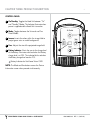
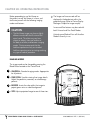
CONTROL PANEL
1 On/Standby: Toggles the Head Unit between “On”
and “Standby” Modes. The Indicator illuminates when
power is supplied and the Head Unit is turned on.
2 Mode: Toggles between the Universal and Fine
Detail Modes.
1
3 Inverse: Inverts the colors within the image field to
project green veins on a dark background.
4
2
4 Size: Adjusts the size of the projected image field.
5 Battery Indicator: Alerts the user to the charge level
5
3
of the Battery. Illuminates solid red when the Battery
charge level is at 25%. The indicator blinks red when
the Battery charge level reaches 10%.
! Battery Indicator for VeinViewer Vision ONLY
NOTE: The Mode and Size buttons access the Device
Information screen when pressed simultaneously.
VE IN V IEWER VI SI ON AND V IS IO N X T N D US ER GUIDE
020-300036-03 rEV. 1 (2012-09)