1
33
IntelliFlo or IntelliPro VF pump
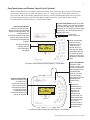
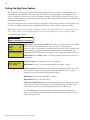
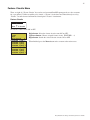
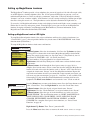
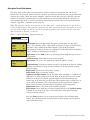
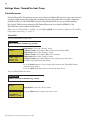
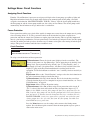
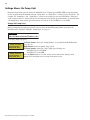
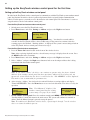
To access the IntelliFlo VF menu:
Getting There
Pump
#1
Pump #2
Pump
Type
Flow
Filtering
Priming
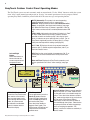
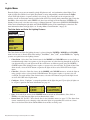
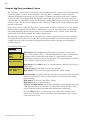
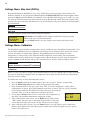
Pump #1 Type
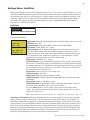
Type:
VF
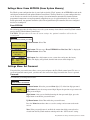
Pump #1
GPM : 30
Circuit:
[ AUX 1
1/8
]
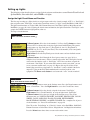
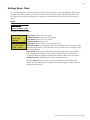
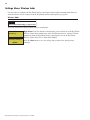
Pump Filtering
Size
: 1500
Turns : 2
Man Filt: 0
iS4/iS10 pump
speed control:
IntelliFlo pump
speed can be
increased or
decreased in
increments from an
iS4 or iS10 spa-side
remote. See “iSx
Pump Control” in
the “Settings” menu
(page 46).
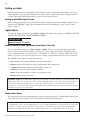
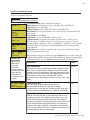
GPM: 73
1927 RPM 1980 W
Filter: 7
Status: NORMAL Status screen
▲
MENU ▼ SETTINGS ▼ INTELLIFLO
PUMP # 1
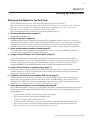
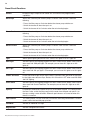
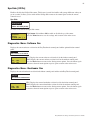
Up or Down button: Choose Pump #1 or Pump #2
Right button: Select Pump #1 to assign as IntelliFlo VF or IntelliFlo VS.
Right button: Select Pump Type.
Up/Down buttons: Choose VS or VF. Select VF (IntelliFlo VF).
Menu button: Press the menu button to save selection and go to the IntelliFlo VS
menu settings.
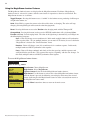
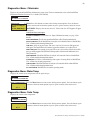
Down button: Choose Flows.
Right button: Access the IntelliFlo VF flow settings.
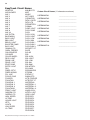
Up/Down buttons: Assign the circuit: None, Spa, Pool, Aux 1-7 (ET8), Aux 1-3
(ET4), Feature 1-8, Aux Extra (only if Solar is not selected, see page 25 and 42),
Heater, Pool Heater, Spa Heater, Freeze, and Hi-Speed. “Aux Extra” is only available
if the Solar output (J17) plug on the EasyTouch motherboard is not being used for
solar equipment.
Right button: Press the Up arrow button and go to the next circuit page settings
(2/8) and repeat the previous steps.
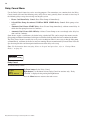
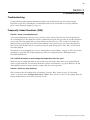
When finished setting up a parameter, press the Menu button to save the settings and
to return to the IntelliFlo VF setting menu. When finished setting up all of the IntelliFlo
VF pump parameters, press the Menu button until the main screen displays.
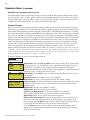
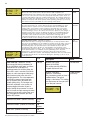
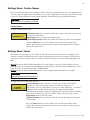
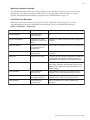
Description
Value
Pool Size/Gallons
The pool size value is expressed as 1000’s of gallons (Kgal).
Enter from 1 to 1000 Kgal for the pool volume. The volume
number can be a close estimate, although the more accurate
the better the turns will be done when employing filter mode.
Filter mode uses this value in coordination with the
parameters from Filter mode to sustain turn rates, flows, and
times.
0-255
Turnovers per day
You can set up to up to eight turns per day. It is
recommended to set one turn per day for energy
conser vation for most common residential pools. Also, refer
to your sanitizer recommendation for additional information.
1-8
Manual Filter GPM (Default is 30 GPM)
Manual Filter sets the flow at which the pump will run if it is
turned on manually. The IntelliFlo pump will only run in the
'Filter' mode during the programmed times. For example, if
the pump is programmed (star t/stop times) for the pool circuit
to run from 8:00 AM to 4:00 PM ever yday. This program or
programs are used by IntelliFlo to calculate at what speed it
must run given those ‘ON’ times to achieve the turnover(s) for
that sized pool for the basic filter mode.
15-130
EasyTouch Pool and Spa Control System User’s Guide