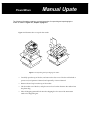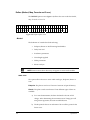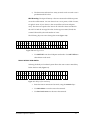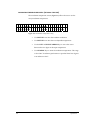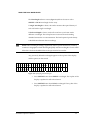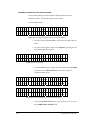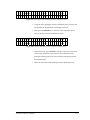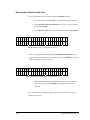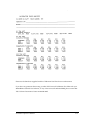
1
PowerWave Microplate Scanning Spectrophotometer Operator’s Manual TM . PowerWave Manual Upate Rev. C1, P/N 7261000 The following information pertains to revised instructions for unpacking and repackaging the reader as shown in Figure 2-1, Chapter 2, page 2-2. Figure 2-1 illustrates how to unpack the reader. Figure 2-1: Unpacking and repackaging the reader • Carefully open the top of the box, and remove the dust cover. The box will include a power cord, an Operator’s Manual, and optionally, a Service Manual. • Remove the end cap from the top of the reader. • Lift the reader out of the box, and place it on a level surface. Remove the reader from the plastic bag. • Place all shipping material back into the shipping box for reuse if the instrument needs to be shipped again. TM ÿþýüûúùø÷ö ôýøóóþóò ôúöý÷üûúñû÷ûðö÷öü For Research & Development Use Only Operator’s Manual MANUAL PART #7261000 REV. C COPYRIGHT 1997 BIO-TEK INSTRUMENTS, INC. ii Notices ______________________________________________________ BIO-TEK INSTRUMENTS, INC. Highland Park, Box 998 Winooski, Vermont 05404-0998 802-655-4040 800-451-5172 800-24-BIOTK (Service) FAX: 802-655-7941 (Sales) 802-655-3399 (Service) E-mail: [email protected] INTERNET: http://www.biotek.com Lionheart Technologies Europe N.V. Sneeuwbeslaan 33 B-2610 Wilrijk, Belgium (32) 3-8290455 FAX: (32) 3-8254749 Copyright © Copyright 1997, Bio-Tek Instruments, Incorporated. No part of this publication may be reproduced, transmitted, transcribed, stored in a retrieval system, or translated into any language without the written permission of Bio-Tek Instruments, Incorporated. Trademarks Bio-Tek is a registered trademark, and PowerWave 200, PowerWave 340, Extensions, RoboReader, KCJr, KCII, KC3, KC4, ELx 800 and ELx 808 are trademarks of Bio-Tek Instruments, Inc. Windows is a trademark of Microsoft, Inc. Restrictions and Liabilities Information in this document is subject to change, and does not represent a commitment by Bio-Tek Instruments, Inc. Changes made to the information in this document will be incorporated in new editions of the publication. No responsibility is assumed by Bio-Tek for the use or reliability of software or equipment that is not supplied by Bio-Tek, or its affiliated dealers. iii Revision Appendix Revision Date A 4/97 B 4/97 Chapter Change First Release Front Pg Changed Enzyme Immunoassay Analyzer to Microplate Spectrophotometer. Changed ELISA-based data to microplate-based data. Changed all references to monochronometer to monochromator. B1 8/97 Inserted a Manual Update correcting the calibration plate Part Number. C 8/97 Corrected Cal Plate PN in Chapters 1 and 4 to 7260522. Corrected Error Codes in Appendix C. Added accuracy and repeatability data to Optical Specifications section. Added Computer Control commands to Appendix B. Printed in the United States of America Bio-Tek Printed Material Part No. 7261000 iv Warnings and Precautions The PowerWave should be operated on a flat surface away from direct sunlight or strong incandescent light. Excessive humidity should be avoided. Hazard Warnings Warning! Power Rating. PowerWave’s must be connected to a power receptacle that provides voltage and current within the specified rating for the system. Use of an incompatible power receptacle may produce electrical shock and fire hazards. Warning! Internal Voltage. Always turn off the power switch and unplug the power cord before cleaning the instrument’s outer surface. Warning! Liquids. Avoid spilling liquids on the reader; fluid seepage into internal components creates a potential shock hazard. Do not operate the instrument if internal components are exposed to fluid. Warning! Software. The microplate reader operator must follow the manufacturer’s assay package insert when modifying software parameters and establishing result calculation methods, using the reader’s on-board software. Warning! Data Reduction Protocol. The reader’s software will flag properly defined controls when they are out of range. It will present all the data with the appropriate error flags in order for the user to determine their validity. Because there have been no limits applied to the raw absorbance data, all information exported via computer control must be analyzed completely. v Precautions The following precautions are provided to help you avoid damaging the system: Caution: Service. The system should be serviced by authorized service personnel. Only qualified technical personnel should perform troubleshooting and service procedures on internal components. Caution: Environmental Conditions. Do not expose the system to temperature extremes. Ambient temperatures should remain between 1540°C. System performance may be adversely affected if temperatures fluctuate above or below this range. Caution: Sodium Hypochlorite. Do not expose any part of the instrument to Sodium Hypochlorite solution (bleach) for more than 30 minutes. Prolonged contact may damage the instrument surfaces. Be certain to rinse and thoroughly wipe all surfaces. Caution: Power Supply. Only use the correct line voltage when operating the Automated Microplate Reader. A four-position line voltage select switch is used to adjust for different line voltages. This switch is located on the power input module. See the section Adjusting line voltage input range in this manual for more details. vi Electromagnetic Interference and Susceptibility USA FCC CLASS A Warning: Changes or modifications to this unit not expressly approved by the manufacturer could void the user's authority to operate the equipment. This equipment has been tested and found to comply with the limits for a Class A digital device, pursuant to Part 15 of the FCC Rules. These limits are designed to provide reasonable protection against harmful interference when the equipment is operated in a commercial environment. Like all similar equipment, this equipment generates, uses, and can radiate radio frequency energy and, if not installed and used in accordance with the instruction manual, may cause harmful interference to radio communications. Operation of this equipment in a residential area is likely to cause interference, in which case the user will be required to correct the interference at his own expense. Canadian Department of Communications Class A This digital apparatus does not exceed Class A limits for radio emissions from digital apparatus set out in the Radio Interference Regulations of the Canadian Department of Communications. Le present appareil numerique n'met pas du bruits radioelectriques depassant les limites applicables aux appareils numerique de la Class A prescrites dans le Reglement sur le brouillage radioelectrique edicte par le ministere des Communications du Canada. vii Based on the testing below, PowerWave bears the CE mark. EC DIRECTIVE 89/336/EEC EN 50081-1, CLASS A-Emissions The system has been type tested by an independent testing laboratory and found to meet the requirements of EC Directive 89/336/EEC for Radiated Emissions and Line Conducted Emissions. Verification was to the limits and methods of EN 55022. The device is classified as EN 55022, Class A. EN 50082-1 Immunity The system was also tested and found to meet requirements for Electrostatic Discharge Susceptibility, Radiated Susceptibility, and Electrical Fast Transient/Burst Susceptibility. Verification of compliance was conducted to the limits and methods of EN 50082-1:1992; IEC 1000-42:1995; IEC 1000-4-3:1995; and IEC 1000-4-4:1995. Safety This device has been type tested by an independent laboratory and found to meet the requirements of: North America ■ Canadian Standards Association CAN/CSA C22.2 No. 1010.1-1992 Safety Requirements for Electrical Equipment for Measurement, Control and Laboratory Use, Part 1: General Requirements International ■ IEC 1010-1 (1990) "Safety requirement for electrical equipment for measurement, control and laboratory use. Part 1, General requirements." EC Directive 73/23/EEC Low Voltage Directive ■ EN 61010-1 (1990) "Safety requirement for electrical equipment for measurement, control and laboratory use. Part 1, General requirements." viii Safety Symbols The following warning and informational symbols may be found in various locations on the PowerWave. Only qualified personnel who recognize shock hazards and are familiar with the safety precautions should use this instrument. Read the manual carefully before operating this instrument. Alternating current Courant alternatif Dreiphasen-Wechselstrom Corriente Atterna Corrente alternata Earth ground terminal Borne de terre Erde (Bettriebserde) Borne de Tierra Terra (di funzionamento) Protective conductor terminal Borne de terre de protection Schutzleiteranscluss Borne de Tierra de Protección Terra di protezione On (Supply) Marche (alimentation) Ein (Verbindung mit dem Netz) Connectado Chiuso ix Off (Supply) Arrest (alimentation) Aus (Trennung vom Netz) Desconectado Aperto (sconnessione dalla rete di alimentazione) Caution (refer to accompanying documents) Attention (voir documents d'accompanement) Achtung siehe Begleitpapiere Atención (vease los documentos incluidos) Attenzione, consultare la doc annessa Caution, risk of electric shock Attention, risque de choc electrique Gefährliche elektrische Spannung Atención, riesgo de sacudida eléctrica Alta tensione (in questo documento Alta tensione non significa “tensione pericolosa” come definito in IEC 417) x Intended Use Statement The PowerWave is an eight-channel, automated, benchtop, general purpose, Microplate Spectrophotometer which performs analyses of a variety of samples. The Performance Characteristics of the data reduction software have not been established with any laboratory diagnostic assay. The user must evaluate this software in conjunction with the specific laboratory diagnostic assay. This reevaluation must include the establishment of new performance characteristics for the specific assay. This system is designed for use with a variety of microplate-based assays. Assay protocol variations are addressed by the developer of the ELISA test kit, in accordance with the test kit's procedure. A versatile curve fitting and statistical software program is preloaded on every PowerWave. Plate templates and formulas are automatically combined with the protocol assay setup. Data results may be printed out, or sent to a computer running a Bio-Tek software package, such as KC Jr. or KC4 for Windows. The software provides: ■ An easy-to-use, menu-driven interface; ■ Endpoint curvilinear regressional and statistical calculations; ■ Curve fitting, with 4-parameter, cubic, quadratic, linear, cubicspline, point-to-point and 2-P (Logit) methods; ■ Formula calculations for more complex mathematical operations; ■ Ability to define controls and positive and negative cutoffs; ■ Kinetic, with maximum slope, R-squared at maximum slope and Onset OD Time analysis; ■ Scanning read mode to provide area under the curve calculations. Specimen Preparation Samples should be obtained, treated and stored following instructions and recommendations contained in the package kit. xi About This Manual The intent of this Operator’s Manual is to quickly instruct the new user how to set up and operate Bio-Tek’s PowerWave. To help you read and understand this manual, certain document conventions have been used. iii Important information will be flagged in this manner, with the information icon that appears at the beginning of this paragraph. Major topic headings start a new page (such as About This Manual, above) to give you a visual and style clue that a new major subject is being introduced. One or more subheadings may appear below each major heading. Registration Card Once the Microplate Reader has been set up, and is running successfully, please take a moment to fill out and mail the postage-paid Warranty Registration card. By sending in the registration card, you’ll be assured of receiving prompt information on product enhancements. xii Warranty This Warranty is limited and applies only to new products, except for computer-based software which is covered under a separate Warranty Policy, manufactured by Bio-Tek Instruments, Inc. (“Bio-Tek”). Bio-Tek makes no warranty whatsoever regarding the condition of used products. Bio-Tek warrants the instrument (hereinafter collectively referred to as “Products” or “Product”) for a period of one (1) year from the original purchase date against defective materials or workmanship. This Warranty is limited to the original purchaser (the “Purchaser”) and cannot be assigned or transferred. All claims under this Limited Warranty must be made in writing to Bio-Tek, Attention: Service Department. Purchaser must ship the Product to Bio-Tek, postage pre-paid. Bio-Tek shall either repair or replace, at its option and without cost to the Purchaser, any Product which in Bio-Tek’s sole judgment is defective by reason of defects in the materials or workmanship. This Warranty is VOID if the Product has been damaged by accident or misuse, or has been damaged by abuse or negligence in the operation or maintenance of the Product, including without limitation unsafe operation, operation by untrained personnel, and failure to perform routine maintenance. This Warranty is VOID if the Product has been repaired or altered by persons not authorized by Bio-Tek, or if the Product has had the serial number altered, effaced, or removed. This Warranty is VOID if any of the Products has not been connected, installed or adjusted strictly in accordance with written directions furnished by Bio-Tek. Batteries and fuses used in any of the Products are not covered by this Warranty. Software utilized in conjunction with any of the Products is not covered by the terms of this Warranty but may be covered under a separate, Bio-Tek software warranty. xiii xiv Table of Contents Notices ............................................................................................. iii Warnings and Precautions .............................................................. v Intended Use Statement ................................................................. xi Chapter 1 Introduction..................................................................1-1 Introducing the PowerWave ............................................................... 1-1 Quality Control .................................................................................... 1-2 Hardware Features ............................................................................. 1-3 Software Features............................................................................... 1-3 Package Contents............................................................................... 1-4 Optional Accessories .......................................................................... 1-4 Specifications...................................................................................... 1-5 Technical Support ............................................................................... 1-8 Chapter 2: Installation...................................................................2-1 The Operating Environment ........................................................................... 2-1 Unpacking and Repackaging the Instrument ............................................... 2-1 After Unpacking, Verify Performance............................................................ 2-3 Before Repackaging the Instrument.............................................................. 2-3 Adjusting the Reader’s Wavelength Table Setting....................................... 2-4 Printing and Data Communications .............................................................. 2-6 Installing a Printer ............................................................................... 2-6 Parallel Port Pin Definition .................................................................. 2-7 Setting Up the Serial Port Communications with Other Devices ........ 2-8 Attaching the Serial Cable .................................................................. 2-8 Serial Port Pinout Description ............................................................. 2-9 Setting Up Communications Parameters ............................................ 2-9 Changing the Baud Rate on the Reader........................................... 2-10 Lamp Replacement ....................................................................................... 2-12 Bulb Removal.................................................................................... 2-13 Adjusting the Line Voltage Input Range ..................................................... 2-14 xv Adjusting the Fuse Configuration or Fuse Replacement .......................... 2-15 Other Utility Options ..................................................................................... 2-17 Setup Options ................................................................................... 2-17 Output Options.................................................................................. 2-19 Read Options .................................................................................... 2-20 Chapter 3: Operation.....................................................................3-1 Introduction ...................................................................................3-1 The Keyboard ..................................................................................... 3-1 The Cooling Fan ................................................................................. 3-2 The Startup Screen ......................................................................................... 3-2 The Main Menu Screen ................................................................................... 3-3 Define ............................................................................................................... 3-4 Select Assay ....................................................................................... 3-4 Assay Name........................................................................................ 3-5 Define (Method, Map, Formula and Curve) ................................................... 3-6 Method.............................................................................................................. 3-6 Read Type..................................................................................... 3-6 Delay in First Read........................................................................ 3-7 Incubation Temperature ............................................................... 3-8 Single or Dual Wavelength............................................................ 3-9 Wavelength Selection.................................................................. 3-10 Number of Kinetic Reads/Kinetic Duration .................................. 3-10 Kinetic Interval ............................................................................ 3-11 Kinetic Number of Reads ............................................................ 3-12 Kinetic Duration ........................................................................... 3-12 Shake Mode Selection ................................................................ 3-12 Shake Time ................................................................................. 3-13 Shake Speed............................................................................... 3-13 Kinetic Data Analysis Selection................................................... 3-14 xvi Number of Kinetic Points Selection ............................................. 3-15 Onset OD Selection..................................................................... 3-15 Well Scanning ............................................................................. 3-16 Map Definition................................................................................................ 3-17 Map Generation........................................................................... 3-18 Mapping Direction ....................................................................... 3-19 Replication Direction ................................................................... 3-19 Start Mapping at Well Location ................................................... 3-22 Blank Map Selection.................................................................... 3-22 Constant Blank Value.................................................................. 3-24 Number of Blanks........................................................................ 3-25 Blank Location............................................................................. 3-25 Number of Standards .................................................................. 3-26 Number of Standard Replicates .................................................. 3-26 Average Standards...................................................................... 3-27 Standard Concentration .............................................................. 3-27 Reuse of Standard Curves .......................................................... 3-28 Number of Controls ..................................................................... 3-30 Type of Control............................................................................ 3-31 Number of Control Replicates ..................................................... 3-31 Location of Controls .................................................................... 3-32 Number of Samples..................................................................... 3-32 Number of Sample Replicates..................................................... 3-33 Sample Location.......................................................................... 3-33 Panel ........................................................................................... 3-35 Formula Definition......................................................................................... 3-40 Formula Type .............................................................................. 3-41 Validation Type Selection............................................................ 3-41 xvii Formula Entry.............................................................................. 3-42 Validation Formula Examples...................................................... 3-44 Number of Required Controls/Blanks.......................................... 3-45 Cutoff Formulas........................................................................... 3-45 Grayzone..................................................................................... 3-46 Positive or Negative Call for Cutoff ............................................. 3-46 Transformations .......................................................................... 3-47 Transformation Formula Definition .............................................. 3-47 Transformation Scope Variable................................................... 3-48 Defining the Curve-Fit................................................................................... 3-52 Curve-Fit...................................................................................... 3-52 Edit Standard Outliers ................................................................. 3-54 Axis Selection.............................................................................. 3-55 Extrapolation of Unknowns.......................................................... 3-55 Reading a Microplate .................................................................................... 3-57 Select Assay................................................................................ 3-57 Run-Time Prompts ...................................................................... 3-58 Enter Number of Samples ........................................................... 3-59 Enter Plate ID .............................................................................. 3-59 Enter Sample ID .......................................................................... 3-60 Prompts for Well Location ........................................................... 3-60 Beginning the Plate Read ........................................................... 3-61 Printing Reports and Assay Lists................................................. 3-62 Result .......................................................................................... 3-63 Map ............................................................................................. 3-64 Assay........................................................................................... 3-64 List............................................................................................... 3-64 xviii Chapter 4: Performance Verification ..........................................4-1 Achieving Maximum Performance................................................................. 4-1 Installation and Operational Qualification Procedures................................ 4-2 Routine Procedure .......................................................................................... 4-4 Accessing Tests and Calibration Using the Utility Option .......................... 4-5 Test Options .................................................................................................... 4-5 System Self Test ................................................................................. 4-6 Checksum ........................................................................................... 4-8 Calibration Validation ..................................................................................... 4-9 Calibration Plate Test.......................................................................... 4-9 Requirements ................................................................................ 4-9 Entering Calibration Plate Specifications .................................... 4-10 Running the Calibration Plate Test.............................................................. 4-12 Calibration Plate Analysis............................................................ 4-13 Linearity Test ................................................................................................. 4-15 Equipment Required ......................................................................... 4-15 Procedure ......................................................................................... 4-16 Verification of Alignment.............................................................................. 4-17 Appendix A: Decontamination .................................................... A-1 Appendix B: Computer Control................................................... B-1 Appendix C: Error Codes............................................................. C-1 Appendix D: Report Format......................................................... D-1 xix xx Chapter 1 Introduction This chapter introduces the PowerWave, and describes its hardware and software features. Instructions on how to contact Technical Assistance are included. Introducing the PowerWave Bio-Tek’s PowerWave is an eight-channel reader-assay system for research and development use only. The reader can serve as a stand-alone system, or as an integral part of a larger laboratory network, sending, receiving and manipulating assay data. The PowerWave is a spectrophotometer that has the capability of spectral scanning using a monochromator. This allows the user to perform endpoint and kinetic analysis, in 96-well microplates, using any wavelength between 200 and 800 nm for PowerWave 200 and 340 to 800 nm for PowerWave 340, thereby achieving the maximum absorbance for any sample. The reader features superior optical specifications, with an extended dynamic range of up to 4.000 absorbance units. The instrument’s onboard processor, 2 X 24 LCD screen and membrane keys allow easy definition and management of assay protocols, templates, formulas and data. Results can be output in a printed report format, or exported for use in a variety of microplate-based data manipulation applications. Bio-Tek’s PowerWave may be configured with all, or selected options for optimum performance: • PowerWave 340 instruments are capable of reading plates at wavelengths between 340 and 800 nm. • I-model instruments have a four-zone incubation chamber which controls temperature from 4° above ambient to 50° C. • In addition, options such as an internal bar-code scanner and robot friendly (RoboReader) are available. Quality Control __________________________________________________ It is considered to be good laboratory practice to run laboratory samples according to instructions and specific recommendations included in the package insert for the test to be conducted. Failure to conduct Quality Control checks could result in erroneous test data. • Regulatory Agency Approvals : The instrument has been tested, approved and externally labeled to show compliance to the following test standards. • ETL CAN/CSA - C22.2 No. 1010.1-92 EN 61010-1 • CE EN50081-1 (Emission) EN61010-1 (Low Voltage Direction) EN50082-1 (EMC Susceptibility) • FCC Subpart 15 (EMI) • Canadian Standards Association CAN/CSA C22.2 No. 1010.1-1992 Safety Requirements for Electrical Equipment for Measurement, Control and Laboratory Use, Part 1: General Requirements Accessories Included • Operator’s manual • Line cord for the country of use • Dust Cover • 1-2 Parallel Cable Introduction Hardware Features ________________________________________________ • Eight optics channels, with an additional reference channel • Α N range of 200-800 nm (PowerWave 200) 340-800 nm (PowerWave 340) • A 2 X 24 LCD display • A membrane keypad with alphanumeric keys • Adjustable plate shake frequency and times • Reads 96 well microplates with .355" well centers • Operates from 100, 120, 230, or 240 VAC @ 50-60 Hz (with external switching) • One serial COM port (25-pin male connector) and one parallel port (25-pin female connector) • Internal bar code option • Four-zone incubation chamber option • Robotics interface option Software Features _______________________________________________ • Easy-to-use menu-driven interface • Endpoint, Kinetic and Scanning calculations • Curve fitting, with 4-parameter, cubic, quadratic, linear, 2-P, cubicspline and point-to-point methods • Transformation and formula calculations for more complex mathematical operations, including validations • 55 assays are available onboard; 75 assays can be pre-programmed and exported to the reader using Bio-Tek’s Extensions software. • Automatically stores results for last 10 plates. • Spectral scanning on PowerWave 200 using KC4 software. PowerWave Operator’s Manual 1-3 Package Contents _______________________________________________ The contents of the PowerWave package includes: • Microplate Reader • Power Cord • Operator’s Manual and Warranty Registration Card • Dust cover (PN 7342066) • Parallel cable (PN 71072) Optional Accessories: 1-4 • Service Manual for all instrument models (PN 7261001) • Replacement lamp assembly (PN 49789) • Serial cable (PN 75053) • Calibration Test Plate (PN 7260522) Introduction Specifications___________________________________________________ Optical Specifications • The following specifications apply to 96-well, flat- or round-bottom plates, single wavelength endpoint or kinetic (with intervals of at least 20 seconds) readings: λ range: λ accuracy: λ repeatability: 200 to 800 nm for PowerWave 200 340 to 800 nm for PowerWave 340 +/- 2 nm for PowerWave 200 and 340 +/- 0.2 nm for PowerWave 200 and 340 Regular read mode end point or kinetic with interval at least 20 seconds. Read time: 20 seconds on single wavelength 50 seconds on dual wavelength Absorbance Measurement Range: 0-4.000 Abs (200/340 -900 nm) Accuracy: +/- 1% +/- .010 Abs from 0 to 2.000 Abs +/- 3% +/- .010 Abs from 2.000 to 3.000 Abs (measured with neutral density filters calibration test plate @ 405, 450, 490, 550, 630, 690 nm) Linearity: +/- 1% from 0 to 2.000 Abs +/- 3% from 2.000 Abs to 3.000 Abs (measured @ 405 nm) Repeatability (STD): +/- 1% +/- .005 Abs from 0 to 2.000 Abs +/- 3 % from 2.000 Abs to 3.000 Abs (measured @ 405 nm) Fast mode of read or spectral scanning When read intervals from 10 seconds to 20 seconds are selected, or spectral scanning is performed, the specifications are as follow: Accuracy: +/-1%+/-.010 Abs from 0 to 2.000 Abs +/- 3% +/- 0.010 Abs from 2.000 Abs to 2.500 Abs (measured with neutral density filters calibration test plate @405, 450, 490, 550, 630, 690 nm) Linearity: +/- 1% from 0 to 2.000 Abs +/-3 % from 2.000 to 2.500 Abs (measured @ 405 nm) PowerWave Operator’s Manual 1-5 Repeatability (STD): +/- 1% +/- 0.005 Abs from 0 to 2.000 Abs +/- 3% +/- 0.005 from 2.000 to 2.5 Abs (measured @ 405 nm) • Display: 2 X 24 Character LCD • Light Source: Xenon Arc Flash bulb • Dimensions: 16.0” deep X 15.5" wide X 9.75" high 40.1 mm deep X 39.3 mm wide X 24.8 mm high • Weight: 40 lb. maximum (18.1 kg) • Environment: Operational temperature 18-40° C • Humidity: 10-85 % non-condensing • Power Consumption: 100VA Four Voltage Ranges accommodated by voltage selection switch: • Range 1 100 VAC 90-110 VAC, 50-60 Hz Range 2 120VAC 103-127 VAC, 50-60 Hz Range 3 230 VAC 207-253 VAC, 50-60 Hz Range 4 240VAC 216-264 VAC, 50-60 Hz Incubation (optional): Temperature Control: Temperature Variation: • 4° over ambient to 50° C +/- 0.5° C @ 37°C ( with the plate sealed). Optional internal Bar Code reader : If enabled, the internal bar code reader recognizes a number of common bar code types during the plate read operation. Specific information about each bar code type is available from Bio-Tek Technical Services. The reader’s bar code option is compatible with the following bar code types: CODABAR CODE 39 INTERLEAVED 2 of 5 CODE 11 CODE 93 1-6 UPC EAN MSI PLESSEY CODE 128 Introduction • Robot Interface Option : The Robot interface (Model-R) allows the reader to function with an autoloading robot. Using computer control commands from a host PC, the reader’s functions can be controlled in conjunction with the robotic system. The Robot interface model can be configured with all options available for the standard PowerWave. PowerWave Operator’s Manual 1-7 Technical Support ____________________________________________________________________________________________________________________________________ Bio-Tek’s PowerWave is backed by a superior support staff. If the Microplate Reader ever fails to work perfectly, please contact the Technical Support Staff. • You can telephone the Technical Assistance Center between 8:30 AM and 6:00 PM Eastern Standard Time, Monday through Friday, except Holidays. The number is (800) 242-4685 ; Outside of the USA (802) 655-4044; European (32) 3-829 0455. Emergency Assistance is available Monday through Friday, 6:00 PM to 9:00 PM EST. Fax: (802) 655-3399. • E-mail: [email protected] • INTERNET: http://www.biotek.com • You may write a letter with your comments and send it to: Bio-Tek Instruments Technical Assistance Center Highland Park, Box 998 Winooski, VT USA 05404-0998 • Lionheart Technologies Europe N.V.: Sneeuwbeslaan 33 Wilrijk, Belgium FAX: (32) 3-8254749 Whichever method of contact you choose, please provide the following information. 1-8 • Product name and serial number • Revision level of your software • The specific steps which reproduce your problem • A daytime phone number • Your name / company • A Fax number (if available) • E-mail address (if available) Introduction Chapter 2 Installation This chapter includes instructions for unpacking and setting up the PowerWave and instructions for connecting printers and/or serial devices. The Operating Environment For best operation, install Bio-Tek’s PowerWave on a level surface in an area where ambient temperatures between 18°C (65°F) and 40°C (104°F) can be maintained. The reader is sensitive to extreme environmental conditions. Conditions to avoid are: • Excessive humidity: Condensation directly on the sensitive electronic circuits can cause the instrument to fail internal self checks. • Excessive ambient light: Bright sunlight or strong incandescent light can reduce the linear performance range and affect the instrument’s readings. • Dust: Optical density readings may be affected by extraneous particles (such as dust) in the microplate wells. A clean work area is necessary to ensure accurate readings. Unpacking and Repackaging the Instrument • If the shipping box has been damaged, inspect the instrument for visible dents and scratches as you unpack it. • If the reader is damaged, notify the carrier and your manufacturer’s representative. Keep the shipping cartons and the packing material for the carrier's inspection. The manufacturer will arrange for repair or replacement of your instrument immediately, before the shipping-related claim is settled. • If the reader is shipped to the factory for repair or replacement, it must be carefully repackaged using the original packing materials. Shipping with improper packaging materials may void your warranty. If the original packing materials have been damaged, replacements are available from the manufacturer. • An RMA (Return Materials Authorization) must be obtained before returning equipment for service. Contact Bio-Tek’s Technical Assistance Center at 1-800-242-4685 for an RMA number, and mark the RMA number on the outside of the shipping container. Figure 2-1 illustrates how to unpack the reader. Figure 2-1: Unpacking and packing the reader • Carefully open the top of the box, and remove the dust cover. The box will include a power cord, an Operator’s Manual, and optionally, a Service Manual. • Remove the end caps from the reader. • Lift the reader out of the box, and place it on a level surface. Remove the reader from the plastic bag. • 2-2 Place all shipping material back into the shipping box for reuse if the instrument needs to be shipped again. Installation After Unpacking, Verify Performance Each time the PowerWave is turned on, it automatically runs a self-test. If an error occurs, contact Bio-Tek. Before Repackaging the Instrument: • Decontaminate the reader prior to shipping. (Refer to the Decontamination procedure in Appendix A.) • Once the reader is clean, pack it in its original shipping box, using original packing materials. This shipping system was designed to be used no more than five times. If the container is damaged and/or has been used more than five times, contact Technical Services for a new set of shipping materials. PowerWave Operator’s Manual 2-3 Adjusting the Reader’s Wavelength Table Setting To check, or change the software wavelength: • R E A D Y Power up the reader. At the Main Menu Screen (Figure 2-2), press the soft key under the UTIL menu option. 9 R E A D : 4 5 P M D E F I N E 0 5 / 0 9 R E P O R T / 9 5 U T I L Figure 2-2: The Main Menu screen The Utilities Options menu appears (Figure 2-3). S E L E C T T E S T S U T I L I T Y S E T U P O P T I O N ? O U T P U T R E A D Figure 2-3: The Utilities Option Screen • E D I T From the Select Utility Option menu, press the soft key beneath the menu option SETUP. The Edit Setup Information screen is displayed (Figure 24). S E T U P D A T E T I M E I N F O R M A T I O N ? L A M B D A m o r e * Figure 2-4: The Edit Setup Screen 2-4 • From this menu, press the soft key under the LAMBDA menu option. • The wavelength will be displayed (Figure 2-5). To advance to the next wavelength, press ENTER. • To change the wavelength number, use the NUMERIC keypad to enter a number at the cursor location. The cursor will automatically advance to the next editable field. To save the entry and move to the next wavelength on the table, press the ENTER key. Installation E N T E R L A M B D A # 1 W A V E L E N G T H : 4 0 5 Figure 2-5: The Wavelength Entry screen • E D I T When the last wavelength has been entered, the software exits the routine, and displays the following screen (Figure 2-6): S E T U P D A T E T I M E I N F O R M A T I O N ? L A M B D A * M O R E Figure 2-6: The Edit Setup screen • Press the Main Menu key to return to the Main Menu. PowerWave Operator’s Manual 2-5 Printing and Data Communications _____________________________ Installing a Printer The PowerWave’s parallel port (LPT1) (see Figure 2-7) allows connection to Epson-compatible printers such as the Canon Bubble Jet. The Bubble Jet printer should be configured for Epson graphics compatibility. The reader’s parallel port requires a 25-pin D-sub connector. Parallel Port Serial Port Figure 2-7: Serial and Parallel connectors The parallel port’s pinout definition is described in Table 2-1. A printer cable is supplied with the reader. Should the cable that came with the reader become lost or damaged, Bio-Tek offers replacement printer cables. Contact your authorized Bio-Tek dealer for information on cable prices and availability. 2-6 Installation Monochromator Viewing Port To attach a printer to the PowerWave: iii • Power off the printer and place it in a location adjacent to the PowerWave. • Attach one end of the parallel cable to the printer's parallel port. • Attach the other end of the cable to the reader’s Parallel Port, located on the instrument’s rear panel. • Make sure the securing screws on both ends of the cable are tightened, and power up the reader and printer. IMPORTANT: To avoid system instability, connect the printer to the reader before powering up the reader. Turn on the PowerWave first, then the printer. Parallel Port Pin Definition Table 2-1 illustrates the pin definitions for the reader’s 25-pin (socket-female) D-sub Parallel connector. Parallel Port Pinout Pin 1 2 3 4 5 6 7 8 9 10 11 12 13 Signal PSTROBE D0 D1 D2 D3 D4 D5 D6 D7 NC BUSY NC NC Pin Signal 14 15 16 17 18 19 20 21 22 23 24 25 NC NC RESET NC GND GND GND GND GND GND GND GND Table 2-1: Parallel Connector Pinouts PowerWave Operator’s Manual 2-7 Setting Up the Serial Port for Communications with Other Devices The PowerWave has a 25-pin serial (RS232) port located on the rear panel of the instrument (see Figure 2-7). The serial port allows the reader to communicate with a computer, using standard communications software and/or RS232 protocols. Appendix B contains information on required protocols for computer control of the reader. Attaching the Serial Cable 2-8 • Power down the computer and the reader. • Connect the appropriate serial cable to both machines. The serial port on the reader is a DTE configuration with a 25-pin (pinmale) D-sub connector. The connector’s pinout is illustrated in Table 2-2. • Power up the reader and the computer. • Ensure that the PowerWave and the computer are operating with the same communications settings. Installation Serial Port Pinout Description Table 2-2 describes the reader’s serial /RS232 pin connection. Serial Pin Description Pin Signal Pin Signal 1 2 3 4 5 6 7 8 9 10 11 12 13 NC TX RX RTS CTS DSR GND DCD NC NC NC NC NC NC NC NC NC NC NC DTR NC RI NC NC NC 14 15 16 17 18 19 20 21 22 23 24 25 Table 2-2: Serial Pinout Description Setting Up Communications Parameters Before serial communications are initiated between the PowerWave and another device, the communication parameters (Baud Rate, Data Bit configuration and Parity status) must match on both devices. The reader’s default communication parameters are: • 9600 Baud, • 8 Data Bits, • 2 Stop Bits, and • No Parity. The user may change the Baud rate on the reader from the recommended default setting of 9600 to 1200 or 2400. Data bits, Stop Bits and Parity are not user configurable. Thus the communications software operating on the host computer device should be set to 8, 2 and None. PowerWave Operator’s Manual 2-9 Changing the Baud Rate on the Reader To change the baud rate from the default of 2400, to either 1200 or 9600: • R E A D Y Power up the instrument. At the Main Menu screen 2-8), press the soft key beneath the menu option UTIL. 9 R E A D : 4 5 P M D E F I N E 0 5 / R E P O R T 0 9 / 9 5 U T I L (Figure Figure 2-8: The Main Menu screen • S E L E C T T E S T S At the UTILITY OPTIONS screen, press the soft key beneath the menu option SETUP (Figure 2-9). U T I L I T Y S E T U P O P T I O N ? O U T P U T R E A D Figure 2-9: Selecting Setup • E D I T D A T E E D I T R S 2 3 2 At the EDIT SETUP INFORMATION screen, press the soft key beneath the *MORE menu option to advance to the EDIT SETUP / RS232 option screen (Figure 2-10). S E T U P T I M E S E T U P C A L I N F O R M A T I O N L A M B D A * M O R E I N F O R M A T I O N ? P L A T E * M O R E Figure 2-10: Select *MORE to advance to the RS232 menu 2-10 Installation • Press the soft key beneath the RS232 menu option to access the BAUD RATE selection menu (Figure 2-11). The top line of the display shows the Baud rate currently set in memory. S E L E C T B A U D R A T E : 1 2 0 0 2 4 0 0 9 6 0 0 9 6 0 0 V I E W Figure 2-11: Selecting the Baud Rate R S 2 3 2 2 • To change the BAUD rate, press the soft key beneath the desired baud rate. The display (top line) automatically updates to reflect the new choice. • To view the reader’s other communication settings (Figure 2-12), press the soft key beneath the VIEW menu option. S E T T I N G S : N O S T O P - B I T S 8 P A R I T Y D A T A - B I T S Figure 2-12: Viewing Other Communication Settings PowerWave Operator’s Manual 2-11 Lamp Replacement _______________________________________________ The reader’s lamp should operate without replacement for about 1 billion flashes. The intensity of the lamp will slowly drop over time until the reader’s run time self check detects a low signal, and warns the user with a displayed message. The bulb should be replaced at this time, using a replacement bulb part numbered PN 49789. Refer to Figure 2-13 for a detailed view of access to the lamp assembly. Bulb Housing Bulb Socket Bottom Plate Mounting Hardware Figure 2-13: Location of the lamp assembly 2-12 Installation Bulb Removal • Always wear safety glasses when handling the bulb. • Turn the PowerWave off and let it sit for 5 minutes before proceeding. • Remove the bottom plate mounting hardware (6). • Remove the bulb socket mounting hardware (2) and carefully remove the bulb housing. • Remove the old bulb from the socket. • Using lens paper or gloves, replace the bulb and mount it back into the bulb housing. There should be no fingerprints on the bulb. • Replace the bottom using the mounting hardware. PowerWave Operator’s Manual 2-13 Adjusting the Line Voltage Input Range The PowerWave is equipped with a four-voltage range power input module. This power input module, located on the right side of the instrument, can be adjusted for 100 VAC, 120 VAC, 230 VAC and 240 VAC voltage inputs. The setting can be determined visually by observing which indicator hole on the power input module has a peg within it. The ON/OFF switch and fuses are also housed within the power input module. The following instructions can be used to change the input voltage range. Figure 2-14 illustrates the power input module. Figure 2-14: Selecting voltage input 2-14 • Unplug the reader and remove the power cord. • Use a small flat-blade screw driver to pop the fuse holder out of the power input module. Installation • A small voltage select switchboard is located on the right of the power input module. The switchboard, which can be removed with needle nose pliers, can be oriented four ways to select four different voltage input ranges. • Once the switchboard is removed, text can be read on one side of the board. This text identifies the switch positions. The text is always facing the ON/OFF switch when installed in the power input module. The text matching the desired voltage range should be on the edge of the switchboard which goes into the power input module as the arrow on the board indicates. The white plastic indicator will need to rotate around so that it fits into the correct groove on the switch board. • Once the switchboard is reinstalled, the white plastic indicator peg should line up with the fuse holder voltage indicator holes. If the peg does not fit in the hole which indicates the voltage intended, the switchboard is not installed correctly. Do not power up the instrument until the voltage input range to be used is indicated correctly by the peg. Adjusting the Fuse Configuration or Fuse Replacement Both USA and European fuses are installed in the reader’s power input fuse module. The reader’s fuses are configured at the factory prior to shipping. Use the following procedure if you need to change the fuse configuration, or replace fuses. A failed fuse is usually an indication of another problem which a new fuse is not likely to fix. Contact Technical Services if the fuse replacement fails to rectify the problem. • Use a small, flat-blade screw driver to remove the fuse module from the power input module. PowerWave Operator’s Manual 2-15 • The fuse module has two fuse configurations: The USA configuration has a fused Hot (PN 46023) .75 amp slo blo). The European configuration has both Hot and Neutral fused (PN 46051) .315 amp slo blo T 5 X 20 mm. • To replace a bad fuse, pop out the old fuse and replace it with the correct new one. • The configuration of the fuse module (U.S. or European) is determined by which fusing network is facing the inside of the power input module. To change the configuration, remove the Phillips head screw that anchors the fuse holder. Remove the fuse holder and turn it over. Replace the screw and reinstall the fuse module in the power input module. 2-16 Installation Other Utility Options ______________________________________________ The PowerWave may be configured a number of ways, depending on user preference. Configuration options are accessed via the Utility Options menu (Figure 2-15), and include: • SETUP: Setting the date and time. • OUTPUT: Selecting whether reports will be output to a Printer, the Computer display or both; choosing a Column or Matrix Report format; and determining if Curve Fits will be printed. • READ: Whether prompts are required for Plate IDs, Sample IDs, and Sample Counts. • TESTS: System, which checks reader optics; CHKSUM, which checks version of software installed; CALPLATE, which runs Calibration Plate Test. See page 4-5 for more information. To set these user-configurable options: • S E L E C T T E S T S At the Main Menu screen, press the soft key beneath UTIL to access the Utility Options menu. U T I L I T Y S E T U P O P T I O N ? O U T P U T R E A D Figure 2-15: Selecting Setup, Output and Read to Access Configuration Options Setup Options E D I T D A T E • At the UTILITY OPTIONS screen, press the soft key beneath the menu option SETUP. • At the EDIT SETUP INFORMATION screen, press the soft key beneath DATE (Figure 2-16). S E T U P T I M E I N F O R M A T I O N L A M B D A * M O R E Figure 2-16: Selecting the Date Option PowerWave Operator’s Manual 2-17 • D A T E : Enter the new date, using the NUMERIC keys. The cursor is positioned under the first editable field, and advances automatically. To change the date format , press the soft key beneath MMDDYY or DDMMYY. The display updates to reflect the new format (Figure 2-17). 0 3 / 1 6 M M D D Y Y / 9 5 M D Y D D M M Y Y Figure 2-17: Entering the Date / Selecting the Date Format • Press ENTER to return to the EDIT SETUP INFORMATION screen. • To edit the TIME, press the soft key positioned beneath the TIME menu option. At the Time entry screen (Figure 2-18), use the NUMERIC keys to enter the correct time. The cursor is positioned at the first editable field. T I M E : 0 3 1 2 H O U R : 1 1 P M 2 4 H O U R 1 2 H R A M / P M Figure 2-18: Entering the Time / Selecting the Format 2-18 • Select a 12- or 24-hour format by pressing the soft key beneath these options. The display automatically updates with the new time / format. • Press the Previous Screen key to return to the SELECT UTILITY OPTIONS menu. Installation Output Options • R E P O R T At the SELECT UTILITY OPTIONS screen, press the soft key beneath OUTPUT to set report output preferences (Figure 2-19). O U T P U T ? P R I N T B O T H C O M P U T E R B O T H Figure 2-19: Selecting Report Output R E P O R T • Any previously defined selection appears on the top line of the display. Press the soft key beneath the desired option (PRINT, COMPUTER, BOTH) to change the output device. • Press ENTER to advance to the REPORT TYPE menu screen (Figure 2-20). T Y P E ? C O L U M N M A T R I X M A T R I X B O T H Figure 2-20: Selecting Report Type • S A M P L E S Any previously defined selection appears on the top line of the display. Press the soft key beneath the desired option (COLUMN, MATRIX, BOTH) to change the Report Type. The display will automatically update with the new type (Figure 221). I N Y E S C O L R P T ? N O N O Figure 2-21: Choosing Whether to Include samples in Column Report • If NO is selected, the column report will only include standard blank and control well results. • Press ENTER to advance to the PRINT CURVE FIT screen (Figure 2-22). PowerWave Operator’s Manual 2-19 P R I N T C U R V E - F I T ? Y E S N O N O Figure 2-22: Choosing Whether to Print Curve Fit data • Any previously defined selection is displayed on the top line of the screen. To change the report option, press the soft key under YES or NO. The display updates to reflect the selection. • Press ENTER to return to the SELECT UTILITY OPTION screen. • At the SELECT UTILITY OPTIONS screen, press the soft key beneath READ to set up Reader Prompt preferences (Figure 223). Select YES to prompt for identifications and sample counts before a microplate is read. • Press the soft key beneath YES or NO to select Plate ID prompts for microplate identification. Sample ID will prompt for an identification for each sample. Sample Count will ask for the number of samples on each plate. • Pressing ENTER after each selection advances the display. • When selections are completed, the display returns to the SELECT UTILITY OPTION screen. Read Options P R O M P T Y E S P R O M P T Y E S P R O M P T Y E S F O R P L A T E I D ? N O N O F O R S A M P L E I D ? N O N O S A M P L E C O U N T ? N O N O Figure 2-23: Selecting Read Preferences 2-20 Installation Chapter 3: Operation This chapter includes instructions for operating the PowerWave, and its software. Introduction The PowerWave features a 25-pad keyboard and a 2 X 24 character LCD display, allowing the user to access the reader’s program menus to view test results. The reader’s bidirectional serial port allows computer control of the instrument, and provides the means for downloading additional assay definition files to the instrument. The Keyboard Figure 3-1 shows the instrument’s keyboard layout. Figure 3-1: Keyboard The Cooling Fan Located on the bottom right edge of the instrument is the switch which activates the cooling fan. When the PowerWave is on, the temperature in the measurement chamber will be approximately 7°C above ambient temperature. For users that need the measurement chamber to be close to ambient, Bio-Tek recommends using the cooling fan. The fan will bring the temperature within 4°C of ambient. This would be important for kinetic measurements that need to be made close to room temperature. The fan should be off when non-temperature-sensitive testing is being completed, as it may introduce dust into the internal workings of the instrument. The Startup Screen The PowerWave performs a self-test when powered on, displaying the Startup screen until initialization is complete. During this period, no keys are active. Should the instrument fail to pass the self-test, a beep will sound, and an error code will display. Refer to Appendix C - Error Codes, to interpret this code. Contact Bio-Tek Instrument’s Technical Assistance Center between 8:30 AM and 6:00 PM Eastern Standard Time, Monday through Friday, except holidays, at (800) 242-4685; outside of the USA, at (802) 655-4044; and in Europe, at (32) 3-829 0455 for assistance on troubleshooting this error. I N S T R U M E N T S E L F - T E S T . 3-2 I D . . Operation The Main Menu Screen Once the system is initialized, the Main Menu Screen is displayed (Figure 32). The keyboard’s four “soft keys,” located below the on-screen menu options (Read, Define, Report and Util), are activated, and may be selected. R E A D Y R E A D 9 : 4 5 P M D E F I N E 0 5 / 0 9 R E P O R T / 9 5 U T I L Figure 3-2: Main Menu Screen Press the “soft key” that corresponds to a displayed menu option to activate that option: • READ option (or, press the key labeled READ on the keyboard) for plate reading prompts. The user will be asked to select an assay from a list of choices. • DEFINE option: Allows the creation of a reading and data reduction protocol. The user will be prompted to select an assay from an assay definition list. • REPORT option: Allows printing of results and protocol descriptions. The user will be prompted for the name of a previously run assay with valid data. • UTIL option: The user will be prompted to select options from the list of onboard utilities. PowerWave Operator’s Manual 3-3 Define The Main Menu option, DEFINE, allows the user to edit previously defined assays stored in memory. • From the Main Menu, press the soft key beneath the DEFINE menu option to access the SELECT ASSAY NUMBER screen. Select Assay At the Select Assay Number screen, • Use the NUMERIC keys to enter the number of any predefined Assay Definition Files stored in the reader’s memory, or the OPTION key to advance one assay at a time. The cursor is positioned at the first editable field, and advances automatically. The numeric range depends on the number of assays programmed in the reader’s memory. (The reader has 55 “open” assays available.) The assay’s name and number are displayed on the screen (Figure 3-3). S E L E C T N A M E A S S A Y N U M B E R : 0 1 : H B S -A G 1 Figure 3-3: Assay Selection screen Press ENTER to advance to the EDIT ASSAY NAME screen. You may change the default assay number to a more descriptive one (see assay name below): • CLEAR: Clears the reader’s LCD display. • MAIN MENU: Returns the display to the Main Menu screen. • PREVIOUS SCREEN: Returns the display to the previous screen. • ENTER key: Saves the screen and advances the display to the next screen. iii Note: Throughout this manual, these keys will continue to have these functions within each screen. 3-4 Operation Assay Name At the EDIT NAME screen, it is possible to edit the name assigned to the assay (Figure 3-4). The assay name can be up to 16 characters. E D I T N A M E > H B S - A G 1 - / : S P A C E Figure 3-4: Assay Name screen • Use the ALPHA and NUMERIC keys to change the Assay name. The cursor is positioned at the first editable field. • Use the OPTION key to sequentially advance the character positioned above the cursor. The characters will cycle through the alphabet (A-Z), with a space following Z. • Use the LEFT & RIGHT ARROW keys to move the cursor to the previous or next editable field. The cursor will wrap around the edit field. • Use SOFT KEYS 1, 2, 3 & 4 when using alphanumeric characters on the display above the soft key in the assay name. PowerWave Operator’s Manual 3-5 Define (Method, Map, Formula and Curve) The DEFINE Option screen (Figure 3-5) allows the user to edit the Method, Map, Formula or Curve Fit. D E F I N E M E T H O D M A P F O R M U L A C U R V E Figure 3-5: Define Option screen Method The definition of a method includes selecting: iii • Endpoint, Kinetic or Well Scanning Read Modes • Delay first read • Incubation parameters • Wavelengths applied • Shake parameters • Kinetic analysis NOTE: Some screens shown here may not appear on some reader models. READ TYPE This option allows the user to enter which read type, Endpoint, Kinetic or Scan. Endpoint: The plate is read once. The unit of measure is Optical Density. Kinetic: The plate is read several times. Three different types of data are available: a) For a rate determination, the data calculated is the rate of OD change. After determining the maximum rate of change per well using linear regression, the units are milliOD/min. b) The R-squared value is an indication of how well the points fit the linear curve. 3-6 Operation c) The Onset time indicates how many seconds it took to reach a user’s predetermined OD value. Well Scanning: The Optical Density values are measured at different points across the well diameter. You can choose from 1 to 31 points; 15 left of center, 15 right of center. If you choose 1, then it would be read as an endpoint assay. The data out is equal to the sum of all of the OD values recorded for the well. To find the average OD value for the region scanned, divide the scanned OD result by the total number of scans. The following keys are active during this screen (Figure 3-6): R E A D T Y P E : K I N E T I C E N D P O I N T K I N E T I C S C A N Figure 3-6: Read Type screen • Use SOFT KEY 1 to select Endpoint read mode. Use SOFT KEY 2 to select Kinetic read mode. DELAY IN FIRST READ ENTRY Selecting the Delay in First Read option allows the user to enter a time delay before the first read (Figure 3-7). D E L A Y T I M E : F I R S T R E A D X X : X X Figure 3-7: Delay in first read entry • Enter the time in minutes and seconds, using the numeric keys. • Use Main Menu to save the time value entered. • Use Previous Screen save the time value entered. PowerWave Operator’s Manual 3-7 INCUBATION TEMPERATURE ENTRY (OPTIONAL FEATURE) The incubation temperature screen (Figure 3-8) allows the user to set the assay incubation temperature. I N C U B A T I O N A M B I E N T T E M P : 3 7 C T E M P E R A T U R E Figure 3-8: Incubation Temperature entry • Use SOFT KEY 1 or 2 to select ambient incubation. • Use SOFT KEY 3 or 4 to select an adjustable temperature. • Use the LEFT and RIGHT ARROW keys to move the cursor between the two digits on the input temperature. • Use NUMERIC keys to enter the incubation temperature. The range is 25 to 50° C. Incubation performance is specified from four degrees over ambient to 50° C. 3-8 Operation SINGLE OR DUAL WAVELENGTH The Wavelength selection screen (Figure 3-9) allows the user to select SINGLE or DUAL wavelength for the assay. If single wavelength is chosen, the reader measures the optical density of each well with a single wavelength. If dual wavelength is chosen, each well is read twice, each time with a different wavelength. The microplate is not removed from the reading chamber between the two measurements. The final reported optical density is the difference between the two readings. iii NOTE: Dual wavelength readings significantly reduce optical interference caused by scratches or fingerprints which absorb light equally at both wavelengths. Choose a REF filter that is far from the MEAS filter in the spectrum for best results. Any previously defined wavelength appears on the top line of the display, and the options on the second. W A V E L E N G T H : S I N G L E D U A L D U A L Figure 3-9: Specifying the Wavelength • Press SOFT KEY 1 to select SINGLE wavelength. The top line of the display is updated to reflect the selection. • Press SOFT KEY 2 to select DUAL wavelength. The top line of the display is updated to reflect the selection. PowerWave Operator’s Manual 3-9 WAVELENGTH SELECTION The MEAS selection screen (Figure 3-10) allows the user to select the wavelength(s) for the assay. Any previously defined wavelength appears on the top line of the display and the options on the second. M E A S : 4 0 5 M E A S 4 5 0 R E F : 4 5 0 : 6 3 0 4 5 0 R E F : 6 3 0 4 9 0 M O R E 6 3 0 3 4 0 Figure 3-10: Specifying the wavelength • Use SOFT KEYS 1, 2, 3 & 4 to select the wavelength option displayed above the soft key. The display updates to reflect the selection. • Use the LEFT or RIGHT ARROW keys to move the cursor between the measurement and reference filter selections. NUMBER OF KINETIC READS / KINETIC DURATION SELECTION This menu allows the user to either select the total number of kinetic reads or the length of time the assay will run (kinetic duration) (Figure 3-11). Any previously defined value is shown on the top line of the display and the options on the second. K I N E T I C : T O T A L T O T A L R E A D S R E A D S D U R A T I O N Figure 3-11: Kinetic Read and Duration selection screen 3-10 Operation • Use SOFT KEY 1 to select the total reads option. • Use SOFT KEY 3 to select the duration option. KINETIC INTERVAL ENTRY Use this screen (Figure 3-12) to enter the interval of time time (in hours, minutes and seconds) between each kinetic read. K I N E T I C I N T E R V A L : 0 1 : 2 3 : 5 6 Figure 3-12: Kinetic Interval entry screen • Use the NUMERIC keys to enter the time duration. Valid ranges are: 0-1 hours, 0-59 minutes and 0-59 seconds. The number of Reads = Duration / Interval must be less than or equal to 40 and more than or equal to 2. • Use the LEFT and RIGHT ARROW keys to move to the next or previous numeric entry fields. PowerWave Operator’s Manual 3-11 KINETIC NUMBER OF READS ENTRY Use this screen (Figure 3-13) to enter the number of kinetic reads. K I N E T I C N U M B E R T O T A L O F R E A D S : 1 0 Figure 3-13: Kinetic Reads entry screen • Use the NUMERIC keys to enter the number of reads required. The range is 2 to 40 reads. KINETIC DURATION ENTRY Use this screen (Figure 3-14) to enter (in hours, minutes and seconds) the duration of the kinetic reaction. K I N E T I C D U R A T I O N : 1 1 : 2 3 : 4 5 Figure 3-14: Kinetic Duration entry screen • Use the NUMERIC keys to enter the time duration in hours, minutes and seconds. The maximum duration time is 80 hours. • Use the LEFT and RIGHT ARROW keys to move between entry fields. SHAKE MODE SELECTION Use this screen (Figure 3-15) to enter the shake mode for a kinetic assay. S H A K E : B E F O R E E V E R Y F I R S T N O N E E V E R Y R E A D Figure 3-15: Shake Mode Selection screen 3-12 Operation • Use SOFT KEY 1 to select shaking for the first read only. • Use SOFT KEY 2 to select shaking for every read. • Use SOFT KEY 3 to select no shaking. SHAKE TIME Use this screen (Figure 3-16) to enter the desired shake interval. S H A K E T I M E : 0 0 : 1 2 : 3 4 C O N T I N U O U S Figure 3-16: Shake Time entry screen • Use the NUMERIC keys to enter the shake interval. Valid ranges are: 0-1 hours, 0-59 minutes and 0-59 seconds. • Press SOFT KEY 1 to select CONTINUOUS SHAKE. The shake time will be set automatically according to the kinetic interval. • Use the LEFT and RIGHT ARROW keys to move the cursor between hours, minutes and seconds. SHAKE SPEED Use this screen (Figure 3-17) to select the shake speed. The shake movement is a repeated .021 inch movement from the shake position and back. S H A K E L O W S P E E D : M E D I U M M E D I U M H I G H V A R I Figure 3-17: Shake Speed Selection screen PowerWave Operator’s Manual 3-13 • Use SOFT KEY 1 to select low-speed (17 Hz) shaking. • Use SOFT KEY 2 to select medium-speed (18 Hz) shaking. • Use SOFT KEY 3 to select high-speed (19 Hz) shaking. • Use SOFT KEY 4 to select variable-speed shaking ( 1 second of each speed repeated). KINETIC DATA ANALYSIS SELECTION Use this screen (Figure 3-18) to select the type of kinetic analysis. K I N E T I C A N A L Y S I S R A T E S Q R R - : R - S Q R O N S E T Figure 3-18: Kinetic Data Analysis selection screen • Use SOFT KEY 1 to select the kinetic rate calculation. This method will apply a linear fit to calculate the maximum slope in mOD/min. based on the number of kinetic points specified. • Use SOFT KEY 2 to select the R-squared rate calculation. This method will calculate the R-squared value at the maximum slope, based on the linear curve fit and the number of kinetic points specified. • Use SOFT KEY 3 to select the time calculation, which will calculate the time for each well to reach the onset optical density. 3-14 Operation NUMBER OF KINETIC POINTS SELECTION Use this screen (Figure 3-19) to select the number of sequential kinetic points to calculate the steepest Rate, or the R squared at the steepest Rate. K I N E T I C A L L P O I N T S : 3 P O I N T S Figure 3-19: Kinetic Points Used entry screen • Use the NUMERIC keys to input the number of points. The range is 2 to MAX where max is the total number of reads. • iii Use SOFT KEY 1 or 2 to select All points. Note: If the number of kinetic reads is changed during assay definition, be certain also to adjust the kinetic points. The number of kinetic points must be equal to or less than the total kinetic reads. ONSET OD SELECTION Use this screen (Figure 3-20) to enter the onset OD value. E N T E R O N S E T O D : 1 . 2 3 4 Figure 3-20: Onset OD screen • Use NUMERIC keys to enter the onset OD. 3.000 Abs is the maximum value. • Use the LEFT and RIGHT ARROW keys to move the cursor within the entered OD field. PowerWave Operator’s Manual 3-15 WELL SCANNING If Scanning is chosen as the Read Type, use the following screen (Figure 3-21) to enter the number of scan points per well: E N T E R O F N U M B E R S C A N P O I N T S ? 1 1 Figure 3-21: Number of Scans screen The maximum number of selectable points is 31 (odd number only). The 31 scan positions are fixed in the software. The user must determine the optional number of scans per well. If, for example, 7 scans across the well is chosen, the reader will read the centermost seven points in the well. The more scan points chosen, the closer to the well sides reads will be taken. iii Note: If too many scans are chosen, the reader may be reading the sides of the well. The reader will read the chosen number of points across the well and report the sum of OD values for all points scanned. 3-16 Operation Map Definition The MAP Definition screen (Figure 3-22) allows the user to edit or specify the following options in the assay: ⇒ Automatic or manual map generation ⇒ Mapping direction ⇒ Replication direction ⇒ Blank Map Selection ⇒ Blanking constant ⇒ Number of Blanks ⇒ Location of Blanks ⇒ Number of Standards ⇒ Number of Standard Replicates ⇒ Averaging of Standards ⇒ Concentration and Location of Standards ⇒ Number of Controls ⇒ Control Type Definition ⇒ Number of Control Replicates ⇒ Control Location ⇒ Number of Samples ⇒ Number of Sample Replicates ⇒ Sample Location D E F I N E M E T H O D M A P F O R M U L A C U R V E Figure 3-22: Selecting the Map option on the DEFINE screen PowerWave Operator’s Manual 3-17 • At the DEFINE Options screen, press Soft Key 2 to begin the plate MAP process. MAP GENERATION This option (Figure 3-23) allows the user to select manual or automatic plate map generation for the assay. Any previously defined value is shown on the top line of the display and the available options on the second. M A P G E N E R A T I O N ? A U T O M A N U A L M A N U A L Figure 3-23: Selecting Manual or Automatic Map Generation Automatic Plate Map Generation refers to the ability of the software to automatically generate a Plate Map after the number of blanks, controls, standards and samples have been identified. Manual Plate Map Generation refers to the ability of the user to identify where each blank, control, standard, or sample will be located. • Press SOFT KEY 1 for sample plate map generation. The display will update to reflect the selection. • Press SOFT KEY 2 for MANUAL plate map generation. The display updates to reflect the selection. iii 3-18 NOTE: Use the SHIFT-CLEAR keys to clear any previously defined map. Operation MAPPING DIRECTION This option (Figure 3-24) allows the user to select how the wells are mapped on the plate. The well types can be listed in column format (down) or in row format (across). Any previously defined Mapping Direction appears on the top line of the display; the available options appear on the second line (see Figure 3-25A). M A P P I N G D O W N D I R E C T I O N ? D O W N A C R O S S Figure 3-24: Mapping Direction Entry screen • Press SOFT KEY 1 to map DOWN the column. • Press SOFT KEY 2 to map ACROSS the row. REPLICATION DIRECTION This option (Figure 3-25) allows the user to specify how replicates are mapped on the plate. Any previously defined Replication Direction appears on the top line of the display and available options on the second. R E P D O W N D I R E C T I O N ? A C R O S S A C R O S S Figure 3-25: Mapping the Direction of the Replicates PowerWave Operator’s Manual 3-19 • Press SOFT KEY 1 to map the replicates DOWN the column, following the direction of the map listing. • Press SOFT KEY 2 to map the replicates ACROSS (in a paired format). As an example, two replicates can be placed in A1 and A2 wells. The third replicate would follow in B1. The next standard control, or sample, would follow in B2. Examples of mapping directions are shown in Figure 3-25A. 3-20 Operation A B C D E F G H 1 STD1 STD1 STD2 STD2 STD3 STD3 STD4 STD4 2 STD5 STD5 PC PC NC NC SMP SMP 3 SMP SMP SMP 4 5 6 7 8 9 10 11 12 9 STD5 10 STD5 11 PC 12 PC 9 10 11 12 9 SMP SMP 10 11 12 The map above shows Map Direction DOWN, Rep Direction DOWN A B C D E F G H 1 STD1 NC 2 STD1 NC 3 STD2 SMP 4 STD2 SMP 5 STD3 SMP 6 STD3 SMP 7 STD4 SMP 8 STD4 SMP The map above shows Map Direction ACROSS, Rep Direction ACROSS A B C D E F G H 1 STD1 STD2 STD3 STD4 STD5 PC NC SMP 2 STD1 STD2 STD3 STD4 STD5 PC NC SMP 3 4 5 6 7 8 The map above shows Map Direction DOWN, Rep Direction ACROSS A B C D E F G H 1 STD1 STD1 2 STD2 STD2 3 STD3 STD3 4 STD4 STD4 5 STD5 STD5 6 PC PC 7 NC NC 8 SMP SMP The map above shows Map Direction ACROSS, Rep Direction DOWN Figure 3-25A: Examples of Mapping Directions PowerWave Operator’s Manual 3-21 START MAPPING AT WELL LOCATION The Start Mapping at Well Location screen (Figure 3-26) is only shown if automatic mapping is selected. This option allows the user to enter the location of the well that will be the starting point for automatic mapping. Previously defined Starting Well Location appears on the top line of the display. S T A R T A T M A P P I N G W E L L L O C A T I O N ? A 0 1 Figure 3-26: The Starting Well Location screen • Use the LEFT & RIGHT ARROW keys to move the cursor to the previous or next editable field. The cursor will wrap around the edit field. • Use the NUMERIC & ALPHA keys to enter a letter or number at the cursor location. For all prompts of a well location, only the ALPHA keys are active for the first character and NUMERIC for the second and third character. BLANK MAP This option (Figure 3-27) allows the user to select which blanking method to apply to the assay. Any previously defined Blank Map value appears on the top line of the display, with available options on the second. The blanking options, AIR, FULL and CONSTANT, ROW and COLUMN, and P-ACROSS and P-DOWN are displayed on three screens and are only valid for automatic mapping methods. 3-22 Operation B L A N K A I R B L A N K R O W B L A N K M A P : F U L L M A P : F U L L C O N S T F U L L C O L U M N M A P : P - A C R O S S * M O R E * M O R E F U L L P - D O W N * M O R E Figure 3-27: The three Blank Map screens • Use SOFT KEYS 1, 2 or 3 to select the BLANK MAP type above the soft key. The display updates to reflect the selection. • Use SOFT KEY 4 to access MORE options: ROW or COLUMN, and P-ACROSS or P-DOWN. Blank Map Definitions: • AIR uses the initial blanking value on air as a blank value. • FULL enables a single blank well or an average of blank wells (up to 48) to be subtracted from the whole plate. • CONST (Constant) allows entry of a user-specified absorbance value. This value wil be subtracted from each well on the plate. • ROW enables a single blank well or an average of blank wells to be selected for each row. The maximum number of blanks is 48. Manual mapping is recommended. • COLUMN enables a single blank well or an average of blank wells to be selected for each column. The blank OD or average OD will be subtracted from other wells in the column. Use manual mapping to position blanks, standards, controls and samples. PowerWave Operator’s Manual 3-23 • P-ACROSS enables a blank in every even-numbered column to be subtracted from the well to the left of it in every odd column. Use manual mapping to set up the appropriate map by placing the standards, controls and samples in only the odd columns. • P-DOWN enables a blank in the B, D, F and H rows to be subtracted from the well above in the A, C, E and G rows. Use manual mapping to set up the appropriate map by placing the standards, controls, and samples in only the A, C, E, and G rows. CONSTANT BLANK VALUE This entry screen (Figure 3-28) only appears when a Constant Blank map is selected. The user enters a value that is subtracted from each well on the plate. E N T E R B L A N K I N G C O N S T A N T : 1 : 2 0 Figure 3-28: Constant Blank Value screen • Use the NUMERIC keys to enter the value. The range is 0.000 to 3.000. The cursor is positioned at the first editable field and advances automatically. • 3-24 Use the CLEAR key to clear the value on the display. Operation NUMBER OF BLANKS The Number of Blanks field (Figure 3-29) allows the user to enter the number of blanks in the assay. This entry screen is only displayed when Full, Column or Row Blank maps are selected. Any previously defined value is displayed. E N T E R N U M B E R O F B L A N K S : 2 Figure 3-29: Number of Blanks entry screen • Use the NUMERIC keys to enter the number of blanks. The range is 0 to 48. • Use the CLEAR key to clear the Number of Blanks value from the display. BLANK LOCATION The Blank Location screen (Figure 3-30) allows the user to define where the blank well occurs on the microplate. This screen only appears if Manual Map Generation has been selected. Any previously defined value is displayed. E N T E R T H E B L A N K # 1 L O C A T I O N O F : A 1 2 Figure 3-30: Defining the Location of Blanks • Use the NUMERIC & ALPHA keys to enter a Blank Location, based upon the plate geometry. • Use the ARROW keys to move the cursor to the next or previous editable field. The cursor is positioned beneath the first editable field. PowerWave Operator’s Manual 3-25 NUMBER OF STANDARDS This option (Figure 3-31) allows the user to enter the number of standards that will be used in the assay. Any previously defined value will be displayed on the screen. If the number of standards is altered, the number of replicates for the standard automatically defaults to 1. E N T E R N U M B E R O F S T A N D A R D S : 2 Figure 3-31: Number of Standards entry screen • Use the NUMERIC keys to enter the Number of Standards. The valid range depends on the selected curve fit method. The maximum number of standards is 12. The minimum is 4 for 4-P fit, cubic, cubic spline, and logit-log; 3 for quadratic; and 2 for linear and point-to-point. NUMBER OF STANDARD REPLICATES This option (Figure 3-32) allows the user to enter the number of replicates per standard in the assay. Any pre-defined value appears on the display. E N T E R O F S T D N U M B E R R E P L I C A T E S : 2 Figure 3-32: Number of Standard Replicates screen • Use the NUMERIC keys to enter the Number of Standard Replicates. The range is 1 to 8 replicates. The software will verify that the number of replicates, multiplied by the number of standards, does not exceed the number of wells on the plate. 3-26 Operation AVERAGE STANDARDS The Average Standards option (Figure 3-33) allows the user to select whether or not to Average the Replicates of a Standard. This average is used to calculate the standard curve instead of using the individual replicate of each standard. If the replicate selection is 1, this option is not available. A V E R A G E S T A N D A R D S ? Y E S Y E S N O Figure 3-33: Average Standards entry screen The active keys are: • Use SOFT KEY 1 to select YES (average the replicates). The top line of the display updates to reflect the selection. • Use SOFT KEY 2 to select NO (do not average the replicates). The top line of the display updates to reflect the selection. STANDARD CONCENTRATION The Standard Concentration field (Figure 3-34) allows the user to enter a concentration value for each standard. Any previously defined value is displayed. If automatic map generation is selected, the location field is only editable for the first replicate of the first standard. C O N C . S T D # 1 O F : 1 . L O C A T I O N 5 0 R E P # 1 : A 0 1 Figure 3-34: Standard Concentration screen • Use the NUMERIC & ALPHA keys and the DECIMAL POINT key to enter Standard Concentration values. The range is .00001 to 999999, but the total field cannot exceed 6 characters for any concentration. Valid well locations for the defined geometry are listed below. PowerWave Operator’s Manual 3-27 • Use the RIGHT ARROW and LEFT ARROW keys to move to the next or previous editable field. • Use the CLEAR key to clear the Standard Concentration value from the display. VALID WELL LOCATIONS ⇒ For all prompts of a well location, only the ALPHA keys are active for the first character and numeric for the second and third characters. For example, enter A1 as A 0 1. REUSE OF STANDARD CURVES The PowerWave now has the ability to reuse a standard curve that has already been established (Figure 3-35). Limitations of the Reuse of Standard Curves ♦ The reuse of standard curves can only be done in assay positions 51 through 55. Each of these positions can only store one standard curve. ♦ Only 5 curves can be stored at any one time. ♦ In order for a standard curve to be reused, the assay name from the stored curve and the name of the assay being run must be identical. ♦ Standard curves cannot be reused on panels (see page 3-30 for Panel Definition). ♦ Standard curves will be stored with the Assay Name, Standard Concentrations, Replicate Counts and Optical Densities for each standard replicate. ♦ If custom assays have been defined, they may not be able to re-use standard curve. Contact Bio-Tek or your sales representative. 3-28 Operation To reuse a standard curve, an assay must first be programmed ( in positions 51-55) and run. During the defining process, the user will be prompted to enter the number of standards, the number of standard replicates and the standard concentrations ( Refer to pages 3-17 through 3-20). The following screen has been added after these prompts: R E U S E S T A N D A R D Y E S C U R V E ? Y E S N O Figure 3-35: Reuse Standard Curve screen After the assay has been run, the results have been calculated, and the reports have been generated, the reader will prompt if this standard curve should be stored in memory. The following display will appear (Figure 3-36): S A V E S T A N D A R D Y E S C U R V E ? Y E S N O Figure 3-36: Save Standard Curve screen Choosing YES will store the curve to be used at a later time. The next time this assay is used, the instrument will prompt if there are standards on the plate (Figure 3-37). S T A N D A R D S Y E S O N P L A T E ? N O N O Figure 3-37: Standards on Plate screen If YES is chosen, a new standard curve will be generated. The plate map is not changed. (If “Prompt for Sample ID” is enabled in UTIL section, the user will be prompted to enter the number of samples - see page 2-20 for more information on the UTIL options.) PowerWave Operator’s Manual 3-29 If NO is chosen, the stored standard curve will be used. If Auto mapping had been used to originally map the standards, blanks, controls and samples defined for this assay, the map will be automatically regenerated without the standards, beginning in well xxx (where xxx was chosen as the Starting well in the map, usually well A01). If Manual mapping was used to map the plate, the map is NOT regenerated - the reader will NOT produce results for the well positions that originally were standards. Auto mapping is recommended, if the standards curves will be routinely re-used. NUMBER OF CONTROLS The Number of Control screen (Figure 3-38) allows the user to enter the number of controls that will be used in the assay. Any previously defined value will appear on the display. E N T E R N U M B E R O F C O N T R O L S : 2 Figure 3-38: Number of Controls screen • Use the NUMERIC keys to enter the Number of Controls. The range depends on the number of locations on the plate that are undefined. The maximum number of controls is 8. 3-30 Operation TYPE OF CONTROL This option (Figure 3-39) allows the user to enter the type of control used in the assay. Any previously defined Control Type will be displayed on the screen. Choose one control identifier for each type of control in your assay. C O N T R O L # 1 P C : N C H P C C O N T R O L # 1 L P C P C : P C C T L 1 C O N T R O L # 1 C T L 3 : * M O R E C T L 2 * M O R E P C C T L 4 * M O R E Figure 3-39: Types of Control screen • Press the soft keys under the displayed Control Type to select the option (Positive Control, Negative Control, High Positive Control, Low Positive Control, CTL1, CTL2, CTL3, CTL4. • Use the CLEAR key to clear the Control Type from the display. NUMBER OF CONTROL REPLICATES The Number of Control Replicates screen (Figure 3-40) allows the user to enter the number of replicates per control in the assay. Any previously defined number will be displayed. N U M B E R O F R E P L I C A T E S P C : Figure 3-40: Number of Control Replicates screen PowerWave Operator’s Manual 3-31 • Use the NUMERIC keys to enter a value for Number of Control Replicates. The range is 1 to 12 replicates. The software performs a check to ensure the number of replicates, multiplied by the number of controls, does not exceed the number of undefined wells remaining on the plate. • Use the CLEAR key to clear the displayed Number of Replicates value. LOCATION OF CONTROLS This option (Figure 3-41) allows the user to enter the location of the controls in the assay. If automatic map generation is selected, only the location field that is displayed is editable. C O N T R O L # 1 L O C A T I O N T Y P E R E P # 1 : P C : A 0 2 Figure 3-41: Location of Controls screen • Use the CLEAR key to clear the value on the display. • Use the NUMERIC & ALPHA keys: Use these keys to enter characters and numeric values for valid well locations, depending on the plate geometry. Valid locations are: VALID WELL LOCATIONS ⇒ For all prompts of a well location, only the ALPHA keys are active for the first character and numeric for the second and third character. NUMBER OF SAMPLES This option (Figure 3-42) allows the user to enter the number of samples that will be used in the assay. Any previously defined value appears on the display. If the number of samples is altered, the number of replicates for the sample defaults to a value of 1. 3-32 Operation E N T E R N U M B E R O F S A M P L E S : 2 4 Figure 3-42: Number of Samples screen • Use the NUMERIC keys to enter the Number of Samples in the assay. The range is 0 up to the number of undefined well locations remaining on the plate. NUMBER OF SAMPLE REPLICATES This option (Figure 3-43) allows the user to enter the number of replicates per sample that will be run in the assay. Any previously defined value will be displayed. E N T E R O F N U M B E R S A M P L E R E P L I C A T E S : 2 Figure 3-43: Number of Sample Replicates screen • Use the NUMERIC keys to enter the Number of Sample Replicates. The range is 1 to 12 replicates. The software ensures that the number of replicates multiplied by the number of samples does not exceed the number of undefined wells remaining on the plate. SAMPLE LOCATION This screen (Figure 3-44) allows the user to select the well location of the sample on the plate. Any previously defined Sample Location appears on the display. S A M P # 1 L O C A T I O N R E P # 1 : A 0 1 Figure 3-44: Sample Location screen PowerWave Operator’s Manual 3-33 • Use the NUMERIC, ALPHA keys and DECIMAL POINT keys to enter the sample and its location on the plate. Valid characters and numeric entries are based on the selected plate geometry. The following are acceptable entries for well locations based on plate geometry: ⇒ 96-well plate range: A01-A12, B01-B12, C01-C12, D01-D12, E01E12, F01-F12, G01-G12 and H01-H12. 3-34 Operation Panel A Panel is a collection of assays to be run on one plate. The most common reason to use a Panel test is for confirmatory tests based on a screening test in clinical applications. Only one panel can be defined on the reader at any time. The instrument can then be programmed to run up to 8 assays within this panel. The assays must have been originally defined in any of the “full” assay positions 1-55 on the reader before they can be used in a Panel. Other Important Notes: ♦ The Panel assays must be endpoint method only. ♦ Any curve fit, formulas or standard concentrations previously defined for each assay will be used when the assay is selected for a Panel. (Panel assays cannot re-use standard curves.) ♦ The type and number of controls, blanks, standards and replicates in the assays chosen for the Panel will be “copied” into the Panel definition. If the user wishes to change any of the map or assay parameters, they must be changed in the “full” assay first. To use the Panel option, press DEFINE, and choose Assay Number 99. When defining a panel, the first screen (Figure 3-45)will prompt for the name of the panel. N A M E : P A N E L - / : S P A C E Figure 3-45: Panel Name screen • Use the ALPHA and NUMERIC keys to update the Assay name, if desired. The cursor is positioned at the first editable field. • Use the OPTION key to sequentially advance the character positioned above the cursor. The characters will cycle through the alphabet (A-Z), with a space following Z. PowerWave Operator’s Manual 3-35 • Use the LEFT & RIGHT ARROW keys to move the cursor to the previous or next editable field. The cursor will wrap around the edit field. • Use SOFT KEYS 1, 2, 3 & 4 when using alphanumeric characters on the display above the soft key in the assay name. The next screen (Figure 3-46)will prompt for the number of assays comprising this panel. N U M B E R O F A S S A Y S : 2 Figure 3-46: Number of Assays screen • Use the NUMERIC keys to update the display and the cursor to advance to the next field. The limit is 8 assays. The next screen (Figure 3-47), when defining a panel, prompts to select the mapping direction of the assays. The available options are DOWN or ACROSS. iii NOTE: All original map directions for the assays are overwritten in the panel. If the assay includes replicates, they will follow the Panel map direction. 3-36 Operation M A P P I N G D O W N D I R E C T I O N : D O W N A C R O S S Figure 3-47: Choosing the Mapping Direction • SOFT KEY 1 maps the assays and replicates DOWN. • SOFT KEY 2 maps the assays and replicates ACROSS. After selecting the mapping direction of the assays, it is necessary to choose which assays will be used in the panel (Figure 3-48). It is important to note that these assays must have been previously defined to be used in the panel definition, and must all use the same wavelength. S E L E C T N A M E : A S S A Y N U M B E R : 2 2 H B S - A G 1 Figure 3-48: Selecting the Assay Number • The OPTION key will increment the assay number by one. The display will be updated as the keys are pressed. • The NUMERIC keys are used to choose the assay numbers of the tests to be run. The range is 1 to 55. PowerWave Operator’s Manual 3-37 Once the first assay has been chosen, the software will prompt for the location that the reader should start mapping the assay (Figure 3-49). S T A R T A T M A P P I N G W E L L L O C A T I O N : A 0 1 Figure 3-49: Well location to begin mapping • Use the LEFT and RIGHT ARROW keys to move the cursor in the editable field to the previous or next field. The cursor will wrap around the edit field. • Use the ALPHA & NUMERIC keys to choose the well location to begin the assay. Wells A-1 through H-1 are valid for ACROSS; A-1 through H-12 are valid for DOWN. This process will be repeated for each assay within the panel. The user must be aware of the total number of controls, standards and blanks that were originally mapped in the “full” assay as they map the Panel assay. It is recommended that the user first print the Assay setups for reference before mapping them in the Panel. For example, if the user wishes to run Assays 1, 8 and 22 within a Panel: Assay 1 has a total of 12 wells defined for controls, blanks and standards, and in the Panel , the mapping for Assay 1 begins in well A01, with the map direction DOWN. The user wants to run 6 samples in Assay 1. Assay 1 now fills wells A01 through B03. The mapping for Assay 8 in the panel can begin in well B04, or any next available well the user chooses. The reader will “beep” if the user tries to map into a well that has been previously used in the panel. The mapping for Assay 22 should begin at the next available well location after Assay 8 mapping is complete. After all the assays have been entered into the Panel, the user may print the Panel assay Map. Choose Report (from the Main Menu), Map, Assay 99. The reader will print the map of each assay configured in the Panel. The Panel Assay results are sorted by Sample (unless a custom assay has been programmed by Bio-Tek). See Figure 3-49A. 3-38 Operation Figure 3-49A: Panel Report PowerWave Operator’s Manual 3-39 Formula Definition Defining the Formula involves identifying the formula type and entering the actual formulas. Formula definition screens are displayed on the PowerWave in the order detailed below. Formulas created using Bio-Tek’s Extensions (Define Reader Protocol software) cannot be edited by using the reader. Formulas are processed in the following order, with the number of permitted formulas of each type: • Blank Validation • Control Validation 0-4 • Assay Validation 0-4 • Transformations 0-1 • Cut-off Formulas 0-1 • General Formulas 0-4 0-1 If a curve fit method is also specified, here’s the order in which the processing occurs: 3-40 • Blank Validation • Control Validation • Assay Validation • Transformations • Curve-Fit Analysis • Cut-off Formulas • General Formulas Operation FORMULA TYPE Use the Formula Type screen (Figure 3-50) to choose the formula type (Cutoff, Transformation, Assay Validation or General formula) that will be entered for the Assay. S E L E C T F O R M U L A C U T O F F T R A N S T Y P E ? V A L G E N E R A L Figure 3-50: Formula Type screen • Press SOFT KEY 1 to select Cutoff Formula. • Press SOFT KEY 2 to select Transformation formula. • Press SOFT KEY 3 to select Assay validation formula. • Press SOFT KEY 4 to select General Formula. VALIDATION TYPE SELECTION Use this option to select which Validation Formula type (Control, Assay or Blank Validation formulas) to enter for the assay (Figure 3-51). S E L E C T V A L I D A T I O N T Y P E ? A S S A Y B L A N K C O N T R O L Figure 3-51: Validation Type selection screen • Press SOFT KEY 1 to select Control Validation Formula. • Press SOFT KEY 3 to select Assay Validation Formula. • Press SOFT KEY 4 to select Blank Validation Formula. PowerWave Operator’s Manual 3-41 FORMULA ENTRY Use this screen (Figure 3-52) to enter the formula used in the assay. Each formula can contain a maximum of 24 characters. Spaces are unnecessary. F O R M U L A # 1 M A T H : O T H E R M A P F U N C T N Figure 3-52: Formula entry screen • Use LEFT and RIGHT ARROW keys to move the cursor to the previous or next editable field. • Press SOFT KEY 1 to place the next item on the MATH list at the cursor position. See the table that follows for the order of items on the MATH list. MATH LIST 3-42 + Addition sign - Subtraction sign * Multiplication sign / Division sign % Percent = Equal > Greater then >= Greater than or equal to < Less then <= Less then or Equal to Operation • Press SOFT KEY 2 to place the next item on the OTHER list at the cursor position. See the table that follows for the order of items on the OTHER list. OTHER LIST • ( Left parenthesis ) Right parenthesis AND Logical AND OR Logical OR Press SOFT KEY 3 to place the next defined item on the plate map list (i.e., STD, NC, PC, BLK) at the cursor position. • Press SOFT KEY 4 to place the next option on the FUNCTION list at the cursor position. See the table that follows for the order of items on the FUNCTION list: FUNCTION LIST • LOG10 Log Base 10 ALOG10 Ante Log Base 10 AB Absolute Value PWR Power ALOG Anti Log LOG Log SQRT Square Root Functions are followed by wells, well types or numbers in parentheses. PowerWave Operator’s Manual 3-43 VALIDATION FORMULA EXAMPLES • Blank Validation: An assay protocol states that the blank wells on a plate should have an OD of less than 0.050. The formula is entered on the reader as a Blank Validation Formula: BLK < 0.050. • Negative Control Validation: An assay protocol states that the Negative Control wells must have an OD of less than 0.100. The formula is entered as a Control Validation Formula: NC < 0.100. • Positive Control Validation: An assay protocol states that the Positive Control wells must have an OD higher than 1.000, but less than 2.500. Two Control Validation Formulas can be entered: PC > 1.000 and PC < 2.500. Or, one formula can be used if the formula is 24 characters or less: PC>1.000ANDPC<2.500. • Assay Validation: An assay protocol states that in order for an assay to be valid, the mean of the Negative Control well OD’s must be less than 0.100. The Assay Validation formula that should be entered: NC;x < 0.100 (the map identifier NC;x indicates the mean of the NC’s) 3-44 Operation NUMBER OF REQUIRED CONTROLS / BLANKS If a control or blank validation formula is entered, use this screen (Figure 3-53) to enter the number of valid controls / blanks for the assay. Any previously defined values will appear on the display. For example, if only two out of three control replicates are required for validation, enter 02. E N T E R N U M B E R V A L I D R E Q U I R E D ? 0 2 Figure 3-53: Number of Required Controls screen • Use the NUMERIC keys to enter the Number of Required Controls. The range is 1 through the number of defined replicates of a control or blanks. CUTOFF FORMULAS Cutoff formulas create numbers (cutoffs) which determine which samples are positive, equivocal, or negative. Similar to entering validation formulas, cutoff formulas use the same math functions. EXAMPLE: A cutoff between negative and positive could be the average of the negative controls added to an absorbance of 0.050. This would be: NC;x + 0.050. If a user wishes to define a cut-off value that determines whether a well would be called POS or NEG or EQUIV, then the user would define a Cutoff Formula. • For example, an assay states that the cut-off value is the mean of the Negative Controls plus 0.050OD. Any wells higher than this result will report as POS. Any OD’s less than the result will be called NEG. The Cutoff Formula to be entered is: NC;x + 0.050. • Do not use the > and < operators in a Cutoff Formula. A cutoff can be defined just as a map identifier also, for example: All wells whose OD is higher than the mean of STD2 on a plate will be called POS. This formula would be entered as STD2;x in the Cutoff formula definition screen. PowerWave Operator’s Manual 3-45 iii NOTE: A syntax error in your formula will result in a “Token Error” message when running the assay. GRAYZONE ENTRY Use the Grayzone screen (Figure 3-54) to enter the grayzone percentage for the assay. The grayzone is the area around the cut-off, that is, samples that fall within an area defined by the cutoff (+/- 5%) would be considered equivocal or questionable. Any previously defined grayzone value is displayed. E N T E R G R A Y Z O N E ? 0 5 % Figure 3-54: Grayzone Percentage screen • Use the NUMERIC keys to enter the grayzone value. The range is 1 to the number of defined replicates of a control. POSITIVE OR NEGATIVE CALL FOR CUTOFF The positive or negative call for cutoff allows the user to define the calls above cutoff as positive or negative (Figure 3-55). Calls below the cutoff will be the reverse of the above cutoff specified. S A M P > C U T O F F + 0 5 % ? P O S P O S N E G Figure 3-55: Positive or Negative Call for Cutoff entry screen 3-46 • Use SOFT KEY 1 to select a positive call for cutoff. • Use SOFT KEY 2 to select a negative call for cutoff. Operation TRANSFORMATIONS Transformation formulas change the absorbance data of all wells defined in the Map, to another format, in preparation for further data reduction. Simple transformations can change the OD values of all wells on the plate to some other value, as described in Transformation Formula Definition below. TRANSFORMATION FORMULA DEFINITION • From the assay Define Menu, press the arrow corresponding to Formula (Figure 3-56). D E F I N E : M E T H O D MA P F O R MU L A C U R V E Ï Figure 3-56: The Define screen • This will bring the user to a screen asking to Select Formula Type. At this screen (Figure 3-57), select TRANS. Then enter the formula using the Math, Other, Map and Function keys. S E L E C T F O R MU L A CU T O F F T R A N S T Y P E : V A L * MO R E Ï Figure 3-57: Select Formula Type screen EXAMPLE 1: Divide all OD’s on the plate by 2 and multiply by 100. Enter the formula: (OD/2)*100 This formula will be applied to the OD’s of all samples, standards, controls and blanks that are present on the plate map. PowerWave Operator’s Manual 3-47 TRANSFORMATION SCOPE VARIABLE For more complicated transformations, a Transformation Scope Variable (TVar) can be defined. The TVar will allow the user to define a variable to be used in the transformation formula. This variable will define the scope of the transformation: whether to apply the transformation to just the samples (SMP) or to all wells defined on the plate (OD). • From the assay Define Menu, press the arrow corresponding to Formula. D E F I N E : M E T H O D MA P F O R MU L A C U R V E Ï • This will bring the user to a screen asking to Select Formula Type. At this screen, press *MORE. S E L E C T F O R MU L A CU T O F F T R A N S T Y P E : V A L * MO R E Ï • The options displayed now include Trans-Var. Select the arrow that corresponds to this (Figure 3-58). S E L E C T GE N E R A L F O R MU L A T Y P E : T R A N S - V A R * MO R E Ï Figure 3-58: Trans-Var Menu 3-48 Operation The following screen (Figure 3-59) will appear, asking the user to choose the scope of this transformation. S C O P E V A R I A B L E : SM P O D OD Figure 3-59: Scope Variable screen If SMP is chosen, the transformation formula defined will apply only to the samples defined in the plate map. SMP and all other well identifiers (CTRL, PC, NC, STD, etc.) defined will become available as MAP options when writing the transformation formula. EXAMPLE 2: An assay map contains an NC and a CTRL1, both in duplicate. The remainder of the map is filled with samples. The assay data reduction requires that the mean of the NC be subtracted from all the SAMPLES on the plate, but not from the CTRL1. On paper, the formula reads: SMP - NC;x To program this on the reader, • At the Scope Variable screen, select SMP. Press Enter. • Press TRANS. • Use the Math, and Map keys to enter the formula as shown above. PowerWave Operator’s Manual 3-49 If OD is chosen, the formula definition screen will appear. Use the formula keys (Math, Other, Map and Function) to define the transformation variable (TVar). Once the variable has been defined, it can be used in a transformation formula. The TVar will be available as a MAP option when writing the transformation formula. EXAMPLE 3: An assay map has 2 blanks, 1 control well in duplicate (CTL1), 1 negative control well in triplicate (NC), 5 standards in duplicate (STD1-STD5) in varying concentrations. The assay data reduction states: • Subtract the mean of the NC minus the mean of CTL1, from all OD’s on the plate. • Divide by the mean of the NC minus the mean of CTL1, then multiply by 100. On paper, the formula reads: (OD - (NC;x - CTL1;x)) / (NC;x - CTL1;x) * 100 On the reader, the formula (NC;x - CTL1;x) will be programed as the Transformation Variable, since the transformation will apply to all standards, controls and samples on the plate. To do this: • At the SCOPE VARIABLE selection, choose OD and press Enter. • Now enter the formula (NC;x - CTL1;x) by using the Math, Other, Map and Function keys. Press Enter. • The regular formula definition screen is displayed. Choose TRANS. • Enter the formula (OD - (Tvar)) / (Tvar) * 100, using the Math, Other, Map and Function keys. (TVar is included in Map options on the formula entry screen.) The transformation formula has been added to the assay definition. 3-50 Operation EXAMPLE 4: In the case of competitive reactions, converting absorbance data to percent B/B0 can be: (OD/Std1)*100. This would divide all the wells by Std1, presumably the 0 standard, and multiply by 100. Go to TVAR, choose OD. Select STD1 from MAP. At transformation formula screen, enter: (OD/TVAR)*100. GENERAL FORMULA A general formula is any desired data reduction that may accompany other reports. This feature is not used in the current version of the reader. PowerWave Operator’s Manual 3-51 Defining the Curve-Fit The CURVE entry screens allow editing and entry of: • Curve-Fit Type • Editing of Outliers • Axis Identification • Extrapolation of Unknowns These screens are displayed on the PowerWave in the order in which they appear in the assay. If a closed variable (i.e., an element of the assay definition that the user cannot access or modify) is being used in the assay, the entry screen is omitted. CURVE-FIT The Curve-Fit screen (Figure 3-60) allows the user to select the curve-fit method that will be applied to the assay. Any previously defined curve-fit type appears on the top line of the display, and available options on the second line. The Curve-Fit screen has three sub-menu screens. Each sub-menu screen provides different curve-fit options for selection. These options include CSpline, Linear, Quadratic, Cubic, 4-P, 2-P (Logit/Log) PT to PT (point to point), and None. • Linear curve fit: A simple best fit straight line is plotted using the values of the standards. • Quadratic or “Quad” curve fit: A curve fit which uses the 2 Quadratic equation “ax +bx +c=y” to plot the standards values. Utilizing this curve, any data point for a standard that deviates from the ideal value will not affect the entire curve. 3-52 Operation • 3 2 Cubic curve fit: A curve fit which uses the equation “ax + bx + cx + d = y” to plot the standards values. This type of curve fit is affected even less than the quadratic fit when any particular standard has a poor value. • 2-P (LOGIT/LOG): A curve fitted to the standard values, which is characterized by a skewed sigmoidal (S-shaped) plot that eventually becomes asymptotic to the upper and lower standard values. The logistic equation is algebraically transformed to a simpler form in which experimentally determined values are used for the responses at concentrations of zero and infinity. • Cubic Spline (C-Spline) curve fit: A piecewise polynomial approximation consisting of joining a set of data points by a series of straight lines, which is then smoothed by using a cubic fit. • 4-Parameter Logistic or “4-P”: A curve fitted to the standard values, which is characterized by a skewed sigmoidal (S-shaped) plot that eventually becomes asymptotic to the upper and lower standard values. The 4 parameters are: Left asymptote, Right asymptote, Slope and Value at the Inflection point. This fit is most recommended for immunoassay data, and is more exact than Logit/Log. Point to Point or “PT to PT”: A plot that connects each standard point with a line, with no averaging of the values to “smooth” the curve at each standard. PowerWave Operator’s Manual 3-53 C U R V E N O N E F I T T Y P E L I N E A R C U R V E - F I T C U B I C 4 C U R V E - F I T : * M O R E C - S P L I N E L O G I T * M O R E T Y P E C - S P L I N E C - S P L I N E Q U A D T Y P E - P : : C - S P L I N E P T - P T * M O R E Figure 3-60: Curve Fit screens • Press SOFT KEYS 1, 2, 3 or 4 to select the curve-fit type that is displayed above the soft key. Select the soft key below the menu option MORE to display additional options. The top line of the display updates to reflect this selection. EDIT STANDARD OUTLIERS This screen (Figure 3-61) allows the user to select which method (None or Manual) will be used to edit Standard Outlier values. Any previously defined edit method is displayed. E D I T N O N E S T D O U T L I E R S ? M A N U A L M A N U A L Figure 3-61: Standard Outliers screen 3-54 Operation • Press SOFT KEY 1 or 2 to select the edit option displayed above the soft key. The display updates to reflect your selection. AXIS SELECTION This screen (Figure 3-62) allows the user to define the X and Y Axis Type. Any previously defined axis type will be displayed. This option screen appears only if Manual Map Generation has been selected. X / Y L I N A X I S L I N / T Y P E : L O G L O G L O G / L I N Figure 3-62: Axis Selection screen • Press SOFT KEY 1, 2, 3 or 4 to select the axis identification option displayed above the soft key. The top line of the display updates to reflect the selection. EXTRAPOLATION OF UNKNOWNS This screen (Figure 3-63) allows the user to choose whether to extrapolate the curve to evaluate samples outside of the absorbance range defined by the standards. Any previously defined decision appears on the screen. Not available for all curve fit types. E X T R A P O L A T E Y E S U N K N O W N S ? Y E S N O Figure 3-63: Extrapolation of Unknowns screen • Press SOFT KEY 1 to select YES (extrapolate the unknowns). The top line of the display updates to reflect this selection. • Press SOFT KEY 2 to select NO. The top line of the display updates to reflect this selection. PowerWave Operator’s Manual 3-55 iii Note: If extrapolation is chosen for point to point curve fit, unknown concentrations will be extrapolated linearly from the nearest segment of the curve. If the plot includes both increasing and decreasing segments, the curve printout will be labeled “Ambiguous.” The resulting values, which actually are extrapolated, may not be indicated as such. All calculated results for an “Ambiguous” curve should be considered unreliable. 3-56 Operation Reading a Microplate Use the READ option, found at the Main Menu, to read a microplate. • From the MAIN MENU screen, press the soft key beneath the READ menu option to access the SELECT ASSAY NUMBER screen. • Alternately press the red READ key on the lower right of the keyboard. Select Assay At the Select Assay Number screens, Use the NUMERIC keys to enter the number of any predefined Assay Definition Files stored in the reader’s memory, or the OPTION key to advance one assay at a time. The cursor is positioned at the first editable field, and advances automatically. • The numeric range depends on the number of assays (1-55) programmed in the reader’s memory. The assay’s name and number are displayed on the screen (Figure 364). S E L E C T N A M E A S S A Y N U M B E R : 6 5 : H B S -A G 1 Figure 3-64: Assay Selection screen • Press ENTER to advance to the EDIT ASSAY NAME screen. • Labeled keys may be used to move around the reader’s menu structure, specify the assay number or clear the display: PowerWave Operator’s Manual 3-57 Run-Time Prompts After the assay is selected, the user may be prompted for information, depending on preferences selected in the reader’s Utilities, whether a manual map was set up, or if the assay was created in, and downloaded from, BioTek’s Extensions Define Reader Protocol software. If custom assays were created, typical prompts might include: • The number of samples • Standard concentrations • Assay ID • Fill pattern • Blank method • First well location • Replicate count for each well type • Wavelength mode • Report preferences, etc. Refer to the Extensions Reader Protocol Manual for more information on user prompts that might be encountered. Utility read options might include: • Enter number of samples • Plate ID • Enter Sample ID If a Manual Map is used, prompts for information might include: • 3-58 Well locations for each sample Operation Enter Number of Samples The user can enter from 00 to the maximum number of samples permitted by the previously created well map (Figure 3-65). This value controls the number of samples reported if Matrix or Column reports are requested. E N T E R N U M B E R O F S A M P L E S : 2 0 Figure 3-65: Enter Samples screen Enter Plate ID If prompted, the user can enter a 10-character (maximum) identifier to assign to the plate (Figure 3-66). Since this Plate ID will be stored in the reader’s memory, each plate ID should be unique. iii NOTE: Use caution when creating multiple Plate IDs. The reader does not warn the user that he is about to exceed the maximum of 10 plate IDs stored in memory. If an 11th Plate ID is added, it will overwrite the first Plate ID stored in memory. NOTE: If ithe internal barcode Scanner option is installed, the reader will automatically scan the plate/barcode label and use this as the Plate ID. P L A T E - I D : / : S P A C E Figure 3-66: Entering a Plate ID • Use the KEYPAD to enter numbers, and the Shift-Letter sequence, or OPTION key to enter letters. • Use the LEFT & RIGHT ARROW keys to move the cursor to the previous or next editable field. • Use SOFT KEYS 1, 2, 3 & 4 when using alphanumeric characters on the display in the field above the soft key. PowerWave Operator’s Manual 3-59 Enter Sample ID If prompted, the user can enter a starting sample identification from 00001 to 99999 (Figure 3-67). The software will automatically increment each subsequent sample identification by 1. The sample IDs will be assigned by following the mapping order previously defined. E N T E R S A M P L E I D : Figure 3-67: Enter Sample ID screen • Use the KEYPAD to enter numbers, and the LEFT / RIGHT arrow keys to move the cursor. Prompts for Well Location Well locations (Figure 3-68) can be changed at run time if a Manual Map has been specified, and the user has requested a sample count at run time via the Utilities menu. S A M P # 1 L O C A T I O N R E P 1 : G 0 1 Figure 3-68: Enter Well Location screen • Use the KEYBOARD to enter the well location, using the SHIFTLETTER sequence to key in letters, and ENTER to specify the desired location. 3-60 Operation Beginning the Plate Read When the following screen appears on the display (Figure 3-69), the reader is ready to read a plate: P L A C E A N D P L A T E P R E S S I N C A R R I E R < R E A D > K E Y Figure 3-69: Plate and Read prompts • Press the READ key to initiate the plate read. After the plate has been read, all requested reports will be generated. • iii To halt in read in progress, press the STOP key. NOTE: If using the incubation option, the reader will wait for the incubator to reach temperature before reading the plate. PowerWave Operator’s Manual 3-61 Printing Reports and Assay Lists Reports (Figures 3-70 through 3-77) are automatically generated after a plate has been read if PRINT (or BOTH) has been selected as an output option in the UTILITIES menu. R E A D Y 9 R E A D : 4 5 P M D E F I N E 0 5 / 0 9 R E P O R T / 9 5 U T I L Figure 3-70: The Main Menu with Utilities option • P R I N T For additional reports, press the third soft key, REPORTS. R E P O R T ? R E S U L T M A P A S S A Y L I S T Figure 3-71: Print Report Menu • Select the RESULT option to obtain an exact copy of results from the plate reading. The form in which the results are presented is determined by the report settings (Matrix, Column, Curve Fit) specified in the UTILITIES menu option. • Select MAP to provide a location matrix of the Blanks, Standards, Controls and Samples for a selected assay. • Select ASSAY to provide a map and a listing of all of the assay’s settings, such as wavelengths, numbers of well types, all validation, cutoff, transformation, and general formulas and curve fit parameters. • 3-62 Select LIST to provide a list of all assays in the PowerWave. Operation Result R E P O R T : H B S - A G I D : 0 0 1 0 7 / 1 7 / 9 5 Figure 3-72: Selecting RESULT • Use the OPTION key to select the appropriate Plate ID and Report. Note that the Assay ID will change if the selected Plate ID was read with a different assay. Once you have found the correct Plate ID, press the ENTER key. E D I T S T D Y E S N O O U T L I E R S ? Figure 3-73: Edit Standard Outliers screen • If YES is selected for this screen, you will be able to edit the replicates for each standard. If NO is selected, the user will be asked if reports should be printed. You will see this screen only if you have a standard curve for this assay and have selected “YES” for Edit Standard Outliers. E D I T S T D 1 Y E S R E P 1 ? Y E S N O Figure 3-74: Edit Replicate screen • If YES was previously selected, you will be asked if you wish to edit each replicate. Select YES if you wish to remove a replicate. P R I N T R E S U L T S ? Y E S N O Figure 3-75: Print Results screen • Press YES to compile reports, or NO to return to the Main menu. PowerWave Operator’s Manual 3-63 Map • S E L E C T N A M E : Select REPORT at the Main Menu, then select MAP. A S S A Y N U M B E R : 0 1 H B S - A G Figure 3-76: Select Assay Number screen • Use the keyboard to type the assay number, or the OPTION key to cycle through the list of available assays. Press ENTER to enter the assay and begin printing the map of programmed well locations in the selected geometry. Assay • S E L E C T N A M E : Select REPORT at the Main Menu, then select ASSAY. A S S A Y N U M B E R : 0 1 H B S - A G Figure 3-77: Select Assay screen • Use the keyboard to type the assay number, or the OPTION key to cycle through a list of available assays. Press ENTER to enter the assay and begin printing the map and other assay parameters. List • Select REPORT at the Main Menu, then select LIST. The entire list of assays stored in the PowerWave’s memory will be sent to the printer. 3-64 Operation Chapter 4 Performance Verification This chapter includes instructions for using the PowerWave’s utilities to achieve performance verification. Discussed in this chapter are running the System tests, and using the Calibration Test Plate. This chapter also discusses Linearity, Accuracy and Repeatability tests. Achieving Maximum Performance Here are some recommendations to help you achieve maximum performance. • The microplate should be perfectly clean and free of dust or bottom scratches. Use new microplates from sealed packages. Do not allow dust to settle on the surface of the solution; use microplate covers when not reading the plate. • Although the PowerWave works with all flat, U-bottom, and Vbottom microplates, it performs best with optically clear, flatbottomed wells. Non-uniformity in the optical density of the well bottoms can cause loss of accuracy, especially with U- and V-bottom polyvinyl microplates. Check for this by reading an empty microplate. Dual wavelength readings can eliminate this problem, or bring the variation in density readings to within acceptable limits for most measurements. • Inaccuracy in pipetting has a large effect on measurements, especially if smaller volumes of liquid are used. For best results, use at least 100 microliters. • The inclination of the meniscus can cause loss of accuracy in some solutions, especially with small volumes. Agitate the microplate 1 before reading to help bring this problem within acceptable limits. Use Tween 20, if possible, (or some other wetting agent) to normalize the meniscus. Some solutions develop menisci over a period of several minutes. This effect varies with the brand of microplate. As the center of the meniscus drops and shortens the light path, the density readings change. The meniscus shape will stabilize over time. Installation and Operational Qualification Procedures Tests outlined in this section may be utilized to confirm initial and ongoing performance of PowerWave. Your PowerWave reader was fully tested at Bio-Tek prior to shipment and should operate properly upon initial setup. If it is suspected that problems may have occurred during shipment, if the device was reshipped by you, or if regulatory requirements dictate that Installation Qualification Testing is necessary, the following tests should be performed. After the initial confirmation of operation, this testing should be performed annually. • System Self Test: Verifies the proper gains, bulb operation, and optional incubator functionality. There will be a document printout that shows that the testing was done. • Wet (dye) testing confirms the linearity and alignment. • Calibration Test Plate: ♦ Accuracy of the Optical Density readings -The comparison of the wavelength readings with those given with the Calibration Test Plate insert will confirm the accuracy of the wavelengths. 4-2 Performance Verification ♦ Linearity of the Optical Density readings are confirmed by default if the wavelength readings are accurate. ♦ Alignment of the plate carrier and standard microplate s are confirmed by the four corner positional accuracy check. ♦ Channel-to-channel variation can be tested by completing the turnaround test. This tests the readers ability to read samples accurately in different plate positions. ♦ Wavelength setting accuracy. To check the accuracy of wavelength settings, use the special Calibrator Test Plate, Part Number 7260522. The Calibration Test Plate provides a multiband calibration filter in location C6. The filter is Didymium glass V10. The filter should be scanned between 580 and 590 nm in 1 nm increments using KC4. For PowerWave 340, or if KC4 is not available, select six wavelengths at 1 nm increments near the expected peak. The wavelength of the maximum absorbance should be compared with the wavelength written on the sheet supplied with the calibration plate. M U LT IB A N D C A L IB R A T IO N F ILT E R IN LO C A T IO N C 6 4 .5 4 3 .5 3 2 .5 2 1 .5 1 0 .5 0 200 300 4 00 500 W A V E L E N G T H (n m ) 6 00 7 00 800 PEA K T Y P IC A L A B S O R B A N C E S P E C T R U M : D ID IM IU M G L A S S V -1 0 W A V E L E N G T H O F P E A K IN T H E IN T E R V A L B E T W E E N 5 8 0 n m A N D 5 9 0 n m PowerWave Operator’s Manual 4-3 Routine Procedure To ensure proper operation of PowerWave on an ongoing basis, the following Operational Qualification Procedure should be conducted monthly. 4-4 • System Self Test (described above) • Calibration Test Plate (described above) Performance Verification Accessing Tests and Calibration Using the Utility Option From the Main Menu screen, press the soft key that corresponds to UTIL to access the PowerWave’s Utility menu. R E A D Y R E A D 9 : 4 5 P M D E F I N E 0 5 / 0 9 R E P O R T / 9 5 U T I L Figure 4-1: Selecting UTIL from the Main Menu Test Options The Utility Options Menu allows the user to select between four available utilities: Tests, Setup, Output and Read. In this chapter, we will discuss the TESTS utility. The “soft” keys positioned under the menu options allow you to select the option. S E L E C T T E S T S U T I L I T Y S E T U P O P T I O N ? O U T P U T R E A D Figure 4-1: Selecting Tests from the Utility Options screen • SOFT KEY 1: Press this key to select TESTS. • Use the MAIN MENU and PREVIOUS SCREEN keys to return to the Main Screen or move backwards through the menu structure. The Tests screen allows the user to select which performance test to run. The options are System, Checksum and Calibration Plate. S E L E C T T E S T S Y S T E M C H K S U M C A L P L A T E Figure 4-2: The Utility Tests screen PowerWave Operator’s Manual 4-5 The active keys are: • SOFT KEY 1: Press this key to run the SYSTEM test. • SOFT KEY 2: Press this key to select CHECKSUM. • SOFT KEY 3 and 4: Press either of these keys to select CALIBRATION PLATE TEST. Before running the test, ensure that the Calibration Plate values are entered. See the Calibration Plate section in this chapter for more information. • Use the MAIN MENU and PREVIOUS SCREEN keys to return to the Main Screen or move backwards through the menu structure. System Self Test When SOFT KEY 1 is pressed, the PowerWave runs the instrument’s System Self Test, and reports results in a pass/fail format. The results are sent to the printer via the instrument’s parallel port, and a printout similar to Figure 4-3 is produced. Photodiodes The Optics portion of the System Self Test confirms that the eight reading and 1 reference channels have adequate range (gain within operational limits by comparison of the ambient readings to air) in order to ensure that each channel can be normalized to the others. Light bulb The Optics test also indicates if the light bulb is within operational limits. Incubation If the PowerWave has an incubation chamber installed, the System Self-Test will verify the four thermistors and compare these readings to a built-in selfcheck circuit to confirm proper operation. 4-6 Performance Verification Operator ID:_______________________________________________________________________________________ Notes: ___________________________________________________________________________________________ 03:09PM 12/19/96 SYSTEM SELF TEST Lambda: 220 Gain: 1.64 Resets: 2 Channel: Ref 1 2 3 4 5 6 7 8 Air: 13555 37929 38915 36303 38602 39910 37907 34107 38052 Dark: 3732 3730 3743 3742 3726 3748 3735 3742 3731 Delta: 9823 34199 35172 32561 34876 36162 30372 34189 34321 Lambda: 232 Channel: Gain: 1.13 Resets: 8 Ref 1 2 3 4 5 6 7 8 Air: 13691 37529 38555 36381 38237 39657 34072 37706 37878 Dark: Delta: 3740 9951 3738 33791 3749 34806 3747 32634 3738 34499 3750 35907 3744 30328 3746 33960 3740 34138 4 5 6 7 8 Lambda: 250 Channel: Ref Gain: 1.31 1 Resets: 8 3 2 Air: 13622 36711 38276 36092 38245 39750 33855 37674 38155 Dark: 3739 3737 3750 3748 3737 3751 3743 3746 3739 Delta: 9883 32974 34526 32344 34508 35999 30112 33928 34416 Lambda: 492 Channel: Air: Gain: 1.73 Resets: 8 Ref 1 2 3 4 5 6 7 8 13888 37248 38931 36215 38675 39845 34691 38657 39729 Dark: 3737 3735 3751 3749 3734 3753 3742 3747 3737 Delta: 10151 33513 35180 32466 34941 36092 30949 34910 35992 Lambda: 547 Channel: Gain: 1.68 Resets: 4 Ref 1 2 3 4 5 6 7 8 Air: 13677 37188 38765 36129 38326 39678 34693 38571 39682 Dark: 3736 3733 3748 3746 3732 3751 3740 3745 3735 Delta: 9941 33455 35017 32383 34594 35927 30953 34826 35947 Lambda: 630 Channel: Gain: 2.35 Resets: 1 Ref 1 2 3 4 5 6 7 8 Air: 13386 37072 38447 35928 37984 39569 34622 38342 39467 Dark: 3718 3711 3728 3729 3702 3740 3716 3731 3713 Delta: 9668 33361 34719 32199 34282 35829 30906 34611 35754 Channel: Ref 1 2 3 4 5 6 7 8 Noise Max: 3695 3683 3778 3762 3680 3786 3728 3752 3698 Noise Min: Delta: 3695 3682 3777 3761 3679 3785 3727 3752 3698 1 1 1 1 1 1 0 0 0 03:09PM Temperature Setpoint: Zone 1: 29.6 Min: Zone 2: 30.1 Min: Zone 3: 31.3 Min: Zone 4: 29.9 Min: SYSTEM TEST PASS 12/19/96 0.0 29.6 30.1 31.3 29.9 INCUBATOR SELF TEST Current Average: Max: 29.6 Max: 30.1 Max: 31.3 Max: 29.9 30.2 Range: Range: Range: Range: A/D Test: PASS PASS PASS PASS PASS Thermistor: Thermistor: Thermistor: Thermistor: Figure 4-3: Output Results of the System Test PowerWave Operator’s Manual 4-7 PASS PASS PASS PASS Checksum When SOFT KEY 2 is selected, the software’s checksum appears on the display, as shown in the example below: Software P/N Software Version Code Checksum: (1ED3) (dependent on software version) The second screen shows: Configuration P/N Configuration Version (Blank) 4-8 Performance Verification Calibration Validation It is considered good laboratory practice to periodically validate the calibration of the PowerWave. Calibration validation should occur monthly by performing either of the tests in this section. The tests are: ■ Calibration Plate Test ■ Linearity Test (wet test) alternate method Calibration Plate Test This test is used to confirm the alignment, repeatability, accuracy/ linearity of the PowerWave. An alternative method used to determine accuracy, repeatability and linearity is the Linearity or Wet Test described later in this chapter. The Calibration Test Plate (PN 7260522) measures a known optical standard. Both accuracy/linearity, repeatability, and alignment are tested. Specific calibration values must be entered for each wavelength to be tested. REQUIREMENTS: • Bio-Tek Calibration Plate (PN 7260522). Figure 4-4: Calibration Plate insert PowerWave Operator’s Manual 4-9 ENTERING CALIBRATION PLATE SPECIFICATIONS: Using the Data Sheet provided with the Calibration Plate, enter the calibration values. To enter the values into the reader: From the Main Menu: R E A D Y 9 R E A D : 4 5 P M D E F I N E 0 5 / 0 9 R E P O R T / 9 5 U T I L Figure 4-5: Selecting the Utilities option from the Main Menu • Press the soft key beneath UTIL to advance to the Utility Options menu. • From the Utility Options menu, select SETUP by pressing the soft key beneath this menu option. S E L E C T T E S T S U T I L I T Y S E T U P O P T I O N ? O U T P U T R E A D Figure 4-6: Accessing Setup • From the SETUP options menu, press the soft key beneath MORE to advance to the EDIT SETUP menu that allows entry of Calibration Plate values. E D I T D A T E E D I T R S 2 3 2 S E T U P T I M E S E T U P C A L I N F O R M A T I O N L A M B D A * M O R E I N F O R M A T I O N ? P L A T E * M O R E Figure 4-7: Selecting MORE to access the Cal Plate menus. • At the second EDIT SETUP menu, press soft keys 2 or 3 to access the CALIBRATION FILTER menu. 4-10 Performance Verification C A L I B R A T I O N 4 0 5 4 5 0 F I L T E R : 4 9 0 4 0 5 6 3 0 Figure 4-8: Selecting the Filter Wavelength during Calibration Setup • Using the insert packaged with the calibration plate, press the soft key beneath the desired filter wavelength to select it. • Then press the ENTER key to advance to the menu that allows entry of Well Location and calibration values. W A V E L E N G T H : C A L I B R A T I O N 4 0 5 W E L L V A L U E S : : C 0 1 0 . 0 0 0 Figure 4-9: Entering Calibration Values using the Cal Plate Insert. • After each entry, press ENTER to advance to the next consecutive well location. Enter the values listed on the Calibration insert packaged with the plate. The cursor will be positioned under the first editable field. • When all values have been entered, press the Main Menu key. PowerWave Operator’s Manual 4-11 Running the Calibration Plate Test Power up the PowerWave. From the reader’s Main Menu display: • Press the soft key beneath UTIL to access the Utility Options menu. • At the SELECT UTILITY OPTION menu (Figure 4-4), press the soft key beneath TESTS. • At the SELECT TEST menu, press soft key #4 to select CALPLATE. S E L E C T T E S T ? S Y S T E M C H K S U M C A L P L T E Figure 4-10: Selecting the Calibration Plate Test • Select the appropriate wavelength at the CALIBRATION FILTER screen by pressing the soft key beneath the desired value. Press ENTER to save the value and advance to the next screen. C A L I B R A T I O N 4 0 5 4 5 0 L A M B D A : 4 9 0 4 0 5 6 3 0 Figure 4-11: The Calibration Filter Selection screen • When prompted, insert the calibration plate into the PowerWave’s plate carrier, and press the READ key to begin the calibration program. The Calibration Plate Analysis Report (page 4-10) will be sent to a printer when the test is run. 4-12 Performance Verification Please see the data sheet supplied with the Calibration Test Plate for more information. If you have any questions about using your Bio-Tek Universal Calibration Test Plate with your PowerWave on-board Test Software, or any of the test results indicate FAIL, please contact BioTek's Technical Assistance Center at 800-242-4685. PowerWave Operator’s Manual 4-13 The Calibration Report has three report parameters: • Alignment: This portion of the test measures the alignment of the microplate carrier with the optical path. A reading of > .015 represents an out-of-alignment condition. Wells A01, A12, H08, and H12 are the only valid alignment holes for the reader on the 7260522 calibration test plate. • Accuracy: Accuracy is a measure of the absorbance (optical density) of Calibration Plate wells C01, D04, E02, F05, G03 and H06 with known standard values contained in the Specification Sheet that accompanies each Calibration plate. If the accuracy specifications are met, then the reader also proves to be linear. • Repeatability: This parameter is a measure of the instrument's ability to read the same well with minimum variation between two reads with the well in the same location. TEST FAILURES If any of the test parameters report as "FAIL", contact your Bio-Tek representative, or call Bio-Tek's Technical Assistance center at 1-(800)-2424685, or fax at (802) 655-3397. Outside the U.S., call (802) 655-4740. 4-14 Performance Verification Linearity Test The linearity of the reader also can be tested by preparing a series of solutions of varying absorbances. The absorbance of a solution is a function of how much light is absorbed by that solution when it contains a colored compound. A solution that has twice as much color as another solution will have twice the optical density. (Any solution that gives a stable color will suffice. This includes substrates incubated with an enzyme preparation and then stopped with an acidic or basic solution.) Some enzyme/substrate combinations are given in Table 4-1. Table 4-1 : Typical Enzyme-Substrate Combinations and Stopping Solutions Enzyme Substrate Stopping Solution Alkaline Phosphate o-nitrophenyl phosphate 3N sodium hydroxide beta-Galactosidase o-nitrophenyl -beta-D galactopyranoside 1M sodium carbonate Peroxidase ABTS 2, 2 Amino-di-(3 ethyl[benzthazolin sulfonate] citrate-phosphate buffer, Peroxidase o-phenylenediamine 0.03N sulfuric acid pH 2.8 A more basic method is to use food coloring available at supermarkets (e.g. Durkeeô food coloring.) EQUIPMENT REQUIRED: • Distilled water • Pipet • Yellow food coloring (Example: Durkee yellow food coloring, .3 oz. bottle) • Flat-bottom microplates (Example: Costar #3590) • Tween 20 (polyoxyethylenesorbitan Monolaurate) • Beakers • Rack of 10 test tubes (10 ml minimum volume) PowerWave Operator’s Manual 4-15 PROCEDURE 1. Create a 0.5% solution of Tween 20 and distilled water. As an example, add 1 ml of Tween 20 to 200 ml of distilled water. Shake well for several minutes. 2. Add 6 drops of yellow food coloring to the 200 ml of the 0.5% Tween solution. This should give an absorbance of 1.4 to 2.0 absorbance units when using 200 ml in the well. If you wish to attain an absorbance up to 3.0 OD, add 3 additional drops of food coloring (a total of 9 drops). 3. Stir well to ensure all the color is spread throughout the solution. This is entirely a trial-and-error process. If it does not give enough absorbance, add another drop of food coloring. The reader will display absorbance units up to 3.000 absorbance units; it is specified to be linear to 2.000 ** absorbance units. (** This is a configurable value and may vary, depending on the reader model.) 4. Set up a rack containing 10 tubes, numbered consecutively. Table 4-2: Test Tube Dilutions Tube Number 1 2 3 4 5 6 7 8 9 10 Volume of Original Solution (ml) 20 18 16 14 12 10 8 6 4 2 Volume of 0.5% Tween Solution (ml) 0 2 4 6 8 10 12 14 16 18 Absorbance (Expected if original solution is 2.0 at 200 µl) 2.0 1.8 1.6 1.4 1.2 1.0 0.8 0.6 0.4 0.2 4-16 Performance Verification 5) Perform a percentage dilution, beginning with 100% of the original dense solution in the first tube, 90% of the original solution in the second tube; 80% in the third tube, all the way to 10% in the last tube. Dilute using amounts of the remaining 0.5% solution of distilled water and Tween 20, as shown in Table 4-2. 6. Remove a 200 ml aliquot from each tube, and dispense it into the appropriate microplate well. There should be enough solution to have several replicates, if desired. 7. Read the microplate at 405 nm to determine the absorbance, and then graph the results, plotting absorbance versus percentage. You should get a straight line passing through zero, if your pipetting is accurate. 8. The choice of dilutions is strictly arbitrary, as is the absorbance of the original solution. Use Table 4-2 as a model for calculating the expected absorbances of a series of dilutions, given a different absorbance of the original solution. Verification of Alignment • Use a new microplate, free from dust and scratches which could affect the readings. • Fill the microplate with the time-stable solution you want to measure, such as the solution suggested for the Linearity Test. Use a filter wavelength corresponding to the maximum absorbance of your solution. • Use different solution volumes (not less than 100 microliters) and densities. For example, put 100 microliters in rows A through D, and 150 microliters in rows E through H. PowerWave Operator’s Manual 4-17 • The factory repeatability and accuracy tests that follow are performed with Costar flat (#3590) and round bottom (#3797) microplates with Durkee yellow food coloring, using a 405 nm filter. Different solutions and microplates, may vary repeatability and accuracy. Accuracy (specification +/-1%+/-.010) @ 405nm to 2.00abs 1) Turn the microplate around (A1 is now in the H12 position and repeat the test procedure described in the Repeatability section. 2) Compare the Means from each well, using the readings in the two positions. The readings should be within 1% of the OD., and 0.010 counts of each other. For example, if A1 was initially 1.000, then the "turn-around" test should show results between .980 OD and 1.020 OD Repeatability (specification +/- 1%+/-.005abs) @ 405nm to 2.00abs 1) Read the microplate using a single wavelength, no blanking (or blank on air), and an 8 x 12 matrix format. Repeat the read six times. 2) Calculate the Mean and Standard deviation for each well. The Standard Deviation should be within specifications for repeatability. . 4-18 Performance Verification Appendix A Decontamination This appendix contains the procedure for decontaminating the PowerWave. Decontamination Procedure If the PowerWave is to be shipped after being exposed to potentially hazardous material, it should be decontaminated. The following procedure outlines how to decontaminate the instrument before packaging and shipment. Purpose Decontamination minimizes the risk to all who come in contact with the reader during shipping, handling, and servicing. It is also required by the U.S. Department of Transportation regulations. General Considerations Any laboratory instrument which has been used for clinical analysis is considered a biohazard and should be decontaminated prior to handling. Intact skin is generally considered an effective barrier against infectious organisms; however, small abrasions and cuts may not be always be visible. Prophylactic gloves must be worn when handling instruments that have not been decontaminated. Gloved hands should be considered contaminated at all times and must be kept away from eyes, mouth and nose at all times. Mucous membranes are considered prime entry routes for infectious agents. Wear eye protection and a surgical mask when there is a possibility of aerosols. Eating and drinking while decontaminating instruments is not advisable. Procedure • A solution of .5% Sodium Hypo Chlorite (NaOCL) solution (Bleach) is used. Commercial bleach is 5% NaOCL; household bleach is 3% NaOCL. When using commercial bleach use a 10:1 mixture; if using household bleach, a 6:1 mixture is required. This is a caustic solution. It is important to wear gloves and eye protection when handling it. • Wipe down the carrier and all exposed surfaces of the unit with the bleach solution. Remove the top shroud of the instrument and wipe down the top surface of the instrument base, as well as the inside of the top shroud. • A-2 Reassemble the unit and discard the used gloves and towels. Decontamination Appendix B Computer Control PowerWave can be controlled either from the reader's front panel or by using a serial cable connecting the reader and a computer's serial port. This section describes the features of computer control, and explains how to program the computer to control the reader. Overview PowerWave can be controlled by computer. Some of the reader’s functions can be externally controlled by either a Bio-Tek software package, or a custom-programmed software package. Readings higher than 4.000 OD may be transmitted, under computer control. For spectrum scanning and multiple wavelength readings, PowerWave must be controlled through KC4. The RS-232 Port At baud rates of 1200, 2400, and 9600, PowerWave is capable of sending and receiving data through its serial port (RS-232C). Controlling the Reader with Bio-Tek Software PowerWave can be controlled for endpoint or kinetic, single-, or dualwavelength readings using Bio-Tek’s KCJR, KCII, KC3 or KC4 for Windows, or DeltaSoft3 TM for Macintosh software. • Power up both machines. • Το control the reader with KCJR or KCII, use a null modem serial cable, Bio-Tek part number 75053, to connect the reader to the IBM-compatible PC. • Follow the setup instructions in the KCJR or KCII Operations Manual for Model EL312. Macintosh DeltaSoft3 Software When setting up the reader for use with DeltaSoft3 software, use the ELx808 reader choice. The DeltaSoft3 is supplied with the appropriate serial cable and adapter to use with PowerWave. KC3 for Windows When setting up the reader for use with KC3 for Windows software, use the ELx808 reader choice. KC3 will not have scanning or multiwavelength functions; KC4 is recommended. KC4 for Windows When setting up the reader for use with KC4 software, choose PowerWave as the reader. COMPUTER CONTROL PROGRAMMING: PowerWave’s RS-232C serial port is configured as a DTE; that is, the unit is wired to emulate a modem. Data is received on Pin 2 (the RX Pin), and transmitted on Pin 3 (the TX pin). For an illustration, see the section Setting Up the Serial Port for Communications in Chapter 2. The transmitted data consist of 96 six-character strings. Each string consists of a comma, a sign character, and four digits that represent an optical density reading (the decimal point has been omitted). Blanking and dual wavelength subtractions have already been done. One carriage return character precedes the entire sequence. After each 12th string, a line feed and carriage return are inserted. An end-of-message character, Control-Z, follows the last line feed, carriage return, file name (6 bytes), report title (22 bytes), and time and date string (23 bytes). B-2 Computer Control SIGN CHARACTERS Positive value / not designated as a + blank well Negative value- / not designated as a - blank well Out-of-range value-/ not designated * as a blank well P Positive value / used as a blank well N Negative value- / used as a blank well Out-of-range value / used as a blank O well ,,(space) Output value has not been read Table B-1: Sign Characters When an asterisk (*) or an O character is used, the four digits that follow are undefined and ignored by the receiving program, although they should be ASCII printable characters. The space character should be followed by four more space characters. Appendix B B-3 If sent to a printer, this output might appear as: <RETURN> ,+1234,+1432,+0012,+0138,+0387,+1324,+0021,+0000,09924,-0006,+1234,+0982 [CR-LF] ,-0532,-0021,+1238,*****,+0987,+0765 ... . . . ,+1321,-0123,-0029,+0089,+0642,+0963,+3470,+2381,+0002, 0876,+1200,+1119[CR-LF] FILENAME [CR-LF] REPORT TITLE [CR-LF] MM/DD/YY HH:MM:SS.XX AM[CR-LF]^Z The baud rate used for transmission is stored in memory and can be changed by the user. Other serial port parameters, No Parity, 8 Data Bits, and 2 Stop bits are fixed and cannot be changed. Refer to Table B-1 for the ASCII control characters used in the computer control protocol and to Table B-2 for the ASCII characters used for PowerWave’s buttons and keys. USING THE STOP KEY TO HALT SERIAL COMMUNICATIONS Pressing the STOP key on the reader during serial communications will: cause the following to occur: 1. Halt the motors that move the micro plate and the filter wheel; 2. Move the microplate carrier to its full-out position; 3. The reader will display the Main Menu. 4. The reader will transmit an ASCII DLE (10h) character to the computer. B-4 Computer Control While awaiting a command, PowerWave responds to nulls or other unintentional characters by clearing its input buffer and transmitting a NAK. Therefore, if valid commands are preceded by invalid characters, they may be missed. ASCII Function Code Hex Decimal Control Reader Code Code Code ↔ ACK Acknowledge 06 06 ^F → NAK Negative 15 21 ^U → acknowledge RS Record separator 1E 30 ^^ → ETX End of text 03 03 ^C ↔ DLE Data link escape 10 16 ^P → CR Carriage return 0D 13 ^M ← LF Line feed 0A 10 ^J ← CTRL-Z Control Z 1A 26 ^Z ← Table B-2: ASCII Control Characters Used in Computer Control Protocol All commands can be executed from the serial port. As the final part of executing all commands, PowerWave transmits a status string to the computer. When the reader sends data to the computer, the data is sent first, then the status string. Appendix B B-5 Computer Control Command Set A command from the computer to the reader consists of a single ASCII character, and, in some cases, a supporting argument. Table B-3 describes the supported computer control command set. Command A Function Move the microplate carrier to its full-out position, then move inward into the reading chamber. D Simulate pressing the SERIAL OUT key on the reader. A one-byte command. J Move the microplate carrier to its full-out position. A one-byte command. S Simulate pressing the START key on the reader. A one-byte command. Nothing is returned. V Send the current parameter setup file, 170 hex bytes, to the reader. For the format of these files, see Table B-4. W Upload the filter wavelength setup table to the computer by sending 6 threecharacter strings separated by commas. These strings correspond to the wavelengths assigned to lambda numbers 1 through 6 ( for example: 405, 450, 490, 630, 000, 000). A one-byte command that returns 24 bytes of data before the status. X Simulate pressing the STOP key on the reader. This one-byte command resets the reader to its READY state. The reader responds with a DLE (10h) character. ? Return 16 bytes of data consisting of the type of reader and the software revision number before the status. A one-byte command. * Run Self-Test on the reader. A one-byte command. Results are sent out the serial port but are not printed. ( Open Robotic door (only available with R option). ) Close Robotics door (only available with R option). Table B-3: Computer Control Command Set B-6 Computer Control Command Function M Set wavelengths (see page B-19 for description). [ Set temperature. ] Get temperature. & Spectral scan (see page B-20 for details). } Instrument identification (see page B-16 for details). % Strip read mode (see page B-16 for details). $ Get minimum kinetic intervals (see page B-24 for details). Table B-3: Computer Control Command Set (Cont.) Appendix B B-7 Number of Data bytes 1 Checksum for this file structure. Loop through each byte of the following array, starting at 2. Put that number in Array 1. (This is the checksum for this structure.) 2-7 NOT USED 8 - 29 NOT USED 30 Options Bit 6: Bit Set to 1 Bit Set to 0 dual single wavelength wavelength 31 Options Bit Set to 1 Bit 4: NOT USED Bit 5: NOT USED Bit 6: NOT USED Bit 7: TTL minutes 32 NOT USED 33-34 NOT USED 35-36 NOT USED 37 NOT USED 38 - 45 NOT USED 46 - 49 NOT USED 50 - 52 Filter #1 (ASCII filter #) Bit Set to 0 number of reads Table B-4. Byte Assignment for Parameter Setup File B-8 Computer Control Number of Data bytes 53 - 55 Filter #2 (ASCII filter #) 56 Read mode (0 or 2) 0 Read-and eject 2 Repeated reads\Kinetics 57 NOT USED 58-59 NOT USED 60-61 Read timing value 11 - 9999 seconds between repeated reads on single wavelength; 21 - 9999 seconds on dual wavelength 62-63 Repeated-reads count (1 - 9999] 64 Map number (0-5) 0 = user constant 1 = full blank 2 = half blank 3 = quarter blank 4 = 8-rows blank 5 = 12-columns blank 65-66 User blank constant value (0.000 to 2.999) 67-162 Blanking map (If constant blank sector number (1-12) is being used, all the wells would be 00000000.) Bits 0-3: unused Bit 4: unused Bit 5: 1 suppresses the reading; 0 enables the reading Table B-4. Byte Assignment for Parameter Setup File (Cont.) Appendix B B-9 Number of Data bytes Bit 6: 1 sets this well as the blank well; 0 does not set this well as a blank well. Bit 7: 163-165 Not used 166-167 Length of read in Bit Set to 1 Bit Set to 0 Delay in Read No Delay in Read minutes for TTL minutes in Repeated-Reads (range is 1 to 9999 minutes) 168 Bit 0 169-170 Length of delay in seconds (0 to 999) Table B-4. Byte Assignment for Parameter Setup File (Cont.) B-10 Computer Control Status String Format Following execution of each command, PowerWave sends a status string back to the computer if Return of Status is enabled. This string consists of 5 ASCII characters -- RS, S3, S2, S1, and ETX: ⇒ RS A record separator that marks the beginning of the status string. ⇒ S3 A hexadecimal digit, 0 through F, where the bits mean: 8 - stepper motor busy 4 - printer busy 21- ⇒ S2 A single digit, used as a reader fault or error code number. ERROR CODES Error code numbers indicate the following: 0 - no fault or error 3 - analog channel out of range 6 - printer busy for more than 3 seconds 7 - checksum byte of downloaded file does not match. 8 - WCF error detected during plate read. Appendix B ⇒ S1 Byte S1 will always be zero. ⇒ ETX End Of Text marks the end of the status block. B-11 Example of Application Subroutine EXAMPLE Goal: Read a microplate at 405 nm, blank on well A1, print the heading and optical densities for all wells, and send the optical densities for all wells to the computer. Array [1] • Set up a 170-character array (see Table B-4). Each character should be 1 byte. • This array represents a file setup similar to a typical file for an EL312e. The multiple byte strings, such as Array [33 - 34] and Array [35 - 36] are listed as low byte first and high byte second. This is how the reader expects the strings to come across. = Loop through each byte of the Comments and Order following array starting at 2. Put that number in Array 1. This is a checksum for this file structure. Array [2-7] “ “ NOT USED Array [8-29] “ “ NOT USED Array [30] = 0 Array [31] = 0 Array [32] = 0 Array [33-34] = 0,0 Low byte, high byte Array [35-36] = 0,0 Low byte, high byte Array [37] = 0 Array [38-45] = 0s Array [46-49] = 0s Array [50-52] = “405” [50] = “4” B-12 Filter #1, 405 nm [51] = “0” [52] = “5” Computer Control Array [53-55] = 0 Array [56] = 0 Array [57] = 0 Array [58-59] = 0, 0 low byte, high byte is the order Array [60-61] = 0, 0 low byte, high byte is the order Array [62-63] = 0, 0 low byte, high byte is the order Array [64] = 1 Full blank map. Range is 0 to 5 for the Read and eject. blank maps. Array [65-66] = 0 No user blank constant. 0.000 to 3.000 to be entered. Fixed point integer, low byte/high byte. Array [67-162] Each well is given an 8-bit designation. EXAMPLE Part 1: Array [67] could be 10000001, which is 81h Appendix B B-13 iii Note: Each of the 96 wells is given an 8-bit designation describing what sector it is in, if the sector is to be read, and if it is to be used for blanking. The first 4 digits (bits 0 - 3), describe the sector number, and in this case the sector is sector 1. Bits 4 - 5 are unused. Bit 6 is used to enable or suppress the reading. Zero (0) enables the reading and 1 suppresses the reading. Bit 7 indicates whether the well will be used as a blanking well. One (1) selects the well as a blanking well,;0 selects it as a non-blanking well. In the above case, this well is in Sector 1, the reading is enabled, and it is used as a blank well. The first 8-bit number is A-1, the second A2, the thirteenth B-1, etc. EXAMPLE (Part 2) Array [68 -162] = 00000001 which is 1h. This means that all other wells are not used as blanking wells and they all belong to Sector 1. If the reading has been suppressed and had no blank wells in the full blank map, all wells would be 01000001. Array [163- 164] = 0, 0 Low byte, High byte (Not Used) Array [165] = 0 (Not Used) Array [166-167 ] = 0, 0 Low byte, High byte Array [168] =0 Array [169- 170] = 0, 0 B-14 Low byte, High byte Computer Control 1. Send this setup to the reader. Send each character out the serial port using the appropriate command from the asynchronous computing package used. Cmdstr = V(170byte array) 2. Check for Status =000, which is an automatic return message from the reader. 3. Start the reader. Send CmdStr = S 4. The program has to wait for the data to come across. (650 characters plus 5 bytes of status are expected.) Appendix B B-15 SPECIAL POWERWAVE COMMUNICATIONS PROTOCOLS After any initial command character is sent to the reader, the host should wait for an <ACK> response before sending the remaining information associated with the command. If a <NAK> response is received, it means the reader does not recognize the character as corresponding to a valid command. NOTE: All ASCII numeric representations send high digit first. INSTRUMENT IDENTIFICATION When a single '}' character is sent to the spectral reader, a PowerWave 200 will respond with a single ‘0’. A PowerWave 340 will response with a single ‘1’. All other instruments will return <NAK>. STRIP READS The Select Strips (‘%’) command is defined as follows: Host Limits ‘%’ Response <ACK/NAK> first strip (1) 0 - 12: first strip to read last strip (1) 0 - 12: last strip to read Example: 0x09, 0x0C means read strips 9 through 12 The Select Strips command returns the standard status response string. To read a range of one or more contiguous strips, first send a reader definition table (‘V’ command - standard or modified for multi-wavelength as described below). Then send the Select Strips command. Once this command has been used to select a strip range, it shall remain in effect for all subsequent reads until a new reader definition table is sent to the reader (‘V’ command), or a new Select Strips command is sent. B-16 Computer Control If only a single strip is to be read, both bytes should be set to the same value, i.e. 0x03, 0x03 indicates read strip 3 only. If the last strip is lower than the first strip, only the first strip will be read. A first strip argument of 0x00 will cause the entire plate to be read (as will 0x01, 0x0C). By default the instrument will be initialized to perform full plate reads. When the read is performed, initiated by the S command, response data will be returned for only those strips indicated. As in full-plate reads, ODs will be presented row-major, with each row terminated by <CR><LF>. For example, if strips 1-3 are selected, data will be returned as A1, A2, A3, <CR>, <LF>, B1, B2, etc. Dual wavelength subtracts, blanking, or multiple wavelength reads will be performed if specified, in the same fashion as full plate reads. If blanking is selected, the blanking wells will need to be included in the range of strips to be read. NOTE: Data returned for each set of strips read at an indicated wavelength will start with <CR> followed by that wavelength’s well ODs, as defined in the previous section. Each set of strips will be terminated with a <^Z> character followed by a checksum. Checksum calculation starts with the first byte after the data start code (<CR>), up through and including the <^Z> data terminator code. The checksum is transmitted as a single hex data byte. An aborted read is indicated by a <DLE> response at any time. Any data received, including checksums, should be considered invalid and irrelevant in this case. Since the command function described above is new, there is no reason to maintain compatibility with obsolete products. Therefore, no assay name, report title, or time/date stamp, blank or otherwise, will be returned with data collected using the above function. If a strip range of 1 to 12 is selected, by default or otherwise, and no other new command functions are involved (see Multiple Wavelengths, pg 18), data will be returned using the protocol, as described in the previous section, including assay name, report title, time/date stamp, and NO checksum. Appendix B B-17 MULTIPLE WAVELENGTH READS To cause a read to return data for each indicated wavelength (rather than performing dual wavelength subtracts or blanking), use the following procedure: a) Set both wavelengths in the standard reader definition table (see ‘V’ command) to '000'. In this case, the single/dual wavelength select parameter (byte #30, bit #6) will be ignored. b) Starting at byte #67 in the same table, replace blanking map values with six wavelength's worth of ASCII characters (3 bytes each, 24 bytes total - if wavelength not to be used, set to '000'). c) Send reader definition table to reader. ('V' command). d) If reading a range of selected strip(s), send Select Strips command ('%') as defined above. e) Send Read command ('S') to perform the actual read. Response data from the read will consist of an entire 8 x 12 plate for each indicated wavelength, or an 8 x <#strips> plate consisting of strip(s) selected by the Select Strips command (‘%’). Wavelengths indicated by '000' will return no data. NOTE: Data returned for each plate read at an indicated wavelength will start with <CR> followed by that wavelength’s well ODs as defined in the 312 protocol spec. Each plate will be terminated with a <^Z> character followed by a checksum. Checksum calculation starts with the first byte AFTER the data start code (<CR>), up through and including the <^Z> data terminator code. The checksum is transmitted as a single hex data byte. B-18 Computer Control An aborted read is indicated by a <DLE> response at any time. Any data received, including checksums, should be considered invalid and irrelevant in this case. After data for the very last plate has been sent, the reader performs some final FMEA tests to ensure that no errors may have occurred during the read process. If any errors were detected a <DLE> character will be transmitted as a final series terminator (the actual error code will be shown on the reader display, where the user will have to go to stop the beeping). Otherwise another <^Z> character will be sent. This indicates that the reader is completely finished with the read, and that more commands can be sent by the host. Since the command function described above is new, there is no reason to maintain compatibility with obsolete products. Therefore, no assay name, report title, or time/date stamp - blank or otherwise - will be returned with data collected using the above function. FILTER CONFIGURATION To select wavelengths to be used in future read cycles, use the currently defined Set Filter Table command ('M'): Host Limits ‘M’ Response <ACK/NAK> first wavelength (3) ‘200’ - ‘800’ comma separator (1) ‘,’ second wavelength(3) ‘000’ - ‘800’ comma separator (1) ‘,’ last wavelength (3) ‘000’ - ‘800’ comma separator (1) ‘,’ <ETX> Appendix B B-19 Each wavelength is represented by 'xxx,'. (3 ASCII digits followed by a comma). Six wavelengths must be sent (24 bytes), followed by ETX after last comma. If a wavelength is not to be specified, it must be replaced by '000'. The Set Filter Table command returns the standard status response string. After wavelength configuration, a self-test ('*' command) sequence must be run to calibrate gains and generate self-check information for the new wavelength configuration. SPECTRAL SCANNING The Spectral Scan ('&') command is defined as follows: Host Limits '&' well (2) Response <ACK/NAK> '00': scan entire strip '01' - '08': scan well in indicated row strip (2) '01' - '12' start wave (3) '200' - '800' stop wave (3) '200' - '800' wave step (3) '1' - '600' series option (1) '0': single scan ‘1’:first scan in series ‘2’ : next scan ’3’ :last scan B-20 Computer Control calibrate option (1) '0': calibrate only if necessary '1': calibrate before scanning shake time (2) '00' - '99': time in seconds shake speed (1) '0': slow '1': medium '2': fast '3': variable <ETX> <ACK/NAK> The standard status response string is then returned to the host. If an error code is returned with the status, it indicates that the spectral scan has terminated, and no further response data will be transmitted by the reader. Reader response protocol (ASCII format) for each wavelength undergoing calibration (none to all wavelengths selected): wavelength (3) '200' - '800’ wave terminator (1) <CR> calibration terminator (1) <^Z> (always returned even if no waves calibrated) For each wavelength (none, or all wavelengths selected): wavelength (3), '200' - '800' wave terminator (1) <CR> first strip read terminator <^Z> (always returned even if (1) no 1 strip read) data start code (1) <CR> Appendix B st B-21 For each wavelength: wavelength (3) '200'-'800' For each well selected (1 or 8): comma separator (1) ‘,’ sign (1) '+' or '-' data (4) ‘xxxx' well terminator <CR> <LF> data terminator <^Z> checksum (1) 0x00 - 0xFF If the calibrate option is selected, all wavelengths indicated for the current spectral scan will be calibrated. If calibration is not selected, any wavelengths selected but not scanned since the instrument was powered up will be calibrated anyway. In addition, any selected wavelengths with previous errors detected will also be calibrated. If no calibration is performed at all, the <^Z> terminator is returned alone with no wavelengths. If a single well is selected for scanning, or if “last scan” is selected for a series option, no first strip read is performed. In this case, the <^Z> terminator is returned alone with no wavelengths. Checksum calculation starts with the first byte AFTER the data start code, up through and including the <^Z> data terminator code. The checksum is transmitted as one hex data byte. An aborted scan is indicated by a <DLE> response at any time before the final <^Z> and checksum are received at the end of the response stream. Any data received, including the checksum, should be considered invalid and irrelevant in the case of an aborted scan. NOTE: No assay name, report title, or time/date stamp - blank or otherwise - will be returned with data collected using the above function. B-22 Computer Control TEMPERATURE POLLING The Get Temperature (‘]‘) command is defined as follows: Host ']' Response <ACK/NAK> The Reader response protocol (hex format): temperature low byte 0x00-0xFF temperature high byte 0x00-0xFF The Get Temperature command then returns the standard status response string. Temperature is returned scaled up by 10, i.e. 370 indicates a temperature of 37.0 degrees Celsius. If the instrument does not have incubation, or an incubation error has been detected, 0x00, 0x00 (hex, not ASCII) will be returned as temperature data. An error will then be flagged and returned with the standard status response string. Otherwise, the current temperature (averaged over four thermal zones) is returned as defined above. The reader should be able to accept and process the Get Temperature command at any time, including during a read cycle. The temperature response will NOT interrupt a plate data response stream, however. If a Get Temperature command is received during a data transmission, it will not be processed until the transmission has completed, i.e. after the <^Z> checksum combination has been sent. KINETIC INTERVALS Appendix B B-23 The Get Minimum Kinetic Interval (‘$‘) command is defined as follows: Host Response '$' <ACK/NAK> Reader response protocol (hex format): interval low byte,0x00 0xFF interval high byte,0x00 0xFF The Get Minimum Kinetic Interval command then returns the standard status response string. Intervals are returned in units of seconds. Minimum kinetic intervals are calculated based on a number of different variables, including but not limited to the user’s selection of strip(s), wavelength(s), shake time, and baud rate. The host PC should ensure that all reader setup commands have been sent for the upcoming read before requesting the minimum kinetic interval (filter configuration, assay definition with or without multi-wavelength setup, strip range selection, etc.). B-24 Computer Control Appendix C Error Codes This is a list of Error Codes that may appear on the reader. If an error is displayed, call Bio-Tek’s Technical Assistance Center between 8:30 AM and 6:00 PM Eastern Standard Time, Monday through Friday, except holidays. The number is (800) 242-4685 ; outside of the USA, (802) 655-4044; in Europe, (32) 3-829 0455. Error Codes Error codes are displayed on the microplate reader as a four-digit identifier. The first digit will usually be either 0 or 8. The 0 denotes a non-critical error which means the instrument will still respond to keypad input. An eight in the first digit denotes a serious error which requires that the reader be powered down before additional keystrokes will be accepted. Displayed Error Potential Cause ERROR 0200 Plate carrier did not find the home sensor ERROR 0201 Filter Wheel motor did not find the home sensor; filter wheel not installed ERROR 0202 Monochromator did not find the home sensor ERROR 0203 Robot did not find the home sensor Errors 200, 201, 202 and 203 indicate that an axis was not able to correctly travel to its “home” position. Both axes have optical sensors which, when interrupted, indicate that the specific axis has been successfully “homed.” PROBABLE CAUSE: • Carrier Axis Case - Bad sensor. The X-axis movement is limited so that the optical sensor cannot be interrupted. • Filter Wheel Case - Bad sensor. The filter wheel movement is limited so that the sensor cannot be interrupted. Or, the filter wheel is not installed. iii NOTE : In cases where a sensor is not functioning, the motor will drive the axis to its mechanical stop and generate substantial noise. Displayed Error Potential Cause ERROR 0300 Carrier failed to find light beam ERROR 0301 Filter wheel did not find home Errors 300 and 301 indicate that a particular axis has moved to a point where the light beam from the optics is no longer detectable by the measurement electronics. This error is usually only seen during the Auto Cal sequence. PROBABLE CAUSE: • Carrier - A loose belt, loose motor pulley or bad motor drive may causes the carrier to ignore movement instructions. • Filter Wheel Motor - The filter wheel drive gear is loose or motor drive failure is impeding filter wheel movement. C-2 Error Codes Displayed Error Potential Cause ERROR 0400 Carrier axis failed position verify ERROR 0401 Filter Wheel motor failed position verify ERROR 0402 Monochromator failed position verify ERROR 0403 Robot failed position verify Errors 400, 401, 402 and 403 indicate that an axis failed its Position Verify test. The Position Verify test monitors axis movements. If the axis moves to its home position in too few or too many steps, the test fails. PROBABLE CAUSE: • The belt is slipping, due to incorrect tension, a loose motor pulley or a loose belt clamp. This can also be caused by a bad motor drive circuit. Displayed Error Potential Cause ERROR 0500 Saturation error Error 500 indicates an empty filter location on the filter wheel, or that the filter wheel is not installed. PROBABLE CAUSE: • All wavelength locations must have either a bandpass or a filter blank installed, or this error will occur. If the entire wheel is not installed, the reader will also display this error. Appendix C C-3 Displayed Error Potential Cause ERROR 0601 LAMBDA #1 Gain out of range ERROR 0602 LAMBDA #2 Gain out of range ERROR 0603 LAMBDA #3 Gain out of range ERROR 0604 LAMBDA #4 Gain out of range ERROR 0605 LAMBDA #5 Gain out of range ERROR 0606 LAMBDA #6 Gain out of range Errors 601-606 indicate that the gain for a specific wavelength is out of the range necessary to ensure the filter’s performance to specifications. PROBABLE CAUSE : • A bad lamp could provide enough reduction in signal to cause this error. Misaligned optics could also cause this error. Displayed Error Potential Cause ERROR 0700 Reader failed noise test Error 700 indicates that the measurement electronics do not read repeatably at a maximum gain, with the light blocked. PROBABLE CAUSE: • External signals penetrating the measurement circuit. The bottom and top shrouds, and the filter wheel cover should be correctly installed. This problem in a correctly assembled unit could indicate a problems with the reader’s printed circuit board. C-4 Error Codes Displayed Error Potential Cause ERROR 0800 Reader failed offset test Error 800 indicates that the measurement electronics’ dark current offset is outside of acceptable limits at maximum gain. PROBABLE CAUSE: • Ambient light leak or faulty printed circuit board. Displayed Error Potential Cause ERROR 0900 Read time dark value out of range Error 900 indicates that the dark current value taken during the current read, is significantly different than the same reading taken during the power up self-check. PROBABLE CAUSE: • The measurement electronics background noise has changed since the last power up self-check. Displayed Error Potential Cause ERROR 0A00 Read time air blank out of range Error A00 indicates that the blank (full signal) reading taken during the current read, has changed significantly from the same reading taken during the power up self-check. Appendix C C-5 PROBABLE CAUSE: The measurement electronics full signal level has changed since the power-up self-check was last run. Displayed Error Potential Cause ERROR 0C00 Printer timeout error Error C00 indicates that the time allotted for the instrument to make a valid connection to a printer has expired. PROBABLE CAUSE: Printer not connected or powered up. Printer’s parallel port may not be correctly selected. Displayed Error Potential Cause ERROR 0D00 Reader failed calibration checksum test ERROR 0E00 Wavelength not detected in reader’s wavelength table (1: MEAS; 2: Ref; 3: sec. ERROR 0F00 Reader’s wavelength or channel signal is out of specified range. ERROR 1000 Required reader configuration data missing. ERROR 1100 Failed configuration checksum test ERROR 1200 Calibration data missing ERROR 1300 Motor not correctly homed ERROR 1400 Assay incubation Error. Assay requires incubation but the instrument does not appear to have an incubator. C-6 Error Codes ERROR 1500 Incubator failed to hold temperature within tolerances during the assay. ERROR 1600 Computer control assay definition error. ERROR 1700 Kinetic interval too short for selected options ERROR 1800 Too many kinetic intervals selected ERROR 1900 Memory allocation failure These errors indicate the reader has failed one or more internal selftests. Contact Bio-Tek’s Technical Assistance Center for instructions. Appendix C C-7 C-8 Error Codes Appendix D Report Format This appendix contains the various types of reports available on the PowerWave. The following are examples of reports that can be generated and/or printed from the PowerWave. Refer to Chapter 2, Output Options, for details on how to select to print these reports. In addition, an Assay List, Assay Definition, Map and Result can be printed by choosing Report from the Main Menu screen. Figure 1: Samples with Calls on Matrix Report D-2 Report Format Figure 2: Curve Fit Report Appendix D D-3 Figure 3: Samples with Calls on Column Report D-4 Report Format Figure 4: Column Report without Samples Appendix D D-5 Figure 5: Panel Report D-6 Report Format Figure 6: Assay Detail Report Appendix D D-7 Figure 7: Assay List D-8 Report Format