1
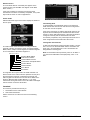
Configuration of the audio interface is done completely via
software utilities.You don't have to set any jumpers. For furhter
information, please refer to Chapter 6 for audio setup details.
2.15 Serial ports (CN16, CN14)
The PCM-5820 Series offers two serial ports: one RS-232 and one
RS-232/422/485. These ports allow you to connect to any serial
device (a mouse, printers, etc.) or communication network.
2.15.1 COM1 RS-232 port (CN16)
The serial port connectors are mounted on the bottom edge of the
card. The 9-pin D-SUB connector to the left of the card is the
RS-232 port.
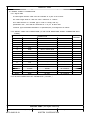
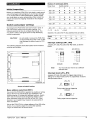
2.15.2 COM2 RS-232/422/485 selection (CN14)
The secondary port located above COM1, consists of a 14-pin,
dual-in-line, male header and can be configured to operate in
RS-232, RS-422, or RS-485 mode. This is done via J4.
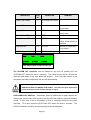
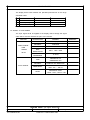
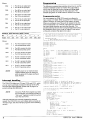
Table 2-4: COM2 selection (J4)
*RS-232
RS-422
RS-485
1
3
5
1
3
5
1
3
5
2
4
6
2
4
6
2
4
6
J4
* default setting
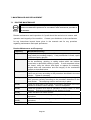
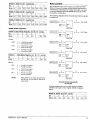
The IRQ and address range for both ports are fixed. However, if
you wish to disable the port or change these parameters later, you
can do this in the system BIOS setup. The table below shows the
settings for the PCM-5820 Series board's ports.
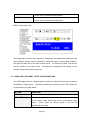
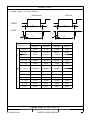
Table 2-5: Serial port default settings
Port
COM1
COM2
24
Address
3E8, 3F8
2E8, 2F8
PCM-5820 Series User's Manual
Interrupt
IRQ4
IRQ3
Default
3F8
2F8