1
To Purchase This Item, Visit BMI Gaming | www.bmigaming.com | 1-800-746-2255 | + 1-561-391-7200
14.) COINS PER CREDIT
This option sets the number of coins required for a credit. The settings are from 1 to 8
coins per credit. Depressing Button 1 will change the setting from 1 to 8, then back to
1. Depressing Button 2 displays the next option, “JACKPOT INCREMENT”
15.) JACKPOT INCREMENT
Every time a coin is inserted into the game, the jackpot value is incremented by this
amount. The setting is from an increment of 1 to 50. Depressing Button 1 will change
this setting from 1 to 50, and then revert back to 1. Depressing Button 2 will display
the next option, “JACKPOT START VALUE”.
16.) JACKPOT START VALUE
This option sets the starting Jackpot value. Depressing Button 1 will change this
setting from 100 to 900 in increments of 100, and then revert back to 100. Depressing
Button 2 will display the next option, “JACKPOT MAX VALUE”.
17.) JACKPOT MAX VALUE
This option sets the Maximum Jackpot value. Depressing Button 1 will change this
setting from the starting value set in Option 15 to 99,999 in increments of 100.
Depressing Button 2 will display the next option, “MERCY TICKET”.
18.) MERCY TICKET
This option sets the Mercy Ticket. Depressing Button 1 will change this setting from
0 to 3 Tickets. Depressing Button 2 will display the next option, “AIR BLAST
TIME”.
19.) AIR BLAST TIME
This option sets the time duration for one blast of air. Depressing Button 1 adjusts the
air time from 0.20 seconds to 2.30 seconds in increments of 0.05 seconds. Depressing
Button 2 will display the next option, “CALIBRATE SPINNER?”.
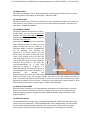
20.) CALIBRATE SPINNER
This option calibrates the spinner for accuracy. Depressing button 1 will enter the
calibration mode. Depressing Button 2 displays the next option, resetting the total for
COINS IN. If Calibration Mode is entered, “CALIBRATION” will be displayed. The
procedure for calibration is as follows: Depress the Play Button once. The spinner
should stop at the center of the jackpot area on the dial. The calibration range is from
–127 to +127. If the spinner does not stop in the center, adjust the calibration using
Button 1. The value will increment/decrement by 1 with each depression of Button 1.
If Button 1 is depressed and held, the value will continue to increment/decrement.
Each time Button 1 is depressed and released, the direction(increment or decrement)
will change. A more positive Calibration Number will move the spinner to the right,
and a more negative number will move it to the left. Change the number in small
increments, then depress the Play Button so that the spinner spins and then stops
again. Repeat this procedure until the spinner is centered in the Jackpot Area. Depress