1
5
6
7
8
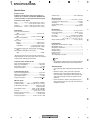
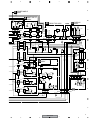
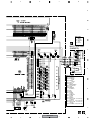
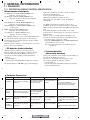
8. PANEL FACILITIES
8.1 FRONT PANEL
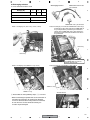
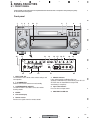
All the controls on the front panel are explained and/or referenced here. To open the front panel push gently
on the lower third of the panel.
A
Front panel
2
1
3
4
10
5
6
8
7
9
AUDIO/VIDEO MULTI-CHANNEL RECEIVER
VSX-52TX
B
MODE
DVD/LD
TV/SAT
DVR/VCR
VIDEO1
CD
CD-R/
TAPE/MD
TUNER
VIDEO2
ENTER
MULTI JO G
MASTER VOLUME
C
11
10
12
TUNER
CONTROL
TUNER
EDIT
TUNING/
STATION
BAND
MPX
MIDNIGHT/
LOUDNESS
TONE
MULTI
JOG
SYSTEM
SETUP
MULTI JOG
15
16 17
ACOUSTIC
MULTI CH
DIALOG
EQ
ENHANCEMENT
IN
SIGNAL
SELECT
18
EXTENDED
MODE
19
SPEAKERS
MULTI
JOG
VIDEO2 INPUT
MULTI ROOM
RETURN
14
13
CONTROL
MCACC
SETUP MIC
ON/OFF
MULTI JOG
PHONES
DIGITAL IN
24
23
22
2 STANDBY/ON
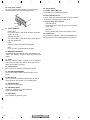
Switches the receiver between on and standby.
3 LISTENING MODE SELECT
Use with the MULTI JOG dial to select the various
listening modes.
5
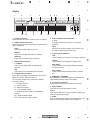
Character display
L
AUDIO
D
R
20
7 MCACC indicator
Lights when Acoustic Calibration EQ is on
(Acoustic Calibration EQ is automatically set to ALL CH
ADJUST after the Auto MCACC Setup or EQ
Auto Setting is complete).
8 Input select buttons
Press to select an input source.
9
ENTER
VIDEO
21
1 MULTI JOG dial
Use the MULTI JOG dial to select various settings and
menu options.
4
S-VIDEO
E
MASTER VOLUME dial
6 Remote sensor
Receives the signals from the remote control.
F
143
VSX-52TX
5
6
7
8