1
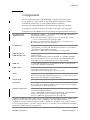
Components
Important:
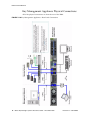
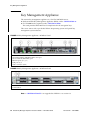
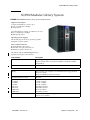
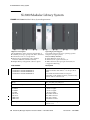
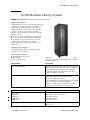
Key management appliances should be installed in pairs as shown in the
configuration drawings FIGURE 1-1 through FIGURE 1-4. Some key points include:
■
Multiple KMAs are clustered on a dedicated, private, local, or wide area network.
■
The servers in a OKM Cluster provide data replication so there is redundancy.
This allows each key management appliance to serve as backups to others.
■
Tape drives, called Agents, must remain connected to the network in the event an
encryption key is needed.
■
Any KMA in the cluster can service any tape drive on the network provided there
is an Ethernet connection between the two.
■
KMAs and agents can be logically “group” to create a site, where agents
preference KMAs within the site to which they are assigned.
■
By default, Agents are serviced by the local KMAs if available.
■
Any KMA can be used for administration functions.
■
All changes to any KMA are replicated to all other KMAs in the cluster:
■
New keys generated at any site are replicated to all other KMAs in the cluster.
■
All administrative changes are propagated to all other KMAs in the cluster.
Encryption Hardware Kits
Encryption hardware kits come complete with Ethernet switches, cables, power
distribution units, and mounting hardware for connection of the tape drives in either
a library or standalone rack configuration.
The type of configuration determines how the tape drives are installed, each
configuration has its own kit, see Chapter 4, “Components” for more information.
Refer to the Oracle Key Manager: Installation and Service Manual and the
individual product installation manuals for specific installation instructions.
Key Manager Configurations
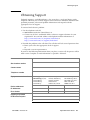
Multiple KMAs1 (two or more) must be installed together to create a cluster2.
Clusters of KMAs are able to fully replicate their data to each other KMA.
Note: Cluster size should be strongly considered when designing the system for
maximum availability.
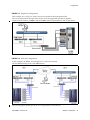
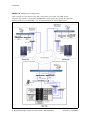
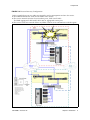
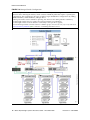
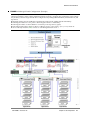
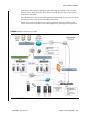
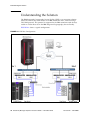
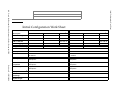
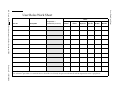
The following figures show examples of Version 2.x configurations for the key
management appliance:
■
FIGURE 1-1 Single site – local area network
■
FIGURE 1-2 Multiple sites – wide area network
■
FIGURE 1-3 Multiple sites with disaster recovery – wide area network
■
FIGURE 1-4 Disaster Recovery Configuration
1. Multiple KMAs: Exceptions to this standard configuration must be made with the
approval of Encryption Engineering, Professional Services, and Support Services.
2. A Cluster is a group of linked appliances that work together, so that in many respects they
form a single component.
4 Oracle Key Manager: Systems Assurance Guide • November 2010
Revision: D • 316194806