1
DPM 2340
Digital PlateMaster
Operator’s Manual
A.B.Dick Company
811 Jefferson Road
Rochester, NY 14623-3211
©2000 A.B.Dick Company
All rights reserved. No part of this publication may be duplicated, reproduced, or
transmitted in any form or by any means, electronic or mechanical, including
photocopy, recording or any information storage and retrieval system, without prior
written consent of A.B.Dick Company.
A.B.Dick Company makes no representations or warranties with respect to the contents
hereof and specifically disclaims any implied warranties of merchantability or fitness
for any particular purpose. Further, A.B.Dick Company reserves the right to revise this
publication and to make changes from time to time in the contents hereof without
obligation of A.B.Dick Company to notify any person or organization of such revisions
or changes.
A.B.Dick Company disclaims any responsibility or liability for personal injury, death or
property damage caused by or arising out of (i) the failure of operators to observe all
operating and safety instructions and warnings contained herein or (ii) the improper
use, abuse, neglect or unauthorized repair of the equipment described herein, and the
purchaser and any subsequent owner or lessee of such equipment shall defend,
indemnify and hold A.B.Dick Company harmless from and against all liability caused
or arising out of such nonobservance, improper use, abuse, neglect or unauthorized
repair.
Mega and Mega Plus are trademarks of A.B.Dick Company. Itek Graphix is a licensed
trademark of Itek Graphix Corp.
Warning: This is a Class A Product. In a domestic environment this product may cause
radio interference, in which case the user may be required to take adequate measures. If
this equipment does cause harmful interference to radio or television reception, which
can be determined by turning the equipment off and on, the user is encouraged to try to
correct the interference by one or more of the following measures:
— Reorient or relocate the receiving antenna.
— Increase the separation between the equipment and receiver.
— Connect the equipment into an outlet on a circuit different from that to which the
receiver is connected.
— Consult the dealer or an experienced radio/TV technician for help.
10 9 8 7 6 5 4 3 2
Oct
WARNING: This Class A digital apparatus meets all requirements of the
Canadian Interference-Causing Equipment Regulations.
Cet appareil numerique de la casse A respectetoutes les exigences du Reglement
sur le materiel brouilleur du Canada.
WARNING: This is a Class A product per EN55022:1998. In a domestic
environment this product may cause radio interference in which case the user may
be required to take adequate measures.
Table of Contents
••••••
Table of Contents
Introduction
Welcome . . . . . . . . . . . . . . . . . . . . . . . . . . . . . . . . . . . . . .
About this Manual . . . . . . . . . . . . . . . . . . . . . . . . . . . . . .
Assumptions . . . . . . . . . . . . . . . . . . . . . . . . . . . . . . . .
Conventions . . . . . . . . . . . . . . . . . . . . . . . . . . . . . . . .
Installing the DPM 2340. . . . . . . . . . . . . . . . . . . . . . . . . .
Installation Assistance . . . . . . . . . . . . . . . . . . . . . . . .
Installation Requirements . . . . . . . . . . . . . . . . . . . . . .
Safety . . . . . . . . . . . . . . . . . . . . . . . . . . . . . . . . . . . . . . . .
Safety Devices . . . . . . . . . . . . . . . . . . . . . . . . . . . . . .
Laser Safety . . . . . . . . . . . . . . . . . . . . . . . . . . . . . . . .
Specifications . . . . . . . . . . . . . . . . . . . . . . . . . . . . . . . . . .
Functional Specifications . . . . . . . . . . . . . . . . . . . . . .
Physical specifications . . . . . . . . . . . . . . . . . . . . . . . .
1-1
1-1
1-2
1-2
1-2
1-2
1-3
1-3
1-4
1-5
1-5
1-5
1-7
Getting Started
Locating the Major Areas . . . . . . . . . . . . . . . . . . . . . . . . . 2-2
Describing the Functional Operation . . . . . . . . . . . . . . . . 2-3
Describing the Status Panel and Function Switch . . . . . . 2-5
Status Panel. . . . . . . . . . . . . . . . . . . . . . . . . . . . . . . . . 2-6
Media messages and the function switch . . . . . . . . . . 2-6
Turning on the DPM 2340 . . . . . . . . . . . . . . . . . . . . . . . . 2-7
Shutting Down the DPM 2340 . . . . . . . . . . . . . . . . . . . . . 2-8
Describing the Rip Workstation . . . . . . . . . . . . . . . . . . . . 2-9
Understanding Default Settings . . . . . . . . . . . . . . . . . . . 2-11
Understanding RipManager™ . . . . . . . . . . . . . . . . . . . . 2-12
About setting exposure . . . . . . . . . . . . . . . . . . . . . . . 2-12
Working with media management . . . . . . . . . . . . . . 2-12
Maintaining Quality Output . . . . . . . . . . . . . . . . . . . . . . 2-14
About processor quality . . . . . . . . . . . . . . . . . . . . . . 2-14
About air filter changes. . . . . . . . . . . . . . . . . . . . . . . 2-14
•
•
•
•
•
•
iii
Recommending supplies . . . . . . . . . . . . . . . . . . . . . . . . .
About media materials . . . . . . . . . . . . . . . . . . . . . . .
About chemicals . . . . . . . . . . . . . . . . . . . . . . . . . . . .
Tips about supplies . . . . . . . . . . . . . . . . . . . . . . . . . .
Viewing DPM 2340 Software Information . . . . . . . . . .
Closing Software Programs on the RIP Workstation . . .
2-15
2-15
2-15
2-16
2-17
2-18
Operating Basics
Working with Media. . . . . . . . . . . . . . . . . . . . . . . . . . . . . 3-2
About cassettes . . . . . . . . . . . . . . . . . . . . . . . . . . . . . . 3-2
Setting the media type. . . . . . . . . . . . . . . . . . . . . . . . . 3-9
Defining a media cassette . . . . . . . . . . . . . . . . . . . . . 3-12
Selecting the Exposure Sweep and Interpreting the Test Patterns
3-14
Finding the exposure level . . . . . . . . . . . . . . . . . . . . 3-14
Exposure Sweeps . . . . . . . . . . . . . . . . . . . . . . . . . . . 3-14
Explanation of the Exposure Sweep Test Pattern. . . 3-16
Setting the Exposure . . . . . . . . . . . . . . . . . . . . . . . . . . . . 3-18
Setting the image centering and plate length calibration . .
3-22
Backing up and retrieving media and cassette definitions .
3-28
Using RipManager for media management . . . . . . . 3-29
Using the take-up cassette accessory . . . . . . . . . . . . 3-30
Customizing the media feed parameters . . . . . . . . . . 3-33
Working with the Plate Catcher . . . . . . . . . . . . . . . . . . . 3-35
Adjusting the Plate Catcher . . . . . . . . . . . . . . . . . . . 3-35
Troubleshooting
Identifying Troubleshooting Areas . . . . . . . . . . . . . . . . . . 4-1
Understanding Malfunctions. . . . . . . . . . . . . . . . . . . . . . . 4-2
Working with error codes and malfunctions. . . . . . . . 4-2
Clearing Jams . . . . . . . . . . . . . . . . . . . . . . . . . . . . . . . . . 4-10
Clearing drum area jams . . . . . . . . . . . . . . . . . . . . . . 4-10
Clearing media jams during load . . . . . . . . . . . . . . . 4-18
Clearing processor area jams . . . . . . . . . . . . . . . . . . 4-22
Clearing conveyor area jams. . . . . . . . . . . . . . . . . . . 4-28
Maintaining the DPM 2340
Servicing the DPM 2340 Quarterly . . . . . . . . . . . . . . . . . 5-1
iv
•
•
•
•
•
•
Table of Contents
Changing the Air Filter . . . . . . . . . . . . . . . . . . . . . . . . . . .
Changing Chemicals . . . . . . . . . . . . . . . . . . . . . . . . . . . . .
Draining chemicals . . . . . . . . . . . . . . . . . . . . . . . . . . .
Filling the processor with chemicals . . . . . . . . . . . . .
Cleaning the processor unit. . . . . . . . . . . . . . . . . . . . .
5-1
5-2
5-2
5-5
5-7
Appendix
Supporting Applications . . . . . . . . . . . . . . . . . . . . . . . . . . 6-1
Locating Authorized A.B.Dick International Subsidiaries 6-1
Important Safety Warnings . . . . . . . . . . . . . . . . . . . . . . . . 6-2
Index
Table of Contents
•
•
•
•
•
•
v
vi
•
•
•
•
•
•
Chapter 1
Introduction
••••••
•
• 1-1
•
•
•
•
Welcome
Congratulations on your purchase of the DPM 2340 (Digital PlateMaster).
A.B. Dick has combined leading-edge internal drum technology with
reliable in-line processing to provide you with this state-of-the-art
platemaker.
•
•
•
1-2 •
•
•
Introduction
About this Manual
The DPM 2340 is an advanced platemaker using precision internal drum
technology and an integrated processor. The platemaker interfaces with
feature enhanced PrintersRIP® software.
This manual contains important information about installation, calibration,
and daily use of the DPM 2340, including working with the media
cassettes, and processing systems.
Information about the PrintersRIP® and valuable tips about getting the
most out of your RIP are found in the separate PrintersRIP® Operator’s
Manual.
Each chapter of this manual has a specific focus. The information
contained in these chapters are organized to provide ease of use and
understanding leading you to effective use of the DPM 2340.
Chapter 1
This chapter describes relevant information about safe operation of
the DPM 2340, specifications about the equipment and its installation,
and also how to use this manual effectively.
Chapter 2
‘Getting Started’ helps you to become familiar with the DPM 2340. It
also identifies essentials for getting up and running quickly, and how
to sustain quality output from the equipment.
Chapter 3
‘Operating Basics’ includes procedures used in the day-to-day operation of the platemaker.
Chapter 4
‘Troubleshooting’ helps you resolve those infrequent occurrences
when the DPM 2340 does not function as expected.
Chapter 5
‘Maintaining the DPM 2340’ provides procedures for keeping your
platemaker operating at its best.
Chapter 6
‘Appendix’ provides you with specific safety information, and a list of
authorized A.B.Dick/Itek International subsidiaries.
Assumptions
Read the DPM 2340 Operator’s Manual and the PrintersRIP® Operators
Manual before starting to work with the platemaker.
This manual assumes you have some familiarity with digital platemaking
as well as a basic knowledge of Microsoft Windows NT.
Conventions
Certain notational conventions have been applied to this manual to aid in
understanding the information presented.
The following fonts and special symbols are used throughout this manual.
1
Paragraphs which are numbered contain instructions which you
should follow.
Introduction
•
•
•
• 1-3
•
•
Text written in the sans-serif bold face represents a menu title, menu item
or control item in a dialogue box.
Text written in this bold typewriter face represents literal information
which should be typed exactly as it appears in the manual.
Text written in italic and appearing within a sentence, is important related
reference information.
Text written in bold italic and appearing within a sentence, represents a
specific button on the DPM 2340 or on a menu window or dialogue box.
Text located in the left
margin and preceded by
an arrow, is important
information about the
topic presented at that
point. It should be read
carefully.
•
•
•
1-4 •
•
•
In addition, other graphics depicting buttons found within screens on the
RIP Workstation will be displayed whenever appropriate.
Introduction
Installing the DPM 2340
The DPM 2340 must be installed or removed by a qualified A.B.Dick
service representative or an authorized dealer/distributor.
The IEC connector on the detachable power cord retaining bracket on the
DPM 2340 inlet receptacle prevents it from serving as the “disconnect
device” for the DPM 2340. A power cord that is permanently wired into the
power supply should have a readily accessible disconnect device
incorporated into the fixed wiring.
Installation Assistance
Installation of the DPM 2340 Digital PlateMaster is not difficult, but to
ensure that the entire system is properly installed and configured, the
hardware and software must be installed by an authorized A.B. Dick
service technician in accordance with the installation instructions in the
DPM 2340 Service Manual and with national and local regulations
concerning electrical safety.
The internal selectable voltage transformer must be properly wired before
connecting this equipment to the facility power supply.
Installation Requirements
CAUTION: To prevent
damage to the
platemaker when moving
it, always pick it up by the
base frame only. To
prevent spilling or
contamination of
processor chemistry,
drain the activator and
stabilizer tanks.
The DPM 2340 Digital PlateMaster must be placed on a hard, flat stable
surface with a free space of 58 cm (23”) at the back, not including the plate
catcher, and 76 cm (30”) at the sides. Free access at the front must be
provided for installing and removing the media cassettes, and maintaining
the processor area.
Electrical supply
The DPM 2340 must be connected to a grounded 180 - 240 V ac,
50 or 60 Hz outlet.
WARNING:
The DPM 2340 is Class I electrical equipment. For your personal safety,
it must be connected to a protected ground (earth) in accordance with
national and local regulations.
Fuses
The DPM 2340 has internal fuses that may only be changed by authorized
service personnel.
WARNING:
The electrical distribution box should be accessed only by authorized
A.B.Dick service technicians. Dangerous high voltages are present when
the machine is connected to the facility power supply.
Introduction
•
•
•
• 1-5
•
•
Safety
Protect yourself, others, and your equipment by observing all safety
warnings contained in this guide. Before attempting to operate the DPM
2340, be certain that each operator has read this guide and is thoroughly
familiar with the operating instructions and safety warnings. You will find a
summary of safety data at the end of this guide.
WARNING:
This equipment is Class I rated electrical equipment and must be
connected to a properly grounded, three (3) wire power supply in
accordance with national and local regulations. Failure to do so creates
a potential danger of electrical shock.
The circuit to which the equipment is connected must be current
protected by a device with suitable interruption capability as required by
national or local standards (whichever is the most stringent).
The power cord used to connect the equipment to the facility power
supply must comply with national and local standards and must have a
minimum rated current capacity of 20 Amp. (N.A.)/16 Amp. (Europe).
Safety Devices
The following illustrations identify and describe the function of the safety
devices used on the DPM 2340. Do not operate the PlateMaker without all
covers, interlocks, and safety devices in their original, factory installed
positions.
NOTE: A LASER
INTERLOCK
SWITCH is located
under this cover.
ON/OFF
Switch/Circuit
Breaker (15 A) is
located on the back of
PROCESSOR
ACCESS DOOR
INTERLOCK
SWITCHES
IMAGING UNIT
ACCESS and
LASER INTERLOCK
SWITCHES
Two interlock switches
are activated by the
doors. The processor
drive motor and heater
are disabled when
either door is open.
The four switches
disable the laser unit
when the light shield
or a cover is
removed.
Safety Device Locations
•
•
•
1-6 •
•
•
Introduction
Laser Safety
The DPM 2340 is a Class I laser product and contains a laser which,
however, is totally shielded by the cabinet. When the cabinet is opened,
the interlock system automatically switches off the laser, and there is no
risk of laser radiation.
WARNING
Only authorized service personnel may override the interlock system.
The warning labels located near the interlock switches and apertures of
the drum assembly are intended for such personnel.
This warning appears near interlock switches.
DANGER - LASER RADIATION WHEN OPEN AND INTERLOCKS
FAILED OR DEFEATED. AVOID EXPOSURE TO BEAM.
ATTENTION - SOURCE LASER-DANGER DE RADIATIONS EN CAS
D’OUVERTURE DE CAPOTS OU EN CAS DE FONCTIONNEMENT
SANS LES S_CURIT_S DES PORTES. EVITER TOUTE
EXPOSITION AUX RAYONS LASER.
ACHTUNG WARNUNG! BEI OFFENEM GEH+USE UND
AUSGESCHALTETEM SICHERHEITSSCHALTER DIREKTE
BESTRAHLUNG VERMEIDEN WARNUNG VOR LASERSTRAHLUNG!
These warnings appear near front aperture and ends of the imaging drum.
AVOID EXPOSURE
LASER RADIATION IS EMITTED FROM THIS APERTURE
EVITER TOUTE EXPOSITION
AUX RADIATIONS EMISES PAR CETTE OUVERTURE
BELICHTUNG VERMEIDEN!
LASERSTRAHLUNG WIRD DURCH DIE +FFNUNG ABGEGEBEN!
Introduction
•
•
•
• 1-7
•
•
Specifications
This section includes important information regarding both functional and
physical specifications for the DPM 2340.
Functional Specifications
Imaging technology
Internal drum.
Light source
675-nm, 10mW visible red laser diode.
Maximum imaging area
35.5 x 49 cm (14” x 19.3”).
Resolution
900 to 3600 dpi, in 17 discrete steps.
Speed of exposure
At 2400 dpi (28 full size plates per hour).
At 900 dpi (38 full size plates per hour).
Spot size
10 -30 microns, automatically matched to the chosen resolution.
Accuracy (
within an image)
+/- 25 microns.
Repeatability
(within an image)
+/- 5 microns.
Output media
RA process films.
Polyester and paper based plates.
Media loading
Daylight cassette with automated loading.
Media width
Plate: 22.9 cm to 34.0 cm / 9” to 13.4”.
Film: 22.9 cm to 35.6 cm / 9” to 14”.
•
•
•
1-8 •
•
•
Introduction
Media cassette capacity
61 m (200 feet).
Take-up cassette accessory capacity
10 m (33 feet).
Take-up cassette accessory dimensions (W x H x D)
45.2 x 13.3 x 12.7 cm (17.8” x 5.25” x 5.00”).
Physical specifications
Dimensions (W x H x D) 1
37 x 114 x 71.1 cm (54” x 45” x 28” without Plate Catcher).
137 x 114 x 104 cm (54” x 45” x 41” with Plate Catcher).
Weight
306 kg / 675 lbs.
Power consumption (without accessories)
1400 W.
Rated voltage
180 / 200 / 208 / 220 / 230 / 240 VAC, 50/60 Hz.
Rated current
12 Amp.
Main circuit breaker
15 Amp / 250 V
In addition, the DPM 2340 has internal fuses that may only be
changed by authorized service personnel.
Ambient temperature
18 to 27° C (65 - 80° F).
Relative humidity
30 - 70%
Noise level
Less than 70 dBA.
Data interface Differential Fast SCSI-2.
Introduction
•
•
•
• 1-9
•
•
•
•
•
1-10 •
•
•
Chapter 2
Getting Started
••••••
This chapter provides useful information about your DPM 2340 and RIP
Workstation. It will guide you to a basic understanding of the three main
areas of the platemaker, initial default settings, and will highlight those
things that are important in obtaining consistent quality results in a
convenient manner.
Take time to read this chapter thoroughly before attempting any of the
procedures found in the following chapters.
•
• 2-1
•
•
•
•
Locating the Major Areas
Become familiar with the major external areas shown in the drawing below.
They will be referenced throughout this manual.
CASSETTE
COVER
MEDIA and
DRUM Area
CONVEYOR Area
PROCESSOR Area
DPM 2340 Major Areas
•
•
•
2-2 •
•
•
Getting Started
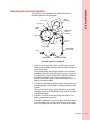
Describing the Functional Operation
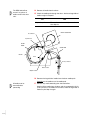
The following is a brief description of the media path during the
platemaking operation of the DPM 2340.
MEDIA
CASSETTE
Feed Rollers
Input Rollers
GUIDE
HOOP
GUIDE BOX or
TAKE-UP
CASSETTE
DRUM
Knife
Conveyor
Rollers
Buffer
Output Rollers
PROCESSOR
INPUT GUIDE
EXIT
STABILIZER
ACTIVATOR TANK
Functional Diagram of the DPM 2340
1
When the “Load” command is given, the feed rollers move the
media to the input rollers which pull it from the media cassette and
load it into the drum.
During media loading, the carriage and optics unit is located to
the middle of the drum. At each end of the carriage, a semicircular guide hoop is mounted. These guides support the media during loading and prevent it from falling onto the optics unit.
Sensors on the guides report an error to the PrintersRIP® if the
media is not properly loaded.
2
The input and output rollers feed the media around the drum and
through the output and knife module, holding the media securely
in place.
The input and output sensors monitor the position of the media
and report an error to the PrintersRIP® if the media is not loaded
or positioned properly.
3
The optics unit moves to the right-hand end of the drum. The
media is exposed from right to left.
The media is exposed by a laser which spins continuously around
a central spindle as the carriage moves along the length of the
drum. The carriage will only move as far as necessary to expose
Getting Started
•
•
•
• 2-3
•
•
the job, depending on the format of the page and its orientation in
the drum.
4
The input rollers and output rollers and buffer rollers then transfer
the exposed media from the drum to the guide box.
At the same time, media for exposure of the next page enters the
drum.
If the take-up cassette accessory is installed, the exposed media
will leave the drum and enter the take-up cassette.
The knife cuts the media and the buffer rollers pass the media
through the buffer module to the conveyor section and the processor.
If desired, the media in the drum can be removed using the
UNLOAD command, and a different media cassette can be
installed.
If the take-up cassette accessory is installed, an EJECT command can be issued. The media is cut, and the buffer rollers pass
the media into the take-up cassette. The cassette can be
removed and the media developed off-line.
•
•
•
2-4 •
•
•
The panel shown provides the operator with important information
regarding the status of the DPM 2340 while powered on. Each message,
and the related use of the function switch is described below
.
ERROR
TAKE-UP
Getting Started
Describing the Status Panel and Function Switch
ON LINE
BUSY
ON
EJECT
LOAD UNLOAD
FUNCTION SWITCH
Status Panel and Function Switch
Getting Started
•
•
•
• 2-5
•
•
Status Panel
The messages indicate the operational status of the DPM2340.
Message
Function
ON
illuminates whenever the power is switched on to the DPM 2340
BUSY
illuminates whenever the DPM 2340 is carrying out an operation, i.e., during platemaking or media transport
ON LINE
illuminates whenever the power is switched on, unless you open the DPM
2340 Hyperterminal program in the RIP Workstation and activate the
MAIN menu.
This puts the DPM 2340 off-line with respect to the PrintersRIP®,
and you will not be able to image media.
TAKE-UP
illuminates after an EJECT command has been performed, to show that the
media has been cut and the media has been forwarded to the Take-up Cassette.
The take-up cassette accessory, if installed, can be removed and
the media developed in an off-line processor.
also illuminates when the platemaker detects that neither the Guide Box
nor the Take-up Cassette are installed when the platemaker is ready to
advance media from the Drum.
ERROR
illuminates if an error occurs in the functioning of the DPM 2340. More
detail about the problem is displayed in the System Monitor window of the
PrintersRIP® and in the DPM 2340 Hyperterminal window of the RIP
Workstation.
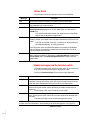
Media messages and the function switch
The media messages relate specifically to the status of the media in the
drum. Only one of these messages is displayed at a time.
Pushing the Function Switch carries out the function displayed:
Message
Function
EJECT
illuminates when imaged media is ready to be inserted into the Take-up
Cassette. Pushing the function switch will cause the media to be cut by the
knife and then transported forward until it is free of the buffer rollers
LOAD
illuminates when a different media cassette has been placed in the DPM
2340. Pushing the function switch transports the media into the drum for
exposure
LOAD flashes if the media cassette is out of media.
UNLOAD
illuminates when no imaged media is in the drum, and the platemaker is not
busy. Pushing the function switch will cause the media to be removed from
the drum
The media cassette can be removed/changed at this time.
NOTE: LOAD, EJECT and UNLOAD can also be performed from the Media Management
window at the RIP Workstation. See “Working with media management” on page 2-12.
Media messages
•
•
•
2-6 •
•
•
When you power on the DPM 2340, the processor begins its warm-up
cycle. When the software is completely loaded, which takes approximately
1.5 minutes, the ON LINE message illuminates. Always wait for the ON
LINE light to appear before you perform any operation, including shutting
down the DPM 2340.
If you need to power on the DPM 2340 immediately after powering it off,
wait at least 5 seconds to prevent damage to the electronic circuitry of
the PlateMaker.
Getting Started
Turning on the DPM 2340
Since the warm-up cycle heats the processor chemicals to their operating
temperature, always be sure the tanks are filled with chemicals before you
power on the DPM 2340. If the tanks are empty at power up, the warm-up
circuitry will not turn on. The liquid level must be kept within 1/4” of “Full”
operating level for proper operation.
To power on the DPM 2340:
1
Check that both processor tanks are filled with chemicals. If they
are not, see the “Filling the processor with chemicals” on page 5-5
located within “Changing Chemicals”.
2
Fill the replenisher bottles with pre-mixed activator and stabilizer
each day. Do not make plates if the replenisher bottles are empty
or not in place.
3
Press the ON/OFF switch to turn on the DPM 2340.
The DPM 2340 processor requires approximately 15 - 20 minutes
to warm up before plates can be made.
4
Power on the RIP Workstation.
ON/OFF Switch is
located on the back
of the DPM 2340
Power On/Off Switch
Getting Started
•
•
•
• 2-7
•
•
Shutting Down the DPM 2340
The DPM 2340 may be turned off and on without shutting off the Rip
Workstation.
If the RIP Workstation has also been turned off, do not turn it on again until
the DPM 2340 has been turned on and has completed the boot up cycle
(Status Panel lights illuminated).
To power off the RIP Workstation:
1
2
3
•
•
•
2-8 •
•
•
On the Start menu, select Shut Down
When the Shut Down Window appears, select Shut down and
click on the OK button.
When the OK To Turn Your Computer Off appears, turn off the RIP
Workstation.
A.B.Dick recommends purchasing the matched A.B.Dick Rip Workstation
for your DPM 2340. If desired, another computer meeting the minimum Rip
Workstation specifications may be substituted.
Whether supplied by A.B.Dick, or by the end user, the Rip Workstation
should be dedicated to running the DPM 2340 only. It should have
only A.B.Dick approved software installed. If non-approved programs are
installed by the end user, service calls caused by those programs will not
be covered under the warranty or by your maintenance agreements.
Getting Started
Describing the Rip Workstation
Rip Workstation
The Rip Workstation consists of 5 major parts:
Important: The
PrintersRIP® Dongle is
the security key that
enables your
PrintersRIP®™ program
to operate. If the Dongle is
lost, a new one must be
purchased at full price.
Handle your PrintersRIP®
Dongle carefully.
1
2
3
4
5
Computer
Monitor
PrintersRIP® Dongle
Keyboard
Mouse
Getting Started
•
•
•
• 2-9
•
•
Four major software programs combine to operate your DPM 2340. These
programs are automatically started when the Rip Workstation is booted.
They can also be operated through use of the button bar.
Button Bar
The table below describes the function of each button on the button bar.
Button
Function
This starts the PrintersRIP® program. It will also make the program window
appear if it is minimized, or hidden behind another window. See your PrintersRIP®™ manual for more information.
This starts the RipManager™ program. It will also make the program window appear if it is minimized, or hidden behind another window. See the
PrintManager for more information.
This starts the DPM 2340 Imager Window program. It will also make the
program window appear if it is minimized, or hidden behind another window.
Although some functionality of the other programs exists in the DPM 2340
Imager Window program, it is intended for service technician’s use and is
not covered in any user documentation. This program is not required to
operate the DPM 2340, but it starts whenever the RIP Workstation is
booted. This program records error information useful to your Service Technician and should allowed to operate in a minimized mode.
This starts a program window containing electronic versions of the PrintersRIP® Operators Manual, and the DPM 2340 Operators Manual.
•
•
•
2-10 •
•
•
Several defaults are set by the manufacturer to provide efficient troublefree operation for most situations. The ability to change those settings to
meet specific needs is a feature available in the DPM 2340. Below you will
find a table of default settings and function descriptions. This allows you to
see how the equipment was configured originally, and return any setting to
it’s original setup.
Preference
Function
Default
Smart Cassette
Software monitors the media usage. If deselected, the platemaker will treat a job as defined
by the Stop on page errors and Stop on media out
settings.
X
Stop on page errors
Platemaker will stop if a job will not fit on the page
with the setup applied.
If de-selected, the platemaker will skip over the job
and it will be put in the RIP Queue. It will not be
written until adjusted to fit on the page/plate.
X
Stop on media out
Platemaker will stop when the monitoring software
believes the media has run out. The accuracy of
this is dependent upon the length of media
metered for that media cassette.
The hardware monitors media independently of
the software and it will always stop when the
media cassette runs out of media.
Stop on take-up full
Software monitors the amount of media fed into
the take-up cassette and stops the platemaker
when it is full. This is the only method the RipManager™ utilizes to monitor the amount of media
sent to the take-up cassette.
It is recommended that this preference is always
selected.
Disable direct SCSI
This is for qualified service technician use only.
This should not be selected.
The platemaker will not produce images if this has
been selected.
Save imagesetter log to
DOTLOG.TXT file
This saves information to a log for the service technician’s use. It should only be selected when problems are suspected and service intervention is
expected.
Stop on printer caught ups
If the RIP should fall behind sending data, the
platemaker will stop.
Maximum data rate
This setting is established automatically and
should not be changed.
Safety factor
It is recommended that this setting not be
changed.
Getting Started
Understanding Default Settings
X
X
5%
Getting Started
•
•
•
•2-11
•
•
Understanding RipManager™
The functions of the DPM 2340 are controlled by software which is
accessible through the RIP Workstation. Features have been provided to
allow for efficient utilization of the platemaker. To enable these features, it
is important that the software has the correct information. This involves
only a few basic steps at the initial setup of the equipment, and selection
of the appropriate information when media is changed or the Take-up
Cassette Accessory is used.
About setting exposure
To achieve consistent accurate output, the DPM 2340 must have exposure
information relative to the laser in the platemaker, media being used, and
the resolution selected. Changes in color balance and contrast, loss of
brightness, and loss of highlight or shadow detail of the output can result
from deviations in exposure calibration. Even if the platemaker is accurate,
the output will be affected by the media used and chemistry life, so
exposure calibration should be regularly checked.
“Setting the Exposure” on page 3-18 are procedures used to select the
exposure level which ensures that 100% of the exposed areas of the
media have the optimum density recommended by the manufacturer. This
value may vary quite a bit, depending on the media type. Since output
resolution, screen frequency and dot shape also have influence on the
optimum exposure level, you should never create a calibration set without
first adjusting the exposure level.
Working with media management
The DPM 2340 allows you to define and track up to 16 media cassettes
and up to 10 different media types. This is done through the
RipManager™ software. Note that only the Media Management function
of RipManager™ should be used for this purpose.
If the media and cassettes are defined in RipManager™, the DPM 2340
can keep track of the amount of media left in the cassette, so you won’t run
out unexpectedly. This feature is particularly useful if you frequently switch
media cassettes and media types. If you prefer not to use the media
management function, the platemaker can still be used. When the media
cassette is empty, the LOAD message on the DPM 2340 status panel will
illuminate to alert you that no media is left in the media cassette.
If the Take-up Cassette Accessory is installed, the DPM 2340 will
automatically carry out an EJECT if the length of the media in the take-up
cassette reaches the maximum of 10 meters (33 feet).
To use the media management function, you must assign a name to each
media you expect to use. You can then define one or more cassettes,
specifying:
• the name or number of the cassette (“Defining a media cassette” on
page 3-12).
• the type and length of media loaded (“Setting the media type” on page
3-9).
•
•
•
2-12 •
•
•
Media Low warnings.
Getting Started
Getting Started
• the points at which you want the RIP to give you the first and second
•
•
•
•2-13
•
•
Maintaining Quality Output
Your DPM 2340 is designed to provide excellent output with a minimum of
maintenance. To keep the platemaker operating efficiently, there are only
a few areas of attention that are recommended. These involve the
processor, and filter changes. In addition, a periodic “check-up” by an
authorized service representative is recommended.
About processor quality
In the DPM 2340, the activator and stabilizer should be changed after
172.5 square meters (1875 square feet) of media has been processed, or
every four weeks (whichever comes first). The activator Filter cartridge,
2340-PF, should also be changed every three months, or every three
chemistry changes. These ensure optimum plate production and chemical
life. Failure to properly clean the processor on a timely basis can result in
improper processing, scratches on plates, jams, and reduced chemical
life. To obtain optimum results with your new chemicals, you should also
clean the processor unit at the same time. See “Changing Chemicals” on
page 5-2 for detailed procedures.
About air filter changes
An air filter is located in the cassette cover of your DPM 2340. This filter
keeps the Media and Drum areas dust free while providing the required air
circulation needed in the imaging area. To ensure that the high quality
imaging is not impacted by the presence of dust or poor air flow, the filter,
2340-AF, must be changed every three months.
Every 3 months:
With the
platemaker power
off:
1. Open the filter
cover.
2. Replace the air
filter with the metal
mesh facing down.
Close the filter
cover.
Changing the Air Filter
•
•
•
2-14 •
•
•
Use of quality media and chemicals are essential to obtaining the desired
results from your DPM 2340. Information is provided here on approved
media and chemicals that will deliver expected results when used with the
DPM 2340.
Also included, are tips about these materials that will aid in achieving
consistently satisfying results.
Getting Started
Recommending supplies
About media materials
Three types of Mega Pro® plate material (media) are available for the
DPM 2340. Paper plate material is a silver-emulsion, paper base plate
material capable of running 10,000 impressions and reproducing fine-line
work, including halftones up to 150 lines. It requires Mega processing
chemicals and etch.
NOTE: Run lengths are
recommended
maximums. The actual
number of impressions
may vary more or less,
depending on printing
variables.
Mega Pro® 8 mil and 5 mil film base materials provide a silver-emulsion
plate material with a film base for excellent dimensional stability. The 8 mil
thickness (0.200 mm) plate material will run up to 25,000 impressions. You
can also get a 5 mil (0.125 mm) type that runs up to 25,000 impressions.
Mega Pro® uses the same chemicals as paper based Mega material.
Imagesetting film (RA Film) is also available for the DPM 2340. RA film
requires use of the Take-up Cassette Accessory for off line processing.
About chemicals
Never use Mega Pro® plate materials with chemicals designed for other
plate systems. Always use the correct material and chemical combination.
Furthermore, Mega materials must be processed at a specific
temperature. The online processor is set at this temperature at the factory.
Never use Rapid Access fixer or developer in the DPM 2340 processor.
Plate material requires two processing chemicals--activator and stabilizer.
The activator is available in four 1-gallon containers (PC 38750) or in one
5-gallon container (PC 38745). Stabilizer is available in four 1-gallon
containers (PC 38756) or in one 5-gallon container (PC 38753). These
come in concentrated form, and you simply mix with water before using
them in the processor of the DPM 2340.
Plate etch (PC 38766) for Mega plates is wiped on the plate, full strength,
before the plate is run. It prepares the plate surface for proper acceptance
of ink and water during printing. It may not be used as a fountain solution.
Fountain solution A.B.Dick provides a variety of fountain solutions to
match your presses dampening system.
Use deletion fluid (PC 38771) to mask or erase unwanted images on
plates. Apply deletion fluid before the plate is etched.
Processing off line.
When processing imagesetting film sent to the Take-up Cassette
Accessory, use of Rapid Access chemicals are suggested.
Getting Started
•
•
•
•2-15
•
•
• Rapid Access Developer is available in four 5-quart (4.7 liter) bottles
(PC 55050), or in one 5-gallon (18.9 liter) container (PC 55055).
• Rapid Access Fixer is available in four 5-quart (4.7 liter) bottles (PC
26101), or in one 5-gallon (18.0 liter) container (PC 26131).
WARNING
Use only A.B.Dick brand materials and chemicals for optimum results
and equipment life. The use of other brands, that result in damage to the
equipment, may void warranty protection and result in termination or
non-renewal of any maintenance agreement.
Tips about supplies
• Maintaining the proper level of chemicals in the processor tanks is very
important. Although the DPM 2340 will detect low chemical levels, best
performance is obtained by checking the replenisher bottles regularly
and keeping them filled.
• Plate material is light sensitive. Always store it in its original containers
(plastic sleeve and box).
• Store plate material away from sources of excessive heat, like radiators
and direct sunlight.
• When your DPM 2340 PlateMaster is not going to be used for extended
periods of time, remove the media and store it in its bag.
• Avoid touching the printing surface of media.
• Use Itek Graphix activator, stabilizer, etch, and fountain solution for
best results.
•
•
•
2-16 •
•
•
The current version of RipManager™ software loaded on your DPM 2340
can be found by accessing the Help menu of RipManager™.
The current version of PrintersRIP® software loaded on your DPM 2340
can be found by accessing About PrintersRIP in the PrintersRIP menu.
Getting Started
Getting Started
Viewing DPM 2340 Software Information
•
•
•
•2-17
•
•
Closing Software Programs on the RIP Workstation
The RIP Workstation operates on a Microsoft “Windows” platform. This
allows you three options to close software programs. They are:
• In File on the menu bar, select Close.
Follow directions in any dialogue box that may appear.
• Click on the Close (“X”) Window Control Button in the upper right
corner of the program title bar.
Follow directions in any dialogue box that may appear.
• Double click on the Control-menu Icon in the upper left corner of the
program title bar.
Follow directions in any dialogue box that may appear.
•
•
•
2-18 •
•
•
Chapter 3
Operating Basics
••••••
This chapter covers the procedures you will use in your daily operation of
the DPM 2340. It includes information about working with media,
cassettes, and relevant RIP Workstation activities.
Working with Media
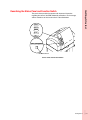
Media Cassette and Drum Area
About cassettes
The DPM 2340 uses A.B.Dick brand media supply cassettes. Follow the
steps below to ensure that the media is properly loaded.
The media supply and Take-up Cassette are conveniently accessible from
the front of the DPM2340. The media cassette is in the upper position and
the guide box is located under the media cassette. If you have the Take-up
Cassette Accessory (used when running RA Material), it will be located
•
• 3-1
•
•
•
•
where the guide box is shown here. See “Using the take-up cassette
accessory” on page 3-29 in this Chapter for specific procedures in the use
of this accessory.
Cassette Cover
Media Cassette
Guide Box or Takeup Cassette
Cassette Locations
To remove the media cassette:
1
If the BUSY message is illuminated, wait for it to go out.
ERROR
TAKE-UP
ON LINE
BUSY
ON
EJECT
LOAD UNLOAD
BUSY message
•
•
•
3-2 •
•
•
Operating Basics
2
Open the Cassette Cover.
Cassette Cover
Media Cassette
Guide Box or Takeup Cassette
Cassette Locations
3
Is the UNLOAD message illuminated?
NO
Wait for the UNLOAD message
to illuminate.
YES
Press the Function Switch and
wait until the UNLOAD message
flashes.
ERROR
TAKE-UP
ON LINE
BUSY
ON
EJECT
LOAD UNLOAD
Function Switch
UNLOAD message and Function Switch
4
Partially remove the media cassette and adapter.
Operating Basics
•
•
•
• 3-3
•
•
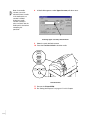
Push down on the two holding forks and slide the cassette toward
you to the stop.
Cassette
Cover
Media cassette
and adapter
Fork
Removing the media cassette
5
Wait for the BUSY message to go out. Remove the media cassette
from the two upper forks.
ERROR
TAKE-UP
ON LINE
BUSY
ON
EJECT
LOAD UNLOAD
BUSY message
•
•
•
3-4 •
•
•
Remove the cassette adapter assembly from the media cassette.
Turn the latch until it stops.
Cassette Adapter Guide
and End-cap
3
Latch
2
Operating Basics
6
1
Cassette
Cassette Adapter Guide and End Caps
7
Is the media cassette empty?
NO
Do Step 8.
8
YES
Discard the cassette, and load another cassette.
See “To load a media cassette:” on page 3-6 in
this Chapter.
Tape the media leader to the cassette, and set the cassette aside
for future use.
If the media will not be used in the immediate future, place the
cassette in the plastic sleeve and the original shipping box.
Cassette with media leader taped
Operating Basics
•
•
•
• 3-5
•
•
To load a media cassette:
1
Pull the media from the cassette until you have approximately
5 inches beyond where the tape secured the media inside the
cassette (new cassettes only).
Previously used cassettes will only need approximately 3 inches
of leader pulled from the cassette.
2
Cut the media leaving approximately 3 inches of leader (new
cassettes only).
3
Thread the leader through the cassette adapter guide and endcap assembly.
4
Insert the cassette adapter end-cap pins into the media cassette
and attach the latch end-cap.
Turn the latch until it stops.
Cassette Adapter Guide
and End-cap
Media
Guide edge
1
Pin
Latch
2
3
Cassette
Latch end-cap
Attaching the Cassette Adapter Guide and End Caps
5
•
•
•
3-6 •
•
•
Cut the media even with the longer edge of the cassette adapter
guide.
Carefully align the cassette adapter with the forks and push the
cassette assembly in until it latches.
Cassette
Operating Basics
6
Fork
Cassette and forks
7
Are you changing the media type?
NO
Proceed to Step 8.
The cassette and media
type must be defined
before doing Step 8.
8
YES
See “Setting the media type” on page
3-8 in this Chapter.
Press the Function Switch. Wait until the BUSY message goes
out (approximately 30 seconds).
Operating Basics
•
•
•
• 3-7
•
•
Setting the media type
Every time you change the media type, you must tell the DPM 2340
software what type of media you installed. This is done by typing media
and cassette definitions into the media management function in
RipManager.
While setting up these definitions, you will be able to size image areas,
select on-line or Take-up Cassette destinations, and you make it possible
for RipManager to monitor the media consumption and to warn you when
the level of media in the media cassette is low.
To set the media type:
1
2
Shut down the PrintersRIP®.
In RipManager, select DPM 2340 > Media Management.
Selecting Media Management
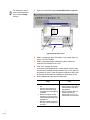
3
Click on Edit Cassettes to open the Edit Cassettes window.
Media Management Window
•
•
•
3-8 •
•
•
Operating Basics
4
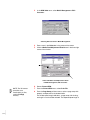
Click on Edit Media to open the Edit Media window.
Selecting Edit Media
5
Are you defining a new media type, or changing the definition of a
media that is already on the list?
NO
YES
Select the media you will be To define a new media: Click on an
empty line in the media list.
using. Skip to Step 7.
To change a media definition: Select
the media definition you want to
change.
Edit Media Window
Operating Basics
•
•
•
• 3-9
•
•
6
Field
Enter the following information into the indicated fields:
Action
Notes
Name
Enter the desired name.
Either the product code, or a name that
is meaningful to you.
Width
Enter width of the media to be
used.
This can be found on the media
label.
Type menu
Select the relevant media from
the list.
Paper and film refer to RA process
imaging films and paper.
Polyester plate and Paper plate refer to
platemaking materials.
Thickness
Enter the thickness of the media.
(See the table below for media
thicknesses.)
This value is used by the platemaker to
maintain accuracy when exposing different media thicknesses.
Media
7
Thickness
5 mil plate
.005”
127 µm
7 mil plate
.007
178 µm
8 mil plate
.008”
.203 µm
Polyester RA film
.004”
.102 µm
Click OK to save the settings.
The Edit Media window will close.
8 Click OK to close the Edit Cassettes window.
9 Click OK to close the Media Management window.
10 Re-start the PrintersRIP®.
•
•
•
3-10 •
•
•
If you try to open and
check the Edit cassette
menu in the Media
Management window and
cannot, PrintersRIP® is
running. Close
PrintersRIP®.
Up to 16 different cassettes can be defined. Label the actual cassette with
the names corresponding to those in the list.
To set the cassette definition:
1
2
3
Shut down the PrintersRIP®.
In RipManager, select DPM 2340 > Media Management.
Click on Edit Cassettes to open the Edit Cassettes window.
.
Operating Basics
Defining a media cassette
Selecting Edit Cassette
4
Click on an empty line in the cassette list to add a new media.
To change the definition of a media that is already in the list, click
on that line.
5
Enter the following information into the indicated fields:
Field
Action
Name
Enter the desired name.
Media
Select the relevant media from the list.
If the media is not defined, this must be done before you can
complete this procedure. See “Setting the media type” on page
3-8.
Length
Enter the length of the media contained in the cassette.
A new cassette has 61 m (200 ft.).
6
Set the Media Low Warnings as desired.
As a job is exposed, the DPM 2340 calculates the amount of
media used. When the amount of media remaining in the cassette reaches the levels you specify, the PrintersRIP® will display
the First warning (Info: Media Low) or Second warning (Warning: Media Low) in its System Monitor window.
7
Click OK to save these settings.
The new cassette definition is now available.
Operating Basics
•
•
•
•3-11
•
•
Note: A new media
cassette can not be
selected if there is media
in the media path, or a
cassette is loaded.
Unload any media
cassette currently in
place, and check that the
media path is clear before
attempting this
procedure.
8
In Media Management, select Upper Cassette pull down menu.
Selecting Upper Cassette pull down menu
9 Select the newly defined cassette.
10 Press the Function Switch to load the media.
ERROR
TAKE-UP
ON LINE
BUSY
ON
EJECT
LOAD UNLOAD
Function Switch
Function Switch
11 Re-start the PrintersRIP®.
12 Do “Setting the Exposure” on page 3-17 in this Chapter.
•
•
•
3-12 •
•
•
To achieve consistent accurate output, the DPM 2340 must have exposure
information relative to the laser in the platemaker, media being used, and
the resolution selected.
The following procedures are used to set the DPM 2340 laser power to the
proper power level for the media and output resolution in use. See
“Controlling Job Parameters” in the PrintersRIP® Operators Manual for a
full explanation of the Page Setup concept, and for the additional
procedure for setting the dot percentages needed to complete calibration.
Operating Basics
Selecting the Exposure Sweep and Interpreting the Test Patterns
Finding the exposure level
The exposure level is determined by producing an “exposure sweep,”
which is the automatic exposure of test strips at a series of different
exposure levels. The strips are then examined to determine the proper
exposure level. Test strips are output for the resolution and cassette
specified in the Page Setup. Once the proper exposure is determined, it is
entered into that Page Setup.
Exposure Sweeps
WARNING
When producing exposure sweeps on:
Plate Material:
• The "life" of the plate processing chemistry must NOT be totally
used up. (chemistry life is 1875 ft2 [174 M2] or 4 weeks).
• The plate processing chemistry should be at the proper level (the
replenishing bottle must not be empty).
Film Material:
• The "life" of the RA processing chemistry must NOT be totally
used up.
• The RA processor should be properly filled and the processor
properly warmed up.
• The processor should be set to 95°F (35°C) and 38 seconds
dwell time
Operating Basics
•
•
•
•3-13
•
•
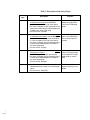
Table 1: Description of the Sweep Types
Sweep
type
•
•
•
3-14 •
•
•
Description
Purpose
Coarse
• Produces 11 exposure bars covering the
entire exposure range of the DPM2340.
• 11 jobs will appear in the Rip active queue.
• An arrow will appear on the media next to the
exposure bar indicating the selected exposure
number in the active page setup.
• Print file name: "coarswp"
Useful for narrowing the
exposure range prior to
running the FineSweep
target.
Fine
• Produces 11 exposure bars covering a range
of 100 exposure numbers, from 50 below the
number in the active page setup to 50 above.
• 11 jobs will appear in the Rip active queue.
• An arrow will appear next to the exposure bar
indicating the selected exposure number in
the active page setup.
• Print file name: "fineswp"
Best used immediately
after a CoarseSweep to
find an exact exposure
number.
Mini
• Produces 5 exposure bars covering a range of
50 exposure numbers.
• 5 jobs will appear in the Rip active queue.
• An arrow will appear next to the exposure bar
indicating the selected exposure number in
the active page setup.
• Print file name: "MiniSwp"
Conserves plate material
when running daily exposure sweeps for multiple
page setups or resolutions.
Verify
• Produces 1 exposure bar indicating the
selected exposure number in the active page
setup.
• Print file name: "VerifyExp"
Quick check that the
exposure setting has not
drifted.
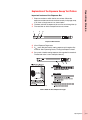
Important features of the Exposure Bar
1 Exposure number at which the bar was written. Where the
exposure number matches the number currently in the page setup,
it will have a triangle next to it as shown below.
2
3
The date and time the exposure job was first sent through the rip.
The resolution at which the exposure bar was written.
1
2
3
Operating Basics
Explanation of the Exposure Sweep Test Pattern
Exposure Bar Features
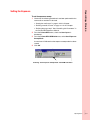
4
5
6
Visual Exposure Target area
Dmin patch: May be used for setting exposure with negative film
materials. See "Operating Basics, Finding the Exposure Level".
Dmax patch: Used for setting exposure with negative film materials.
The desired value is 3.8 to 4.0 optical density.
4
5
6
Plate material must be completely dry.
How to Read the Visual Exposure Target
Operating Basics
•
•
•
•3-15
•
•
7
Cross Hatch Exposure Target Area: This is an alternative target to
determine exposure.
• Using a 25X loupe, inspect the point at which the positive and
negative lines meet at the various exposures.
• Determine the correct number by comparing the results to the
illustration.
7
Important factors
impacting the accuracy of
the settings.
Be aware that the following will impact the results of the exposure
calibration process and in turn, the imaging results:
• For negative film material processed off line, a reliable and accurate
densitometer capable of measuring transmission densities up to 4.0 or
higher is needed.
• The DPM 2340 processor chemistry must be within the specified life.
• Plates must be evaluated under the recommended viewing conditions.
•
•
•
3-16 •
•
•
To set the exposure sweep:
1
Check that the following procedures have been performed for the
new media or resolution to be used.
• “Setting the media type” on page 3-8 in this Chapter.
• “Defining a media cassette” on page 3-11 in this Chapter.
• “Defining the page setup”. See “Controlling Job Parameters” in
the PrintersRIP® Operators Manual.
2
From the PrintersRIP® menu, check that Start Inputs is
deselected.
3
From the PrintersRIP® DPM 2340 menu, select Start Exposure
Sweep Mode.
Operating Basics
Setting the Exposure
A status box will indicate that the exposure sweep mode has been
started
4
Click OK.
.
Selecting “Start Exposure Sweep Mode” from DPM 2340 menu
Operating Basics
•
•
•
•3-17
•
•
The file browser should
be set to PostScript® (.ps)
files, and the C:/itekgx
directory.
5
From the PrintersRIP® select PrintersRIP® menu > print file..
6
8
7
Page Setup pull down menu
6
Select a sweep type. (See “Description of the Sweep Types” on
page 3-14 in this Chapter).
7
Select a preselected page setup defining the cassette and
resolution for the exposure you want.
8
Click "Print" to begin the sweep.
One or two plates (depending on the file printed, material width
and resolution selected) will be produced. The 12 inch (305 mm)
long plates will have a series of exposure calibration strips used
to correctly set the exposure calibration for either plate, or film.
9
Do the appropriate steps from the table below:
Plate
• Allow the plate to completely
•
•
•
•
•
•
3-18 •
•
•
dry.
View the plate squarely, at
eye level, from 3 feet away,
and under consistent lighting
conditions.
Identify the exposure strip
having the circles that come
closest to disappearing in the
background.
Note the number to the left of
this strip. It will be used in the
next step.
Film
• Check the maximum
•
density patch at the right of
each exposure strip with a
densitometer.
Identify the patch that has
closest transmission
density to 3.9+/-0.1. This
will be used in the next step.
Operating Basics
10 From the PrintersRIP® pull down menu, select Page Setup
Manager.
Select the page setup used to make the exposure sweep, and
click Edit to change the page setup values.
Select
Page Setup
Click Edit
Selecting the Page Setup Manager
Operating Basics
•
•
•
•3-19
•
•
11 Enter the exposure number selected in Step 9 into the Exposure
setting.
12 Click the "OK" to close the page setup.
13 Click OK to save the setting.
11
13
12
Entering Exposure
After completing the
course sweep, remember
to perform a fine sweep.
Note: If you have performed a coarse sweep, the number arrived at will not
be adequate to ensure proper exposure. Return to Step 5 and perform a
fine sweep to finish setting the exposure for this page setup.
If you do not stop the
Exposure Sweep mode,
plates will be produced
without properly negated
(black) margins.
14 From the PrintersRIP® window, select DPM 2340 > Stop
Exposure Sweep Mode.
A status box will indicate the sweep mode is stopped.
Stop Exposure Sweep Mode
•
•
•
3-20 •
•
•
Start Inputs.
Click on the box for Start Inputs. A will be placed in the box.
16 Do “Setting the image centering and plate length calibration” on
page 3-21 in this Chapter.
Setting the image centering and plate length
calibration
Do this procedure each time a new media supply cassette is installed.
Operating Basics
15 From the PrintersRIP® menu, select Start Inputs and restart the
Plate material is conserved by doing these calibrations using only one
plate. If desired, either calibration can be done separately by doing the
appropriate steps below.
Image Centering
Steps 1 - 4, 6 - 10
Plate Length
Steps 1 - 3, 5 - 9
It is recommended that the Plate Catcher be set for the plate length being
sent. See “Working with the Plate Catcher” on page 3-34 in this Chapter.
To set the image centering and plate length calibration:
1
Close the PrintersRIP® window (click the “x” in the upper right
corner, or use the PrintersRIP® menu).
2
Open the RipManager window.
Click the RipManager icon on the RIP Workstation button bar.
RipManager
button
RIP Workstation Button Bar
Operating Basics
•
•
•
•3-21
•
•
3
In the DPM 2340 menu, select Media Management > Edit
Cassettes.
Selecting Edit Cassettes in Media Management
4
5
Enter a zero in the Offset box in the center of the screen.
Click the Media Feed Adjustment Reset button in the lower right
corner of the window.
Offset and Media Feed Adjustment Reset
in Media Management, Edit Cassettes
NOTE: The file browser
should be set to
PostScript® (.ps) files,
and the C:/itekgx
directory.
•
•
•
3-22 •
•
•
6
7
8
Restart PrintersRIP®.
From the PrintersRIP® menu, select Print File.
From the Page Setup pull down menu, select a page setup with
properly set exposure for the loaded media.
For the best plate length calibration, a page setup with the longest length in use should be selected. The expected plate length is
Operating Basics
found by looking in PrintersRIP® > Page Setup Manager > Edit
> Configure Device > Fixed Feed Length.
Fixed Feed Length
Configure Device window
9
Is the Plate Catcher adjusted for the plate length to be produced?
NO
YES
Adjust the Plate Catcher. If necessary, see
“Adjusting the Plate Catcher” on page 3-34 in
this Chapter.
Do Step 10.
10 Select the center.ps file.
center.ps
Print Button
Selecting Center.ps in the Page Setup pull down menu
Operating Basics
•
•
•
•3-23
•
•
11 Click the Print button.
A centering target plate is produced.
TOP
RIGHT
LEFT
(Measure distance from
center to left edge
of material)
Offset
=
(Measure distance from
center to right edge
of material)
RIGHT - LEFT
2
* Offset may be positive or negative
centering target
NOTE: Make the
measurements in the
same unit of measure that
the RipManager
indicates. Use a quality
scale, and a low power
loupe (7X) to determine
your measurements.
RipManager allows the
units of measurement to
be changed through the
RipManager Setup
menu.
12 Measure and record the distance from both the right and left
NOTE: The resulting
number may be positive
or negative.
14 Subtract the left distance from the right distance. Divide the
edges to the center line on the target. Measure and record the
length of the plate at the center line.
13 Perform the calculation described on the target.
The built-in calculator can be used to perform the calculations.
Access it by selecting Start on the Microsoft Windows “Task Bar”,
Programs > Accessories > Calculator.
resulting number by two, and record the result.
15 Close the PrintersRIP® window (click the “x” in the upper right
corner).
•
•
•
3-24 •
•
•
Operating Basics
Offset
Expected Length
Actual Length
Set
Set Button in Edit Cassette Window
16 Open the RipManager window.
Click the double arrow button on the RIP Workstation button bar.
17 In the DPM 2340 menu, select Media Management >
Edit Cassette.
18 Enter the resulting number from Step 14 in the Offset box in the
center of the screen.
If the resulting number is negative, it should be entered as a negative number.
19 In the Expected Length box (lower left of screen) type the fixed
length number from PrintersRIP® > Page Setup > Edit >
Configure Device > Fixed Feed Length used to make the plate.
20 In the Actual Length box, enter the measured length from
Step 12.
21 Click the Set button to save the setting.
Operating Basics
•
•
•
•3-25
•
•
OK
PrintersRIP®
button
OK
22 Click OK in the Edit Cassette box.
23 Click OK in the Media Management screen.
24 Minimize the RipManager screen (click “—” in the upper right
corner).
25 Start the PrintersRIP®.
Click the PrintersRIP® icon on the RIP Workstation button bar.
This media is now ready for use.
•
•
•
3-26 •
•
•
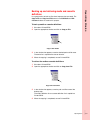
It is a good practice to back-up files where important data are stored. The
Copy to File and Copy from File buttons in the Edit Media and Edit
Cassette windows are used for this purpose.
To back up media or cassette definitions:
1
2
Shut down PrintersRIP®.
Open the appropriate window and click on Copy to File.
Operating Basics
Backing up and retrieving media and cassette
definitions
Copy to File Button
3
In the window that appears, enter the desired path and file name.
The entire list is copied to the chosen location.
4
When the copying is completed, re-start PrintersRIP®.
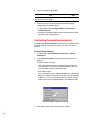
To retrieve the media or cassette definitions:
1
2
Shut down PrintersRIP®.
Open the appropriate window and click on Copy from File.
Copy from File Button
3
In the window that appears, enter the path and file name of the
backup copy.
The media definition list or cassette definition list is copied into
PrintersRIP®.
4
When the copying is completed, re-start PrintersRIP®.
Operating Basics
•
•
•
•3-27
•
•
Using RipManager for media management
By typing media and cassette definitions in the media management
function as described above, the DPM 2340 monitors the media
consumption and alerts you when the level of media in the media cassette
is low.
The Media Management window lets you carry out some media related
functions without going to the platemaker. The functions are indicated by
three buttons in the lower part of the Media Management window.
Media Management
• Eject is available when the DPM 2340 contains exposed media. If you
click on Eject, the media is cut and forwarded to the Take-up Cassette
Accessory. The media is cut and the Take-up Cassette can be removed
for remote media processing.
• Unload removes any media in the drum allowing you to change the
media cassette. If the take-up cassette accessory is installed when
Unload is activated, an Eject is automatically performed.
• Load: the text on the Unload button will change to Load when a new
media cassette has been installed. Clicking on Load advances the
media into the drum, ready for exposure.
• Form Feed outputs a full 51 cm (20 inches) of media without exposing
it. This function is only available in the Media Management window,
and not with the function switch.
The Cassette selection in the Media Management window is only
available when there is no media in the DPM 2340. When the menu is
active, you can use it to tell the RipManager which cassette will be loaded.
•
•
•
3-28 •
•
•
Operating Basics
Using the take-up cassette accessory
To install the Take-up cassette:
1
2
Open the Cassette Cover.
Remove the guide box.
Push down on the 2 forks and pull the guide box toward you.
Cassette Cover
Guide Box
Removing the Guide Box
3
Carefully align the Take-up Cassette over the lower forks, and
push the cassette in until it latches.
Take-up cassette
Forks
Installing the Take-up Cassette
Operating Basics
•
•
•
•3-29
•
•
4
Check that the DPM 2340 is configured for the Take-up Cassette.
• Check that the configuration is correct for the Take-up Cassette.
• In Page Setup, select Configure Device > Output to: > Takeup Cassette.
• Check that the media feed parameters are correct for the Takeup Cassette. See “Customizing the media feed parameters” on
page 3-32 in this Chapter.
The media type must be
set for RA film when using
the Take-up Cassette.
5
Is the media type correctly defined?
NO
YES
See “Setting the media type” on page 3-8 in
this Chapter.
6
Go to Step 6.
Close the Cassette Cover.
To remove the Take-up Cassette:
1
Are ON LINE and EJECT illuminated?
NO
YES
Skip to Step 4.
2
Go to Step 2.
Press the Function Switch to move imaged media into the Takeup cassette.
ERROR
TAKE-UP
ON LINE
BUSY
ON
EJECT
LOAD UNLOAD
Function Switch
Status Panel
•
•
•
3-30 •
•
•
Operating Basics
3
Wait until the BUSY light goes out on the Status Panel.
ERROR
TAKE-UP
ON LINE
BUSY
ON
EJECT
LOAD UNLOAD
Function Switch
Status Panel and Function Switch
4
5
Open the Cassette Cover.
Remove the Take-up cassette.
Cassette Cover
Take-up Cassette
Forks
Removing the Take-up Cassette
Operating Basics
•
•
•
•3-31
•
•
6
Are you installing the guide box?
NO
Install the Take-up cassette and continue imaging media. Do not do Step 7.
7
YES
Do Step 7.
Install the conveyor guide and check that the DPM 2340 is
configured for the conveyor guide.
• In Page Setup, select Configure Device > Destination >
Online Processor
• Check that the media loaded is correct for the conveyor guide
(polyester plate, or paper plate).
Customizing the media feed parameters
The RipManager Device Preferences window lets you customize several
parameters related to the amount of media that is fed to the Take-up
Cassette.
To access these functions:
1
In RipManager, select DPM 2340 > Preferences > Device
Preferences.
2
In the Take-up Cassette tab, enter the desired values for the
following:
• Maximum Take-up Length
This is the maximum amount of media fed into the Take-up
Cassette before an Eject must take place (default is the maximum allowable value of 10 meters (33 feet).
• Extra Feed on Eject
This is the length of extra, unexposed media that is fed into the
Take-up Cassette in connection with an Eject. The default value
is 300 mm. (11.8”) but some processors may require a longer
lead to make sure that exposed media is not exposed to light.
Device Preferences Take-up Cassette tab
3
•
•
•
3-32 •
•
•
Click OK to save this setting and close the window.
In the Imagesetter tab, enter the desired value for Minimum Feed
Length.
This is the minimum amount of media fed into the drum for each
new job. Normally, the default length of 5 cm. (shown in the dialogue box as “0”) is sufficient, but a higher value can be entered if
problems occur.
This setting applies to use of the Take-up Cassette only.
Operating Basics
4
Entering Minimum Feed Length
5
6
7
Click OK to save this setting and close the window.
Click OK to close Device Preferences.
Click OK to close the Preferences window.
Operating Basics
•
•
•
•3-33
•
•
Working with the Plate Catcher
The Plate Catcher, which is located on the back of the DPM 2340, is where
the processed plates will be delivered when using the in-line processor.
Adjusting the Plate Catcher
Each time you produce plates with a new length, the Plate Catcher must
be adjusted to accept the length of media that will be produced.
NOTE: When producing plates of various lengths, best results can be
obtained by batching plates with similar lengths (less than 10 cm / 4 inches
difference).
To adjust the plate catcher:
1
Locate the Plate Catcher.
Located on the back of the DPM 2340 in the middle of the lower
half of the equipment.
2
Will you be producing media of various lengths?
NO
Do Step 3 only.
3
YES
Skip to Step 4.
Adjust the Plate Catcher so that it is 2.5 cm (1") longer than the
media length you will be producing.
Grasp the adjustable center slide, and extend it to the appropriate
length.
4
Adjust the Plate Catcher so that it is 2.5 cm (1") longer than the
longest media length you will be producing.
Grasp the adjustable center slide, and extend it to the appropriate
length.
•
•
•
3-34 •
•
•
Chapter 4
Troubleshooting
••••••
The DPM 2340 utilizes a combination of proven imaging design, simple
media path, and reliable processor technology. In the unlikely event that
difficulty should arise in these areas, the procedures in this chapter will be
valuable in resolving media related difficulties.
Identifying Troubleshooting Areas
MEDIA and DRUM Area
CONVEYOR Area
PROCESSOR Area
Jam Areas
•
• 4-1
•
•
•
•
Understanding Malfunctions
When most malfunctions occur, the Status Panel and the RIP Workstation
will alert you to such an occurrence. The ERROR message on the Status
Panel will illuminate, frequently accompanied by a group of error
messages being displayed in the PrintersRIP® window. Some
malfunctions will not be accompanied by any indication at the Status Panel
or at the PrintersRIP® window. Some malfunctions are only observable by
the operator.
Working with error codes and malfunctions
If you should experience a malfunction, first determine if the malfunction
seems to be machine related, or is it related to settings that are specific to
the job you are running. Next, use the following tables, which are divided
into "Machine Related", and "Job, Page Setup, or Media Definition
Related", to locate the malfunction you are experiencing. The information
provided in these tables will assist you in resolving the malfunction.
When error messages are generated, they will appear in the
PrintersRIP® window. Some will only appear when a job is run. If the
ERROR message is illuminated on the Status Panel, and no error text
appears in the PrintersRIP® window, drag the last job from the held
queue into the active queue. The job will fail to run, and the error text will
appear.
Find the grouped error messages that match those displayed in the
PrintersRIP® window, and perform the recommended action. Information
appearing in SOLID UPPER-CASE, represent the error messages
displayed in the PrintersRIP® window.
ERROR CODES and
MALFUNCTIONS
POSSIBLE
CAUSE
RECOMMENDED ACTION
Machine Related
•
•
•
4-2 •
•
•
ERROR: PAPER JAM #9
ERROR: CONVEYOR SENSOR
TIMEOUT
ERROR: PAPER JAM
This is caused by
failure of the
media to reach the
conveyor media
sensor from the
drum.
See “Clearing drum area
jams” on page 4-10.
ERROR: PAPER JAM #9
ERROR: DRUMOUT SENSOR
TIMEOUT
ERROR: PAPER JAM
This is caused by
failure of the
media to reach the
drum-out media
sensor (located
just before the
buffer rollers).
See “Clearing drum area
jams” on page 4-10.
POSSIBLE
CAUSE
Troubleshooting
ERROR CODES and
MALFUNCTIONS
RECOMMENDED ACTION
Machine Related
ERROR: PAPER JAM #9
ERROR: CAR PROTECT
ERROR: MEDIA AT CAR
This is caused by
the media striking
the semicircular
Guide Hoops. This
occurs when the
media fails to lie
flat across the
drum.
See “Clearing drum area
jams” on page 4-10.
ERROR: OUT OF MEDIA (#10)
ERROR: LOAD ERROR, NO FEED
SENSOR ACTIVE
ERROR: PAPER OUT
Media jammed in
the drum area during the load
sequence.
See “Clearing media jams during load” on page 4-18.
ERROR: ONLINE PROCESSOR
GENERAL ERROR (#23)
ERROR: EXIT SENSOR TIMEOUT
ERROR: NOT READY
Media is jammed
in the processor
area.
See “Clearing processor area
jams” on page 4-22.
ERROR: ONLINE PROCESSOR
GENERAL ERROR (#23)
ERROR: PROCESSOR IN
SENSOR TIMEOUT
ERROR: NOT READY
Media is jammed
in the conveyor
area.
See “Clearing conveyor area
jams” on page 4-28.
JOB ERROR: OCCURS AS JOB
BEGINS TO RUN
ERROR: COVER OPEN #19
ERROR: COVER OPEN
Front Doors to processor are open.
Close both front doors.
JOB ERROR: OCCURS AS JOB
BEGINS TO RUN
ERROR: LIQUID LEVEL FAILURE
(#20)
ERROR: ACTIVATOR LEVEL LOW
ERROR: LIQUID LEVEL FAILURE
The activator fluid
level is too low.
Add activator to the replenisher bottle. See “Filling the
processor with chemicals” on
page 5-5.
JOB ERROR: OCCURS AS JOB
BEGINS TO RUN
ERROR: LIQUID LEVEL FAILURE
(#20)
ERROR: STABILIZER LEVEL LOW
ERROR: LIQUID LEVEL FAILURE
The stabilizer fluid
level is too low.
Add stabilizer to the replenisher bottle. See “Filling the
processor with chemicals” on
page 5-5.
ERROR: INTERNAL POWER
FAILURE #18
ERROR: POWER FAILURE OR
INTERLOCK OPEN
ERROR: NO POWER
One of the four
laser aperture covers is not closed.
See “Safety Devices” on page
1-6 to identify the covers that
must be closed.
Troubleshooting
•
•
•
• 4-3
•
•
ERROR CODES and
MALFUNCTIONS
POSSIBLE
CAUSE
RECOMMENDED ACTION
Machine Related
•
•
•
4-4 •
•
•
Job waits in Print position of RIP
No error message
The temperature
of the activator
fluid is too low.
Wait approximately 30 minutes
for the processor to warm up.
If necessary, check the processor fluid levels. See “Filling
the processor with chemicals”
on page 5-5.
Re-occurring processor jam errors
with no media jammed in the processor.
Media is sticking
at the exit sensor.
Check that the Plate Catcher
is adjusted correctly. See
“Adjusting the Plate Catcher”
on page 3-34. If necessary, do
not mix media with lengths
more than 10 cm (4") different.
Plates come out all black.
Covers were
removed while
media was in the
path.
Unload the media and re-load
it again, OR run two 51 cm
(20") plates through the drum.
This will remove the fogged
media from the drum. If necessary, see “About cassettes” on
page 3-1.
Plates come out all black with the
covers closed.
Covers have not
been opened
while the media is
in the path.
Check that the exposure settings are correct. See “Setting
the Exposure” on page 3-17.
Plates come out all silver.
Exposure setting
may be incorrect.
Check that the exposure settings are correct. See “Setting
the Exposure” on page 3-17.
Plates come out of processor with
scratches or dirty.
Processor is dirty.
Clean the processor and
change the chemicals. If necessary, see “Cleaning the processor unit” on page 5-6.
Condensation from the processor is
forming on the conveyor and guide
box with the drum cooling fan running.
Drum cooling fan
air filter is clogged.
Change the air filter located in
the drum cabinetry. See
“About air filter changes” on
page 2-14.
Condensation from the processor is
forming on the conveyor and guide
box but the drum cooling fan is not
running.
Service is
required.
Place a call for service.
Troubleshooting
Some malfunctions occur because the job is not compatible with the
settings within PrintersRIP®. The table that follows provides important
information useful in resolving these types of malfunctions.
Locate the type of malfunction you are experiencing, and perform the
recommended action.
ERROR CODES and
MALFUNCTIONS
Job, Page Setup, or Media
Definitions Related
OTHER
CONDITIONS
RECOMMENDED ACTION
JOB ERROR: OCCURS AS JOB
BEGINS TO RUN
ERROR: LEFT MARGIN + PAGE
WIDTH + RIGHT MARGIN TOO
LARGE
ERROR: INVALID CLIPPING
Job is being held in
"Active Queue"
with this message.
Job is too long for the Page
Setup. Check Job length and
Page Setup, and correct as
needed. See “Controlling Job
Parameters” of the PrintersRIP® Operators Manual.
JOB ERROR: OCCURS AS A JOB
BEGINS TO RUN
ERROR: WRONG PARAMETERS
#5
ERROR: JOB WIDTH + MARGINS
> X SIZE
ERROR: UNKNOWN ERROR
Job is being held in
"Active Queue"
with this message.
Job plus gripper margin is
longer than 508 MM (20").
Reduce job length or gripper
margin (Gripper Margin must
be at least 19 mm (.75"). See
“Controlling Job Parameters”
of the PrintersRIP® Operators Manual.
JOB ERROR: OCCURS AS A JOB
BEGINS TO RUN
ERROR: TOP MARGIN + PAGE
HEIGHT TOO LARGE
ERROR: INVALID CLIPPING
Job is being held in
"Active Queue"
with this message.
Job is wider than defined
media width. Check job width
and media definition and correct as needed. See “Setting
the media type” on page 3-8
JOB ERROR: OCCURS AS A JOB
BEGINS TO RUN
ERROR: WRONG PARAMETERS
#5
ERROR: RIGHT GRIPPER
MARGIN TOO SMALL
ERROR: UNKNOWN ERROR
Job is being held in
"Active Queue"
with this message.
Gripper Margin (or right margin) too small. Gripper margin
must be at least 19 MM (.75").
See “Controlling Job Parameters” of the PrintersRIP Operators Manual.
Troubleshooting
•
•
•
• 4-5
•
•
ERROR CODES and
MALFUNCTIONS
Job, Page Setup, or Media
Definitions Related
•
•
•
4-6 •
•
•
OTHER
CONDITIONS
RECOMMENDED ACTION
JOB ERROR: OCCURS AS A JOB
BEGINS TO RUN
ERROR: ON-LINE PROCESSOR
GENERAL
ERROR #23
ERROR: ILLEGAL MEDIA TYPE
FOR PROCESSOR
ERROR: NOT READY
Job is being held in
"Active Queue"
with this message.
Media type loaded is defined
as film or paper, while the
Page SetupConfigure
Device > Destination is set
for Online Processor. Only
Polyester or paper plate may
be sent to the processor.
Change media definition or
change destination to Take-up
Cassette. See “Controlling
Job Parameters” of the PrintersRIP® Operators Manual,
“Using the take-up cassette
accessory” on page 3-29, and
“Setting the media type” on
page 3-8.
JOB ERROR: OCCURS AS A JOB
BEGINS TO RUN
ERROR: TAKE-UP CASSETTE
NOT PRESENT
ERROR: CONVEYOR BOX NOT
PRESENT
ERROR: NO TAKEUP CASSETTE
Job is being held in
"Active Queue"
with this message.
Either: The media loaded is
defined as paper or polyester
plate, while the Page Setup >
Configure Device > Destination is defined as Take-up
Cassette, or, neither a Takeup Cassette, or Guide (Conveyor) Box is present in the
machine. Install either the
guide box, or, see “Controlling
Job Parameters” of the PrintersRIP® Operators Manual,
“Using the take-up cassette
accessory” on page 3-29, and
“Setting the media type” on
page 3-8.
JOB ERROR: OCCURS AS JOB
BEGINS TO RUN
ERROR: INPUT CASSETTE NOT
PRESENT #11
ERROR: NO CASSETTE
Job is being held in
"Active Queue"
with this message.
The media cassette defined in
the page setup for the job
does not match the media
cassette defined as loaded in
the machine. Change the job
media cassette. See “Controlling Job Parameters” of the
PrintersRIP® Operators Manual.
Job, Page Setup, or Media
Definitions Related
OTHER
CONDITIONS
RECOMMENDED ACTION
JOB ERROR: OCCURS AS JOB
BEGINS TO RUN
ERROR: WRONG PARAMETERS
#5
ERROR: OUT OF RANGE
ERROR: UNKNOWN ERROR
Job is being held in
"Active Queue"
with this message.
Page Setup has an exposure
setting of Zero (0). Exposure
setting must be in the 1 - 1200
range. See “Setting the Exposure” on page 3-17.
Plates margins come out all silver
Page Setup has
CTP enabled.
Machine has been left in the
Start exposure sweep
mode. See “Setting the Exposure” on page 3-17, or, the
media defined is narrower
than the media loaded. See
“Setting the media type” on
page 3-8.
Plates that have been sent can’t be
found.
RipManager >
Setup > Imagesetter does not have
Stop on page
errors enabled
().
Job should be in "Held
Queue". Run the job again to
determine what page error
occurred, and perform the recommended action for that
error.
The page or image is not centered
on the media width.
CTP is enabled in
Page Setup.
The media width defined is different from the media width
loaded in the machine. See
“Setting the media type” on
page 3-8.
The page or image is not centered
on the media width.
CTP is not enabled
in Page Setup.
Enable CTP or use Page
Setup Features to correct the
centering. See “Controlling
Job Parameters” of the PrintersRIP® Operators Manual.
The page or image is not positioned
properly on the plate.
CTP is enabled.
Change plate length, or
increase or decrease the gripper margin to correct the positioning of the plate or
image.Rotating the image
180° may help, or reconfigure
the job in application software.
See “Controlling Job Parameters” of the PrintersRIP®
Operators Manual.
Troubleshooting
Troubleshooting
ERROR CODES and
MALFUNCTIONS
•
•
•
• 4-7
•
•
ERROR CODES and
MALFUNCTIONS
Job, Page Setup, or Media
Definitions Related
•
•
•
4-8 •
•
•
OTHER
CONDITIONS
RECOMMENDED ACTION
A silver line appears at the top of the
plate (next to the gripper margin for
portrait plates).
CTP is enabled.
Re-calibrate the plate length.
See “Setting the image centering and plate length calibration” on page 3-21.
Jobs are not ripped as color separations.
Page Setup is not
set for color separations.
Select CMYK Separations in
the Page Setup > Separations Manager. See “Color
Separation” in the PrintersRIP® Operators Manual.
Jobs are not ripped as monochrome.
Page Setup is not
set for monochrome.
Select Monochrome Separation in the Page Setup > Separations Manager. See
“Color Separation” in the
PrintersRIP® Operators Manual.
Exposure sweep comes out on separate plates.
Exposure sweep
mode has not
been started.
Start Exposure sweep mode.
See Step 11 in “Finding the
exposure level” on page 3-13.
Exposure sweep comes out on separate plates with Exposure sweep
mode started.
DPM 2340 power
was turned off
after the Exposure
sweep mode was
started.
Stop Exposure sweep mode,
and re-start Exposure sweep
mode. See Step 11 in “Finding the exposure level” on
page 3-13.
Exposure does not change after
running Exposure sweep mode.
All the circles have the same level of
grey.
The Exposure job
has been checked
for information
causing all pages
in the job to be
produced using the
same exposure
number.
Checking information on the
Exposure Page Buffer may
have resulted in all the Exposure jobs having the same
exposure number. Re-RIP the
Exposure jobs rather than
pulling them from the "Held
Queue".
NOTE: If information must be
checked after a job is ripped,
make sure Change all pages
in job is de-selected (NO in
the box).
When media jams occur in the DPM 2340, the following procedures will
assist you in clearing the jams. Use the tables found in “Working with error
codes and malfunctions” on page 4-2 to help identify the appropriate jam
clearance procedure to use.
Clearing drum area jams
If a media jam occurs in the drum area, error messages are displayed in
the PrintersRIP® Window. To clear a media jam in this area of the DPM
2340, perform the following jam clearance procedure.
Troubleshooting
Clearing Jams
To remove media jams from the drum:
1
Allow sufficient time for any jobs in the processor to finish.
Wait approximately 1 minute, or until the BUSY message is no
longer illuminated, before doing this procedure.
ERROR
TAKE-UP
ON LINE
BUSY
ON
EJECT
LOAD UNLOAD
BUSY message
2
Turn off the power switch on the back of the DPM 2340.
Troubleshooting
•
•
•
• 4-9
•
•
3
4
Open the cassette cover.
Pull the media cassette toward you until you can cut the media
Push down on the forks, and pull the cassette toward you about
20 cm (8 in).
Cassette Cover
Media Cassette
Clearing the Media area
5
6
Cut the media and remove the media cassette.
Is the Take-up Cassette installed?
NO
Do Step 7.
YES
• Pull the Take-up Cassette forward and cut
any media extending from the drum into
the cassette.
This will save the imaged media
already in the Take-up Cassette.
• Remove the Take-up Cassette.
• Skip to Step 11.
•
•
•
4-10 •
•
•
Troubleshooting
7
Pull the guide box toward you and check for media extending
through the guide box and into the conveyor area.
Push down on the forks, and pull the guide box toward you.
Cassette Cover
Guide Box or Take-up
Cassette
Clearing the Media area
8
Has the media extended into the conveyor area?
NO
Skip to Step 10.
YES
Do Step 9.
Troubleshooting
•
•
•
•4-11
•
•
9
Remove any media from the conveyor area.
Pull the latch pin at each side of the conveyor and pivot it toward
you.
Latch Pins
Conveyor Guide
Conveyor Guide
10 Remove the guide box, or (if installed) the Take-up Cassette
Accessory.
Push down on the forks, and pull the guide box toward you.
Cassette Cover
Guide Box or Take-up
Cassette
Forks
Removing the Guide Box or Take-up Cassette
•
•
•
4-12 •
•
•
Troubleshooting
11 Remove the upper light shield.
Pivot the latch levers inward, and slide the light shield forward
until they clear the forks.
12 Remove the lower light shield
Pivot the latch levers inward, and slide the light shield forward
until they clear the forks.
13 Remove the right and left side covers.
Lift them straight up until they clear the machine.
Upper Light Shield
Side Cover
Latch Levers
Latch Levers
Side Cover
Lower Light Shield
Removing Light Shields and Side Covers
Troubleshooting
•
•
•
•4-13
•
•
14 Remove all media from the drum.
15 Check the media path through the drum. Are there large folds of
The DPM 2340 will not
restart if any pieces of
media remain in the drum
area.
media caught in the path?
NO
YES
Skip to Step 17.
The media must be carefully removed.
See Step 16.
MEDIA CASSETTE
Feed Rollers
Input Rollers
GUIDE
HOOP
GUIDE BOX
DRUM
Knife
Conveyor Rollers
Buffer Rollers
Output Rollers
Drum Area Media Path
16 Remove the large folds of media from the drum media path.
Carefully cut the media out of the media path.
All media must be
removed before
proceeding
•
•
•
4-14 •
•
•
17 Remove any media extending from the feed rollers.
Gently pull the media from the drum and do not exceed 2.25 Kg
(5 lbs.) of force. If the media will not move, check for large folds. If
necessary, do Step 16 again.
Troubleshooting
18
19
20
21
Install and latch the lower light shield.
Install and latch the upper light shield.
Re-install the guide box or Take-up Cassette.
Re-install the side covers.
Place them straight down over the cabinet ends.
Upper Light Shield
Side Cover
Latch Levers
Latch Levers
Side Cover
Lower Light Shield
Installing Light Shields and Side Covers
22 Is the processor path clear of media?
NO
See “Clearing processor area jams” on page
4-22.
YES
Do Step 23.
Troubleshooting
•
•
•
•4-15
•
•
23 Turn the power switch on.
24 Wait for the BUSY message on the Status Panel to go out.
ERROR
TAKE-UP
ON LINE
BUSY
ON
EJECT
LOAD UNLOAD
BUSY message on the Status Panel
25 Use the Function Switch below the Status Panel to reload media.
ERROR
TAKE-UP
ON LINE
BUSY
ON
EJECT
LOAD UNLOAD
Function Switch
Status Panel and Function Switch
•
•
•
4-16 •
•
•
Troubleshooting
26 From PrintersRIP®, select DPM 2340 > Output > Output
Controller/Monitor.
27 De-select the disable outputs.
Click on the for disable outputs.
Enable outputs in PrinterRIP®
Clearing media jams during load
If the media fails to load properly, error messages are generated in the
PrintersRIP® Window indicating the existence of a jam.
To clear a media loading jam:
1
Allow sufficient time for any jobs in the processor to finish.
Wait approximately 1 minute, or until the BUSY message is no
longer illuminated, before doing this procedure.
ERROR
TAKE-UP
ON LINE
BUSY
ON
EJECT
LOAD UNLOAD
BUSY message
2
Turn off the power switch on the back of the DPM 2340.
Troubleshooting
•
•
•
•4-17
•
•
3
4
Open the cassette cover.
Remove the media cassette and slowly pull it toward you.
Only a short length of media should come out with the cassette.
Push down on the forks, and pull the cassette toward you about
20 cm (8 in).
Cassette
Cover
Media Cassette
Clearing the Media area
5
Are you able to easily remove the media cassette and the short
length of media?
NO
YES
The media is fed too far into the drum. See “Clear- Do Step 6.
ing drum area jams” on page 4-10.
6
7
Pull a small amount of additional media from the media cassette.
Carefully trim the media.
Trim the media even with the longer edge of the cassette adapter
guide.
8
9
Re-install the media cassette.
Turn on the power
The switch is on the back of the DPM 2340.
•
•
•
4-18 •
•
•
Troubleshooting
10 Wait for the processor unit to warm up.
The BUSY message turns off.
ERROR
TAKE-UP
ON LINE
BUSY
ON
EJECT
LOAD UNLOAD
BUSY message on the Status Panel
11 Load the media.
Push the LOAD button on the Status Panel to load the media.
ERROR
TAKE-UP
ON LINE
BUSY
ON
EJECT
LOAD UNLOAD
LOAD Button on the Status Panel
Troubleshooting
•
•
•
•4-19
•
•
12 From PrintersRIP®, select DPM 2340 > Output > Output
Controller/Monitor.
13 De-select the disable outputs.
Click on the for disable outputs.
Enable outputs in PrinterRIP®
•
•
•
4-20 •
•
•
If you are unfamiliar with
working in the processor
area of the DPM 2340,
review the procedures in
“Changing Chemicals” on
page 5-2 for more
information regarding the
processor area.
This procedure will be helpful in clearing any media jam that may occur in
the processor area of the DPM 2340.
To clear a media jam in the processor area:
1
2
3
Turn off the power switch on the back of the DPM 2340.
Open the front doors.
Lift the lever up and slowly pull out the processor using the handle.
Troubleshooting
Clearing processor area jams
Lever
Handle
Processor Lever and Handle
4
Slide the drip tray out and place it on the floor in front of the
processor unit.
The drip tray is stored under the processor unit.
Troubleshooting
•
•
•
•4-21
•
•
5
Remove any media that has become jammed in the conveyor
path. If necessary, see “Clearing conveyor area jams” on page
4-28 for more information.
Cassette Cover
Front Door
Latch Pins
Front Door
Upper Conveyor Guide
Lower Conveyor Guide
Conveyor Guide
Never remove media by
pulling it backwards. This
will contaminate the input
rollers and require you to
clean the input guide and
rollers.
6
Remove any media that is jammed in the processor.
Unlatch the input guide and pivot it toward you and pull the media
forward through the rollers.
Input Guide
Opening the Input Guide
•
•
•
4-22 •
•
•
Remove any media that is in the activator rack.
Unlatch and remove the rack. If necessary, remove the activator
guide.
8
Remove any media that is in the stabilizer rack.
Unlatch and remove the rack. If necessary, remove the stabilizer
guide.
Latch
Stabilizer Rack
Activator Rack
Troubleshooting
7
Unlatching the Processor Racks
9
Check that the exit guides are clear of media.
These are located above the plate catcher.
10 Clean any guides that are dirty and may have contributed to the
jam.
If necessary, see “Cleaning the processor unit” on page 5-6 for
information about any guide you may need to clean.
Thumb Screw
Guide
Disassembling the Processor Racks
Troubleshooting
•
•
•
•4-23
•
•
The pin on the rack must
be aligned with the slot in
the tank.
11 Install the stabilizer rack into the stabilizer tank and the activator
rack into the activator tank.
Stabilizer Rack
Activator Rack
Installing the Processor Racks
12 Ensure that the gears on each rack are engaged.
You will not be able to latch the racks if the gears are not engaged
correctly.
13 Latch each rack.
Latch
Latching the Processor Racks
•
•
•
4-24 •
•
•
Troubleshooting
14 Close and latch the processor input guide.
Input Guide
Input Guide
Latch
Processor Frame
Latching the Input Guide
15 Install the drip tray.
16 Push the processor unit into the DPM 2340 until it latches.
17 Close the front doors.
Front Doors
Front Doors
Troubleshooting
•
•
•
•4-25
•
•
18 Turn on the power.
The switch is on the back of the DPM 2340.
19 Wait for the processor unit to warm up.
The BUSY message turns off.
ERROR
TAKE-UP
ON LINE
BUSY
ON
EJECT
LOAD UNLOAD
BUSY message on the Status Panel
20 From PrintersRIP®, select DPM 2340 > Output > Output
Controller/Monitor.
21 De-select the disable outputs.
Click on the for disable outputs.
Enable outputs in PrinterRIP®
•
•
•
4-26 •
•
•
Media jams that occur in the conveyor area can be cleared using this
procedure.
To clear a conveyor area jam:
1
Allow sufficient time for any jobs in the processor to finish.
Wait approximately 1 minute, or until the BUSY message is no linger illuminated, before doing this procedure.
Troubleshooting
Clearing conveyor area jams
ERROR
TAKE-UP
ON LINE
BUSY
ON
EJECT
LOAD UNLOAD
BUSY message
2
Turn off the power switch on the back of the DPM 2340.
ON/OFF Switch is
located on the back
of the DPM 2340
Power On/Off Switch
Troubleshooting
•
•
•
•4-27
•
•
3
4
Open the cassette cover.
Open the front doors.
Cassette Cover
Front Doors
Cassette Cover and Front Doors
•
•
•
4-28 •
•
•
5
Remove any media from the upper portion conveyor area.
Pull the latch pin at each side of the conveyor and pivot it toward
you.
Cassette Cover
Troubleshooting
If there is media
extending from the guide
box, see “Clearing drum
area jams” on page 4-10
for more information.
Front
Door
Latch Pins
Front
Door
Upper Conveyor Guide
Lower Conveyor Guide
Conveyor Guide
6
Remove any media that is in the lower portion of the conveyor.
Swing the lower conveyor guide toward you to remove any media.
This is located just below the upper portion of the conveyor guide.
It can be accessed through the front doors.
7
Close and latch the upper and lower portions of the conveyor
guide.
Troubleshooting
•
•
•
•4-29
•
•
If there is media jammed
in the processor, see
“Clearing processor area
jams” on page 4-22 for
more information.
8
9
Check for any media that may be jammed in the processor path.
Close the front doors and cassette cover.
Cassette
Cover
Front
Door
Front
Door
Cassette Cover and Front Doors
10 Turn on the power.
The switch is on the back of the DPM 2340.
11 Wait for the processor unit to warm up.
The BUSY message turns off on the Status Panel.
ERROR
TAKE-UP
ON LINE
BUSY
ON
EJECT
LOAD UNLOAD
BUSY Message on the Status Panel
•
•
•
4-30 •
•
•
Troubleshooting
12 From PrintersRIP®, select DPM 2340 > Output > Output
Controller/Monitor.
13 De-select the disable outputs.
Click on the for disable outputs.
Enable outputs in PrintersRIP®
Troubleshooting
•
•
•
•4-31
•
•
Chapter 5
Maintaining the DPM 2340
••••••
Your DPM 2340 has been designed to deliver consistent high quality
output. To ensure that the outstanding imaging results you have become
accustomed to are not degraded, a few maintenance activities are
required.
This chapter details those procedures that should be performed.
Servicing the DPM 2340 Quarterly
The DPM 2340 requires cleaning and lubrication by an authorized
A.B.Dick service technician every 3 months. Contact the authorized
service organization in your area to schedule this.
Changing the Air Filter
The air filter, 2340-AF, must be changed every 3 months to ensure that
dust does not contaminate the imaging area, and that sufficient air flow is
maintained in the drum area.
To change the air filter:
1
2
3
Turn the platemaker off.
Open the filter cover and remove the air filter.
Install a new filter, 2340-AF with the metal mesh down, and close
the cover.
Filter Cover
ON/OFF Switch is
located on the back
of the DPM 2340
Changing the Air Filter
•
• 5-1
•
•
•
•
Changing Chemicals
In the DPM 2340, the activator and stabilizer should be changed after
172.5 square meters (1875 square feet) of media has been processed, or
every four weeks (whichever comes first).
Important: To obtain optimum results with your new chemicals, you should
also clean the processor unit at the same time you change chemicals. The
activator filter element should also be changed every three months.
Draining chemicals
To drain the chemicals:
1
Open the front doors.
Front Door
Processor
Processor
•
•
•
5-2 •
•
•
Lift the lever up and slowly pull out the processor using the handle.
Lever
Maintaining the DPM 2340
2
Handle
Processor Lever and Handle
3
Remove the chemistry replenisher bottles.
Replenisher Bottles
Locating the Replenisher Bottles
Do not allow each tank to
drain unattended. Each
tank holds approximately
5.5 gallons of chemistry.
4
5
Place a bucket under the side of the processor unit.
Locate the drain hoses on the side of the processor. Place the end
of the stabilizer drain hose in the bucket.
The hose toward the back of the processor is the stabilizer drain
hose.
Maintaining the DPM 2340
•
•
•
• 5-3
•
•
6
Turn the lever to open the hose valve.
The stabilizer chemistry will drain from the tank into the bucket.
Processor Unit
Stabilizer Hose
Valve
Activator Hose
Draining the Processor Tanks
WARNING! Obey all laws
regarding disposal of
chemicals in your area.
7
8
9
10
When the tank is empty, turn the lever to close the hose valve.
Return the hose to its original position and empty the bucket.
Repeat Steps 4 - 8 to drain the activator tank.
Push the red button on the filter.
The pressure in the system must be released before opening the
filter assembly.
The filter is full of activator
chemicals.
11 Place a bucket under the activator filter canister.
12 Carefully unscrew the activator filter canister.
Red Button
Bucket
Activator Filter
Canister
Draining the Filter Canister
Replace the activator filter
element every 3 months,
or with every third
activator chemical
change.
•
•
•
5-4 •
•
•
13 Drain the filter canister.
Tip the canister to drain the chemicals.
14 Re-assemble the filter taking care not to cross-thread the canister.
“Cleaning the processor unit” on page 5-6 in this Chapter.
Filling the processor with chemicals
To fill the processor with chemicals:
Do not pour chemicals
and water separately into
the tanks. This will not
result in proper mixing.
1
In a clean graduated container/bucket, mix one of the chemical
solutions described below. Stir thoroughly.
Activator:
Mix equal parts of activator and warm water (83° - 87° F).
Mix 3 gallons (11.37 liters) of activator, and 3 gallons (11.37 liters) of
warm water.
Stabilizer:
Mix one part stabilizer to three parts water.
Mix 1.5 gallons (5.68 liters) of stabilizer and 4.5 gallons (17.05 liters) of
water.
NOTES:
Each tank holds 5.5 gallons (11.4 liters) of chemistry. The additional 2
quarts (1.9 liters) is for the replenishment bottle.
Maintaining the DPM 2340
15 Always clean the processor when changing chemistry. See
Always have the rack assemblies in position before filling the unit with
chemistry.
2
Check that both drain hose valves are closed.
Drain Hoses
Valve
Closing Drain Hose Valves
3
Pour the solution into the filling spout of the tank (where the
replenisher bottle was removed). Be careful to pour solution into
the correct tank. Tanks are labeled on the outside. Fill until the
chemical level reaches the base of the filling spout. Don’t overfill.
4
Fill the replenisher bottle and install the feeder cap. Insert the
replenisher bottle into the filling spout with the label facing out.
Maintaining the DPM 2340
•
•
•
• 5-5
•
•
Refill the replenisher
bottles as needed.
The replenisher bottle will add chemistry to the tanks bringing it to
the proper fluid level.
Replenisher Bottle
and Label
Filling Spout
Filling Tanks and Replenisher Bottles
5
6
Rinse the mixing container and stirring stick.
Have both tanks been filled?
NO
YES
Repeat Steps 1 - 6 to mix the other chemical Do Step 7.
solution and fill the other tank.
7
Gently push the processor unit into the DPM 2340.
Be careful to avoid spilling the chemicals.
8
9
Close the front doors.
Wait for the processor unit to warm up before beginning operation.
The platemaker will not operate until it has reached operating
temperature (15 - 20 minutes).
Cleaning the processor unit
Following the processing of 1875 square feet (172.5 square meters) of
media or four weeks (whichever comes first), the DPM 2340 processor
must be cleaned. This ensures optimum plate quality and chemical life.
Failure to properly clean the processor on a timely basis can result in
improper processing, scratches on plates, jams, and reduced chemical
life. Since you must change your chemicals at the same time, you should
clean the processor unit every time you change chemicals. The processor
unit also includes a filter, 2340-PF, to remove particles from the activator
chemistry. This filter should be changed every 3 months, or with every third
activator chemistry change.
•
•
•
5-6 •
•
•
1
2
Open the front doors.
Lift the lever and slowly pull out the processor unit using the
handle.
Lever
Maintaining the DPM 2340
To clean the processor unit:
Lever
3
4
Remove the chemistry replenisher bottles.
Drain the chemicals from both tanks.
See the “Draining chemicals” on page 5-2 in this Chapter.
5
Slide the drip tray out and place it on the floor in front of the
processor unit.
The drip tray is stored under the processor unit.
6
7
Unlatch and pivot the processor input assembly.
Turn the latches on each processor rack.
Latch
Input Assembly
Latch
Unlatching the Processor Racks
Maintaining the DPM 2340
•
•
•
• 5-7
•
•
8 Lift one rack out and set it on the drip tray.
9 Take the drip tray and rack to a sink for cleaning.
10 Repeat Steps 8 and 9 for the second rack.
Do Steps 11-13 to clean the Stabilizer Rack.
11 Remove the thumb screws and the guide for the stabilizer rack.
Thumb Screw
Guide
Disassembling the Stabilizer Rack
Do not use abrasive
materials such as sanding
cloth or scouring pads on
any rollers or guide.
12 Clean the racks, guide, and 6 rollers with clean, warm water.
Rollers and guide should be cleaned with isopropyl alcohol and a
cotton pad.
2 Rollers
Paddle Wheels
4 Rollers
Rollers and Paddle Wheels
•
•
•
5-8 •
•
•
tab is aligned correctly with the pin in the rack.
"V" Groove
Maintaining the DPM 2340
13 Install the guides back onto the racks making sure the “V” in the
Re-assembling the Stabilizer Rack
Do Steps 14-19 to clean the Activator Rack.
14 To remove the Paddle Shaft:
• Unscrew the thumb screw approximately 1/4-in. (6 mm). Do not
completely remove the thumb screw.
• Slide the bushing outward to the thumb-screw. With the bushing
free of the rack, pivot the shaft out of the rack.
Paddle Shaft
bushing
Thumb Screw
groove in rack
Disassembling the Activator Rack
Maintaining the DPM 2340
•
•
•
• 5-9
•
•
15 Remove the two thumb screws (A) through the top of the rack and
remove the top and bottom guides.
16 Loosen the thumb screws (B) and separate the top guide from the
bottom guide.
17 Loosen the thumb screws (C) and remove the front guide.
Thumb Screw (A)
Front Guide
Thumb Screw (C)
Top Guide
Bottom Guide
Do not use abrasive
materials such as sanding
cloth or scouring pads on
these parts.
•
•
•
5-10 •
•
•
Thumb Screw (B)
18 Clean the racks, guides, and rollers with clean, warm water.
Rollers and guides should then be cleaned with isopropyl alcohol
and a cotton pad.
bottom and front guides back onto the racks making sure the “V”
groove in the lower guide tab is aligned correctly with the pin in the
rack.
Front Guide
"V" Groove
Maintaining the DPM 2340
19 Install the top guide into the bottom guide. Then, install the top,
Top Guide
Bottom Guide
Re-assembling the Activator Rack
20 Install the paddle shaft:
• Holding the bushing and the thumb screw at the end of the
shaft, pivot the shaft into the groove of the rack.
• Seat the bushing in the groove of the rack.
• Tighten the thumb screw.
Paddle Shaft
bushing
Thumb Screw
groove in rack
Installing the Paddle Shaft in the Activator Rack
21 Rinse the tanks with warm water. Drain the tanks using the drain
hoses and a bucket.
Maintaining the DPM 2340
•
•
•
•5-11
•
•
The pin on the rack must
be aligned with the slot in
the tank.
22 Wipe the tanks dry with a clean cloth.
23 Install the stabilizer rack into the stabilizer tank and the activator
rack into the activator tank.
Stabilizer Rack
Activator Rack
Installing the Processor Racks
24 Ensure that the gears on each rack are engaged.
You will not be able to latch the racks if the gears are not engaged
correctly.
25 Latch each rack.
Latch
Latching the Processor Racks
•
•
•
5-12 •
•
•
The processor input guide does not need to be cleaned every
time the chemistry is changed. Cleaning is only necessary if a
residue builds up on the guide.
NO
Do Steps 27 -30.
YES
Skip to Step 31.
27 Remove the 2 thumb screws on the processor input guide.
28 Lift the guide out.
Guide
Thumb Screw (2)
Maintaining the DPM 2340
26 Is the input guide clean?
Input Assembly
Removing the Input Assembly Guide
29 Clean the guide you removed and the one in the DPM 2340.
30 Install the guide using the 2 thumb screws.
Guide
Thumb Screw (2)
Input Assembly
Assembling the Input Assembly Guide
Maintaining the DPM 2340
•
•
•
•5-13
•
•
The processor input
guides will only latch
when it is closed correctly.
31 Close and latch the processor input guide.
Input Guide
Input Guide
Latch
Processor
Frame
Latching the Input Guide
32 Install the drip tray.
33 Refill the tanks and replenisher bottles with chemicals. See “Filling
the processor with chemicals” on page 5-5 in this Chapter.
34 Install the replenisher bottles.
Replenisher Bottles
Installing the Replenisher Bottles
35 Push the processor unit into the DPM 2340.
36 Close the front doors.
37 Wait for the processor unit to warm up before beginning operation.
The platemaker will not operate until it has reached operating
temperature (15 - 20minutes).
•
•
•
5-14 •
•
•
Chapter 6
Appendix
••••••
•
• 6-1
•
•
•
•
Supporting Applications
For assistance in the operation of the DPM 2340, contact the Digital
Prepress Support Center:
•
•
•
6-2 •
•
•
Telephone:
(888) 787-7222
Fax:
(800) 865-0197
E-mail:
[email protected]
Appendix
Locating Authorized A.B.Dick International Subsidiaries
A.B.Dick Ltd.
European Distributor Group
Great West Trading Estate
983 Great West Road
Brentford, Middlesex
TW8 9DN England
Telephone: 011 44 181 569 9252
Fax: 011 44 181 560 7439
Europe, Africa, and Near East
United Kingdom
A.B.Dick Ltd.
Head Office
Great West Trading Estate
983 Great West Road Brentford, Middlesex
TW8 9DN England
Telephone: 011 44 181 568 9297
Fax: 011 44 181 847 0779
Appendix
•
•
•
• 6-3
•
•
A.B.Dick S.A.
Leuvensesteenweg 46b
B 1932 St. Stevens-Woluwe
Belgium
Telephone: 011 32 2 712 0040
Fax: 011 32 2 712 0060
Belgium
A.B.Dick Company of Canada, Ltd.
94 Brockport Drive
Rexdale, Ontario M9W 5C5
Telephone: (416) 675-3933
Fax: (416) 675-6986
Canada
A.B.Dick Netherlands B.V.
Holland Sales and Service Division
Zonnebaan 29
3606 CH Maarsen
Holland
Telephone: 011 31 (0) 30 242 5600
Fax: 011 31 (0) 30 242 5610
Holland
•
•
•
6-4 •
•
•
Appendix
Important Safety Warnings
• Before attempting to operate the platemaker, be certain that each
operator has read this guide and is thoroughly familiar with the
operating instructions and safety warnings.
• Always unplug the machine before undertaking repair, service, or
maintenance.
• Read and heed all warning labels.
• Do not modify the unit, remove guards, covers, etc. and/or attempt to
defeat any interlock switches. Under no circumstances attempt to
operate the machine without all safety covers, interlocks, and other
safety devices in their original, factory-installed condition.
• Obey all laws concerning the disposal of developing and processing
chemicals, and other substances, in your area.
• Itek Graphix recommends that repair and serving of your machine be
performed only by a qualified Itek Graphix or A.B.Dick service
representative or an authorized dealer/distributor. Repair or servicing
of the equipment by owners, operators, or unauthorized service
personnel is not advised due to safety risks posed and the possibility
of voiding applicable warranty coverage.
Appendix
•
•
•
• 6-5
•
•
• Do not overfill the chemical tanks (see filling instructions). Be careful to
avoid spillage of chemicals when filling and when sliding the processor
unit in and out of the machine.
• Under no circumstances are the door or cover interlocks to be
defeated.
CLASS I LASER PRODUCT
according to EN 60825-1:1994
CAUTION
Adjustments or performance of procedures other than those
specified herein may result in hazardous radiating exposure.
•
•
•
6-6 •
•
•
Index
••••••
A
B
defining
media cassette 3-12
media management 2-12
media type 3-9
deletion fluid 2-15
description of operation 2-3
dimensions 1-7
disconnect device 1-2
Dongle 2-9
drum area jams 4-10
backing up definitions 3-28
button bar 2-10
E
A.B.Dick 6-1
accuracy 1-6
activator 2-14, 2-15
activator filter cartridge 2-14
air filter 2-14, 5-1
ambient temperature 1-7
C
calibration
plate length 3-22
cassette adapter guide
attaching 3-7
location 3-6
cassettes 3-2
centering
image 3-22
target 3-25
changing
air filter 2-14, 5-1
media cassettes 3-3
media type 3-8, 3-9
chemicals
about 2-15
adding 5-5
changing 5-2
draining 5-2
cleaning the processor 5-7
closing software programs 2-18
coarse sweep 3-18
configuration, default 2-11
contacting A.B.Dick 6-1
conventions 1-2
conveyor area jams 4-28
current 1-7
electrical requirements 1-3
end caps
attaching 3-7
location 3-6
erasing plates 2-15
error codes 4-2
exposure
level 3-14
setting 2-12, 3-18
speed 1-6
sweep 3-14
F
feed length, take-up cassette 3-33
filling the processor 5-5
fountain solution 2-15
function switch 2-6
fuses 1-3
G
ground 1-3
guide box 3-30
H
help 2-10
I
D
data interface 1-7
default settings 2-11
image centering 3-22
Imager Window 2-10
imagesetting film 2-15
imaging area 1-6
•
•
•
•
•
•
1
installing
platemaker 1-2
take-up cassette 3-30
interlock switches 1-4
J
jams
conveyor area 4-28
drum area 4-10
loading 4-18
processor area 4-22
L
laser
diode 1-6
safety 1-5
M
main circuit breaker 1-7
maintenance, routine 5-1
malfunctions 4-2
managing media 2-12, 3-29
media
loading 1-6
low warnings 2-13
management 3-29
managing 2-12
managing, RipManager 3-29
materials 2-15
type 3-9
width 1-6
media cassettes
about 3-2
backing up definitions 3-28
capacity 1-6
changing 3-3
defining 3-12
loading 3-7
removing 3-3
retrieving definitions 3-28
Mega Pro plate material 2-15
messages
error 4-2
media 2-6
status 2-6
N
noise level 1-7
•
•
•
2 •
•
•
O
on/off switch 1-4
operational description 2-3
output media 1-6
P
plate catcher 3-35
plate etch 2-15
plate length calibration 3-22
power
consumption 1-7
cord 1-3
off 2-8
supply 1-3
up/on 2-7
PrintersRIP 2-10
processor area jams 4-22
Q
quality 2-14
R
Rapid Access
chemicals 2-15
developer 2-16
film 2-15
fixer 2-16
relative humidity 1-7
repeatability 1-6
resolution 1-6
retrieving definitions 3-28
Rip Workstation 2-9
RipManager 2-10, 2-12, 3-29
routine maintenance 5-1
S
safety
devices 1-4
laser 1-5
power supply 1-3
requirements 1-3
warnings 6-2
setting
default 2-11
exposure 2-12, 3-18
media type 3-9
shutting down 2-8
software versions 2-17
space requirements 1-3
specifications 1-5
Index
spot size 1-6
stabilizer 2-14, 2-15
status panel 2-5
supplies 2-15
support 6-1
sweep 3-14
switches, interlock 1-4
T
take-up cassette
about 3-2
capacity 1-6
eject 2-12
feeding length 3-33
installing 3-30
removing 3-31
target, centering 3-25
technical support 6-1
troubleshooting areas 4-1
turn off 2-8
turn on 2-7
V
versions of software 2-17
voltage
specificaitons 1-7
transformer 1-3
W
warm-up cycle 2-7
weight 1-7
Index
•
•
•
• 3
•
•