1
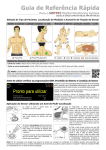
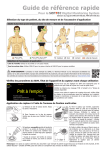
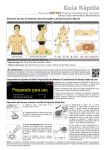
Sensor Removal with Multi‑Site Attachment Ring
is o
pr
o
70 pan
% o
Remove the sensor from the patient when monitoring is
completed or monitoring time has elapsed (message ‘Site time
elapsed’ or ‘Calibrate sensor’).
CAUTION: For site inspection and/or calibration the
Multi‑Site Attachment Ring can remain on the same site
for up to 24 hours and may be reused for another sensor
application. It is recommended to remove and to discard the
Multi‑Site Attachment Ring after 24 hours and to keep the
measurement site free of adhesive for 8 to 12 hours.
Sensor Removal for Subsequent Reattachment to
Same Site
1. Remove the adhesive tape securing the sensor cable.
l
3. Clean the sensor with a swab wetted
with 70% isopropanol to remove any
contact liquid residues or dirt (for other
approved cleaning agents refer to the
sensor’s Directions for Use).
4. Check the condition of the sensor membrane and the
integrity of the sensor (p. 15). Change the membrane if
necessary (p. 17). Do not use the sensor if any problems
are noted.
Important: Before reapplying the sensor to the same site,
we recommend calibrating the sensor even if calibration is not
yet mandatory or recommended by the SDM. If you skip the
calibration, at least reset the Site Timer by pressing the Enter
Button when the message ‘Sensor off patient (8 )’ displays and
then continue at step 6.
2. Place a finger on each side of the
ring and rotate the sensor towards the
index finger. The index finger will act as
a wedge and will disengage the sensor
39.4
from the ring.
96
84
50
30
PCO2
mmHg
100
85
140
50
%SpO2
2.0 PI
PR
bpm
14-04-28 15:28:31
5. To calibrate the sensor open the
Docking Station Door and then hang
the sensor in the holder in the inside
of the Docking Station Door (the red
light will be visible). Close the Docking
Station Door.