1
TK-8160H
GENERAL / SYSTEM SET-UP
5. INSTALLATION PLANNING – CONTROL STATIONS
5-1. Antenna system
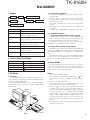
NOTE
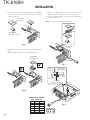
If you do not intend to use the 3.5-mm jack for the external
speaker, fit the supplied speaker-jack cap to stop dust and
sand from getting in.
Control station. The antenna system selection depends on
many factors and is beyond the scope of this manual. Your
KENWOOD dealer can help you select an antenna system
that will best serve your particular needs.
5-2. Radio location
Select a convenient location for your control station radio
which is as close as practical to the antenna cable entry point.
Secondly, use your system’s power supply (which supplies
the voltage and current required for your system). Make sure
sufficient air can flow around the radio and power supply to
allow adequate cooling.
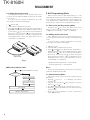
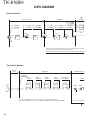
External
speaker
jack
Antenna
connector
SERVICE
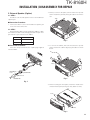
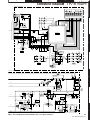
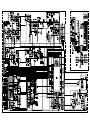
This radio is designed for easy servicing. Refer to the
schematic diagrams, printed circuit board views, and alignment procedures contained in this manual.
Power input
connector
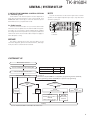
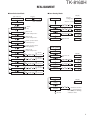
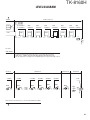
SYSTEM SET-UP
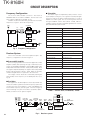
Merchandise received
License and frequency allocated by FCC
Frequency range (MHz)
RF power
450~490
45W
K
440~480
45W
M
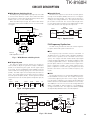
Choose the type of transceiver
See page 5.
A personal computer (IBM PC or compatible), programming interface (KPG-46),
and programming software (KPG-99D) are required for programming.
Transceiver programming
KAP-2
Horn alert/P.A. relay
unit
KCT-39
Connection cable
(Option)
KES-3
External
speaker
(Option)
Type
(Option)
KES-5
External
speaker
KCT-18
Ignition sense cable
KCT-36
Extension cable
(Option)
(Option)
KGP-2A
Modem GPS receiver or
or
KGP-2B
Modem GPS controller
(Option)
(Option)
KDS-100
Mobile data
terminal
(Option)
Delivery
You can install either KAP-2 or KCT-39 to the transceiver.
3