1
TK-8160H
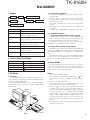
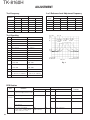
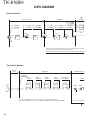
REALIGNMENT
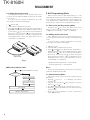
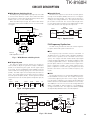
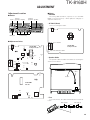
■ Item Selection Mode
[ ] + Power on
■ Item Setting Mode
Display
→ 1SE L F
Self programming mode
Display
Current
setting value 4 5 0 0 0 0 0 0
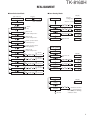
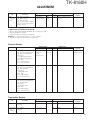
1. RX frequency
1
[ ]
Zone
Zone / Channel selection
[ ]
[ ] [ ]
[
Zone No. /
Channel No. selection [
] : Down
] : Up
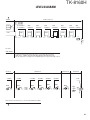
1. RX frequency
[ ] Refer to the
“Item setting mode”.
[ ]
2. RX signaling
[ ] Refer to the
“Item setting mode”.
[ ]
3. TX frequency
]/[
]
[ ]
[
]/[
]
[ ]
[
]/[
]
[ ]
4 5 0 *****
kHz setting
4 5 0 *****
kHz step
ST PD5 0 0 K
[ ] [ ]
[ ] [ ]
[ ]
[
[ ] [ ]
[ ] [ ]
[ ]
MHz setting
[ ] [ ]
[ ]
[ ]
[ ]
Value is not set – – – – – – – –
Channel
Frequency clear
[ ] : Cleared
––––––––
[ ] Same operation as the
“RX frequency”.
[ ] [ ]
[ ]
4. TX signaling
[ ] Same operation as the
“RX signaling”.
2. RX signaling
[ ] [ ]
[ ]
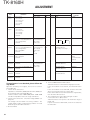
5. Channel name
[ ] [ ]
[ ]
[ ]
9. Beat shift on/off
[ ] [ ]
[ ]
[ ]
8. Scan Del/Add
[ ] [ ]
[ ]
[ ]
7. RF power
[ ] [ ]
[ ]
[ ]
6. Wide / Narrow
[ ] [ ]
[ ]
[ ] Refer to the
“Item setting mode”.
10. Compander on/off
[ ]
[ ]
[ ]
[
[
]/[
]/[
]
[ ] : Stored
[ ] : Not stored
]
[ ] : Stored
[ ] : Not stored
[ ]
[
]/[
]
[ ] : Stored
[ ] : Not stored
[ ]
[
]/[
]
[ ] : Stored
[ ] : Not stored
[ ]
[
]/[
]
[ ] : Stored
[ ] : Not stored
[ ]
[ ]
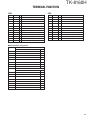
Signaling setting
Display
[ ] [ ]
[ ]
Off
[ ] : Tone off
TONEDOF F
[ ] [ ]
[ ]
QT normal
[
]/[
]
[ ]
[
]/[
]
[ ]
[
]/[
]
[ ]
QTDD ****
[ ] [ ]
[ ]
[ ]
DQT normal
DQTD ***N
[ ] [ ]
DQT inverse
DQTD *** I
5. Channel name
Display
[ ]
[ ]
________
Channel name
setting
[ ] [ ]
[ ]
1~8 digit
selection
[ ] : Stored
[
]/[
]
Character selection
If the [ ] key held down
(2 seconds), the blinking
character clears.
7