1
II. Periodic Maintenance Requirements
II-a
MONITOR
Maintenance Check: A routine maintenance check of the meter consists of exercising all of the
functions of the meter with a sampling of flowsensors, and verifying that all features respond as
described in the “Functional Tests” section of the Operator’s Manual. If any of these functions do not
respond as described, contact Transonic Systems Technical Support Service (1-800-353-3569 USA).
Cleaning: Exterior flowmeter surfaces can be cleaned using a cloth or brush dampened with soapy
water, followed by damp wiping with clear water. Alternately, the surface can be damp-wiped clean
with isopropyl alcohol at room temperature in a dry place. Warning - Do not drip liquids into the meter
cabinet. A flowmeter accidently exposed to spillage should be immediately unplugged from its power
source. Remove the cover. If the spilled liquid is potentially corrosive or may leave a residue, flood the
area with clean water, using care not to disturb components or components. Compressed air may be
used to blow liquid off components. Remove the remaining liquid from the unit with a heat gun or a
hair dryer. Do not operate the flowmeter in a wet condition. Extreme damage may occur to the
unit.
II-b
FLOW/DILUTION SENSORS
Flow/Dilution Sensors: After use of a sterile tubing flowsensor, wash and sterilize the sensor
according to the instructions in the Operator’s Manual. If the connector becomes wet, drying overnight
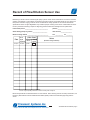
in an incubator oven (≤60ºC, 140ºF) is recommended. Transcribe the flow data to the Record of
Sensor/Probe Use available in this manual, along with observations of the sensor’s received quality
strength. Signal quality usually diminishes as the sensor increases in age. If the received signal quality
drops below the 50% level, the sensor should not be used. Inspect the cables and connectors
routinely for damage. Store the sensors at room temperature.
Transonic Systems Inc.
Tel: 800-353-3569(USA); Fax 607- 257-7256; www.transonic.com
Europe: Tel: 31 43 407 7200; e-mail: [email protected]; Fax: 3143 407 7201
AUSHD02 Repair Manual, page 4