1
KB2LJJ Radio Mods Database
www.r6-ru4montesecchieta.it
®
IZ5CCV
Free Downloads
Modifications for the Kenwood TM-G707
Extended RX and TX for Kenwood TMG707
Extended RX MOD for Kenwood TMG707A
Low Audio Fix for Kenwood TM-G707
TM-G707E extended RX and TX
Extended RX and TX for Kenwood TM-G707
1. Remove the detachable front from the transceiver.
2. Remove the bottom case. (4 screws in each corner).
3. Put the transceiver in front of you, upside down, with the antenna connecter pointed at you.
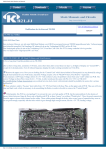
4. Locate in the upper right corner on the small vertical placed print (witch is located behind the display adaptor) a group of
4 small 0 Ohm resistors in smd format, numbered 0-1-2-3.
5. Remove or lift resistor 0 for extended RX
RX
RX
RX
RX
RX
band
band
band
band
band
1
2
3
4
5
=
=
=
=
=
118-136
136-174
300-400
400-520
800-999
Mhz
Mhz
Mhz
Mhz
Mhz
AM
FM
FM
FM
FM
http://www.kb2ljj.com/data/kenwood/tm-g707.htm (1 di 8)30/08/2009 18.07.54
KB2LJJ Radio Mods Database
6. Remove or lift resistor 3 for extended TX
TX band 2 = 136-174 Mhz FM
TX band 4 = 400-520 Mhz FM
Note:
When these two resistors are removed or lifted, in the MENU there will be een extra menu-choise (number 0) to switch between
AM and FM on all 5 bands (AM only receive).
Subject: Correct mod!
The mod listed for super-expanded frequency coverage (RX and TX) of the Kenwood TM-G707 is incorrect!
I have read multiple reports (also on QRZ) that for the expanded frequency coverage, it is necessary to remove the SMT
resistor marked "1", NOT the one marked "0".
This is INCORRECT, at least in my radio, which was purchased NEW on 4-3-01. Removal of resistor "1" changed my radio
from the "American" version to the "European" version (described in more detail in the instruction manual), which actually
DECREASED the frequency coverage to LESS than it was before modification (again, both RX and TX were severely
limited)!
Also, the ability to program the microphone buttons yourself was totally disabled. I called Kenwood and they couldn't help
me, since the mod I'd performed was not endorsed by Kenwood.
I put resistor "1" back in place, and removed resistor "0". All the disabled functions were restored, and the frequency
modification (both RX and TX) was completed. This correction may not be the case with all of the TM-G707's out there, so
my advice is to remove only one side of the resistor you choose to try. Using your soldering iron, heat it up and just bend it up
far enough to break the connection, without removing it completely from the PCB.
If you notice undesireable changes in your radio, reconnect it and try the other one. There are only 2 of these resistors in my
radio, so it should be a simple process of elimination. Good Luck!
Subject: Another variant to the TM-G707 resistor removal mod
The "resistor removal" mods listed here are almost right for my TM-G707, which has a serial number series 301xxxxx. Only
two of the SMT resistors were present, 0 and 1. Removing 0 opened up the extended RX capability, however, it resulted in
leaving the radio in limited TX on 440 (probably the European band limits). Removing resistor 1 opened up extended TX, and
removed the limitation previously imposed on 440.
At the end of the mod I had NO resistors on any of the 4 available pads.
Subject: Incorrect Information
The person that has typed up this modification has made a nice mistake which cost me quite abit of money.
The radio no amtter what country version it is USA or European will not do about 470mhz Transmit but will on the recieve.
The US version comes with only resisters 0 and 1 if you remove both your get extended RX & TX.
In regards to the Euro version you remove the resisters as per the instructions in the above mod.
Subject: WARNING! DO NOT REMOVE THE DIODES
http://www.kb2ljj.com/data/kenwood/tm-g707.htm (2 di 8)30/08/2009 18.07.54
KB2LJJ Radio Mods Database
Subject: WARNING! From CK Radio Florida
Please DO NOT remove the diodes on this radio.
Certain versions of this radio are different and by removing the diodes you will cause the radio to become innoperative.
All you need to cover Tx-Rx Expansion is to
Turn the radio upside down.
Take off the bottom cover 4 screws.
Remove the cover.
Look towards the front of the radio and locate the vertical display board.
Look for two thin green wires behind the two diodes mentioned
in the previous articles.
CUT the green wire furthest away from the side of the radio
that the mic connector is on.
THAT'S ALL YOU NEED TO DO.
This mod works on the TM-733 and the TM-G707.
Good Luck, 73 Chris
Subject: Mod works great!
The above described mod works great for my TM-G707E (European version)!
I have removed resistor 0 and 3 so only resistor 2 remains as the only one left!
I have the described Rx and Tx now available in AM and FM - this is perfecto! :) Thanks!
Extended RX MOD for Kenwood TM-G707A
Author: Kenwood
This from the Kenwood Factory Website...
1. Disconnect power cord and antenna from transceiver
2. Detach the head
3. Remove Top and Bottom screws (9 total)
4. Lift the locking tabs on top and bottom side of the front panel, pull the front panel forward to expose the control board.
DO NOT BREAK THE TWO RIBBON CABLES!!!! They connect the control board to the TX-RX board.
5. Remove the single screw from the control board to access the bottom of the board (component side). There is NO need to
disconnect the ribbon cables!!
6. Locate the TWO GREEN JUMPER WIRES on the component side of the control board.
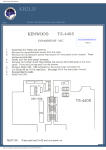
7. Cut the one labeled W501 (SEE ILLUSTRATION)AND IF NEED BE INSULATE THE END TO PREVENT
CONTACT.
8. Re-assemble and power up unit. It will automatically reset.
http://www.kb2ljj.com/data/kenwood/tm-g707.htm (3 di 8)30/08/2009 18.07.54
KB2LJJ Radio Mods Database
New receive capability118.00-173.995
320.00-399.995
400.00-523.995
800.00-823.9875
849.00-865.9875
894.00-949.9875
Kenwood TM-G707A programming
Dear Kenwood Customer:
Thank you for your e-mail.
G707A.......
This is simple directions for programming your TM-
1. Push the VFO button
2. Enter your desired frequency
3. Push the TONE button until the T shows in the display for repeaters with PL/Encode
4. Push F button then SHIFT to select your + or - offset
5. Push the F button, then push the T. SEL button, at this time the PL/Encode number
will
appear (example 88.5 will be flashing) turn the main tuning knob to select the
desired
PL/Encode.
6. Now to store the PL press the OK button (which is the far right button on the
bottom)
(This is the set of the four little button that all look the SAME)
7. To store all this information into Memory, push the F button, and when the memory
numbers
appear to the right of the frequency display turn the main tuning knob to the
desired
Memory of your choice, push the MR button to store the information.
8. To recall that memory just push MR again.
If you need further assistance, please e-mail us again.
Sincerely,
Kenwood Amateur Radio Customer Support
http://www.kb2ljj.com/data/kenwood/tm-g707.htm (4 di 8)30/08/2009 18.07.54
KB2LJJ Radio Mods Database
Kenwood TM-G707A/E Fuse
Download PDF file
TM-G707AF4FUSE.pdf
Subject: WARNING! From CK Radio Florida
Please DO NOT remove the diodes on this radio.
Certain versions of this radio are different and by removing the diodes you will cause the radio to become innoperative.
All you need to cover Tx-Rx Expansion is to
Turn the radio upside down.
Take off the bottom cover 4 screws.
Remove the cover.
Look towards the front of the radio and locate the vertical display board.
Look for two thin green wires behind the two diodes mentioned
in the previous articles.
CUT the green wire furthest away from the side of the radio
that the mic connector is on.
THAT'S ALL YOU NEED TO DO.
This mod works on the TM-733 and the TM-G707.
Good Luck, 73 Chris
Subject: Update mod
On mine the first green wire cut opened up the RX, but I also needed to cut the second green wire for expanded transmit of
142-151Mhz. It would not TX beyond those points. Anyone else have a differenct result?
Subject: My Experience
I tried this modification just a listed above. My TMG707A is about 3 years old. I cut the green wire as noted and received the
opened up RX. Nothing changed on the TX but I did not tray to cut any other wires. Good Luck All and 73's.
Subject: My xperience
Tried the green wire fartherist from end, gained rx. I'm afraid to go any further, much to much controversy on this unit. Would
like to hear from other's experience and some success stories. Don't know what to do now. Thanks 73's
Subject: Success
http://www.kb2ljj.com/data/kenwood/tm-g707.htm (5 di 8)30/08/2009 18.07.54
KB2LJJ Radio Mods Database
I went back into the radio for another try (see post above). This time I cut the second green wire. Powered the radio and
gained some extra transmit. Next, I went in and performed a modification that I will describe below. The result was that the
radio cleared the memory but I have ability to transmit on just about all freqs.
Removed cover to get to board in front of unit just as described above. On the back side of the board shown in drawing above,
you will find 2 surface mounted resistors. They are right behind the 2 green wires. One is numbered (1) and the other is (0).
Take a pair of needle nose pliers and gently crush the top of the resistor numbered (1). Reassemble the radio and you are done.
Please read below.
This modification did open up transmit of all the freq's. The reason I did this mod is to gain access to the FRS area of the
bands which is at 462.5*** and 467.5***. It worked GREAT.
The drawback is that you will loose the "automatic" feature of setting the repeater offsets while tuning in the 2 meter bands.
You will also not see option #7 in the menu which turns on and off that feature. You simply must define -,+ or none when you
are tuning to a repeater for the first time. Once in memory, the info is there for good.
I am NOT a techie or pretend to be. I just decided to try the modification and chance having to replace a board if it failed. It
worked exactly as it was stated to do.
If you have any questions, feel free to email me at [email protected]
Low Audio Fix for Kenwood TM-G707
Author: Jim WD0JIM - [email protected]
I have two of these rigs and both had low audio. I searched the Internet for a solution and could not find one so I spent $23.00
and purchased the service manual. So for everyone that has low audio here is my gift to you!
**Perform at your own risk**
1. Place the radio into Service Adjustment Mode by shorting pins 3 (PKS) and 6 (SQC) on the data jack on the front left
side of the radio under the protective cap.
2. Power up the radio while holding "F" key and "TONE" key
3. Put radio into VFO mode and select a 2 meter frequency and monitor it with another rig. (I used headphones to prevent
feedback)
4. Press MNU to activate adjustment mode
5. Press the keys to get to the DEVI menu
6. Key mic and speak and listen through other radio.
7. Turn the encoder knob until you hear the audio level you want. Mine sounded good when the value was "BB"
8. Press "OK" button to save new deviation value.
http://www.kb2ljj.com/data/kenwood/tm-g707.htm (6 di 8)30/08/2009 18.07.54
KB2LJJ Radio Mods Database
9. Press MNU to return to VFO mode.
10. Select a 440 frequency and repeat steps 3-9 for the 440 band. Deviation is set independently for each band.
11. When complete, power off radio and remove shorting plug. Your radio no longer has low audio!
** Tip for shorting plug**
I purchased a PS/2 keyboard extension cable as the connector is the same and inserted a wire between pins 3 + 6 to put into
adjustment mode.
Pin 3 is at the 3 o'clock position and pin 6 is at the 10 o'clock position when looking at the front of the rig and the connector is
on your left hand.
Good luck and 73.
Jim WD0JIM
Home | Info | CT1APV | About | Forum | Guest Book | APRs | Mods | | Uploads | Help | Software |
Email |
TM-G707E extended RX and TX
Author: PA5LS - [email protected]
The E-version is modified to extended Rx and Tx by having only resistor no.2 in place. Resistors locations 0,1,3 and 4 should
be empty.
See the other (-A) modifications for location and Rx / Tx ranges.
This will keep the automatic European repeater offsets as they should be.
http://www.kb2ljj.com/data/kenwood/tm-g707.htm (7 di 8)30/08/2009 18.07.54
KB2LJJ Radio Mods Database
http://www.kb2ljj.com/data/kenwood/tm-g707.htm (8 di 8)30/08/2009 18.07.54