1
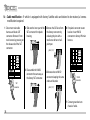
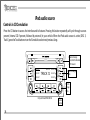
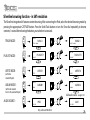
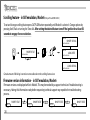
Scrolling feature - in SAT emulation, Mode 6 (Only with Audi/VW-SAT kit)
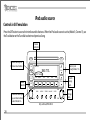
To set and change scrolling feature press CAT/FLDR button repeatedly until Mode 6 is selected . Change options by
pressing Seek/Track or turning the Tune dial. After setting the desired feature turn off the ignition for at least 50
seconds to engage the new selection.
XM 1 001
SHORT SCROL
SOFTWARE VERSI
XM 1 001
CAT
FLDR
SHORT STAT
SOFTWARE VERSI
SEEK
TRACK
XM 1 001
or
LONG STAT
TUNE
SOFTWARE VERSI
XM 1 001
LONG SCROL
SOFTWARE VERSI
Certain amount of blinking is normal on some radios when the scrolling feature is on.
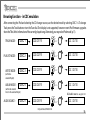
Firmware version information - in SAT emulation, Mode 6
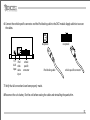
Firmware versions are displayed while in Mode 6. This may be needed by a support technician if troubleshooting is
necessary. Having this information ready before requesting technical support may expedite the troubleshooting
process.
XM 1 001
XM 1 001
SHORT STAT
CAR 1.00
30
XM 1 001
SHORT STAT
IPOD 1.00
XM 1 001
SHORT STAT
AUX 1.00
SHORT STAT
CORE 1.00