1
GETTING STARTED
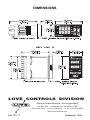
1. Install the control as described on page 3.
2. Wire your control following the instructions on page 5. If you are using
a two-wire transmitter as an input, see the drawing and instructions on
page 6. Option wiring instructions are on Page 7. Option descriptions
and specific instructions start on page 16.
3. Most controls do not need many (if any) program changes to work on
your process. For best results when programming changes are
necessary, make all the necessary changes in the Secure Menu (page
26) before making changes to the Secondary Menu (page 19). If error
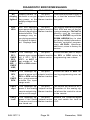
messages occur, check the Diagnostic Error Messages on page 35 for
help.
Take the example of a Model 86010 that comes from the factory programmed for type J thermocouples. Suppose for this example you wish to
change the input to type K and limit the set point range between 0° and
1000° C.
First, enter the Secure menu as instructed on page 5. Press the INDEX key
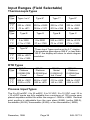
until the display shows Inp and press the DOWN ARROW until the display
shows CA. Don't forget to press the ENTER key to retain your setting.
Next, press the INDEX key to display Unit. Press the DOWN ARROW until
the display shows C. Press ENTER.
Next, press the INDEX key until SPL is displayed (pass the dPt and InPt
selections). Press the UP ARROW until the display shows 0. Press
ENTER.
Finally, press INDEX key to display SPH. Press the DOWN ARROW until
the display shows 1000. Press ENTER.
The necessary program changes are now complete. After 30 seconds the
display will switch back to the temperature reading. If you want to return
faster, press the UP ARROW and ENTER keys (at the same time) and then
press the DOWN ARROW and INDEX keys ( again at the same time). This
will 'back out' of the menu and immediately display the temperature reading.
If you want to use Self Tune®, Auto/Manual, or the Ramp/Soak Programmer features, see the special sections on these items. Page numbers for
these are in the Contents section on the previous page.
December, 1998
Page 3
949-1277-3