1
7 ADVANCED OPTIONS
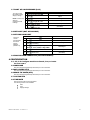
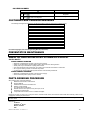
Entering this menu requires entry of a password. The following options are available:
Discount
Max Change
Promo Vend
Programmable POS
Free Vend Rate
Shutdown
Exact Change
Energy Savings
Unconditional Acceptance
8 ENERGY SAVINGS (NOT APPLICABLE)
9 TEST
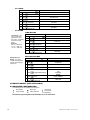
Use this menu to test vend individual motors. The selection will display with the test vend. If a test vend attempt on a particular motor
fails, controller will beep.
STEP
DISPLAY
1.
Press Service Mode Button
2.
Press
Press selection number on keypad and wait
Repeat step 3 for other selections.
3.
4.
5.
Press
Motors ( - - )
Item - - Item 010
(Sales Mode)
3 times to exit.
TEST ALL MOTORS
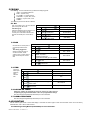
This menu will test vend all motors. The selection will display with the test vend. If a test vend attempt on a particular motor fails, then the
controller will beep. Satellite machines will also be included in the test.
STEP
NOTE:
1.
Press Service Mode Button
Pressing
at
any time will stop
the test.
2.
Press
and wait.
The motor selection number will display while
it is being tested.
3.
Press
3 times to exit.
DISPLAY
Motors ( - - )
Item
Item 010
(Sales Mode)
0 DIAGNOSTIC
STEP
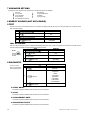
This menu is used to
perform a self-diagnostics
check and display results.
1. Press Service Mode Button
2.
3.
DISPLAY
Motors ( - - )
Press
Diagnostic...
Press
to start test
Checksum
Temp Sensor
Optical
Coin Acceptor
Bill Validator
Card Reader1
Card Reader2
Tests Completed
Press
3 times to exit.
(Sales Mode)
0.2 TEST RELAY
See GVC2 Programming Manual (P/N 4215507) for more information.
0.3 LOG
See GVC2 Programming Manual (P/N 4215507) for more information.
0.4 COIN REJECT RATE
See GVC2 Programming Manual (P/N 4215507) for more information.
0.5 BILL REJECT RATE
See GVC2 Programming Manual (P/N 4215507) for more information.
12
MERC AT O WS SERIES • 4216320 R ev A