1
CHAPTER 1 GETTING STARTED
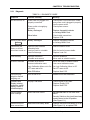
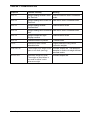
1.10.2 Interface Commands
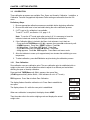
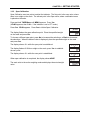
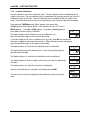
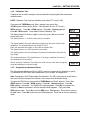
The RS232 Interface enables a computer to be used to control some functions of the Indicator
using the commands listed in Table 1-4.
TABLE 1-6. SERIAL INTERFACE COMMAND TABLE.
Command
1
IP
Function
Immediate Print of displayed weight (stable or unstable).
2
P
Print stable displayed weight (according to stability setting).
CP
Continuous Print
SP
Print when stable.
xP
Interval Print x = Print Interval (1-3600 sec)
Z2
Same as pressing Zero button
2
Same as pressing Tare button
P
T
xT
Download Tare value in grams (positive values only). Sending 0T clears tare
(if allowed)
PU
Print current unit: g, kg, lb, oz, lb:oz
xU
Set scale to unit x: 1=g, 2=kg, 3=lb, 4=oz, 5=lb:oz
PV
Version: print name, software revision and LFT ON (if LFT is set ON).
H x “text”
Esc R
Enter Header line , where x = line number 1 to 5, “text” = header text up to 24
alphanumeric characters
Global reset to reset all menu settings to the original factory defaults
NOTES:
1. Commands sent to the Indicator must be terminated with a carriage return (CR) or
carriage return-line feed (CRLF).
2. Alternate command characters may be defined by the user.
3. Data output by the Indicator is always terminated with a carriage return-line feed (CRLF).
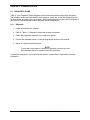
1.10.3 Output Format
The default serial output format is shown below.
TABLE 1-7. DEFAULT SERIAL OUTPUT FORMAT
Field:
Polarity
Space
Weight
Space
Unit
Stability
CR
LF
Length:
1
1
7
1
5
1
1
1
Definitions:
Polarity, “–” sign if negative, blank if positive.
Weight, up to six numbers and one decimal, right justified, leading zero blanking.
Units, up to five characters.
Stability, “?” character is printed if not stable, blank if stable.
5000 Series T51 Indicator Service Manual
1-15
Ohaus Corporation www.ohaus.com