1
General Classes – Customer
Electronic Technician – Service
Software Support 2009
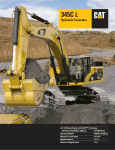
Cat Machine Walk-Around and
Maintenance
CC 11
CC 20
Length: 16 hours (2 days)
Course Format: 90% ILT, 10% Lab, 0% Web
Prerequisite(s): None
Instructor(s): William Miles, Dan Price
Student Maximum: 8
Student Minimum: 4
Course Cost: Please refer to Pricing Policy on page 5
Length: 4 hours (.5 day)
Course Format: 0% ILT, 100% Lab, 0% Web
Prerequisite(s): None
Instructor(s): Marty Cirbo, Ron Spohrer, Jim Hottenroth,
Richard Navarro
Student Maximum: 8
Student Minimum: 4
Course Cost: Please refer to Pricing Policy on page 5
Course Description:
This course provides instruction on the installation,
updating procedure, and use of Electronic Technician
software and the required communication adapter.
Students receive instruction on ET as a service tool and
upon completion of the course, are able to demonstrate
the features of ET software. The primary focus of this
class is the explanation of new service tool functionalities
and the scenarios in which they are applied. This course
may vary in content and length according to the need to
cover service issues for the current product line.
NOTE: If available, participants should bring their own
laptops with the latest version of Electronic Technician,
the communication adapter, and cables they currently
have available.
Course Description:
Participants learn to locate and explain warning signs
and labels, locate and identify switches on the machine,
perform a walk-around inspection, and learn basic
maintenance procedures for that particular machine.
Course Objectives:
• Identify and locate all filters
• Locate all lubrication points
• Locate all fluid level check points
• Locate and understand all warning labels
Course Objectives:
• Connect, use, and perform basic data link
troubleshooting using the Caterpillar communication
adapter
• Navigate through ET functions of status, diagnostic
and event codes, configuration tool, special tests,
and ET preferences
• Look up codes and troubleshooting procedures in SIS
web
• Understand how to perform and record a regeneration
using the Datalog feature on ET
• View a regeneration Datalog file and determine the
state of the regeneration system
• Perform a ASV test and diagnose results
• Save, rename, and send Datalog and ASV test files to
the TC for troubleshooting assistance
16
www.wagnertraining.com