1
Service and Troubleshooting Guide
4.6
Data Network Installation
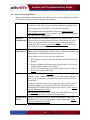
Before connecting the data network to the Allworx server, some pre-planning is required.
Consider the following network configuration guidelines:
DHCP Server
The Allworx server includes a LAN-side DHCP server that is enabled
by default. If the Allworx server is being connected to another local
area network, one of the DHCP servers needs to disabled.
If IP telephones are being installed, refer to the Allworx System
Administrator’s Guide for more complete information on IP telephone
and DHCP server configuration.
The Allworx server includes an enterprise class firewall. If the
Firewall
Configuration Allworx WAN is being connected directly to the Internet, be sure to
select one of the NAT firewall options before making the physical
connection. Refer to the System Administrator’s Guide for this and
other firewall configuration options.
Domain
Name Server
If a local domain name server is available on a LAN, use that IP
address when configuring the Allworx server. Otherwise, contact your
Internet Service Provider for the proper IP address.
If the Allworx server will be used as a public host:
• Be sure there is a direct connection from the Allworx WAN to the
Internet.
• Be sure to update your domain name registrar name server record
with the Allworx public server address.
• Be sure your Internet Service Provider assigns a static IP address.
Do not use dynamic addressing.
Mail Server
You must decide whether inbound email will be routed through the
Allworx server. If the Allworx server is to be the primary inbound
mail server, be sure there is a connection from the Allworx WAN to
the Internet.
If using an external mail server to support the Allworx All-in-One™
unified messaging, you must add an account to the email client to
download POP3 email from the Allworx server (Refer to the Allworx
System Administrator’s Guide).
For outbound mail, the Allworx server can be the SMTP server if it is
on a LAN and the WAN is connected to the Internet.
Internet Web
Server
Be sure to connect the Allworx WAN to the Internet. Additional
guidelines for web server configuration can be found in the Allworx
System Administrator’s Guide.
12