1
USAGE INSTRUCTIONS
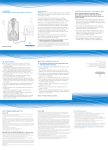
DIAGRAM KEY
EN
12 Headset Docking Cradle
13 Charge contacts
14 Charge Indicator
15 Talk Indicator
16 Power Indicator
17 Handset Lifter (optional)
Headset
18 Microphone
19 Speaker
20 Talk Button
21 Listen Volume Adjust
UP/DOWN
22 Headset Mute Switch
23 On-line Indicator
24 Charge contacts
25 Battery Door
INSTALLATION
Please install the CS50 Wireless Headset System in accordance
with the instructions detailed in the Quick Start Guide.
HEADSET/HANDSET MODE
Pressing the Talk Button (20) on the Headset selects Headset
mode. The Talk Indicator (15) on the base unit will illuminate
and the On-Line Indicator (23) on the headset will flash when
in Headset mode. Both of the indicators are extinguished when
in Handset mode.
PLACING A CALL USING YOUR HEADSET
To place a call using the headset, the system must be in Headset
mode. Take the handset off the hook and dial in the normal way.
6
EN
Base Unit
1 Tx Slide Switch (A-D)
(Speak Volume Master)
2 Rx Slide Switch (1-4)
(Speak Volume Master)
3 Speak Volume Adjust UP
4 Speak Volume Adjust
DOWN
5 IntelliStandTM Switch
ON/OFF
6 Configuration Dial
7 AC Power Adapter
8 AC Power Adapter Port
9 Handset Cable Port
10 Telephone Cable Port
11 Accessory Port
You will then be able to talk through your headset. When the call
is complete, return the telephone handset to the cradle.
Tip: By selecting Handset mode after completing your call,
you will conserve the headset battery power and extend the
remaining available talktime. You can achieve this by
pressing the Talk Button (20) immediately on conclusion of
the call.
Note: If you have installed a Plantronics Handset Lifter (17)
please refer to the section “Making a call using the Lifter”
on page 9.
RECEIVING A CALL USING YOUR HEADSET
When your telephone rings take the handset off the hook. Ensure
that your CS50 Wireless Headset System is already in Headset
mode. You will then be able to talk through your headset. When
the call is complete, return the telephone handset to the cradle.
Note: If you have installed a Plantronics Handset Lifter (17)
please refer to the section “Receiving a call using the lifter”
on page 9.
ADJUSTMENTS
PLACING AND RECEIVING A CALL USING THE HANDSET
In Handset mode the telephone can be used to make and receive
calls in the normal way.
OUT OF RANGE WARNING
As you walk away from the base unit you will eventually reach the
system operating range limit. When in Headset mode a warning
alert of two beeps will sound in the headset shortly before you
meet the range limit.
On hearing this alert you should walk closer to the base unit to
ensure call quality is maintained.
7