1
EN
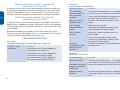
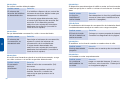
PROBLEM
Receive sounds distorted.
Possible Cause
Listen volume too
high on your
telephone
PROBLEM
I can hear a dial tone in more than one configuration position
Possible Cause
Telephone will work
in more than one
Configuration Dial
position
Solution
Use the position that sounds best to you
and the person you call.
PROBLEM
I tried all four positions on the Configuration Dial and cannot hear
a dial tone in any position.
Possible Cause
CS50 Wireless
Headset System is
not connected
correctly
You may have an
office incompatible
phone
The telephone line
is dead
12
Solution
If your telephone has a receive
volume control, lower this until
the distortion disappears.
If the distortion is still present, lower the
Listen Volume Adjust on the headset.
If the distortion persists, select another
Rx Slide Switch setting (refer to the
Quick Start Guide).
EN
Incorrect
Configuration Dial
setting for your
telephone
If the volume is still too low, select another
Tx Slide Switch setting (refer to the Quick
Start Guide).
Try other Configuration Dial settings on
the base unit.
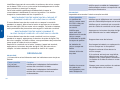
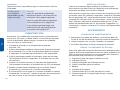
PROBLEM
I can hear too much background conversation, noise or sidetone.
Possible Cause
Speak volume is
too high
Solution
Check that the telephone is connected to
the base unit’s Telephone Cable Port.
PROBLEM
Check that the handset is connected to
the base unit’s Handset Cable Port.
Call your supplier or local Plantronics
for help.
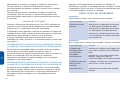
Possible Cause
Software reset
required
Solution
Lower the Speak Volume by adjusting the
Speak Volume control on the base unit.
If the volume is still too high, select
another Tx Slide Switch Setting (refer to
the Quick Start Guide).
Sudden loss of audio, continuous noise or distorted audio on
receive.
Solution
Press the Talk Button (20) twice.
If the problem persists perform a System
Reset refer to instructions on page 16.
Reconnect the handset to the telephone
and test.
13