1
G
B
- Repeat the LED activation check on the MASTER Wi-Fi pushing the other
TOUCH Wi-Fi strips installed.
- Perform a final check of all of the strips installed, activating the movement of the
automation and ensuring that upon impact with the strip the automation stops/
reverses movement.
ANTENNA
In
order
to
communicate
with
868
MHz
Wi-Fi
safety
devices,
MASTER
Wi-Fi
is
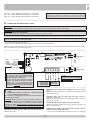
equipped with a piece of electric wire that acts as an antenna
linked to the J8 terminal. If it is necessary to improve the
radio signal (for example, with MASTER Wi-Fi inserted in
the SUPER motors or MASTER Wi-Fi installed in a metallic
connector), connect the 868.3 MHz antenna (code ACG5451) to the J8 terminal,
ensuring the correct connection of the central wire and the earth wire, and
position it in such a way so that it is “in view” of all safety devices.
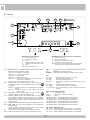
On the MASTER Wi-Fi the LEDs DL2 and DL3 turn off MASTER Wi-Fi blocks the
automation.
On the MASTER Wi-Fi the dual-color LED corresponding to the photocell or
the strip with the low or non-functioning batteries flashes alternately red and
green. The BUZZER emits an alternating sound for 1 minute, while the SPARK
Wi-Fi blinker (if available) signals the alarm status by emitting emitting 2
consecutive flashes followed by a pause for 3 seconds, notifying the user
that the batteries must be replaced or repaired.
The alarm is renewed for 1 minute if a command is given to the door.
TOTAL REMOVAL PROCEDURE FOR MEMORIZED SAFETY DEVICES
To perform a total removal of the safety devices (NOVA Wi-Fi and TOUCH Wi-Fi)
recorded in the MASTER Wi-Fi memory just push and hold the button PROG. RX
for 10 seconds. After 10 seconds all of the dual-color LEDs (from EDGE PHOT
1 to EDGE PHOT 6) will flash alternately 6 times, indicating successful removal.
Afterwards the dual-color LED EDGE PHOT and LEDs DL2 and DL3 will turn off.
ATTENTION: WITH LED DL2 AND DL3 OFF AUTOMATION DOES NOT
WORK.
12/24V ac/dc
To ensure the system functions correctly it is necessary that between the
MASTER Wi-Fi and the safety devices there are no obstacles such as reinforced
cement walls, iron surfaces, etc. that could obstruct the radio communications
and consequently reduce the battery life of the safety devices.
For control panels working at 433,92 MHz, the antenna is also in this
case already connected (wire billet in the RIB control panel), however,
if it is necessary to install the antenna to attain greater range, connect
it to terminals 1-2 if MASTER Wi-Fi WITH TERMINAL BOARD, or to
the terminals dedicated to antenna connection on RIB control panels.
NOVA Wi-Fi AND VERTIGO PHOTOCELL ALARM SIGNAL CHECK
Check that by taking the battery out of the photocell receiver with micro-switch,
for example 3 in the ON on position, and commanding the door to open, the dualcolor LED3 on the MASTER Wi-Fi alternates green and red , while LEDs DL2 and
DL3 turn off, and that the buzzer emits an alternating sound for 1 minute.
Repeat the check for any other photocell receivers installed.
Note: if when removing the battery and commanding the door to open the buzzer
on the MASTER Wi-Fi does not sound, micro-switch 3 on the MASTER Wi-Fi is in
the OFF position (go-ahead not enabled). Turn it to ON.
TOUCH Wi-Fi STRIP ALARM SIGNAL CHECK
Check that by taking the battery out of the transmitter with micro-switch, for
example DIP3 in the ON position, the dual-color LED EDGE PHOT 3 on the
MASTER Wi-Fi alternates red and green while LED DL2 turns off, and that the
buzzer emits an alternating sound for 1 minute.
Repeat the check for any other strips installed.
Note: if the battery is removed and the buzzer on the MASTER Wi-Fi does not
sound, micro-switch 3 on the MASTER Wi-Fi is in the OFF position (go-ahead not
enabled). Turn it to ON.
WARNING (replace the batteries)
The WARNING tells the user of the immediate need to replace the batteries.
When battery power reaches 2,3V for NOVA Wi-Fi and 3V for TOUCH Wi-Fi, the
NOVA Wi-Fi photocell receiver or the strip signal the MASTER Wi-Fi via radio
of the low battery status and activate the BUZZER of the MASTER Wi-Fi with a
sound every 3 seconds for 1 minute.
The warning is renewed for 1 minute if a command is given to the door.
The dual-color LED on the MASTER Wi-Fi corresponding to the photocell or the
strip with the low batteries emits a constant red light.
The SPARK Wi-Fi blinker (if available) indicates the warning by emitting 2
consecutive flashes followed by a pause for 3 seconds for the duration of
the opening or closing of the door.
The system is still operational during these signals, but it is advantageous to
replace the batteries as soon as possible in order to avoid a full stop of the door
operation which happens when the batteries reach 2,0 V for NOVA Wi-Fi and 2,7
V for TOUCH Wi-Fi.
ALARM (batteries completely exhausted or not working)
The alarm activates when the batteries are completely exhausted (2V for NOVA
Wi-Fi and 2,7V for TOUCH Wi-Fi) or when they stop working.
REMOVAL PROCEDURE FOR A SINGLE SAFETY DEVICE (PHOTOCELL OR
STRIP)
In order to remove a single memorized safety device on the MASTER Wi-Fi, use
the following procedure:
- Push the button PROG. RX one or more times to select the dual-color LED
EDGE PHOT which begins flashing green, corresponding to the safety device
to be eliminated.
- After selecting the safety device, push and hold the button PROG. RX for 10
seconds.
- After 10 seconds the dual-color LED EDGE PHOT flashes alternately red and
green 6 times, indicating successful removal.
ATTENTION: Place the micro-switch corresponding to the eliminated safety
device in the OFF position, then scan the dual-color LED pushing the button
PROG. RX 6 times.
REPLACING THE BATTERIES
The lifespan of the 1.5 V AA batteries used in the safety devices is about 3 years.
In case it is required to replace the batteries, it will not be necessary to re-program
the photocells, nor any other RIB Wi-Fi accesories.
- Identify the safety device with the exhausted batteries by checking the diagnostic
of the LED EDGE PHOT on the MASTER Wi-Fi.
- Using the number on the side of the dual-color LED EDGE PHOT which is
flashing red and green or that emits a constant red light identify the number of
the safety device with the exhausted batteries.
- Find the NOVA Wi-Fi or TOUCH Wi-Fi device with the adhesive strip bearing the
identification number corresponding to the number of the dual-color LED which
is in alarm status on the MASTER Wi-Fi.
- Replace the batteries, checking that the polarity is correct.
- Push button PROG TX on the NOVA Wi-Fi or TOUCH Wi-Fi to restart the
MASTER Wi-Fi.
- The buzzer on the strip of the MASTER Wi-Fi will turn off and the LEDs DL2- DL3
(if in alarm status) will come on. The dual-color LED corresponding to the safety
device with the replaced batteries will turn off.
The automation is now ready for safe operation.
ATTENTION: Please remember that batteries must be disposed of properly
according to current standards. In case of disposal of the safety devices please
remember to remove the AA batteries and dispose of them properly
H - PROGRAMMING THE SPARK Wi-Fi BLINKER
- Push and hold the button PROG. RX on the MASTER Wi-Fi for at least 3
seconds.
- After releasing the button PROG. RX the dual-color LED DL7 will begin flashing
red for 10 seconds.
- Push the button S4 PROG. TX on the SPARK Wi-Fi blinker to send a radio signal
to the MASTER Wi-Fi.
- Successful memorization is indicated by a sound from the buzzer and the red
dual-color LED DL7 on the MASTER Wi-Fi turning green, while the red LED DL7
on the SPARK Wi-Fi card flashes 3 times.
15