1
Setup Method C:
Configuración del Método C:
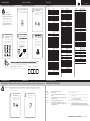
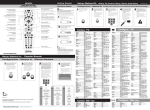
Direct Code Entry
Entrada Directa de Código
1
Note/Nota:
2
Press the TV POWER key.
Presione la tecla TV POWER
(Encendido del televisor).
Make sure TV is ON before
starting remote control setup.
Asegúrese de que el televisor
esté en la posición ON de
encendido antes de comenzar
Codes: TV
Códigos: TVs
Press and hold TV and SEL
Until LED blinks twice.
Mantenga presionada la
TV y SEL hasta que el LED
parpadee dos veces.
+
remoto.
3
4
Enter the 1st TV code for
your brand from the code
list to the right.
Ingrese el 1er código de
televisor para su marca
de la lista de códigos.
5
Press the TV POWER key to
test TV control. If the TV
Presione el botón de
encendido para probar
el control para TV. Si el
televisor se apaga, la
repeat this process using
the next code for your TV
brand.
Si el televisor no se apaga,
repita este proceso
utilizando el siguiente
código para su marca
de TV.
completa.
WATC
AUD
IO
H CABL
E
B
DAY
P
TU
TV
SE
C
CABLE
ONAND
DEM
SELE
D
CT
SET TINGS
MENU
OK
INFO
DAY
PAGE
L
VO
EXIT
LIST
CH
ghi
1
8
mno
3
F
ON/OF
tuv
def
5
LAST
jkl
7
2
pqrs
abc
4
FAV
9
SWAP
z
PIP
0
wxy
6
LIVE
/OPTIMUM
Para encontrar el código exacto para su TV, utilice nuestra función de LOCALIZADOR DE CÓDIGOS
en www.urcsupport.comWWW.URCSUPPORT.COM/OPTIMUM
Tip/Consejo:
AOC
Apex Digital
Ario
Astar
Asus
Audiovox
Auria
Aventura
Axion
Berkshire
Brocksonic
Celera
Changhong
Citizen
Coby
Commercial Sol.
Craig
Curtis
Curtis Mathis
Cytron
Daewoo
Digital Lifestyles
Dumont
Durabrand
Dynex
Electrograph
Electrohome
Electron
Element
Emerson
Emprex
Envision
Epson
ESA
Funai
Gateway
GE
GFM
Gibralter
Goldstar
GPX
Haier
DVD
GUIDE
Acer
Admiral
Advent
Affinity
Akai
Write the working TV code here for future use.
Escriba aquí el código de TV que funciona, para uso futuro.
TV code
Código de TV
Hallmark
Hannspree
Hisense
Hitachi
Hyundai
I-Inc
iLo
Initial
Insignia
Inteq
iRIS
Setup Method D:
Volume Lock
Configuración del Método C: Bloqueo de los controles de volumen con ajuste en dispitvo de audio
MUG2464S_A03
1339
0463
1570
3577, 3716, 3717
1675, 0765, 1207, 1935,
0812
1589, 2087, 1365, 1590,
2014
2397, 0765, 1217
2397
1531, 1738
3340
1564, 1276, 1766, 1769,
1868, 1937, 1951, 2413,
2513, 3065, 3410
2087
0171
1937
0047
0463, 1935, 1938
0765
0765
1935
3478, 1538, 1634, 2306,
2314, 2315, 2338, 2340,
2344, 2345, 2348, 2560,
3493, 3629
0047
3423
3382, 2397, 1326, 2532,
2855, 3577, 3895
0047, 1661, 1959
1326
1661
1765
0017
0171, 0178, 0463, 1570
2049
1755
0463, 1570, 1670
2855
3559, 2183, 1687
1864, 0171, 3559, 2183,
0178, 0463, 1661, 1913,
1963
1765
1589, 2087, 1365, 2014
1122
0171, 1963, 0812
0171, 1963
1755, 1756
0178, 0047, 0051, 0765
1864, 0171, 1963
0017
0178
2784
3382, 1753, 1570, 2293,
2494
0178
1348
2183, 1314, 1660, 2098
1643, 1345, 1576, 3007
3418
1746
1286, 1684, 1990
1990
2049, 1423, 1564, 0171,
0463, 1204, 1326, 1517,
1660, 1963, 2417, 2751
0017
2189
iSymphony
JCM
Jensen
JVC
KDS
KLH
LG
LXI
MAG
Magnasonic
Magnavox
Marantz
Maxent
MB Quart
Megatron
Memorex
MGA
Midland
Mintek
Mitsubishi
NAD
Naxa
NEC
NetTV
Nexus Electronics
Nikko
Norcent
Norwood Micro
Ölevia
Optimus
Optique
Optoma
Orion
Panasonic
PARK
Penney
Philco
Philips
Pioneer
Planar
Polaroid
Portland
Prima
Prism
Proscan
Proton
Proview
Pulsar
Pyle
Quasar
Radioshack
RCA
Realistic
Runco
Sampo
3382, 3094
2256, 2189
1326
1774, 2321, 0463, 1670,
1923, 2118
1687
0765
1423, 0178, 0017, 1768
0178, 0047
1687
1913
1867, 1454, 2597, 1755,
0171, 0051, 1365, 1913,
1963, 1990, 2492
1454
1755, 1757
1868
0178
1927, 1924, 0178, 0463,
0150, 1570, 1670, 1938
0178, 0150
0047, 0017, 0051
1990
1250, 0150, 0178
0178
3382, 2104, 3145
2293
1755
2183
0178
1589, 1365, 1590
1286
1610, 1144, 1240
1927, 1924, 1913
2189
1348
0463, 1938
1480, 1927, 1947, 1925
0051
2104
0178, 0047, 0051
0171, 1963
1867, 1454, 2597, 0171
1365, 1990, 2492, 2622
2992
1457
1589
1523, 0765, 2120, 2063,
1769, 1766, 1762, 1687,
1538, 1328, 1314, 1286
1276
1661
1753
0051
2256, 2183, 3382, 0047
3577, 3717
0178
1687
0017
2196, 2641
1927, 1924, 0051
0178, 0047
2434, 2746, 2932, 0047
2183, 3382, 0051,1661
1958, 1959, 1868, 0090
2855, 3577, 3717
0178
1755
1755
Samsung
Sansui
2051, 1959, 0178, 0812
3559, 0171, 0463, 1409
1670, 1935, 1938
Sanyo
1142, 0088
Sceptre
2337, 0878, 1217, 1360
2506
Scotch
0178
Scott
0178
Sears
0171, 0178, 0047
Seiki
2559, 0178, 3560, 3953
Sharp
2360
Sherwood
1399, 3061
Sigmac
3423, 3477
Sony
0810, 1685
Soundesign
0178
Soyo
1746, 1826
Sectroniq
1687
SquareviewTV
0171
SunbriteTV
1610, 2337
Superscan
0864
Supersonic
1753, 2104, 2784, 3154
3593, 3595, 3894
SVA
1963
Sylvania
1864, 0171, 1314, 1913
1963
Symphonic
0171, 1913
Syntax
1610, 1144, 1240
Tatung
1756, 1286
TCL
2434
Technics
0051
Techwood
0051
Teknika
0150
TMK
0178
TNCi
0017
Toshiba
1524, 1343, 1369, 1935
1959, 2684
TruTech
1723
TVS
0463
US Logic
1286
Venturer
1868
Vidtech
1661, 1665, 1963
Viewsonic
2049, 1755, 1564, 2087,
0864, 0885, 1330, 1365,
1578, 1627, 1742, 2014,
3706
Viore
3382, 1207, 1684, 2104,
2352, 3094
Vivitek
1368
Vizio
1758, 2707, 0864, 1756
0885
Vuon
3418
Wards
0178, 0047, 0017, 0051
Westinghouse
3470, 3579, 3382, 2397
0885, 1217, 1282, 2293
2499, 3094
White Westinghouse 0463, 1661
Wyse
1365
Zenith
1423, 0178, 0047, 0017
0463, 1661, 1365
TROUBLESHOOTING
RESOLUCIÓN DE PROBLEMAS
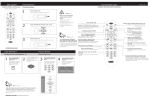
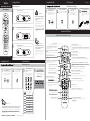
Note/Nota: Volume functions default to control the TV. Follow these steps if you wish to use the Cable box for volume control
Las funciones de volumen controlan el televisor de manera preterminda. Siga estos pasos si desea utilizer un dispositivo caja
de cable para el control de volumen.
1
Press and hold TV and SEL
until LED blinks twice.
Mantenga presionada la
TV y SEL hasta que el LED
parpadee dos veces.
2
Press the Volume - Key
Presione la tecla Volume (disminuir volumen).
Problem:
Solution:
LED does not blink when a key is pressed.
Replace batteries.
Problema: El LED no parpadea al pulsar una tecla.
Solución: Reemplace las pilas.
Problem:
TV does not respond when TV POWER or VOLUME keys are
pressed.
Program remote control for your TV brand using instructions
in Setup Method A, B, or C.
Problema: El televisor no responde al presionar las teclas POWER (Encendido) o
VOLUME (Volúmen).
Solución: Programe el control remoto para su marca de TV utilizando las instruc-
Tried all codes for my TV brand and none work.
Try CODE SEARCH (Setup Method B) method or go to
www.urcsupport.com/optimum for additional support and for
CODE FINDER search tool.
Problema: Probé con todos los códigos que corresponden a mi marca de
aparato y ninguno funciona.
Solución:
Método B) o visite www.urcsupport.com/optimum para recibir ayuda
adicional y para la herramienta de búsqueda LOCALIZADOR DE CÓDIGOS.
Solution:
Problem:
Solution:
+
WWW.URCSUPPORT.COM/OPTIMUM
©Copyright Universal Electronics 2014