1
MVE Biological Systems
MVE Variō™ Pro Quick Start Guide
1.0 Product Identification
1.1 The Variō Pro Controller
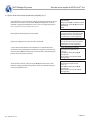
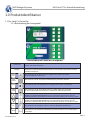
1.1.1 Display Panel Identification
FOG
CLEAR
END
CLEAR
SETUP
ALARM
MUTE
ESC
ENTER
MVE Vario Pro
BioMedical
Front Panel
Display
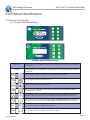
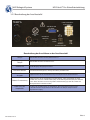
Display Panel Identification Key
The front panel is the user interface for the Variō Pro. All displays and controls are located on
the front panel.
A 4 x 20 Liquid Crystal Display (LCD) provides the user with all of the pertinent information
associated with the selected menu item. The display also shows any current alarm conditions
that may exist.
FOG
CLEAR
Used to manually clear the fog from the storage area to increase visibility.
END
CLEAR
Used to manually end the fog clearing process.
Used to enter and navigate the setup menus.
ALARM
MUTE
Used to silence the audible alarm. Also used to reset the latching alarms after the alarm
condition has been corrected.
Used to increase numeric values and toggle YES/NO or ENABLED/DISABLED settings in the
setup menus. Press once to increase incrementally. Hold the button down to scroll quickly.
Used to decrease numeric values and toggle YES/NO or ENABLED/DISABLED settings in the
setup menus. Press once to decrease incrementally. Hold the button down to scroll quickly.
ESC
ENTER
PN 14910831 Rev A
Used to exit any menu or cancel any menu operation.
Used to select any menu for editing or save any user setting.
Page 2