1
ATTIVAZIONE / ACTIVATIONS
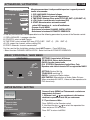
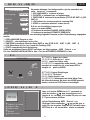
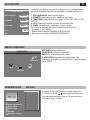
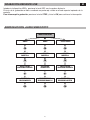
Alla prima accensione è indispensabile impostare i seguenti parametri
tramite telecomando:
First Installation
OSD Language
IT/GB
ENGLISH
COUNTRY
Europe
Time Zone
GMT+1
LNC
ON
Start
1. OSD LANGUAGE: Seleziona la lingua
2. COUNTRY Seleziona il paese di appartenenza
3. TIME ZONE: Seleziona il fuso orario (IT-FR-D-SP GMT +1) (GR GMT +2)
4. LCN: Ordina i canali durante la scansione (ON)
5. START: Memorizzazione automatica canali
Qualora NON apparisse la finestra d’Installazione:
- Premere il tasto MENU
- Selezionare la funzione CHANNEL INSTALLATION
- Selezionare la funzione AUTOMATIC RESEARCH.
At the very first switch-on, it is indispensable to set the following parameters by means of the Remote-control:
1. OSD LANGUAGE : Language-selection
2. COUNTRY: select related Country
3. TIME ZONE: select related GMT-zone (IT-FR-D-SP = GMT +1); (GR = GMT +2)
4. LCN: ranges the channels while scrolling (ON)
5. START: automatic channel-memorization
For the case that the Installation-window should NOT appear: - Press MENU-key
- Select function CHANNEL INSTALLATION - Select function AUTOMATIC RESEARCH
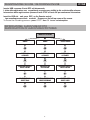
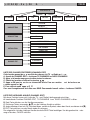
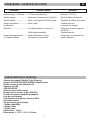
MENU’ PRINCIPALE / MAIN MENU
HOME MENU
PLAYSTATON
SETTINGS
RADIO
TELEVISION
SETTINGS: Impostazioni di Sistema
TELEVISION: Visione della televisione
RADIO: Ascolto stazioni radio
PLAYSTATION: Riproduzione Audio-Video*-Foto
Riproduce solo video in formato PVR se registrati dal VM211
SETTING: System Set-Up
TELEVISION: watching TV
RADIO: Listening to Radio-stations
MULTIMEDIA: Reproduction of Audio-Video-Pictures
When recorded with VM211, Videos will be reproduced in
PVR-format only.
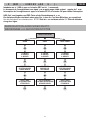
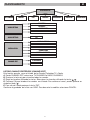
IMPOSTAZIONI / SETTING
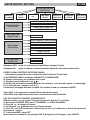
• Impostaz. di sistema
•Imposta video
• Imposta audio
• Sistema
•Gestione canali
Premere
Premere il tasto (MENU) sul Telecomando e selezionare
impostazioni di sistema.
1. Utilizzare i tasti
per posizionarsi sulla funzione
desiderata e premere il tasto OK per confermare.
EXIT per ritornare al Menù.
Press (MENU) on the Remote-control
1. Use direction-keys
to select the requested function and press OK to confirm.
Press EXIT to return to MENU.
e OK per scegliere
4