1
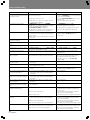
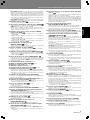
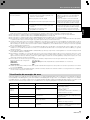
Other (Troubleshooting)
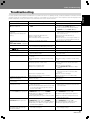
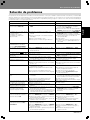
Symptom
Jog dial doesn’t respond.
Jog dial performs different operation
from that intended.
Probable Diagnosis
¶ NORMAL/DJ switch is set to “NORMAL”.
¶ Jog mode is incorrect.
¶ Hyper-jog mode is incorrect.
¶ With DVD, some discs do not support point DJ
operations during playback.
Remedy
¶ Set NORMAL/DJ switch to “DJ”.
¶ Press the JOG MODE button to select desired
jog mode (VINYL ON/OFF).
¶ Press the HYPERJOG MODE button to select
desired mode.
¶ Play a part supporting DJ operations.
¶ NORMAL/DJ switch is set to “NORMAL”.
¶ With DVD, some discs or players do not support
point DJ operations during playback.
¶ “DISABLE DJ MODE” is displayed.
¶ With DVD, DJ operations not be possible when
playback is performed from the Setup Menu.
¶ Set NORMAL/DJ switch to “DJ”.
¶ Play a part supporting DJ operations.
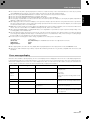
With power ON, disc stops.
¶ If left in pause mode without command input for
100 minutes or more, player automatically stops
disc rotation.
¶ Disc rotation stops with disc playback completes
last track.
¶ Press PLAY/PAUSE (6) button to resume
playback. Or press EJECT (0) button to
remove disc.
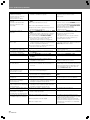
Screen images stops and commands don’t respond.
¶ Operations prohibited on some discs.
¶ Press the STOP button, then begin playback
again.
Setting items don’t appear on Setup
Menu.
¶ Setup Menu is set for [Basic] mode.
¶ Set Setup Menu to [Expert] mode.
Digital sound isn’t reproduced.
¶ [Digital Out] option is set to [Off].
¶ Set [Digital Out] option to [On].
96 kHz audio is not output in digital.
¶ [96kHz PCM Out] option is set to [96kHz 3 48kHz].
¶ Some discs prohibit 96 kHz output.
¶ Set [96kHz PCM Out] option to [96kHz].
DTS audio is not reproduced.
¶ Amplifier or decoder does not support DTS audio.
¶ Press audio button to select audio format
other than DTS.
Image appears stretched horizontally or vertically.
¶ [TV Screen] option settings are incorrect.
¶ S-terminal video output connection is incorrect.
¶ Set [TV Screen] options properly.
¶ Due to television signal processing, images
may appear lengthened horizontally or
vertically. In this case, set [S-Video Out]
option to [S1].
During DVD playback, image is
distorted or dark.
¶ Disc is equipped with analog copy protect
technology.
¶ Not a malfunction.
Subtitles don’t appear.
¶ NORMAL/DJ switch is set to “DJ”. (Subtitles
aren’t displayed in DJ mode)
¶ Set NORMAL/DJ switch to “NORMAL”.
Can’t open Setup Menu.
¶ Setup cannot be performed during playback in DJ
mode.
¶ Stop playback before performing settings.
¶ Perform settings in NORMAL mode.
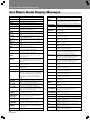
When angle is changed, playback is
momentarily interrupted.
¶ In DJ mode, a special playback mode is used so
changing the angle causes temporary playback
interruption.
¶ Not a malfunction.
When audio format is changed,
playback is momentarily interrupted.
¶ In DJ mode, a special playback mode is used so
changing the audio causes temporary playback
interruption.
¶ Not a malfunction.
Title or chapter search command
doesn’t respond.
¶ With DVD, some discs do not support certain
operations.
¶ Not a malfunction.
Can’t begin playback from title or
chapter designated before loading
disc.
¶ With DVD, some discs require playback from a
specified place.
¶ Not a malfunction.
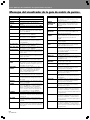
Cue point navigation menu doesn’t
display thumbnail images.
¶ Disc is copy protected.
¶ If the disc includes a copy-protect signal,
thumbnail images cannot be recorded to the
memory card.
¶ Insert memory card formatted in compliance
with SD memory card standards.
¶ Thumbnail images are not displayed with CDs.
DJ operations don’t respond.
¶ No memory card is loaded.
¶ Disc loaded is CD.
Cue point memory cannot be
recorded.
¶ During DVD/MP3 play, the inserted memory card
was recorded on a CDJ-1000, CDJ-1000MK2.
¶ No memory card is loaded.
¶ SD memory card has been set for write-protect.
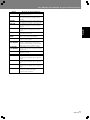
Can’t use SD memory cards.
48
En <DRB1416>
¶ SD memory card not loaded.
¶ SD memory card has been set for write-protect.
¶ SD memory card not formatted properly.
¶ DJ operations are not supported here. Play a
part of the disc supporting DJ operations.
¶ DVD/MP3 data cannot be recorded to
multimedia cards (MMC) recorded on a CDJ1000 or CDJ-1000MK2.
¶ Insert memory card formatted in compliance
with SD memory card standards.
¶ Set write-protect switch to allow writing to card.
¶ Insert SD memory card.
¶ Set write-protect switch to allow writing to card.
¶ Insert memory card formatted in compliance
with SD memory card standards.