1
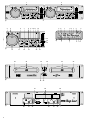
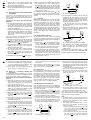
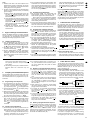
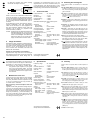
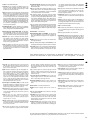
9 Taste CONT./SINGLE zur Wahl des Betriebsmodus (siehe auch Kap. 5.3) und zum Ein-/Ausschalten der Funktion OUTRO
Grundeinstellung: Einzeltitelwiedergabe;
das Display signalisiert „AUTO
CUE SINGLE“ (d)
1. Tastendruck:
Wiedergabe aller Titel der CD;
das Display signalisiert „CONTINUE“ (c)
2. Tastendruck:
Zurückschalten auf die Grundeinstellung
Die Taste ca. 3 Sekunden gedrückt halten, bis im
Display „OUTRO“ (k) erscheint:
Einschalten der Funktion OUTRO zum Abspielen
der jeweils letzten 30 Sekunden der folgenden
Titel [Zum Ausschalten der Funktion entweder
die Taste erneut ca. 3 Sekunden gedrückt halten
oder die Taste TIME/STOP (10) kurz betätigen.]
10 Taste TIME/STOP:
wird die Taste länger als 3 Sekunden gedrückt
gehalten, stoppt das Laufwerk;
zur Umschaltung der Display-Zeitanzeige (j) die
Taste nur kurz antippen:
Grundeinstellung: Anzeige der Restzeit des laufenden Titels
1. Tastendruck:
Anzeige der bereits gespielten Zeit des laufenden Titels
2. Tastendruck:
Anzeige der Restzeit der gesamten CD
3. Tastendruck:
Zurückschalten auf die Grundeinstellung
11 Taste PROG. (mit Kontroll-LED) zum Programmieren einer beliebigen Titelfolge – siehe Kap. 6
12 Taste PITCH zur Wahl des Geschwindigkeitseinstellbereiches (max. ±8 % oder max. ±16 %
Abweichung von der Standardgeschwindigkeit),
der gewählte Bereich wird durch die entsprechende LED (13) neben der Taste angezeigt
13 LEDs zur Anzeige des mit der Taste PITCH (12)
gewählten Geschwindigkeitseinstellbereiches:
Blinken = der Regler PITCH CONTROL (14) ist
nicht aktiviert
9 Button CONT./SINGLE to select the operating
mode (also see chapter 5.3) and to activate/
deactivate the function OUTRO
Basic setting: single title replay;
the display indicates “AUTO
CUE SINGLE” (d)
1st actuation
of button:
replay of all titles of the CD;
the display indicates “CONTINUE” (c)
2nd actuation
of button:
return to the basic setting
Keep the button pressed for approx. 3 seconds
until “OUTRO” (k) is displayed:
Activation of the function OUTRO for replay of
the last 30 seconds each of the following titles
[To deactivate the function, either keep the button pressed again for approx. 3 seconds or
shortly actuate the button TIME/STOP (10).]
10 Button TIME/STOP:
If the button is kept pressed for more than 3 seconds, the player mechanism stops;
to switch over the time display (j), just press the
button shortly:
Basic setting: display of the remaining time of
the current title
1st actuation
of button:
display of the time already
played of the current title
2nd actuation
of button:
display of the remaining time of
the entire CD
3rd actuation
of button:
return to the basic setting
11 Button PROG. (with indicating LED) to programme any desired title sequence – see chap. 6
12 Button PITCH to select the speed adjusting
range (max. ±8 % or max. ±16 % deviation from
the standard speed), the selected range is displayed by the corresponding LED (13) next to the
button
14
15
16
17
18
19
20
21
konstantes Leuchten = der Regler wurde mit der
Taste ON/OFF (15) aktiviert
Schieberegler PITCH CONTROL zum Ändern
der Geschwindigkeit bzw. Tonhöhe (max. ±16 %);
die Einstellung des Reglers ist nur bei gedrückter
Taste ON/OFF (15) wirksam
Taste ON/OFF zum Aktivieren und Deaktivieren
des Reglers PITCH CONTROL (14)
Drehrad
1. Kontroll-LED der Taste SEARCH (5) aus:
für die Funktion „Pitch Bend“ und im Pausenmodus zum exakten Anfahren einer bestimmten Stelle
2. Taste SEARCH gedrückt, LED leuchtet:
für den schnellen Vor- und Rücklauf
Taste CUE zum Anspielen eines Titels und für
den Rücksprung zu einer zuvor bestimmten
Stelle (siehe Kap. 5.4 bzw. 5.9)
Taste PLAY/PAUSE
zum Umschalten zwischen Wiedergabe und Pause
Tasten zum Speichern und zur Wiedergabe
einer Endlosschleife:
Taste A zum Bestimmen des Startpunktes der
Schleife
Taste B/LOOP – EXIT zum Bestimmen des Endpunktes der Schleife und gleichzeitigem Starten der Schleife; zum Verlassen der Schleife
die Taste erneut drücken
Taste RELOOP zum erneuten Abspielen der
Schleife
Tasten PITCH BEND zur Anpassung des Taktes
eines Titels auf dem Laufwerk 1 an den eines
Titels auf dem Laufwerk 2
Solange eine der Tasten gedrückt gehalten wird,
erhöht bzw. reduziert sich die Standardgeschwindigkeit um 16 %.
Taste BPM/TAP für den manuellen Beatcounter
Um für einen Titel die Anzahl der Taktschläge
pro Minute zu ermitteln, die Taste einige Male
im Takt der Musik antippen: im Display wird
statt „PITCH“ (f) die Anzeige „BEAT“ (e) einge-
13 LEDs to indicate the speed adjusting range selected with the button PITCH (12)
flashing = the PITCH CONTROL (14) is not
activated
continuous lighting = the control has been activated with the button ON/OFF (15)
14 Sliding control PITCH CONTROL to modify the
speed or pitch (max. ±16 %); the adjustment of
the control is only effective with the button ON/
OFF (15) pressed
15 Button ON/OFF to activate and deactivate the
PITCH CONTROL (14)
16 Rotary wheel
1. Indicating LED of the button SEARCH (5)
extinguished:
for the function “Pitch Bend” and in the pause
mode for exact positioning of a desired spot
2. Button SEARCH pressed, LED lights up:
for the fast forward and reverse
17 Button CUE for short replay of a title beginning
and return to a previously defined spot (see
chapter 5.4 or 5.9)
18 Button PLAY/PAUSE
to switch between
replay and pause
19 Buttons to memorize and replay a continuous
loop:
button A to define the starting point of the loop
button B/LOOP – EXIT to define the end point of
the loop and to simultaneously start the loop;
to exit the loop, press the button once again
button RELOOP to replay the loop once again
20 Buttons PITCH BEND to synchronize the beat of
a title on player mechanism 1 to that of a title on
player mechanism 2
As long as one of the buttons is kept pressed, the
speed is by 16 % lower or higher than the standard speed.
21 Button BPM/TAP for the manual beat counter
To determine the number of beats per minute
for a title, shortly press the button several
times to the beat of the music: “BEAT” (e) is
blendet und das Anzeigefeld PITCH (h) gibt
statt der prozentualen Abweichung von der
Standardgeschwindigkeit die Anzahl der Taktschläge pro Minute des Titels an
Zum Zurückschalten auf Anzeige der Geschwindigkeitsabweichung die Taste ca. 3 Sekunden gedrückt halten, bis „BEAT“ erlischt
und wieder „PITCH“ angezeigt wird.
D
A
CH
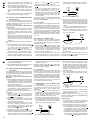
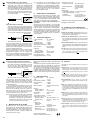
1.1.2 Display (Abb. 3)
a Symbol für den Wiedergabemodus
b Symbol für den Pausenmodus
c Anzeige „CONTINUE“: signalisiert die Betriebsart „Gesamttitelwiedergabe“, siehe Position 9
Taste CONT./SINGLE
d Anzeige „AUTO CUE SINGLE“: signalisiert die
Betriebsart „Einzeltitelwiedergabe“
e Anzeige „BEAT“: signalisiert, dass rechts oben
im Display [Anzeigefeld (h)] die Taktschläge pro
Minute angezeigt werden, siehe Position 21
Taste BPM/TAP
f Anzeige „PITCH“: signalisiert, dass rechts oben
im Display [Anzeigefeld (h)] die prozentuale Abweichung von der Standardgeschwindigkeit [eingestellt mit dem Regler (14)] angezeigt wird
g Bargraph: gibt durch seine Länge die Restzeit
eines Titels bzw. der CD an [„REMAIN“ (m) eingeblendet] oder die bereits gespielte Zeit eines
Titels („REMAIN“ ausgeblendet)
h Anzeige der mit dem Regler PITCH CONTROL
(14) eingestellten prozentualen Abweichung von
der Standardgeschwindigkeit bzw. Anzeige der
Taktschläge pro Minute nach dem Umschalten
mit der Taste BPM/TAP (21)
i Titelnummer bzw. kurz nach dem Einlegen einer
CD die Anzahl der Titel auf der CD
j Zeitanzeige in Minuten (M), Sekunden (S) und
Frames (F); siehe Position 10 Taste TIME/ STOP
k Anzeige „OUTRO“: signalisiert die Funktion
OUTRO, siehe Position 9 Taste CONT./SINGLE
displayed instead of “PITCH” (f) and the display field PITCH (h) indicates the number of
beats per minute of the title instead of the percentage deviation from the standard speed
To switch back to display of the speed deviation, keep the button pressed for approx.
3 seconds until “BEAT” is extinguished and
“PITCH” is displayed again.
GB
1.1.2 Display (fig. 3)
a symbol for the replay mode
b symbol for the pause mode
c display “CONTINUE”: indicates the operating
mode “total title replay”, see item 9 button CONT./
SINGLE
d display “AUTO CUE SINGLE”: indicates the
operating mode “single title replay”
e display “BEAT”: indicates that on the top right of
the display [display field (h)] the beats per minute
are displayed, see item 21 button BPM/TAP
f display “PITCH”: indicates that on the top right of
the display [display field (h)] the percentage
deviation from the standard speed [set with the
control (14)] is displayed
g bar graph: its length indicates the remaining time
of a title or CD [“REMAIN” (m) displayed] or the
time already played of a title (“REMAIN” extinguished)
h display of the percentage deviation from the
standard speed adjusted with the PITCH CONTROL (14) or display of the beats per minute
after actuation with the button BPM/TAP (21)
i title number or, shortly after inserting a CD, the
number of titles on the CD
j time display in minutes (M), seconds (S), and
frames (F); see item 10 button TIME/STOP
k display “OUTRO”: indicates the function OUTRO,
see item 9 button CONT./SINGLE
l display “LOOP”: is displayed if a continuous loop
is replayed (chapter 5.10)
5